We may receive a commission on purchases made from links.
It’s funny how cultural movements always end up circling back around and becoming popular again. Pompadour hairstyles, vinyl records, and now van life. Van culture was huge back in the ’70s. That’s where the inspiration for Scooby-Doo and the Mystery Machine came from, after all. This time around, though, we’re looking at budget-friendly camper vans equipped with electric gadgets to modernize the experience for comfort and convenience. This is our list of 16 devices that provide a boatload of USB functionality while staying under budget.
In the tight confines of a van, everything needs to have a purpose. Devices on this list are therefore as compact and travel-friendly as possible, provide an actual meaningful use, and maintain high ratings (at least 4 stars) with a large number of reviews. In many cases, items we found regularly sell for below $50 even if that’s not their listed price. Before you head out on the road, stock up on a few of these.
Advertisement
FosPower NOAA Emergency Weather Radio
Depending on how serious you are about van life, be it just a couple of days, weeks, or longer, you need to be prepared for emergencies. Grab this FosPower NOAA Emergency Weather Radio just in case. In addition to the emergency radio, it packs a 7,400 mWh (2,000 mAh) power bank with three options for charging it: a flip-out solar panel, hand crank, or backup AAA batteries. The flashlight is a powerful 135-lumen beam with an aperture to widen it. If that’s too much, there’s a flip-out set of reading LEDs for low-light situations. The entire unit is water-resistant.
Advertisement
The radio can also serve as an SOS alarm and produce a flashing light in extreme emergency situations, and it’s water-resistant to boot. For a big van meant to travel far and wide, you can’t put a price on emergency preparedness — but in this case, the FosPower Radio retails for a respectable $39.99 and often goes on sale for much less. Also check out our full list of the best emergency radios to have around for a rainy day.
Advertisement
Lisen Retractable Car Charger
Any van that has 12V cigarette lighter sockets is not complete without at least a couple of accessories that make use of them. A charger is a good start. This Lisen Retractable Car Charger sets itself apart from the others by having two clean, retractable cables built in, so you don’t have to turn the entire van upside down looking for a spare — plus an extra USB-C and USB-A port for good measure. It claims to charge at up to 64W, and its USB-C port supports up to 30W Power Delivery. It looks nice, and it comes in multiple colors, too.
Admittedly, there is a surfeit of car chargers on Amazon from throwaway-name brands like this. If we’re going for van life, though, this one wins because of the retractable cables and the durable metal body. Everything in the van must reduce clutter and last long. Make sure you grab this one when it’s $16.98, which is the lowest historical sale price.
Advertisement
Bissell AeroSlim Lithium Ion Cordless Handheld Vacuum
If you’re going to be in that van almost 24/7 — driving, sleeping, relaxing — it’s going to get dirty fast. A good vacuum, like the Bissell AeroSlim Lithium Ion Cordless Handheld Vacuum, is non-negotiable. It may be compact, with just a 0.1-liter dust reservoir, but it packs a punch with crevice tools and a roughly 12-minute runtime — plenty to clean more or less the whole vehicle.
Instead of having a filter you have to dispose of and rebuy, you can just wash out the included filter. Also a plus is that it charges via USB; you can plug this into your retractable car charger rather than having to use a proprietary wall plug. The Bissell gets a bit close to our $50 limit at $44.49, but it’s a known brand, and it has solid positive reviews from over 17,000 customers. If you want something for more serious cleaning, check out our list of the best handheld vacuums judged by customer satisfaction.
Advertisement
Xool Car Fans for Backseat
A common fuel myth you should stop believing is that opening your windows to get a breeze is better than running the air conditioning. Still, AC does eat up a fair amount of fuel. A happy halfway point might be these Xool Car Fans, especially in a van that might only have AC for front-seat passengers. The two fan heads are designed to clip onto the back of a headrest, although there are other models with a single clip that could go almost anywhere.
They have multiple speed settings and a 360-degree rotation angle to get the perfect airflow. Plugging them into the console or another USB port near the back should be easy with the 70-inch extension cord. They’d be a lot easier to cable-manage as a permanent feature.
Advertisement
Be aware that this is a frequently returned item. Durability appears to be a mixed bag, and the fans can be too noisy even for the already juddering interior of a van. Despite that, it maintains a 4.2-star average across more than 5,000 reviews.
Advertisement
USB-C to USB-A Converters
USB-C is about as versatile as it gets, serving as a card reader, HDMI, Ethernet, and even audio connections with the help of USB-C adapters. But we’d argue the transition to USB-C isn’t yet complete. You’ve probably still got at least a handful of devices using USB-A, particularly chargers and other plug-ins. For that, come prepared with USB-C to USB-A converters. These ones from Basesailor cost $8.49 for a three-pack. They’re so cheap that it really doesn’t hurt to grab some for those unexpected situations when you’re in the middle of nowhere and need a converter plug for whatever reason.
You want to be very careful when buying adapters to make sure they can do what you need them to do. This particular model supports data transfer in addition to charging, but not a video signal. Many adapters only support charging. It’s going to really suck if you use the wrong adapter type for, say, plugging into your computer and find out you can’t use a USB-C flash drive.
Advertisement
Jemluse Wireless CarPlay Adapter
If you have an iPhone, then CarPlay is a must. It’s effectively an extension of your iPhone to your van’s head unit, and it supports a bunch of CarPlay-compatible apps you can’t live without. But if your head unit isn’t equipped for it, you’re out of luck — unless you buy this Jemluse Wireless CarPlay Adapter. This device acts as a bridge between your iPhone and a car that doesn’t natively support wireless CarPlay. Reviews praise it for having easy-to-follow setup instructions.
Speaking anecdotally, upgrading to CarPlay is a game changer. It’ll be far better than the janky OS on your car’s head unit and makes it easier to safely access the best parts of your iPhone without actually reaching for it. The small size of the receiver helps reduce clutter from this “upgrade.” Please be aware that there’s a newer version of this dongle, but at the time of writing, it has only a small number of reviews.
Advertisement
Febrytold USB Car Interior Atmosphere Lamps
If your van is going to be your home, then sometimes you need the right lighting for the right mood. You could install your own lighting during a van remodel, but if you want something quick and easy to set the mood, try these Febrytold USB Car Interior Atmosphere Lamps. Choose from the available colors, plug them in, and you’re good to go. Their low 18mA consumption means they’re unlikely to be a drain on your car’s battery if you forget to remove them for a night. At $5.48 for a four-pack, that’s not at all a bad price.
Your van might also be the site of a spontaneous party, if 1970s van culture is your aim. In that case, you might try these USB mini disco ball party lights. They don’t just look like a disco ball; they react intelligently to the music. Don’t let the size fool you. Take a look at the user review pictures, and you’ll see that they can easily transform a van interior into a mini disco club.
Advertisement
USB LED Light Lamp
Vans are cramped spaces where it’s hard for one person to do something that doesn’t affect everyone else. Reading at night when someone else is trying to sleep can be challenging without a backlit Kindle, especially if there’s only one bed. If you’re up late burning the midnight oil — reading, working, whatever — maybe grab one of these USB LED Light Lamps. The flexible arm helps aim the light at your book — not a sleeping person’s face — and makes it useful for more than books; think other USB devices that might need light, like a laptop keyboard.
Advertisement
If you don’t have a USB port handy to power the lamp, don’t worry. This one has the added benefit of working with a power bank. Since it’s such a low power draw, you can probably use it comfortably for hours with whatever you’ve got. Check out our list of unique book lights for more options.
Advertisement
Bestek Power Inverter
Van life is about, well, living in a van, so the lack of standard plug outlets quickly becomes pronounced. For that, you should consider getting a power inverter. There are a surprising number of options under our $50 price threshold that provide multiple plugs, plus some USBs for charging. The Bestek 300W Power Inverter is a solid choice, though it retails for $59.99. At the time of writing, it’s on sale for $41.99 and often stays below the $50 line. Bestek also has a cheaper model that starts at $34.99, likewise with two plugs and USB-A for charging.
The two Bestek models are a bit on the large side, so if you want something more compact that still has just as many plugs and USB ports, try the Foval 200W Car Power Inverter. It has a built-in cooling fan to help prevent overheating. The compact size and flat body make it an excellent choice for mounting somewhere more permanently; some reviews show people attaching it to Velcro pads stuck to a wall.
Advertisement
Lihan 7-in-1 Cigarette Lighter Splitter
So far, we’ve detailed several devices that leverage the 12V cigarette lighter to power things. But even in a van, you’ve probably got few of those to spare. 12V DC car chargers generally offer more power than built-in USB ports, so one socket may be enough for multiple 12V-powered devices. Consider the Lihan 7-in-1 Cigarette Lighter Splitter for this purpose. Take one 12V socket and turn it into three, plus a couple of USB-A charging ports and a USB-C Power Delivery port. Obviously, it probably can’t power three demanding 12V devices at once, but it does support a total output of 80W.
We like the slim profile and long 3.3-foot cable on this one, making it another good choice for mounting somewhere semi-permanently. Plus, it’s a nice addition that you can individually switch the 12V sockets on and off, rather than having to unplug them when they’re not in use. The main on-and-off switch also makes it easy to turn everything off without unplugging it.
Advertisement
Superlit 3-in-1 Retractable Backseat Car Charger
If you’ve got people traveling in the back of the van, they’ll want to charge their devices, too. A good option might be this Superlit 3-in-1 Retractable Backseat Car Charger. Similar to other 12V chargers with retractable cables, this one also has built-in retractable cables for USB-C, Apple Lightning, and, if needed, micro-USB. Superlit markets it toward rideshare drivers, but we’d argue it makes excellent use of a van’s limited space if you don’t have another backseat charging option.
Unfortunately, this is also a frequently returned item. Reviews point to potential durability issues, though for something this cheap with moving parts, that’s somewhat to be expected. On the bright side, it does appear to be fairly easy to open up and fix if, for example, one of the cables gets jammed. We hope an updated version comes out soon with an additional USB-C cable in place of the dated micro-USB option.
Advertisement
Wolfbox MF50 Compressed Air Duster
The image in your head of van life is probably one of open windows and doors in a campsite somewhere far from civilization. A perfect way to collect a lot of dust. The Wolfbox MF50 Compressed Air Duster does away with buying cheap, one-use compressed air cans thanks to a nozzle and a high-rpm mini blower fan. You’ll get up to four hours of dusting on the low setting.
Advertisement
Though it’s marketed primarily toward people trying to keep their home desktop computers clean, we think it aligns perfectly with the van-life mindset of keeping things clean and compact. It’s less wasteful, too, since you could probably use this thing for years before the battery would wear out enough to merit replacement. As a nice little cherry on top, this is one of those rare items that Amazon gives the “Customers usually keep this item” label, meaning it sees below-average returns compared to competing items.
Advertisement
Car Air Purifier Ionizer
Van life may be a return to ’70s hippy culture, but nobody wants their van to smell like it. Those classic evergreen tree-shaped scent pads might do the trick, but a Car Air Purifier Ionizer could help with more persistent, hard-to-remove smells; this model claims to get rid of smoke smells, for example. As a nice bonus, it has two USB-A ports, so you can make full use of that 12V cigarette lighter.
Before you buy this, be aware that air ionizers tend to be marketed as capable of things they aren’t. The EPA makes it clear that ionizers can only target very small particulate matter, such as that from smoke, and that claims about getting rid of odors and allergens are generally unsupported. Instead, they introduce ozone, a smell (which some people find pleasant) that can mask existing odors. Ozone is a lung irritant, so if you use this, be sure to air out the van as much as possible.
Advertisement
Ugreen Aux to Bluetooth 6.0 Adapter 3.5mm Bluetooth Receiver for Car
Much of the allure of van life is turning an old RV or van into a camper. However, rather than replacing the head unit with a modern one, the cheapest and easiest solution is sometimes to use a plug-and-play Bluetooth receiver. The Ugreen Aux to Bluetooth 6.0 Adapter 3.5mm Bluetooth Receiver uses the latest Bluetooth 6.0 codec and includes a microphone for calls. For $13.99, you’d be hard-pressed to bring an older system into the modern age for less.
As a potential downside, you need a nearby USB-A power source to plug it into. This can result in the cable stretching across the cabin from the aux port to a USB-A outlet. It also means the receiver — where the microphone is located — may sit farther away from your voice. However, some reviewers say that the microphone is very sensitive and works well even at a distance.
Advertisement
Nulaxy Car Bluetooth FM Transmitter
Another option for getting media and calls to play through your van’s speaker system — if you don’t have an aux cable — is to transmit it locally through an FM station. That’s what this Nulaxy Car Bluetooth FM Transmitter does. Connect your phone to the transmitter, then tune your van’s radio to the station shown on the display. Voilà. There’s also an SD card slot to pop in your favorite playlist and one USB-A port for charging.
Anecdotally, the FM transmission experience is going to be a mixed bag, but not necessarily because of this product in particular. It can be challenging to get a clean, stable signal from the transmitter, and it will likely be affected by local stations already occupying the airwaves. Be prepared to do a lot of adjustment to get it working. In my experience, even on long road trips, you’ll likely find yourself changing frequencies dozens of times. Nonetheless, it’s a great way to add Bluetooth capabilities to an older, radio-only system.
Advertisement
Soaiy 3-in-1 Cigarette Lighter Car Mount
Older van conversions especially are unlikely to have a head unit with a screen, so make sure you’ve got a good phone mount. Again, we want to make the most of a van’s limited space and use solutions that punch well above their weight. This Soaiy 3-in-1 Cigarette Lighter Car Mount meets that criterion. It’s one part phone mount and two parts USB-A charger. Plus, there’s a nice little voltage readout, so you can tell whether your phone is taking so long to charge.
Advertisement
We’d argue these sorts of gooseneck adjustable mounts are the best kind, especially considering that this particular mount locks securely into your 12V cigarette lighter. The extra stability allows your phone to be held vertically or horizontally. It’ll probably stay a lot more solid than a suction-mounted or vent-mounted phone holder, and it doesn’t take up space on the dash. However, this will depend on where your 12V outlet is located.
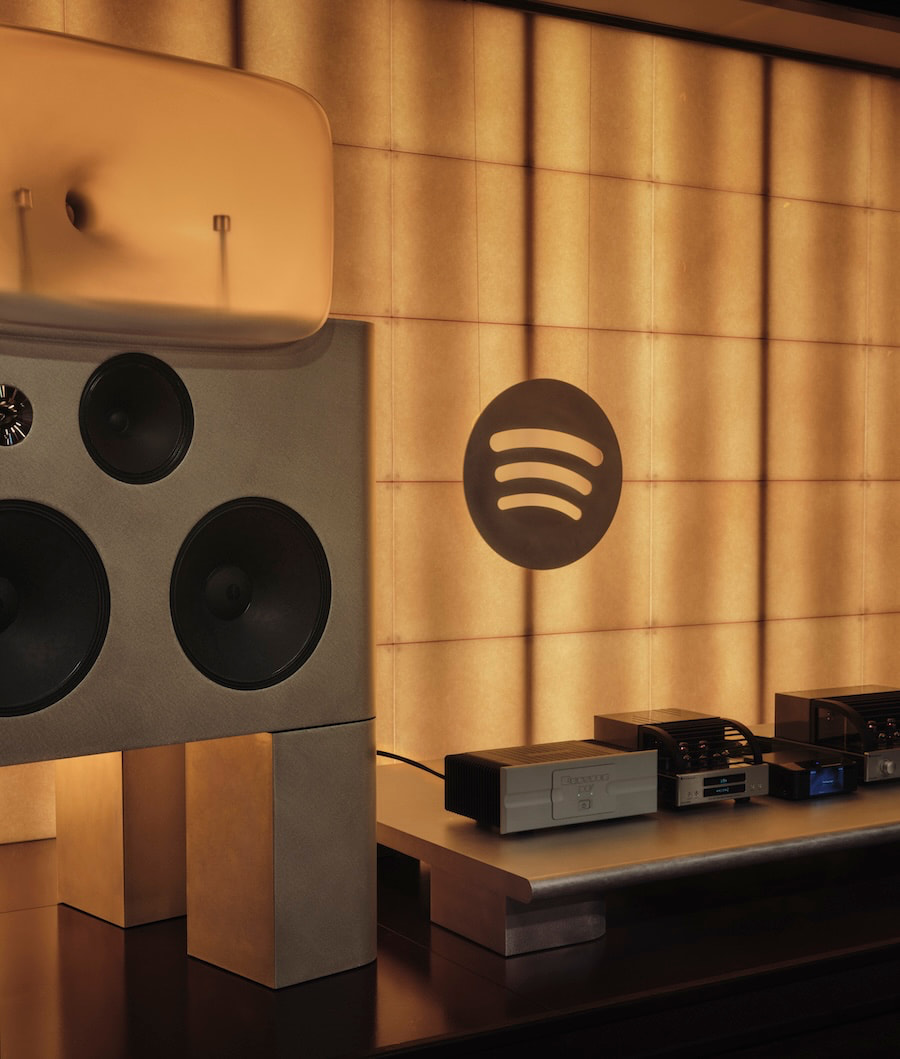
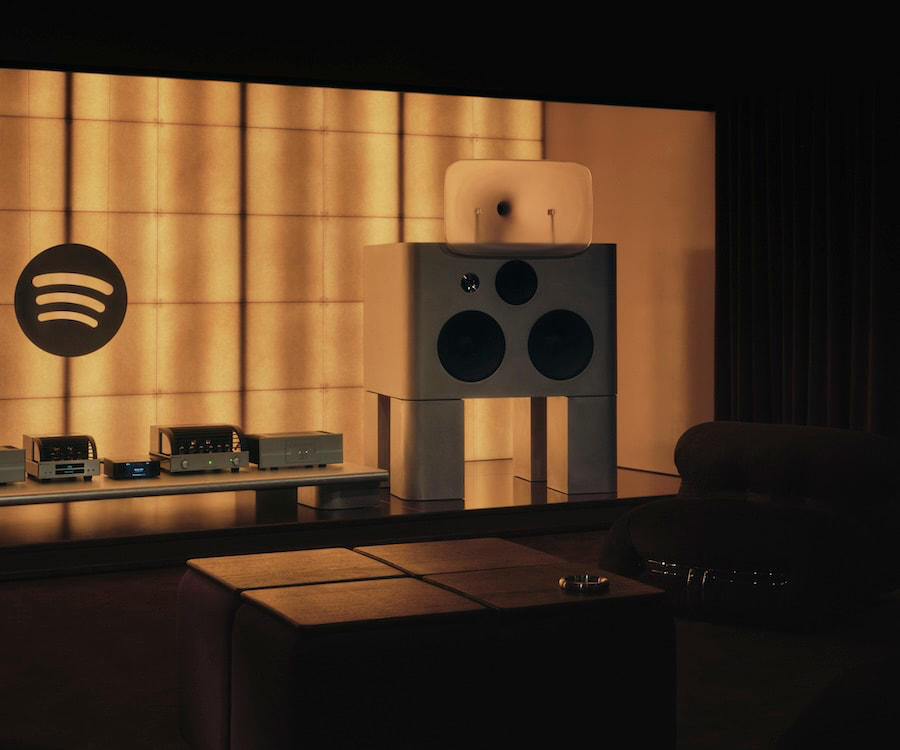
Spotify has spent the better part of two decades convincing the world that convenience beats fidelity. Now it wants you to sit down, shut up, take your shoes off, and listen. Really listen. Inside its London headquarters, the company has opened a 30-seat Listening Lounge designed to showcase its long-delayed lossless tier, which finally arrived in 2025 after competitors like TIDAL, Qobuz, and Apple Music had already moved on to higher ground. Timing has never been Spotify’s strong suit when it comes to sound quality, but at least it showed up.
The Listening Lounge is invite-only, which feels about right. Spotify Premium users and “top fans” get the nod, assuming they want to trade playlists and background noise for something resembling focus. The room is built around album-centric sessions and curated listening events, which Spotify now calls “intentional listening.” Audiophiles have been calling it Tuesday night since 1978, but sure, let’s rebrand it and roll it out to the press who will eat it up like horseradish on gefilte fish at the Passover seder. On second thought — stick with the biltong and some mustard.
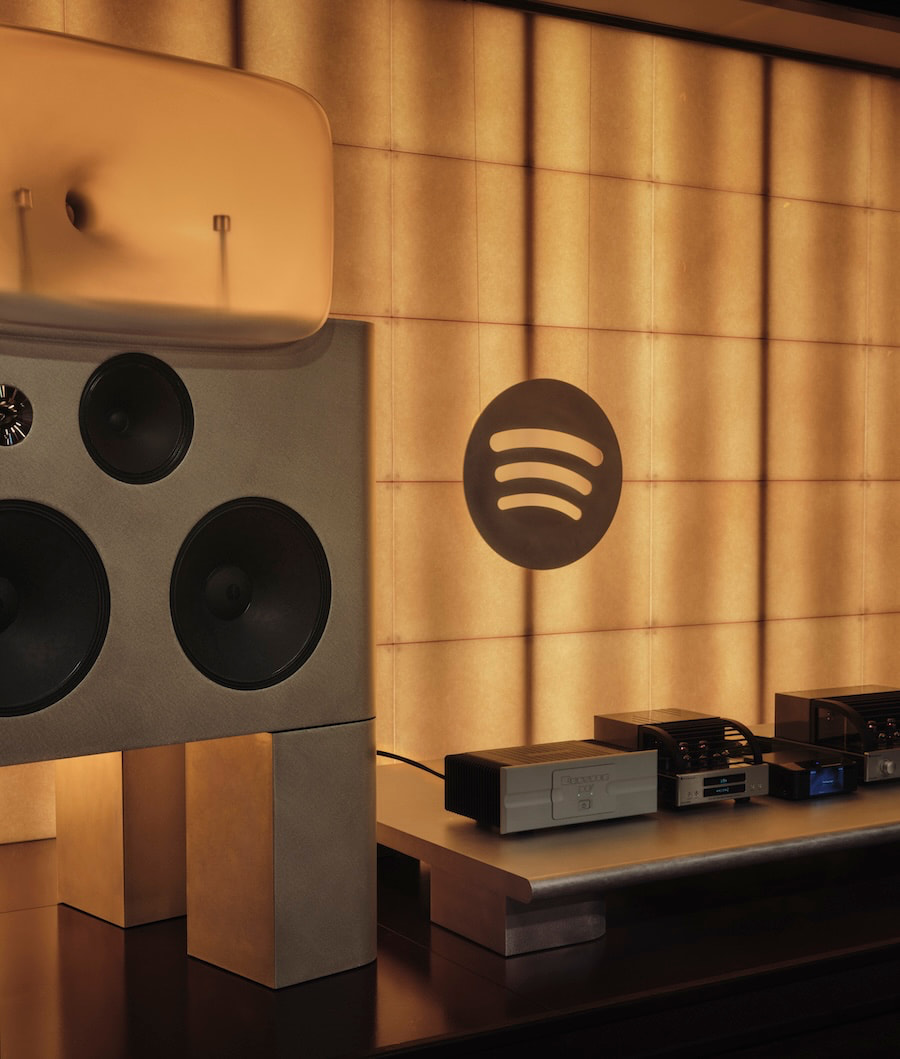
To Spotify’s credit, it didn’t cheap out on the system. This isn’t a soundbar and some mood lighting. The setup leans hard into old-school hi-fi: custom horn-loaded speakers from Friendly Pressure, Bryston 3B Cubed power amplifiers, a PrimaLuna DAC paired with an Evo 400 tube preamp, and a Bluesound Node Icon handling streaming duties.
The speakers are big, unapologetic, and built around Alnico drivers and compression horns that don’t care about your furniture layout or your neighbors. This is two-channel stereo with no Atmos tricks, no DSP safety net, and no interest in pretending otherwise. Left, right, and whatever your ears can handle.
Advertisement
The room itself plays along. Designed with a Japanese vinyl bar aesthetic, the system sits elevated like some kind of altar, because apparently we’re doing ritual now. Acoustic treatment is handled seriously, reflections are controlled, distractions minimized. And yes, you take your shoes off. Nothing says “we’re serious about lossless audio” quite like white socks from Marks & Spencer on a polished floor while a tube preamp warms the room.
The timing of all this is hard to ignore. Spotify’s lossless rollout wasn’t early. It wasn’t even competitive. It was late. While others were pushing 24-bit streams and building credibility with listeners who actually care about sound, Spotify leaned into scale, algorithms, and playlists designed for people who don’t want to think too hard about what they’re hearing. Now that fidelity has become “important,” Spotify is doing what large companies do best. Build an experience, control the narrative, invite the right people, and hope nobody remembers how they had to be dragged kicking and screaming into the room.
The system, however, does its job. Reports point to serious dynamics, scale that fills the room, and a level of clarity that makes lossless audio feel like more than a marketing checkbox. Horn speakers bring speed and impact, along with a presentation that can get a little sharp if the recording demands it. That’s the trade-off. This setup doesn’t smooth things over or make bad recordings sound polite. It tells the truth, whether you like it or not. There’s a lesson there for the high-end audio community.
This whole exercise isn’t really about a room in London. It’s about positioning. Spotify wants to be seen as a company that understands high-end audio, not just one that delivers background music between podcasts and ads. It wants a seat at the same table as services that built their reputations on fidelity, not convenience. That’s a tough pivot when your entire business model was built on making music easier, faster, smaller, and rather crappy sounding.
Advertisement
The Bottom Line
The Listening Lounge is impressive. The system is real. The intent is finally pointed in the right direction. But there’s an unavoidable edge of irony here. Audiophiles have been building rooms like this for decades without the need for an invite list or a press release. Spotify didn’t invent serious listening. It just discovered that it matters.
And that’s where this either becomes something meaningful or just another well-lit detour. Spotify isn’t a niche player trying to earn credibility. It’s the largest music streaming platform on the planet, with hundreds of millions of users; more than all of its direct competitors combined. If lossless audio actually matters to the company, this can’t stop at a single curated room in London with a guest list and a carefully controlled narrative. That’s not a movement. That’s a demo.
Because the real test isn’t what happens inside that room. It’s what happens outside of it. Does Spotify push lossless as a core feature across the platform, front and center, where its massive user base can actually engage with it? Does it educate listeners on why better sound quality matters? Does it integrate that experience into everyday listening in a way that doesn’t require an invitation and a plane ticket?
Advertisement. Scroll to continue reading.
Advertisement
Right now, it feels like Spotify is trying to prove something—to the press, to the industry, maybe even to itself. But if this is going to land, it needs to scale beyond a showcase and become part of the product story in a real, unavoidable way. Otherwise, this Listening Lounge risks being remembered for what it looks like today: a very expensive reminder that Spotify showed up late and is still figuring out how serious it wants to be.
I’m going to trust that most of our audience will have some idea of what McCarthyism was in the 1950s. To summarize very briefly, it was an anti-communist campaign that spread into becoming equally anti-leftist throughout the country, with a specific focus on driving the supposed communist influences out of major media in America, such as radio and Hollywood. This led to a public hyper-vigilant in looking for supposed communists everywhere, as well as plenty of cases of false accusations of communist activity purposefully foisted upon people for personal reasons. This rabid, frothy-mouthed era of suspicion became a major stain on America in the 1950s.
I’m watching a version of this begin to take form around artificial intelligence. I know, I know: there are very real dangers and negative outcomes that could come to be from AI. That was true of communism and our Cold War enemy in the Soviet Union as well. My point is not that AI is great all the time and any pushback against it is invalid. Instead, my point is that we’re starting to see what I’ll call McPromptism, where some percentage of the public looks for AI everywhere it can and, if use is suspected, immediately decries it as terrible and demands that people not engage with the supposed user.
And just like McCarthyism, McPromptism gets its accusations wrong sometimes. You can see a version of that in the story of Aspyr’s remastering of old Tomb Raider games and the horrible outfits that were produced for the protagonist, Lara Croft.
Earlier this week we reported on fan reaction to the latest update to the Tomb Raider I-III Remastered collection, in which the game received a new Challenge Mode, while Lara received a suite of new outfits to wear as rewards. And oh wow, they were bad. Comically bad. So bad, in fact, that one of the remaster’s original artists posted on X to distance himself and his colleagues from the dross. Alongside all of this was the suspicion that genAI might have been involved in the fits’ creation, given just how dreadful they looked. Publisher Aspyr has now finally responded to the claims to insist no AI was used at all, instead stating they were created by “our team of artists.” Which raises more questions.
If you want to see a somewhat humorous look at the outfit textures that are the subject of public complaint, here you go.
Advertisement
On the one hand, for someone like me who is not into the anti-AI dogma out there, it is objectively funny for some people to point at bad video game textures and claim they’re so bad because they’re obviously created using generative AI… only to have the company that made them say, “Nuh uh! It was our human employees who made them!” It’s almost Monty-Python-esque, in a way.
But this default among some in the gaming public to be “This thing in gaming is bad, so it must have been made using AI!” is just one more kind of silly that is out there right now. Aspyr doesn’t exactly have a perfect reputation when it comes to remastering games, after all, and it built that reputation long before genAI came along.
It seems clear that this was a case of images being released to promote the remastered game that Aspyr didn’t live up to in the actual game itself. No AI, just human beings not hitting the mark. It happens all the time. Hell, there is even a chance that AI could have done a better job. Not a certainty by any stretch, but a possibility.
Advertisement
But the real take away from this otherwise minor episode for me was the McPromptism misfire. If you’re going to rage against the literal machine in the video gaming industry, which I think is the wrong stance to take anyway, at least let it be righteous rage.
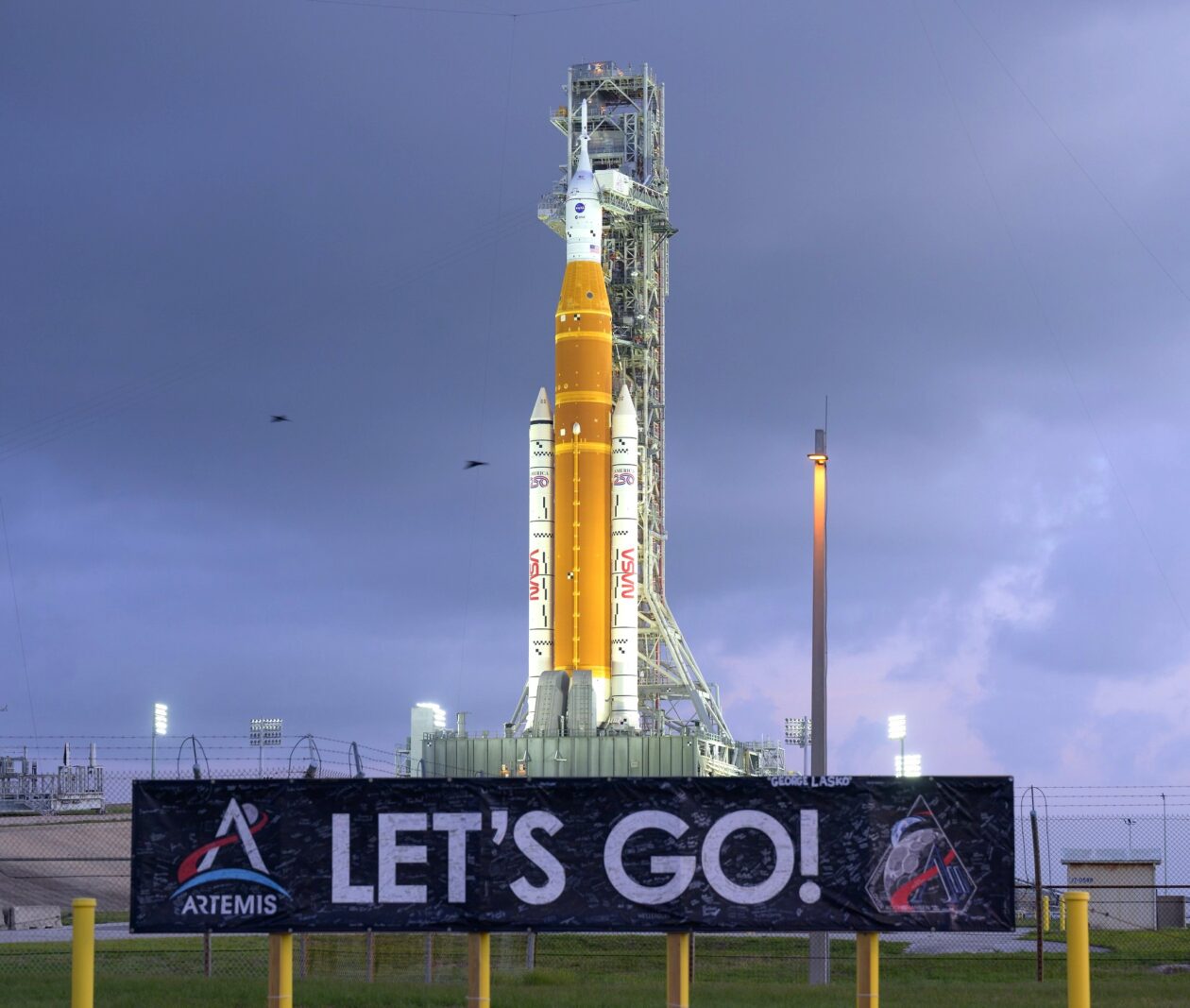
NASA’s Space Launch System rocket stands on its launch pad in preparation for the Artemis 2 moon launch. (NASA Photo / Bill Ingalls)
After years of postponements and close to $100 billion in spending, NASA is finally counting down to its first attempt to send astronauts around the moon since Apollo 17 in 1972.
The 10-day Artemis 2 mission is set to begin today with the liftoff of NASA’s Space Launch System rocket from NASA’s historic Launch Complex 39B at Kennedy Space Center in Florida. The two-hour launch window opens at 6:24 p.m. ET (3:24 p.m. PT), and NASA is streaming live mission coverage of the countdown on twodifferent YouTube channels.
NASA has fueled up the 322-foot-tall SLS rocket with liquid hydrogen and oxygen, and there’s an 80% chance of acceptable weather for launch. Rain showers are the main concern.
Artemis 2 is the first crewed test flight in a series leading up to a moon landing that’s currently scheduled for 2028. It follows Artemis 1, which sent a crewless Orion space capsule around the moon in 2022. This time, four astronauts will be riding inside Orion: NASA mission commander Reid Wiseman, NASA astronauts Christina Koch and Victor Glover, and Canadian astronaut Jeremy Hansen. Koch will be the first woman to go beyond Earth orbit, and Hansen will be the first non-American to do so.
Although the astronauts won’t be landing on the lunar surface, they’ll follow a figure-8 trajectory that will send them 4,700 miles beyond the far side of the moon and make them the farthest-flung travelers in human history.
Advertisement
Last week, NASA Administrator Jared Isaacman laid out a plan for establishing a permanent base on the moon and preparing for even farther trips into the solar system. On the eve of the launch, Isaacman played up the significance of Artemis 2 in that plan. “The next era of exploration begins,” he said in a post to X.
Senior test director Jeff Spaulding, a veteran of the space shuttle program, said he was looking forward to the mission. “I’m excited about going to the moon,” he told reporters. “I’m excited about establishing a presence there. It’s something that I have had a desire for, for a great many years — and then to get humans out to Mars as well.”
“They’re going to be able to see the whole moon as a lunar disk on the lunar far side,” Marie Henderson, lunar science deputy lead for the Artemis 2 mission, said in a NASA video. “So, that’s a brand-new, unique perspective that humans haven’t been able to look at before.”
Advertisement
At the end of the trip, the crew and their Orion capsule are due to splash down in the Pacific Ocean off the California coast. They’ll be brought to a recovery ship for medical checkouts and their return to shore, following a routine that became familiar during the Apollo era.
Artemis 2 is about the history of America’s space program as well as its future. The round-the-moon mission profile matches that of Apollo 8, which served as a unifying event for a nation riven by the social tumult of the time. That mission’s commander, Frank Borman, reported receiving a telegram reading, “Congratulations to the crew of Apollo 8. You saved 1968.” Notably, less than a third of Americans living today were around when Apollo 8 flew.
The main motivation for the Apollo program was America’s superpower competition with the Soviet Union, and today, the geopolitical stakes are similarly high. NASA and the White House are seeking to jump-start progress on Artemis in part because China is targeting a crewed moon landing by 2030.
Sen. Maria Cantwell, D-Wash., said this week during a visit to Seattle-area suppliers for the Artemis program that it’s important for America to get to the moon first. “We’re trying to get the best real estate on the moon,” she said. “So, to do that, you’ve got to get up there to claim it.”
Advertisement
The course of the Artemis program, which is named after the goddess of the moon and the twin sister of Apollo in Greek mythology, hasn’t always run smooth. When the program was given its name in 2019, the Artemis 2 mission was planned for 2022 or 2023, with the moon landing scheduled for 2024. The cost of the program has been estimated at $93 billion through 2025, with each Artemis launch costing $4.1 billion.
Artemis 2’s launch team ran into several challenges during this year’s preparations for launch. Liftoff was initially scheduled for February, but a liquid hydrogen leak forced NASA to reset the launch for March. The launch date was reset again when a helium pressurization problem required a rocket rollback for repairs. The SLS was brought back out to the pad on March 20, and preparations went smoothly since then.
Several companies with a presence in the Seattle area are banking on Artemis’ success. For example, a facility in Redmond operated by L3Harris (previously known as Aerojet Rocketdyne) builds thrusters for the Orion spacecraft and is already working ahead on the Artemis 8 mission.
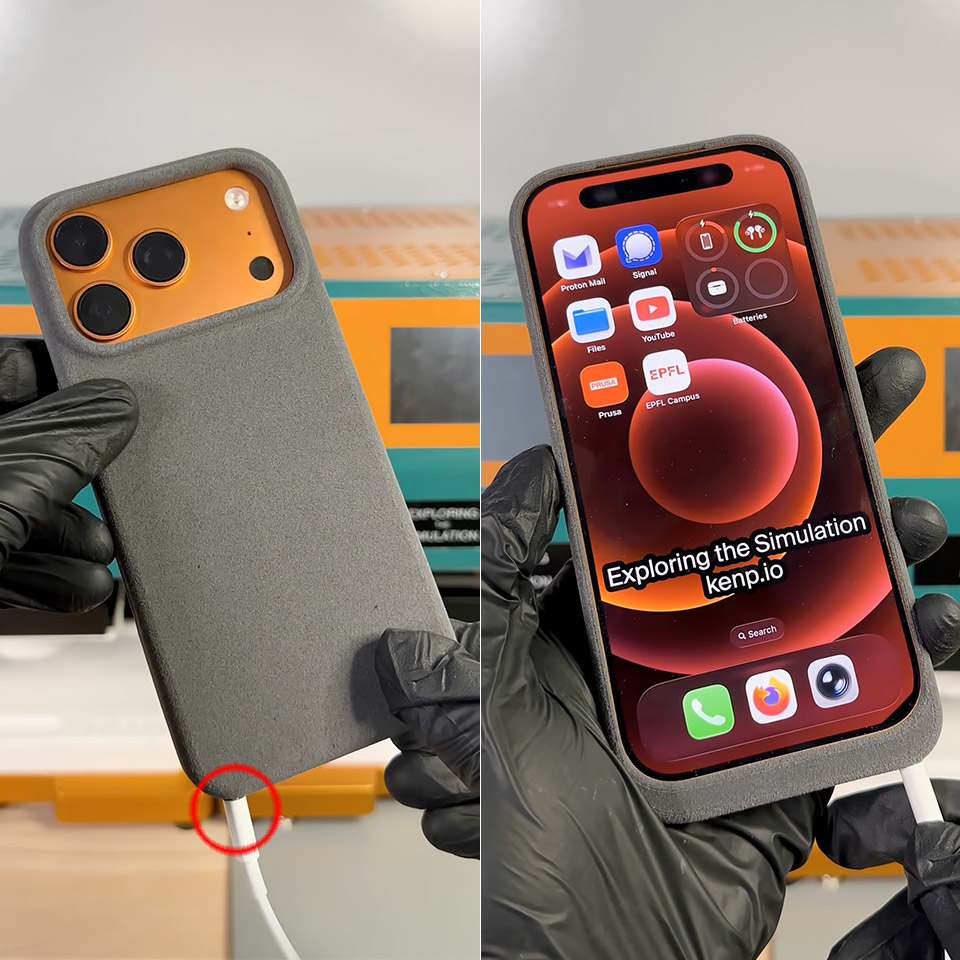
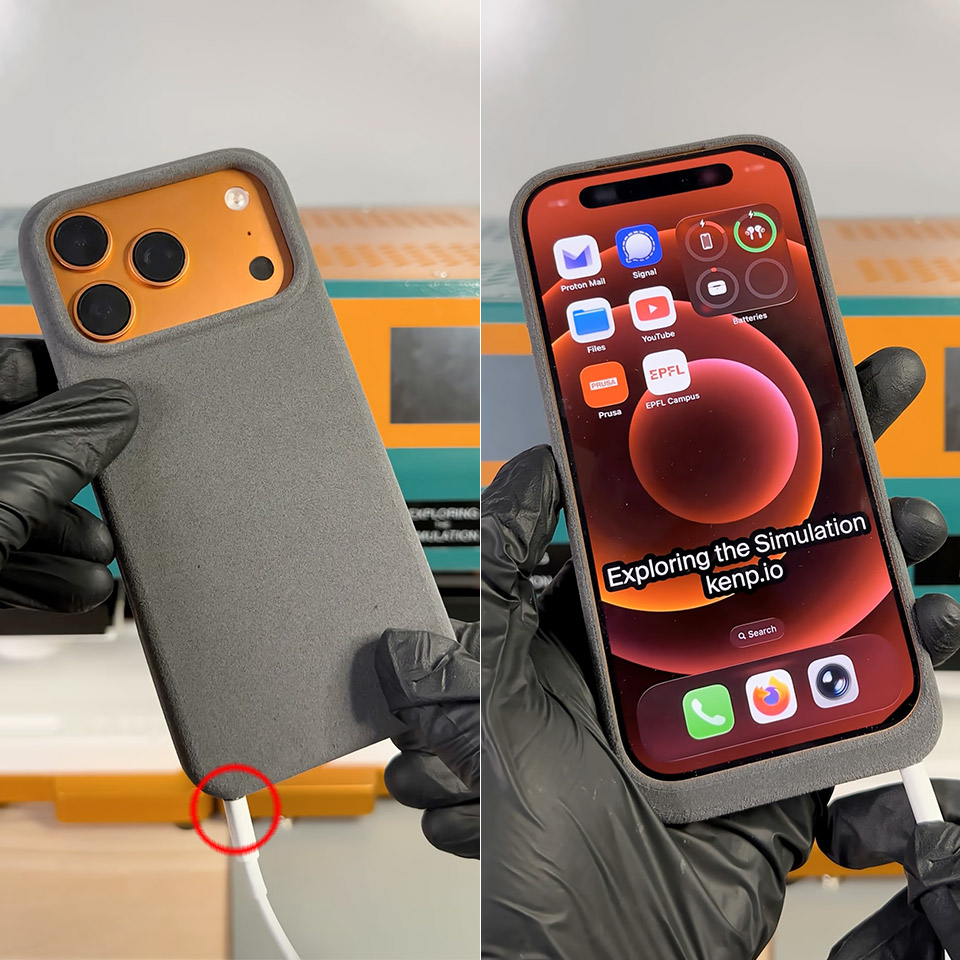
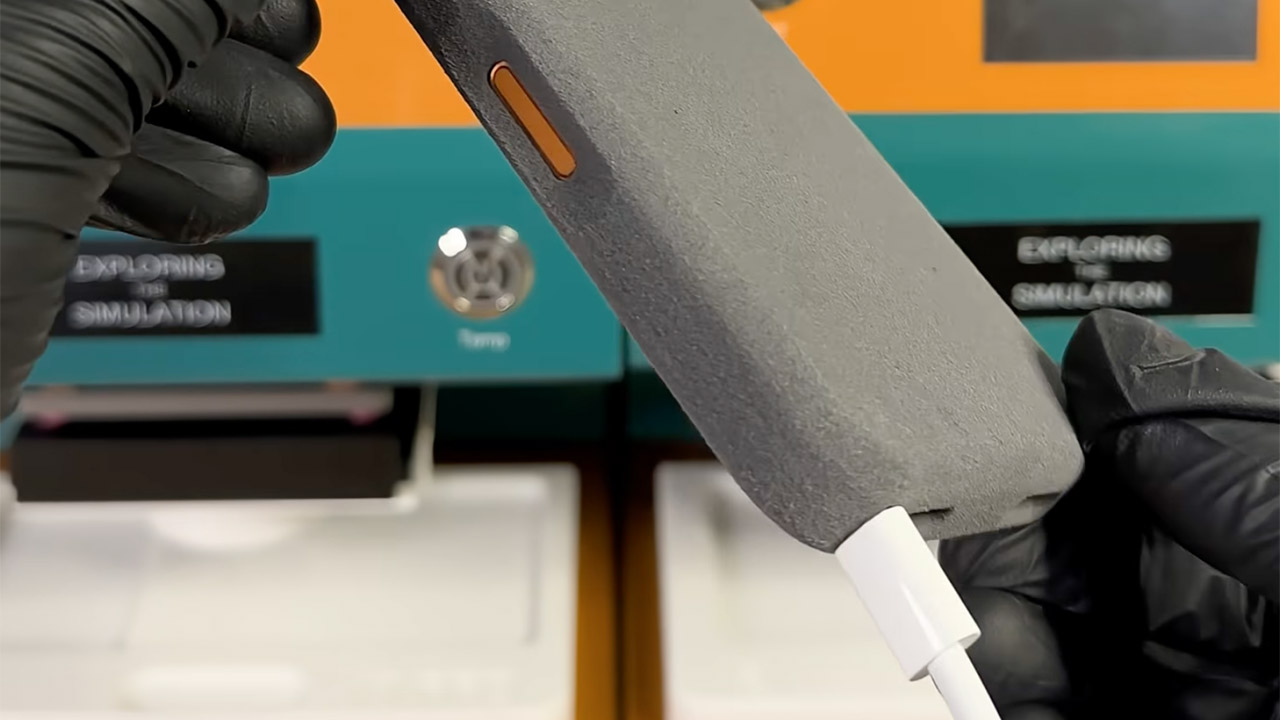
Ken Pillonel, a Swiss engineer, struck again. He’s well-known for refurbishing outdated iPhones with creative add-on cases, which he even sells. This time, however, he turned the tables. On April 1st, he completed a totally new prototype in just a few days, a slim protective cover that hands the iPhone 17 Pro a working Lightning port right where Apple moved on from it.
If you’ve recently updated from an iPhone 14 or earlier, you understand the pain. All of those old cords, docks, and chargers you used to love are now rendered worthless unless you carry a separate adapter with you everywhere. Pillonel effectively solved the challenge by working in reverse. Instead of forcing the phone to use a newer plug, he designed a cover that allows Lightning cables to plug right in while the iPhone 17 Pro remains safely tucked inside its USB-C shell.
3 in 1 Wireless Charger Station: This 3-in-1 wireless charger is designed to work seamlessly with a variety of devices, including iPhone 17 16e…
Fast Charging Power: Ensure your devices are efficiently charged with up to 7.5W for phones, 5W for earbuds, and 3W for watches. The charger is…
Portable and Foldable Design: Featuring a foldable, lightweight design, this charging station is ideal for home, office, travel or trip. Manufacturer…
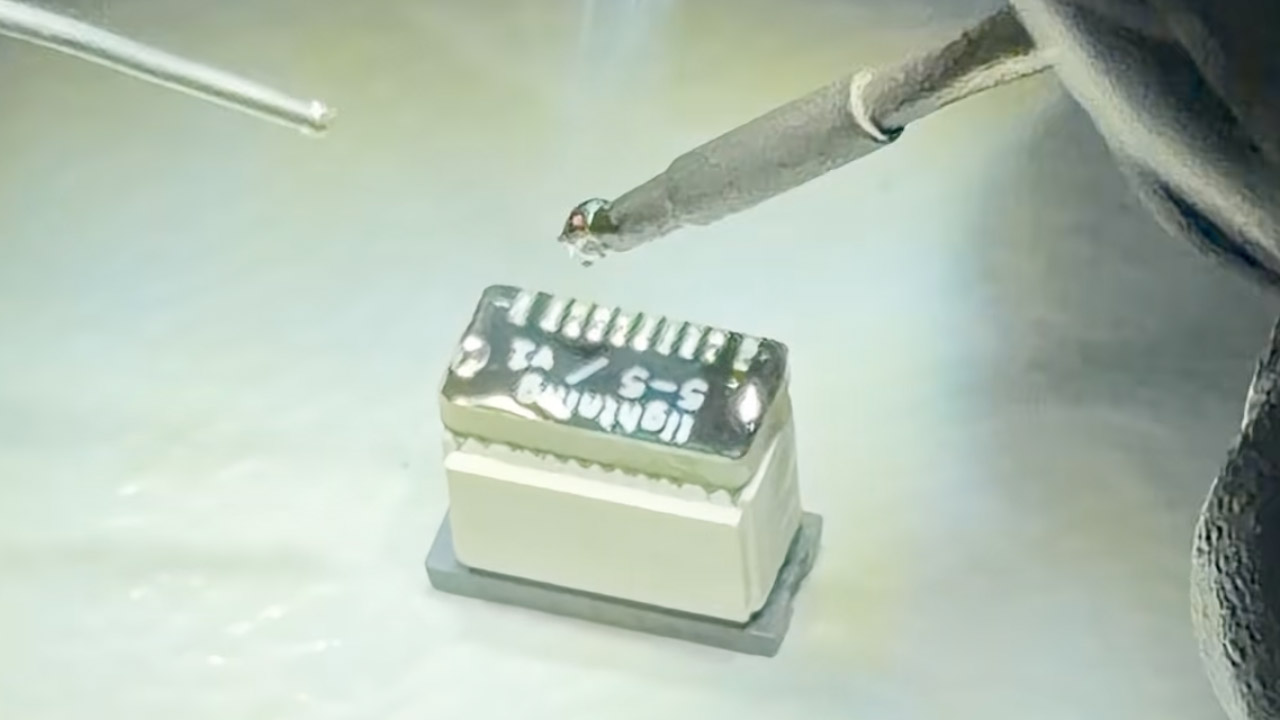
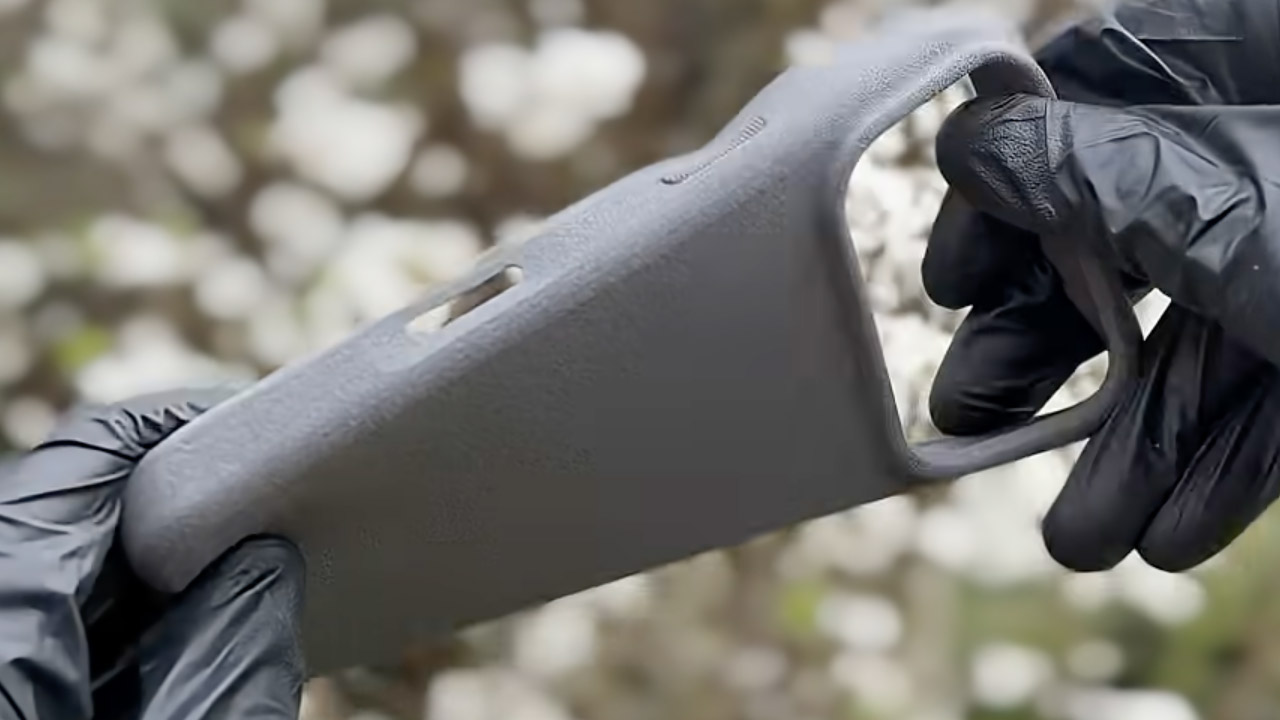
It all starts with some careful effort on the electronics side. He designed tiny custom circuit boards to shrink a standard USB-C to Lightning adapter down to almost nothing. These boards are located inside the bottom border of the casing and add only a few mils of thickness. Next came the casing, which was produced in flexible TPU using a high-end 3D printer that is good at reducing waste. He also made a little jig to help get the MagSafe magnets in the appropriate place, and when he snapped everything together, it fit like a charm, no tools required.
When it’s all put together, the case feels exactly like any other you’d get in a store, soft to the touch and durable enough for daily use. When you insert the iPhone 17 Pro inside, the internal cables align neatly with the phone’s USB-C port. Plugging a Lightning cable into the new hole outside just works; power flows exactly like it would on an older model. Yes, charging works well, as he demonstrated in his whole build video; now he just needs to test data transfer and other accessories.
Pillonel never meant to sell this one. He refers to the finished piece as one of the oddest things he has ever put together, a tongue-in-cheek reference to Lightning’s official departure from the roster years ago. Nonetheless, the project illustrates a wider point. With some work and the correct parts, compatibility gaps between old and new technology can be bridged in inventive ways that keep favorite accessories alive. [Source]
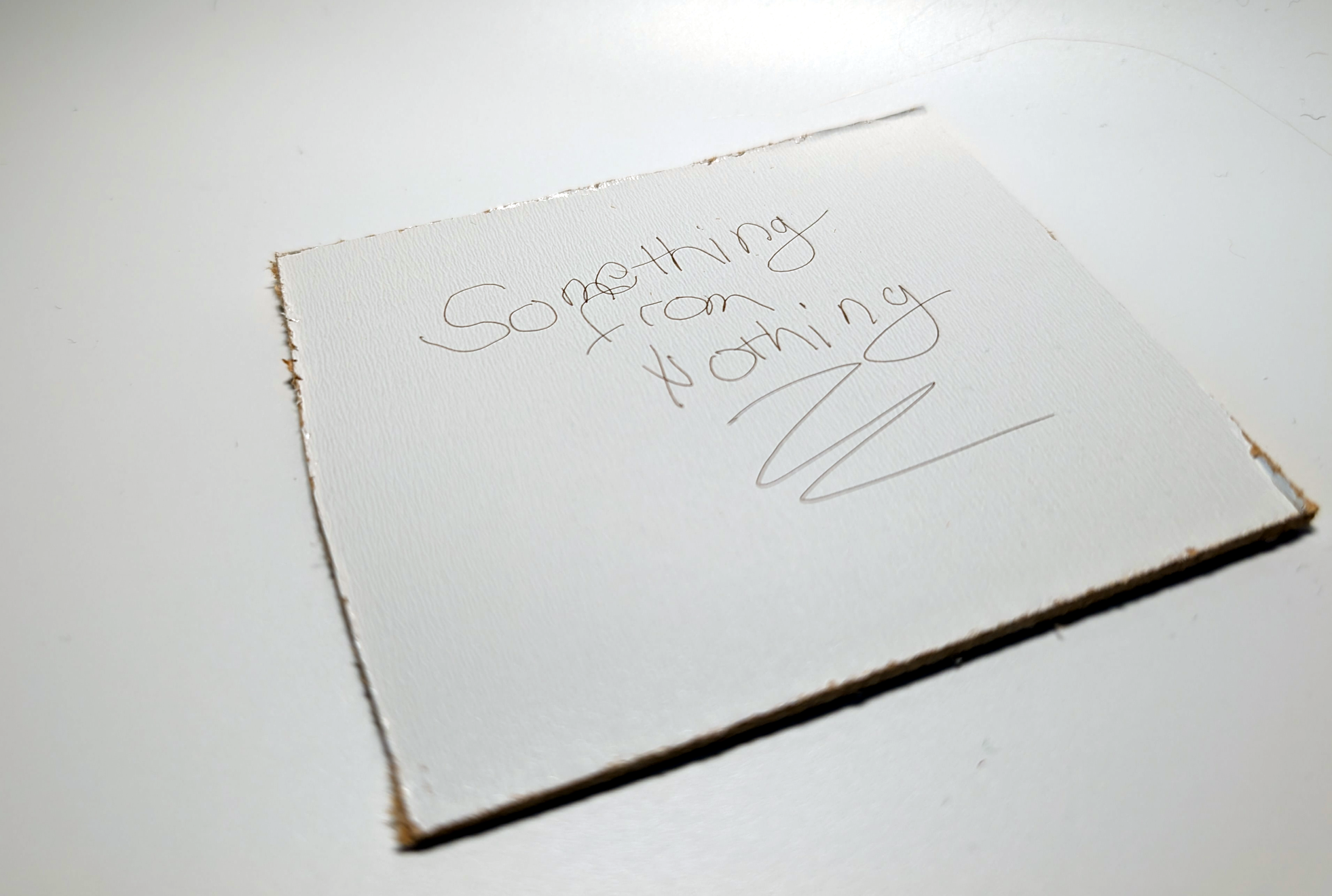
Some projects need no complicated use case to justify their development, and so it was with [Janne]’s BeamInk, which mashes a Wacom pen tablet with an xTool F1 laser engraver with the help of a little digital glue. For what purpose? So one can use a digital pen to draw with a laser in real time, of course!
Pen events from the drawing tablet get translated into a stream of G-code that controls laser state and power.
Here’s how it works: a Python script grabs events from a USB drawing tablet via evdev (the Linux kernel’s event device, which allows user programs to read raw device events), scales the tablet size to the laser’s working area, and turns pen events into a stream of laser power and movement G-code. The result? Draw on tablet, receive laser engraving.
It’s a playful project, but it also exists as a highly modular concept that can be adapted to different uses. If you’re looking at this and sensing a visit from the Good Ideas Fairy, check out the GitHub repository for more technical details plus tips for adapting it to other hardware.
In the early 1970s, the idea of an ordinary person owning a computer sounded absurd. Computers back then were more like aircraft carriers or nuclear power plants than household appliances – vast machines housed in data centres operated by teams of specialists, serving governments, universities and large corporations.
Founded on April 1 1976 by ‘college dropouts’ Steve Jobs and Steve Wozniak, the Silicon Valley start-up did not invent computing. What it did was arguably more important: it helped turn computing into a personal technology.
Before Apple, computers were largely sold in kit form. Jobs saw that people wanted them pre-assembled and ready to run. The earliest Apple I units, featuring handmade koa wooden cases, now sell for hundreds of thousands of dollars.
As an early Apple adopter and app developer, here’s my selection of the company’s (and Jobs’s) most significant technological achievements over the last 50 years.
Apple II – beige yet distinctive
Early personal computers were more curiosities than practical tools. The Apple II, launched in June 1977, introduced something new: style. Even its colour – beige – was distinctive, contrasting with the black metal boxes common at that time.
Advertisement
Bottom of Form
The use of colour graphics was both new and exciting, and the keyboard felt satisfying to use. A simple speaker, with only a single-bit output, was ingeniously coaxed into producing tones and even speech-like sounds. The design revolution stretched as far as the packaging: Jerry Manock, Apple’s first in-house designer, placed the machine in a moulded plastic case which looked sleek and professional.
The mouse – a whole new way of interacting
By 1979, the 24-year-old Jobs – sensing that tech giant IBM was catching up with Apple – went looking for the next big thing. The photocopier company Xerox, wanting pre-IPO shares in Apple, offered a visit to its nearby research labs as an inducement. Jobs realised that researchers such as Alan Kay at Xerox’s Palo Alto research centre were creating the next generation of computing interfaces.
Central to this was a device invented by Kay’s mentor, Douglas Engelbart, at Stanford University in the mid-1960s and nicknamed ‘the mouse’. Engelbart’s vision of computers as machines to augment the human mind inspired Kay and colleagues to create graphical displays in which users interacted with scrollbars, buttons, menus and windows.
Advertisement
Macintosh – dawn of the modern product launch
Jobs thought anyone should be able to use a computer. In January 1984, the first Apple Mac pushed this idea to new extremes. The traditional need for obscure computer commands (and manuals) vanished. Early adopters such as myself felt we just knew how to do everything.
But the Mac’s launch was not just another technological leap for Apple. It also inspired the now-familiar cultural moment of the modern product launch. Following a teasing Super Bowl advert directed by Ridley Scott, Jobs used a 1,500-seat theatre on January 24 to create a stage performance centred on a single charismatic presenter. Jobs let a small, square and still-beige computer (then known as Macintosh) out of its bag – and it began speaking for itself, to rapturous applause.
Pixar – Jobs’s side hustle
In its first decade, Apple grew at an exceptional rate – but it also came close to financial collapse on several occasions. This led to one of the most dramatic moments in Apple’s history when, in May 1985, the company forced Jobs out.
Advertisement
A year later and now in charge of the start-up NeXT Inc, Jobs bought a division of George Lucas’s film company which was soon rebranded as Pixar. Its RenderMan software generated images by distributing processing across multiple machines simultaneously.
Pixar, jokingly referred to as Jobs’s “side hustle”, would become one of the world’s most influential (and valuable) animation production companies, having released the first fully computer-animated feature film in Toy Story (1995).
iMac – a meeting of minds
After a failed attempt to develop a new operating system with IBM, Apple eventually bought Jobs’s company NeXT. In September 1997, he returned to Apple as interim CEO with the company “two months from bankruptcy”. The move, though welcomed by many Apple users, terrified some of its employees. Jobs quickly began firing staff and shutting down failed products.
Advertisement
During this restructuring, he visited Apple’s design studio and immediately hit it off with young British designer Jony Ive. Their meeting of minds led to the 1998 candy-coloured translucent iMac. Essentially smaller, cheaper NeXT machines, iMac (the ‘i’ stood for internet) also kicked off another Apple habit: abandoning ageing technology. The floppy disk drive was ditched in favour of a CD drive – a move heavily criticised at the time, but later widely copied.
iPod – 1,000 songs in your pocket
For Apple, computing was always about more than, well, computing. In 2001, the company began focusing on processing sound and video, not just text and pictures. By November that year, it had released the iPod – a personal music player capable of storing “1,000 songs in your pocket”, compared with a maximum of 20-30 on each cassette tape in a Sony Walkman.
The iPod used an elegant ‘click wheel’ to operate the screen. Music was synced through a new application called iTunes. By 2005, people were using iTunes to manage audio downloaded automatically from the internet using a process called RSS. This in turn put the pod in podcasting.
Advertisement
iPhone – a computer in everyone’s hands
By 2007, many mobile phone companies had approached Apple about merging the iPod with their phones. Instead, on January 9, Jobs unveiled Apple’s most ambitious product yet: a combined phone, music player and Mac computer – all at the size of a handset with no physical keyboard and huge screen.
Most media ‘experts’, from TechCrunch to the Guardian, predicted the iPhone would bomb. Steve Ballmer, then CEO of Microsoft, mocked the US$500 price tag, saying nobody would buy it. In fact, 1.4m iPhones were sold by the end of the year – and over 3bn more since then. This truly put a computer into everyone’s hands – and opened the door to social media as we know it today.
Advertisement
App Store’s software revolution
By mid-2008, the iPhone enabled third-party developers the chance to create a dizzying range of new applications. At the same time, the App Store – launched on July 10 2008 – addressed one of the most complex problems: how to distribute and commercialise these ‘apps’. Historically, they were often copied and distributed freely. The App Store changed this, using strong encryption to ensure the copy sold could only be used by that specific user, thus eliminating software piracy.
By establishing the first (eponymous) App Store, Apple changed the way people discover and purchase software. This led to an explosion of apps and a simple but powerful idea: whatever you wanted to do, someone, somewhere, had already built it. Apple captured this shift in a slogan that became part of everyday language: “There’s an app for that”.
Time and again, this extraordinary company has anticipated the value of opening up computing to everyone. Happy birthday, Apple.
Nick Dalton is an associate professor in the School of Computer Science at Northumbria University in Newcastle. His background is as a computer scientist crossing between architecture and computation. His principal area of expertise is in the design, development and evaluation of human computer interfaces with a specialism in the design of ubiquitous computing technology.
Don’t miss out on the knowledge you need to succeed. Sign up for the Daily Brief, Silicon Republic’s digest of need-to-know sci-tech news.
There’s a great debate these days about what the current crop of AI chatbots should and shouldn’t do for you. We aren’t wise enough to know the answer, but we were interested in hearing what is, apparently, Microsoft’s take on it. Looking at their terms of service for Copilot, we read in the original bold:
Copilot is for entertainment purposes only. It can make mistakes, and it may not work as intended. Don’t rely on Copilot for important advice. Use Copilot at your own risk.
While that’s good advice, we are pretty sure we’ve seen people use LLMs, including Copilot, for decidedly non-entertaining tasks. But, at least for now, if you are using Copilot for non-entertainment purposes, you are violating the terms of service.
Legal
While we know how it is when lawyers get involved in anything, we can’t help but think this is simply a hedge so that when Copilot gives you the wrong directions or a recipe for cake that uses bleach, they can say, “We told you not to use this for anything.”
It reminds us of the Prohibition-era product called a grape block. It featured a stern warning on the label that said: “Warning. Do not place product in one quart of water in a cool, dark place for more than two weeks, or else an illegal alcoholic beverage will result.” That doesn’t fool anyone.
Advertisement
We get it. They are just covering their… bases. When you do something stupid based on output from Copilot, they can say, “Oh, yeah, that was just for entertainment.” But they know what you are doing, and they even encourage it. Heck, they’re doing it themselves. Would it stand up in court? We don’t know.
Others
Now it is true that probably everyone will give you a similar warning. OpenAI, for example, has this to say:
Output may not always be accurate. You should not rely on Output from our Services as a sole source of truth or factual information, or as a substitute for professional advice.
You must evaluate Output for accuracy and appropriateness for your use case, including using human review as appropriate, before using or sharing Output from the Services.
You must not use any Output relating to a person for any purpose that could have a legal or material impact on that person, such as making credit, educational, employment, housing, insurance, legal, medical, or other important decisions about them.
Our Services may provide incomplete, incorrect, or offensive Output that does not represent OpenAI’s views. If Output references any third party products or services, it doesn’t mean the third party endorses or is affiliated with OpenAI.
Notice that it doesn’t pretend you are only using it for a chuckle. Anthropic has even more wording, but still stops short of pretending to be a party game. Copilot, on the other hand, is for fun.
Your Turn
How about you? Do you use any of the LLMs for anything other than “entertainment?” If you do, how do you validate the responses you get?
When things do go wrong, who should be liable? There have been court cases where LLM companies have been sued for everything, ranging from users committing suicide to defaming people. Are the companies behind these tools responsible? Should they be?
Anthropic is using copyright takedown notices to try to contain an accidental leak of the underlying instructions for its Claude Code AI agent. According to the Wall Street Journal, “Anthropic representatives had used a copyright takedown request to force the removal of more than 8,000 copies and adaptations of the raw Claude Code instructions … that developers had shared on programming platform GitHub.” From the report: Programmers combing through the source code so far have marveled on social media at some of Anthropic’s tricks for getting its Claude AI models to operate as Claude Code. One feature asks the models to go back periodically through tasks and consolidate their memories — a process it calls dreaming. Another appears to instruct Claude Code in some cases to go “undercover” and not reveal that it is an AI when publishing code to platforms like GitHub. Others found tags in the code that appeared pointed at future product releases. The code even included a Tamagotchi-style pet called “Buddy” that users could interact with.
After Anthropic requested that GitHub remove copies of its proprietary code, another programmer used other AI tools to rewrite the Claude Code functionality in other programming languages. Writing on GitHub, the programmer said the effort was aimed at keeping the information available without risking a takedown. That new version has itself become popular on the programming platform.
Right wing broadcasters are having a very good time under Brendan Carr, who has looked to destroy all remaining media consolidation limits to let them merge. Such companies, like Sinclair, Nexstar, and Tegna, don’t do journalism so much as they do soggy, right wing propaganda and infotainment, usually with endless fear mongering about drugs, homelessness, and crime rates.
They’re just one part of the right wing’s effort to remake the entirety of media into a massive safe space for dim autocrats.
Carr’s latest effort: he rubber stamped Nexstar Media Group’s $6.2 billion purchase of Tegna behind closed doors. Carr let the merged companies ignore our remaining media consolidation limits, which prevent one company from being the primary broadcast news voice for more than 39 percent of households (the new combined company reaches 54.5 percent).
Nexstar (a very Republican friendly company that also owns The Hill), not that long ago fired a journalist whose reporting angered Trump. Combined with Tegna, the two companies will own 221 Big Four broadcast stations, or more than half of the U.S. stations affiliated with FOX, NBC, ABC, or CBS.
Advertisement
Carr’s been on a campaign to ensure these right-wing loyal companies have more power in their dealings with their national counterparts (remember how they helped Carr censor Jimmy Kimmel?). The efforts come as local Americans increasingly live in “local news deserts” where quality local journalism simply no longer exists.
Anna Gomez, the lone Democrat left at the FCC (Republicans refuse to fill the other seat), didn’t have nice things to say about Carr’s decision to ignore the public interest protections without a transparent, public vote (indicating Carr very clearly knew this would be very unpopular):
As always, Carr’s order approving the merger leverages all manner of pseudo-legalistic sounding bullshit to justify ignoring Congress and the law. And he parrots a bunch of completely empty promises by Nexstar that they’ll ramp up the production of more “local news”:
“We note that Nexstar has made significant commitments in the agency’s record as well, further ensuring that this transaction promotes the public interest. To further serve its local communities, Nexstar commits to expanding its investment in local news and programming, including increasing the amount of local news it provides in acquired markets.”
Except again, by “news” we mean right wing propaganda. And Brendan Carr never meaningfully holds corporate power accountable for anything, unless it involves a comedian making fun of the president or companies not being suitably racist enough for the president’s liking.
Eight states have already filed a lawsuit challenging the legality of the decision. The lawsuits understandably focus heavily on the competition impacts, and the likely higher cable TV prices that will result for most of you:
Advertisement
“By consolidating with a major competitor, Nexstar would likely acquire the power to charge MVPDs higher retransmission consent fees for Big 4 station content. In turn, those MVPDs would likely pass on the increased retransmission consent fees, in large measure, to their subscribers in the form of substantially higher cable and satellite bills.”
California regulators attempted to slow the process down by proposing a standard timing agreement with Nexstar, where the company would suspend its acquisition of Tegna until the state completed its investigation.
But something of particular note: on pages 16-17 of the states’ amended complaint, it becomes clear that Nexstar completely ignored the State AGs for 8 days, then ignored their lawsuit for another 18 hours, and then told the state AGs “The relief sought in your Complaint is no longer available.”
In other words, what passes for some of the only real antitrust enforcement we have (a scattered coalition of states) have to fight both consolidated corporate power and the authoritarian, corrupt government simultaneously to make any inroads in the public interest.
“This is completely unprecedented,” Free Press (the consumer group, not the Bari Weiss troll farm) Research Director S. Derek Turner told me via email. “Nexstar and the Trump DOJ and FCC seem to have acted in concert to deprive the citizens of of these 8 states their rights to have our AG enforce the antitrust laws on our behalf.”
If Carr succeeds here, I suspect it won’t be long before you see Sinclair and this new combined company merge. Carr is also fielding requests by the big four national broadcasters to eliminate restrictions preventing them from merging as well (one of many reasons they’ve been so feckless). After that, you’ll likely see more consolidation across telecom, tech, and media.
Advertisement
It is, just in case we’ve forgotten, the complete opposite of the “antitrust reform populism” Trump, and a long line of useful idiots, promised last election season.
While this is certainly an act of some desperation (less than 20% of all U.S. TV viewing is now broadcast), claiming this doesn’t matter because this is “just local broadcasting” and the “future is the internet” (something I see often) is a violent misread of the dire stakes of the situation. This aggressive, Trump-loyal consolidation hasn’t, and isn’t, just being confined to broadcast television (see: Twitter, TikTok).
This is, to be clear, a coordinated and illegal authoritarian/corporatist effort to ignore the public interest and the law to expand right wing propaganda’s power over an already clearly befuddled and broadly misinformed electorate. Right wingers will continue to engage in this quest to dominate the entirety of U.S. media (following in the steps of Victor Orban in Hungary) until they run into something other than the political and policy equivalent of soft pudding.
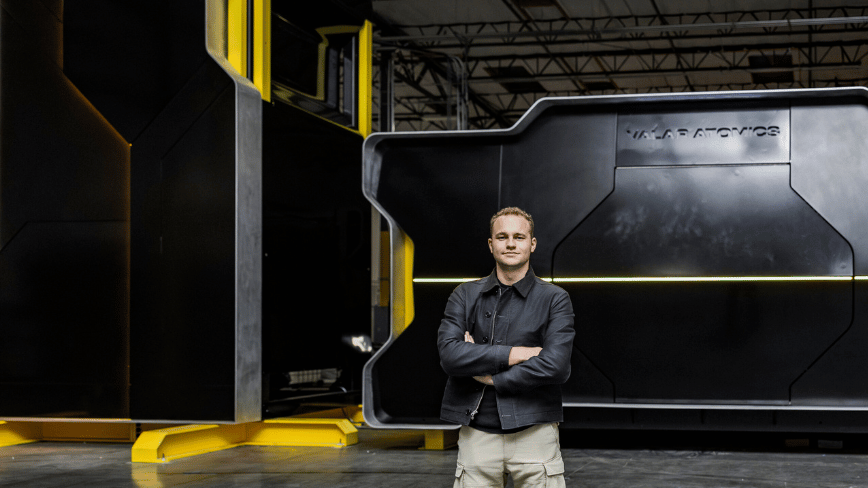
Isaiah Taylor was sixteen when he decided the nuclear industry had a size problem. Not that reactors were too dangerous or too expensive, though they are both, but that they were simply too big. The multi-gigawatt monuments to Cold War-era engineering that still dot the American landscape were designed for a grid that moved power in one direction: from a distant plant to a distant city. They were never meant to sit behind a hyperscaler’s fence line, feeding a cluster of GPU racks whose appetite doubles every eighteen months.
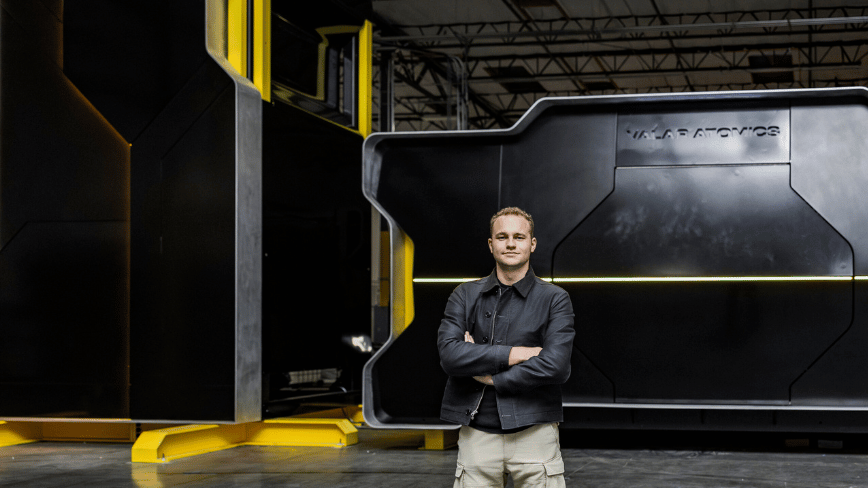
Taylor, now 27, founded Valar Atomics in 2023 to build something different. On Tuesday, the El Segundo, California-based startup announced it has raised $450 million at a $2 billion valuation, according to Bloomberg. The round comprises $340 million in equity and $110 million in debt, and it lands barely five months after a $130 million Series A that valued the company at a fraction of its current price.
The backers read like a roster of the Americandefence-tech establishment that has lately been writing enormous cheques. Palmer Luckey, the Anduril Industries founder whose company was recently reported to be pursuing a $4 billion raise at a $60 billion valuation, is an investor. So is Shyam Sankar, the chief technology officer of Palantir Technologies. The earlier Series A was led by Snowpoint Ventures, the firm co-founded by Doug Philippone, Palantir’s former head of global defence, alongside Day One Ventures and Dream Ventures. Lockheed Martin board member and former AT&T chief executive John Donovan also participated.
Valar’s pitch is built around what it calls “gigasites”, sprawling industrial campuses that would host hundreds or even thousands of small, high-temperature gas-cooled reactors operating in concert. Each unit uses helium as a coolant and TRISO fuel encased in graphite, a combination that allows the reactors to run at significantly higher temperatures than conventional light-water designs. The company says these clusters can deliver dense, steady, carbon-free power tailored to the load profiles of AI data centres, industrial manufacturers, and grid-constrained regions.
It is anaudacious answer to an increasingly urgent question: where will the electricity come from? The International Energy Agency projects that data-centre power consumption will double by 2026. Goldman Sachs estimates that 85 to 90 gigawatts of new nuclear capacity will eventually be needed to help fill the gap. Microsoft, Amazon, and Google have all signed nuclear power agreements in recent months, but the reactors those deals depend on do not yet exist at commercial scale.
Advertisement
Valar claims a meaningful head start. In November 2025, the company announced that its NOVA Core achieved zero-power criticality at Los Alamos National Laboratory’s National Criticality Experiments Research Centre, making it what the Breakthrough Institute described as the first company to reach that milestone under the US Department of Energy’s Nuclear Reactor Pilot Programme. Zero-power criticality — a self-sustaining chain reaction of uranium-235 without reaching full operating temperatures — is a necessary validation step, not a working power plant, but it is further than most of Valar’s competitors have publicly demonstrated.
The company is now preparing its Ward250 reactor, a 100-kilowatt thermal high-temperature gas-cooled unit, for power operations at the Utah San Rafael Energy Research Centre. In February 2026, the reactor was airlifted from California to Utah aboard three C-17 Globemaster military cargo aircraft in a joint operation between the Departments of Defence and Energy — a logistical stunt that doubled as a proof of concept for rapid reactor deployment. Valar is targeting operational status before 4 July 2026, the deadline the DOE set for three reactors in its pilot programme to achieve criticality.
Taylor’s trajectory has beenunconventional even by deep-tech standards. A self-taught coder who launched his first venture as a teenager, he comes from a family with nuclear roots: his great-grandfather, Ward Schaap, was a physicist on the Manhattan Project. The Ward250 reactor carries Schaap’s name. Taylor has assembled a leadership team that includes Mark Mitchell, the former president of Ultra Safe Nuclear Corporation, and Muhammad Shahzad, the former president and chief financial officer of Relativity Space.
The competitive field is crowded and well-funded. TerraPower, backed by Bill Gates, broke ground on a sodium-cooled reactor in Wyoming last year. Kairos Power is building a molten-salt demonstration plant in Tennessee. X-energy has a partnership with Dow Chemical for an industrial HTGR. Oklo, which went public via a SPAC in 2024, is developing a fast-neutron microreactor. None has yet delivered commercial power from an advanced design.
Advertisement
Valar has also taken a combative approach to regulation thatfew young companies would risk. In April 2025, the startup sued the Nuclear Regulatory Commission, arguing that the agency’s licensing framework unlawfully restricts small-scale reactor innovation by requiring the same approval process for low-power test reactors as for full-scale commercial plants. The lawsuit, filed alongside the states of Texas, Utah, Louisiana, Florida, and Arizona, as well as fellow reactor startups Last Energy and Deep Fission, seeks to shift regulatory authority for small reactors to individual states. The case has since been paused amid the Trump administration’s broader executive order to overhaul the NRC.
The $2 billion valuation places Valar among the most richly valued nuclear startups in the United States, a distinction that would have seemed absurd five years ago. Whether the premium reflectsgenuine confidence in the technology or the gravitational pull of AI-adjacent capitalis a question the next eighteen months should begin to answer. If the Ward250 reaches power operations in Utah this summer, Valar will have done something no advanced-reactor startup has managed: moved from incorporation to criticality to grid-connected electricity in roughly three years. If it does not, $2 billion will buy a very expensive physics experiment in the desert.




















































You must be logged in to post a comment Login