“A brilliant specialist with a short attention span.”
Pros
Rights itself and launches from open water every single time
Tracking at 15 mph is steady enough to pass for a chase boat
The Lighthouse wearable handles launch, landing, and following
Onboard screen lets you replay clips on the water with no phone
Dead battery? It lands softly on the surface and floats
Cons
I measured 10 and 13 minutes of flight against an advertised 23
The Lighthouse shows no battery level at all
No obstacle avoidance
The battery is only fully waterproof while it sits in the drone
Quick Take
I spent two weeks on an Oregon river trying to break this thing — off an eFoil, out of a kayak, and by throwing it into the water on purpose. The HoverAir Aqua is the first consumer drone actually built to live on open water, and after two weeks I still stop what I’m doing to watch it launch. Throw it in the river upside down, and it flips upright, shakes the water off its props, pops into a low hover, and waits for you. Strap the Lighthouse beacon to your forearm, and it will follow you across the river at eFoil speed with your hands never touching a controller.
Let me be blunt, because this is the most important thing to know before you buy: there are two battery problems. HoverAir prints 23 minutes on the box. I measured 10 minutes and 13 minutes with the drone actively tracking me. And the wearable never tells you how much charge is left. So this is a drone I love, packed in a dry bag next to a fistful of spare batteries I resent having to carry.
HoverAir Aqua specs: A quick peek at the innards
Weight
Under 249 g, light enough to skip FAA registration for recreational U.S. flight
Waterproofing
IP67; floats and rights itself; battery fully waterproof only while installed
Camera
4K at up to 100 fps through a heated lens that sheds fog and spray
Altitude sensing
Millimeter wave radar that reads wave height for low passes over water
Display and storage
1.6-inch onboard AMOLED; 128GB internal storage, no SD card
Battery
2,013 mAh smart battery; rated 23 min; I measured 10 and 13 min while actively tracking
Charging
About 55 minutes with the battery inside the drone
Controller
Lighthouse waterproof wearable (launch, land, track, auto recall) with no battery readout
Obstacle avoidance
None
Recognition
CES 2026 Innovation Awards honoree; Red Dot Award
Test conditions
Two weeks on an Oregon river; eFoil at about 15 mph plus kayak sessions
HoverAir Aqua design & build: A pool toy with flagship chops
Ian Bell / Digital Trends
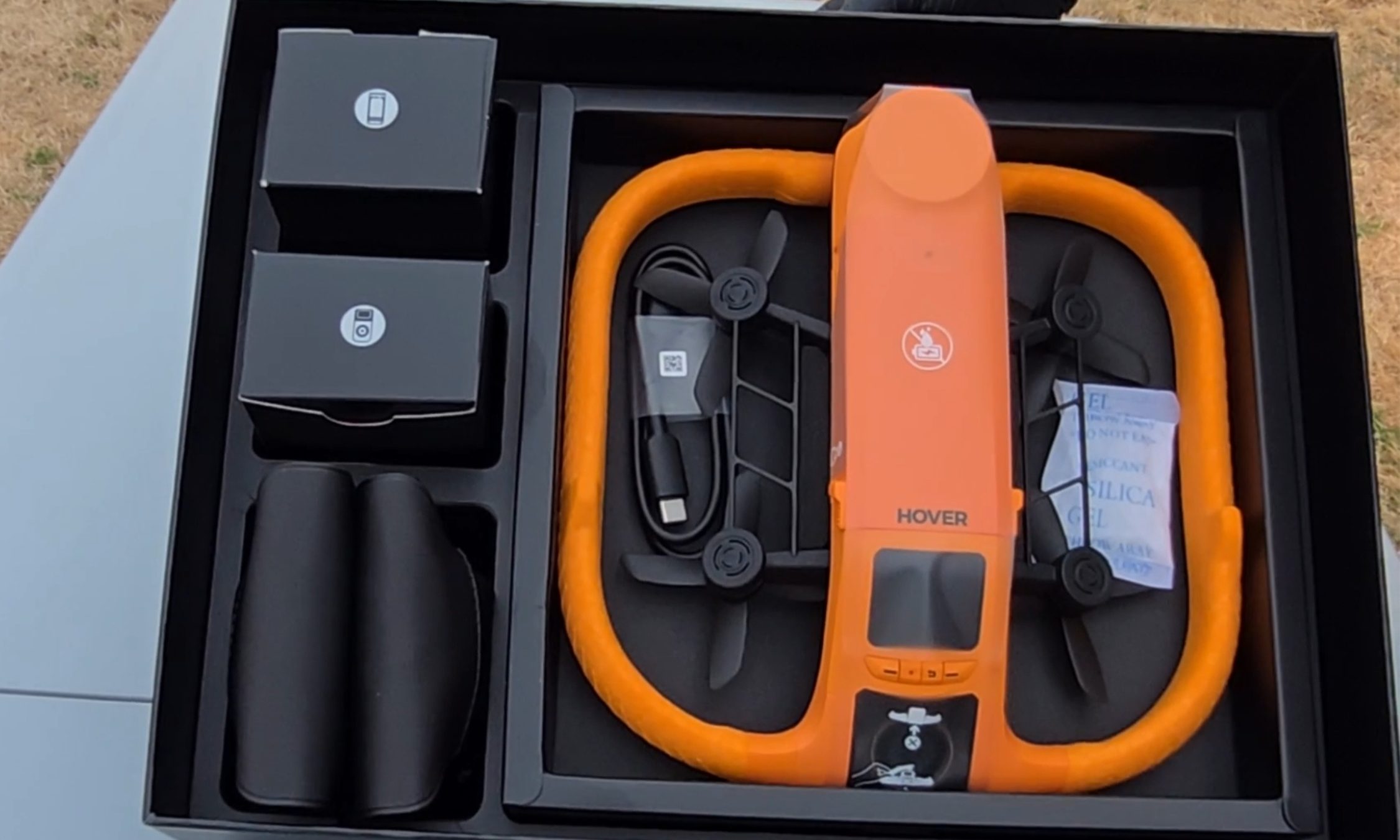
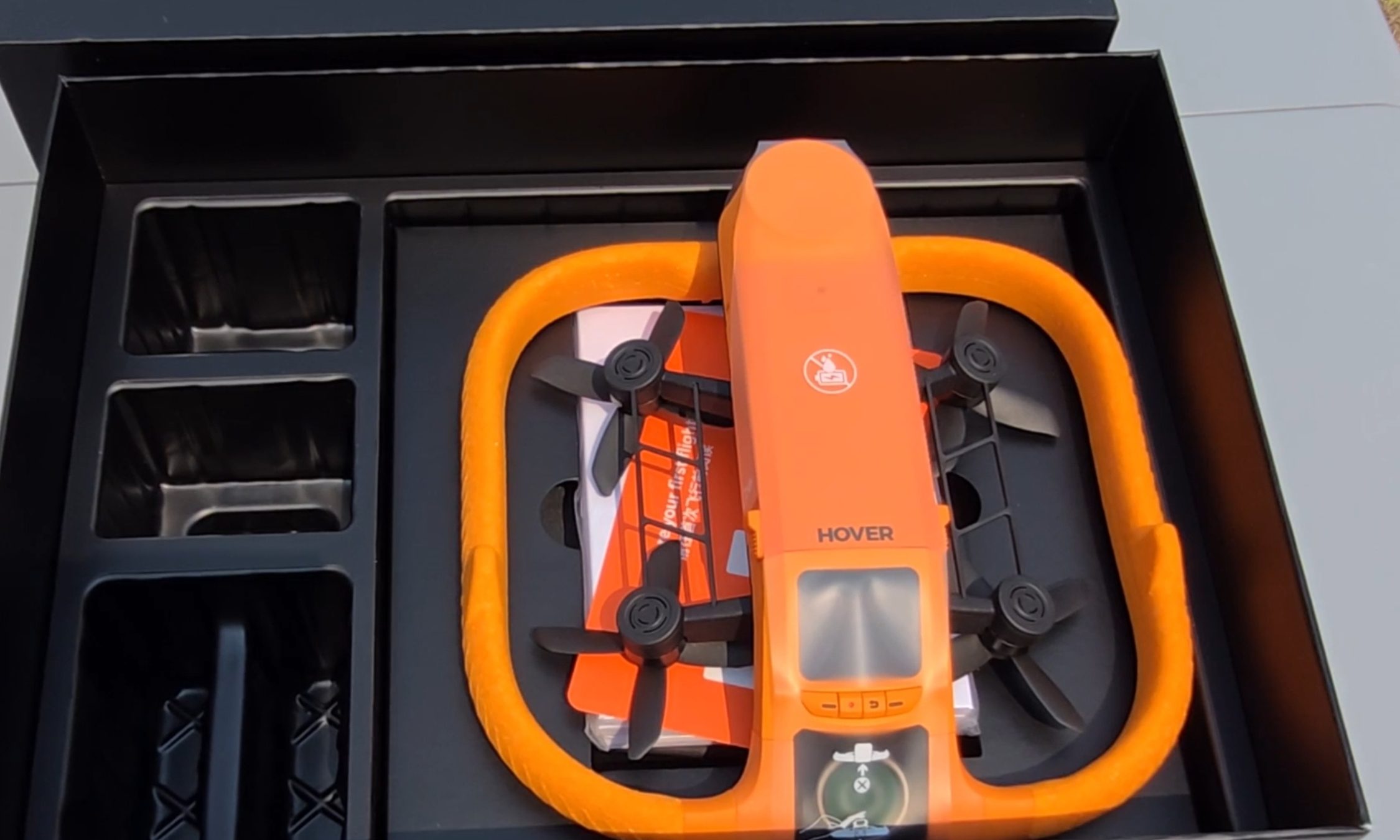
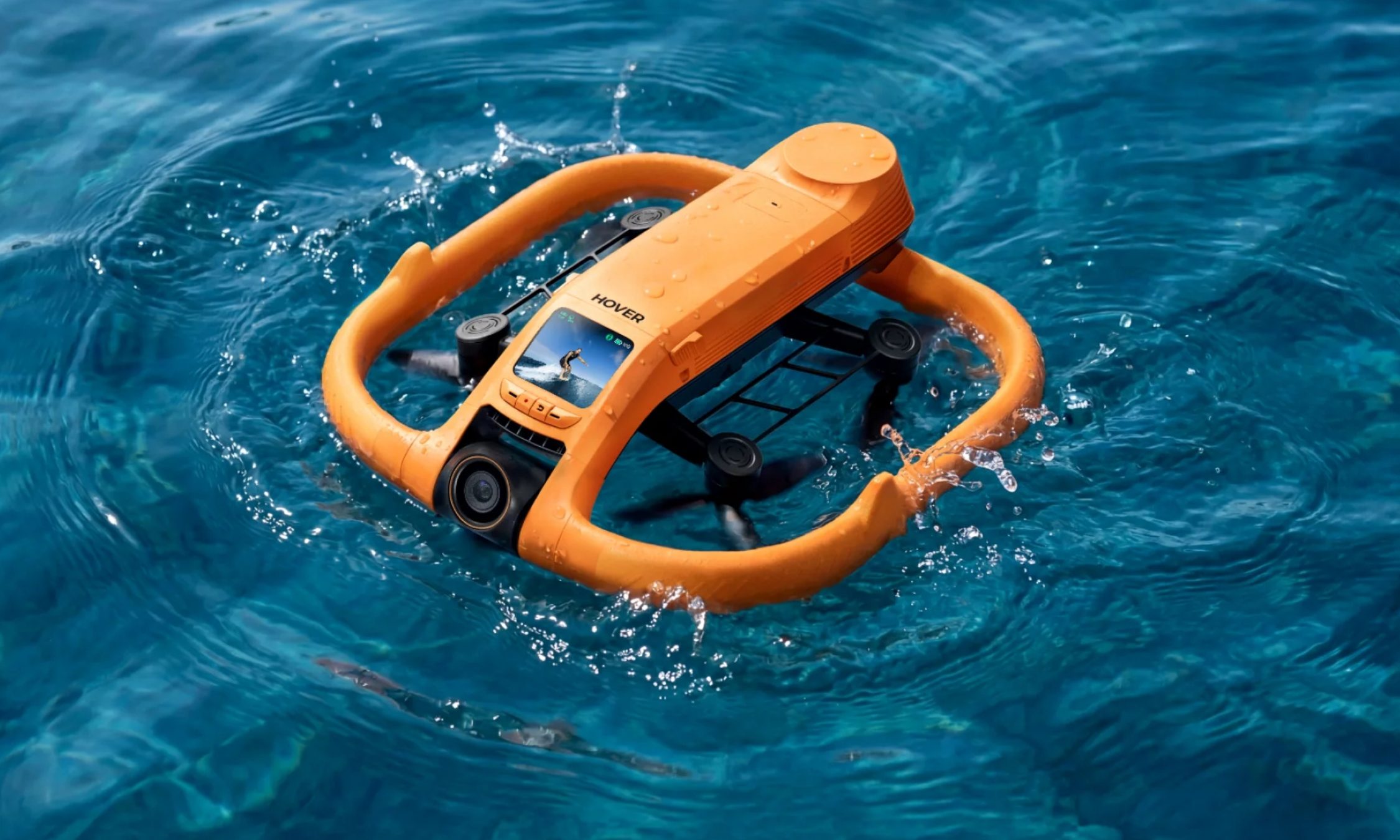
The first thing I noticed pulling the Aqua out of the box is the fat ring of safety-orange foam around its body, the same shade as a life vest. It looks like a pool toy. That’s deliberate. The foam keeps the drone buoyant, cushions the props, and makes the aircraft easy to spot from fifty yards out when it sets down on dark green water. The whole package carries an IP67 rating and weighs under 249 g, which keeps recreational pilots in the U.S. under the FAA registration threshold.
Ian Bell / Digital Trends
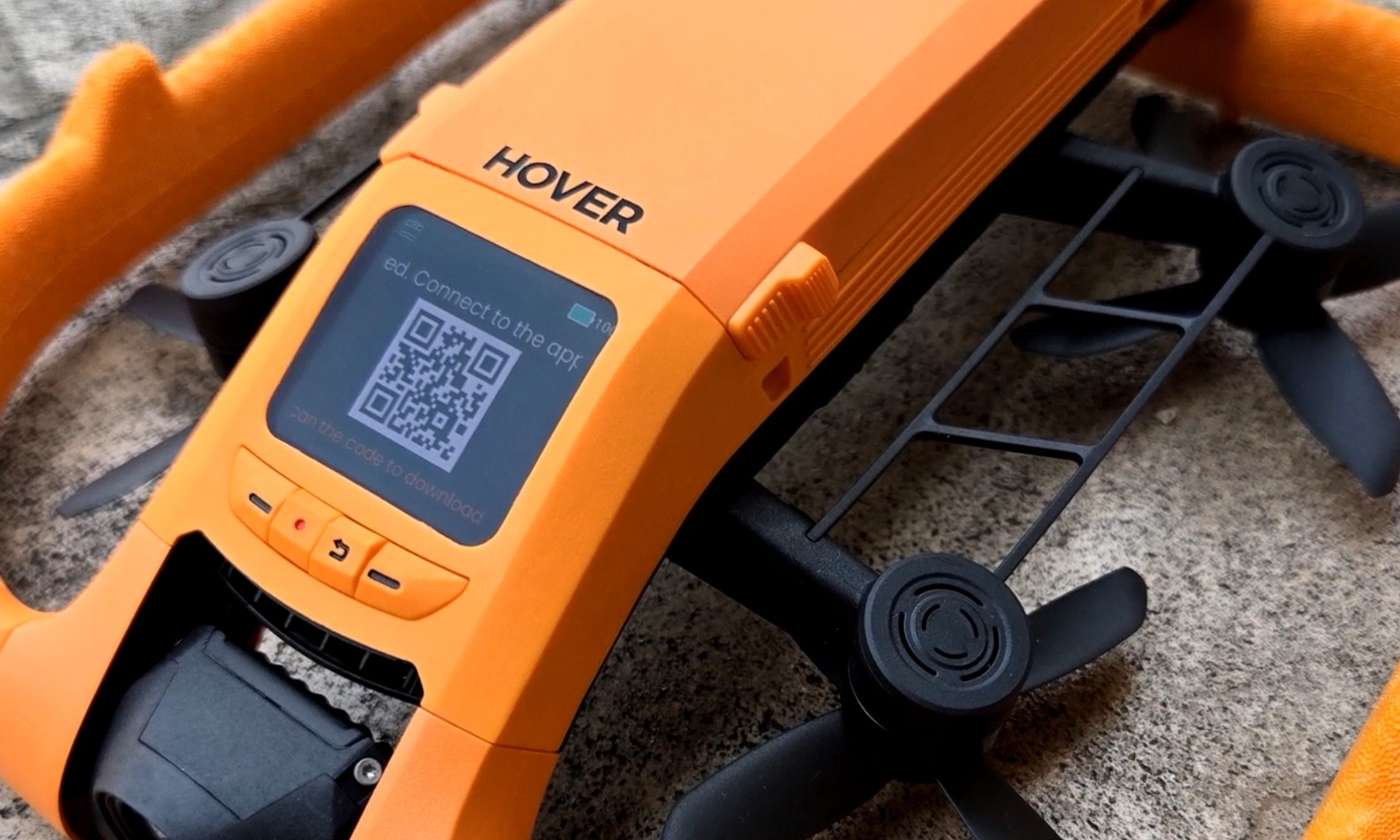
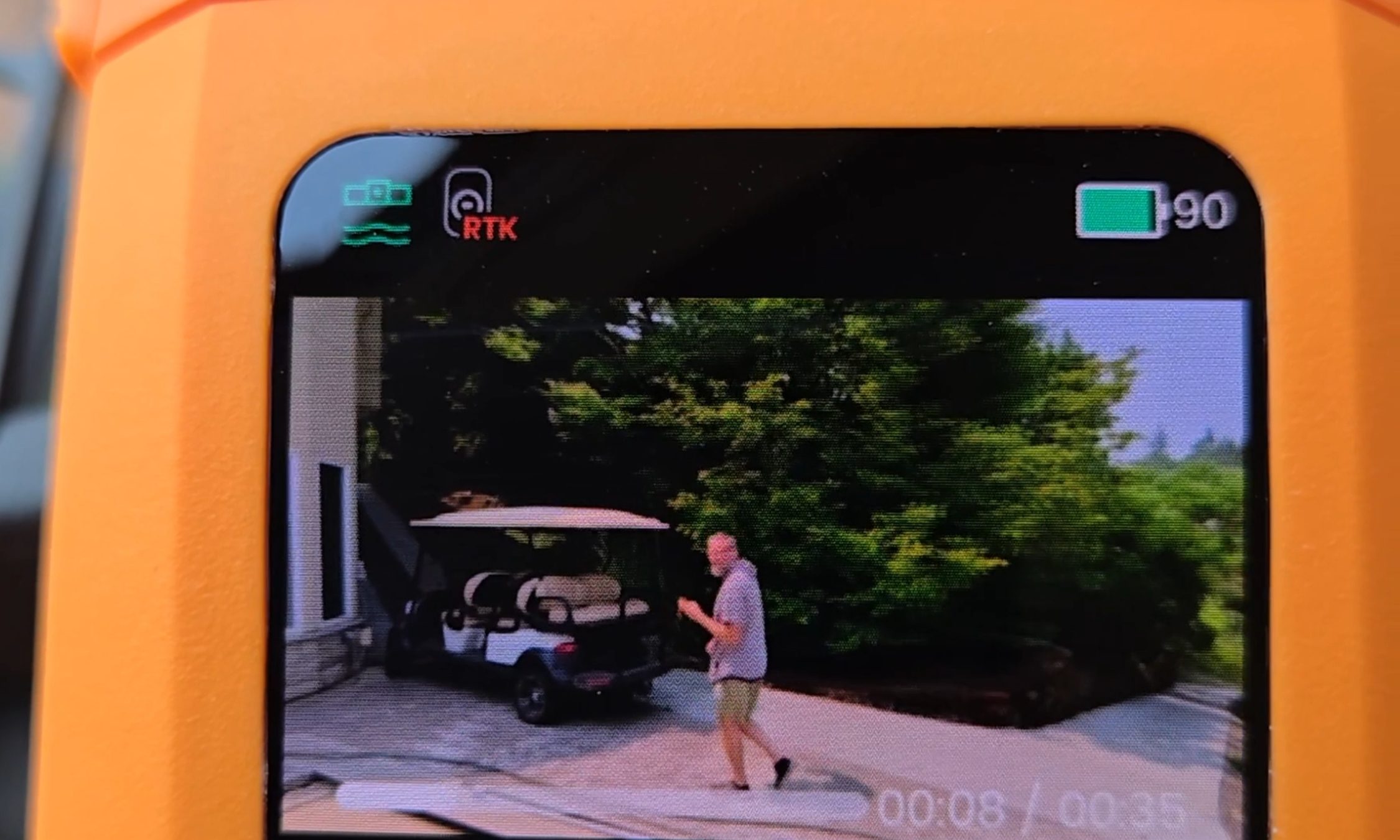
My favorite piece of hardware here is also the smallest. A 1.6-inch AMOLED screen sits on the drone’s spine, and it stays readable even with glare coming off the water. It’s there to pick flight modes, but I mostly used it to review what I’d just shot — sitting on the board, dripping, thumbing back through a run while the river went past. Two weeks in, I was still reaching for it instead of my phone. Storage is 128GB and internal, so there’s no SD card to lose, forget, or flood.
Ian Bell / Digital Trends
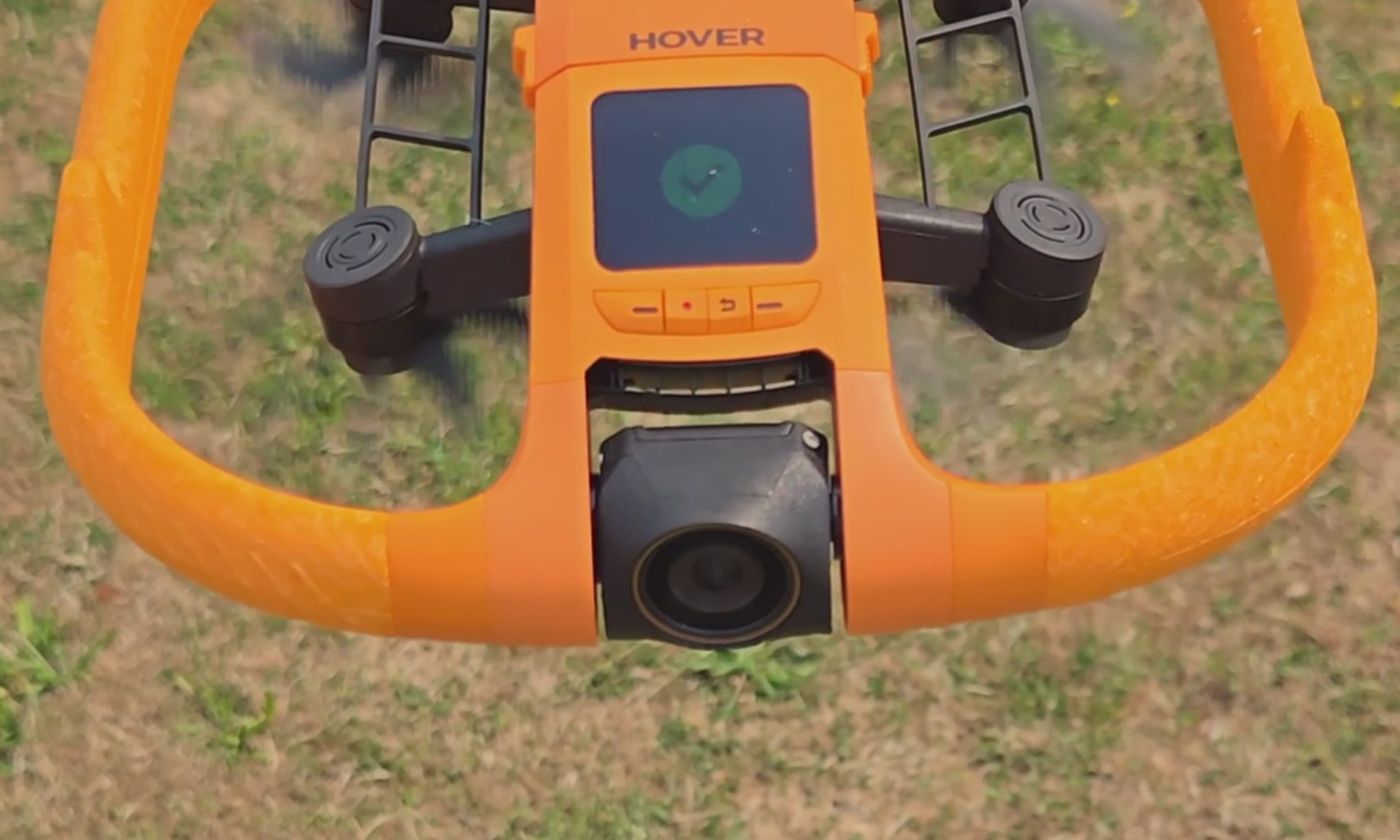
The camera records 4K at up to 100 fps for slow motion through a heated lens, which keeps fog from forming and makes water bead off instead of smearing across the glass. Underneath the airframe is the strangest line I have ever typed about a consumer drone: millimeter wave radar that reads the height of the waves rolling beneath it, so the Aqua can skim low over moving water without clipping a crest.
For those of you unfamiliar with the term, and since the spec sheets never bother explaining it, millimeter wave radar bounces very short-wavelength radio off a surface to measure distance to it — here, a surface that will not hold still. The industry noticed. The Aqua premiered at CES 2026 as an Innovation Awards honoree and collected a Red Dot Award along the way.
HoverAir Aqua water launch: Throw it in, it flies out
Ian Bell / Digital Trends
The water launch is the feature every bystander will ask you to do twice, and I tested it from the kayak with my kids leaning over the side to watch. You toss the drone into the river upside down, carelessly. However, it happens to leave your hand. It bobs for a beat. Then the props bite, it rolls upright, and it climbs into a hover a few feet off the surface to wait for you to start moving. It did that every single time I asked, and I asked a lot. Not once did I have to paddle over and fish it out or reset anything. In a category where water has always meant total loss, that is a bigger deal than a party trick sounds.
HoverAir Aqua subject tracking: A chase boat on your forearm
Most of my testing happened on my eFoil at around 15 miles per hour, with the waterproof Lighthouse strapped to my forearm like a chunky watch. One button sends the drone up. One button brings it home. Everything between those two presses is automatic.
Advertisement
Not the actual resolution captured by the HoverAir Aqua. The image has been resized.Ian Bell / Digital TrendsNot the actual resolution captured by the HoverAir Aqua. The image has been resized.Ian Bell / Digital TrendsNot actual resolution captured by the HoverAir Aqua. The image has been resized.Ian Bell / Digital Trends
The footage surprised me. My wake unspooling behind the board in a long white seam, the tree line sliding by, and me held in the center of the frame for the entire run. The best material came when the drone swung out ahead of the board and shot back at me, spray kicking off the foil, the whole river opening up behind.
It never fell behind, and it never wandered. When I drifted too far, it closed the gap on its own. When I slipped off the board and sat chest-deep in the water beside it, it stayed locked on and waited. The kayak sessions at lazier speeds went the same way: steady framing, no fuss, the family paddling along with a small orange aircraft holding formation off the bow. This is the closest thing to a camera operator you can wear on your wrist.
HoverAir Aqua Battery Life: High on the box, dips in the water
Ian Bell / Digital Trends
Now, the part the box will not tell you. HoverAir advertises 23 minutes of flight from the 2,013mAh smart battery. My first battery, actively tracking me on the foil, gave me 10 minutes before the drone called it quits. I rode back to shore, clicked in a fresh one, and went back out. Thirteen minutes. Doing the exact job you bought it for, you get about half the number on the sticker.
It’s worth noting that drone makers rate flight time in windless conditions with no tracking load, and you should not expect that figure in the real world. Even allowing for that, half is a wide gap. At least the ending is graceful.
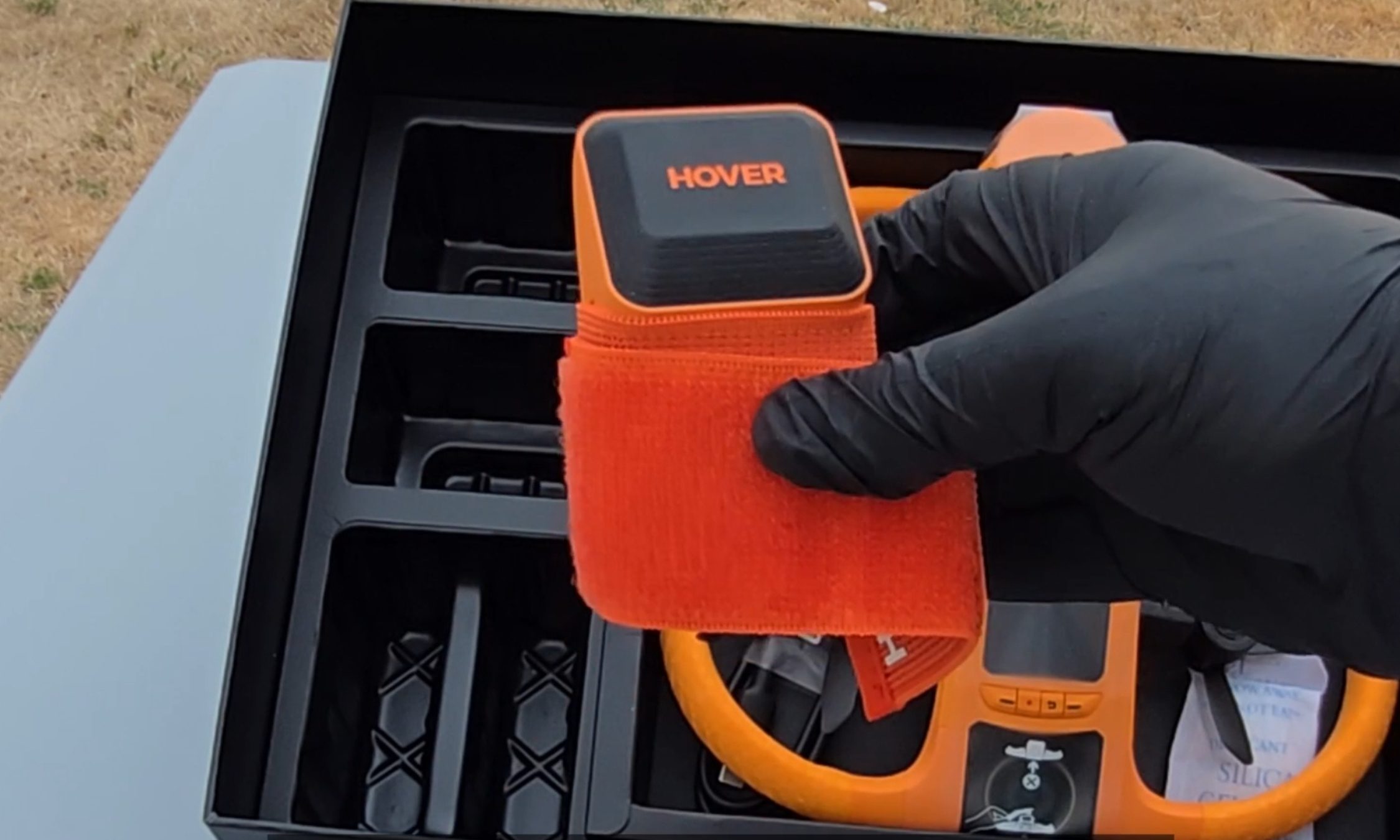
When the charge runs out, you get a warning that the drone will land in 15 seconds, and then it sets down on the surface, orange side up, rocking on the chop until you come get it. Nothing dramatic happened in two weeks of testing. Recharging takes about 55 minutes with the battery inside the drone, and because a battery is only fully waterproof while it’s installed, HoverAir includes a dedicated waterproof pouch for hauling spares out on the water. Read that accessory list again. The company is telling you, in its own way, that you will be swapping batteries mid-session.
HoverAir Aqua Lighthouse Wearable: Great controller, no fuel gauge
Ian Bell / Digital Trends
The second problem makes the first one worse. The Lighthouse is otherwise the best thing about this product, and it tells you nothing about the battery. No percentage. No halfway warning. No blinking light as the level sinks. Mid-run, I had no idea whether the drone above me had eight minutes left or thirty seconds.
Ian Bell / Digital Trends
When the entire budget is 10 to 13 minutes, that silence turns every session into a guessing game. Both times a battery died on me, my only notice was the 15-second landing warning, right when I felt like I was getting going.
Should you buy
HoverAir
The good here is genuinely good. The footage is beautiful, the Aqua keeps pace with a foil at speed, it launches itself out of open water, and it runs hands-off enough that you forget it exists until you sit down to replay the clips. As a piece of engineering built for a hostile environment, it is the real deal.
The battery is what makes me hesitate, and I am not going to soften that. Plan a full session around this drone, and you are packing a pocketful of spares and guessing when to burn them.
Advertisement
So here is the fork. If what you want is a quick promo shot or a fast social clip off the water, this is the drone doing that job, and I don’t know of another one built to take the punishment. If you want to shoot an entire session, wait and watch for a firmware update that pushes battery data to the Lighthouse.
That one change would make this an easy recommendation for anyone who makes content on the water. As it stands, the Aqua is a brilliant specialist with a 10-minute attention span, and I keep taking it out anyway.
Why not try?
HOVERAir X1 PROMAX — Priced significantly lower at $700, this one offers hands-free auto-follow tracking and Lighthouse wearable perks, can shoot up to 4K 120fps footage, and stands out with a foldable design. It’s slightly slower and doesn’t offer a waterproof build, but makes up for it with collision-sensing tech.
DJI Mini 4 Pro — Another option that is more affordable as well, DJI’s drone offers impressive aerial capture capabilities with omnidirectional obstacle sensing and a reliable 4K camera that can capture high dynamic range videos. Plus, the battery packs can extend the flight time by up to 45 minutes, while the transmission performance is also fantastic. But an impending ban casts a shadow of skepticism over long-term support and after-sales experience.
Advertisement
FAQs (Frequently Asked Questions)
Who needs the HoverAir Aqua?
It’s a waterproof, self-flying 4K camera drone. If you’re into activities such as kayaking and wakeboarding, it’s an appropriate choice.
Is it capable of taking off and landing directly on water?
Yes, the positive buoyancy engineering allows it to float on water. And yes, it can take off and land from the surface of water. Moreover, it also comes with a Turtle Flip feature that lets it correct its position instantly, even if it’s flipped upside.
Is the build really waterproof?
The HoverAir Aqua has an IP67-certified build, featuring corrosion-resistant components, while the camera sensor is protected by a hydrophobic, anti-fog lens.
Do you need a license to fly it?
It falls under the prescribed FAA weight limit, so you don’t need a license to fly it.
Advertisement
Can it fly and capture without a phone?
Yes, the wearable Lighthouse controller relies on Real-Time Kinematics (RTK) positioning to let the drone track you and capture videos without requiring a cellular link or base stations.
What is the top speed and battery life?
The HoverAir Aqua can fly at a speed of up to 34 miles per hour, and it is claimed to last over 20 minutes on a single charge.
A rumored “Silo” spinoff could keep Apple TV’s dystopian franchise alive beyond its planned finale, but the books’ author is pushing back on the claim.
“Silo” is a dystopian science-fiction drama about a society living underground after humanity has been driven from the surface. The Apple TV series is based on the bestselling “Silo” trilogy, “Wool,” “Shift,” and “Dust,” by Hugh Howey.
While it was well liked, Apple TV had told the creators that the series would end after the fourth season. The third season just returned to the small screen in July, with the fourth season anticipated to release in Summer 2027.
Even though the series is facing down its inevitable end, it may not be time to say goodbye just yet.
Advertisement
Allegedly, there’s a chance “Silo” may be getting its own spinoff, set to begin pre-production in late 2026. It is expected to tie into Hugh Howey’s upcoming “Silo 40” trilogy, which is set to release in 2027.
This tantalizing tidbit was shared by Apple TV enthusiast Sigmund Judge on Threads.
One minute later, however, a very significant figure refuted the claim. Speaking up was the “Silo” author, Hugh Howey.
“Yo, this is news to me,” Howey says in the replies. “So probably not true.”
Advertisement
“I appreciate you wanting to keep a surprise,” Judge says in response. “Love everything you do.”
Judge says that he’s got some further evidence in response to “a denial,” presumably Howey’s. Judge says that hires for the upcoming project have begun, and that the main sets used for “Silo” have remained, even after production on the fourth season wrapped in March.
Lesser horseshoe bat. (Credit: Lylambda, Wikimedia)
As great as echolocation is, things can get rather messy once it’s not just you chirping away, but also hundreds of your buddies in roughly the same area. This is the scenario that the typical colonies of bats have to deal with. In a recent study by [Haruhito Matsumoto] et al. in Journal of Comparative Physiologythey investigated how colonies of greater Japanese horseshoe bats deal with this issue.
Echolocation in animals can use a variety of methods, including frequency modulation (FM, varying the pitch) or constant frequency (CF), with both having their uses during hunting as well as obstacle avoidance. One big advantage of CF is that it can be used for Doppler shift, giving very precise information about location and velocity of objects in the environment, but if used in a busy colony the acoustic interference would effectively render them blind.
What researchers have found is that the CF component frequencies differ per bat colonies, with the mixing of wild-caught and resident horseshoe bats in this experiment showing them adjusting the dominant second harmonic (CF2) to match, with bats using a lower frequency CF2 adjusting it upwards. In this way frequency convergence is used as a strategy to avoid acoustic interference using a so-called ‘silent spectral window’.
As this spectral window for effective Doppler tracking is found above the CF2 frequency, it therefore makes sense that the bats at a lower CF2 harmonic would adjust their CF upwards to match that of their neighbors. Although more research is required to fully confirm these findings, it sheds some more light on the use of echolocation by these amazing flying mammals.
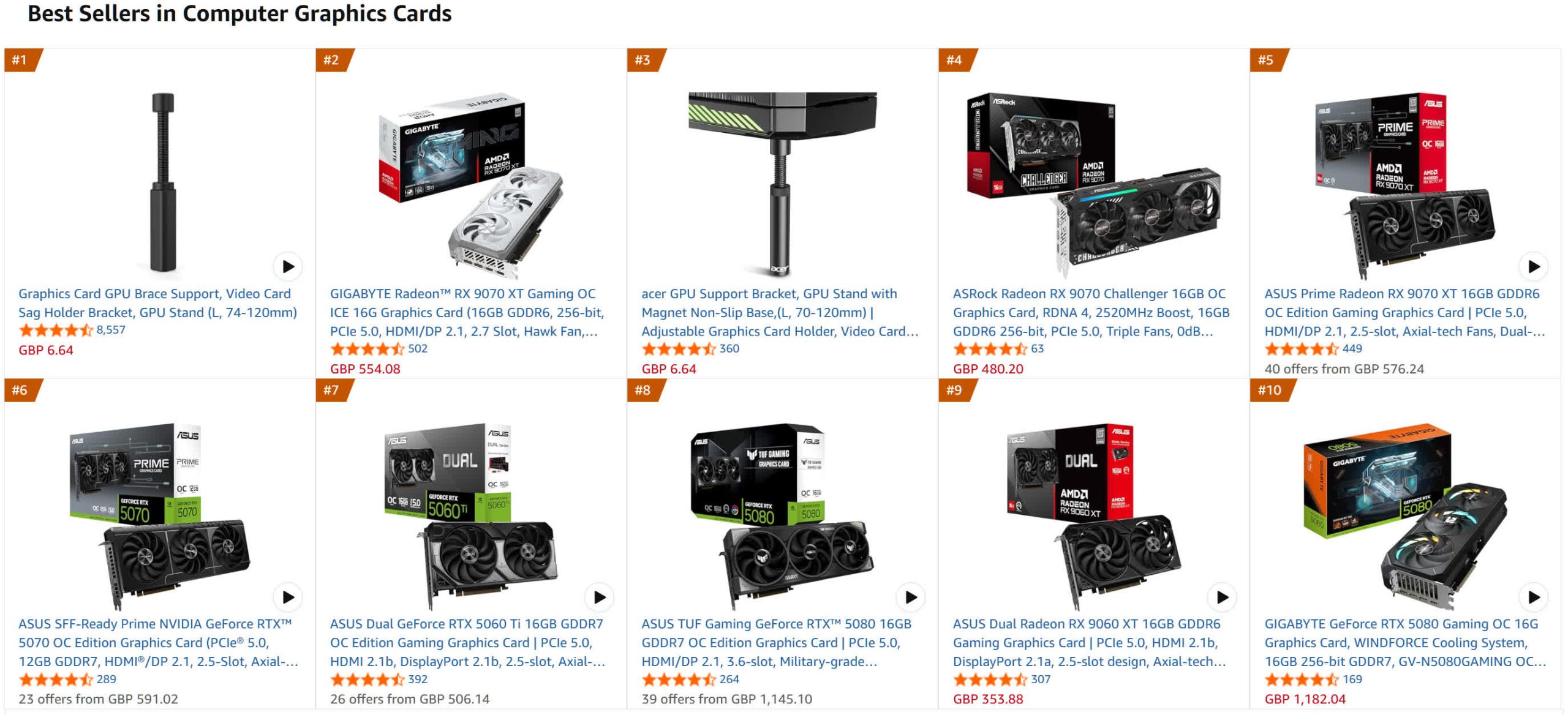
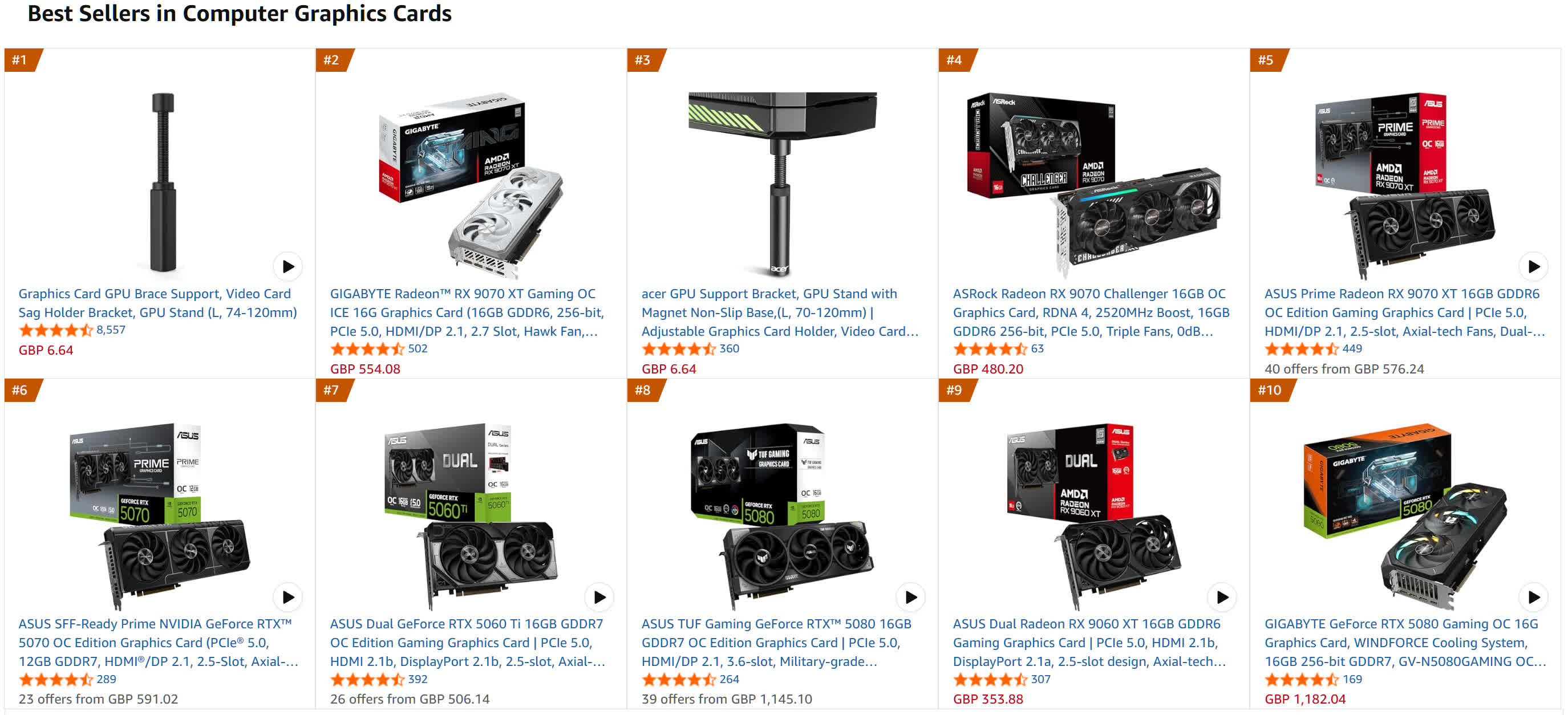
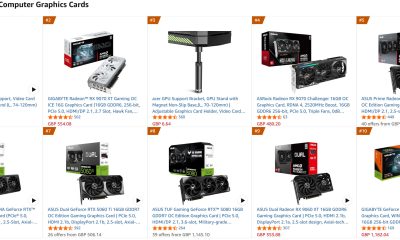
In a nutshell: Despite Nvidia losing fans over the last few years as its focus on gamers diminishes (or disappears), the company’s GPUs have dominated the sales charts. But that status quo is starting to change: Amazon’s top 10 best-selling GPU list is an even split between Team Red and Team Green, with the highest position held by a Radeon 9000-series card. Meanwhile, in Germany, AMD is the one that’s dominating sales – at least at one retailer.
The rise of RDNA 4 was highlighted by TechEpiphany on X.
The Amazon best-selling list has changed slightly since the post, but the Radeon RX 9070 XT is still the top GPU. This Gigabyte version is priced at $749, which, of course, is considerably higher than the GPU’s $599 launch MSRP.
The other AMD cards in the chart are an Asus model of the 9070 XT, an Asrock 9070, and an Asus 9060 XT. Nvidia also holds four positions with its RTX 5070, RTX 5060 Ti, and two RTX 5080 models.
Advertisement
Things appear even more favorable for Lisa Su’s firm in Germany. The figures, which come from Mindfactory, show AMD accounting for almost 56% of all GPUs sold over the last week, while Nvidia holds a 40% share. Again, the RX 9070 XT is the most popular card by far, followed by the RX 9060.
It’s worth remembering that Mindfactory has a reputation for favoring AMD, offering promotions, discounts, and bundles featuring its products, which help push up sales figures. The store’s AMD cards have outsold Nvidia’s in the past.
However, these charts do illustrate the impact of the memory crisis on the graphics card market. All GPUs are more expensive, but AMD’s are often cheaper than equivalent Nvidia cards.
The other reason is likely simple availability. The Amazon chart shows three AMD cards in stock, while Nvidia only has one – a Gigabyte RTX 5080 for a colossal $1,599, and that’s with a 6% discount.
Advertisement
Only one company dominates the Steam survey GPU chart
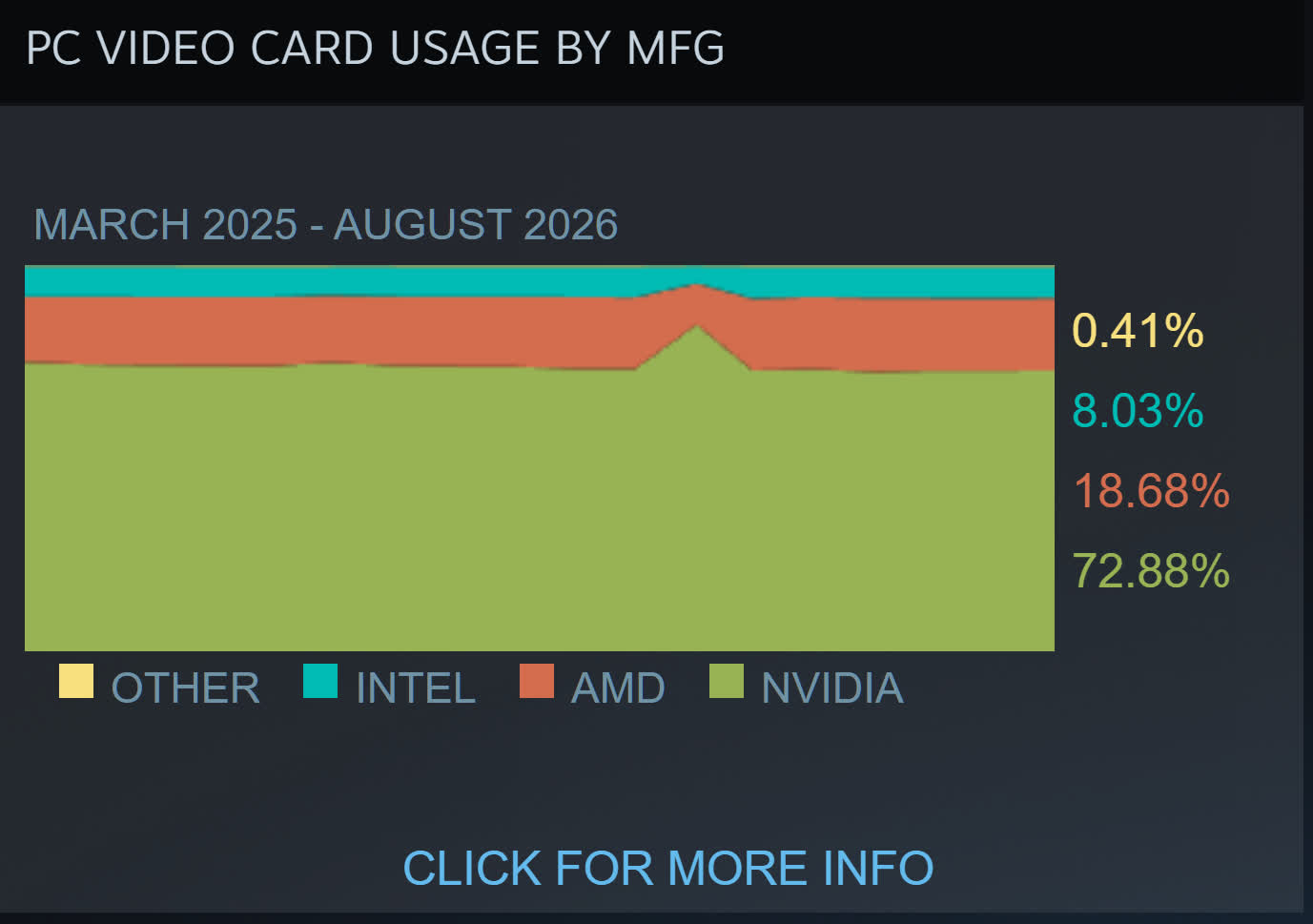
TechEpiphany’s claim of AMD “dominating everywhere” might be a bit of an exaggeration, but there are signs of consumers opting for its cards because of the cheaper prices – or just buying them because there are no Nvidia alternatives. The most valuable company in the world still has GPUs in almost 73% of Steam survey participants’ machines, compared to AMD’s 18.6%, so we’re not seeing a red revolution just yet.
Create a strong password policy by prioritizing length and uniqueness, blocking compromised passwords, allowing password managers and autofill, removing arbitrary complexity and expiration rules, and requiring MFA for important accounts. Deploy the policy with a managed password vault, secure recovery procedures, and tests that confirm the written rules work in every covered system.
Quick Take
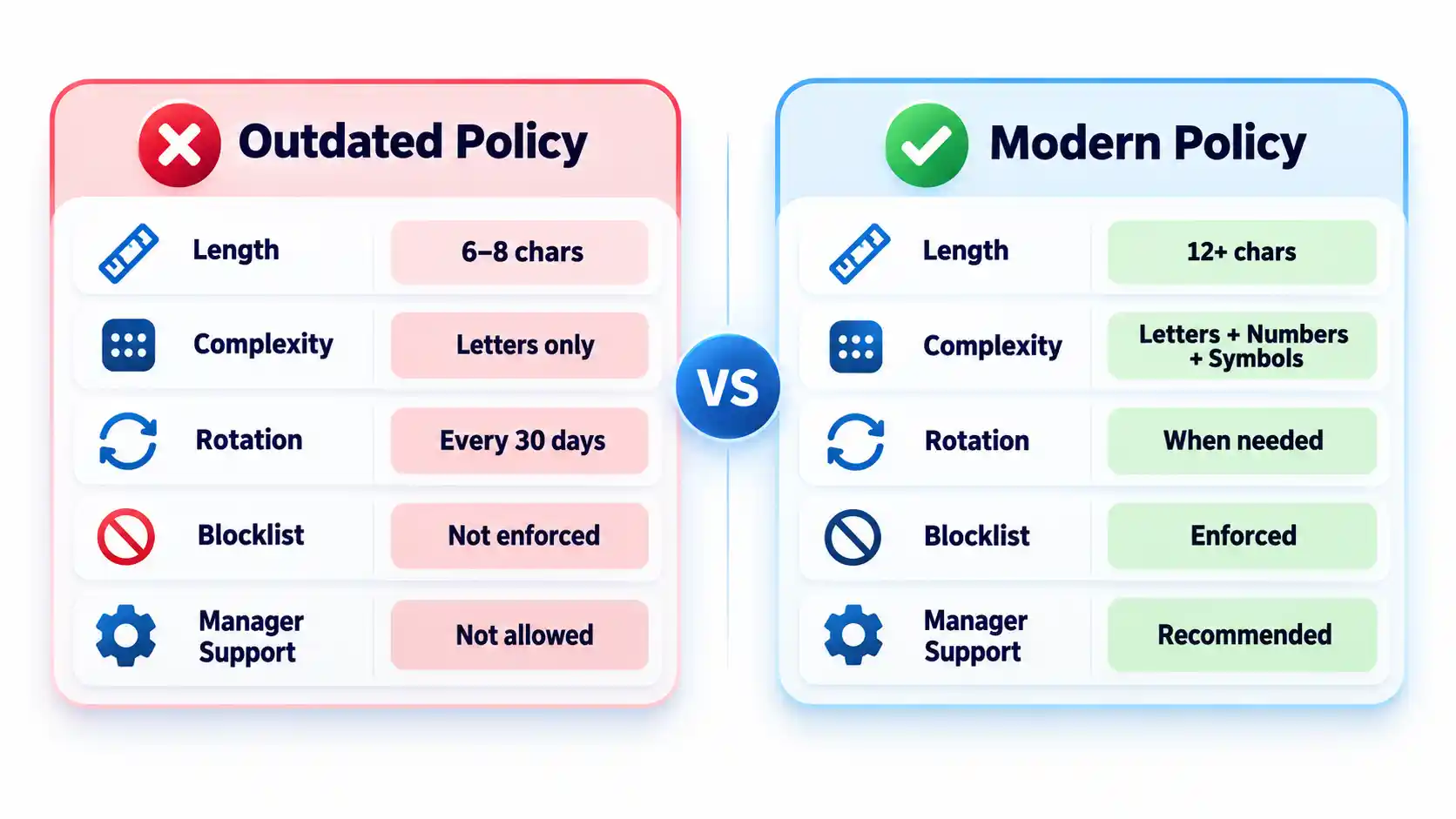
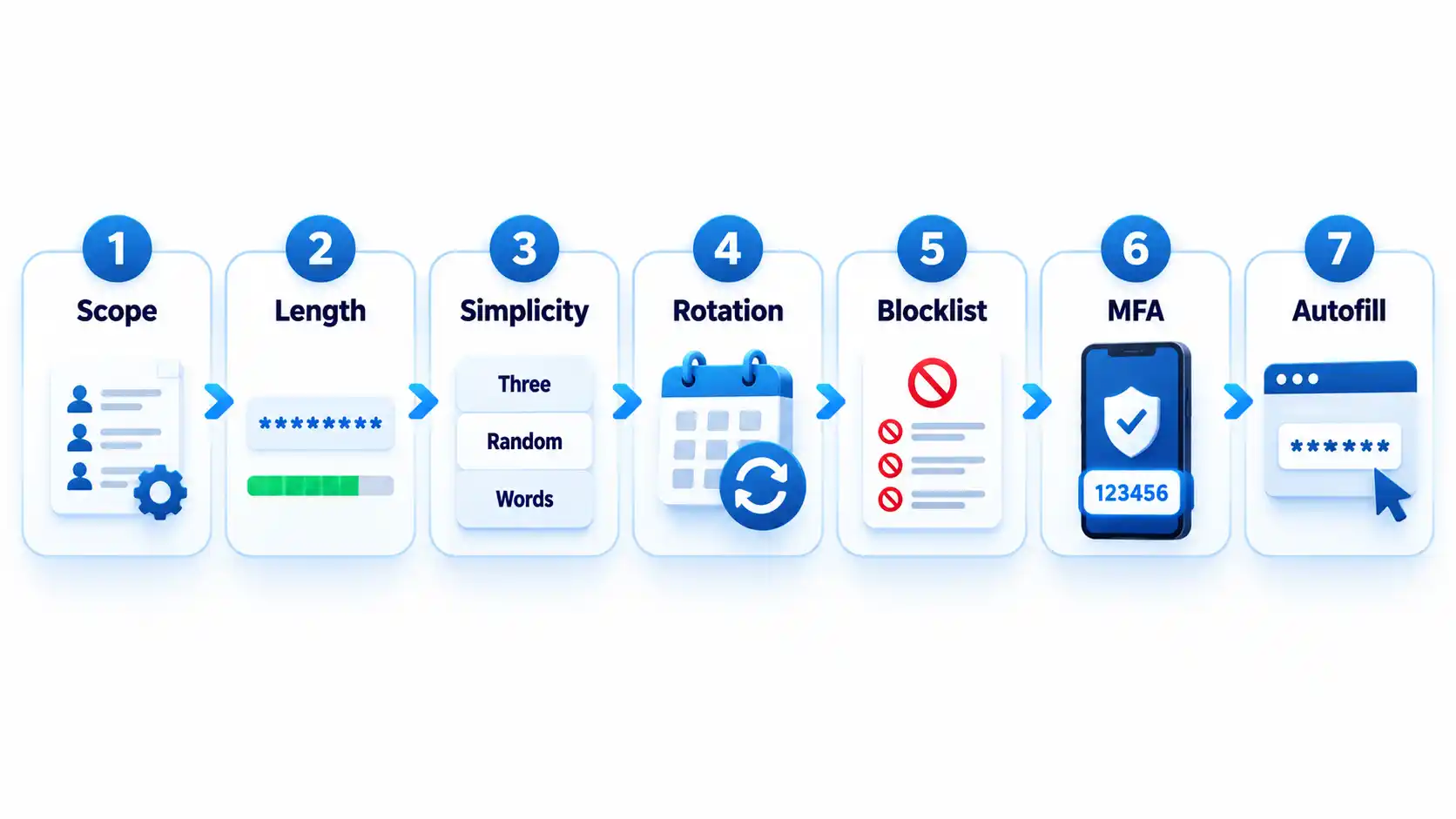
Require at least 15 characters when a password is the only authentication factor.
Allow passwords of at least 64 characters, including spaces.
Do not require arbitrary mixtures of uppercase letters, numbers, and symbols.
Replace scheduled password expiration with changes triggered by suspected compromise.
Reject commonly used, predictable, and previously compromised passwords.
Allow password managers, paste, and autofill on login forms.
Protect important accounts and cloud-synchronized vaults with MFA.
Test login, recovery, export, offboarding, and session-revocation controls.
These requirements follow current NIST authenticator guidance. They are a security baseline rather than proof that a particular policy satisfies every law, contract, or industry framework.
Prerequisites and Ownership
Identify the accounts in scope
Inventory the systems that accept passwords before writing the rules. Include workforce accounts, customer accounts, administrator access, cloud services, remote-access tools, shared credentials, and legacy applications. Record which systems use single-factor authentication, MFA, or single sign-on.
Keep machine credentials in a separate category. API keys, database secrets, certificates, service-account tokens, and CI/CD credentials require secrets-management controls rather than an ordinary employee password vault. A dedicated article on business secrets management should cover those systems.
Assign responsibility
Name a policy owner, identity-platform administrator, security reviewer, help-desk recovery owner, and departmental access approver. A policy without named owners tends to fail at exceptions, recovery, and offboarding rather than during ordinary password creation.
Advertisement
Document technical constraints
Record each system’s minimum and maximum length, supported characters, MFA options, password-history rules, breached-password screening, paste and autofill behavior, recovery process, and session controls. Legacy systems that cannot meet the baseline should enter a documented exception process with compensating controls and a retirement or remediation date.
Step-by-Step: Create the Password Policy
Define which accounts the policy covers
State whether the policy applies to employees, contractors, administrators, customers, service providers, and shared accounts. Classify higher-risk accounts such as email, identity-provider, financial, cloud-administrator, source-code, and password-vault accounts.
Where possible, replace shared accounts with individually attributable accounts. If sharing is unavoidable, use a managed vault that records access and lets administrators revoke membership.
Expected result: Every covered account type has an owner, risk classification, authentication method, and exception status.
Set length and input requirements
Require at least 15 characters when a password is the only authentication factor. NIST permits passwords used only as part of an MFA process to be shorter, but they must contain at least 8 characters. Organizations may adopt a longer minimum when users can rely on a password generator.
Permit passwords of at least 64 characters. Accept spaces and broad character sets, process the entire submitted password, and never silently truncate it. Systems that mishandle spaces or long generated values should be corrected or documented as exceptions.
Advertisement
Expected result: Users can create long passphrases or generated passwords without encountering unnecessary input restrictions.
Remove mandatory composition rules
Do not require every password to contain a prescribed mixture of uppercase letters, lowercase letters, numbers, and symbols. Current NIST rules prohibit these composition requirements because users commonly satisfy them with predictable patterns.
Symbols remain acceptable when a generator selects them or a service requires them. The policy should not imply that a short password becomes safe simply because one letter was replaced with a familiar symbol. NIST’s public password creation guidance prioritizes length and recommends long passphrases when a password must be created manually.
Expected result: Users can choose long, usable passwords without following predictable formatting recipes.
Replace scheduled expiration with event-driven changes
Do not force users to change passwords every 30, 60, or 90 days without evidence of risk. Require a change when a password is known or suspected to have been disclosed, appears in relevant breach data, was transmitted insecurely, or may remain known to someone whose access has ended.
A password change must be accompanied by session revocation when an attacker could already be signed in. Changing the secret alone may not invalidate active browser sessions, application tokens, or remembered devices.
Advertisement
Expected result: Password changes respond to compromise and access changes rather than an arbitrary calendar.
Block weak and compromised passwords
Compare new and changed passwords against a blocklist containing commonly used, expected, and compromised values. Include context-specific choices such as the organization’s name, service name, username, and predictable derivatives.
Explain why a proposed password was rejected and ask the user to choose a genuinely different value. Do not reveal whether another person uses that password. Avoid enormous blocklists that create excessive false rejections without meaningfully improving protection against rate-limited online guessing.
Expected result: Users cannot enroll values that attackers are likely to guess early or already possess from breach collections.
Add controls around the password
Require MFA for email, identity-provider, financial, remote-access, cloud-administrator, source-code, and password-manager accounts. Prefer phishing-resistant methods such as passkeys or hardware-backed security keys where the service and user environment support them.
Rate-limit or progressively delay failed attempts. Monitor suspicious logins, protect account recovery, avoid knowledge-based questions as a sole recovery method, and provide a way to revoke sessions after suspected compromise. The OWASP authentication guidance treats password controls, MFA, recovery, session handling, and login monitoring as connected parts of account security.
Advertisement
Expected result: A guessed or disclosed password is harder to convert into persistent account access.
Require password-manager-compatible login forms
Allow users to paste and autofill credentials. Use standard password fields and avoid scripts or form designs that block managers. NIST requires verifiers to allow password managers and autofill and recommends permitting paste when autofill interfaces are unavailable.
Do not interpret clipboard blocking as a security control. It can push users toward shorter passwords they can type manually or toward storing credentials in insecure notes.
Expected result: Users can generate, store, and enter unique credentials without weakening them for convenience.
How to Choose a Password Manager
Select a manager by deployment fit, recovery design, security controls, and usability rather than by the length of its feature list. The NCSC buyers guide emphasizes that an unusable manager will leave insecure workarounds in place.
Advertisement
Comparison of password-manager deployment models
Manager type
Best fit
Principal advantage
Main limitation
Browser or platform manager
People using one primary browser or device ecosystem
Low setup friction and integrated autofill
Potential platform lock-in and fewer team controls
Standalone cloud-sync manager
Mixed-device users and small teams
Cross-platform access and centralized synchronization
Remote account and recovery paths require strong protection
On-device manager
Narrow or offline use cases
Reduced dependence on a cloud service
Limited synchronization and more difficult recovery
Enterprise-managed vault
Organizations requiring governance and offboarding
Managed sharing, audit records, policy enforcement, and provisioning
Greater administrative complexity and recurring cost
Evaluate the following capabilities before deployment:
Protection of credentials and metadata at rest.
Who controls or can recover the vault’s decryption key.
MFA, passkey, and approved-device support.
Recovery options and the people authorized to use them.
Secure sharing without revealing passwords in email or chat.
Role-based administration, audit records, and offboarding controls.
Restrictions or alerts for bulk export.
Supported browsers, operating systems, and mobile devices.
Update delivery and the provider’s vulnerability-disclosure process.
A practical method for leaving the service without permanent lock-in.
Browser and device managers can be appropriate when convenience and ecosystem integration matter most. A reputable standalone manager may fit mixed-device environments or teams requiring advanced sharing and administration. The NCSC’s updated password-manager guidance recommends evaluating reputation, device security, recovery, MFA, and platform needs instead of assuming one type fits everyone.
How to Deploy and Use the Password Manager
1. Protect the vault account
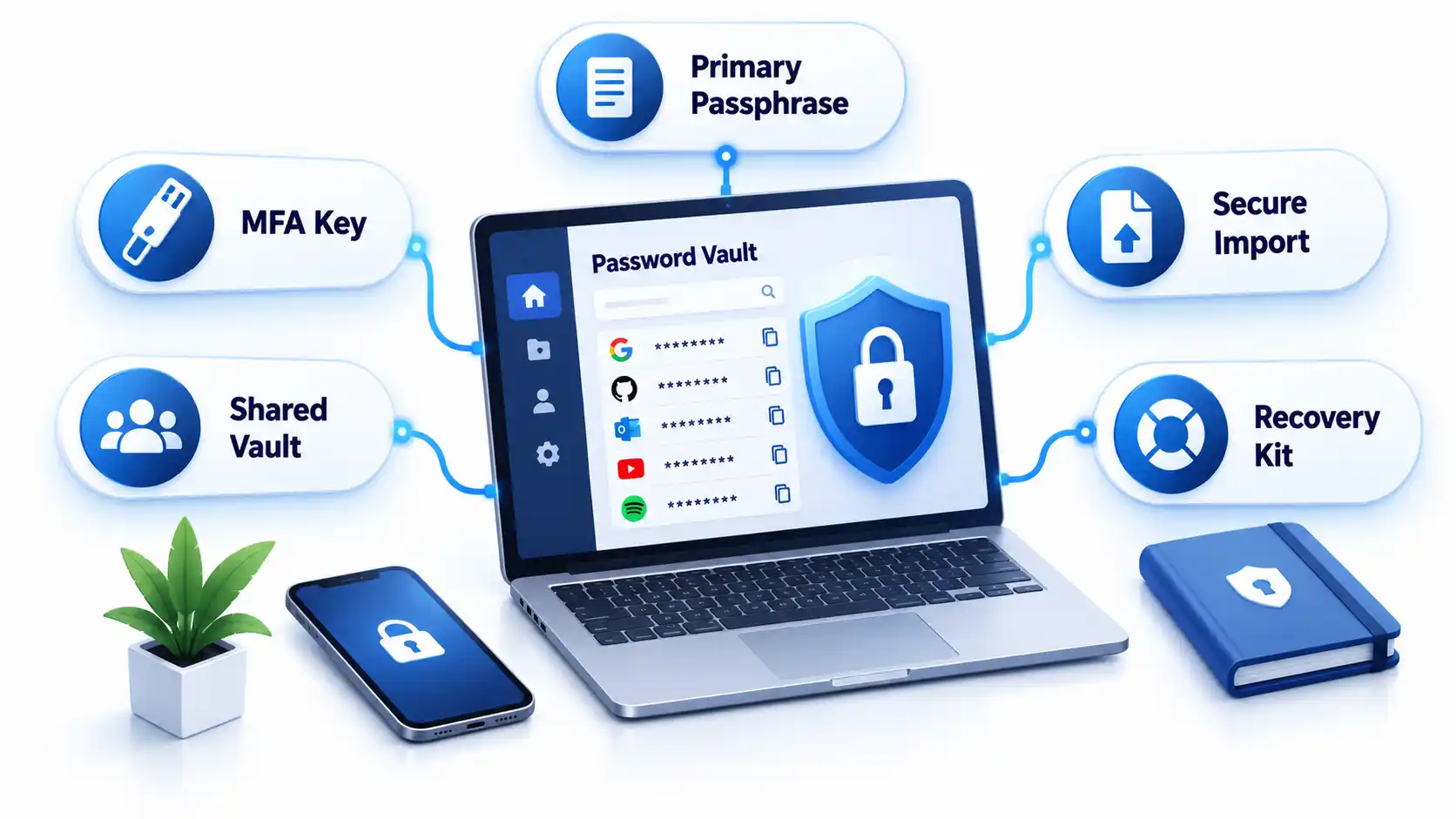
Create a long, unique primary passphrase that is never used elsewhere. Enable the strongest practical MFA and secure every registered device with updates, automatic locking, and a local PIN or biometric unlock.
Store recovery keys or emergency instructions separately from the vault. Avoid circular recovery in which the only way to access the email account is through the vault while the only way to recover the vault is through that email account.
2. Import credentials carefully
Some managers migrate credentials through a CSV file. That export may contain readable usernames and passwords. Create it only on a trusted device, import it immediately, verify that the records arrived, and delete the exported file from the original folder, recycle bin, cloud synchronization, and temporary storage.
Advertisement
Do not perform a vault migration over an unfamiliar hotspot. Review the precautions in this public Wi-Fi security guide before accessing sensitive accounts away from a trusted connection.
3. Replace reused passwords in risk order
Secure the password-manager account and its recovery channels.
Change email and identity-provider credentials.
Change banking, payment, payroll, and financial credentials.
Change administrator, cloud, source-code, and remote-access credentials.
Change shopping, social-media, subscription, and lower-impact accounts.
Do not change dozens of accounts without confirming that each new password was saved. Keep the old session open until the new credential has been tested in a separate private window or another approved device.
4. Configure generation and autofill
Generate a different random password for every compatible service. Match the site’s supported length and character rules while avoiding needless manual edits. If autofill does not appear, check the exact domain before searching the vault and copying the password.
Autofill may help resist phishing because a manager should associate credentials with the legitimate domain. It is not infallible. Users must still inspect unusual addresses, subdomains, redirects, and browser warnings.
5. Configure team sharing and offboarding
Store business credentials in organization-controlled collections rather than personal vaults. Grant access by role, assign an accountable owner, review membership, and remove access promptly when someone changes roles or leaves.
Advertisement
Revoking vault access prevents future retrieval, but it cannot make a password unknown to someone who already viewed or copied it. Rotate credentials when a departing user could retain them. Teams protecting software repositories should connect this process to the controls in the guide to preventing source-code theft.
Verify That the Policy Works
Test the deployed controls instead of assuming a written setting was applied consistently.
Checklist
Confirm that a 15-character single-factor password is accepted.
Confirm that long passphrases, spaces, paste, and autofill work.
Confirm that the application processes the full password without truncation.
Attempt to enroll a known common password and verify that it is rejected with useful guidance.
Confirm that uppercase, number, and symbol mixtures are not mandatory.
Verify that routine expiration is disabled and compromise-driven resets work.
Trigger repeated failed attempts in an approved test account and verify rate limiting or progressive delay.
Test MFA, recovery, session revocation, emergency access, and lost-device procedures.
Remove a test user from a shared collection and verify that access ends.
Verify that export actions are restricted, logged, or both.
Record exceptions and failed tests with an owner and target correction date. Repeat the checks after identity-platform changes, password-manager migrations, or major policy revisions.
Failure Modes and Troubleshooting
Common password policy and manager deployment failures
Failure
Likely cause
Security consequence
Corrective action
Long generated password is rejected
Legacy length or character restriction
User shortens or reuses a password
Correct the restriction or document a temporary exception
Autofill does not appear
Unsupported form, disabled extension, or domain mismatch
User may copy into the wrong page
Verify the domain and manager permissions before manual entry
Credentials fill on an unexpected subdomain
Overly broad saved-domain matching
Password may reach an unintended service
Narrow the saved address and report unsafe matching
Primary passphrase is lost
Recovery was not configured or documented
Vault data may become inaccessible
Use the approved recovery process and reset affected accounts if recovery fails
MFA device is lost
No backup factor or recovery key exists
User is locked out or bypasses policy
Use pre-established recovery and revoke the lost device
Exported CSV remains on disk
Migration cleanup was missed
Passwords remain exposed in plaintext
Delete all copies and rotate credentials if exposure is possible
Former worker retains a shared password
Vault removal occurred without credential rotation
Continued unauthorized access remains possible
Rotate the credential and review account activity
Legacy system requires frequent changes
Obsolete platform rule
Users may create predictable variations
Apply compensating controls and schedule remediation
Vault and email recovery depend on each other
Circular recovery design
One lost factor can lock out both services
Create an independent recovery route and protect it offline
Operational Limits and Edge Cases
Concentrated value: A vault makes unique passwords practical, but a successful vault compromise can expose many accounts. Protect the primary account and registered devices accordingly.
Compromised endpoints: Malware or someone using an unlocked computer may capture credentials after the vault decrypts them. A password manager does not replace device protection. Organizations can evaluate those controls separately in this endpoint protection guide.
Recovery trade-off: Recovery improves availability but creates another path that an attacker may target. Document who can recover a vault and what evidence is required.
Shared accounts: A vault improves sharing, but individual accounts remain preferable because they provide attribution and cleaner revocation.
Offline access: Emergency recovery material needs physical protection, named custodians, and periodic verification.
Phishing: Passwords themselves are not phishing-resistant. Adopt passkeys where appropriate and evaluate the differences in a future passkeys versus passwords guide.
Key Takeaways
Use length, uniqueness, blocklists, and login protections instead of frustrating composition rules.
Require at least 15 characters when a password is the only authentication factor.
Do not force periodic changes without evidence of compromise.
Allow password managers, paste, autofill, and long values.
Protect the password vault, email, identity provider, and administrator accounts with MFA.
Select a manager based on security, recovery, usability, platform support, export, and governance.
Replace reused passwords in risk order and verify each change.
Test recovery, offboarding, exports, and session revocation before an incident.
Frequently Asked Questions
Should contractors use the company password manager?
Contractors should use an organization-controlled vault when they need access to company credentials. Place them in restricted groups, set an access end date where supported, and avoid mixing business credentials with their personal vaults. At contract completion, revoke access and rotate any credential they could have copied.
Should a password manager store the code for its own MFA?
Storing a service’s password and MFA code in one vault is convenient, but storing the vault’s own second factor inside that same locked vault creates a circular dependency. Protect the manager itself with a separate authenticator, passkey, hardware key, or securely stored recovery code.
What happens if the password manager company shuts down?
A usable exit plan should let authorized users export or transfer credentials to another manager. Confirm the export format before deployment and document how migration would work. Because exports may be plaintext, continuity planning should not involve leaving permanent backup exports on ordinary drives.
Advertisement
Can administrators see employees’ passwords in a business vault?
That depends on the manager’s encryption, sharing, recovery, and administrative design. Some administrators can recover accounts or manage shared collections without seeing every private credential. Others may have broader recovery powers. Review the product’s key-ownership and recovery documentation before adoption.
Should personal and work passwords be kept in the same vault?
Separate vaults or clearly separated organization-controlled and personal spaces are preferable. The company must be able to manage, audit, and revoke business access without gaining control over personal credentials. Employees should also retain their personal passwords after leaving without exporting company secrets.
What should happen when a password appears in a data breach?
Change the affected password, revoke active sessions, review account recovery methods, inspect recent activity, and replace the same password anywhere it was reused. Follow a documented data breach response checklist so the reset does not overlook tokens, forwarding rules, or connected applications.
Amazon’s next pillar could be built on a foundation of silicon.
In a new interview with Fortune, Amazon founder and Executive Chair Jeff Bezos says the company’s custom chip business is on track to become one of Amazon’s most durable businesses, placing it alongside Marketplace, Prime, and Amazon Web Services as a core pillar of the company.
“A few of our offerings have become durable pillars, things like Marketplace and Prime and AWS,” Bezos told Fortune. “What I see right now is that our chips business, our silicon business, is lining up to be our next pillar.”
The comments offer one of Bezos’ clearest public endorsements yet of Amazon’s push to design its own chips for artificial intelligence, an increasingly important strategy as demand for AI computing soars and companies look for alternatives to Nvidia’s dominant processors.
More than a decade of investment
Amazon has invested heavily in custom silicon through Annapurna Labs, the Israeli chip startup it acquired in 2015. The company now develops its own AI chips under the Trainium and Inferentia brands, designed to train and run large language models while reducing costs for customers using Amazon Web Services.
Advertisement
AWS has positioned the chips as a lower-cost alternative for AI developers. AWS has positioned the chips as a lower-cost alternative for AI developers. Anthropic trains and runs its Claude models on Trainium, and OpenAI has committed to consume about 2 gigawatts of Trainium capacity, ramping in 2027.
The company disclosed revenue for its in-house data center chips for the first time earlier this year, and since then its Trainium, Graviton, and Nitro chips have grown to a combined annual run rate of more than $20 billion. Amazon has been pouring billions of dollars into AI infrastructure, including new data centers and custom networking hardware.
Amazon CEO Andy Jassy has repeatedly argued that demand for AI computing will remain strong for years, making investments in chips, servers, networking equipment, and power generation essential to the company’s long-term growth.
In an earnings release earlier this year, Jassy signaled plans to pour a record $200 billion in capital expenditures across Amazon in 2026, citing “seminal opportunities like AI, chips, robotics, and low earth orbit satellites.”
Advertisement
The real potential for Amazon’s chips business could come in going beyond the walls of its own data centers. Jassy wrote in his annual letter to shareholders this year that it’s “quite possible” Amazon will sell racks of its internally developed chips to third parties in the future.
Amazon’s fourth pillar?
This discussion about Amazon’s “pillars” goes back to Bezos’ 2014 letter to shareholders, where he described four characteristics of what he called a “dreamy” business: “Customers love it, it can grow to very large size, it has strong returns on capital, and it’s durable in time — with the potential to endure for decades.”
AWS, Marketplace, and Prime are considered the first three pillars. The question of what could become Amazon’s “fourth pillar” has been debated for more than a decade, with areas including shipping and logistics and Alexa cited as contenders in the past.
The company’s big bet on silicon also was emphasized by Jassy in the Fortune piece. He told the magazine that chips are often the key to computing. “The growth in AI has been so significant, but we have a chips business that we built over the last decade here that is growing very quickly,” he said.
The profile appeared alongside Fortune’s release of its 2026 Global 500 ranking, which placed Amazon at No. 1 for the first time, ending Walmart’s 12-year run as the world’s largest company by revenue after Amazon surpassed $700 billion in annual sales, as reported previously.
Walmart fell to No. 2, followed by State Grid of China, UnitedHealth Group, and Saudi Aramco. The magazine reports that Amazon is on pace to be the first trillion dollar company by revenue.
Amazon reports Q2 2026 earnings on Thursday afternoon. Check back with GeekWire for coverage.
If you would like the added functionality of Active Noise Cancellation, AirPods 4 with ANC are also marked down, with a $35 discount bringing the price down to $144.99.
Advertisement
AirPods Pro 3 are reduced to $199.99 thanks to a $50 price cut, with delivery as early as today to select locations for Prime members.
The steepest discount can be found on Apple’s over-ear option, with AirPods Max 2 now $100 off at Amazon as well. With the triple-digit savings, you can pick up a pair in any of Apple’s five color options for $449.
Layoffs partially a cost-saving measure, sources told Bloomberg.
Payments giant Visa is cutting roughly 7pc of its workforce in a now familiar pivot towards AI. The layoffs translate to about 2,600 employees.
The job cuts are expected to primarily affect technology and product teams. Visa has European offices in Poland and the UK.
“To capture the opportunities ahead and best position Visa to lead this transformation, we must continue evolving how we work,” company CEO Ryan McInerney wrote in a memo to staff, parts of which were verified by multiple news organisations.
Advertisement
“AI is also helping to accelerate this evolution and shape the way work gets done at Visa.”
Visa’s layoffs come at a transformational moment for the tech industry, which has been rapidly evolving since generative AI’s mainstream popularity skyrocketed in recent years.
Tech leaders, including the likes of Meta CEO Mark Zuckerberg and Block’s Jack Dorsey, among several others, have shared their vision for slimmer teams powered with AI for better cost saving and added efficiency.
According to technology and start-up layoffs tracker Layoffs.fyi, 252 tech companies have cut more than 124,000 jobs so far in this year alone, already crossing the nearly 123,000 that were laid off in the whole of 2025.
Sources, however, told Bloomberg that AI-powered work efficiency was not the only reason behind Visa’s decision to cut jobs.
Visa intends to redirect the funds saved towards consumer payments, business and value-added services, including stablecoins, cross-border and business-to-business offerings, they added.
“I have deep conviction that we are doing what is right for Visa, our clients and our partners as we continue to focus on driving efficiency across the company in order to reinvest in our highest potential opportunities.
Advertisement
“As a result of the choices we have made over the past few years, we are entering a new era in commerce with a business that has real momentum,” McInerney said in the memo.
“We see this in our continued strong financial results, client satisfaction, employee engagement, and breakthrough innovation as we build and ship products better and faster than ever before.”
Net revenue at the company is up 14pc this quarter past to $11.6bn. Company shares gained more than 1pc by trading close on Tuesday (28 July), falling marginally in after-hours trading. Share prices have risen nearly 5pc over the past year.
Don’t miss out on the knowledge you need to succeed. Sign up for the Daily Brief, Silicon Republic’s digest of need-to-know sci-tech news.
Advertisement
Ryan McInerny at the World Economic Forum Annual Meeting, 2025. Image: World Economic Forum via Flickr (CC BY-NC-SA 4.0)
Visa aimed Anthropic’s Claude Mythos at the infrastructure behind billions of daily transactions, a network that spans more than 200 countries and territories, moves money in roughly 160 currencies, and connects nearly 5 billion payment credentials to more than 175 million merchant locations.
The model stitched minor weaknesses deep in the stack into working exploit chains that would traditionally have surfaced only late in penetration testing. Rajat Taneja, Visa’s president of technology, walked the VB Transform 2026 audience through what came next, including why Visa released the harness that governed the entire hunt as open source and why the company abandoned traditional remediation metrics for a measurement its team invented.
Taneja has run technology strategy, product engineering, and global infrastructure at Visa since 2019, after joining the company in 2013 from Electronic Arts, where he served as CTO following 15 years at Microsoft. He co-authored, with Visa chief information security officer Subra Kumaraswamy, the June 10 blog post announcing the release of the Visa Vulnerability Agentic Harness on GitHub as a reference implementation that any security team can inspect, adapt, and extend. Visa also published a technical white paper detailing the architecture, lessons learned, and 12 non-negotiable architectural practices for critical infrastructure.
Advertisement
Trust built on pessimism and paranoia
Taneja led with the arithmetic that makes Visa a target worth defending obsessively. Trust at the scale of global payments gets engineered through what he called pessimism and paranoia, by assuming failure and designing around it before failure arrives. The network has been hardened over many years through zero-trust architecture, layered defenses, and highly automated security operations built for the scale and reliability global payments demand.
So when Anthropic invited the organizations behind critical software to test Mythos under Project Glasswing, Visa said yes. Glasswing participants collectively identified more than 10,000 high- or critical-severity vulnerabilities in the first month of testing across software underpinning critical systems industry-wide, according to Anthropic. Anthropic’s own conclusion placed the bottleneck after discovery, in verification, disclosure, and patching speed. Visa joined to test decades of hardening at AI speed and learn where advanced models could push its defenses further.
What Mythos showed at Visa
Inside Visa’s environment, Mythos demonstrated system-wide, context-aware analysis, surfacing vulnerabilities buried deep in the stack and flagging issues that grow more serious when chained together, with findings clean enough that engineering teams could act on them without wading through noise. Some findings carried critical severity ratings, and Visa credits its zero-trust controls, network segmentation, and layered safeguards with breaking the chain before any external actor could have acted.
That confirmation mattered, Taneja said, but the epiphany that followed mattered more. “In a world of agentic attacks, defense also has to be agentic,” he said. Even at a company that has invested decades in defense-in-depth, the model revealed assumptions the team had been operating under that needed rethinking. Traditional SAST tools keep their place as a first pass against known vulnerability patterns, Visa’s white paper notes, but pattern matching alone cannot follow an adversary who reasons through logic, data flow, and the exploit chains that live between the signatures.
Advertisement
A harness, not a scanner
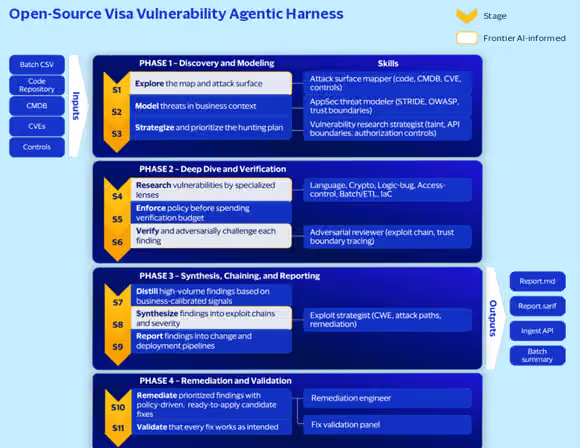
Visa’s response was not another monolithic scanner. The team built the Visa Vulnerability Agentic Harness, now in its fifth generation, as a governed pipeline that directs frontier AI models through structured security tasks while enforcing deterministic controls, policy gates, and human oversight at every stage. Taneja walked through the design philosophy. The harness operates across four phases and eleven stages, from code ingestion and threat modeling through deep-dive verification, exploit chain synthesis, and finally remediation and fix validation.
The open-source Visa Vulnerability Agentic Harness pipeline. Standardized inputs flow through four phases and eleven stages, combining deterministic controls with frontier-AI-informed reasoning to produce structured reports, SARIF artifacts, and validated candidate fixes. Source: Visa Project Glasswing white paper, June 2026.
Three design choices drive finding quality, per the project’s own documentation. Threat modeling runs before analysis to focus on the attack surface rather than scanning everything blindly, multi-agent deterministic voting requires convergence across independent reasoning chains before a finding advances, and structured triage artifacts compress the lifecycle from discovery to a result developers can actually ship. The payoff is a pipeline that runs hot by default. A plain scan in the shipped profile runs all eleven stages and edits source files in the target repository in fix mode, applying candidate patches unless the operator stops it at detection.
The harness is multi-model by design. An LLM abstraction layer lets Visa swap or combine providers without changing the control plane, and the open-source version works with Anthropic Claude, OpenAI-compatible models, or a mix. The repo’s documentation is candid about the exception. Applying a fix requires the file-editing tools that only the Anthropic backends expose, so the remediation and validation stages currently require Anthropic models for full functionality, and an OpenAI-compatible model in those roles is limited to report-only output. VentureBeat’s Q2 2026 Pulse research, presented earlier at the conference, reinforces why that provider flexibility matters. Among the enterprises surveyed, 82% rely on provider-native controls as their primary security layer, and 59% plan to adopt or switch agent security tooling within the year. The controls enterprises adopted last year are already becoming the controls they plan to replace.
Advertisement
Mean Time to Adapt replaces legacy metrics
Finding vulnerabilities is no longer the hard part, Taneja argued. The real challenge is how quickly a team can confirm an issue is truly exploitable, fix it, and prove the attack path is closed rather than just showing a patch was applied. Visa calls this Mean Time to Adapt, and the white paper tracks it along three dimensions. Inventory freshness measures how current and complete the organization’s view is of code, configuration, and runtime deployment. Exploitable paths per release counts how many end-to-end attack chains remain possible after each release, not just how many findings were closed. Validation cycle time tracks how long it takes to produce repeatable, evidence-backed proof that a fix works and stays working in production.
That distinction matters because legacy measures such as mean time to detect and raw CVE closure counts can look better on paper while actual exposure keeps growing underneath them. An organization can close hundreds of findings a month and still leave viable exploit chains open if nobody tested whether the patches actually break the attack. MTTA forces teams to measure the outcome that matters, and the white paper leans on CISA Known Exploited Vulnerabilities data to make the prioritization case, noting that fewer than 1% of CVEs are ever actively exploited. Visa’s SSDLC policy now assumes every exploitable path will be exercised in production and requires it to be remediated before code is promoted.
Supply chain risk accelerates under AI
The conversation moved past Visa’s own perimeter when Taneja turned to suppliers. A well-defended enterprise stays exposed through weak vendors and weak open-source components, the white paper warns, so Visa is making AI-specific security posture a non-negotiable dimension of supplier due diligence, with expectations for continuous vulnerability validation, living software bills of materials, and MTTA baselines across its technology stack.
Visa has also joined Project Lightwell, the $5 billion IBM and Red Hat initiative to harden widely used open-source components through AI-driven validation and coordinated patching, alongside financial institutions including Bank of America, JPMorganChase, Goldman Sachs, and Mastercard. The commitment extends the same logic upstream, because the MTTA clock does not pause at any single company’s perimeter.
Advertisement
When agents start buying things
Securing agentic commerce is Visa’s next problem. Taneja described a future where AI agents transact on behalf of consumers and enterprises, and said Visa is building the trust framework, identity layer, and agent readiness scoring that merchants will need before agents can safely complete transactions. Behind that work sits the Visa Payment Threats Lab, a simulation environment where real fraud scenarios get replayed against the authorization rules, thresholds, and configurations Visa actually runs, to surface AI-enabled failure modes as targeted hardening recommendations.
The identity challenge is not theoretical. VentureBeat’s Pulse research found that 69% of enterprises already run credential sharing somewhere in their agent deployments, and companies with shared credentials report security incidents or near-misses at a 63.5% rate, against 40.9% where every agent has its own scoped identity. Visa’s white paper addresses that gap directly, listing “AI agents are identities” among its 12 non-negotiable practices and requiring scoped permissions, least privilege enforcement, full audit trails, and inclusion in IAM governance for every agent that calls an API, reads data, or modifies a system.
Three priorities for defenders
Visa is organizing its defensive strategy around three priorities, Taneja said. Shift security left until exploitable flaws are designed out before they reach production, and replace high-risk, under-supported components before they turn into material exposure. The third is the heaviest lift at Visa’s scale, refactoring defenses to run autonomously under human governance so detection, validation, and response keep pace as threat volume grows and the models behind attacks improve.
None of it requires a payment network’s budget to start. The harness sits on GitHub with 595 stars and 97 forks as of July 20, MTTA needs a dashboard rather than a procurement cycle, and the white paper’s 12 non-negotiable practices map onto architecture reviews security teams already run. Visa’s own conclusion reads like a deadline. The opening to get ahead of machine-speed attackers is still there, the paper argues, and it will not stay open.
Not too long ago, PC gaming was still considered a niche hobby, stereotyped by the typical gamer who lives inside a basement and refuses to come out. Those times, fortunately, are long gone. Esports has grown massively in both viewership and competition, so much so that we have an esports World Cup currently happening in Paris. This popularity is driven mostly by games like Valorant. Even I, famously a MacBook user, have spent countless hours playing Valo with my friends because it’s so much fun. Around 20 million players play the game every month, and some are its biggest fans.
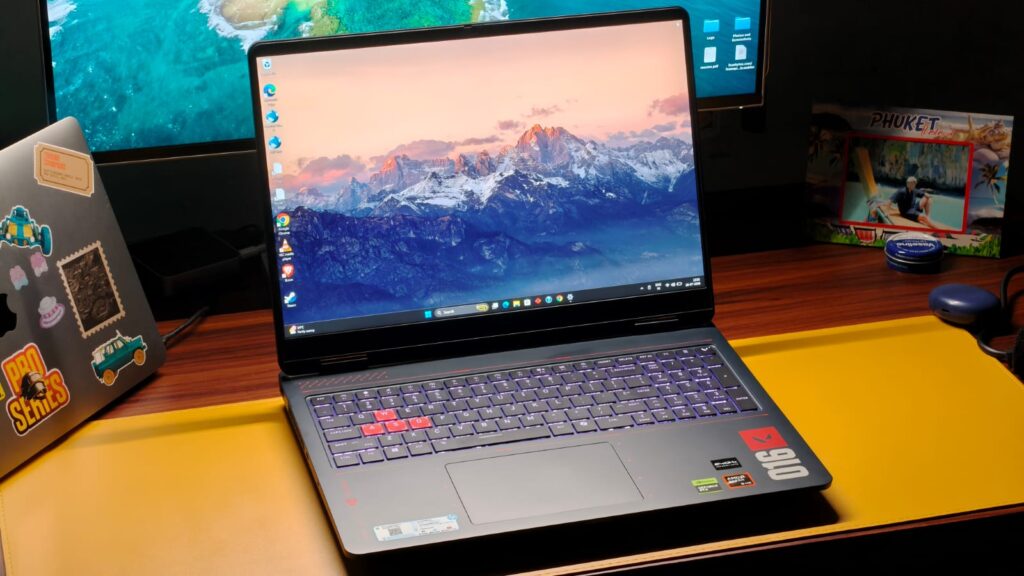
Playing PC games, though, isn’t cheap. You need a capable processor, a GPU that doesn’t throttle when you’re in the middle of a fight, and enough RAM to keep all tasks at bay. Not to mention a high-refresh-rate display, which is super important for hitting those headshots. If you’re in the market for a new machine to take your Valorant gameplay to the next level, I don’t see any better machine than the HP Omen 16 Valorant Edition. It’s the company’s top-of-the-line gaming laptop, complete with a Valorant-inspired design, the Ryzen 9 9955HX processor, an RTX 5070 GPU, and, even in this economy, 24GB of LPDDR5X RAM. Naturally, when HP sent over the laptop for review, I was very excited to get my hands on it. But is it worth your money? This review should help you answer that.
HP Omen 16 Valorant Edition Review
Hisan Kidwai
Advertisement
Summary
The HP Omen 16 Valorant Edition is one of the best special-edition laptops, with a really striking yet sophisticated design that pays homage to Valorant. The build quality is solid, and the performance is just next level. I don’t think there is any workload the Omen 16 can’t handle, and even AAA games run smoothly, albeit sometimes requiring DLSS. Rounding things out is a sizeable 16-inch 240Hz display that keeps things fast, and the excellent-feeling keyboard
Advertisement
Design & Hardware
If you love Valorant, there is nothing I can say right now that’ll make you not love this laptop. I’ve tested many limited edition phones, and most times brands just slap a logo on the back and call it a day. That’s not the case with the HP Omen 16. The Valorant inspiration starts with the color. It’s painted VALORANT BLUE, a dark navy blue of sorts that looks very unique among the sea of grey laptops. In the center of the back panel, you’ll find the HyperX logo, which is encircled by the red Valorant logo. I didn’t think this combination would work this well, but it does, and it looks fantastic. But that’s not all. On the back panel’s left side is Valorant written in the iconic font, and the right side lists the game’s maps, along with a small logo.
Open up the laptop, and you’re greeted with the same design cues. The WASD buttons are painted red; there’s another logo on the right and a few other subtle design cues. I think it’s a very faithful attempt at making a special edition laptop that doesn’t go over the top. To confirm, it’s not just me fanboying the laptop; I put it on my Instagram story. Look, I post a lot of new tech to show my friends, and never once have I gotten so many likes on the story as with the Omen 16. People asked me all sorts of things about the laptop, with the main thing being it’s so pretty.
Besides all the Valorant stuff, the HP Omen 16 is made from aluminum. The color finish is matte, so thankfully it doesn’t pick up many fingerprints. However, if you’re like me and eat Doritos while watching a series, please keep your hands away because they will smudge the laptop. I had to give the laptop a thorough clean before taking the review photos. When it comes to handling, the Omen 16 is like a typical gaming laptop. All those powerful internals add weight, 2.47 kg to be precise. I wouldn’t call that too heavy, but carrying around a 16-inch laptop will hurt your back a bit. Still, I was able to take it to my nearby coffee shop for some work without much trouble. If I had to complain, it’d be about the charger, which is a hefty unit and a pain to carry around.
Beyond that, the hinge is a bit wobbly, but it keeps the laptop steady and can be opened with one hand. I also wasn’t worried about the durability since there was almost no chassis flex on the keyboard deck. You can chuck it inside your backpack, and it’ll be fine.
Let’s talk ports. With a gaming laptop, brands can’t get away with bundling just one USB-C port. And fortunately, that’s not the case with the Omen 16. On the left and right sides, there are two USB Type-A 5Gbps ports, coupled with a USB 3.0 Type-C port with charging support and a headphone/microphone combo jack. Is that it, you may ask? To which I’d answer no. There is a USB Type-A 10Gbps port, an HDMI 2.1 port, an Ethernet jack, and a barrel charging port on the back side for easier connectivity.
Advertisement
Keyboard & Trackpad
Given that you’d be spending most of the time using the keyboard when gaming, it quickly becomes an important subject. And as a surprise to maybe no one, the HP Omen 16’s keyboard is very good. Keys have a lot of travel, which I love, and there’s satisfying feedback when pressed. The actuation energy isn’t much, and you won’t be disturbing your colleagues with the sound inside an office. Since this is a 16-inch device, HP also bundled a dedicated number pad row.
While I’m not the biggest fan of this layout as it shifts everything to the left, I can see the appeal for gamers and professionals. In classic gaming laptop fashion, the keyboard has RGB backlighting, which can be configured using the Omen Light Studio app. There are four zones, and you can choose to go all the way in the funky territory if you wish. For me, I’m more of a white-backlit guy to keep everything classy.
Moving over to the trackpad, I have nothing to complain about here, as well. It’s a big, glass-topped surface that does the job when navigating the UI. The surface is smooth enough to not cause much friction. The physical buttons feel nice to press, and the energy required for a press isn’t so much that it causes strain.
Display & Cameras
What’s the one thing about the display that matters with games like Valorant? If your answer was high-refresh rate, then you’d be absolutely correct. HP thinks the same, which is the reason the Omen 16 houses a 240Hz refresh rate screen. It’s hard to put that feeling into words, but there’s some genuine advantage that you will get. Beyond that, the panel spans 16 inches and has a resolution of 2.5K and a 3ms response time.
To hit that 240Hz refresh rate, HP had to go with an IPS panel, which is fine to me. Do I miss the deep blacks and vibrant colors of an OLED display? Yes. Still, the Omen 16’s display is fantastic. Colors feel natural, and watching a movie on that big screen is a delight. I finally got around to watching Ted Lasso, and it was a very enjoyable experience, thanks to the 500 nits of peak brightness. For all my creative friends, the Omen 16’s display does cover 100% of the sRGB color space. So, you can edit videos/photos and not worry about them looking messed up on others’ screens. The anti-reflective coating proved quite capable as well, keeping most of the reflections at bay.
As far as the camera is concerned, it won’t be winning any competitions. It’s 1080p, thankfully, and works well for quick video calls or classes. The sharpness in low light can be missing, and colors are washed out compared to my MacBook.
Advertisement
Performance
It’s no secret that a gaming laptop isn’t just for playing games. It’s also a tool for creative and coding professionals who need the extra horsepower. Under the hood, the HP Omen 16 packs the latest AMD Ryzen 9955HX processor, which has 16 cores and 64 MB L3 cache, and can boost up to 5.4 GHz in demanding tasks. It’s paired with 24 GB DDR5-5600 MT/s RAM and a 1 TB PCIe Gen4 NVMe SSD. Graphics are handled by the RTX 5070 GPU, with 8GB of VRAM. Since you can’t have the thirsty RTX graphics running all the time, and people do need more battery life than just one hour, there’s integrated AMD Radeon 610M graphics for lighter tasks.
It shouldn’t come as a surprise, but the Omen 16 is a very powerful machine. You can throw any workload at it, and it’ll handle it like a champ. I did my usual writing and researching on the laptop, and it never once hesitated when opening another application. Everything felt effortless, and I just couldn’t push the laptop with my office work even if I tried. As this was the case, I also installed Da Vinci Resolve to do a spot of video editing. Even with multiple 4K streams, some advanced effects and color grading work, the timeline preview was pretty smooth, and the render times were some of the fastest in my testing. The same happened when running a long Python script, marked by exceptionally quick compile times. Not to mention how smooth everything feels on the 240Hz display.
Benchmarks, however, are where you see the real power of the Omen 16. In Geekbench, the Ryzen 9955HX scored 2,751 in the single-core test and 18,266 in the multi-core test. The closest competition I have tested is last year’s Zephyrus G14, which ran on the Ryzen 9 HX 370. The Omen 16 scored more than 20% higher in multi-threaded workloads. Moving to Geekbench’s GPU test, the score reached a pretty remarkable 120,517 points.
Gaming & Thermals
It’s time to talk about the things you came here for: gaming. After all, that’s the biggest reason to buy the Omen 16. And it would be a shame to start with anything else except Valorant. There, the Omen 16 delivered easy 250+ FPS on high settings. With Red Dead Redemption 2, I could max out the resolution at 2.5K with very high graphics and still get around 80 FPS. Cyberpunk 2077 was a bit more challenging, pushing the laptop to its very limit. On maxed-out settings, I observed around 50 FPS. If that’s not enough for you, there’s always DLSS. It’s a very clever way to get over 100 FPS without losing much detail. Some purists may argue those frames are not real, but you’d be hard-pressed to find the difference playing on a laptop screen.
I employed DLSS once again, with Indiana Jones: The Great Circle, to get an average of 100 FPS, with 1% lows around 80 FPS. If you’re a racing fan, Forza Horizon and Motorsport both worked flawlessly at highest settings, with RTX reflections turned on. Even Call of Duty fans will be pretty pleased with this setup.
As far as thermals are concerned, the bottom plate is a large intake, and the hot air comes out from the sides and back. Regardless of the game I tested, there were no signs of thermal throttling inside a temperature-controlled room. HP also bundles its OMEN app with the laptop to control the metrics. It has ads, which is something I absolutely despise in a first-party app. They should not have ads. That said, it was pretty good at controlling different metrics of the laptop, and you can manually tweak different aspects of the performance.
Advertisement
Battery Life & Speakers
Battery life is usually the Achilles’ heel of gaming laptops, simply because running all those internals takes a lot of power. The HP Omen 16 tries to combat that with an 83 Wh cell. In my daily use, which is mostly on Chrome, along with some spreadsheet work and YouTube, the laptop lasted roughly 4 hours on a single charge. I wouldn’t call that groundbreaking, but it’s enough to get you through a work session inside a cafe. Fortunately, there’s a fast charger bundled, albeit with a massive one. With it, you can recharge the battery to 50% in 30 minutes. If you’d rather not carry the large brick, the USB-C port supports charging.
I can say almost the same about the speakers, which you get two of. They are decent if you want to watch a quick YouTube video with clear dialogue and vocals. Just don’t expect them to fill a room with music. The highs and lows do get slightly muffled, and the treble was a little less than what I like. They also sounded quieter than my MacBook.
Verdict
At ₹299,990, the HP Omen 16 Valorant edition is certainly a premium laptop, but for the right person, I believe it’s a no-brainer. I think it’s one of the better special edition laptops, with a really striking yet sophisticated design that pays homage to Valorant. All the little details are excellent. The build quality is solid, and the performance is just next level. I don’t think there is any workload the Omen 16 can’t handle, and even AAA games run smoothly, albeit sometimes requiring DLSS. Rounding things out is a sizeable 16-inch 240Hz display that keeps things fast, and the excellent-feeling keyboard. I do think the speakers could have been better, but that’s a tradeoff with most gaming laptops.
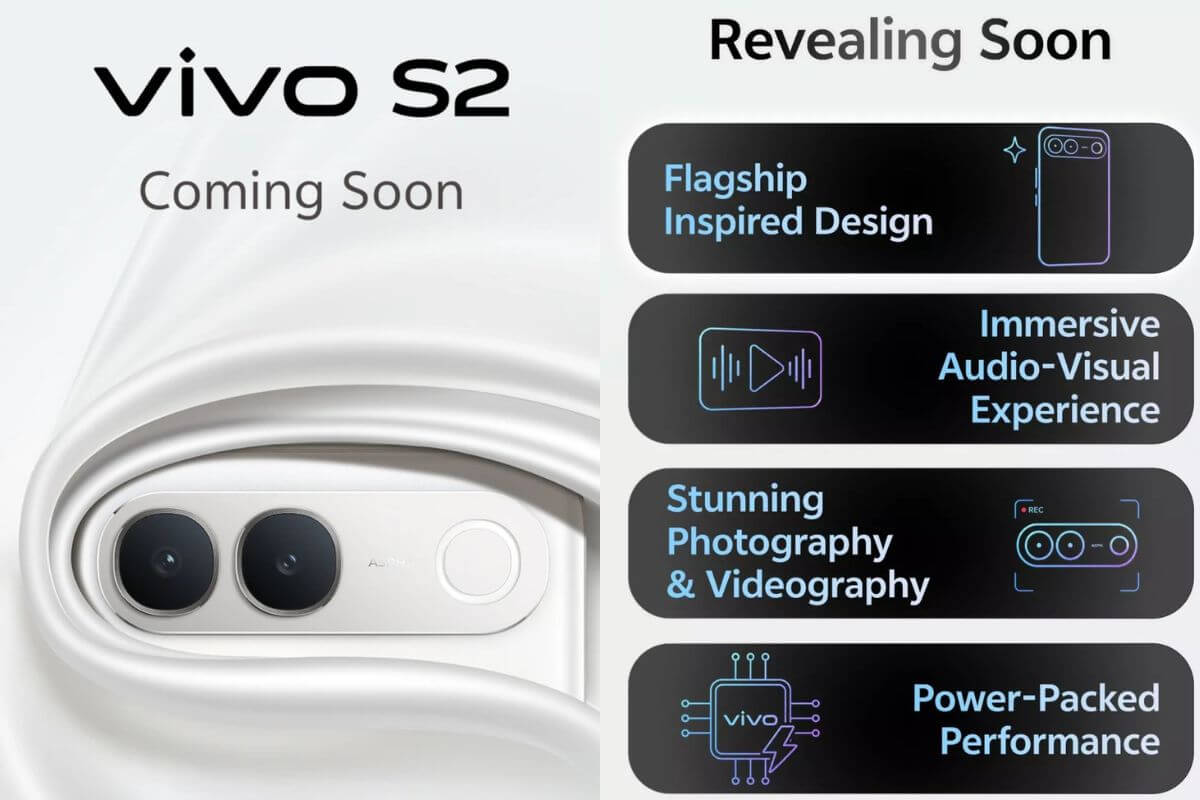
According to reports, Vivo has started preparations for launching its S series phones back in India with the release of the Vivo S2 smartphone. While Vivo hasn’t officially confirmed a release date, some reports indicate the phone could launch on August 6th, with sales expected to begin on August 11. This would mark the revival of the S series of phones in India following the debut of the Vivo S1 phone back in 2019. Reports have also given an early look at its design while revealing details about its expected specifications, color options, and launch plans.
Expected Specifications and Camera Features
Leaks suggest the Vivo S2 will feature an OLED display with a refresh rate of up to 120Hz. The phone may use the MediaTek Dimensity 7360 chipset, built on a 4nm process. Reports also suggest the phone will come in 8GB + 128GB and 8GB + 256GB variants. On the camera front, the Vivo S2 is tipped to include a 50MP Sony main sensor. Some information also suggests that the phone would be capable of recording videos in 4K quality through both front and rear cameras.
According to some recent leaks, the Vivo S2 would come with a sleek design. It would have a 3D curved display with narrow borders and a punch-hole selfie camera at the center of the device. On the back side, there would be a camera module in the shape of a pill with two big rings and an LED flash. Unlike many smartphones, the camera module matches the rear panel color for a more seamless finish. Vivo could offer the phone in Sapphire Blue, Regal Bronze, and Silk White. Its design closely resembles the Vivo X300 FE. Vivo has not shared any battery details yet. However, one report suggests the Vivo S2 may pack a 7,000mAh battery. This information is still based on leaks and awaits official confirmation.
Expected Price of Vivo S2
The Vivo S2 could target India’s premium mid-range smartphone market. It might cost anywhere between ₹40,000 and ₹50,000, though Vivo has not yet officially announced its pricing. Some leaks also reveal internal listing prices, but they may differ from the final retail price. On launch, the Vivo S2 will challenge the OnePlus Nord 6 and the Motorola Edge 70 Pro smartphones. It will also take on the Realme 16 Pro series and Vivo V70 FE.

























![How far can I walk from my house surviving only from money I find on the ground? [PART 1]](https://wordupnews.com/wp-content/uploads/2026/09/1788864064_maxresdefault-80x80.jpg)































You must be logged in to post a comment Login