

If there’s one thing that Americans can unite behind, it’s anxieties over artificial intelligence.
Tech
3 Common Problems With Daikin Mini Split HVAC Systems



Historic homes constructed before the invention of modern conveniences like air conditioning still possess unique charm and timeless benefits. They often offer solid build quality that has held up for decades or even centuries, ornate details and architecture rarely found in modern homes, and a sense of history that new construction lacks. Depending on where you live, however, they can also be very warm in the summer.
It’s often extremely difficult to add air conditioning to older homes because they don’t have ductwork in place. Sometimes there’s not enough space to add ductwork, and it can also compromise the preservation of historic buildings. Instead, HVAC experts often recommend using ductless mini-split HVAC systems. These systems can heat and cool individual rooms or zones using an outdoor compressor that is connected to indoor units. These units are typically mounted on a wall or ceiling, and they don’t require ductwork. They can be expensive, but are often more efficient than traditional HVAC systems. They also avoid the headaches that come with window units, which have to be installed annually in every room you want to cool.
Daikin provides a wide range of mini-split systems, including single-zone and multi-zone options. Whether you already own a Daikin system or are simply researching options for your home, it’s important to understand both the positives and negatives. Here are three common problems that sometimes plague Daikin mini-split systems.
Coil Leaks

In 2025, public interest law firm Migliaccio & Rathod LLP disclosed that it was investigating reports of indoor evaporator coil failures in Daikin mini-split systems. These failures, which reportedly happen prematurely and sometimes only a few years after the systems are installed, can result in both water and refrigerant leaks.
Both customers and HVAC technicians report leaks from the U-bends of indoor coils. The warranty sometimes covers replacing these coils, but customers still experience new leaks after replacement, along with labor costs not covered by the warranty. Technicians also recharge the system after coil replacements, which results in another charge for customers.
If you notice water leaking from an indoor unit, there are several steps you can take. First, make sure the unit is level so it can drain properly. Next, check the condensation drain line to be sure it’s not clogged, which is a common problem. Also, a dirty air filter may cause the coil to freeze, resulting in a leak when the ice melts. If none of these issues fix the problem, call in an expert to examine your system. If you’ve had several coil failures or leaks, Migliaccio & Rathod encourages owners to explore their legal rights to replacement or compensation.
Build-up in the streamer unit

Daikin Mini Split HVAC systems are complex, and it can be tough to pinpoint the problem. Daikin attempts to simplify the process with indicator lights and error codes, but you may not always understand what the system is trying to tell you. If you see an orange light appear on an indoor unit, it often indicates an issue with the streamer unit.
The streamer unit is an air-purifying element that can eventually get clogged with dust and other pollutants. When that build-up happens, the indoor unit displays an orange light to indicate that maintenance is required. When this happens, users can remove the streamer unit to clean it. Follow the instructions in your manual. If you don’t have the manual, experts recommend soaking it in cold or lukewarm water for about an hour, then wearing rubber gloves and using a soft cloth to clean the unit. Wash and drain it, then let it dry for about 24 hours. Once you’ve replaced it, you may need to reset the indicator light to shut it off.
Unit turns off unexpectedly
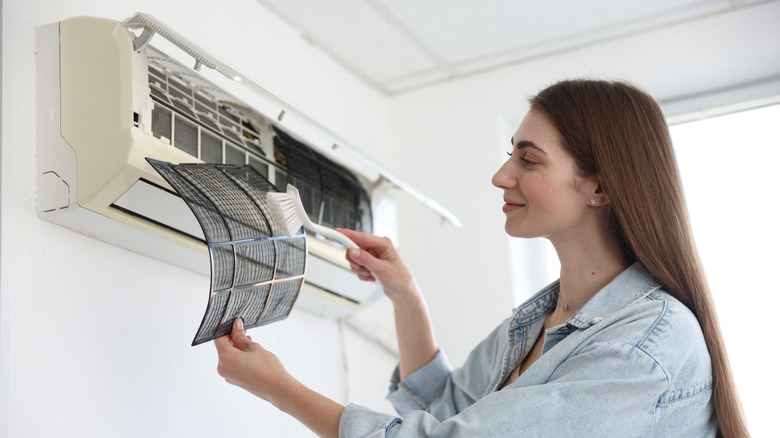
It’s Murphy’s Law — if your HVAC unit is going to go on the fritz, it will happen on the coldest or hottest day of the year. If you find yourself sweating on a 90-degree day because your Daikin mini-split system keeps shutting down unexpectedly, or it won’t turn on at all, there are several things you can try before making an expensive service request.
Your A/C may be turning itself off to protect itself from damage from a myriad of issues, including a dirty air filter, one of the most common problems that arises with all different types of air conditioning systems. Inspect your filter and replace it if need be. If that doesn’t do the trick, check for leaking water, which could indicate a clogged drain line. If your system is not draining properly, it’s designed to shut off to prevent water damage. The problem could also be electrical, so check your electrical panel for tripped circuits (but leave inspection of internal loose wires to a licensed professional).
Your Daikin system likely also displays an error code when it encounters a problem, which can certainly assist in troubleshooting. You can check your owner’s manual for information, but the system may display error codes with a sequence of flashes on the indoor unit’s front panel. The sequence lines up with a specific code — for example, one flash means there’s a fault with the indoor unit’s control board, and you should try resetting the breaker. Ultimately, when in doubt, call a technician for an official diagnosis and solution.
Continue Reading


Saudi Arabia’s first domestic car brand showed its opening pair of production vehicles this weeks, at the new CEER Manufacturing Complex in King Abdullah Economic City. CEER is a joint venture between the Public Investment Fund and Foxconn, and the EXOBOT collection starts with a long, low sedan and a slightly shorter SUV that share one electric platform, the same 112 kWh battery, and the same 800 volt electrical layout. Five more models are planned by 2030, some smaller and some with other power sources, but these two flagships are the ones the company is putting on the road first.
The cars have a sharp wedge profile, with the nose thrust forward so near to the tarmac and the cabin rising up toward the back. Rob Melville, a McLaren veteran, designed them with a 2.4-meter windshield tilted back at a 15-degree angle, thin light bars made of 32 vertical elements to commemorate Saudi unification year, and forged aluminum wheels with triangular cutouts inspired by traditional Lahej architecture. Lower door glass is reversible, allowing it to shift from tinted to opaque, and then there are the distinctive doors, known as Shahin Wing Doors. They’re nearly three meters long, swing up in a 60-centimeter arc, and leave you with a pillarless entrance that looks more like a concept car than a production vehicle.
Sale

LEGO Speed Champions Bugatti Vision Gran Turismo Hyper Sports Car 77253
- CAR TOY FOR KIDS – Young car fans build a legendary ride with the LEGO Speed Champions Bugatti Vision Gran Turismo Hyper Sports Car (77253) building…
- ICONIC BUGATTI DETAILS – The completed build is packed with authentic details from the car created by Bugatti for the Gran Turismo video game in…
- DRIVER MINIFIGURE & ACCESSORIES – Includes a driver minifigure wearing a Bugatti outfit and helmet with a wig and wrench accessory that can be…
The sedan measures 5.26 meters long, 2.1 meters wide, and 1.43 meters tall. The SUV is 5.02 meters long and the same width, but it stands 1.69 meters taller since it has more than 11 inches of ground clearance. Both automobiles have a wheelbase of 3.2 meters. The First Edition models have a tri-motor all-wheel-drive system that produces 850 horsepower and 1,000 Nm. That sedan will accelerate to 100 km/h in 2.6 seconds and can reportedly travel up to 670 km on a single charge utilizing the NEDC cycle. The matching SUV takes somewhat longer to reach 100, but still does it in 2.9 seconds, despite having a slightly lower stated range of up to 560 kilometers. If you upgrade to additional power, you’ll receive 1,111 horsepower and 1,500 Nm, which reduces the time to 2.1 seconds for the sedan and 2.4 seconds for the SUV, with top speeds of 250 km/h and 210 km/h. Oh, and charging from 10% to 80% will take less than 30 minutes, with a peak rate of approximately 250 kW.




Heat is something they take extremely seriously, because it is not an afterthought, but a priority. They claim that their Halo Cooling technology can reduce cabin temperature from a blistering 65 C to a considerably more comfortable 32 C in just ten minutes. They’re also installing special foils, quadruple silver-coated glass, dual air conditioning units, and an aerodynamic roof to keep the heat out. All of this is part of a package that includes Rimac electric drive hardware, seven airbags, an aluminum space frame, and cell-to-pack batteries (which allow for additional interior space). Hyundai Transys plans to start supplying integrated drive units in 2027, and the business has even licensed some BMW component technology.

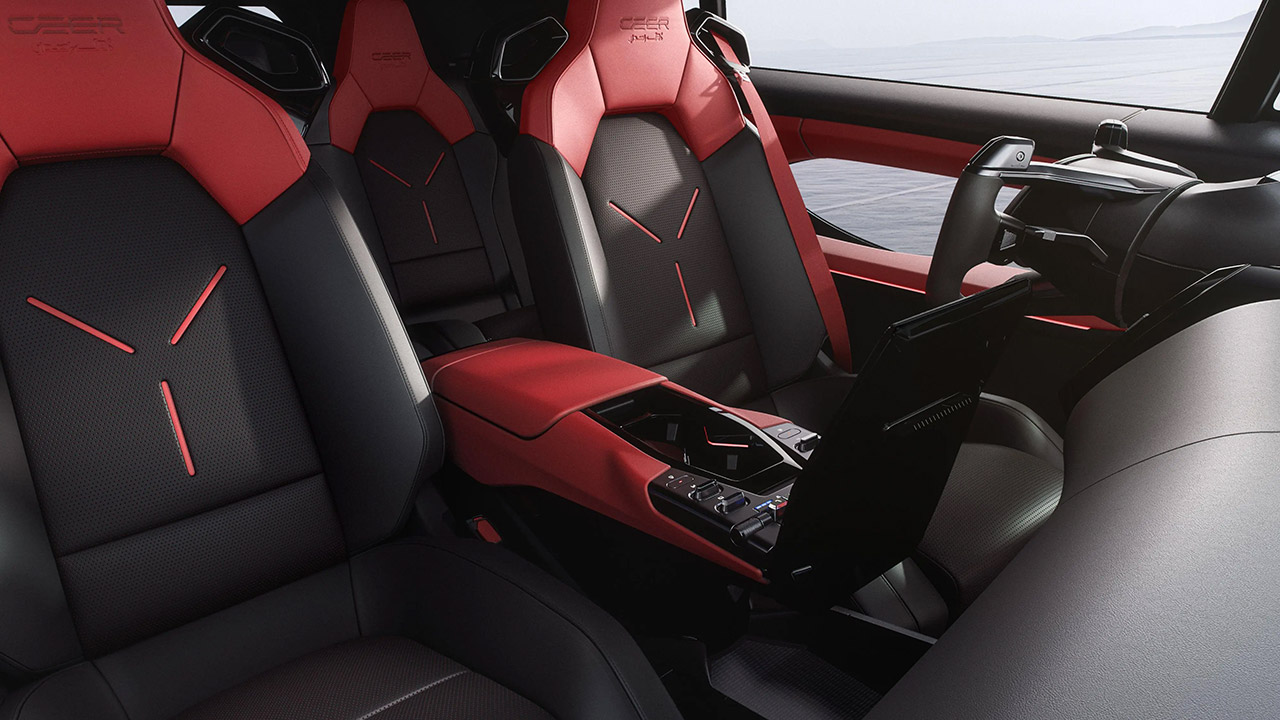
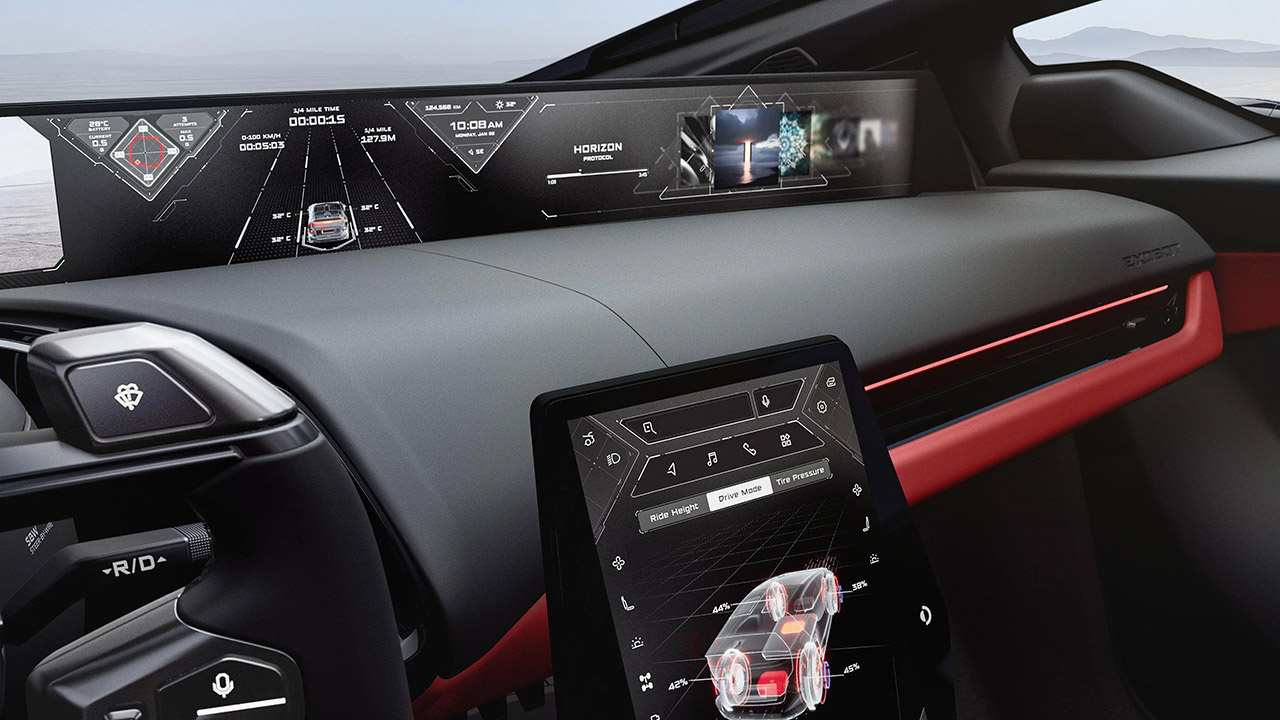
Inside the cabin, the major feature is a giant 48-inch curved 8K display that runs from pillar to pillar, a 10.4-inch center control panel, and an 8-inch screen for the passengers in the back. Steering is accomplished via a yoke, with steer-by-wire technology reducing lock-to-lock travel from 400 degrees to a considerably more manageable 160 degrees. There is also rear-wheel steering and adaptive air suspension. The voice assistant supports Arabic and English, and the sound system is rather wild, with exciters for 360-degree playback. You can choose from three factory-fitted scents to set the mood, and there are over-the-air upgrades, which allow you to add features later without having to return to the dealer. Standard highway aid technology includes hands-free driving, automated lane changes, and point-to-point navigation. To top it off, there’s a companion app that allows you to monitor charge status, interior temperature, and even remotely park your car.

Production will remain inside the local confines of the King Abdullah Economic City plant, as CEER envisions their major automotive manufacturing in the Middle East. Localization targets are scheduled to rise to 45 percent of local content by 2034, after which they promise orders would be fulfilled and delivered within weeks. The first deliveries are scheduled for 2027, after which they will be distributed throughout Saudi Arabia and the surrounding markets. The First Edition vehicles have a really neat collection of standard luxuries, including red and black Nappa leather, some great trimming, and a numbered plaque that’s a reproduction of the VIN, just to add that bit of exclusivity. As for the pricing, well, let’s just say that they’re keeping that under wraps for now. For a country that has never made its own passenger automobiles, this is an audacious first effort: it is long, wide, fast, and designed to survive the local climate, which is where it will be used the most in the real world.
[Source]
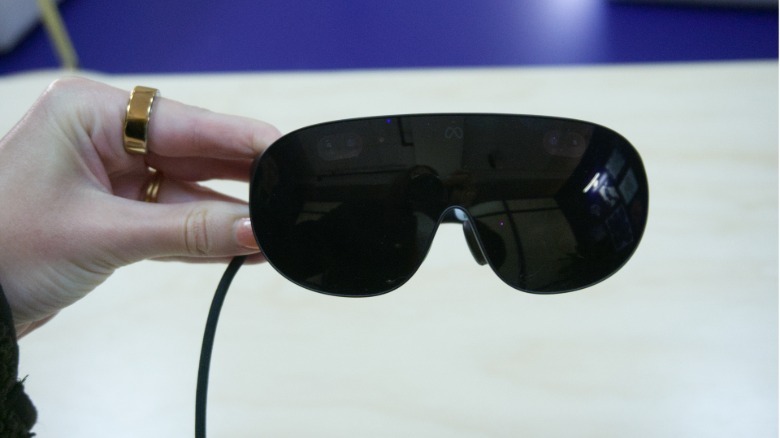
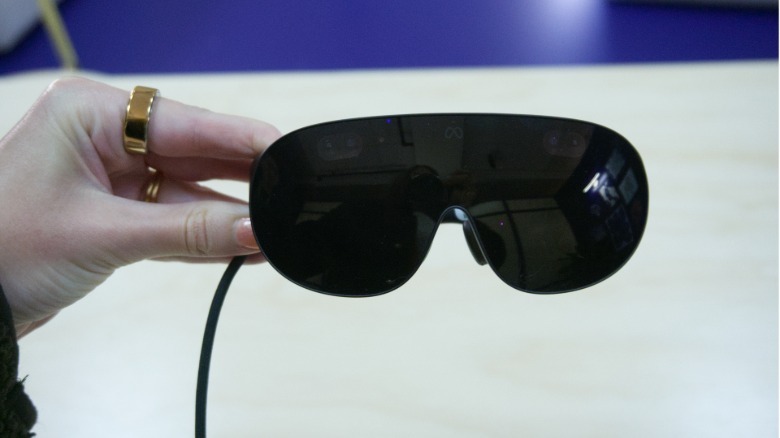
It’s a bit of a strange moment for VR. While Meta once championed the industry, it’s been closing studios and waffling on the metaverse (a word I didn’t hear once in my demo, by the way). And while it’s announcing some new games alongside the VR glasses, including the latest iteration of Beat Saber, I don’t think gaming will be a primary use case.
Instead, Meta seems to be positioning its VR glasses as more of an entertainment and productivity device. I was able to watch some 3D content — a Billie Eilish concert and an NBA game — that was specifically filmed for the device and it felt more immersive than even the typical VR viewing experience.
 Karissa Bell for Engadget
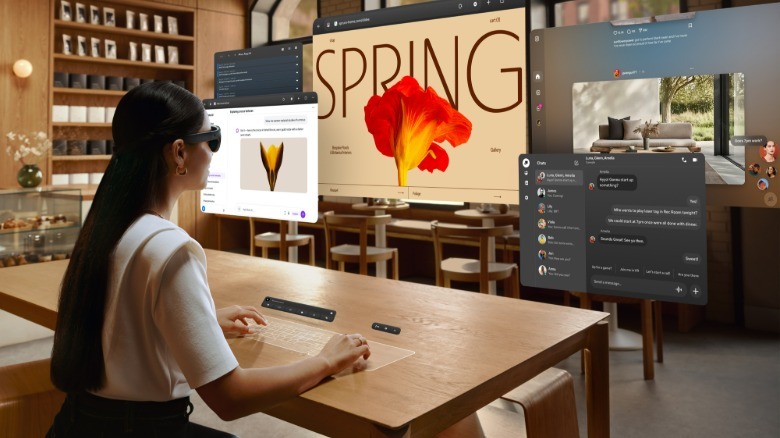
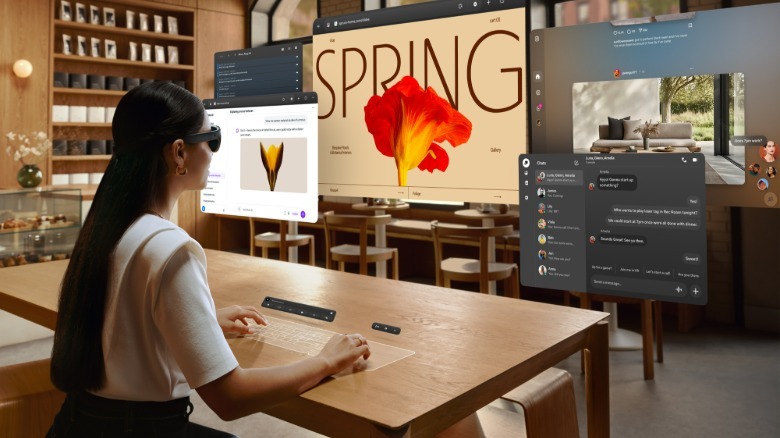
But I was more intrigued by how Meta is thinking about productivity. You can connect the glasses to a Mac or PC to use as a remote desktop. I tried this out with a Surface laptop. The laptop’s display was dark but I could see a three-window setup in front of me, with the ability to reposition the windows or even move into an ultrawide mode.
There’s also a somewhat confusingly named “Surface Keyboard” that turns any flat surface in front of you into a keyboard and trackpad. All I had to do was lay my hands on the table and a virtual keyboard and trackpad appeared.
The keyboard was “full-sized” according to Meta, and when I looked at it alongside my hands it did seem close to the dimensions of the laptop keyboard I’m currently typing on. But something about the perspective made it feel a little smaller and more cramped. Plus, the lack of haptic feedback made the experience feel a bit odd. I was still able to type out a few sentences with relatively little effort, though, so it might feel more natural over time.
 Meta
Meta
Still, I’m a little skeptical that people want to work this way. Due to the relatively limited field of view, I had to physically turn my head around to see the contents of each window and couldn’t see all three at once. But I also spend much of my laptop time writing in Google Docs and reading web pages, tasks that aren’t necessarily enhanced by the immersive environment in VR. I could see how vibe coding or design-focused work might benefit from this kind of setup.
In some ways, the Meta VR Glasses feels like the company’s way of trying to make VR hardware more broadly appealing. By emphasizing “immersive entertainment” and productivity, Meta can now reach people who are intrigued by something like Android XR (or even the Apple Vision Pro) but never saw much utility in a Quest headset. It also helps that hardware advancements made VR in a glasses-like form factor possible in the first place.
I’ve only ever been a casual VR user, but I think it’s an approach that makes a lot of sense in 2026, even if it might be a disappointment to some VR fans. I also expect we will likely get even more news and updates about upcoming content from Meta over the next few months before the Meta VR Glasses’ expected ship date next spring.
Global demand for electricity is forecast to keep on rising in the coming years, and researchers are exploring a variety of new ways to meet that demand. Nuclear fusion is seen by many as a promising new avenue for development, and a string of startups are racing to be the first to commercialize the emerging technology. In late 2025, researchers in Japan claimed to have solved one of fusion energy’s biggest mysteries, but there are still plenty of hurdles that startups face before fusion plants can be built.
Despite the challenges, some startups have drawn up plans to begin construction of their plants within the next decade. One of the leading startups is Commonwealth Fusion Systems (CFS), which recently announced that it had secured new investment during its latest funding round. That investment came from Hyundai Motor Group, the company that’s responsible for the Hyundai and Kia car brands, as well as the upmarket Genesis brand.
CFS did not disclose the exact amount that Hyundai committed to invest, but said that the deal came as part of a larger $1 billion funding round. In total, the startup has attracted roughly $4 billion in funding from various investors, including Mitsubishi Corporation, Google, and the Italian oil company Eni.
In a September 2026 press release, CFS CEO and co-founder Bob Mumgaard said the latest deal with Hyundai was “an important component to helping us scale our ARC power plant business,” adding that the Korean company’s “expertise and track record of building power plants in Korea and around the world” would be particularly beneficial.
Hyundai has various other investments in power plants and infrastructure
Mumgaard stated that his company plans to “put fusion energy on the grid in the early 2030s,” with its initial power plant being built in Virginia. The state has an especially high demand for electricity, as it already houses more data centers than anywhere else on Earth.
In the same press release, Executive Vice President of Hyundai Motor Group Hokeun Chung said that “CFS has demonstrated strong technical progress toward commercial fusion energy,” and stated that he believed “fusion energy has the potential to play an important role in addressing growing global energy demand while supporting a more sustainable future.”
Fusion energy is far from the only non-automotive technology that Hyundai Motor Group has invested in. The company already makes a diverse array of products besides cars, including everything from high-speed trains and tanks to bridges, apartment buildings, and luxury resorts. It is also involved in the construction of several nuclear power plants that are being built in Europe, with major projects in Bulgaria, Slovenia, and Finland.
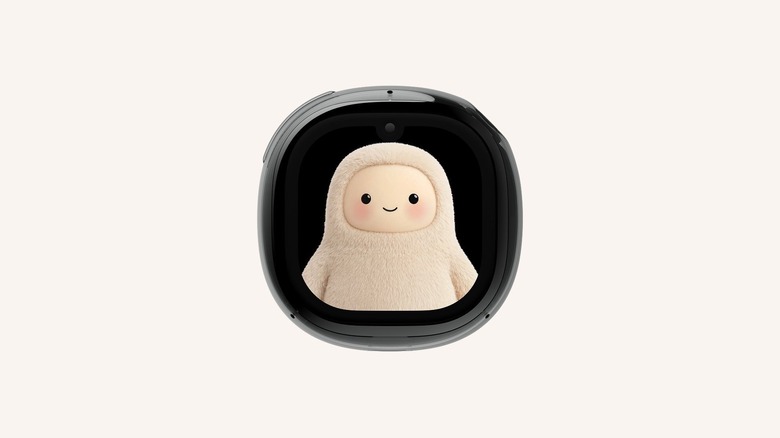
Mark Zuckerberg has revealed the device on stage at Connect.
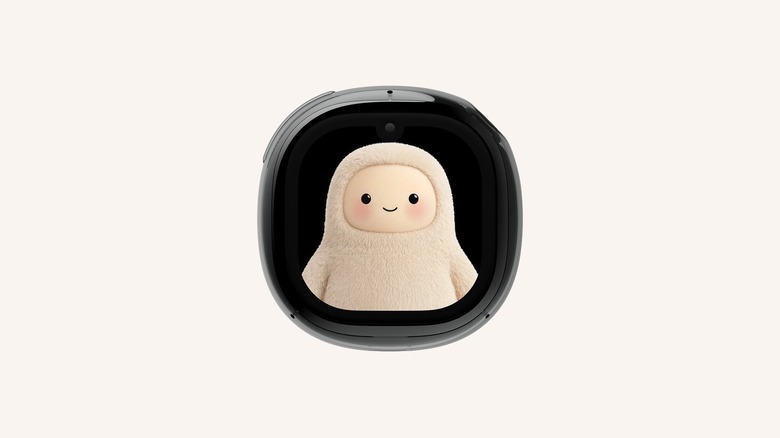
Meta has revealed a Tamagotchi-like device on stage at its Connect event, except instead of a digital pet, it contains the company’s Muse AI. During the demo, Mark Zuckerberg showed how you only have to tap on the “Muse Charm’s” fingerprint sensor at the corner to start interacting with the AI. Its screen shows a small animated and interchangeable avatar as the visual representation of Muse. Zuckerberg says Meta “packed the whole Muse experience, including the real-time voice and avatar stack into something that fits on a keychain and is always available to talk to.”
The company still has to finalize the Muse Charm’s components and design and has only built a few units so far. However, as you might have already guessed, it is aiming to get the device ready to ship in time for the holidays this December. Zuckerberg didn’t reveal much about it during Connect, but he said Meta will share more details about it soon.
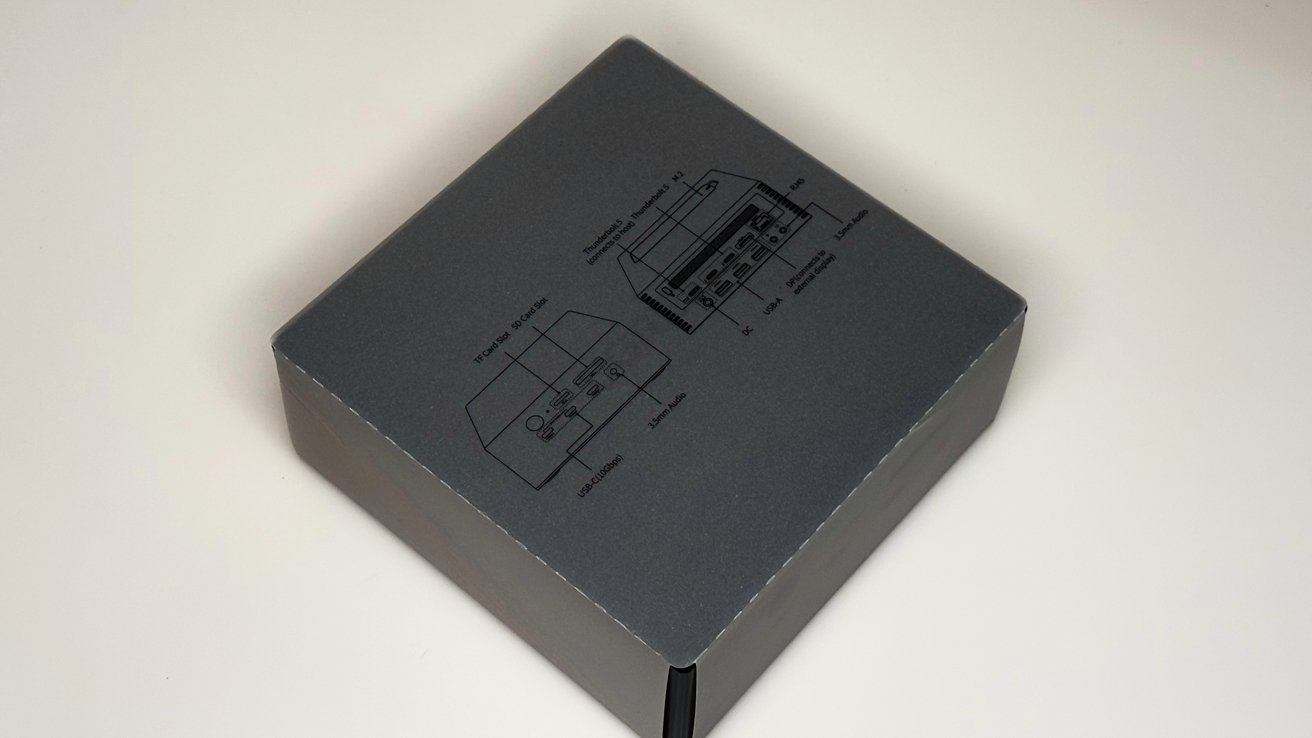
The Thunderbolt 5 docking station market is very crowded, but at a street price of about $350, the uGreen Revodok Maxidok 17-in-1 stands out, with an excellent price to features balance.
A laptop is a compromise between power and portability. The trade-off is usually ports, with thin notebooks like the MacBook Pro offering only a handful of connections.
A Thunderbolt dock solves that by turning one port into many. The Revodok Maxidok pushes that idea about as far as it currently goes, with Thunderbolt 5 speeds and a built-in SSD slot.
uGreen’s dock lineup spans USB-C hubs through to Thunderbolt 5 models. The 17-in-1 sits at the top of the current range.
uGreen Revodok Maxidok 17-in-1 review: Specifications
| Host interface | Thunderbolt 5 (up to 120Gbps) |
| Compatibility | Thunderbolt 5, Thunderbolt 4, USB4, USB 3.x; Mac and Windows |
| Max display output | Single 8K at 60Hz, or dual 6K at 60Hz |
| Video ports | 1 x DisplayPort 2.1 (8K at 60Hz), plus video over Thunderbolt/USB-C |
| SSD slot | 1 x M.2 NVMe PCIe Gen4 x4, up to 8TB (tool-free access) |
| Power | 1 x DC-in |
| Total power | 240W |
| Laptop charging | Up to 140W (requires Power Delivery 3.1) |
| Other charging | 2 x Thunderbolt 5 at 15W each, 2 x USB-C at 60W combined |
| Thunderbolt 5 | 1 upstream (to laptop), 2 downstream (to peripherals) |
| USB-C | 3 x USB-C (10Gbps), front |
| USB-A | 3 x USB-A (10Gbps), rear |
| Display | 1 x DisplayPort 2.1 |
| Ethernet | 1 x 2.5 Gigabit Ethernet |
| Card readers | SD 4.0 and TF (microSD) |
| Audio | 1 x 3.5mm combo jack (front), plus audio in/out (rear) |
| Dimensions / Weight | Not listed on the product page |
| Price | $499.99 MSRP (discounted to $390 at time of writing) |
uGreen Revodok Maxidok 17-in-1 review: Design and ports
The Maxidok uses a two-tone metal chassis, with ports split across the front and rear faces. The front holds the most frequently accessed connections, while the back handles the permanent desk setup.

uGreen Revodok Maxidok 17-in-1 review: The box
On the front are three USB-C ports at 10Gbps, an SD 4.0 and TF card reader, a 3.5mm combo audio jack, and a power button. Power buttons are uncommon on docks, and it is a nice touch.
The rear carries the two Thunderbolt 5 downstream ports, the single Thunderbolt 5 upstream port for the laptop, and a DisplayPort 2.1 output. It also has three USB-A ports at 10Gbps, 2.5 Gigabit Ethernet, separate audio in and out jacks, and the DC-in for the power supply.

uGreen Revodok Maxidok 17-in-1 review: The front ports
Underneath is a cover, hiding the M.2 SSD slot for storage. We don’t normally recommend getting faster drives for docks or network attached storage. The latest crop of Thunderbolt 5 docks is an exception.
Spend the extra money for a PCI-E 4 M.2 SSD. While you still won’t quite get native speeds from the drive, when connected to a Thunderbolt 5 host, you will see more than 3 gigabytes per second transfer.
uGreen Revodok Maxidok 17-in-1 review: Thunderbolt 5 and performance
The headline feature is Thunderbolt 5, the host connection to the notebook. It supports data transfer at up to 120Gbps, which uGreen notes is more than double the bandwidth of Thunderbolt 4.
Thunderbolt 5 is the latest version of Intel’s high-speed connection standard. Crucially, it is backwards compatible, so the dock also works with Thunderbolt 4, USB4, and older USB 3.x devices, just at their own lower speeds.

uGreen Revodok Maxidok 17-in-1 review: Rear port view.
For Mac users, this matters because the latest Apple Silicon MacBook Pro models with M5-series chips support Thunderbolt 5. Plugging into this dock would unlock the full bandwidth on those machines.
Older Macs with Thunderbolt 4 or Thunderbolt 3 will still work, but at their respective lower bandwidths. Obviously, the dock does not add capability the host Mac does not already have.
This only really matters if you’re using the SSD, or need to connect three monitors through the dock, though.
uGreen Revodok Maxidok 17-in-1 review: Displays
The Maxidok can drive a single 8K display at 60Hz, or two 6K displays at 60Hz. There is one dedicated DisplayPort 2.1 output, with additional video carried over the Thunderbolt and USB-C connections. Adapt as you will.
There is also a caveat for triple-display setups. Extended mode across three screens is only supported on host laptops and computers with Thunderbolt 5 ports.

uGreen Revodok Maxidok 17-in-1 review: Small compared to its power brick and a Mac mini.
For Mac users specifically, the number of external displays a Mac can drive depends on its chip. Entry-level Apple Silicon chips have limited external display counts, so the dock’s multi-display ceiling likely exceeds what some Macs can actually use, if you don’t have a MacBook Pro.
I can confirm that the dock works fine on Windows. This is AppleInsider though, so that wasn’t the main testing platform.
uGreen Revodok Maxidok 17-in-1 review: Storage and charging
A key differentiator is the built-in M.2 NVMe slot. It accepts a PCIe Gen4 x4 SSD up to 8TB, and uGreen says it can be accessed without completely disassembling the dock, which is a nice change.
This effectively folds a fast external drive into the dock itself. For creative users working with 4K footage or other large files, having that storage built into the desk setup is convenient.
SSDs used for testing included a Samsung 990 Evo Plus drive and a Samsung SSD 9100 Pro 1TB drive.

uGreen Revodok Maxidok 17-in-1 review: You can add an M.2 drive for added storage.
The manufacturer says that transfer speeds peak at 6.2 gigabytes per second from the drive. That’s never a real number, no matter what manufacturer is saying it.
In the real world, I got about 5.3 gigabytes per second from a M3 Ultra Mac Studio, which is close enough when compared to a manufacturer spec.
As far as power goes, the dock provides 240W in total. Up to 140W of that goes to charging the host laptop, though this requires the laptop and cabling to support Power Delivery 3.1.
Initial tests were limited to 100W with the cable supplied by uGreen, to a 16-inch M5 Max MacBook Pro. I swapped out the cable with a known EPR-compatible USB-C cable, and the dock delivered 140W, no problem.
The remaining power is split among the other ports. The two Thunderbolt 5 downstream ports provide 15W each, and the two front USB-C ports share 60W between them.
uGreen Revodok Maxidok 17-in-1 review: A flagship dock for a single-cable desk
The Revodok Maxidok 17-in-1 is built for users who want one cable to do everything, the same as every other Thunderbolt dock on the market since 2016. In 2026, the combination of Thunderbolt 5, 17 ports, built-in SSD expansion, and 140W charging covers a complete desk setup.
The built-in M.2 slot is the feature that sets it apart from most docks. Folding fast storage into the dock removes the need for a separate external drive on the desk.

uGreen Revodok Maxidok 17-in-1 review: Mac mini for scale.
At $499.99, it is a premium product, though it is discounted to $390 in June 2026. That price is justifiable for users with a Thunderbolt 5 Mac who will actually use the bandwidth and the port count.
For Mac users, the value is highest on the newest MacBook Pro models with Thunderbolt 5. On older Macs, much of the dock’s headroom would go unused, and a cheaper Thunderbolt 4, or even an older Thunderbolt 3 dock serves just as well.
uGreen Revodok Maxidok 17-in-1 Pros
- Thunderbolt 5 with 17 ports
- Built-in 8TB M.2 SSD expansion
- 140W laptop charging
uGreen Revodok Maxidok 17-in-1 Cons
- Premium price
- Full benefit requires a Thunderbolt 5 Mac
- Some monitors need USB-C to DP or HDMI adapters
Rating: 4.5 out of 5
While uGreen as of late is more known for network attached storage, they’ve delivered a pretty solid product with the Revodok Maxidok 17-in-1. The SSD speeds are very good, and the price for what you get for the dock is worth it.
Just try to find a SSD on sale. Those prices are rough now.
Where to buy the uGreen Revodok Maxidok 17-in-1
The uGreen Revodok Maxidock 17-in-1 is available from Amazon for $349.99. It’s also available from uGreen directly, also for $349.90.

A monkey plays a keyboard with a drumstick, and nobody stops to ask if that is really how one works. A male teacher walks into a school and someone decides he must be the gym coach before he says a word.
A Shrinking Share of Male Teachers
Ed Finkel spoke with men across the country about why they went into teaching, and why so many eventually leave. He looked at a new survey of the profession and heard from teachers who described walking into a building and facing assumptions about who they must be before they said a word. Finkel wanted to know what is pulling men away from the classroom, and what a school might do differently to keep them there.
When AI Gets the Basics Wrong
Adam Stone went looking at what is now called baby slop, the wave of AI generated videos aimed at toddlers and preschoolers. He found channels posting thousands of these videos in a matter of months, and some of that content shows scenes that do not line up with how the world actually works. Stone wanted to know what that content is doing to kids who are still learning to tell the difference between what is real and what is not.
Stories Mentioned in This Episode
As Male Teachers Vanish From the Classroom, Schools Look for Ways to Bring Them Back by Ed Finkel
AI Videos Are Warping Early Learning, Teachers Say. Here’s How They’re Responding by Adam Stone
This Week with EdSurge is a weekly podcast from EdSurge. Subscribe to the EdSurge newsletters for more news and analysis on education and technology.

According to a recent NBC News/Decision Desk poll, 70 percent of adults say they are personally more worried than excited about the technology; it’s basically underwater in every area of society with one notable exception: its use in scientific research and medicine.
According to Dr. Dhruv Khullar, a physician at Weill Cornell Medicine and writer at the New Yorker, that optimism is well-founded.
Khullar uses AI tools in his own practice as a physician and writes about their advancements in the medical field. He says that “right now, at least, there’s a generally optimistic view of how AI will change healthcare going forward.”
AI in medicine is nothing new. In 2024, the Nobel Prize in Chemistry was given to researchers who developed an AI model that enabled breakthroughs in predicting protein’s complex structures. As it becomes more ubiquitous, it’s also emerging as a resource for doctors to get second opinions and as a tool to take notes on patient-doctor interactions.
On top of that, Khullar says, it might help unlock new medicines to treat diseases.
Khullar joined Today, Explained co-host Sean Rameswaram to discuss the ways that AI is transforming drug discovery and research, as well as what it still can’t do. They also discuss how to think about AI’s potential in healthcare at the same time as top AI researchers are increasingly warning about the technology’s risk.
Below is an excerpt of the conversation, edited for length and clarity. There’s much more in the full podcast, so listen to Today, Explained wherever you get podcasts, including Apple Podcasts, Pandora, and Spotify.
You’ve been thinking about lifesaving AI innovation. Has AI already started saving lives?
I think it has. This is the fastest I’ve ever seen healthcare take up a new technology. Part of that might be that the healthcare system is so messed up that there’s an appetite for some type of change. It’s unaffordable, it’s inaccessible, it’s inconvenient, the quality is uneven.
There’s at least a hope that AI is going to help with all of these things, and I think it’s already starting to make its way into the healthcare system. Now it’s our responsibility to figure out how to make the most of it without also promulgating some of the downsides.
For those who are unaware, tell us how it’s working its way into the system.
It’s helpful to categorize it into a few buckets, at least for healthcare.
The most rapid uptake, and I think the place that it’s already starting to make a difference, is on the administrative side. Many people who have gone to a doctor recently might have noticed that there’s an AI scribe that’s taking notes now. And people seem to really like it, at least so far. Doctors are able to look their patients in the eye in the way that they weren’t able to when they were poring over their computers and just typing what the patient was telling them.
The second big area is patient navigation. When is your next scan? When’s your next appointment? Do I need to take this medication on an empty stomach or not? There’s a huge opportunity for people, let’s say, who are diagnosed with a serious illness like cancer or heart failure to navigate the system more seamlessly.
The third big area that I’m really excited about is drug discovery. AI is making a huge dent in the early parts of drug discovery.
The last thing that I’m excited about and that I use every day when I’m in the hospital is [AI] as a second opinion. Now instead of having to get a consult or turn to a textbook, AI can be a very, very helpful clinical decision support. It’s not to say that I never consult someone, of course, but that first pass — I’m not sure what’s going on. What are some recent trials that might influence my decision here? Is there something I’m missing? Is there a test that I should be ordering that I’m not ordering? — all those types of things, they start to help with.
The biggest chunk of this positive view of AI and medicine is drug discovery. Tell me more about how that’s going so far and how it might be going in a year, or five, or 10.
I don’t want to leave this conversation and say that we’ve solved the cure for cancer because of AI, but I do want people to know that at least for the early stages of drug discovery — figuring out the very basic steps of is this an interesting molecule? Does it have potential biological applications? — AI is already very helpful for that.
They’re trying to take, basically, what is an infinite number of drug-like molecules that are theoretically possible to be drugs and they’re trying to match that to some disease that’s going on inside a human. And human biology is incredibly complex as well. There’s tens of thousands of genes, hundreds of thousands of proteins, trillions of cells, and you have to match a potential molecule to a potential target within a human.
In the past, a researcher might take years to study a disease or a biological pathway and figure out, okay, this protein seems to be involved. And actually, it might not be involved, it might be involved, it might be disrupted, but not be the causative agent. There’s a lot of uncertainty there, so now AI can take enormous amounts of data, and it can rank various potential targets that seem to be the most likely to be causing a particular disease and give you that short short list of potential targets that may have taken months or years in the past.
So now you know what to attack, but you have to figure out what to attack it with. So you need a molecule, you need to generate a molecule that’s going to fit into that target or disrupt that target in some way.
Now again, AI can scour vast chemical spaces and give you a list of the things that seem to be most likely to be able to disrupt that target. And then it can actually help you generate that molecule in some cases.
So now we have the target. Now we have something that we’re going to attack the target with. And then you have to do something called lead optimization, and that’s the third thing. Lead optimization means you have this lead and you have to optimize it.
“I would make the counterargument that healthcare is ripe for disruption and you don’t even need the frontier frontier models to make it a lot better with AI.”
Now we have to figure out, of all the molecules that seem to be good at potentially affecting this target, which ones are able to be absorbed in the body, which ones are going to get to the right tissue. AI models can predict the most likely molecule to give you that Goldilocks set of properties that’s needed for a safe and effective drug.
As we all know from anyone who’s asked AI to write an email for them or Googled a question, these tools have a certain degree of certitude, even though these tools can just be flat out wrong about stuff. Are you guys worried about that in the field?
Absolutely. And so this is why I think the narrative around AI just replacing scientists or doctors or other workers is incorrect. Because you still need a lot of judgment.
You need to be able to adjudicate the output of these models to figure out what is most promising and what is potentially dangerous. That is going to require wet labs and scientists and reasoning based on prior experience and understanding the context. There’s all sorts of issues around, can you manufacture some of the drugs that are being proposed by these models? So just because it’s set, it dreams something up doesn’t mean you can actually make that thing in the real world.
Some of the drugs that it proposes might actually be toxic in certain ways that it didn’t predict. And of course, then you have to take this thing into clinical trials. You have to recruit l people who are willing to put this medication in their bodies. You have to find out who might benefit, you have to put it through the regulatory process.
That’s why I said that the first part of drug discovery, where you’re trying to figure out how do we get the right drug candidates, what seems most exciting to test further, that’s going to be really accelerated. That whole second half where we actually have to figure out if it works in human biology, that is still going to be in some respects an analog process.
It doesn’t sound like you’re terribly scared that we are like ceding control of our hospitals, of our research facilities, to AI. This is very much in the sort of assistant bucket?
For now it is. And I think one of the challenges is to maintain our agency as these models become more and more sophisticated. As you lean more on these machines, if you’re a doctor, inevitably some of the skills, the critical thinking, the reasoning that we put into coming up with the diagnosis that we honed over the course of years, that can start to atrophy.
These are the types of things that we still need to sort through as we’re implementing more and more AI into the healthcare system.
For the people who just say, shut it all down, this is too dangerous, the risk is far too great, we don’t actually need this, this isn’t doing anything for society, would you make a counterargument?
I would make the counterargument that healthcare is ripe for disruption and you don’t even need the frontier frontier models to make it a lot better with AI.
Even if we wanted to “slow the pace of the frontier,” fine. But there are models from a year or two years ago that could be very helpful in the healthcare setting. When we’re talking about slowing the pace of the frontier and the most sophisticated and potentially dangerous models, fine.
But if we’re talking about shutting down AI and not using it in biotechnology or not using it in scientific research or not using it in clinical care delivery, that’s where I would push back pretty hard.
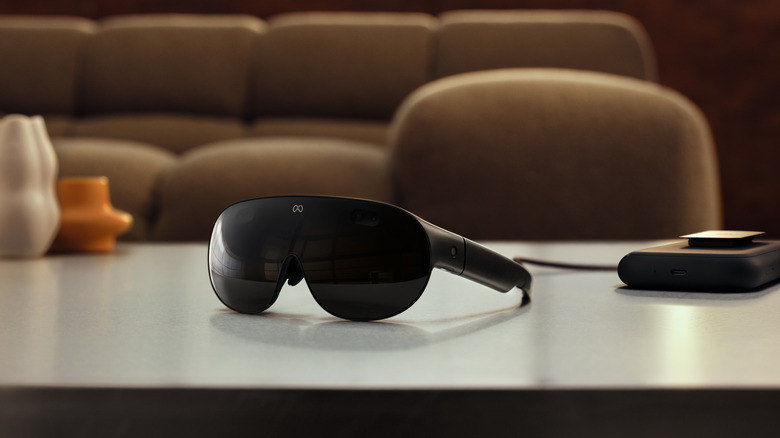
VR glasses, Aviator-style Ray-Ban Meta specs, Ace Attorney in virtual reality and much more.
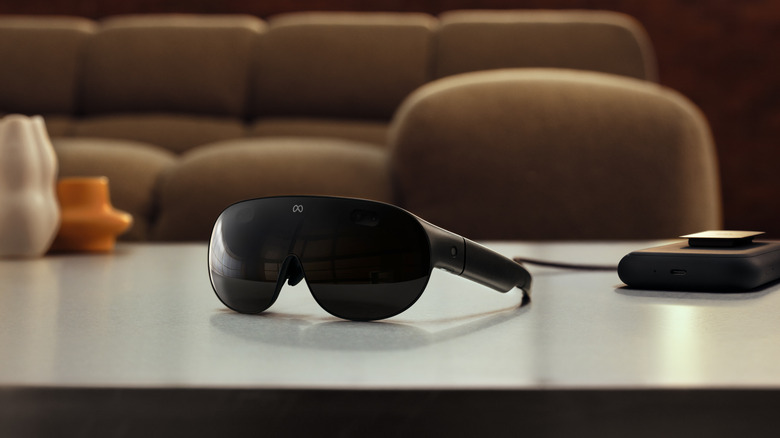
It’s Meta’s turn to reveal new hardware during the always-busy fall season. The company showed off two new types of wearables at Meta Connect, virtual reality glasses and an audio-only set, as well as the third-gen Ray-Ban Meta AI specs.
It announced some updates for Meta Ray-Ban Display while making those smart glasses more broadly available. In addition, Meta revealed a hearing assistance feature for its glasses along with the biggest changes yet for Beat Saber and a raft of entertainment content that’s coming to the VR ecosystem. In addition, Meta is working on bringing the Muse AI agent to its glasses.
Let’s dive into everything the company announced at Meta Connect 2026. You can also check out our liveblog for a real-time breakdown of all the announcements.
Meta VR Glasses

The biggest announcement at Meta Connect was the company’s virtual reality glasses. Rumors back in 2023 suggested that Meta would deploy its first such product in 2027 and it’s sticking to that time frame — Meta VR Glasses will arrive next spring. You might want to start putting some cash aside for them if you’re interested, though, as they’ll cost $1,300.
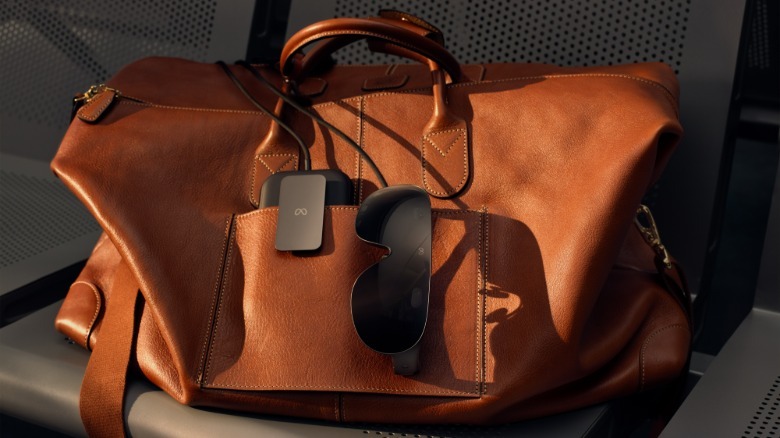
The company says, at around 100 grams, Meta VR Glasses are five times lighter than the Meta Quest 3 headset. The frames are built with magnesium alloy and have pancake lenses. They include full-color passthrough video support and a 5K display. Meta claims they’ll offer “cinema-grade clarity” with support for Dolby Vision and Dolby Atmos spatial audio. The company says it’s the first IMAX Enhanced certified VR device too.
 Meta
Meta
All of the computing is handled by a tethered puck and everything runs on Qualcomm’s Snapdragon Reality Elite chipset. The puck also contains the storage and battery. Meta says the glasses will be able to deliver “up to three hours of continuous high-resolution media playback” on a charge. The puck has support for 45W fast charging too.
At the outset, there’ll be 75 games you can play using hand gestures. The glasses will run every game that’s available for Quest headsets with the help of support for Touch Plus controllers. You’ll be able to stream titles through Xbox Cloud Gaming, though Microsoft is imposing new time limits on that service. There’s the option to connect to other gaming devices wirelessly or via USB-C as well.
 Meta
Meta
True to its metaverse-derived name, Meta sees the glasses as a vector for productivity. You can hook the device up to a Windows PC or Mac and control them with a virtual keyboard and touchpad on a desk or table. You can just use a physical mouse and keyboard too.
Not unlike Apple Vision Pro, Meta VR Glasses will support holographic avatars that you can use in video calls on apps such as WhatsApp and Zoom. Folks who are joining a call on a flatscreen device can see your hologram. When you see another person’s hologram while you’re using the VR Glasses, spatial audio will place their voice in their virtual location.
Of course, the company is integrating Meta AI into the glasses. You can tell Meta VR Glasses what you want to do using your voice. Alternatively, you can control the device with your eyes or hand gestures.
Ray-Ban Meta Audio
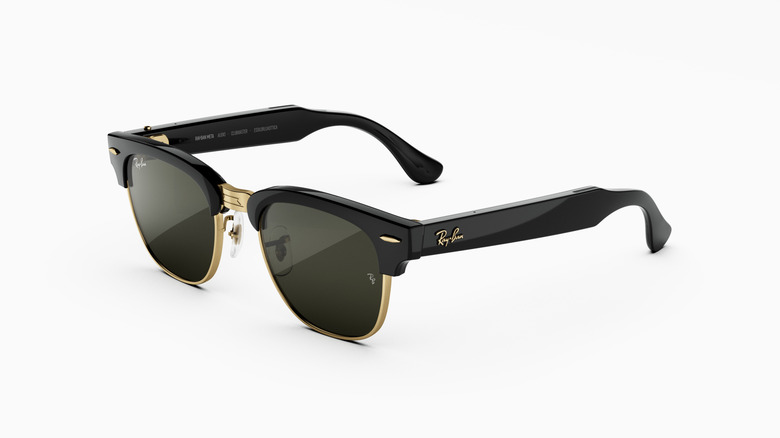
Perhaps in an effort to sidestep the not-unwarranted “pervert glasses” label that many have given to wearables that have a camera, Meta is releasing an audio-only model. The Ray-Ban Meta Audio glasses are, of course, equipped with an AI voice assistant. They support music and podcast playback as well as voice calls. The company says the device will run for up to 12 hours on a charge. The charging case is said to add up to 48 hours of use.
Ray-Ban Meta Audio is designed for all-day wear, the company notes. The glasses weigh 43 grams and have “professionally adjustable temple tips, adjustable or swappable nose pads and overextension hinges.” They’ll be available in a classic Ray-Ban style called Clubmaster and a more rectangular Burbank shape in 23 color and lens combos. The glasses support prescription lenses too.
Pre-orders for the Ray-Ban Meta Audio open today and the glasses ship on October 13. They start at $349.
Ray-Ban Meta Gen 3 and other smart glasses

Meta still does have camera-equipped smart glasses, however. It has refreshed the Ray-Ban Meta with a slimmer design and a button that triggers Meta AI. The third-gen model is said to have a longer battery life than the previous one, with nine hours of usage versus eight. There’s a six-mic array that Meta claims can cut out over 90 percent of background noise for clearer audio.
The 12MP camera supports 3K video capture. The company adds that the cameras on its AI glasses will soon be able to record videos with Dolby Atmos spatial audio. A dynamic photo feature can snap multiple shots and you can pick the best one (or let Meta AI suggest options).
You can now get the glasses in the style of Ray-Ban’s classic Aviator, as well as Zena, a cat-eye frame. The Wayfarer look is sticking around too. Ray-Ban Meta Gen 3 are available starting today in 27 combos of lenses and colors. They start at $449.
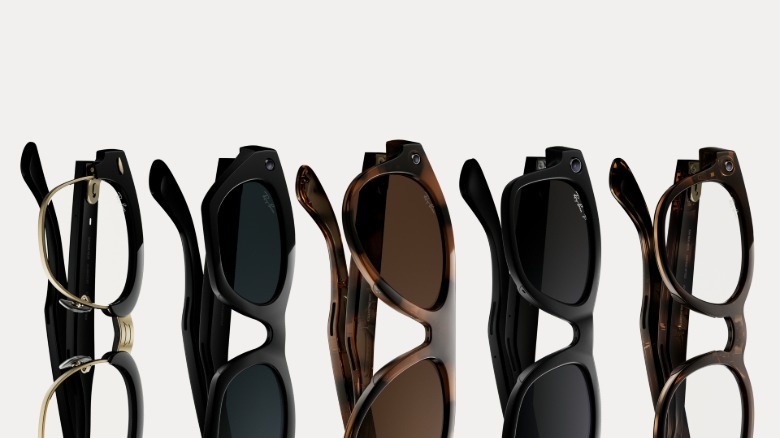 Meta
Meta
There are a bunch of special editions as well. An Aviator version in milky beige with brown Transitions lenses start at $579 and will be available for a limited time. There are new collabs with Kylie Jenner and Blackpink’s Lisa, and those models start at $399. Meta is also releasing new styles for its Essilor Luxottica glasses and bringing them (and other models) to more markets.
On top of all of that, Meta is introducing more models in its own-brand Meta Glasses range. The Meta Adventurer frames now start at $249 with a black frame and gray lenses along with a plug-in case, and there’s also a limited-edition version of the Meta Fury with a clear frame and mirrored lenses. Pre-orders for the former open today and they’ll hit shelves on October 23.
Meta Ray-Ban Display updates
There were updates on the Meta Ray-Ban Display front as well. Meta is bringing this model to more markets and making them more broadly available in the US, where you can now order them online for $799. Folks in the UK and Canada can buy these glasses today for £749 and $1,149 CAD, respectively. Pre-orders are opening today in Germany, France and Italy, where Meta Ray-Ban Display starts at €899. The glasses will be available in those three countries on October 13.
In terms of feature updates, folks in the US and Canada will be able to access cycling and public transit directions in the heads-up navigation tool later this month. Also, instead of turn-by-turn walking directions, the glasses can tell you to turn at a certain landmark that’s in front of you.
Meta Ray-Ban Display will support holograms in video calls too, but you’ll need to capture yourself using the Meta AI app if you want to create your own avatar. This will first be supported for WhatsApp calls in the US this fall.
Through the Meta AI app and Explore (an app you can access on the glasses), you’ll be able to check out an array of web apps. Moreover, Meta Ray-Ban Display will support photo editing on the display, Dolby Atmos video capture, notifications mirrored from your phone and more.
Hearing enhancement feature
Meta is bringing a hearing enhancement feature to its smart glasses. It’s designed more for people who can usually hear fine but might struggle in a noisy environment than hard-of-hearing folks who would benefit more from an actual hearing aid.
The setup flow is similar to the hearing aid feature on Apple’s AirPods — you’ll need to listen to tones in a quiet room so the glasses can tune the settings for you. You can switch this mode on or off by saying “Hey Meta, start hearing enhancement.”
This feature will be available in the US later this year on Meta Glasses, and later on the third-gen Ray-Ban Meta and Ray-Ban Meta Audio. There’s a 30-day trial but the company says it’ll cost a one-off $149 fee after that. Alternatively, it’s included with a Meta One subscription. Meta says the hearing enhancement tool is eligible for FSA and HSA reimbursement.
Beat Saber, Supernatural’s return and other VR games
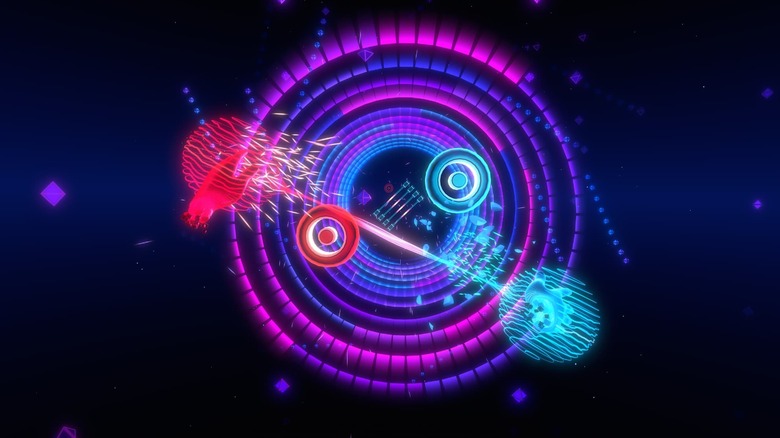
Let’s get into the entertainment side of VR, starting with Beat Saber. Meta-owned developer Beat Games is said to be giving the title its biggest update ever this spring. It includes support for hand tracking, so you’ll no longer need to use Touch Plus controllers to play, though you can still do that if you prefer.
Flux is a new single-player mode in which you can use powers like the Flux Tether. Meta says this “channels power between your palms to slice through notes in time with the beat of pulse-pounding tracks.” Flux, which will be available on Meta VR Glasses and Meta Quest, includes 35 songs from across the Beat Saber landscape at the outset, with more to follow.
Beat Games is also revamping the single-player campaign to include a narrative aspect, fresh missions and a new menu system. The studio is adding a new progression and rewards system as well. This will let you customize the look and sound of the game.
 Supernatural Health
Supernatural will be back on the Meta Horizon Store this fall. A newly independent development team took the reins of the VR exercise platform after Meta made widescale cuts across its VR and metaverse division at the start of the year. Users’ points, streaks and badges will remain intact in the new app. The developers are adding more HD environments, workouts and music along with other upgrades, Meta says.
Elsewhere on the gaming front, heist title Payday: Aces High is coming to Meta Quest 3 and 3S later this year with support for co-op crossplay with the PC VR version. An open playtest starts October 19. A mixed reality version of Tetris Effect is coming to Meta VR Glasses next year with hand-tracking support. Two Point Hospital is on the way to Meta Quest 3 and 3S with hand-tracking support as well.
While fans wait for the first entirely new Ace Attorney game in over a decade, the series is about to make its VR debut. Phoenix Wright Ace Attorney: Dual Destinies (which was first released on the Nintendo DS in 2013) is coming to Meta VR Glasses and Meta Quest next year with support for hand tracking and voice activation, so you can physically point at witnesses and yell “objection!” I’ve gotta say, that sounds like a fun way to confuse people you live with. You can check out Phoenix Wright Ace Attorney: Dual Destinies VR on Meta VR Glasses and Meta Quest next year.
VR movies, sports and other entertainment

Meta is making a bigger push into 3D and VR experiences on its headsets and Meta VR Glasses. Disney+ subscribers (that service just got more expensive in the US, FYI) in certain countries will be able to stream the likes of The Avengers and Black Panther in 3D starting in November.
Meta VR Glasses owners will be able to check out VR Enhanced versions of iconic films like Avengers: Infinity War and Star Wars: A New Hope next spring. Meta says, in the versions of these movies that will be available through a new Disney Immersive Cinema by ILM app, “your surroundings will be transformed with immersive environments, dynamic effects, stunning 3D visuals and spatial audio to feel like you’re not just watching a scene, but living inside it.”
A docuseries called Open Season will debut in the Meta Quest TV app on September 29. This will take you inside the therapy sessions of Golden State Warriors player and four-time NBA champion Draymond Green during the 2025-26 season. This is the first entry in an original series called Meta Presents.
The company says it will offer hundreds of 2D and 3D movies for folks to buy and rent in the US later this year. It will expand the library to more countries by the time Meta VR Glasses are available.
A new National Geographic: Beyond app will feature 180-degree 3D experiences of the natural world. A whole bunch of other streaming apps are available too, including Amazon Prime Video, YouTube, DirecTV, AMC+, Crunchyroll, Plex and Tubi, while Peacock, HBO Max and Paramount+ will offer up 3D titles.
Meta says that, along with being able to dive into sports apps like those from the NBA and MLB, you can check out immersive sports from ESPN. This will include 8K streaming with 180-degree views. Immersive Sports starts with college football this year, and it’ll expand to other sports in 2027. On Meta VR Glasses, you’ll be able to watch more than 100 live sports events each year via Meta’s partnerships with MLB, NBC Sports, TNT Sports and UFC.
One more thing
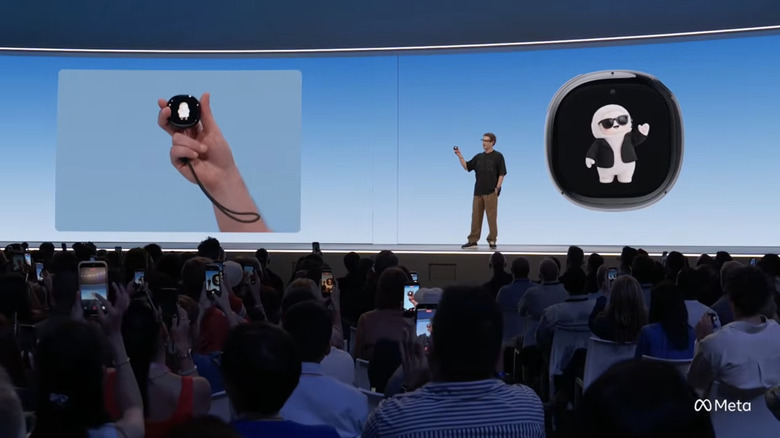
We know barely anything about it, but at the end of today’s keynote, Zuckerberg briefly showed off a new device called Muse Charm. It’s a dedicated piece of hardware that houses your personal Muse Agent with a small display, speakers, mics and a fingerprint sensor. It looks a little like a Tamagotchi, into which, Zuckerberg says, Meta has “packed the whole Muse experience, including the real-time voice and avatar stack into something that fits on a keychain and is always available to talk to.” The company says it’ll have more to share on the device later this year.
One of the more interesting trends starting to emerge in personal technology is a simultaneous divergence of devices designed for individual use and a convergence of the computing systems to which they connect. While we’re beginning to see a much broader range of intelligent form factors and devices, we’re also increasingly seeing them focused on performing AI-powered agentic tasks on our behalf, often through shared platforms.
At Qualcomm’s latest Snapdragon Summit event in Maui, which the company graciously sponsored me to attend, this seemingly contradictory set of developments was on full display. Qualcomm introduced a range of additions to its Snapdragon family targeted at everything from smartphones and computers to several types of wearables.
While each has technologies and capabilities optimized for its particular platform, they all share an increasing focus on AI-powered agents that can complete tasks on an individual’s behalf.
In many ways, it offered a fascinating look at the evolution of personal computing hardware and how very different types of devices are attempting to achieve a shared new set of goals. Just as interesting is how AI agents are becoming the common glue connecting these different device experiences.
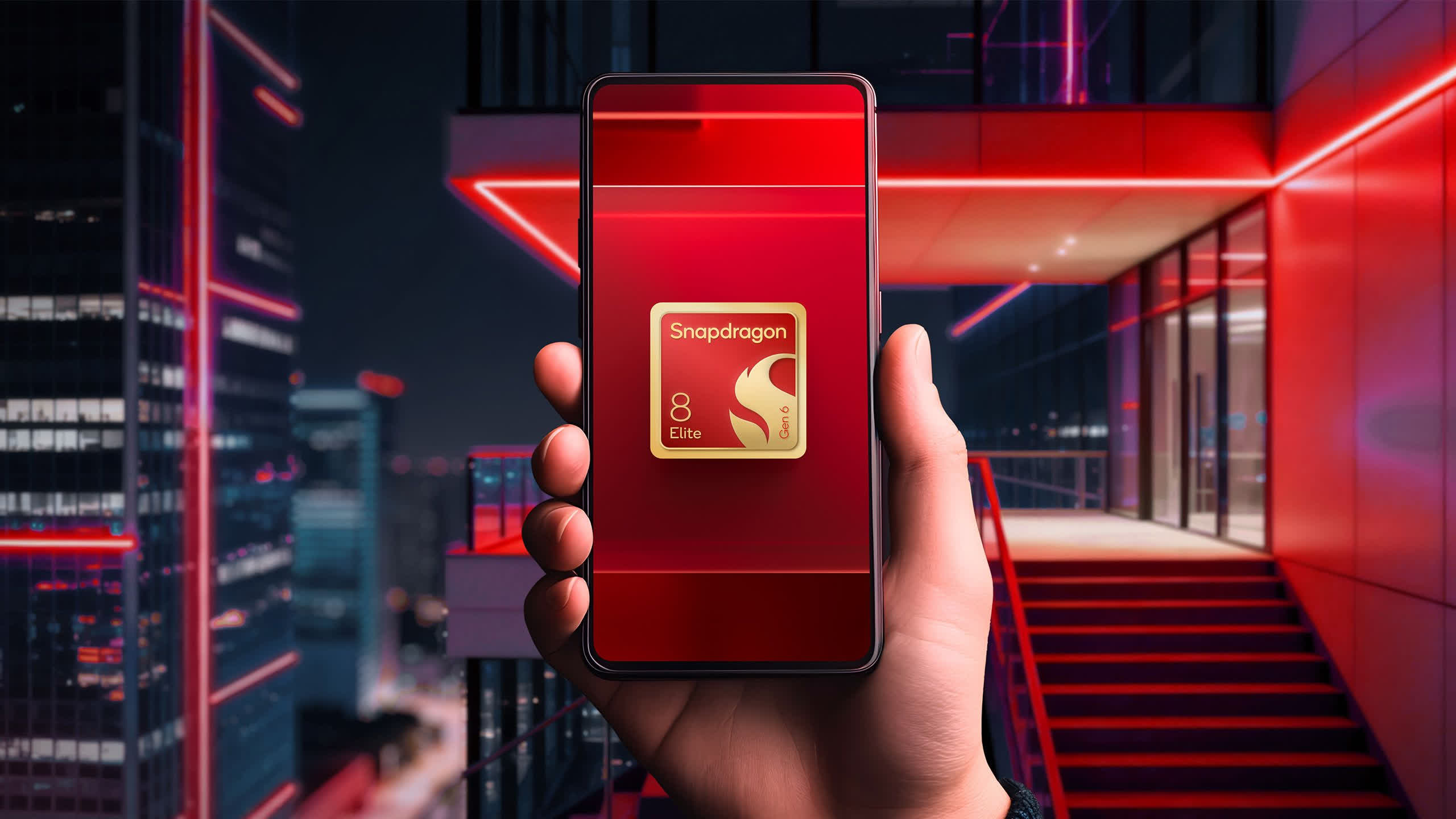
For smartphones, Qualcomm took the unusual step of announcing two flagship processors, the Snapdragon 8 Elite Gen 6 and Snapdragon 8 Elite Extreme Gen 6. As TechSpot covered in detail, both bring the CPU, GPU, and efficiency improvements you’d expect from a new generation, including prime Oryon CPU cores capable of reaching 5 GHz and new Adreno Neural Fusion technology designed to improve gaming performance.
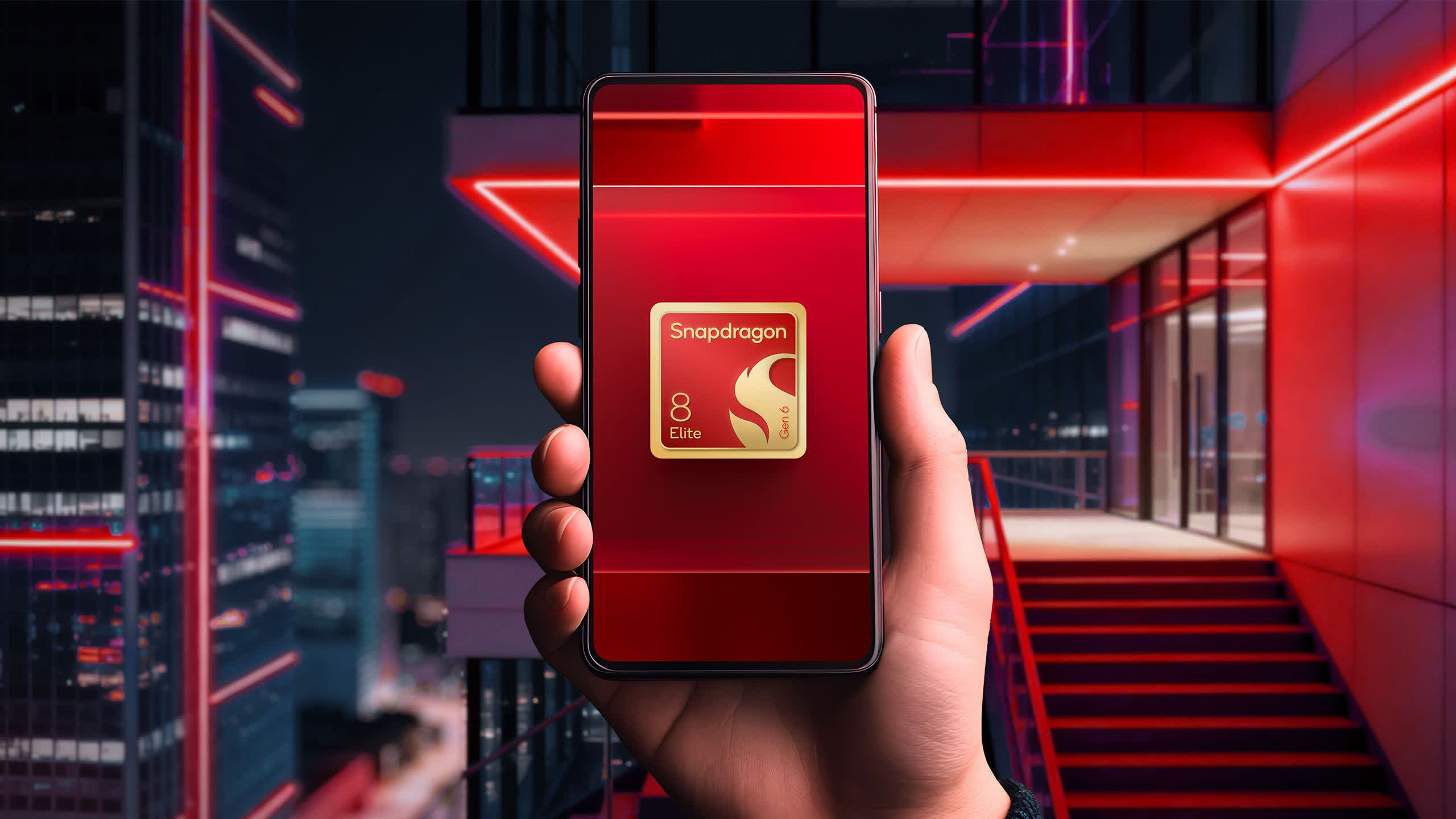
But arguably the more important changes for Qualcomm’s broader strategy are the upgraded Hexagon NPU, the newly architected Sensing Hub, and the addition of an Element Accelerator specifically designed to speed up agentic AI workloads.
The updated Sensing Hub, like those found in several of the company’s wearable-focused chips, consumes little enough power to remain active all the time. That allows devices to continuously listen for certain audio cues and respond to agentic tasks using the two micro-NPUs embedded within it. Qualcomm demonstrated how the Sensing Hub could power a personal scribe application, for example, transcribing and summarizing conversations while consuming very little battery power.
The Extreme version of the 8 Elite Gen 6 pushes AI, gaming, and creator workloads further through several architectural enhancements. Its Adreno GPU adds matrix cores optimized for the kinds of calculations commonly used in AI inference, while its Hexagon NPU includes 50% more dedicated memory to help it run longer agentic loops. The bigger story, however, becomes apparent when you look beyond smartphones.
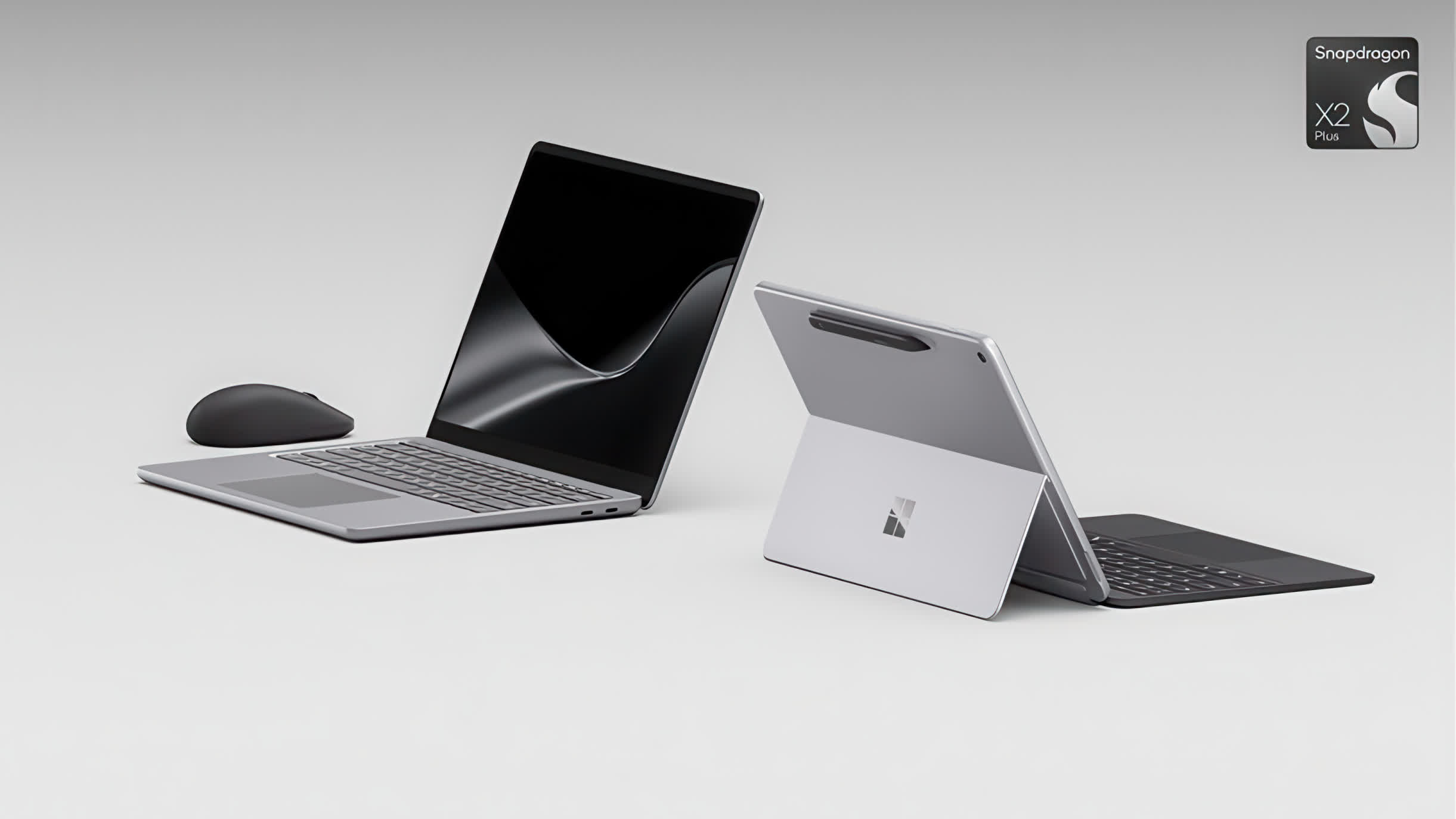
In the PC world, Qualcomm highlighted the growing number of computers based on its Snapdragon X2 family, including Microsoft’s latest Surface systems introduced earlier this year. The newest 13-inch Surface Pro, for example, is available with Snapdragon X2 Plus and X2 Elite processors, giving Windows PCs substantially more dedicated NPU performance for increasingly sophisticated local AI workloads.
The chips offer 85 TOPS of NPU performance and are compatible with all the latest agentic AI tools, including Perplexity, Hermes agent, OpenClaw, Claude Code, OpenAI, and more. The new Surface Pro also offers optional support for an embedded 5G modem.
Qualcomm is also supporting Google’s newly launched Googlebook platform, the next generation of Google’s laptop efforts, with Snapdragon X Series processors. Dell and HP are among the first manufacturers bringing Snapdragon-powered Googlebooks to market, combining local AI processing with Google’s growing collection of Gemini-powered features and tighter links to Android phones.
Arguably the most intriguing announcement from this year’s Summit, though, was the latest generation of Snapdragon Sound. While previous generations primarily focused on high-quality wireless audio and automatic noise cancellation, Snapdragon Sound Elite Gen 2 puts much more emphasis on audio-based AI, including conversations with AI agents and other intelligent applications.
In essence, Qualcomm is bringing some of the intelligence previously associated with its AR and VR platforms, such as the Snapdragon XR chips used in devices like the new Snap Specs, into audio-focused products.
Given the growing range of audio smart glasses, AI recording devices, earbuds, and other “hearables” appearing on the market, Snapdragon Sound Elite Gen 2 feels particularly timely. The dramatically improved audio recognition and processing capabilities these chips enable are creating entirely new ways to interact with AI-powered computing resources.
The ability to intelligently converse with AI platforms like ChatGPT, Claude, Gemini, and others simply by speaking offers a fascinating new way to use AI. In fact, given the size and weight challenges of today’s display-equipped smart glasses, along with the still somewhat awkward mechanisms for interacting with them, it’s possible that audio-focused smart glasses could ultimately become the mainstream option for the category.
Time will tell, but the seemingly foregone conclusion that display-equipped smart glasses would become the volume leader may not be as certain as previously thought, particularly given the ease of use and growing capabilities of audio-focused alternatives.

Regardless of which form factor ultimately wins out, connecting these devices to a common identity creates something potentially more important. Agentic AI tools can begin to work across devices, producing a degree of convergence and shared intelligence that seemed like a dream only a few years ago.
To bring these capabilities to audio devices, Qualcomm had to introduce several new technologies to Snapdragon Sound Elite Gen 2 on both the compute and connectivity sides.
For AI processing, the company integrated a dedicated new eNPU that doubles on-device AI capability compared with the previous generation. It also added micro-power Wi-Fi 6E, allowing devices to connect directly to cloud-based AI services from a hearable form factor. Combined with enhanced Bluetooth capabilities and support for Qualcomm’s XPAN personal networking technology, that connectivity allows devices to access agentic platforms, as well as high-quality audio streams, across a much wider area.
Beyond the hardware, Qualcomm also introduced Snapdragon Sound Apps and Agents. Designed specifically for ultra-low-power devices based on Snapdragon Sound Elite Gen 2, these apps, along with the development tools necessary to create them, could help establish an entirely new software ecosystem for hearable devices.
There’s no doubt that we’re still in the early stages of agentic AI, but it’s fascinating to see how quickly tools are starting to tie our devices together into a more unified whole.
The technologies Qualcomm displayed at this year’s Snapdragon Summit are helping push that development forward. By combining advanced compute, AI acceleration, and connectivity across an increasingly diverse range of devices, the company is moving toward a world where our individual portable digital identities, and all that entails, can follow us wherever we go, whatever we’re doing, and whichever device we happen to be using.
Bob O’Donnell is the founder and chief analyst of TECHnalysis Research, LLC a technology consulting firm that provides strategic consulting and market research services to the technology industry and professional financial community. You can follow him on Twitter @bobodtech
Tech
Tiny drone grows artificial whiskers to navigate dark and smoky spaces where cameras and GPS can struggle to see clearly

- Two artificial whiskers give this tiny drone a working sense of touch
- Pressure sensors at the whisker base detect surface contact instantly
- Onboard software processes tactile data using only 34 kilobytes of memory
A research team from Delft University of Technology in the Netherlands has developed a tiny drone that uses artificial whiskers to navigate where conventional sensors struggle.
The system relies on physical contact rather than cameras or satellite positioning, allowing the aircraft to detect nearby surfaces through touch.
The researchers designed the technology for drones weighing below 100 grams, where adding substantial sensing equipment can quickly consume available capacity.
Latest Videos FromTechRadar
Tiny whiskers give the drone another way to sense surroundings
The device carries two slender filaments near its nose, angled upward and connected to miniature pressure sensors underneath.
When either filament touches an object, pressure changes provide information that helps the aircraft estimate its position relative to nearby surfaces.
That information allows the drone to move around obstacles, maintain contact with structures, and construct a basic representation of surrounding spaces.
The approach takes inspiration from rodents and other mammals, which use facial hairs to move through confined environments with limited visibility.
“Here, we aim to equip drones with rich tactile sensing — not for manipulation in the air, but for a novel concept of tactile navigation,” said Salua Hamaza, Associate Professor of Aerial Physical Interaction and Embodied Intelligence.
The system needed to be lightweight, process rapidly, and consume limited energy before tactile navigation could become practical aboard small aircraft.
The sensing system runs on only 34KB
A major hurdle was airflow, since passing wind can easily disturb whisker readings and confuse the pressure sensors beneath them.
To solve this, the researchers wrote a lightweight processing program that separates turbulence from genuine surface contact in real time with millimetric precision.
The complete onboard software occupies just 34 kilobytes of memory, keeping the computational requirements unusually low for an autonomous sensing system.
Traditional navigation software built for larger drones typically demands considerably more computing power than this compact whisker-processing system requires today
“We wanted to show that touch does not have to come at the cost of size or computational power,” said Chaoxiang Ye, a PhD candidate and researcher at Deft.
The small size allows the drone to interpret environmental information without depending on external processing.
The approach will not suit the fastest drones, but for small rescue units, sensing through touch may prove genuinely valuable.
This device is especially useful for environments where smoke, dust, darkness, or damaged infrastructure could interfere with cameras and other optical equipment.
One potential application of this drone is in collapsed buildings where rescue operations can prove to be difficult because of instability and tight spaces, and regular aerial sensing may be unreliable
Small drones could enter restricted spaces ahead of human responders, using physical contact to gather information about nearby structures and possible pathways.
The system could also provide another sensing method when GPS signals are unavailable or visual information becomes difficult to interpret.
Via TomsHardware

Follow TechRadar on Google News and add us as a preferred source to get our expert news, reviews, and opinion in your feeds.

NewsBeat2 minutes ago
Up to 700 Asda stores across the UK set for a major change

Business3 minutes ago
Anthropic CEO Dario Amodei says AI could cure most diseases in 5-10 years

Crypto World4 minutes ago
The Fed Just Raised Rates, But Berkshire's Cash Payoff Hasn't Shown Up Yet




-

 Fashion5 days ago
Weekend Open Thread: Talbots – Corporette.com
-

 Tech3 days ago
Researchers escape OpenAI Codex sandbox to run commands on host
-

 Crypto World5 days ago
Circle launches Arc Studio AI agent for building onchain apps
-

 Crypto World3 days ago
Who Needs CLARITY Anyway? ARB Could See 70X Increase: Hodler’s Digest
-
 NewsBeat5 days ago
Trump says US has reached an agreement to take permanent control of Greenland’s security
-

 Crypto World5 days ago
Trading Bitcoin on Robinhood? Why 2% Spread Has Traders Worried
-

 Crypto World1 day ago
Goldman Sachs and Deutsche Bank Agree: The S&P 500 Rally Isn't Over
-

 Crypto World6 days ago
Mortgage and refinance interest rates today, Thursday, September 17, 2026
-

 Crypto World5 days ago
Bitcoin price breaks channel as RSI climbs to 63
-

 Tech3 days ago
Google’s $899 Googlebook is a bet that you’ll buy a new laptop for Gemini
-

 Business3 days ago
Analog Devices (ADI) Bets $1.35 Billion on Chips that Let Machines Think for Themselves
-

 Crypto World3 days ago
Coinbase, Robinhood, Circle Seen as Tokenized-Stock Winners
-

 Crypto World5 days ago
World Money launches in 150+ countries with Stripe
-

 Crypto World6 days ago
Silver prices recover quickly, hitting weekly high today
-

 Tech4 days ago
Trump suggests rebranding AI with a new name, says he’s also creating an AI Force
-
 Business1 day ago
Oil Price Today (September 23): Crude oil below $100 on hopes of US-Iran talks. What did Trump say?
-

 Tech6 days ago
GPT-6 Astra Reached the Nether in Minecraft, Lost Its Stash to a Creeper, and Farmed Potatoes for Hours
-
 NewsBeat5 days ago
US was ‘on brink of war’ with China over false AI report of nukes moving in Middle East
-

 Crypto World2 days ago
Meta Jumps 11% As Muse Shines and Investors Show an Appetite for Advancing AI
-

 Crypto World5 days ago
CFTC sends crypto market structure rulemaking to White House
You must be logged in to post a comment Login