In a new blog post, Anthropic CEO Dario Amodei has admitted that it received a letter from the Defense Department, officially labeling it a supply chain risk. He said he doesn’t “believe this action is legally sound,” and that his company sees “no choice” but to challenge it in court. Hours before Amodei published the post, the Pentagon announced that it notified the company that its “products are deemed a supply chain risk, effective immediately.”
If you’ll recall, the Defense Department (called the Department of War under the current administration) threatened to give the company the designation typically reserved for firms from adversaries like China if it didn’t agree to remove its safeguards over mass surveillance and autonomous weapons. President Trump then ordered federal agencies to stop using Anthropic’s tech.
Amodei explained that the designation has a narrow scope, because it only exists to protect the government. That is why the general public, and even Defense Department contractors, can still use Anthropic’s Claude chatbot and its AI technologies. Microsoft told CNBC that it will continue using Claude after its lawyers had concluded that it can keep on working with Anthropic on non-defense related projects.
The CEO has also admitted that his company had “productive conversations” with the department over the past few days. He said that they were looking at ways to serve the Pentagon that adheres to its two exceptions, namely that its technology not be used for mass surveillance and the development of fully autonomous weapons, and at ways to “ensure a smooth transition if that is not possible.” That confirms reports that Anthropic is back in talks with the agency in an effort to reach a new deal. In addition, he apologized for a leaked internal memo, wherein he reportedly said that OpenAI’s messaging about its own deal with the department is “just straight up lies.”
Are pickup truck engines the same as those used in normal passenger or sports cars? The answer is both yes and no. Physically, at least, there’s usually little that separates an engine in a truck’s engine bay from one in a car’s. After all, there have been plenty of times in the industry’s history when automakers have sold cars and trucks with nearly identical engines. Case in point, the legendary Chrysler slant-six engine, which came in everything from compact cars to pickup trucks and vans.
But in the modern era, especially, there can be notable differences between car and truck engines, even if their displacement and general engine architecture are the same. The modern HEMI V8 used in Dodge muscle cars and Ram pickups is a good example of this, with different versions of the same engines used in performance cars and pickups. Most of the differences between truck and car engines involve how and when the engines deliver their horsepower and torque.
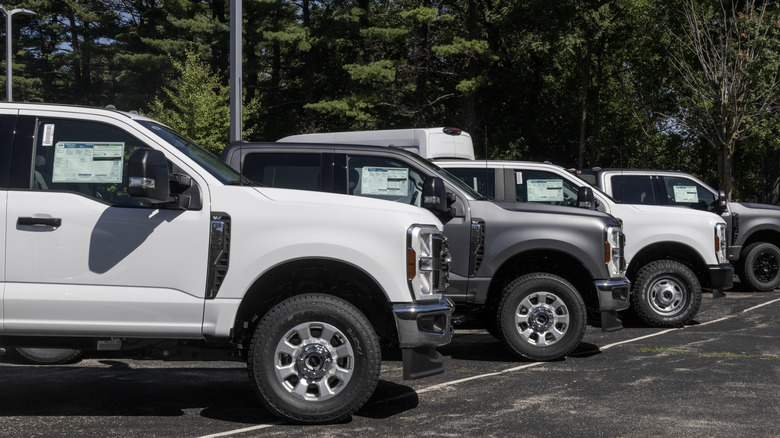
A car engine may produce more peak horsepower than an equivalent truck engine, but the truck engine will often provide more torque or deliver the same amount of torque at lower revs. Just how much difference there is between the two will vary by automaker, and some brands, like Ford, offer V8 engines designed from the ground up for trucks that share nothing with their car counterparts.
Advertisement
The different flavors of V8s
Jetcityimage/Getty Images
Ultimately, the main difference between car and truck engines is rooted in the difference between horsepower and torque. While horsepower matters in a truck, when it comes to pulling a trailer or carrying a heavy load, it’s the torque that’s important — and the lower in an engine’s powerband that torque comes, the better it is. Thus, the popularity of ultra-torquey, but relatively low-horsepower turbodiesel engines for large pickups. Peak horsepower, meanwhile, takes prominence in a sports car where engine speeds are higher.
Even within the same V8 family, there can be notable differences in car and truck engines. In GM’s V8 lineup, the 401-hp 6.6-liter L8T truck engine is designed for low-speed torque, with 464 lb-ft of torque at 4,000 RPM. The Chevrolet Corvette’s smaller, 495-hp 6.2-liter LT2 V8 is part of the same family and easily bests the L8T in peak horsepower, yet it barely edges the L8T in torque. It also needs to rev much higher to generate its torque, with its 470 lb-ft coming at 5,150 rpm.
Advertisement
Ford’s Super Duty 7.3-liter Godzilla V8 takes this concept even further. Not only is the Godzilla much larger than the 5.0 Coyote V8 in the Mustang GT, but it also uses an entirely different design with an overhead-valve, single-camshaft design compared to the 5.0’s dual overhead cams and 32 valves. At 480 hp, the 5.0 beats out the 430-horsepower Godzilla, but the 7.3 takes the torque crown, with 475 pound-feet to the Mustang’s 415 lb-ft.
Advertisement
The curious case of the Nissan 240SX
betto rodrigues/Shutterstock
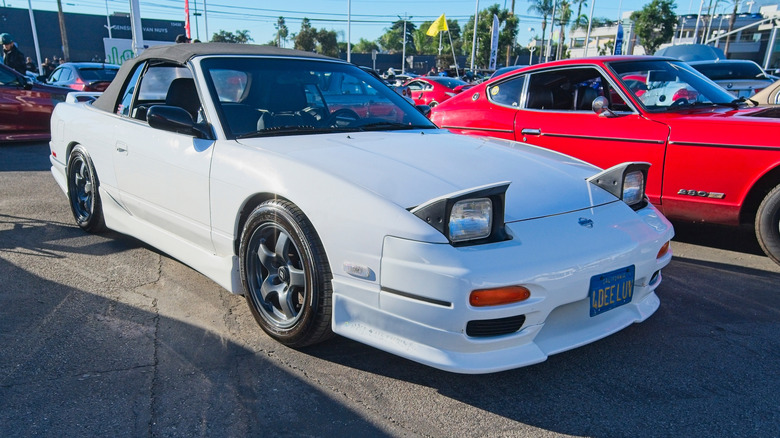
So what happens, then, if you put a pickup truck engine into a sports car? Look no further than the North American-market Nissan 240SX from the 1990s. When the S13 Nissan Silvia and 180SX debuted in the Japanese home market, the cars were available with high-horsepower turbocharged four-cylinder engines — first the 1.8-liter CA18DET and later the legendary SR20DET. This, combined with a great chassis and tons of aftermarket support, helped the S13 become a smash hit among enthusiasts.
However, when it came time to export the car to America, Nissan decided to forgo the turbo engines in favor of the naturally aspirated 2.4-liter KA24 engine used in Nissan pickup trucks. Though the USDM engine was larger than its JDM counterpart and produced a decent amount of torque for its size, the KA24 only made 140 hp and, more importantly, lacked the high-revving sports car feel many expected from the 240SX.
Fortunately, the SR20DET was an easy swap, and Nissan’s decision to go with a truck engine didn’t entirely detract from the many features that helped the 240SX become a legendary drift car in the years and decades that followed. Even then, though, one can’t help but wonder what would’ve happened had Nissan given the U.S. market 240SX the turbocharged performance engine it deserved.
ZipNada writes: Two software researchers recently demonstrated how modern AI tools can reproduce entire open-source projects, creating proprietary versions that appear both functional and legally distinct. The partly-satirical demonstration shows how quickly artificial intelligence can blur long-standing boundaries between coding innovation, copyright law, and the open-source principles that underpin much of the modern internet.
In their presentation, Dylan Ayrey, founder of Truffle Security, and Mike Nolan, a software architect with the UN Development Program, introduced a tool they call malus.sh. For a small fee, the service can “recreate any open-source project,” generating what its website describes as “legally distinct code with corporate-friendly licensing. No attribution. No copyleft. No problems.” It’s a test case in how intellectual property law — still rooted in 19th-century precedent — collides with 21st-century automation. Since the US Supreme Court’s Baker v. Selden ruling, copyright has been understood to guard expression, not ideas.
That boundary gave rise to clean-room design, a method by which engineers reverse-engineer systems without accessing the original source code. Phoenix Technologies famously used the technique to build its version of the PC BIOS during the 1980s. Ayrey and Nolan’s experiment shows how AI can perform a clean-room process in minutes rather than months. But faster doesn’t necessarily mean fair. Traditional clean-room efforts required human teams to document and replicate functionality — a process that demanded both legal oversight and significant labor. By contrast, an AI-mediated “clean room” can be invoked through a few prompts, raising questions about whether such replication still counts as fair use or independent creation.
Intel said the agreement is reflective of a strong partnership with Apollo, as well as the organisation’s role in the age of AI.
US technology company Intel has plans to repurchase a 49pc stake of the Leixlip, Kildare Fab 34 manufacturing facility, via a partnership with asset manager Apollo Global Management. The deal which will be valued at $14.2bn is expected to be funded through cash on hand and proceeds from the issuance of new debt of approximately $6.5 bn.
With work beginning in 2019, Fab 34 was designed to be an advanced semiconductor manufacturing facility.
There has been significant investment in the plant over the years with the organisation hitting several important milestones and currently it is a fabrication facility for products utilising the Intel 4 and Intel 3 process technologies, for example Intel Core Ultra and Intel Xeon 6 processors.
Advertisement
In 2024, it was decided that Intel would sell a 49pc stake in Fab 34 to Apollo Global Management.
At the time, David Zinsner, the chief financial officer at Intel, said that the $11bn deal would give the chip maker the “additional flexibility to execute our strategy as we invest to create the world’s most resilient and sustainable semiconductor supply chain”. Intel also said it would be retaining full ownership and control of Fab 34 and its assets.
Commenting on the recent announcement Zinsner said, “Our 2024 agreement was the right structure at the right time and provided Intel with meaningful flexibility, enabling us to accelerate critical initiatives. Today, we have a stronger balance sheet, improved financial discipline and an evolved business strategy.”
Apollo Partner Jamshid Ehsani added, “Our partnership with Intel began at an important stage in the execution of its advanced manufacturing roadmap, where our long-term strategic capital played a meaningful role in accelerating the production of next-generation chip technology.
Advertisement
“Flexibility and alignment are core to how we approach relationships as a long-term, solutions-oriented capital partner, and we are pleased to facilitate this transaction in support of Intel’s evolving strategic and operational priorities.”
Don’t miss out on the knowledge you need to succeed. Sign up for the Daily Brief, Silicon Republic’s digest of need-to-know sci-tech news.
Samsung already has its own slim magnetic case for the Galaxy S26 Ultra, so most people won’t think twice about alternatives.
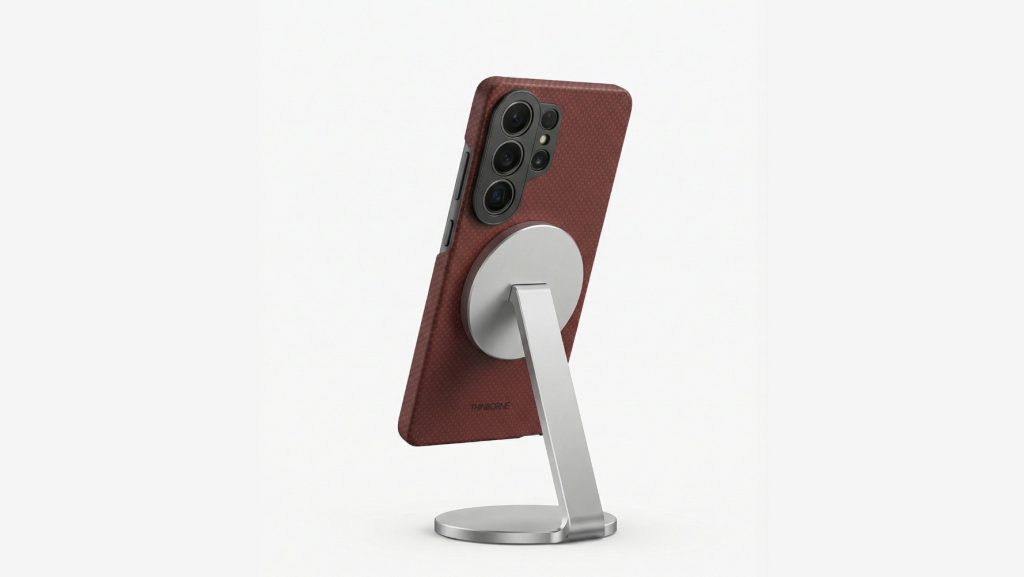
But choosing the right Samsung Galaxy S26 Ultra case isn’t always as straightforward as it seems. Some cases look great on day one but end up feeling too smooth, slightly bulky, or just awkward to use after a few days. Thinborne is still a thin magnetic case, but it takes a slightly different approach.
This review focuses on how it feels in real use, and how it compares to Samsung’s own option.
Thinborne Overview of Features
It helps to look at what Thinborne actually offers and how those features translate in real use.
Advertisement
Material and Build
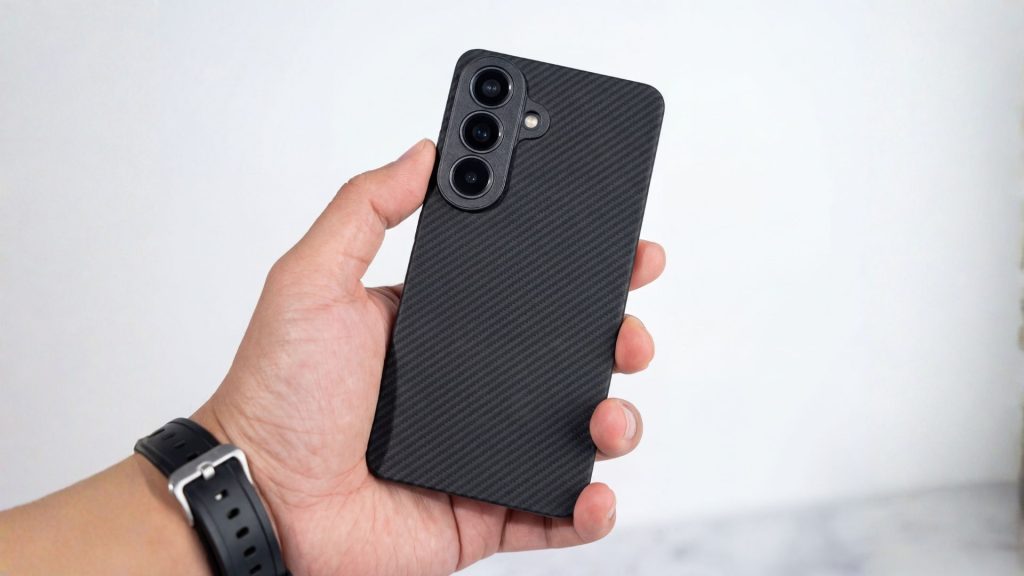
Thinborne uses 600D aramid fiber, which you’ll usually see in lightweight, high-strength materials. You’ll notice how it feels:
It’s very light
It feels firm rather than flexible
The surface has a subtle texture
At 0.90 mm thin, it doesn’t add much bulk. The phone still feels close to how it does without a case.
What makes it different from typical cases is the structure. It doesn’t have that soft, slightly rubbery feel you get from silicone. It’s more rigid, almost like a thin shell that snaps into place. Over time, silicone can start to feel sticky or collect dust – this doesn’t.
MagSafe Compatibility
Like most Galaxy S26 Ultra cases, Thinborne includes built-in magnets since the phone itself doesn’t have them. In everyday use, that means:
Chargers snap into place quickly
Car mounts hold steady
Wallets and stands attach cleanly
The experience is straightforward, and everything lines up as expected (and it stays in place).
One thing that helps with the setup is the case’s rigidity. Since it doesn’t flex much, the alignment stays consistent. You don’t get that slight shift you sometimes notice with softer cases.
Available Colors
Thinborne keeps the color options simple:
Black
Royal Crimson
Wild Navy
All three use the same woven finish, so the feel doesn’t change – only the color does. The tones are muted and don’t draw too much attention.
Thinborne Thin Phone Case vs Samsung Galaxy S26 Ultra Slim Magnet Case
Samsung’s Slim Magnet Case is the most direct comparison. Both cases fall into the same general category: thin, lightweight, and magnetic.
Advertisement
Samsung doesn’t list an exact thickness, but it’s positioned as a slim case. What we do know is that it weighs 24 grams, making it a bit heavier than Thinborne, which weighs around 20 grams.
Here’s how they compare:
Feature
Thinborne Galaxy S26 Ultra Case
Samsung Slim Magnet Case
Weight
20 g
24 g
Thickness
0.90 mm
slim profile (not officially listed)
Material
600D aramid fiber
Synthetic/plastic
Grip
Textured (woven)
Smooth
Magnets
Built-in magnetic array
Built-in magnets
As you can see, Thinborne and Samsung look similar. In use, however, the differences can be noticed:
Grip – Thinborne has a bit more texture, so it feels more secure in your hand. Samsung’s case is smoother, which can feel slightly slippery.
Weight – The difference isn’t huge, but the lighter feel can be noticeable over time – especially on a large phone like the S26 Ultra.
Material feel – Thinborne feels more solid and structured. Samsung’s case feels more like a standard slim case.
Pricing and Availability
Thinborne and Samsung are priced almost the same, so cost isn’t really the deciding factor here.
Thinborne comes in at $69.69, while Samsung’s Slim Magnet Case is slightly higher at $69.99. The difference is minimal, and in practice, both sit in the same premium range for thin magnetic cases.
Advertisement
Where they differ is availability. Thinborne is sold through its official website and is also available on Amazon, which gives you a bit more flexibility when buying. It typically includes extras like a tempered glass screen protector as well.
Samsung’s case is easier to find overall. It’s available through Samsung’s store and most major retailers, making it a more convenient option if you prefer to buy locally or through familiar channels.
At this price point, it really comes down to which case fits your preferences better, not which one is cheaper.
Wrap Up
Thinborne keeps things simple, and that’s really the point. It’s built as a thin phone case that doesn’t change how the Galaxy S26 Ultra feels in your hand. The lighter weight, subtle texture, and rigid build all come together in a way that feels easy to live with day to day.
Advertisement
Samsung’s Slim Magnet Case still does what it’s supposed to. It’s reliable, widely available, and works well with magnetic accessories. But if you care about how your phone actually feels in use, Thinborne has a clear edge. The lighter weight and textured finish make it easier to hold, especially during one-handed use – something you start to notice after a few days of use.
Microsoft is investigating a known issue that prevents some Classic Outlook users from sending emails via Outlook.com.
Affected users are being warned that their message hasn’t reached some intended recipients, and they will encounter this problem more often when the Outlook.com account they use to send email is an Outlook profile linked to another Exchange account.
“This message could not be sent. Try sending the message again later or contact your network administrator,” the non-delivery report (NDR) error displayed when sending or replying to emails reads.
“You do not have the permission to send the message on behalf of the specified user. Error is [0x80070005-0x0004dc-0x000524].”
Advertisement
Microsoft added that another condition that may trigger these errors is that the sender’s account has an Exchange Online mail contact with the same SMTP address.
Classic Outlook non-delivery report (NDR) error (Microsoft)
While investigating this issue and still looking for a fix, the Outlook team shared several workarounds that may help affected customers temporarily mitigate the issue.
Microsoft recommends removing the M365 account Address Book so that the Outlook client does not check it when sending emails, hiding the Outlook.com contact from the Microsoft 365 account Global Address List (GAL).
Other alternatives include creating a new classic Outlook profile that includes only the account receiving NDR errors, and using the New Outlook client or Outlook.com on the web to send email from the affected account.
Automated pentesting proves the path exists. BAS proves whether your controls stop it. Most teams run one without the other.
This whitepaper maps six validation surfaces, shows where coverage ends, and provides practitioners with three diagnostic questions for any tool evaluation.
Scientists say extreme March heat caused an unusually rapid collapse of snowpack across the American West that’s leaving major basins at record or near-record lows. “This year is on a whole other level,” said Dr Russ Schumacher, a Colorado State University climatologist. “Seeing this year so far below any of the other years we have data for is very concerning.” The Guardian reports: […] The issue is extremely widespread. Data from a branch of the US Department of Agriculture (USDA), which logs averages based on levels between 1991 and 2020, shows states across the south-west and intermountain west with eye-popping lows. The Great Basin had only 16% of average on Monday and the lower Colorado region, which includes most of Arizona and parts of Nevada, was at 10%. The Rio Grande, which covers parts of New Mexico, Texas and Colorado, was at 8%. “This year has the potential of being way worse than any of the years we have analogues for in the past,” Schumacher said.
Even with near-normal precipitation across most of the west, every major river basin across the region was grappling with snow drought when March began, according to federal analysts. Roughly 91% of stations reported below-median snow water equivalent, according to the last federal snow drought update compiled on March 8. Water managers and climate experts had been hopeful for a March miracle — a strong cold storm that could set the region on the right track. Instead, a blistering heatwave unlike any recorded for this time of year baked the region and spurred a rapid melt-off. “March is often a big month for snowstorms,” Schumacher said. “Instead of getting snow we would normally expect we got this unprecedented, way-off-the-scale warmth.”
More than 1,500 monthly high temperature records were broken in March and hundreds more tied. The event was “likely among the most statistically anomalous extreme heat events ever observed in the American south-west,” climate scientist Daniel Swain said in an analysis posted this week. “Beyond the conspicuous ‘weirdness’ of it all,” Swain added, “the most consequential impact of our record-shattering March heat will likely be the decimation of the water year 2025-26 snowpack across nearly all of the American west.” Calling the toll left by the heat “nothing short of shocking,” Swain noted that California was tied for its worst mountain snowpack value on record. While the highest elevations are still coated in white, “lower slopes are now completely bare nearly statewide.”
Studio 64 Bits worked tirelessly for four months to hand-draw every single frame, allowing them to introduce Elden Ring to the wild world of Saturday morning television in the 90s. The end effect feels like a bizarre parallel universe in which the game appears alongside Thundercats and He-Man.
Ranni is right there at the start, cradling a double-necked electric guitar slung lazily across her shoulders, and as she begins noodling on the opening chords, the camera sweeps across these blasted landscapes, full of familiar faces from both the base game and the Shadow of the Erdtree expansion. We see Malenia charging ahead with blades flashing, Blaidd standing tall and loyal by her side, and Messmer looming large as the true new threat. Meanwhile, Miquella and Radahn share a dramatic moment, and Melina, Rykard, Mohg, Varre, Midra, Placidusax, Astel, Maliketh, and the Elden Beast all flash across the screen in quick, splashy bursts. Each character receives the usual cartoon makeover, complete with bold outlines, vivid colors, and exaggerated posturing that transforms their conflicts into heroic showdowns rather than gloomy, terrible struggles.
The animation sticks to the technical limits of 90’s TV production, which means that the colors don’t deviate much from a fairly limited palette, the lines have just a hint of that creaky hand-drawn cel look to them, and the transitions snap along with the same crisp timing you’d see on shows from that era. The music builds to a precise pitch, culminating in a driving rock song that sounds like it might have come directly from the opening titles of Jayce and the Wheeled Warriors or Captain Planet. Every second creates the impression that an entire series could follow, with the Tarnished rushing across the continent to repair the Elden Ring and face off against these legendary monsters in one thrilling episode after the next.
After the main intro concludes, the film transitions to a brief commercial in which Elden Ring appears to have recently been released for the old SNES. A happy narration promises additional dungeons, secrets, and a fate that is entirely in the player’s control. The tagline reverses a humorous old Nintendo slogan into ‘Now you’re playing with power, rune power’, and the spot concludes with a quick little bumper that parodies the DIC logo from coutnless old 90’s cartoons. It connects neatly to their last full-length SNES remake, making the entire package feel like one continuous block of faux Saturday morning programming.
Smart glasses have always had a basic problem for people like me. They looked cool in demos, sounded futuristic in press releases, and usually came with the same quiet catch. If you already wear glasses every day, you are expected to work around them. This meant adding prescription lenses later, settling for a fit that is not quite right, or treating the whole thing as a novelty instead of something you would actually wear throughout the day.
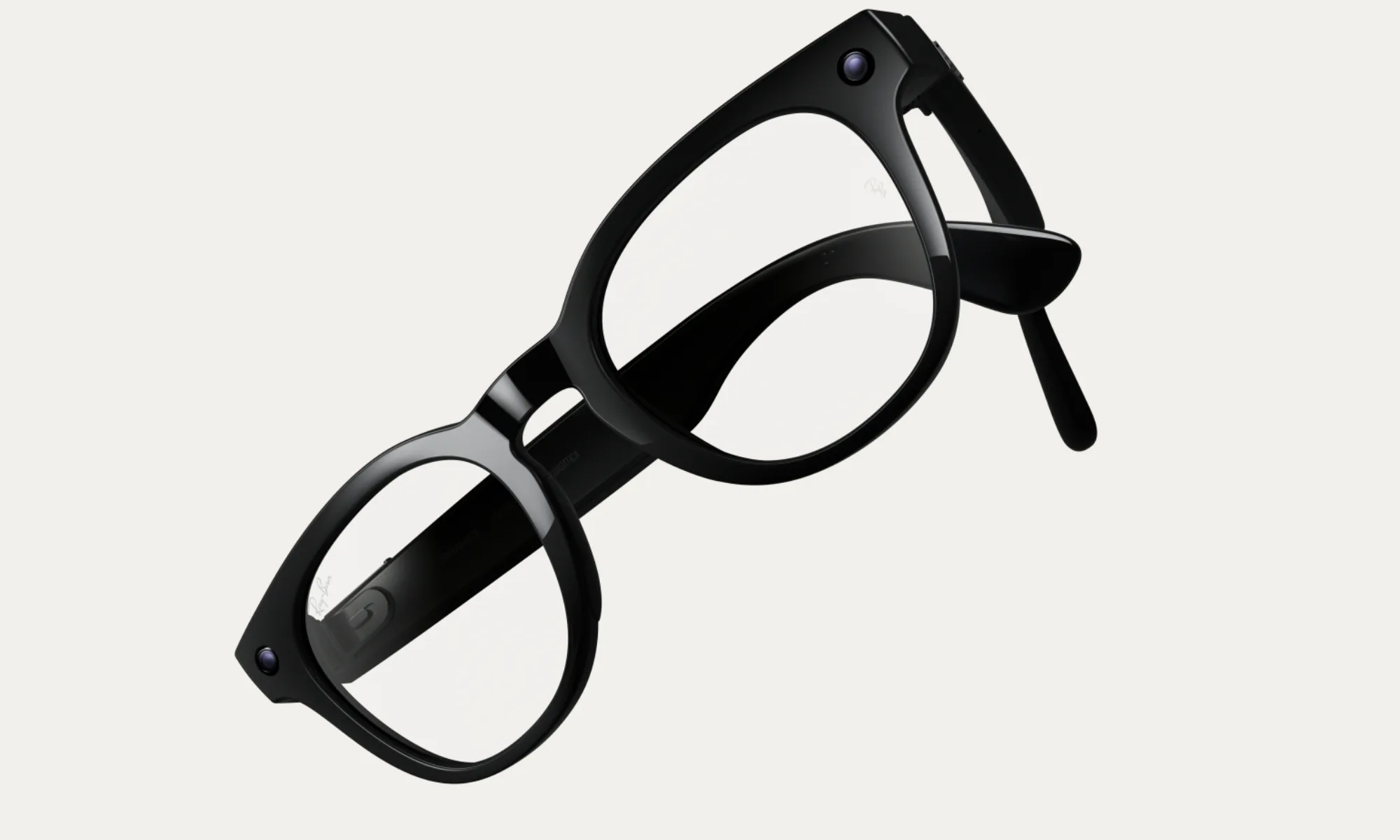
This is what makes Meta’s latest announcement more exciting. The company just unveiled its first prescription-optimized AI glasses, the Ray-Ban Meta Blayzer Optics (Gen 2) and Ray-Ban Meta Scriber Optics (Gen 2), and they are explicitly designed around people who rely on prescription eyewear all day.
Meta says they support nearly all prescriptions, start at $499 in the US, and will be available at optical retailers beginning April 14.
For me, that is the first time Meta’s glasses story has felt less like wearable hype and more like something I could actually live with.
Advertisement
Meta
Prescription wearers don’t have to do extra work
Billions of people around the world use glasses or contacts for vision correction, and Meta itself notes that many Ray-Ban Meta and Oakley owners already add prescription lenses to existing models. But “can be added later” is not the same thing as “built for you from the start.”
The new prescription-first push feels more thoughtful. Meta says that these new models were designed for all-day comfort and include features like overextension hinges, interchangeable nose pads, and optician-adjustable temple tips. These may sound like dry-product language stuff, but if you actually wear glasses every day, it is the kind of detail that decides whether something stays on your face for the next eight hours or if it gets thrown into a case after 20 minutes.
Balancing act between ‘gadget’ and ‘eyewear’
Meta
Meta is not just launching two new frame styles and calling it a day. It is trying to make AI glasses feel like a normal category of eyewear rather than a niche device for early adopters. These new prescription-optimized frames aren’t alone, as Meta also announced more frame and lens options across Ray-Ban Meta and Oakley Meta glasses.
There’s also a new software feature, like hands-free nutrition tracking, WhatsApp summaries and recall through Meta AI, and Neural Handwriting support expanding to iMessage. All of this makes these new glasses feel more natural for daily use. The tech itself is only half the story. The real breakthrough is when you don’t need to accommodate the hardware.
And if you already wear prescription glasses, that threshold is even higher. A smartwatch can be optional. Glasses are not.
Meta
This is the first Meta glasses move that feels genuinely practical
This is basically why I think these new Meta glasses matter more than they might look on paper. The usual wearable pitch is about features, AI tricks, cameras, and convenience. But for prescription wearers, such as myself, the first question is whether I would actually want to wear this all day instead of normal glasses?
And for a change, Meta seems to be answering that question directly.
Advertisement
Yes, the concerns don’t disappear, and smart glasses still have the privacy baggage and hefty price tag. They also haven’t proved that their AI features are useful often enough to justify becoming part of your daily routine. But this launch clears a much more fundamental barrier than people give it credit for.
And for someone who already owns prescription Wayfarers and knows how much difference proper eyewear fit makes, Meta’s new AI glasses suddenly feel a lot more attractive.
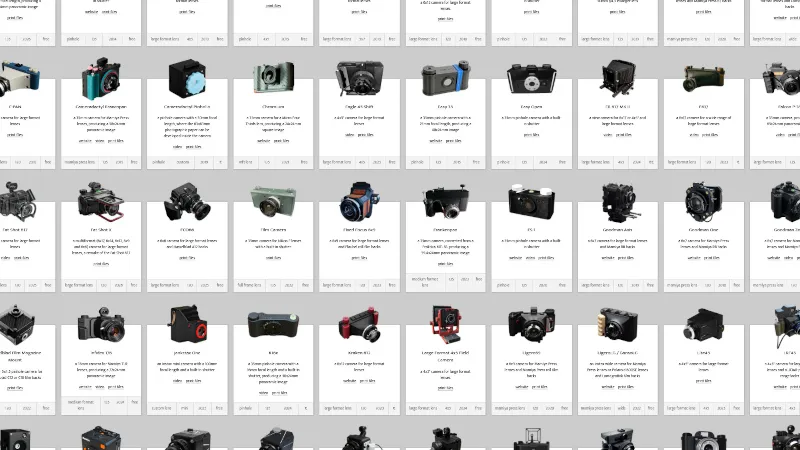
For those of us who hack old cameras, the 3D printer has undoubtedly been a boon. High precision, or at least consistent precision, lightproof enclosures can be easily made and reproduced for others. As a result there are quite a few printable cameras out there, and we’ve featured our share here. We didn’t realize just how many there are without the work of [Sebastian] though, as he’s gathered together every one he can find in a glorious catalog of homemade photographic construction.
As a snapshot of the world of home made cameras it’s refreshing to see such a wide range of designs. There are pinholes aplenty as well as cameras using lenses from scavanged point and shoots through 35mm SLR, medium format, and even one using a Micro Four Thirds compact digital camera lens. For film there’s 35mm and 120 as well as large format, but we’re pleased to see a few instant cameras in there. Some of the models in the list are paid-for designs but most of them are free, so you probably won’t need any encouragement to make yourself a camera!
Unless we missed something, we didn’t see any movie cameras in the list. With 35mm and 16mm models to be found, we hope some of them make it.
ChatGPT arrives on Apple CarPlay update for iOS 26.4
Update adds support for “voice-based conversational apps”
Interaction is limited to voice prompts only
We reported on a big Apple update in February of this year with the release of the new iOS 26.4 public beta.
The headline news was the inclusion of third-party, voice-controlled AI chatbots on CarPlay for the first time, allowing drivers to make the most of AI assistants outside of those that come part and parcel of many modern cars.
Where Mercedes-Benz has its “Hey Mercedes!” prompts, and Renault’s more recent offerings have Reno, these are not only limited to only the newest models, but are also relatively limited in what they can deliver.
Article continues below
Advertisement
On the other hand, the likes of ChatGPT, Google’s Gemini, and Claude open up the opportunity for more powerful AI assistants, even in older vehicles.
Last week, Apple released iOS 26.4 to the public, and a few days later, OpenAI responded with an update for ChatGPT that made it compatible with the iPhone mirroring software.
(Image credit: Mac Rumors)
Those running the latest version of iOS will see a dedicated ChatGPT app pop up on screen (so long as it exists on the device itself), and, when opened, it allows for “voice-based” conversations with the AI-powered app.
Advertisement
Users will be able to see a list of previous chats, but due to safety legislation put in place by Apple, they will only be able to converse with the chatbot, rather than type or read the resulting reams of text that it produces.
Sign up for breaking news, reviews, opinion, top tech deals, and more.
Essentially, it’s the same as interacting with the smartphone app in voice mode, and the CarPlay app is about as simple as they come. There’s merely an ask icon to show that the app is listening and a button to mute and end the conversation.
Advertisement
Analysis: simple but effective
(Image credit: Getty Images/NurPhoto)
ChatGPT’s voice mode is pretty good, and for most drivers, the ability to ask questions and receive detailed answers will be a boon. It’s a great tool for settling in-car arguments.
That said, there’s no wake word, so you have to open the app manually to use it (a distraction in itself), nor can the app be used to interact with the iPhone or make adjustments to the car’s settings like Siri and manufacturer-designed chatbots can.
It’s a cautious first step into the world of AI apps and Apple CarPlay or Android Auto integration, but it’s likely to be just the beginning.
And of course, you can also follow TechRadar on YouTube and TikTok for news, reviews, unboxings in video form, and get regular updates from us on WhatsApp too.








%20error.jpg)















































You must be logged in to post a comment Login