After experiencing temporary hearing loss in my left ear, I became committed to protecting my hearing. Even though losing my hearing for a few weeks was caused by eustachian tube dysfunction — when the tube connecting the middle ear to the back of the nose no longer functions properly — I began to wonder about what else can negatively impact our ears.
While researching ear health tips, I discovered that a common piece of technology, my earbuds, could have contributed to my hearing issues. To find out more, I spoke to audiologists, health care providers who diagnose and treat hearing, balance and ear disorders. This is what they taught me.
Best Over-Ear Headphones We’ve Tested
Advertisement
Hearing and ear health risks associated with earbuds
Earbuds can pose a few risks, according to Dr. Ruth Reisman, a licensed audiologist and New York hearing aid dispenser. They can trap heat and moisture in the ear, increasing the risk of ear infections. With repeated use, earbuds can also push earwax deeper into the ear, leading to buildup or impaction. Plus, if your earbuds don’t fit correctly or you wear them for long periods, they can cause irritation or soreness in your ear canal.
“Earbuds sit directly in the ear canal, which can increase several risks. The biggest concern is noise-induced hearing loss if volume is too high or listening time is too long,” said Reisman. “I have witnessed all of these problems in the course of my 15 years as an audiologist.”
When you listen to content at high volume, particularly for an extended period, Dan Troast, an audiologist at HearUSA, explains that it can permanently damage the delicate hair cells in your inner ear. Earbud use combined with high volume can cause:
Noise-induced hearing loss
Tinnitus (ringing, buzzing or hissing in the ears)
Sound sensitivity over time
Misusing earbuds is also common. If they don’t have noise cancellation, you might repeatedly turn up the volume to avoid hearing background noise, which can put you in an unsafe listening range fast. However, even listening at a moderate volume can become a problem if you do so for hours each day.
“Early signs of overexposure include temporary muffled hearing or ringing after listening sessions — both are warning signals from the auditory system,” Troast said. Even if you periodically experience temporary ringing in your ears, it can ultimately increase your risk of developing chronic tinnitus.
Advertisement
Best Noise-Canceling Headphones I’ve Tested
Earbuds and radiation
In my search for ear health tips, I came across several articles discussing whether wireless Bluetooth earbuds can cause harm through radiation. I asked Reisman if this is true.
“Current scientific evidence doesn’t show that the energy from Bluetooth earbuds causes harm,” she said. “These devices emit far less radiation than cell phones and remain well below established safety limits. From an audiology standpoint, sound exposure is a far greater risk than radiation.”
Advertisement
Me wearing my beloved AirPods Pro 2.
Anna Gragert/CNET
Follow the 60/60 rule when using earbuds
Both Reisman and Troast recommend the “60/60 rule” to people who wear earbuds. The 60/60 rule means you listen at no more than 60% of the maximum volume for no more than 60 minutes at a time.
“Daily use is fine if the volume stays safe and ears are given time to rest,” Reisman advises. “I usually tell patients to take a 15- to 20-minute break for every hour of use.”
If you haven’t already, Troast recommends checking whether your devices have built-in hearing health settings that automatically monitor volume exposure. For instance, on your iPhone, Apple Watch or iPad, you can set up headphone notifications to alert you to lower the volume when you’ve reached the seven-day audio exposure limit (such as 80 decibels for 40 hours over seven days). Or you can activate the Reduce Loud Audio feature to automatically lower your headphone volume once it exceeds your set decibel level.
Safer headphones for your ears
Over-the-ear headphones are generally safer, according to Reisman, because they sit outside the ear canal and don’t concentrate sound as directly on the eardrum. Since they aren’t in the ear canal like earbuds, they’re also less likely to cause irritation or earwax buildup.
Advertisement
“Over-the-ear headphones can be safer — if they allow for lower listening volumes,” said Troast. “Even better are noise-canceling headphones, which reduce background noise, so listeners don’t feel the need to crank up the volume.” Just make sure you’re still aware of your surroundings, especially if you’re outdoors near traffic.
Open earbuds could also be a safer option. They use bone-conduction technology, which transmits sound through the ear bones and skull rather than directly to the eardrum. “Several headphone companies claim open earbuds are better for your hearing health and are more hygienic,” said David Carnoy, CNET headphone expert.
Since open earbuds don’t sit inside or cover the ear:
Warmth and moisture, like sweat, won’t build up, which can cause ear infections.
Debris, such as dust, won’t transfer from the earbuds into the ear.
They won’t push earwax deeper in your ear, which can lead to impaction.
Don’t rub or press on the ear canal, reducing discomfort or irritation.
However, if you listen to content at high volumes, no headphone style is completely safe. What matters most for your ear and hearing health is total sound exposure over time, so make sure you’re monitoring your volume level and giving your ears breaks.
If you continue to wear earbuds, make sure you’re doing so safely — and that they fit properly.
Anna Gragert/CNET
Expert earbud tips
If earbuds are your preferred headphone type for listening to your favorite music, shows and podcasts, Troast offers the following tips from an audiology perspective:
Advertisement
Use built-in volume limit settings on smartphones.
Choose noise-canceling earbuds or headphones to avoid increasing volume in loud environments.
Take regular listening breaks.
Avoid sleeping in earbuds.
Get a baseline hearing test, especially if you use earbuds daily.
If you’re already experiencing tinnitus, it’s especially important that you manage your volume level to prevent it from worsening.
Carnoy adds that there have also been instances of people being allergic to the materials used for earbud tips. If you have a known allergy, make sure your earbuds don’t use that material, or replace the tips. If you do have an allergic reaction, stop using the earbud tips until you can find a substitute.
Lastly, Reisman advises keeping your earbuds clean, avoiding sharing them and ensuring they fit properly. Most earbuds come with tips in different sizes, so you can find the right fit for your ear size.
Best Noise-Canceling Earbuds
Advertisement
When to see an audiologist or doctor for hearing issues
If you experience ringing in the ears, muffled hearing, ear pain or frequent infections, Reisman recommends you consider an evaluation with an audiologist.
You’ll also want to pay attention to early warning signs of inner ear damage from noise exposure, such as ringing in the ears, difficulty hearing or needing to turn up the volume over time.
If you’re already experiencing hearing loss, Troast said that addressing it with hearing aids can provide relief. Tinnitus, on the other hand, can be treated with evidence-based approaches such as sound therapy or specific counseling strategies.
“Hearing damage is gradual and cumulative,” Reisman said, “but it’s also largely preventable with smart and healthy listening habits.” And that includes using your headphones — or, in my case, earbuds — responsibly.
Advertisement
Anna Gragert
Senior Editor, Health and Home
Anna Gragert (she/her/hers) was previously the lifestyle editor at HelloGiggles, the deputy editor at So Yummy and the senior lifestyle editor at Hunker. Over the past 12 years, Anna has also written for the LA Times, Elle, Bust Magazine, Dazed, Apartment Therapy, Well+Good and more. At CNET, she’s a senior editor on the Healthy Home team, and her coverage includes health, wellness tech, meal kits and home and kitchen tech with a focus on the technology that aims to help us live our healthiest, happiest lives.
See full bio
A VPN and Tor can both hide your normal public IP address from websites, but they use fundamentally different trust and routing models. A conventional VPN sends covered traffic through one provider-controlled endpoint, while Tor sends traffic through multiple relays so no single ordinary relay normally knows both where the connection originated and which destination it ultimately reaches.
Here, Tor means the Tor network as most people use it through Tor Browser. It does not mean the separate Tor VPN Beta, which the Tor Project currently describes as testing software that should not be relied on for sensitive activity.
Quick Take
A VPN concentrates an important part of the connection’s trust in one VPN provider. Tor deliberately distributes route knowledge across multiple relays.
Both can replace the public IP address a normal website sees, but Tor Browser also includes browser-level protections designed to reduce fingerprinting and tracking.
A conventional VPN is commonly designed to cover broader device or application traffic, while Tor Browser protects its browser traffic by default and other applications require appropriate Tor configuration.
Neither tool guarantees anonymity if you sign in to identifying accounts, reveal personal information, use a compromised device, or face an adversary outside the technology’s threat model.
VPN vs Tor at a Glance
The easiest way to compare VPN and Tor is to separate routing, trust, browser privacy, and application coverage. Neither option is universally better because they solve overlapping but different privacy problems.
Typical differences between a conventional VPN and Tor used through Tor Browser
Feature
VPN
Tor / Tor Browser
Routing path
Covered traffic is routed through a VPN endpoint operated by the chosen provider or organization.
Traffic is routed through multiple Tor relays before reaching an ordinary internet destination.
Trust model
Places substantial routing trust in the VPN operator.
Distributes route knowledge across relays so one ordinary relay does not know the complete path.
Public IP seen by website
Normally the VPN server’s public IP for traffic exiting through the VPN.
Normally the Tor exit relay’s public IP for ordinary websites.
What the local ISP sees
For covered traffic, typically a connection to VPN infrastructure rather than the final tunneled destination.
When connecting directly to Tor, normally a connection to Tor nodes rather than the final destination.
Browser fingerprinting defenses
A VPN tunnel does not provide them by itself.
Tor Browser includes defenses intended to make users harder to distinguish by browser configuration.
Typical traffic scope
Can cover broad device or application traffic according to VPN routing policy.
Tor Browser covers its browser traffic by default; other compatible applications require appropriate Tor configuration.
Performance profile
Uses an additional VPN route and endpoint; performance depends on server, route, protocol, and network conditions.
Can add latency because traffic passes through multiple volunteer relays and is affected by network load and route conditions.
Onion-service support
Not a normal VPN function.
Tor Browser can access onion services through the Tor network.
Primary privacy model
Encrypted client-to-VPN transport plus an alternate network exit under a chosen provider.
Distributed onion routing plus Tor Browser privacy defenses.
The table shows why “which one hides my IP?” is too narrow a comparison. Both can change the address a destination sees, but the more consequential difference is which parties can observe the user, the route, and the destination.
The Biggest Difference Is Where You Place Trust
A conventional VPN primarily changes the network intermediary you rely on. Your device establishes an encrypted tunnel to a VPN server, and covered traffic exits through that provider’s infrastructure before continuing toward its destination.
Advertisement
Cloudflare’s VPN explanation describes the client-to-server encrypted tunnel and the VPN server’s role as the network endpoint visible to destinations. The useful privacy question is therefore not whether a VPN removes trust, but whether you are comfortable placing that routing role with the VPN operator.
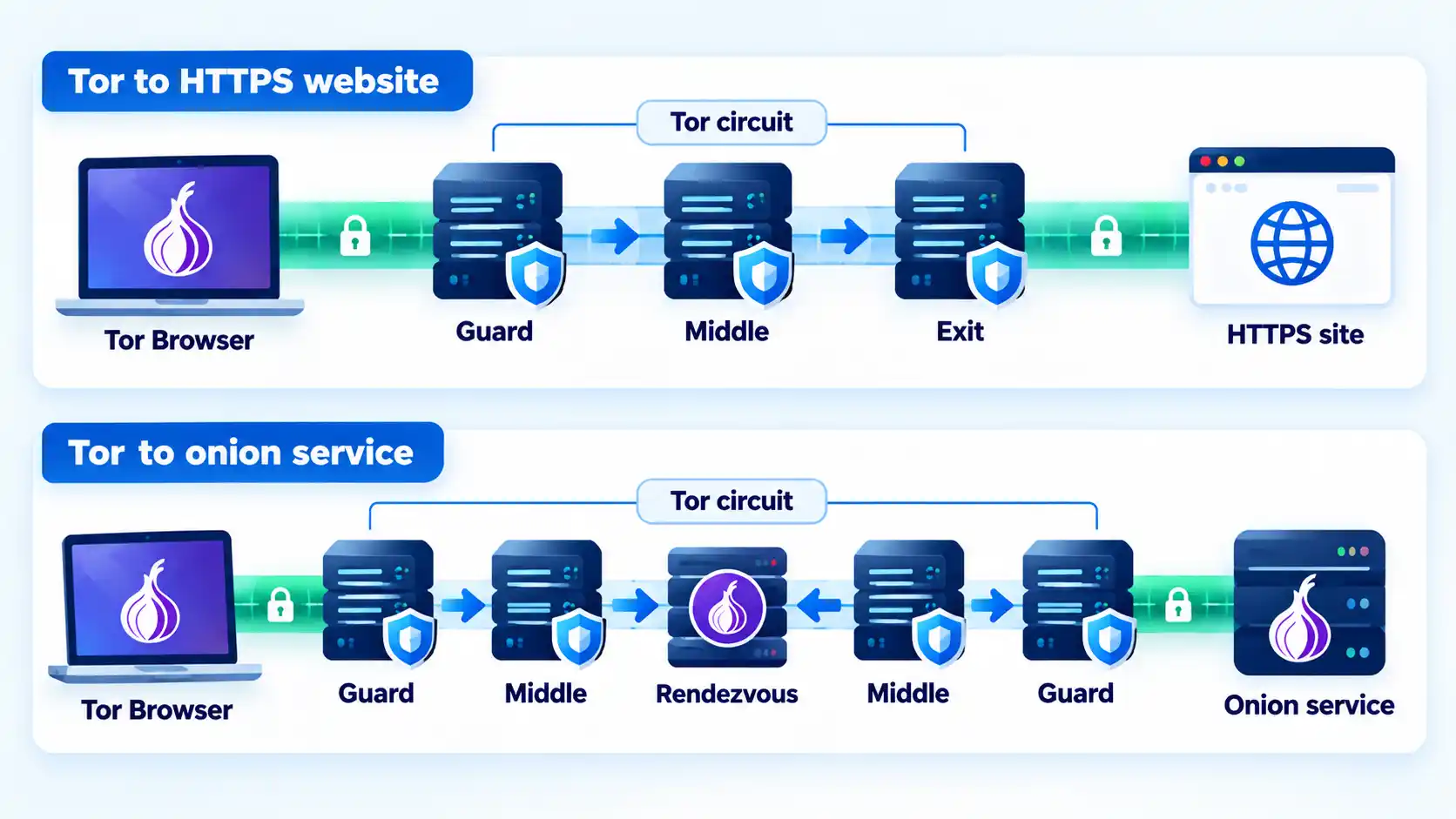
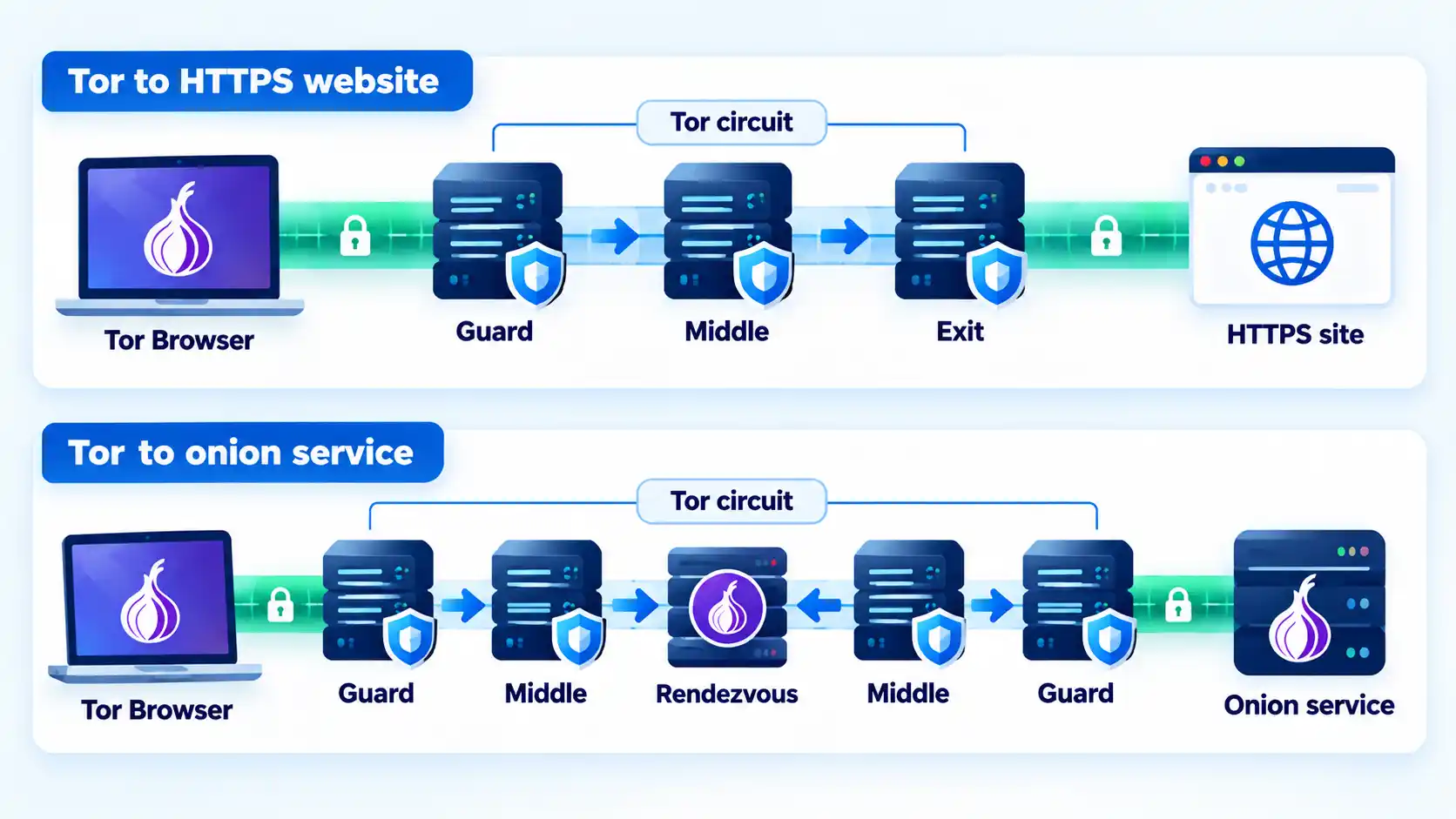
Tor takes a different approach. The Tor Project explains that ordinary Tor traffic passes through multiple relays, with layered encryption and different information available at each position. Its comparison with one-hop proxy services says Tor normally routes traffic through at least three servers before the destination.
For an ordinary web circuit, the first relay is the guard or entry relay. It receives the user’s connection but does not know the final destination. A middle relay connects adjacent parts of the circuit. The exit relay connects to the ordinary public internet but does not receive the user’s original public IP as the source of that exit-side connection.
The Tor client also negotiates separate encryption keys for each hop. The Tor Project’s technical overview of Tor circuits explains that each relay knows only its adjacent hops rather than the complete route.
Advertisement
Infoi
A VPN concentrates an important part of the route in one provider. Tor deliberately distributes route knowledge across multiple relays. That does not make Tor invulnerable, but it removes the ordinary requirement that one routing intermediary know both the incoming user connection and the final destination.
If you are comparing single-intermediary routing models, the distinction between a proxy and a VPN provides useful context. Tor differs from both by deliberately distributing the route across multiple relays.
What Your ISP, VPN Provider, Tor Relays and Websites Can See
Privacy claims make more sense when you identify the observer instead of asking whether traffic is simply “hidden.”
Advertisement
With a VPN
Your internet service provider still carries the connection to the VPN infrastructure. For traffic actually routed through the VPN, the ISP sees that VPN connection rather than directly carrying each covered connection to its final website.
The VPN operator occupies the next major trust position because traffic reaches its infrastructure before exiting toward internet destinations. A website normally sees the VPN server’s public IP address for traffic leaving through that endpoint.
HTTPS remains a separate protection layer. A VPN tunnel can end at the VPN server while an HTTPS connection remains encrypted between your browser or application and the website.
With Tor
The Tor Project says that when you connect directly to Tor, a local internet provider or other local observer can normally tell that you are communicating with Tor nodes but does not receive the final browsing destination from the normal Tor route. Websites instead see a connection coming from the Tor network rather than from your normal public IP. Tor’s protection overview explains this separation through its multi-hop routing model.
Advertisement
The guard relay sees the incoming client IP because it receives the connection. The exit side knows which ordinary internet destination it connects to. The design goal is that one ordinary relay does not receive both pieces of information as part of normal circuit operation.
This is why statements such as “Tor relays cannot see anything” are inaccurate. Each relay has information required for its role; the protection comes from separating those roles.
A useful follow-up distinction is what your ISP can see with Tor or a VPN, because local-network visibility and destination-side visibility are different parts of the same connection.
Privacy Is Not the Same as Anonymity
Neither VPN routing nor Tor routing prevents you from identifying yourself voluntarily.
Advertisement
If you sign in to an email account connected to your real identity, the service can still associate the session with that account. The same applies if you submit your name, phone number, address, payment details, or other identifying information.
The Tor Project makes this boundary explicit. Its Tor Browser safety guidance says perfect anonymity cannot be guaranteed and explains that signing into a website or supplying personal information identifies you to that service even though Tor may still hide your normal network location.
A conventional VPN has another limitation: its network tunnel does not automatically change the browser environment. Cookies, signed-in sessions, extensions, fonts, screen characteristics, and other browser signals can remain available to websites even when your public IP changes.
IP privacy is therefore only one part of online identifiability.
Advertisement
Tor Browser Adds Protections a VPN Tunnel Does Not
Browser fingerprinting combines observable browser and device characteristics that can help distinguish one browser from others. Signals may include operating-system information, fonts, browser capabilities, extensions, screen characteristics, cookies, and other state.
A VPN tunnel does not standardize those properties. Its primary function is network tunneling and routing.
Tor Browser is designed around a broader browser-privacy model. Tor Project documentation says the browser is modified to prevent or reduce several forms of identifying leakage and to make Tor users look more alike.
The distinction is important enough that the Tor Project strongly recommends against using ordinary browsers as substitutes for Tor Browser. Its current guidance specifically warns about real-IP exposure through DNS or WebRTC, fingerprinting through operating-system details, fonts and plugins, and persistent tracking state such as cookies and cache.
Advertisement
This does not mean Tor Browser makes every user indistinguishable under every circumstance. It means its privacy model includes browser-level defenses that a VPN tunnel by itself does not provide.
The same distinction explains why Tor Browser and private browsing should not be treated as equivalent simply because both can limit some browsing state.
Where Encryption Starts and Stops
Both VPN and Tor comparisons become misleading when “encrypted” is treated as one uninterrupted property from the device to every destination.
VPN encryption
A conventional VPN protects covered traffic inside its tunnel between the VPN client and VPN endpoint. After that point, the application’s own protocol determines what protection continues toward the destination. For ordinary modern web browsing, HTTPS can independently protect the browser-to-website session even though the VPN tunnel itself ends at the VPN server.
Advertisement
Tor and ordinary websites
Tor applies layers of encryption inside its relay circuit, but an ordinary website reached through an exit relay still relies on destination-side encryption such as HTTPS to protect application data on the public-internet side of the route.
The Tor Project’s Tor and HTTPS explanation treats the two protections separately. Tor changes network routing and conceals the user’s normal public IP from the destination, while HTTPS protects data exchanged with an HTTPS website.
Onion services use a different path
An onion service does not use the same public-internet exit pattern. The Tor Project’s onion-service documentation explains that both the client and service establish Tor circuits and meet through a rendezvous point, while onion-service traffic is encrypted between the client and onion host.
A `.onion` service is therefore not simply an ordinary website viewed through a Tor exit. The service connection remains inside Tor rather than emerging through a public exit relay to reach an ordinary public web server.
Advertisement
Tor Distributes Trust, but It Still Has Limits
Tor’s distributed design prevents one ordinary relay from simply receiving the complete source-and-destination relationship, but that is not the same as protection against every possible observer.
The Tor Project explicitly documents traffic-correlation and timing attacks as a remaining limitation. An observer capable of seeing both the user’s side of a connection and the relevant destination or exit side may compare timing patterns. Tor’s documentation on remaining attacks states that Tor does not defend against an observer that can see both ends of the communication channel.
That limitation does not make the relay architecture meaningless. It defines the threat model. Tor still prevents ordinary single relays, destination websites, and local network observers from automatically receiving the complete source-to-destination relationship.
Tor can also lose anonymity through application behavior rather than a break in onion routing. The Tor Project notes that circuits may carry multiple TCP connections, so mixing anonymous and identifying traffic or using applications carelessly can create additional correlation risks.
Advertisement
The more detailed architecture behind Tor guards, middle relays, exit nodes, and onion routing explains why these protections and limitations follow from the network design.
VPN vs Tor for Speed and Everyday Compatibility
A VPN and Tor both alter the normal network path, but they do so differently.
A conventional VPN generally sends covered traffic through one VPN endpoint before forwarding it toward the destination. Real performance depends on factors such as server location, congestion, protocol, route quality, device limits, and the underlying internet connection. If a VPN is unusually slow, VPN slowdown diagnosis works best by comparing the same connection with the VPN off and on before changing several settings at once.
The distinction matters most for workloads that are sensitive to latency. Interactive voice, video, gaming, and similar applications may react more strongly to additional delay than ordinary page loading, although actual results depend on route and network conditions.
Application coverage also differs. Many VPN clients are designed to route broad device traffic according to their routing policy. Tor Browser is configured for safe web browsing through Tor by default. Core Tor can be used by other compatible applications, but the Tor Project says it has not researched safe anonymity configurations for every program and recommends Tor Browser for normal browsing.
Tor should therefore not be reduced to “a slower VPN.” Its extra relays and application constraints follow from a different privacy architecture.
Should You Use a VPN and Tor Together?
Not by default.
Advertisement
Combining two privacy technologies does not automatically create stronger privacy. It changes which parties occupy different positions in the connection, introduces additional configuration, and can create new failure modes.
The Tor Project’s current Tor Browser known-issues guidance says VPNs tend to interfere with Tor and does not recommend using VPN and Tor together unless the user is advanced and understands how to configure both without compromising privacy.
There is therefore no general rule that stacking the technologies provides “double anonymity.” Whether a combined design changes privacy in a useful way depends on the exact routing arrangement, threat model, VPN operator, and configuration.
This comparison does not provide VPN-over-Tor or Tor-over-VPN configuration instructions. Those designs require a more specific threat model than the general comparison here.
Advertisement
Which option should you choose?
VPN
Choose this if: you want broader device or application traffic routed through an encrypted client-to-server tunnel, ordinary application compatibility matters, and you are prepared to place substantial routing trust in the VPN provider or organization operating the endpoint.
Avoid this if: your main privacy requirement is to avoid relying on one routing operator that occupies both the incoming client side and the outbound destination side of the VPN path.
Main trade-off: broad traffic coverage and simpler application compatibility come with a concentrated provider trust relationship, while the VPN tunnel itself does not provide Tor Browser’s anti-fingerprinting defenses.
Tor / Tor Browser
Choose this if: distributing route knowledge across multiple relays matters to your threat model, browser-level anti-fingerprinting protections are important, or you need access to onion services without relying on one VPN operator for the full route.
Advertisement
Avoid this if: your primary requirement is straightforward coverage for arbitrary device applications or a workflow that depends heavily on low latency and does not fit Tor’s application model.
Main trade-off: Tor reduces reliance on a single routing intermediary but introduces a multi-relay route, application constraints, and an anonymity model that still depends on how you use Tor Browser and what information you reveal.
Bottom Line
VPN and Tor overlap in one visible result: either can cause a normal website to see an address other than your ordinary public IP. Their privacy architectures are otherwise substantially different.
A conventional VPN gives you an encrypted path to one VPN endpoint and asks you to trust the operator occupying that position. Tor distributes route knowledge across multiple relays and, when used through Tor Browser, adds browser-level privacy defenses that a VPN tunnel alone does not provide. The useful choice depends on your threat model, application needs, tolerance for latency, and whether concentrating or distributing network trust better matches the problem you are trying to solve.
Every magnet has a north and a south pole, but which is which? Sometimes it matters. If a product one builds features a magnetic closure or other part, the polarity of those magnets should be consistent in assembly. So how does one ensure they never glue a magnet wrong again? [Clough42] shows several ways to identify a magnet’s north and south poles using things many of us probably have ready at hand, and goes into a bit of theory while he’s at it.
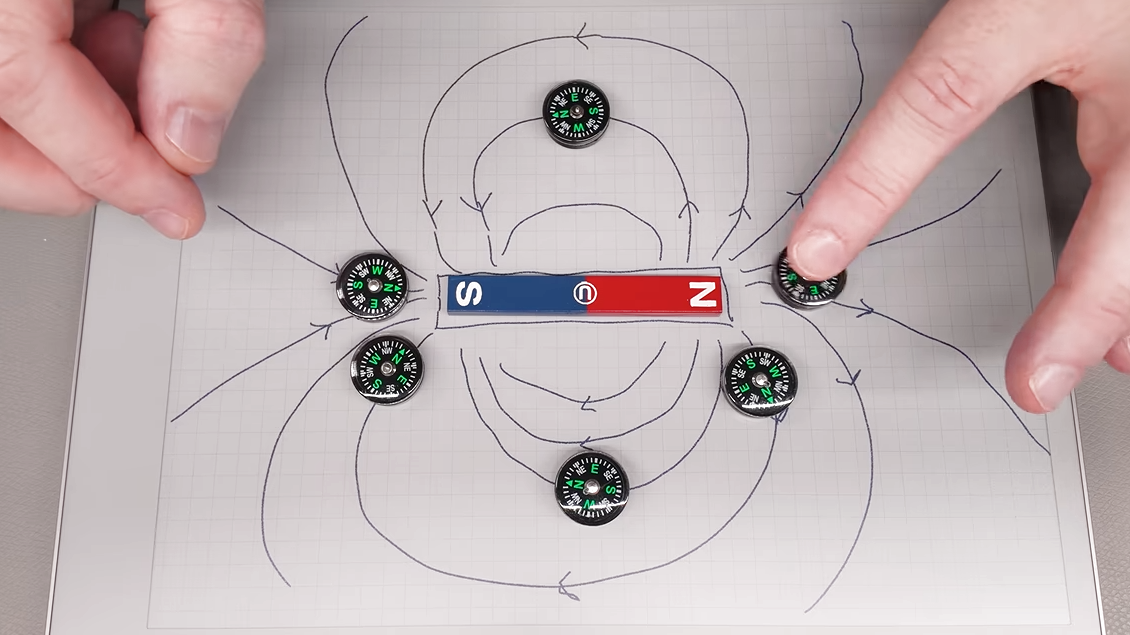
Probably the easiest way is to use a known-good and clearly labeled reference magnet. Same poles repel, and opposites attract. But if that’s not available, a simple magnetic compass can help. Because opposite poles attract, a compass’s north point will be attracted toward a magnet’s south pole, and vice versa.
A Hall effect sensor, or an electromagnet — the winding and current flow determine the polarity — are other ways to measure a magnet’s poles. And here’s where [Clough42] dives into some details of how magnetic fields actually act, because it explains some seemingly strange behavior.
Advertisement
For example, at around 4:08 he demonstrates a Hall effect sensor board that is documented as lighting an LED when the south pole of a magnet is held to its front. It does that, but it also lights the LED when the north end of the magnet is held to the sensor’s back. That’s because the sensor isn’t actually directly sensing the magnet’s pole, it’s sensing the orientation of a magnetic field. The lesson is clear: make sure you’re measuring what you think you’re measuring. Near the end of the video he demonstrates a similar experience with a handy mobile phone app that senses magnetic fields by reading the device’s internal magnetic compass; by waving a strong magnet around, the detected polarity flips back and forth even though the magnet’s orientation isn’t changed.
So what does one do after positively identifying a magnet’s north and south poles? Label it clearly for use as a known-good reference magnet in the future is our suggestion. Watch the whole video below, then take a few minutes to dive into the nitty-gritty of what magnets actually are and how they work.
How Apple’s entry into the foldable market could boost its biggest rival.
Wongsakorn 2468/Shutterstock
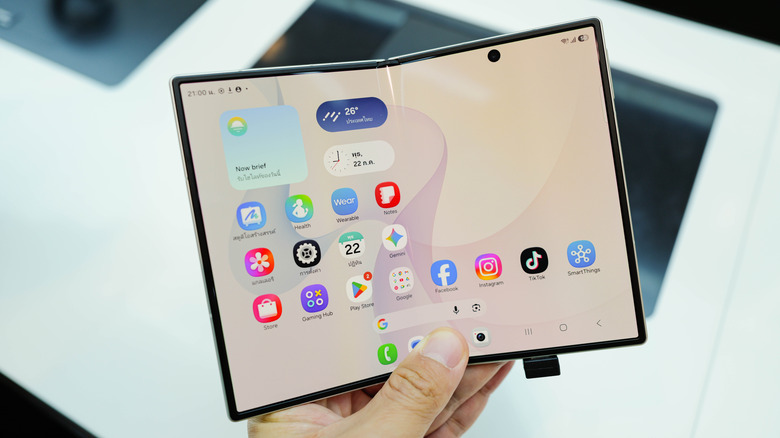
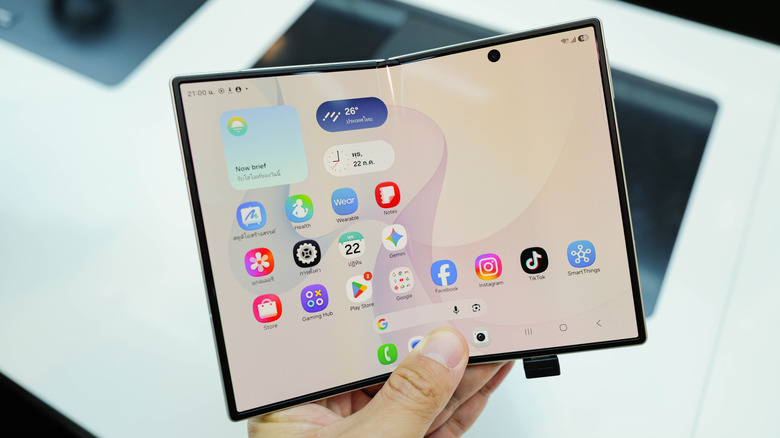
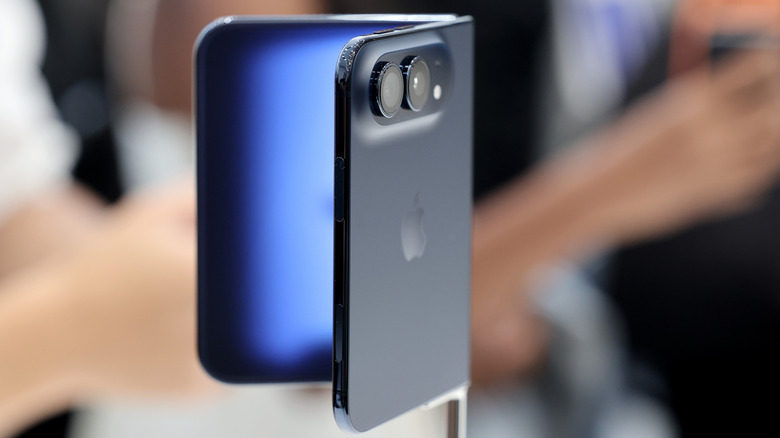
Apple recently unveiled the iPhone Duo, its first foldable phone. Although it won’t hit stores until next month, the announcement alone was enough to get the smartphone world talking. And while Apple is making its first attempt at the format, others, like Samsung, have been doing this for some time — the original 2019 Galaxy Fold was one of the first mainstream foldable devices.
As it turns out, the iPhone Duo announcement might also end up being a positive for competing devices like the Galaxy Z Fold 8. It’s not as if Samsung is celebrating the Duo, but the hype surrounding it ends up drawing more attention to the foldable category overall.
Advertisement
The iPhone Duo has sparked more interest in foldable phones
Benjamin Fanjoy/Getty Images
Samsung currently leads the foldable device segment, but that market slice doesn’t even come close to conventional smartphones. IDC estimates that about 20.6 million foldable phones were shipped last year, but that’s only a fraction of the overall smartphone market. Global smartphone shipments reached 1.25 billion last year, giving an idea of just how niche the foldable phone market still is. But the iPhone Duo has the potential to change that, and we’re already seeing the first effects.
Recent reports suggest that more people are buying the Samsung Galaxy Z Fold 8 following the announcement of the iPhone Duo. It’s possible that people are finally starting to pay attention to foldables, or maybe enthusiasts want to give the form factor a try before the iPhone Duo goes on sale. Either way, Samsung is well aware of this, and has already dropped the price of its foldable phones in some markets. This is just one of many examples of how competition ultimately benefits consumers.
With Apple now in the race, other players will have to step up their game to compete. The result will be more available options and likely broader price ranges, too. There’s only one iPhone Duo for now, but Samsung, for example, already has a variety of foldables available. These range from the relatively affordable Galaxy Z Flip7 FE to the chic and expensive Z Fold 8 Ultra. Eventually, the competition might even push Apple to make a cheaper iPhone Duo model.
Advertisement
Phone makers should give foldables more attention
Benjamin Fanjoy/Getty Images
There’s a benefit on the hardware and software side, too. Although foldable phones aren’t breaking news anymore, Apple has shown how it always finds a way to catch up. For instance, the company hasn’t completely solved the screen crease issue, but it looks significantly less noticeable on the iPhone Duo thanks to a matte nano-textured layer. There’s little doubt that other folding phone makers will follow suit soon.
The same goes for the new user interface designed specifically for the iPhone Duo. It’s still iOS, but clearly designed for a device that can be used in multiple layouts — folded, unfolded or half-open. Many current foldable devices simply stretch or shrink the same interface across all screens, which ends up looking unfinished. Also, there are already developers porting the iPhone Duo’s opening and closing animation to Android. It’s not hard to imagine this becoming an industry standard before long.
So yes, Apple wasn’t the first to make a foldable phone, and you may not even want to buy one. But this entry will likely end up shaping the entire foldable market anyway.
We may receive a commission on purchases made from links.
Cord cutters have usually relied on streaming services and live streaming apps to fill the void once occupied by cable TV. For the most part, this has served people well, but the rising cost and number of streaming services has forced many people to wonder whether these platforms are really worth the investment. If you find yourself wanting a cheap alternative to streaming services like Netflix, Disney+, Hulu, HBO Max, Paramount+, Apple TV, and Peacock, it might be time to use a digital TV antenna.
Depending on your location and the kind of content you consume, a TV antenna can let you access all the content you need without all the unwanted extra options. It may also sound appealing if you feel nostalgic for flipping through channels to watch movies and TV shows. That being said, a lot of antennas can be a downright pain to set up. If you don’t want to spend your valuable time — and money, if you resort to a professional’s help — assembling these devices, here are some convenient and reliable TV antennas that will work from the moment you plug them in.
Advertisement
Antennas Direct Clearstream 4Max
If you live in the suburbs and want an outdoor antenna, the Antennas Direct Clearstream 4Max could be an excellent pick. All it takes is five minutes — just set this antenna up on its 20-inch mast, and the multi-directional ultra high frequency (UHF) design will ensure that you can enjoy the strongest signal quality possible, regardless of what direction it’s facing. If your house is perfect for setting up this antenna, you can use the J-pole that comes with this purchase to mount it to the side of your house. Just make sure you use the sealing pads if you’re screwing this antenna to your roof, to prevent any water from seeping into your house when it rains. The screws can also be prone to rusting, so either apply a protective coating from time to time or keep some replacement screws handy in case you miss a few rounds of maintenance.
Advertisement
While you can get this antenna with a mast and reflector for $134.99, we recommend shelling out a bit extra for an additional amplifier, too. The antenna apparently has great reception, but the amplifier will help in receiving weaker signals properly and expanding the number of channels you can surf. However, it should perform admirably in poor weather conditions, so don’t worry about harsh winds or storms affecting your TV viewing experience all that much.
Advertisement
Channel Master Flatenna 35
People who want a convenient indoor antenna that sticks to a surface and provides you with enough reception to browse channels might love what the Channel Master Flatenna 35 brings to the table. At $35, this is easily one of the cheapest antennas you can get your hands on, though the Amplified version seems an even better bet. $59 isn’t a huge jump in price, and the amplifier will probably be a must-have for people who want to surf as many channels as possible, especially the ones with weak signals.
The Channel Master Flatenna 35 features an understated, minimalist design. You can use double-sided tape or thumbtacks to pin it to a wall or window, and it shouldn’t look out of place. Earlier Flatenna 35 models had a non-removable coaxial cable that was 6 feet long, but this issue has been rectified in the current model, which comes with a 12-foot coaxial cable that is removable. With a range of 35 miles, you should get access to a bunch of channels as long as you place this indoor antenna in an optimal location.
Advertisement
Winegard FlatWave Amped
Indoor antennas can be a bit of a mixed bag. Your location and the walls of your house play a huge role in determining overall signal quality. However, it you don’t want an outdoor antenna, the best indoor TV antennas out there can still provide excellent range and strong reception. The Winegard FlatWave Amped may possibly check all the boxes, offering a simple setup and crisp picture quality. The non-amplified variants of this antenna with ranges of either 30 or 40 miles are decent in their own right, but cord cutters who don’t want to make extra compromises will probably gravitate toward the $59.99 amplified variant that boasts a range of 60 miles.
If you don’t have too many power outlets, the built-in amplifier can conveniently plug into your TV’s USB port, though that may make cable management more of a priority. The unit comes with a bunch of 3M Command strips to make it easy to mount on a window or a wall. While the flat design is pretty low-key, some people may not be fans of a large square hanging in their room. Of course, that’s all ultimately a matter of personal preference — you may not care either way once the Winegard FlatWave Amped is set up and raring to go.
Advertisement
Antennas Direct ClearStream Eclipse
Yet another gadget that cord cutters will want to have in their homes, the Antennas Direct ClearStream Eclipse is as easy to set up as they come. First, download the Antenna Point app and figure out the direction of any broadcast towers. Once this is done, place the ClearStream Eclipse as high as possible in your room on a wall that’s facing these towers. Use the adhesive provided in the box to affix the antenna. Finally, run a scan on your TV, and you should get the signal of as many channels as you can receive.
The claimed range of more than 50 miles is impressive, and no doubt due to the antenna’s built-in amplifier. It should make tapping into UHF signals in metro cities and the suburbs a cinch. The reversible black-and-white design is also a neat addition, and it should help the antenna blend into the background of your home. If the coaxial cable isn’t long enough, you can detach it and use a longer cable. This replaceable aspect should help improve the longevity of the ClearStream Eclipse, too.
Advertisement
If all that isn’t enough, the ClearStream Eclipse also comes with a TV tuner, so there will be no need for you to pick one up separately. The antenna even offers DVR features. If the initial cost of $49.99 seems a bit high, the Antennas Direct ClearStream Eclipse is also on sale at the time of writing, so it could be yours for $34.99.
Advertisement
Antennas Direct ClearStream Flex Amplified
Antennas Direct is clearly deep into making TV antennas, with the ClearStream Flex Amplified being yet another potentially compelling antenna and amplifier combo. With a range of more than 50 miles, the installation process is very simple. Just stick the antenna to a wall or window facing the closest broadcast towers — again, the Antenna Point app will help you out here — and run a scan to access all the televisions within the ClearStream Flex Amplified’s range.
The Sure Grip feature that comes in the package makes this antenna even easier to instal. This adhesive strip can be placed and removed as many times as you wish. It won’t ruin the plaster of your wall, nor will it lose its grip. Even if it gets dirty, all you need to do is clean it with water, and the stickiness will still be maintained. The antenna’s reversible black-and-white will help it blend into a living room, though some feel it’s a bit too wide, so it may stick out no matter what you do.
Of course, ultimately it’s the performance of this antenna that matters the most, and the ClearStream Flex Amplified shouldn’t disappoint. The in-line amplifier, called the Volt Switch, can be toggled on or off easily. The antenna’s reception itself is also strong, which should make for excellent picture quality and a great viewing experience. The $49.99 price tag may seem a bit too high, but it’s a one time investment, compared to recurring monthly streaming service fees.
Advertisement
Mohu Leaf Supreme Pro
If you think paying anything above $50 is overkill for an indoor antenna, the Mohu Leaf Supreme Pro’s $68.99 price won’t make a great first impression. However, look past that, and you may decide that this amplified antenna is worth the cost. An admirable range of 65 miles, excellent 1080p reception, and a detachable 16-foot-long coaxial cable are all notable perks that make the Mohu Supreme Pro pretty compelling compared its competition.
The antenna is very easy to stick on a wall or window, courtesy of the Velcro-esque straps and push pins that come bundled with it. The amplifier is placed on the base antenna and uses LED lights to show signal strength. Just make sure your TV includes a USB port — or you have a port placed near the antenna — since the amplifier needs it for power to function properly. For people who live slightly farther away from the city, the Mohu Leaf Supreme Pro’s longer range could be a must-have.
Advertisement
Antennas Direct ClearStream 2Max
Indoor-outdoor antennas with lengthy ranges are designed for suburban households that want access to a decent array of channels, and the Antennas Direct ClearStream 2Max is a noteworthy option to keep in mind. We highly recommend placing this as high as possible to enjoy the best signal strength possible — ideally on your roof and on top of the 20-inch mast provided with the antenna. Alternatively, a tall enough house can make do with a regular stand, which is sturdy enough to keep this antenna upright and free from any harm in adverse weather conditions. However, you shouldn’t have to worry about the antenna losing signal in the rain — the ClearStream 2Max can still get an adequate level of reception in such a scenario.
Advertisement
This antenna can also pivot on its base, great for making quick adjustments if you’re not getting enough channels. At $89.99, the ClearStream 2Max is certainly more expensive than most of the dedicated indoor antennas we’ve mentioned. However, when compared to other indoor-outdoor variants, it’s very reasonably priced and boasts excellent signal reception. Watching the channel of your choice in 1080p will be easier than ever with this antenna.
Advertisement
Televes Dinova Boss Mix
While not quite as expensive as the Antennas Direct Clearstream 4Max, the Televes Dinova Boss Mix is still pretty pricey. As only the second antenna we’ve recommended to cross the $100 price range, it’s only natural to wonder how this antenna justifies retailing for $129.95. The answer is pretty straightforward: claims of brilliant picture quality, long range, and an easy setup process.
Unfortunately, this antenna doesn’t come with a coaxial cable, so make sure you have one handy during the setup process. The Dinova Boss Mix is quite a bit smaller than other outdoor antennas, so people who don’t want something that really stands out on their roof all the time may prefer it. That being said, you shouldn’t take this antenna if you’re too far away from the main city. A range of 50 miles is decent if you live close to major broadcasting towers, but plenty of people don’t.
Advertisement
Methodology
Gado/Getty Images
A diverse mix of indoor and outdoor TV antennas was chosen for this list, all of which have a setup process that takes 10 minutes or less. To ensure high-quality recommendations, we made these antennas all had good reviews that were either qualitative — positive recommendations — or quantitative — with scores of 4 out of 5 or 8 out of 10 and higher — across two or more professional review outlets. These publications include Antenna Land, PCWorld, The Gadgeteer, Tom’s Guide, CNET, Audioholics, Long Range Signal, TechRadar, What to Watch, The Free TV Project, and Solid Signal.
My job is to translate dry and unrelenting code into a user interface of surpassing beauty. With my mouse, I roll one pixel after another up the vast anthill of the internet.
My dream is to translate the visions of the holy ones into a communication protocol of universal wonderment. I want to launch shreds of light into the air to fall like a layer of diamonds on the endless mountains of the Web.
Don’t imagine these dreams are limited by the LANs of the software lab. Between here and the ultimate unlimited interface of my aspirations lives a dazzling darkness, wide as the universe and thin as a hair.
With repeated exposure, the brain adapts to nicotine’s presence. Receptors become less responsive, and so the brain compensates by increasing the number of nicotine receptors, contributing to dependence. Activation of these receptors also influences the release of other neurotransmitters, including dopamine, which plays an important role in reward and reinforcement.
A common claim within wellness communities is that nicotine is a cognitive enhancer that improves focus and productivity. While there are some studies indicating that nicotine may temporarily enhance attention, vigilance, reaction time, and some types of memory, the results are mixed.
If any benefit does exist, the research suggests that this may only be the case for people with mild cognitive impairment. For healthy individuals, it doesn’t appear to offer any boost and may even worsen cognitive operation among higher-performing people.
In addition, many of these studies include people already dependent on nicotine. When these regular users stop consuming nicotine, they’re likely to experience irritability, anxiety, restlessness, and impaired attention. Reintroducing nicotine often relieves these symptoms, making it difficult to determine whether any improvements reflect true cognitive enhancement or are simply the reversal of withdrawal symptoms.
Advertisement
Wellness influencers also promote nicotine as a tool for managing stress and improving mood. Nicotine does activate reward pathways in the brain, which can create a sense of pleasure and wellbeing—temporarily.
Long-term users of nicotine often find that the substance makes stress and anxiety harder to manage. Research consistently shows that people who quit smoking experience reductions in anxiety, depression, and stress, along with improvements in mood and overall quality of life over time. In fact, long-term discontinuation of nicotine use is associated with better mental health.
But the most ambitious claims emerging from the pro-nicotine wellness movement suggest that nicotine protects against Parkinson’s disease, Alzheimer’s, and other forms age-related cognitive decline. Or further, that nicotine slows biological aging and promotes longevity.
There’s some kernels of research underneath these claims, such as laboratory studies showing that nicotine can affect cellular pathways related to oxidative stress and animal studies suggesting effects on inflammation and other mechanisms linked to aging and disease. However, such findings have not translated into anything that indicates nicotine promotes healthy aging, extends lifespan or prevents age-related disease in humans.
Welcome to the latest edition of Power Play! From now until the midterms, senior writer Molly Taft will be sharing their thoughts every Sunday on this political season’s hottest issue: data centers. We welcome reader comments, and will be answering questions from the comments section in future editions.
The post-lunchtime Climate Week panel featuring tech executives working on AI and data centers was only about a minute into the discussion when a man stood up a few rows over from me in the audience and started yelling.
“The idea that we can keep running on fracked gas is a lie!” he exclaimed as security tackled him.
The panel tried to get back to business after the protester was removed—only to be interrupted again when another person stood up. That’s how things proceeded for the next 10 minutes as protesters with the group Extinction Rebellion NYC staggered interruptions, yelling about various harms of AI over the speakers onstage, who tried valiantly to continue their conversation.
Advertisement
For nearly a decade, Extinction Rebellion groups have used public protest to draw attention to the climate emergency, staging disruptions at corporate-friendly events like this one at Climate Week. Usually, these types of interruptions draw polite silences or subtle eyerolls from panelists waiting for them to stop.
But this experience seemed particularly frustrating to these panelists. Cully Cavness, the cofounder and president of data center infrastructure company Crusoe, confessed to the session’s moderator that he was still thinking about the interruption several minutes after security had taken the last protester out.
I get why they were on edge. The protest at the panel was a microcosm of the tough couple of months for data center defenders, with public opinion at rock-bottom levels and moratoriums popping up in red and blue states. It’s understandable why tech folks would be tense.
Cavness, at one point, said that he assumed most of the protesters probably didn’t even live near a data center and didn’t understand the benefits they could bring to the local tax base. Emerald AI’s Varun Sivaram forged ahead talking about how data centers could become “good citizens,” to work on the grid to lower bills and bring more clean energy online.
Advertisement
“Careful what you wish for,” Sivaram cautioned the now-absent protesters near the end of the session, warning that depriving communities of data centers could deprive them of good actors to help transform the grid.
Lots of folks might take the opportunity, as the protesters did, to yell at a data center executive if given the chance. But unlike the Extinction Rebellion NYC members, climate change almost certainly wouldn’t be the first thing on their minds. Data centers were a hot topic at Climate Week, but it’s also a self-selecting event where people care about one particular issue.
Local concerns—the kind Sivaram and Cavness seemed to be responding to—have dominated the larger national conversation around data center dissent. Poll after poll show that climate is one of the last data center-related environmental concerns on the list for many voters behind water, energy use (and its impact on bills), and local air and noise pollution. Even some climate folks—notably investors—see the state of the atmosphere as a backseat issue. “Climate Week could basically be ‘AI and data center week,” cofounder and managing partner at VoLo Earth told the Wall Street Journal. “It’s all about energy, and most of us as climate investors, myself included, are focused on the energy system.”
During Climate Week, I also caught up with William Lawrence, who is currently locked in a tight race for Michigan’s 7th congressional district. Lawrence knows the climate crisis well—he’s one of the original founders of the Sunrise Movement climate activist group. He’s also made data center opposition, as well as opposition to AI, a cornerstone of his pitch to voters, which helped him win a tough Democratic primary.
Don’t take the health or DNA test results as absolute truth, however. “This can lead to a false sense of security or false alarms,” says veterinarian Amanda Chambers. Forward your results to your veterinarian and always follow up by scheduling a visit to the vet if your pet is marked as a carrier for any genetic disease.
What the Results Can—and Can’t—Tell You
After chatting with Richardson, I’ve found that these are the major areas of limitation with at-home DNA test kits:
Results depend on the size/diversity of the genetic database
Most kits test known markers only—not full genomes
Feline data is less developed
Misinterpretation of results can lead to unnecessary concern
Wisdom Panel claims its cat breed results are over 98 percent accurate and its dog tests are over 99 percent accurate. However, there’s a huge disparity between the three kits I tested on my cats, particularly in breed ancestry. One problem with the vast disparity in results is that the three companies use different sample sizes and metrics to identify breeds.
But the biggest issue for cat owners taking these at-home DNA tests is that you can’t really identify most cats’ breeds the way you can with dogs. Unless your cat is a purebred, about 95 percent of cats don’t belong to a recognized breed. Cats’ genetic backgrounds are muddied—they’re just similar mixes with different physical characteristics, so the tests only show the breed(s) they share the most markers with. Basically, these tests for cats aren’t able to reliably tell us about breed composition, just similarity to other breeds’ traits in the company’s data pool.
Advertisement
From my research, it seems the breed identification part of these tests is more accurate for dogs, as dog DNA is so much more diversified. Breeds have been clearly defined after centuries of diversification, and dog DNA mutates quickly, with genes changing after just a few generations. Cats are not much different from their Egyptian ancestors.
Interestingly, in a 2023 CBS report, the news organization sent dog and human DNA to different at-home test companies and received varying results, with the dog’s DNA ranging from 65 to only 29 percent German Shepherd. The human DNA results were attributed to a bulldog, border collie, and cane corso mix.
In summation, unfortunately, there isn’t a single catchall way to determine a pet’s genetic makeup or ancestry. Humans like categories, and breeds are essentially human constructs based on how a dog or cat looks. The genetic part of the test is fun, but take it with a grain of salt—especially with cats.
Photograph: Molly Higgins
A Note on At-Home Allergy Testing Kits
Advertisement
I recently tested both of my cats for allergies and intolerances using a similar at-home test kit, the 5Strands Pet Food & Environmental Intolerance Test, for $100. For this, you only need to send a fur sample in the mail to a lab; results were sent to my inbox within seven days. The report showed that both of my cats had strong intolerances to common ingredients in their diet, such as various types of fish and chicken meal. This sent me into a panic about my cats’ health and (dis)comfort.
After further research, I learned that hair/fur samples are not an accurate way to measure allergies and intolerances. Studies show that kits claiming to provide these results perform no better than chance and often produce inconsistent or false results.
Saturday Night Live took on the AI industry’s recent warnings of doom last night, as cast member Jane Wickline offered her impression of Anthropic CEO Dario Amodei.
Wickline’s version of Amodei sported an impressive wig and delivered halting answers that occasionally devolved into full-on Gollum-style exchanges with their dark side, at one point confessing, “AI is the devil and I its maker.”
Wickline-as-Amodei assured the audiences that AI executives “are all on the same page here: We do not condone what we are doing.”
Advertisement
“AI is not a weapon, it’s a tool: A tool for building weapons,” she declared. “And I urge you to urge me to stop.”
As for the technology’s supposed benefits, like potentially curing cancer, the fictional Amodei said, “Put it this way: In 10 years, there’s about a 10% chance that cancer won’t be a problem for anyone.”
B2B companies today can track almost every movement a prospect makes, yet the numbers that appear most prominently on dashboards can still have little connection to the number executives and stakeholders ultimately care about: revenue. 87% of B2B marketers found it increasingly difficult to measure the long-term impact of campaigns, while nearly half were required to justify marketing spend to CFOs and CEOs every month.
This pressure is intensifying as software buyers take increasingly complicated routes to purchase. Gartner found in 2026 that B2B buyers use an average of seven information sources during a purchase, with 45% turning to generative AI during their research. At the same time, 67% preferred a completely digital, sales rep-free buying experience. A click therefore marks an increasingly small moment in a much larger commercial journey.
Yet marketing reporting can still end at the first conversion. A campaign generates leads, and the cost per lead looks acceptable, yet the harder question comes later: did those prospects enter a qualified pipeline, did they become customers, and did the advertising spend produce an economic return? Often, there’s a disconnect between what B2B marketing teams are trying to accomplish and what they measure, with lead-based metrics remaining widely used even as companies pursue account-based growth.
The problem becomes sharper in software markets, where a purchase can involve several stakeholders and repeated research before a deal closes. Gartner found that 74% of B2B buying teams experienced unhealthy conflict during the decision process, while buying groups can span five to 16 people. Attribution, under those conditions, is less a reporting exercise than an attempt to reconstruct how a commercial decision actually happened.
Advertisement
It is this gap that Waqas Khokhar, founder and CEO of ScalixAI, has made pivotal to his thinking. Khokhar, who spent nine years at Google before building the company, approaches paid advertising through the lens of the business outcome it is meant to influence. His argument lies in the belief that marketing should ultimately be accountable for the commercial journey it helps create.
Khokhar believes the difficulty starts with attribution itself. “The biggest issue is that companies don’t understand how individual channels influence the end goal, which is revenue,” he explains. In a product-led business, that means understanding how far a customer travels after arriving. In a sales-led model, he argues, obsessing over the cost of a booked demo can obscure whether those demos are producing commercially viable opportunities.
His experience at Google also shaped his view of how paid search should be managed. “Google Ads is ever-changing and ever-evolving, and most people don’t know how to move with the way the algorithm moves,” Khokhar argues. His analogy is a boat in a storm: fighting the current with a fixed playbook makes little sense when the environment itself keeps changing.
The more consequential shift, however, is what happens after the click. Khokhar states, “We want to know: what did I invest, and what did I get out of it?” CAC and CPA still have a role in establishing healthy economics, he argues, but pipeline and closed revenue provide the harder test.
ScalixAI’s reported client outcomes are used to illustrate that philosophy. Khokhar points to Oneleet, which generated 660 demos alongside more than $1 million in closed revenue and more than $2 million in active pipeline. Fyxer, he points out, reached more than 10,000 customers while recording 20x revenue growth within a year, while PAM AI delivered more than 3x ROI within months. These figures form the evidence behind the company’s argument that advertising needs to be evaluated inside the wider revenue system.
Advertisement
Khokhar puts the philosophy in more human terms. He observes that the company’s core values emerged through working with clients instead of being selected as abstract corporate principles. Referrals have since become its main sales channel, he notes, with client recommendations providing evidence that the partnership model is carrying weight commercially.
That model also shapes how ScalixAI charges. The company uses a flat retainer, a structure Khokhar frames as a reflection of where the agency believes its interests should sit: with the client’s growth rather than with the size of the media budget. Khokhar similarly argues that an agency should function as an extension of its client’s team, with regular communication and a genuine understanding of the business.
The operational challenge now is scale. Khokhar highlights that ScalixAI moved from zero to roughly 30 clients in 14 months, with selectivity playing a large role in protecting the company’s culture. He recalls terminating one relationship only days after it began because the working expectations were fundamentally misaligned. “Protecting the team’s energy is part of the job,” he argues.
His next target is growing clientele, supported by the systems and processes he began building early in the company’s growth. The larger question, though, reaches well beyond one agency. As B2B buyers move across search, social, AI, and human validation, marketers face a growing demand to prove what their activity actually produces.




























































You must be logged in to post a comment Login