The Bose QuietComfort Headphones (2nd Gen) arrive in the middle of an ANC arms race that has been going on for more than a decade. Bose and Sony have spent years battling for noise-cancelling supremacy, and almost every new flagship has pushed ANC performance to new heights. Unfortunately, the same can be said for the price tags.
The original Bose QC1 sold for $299 when it was released. Today, the top-of-the-line QuietComfort Ultra Headphones (2nd Gen) are $449. That buys you a ton of features, excellent sound, and some of the best noise cancellation available, but what if you don’t need all of it? An infrequent traveler may have a hard time spending $449 for a single flight each year, while someone just starting out can buy a lot of ramen with the $150 difference.
So do those buyers settle for a previous-generation flagship at a reduced price, or step down to a current model that still offers the core features they actually need at a more reasonable tariff?
Buying used has always been a mixed bag with electronics. Batteries don’t last forever, warranties are usually short, and the realistic lifespan of many consumer electronics products isn’t substantially longer. The better spend may be a sub-flagship model like the Bose QuietComfort Headphones (2nd Gen).
Advertisement
Some readers will recognize the QuietComfort name as Bose’s flagship line, but that distinction now belongs to the model carrying the Ultra suffix. The QuietComfort without it sits in the middle of Bose’s lineup, retails for $359, and can sometimes be found for less. Watching the Black Friday sales is always a good play this time of year.
The Bose QuietComfort has long occupied that middle ground. It isn’t as flashy or as cutting-edge as its more expensive sibling, but it has traditionally focused on the features most buyers actually use. When Bose introduces new technology in its flagship models, some of it inevitably trickles down a generation or two later.
That brings us to the newest QuietComfort Headphones (2nd Gen), which I’ll refer to as the QCgen2 from this point forward. For listeners who want strong ANC, long-term comfort, and the features that matter without paying flagship money, the QCgen2 may represent the best compromise between cost and capability.
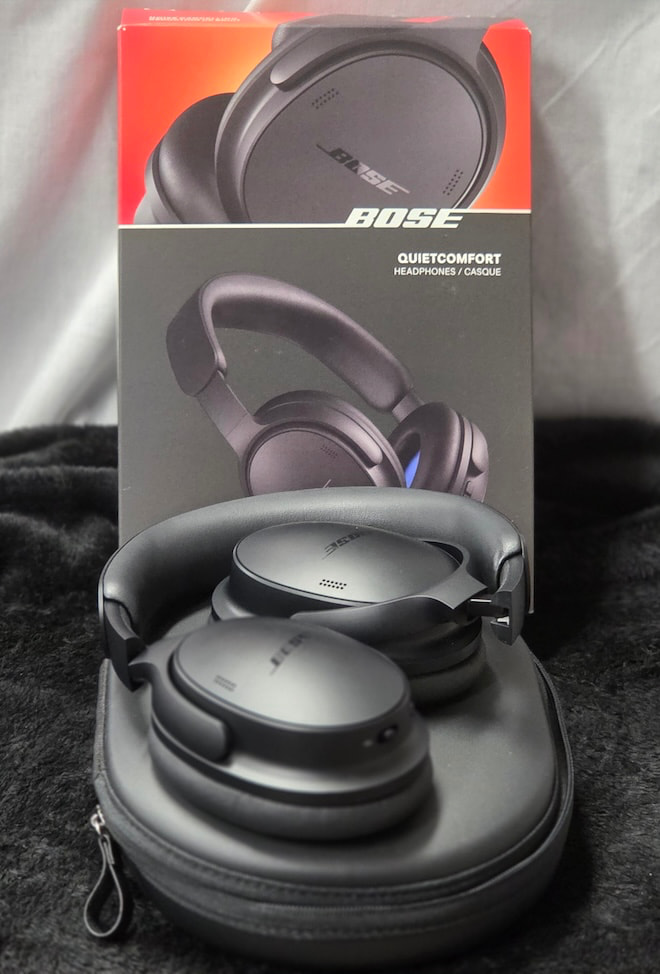
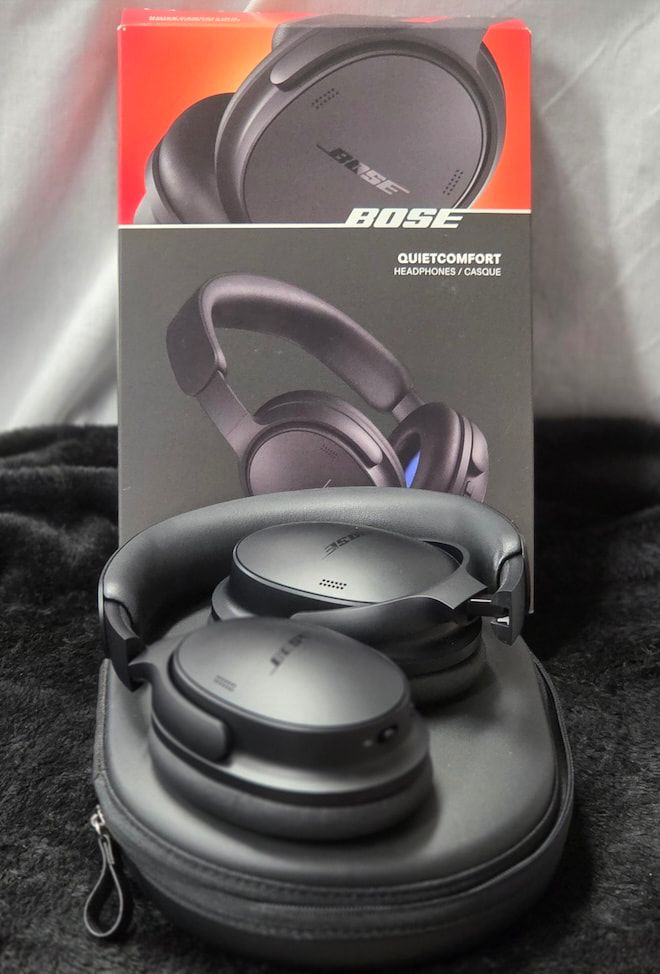
Bose QuietComfort Headphones (2nd Gen)
Related Reviews:
Build Quality and Fit: Familiar Bose Comfort With Useful Refinements
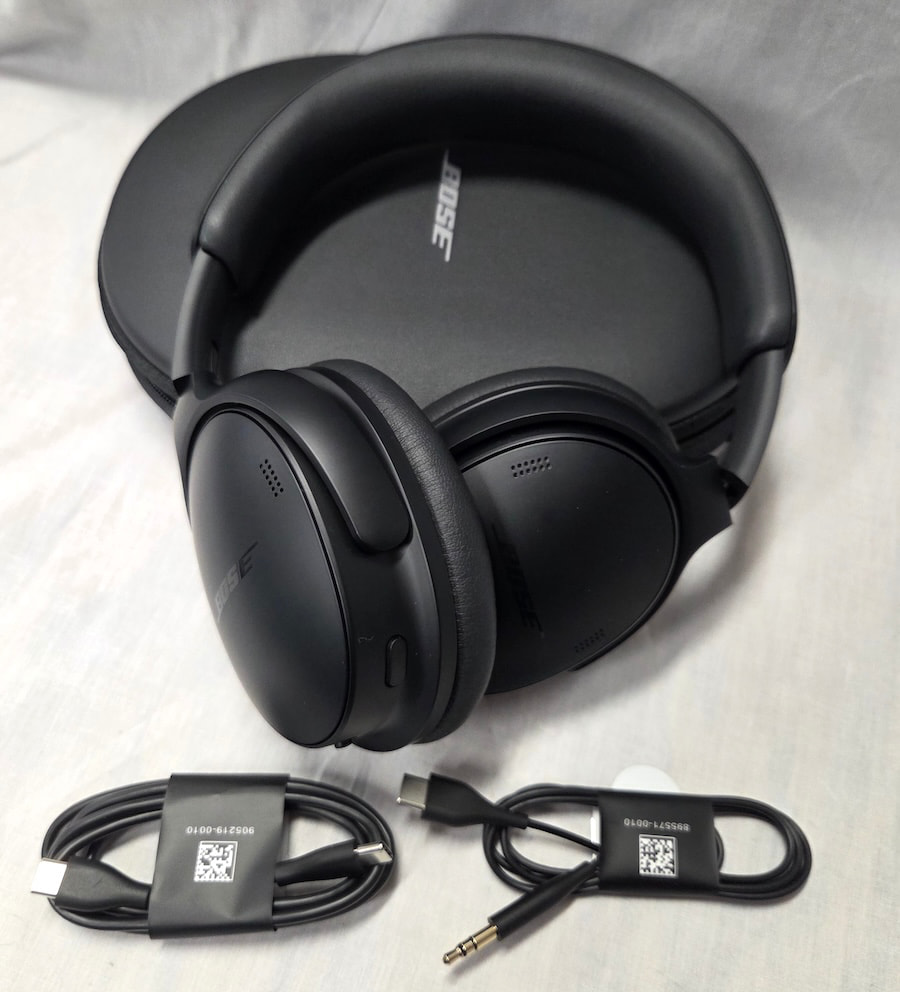
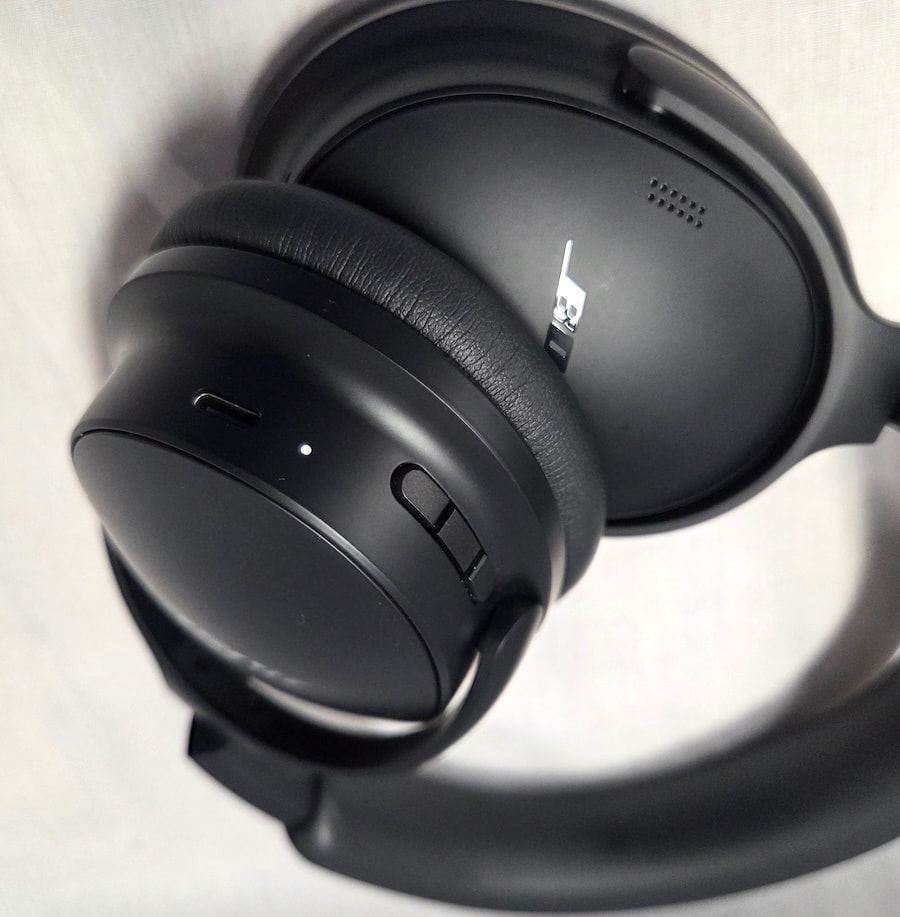
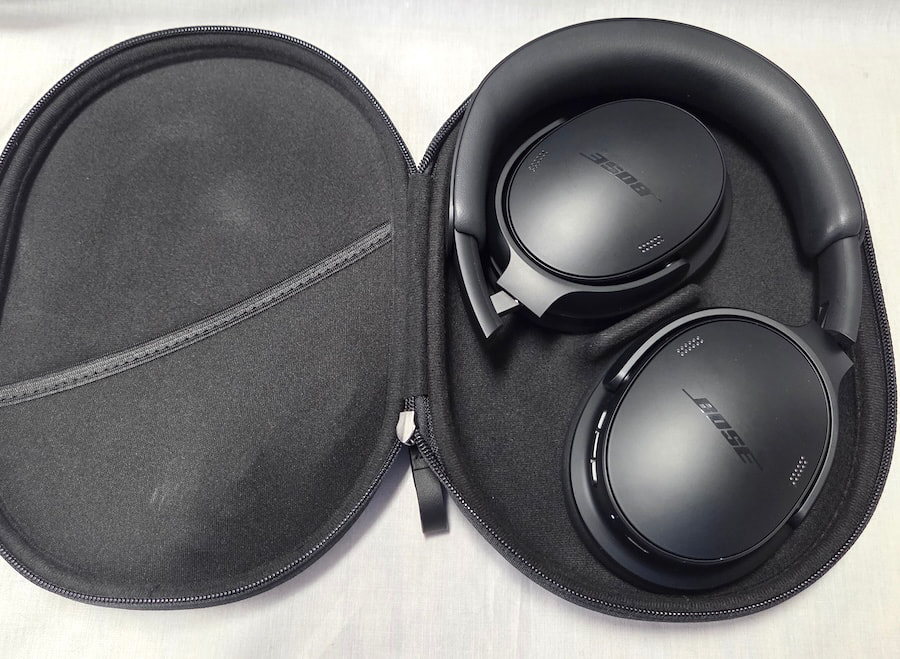
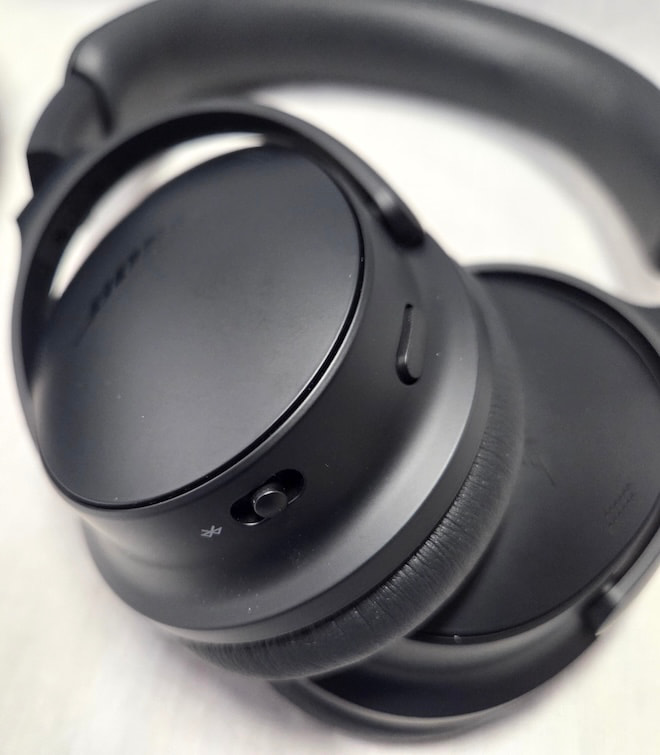
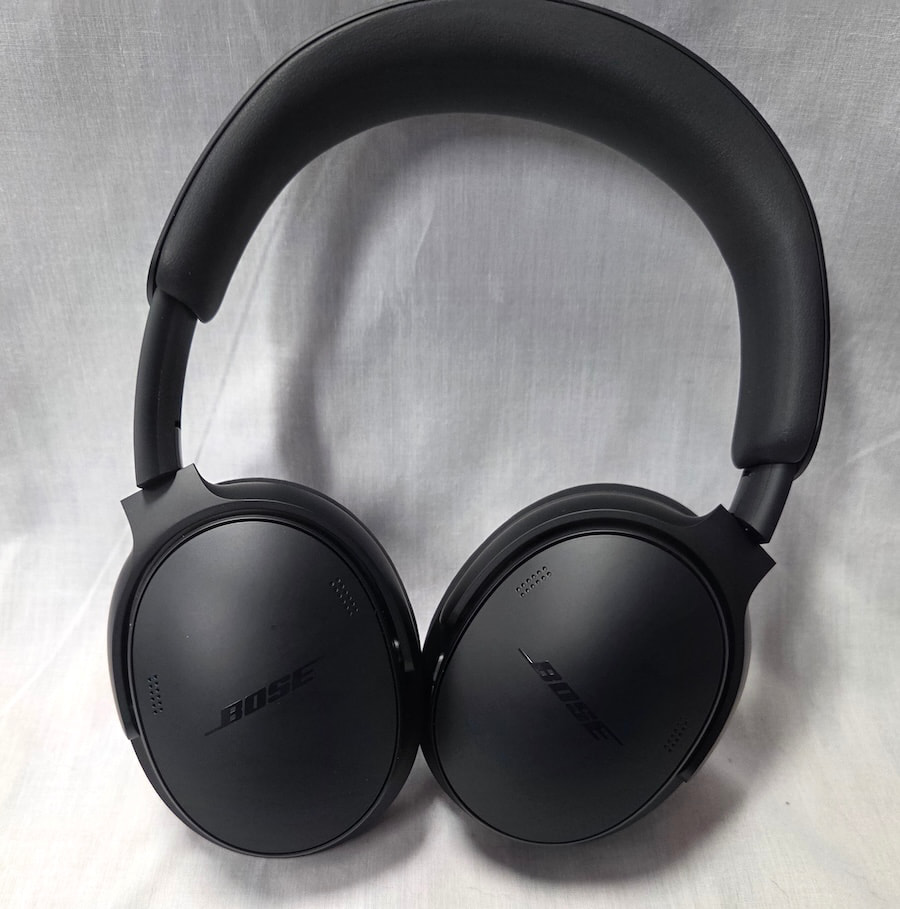
The aesthetic here remains understated, which is either refreshing or disappointing depending on your perspective. Bose has updated the design with treatment similar to what it gave the Ultra. The earcups are more pill-shaped and less rectangular than those of the previous iteration, although the step between the rear of the cup and the face, where the pads attach, is slightly less pronounced than on its sibling. The polymer yoke is wider than the metal version used on the Ultra, but the headband remains the same size as both the previous model and the Ultra.
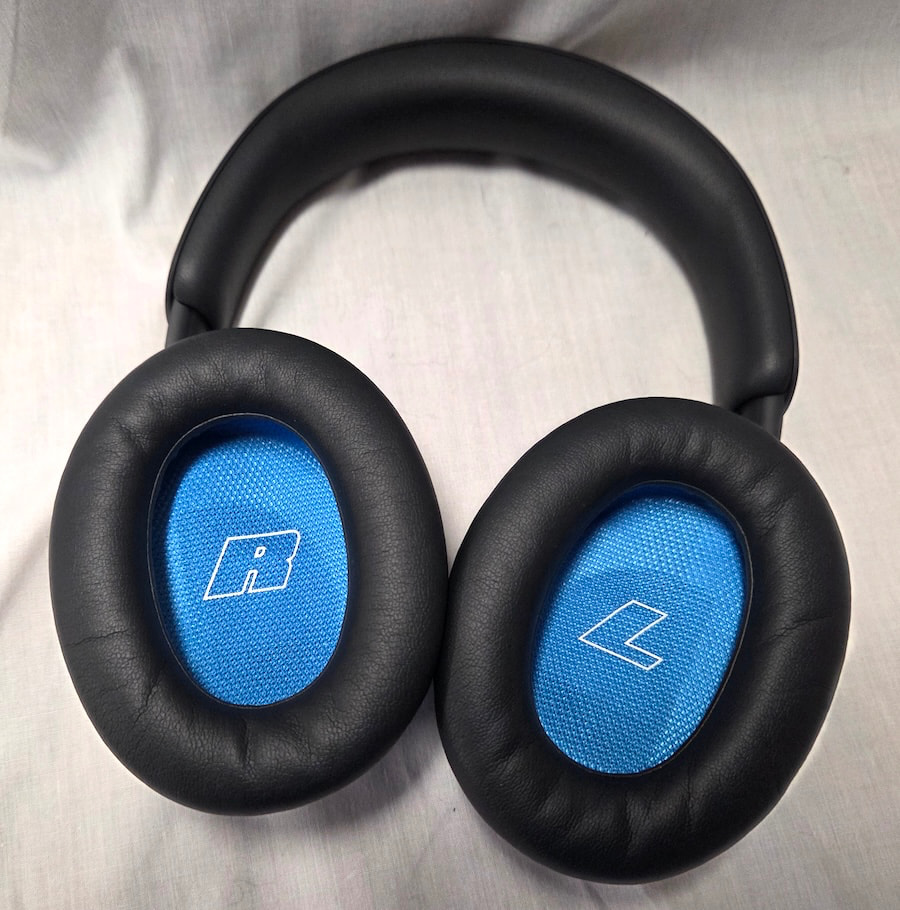
Padding is also shared between the two models, with the headband and ear pads interchangeable between them. Reusing parts where possible helps keep costs down, so it’s no surprise that the line shares as much commonality as it does. One benefit of the greater use of polymer is weight: the QCgen2 comes in at just 230 grams. That puts it firmly in the lightweight class and helps reduce fatigue during longer listening sessions.
Advertisement
Clamping force is moderate for an ANC headphone, with enough pressure to keep the cups firmly in place without feeling like a vise. Overall, I found the QCgen2 comfortable with glasses and easy to wear through an entire movie on a flight or during extended listening sessions.
Color choices used to be limited to black or white, but Bose has expanded the lineup considerably with Eucalyptus Green, Rosewood Mauve, and Dewdrop Mint joining the two original options. I’m not one to use headphones as a vehicle for personal expression, but wearing them as a fashion statement is fairly common now, and Bose has clearly answered the call.
Advertisement. Scroll to continue reading.
Build quality is solid rather than premium, which is about what one should expect at this level. The materials feel appropriate for the price and should provide reasonable longevity.
Advertisement
Internals and Connectivity: Lossless USB Audio Joins Bluetooth 5.4
Bose remains fairly tight-lipped about the driver details, revealing only that the QCgen2 uses 30mm dynamic drivers with a nominal impedance of 48 ohms. Frequency response and sensitivity are not listed.
Bluetooth is version 5.4 and supports AAC and SBC, but not aptX like its bigger sibling. Bluetooth multipoint is supported, allowing users to switch between a phone and laptop without additional hassle, which is a welcome addition.
The USB port can now be used for lossless audio playback at up to 24-bit/48kHz, which is another very welcome upgrade. That helps offset the removal of the 3.5mm jack found on the previous model, as the QCgen2 no longer includes an analog connection. USB audio still requires the headphones to be powered on, and a connected phone may take a battery hit if it is also supplying power while you listen.
Battery life is rated at up to 24 hours depending on the mode in use. ANC consumes less power than Immersive Audio, which drops the rated figure to 18 hours. A full charge takes roughly three hours, while a 15-minute quick charge provides about 2.5 hours of playback for those trying to squeeze in some listening during a short layover.
Advertisement
Features: Immersive Audio Arrives, but ANC Is the Bigger Upgrade
The previous section introduced two of the QCgen2’s major additions: USB audio and Immersive Audio with Bose TrueSpace technology. The other significant change is an improvement in ANC performance.
Immersive Audio offers three options: Still Mode, Motion Mode, and Cinema Mode. The technology has been available on previous generations of the Ultra series, but this is the first time it has trickled down to the QuietComfort line. Still Mode anchors the audio in place, while Motion Mode adjusts the presentation as you move. Cinema Mode is designed for movies, TV shows, and podcasts, creating a more spacious presentation while keeping dialogue intelligible.
Still Mode worked fairly well, while Motion Mode sounded more experimental and less refined to my ears. Cinema Mode does help dialogue cut through, which can be useful, but none of the three qualify as a “gotta have it” feature for me. I suspect a fairly large percentage of users will experiment with Immersive Audio for a while and then largely ignore it.
The changes to noise cancellation are more meaningful. Passive isolation hasn’t changed much, so that part is essentially a wash. Bose’s QuietControl ANC system has been improved with six microphones and updated adaptive feedback control, resulting in better noise reduction, particularly with continuous low-frequency sounds such as dishwasher noise and aircraft engines.
Sudden, unexpected sounds are reduced but not eliminated, which is something users should expect from feedback-based ANC systems. Bose has also added ActiveSense, which automatically increases noise cancellation when it detects a sudden rise in environmental noise while the headphones are in Aware Mode. It is a useful addition that helps prevent abrupt changes in the surrounding environment from becoming a distraction.
Advertisement
Overall, the QCgen2’s noise cancellation is on par with the previous-generation Ultra model, which should satisfy all but the most demanding ANC users.
Battery Life: Up to 24 hours; up to 18 hours with Immersive Audio
Quick Charge: 15 minutes for up to 2.5 hours
Full Charge: About 3 hours
Weight: 230 grams
3.5mm Input: No
Listening
The QCgen2 is decidedly not a reference headphone, with a tuning that falls somewhere between an L-shaped and V-shaped signature, along with a healthy amount of mid-bass emphasis. The overall presentation is also highly dependent on which mode and settings are being used.
Advertisement. Scroll to continue reading.
In its default configuration, the QCgen2 leans heavily toward an L-shaped signature, with a substantial mid-bass lift followed by a relatively flat response above that bump. To my ears, it is an odd tuning choice because vocals tend to sit in the middle or rear of the stage rather than being pushed forward as expected. The soundstage can also feel congested, if not outright cramped, depending on the track.
That might be enough for some listeners to dismiss the QCgen2 were it not for Immersive Audio’s Still Mode. Switching to Still Mode brings the vocals forward and shifts the tuning closer to a V-shaped presentation. The lower leg remains more pronounced than the upper, but the overall balance is considerably better and the presentation sounds more natural and relaxed.
Advertisement
There is also more air and a noticeably larger soundstage in this mode, and to my ears it should be the default. Motion Mode is similar in most respects, so listeners who want to add some head-tracking action get much of the same sonic improvement.
Even with those changes, the upper frequencies remain somewhat subdued, leaving the QCgen2 sounding slightly soft overall. Percussion lacks some of the snap it should have, while transients are slower than what I hear from competing Sony and Sennheiser models. That is clearly the tradeoff for a warmer, bassier presentation, and whether that is a positive will come down to individual preference.
The upside is that very few listeners are likely to find the QCgen2 fatiguing. That makes it a good option for gifting or sharing, as its tuning and various listening modes make it adaptable to a fairly broad range of preferences.
The soundstage is wider than it is deep, with limited overall dimensions and only a modest sense of height, which is hardly uncommon among ANC headphones. Imaging and layering are both acceptable, but the presentation remains somewhat compact because of the limited stage size and can become slightly claustrophobic when tracks get especially busy.
Advertisement
ANC performance is very good, with most continuous droning noises removed almost completely. The ability to adjust the amount of noise cancellation in the Bose app is also useful because increasing ANC has a noticeable effect on the sonic signature. Being able to tailor the level of cancellation to the environment therefore makes a lot of sense.
One weakness is the equalizer in the Bose app, which is fairly limited compared with many competitors. Three bands simply aren’t enough for meaningful tuning, so if neither the default nor Immersive Audio modes match your preferred sound signature, there is only so much you can do to correct it.
It has often been said that Bose makes lifestyle products rather than audiophile ones, and the QCgen2 certainly fits that description. That is not necessarily a criticism. Some competing headphones are more resolving and brighter, but they can also sound harsher and become more fatiguing over longer sessions.
The warmer, more organic presentation of the QCgen2 should appeal to a broad audience, while the expanded range of color options gives Bose another advantage for buyers who care as much about how their headphones look as how they sound.
Advertisement
The Bottom Line
The Bose QuietComfort Headphones (2nd Gen) are a meaningful upgrade over the previous model, with better ANC, improved comfort, USB audio, and Immersive Audio features that have finally trickled down from the Ultra line. Bose has also expanded the color options, which will matter to buyers who increasingly treat headphones as part of the wardrobe rather than something to hide in a carry-on bag.
They are comfortable enough for long sessions, offer solid battery life, and deliver an easygoing, warmer presentation that should work well for a broad range of listeners. The catch is that the default tuning benefits from some adjustment, and Bose’s limited three-band EQ does not give users much room to reshape the sound if it misses the mark.
Advertisement. Scroll to continue reading.
That makes the $359 asking price the real issue. The QCg en2 is not a cheaper Ultra, and it costs more than several very capable mid-tier competitors. For listeners who value comfort, strong ANC, and Bose’s warmer sonic balance, the premium may be justified. For everyone else, the competition is close enough that $59 can become a surprisingly persuasive reason to keep shopping.
Advertisement
Pros:
Excellent long-term comfort and lightweight design
Strong ANC performance approaching the previous Ultra
Immersive Audio modes noticeably improve the presentation
USB-C lossless audio up to 24-bit/48kHz
Warm, non-fatiguing tuning works well for extended listening
Bluetooth multipoint adds useful everyday flexibility
Cons:
No 3.5mm analog input
Three-band EQ is far too limited
Default tuning is heavily L-shaped and can sound congested
Soft treble and slower transients reduce perceived detail
$359 price puts it uncomfortably close to stronger competition
Here’s how to know whether it’s cause for concern.
DC Studio/Shutterstock
Whether you’re a hardcore gamer or a hardworking student, you probably know that the best laptops for gaming and schoolwork can get monstrously loud. There are several reasons why your portable PC’s fans are driving you to distraction with their constant din, but thankfully there are also steps you can take to reduce the noise levels they generate.
It’s important to note that aggressively loud laptop fans shouldn’t necessarily make you worry. In most cases, especially with gaming laptops, the fans are working so hard because they need to ventilate the heat that your machine’s CPU and GPU are generating. The more demanding the game or processing task you throw at your laptop, the faster its fans have to spin to prevent system-wide overheating.
Sure, the constant whirr of laptop fan noise can detract from gaming experiences, but it’s a better solution than suffering through regular crashes owing to an overheated GPU. There are situations where loud fan noise should concern you, and we’ll guide you through those below. In a lot of cases, though, noisy laptop fans shouldn’t give you sleepless nights. But if they do, we’ve got tips on how to make them quieter.
Advertisement
Why does my laptop sound like a jet engine?
Nomads Image Lab/Shutterstock
Most likely because you’re putting the poor thing under seriously heavy load. The best gaming laptops can get obnoxiously noisy when running demanding modern titles. When games like Crimson Desert are putting a lot of strain on both the GPU and CPU, your laptop’s fans have to run at extremely high speeds to dissipate heat from these two crucial components. Prosumer workstations that have been designed with intensive productivity tasks in mind (like 4K video rendering) can also get seriously noisy when GPU usage shoots through the roof.
At the time of writing, we consider the ASUS ROG Zephryus G14 to be the best gaming laptop around. I’m actually writing this up on the beastly RTX 5080 configuration. Trust me when I say that my eardrums know the pain of excessive fan noise all too well. Like many high-end laptops, the G14 has a Turbo mode that squeezes maximum performance out of modern games, at an exceptionally loud cost. In terms of noise output, my G14 can reach in excess of 50 dB (that’s a super-distracting amount of decibels). Unless you play in an FPS-slaying quiet mode, most gaming laptops are going to drum up a whole lot of din.
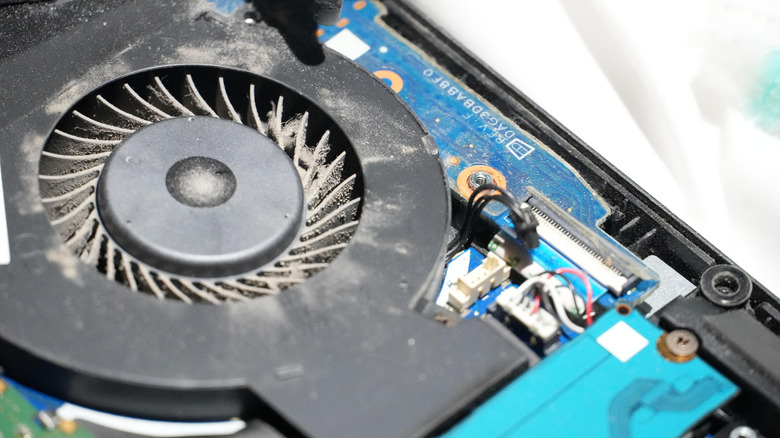
Having a bunch of background processes running can be taxing on your laptop’s fans too, so it’s worth opening the task manager, checking CPU usage and closing any programs you don’t actively need. Blocking effective ventilation to your laptop’s fans will also increase noise output, while dust accumulation can clog fan blades, making them even louder, which we’re about to touch on.
Advertisement
Is it okay to use a laptop with a noisy fan?
Maldives-art/Shutterstock
In most instances, absolutely. If you’re in the middle of playing a demanding AAA game — particularly one that supports advanced ray tracing features like Cyberpunk 2077 — loud fan noise is sadly par for the course. That doesn’t mean your laptop is bricked, though. Far from it. Instead, your portable PC’s fans are merely doing their job by helping to reduce the thermal levels of your system’s internal components. In short, a distractingly noisy fan when your laptop is under heavy load is completely normal and, crucially, safe.
Admittedly, there are cases where noisy fans could point to issues with your laptop. Fans whirring at consistently high speeds are generally nothing to fret over provided your laptop is performing demanding tasks. Yet if your machine sounds like a jumbo jet taking off when you’re merely swapping between tabs in your favorite browser, that’s more concerning.
Should you find that fans are running at full pelt even when your laptop’s GPU and CPU usage levels are low, that could be a sign of dust build-up. When debris accumulates inside your laptop, it can cause dust to cover your system’s fan blades, restricting airflow. If you’re worried your fans are clogged, it’s best to take your laptop to a repair specialist, who will likely remove the lower case of your PC and use compressed air to clean its fans.
Advertisement
Rattling or buzzing noises emanating from your laptop’s fans should be even more worrying. If you are hearing these irregular noises, the fan’s internal bearing may well be damaged. A fan that’s not providing proper cooling can cause serious overheating problems, leading to erratic crashes and shutdowns. Concerned about irregular sounds coming from your laptop’s fans? Definitely take your system to an expert or contact the manufacturer.
How can I make my laptop fan quieter?
Sezer66/Getty Images
Excessive fan noise is generally more common on gaming laptops than it is on standard workstations. Regardless of whether your laptop is a portable powerhouse or is primarily used to watch cat videos on YouTube, you can get the best battery life for your Windows laptop by changing these settings. Improving battery performance is often tied to boosting power efficiency, which in turn can lower fan noise.
One of the easiest methods to reduce fan speeds is by swapping to a quieter power mode. On a Windows laptop, go to Settings > System > Power & battery > Power mode, then select Bestpower efficiency. Alternatively, if you own a dedicated gaming laptop, there’s a decent chance it will have manufacturer-specific software to help you set or reduce fan speed. In the case of my Asus Zephyrus G14, I can quickly select the Quiet profile through its Armoury Crate app, drastically reducing decibel levels.
Advertisement
Staying on noisy gaming laptops, a good way to reduce the din of rapidly whirring fans is to lower in-game settings and cap frame rates. With the latter, capping the PC games to a 60 FPS limit can significantly reduce performance demands compared to running titles at uncapped frame rates, in turn helping to reduce fan noise. Turning off high-end features like ray tracing and lowering a game’s internal resolution will also put less strain on your laptop’s GPU, allowing your system to run quieter.
It’s also worth considering what conditions you’re using your laptop in. In the height of summer, your laptop’s fans have to work harder to ventilate the warmer surrounding air. If you’re worried about ventilation, place your laptop on a flat surface like a desk, as propping your system on a bed or even, yes, your lap, can block airflow to the fans.
As cool as it would have been to wield lasers that produce a beam of neutrinos, recently two papers were published by MIT researchers that seem to dampen the likelihood of such lasers being at all possible. In a review paper by [Ana Maria Rey] et al. these two papers are investigated in more detail.
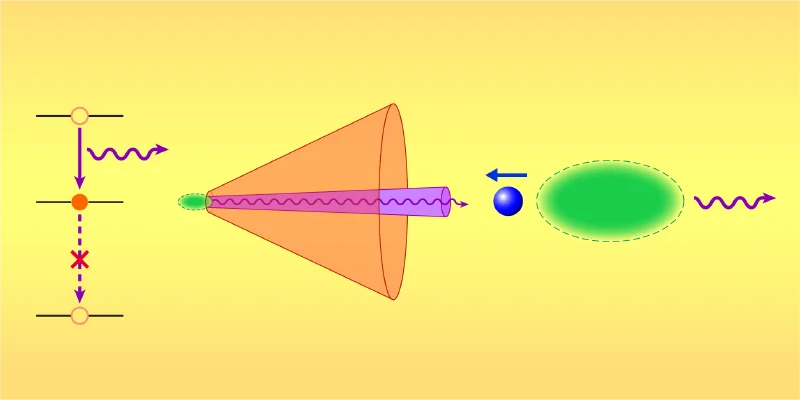
Although the concept behind a neutrino laser is rather simple, using the same superradiance effect involving a Bose-Einstein condensate (BEC) that allows for stimulation by photons to result in a synchronized direction of emitted photons, the idea of using a BEC of radioisotopes that naturally emit neutrinos in this fashion has now been effectively shot down.
The problem lies in taking the leap from photons with a BEC and applying this to a BEC of radioisotopes. Whereas photons are relatively slow and low-energy at a mere 1 eV, a neutrino is extremely fast and at 1+ MeV correspondingly has a much greater kinetic effect on the particle that emitted it. Unlike a photon emitted by an atom, this leaves precious little time for the other particles in the BEC to be affected.
Advertisement
This first scenario is covered in the (paywalled) paper by [Yu-Kun Lu] et al. with their calculations showing that superradiance cannot occur with neutrinos in a BEC and thus a laser is impossible. In the (also paywalled) second paper by [Hanzhen Lin] et al. the question is asked whether the assumption that a BEC of a radioisotope will at all enhance radioactive decay, to which the answer is a curt ‘no’.
Although it’s impossible to prove a negative with the scientific method, these two studies have slammed close a couple of doors on the concept of a neutrino laser.
Sunday night, users of Meta’s AI assistant Muse started getting a strange error message when they tried to buy goods on Amazon. As spotted by GeekWire, the error message read: “Continued access by an unauthorized AI agent violates Amazon’s Conditions of Use, to which our customers have agreed.”
In other words, Muse isn’t welcome as a shopper — and anyone trying to buy something on Amazon through the AI agent will have to find it somewhere else.
But there are also substantive reasons Amazon might not want to be in the agentic commerce business just yet. If Muse makes a bad order, Amazon is going to be the one to clean it up — dealing with both the angry customer and the angry vendor. Muse has one of the lower hallucination rates, as AI models go, but it’s still pretty far from zero. Even if Amazon sees an opportunity in agent-driven commerce, they may want to wait a few more release cycles before rolling anything out.
Not all appliances are created equal, and knowing which brands to stay away from can save you both hundreds of dollars and a major headache. Based on rankings from Consumer Reports and ConsumerAffairs, along with user reviews and overall value for price across several key factors, the five appliance brands to avoid are Haier, Electrolux, Viking, JennAir, and Dacor. If you’re wondering what Consumer Reports ranks as the most reliable kitchen appliance brand, it’s actually Gaggenau, which recently overtook the previous leader, LG.
As for those toward the bottom of the list, it’s important to note that they’re not typically poor quality across the board. For example, a brand may fare poorly on refrigerator reliability but excel at making premium dishwashers. So if you don’t mind mixing and matching appliance brands, it often makes sense to pick and choose based on brand reliability and overall feature set for each appliance type.
With that said, reliability isn’t the only factor to keep in mind when buying a new appliance. Shoddy customer service, complicated repairs, underwhelming feature sets, and inflated price tags can all make otherwise capable appliance brands tough to recommend. Some brands on this list stand out for specific problem areas, while others simply struggle to deliver the overall reliability you would reasonably expect for the price.
Advertisement
1. Haier
FotograFFF/Shutterstock
Haier is one of the world’s most well-known appliance manufacturers, but it’s not always known for the right things. Negative reviews don’t usually highlight a lack of features or inflated prices – they usually complain about poor reliability and what happens when something goes wrong. Haier currently has a bleak 1.2 out of 5 rating on Trustpilot, based on more than 2,000 owner reviews. Refrigerators, washing machines, and other appliances failing prematurely — sometimes out of the box — paired with lengthy waits for repairs and issues sourcing replacement parts are common customer complaints.
Haier’s refrigerators, in particular, draw negative attention. ConsumerAffairs’ Haier refrigerator reviews, which average 1 star across 190+ reviews, include complaints about faulty compressors, inconsistent cooling, control board failures, and appliances becoming prohibitively expensive to repair after just a few years of operation. Head to Reddit for first-person user reports, and you’ll see that many Haier owners have reported refrigerators failing within six months and difficulty getting satisfactory service.
Advertisement
That doesn’t mean every product Haier produces is poor quality, of course. Many customer reviews and anecdotes also say owners use Haier appliances for several years with only minor issues you would expect from any appliance (like general wear and tear). In other words, Haier certainly isn’t a bad choice across the board, but it’s important to research the specific appliance you’re thinking of purchasing to see how owners fare with reliability and repairs.
Advertisement
2. Electrolux
Everson Mayer/Shutterstock
Electrolux makes some truly outstanding appliances, but its laundry machines, in particular, have received poor reviews for longevity. ConsumerAffairs currently gives Electrolux washers and dryers just 1.2 out of 5 stars, with most of its 230 ratings at one star. Read through user complaints, and you’ll see everything from dryers needing several cycles to properly dry clothes to premature failures and costly repairs. The Electrolux Reviews page on ConsumerAffairs tells a similar story, with many owners reporting appliances like washers, dryers, and refrigerators needing repairs or full replacements shortly after purchase.
With that said, keep in mind that Electrolux isn’t a brand to write off entirely. Many of its appliances offer uniquely useful features, and a large number of owners mention years of trouble-free service — the previously mentioned Reddit discussion on Electrolux front-load washers includes owners praising their machines for quiet operation, impressive cleaning performance, and longevity without major issues. So if an Electrolux appliance catches your eye, it may still be worth considering, but questionable laundry reliability for certain units and a high number of negative owner reviews make researching the model you’re interested in especially important.
Advertisement
3. Viking
Viking is one of those brands that looks amazing on paper but doesn’t perform well due to poor reliability. In fact, Consumer Reports ranks Viking dead last of 24 major kitchen appliance brands, with an average reliability score of just 30 out of 100. CR also rates Viking cooking ranges particularly poorly for reliability — its survey data found that 19% of Viking wall ovens had trouble heating properly, compared with an average of just 9% across all brands.
If Viking’s appliances were more affordable, this wouldn’t be as much of an issue — but seeing as how you’re paying premium prices for Viking hardware, you should get premium reliability in return. Meanwhile, Viking refrigerators currently carry a 1.3-star rating from 1,695 reviews on ConsumerAffairs, with owners reporting inconsistent cooling, ice makers that don’t make ice, and expensive, repeated repairs. Viking range reviews from CA (1.2 stars from over 2,200 ratings) see similar complaints about unreliable components, sporadic temperature control, and frequent repairs.
In one Reddit thread titled “PSA: Avoid Viking at all costs,” several commenters criticize the brand’s out-of-box quality and customer support, while another Viking refrigerator owner reported spending more than $10,000 on a refrigerator that had problems with the cooling system, freezer fan, and ice maker from the very first day and wasn’t properly fixed even after 20 service calls. So while Viking appliances offer professional aesthetics, powerful burners, and premium customization, poor reliability makes its steep asking prices hard to justify compared with competitors.
Advertisement
4. JennAir
Gado/Getty Images
JennAir is Whirlpool’s luxury appliance brand (and is actually one of several major appliance brands owned by Whirlpool), offering high-end designs, built-in appliances, and premium features — but the user experience doesn’t always match the price tag. It’s currently rated just 1.1 out of 5 stars across more than 500 reviews on ConsumerAffairs, with many owners complaining about frequent repairs and lackluster customer service. You’ll find everything from failed control panels on $5,000 ovens to refrigerators needing more than five service appointments in two years.
In fact, you’ll find that JennAir refrigerators often land themselves in customer review crosshairs. ConsumerAffairs’ JennAir refrigerator reviews include complaints about expensive, repeated repairs, rust buildup, and malfunctioning water dispensers, with some owners even warning others to “run away from JennAir.”
Advertisement
The need for frequent repairs matters more with JennAir than with a typical freestanding appliance brand because it sells a lot of built-in appliances like refrigerators, wall ovens, cooktops, and downdraft systems that are integrated into walls, cabinets, or countertops. Repairing or replacing one can quickly turn into an involved home improvement project and can often leave you with a dilemma: pay to keep an expensive appliance running, or pay to modify your kitchen and accommodate the replacement.
Advertisement
5. Dacor
Joseph Hendrickson/Shutterstock
Dacor is another luxury appliance brand where the high cost of entry can make reliability problems especially difficult to justify. Dacor currently holds a 1.0 out of 5-star rating on ConsumerAffairs, based on 600 reviews. Complaints span the company’s entire lineup of appliances — including refrigerators, ranges, ovens, and dishwashers — with owners reporting the usual suspects: vital component failures early on, frequent service calls, complicated repair processes, and difficulty with customer support.
Like JennAir, these appliances carry high price tags. Dacor competes in the same premium segment as brands like Miele, Sub-Zero, and Thermador, and some owners report spending thousands on individual appliances only to run into problems early in their lifespan. One Dacor range owner (and baker) reported paying more than $5,000 for a range whose hinges failed over time, were replaced, and then failed again shortly after service.
You may have had positive experiences with Dacor in the past, or heard different things about the brand altogether; that’s because today’s Dacor isn’t quite the same company that built its reputation decades ago. Samsung acquired Dacor in 2016, and the companies married Dacor’s luxury-kitchen focus with Samsung’s manufacturing.
Advertisement
How we listed these brands
BearFotos/Shutterstock
To select these brands, we first did broad research on the most respected and reliable appliance brands. We aggregated user and expert reviews from sources like ConsumerAffairs and Consumer Reports, Reddit, and retail sites including Walmart, Amazon, and Best Buy. We also reviewed SlashGear’s best-of roundups and buying advice, including which washing machine brand is the most reliable, every major refrigerator brand ranked from worst to best, and more.
We also specifically scanned 1-, 2-, and 3-star reviews for repeated issues with quality control, customer service, reliability, and repair simplicity. While massive brands like LG and Samsung have a considerable number of negative reviews, this is to be expected due to their far larger customer base and demand to ship a greater number of units than the brands on this list — these manufacturers were considered, but ultimately provide a better overall owner experience on average and often have much easier repair procedures thanks to simple part sourcing.
Familiarizing yourself with all the components of your motorcycle is wise. The more you know about how your motorcycle works, the more you’ll understand about how to properly maintain it, how to address problems that can arise, when you should replace certain parts, and more. Understanding the role of even the smallest components is valuable in this capacity. For example, the springs that are part of the exhaust system.
Before exhaust springs, the components used to connect exhaust pipes to the rest of a motorcycle could fail in certain predictable ways. For example, if a motorcycle used nuts to hold pipes against gasket rings, those nuts would get loose over the course of a ride. Preventing this was difficult, as one end of an exhaust pipe had to be attached to an engine that naturally vibrates when a bike is in operation.
Unfortunately, the seemingly inevitable loosening of the nuts lead to exhaust residue that would leak from the connection. That was just one problem that could arise due to lack of connective mechanism that accounted for the vibrations that engines generate, but luckily, exhaust springs are a very simple solution that solves what was once a significant problem.
Advertisement
Exhaust springs address once-common motorcycle exhaust system problems
Flyparade/Getty Images
Exhaust residue leakage is by no means the only issue that could arise due to engine vibrations affecting the exhaust system. In some bikes, particularly those with high-revving engines, the force of an engine’s vibrations could be enough to actually crack the exhaust pipes.
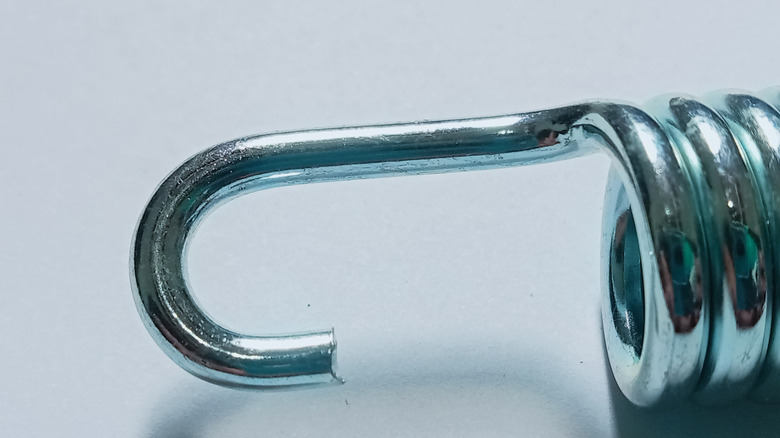
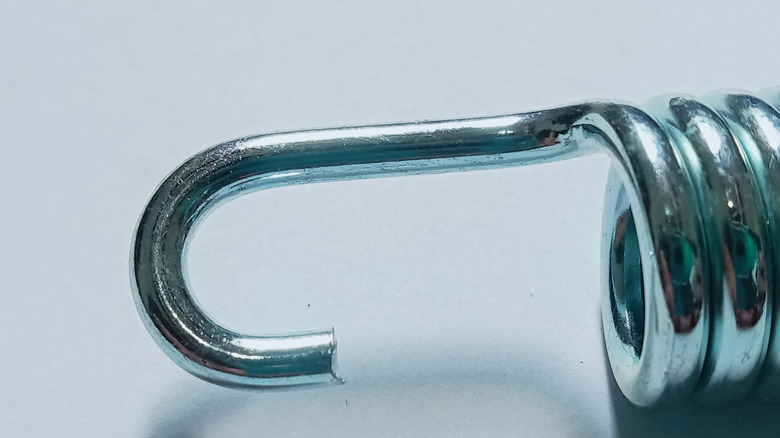
Although there’s no consensus regarding who initially developed and implemented the idea of an exhaust system that uses springs to connect essential components, Yamaha is at least one company to embrace this solution back in the 1960s. However, adding springs wasn’t necessarily an immediate fix. Even when they prevented the exhaust pipes from breaking, the springs themselves could still break. Designers addressed this by adding a rubber hose over the springs for a dampening effect, as well as redesigning the springs in three sections so different components could handle different tasks.
Advertisement
These springs play a vital role in keeping the exhaust system in good condition, so if one gets damaged or goes missing, don’t delay replacing them. Along with learning more about individual motorcycle parts, especially if you’re getting into bike ownership for the first time, it’s also a good idea to know about all the motorcycle tools you should have in your garage, along with gear all motorcycle riders should own. The more knowledge you have, the more comfortable you’ll feel riding, maintaining, and owning a bike.
OPPO has launched the K14 Lite in India, adding a new budget option to its K Series lineup. The smartphone focuses on long battery life, smooth everyday use, and a bright display. It packs a 7,000mAh battery and a 120Hz display, along with the Unisoc T7250 processor. The K14 Lite also brings IP64 protection, reverse charging, and several AI-powered camera features.
OPPO K14 Lite Specifications and Features
Battery life is one of the OPPO K14 Lite’s main highlights. It carries a 7,000mAh battery designed to last through long daily use. OPPO says the battery retains over 80% capacity after 1,800 charging cycles. It can reportedly deliver up to 26.84 hours of YouTube playback. PUBG Mobile gaming can run for 13.19 hours. The phone supports 15W charging and reverse wired charging for other compatible devices. It runs on the Unisoc T7250 octa-core processor with 4GB LPDDR4X RAM. The phone also gets 64GB UFS 2.2 storage and a 13,700 mm² graphite cooling area.
For viewing, the K14 Lite features a 17.15cm HD+ LCD panel with a 120Hz refresh rate. The display reaches up to 900 nits of peak brightness for clearer outdoor viewing. OPPO also adds Splash Touch, Oily-Hand Touch, and Glove Touch support. The device comes with a 13 MP autofocus rear camera and a 5 MP front camera. Users can choose Portrait mode, Night mode, and Time-lapse mode for different photo styles. The phone also has AI Eraser, AI Clear Face, and AI Smart Image Matting 2.0. This phone is splash-proof and dustproof, with an IP64 certification. It also has an attractive Feather Textured Finish.
Price and Availability in India
OPPO has released its new phone, K14 Lite, in India starting at Rs 16,999. This price holds for the 4GB + 64GB storage option. Customers will get an instant discount of Rs 1,000 through the selected banking offers. Thus, the effective price becomes Rs 15,999. The offer includes a 3-month No-Cost EMI. It is available on the OPPO e-store and Flipkart in Stone Brown and Feather Purple.and Flipkart in Stone Brown and Feather Purple.
I was not able to test the AI failure detection, as none of my 30-plus prints failed (aside from a couple of mismeasurements on my end), but I did have occasion to view through the 1080p camera—if you download the free Bambu Handy app, it will store a little time-lapse video of your object being printed, which is fascinating to watch.
In Living Color
The “Combo” in the name refers to the Automatic Material System (AMS) that sits on top of the printer. (You can also buy it separately at $299.) It holds four spools of filament that auto-feed to your project—a game changer if you’re printing something with multiple colors. Without it, a multicolor print would necessitate stopping the print, removing the spool of filament, and installing a new one on the side. For the P2S, the AMS also has the ability to dry the filament—this removes any absorbed ambient moisture that would create steam when heated and mess up your print.
The AMS add-on allows for seamless multicolor prints.
Photograph: Kat Merck
I tested the P2S on the West Coast in late summer, when the humidity was very low, so my filament stayed below 40 percent relative humidity, according to the built-in hygrometer—it didn’t need drying. However, if you live in a humid region, springing for the AMS will be a massive time-saver.
Advertisement
With the P1S, if you needed to swap out a different nozzle, it was something of an ordeal—you basically have to unplug everything and take apart the assembly with screws. On the P2S, the front of the nozzle head is magnetic and pops right off—simply unclip the old nozzle and clip in the new one. Another massive improvement if you find yourself swapping nozzles often.
The P1S’s automatic nozzle cleaning function that “poops” filament blobs out the back of the machine is still in effect on the P2S. I’d been warned, but I was still surprised to see the amount of detritus it left on the floor, especially during multi-color prints. I highly recommend that a “poop chute” or collection basket be one of your first prints. (And there are plenty of fun designs for using the waste filament blobs once they’ve accumulated, from creative games to a “poop Atlas” filament waste world map.)
Do You Really Need One?
Yes, unless you need a dual-nozzle printer or a commercial-grade unit that can also laser cut and engrave—features this printer doesn’t offer. The ability to print and customize useful household and garage objects, art projects, and toys easily and quickly—with minimal fuss—makes the P2S worth every penny. This is doubly so if you have some basic engineering skills, as importing files into Bambu Studio is a cinch.
Bambu Lab-brand filaments start at about $15 a roll with spool. Note that we flagged some app inconsistencies when using non-Bambu filaments with the P1S, but I did not have any non-Bambu filaments on hand to test in the P2S, so I can’t vouch for whether this issue has been fixed.
Adding an electric motor to a kayak, inflatable, canoe, or compact fishing boat can provide powered propulsion without requiring the owner to buy a purpose-built electric vessel. For some boaters, that may mean an easier journey across a lake or less paddling between fishing spots. For others, the added weight, limited runtime, and need to recharge may outweigh the convenience.
The decision depends less on whether electric propulsion is available and more on how the boat is normally used. Short, predictable outings
close to shore present different requirements from long journeys, heavy loads, or trips involving strong currents and changing weather.
That possibility is especially relevant in a boating market filled with existing vessels. Pre-owned boats accounted for 79.7% of U.S. unit sales in 2025, according to figures from the National Marine Manufacturers Association. Many owners considering electric propulsion are therefore deciding whether it can work with a boat they already have.
Advertisement
Small Boats Make Interesting Retrofit Candidates
Compact recreational craft generally require less propulsion than boats intended for high speeds or long-distance travel. An angler moving between nearby fishing spots, for example, has different power needs from someone expecting to travel under motor power for several hours.
Electric motors may be particularly useful when they supplement, rather than replace, the boat’s usual form of propulsion. A kayak owner might paddle for much of an outing and use the motor to cross open stretches of water. On a small inflatable, electric propulsion can provide another option without the need to carry gasoline.
Boats that spend much of their time in storage may also benefit from removable equipment. A detachable motor can be left at home when it is unnecessary and removed before the boat is transported or stored. However, owners still need to consider whether the mounting point, battery, cables, and controls are suitable for their particular craft.
Power Ratings Do Not Tell the Whole Story
Comparing electric and gasoline outboards is not always straightforward. Gas motors are commonly described in horsepower, while electric systems may list watts, kilowatts, voltage, thrust, and battery capacity. None of those figures alone reveals exactly how a motor will perform on a particular boat.
Advertisement
The same motor can behave differently depending on the boat’s total weight, hull design, load distribution, and operating conditions. Wind, waves, and current can increase the amount of power needed, while a
heavily loaded craft may move more slowly or use its available energy faster.
Manufacturers are increasingly designing removable electric systems for compact boats. For example, the Argoseeker electric outboard from LiTime comes in configurations for different sizes of recreational craft, with separate LiFePO₄ battery options and a clamp-on mounting design. Products of this kind illustrate the broader range of retrofit options now available, although buyers still need to match any motor and battery system to the boat’s dimensions, weight limits, mounting arrangement, and expected use.
For that reason, the boat and the planned journey are more useful starting points than an isolated power figure on a product page.
Advertisement
LiTime
Runtime Requires Realistic Planning
Battery capacity helps estimate how long an electric motor may run, but maximum theoretical runtime rarely reflects a complete day on the water.
Energy consumption changes with motor speed, boat weight, weather, current, and the efficiency of the overall system.
A motor operating below maximum power may run considerably longer than it would at full output. Even so, owners should allow a margin for the return journey and for conditions that could require more power than expected. Manufacturer estimates can provide a starting point, but they should not be treated as a guarantee of range in every situation.
More capacity can extend runtime, but larger batteries also add weight and occupy space. Those compromises become especially noticeable on a kayak, canoe, or compact inflatable, where carrying capacity and available room are limited. A setup that promises a long runtime may be impractical if it makes the boat difficult to balance, launch, transport, or paddle.
Installation Affects Handling
Electrical compatibility is only one part of a successful retrofit. The boat also needs an appropriate mounting point, and the combined weight of the motor, battery, and related equipment must remain within its limits. Owners should follow the boat and motor manufacturers’ guidance rather than assuming a universal mount will suit every hull.
Advertisement
Weight distribution matters on small craft because even a relatively compact battery or motor can change how the boat sits in the water. Concentrating equipment at the bow or stern may affect stability and handling, so the battery’s position should be considered alongside that of the passenger, gear, and motor.
Control placement can influence the layout as well. Some systems use a conventional tiller, while others separate the controls from the motor. The appropriate arrangement depends on where the operator can sit comfortably while maintaining balance and controlling the boat safely.
Charging Becomes Part of Trip Planning
Gasoline-powered outboards can be refueled relatively quickly wherever fuel is available. Electric propulsion introduces a different routine based
on battery capacity, charging time, and access to a suitable power source.
Advertisement
That routine may be easy to accommodate for someone taking a kayak to a nearby lake. The battery can be charged at home, used for intermittent propulsion during the outing, and recharged after the boat returns.
Longer or more remote journeys require greater caution. The operator needs enough usable capacity for the planned route, the return trip, and any unexpected changes in weather or water conditions. Carrying a larger or spare battery may extend the available range, but it also increases weight and takes up space.
Boaters should also check local rules before installing or using a motor. Adding powered propulsion can affect how a craft is classified, registered, or permitted in some locations, even if it was originally designed as a paddle boat.
Usage Determines Whether the Tradeoff Works
Electric retrofits tend to make the most sense for compact boats used over moderate, predictable distances, particularly when the motor supplements paddling or provides occasional assistance. Quiet operation, removable equipment, and the absence of onboard gasoline may add to their appeal for some recreational users.
Advertisement
LiTime
The tradeoffs become more significant when a boat carries heavy loads, routinely travels long distances, encounters demanding conditions, or spends extended periods away from charging. In those situations, a conventional outboard or another propulsion arrangement may remain more practical.
Retrofitting does not eliminate the need to assess the boat as a complete system. Motor output, battery capacity, weight, mounting, controls, water conditions, and charging access all affect whether electric propulsion will be useful. For the right type of outing, however, an electric motor can add powered assistance to a small boat without fundamentally changing how the owner uses it.
Digital Trends partners with external contributors. All contributor content is reviewed by the Digital Trends editorial staff.
“In a few weeks, KDE will turn 30 years old,” writes core contributor Kevin Ottens, celebrating with some special KDE community data analytics (including a 30-year graph of the number of contributors):
It peaks around 180 on average (and sometimes reaches towards around 200 people) then shrinks again hitting bottom around 110 persons on average in 2017… Since then, we had two major events happening. First, 2018 is the year where we had the first set of KDE Goals being picked by the community, one being “Streamlined onboarding of new contributors”. Second, we had the transition to GitLab which was fully delivered early in the second quarter of 2020…
Now it seems like the team size is around 140 people on average, so closer to the all time high of 2010 but we didn’t fully close the gap yet. Interestingly though, the commit count is much closer to the one we had in 2010, with a bit less people. We even had an all time high commit count in 2023 which surpassed any other week since the creation of the project. And to make things even brighter, the trends at the end of the plot point upwards. Looks like 2026 will be a very good year. Hopefully the growth will stay stable this time and then the community will be the biggest it’s ever been…
[For the KDE Plasma desktop] We find the 2010 dip but it’s much less dramatic than in all the other plots. It stabilized much quicker and managed to stay with an almost identical team size. We also find the increase leading up to 2020. And clearly it’s one of the projects which benefitted the most of the GitLab transition. It’s average team size almost doubled during the transition! Earlier I asked where the increase we could see on KDE as a whole but not on applications was coming from? Well, this is probably it. Like the rest of KDE, 2026 will be a very good year for Plasma as well. I wonder… will it double in size again next year compared to 2020?
Advertisement
“I’m rather happy that KDE as a whole seems very healthy…” the post concludes. “It looks like in almost 30 years KDE built a great community and many awesome products…”
“Kudos to all the people involved for the past 30 years! Even if you’re not involved any more you helped contribute something beautiful and precious to the world. We’re the living proof that large commons can be created and made sustainable thanks to passionate people.”
While Silicon Valley is spending billions to make AI agents shop for us, the man who pioneered Apple’s retail stores thinks the industry is overestimating how much of shopping people will hand over to machines — and believes physical stores will continue to thrive.
Ron Johnson, 66, has heard predictions about the demise of physical retail before. He joined Apple in 2000 to build its retail business as online shopping was beginning to take off, and went on to help create a store network that became central to how Apple sells its products and connects with customers.
“AI is a new technology that will improve the online shopping experience,” Johnson said in an interview. “But I don’t know that it’s going to change which way we shop.”
Johnson’s view comes as some of the world’s biggest tech companies are trying to push AI deeper into shopping, betting that agents can automate more of how we find and buy items — a concept commonly called agentic commerce. Google is making that push with its Universal Commerce Protocol, a standard designed to help AI agents take consumers from product discovery to checkout. OpenAI, meanwhile, is turning ChatGPT into a shopping destination where users can research, compare, and, in some cases, even buy products without leaving the chatbot.
Advertisement
Asked whether he could imagine someone letting an agent choose and buy a $1,000 or $2,000 laptop without ever visiting a website or store, Johnson was unequivocal: “Honestly, nobody’s going to do that.”
Buying a laptop, he argued, is too personal a purchase to simply delegate to an AI agent. Buyers want to feel its weight, see the display and decide which size works for them. AI may narrow the choices, Johnson told TechCrunch. He added that many consumers would still want to experience the product themselves before spending that kind of money.
“AI will never be able to have you physically experience a product,” Johnson said. Instead, he expects agents to better inform consumers before they walk into a store. “They’ll just become more informed shoppers when they come to the store.”
Johnson’s conviction stems from a decision Apple made more than two decades ago. Apple’s physical stores, he said, were designed not only as places to buy Macs, but also as places where people could try products, learn how to use them, and return for help when something went wrong.
Advertisement
Some of those bets are revisited in Shop Different: How Retail Revealed Apple’s Genius, Johnson’s new book about building Apple’s retail operations alongside Steve Jobs. Competitors, he said, borrowed Apple’s glass-heavy design, open layouts, and even versions of the Genius Bar, but often missed the people.
“The secret sauce for Apple has always been its people, the people in the store, and how they treat the customer,” Johnson said.
Apple Store employees are not paid on commission, Johnson said, unlike the sales culture common across much of retail. The idea, he said, was to remove the pressure to sell and instead have employees figure out what a customer actually needed.
After leaving Apple, Johnson took over J.C. Penney in 2011 with an ambitious plan to reinvent the struggling department-store chain. He was ousted less than two years later after sales plunged.
Advertisement
Johnson now says he tried to change too much, too quickly, without bringing employees and customers along. Apple’s stores had effectively been a startup that evolved alongside the company’s products. J.C. Penney, on the other hand, was a turnaround that required a different approach.
“I applied a startup mentality to what needed to be a turnaround transformation,” he recalled.
Johnson later returned to the startup world, founding Enjoy Technology, an e-commerce company that brought technology products and setup services directly to customers’ homes. The startup filed for bankruptcy in 2022 and sold substantially all of its assets to Asurion.
For all his skepticism about how AI will reshape shopping, Johnson remains bullish on the technology itself. “I’m a real believer in AI. I’m an AI optimist,” he said.
Advertisement
He believes Jobs would have embraced AI, too, but not as a substitute for human judgment. “There’s no substitute for human intuition,” Johnson said, recalling Jobs’ belief in bringing smart people together to debate problems and find new ways of looking at them.
When you purchase through links in our articles, we may earn a small commission. This doesn’t affect our editorial independence.





























































You must be logged in to post a comment Login