
Connect with us
DAPA Banner
DAPA Coin
DAPA
COIN PAYMENT ASSET
PRIVACY · BLOCKDAG · HOMOMORPHIC ENCRYPTION · RUST
ElGamal Encrypted MINE DAPA
🚫 GENESIS SOLD OUT
DAPAPAY COMING

Tech

French AI start-up Mistral raises $830m in debt

Published

on

The Paris-based company is building out ‘cutting-edge’ European data centres with a total capacity ambition of 200MW by 2027.

French AI start-up Mistral has raised $830m in its first debt financing, for the purposes of funding its data centre near Paris.

The company said the deal, supported by a consortium of seven “top-tier” global banks, would pay for Nvidia Grace Blackwell infrastructure with 13,800 Nvidia GB300 GPUs at the “cutting-edge” centre, bringing powered capacity to 44MW.

The data centre at Bruyères-le-Châtel, scheduled to be operational in the first half of this year, was previously earmarked to train AI models belonging to Mistral and its customers, while also “delivering high-performance inference services”, according to the company.

Advertisement

Last month, Mistral said it would spend over $1.4bn in Sweden on digital infrastructure, including a data centre, building towards its stated goal of 200MW of capacity across Europe by 2027.

“Scaling our infrastructure in Europe is critical to empower our customers and to ensure AI innovation and autonomy remain at the heart of Europe,” said Arthur Mensch, CEO of Mistral AI.

“We will continue to invest in this area, given the surging and sustained demand from governments, enterprises and research institutions seeking to build their own customised AI environment, rather than depend on third-party cloud providers.”

Mistral said it is building a “vertically integrated AI company” comprising “frontier open-weight models, deep enterprise integration, production deployments and its own compute infrastructure”.

Advertisement

It counts organisations in the tech, retail, logistics and public sectors among its customers, and has already partnered with the likes of AMSL, Ericsson and the European Space Agency to train models on their proprietary data.

Earlier this month, Mistral launched both ‘Small 4’, the newest model in its fully open-source ‘Small’ series with an aim of consolidating capabilities of its flagship models, and ‘Forge’, a platform that lets enterprises build custom models trained on their own data.

Last September, the 2023-founded French AI darling announced a Series C raise of around $2bn at a post-money valuation of more than $13bn, led by Dutch chipmaker ASML. Existing investors DST Global, Andreessen Horowitz, Bpifrance, General Catalyst, Index Ventures, Lightspeed and Nvidia took part.

Although a frontrunner in the European AI space, Mistral is far behind US competitors such as OpenAI and Anthropic in terms of funding levels and valuations.

Advertisement

Mistral is a founding member of the Nvidia Nemotron Coalition. As part of the initiative, Mistral and Nvidia plan to co-develop frontier open-source AI models.

Don’t miss out on the knowledge you need to succeed. Sign up for the Daily Brief, Silicon Republic’s digest of need-to-know sci-tech news.

Source link

Advertisement
Continue Reading
Click to comment

You must be logged in to post a comment Login

Leave a Reply

Tech

Samsung Movingstyle Essential Review: A Screen on Wheels

Published

on

I’m torn on the price of the Movestyle, though. I love how affordable it is at $580, putting it within a more mainstream budget than I would have assumed. On the other hand, this is a very unique product, and I think higher-end specs might have been a better choice. This is a VA panel rather than IPS, and that means the color accuracy and saturation are OK, but not the best. Although it’s only rated for up to 250 nits of brightness, it topped out at 310 nits when measured against my colorimeter. But it’s not terribly bright, which could be a problem in a brightly-lit room. The display quality isn’t horrible, and this monitor isn’t made for professional video work.

And yet, in terms of the viewing experience, it doesn’t feel all that high-quality, either. For a similar price, you can get a more capable OLED monitor that’s brighter, faster, more colorful, and capable of HDR. But that doesn’t come with the adjustable, rolling stand. An even higher-end monitor would increase the price by at least a few hundred dollars. The lack of a touchscreen feels like a missed opportunity, too, especially since this could easily be used next to a desk or in a kitchen. There are just some cases where using your fingers is easier than using a remote.

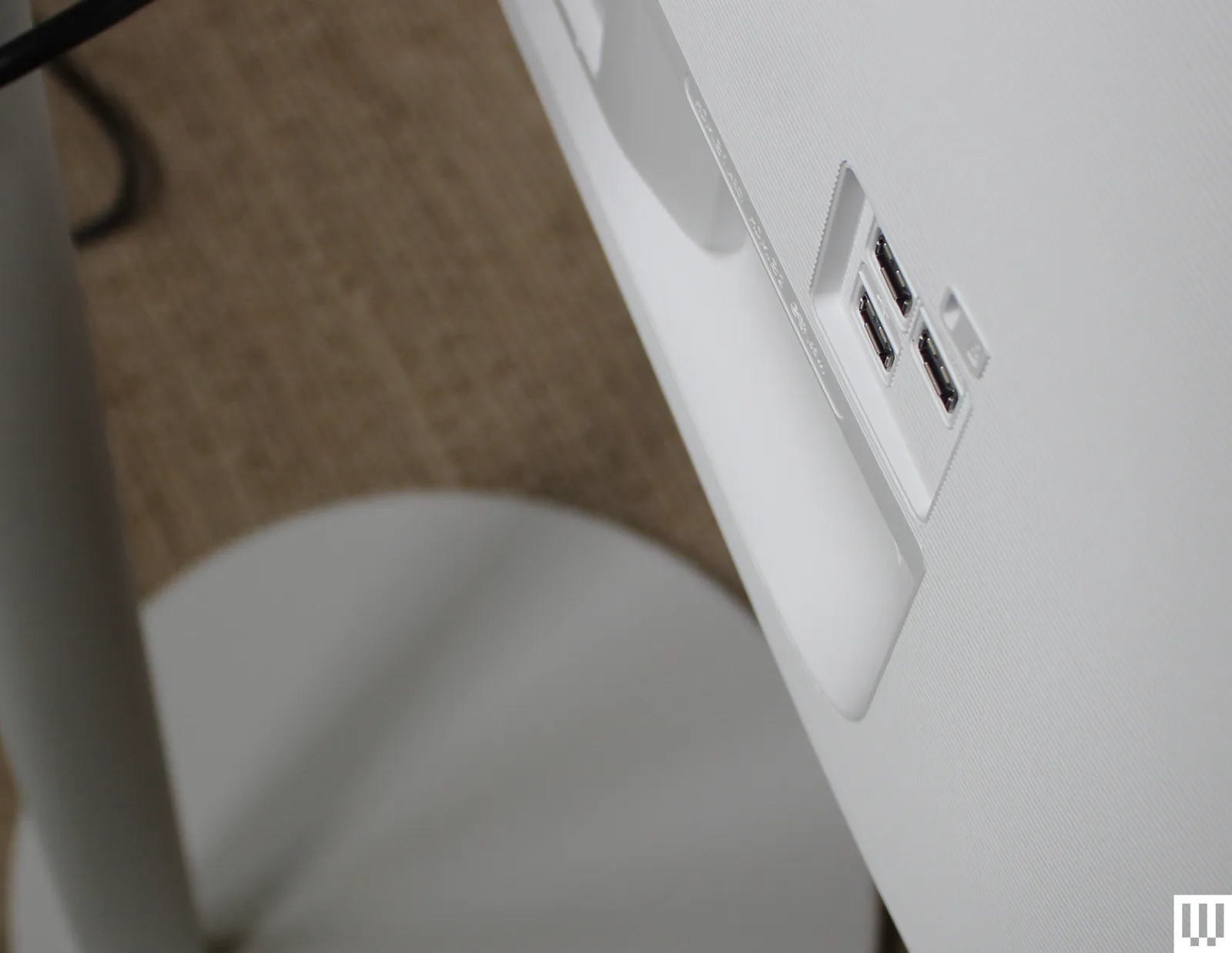
Back of a white monitor to show ports

Photograph: Luke Larsen

Interestingly, Samsung does sell a more premium Movingstyle monitor that’s even touchscreen-enabled and has a higher refresh rate of 120 Hz for gaming. But it’s a smaller 27-inch panel, comes with a lower-resolution 1440p display, and costs significantly more at $1,200. Whew. Another handy feature of the pricier model is a built-in battery. That means when the cord is unplugged, it doesn’t just immediately die. Speaking of the length of the cord, that does end up being one of the limitations of this design as a whole.

In a lot of ways, that more expensive model feels like what a Movingstyle monitor should be. For my purposes, the larger 32-inch 4K panel matches my needs better.

Advertisement

LG has its own version of this that moves in that direction, the LG Smart Monitor Swing. It comes with a 4K panel, measures 32 inches, and has a screen that can handle touch inputs. At $1,000, it’s priced in between the two Movingstyle monitors. For Samsung, perhaps the solution would be to sell the adjustable stand separately, which would give you the ability to pair it with whatever monitor you want.


Power up with unlimited access to WIRED. Get best-in-class reporting and exclusive subscriber content that’s too important to ignore. Subscribe Today.

Source link

Advertisement
Continue Reading

Tech

What Is The 50% Rule For Appliance Repair?

Published

on


You don’t realize just how much you depend on your appliances until one of them goes down. It can happen when you least expect it, forcing you to decide whether or not to find a local repair service, or just buy a new appliance altogether. Before you take your home appliance in for repair, you should know the 50% rule, which says you don’t want to spend over half of what it would take to replace it.

Things can get tough when a repair estimate approaches that 50% line. For example, if you initially paid $1,500 for your refrigerator and the repair cost is $650, that might feel close enough to justify replacing it. But you also have to factor in the time it takes to research the right model, compare prices, and deal with added costs like delivery and installation. Plus, you could be waiting days or even weeks for a replacement to arrive. If the repair gets the original unit back to top form, it might make sense to just get it done.

Age should also play a role. Most appliances, including washing machines, have a limited lifespan. If a unit is nearing the end of its expected shelf life, it may begin breaking down more often. This means repairs will likely just be prolonging the inevitable. Older appliances tend to perform less efficiently as well, which could cost you more money in the long run.

Advertisement

What to know before getting an appliance repair estimate

If you need to get a repair estimate for an appliance, it’s important to know that the cost can vary based on a number of factors. The brand and model of the appliance, its age, and the urgency of the repair itself, can all play a part. The complexity of the repair is a factor as well, and the same is true of your location.

But before you call a local repair service, check the warranty on your appliance. If you don’t have that information or can’t remember if you have an extended warranty, you should contact the place of purchase. Home Depot and Lowe’s both offer warranties beyond manufacturer warranties. Just be sure to have your information ready to go and they should be able to help. If the warranty has expired, you can ask about replacement parts.

Advertisement

If you decide to get an estimate, you should try to find a reputable repair company. Some appliance manufacturers also have a network of trusted repair mechanics at their disposal. If not, this can be tough, so reaching out to friends and family for their recommendations can be a good idea. If you’re searching online, you can use Google to find repair services, read reviews, and get contact information. You can also visit the Better Business Bureau’s website, where you can use their Appliance Repair tool to find BBB accredited repair services. 


Advertisement

Source link

Continue Reading

Tech

Intel’s next-gen Xeons to pack 192 cores, abandon SMT

Published

on

SYSTEMS

Threads on a half shell, Intel power!

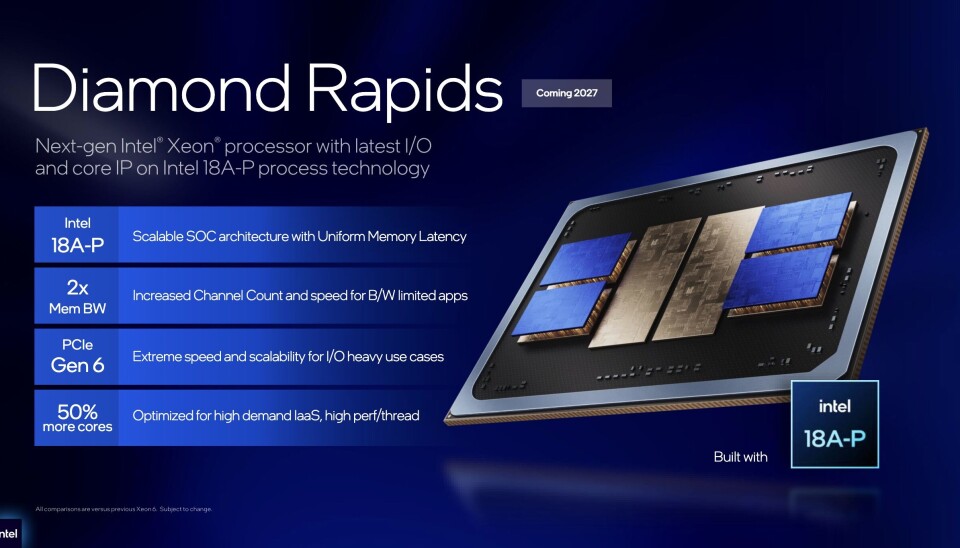
COMPUTEX 2026 Intel’s upcoming Diamond Rapids Xeon will boost core counts to 192, a 50 percent increase over last generation, the x86 giant revealed at Computex in Taipei this week.

But while core counts continue to rise, in doing so Intel has managed to cut thread counts by a quarter.

Advertisement

Yep, Hyperthreading – Intel’s marketing for simultaneous multithreading – is officially dead. 

Intel first added support for SMT all the way back in 2002. The technology boosted utilization by enabling two threads to harness idle execution units during a single cycle. While SMT doesn’t double throughput, for certain applications it can deliver double-digit percentage gains. 

After slowly abandoning the tech across its consumer product lineup, Intel’s Xeons are latest to get the cut. 

Except, wait! It seems Intel may have seen the error of its ways, and is already reversing course on the decision. Intel’s next next Xeon, codenamed Coral Rapids, will bring SMT back.

Advertisement

The jump from 128 to 192 is a big jump for Intel, but still smaller than the AMD is making with its 256-core Venice Epycs. If that weren’t enough, it looks like AMD could beat Intel to market by as much as a year.

Diamond Rapids is now slated for release sometime in 2027.

Echos of Epyc, notes of Monaka

In addition to core count, we also got our first look at how Intel will stitch the chip together. It turns out AMD might have been onto something when it started gluing silicon together back in 2017, because Intel’s next round Xeons look more like an Epyc under the hood than ever.

Here's a quick rundown of the new details we've learned about Diamond Rapids at Computex

Here’s a quick rundown of the new details we’ve learned about Diamond Rapids at Computex

We know the chip will be fabbed using Intel’s 18A-P process tech, a refined version of its 2nm-class process tech. Beyond this details get a little fuzzy.

Advertisement

From the renders shared in Intel’s press deck, we can see what appear to be two I/O dies serving four vertically stacked compute assemblies assembled using its Foveros packaging tech.

This isn’t the first time we’ve seen something like this from Intel. Intel’s Clearwater Forest, which is finally launching after years of teasing, also used a similar arrangement, with four 24-core compute tiles sitting atop a base die containing the memory controller and L3 cache.

Moving the L3 cache to the base die frees up a lot of die area on the compute chiplet. In this case, we’re looking at four 48-core compute chiplets. 

In this respect, Diamond Rapids looks a lot like another CPU we’ve looked at recently: Fujitsu’s Monaka. That chip uses an almost identical chip layout, albeit with one I/O die rather than two.

Advertisement

While we’re fairly certain Diamond Rapid’s L3 cache will live on the base die, the memory controller could be housed on the four base dies or it could be on the I/O dies, similar to what AMD has done since Rome launched in 2019.

If we had to guess, our bet would be on the I/O die, since it would reduce the number of NUMA nodes to one or two as opposed to four.

Not a mainstream part

Unlike Intel’s last P-core Xeon, codenamed Granite Rapids, don’t expect to see Diamond Rapids deployed widely in enterprise virtualization or storage servers.

According to Intel, Diamond Rapids is “optimized for high-demand IaaS, high-perf/thread,” putting it in the same class as its high-performance-computing (HPC)-centric 6900P-series parts.

Advertisement

The lack of SMT complicates hypervisor licensing models. Where you once got two threads for the price of one, Diamond Rapids customers will now be getting half as many for their dollar. There are of course ways of getting around this. Oracle rented out its Ampere-based instances, which also lack SMT, in core-pairs rather than on a core-per-core basis, but something like this would presumably require buy-in from the likes of VMware or RedHat.

As with past HP- optimized processors, Diamond Rapids will be packing a much beefier memory bus than most folks are going to be looking for. HPC workloads like their memory bandwidth and the next-gen Xeon will have no shortage of it with 16-channels of DDR5.

Intel hasn’t disclosed what memory speeds the chip will support out of the box. With that said, Clearwater is already at 8000 MT/s on standard RDIMMS, and Granite could hit 8800 MT/s on MRDIMMS — in fact, 9600 MT/s DIMMS wouldn’t be an unreasonable assumption. That works out to 1.2 TB/s of bandwidth per socket, which happens to be the same as Nvidia’s LPDDR5X-packed Vera CPUs.

That’s not the only thing we’re still in the dark about. Power consumption and instruction per clock gains from the chip’s new architecture are details we expect Intel to trickle out.

Advertisement

The good news: we won’t have to wait long for the next round of specifications, as Intel will be presenting on Diamond Rapids at Hot Chips in August.

Source link

Continue Reading

Tech

Fake downloads of popular PC utilities are quietly installing crypto miners on enthusiast PCs

Published

on


The Windows Defender security team is alerting users with dedicated GPUs about scammers manipulating search engine results to distribute remote monitoring and cryptomining payloads. The hackers are manipulating not only search engine results but also AI chatbot responses.
Read Entire Article
Source link

Continue Reading

Tech

Next-gen Siri will sync your AI chats and spread them across Apple’s walled garden

Published

on

Apple’s long-delayed AI overhaul may finally be starting to take shape, and the company appears ready to push Siri far deeper into its ecosystem than before. According to a new report from Mark Gurman, Apple is developing a major Siri upgrade that will synchronize AI conversations across devices through iCloud, turning the assistant into a more persistent and connected AI system inside Apple’s tightly controlled ecosystem.

The upcoming Siri redesign is reportedly being prepared as part of Apple’s broader iOS 27 and iOS 28 strategy, with the company positioning the assistant more directly against AI products like Google Gemini and ChatGPT. Instead of functioning as a simple voice tool, Siri is expected to evolve into a conversational AI assistant capable of maintaining synced chat histories across iPhones, iPads, Macs, and other Apple hardware.

Apple wants Siri to become the centre of its AI ecosystem

According to Bloomberg’s report, Apple is internally testing a completely redesigned Siri interface that resembles modern AI chatbot apps. The new experience reportedly includes a dedicated chat-style interface, persistent conversation history, and cloud synchronization powered through iCloud.

This would allow users to begin an AI conversation on one Apple device and continue it seamlessly on another. Apple is reportedly positioning this as a key differentiator for its AI strategy, leveraging the company’s ecosystem advantage rather than competing purely on raw AI model performance.

Advertisement

The report also suggests Apple is integrating Siri more deeply across its software platforms as part of future versions of iOS, iPadOS, and macOS. Internally, Apple is said to already be preparing iOS 28 features while work continues on iOS 27.

The AI-focused Siri upgrade has reportedly faced multiple delays over the past two years, partly because Apple has struggled to modernize Siri’s underlying architecture quickly enough. Gurman notes that several Apple AI projects, including AI-powered AirPods and smart home products, were also slowed by delays tied to Siri’s redevelopment.

At the same time, Apple is preparing for a broader hardware push built around AI experiences. Bloomberg reports the company is developing smart glasses aimed at competing with Meta’s Ray-Ban smart glasses, with Siri expected to play a major role in those products as well.

Why this matters

Apple has been noticeably slower than rivals like Google, OpenAI, and Microsoft in rolling out consumer-facing AI products. While competitors aggressively integrated generative AI into search, productivity apps, and smartphones, Siri has increasingly felt outdated compared to modern AI assistants.

Apple’s strategy appears different, however. Instead of creating a standalone chatbot platform, the company seems focused on embedding AI deeply into its hardware ecosystem and user workflows. That could make Siri more useful for existing Apple users, especially if conversation syncing works smoothly across devices. But it also further strengthens Apple’s famously closed ecosystem approach, where the best experiences are often limited to users fully invested in Apple hardware.

What happens next

Apple is expected to reveal more about its AI plans during upcoming WWDC announcements, though Bloomberg suggests the most ambitious Siri upgrades may not fully arrive until iOS 28. The company is also reportedly developing future AI-powered hardware, including smart glasses, updated HomePods, and refreshed Apple TV products that could rely heavily on the new Siri platform.

Advertisement

For now, Apple’s challenge is becoming increasingly clear. The company no longer just needs to improve Siri. It needs to convince users that its version of AI is worth waiting for after years of falling behind competitors already moving at full speed.

Source link

Advertisement
Continue Reading

Tech

Acer Nitro Blaze Link Streams PC Games Straight to a Dedicated Handheld

Published

on

Acer Nitro Blaze Link Streaming Handheld
Acer stepped forward at Computex with a handheld that takes a clear stand. The Nitro Blaze Link exists to pull games from a nearby computer and show them on its screen with built-in controls. It leaves the heavy graphics work on a stronger machine and keeps its own parts minimal on purpose. Designers gave the body ergonomic grips along each side for steady handling during extended play. Standard controls fill the surface in familiar spots, including dual analog sticks, a directional pad, face buttons, shoulder bumpers, and triggers. A seven-inch touchscreen sits front and center with 1920 by 1200 resolution and support for five touch points at once.


Acer Nitro Blaze Link Streaming Handheld
The device weighs 464 grams (nearly a pound), is approximately 287 millimeters wide, and has a maximum thickness of 33.5 millimeters. This is all fairly compact, making it easy to grasp in your hand or throw into a bag without any effort. The power comes from an 18-watt-hour battery, which isn’t bad. There is a single USB-C port that can take up to 15 watts of charging, but no data transmission is available through that port, so you won’t be shifting files or bringing in more peripherals. A set of two-watt stereo speakers or a traditional 3.5 millimeter headphone connector provide audio output.


OnePro Cloud Handheld Portable Remote Play Gaming Console, For Xbox Cloud Gaming, NVIDIA GeForce NOW…
  • 【All-in-One Handheld】 The ultimate portable console in your hands. Enjoy retro games, remote play, cloud gaming, and Android titles on a…
  • 【Cloud Gaming + Remote Play】 Cloud Gaming – Instantly play AAA titles over Wi-Fi with subscriptions to Xbox Cloud Gaming (Beta), GeForce NOW…
  • 【Emulator Retro Games + Android Games】 Emulation – Enjoy retro classics with enhanced compatibility and smoother performance on PS2, GameCube…


It runs on Debian Linux, and Moonlight is configured to receive video streams. To broadcast video and receive controller signals, the host computer must have Sunshine installed. However, games run at full speed on the main system, with the handheld simply decoding video and sending back button presses. That split contributes significantly to the internal hardware’s reduced weight. You’re looking at 1GB of LPDDR4 RAM and 8GB of integrated flash storage, which aren’t very large numbers, especially when compared to what you’d get on a typical gaming device. Interestingly, they appear to handle video decoding perfectly fine. WiFi 6 includes 80 megahertz channel support and a few improvements designed to keep shared home networks working smoothly.

Acer Nitro Blaze Link Streaming Handheld
Acer designed this to work seamlessly with its own Predator Helios and Nitro laptops. Owners may play their whole game libraries from another room or a distance because the setup is straightforward and local. Make no mistake: the hardware has limitations. It cannot run games locally and cannot store much additional stuff. Storage and RAM are simply too limited for that; if you try to squeeze in a bunch of extra apps or save files, things become a little crowded in there. Performance is also dependent on having a reliable wireless connection, and the main system must be able to encode the stream correctly. Any issues are mainly caused by the network rather than the device. No cloud services have been confirmed to be supported, and the Linux foundation and focus on Acer-compatible systems limit what you can accomplish with this device when compared to more open handhelds.

Acer Nitro Blaze Link Streaming Handheld
This device won’t be available in the United States until the fourth quarter of 2026, and Acer hasn’t revealed any pricing details yet. When compared to more serious handhelds with comparable specifications, the Nitro Blaze Link appears to be a more affordable option.
[Source]

Source link

Advertisement
Continue Reading

Tech

MSI’s MEG Vision X2 AI+ desktop has a holostage to keep you busy with an AI pet

Published

on

Gaming desktops have been getting smarter every year with better cooling, faster chips, and more RGB lights than anyone asked for. MSI has decided that none of that is interesting enough and has introduced something genuinely unexpected at Computex 2026.

The Taiwanese company has unveiled a gaming desktop, and its most interesting aspect is the built-in cylindrical display that exists purely to give your AI companion a physical avatar.

What is the AI Holostage and why does it exist?

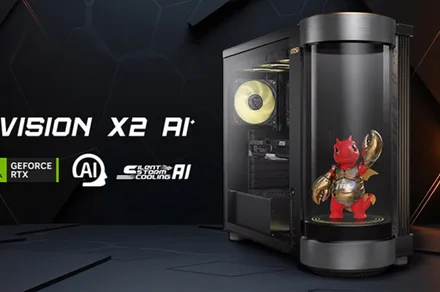
The MEG Vision X2 AI+ is MSI’s new flagship gaming desktop, which sits at the top of its MEG product line. The main main highlight is the AI Holostage, a cylindrical display integrated directly into the chassis rather than sitting as a separate accessory. 

The Holostage gives digital companions, desktop pets, and custom third-party AI avatars a visible, physical presence on your desk. Out of the box, the system ships pre-configured with MSI’s own AI companion, which is called LuckyClaw.

Advertisement

LuckyClaw is MSI’s agentic AI companion, which responds to natural voice commands and gives users hands-free control over performance profiles, MSI monitor settings, and RGB lighting

The chassis also features a tool-free upgradeable design. While this might be something of a novelty or a visually appealing factor, it might not serve a practical utility purpose as such.

What hardware is inside the MEG Vision X2 AI+?

The MEG Vision X2 AI+ features the Intel Core Ultra 7 265 processor, paired with an NVIDIA GeForce RTX 5070 Ti graphics card with support for DLSS 4.5, and MSI’s Silent Storm Cooling AI system handles cooling. 

Pricing and availability have not been confirmed in the official press release. Whether the Holostage becomes the defining feature for gaming PCs or ends up as the most elaborate desktop widget ever built remains to be seen. But as a statement of intent, it is hard to ignore.

Advertisement

Some popular gaming desktop brands, including Asus, Razer, and Lenovo, have tested virtual assistants in their software ecosystems. However, MSI is the first to give the companion a dedicated physical display embedded in the chassis itself.

Source link

Advertisement
Continue Reading

Tech

MIT researchers found a way to get lithium out of hard rock without the massive energy bill

Published

on


For now, lithium-ion batteries continue to dominate for a simple reason – scale. The global lithium supply chain is already well-developed and highly efficient, making it difficult for alternatives to compete on cost.
Read Entire Article
Source link

Continue Reading

Tech

Dell reveals its thinnest and lightest XPS 13 at just $699 to upstage the MacBook Neo

Published

on

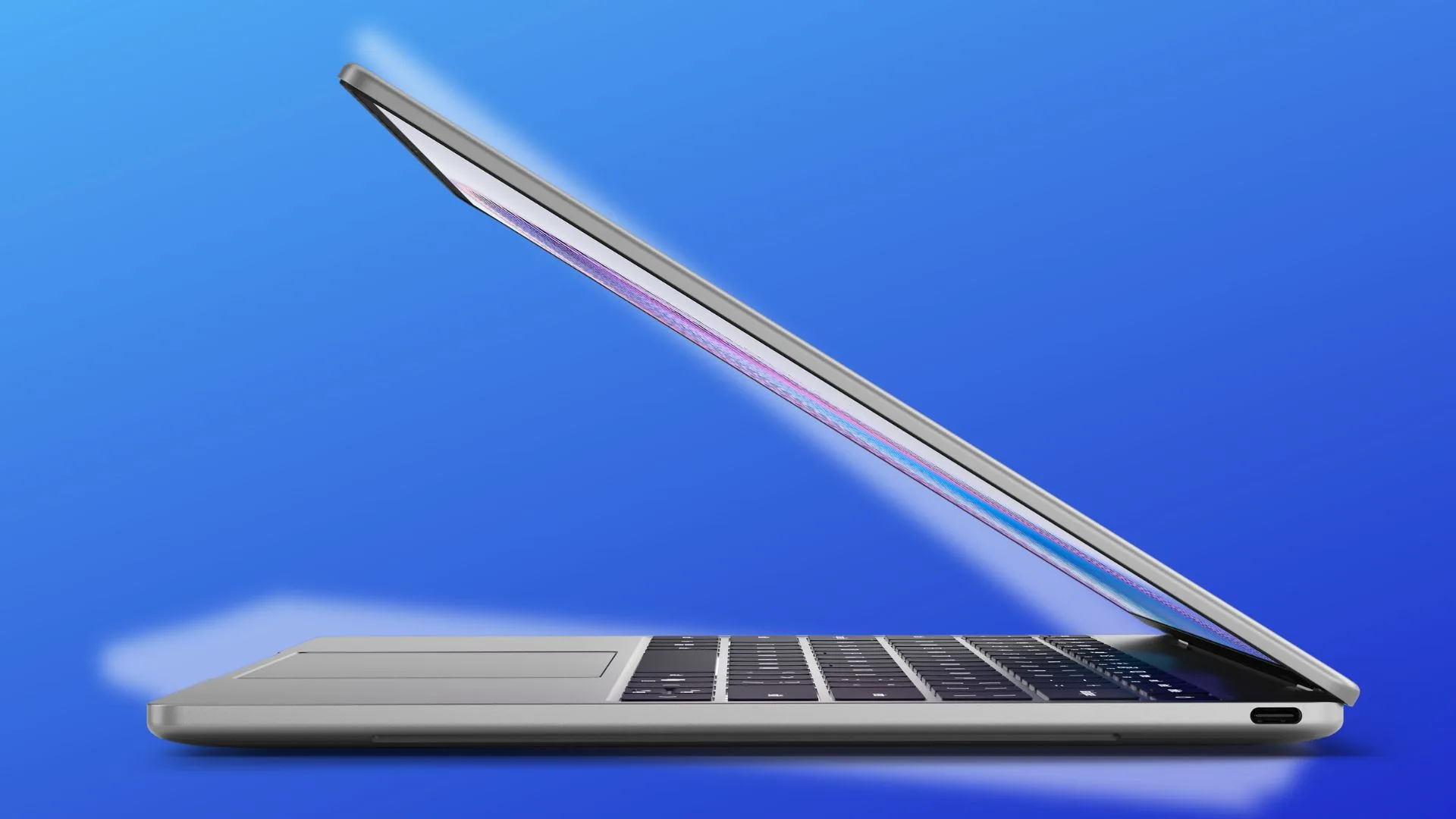
At Computex 2026, Dell came out all guns blazing. Ever since its inception, the XPS series has served as the pinnacle of Dell’s design and engineering innovation for laptops. Of course, they cost a pretty penny, too. After a brief sunsetting, the XPS line is back, and this time around, Dell is taking an extremely ambitious path. The latest from the computing giant is the XPS 13, and more than anything, it’s the $699 asking price of this sleek machine that is going to turn heads.

What makes the XPS 13 special?

Dell says it has a different definition for “premium” laptops at an accessible price, and on that front, it has succeeded. Compared to the MacBook Neo, the XPS 13 offers a few crucial upgrades. To start, it offers a dramatically superior 2.5K touch-sensitive display with a 120Hz refresh rate, faster USB-C (3.2 Gen 2) ports, speedier Wi-Fi 7 support, and a quad speaker setup.

More importantly, the XPS 13 offers a backlit keyboard, which also happens to be one of the biggest omissions on the MacBook Neo. Furthermore, you also get an IR sensor for biometric face unlock on the Windows machine. The base variant draws power from an Intel Series 3 Core 5 Processor, while the higher-end trims will get the more powerful Intel Core Ultra Series 3 silicon, starting at 8GB of RAM and 256GB of onboard storage.

Take a look at the innards of this machine:

Model Number DX13260
Processor Options Series 3 Intel Core 5 Processor 320 (6-Core, 6MB Cache, up to 4.6GHz)
Series 3 Intel Core Ultra 7 Processor 355 (8-Core, 12MB Cache, up to 4.7 GHz)
Intel Core Ultra processors post-launch
Neural Processor 16 TOPS on Intel Core
49 TOPS on 355
Operating System Microsoft Windows 11 Home 64-bit
Microsoft Windows 11 Pro 64-bit
Memory Options* 8GB LPDDR5x at 7467 MT/s
16GB LPDDR5x at 7467 MT/s
32GB LPDDR5x at 7467 MT/s
Intel Core options: 8-16GB, single channel
Intel Core Ultra options: 16-32GB options, dual channel
Storage Options* 256GB PCIe 4 SSD (Gen 4) – post launch
512GB PCIe 4 SSD (Gen 4)
1TB PCIe 4 SSD (Gen 4)
Intel Core Ultra up to 1TB
Graphics Intel graphics
Display 13.4-inch 2.5K (2560 x 1600) InfinityEdge touch display, 500-nit typical brightness, 100% DCI-P3 typical color gamut, VESA DisplayHDR 400, 2000:1 contrast ratio, 176° wide viewing angle +/- 88° / 88° / 88° / 88°, 30-120Hz VRR, Dolby Vision™, Eyesafe® technology, anti-glare
Wireless Intel Wi-Fi 7 BE213 2×2 + Bluetooth 6.0 Wireless Card (with Intel Core)
Intel Wi-Fi 7 BE211 2×2 + Bluetooth 6.0 Wireless Card (with Intel Core Ultra)
AC Adapter 65W USB-C GAN Slim AC adapter (2-pin, Wall-mount)
65W USB-C GAN Slim AC adapter
Construction CNC aluminum
Dimensions and Weights Height: 0.50 in. (12.7mm)
Depth: 7.90 in. (200.66 mm)
Width: 11.69 in. (296.90 mm)
Starting weight: 2.2 lbs (1 kg)
Battery 52Whr battery, 800ED cells
ExpressCharge 1.0
Ports and Slots 2x USB Type-C with DisplayPort 2.1 and Power Delivery (with Intel Core processors)
2x Thunderbolt 4 (USB Type-C) with DisplayPort 2.1 and Power Delivery (with Intel Core Ultra processors)
Kensington lock supported via USB Type-C ports
Inputs 2 Dual Array Microphones
Touch Display
Full size, backlit, chiclet keyboard; 0.8mm travel
Windowed glass touchpad, multi-touch gesture-enabled with anti-smudge coating
Ambient Light Sensor for display & keyboard backlight control
Camera 2MP/1080p HD +IR webcam
Windows Hello compliant
Security Firmware TPM
TCG Certified Windows Hello compliant camera
Dell Support Assist for Home PCs
Kensington lock supported via USB Type-C ports
Audio and Speakers Quad-speaker design with 2W Main x 2 Channel + 2W Tweeter x 2 Channel; 8W total peak output
Dual microphone array
Dolby Atmos

How does it stand out?

Dell is not mincing words here. The XPS 13 is targeted squarely at the MacBook Neo, and it actually does a far better job at a few crucial aspects. Going a step further, Dell is offering the XPS 13 at $599 to students during the back-to-school season. The machine comes in Sky and Storm colors, and it looks pretty stylish.

“The XPS 13 is the lightest and most accessible expression of everything XPS has always stood for. Not a lesser version, but a smaller, lighter one,” says the company. It’s the thinnest and lightest XPS series laptop that Dell has ever made. Despite being lighter and smaller than the MacBook Neo, it actually packs in a bigger display that is also more pixel-dense.

The overarching goal is pretty clear. Dell simply built on the XPS pedigree, while making practical upgrades that make the XPS 13 a far more appealing machine than the MacBook Neo. It’s one of the best laptops to build on the vision that is Intel’s Project Firefly, dropping alongside the Acer Swift Air 14 that was also introduced a few days ago.

Advertisement

Source link

Continue Reading

Tech

4-bit Relay Logic Counter Begs To Have Its Buttons Pushed

Published

on

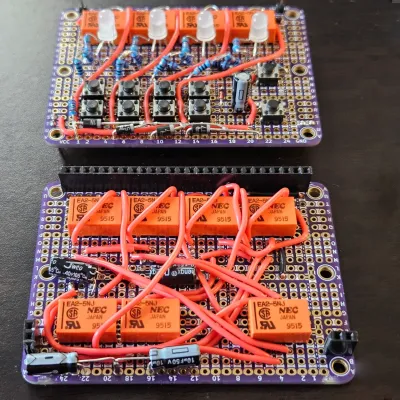
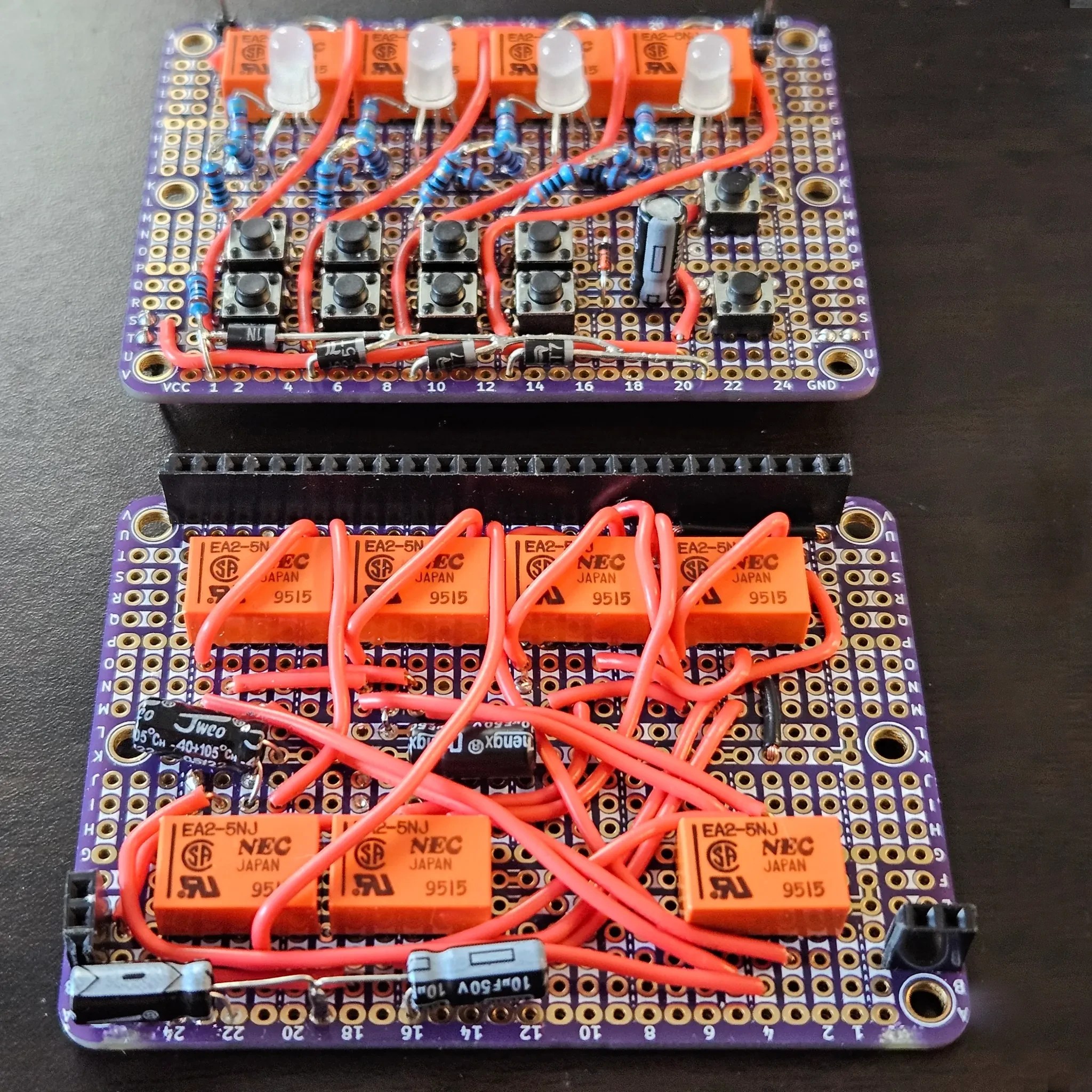
What’s one to do with some nice little relays of questionable pinout, and prototyping board? How about a quietly clicky 4-bit counter using relay logic with tons of buttons?

The register with LEDs and buttons is on the top board, the incrementer on the bottom board.

[Agatha Mallett] made the counter after finding herself in possession of a quantity of relays burdened by terrible documentation (the datasheet shockingly lacks a pinout, and doesn’t even mention the coil being unidirectional). But since the relays are also small and of decent quality, they were a good candidate for a small relay logic-based project.

The key to the build is implementing D-type flip-flops using relays. This is done by holding the coil voltage of each relay between its set and release voltage levels. A small voltage bump will energize the coil, closing the relay and leaving it closed. Conversely, a small negative spike releases the coil, leaving it open. This forms the basis of the counter, and [Agatha] has a separate write-up all about the details of using relays in this way.

Implementing this was rather less straightforward than it may sound because it relies on balancing the coils of many relays on a figurative knife-edge of voltage, but not every component is perfectly identical. A tweaked resistor or capacitor here and there was needed before things settled into reliability.

Advertisement

The end product has indicator LEDs, buttons to increment or clear the current count, and it even has buttons to set or clear individual bits. This is a project that begs to be interacted with, and there’s a short video on the project page so you can watch it go through its paces.

Thanks to [Jess] for the tip!

Advertisement

Source link

Continue Reading

Trending

Copyright © 2025