

If there’s anything that makes people more uncomfortable than highly advanced AI or nuclear weapons technology, it’s the combination of the two. But there’s been a symbiotic relationship between cutting-edge computing and America’s nuclear weapons program since the very beginning.
Tech
How to Choose the Right Automation Stack


.png)
Digital transformation has become an imperative. Companies throughout the US economy are in an all-out race to automate their workplaces, for all sorts of reasons: Labor is getting more expensive while robots are getting better and cheaper; real wages have been flat for years so companies are hiring less and machines more; and workers across multiple industries want machines alongside them, as a way of making their jobs (and joints) less painful. But in the quest for building the optimal automation stack, leaders are often left with a single important question:
Should we invest in RPA, BPM, or iPaaS — or all three?
It is important to know these differences before choosing an appropriate solution. Today, we unpack RPA, BPM and iPaaS in plain language — with facts and trends — so you can call your own shots.
First, Let’s Understand the Core Technologies
1. What is RPA?
Robotic Process Automation (RPA) applies bots to complete routine, rule-based tasks which would involve human interaction with digital systems. Similar bots log into applications, key in information, transfer files and conduct transactions in much the same way employees do — but faster, and without errors.
The global market for RPA software has grown into the double digits year over year, and this remained true even as organisations continued to automate back-office operations, according to Gartner. Many firms are teaming up with RPA services to fast-track the implementation process with enterprise-grade control.
RPA works best when:
● Tasks are repetitive and rule-driven
● Data is structured
● Systems lack APIs (legacy applications)
● Quick ROI is required
“RPA is, however, task-level automation — not full process optimisation.
2. What is BPM?
Business Process Management (BPM) is from a design, monitoring and reconfiguration perspective the whole workflow. Rather than automating discrete tasks, BPM enhances the entire process life cycle.
For example:
● Employee onboarding
● Insurance claims processing
● Loan approval workflows
BPM solutions offer visibility, governance, compliance and control tracking, as well as workflow orchestration. If RPA is the “worker,” then BPM is the “manager” overseeing the entire operation.
BPM practitioners see improved efficiency, shorter cycle times, and better compliance in the context of regulated industries.
3. What is iPaaS?
iPaaS (Integration Platform as a Service) is a cloud-based integration model that links applications, data and devices with connectors and APIs. It guarantees instant data synchronisation between those solutions and other systems (CRM, ERP, HRMS, cloud applications).
If you are a company that’s working with multi-cloud or hybrid solutions, iPaaS is an absolute must.
Being a backend data layer integration tool, and not operating at the user interface level like RPA, iPaaS is far more stable and scalable for long-term integration needs.
Key Differences at a Glance
|
Technology |
Focus |
Best For |
Scalability |
|
RPA |
Task automation |
Repetitive manual tasks |
Medium |
|
BPM |
Process orchestration |
End-to-end workflow optimisation |
High |
|
iPaaS |
System integration |
Connecting cloud & enterprise apps |
Very High |
Why Businesses Are Moving Toward Hyperautomation
The future of automation isn’t a question of picking one tool. It’s about combining them strategically.
This combination is known as hyperautomation – combining RPA, BPM, iPaaS and AI with analytics in a cohesive system.
The hyperautomation market is anticipated to expand substantially until 2030, as businesses increasingly require intelligent and scalable automation solutions, industry estimates say.
A good hyperautomation company generally assists companies to model multi-layered architectures where:
● BPM manages workflows
● iPaaS handles system integration
● RPA automates individual tasks
● AI enhances decision-making
This is orchestration that provides measurable ROI and long-term scalability.
When Should You Choose RPA?
RPA is ideal when:
● You want to make quick wins with minimal changes in infrastructure
● You do similar finance or HR jobs repeatedly
● For legacy systems, you will require the automation
● You want to do cheaper operations fast
Many companies kick off their automation journey with RPA services to eliminate manual roadblocks in for example finance and operations.
But RPA just might not scale well enough on its own, without tying in and orchestrating workflow.
When Should You Choose BPM?
Choose BPM if:
● You really want to see everything that’s happening in workflows
● Compliance and auditable trails are very essential.
● Processes involve multiple departments
● Continuous optimisation is required
BPM solutions empower you to redesign and automate inefficient workflows. This protects against the common pitfall of “automating broken processes”.
When Should You Choose iPaaS?
Choose iPaaS if:
● You use multiple SaaS applications
● Real-time data flow is essential
● API-driven architecture is available
● You want scalable cloud integration
iPaaS lets you rely less on UI-based bots and provides more durable backend integrations.
The role of Low-Code and Test Automation
Modern automation stacks are helped alongside low-code and no-code application development platforms. Therefore with these types of tools, business teams can genuinely create workflows and apps without deep coding skills, further fueling digital initiatives.
Plus, collaborating with such providers who deliver the top test automation services ensures that your automation scripts, along with integrations and workflows are consistent even as systems change over time. Testing is key because poorly controlled automation systems can be broken by UI changes, API updates or workflow adjustments.
How to Build Your Automation Stack (Step-By-Step Framework)
Here’s a basic expert framework to guide you in the decision:
Step 1: Identify Your Bottleneck
Are we actually faced with task repetition, that is lack of efficiency or division within the system?
● Task problem → RPA
● Workflow problem → BPM
● Integration problem → iPaaS
Step 2: Assess Technical Environment
● Legacy systems → RPA shines here
● systems with an API → iPaaS is awesome
● Complex cross-functional processes → BPM is necessary
Step 3: Plan for Scalability
Avoid building isolated automation silos. Integrate technologies in an organised automation infrastructure.
This is one of the reasons that companies frequently partner with providers who bring additional RPA Services to the table with an IR group that speaks BPM and integration frameworks design.
Real-World Example
Picture a health care provider sifting through thousands of insurance claims.
● BPM designs the claims workflow
● RPA pulls data from the old systems
● iPaaS consolidates CRM, billing and compliance systems
● Automated tests guarantee that workflows work without interruption
The result:
● Faster processing time
● Reduced manual errors
● Improved regulatory compliance
● Better patient experience
What are the Common Mistakes to Avoid
1. Automating without process redesign
2. RPA only without integration
3. Ignoring governance and testing
4. Not planning for long-term scalability
An organisation with RPA Services ensures that these pitfalls are avoided.
Final Thoughts: What’s the Best Option?
RPA vs BPM vs iPaaS: No clear winner.
The correct answer will vary based on your business goal, technical ecosystem and long-term strategy.
If you can’t afford to wait for efficiency gains, open with RPA.
If you need additional governance and optimisation, do BPBM.
If you want to make data communications seamless, put some money into iPaaS.
If you want to transform at an enterprise level, that’s when you choose hyperautomation.
The most successful organisations view automation as a strategic capability, and not just another investment in technology.
Together with RPA, BPM, iPaaS, low-code platforms and powerful test frameworks in place this will allow your business to create a strong automation ecosystem which brings measurable ROI and power for sustainable growth.
Continue Reading
In the fall of 1943, Nicholas Metropolis and Richard Feynman, two physicists working on the top-secret atomic bomb project at Los Alamos, decided to set up a contest between humans and machines.
- Los Alamos National Laboratory recently partnered with OpenAI to install its flagship ChatGPT AI model on the supercomputers used to process nuclear weapons testing data. It’s the latest in a long history of symbiosis between America’s nuclear program and cutting edge computing.
- AI tools are already revolutionizing the way scientists are conducting research at Los Alamos, part of a larger program called Genesis Mission that aims to harness the technology to accelerate scientific research at America’s national labs.
- Comparisons of AI to the early days of nuclear weapons abound, both among critics and proponents, but Vox’s reporting trip to the lab found little evidence of the kind of doomsday fears the permeate conversations about AI elsewhere.
In the early days of the Manhattan Project, the only “computers” on site were humans, many of them the wives of scientists working on the project, performing thousands of equations on bulky analog desk calculators. It was painstaking and exhausting work, and the calculators were constantly breaking down under the demands of the lab, so the researchers began to experiment with using IBM punch-card machines — the cutting edge of computer technology at the time. Metropolis and Feynman set up a trial, giving the IBMs and the human computers the same complex problem to solve.
As the Los Alamos physicist Herbert Anderson later recalled, “For the first two days the two teams were neck and neck — the hand-calculators were very good. But it turned out that they tired and couldn’t keep up their fast pace. The punched-card machines didn’t tire, and in the next day or two they forged ahead. Finally everyone had to concede that the new system was an improvement.”
Today, at Los Alamos, a similar dynamic is taking place, as scientists at the lab increasingly rely on artificial intelligence tools for their most ambitious research. Like their punch-card ancestors, today’s AI models have a leg up on human researchers simply by virtue of not having to eat, sleep, or take breaks. Scientists say they’re also approaching tough problems in entirely new and unexpected ways, changing how research is conducted at one of America’s largest scientific institutions.
In recent weeks, in the wake of the feud between the Pentagon and Anthropic, as well as the reported use of AI software for targeting during the war in Iran, the partnership between the US military and leading AI companies has become a highly charged political topic. Less discussed has been the already extensive cooperation between these firms and the country’s nuclear weapons complex, under the supervision of the Department of Energy.
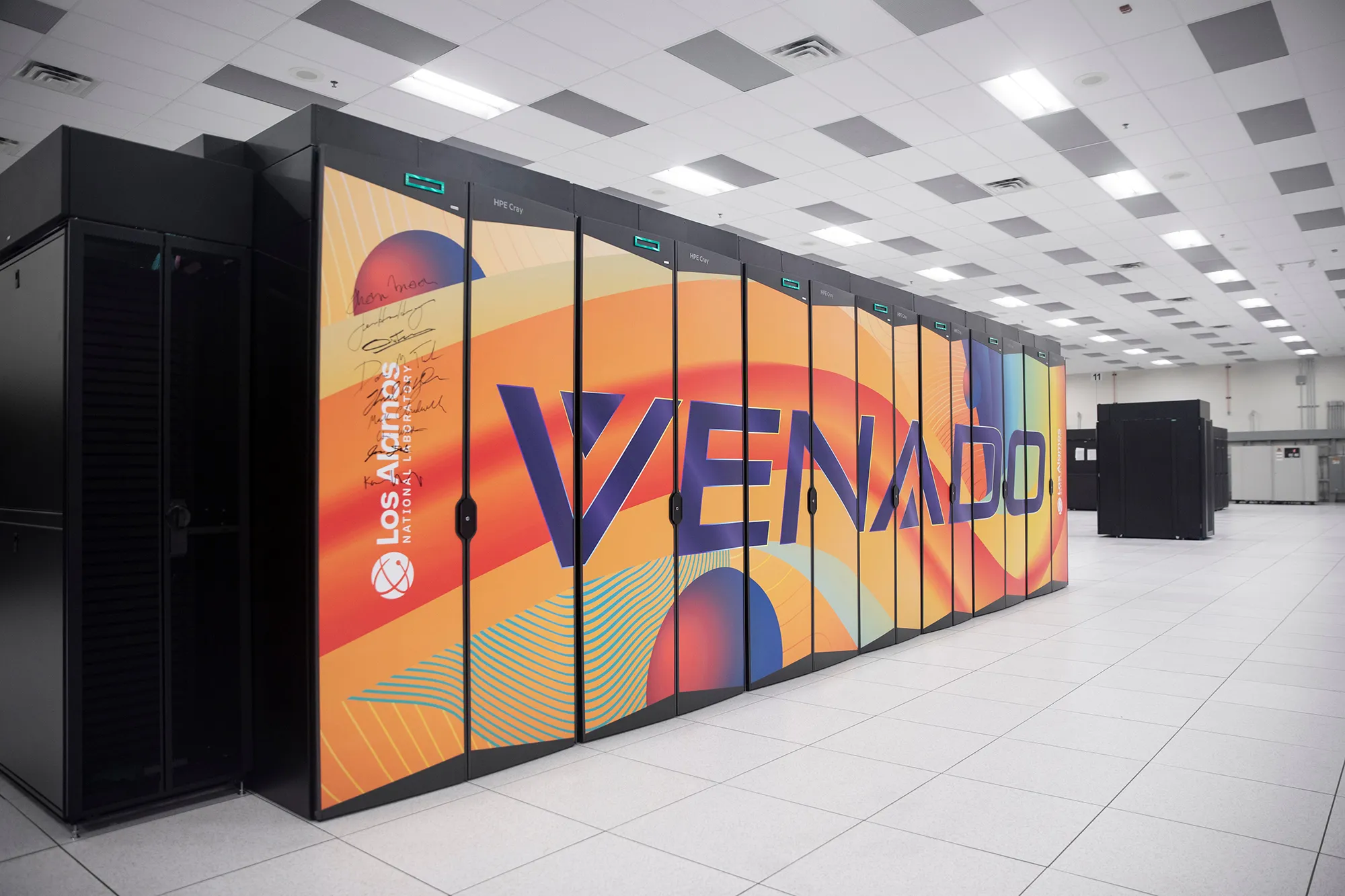
Last year, the Los Alamos National Lab (LANL) entered a partnership with OpenAI allowing it to install the company’s popular ChatGPT AI system on Venado, one of the world’s most powerful supercomputers. As of August, Venado was placed on a classified network, meaning that the AI chatbot now has access to some of the country’s most sensitive scientific data on nuclear weapons.


That wasn’t all. Later last year, the Department of Energy, which oversees Los Alamos and the country’s 16 other national laboratories, announced a $320 million initiative known as the Genesis Mission, which aims to “harness the current AI and advanced computing revolution to double the productivity and impact of American science and engineering within a decade.”
Few people are in a better position to think about the upsides and downsides of revolutionary new technologies than the people who today populate the mesa once occupied by Robert Oppenheimer, Feynman, and the other pioneers of the nuclear age. But when I visited the lab in January, I found that the researchers there were remarkably sanguine about the more existential risks that often come up in conversation about AI, even as they worked on the production of the world’s most dangerous weapons.
“They think we’re building Skynet; that’s not what’s going on here at all,” LANL’s deputy director of weapons, Bob Webster, said, referring to the superintelligent system from the Terminator movies. Geoff Fairchild, deputy director for the National Security AI Office, volunteered that he does not have a “p(doom),” the Silicon Valley shorthand for how likely one believes it is that AI will lead to globally catastrophic outcomes, and doesn’t believe most of his colleagues do either. “We don’t talk about it. I don’t think I’ve ever had that conversation,” he added.
For Alex Scheinker, a physicist who uses AI for the maintenance and operation of LANL’s massive particle accelerator, AI is an extraordinarily useful tool, but a tool nonetheless. “It’s just more math,” he said. “I don’t like to think about it like it’s magic.”
Still, the nuclear-AI comparison is unavoidable. Given the technology’s transformative potential, the dangers it could pose to humanity, and the potential for an innovation “arms race” between the United States and its international rivals, the current state of AI has frequently been compared to the early days of the nuclear age. And how people feel about the Manhattan Project — a triumphant union between the national security state and scientific visionaries? Or humanity opening Pandora’s box? — likely has a lot to do with how they view their work now.
Those making the comparison include OpenAI CEO Sam Altman who is fond of quoting Oppenheimer, and expressed disappointment that the 2023 biopic of the Los Alamos founder wasn’t the kind of movie that “would inspire a generation of kids to be physicists.” One of the film’s central conflicts is how a guilt-stricken Oppenheimer spent much of the second half of his life in an unsuccessful quest to control the spread of his creation. (Disclosure: Vox Media is one of several publishers that have signed partnership agreements with OpenAI. Our reporting remains editorially independent.)
The Trump administration has been explicit about the comparison. In the executive order announcing the mission, the White House invoked the creation of the atomic bomb, writing, “In this pivotal moment, the challenges we face require a historic national effort, comparable in urgency and ambition to the Manhattan Project that was instrumental to our victory in World War II.”
But if we really are in a new “Manhattan Project” moment, you wouldn’t know it in the place where the original Manhattan Project took place.
“The world’s nuclear information is right in there. You’re looking at it,” LANL’s director for high performance computing, Gary Grider, told me during my visit to Los Alamos in January.
We were staring through a glass window at a densely packed shelf of magnetic tapes, each of which could be accessed and read via a robotic system that resembled a high-end vending machine more than a hyperintelligent doomsday computer. The machine we were staring into contained nuclear data so sensitive it’s kept on physical drives rather than an accessible network, not that any of the data stored in the room I was standing in is exactly open source.

I was in Los Alamos’s high-performance computing complex, a vast, brightly lit, 44,000-square-foot room in a building named for Nicholas Metropolis, containing six supercomputers with space cleared out for two more. The first thing that strikes visitors to the computing center, the refrigerator-like temperature and the roar of the overhead fans, both evidence of the gargantuan effort, in money and megawatts, that it takes to keep these machines cool. “Going into high-performance computing, I never thought that I’d be spending this much of my time thinking about power and water,” Grider told me. Computing at Los Alamos is an insatiable beast: The average lifespan of a supercomputer, the cost of which can run into the hundreds of millions of dollars, was once around five to six years. Now it’s around three to five.
Cutting-edge computing has been intertwined with the American nuclear enterprise from the beginning. Los Alamos scientists used the world’s first digital computer, ENIAC, to test the feasibility of a thermonuclear weapon. The lab got its own purpose-built cutting-edge computer, MANIAC, in the early ’50s. In addition to playing a role in the development of the hydrogen bomb, MANIAC was the first computer to beat a human at chess…sort of. It played on a 6×6 board without bishops and took around 20 minutes to make a move. In 1976, the Cray-1, one of the earliest supercomputers, was installed at Los Alamos. Weighing more than 10,000 pounds, it was the fastest and most powerful computer in the world at the time, though it would be no match for a modern iPhone.

I had visited Los Alamos to see MANIAC and Cray’s descendant, Venado, comprised of dozens of quietly humming 8-foot tall cabinets. Currently ranked as the 22nd most powerful computer in the world, Venado was built in collaboration with the supercomputer builder HPE Cray and chip giant Nvidia, which provided some 3,480 of its superchips for the system. It is capable of around 10 exaflops of computing — about 10 quintillion calculations per second. The signatures of executives, including Nvidia’s Jensen Huang, adorn one of the cabinets.
Last May, OpenAI representative, accompanied by armed security, arrived at Los Alamos bearing locked metal briefcases containing the “model weights” — the parameters used by AI systems to process training data — for its ChatGPT 03 model, for installation on Venado. It was the first time this type of reasoning model had been applied to national security problems on a system of this kind.
LANL’s computers are a closed system not connected to the wider internet, but the OpenAI software installed on Venado brings with it learning it has acquired since the company started developing it. Officials at the lab were not about to let a visiting reporter start asking the AI itself questions, but from all accounts, its users interface with it from their desktop computers essentially the same way the rest of us have learned to talk to ChatGPT or other chatbots when we’re generating memes or brainstorming weeknight recipes.
Those users include scientists at LANL itself as well as the country’s other main nuclear labs — Sandia, in nearby Albuquerque, and Lawrence Livermore, near San Francisco. Grider says demand for the new tool was immediately overwhelming. “I was surprised how fast people became dependent on it,” he told me.
Initially, the system was used for a wide array of scientific research, but in August, Venado was moved onto a secure network so it could be used on weapons research, in the hope that it can become an invaluable part of the effort to maintain America’s nuclear arsenal.
Whatever your attitude toward nuclear weapons, Los Alamos researchers argue that as long as we have them, we want to make sure they work.
Since the 1990s, the United States — along with every other country other than North Korea, has been out of the live nuclear testing business, notwithstanding Trump’s recent social media posts on the subject. But between the original Trinity detonation in 1945 and the most recent blast in an underground site in 1992, the United States conducted more than 1,000 nuclear tests, acquiring vast stores of information in the process. That information is now training data for artificial intelligence that can help the lab ensure that America’s nukes work without actually blowing one up.
Venado is effectively a massive simulation machine to test how a weapon would respond to being put under unique forms of stress in real-world conditions. We can “take a weapon and give it the disease that we want and then blow it up 1000 different ways,” as Grider puts it.
In some ways this fulfills the vision of Los Alamos’s founder Robert Oppenheimer, who opposed further nuclear tests after Hiroshima and Nagasaki on the grounds that we already knew these weapons worked and any other questions could be answered by “simple laboratory methods.”
Those methods are not so simple today. When Webster, the LANL deputy director of weapons, first got involved in nuclear testing in the 1980s, the “state of computing that we had was extremely primitive,” he said, and not a viable substitute for gathering new data. Today, he says, “we’re doing calculations I could only dream of doing” before.
Mike Lang, director of the lab’s National Security AI Office, suggested that using AI tools to analyze the data kept “behind the fence” could not only ensure the weapons work, but also improve them. “We’re using [the same] materials that we’ve been using for a very long time,” he said. “Could we make a new high explosive that is less reactive, so you can drop it, and nothing happens? [Or] that’s not made with toxic chemicals, so people handling it would be safer from exposures? We can go through and look at some of the components of our nuclear deterrence, and see how we can make it cheaper to manufacture, easier to manufacture, safer to manufacture.”
Whatever your attitude toward nuclear weapons, Los Alamos researchers argue that as long as we have them, we want to make sure they work.
“We don’t build the weapons to do something stupid,” Webster said. “We build them not to do something stupid.”
The Los Alamos lab’s mesa location, an oasis of pines in the midst of a stark desert landscape, is known to locals as “the Hill.” About 45 minutes north of Santa Fe (on today’s roads, that is), it was chosen during World War II for its remoteness, defensibility, and natural beauty. Oppenheimer, who had traveled in the region since his youth, had long expressed a desire to combine his two main loves, “physics and desert country.”
Eight decades after the days of Oppenheimer, the sprawling fenced-off Los Alamos campus feels a bit like a university town without the young people. Los Alamos County is the wealthiest in New Mexico and has the highest number of PhDs per capita in the country. The lab has around 18,000 employees and the population has boomed since the lab resumed production of plutonium pits — the explosive cores of nuclear weapons — as part of America’s ongoing $1.7 trillion nuclear modernization program. Federal officials recently adopted a plan for a significant expansion of the lab, including an additional supercomputing complex, which critics say fails to take account of the environmental impact of the facility’s electricity and water use as well as the hazardous waste caused by pit production.

Officials at Los Alamos are quick to point out that despite what the lab is best known for, scientists there are working on more than just weapons of mass destruction. During my tour, I met with chemists using AI to design new targeted radiation therapies to improve cancer treatment and visited the Los Alamos Neutron Science Center, a kilometer-long particle accelerator that, in addition to weapons research, produces isotopes for medical research and pure physics experiments.
Critics point out that the vast majority of its budget is still devoted to weapons research, but still, Los Alamos is one of the best places in the world to observe the seismic impact AI is having on how scientific research is conducted. When the decision was made to move Venado onto a secure network, it cut off a number of ongoing scientific research projects, which is one big reason why two new supercomputers, known as Mission and Vision, are planned to debut this summer. Both are designed specifically for AI applications — one for weapons research, one for less classified scientific work.
AI projects, including at Los Alamos, are often criticized for their power use, but scientists at the lab say their work could ultimately result in safer and more abundant energy. There’s a long-running joke that nuclear fusion technology, which could deliver clean power in vast quantities, is perpetually 20 years away. LANL scientists are hopeful that AI could help crack the remaining scientific breakthroughs needed to get it off the ground. Several researchers mentioned the potential use of AI tools to design heat-resistant materials for use in nuclear fusion reactors. Scientists at LANL’s sister lab, Livermore, achieved the world’s first fusion ignition reaction a few years ago, though it lasted only a few billionths of a second. “The thing that excites me…is the notion that we can move out of this computational world and start interacting with these experimental facilities,” said Earl Lawrence, chief scientist at the National Security AI Office.
Researchers increasingly use AI for “hypothesis generation,” devising new potential compounds or materials for testing. But the main feature of AI that excited the Los Alamos scientists I spoke with the most harkens back to what Metropolis and Feynman discovered about using early computers 80 years ago: It can do more work, faster, and without breaks than any human. Increasingly, it can do the sort of physical real-world experiments that post-docs and junior researchers were responsible for as well.
Asked about how he envisioned the future of scientific research in a world of AI, Lawrence quipped, “I hope it’s more coffee shops and walks in the woods.” Grider, a career computer programmer, said, “I hope to hell we can get out of the code business.”
There are downsides to that ease, as well. The sort of grunt work that AI can now do more efficiently is how scientists once learned their craft, assisting senior scientists with research. As in other fields, the pathways to those careers could narrow.
“We need to be intentional about how we train the next generation of scientists,” Lawrence said.
From the atomic age to the AI age
Reminders of Los Alamos’s history are everywhere on the Mesa. During my visit to the lab, I toured the sites, now eerie abandoned historical monuments maintained by the National Parks Service, where the bomb detonated by Oppenheimer and company in the 1945 Trinity test, and Little Boy, dropped on Hiroshima, were assembled. They’re possibly the only US National Parks locations where visiting involves a safety briefing on radiation and nearby live explosives testing.
1/5
But the heirs to Oppenheimer and Feynman have mixed feelings about the Manhattan Project metaphor when it comes to AI.
Lang felt it was a mistake to characterize AI as a weapon, or frame development as an arms race, with China the main competitor this time instead of Germany. He preferred to think of today’s research as continuing the Manhattan Project’s model of “giving a bunch of multidisciplined scientists a goal to really go after and try to make progress on.” Others pointed to the scientists who were concerned at the time about the risk of a nuclear explosion igniting the earth’s atmosphere as somewhat equivalent to today’s AI “doomers.”
There’s also a fundamental difference between the two in how knowledge is disseminated. “In the very early days of nuclear energy, there were only a handful of people who had the knowledge and understanding to even know what was going on,” said Fairchild, the deputy director for LANL’s National Security AI Office. Plus, supplies of uranium and plutonium could be tightly controlled. “These days, everybody knows what’s going on…and much of it is happening in open source.”
AI is also developing in a very different way from previous technologies with national security implications. In the past, the government and military have often dictated academic research into futuristic tech to meet their own needs, with commercial applications only being found later: The internet may be the prime example. Now, as LANL’s partnership with OpenAI shows, it’s the government and military racing to react to cutting-edge applications developed first by private industry for commercial use.
“For the very first time, I would argue, on a really big scale, we find ourselves not in a leadership role here,” said Aric Hagberg, leader of LANL’s computational sciences division.
There may also be an AI-atomic parallel in the sheer size of investment proponents should be devoted to the advancement of the technology. Ilya Sutskever, OpenAI’s former chief scientist once remarked (maybe jokingly) that in a world of superintelligent AI “it’s pretty likely the entire surface of the Earth will be covered with solar panels and data centers.” The remark brings to mind another one by the Nobel Prize-winning physicist Niels Bohr, who had been skeptical that the United States would be able to build an atomic bomb “without turning the whole country into a factory.” When Bohr first visited Los Alamos, he felt, stunned, that the Americans had “done just that.”
The majority of the Manhattan Project was not the work done on chalkboards on the Hill by physicists, but the industrial scale efforts to enrich uranium and produce plutonium in Oak Ridge, Tennessee and Hanford, Washington. The latter site, carried out in large part by chemical firm Dupont — a “public-private partnership” of its era — produced radioactive waste that is still being cleaned up today. Likewise, the work of producing the AI future is as much or if not more about a massive build-out of data centers and the power needed to keep them cool and humming as it is the cutting edge research coming out of Silicon Valley or government labs.
When you visit Los Alamos, it’s hard not to be struck by the amount of ingenuity — in everything from nuclear physics, to explosive design, to revolutionary new techniques in high-speed photography — as well as the sheer industrial output that turned theoretical physics into a workable bomb in just three years.
You can still see the raw intellectual talent and can-do spirit that built the most advanced civilization the world has ever seen at Los Alamos today, and can easily imagine how it might build an even better one tomorrow. But it’s also impossible not to wonder if you’re seeing something else: Humanity’s thirst for power over the material world meeting with its instincts toward fear and aggression to engineer new nightmares. Perhaps we’ll get an answer soon.
This story was produced in partnership with Outrider Foundation and Journalism Funding Partners.
Tech
Report puts Seattle among leading global innovation cities, but it needs more premium office space


Seattle has officially leveled up from a “secondary” tech market to a critical “reinforcer” of the global innovation economy — but the city is running out of room to grow, according to a new report.
The latest edition of commercial real estate firm JLL’s Innovation Geographies report reveals that while Seattle is outpacing traditional hubs like New York and London in talent migration, a shortage of “investment-grade” real estate is creating a bottleneck for the city’s next era of tech expansion.
Seattle lands among 18 so-called reinforcer markets, where it is classified in the report as a “tech powerhouse” alongside cities like Austin, Berlin, and Tel Aviv. Reinforcers also include Los Angeles, Shanghai, Toronto, Washington, D.C., Raleigh, N.C., and others.
While diverse in what makes them attractive, the cities share the common characteristics of much higher rates of net migration, JLL says, having seen population inflows that are 3.8 times higher than the San Francisco Bay Area — the lone “core” city — and eight other “anchor” cities.
The 135 cities ranked in the report are scored based on an analysis of talent concentration and innovation output. While talent concentration measures the human capital and educational pipeline, the output score focuses on the tangible results and financial activity of a city’s innovation ecosystem, such as VC funding, startup activity, R&D spending, and more.
Seattle ranks 12th in innovation output and 23rd in talent concentration. The Bay Area is No. 1 in both categories.
But high-tier hubs are facing a global undersupply of premium, investment-grade real estate that is attractive to innovative companies, according to JLL, which says that only 11% of global office space was built after 2020.
Meanwhile, reinforcer markets like Seattle have seen surging prime rents, averaging $837 per square meter. And while some markets have seen an occupancy recovery, Seattle and others are still below pre-pandemic occupancy highs.
Commercial real estate firm CBRE reported earlier this year that Seattle’s office vacancy reached another record high at 34.7% in Q4. The numbers underscore how hybrid work and shrinking office footprints continue to weigh on a tech-heavy market like Seattle.
In nearby downtown Bellevue, vacancy rates still remain high, reaching 25.4% at the end of last year, according to Broderick Group. But OpenAI signed a big new lease in February, reflecting a growing role for the Eastside in the AI boom.


After years of postponements and close to $100 billion in spending, NASA has launched the first mission to send astronauts around the moon since Apollo 17 in 1972.
The 10-day Artemis 2 mission began today with the liftoff of NASA’s 322-foot-tall Space Launch System rocket from Launch Complex 39B at Kennedy Space Center in Florida at 6:35 p.m. ET (3:35 p.m. PT). NASA is streaming coverage of the flight via YouTube and Amazon Prime.
During the last two hours of the countdown, engineers addressed concerns about the rocket’s flight termination system and instrumentation for a battery on the launch abort system. “Godspeed, Artemis 2,” launch director Charlie Blackwell-Thompson told the crew just before liftoff. “Let’s go!”
Artemis 2 is the first crewed test flight in a series leading up to a moon landing that’s currently scheduled for 2028. It follows Artemis 1, which sent a crewless Orion around the moon in 2022. This time, four astronauts are riding inside Orion: NASA mission commander Reid Wiseman, NASA astronauts Christina Koch and Victor Glover, and Canadian astronaut Jeremy Hansen.
“Great view,” Wiseman told Mission Control during the rocket’s ascent. “We have a beautiful moonrise, we’re headed right at it.”
Koch will be the first woman to go beyond Earth orbit. Similar firsts apply to Glover as a Black astronaut, and Hansen as a non-American astronaut.
Although Artemis 2’s astronauts won’t be landing on the lunar surface, they’ll follow a figure-8 trajectory that will send them 4,700 miles beyond the far side of the moon and make them the farthest-flung travelers in human history.
Last week, NASA Administrator Jared Isaacman laid out a plan for establishing a permanent base on the moon and preparing for even farther trips into the solar system. Today, Isaacman said Artemis 2 is “the opening act” of that golden age of science and discovery.
Senior test director Jeff Spaulding, a veteran of the space shuttle program, said he was looking forward to the mission. “I’m excited about going to the moon,” he told reporters on the eve of the launch. “I’m excited about establishing a presence there. It’s something that I have had a desire for, for a great many years — and then to get humans out to Mars as well.”
The mission timeline calls for Orion to adjust its orbit around Earth today and go through system checkouts. An hour after launch, Mission Control had to troubleshoot a dropout in communications with the crew. After a gap of several minutes, Wiseman reported that he could hear capsule communicator Stan Love “loud and clear.” The crew also worked with Mission Control to fix a balky space toilet.
On Thursday, Orion is due to fire its main engine for about six minutes to leave orbit and head for the moon. The engine burn is designed to put the space capsule on a free-return trajectory, which takes advantage of orbital mechanics to slingshot around the moon for the return trip.
The health of the Artemis 2 astronauts will be monitored during the flight to gauge the effects of deep-space travel. The crew will also assess Orion’s performance and practice in-flight safety procedures. For example, they’ll rehearse the protocol for taking shelter from radiation storms that might flare up during trips beyond Earth’s protective magnetosphere. They’ll also participate in experiments and make observations of the moon’s far side.
The climactic lunar flyby is due to take place on April 6. “They’re going to be able to see the whole moon as a lunar disk on the lunar far side,” Marie Henderson, lunar science deputy lead for the Artemis 2 mission, said in a NASA video. “So, that’s a brand-new, unique perspective that humans haven’t been able to look at before.”
The astronauts will also get an opportunity to capture a 21st-century “Earthrise” photo, and they may be able to glimpse a solar eclipse made possible by the lunar flyby. “They will be able to see the sun’s corona, which is kinda cool,” said Lori Glaze, acting associate administrator for NASA’s Exploration Systems Development Mission Directorate.
At the end of the trip, the crew and their Orion capsule are due to splash down in the Pacific Ocean off the California coast. They’ll be brought to a recovery ship for medical checkouts and their return to shore, following a routine that became familiar during the Apollo era.
Artemis 2 is about the history of America’s space program as well as its future. The round-the-moon mission profile matches that of Apollo 8, which served as a unifying event for a nation riven by the social tumult of the time. That mission’s commander, Frank Borman, reported receiving a telegram reading, “Congratulations to the crew of Apollo 8. You saved 1968.” Notably, less than a third of Americans living today were around when Apollo 8 flew.
The main motivation for the Apollo program was America’s superpower competition with the Soviet Union, and today, the geopolitical stakes are similarly high. NASA and the White House are seeking to jump-start progress on Artemis in part because China is targeting a crewed moon landing by 2030.
Sen. Maria Cantwell, D-Wash., said this week during a visit to Seattle-area suppliers for the Artemis program that it’s important for America to get to the moon first. “We’re trying to get the best real estate on the moon,” she said. “So, to do that, you’ve got to get up there to claim it.”
The course of the Artemis program, which is named after the goddess of the moon and the twin sister of Apollo in Greek mythology, hasn’t always run smooth. When the program was given its name in 2019, the Artemis 2 mission was planned for 2022 or 2023, with the moon landing scheduled for 2024. The cost of the program has been estimated at $93 billion through 2025, with each Artemis launch costing $4.1 billion.
Artemis 2’s launch team ran into several challenges during this year’s preparations for launch. Liftoff was initially scheduled for February, but a liquid hydrogen leak forced NASA to reset the launch for March. The launch date was reset again when a helium pressurization problem required a rocket rollback for repairs. The problem was resolved, and the SLS was brought back out to the pad on March 20.
Several companies with a presence in the Seattle area are banking on Artemis’ success. For example, a facility in Redmond operated by L3Harris (previously known as Aerojet Rocketdyne) builds thrusters for the Orion spacecraft and is already working ahead on the Artemis 8 mission.
Boeing is the lead contractor for the SLS rocket’s core stage. Karman Space & Defense in Mukilteo provides hatch release mechanisms and parachute deployment hardware for Orion. And Jeff Bezos’ Blue Origin space venture, based in Kent, is developing a Blue Moon lander that future Artemis crews could ride to the lunar surface.
Blue Origin’s New Glenn rocket is expected to send an uncrewed cargo version of its lander to the moon sometime in the next few months.
This report has been updated frequently during the countdown and mission.
Read more: Artemis 2 gets a push from Pacific Northwest tech
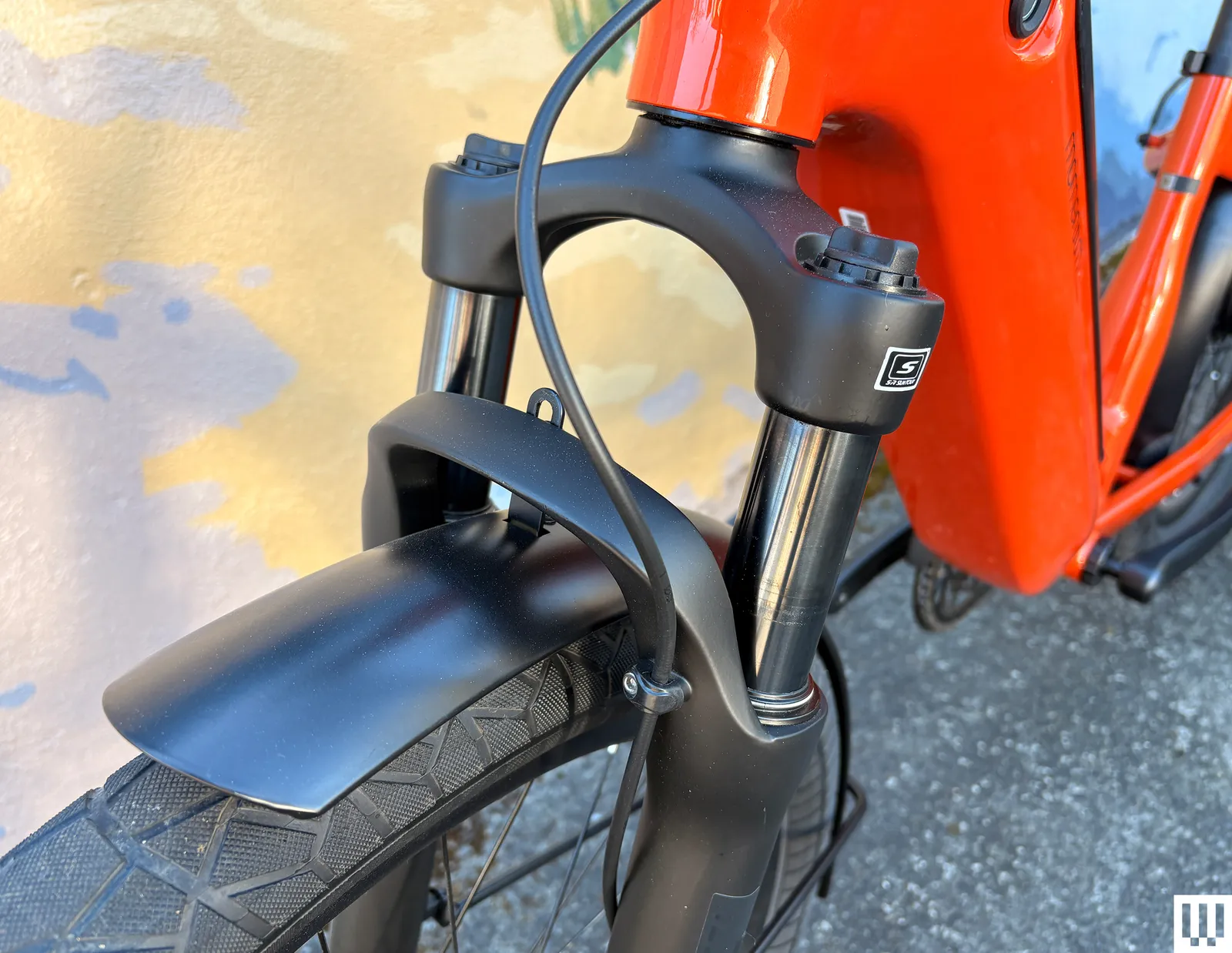
The bike also has a front fork with 80 millimeters of suspension, so accidentally piloting all 60 pounds of it into a pothole won’t pitch you head over heels. It’s fully loaded, with integrated lights, fenders, and a kickstand. And finally, the Vida E+ is UL-certified, so it won’t catch on fire while charging in your garage. The RideControl app lets you check your bike’s electronic systems for problems, lock your bike, and, if you have a bike mount, use it for rudimentary navigation.
Quality Components
Riding the Vida E+ feels like riding a couch, but in a good way. This is a bike that will do everything for you, without your having to think about it very much (unless you’re trying to maneuver it between two cars in your driveway). The step-through frame makes it easy to get on or off. The sit-up geometry and ergonomic handlebars are incredibly comfortable; I can ride with one hand, slowly pedaling at 9 mph while biking my kids home from school, and they blabber on about whatever.
Photograph: Adrienne So

Because this is a bike made by Giant, the components are very nice, for a reasonable price. I can easily read the display in high-glare natural sunlight. The fork is made by Suntour; while I would definitely not take this bike on trails, I hit many potholes, both on purpose and not, without dumping myself. The brakes are high-performance Tektro four-piston hydraulic disc brakes, which is also a little unusual at the price point. You don’t have to worry about being able to make quick stops on hills or with a heavy load.
The Shimano shifters work well with the SyncDrive motor to climb steep hills. I did find that the buttons are not terribly easy to push, and I also tended to mix up the headlight and power buttons at the top, which my kids find annoying when they’ve taken off and I’m still struggling to get a 60-pound bike moving without assistance.
Tech
Erykah Badu’s Mama’s Gun Gets 25th Anniversary Vinyl Reissue with RTI 180g Pressing and Analog Restoration: Review
The new 25th Anniversary Vinylphyle restoration of Erykah Badu’s chart-toping 2000 album Mama’s Gun is an excellent reissue which should be of interest to fans of vocal jazz and modern soul sounds as well as analog loving audiophiles.
A platinum seller with three hit singles including her first top 10, this is a super chill, fluid grooving and melodic song cycle often categorized as “neo-soul” and bridging pop, soul, funk, jazz, hip hop and even singer-songwriter pop. While I’ve read numerous references to Billie Holiday in discussing Ms. Badu’s vocal style, I also hear strong Dinah Washington flavors by way of Minnie Ripperton and Chaka Kahn (which are some pretty great touchstones as well).
As with other Vinylphyle releases in this top-notch new series from Universal Music, Mama’s Gun was pressed at RTI — renown as one of the best vinyl manufacturing facilities in the world. The 180-gram vinyl is dark and well centered. The production quality elements throughout are also outstanding, the album cover is made of heavy cardboard stock akin to a vintage jazz album from 1960s on Verve or Blue Note. Each disc comes housed in an audiophile-grade plastic lined inner-sleeve.
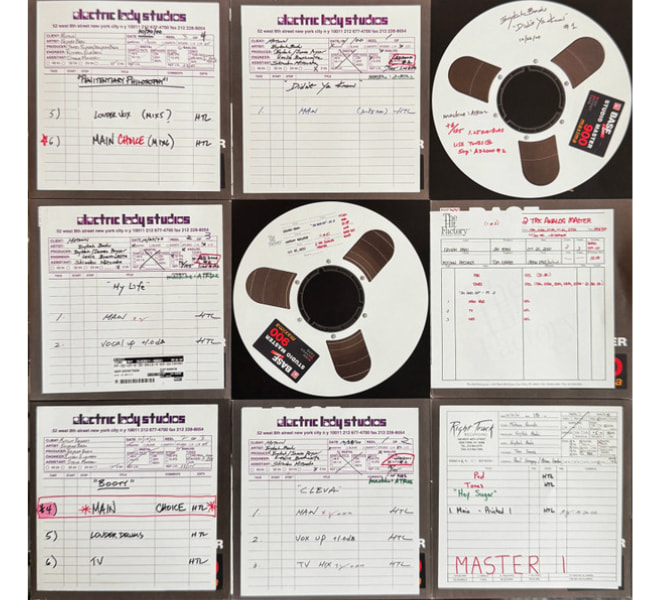
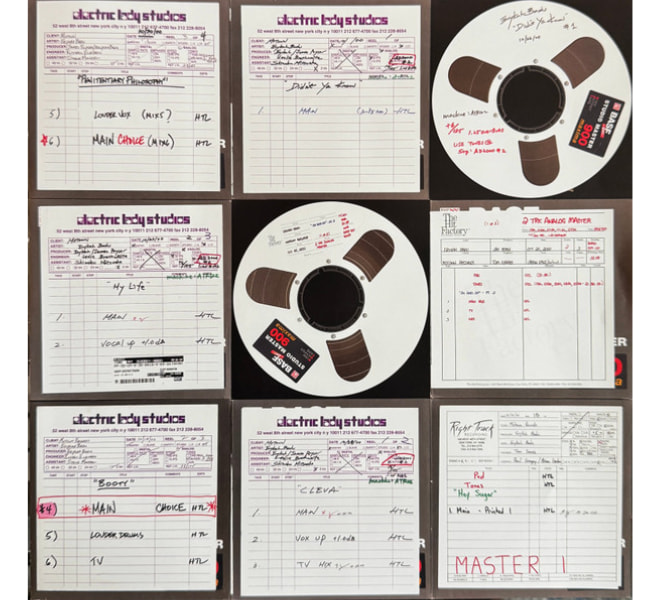
From Universal’s udiscovermusic website we’ve also gleaned some additional information which reveals that this release is more than “just” a reissue but a genuine restoration of note for fans seeking the best quality version of a favorite album.
There we learn:
“There are no sequenced analog masters for Mama’s Gun. The original 44.1kHz/16-bit files, with the original CD mastering and limiting, have been the only source for all digital and vinyl reissues—until now. The record was reassembled and rebuilt digitally from 14 individual track tapes, newly transferred in 96kHz/24-bit, in order to create the first true remaster of this record since it came out 25 years ago.”
In the new liner notes for the album Ms. Badu adds insights into her passion for analog at the crossroads of digital: “With this remastering, we’ve carefully blended analog warmth with digital precision. It’s breathtaking to hear the subtleties of each layer come alive in a new way, making the project resonate even more powerfully.”

Indeed, what a lush round sound Mama’s Gun delivers! Largely played by live musicians in top studios including New York’s iconic Electric Lady (which was created by Jimi Hendrix), no less than The Roots’ Questlove is featured on drums on many of the tracks.
It is haunting hearing “In Love with You” which features vocal contributions from Stephen Marley — Bob Marley’s second son — supported mostly by lovely softly strummed nylon string acoustic guitar. Ms. Badu’s hit “Bag Lady” (#6 Billboard Top 100) was co-written with soul legend Issac Hayes and received two Grammy nominations that year. “Cleva” — which features Roy Ayers on Vibraphone, feels almost like a lost Stevie Wonder tune.

if you ever liked early Meshell Ndegeocello albums like her 1999 masterwork Bitter or even newer artists like New Orleans’ Tank & The Bangas, you might well enjoy Mama’s Gun. Highly recommended.
Universal’s Vinylphyle series 2LP release of Erykah Badu’s Mama’s Gun is currently exclusively available via udiscovermusic for $54.98.
Mark Smotroff is a deep music enthusiast / collector who has also worked in entertainment oriented marketing communications for decades supporting the likes of DTS, Sega and many others. He reviews vinyl for Analog Planet and has written for Audiophile Review, Sound+Vision, Mix, EQ, etc. You can learn more about him at LinkedIn.


Are pickup truck engines the same as those used in normal passenger or sports cars? The answer is both yes and no. Physically, at least, there’s usually little that separates an engine in a truck’s engine bay from one in a car’s. After all, there have been plenty of times in the industry’s history when automakers have sold cars and trucks with nearly identical engines. Case in point, the legendary Chrysler slant-six engine, which came in everything from compact cars to pickup trucks and vans.
But in the modern era, especially, there can be notable differences between car and truck engines, even if their displacement and general engine architecture are the same. The modern HEMI V8 used in Dodge muscle cars and Ram pickups is a good example of this, with different versions of the same engines used in performance cars and pickups. Most of the differences between truck and car engines involve how and when the engines deliver their horsepower and torque.
A car engine may produce more peak horsepower than an equivalent truck engine, but the truck engine will often provide more torque or deliver the same amount of torque at lower revs. Just how much difference there is between the two will vary by automaker, and some brands, like Ford, offer V8 engines designed from the ground up for trucks that share nothing with their car counterparts.
The different flavors of V8s
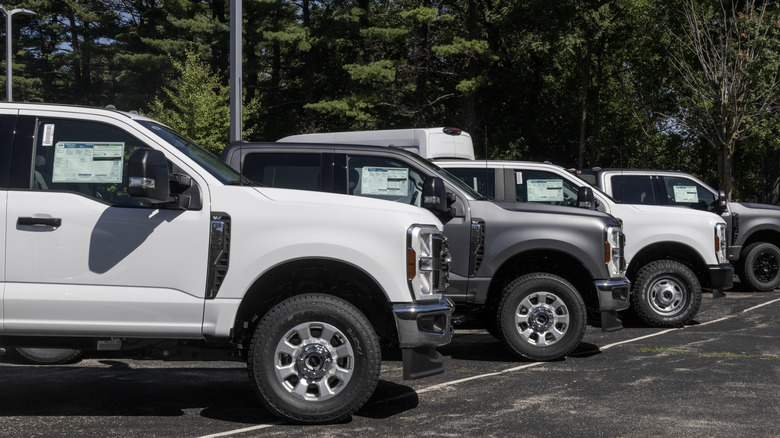
Ultimately, the main difference between car and truck engines is rooted in the difference between horsepower and torque. While horsepower matters in a truck, when it comes to pulling a trailer or carrying a heavy load, it’s the torque that’s important — and the lower in an engine’s powerband that torque comes, the better it is. Thus, the popularity of ultra-torquey, but relatively low-horsepower turbodiesel engines for large pickups. Peak horsepower, meanwhile, takes prominence in a sports car where engine speeds are higher.
Even within the same V8 family, there can be notable differences in car and truck engines. In GM’s V8 lineup, the 401-hp 6.6-liter L8T truck engine is designed for low-speed torque, with 464 lb-ft of torque at 4,000 RPM. The Chevrolet Corvette’s smaller, 495-hp 6.2-liter LT2 V8 is part of the same family and easily bests the L8T in peak horsepower, yet it barely edges the L8T in torque. It also needs to rev much higher to generate its torque, with its 470 lb-ft coming at 5,150 rpm.
Ford’s Super Duty 7.3-liter Godzilla V8 takes this concept even further. Not only is the Godzilla much larger than the 5.0 Coyote V8 in the Mustang GT, but it also uses an entirely different design with an overhead-valve, single-camshaft design compared to the 5.0’s dual overhead cams and 32 valves. At 480 hp, the 5.0 beats out the 430-horsepower Godzilla, but the 7.3 takes the torque crown, with 475 pound-feet to the Mustang’s 415 lb-ft.
The curious case of the Nissan 240SX

So what happens, then, if you put a pickup truck engine into a sports car? Look no further than the North American-market Nissan 240SX from the 1990s. When the S13 Nissan Silvia and 180SX debuted in the Japanese home market, the cars were available with high-horsepower turbocharged four-cylinder engines — first the 1.8-liter CA18DET and later the legendary SR20DET. This, combined with a great chassis and tons of aftermarket support, helped the S13 become a smash hit among enthusiasts.
However, when it came time to export the car to America, Nissan decided to forgo the turbo engines in favor of the naturally aspirated 2.4-liter KA24 engine used in Nissan pickup trucks. Though the USDM engine was larger than its JDM counterpart and produced a decent amount of torque for its size, the KA24 only made 140 hp and, more importantly, lacked the high-revving sports car feel many expected from the 240SX.
Fortunately, the SR20DET was an easy swap, and Nissan’s decision to go with a truck engine didn’t entirely detract from the many features that helped the 240SX become a legendary drift car in the years and decades that followed. Even then, though, one can’t help but wonder what would’ve happened had Nissan given the U.S. market 240SX the turbocharged performance engine it deserved.

ZipNada writes: Two software researchers recently demonstrated how modern AI tools can reproduce entire open-source projects, creating proprietary versions that appear both functional and legally distinct. The partly-satirical demonstration shows how quickly artificial intelligence can blur long-standing boundaries between coding innovation, copyright law, and the open-source principles that underpin much of the modern internet.
In their presentation, Dylan Ayrey, founder of Truffle Security, and Mike Nolan, a software architect with the UN Development Program, introduced a tool they call malus.sh. For a small fee, the service can “recreate any open-source project,” generating what its website describes as “legally distinct code with corporate-friendly licensing. No attribution. No copyleft. No problems.” It’s a test case in how intellectual property law — still rooted in 19th-century precedent — collides with 21st-century automation. Since the US Supreme Court’s Baker v. Selden ruling, copyright has been understood to guard expression, not ideas.
That boundary gave rise to clean-room design, a method by which engineers reverse-engineer systems without accessing the original source code. Phoenix Technologies famously used the technique to build its version of the PC BIOS during the 1980s. Ayrey and Nolan’s experiment shows how AI can perform a clean-room process in minutes rather than months. But faster doesn’t necessarily mean fair. Traditional clean-room efforts required human teams to document and replicate functionality — a process that demanded both legal oversight and significant labor. By contrast, an AI-mediated “clean room” can be invoked through a few prompts, raising questions about whether such replication still counts as fair use or independent creation.
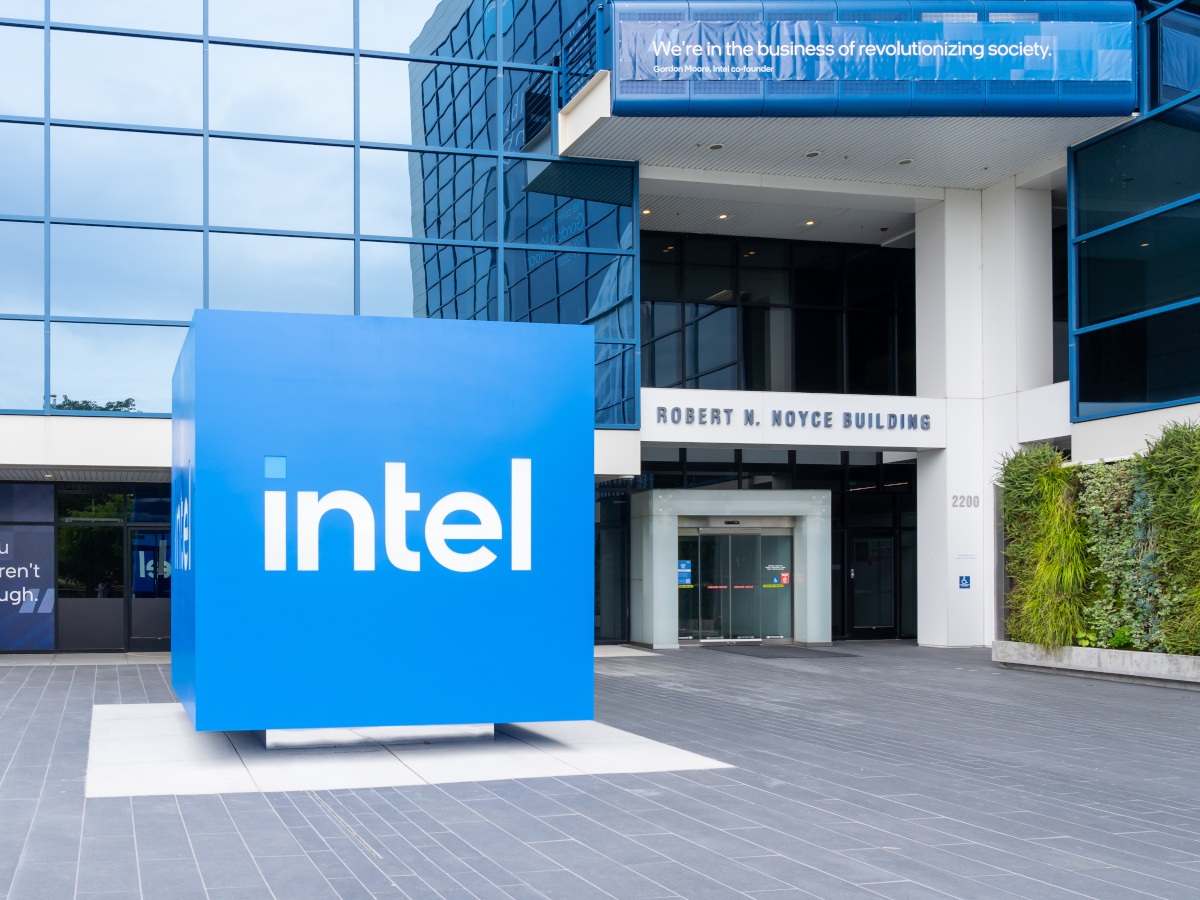

Intel said the agreement is reflective of a strong partnership with Apollo, as well as the organisation’s role in the age of AI.
US technology company Intel has plans to repurchase a 49pc stake of the Leixlip, Kildare Fab 34 manufacturing facility, via a partnership with asset manager Apollo Global Management. The deal which will be valued at $14.2bn is expected to be funded through cash on hand and proceeds from the issuance of new debt of approximately $6.5 bn.
With work beginning in 2019, Fab 34 was designed to be an advanced semiconductor manufacturing facility.
There has been significant investment in the plant over the years with the organisation hitting several important milestones and currently it is a fabrication facility for products utilising the Intel 4 and Intel 3 process technologies, for example Intel Core Ultra and Intel Xeon 6 processors.
In 2024, it was decided that Intel would sell a 49pc stake in Fab 34 to Apollo Global Management.
At the time, David Zinsner, the chief financial officer at Intel, said that the $11bn deal would give the chip maker the “additional flexibility to execute our strategy as we invest to create the world’s most resilient and sustainable semiconductor supply chain”. Intel also said it would be retaining full ownership and control of Fab 34 and its assets.
Commenting on the recent announcement Zinsner said, “Our 2024 agreement was the right structure at the right time and provided Intel with meaningful flexibility, enabling us to accelerate critical initiatives. Today, we have a stronger balance sheet, improved financial discipline and an evolved business strategy.”
Apollo Partner Jamshid Ehsani added, “Our partnership with Intel began at an important stage in the execution of its advanced manufacturing roadmap, where our long-term strategic capital played a meaningful role in accelerating the production of next-generation chip technology.
“Flexibility and alignment are core to how we approach relationships as a long-term, solutions-oriented capital partner, and we are pleased to facilitate this transaction in support of Intel’s evolving strategic and operational priorities.”
Don’t miss out on the knowledge you need to succeed. Sign up for the Daily Brief, Silicon Republic’s digest of need-to-know sci-tech news.

Samsung already has its own slim magnetic case for the Galaxy S26 Ultra, so most people won’t think twice about alternatives.
But choosing the right Samsung Galaxy S26 Ultra case isn’t always as straightforward as it seems. Some cases look great on day one but end up feeling too smooth, slightly bulky, or just awkward to use after a few days. Thinborne is still a thin magnetic case, but it takes a slightly different approach.
This review focuses on how it feels in real use, and how it compares to Samsung’s own option.
Thinborne Overview of Features
It helps to look at what Thinborne actually offers and how those features translate in real use.
Material and Build
Thinborne uses 600D aramid fiber, which you’ll usually see in lightweight, high-strength materials. You’ll notice how it feels:
- It’s very light
- It feels firm rather than flexible
- The surface has a subtle texture
At 0.90 mm thin, it doesn’t add much bulk. The phone still feels close to how it does without a case.
What makes it different from typical cases is the structure. It doesn’t have that soft, slightly rubbery feel you get from silicone. It’s more rigid, almost like a thin shell that snaps into place. Over time, silicone can start to feel sticky or collect dust – this doesn’t.
MagSafe Compatibility
Like most Galaxy S26 Ultra cases, Thinborne includes built-in magnets since the phone itself doesn’t have them. In everyday use, that means:
- Chargers snap into place quickly
- Car mounts hold steady
- Wallets and stands attach cleanly
The experience is straightforward, and everything lines up as expected (and it stays in place).
One thing that helps with the setup is the case’s rigidity. Since it doesn’t flex much, the alignment stays consistent. You don’t get that slight shift you sometimes notice with softer cases.

Available Colors
Thinborne keeps the color options simple:
- Black
- Royal Crimson
- Wild Navy
All three use the same woven finish, so the feel doesn’t change – only the color does. The tones are muted and don’t draw too much attention.
Thinborne Thin Phone Case vs Samsung Galaxy S26 Ultra Slim Magnet Case
Samsung’s Slim Magnet Case is the most direct comparison. Both cases fall into the same general category: thin, lightweight, and magnetic.
Samsung doesn’t list an exact thickness, but it’s positioned as a slim case. What we do know is that it weighs 24 grams, making it a bit heavier than Thinborne, which weighs around 20 grams.
Here’s how they compare:
Feature
Thinborne Galaxy S26 Ultra Case
Samsung Slim Magnet Case
Weight
20 g
24 g
Thickness
0.90 mm
slim profile (not officially listed)
Material
600D aramid fiber
Synthetic/plastic
Grip
Textured (woven)
Smooth
Magnets
Built-in magnetic array
Built-in magnets
As you can see, Thinborne and Samsung look similar. In use, however, the differences can be noticed:
- Grip – Thinborne has a bit more texture, so it feels more secure in your hand. Samsung’s case is smoother, which can feel slightly slippery.
- Weight – The difference isn’t huge, but the lighter feel can be noticeable over time – especially on a large phone like the S26 Ultra.
- Material feel – Thinborne feels more solid and structured. Samsung’s case feels more like a standard slim case.
Pricing and Availability
Thinborne and Samsung are priced almost the same, so cost isn’t really the deciding factor here.
Thinborne comes in at $69.69, while Samsung’s Slim Magnet Case is slightly higher at $69.99. The difference is minimal, and in practice, both sit in the same premium range for thin magnetic cases.
Where they differ is availability. Thinborne is sold through its official website and is also available on Amazon, which gives you a bit more flexibility when buying. It typically includes extras like a tempered glass screen protector as well.
Samsung’s case is easier to find overall. It’s available through Samsung’s store and most major retailers, making it a more convenient option if you prefer to buy locally or through familiar channels.
At this price point, it really comes down to which case fits your preferences better, not which one is cheaper.
Wrap Up
Thinborne keeps things simple, and that’s really the point. It’s built as a thin phone case that doesn’t change how the Galaxy S26 Ultra feels in your hand. The lighter weight, subtle texture, and rigid build all come together in a way that feels easy to live with day to day.
Samsung’s Slim Magnet Case still does what it’s supposed to. It’s reliable, widely available, and works well with magnetic accessories. But if you care about how your phone actually feels in use, Thinborne has a clear edge. The lighter weight and textured finish make it easier to hold, especially during one-handed use – something you start to notice after a few days of use.


Microsoft is investigating a known issue that prevents some Classic Outlook users from sending emails via Outlook.com.
Affected users are being warned that their message hasn’t reached some intended recipients, and they will encounter this problem more often when the Outlook.com account they use to send email is an Outlook profile linked to another Exchange account.
“This message could not be sent. Try sending the message again later or contact your network administrator,” the non-delivery report (NDR) error displayed when sending or replying to emails reads.
“You do not have the permission to send the message on behalf of the specified user. Error is [0x80070005-0x0004dc-0x000524].”
Microsoft added that another condition that may trigger these errors is that the sender’s account has an Exchange Online mail contact with the same SMTP address.
%20error.jpg)
While investigating this issue and still looking for a fix, the Outlook team shared several workarounds that may help affected customers temporarily mitigate the issue.
Microsoft recommends removing the M365 account Address Book so that the Outlook client does not check it when sending emails, hiding the Outlook.com contact from the Microsoft 365 account Global Address List (GAL).
Other alternatives include creating a new classic Outlook profile that includes only the account receiving NDR errors, and using the New Outlook client or Outlook.com on the web to send email from the affected account.
Over the last two weeks, Microsoft fixed two other known issues, including one that caused Classic Outlook to crash when enabling the Microsoft Teams Meeting Add-in and another that triggered 0x800CCC0F and 0x80070057 errors when synchronizing Gmail and Yahoo accounts.
Microsoft is also investigating known bugs that cause “Can’t connect to the server” errors when creating groups if Exchange Web Services (EWS) is enabled for the tenant, and that make the mouse pointer disappear for some users in Classic Outlook, OneNote, and other Microsoft 365 apps.

Automated pentesting proves the path exists. BAS proves whether your controls stop it. Most teams run one without the other.
This whitepaper maps six validation surfaces, shows where coverage ends, and provides practitioners with three diagnostic questions for any tool evaluation.

NewsBeat2 minutes ago
Texas Smoker street food vendor joins Stack Seaburn

Business3 minutes ago
Thousands Report Service Disruption Across US
Crypto World4 minutes ago
Audit admin keys, not just code, expert says after $200 million Drift exploit: Crypto Daybook Americas


-

 Business7 days ago
Instagram, YouTube Found Responsible for Teen’s Mental Health Struggle in Historic Ruling
-

 NewsBeat6 days ago
The Story hosts event on Durham’s historic registers
-
 Tech7 days ago
Intercom’s new post-trained Fin Apex 1.0 beats GPT-5.4 and Claude Sonnet 4.6 at customer service resolutions
-

 Sports6 days ago
Sweet Sixteen Game Thread: Tide vs Michigan
-
Entertainment3 days ago
Fans slam 'heartbreaking' Barbie Dream Fest convention debacle with 'cardboard cutout' experience
-
 Entertainment5 days ago
Lana Del Rey Celebrates Her Husband’s 51st Birthday In New Post
-
Crypto World2 days ago
Dems press CFTC, ethics board on prediction-market insider trades
-

 Crypto World15 hours ago
Gold Price Prediction: Worst Month in 17 Years fo Save Haven Rock
-

 Tech3 days ago
The Pixel 10a doesn’t have a camera bump, and it’s great
-

 Sports2 days ago
Tallest college basketball player ever, standing at 7-foot-9, entering transfer portal
-

 Tech2 days ago
EE TV is using AI to help you find something to watch
-

 Fashion4 days ago
Amazon Sundays: Soft Spring Layers
-

 Tech3 days ago
Apple will hide your email address from apps and websites, but not cops
-

 Tech2 days ago
How to back up your iPhone & iPad to your Mac before something goes wrong
-

 Crypto World3 days ago
U.S. rule change may open trillions in 401(k) funds to crypto
-

 Tech2 days ago
Flipsnack and the shift toward motion-first business content with living visuals
-

 Fashion7 days ago
En Vogue in Brown Leather and Tailored Neutrals by Atelier Savoir, Styled by J Bolin
-

 Politics3 days ago
Should Trump Be Scared Strait?
-

 Fashion7 days ago
What Are Your Favorite T-Shirts for the Weekend?
-

 Business6 days ago
Chinese universities with military links bought Super Micro servers with restricted AI chips
You must be logged in to post a comment Login