According to the organisation, the money raised will be put towards supporting further product development and scaling.
Hexis, an Irish start-up developing a personalised nutrition app, has raised $2.1m in a seed funding round led by Apex Capital. The round also received support from Enterprise Ireland, ScaleX Investments and Sheffield United’s leading goal scorer, Patrick Bamford.
Established in Dublin and founded by Dr David Dunne, Dr Xiaoxi Yan and Dr Sam Impey, Hexis provides a nutrition operating system for athletes. The company integrates software, wearable tech and fitness tracking platforms to turn personalised workout data into a tailored nutrition strategy, depending on the users goals, lifestyle and training.
Reportedly, Hexis works with nearly 40pc of Tour de France riders and 50pc of Premier League clubs and has ambitions to broaden its geographic reach by focusing on the US market. Hexis intends to use the funds raised to support product development and scaling.
Advertisement
Commenting on the announcement, Dunne, who is also the company’s CEO, said: “Our vision at Hexis is to be the global nutrition operating system for human performance. Wearables and training platforms have transformed how athletes understand their training and recovery, but nutrition, the fuel behind both, has lagged behind and remained the missing layer.
“Hexis is ready to complete the picture and make nutrition your smartest training tool. This round allows us to go further, deepening our impact across professional sport while laying the foundations to bring truly personalised, periodised nutrition to every athlete, at every level. That has always been the ambition. We are now in a position to deliver it.”
Keith Brock, the head of Enterprise Ireland’s sports technology portfolio, said: “Enterprise Ireland is proud to back Hexis as it scales its performance nutrition platform from elite sport into the wider consumer market. Our investment reflects real confidence in the science, the founding team and the global ambition behind the business, which already supports professional teams across four continents.
“Supporting companies like Hexis sits at the heart of our strategy of helping ambitious Irish firms scale and compete internationally, and it underlines the growing strength of Ireland’s sports-tech sector.”
Advertisement
In late 2025, Hexis took home the Grand Prix award at the 2025 National Startup Awards. As well as being named the overall winner, Hexis also won the top prize in the tech start-up category, performing well alongside other companies such as Haon Life Sciences, Silicate Carbon and Glitch.
Don’t miss out on the knowledge you need to succeed. Sign up for the Daily Brief, Silicon Republic’s digest of need-to-know sci-tech news.
Every year in the hi-fi and home cinema world there are trends – some you see from the start of the year, others start to develop over the course of a few months.
This type of convergence can almost be an act of serendipity – all these products launching around the same time – what could have kick-started this or any trend?
Let’s take a look at active, also known as powered speakers. They are starting to pop up with unerring regularity.
Hi-Fi has struggled to attract the attention of a younger generation glued to smartphones, tablets and other mobile devices. Hi-Fi can seem hoary and stuffy compared to the worlds that mobile devices can offer.
Advertisement
Some hi-fi brands have taken the route of headphones to entice people not au fait with hi-fi. Speaker brands such as Bowers & Wilkins, Dali, Focal and others have invested big-time in headphones (or head-fi) as a gateway to hi-fi, but is it actually a gateway? Do people jump from headphones to hi-fi? Let’s say I’m not too sure.
Image Credit (Trusted Reviews)
But we’ve seen a renaissance of vinyl. There’s been a resurgence in CD, and even cassette tapes have enjoyed a few days in the sun, while wired headphones continue to drum up positive publicity.
But proper – or trad hi-fi – still struggles for some traction and momentum. The appeal it has is men of a certain age who like to decamp to their den to listen to music in peace.
Advertisement
But active and powered speakers could change that outlook.
For one, hi-fi takes up space. Who has space these days? Everyone wants to move to a bigger house for more space, and everyone wants to move to a smaller house because it’s less expensive. What’s something that’s the best of both worlds – saving space, still offering a good experience but ultimately provides convenience?
Advertisement
Well that could be active/powered speakers.
Advertisement
Image Credit (Trusted Reviews)
The amplification, in some cases the streaming and processing, can be done with just two boxes rather than many. But more than that, they’re multi-purpose in use.
I’m currently testing a pair of KEF and Edifier speakers, both of which come with HDMI eARC to connect to a TV, making them potential soundbar replacements. Other models have a built-in phono stage to connect directly to a turntable. USB means you can plug your music in that way.
And then there’s the wireless support. Some cheaper options will make do with just Bluetooth, but active speakers with Wi-Fi open the world to the likes of Spotify Connect, Tidal, Qobuz etc – high quality music streaming services that you just need to tap a few buttons to get started.
Hi-Fi sound, but without the faff. You can see the appeal, and why brands seem to have set their stall up in this area of the market.
Advertisement
Advertisement
But can they have an impact?
The great thing about active and powered speakers is that they can fit within your current set-up rather than having to buy certain products to create a system.
While traditional hi-fi offers outright performance, especially if you know what you’re doing, knowledge can also be a bit of a bugbear. Not everyone knows what they’re doing or can be bothered to find out either.
This is why the convenience of powered speakers is useful. The plug-and-play mentality, of reducing the number of steps and therefore complexity, is one I’d reckon has wide appeal.
Everyone likes to listen to good music – if you don’t, I fear you might be a miserable so–and–so–and a pair of speakers that can do that without sacrificing much in the way of performance has got to be worth pursuing.
Advertisement
Image Credit (Trusted Reviews)
Advertisement
But convenience is only great if you can afford it. At the low end you might consider £400 rather expensive – especially if you’re the type of person for whom a £70 Bluetooth speaker is you pushing the boat out. £400 (sorry, £399) has become the first boundary marker. You’ll find a decent experience for less, but you won’t find better for less.
It’s when we start to go up through the price bands that I can see things start to stall. Yes, Wi-Fi is a ‘good thing’ to have, but eyebrows start to raise when you see those models pushing £1000 if not more. And then we have your ‘posh’ active speakers, models that stretch the asking price to £2000+, despite not offering a feature set that’s markedly different from a pair of actives half the price. And in some cases, a performance that doesn’t quite live up to the premium billing.
So while this emergence of active and powered speakers is very much ‘good’, it’s also susceptible to money. It is also something of a lifestyle choice. People like listening to music, but how they do so is different. Not everyone wants to be tied to a desktop or their living room. They like to take their music with them.
Image Credit (Trusted Reviews)
So while this emergence/growth of the active/powered is a good thing and may lower the barrier and make hi-fi more accessible, the biggest obstacle active speakers face is not in terms of perception. The biggest obstacle that active speakers, and hi-fi in general faces, is that it has, in a way, been superseded by something in plain view.
Like a riddle; what can you use at home and outside of it? What comes in different forms that allows you to listen to audio however you like? What’s the device tied to you in a very personal way?
Advertisement
Advertisement
What hi-fi has to overcome is the unassailable might of headphones, which has pretty much replaced traditional hi-fi. And I for one can’t see that happening anytime soon. Is the active/powered speaker doomed? Of course not, but maybe this sudden gold rush won’t necessarily result in the riches hi-fi brands hope it will.
Airbus has unveiled a version of its popular H145 helicopter that flies completely without a pilot. The new U145 removes the cockpit to create space for cargo and mission equipment while adding full autonomy through sensors and artificial intelligence.
Designers at Airbus Helicopters began with the H145, a helicopter that has already been used in EMS, law enforcement, and offshore work across the world. They built on the core H145 structure, with the same twin engines and performance as the original. You can’t disagree with over 1,800 of these things flying about, as that’s 8 million plus hours of real-world testing, indicating the U145 has a solid base on which to build reliability.
Due to platform compatibility issue, the DJI Fly app has been removed from Google Play. DJI Neo must be activated in the DJI Fly App, to ensure a…
Lightweight and Regulation Friendly – At just 135g, this drone with camera for adults 4K may be even lighter than your phone and does not require FAA…
Palm Takeoff & Landing, Go Controller-Free [1] – Neo takes off from your hand with just a push of a button. The safe and easy operation of this drone…
Airbus made the most significant change in the front, removing the cockpit and installing large clamshell doors, a fold-down loading table, and a reinforced cargo deck while leaving the regular rear doors and side doors intact. This converts the nose of the vehicle into the main loading area, making it easy to transport large, heavy items in rugged or remote regions.
Advertisement
The power is still provided by two Safran Arriel 2E engines, although they are now fully digitally controlled. The maximum takeoff weight remains at 3,800 kg, and like with all H145s, it is known for being extremely quiet and environmentally friendly. The U145 relies only on sensors and artificial intelligence. Sensors send data into AI algorithms, allowing the aircraft to fly autonomously and complete any mission required. Airbus designed this thing without considering a human crew because the entire concept revolved around it flying on its own.
Cargo delivery is the primary use for both civilian and military users, but the modular design allows it to be utilized for disaster relief, firefighting, surveillance, and even armed scouting. Airbus is also considering employing the U145 as a “mothership” for launching air-launched effects with MBDA, and there is considerable work being done on crewed and uncrewed teaming.
This is the second time Airbus has converted a crewed helicopter into an unmanned system; the VSR700, based on the Cabri G2, has been operational with the French navy for some time. Lessons from that experiment helped them improve the U145 significantly. The first test flights will take place later in 2026, with a safety pilot on board, and it should be ready for operation in the early 2030s. Airbus will collaborate with some specialist partners to improve autonomous capabilities and expand the entire ecosystem for uncrewed aerial aircraft across Europe. [Source]
Threat actors are increasingly turning massive infostealer-derived credential collections into searchable underground services, allowing buyers to request credentials for a specific company, platform, domain, geography, or account type.
Flare researchers analyzed 470 underground forum posts published between January 2025 and June 2026, across different sources, related to actors offering to search for and extract stolen credentials from their databases. The dataset included advertisements, reposts, buyer feedback, pricing references, and disputes around quality and validity.
The findings show a dedicated service layer sitting between infostealer infections, raw logs trading and account takeover activity. The profile of the threat actors who offer these services is divided between the Malware-as-a-Service (MaaS) providers and the MaaS consumers.
In many cases, they function as credential brokers or data processors, monetizing the vast number of logs and their ability to search, filter, format, and deliver targeted results from large stolen credential collections.
Advertisement
Key Points
Analysis of 470 underground posts illustrates a pinpointed service that offers targeted extraction, filtering, deduplication, formatting, and freshness, from large infostealers databases containing tens of billions of lines. It is functioning as an alternative to combo lists, where instead of purchasing a bulk dump, buyers query a seller’s existing data and receive only the results that match their target.
The market overlaps with the Initial Access Broker (IAB) ecosystem, but is not identical to it, when the common output formats included URL:LOGIN:PASS, MAIL:PASS, LOGIN:PASS, PHONE:PASS, MAIL:PHONE, and MAIL:LOGIN.
Interestingly buyer feedback showed there’s a gap between what is advertised and the actual results in terms of in reality the volume is lower, the credentials are often invalid, duplicated and generally usable.
How Does the “Search Your Target” Service Work
The “search your target” market sits in the middle of the account takeover chain.
First, infostealers infect devices and collect credentials, cookies, autofill data, and browser artifacts. Then logs are aggregated and inserted into private clouds, ULP databases, public dumps, or exchange-based collections. Next, the “search-service” threat actors extract rows based on buyers’ requests. Buyers then validate the credentials and use them for account takeover, fraud, spam, phishing, crypto theft, or corporate intrusion.
Advertisement
This means the sellers in this dataset are often neither the first nor final step. They are the processing layer that turns stolen credential noise into targeted attack material.
Figure 1 – the “search your target” flow
From a threat intelligence framework perspective, this service model represents a practical example of T1589.001 (Gather Victim Identity Information: Credentials), where adversaries actively research and acquire credentials prior to exploitation, and potentially T1650 (Acquire Access), given that some sellers deliver results indistinguishable from direct access provisioning.
From GitHub access sales to leaked vendor repositories, the warning signs exist — they’re just buried in forums and marketplaces most teams aren’t watching.
Much like in the DDoS market, where the buyer submits a domain and the service provider attacks it, the service is duplicated and offers the same pipeline.
Advertisement
A buyer sends a target
The seller returns matching credentials
That target can be a company domain, login URL, ecommerce site, gaming platform, application, geographic market, or a list of emails. The output is usually delivered in formats such as URL:LOGIN, URL:LOG, MAIL, LOGIN, PHONE, or other combinations depending on the request.
Several sellers in the underground specify the size of their database as a selling point. One actor advertised an “ULP 5kkk+ lines” database (5,000,000,000), quick access within 10–15 minutes, daily updates, and sources that allegedly included private logs, private clouds, personal streams, and public data. Another actor promoted a 10kkk+ line, 1TB+ URL:LOG database, while others claimed access to collections ranging from hundreds of millions to tens of billions of records.
Screenshot taken from Flare’s platform. Sign up for the free trial to access if you aren’t already a customer.
The size of the database isn’t the only selling point. Threat actors also indicate other capabilities, as part of their sales pitch. The sellers are also advertising their search capabilities, freshness, formatting, and relevance.
Some offer simple domain extraction, while others offer more customized services, such as extracting email accounts for a requested shop, website, app, or game. De-facto, attackers are advertising their technical capabilities of indexing data inside databases, updating and enabling quick and convenient search on it.
Advertisement
As an example, one of the sellers advertised that customers could submit a request for only $20 per request, and add additional payment based on the returned results.
Screenshot taken from the forum of one of the posts in the dataset
The dataset also showed more advanced forms of credential enrichment. One actor claimed access to separate email, password, login, phone, and URL:Login collections, and described how those records could be combined.
For example, a buyer with only an email list could request matching login pairs, or a buyer looking for a specific geography could receive results built from country codes, domains, URLs, cities, and password patterns.
This further indicates that threat actors are using data best practices (e.g. labeling, slicing), much like ordinary legitimate businesses around the world.
Customers Feedback Shows a Gap Between Ads and Reality
Customer feedback indicates that the sellers are over-promising and under-delivering. They claim that some sellers aren’t credible. Some claim that the credentials are invalid, and sellers answer in return that they didn’t ever check if the credentials were valid. Some said that this is the same data that appears in large combo lists published for free across the underground.
Advertisement
Others claim that these databases contain many duplications (one even claimed that out of 3,000 records only 200 were unique).
While the concept of large combo lists or aggregated credential files, isn’t new. This service is still something unique that can eventually, if operated correctly, put a lot of businesses and organizations at risk.
Developed Alongside the Infostealers Market
Over the past several years, infostealer families and log marketplaces produced enormous quantities of records that include browser-stored credentials, cookies, autofill data, and device information. These collections are constantly growing and create a challenge for buyers to sort it out for profit.
The operation to more easily extract value was an opportunity for commercialization. Therefore, a buyer who usually has a specific pinpointed goal can save time and money with this service.
Advertisement
Comparison Between the “Search Your Target” Market and the IAB Market
The “search your target” market is often tied to a general search for an email or business or person, the validity and “freshness” of access isn’t guaranteed, and you are basically paying for search, find, and results. This market partially overlaps with the initial access broker’s (IAB) market.
When buyers are looking for access to corporate VPNs, SaaS platforms, email accounts, cloud environments, admin panels, or remote access systems, the output can become initial access if these markets overlap.
Nevertheless, the IAB market is often more expensive, prestigious and serves as a “white glove service” when they sell validated access, which often can bypass MFA, and ultimately get into an organization.
What Defenders Should Learn
The “search your target” market shows that attackers no longer need to manually process massive dumps to find what matters. They can outsource that work to sellers who specialize in turning noisy credential collections into focused target lists. For defenders, the challenge is to identify and close those exposed paths before a buyer turns them into access.
Advertisement
Flare helps by giving security teams visibility into these underground markets and by monitoring exposed employee credentials, corporate domains, login portals, SaaS applications, and related indicators across deep and dark web sources.
This allows organizations to detect when their access points appear in credential collections or search-service advertisements, prioritize the most relevant exposures, and respond faster with password resets, session revocation, MFA enforcement, and investigation of possible account misuse.
In a nutshell: Obsidian, the developer behind some of the best RPGs of all time, is being sued. A class-action lawsuit has been filed against the Fallout: New Vegas maker over allegations that it violated California wage and hour laws.
The case, Victoria Turner v. Obsidian Entertainment, was originally filed in Orange County Superior Court in October 2025. It appears to have gone largely unnoticed until Reddit user macken_zee highlighted the docket and court documents on the r/pcgaming subreddit. An amended complaint was filed on January 12, 2026.
Turner is listed in The Outer Worlds 2 credits as a QA lead. The filing seeks to represent current and former nonexempt employees who worked for Obsidian in California from October 9, 2021, through the date of class certification. It also seeks to certify a separate group of employees who left the company from October 9, 2022, onward.
The complaint alleges that Obsidian “engaged in a systematic pattern of wage and hour violations under the California Labor Code and Industrial Welfare Commission Wage Orders.”
Advertisement
Those alleged violations include failing to pay all minimum and overtime wages, failing to pay wages owed when employees left the company, failing to pay wages on time during employment, denying lawful meal and rest breaks or compensation in place of them, failing to reimburse necessary business expenses, and failing to provide accurate itemized wage statements.
The lawsuit seeks monetary relief for affected workers, including unpaid wages, unreimbursed expenses, interest, benefits, attorneys’ fees, costs, and penalties.
Obsidian said that it denies “generally and specifically, each and every allegation.” In a response filed in March, the studio asked for the complaint to be dismissed in its entirety with prejudice.
The company also laid out 38 points in its defence. Among them, Obsidian argues that the complaint does not state sufficient facts to support valid claims, and that Turner and any proposed class members “consented to and/or acquiesced in the alleged conduct.”
Advertisement
Reddit users have been arguing over whether California employees can waive meal and rest break protections. Others have urged caution, noting that complaints and responses in wage suits can contain broad, boilerplate allegations and defenses long before the facts are tested.
There has been little movement in the case since Obsidian’s March response. The suit remains pending
Getty already struck a similar deal with Perplexity AI.
Samuel Boivin/Shutterstock
Getty Images has announced a multi-year partnership with OpenAI that will bring its licensed content libraries to the AI company. The agreement means Getty’s content will appear in OpenAI search and ChatGPT.
“High‑quality, licensed visual content makes AI‑powered search and discovery more useful and more trustworthy,” Getty CEO Craig Peters said in a statement. “This partnership with OpenAI reflects a shared recognition of that, and together we will deliver richer visual experiences to ChatGPT users.”
A year after its AI-generated art ban, Getty announced its own generative AI tool, trained on its library and powered by NVIDIA’s Edigy AI model. Each of the resulting images came with a royalty-free license.
But in October 2025, Getty signed a deal with Perplexity AI, allowing the latter’s AI search and discovery tools to access Getty’s library. Critically, the release stated that “Perplexity will be making improvements to how it displays imagery, including image credit with a link to source, to better educate users on how to use licensed imagery legally.” Perplexity has faced suits around alleged illegal use of copyrighted materials.
Notably, Getty hasn’t shared any details on whether its images will be used in AI training, although its deal with Perplexity doesn’t allow for it.
The Svarva lamp can be twisted into different shapes.
Courtesy of Johan Ejdemo
PS Svarva Floor Lamp
“Some stuff I did myself, like this one. The Svarva lamp we made with the design group Front for the PS 2009 collection. They were quite newly established and so we did an armchair and this lamp. The desire was to do a wooden turned lamp, but you should also be able to twist it, articulate it.”
“I felt that that would be very difficult to do. Along with a colleague in lighting at the time, I went to Hungary to this factory that was producing lamps for us. It was all metal tubes that they were doing, so we were a little bit hesitant whether they should be able to solve this. But they made some mock-ups based on the designer drawings. So we went there to have a look, and it was standing there. It was this floor lamp, and also a table lamp where the wooden beads were going in a circle and then up, like a snake.”
“What we didn’t know was that next to the lamp factory was this factory that was doing the turned wooden beads, the small individual pieces that we put together. None of us knew that. It was just pure serendipity. So they were turning these wooden beads, and the lamp factory was putting them on the metal tubes, just like on a necklace. They had very little to do, so they were happy to get the business.”
Advertisement
A Sinka Cabinet resides in Ejdemo’s hallway.
Courtesy of Johan Ejdemo
PS Sinka Cabinet
“I have another favorite from that PS 2009 collection, it’s in my hallway. The PS Sinka, with the small drawers with a wooden base. Sinka means “dovetail” in Swedish, so the name explaining that construction.”
“But the problem we had with this one was the packaging volume was too big. So what we did was each drawer is slightly shallower. So four drawers stack into each other. And four more drawers stack. There’s a little bit of a stopper in the back when you push them in, so they stop evenly at the front. There’s also a hidden compartment behind the smallest drawer. Really good drawers for all this stuff that is just lying around and getting in the way. In the top one I have all my keys that I no longer know where they go.”
PS Jonsberg Vases
“I have this vase from the PS collection to hold the cables [on my Samsung Serif TV]. It was a set, the Jonsberg vases by Hella Jongerius. There were four of them in different ceramic techniques. I had all four, but the terracotta one broke, which was a pity.” [It certainly is. These $39 vases now sell secondhand for $1,700 for a full set.]
Advertisement
“They’re inspired by different regions, and the different techniques are beautiful. I use the big black one for toilet paper in one bathroom. It’s not disrespect for the design. It’s just such a good design to stand there, and it makes the bathroom beautiful, and it can fit the toilet roll. So, why have something like an ugly stick? It’s nice for that.”
Pax Wardrobes
“Pax. We have to mention Pax. I have Pax wardrobes in a few rooms, but also I’m a little bit peculiar. Like in the kitchen, these veneer doors have been sanded and hand-painted by me, just to make them fit my house, in my space. I repaint them sometimes.”
Chipped Spraka pepper mills.
Courtesy of Johan Ejdemo
Spraka Pepper Mills
“I have these pepper mills. One for white pepper, one for black pepper. That was also in a PS collection. We did these with Marcus Arvonen. These pepper mills are beautiful, and these have been around for, like, 20 years as well. They are pretty tall. A smaller version came later on, but I like these.”
Advertisement
“They have their chips, yes, but this just makes them nicer. It’s age. They’ve been around and are used every day. Everything has a little bit of imperfection. You can spend your whole life bothering about that, but there should be some imperfection in life. Fix it? Then something else needs fixing. It just moves. Leave it, be proud.”
Where’s the Billy Bookcase or Kallax?
“I don’t have a Billy in the house now. But there have been! Kallax? I have owned many. Brilliant piece. Really good for vinyl, because that’s the time they come from. I listen to a lot of vinyl.”
The MacBook Air M5 is what happens when Apple keeps refining an already excellent laptop instead of reinventing it. On paper, the upgrades feel modest. The design is unchanged, the display is still 60Hz, and the M5 chip isn’t delivering the dramatic leap that makes last year’s model instantly obsolete. Yet after spending two weeks with it, none of that really matters.
What stands out is how effortless everything feels. The M5 delivers more performance than most users will ever need, battery life remains excellent, the keyboard and trackpad are still among the best in the business, and macOS Tahoe continues to benefit from Apple’s tightly integrated ecosystem.
The lack of an OLED display and the continued presence of the notch prevent it from being perfect, but they are minor complaints in an otherwise outstanding package.
If you’re coming from an Intel Mac, an M1 MacBook Air, or an ageing Windows laptop, the MacBook Air M5 is one of the easiest laptop recommendations I’ve made in years. It’s not revolutionary. It’s just exceptionally good at almost everything.
Advertisement
Apple MacBook Air M5 Specifications
Specification
Apple MacBook Air M5 (13-inch)
Model Name
Apple MacBook Air M5
Operating System
macOS 26 Tahoe
Processor
Apple M5 (10-core CPU)
NPU
16-core Neural Engine
Graphics
Apple 8-core GPU
Memory
16GB Unified Memory
Storage
512GB SSD
Display
13.6-inch Liquid Retina IPS Display
2560 × 1664 resolution
60Hz refresh rate
500 nits brightness
P3 Wide Colour Gamut
True Tone Technology
Support for 1 billion colors
Screen-to-Body Ratio
Not officially specified
Build Material
Recycled Aluminium Unibody
Color Options
Sky Blue, Silver, Starlight, Midnight
Camera
12MP Center Stage Camera
Wireless Connectivity
Wi-Fi 7
Bluetooth 6
Ports
2x Thunderbolt 4 / USB-C
1x MagSafe 3 charging port
1x 3.5mm headphone jack
Audio
Four-speaker sound system
Spatial Audio support
Dolby Atmos support
Three-microphone array
Keyboard
Backlit Magic Keyboard with Touch ID
Touchpad
Force Touch Haptic Trackpad
Battery
Built-in lithium-polymer battery
Battery Life (Tested)
13 hours 28 minutes
Charging
MagSafe 3 / USB-C charging
Cooling
Fanless passive cooling
Dimensions (W × D × H)
30.41 × 21.50 × 1.13 cm
Weight
1.24 kg
I bought the base-model MacBook Air M5, specifically the 13-inch version with 16GB of unified memory and 512GB of storage. No upgrades, no custom configuration, and no attempt to justify spending even more money on a laptop – instead, the version most people are likely to buy.
Here’s the short version of this review: stop worrying about performance.
Reviewers will show benchmark charts because that’s what we do. Those charts will tell you the M5 is faster than the M4. They are correct. The M5 is faster. Apple has once again made the number bigger.
The problem is that the numbers stopped mattering a while ago.
The M4 MacBook Air already had more performance than most people would ever need. The M5 simply adds even more horsepower to a machine that was never struggling in the first place. It is a bit like replacing a sports car with an even faster sports car when your daily commute consists mostly of traffic lights and roadworks.
What you actually notice is how effortlessly everything works.
Advertisement
I’ll admit that unboxing the MacBook Air gave me a genuine little buzz. Partly because it is a gorgeous piece of hardware. The Sky Blue finish is particularly lovely, looking silver from some angles before revealing a subtle blue tint when the light catches it.
The bigger reason is that I’m now in my late 30s, and this is apparently what excitement looks like. Some people buy concert tickets. I admire laptop finishes.
MacBook Air M5Moinak Pal/Digital Trends
Booting up takes around 30 seconds, although I should mention that about half of that time is spent entering my password incorrectly. Once you’re in, everything feels instant. Safari opens in less than a second. Apple Music launches before I’ve fully registered, clicking on it.
Coming from an ageing Windows laptop, the difference is striking. My old machine approached every task with the enthusiasm of someone being asked to help a friend move house on a Sunday morning. The MacBook Air M5, meanwhile, treats every request like it has had three coffees and a motivational speech.
And honestly, that’s the real story here. Not benchmarks, not charts, just a laptop that feels effortlessly fast all the time.
Advertisement
Design
Quick take: Apple’s familiar design remains elegant, portable, and surprisingly difficult to fault.
If you’ve seen a MacBook Air released at any point over the last three years, you’ve already seen the MacBook Air M5.
That’s not necessarily a criticism. Apple landed on a winning design back in 2022 when it introduced the M2 MacBook Air, and the company has spent the years since doing what Apple does best: changing almost nothing and hoping nobody notices. To be fair, when the design is this good, it’s difficult to argue with the strategy.
My review unit is the 15-inch model in Sky Blue, and I genuinely think it is the colour to get. Depending on the lighting, it shifts between silver and a subtle metallic blue. It is understated enough to take into a boardroom, but distinctive enough that you won’t immediately lose track of it among a sea of silver laptops in a coffee shop.
Advertisement
The chassis itself remains carved from aluminium and feels every bit as premium as you’d expect from a laptop at this price point. The flat surfaces and rounded edges strike a nice balance between modern and comfortable. Four years into this design language, it still looks elegant, even if it no longer turns heads the way it once did.
Then there is the notch.MacBook Air M5Moinak Pal/Digital Trends
Look, I know some people stopped noticing it years ago. I haven’t. Every time I open the lid, my eyes go straight to that little black chunk hanging down from the top of the display. Apple insists it is there to house the webcam. I understand the reasoning. I still don’t like it. It is the only part of the MacBook Air’s design that feels like a compromise rather than a deliberate choice.
Port selection remains functional rather than exciting. On the left side, you’ll find MagSafe charging alongside two Thunderbolt 4 ports. The right side gets a solitary 3.5mm headphone jack, which feels a bit lonely over there.
My biggest complaint is one I’ve had for years. I wish Apple would place a USB-C port on either side of the laptop. MagSafe is excellent and remains one of Apple’s smartest features, but giving users the flexibility to plug accessories or chargers into either side would make daily life just a little easier. Instead, you’re still occasionally doing the awkward desk dance where the cable is on the wrong side, and you’re trying to convince yourself it doesn’t bother you.
Advertisement
MacBook Air M5Moinak Pal/Digital Trends
The real magic of the MacBook Air, though, is how little you notice it when carrying it around. Even the larger 15-inch model feels absurdly thin and light. Sliding it into a backpack almost feels like you’ve forgotten to pack a laptop at all. The fanless design helps here, allowing Apple to keep the profile remarkably slim without sacrificing rigidity.
And somehow, despite having no fan whatsoever, the M5 chip barely seems to care. Whether I’m juggling browser tabs, editing photos, writing, streaming music, or bouncing between half a dozen apps at once, the MacBook Air remains cool, quiet, and completely unbothered. No noise, no drama, no sudden bursts of fan activity.
Just effortless performance wrapped in one of the best laptop designs Apple has ever produced.
Score: 9/10
Display
Quick take: A sharp, colour-accurate display that prioritises consistency over OLED flashiness.
Advertisement
Apple may call it a Liquid Retina display, but what you’re actually getting is a 13.6-inch IPS panel with a resolution of 2560 x 1664 and a standard 60Hz refresh rate. The screen is technically larger than its “13-inch” branding suggests, and that extra space is immediately noticeable when compared to smaller ultraportables.
It’s also a very Apple display in the best possible sense.
The MacBook Air’s panel is sharp enough that text looks printed onto the screen rather than rendered on it. Whether you’re writing documents, editing photos, or spending your afternoon with an unhealthy number of browser tabs open, everything looks crisp and clean.
Watching the recently released Spider-Man: Brand New Day trailer proved to be a particularly good showcase for the display. Spider-Man’s bright red-and-blue suit stood out vividly against darker cityscapes, while shadow-heavy scenes retained plenty of detail. The colors looked rich without feeling exaggerated, which is something Apple continues to do better than many rivals.
Part of that experience comes from Apple’s True Tone technology, which automatically adjusts the display’s colour temperature based on ambient lighting conditions. It sounds like a gimmick until you spend a few days using it. Then every other display starts looking slightly off.
Advertisement
MacBook Air M5Moinak Pal/Digital Trends
The MacBook Air’s display is also surprisingly colour accurate. In our usage, it delivers excellent coverage of both the DCI-P3 and sRGB colour spaces, putting it remarkably close to the more expensive MacBook Pro in terms of colour reproduction. For photographers, content creators, and anyone who cares about accurate colors, that’s impressive considering the Air uses a standard LED panel rather than the mini-LED technology found on Apple’s professional machines.
Of course, there’s one aspect of the display that remains divisive: the notch.
Nestled into the top of the screen, the notch houses the webcam and cuts into the menu bar. If you’re seeing it for the first time, it can look a little odd, particularly in light mode where the black cutout stands out against brighter backgrounds.
The good news is that the practical impact is almost nonexistent. Apple effectively uses the area above the traditional display boundary for the menu bar, meaning you still get a full 16:10 workspace below it. In other words, you’re not losing screen real estate. You’re actually gaining some.
MacBook Air M5Moinak Pal/Digital Trends
And when you’re watching films or YouTube videos, the notch mostly disappears from view because most content doesn’t extend into that section of the display anyway.
The only real criticism is that OLED displays are becoming increasingly common on premium Windows laptops. Those panels still offer deeper blacks and more dramatic contrast than Apple’s IPS technology can match.
Advertisement
Even so, the MacBook Air’s display remains one of the best laptop screens available today. It is bright, sharp, colour accurate, and comfortable to use for hours at a time. It may not have the visual fireworks of OLED, but it gets almost everything else right.
Score: 9/10
Keyboard, trackpad, and speakers
Quick take: Apple still sets the benchmark for everyday laptop usability and comfort.
If there’s one area where Apple continues to embarrass much of the laptop industry, it’s the everyday stuff. Not the processor. Not the AI features. The things you interact with hundreds of times every day.
Advertisement
Let’s start with the keyboard.
On paper, the MacBook Air’s keyboard isn’t particularly exciting. Key travel is relatively shallow compared to some traditional laptop keyboards, and mechanical keyboard enthusiasts will probably continue writing angry comments about it until the end of time. But in actual use, it’s excellent.
The layout is logical, spacious, and refreshingly free from unnecessary experimentation. The full-sized function row remains intact, the inverted-T arrow keys are exactly where they should be, and the entire keyboard feels precise and predictable. After a few minutes of typing, it simply disappears beneath your fingers, which is arguably the highest compliment any keyboard can receive.
As someone who spends most of the day staring at a blinking cursor and pretending deadlines don’t exist, I found typing on the MacBook Air genuinely enjoyable.
Advertisement
MacBook Air M5Moinak Pal/Digital Trends
My only complaint is a surprisingly petty one. Apple has continued its recent obsession with replacing text labels on keys like Tab, Shift, Enter, Caps Lock, and Delete with symbols. The icons are familiar if you’ve spent years using iPhones and iPads, but I still think actual words are clearer. This isn’t a functional problem by any means. Touch typists won’t care. It’s just one of those tiny design decisions that makes me wonder whether someone at Apple is being paid by the glyph.
The power button doubles as a Touch ID sensor and remains one of the most convenient authentication systems available on any laptop. A quick tap and you’re logged in before you’ve had time to remember what your password actually is.
Then there’s the trackpad.
At this point, reviewing Apple’s trackpads feels a bit like reviewing gravity. They’re so consistently good that it’s difficult to find new ways to praise them.
The large glass surface remains among the best in the business. It’s smooth, responsive, and absurdly accurate. More importantly, the haptic feedback system continues to perform its party trick of convincing your brain that you’re physically clicking something when, in reality, you’re not.
Advertisement
Unlike traditional trackpads that hinge from the top, the MacBook Air registers clicks evenly across the entire surface. Whether you’re clicking near the top, bottom, or corner, the experience feels the same. Once you get used to it, many Windows trackpads suddenly feel strangely primitive.
MacBook Air M5Moinak Pal/Digital Trends
macOS gestures are equally brilliant. Swiping between desktops, launching Mission Control, or zooming with pinch gestures all feel fluid and intuitive. Everything responds instantly, making navigation feel effortless.
The speakers deserve credit, too. Given how impossibly thin the MacBook Air is, the sound quality is genuinely impressive. Music sounds clear and detailed, vocals come through beautifully, and podcasts are crisp enough that you’ll suddenly realize how many people say “um” professionally.
That said, physics remains undefeated. While the four-speaker system delivers plenty of clarity, it can’t quite match the bass response of thicker laptops or Apple’s own MacBook Pro models. Drums sound punchy, but they don’t have the chest-thumping weight that larger speaker systems can produce.
Still, for a laptop this thin, the overall package is remarkably good. The keyboard is excellent, the trackpad remains the industry benchmark, and the speakers are more than capable of handling everything from work calls to late-night Netflix sessions.
Advertisement
In typical Apple fashion, none of these features is flashy. They just work exceptionally well, every single day.
Score: 9/10
Camera
Quick take: The 12MP webcam delivers sharp, natural video quality for every call.
Nestled inside the controversial notch is a 12MP webcam, and thankfully, it’s a genuinely good one.
Advertisement
Video calls on the MacBook Air look sharp, detailed, and natural. During testing, the camera captured everything with impressive clarity, including individual strands of hair and, somewhat less helpfully, every sign that I probably should have gone to bed earlier the night before. The camera is honest, perhaps a little too honest.
Still, that’s exactly what you want from a webcam. Colors look accurate, detail levels are strong, and image quality is comfortably ahead of the grainy, washed-out webcams that continue to plague many Windows laptops.
MacBook Air M5Moinak Pal/Digital Trends
Apple also includes its Center Stage feature, which automatically tracks and keeps you in frame as you move around during video calls. It’s a clever piece of technology that works surprisingly well, particularly if you’re the sort of person who likes to pace around while talking.
Personally, I rarely make much use of it because my video call strategy consists largely of sitting in one spot and trying not to accidentally leave myself on mute for half the meeting.
For most people, though, Center Stage is a nice bonus rather than a headline feature.
Advertisement
The bigger story is that the MacBook Air’s webcam is simply reliable. Whether you’re jumping into a work meeting, catching up with family, or pretending your camera isn’t on while frantically looking for a document, it delivers consistently excellent image quality with minimal effort required.
Score: 8/10
Software
Quick take: macOS Tahoe refines the experience while Apple’s ecosystem remains unmatched.
The MacBook Air M5 ships with macOS 26 Tahoe, which brings Apple’s biggest visual redesign in years. Whether that’s exciting or mildly concerning depends entirely on how much you enjoy translucent user interfaces.
Advertisement
The headline feature is something Apple calls “Liquid Glass,” a new design language shared across macOS, iOS, and iPadOS. In practice, this means menus, buttons,s and interface elements now have a glass-like appearance that reflects and refracts content behind them. Apple wants it to feel modern and dynamic. Cynics might describe it as the software equivalent of discovering the transparency slider in Photoshop and refusing to stop using it.
MacBook Air M5Moinak Pal/Digital Trends
When Liquid Glass was first revealed, reactions were mixed. Some people loved the fresh look, while others immediately began demanding Apple dial it back. To the company’s credit, it listened. Several tweaks during the beta period reduced some of the more aggressive visual effects, and the final version feels much more restrained.
Thankfully, macOS seems to be the platform that benefits most from the redesign. While Liquid Glass can occasionally feel a little overenthusiastic on iPhones and iPads, its implementation on the Mac is more subtle. After a few days of use, I largely stopped thinking about it, which is probably the best outcome for any interface redesign.
Beyond the visual refresh, Tahoe introduces several genuinely useful features.
Live Translation is one of the most impressive additions, bringing real-time language translation to Messages and FaceTime conversations. The revamped Phone app also makes its way to the Mac, allowing calls and communication features to feel more integrated across Apple’s ecosystem.
Advertisement
MacBook Air M5Moinak Pal/Digital Trends
Live Activities finally arrive on macOS as well, giving you quick access to ongoing tasks, deliveries, sports scores, and other real-time information without constantly switching between apps.
Spotlight search has also become smarter and more capable. Long-time Mac users already treat Spotlight as the fastest way to do almost anything, and Tahoe makes it even more useful. The less time spent digging through folders and menus, the better.
One feature that deserves special mention is Clipboard History. It sounds incredibly boring until you need it. Then it instantly becomes one of your favourite additions. Being able to revisit previously copied items saves a surprising amount of time and frustration.
Of course, there is also the elephant in the room: Apple Intelligence.
Last year, Apple made some very ambitious promises about AI-powered Siri features. Most of those features never arrived, and the company spent the following months explaining why they weren’t ready. It wasn’t Apple’s finest moment.
As a result, Tahoe takes a noticeably quieter approach to artificial intelligence. Apple Intelligence is still present, but it no longer dominates every conversation about the operating system. Frankly, that might be for the best.
Advertisement
MacBook Air M5Moinak Pal/Digital Trends
The real strength of macOS continues to be the ecosystem rather than any single AI feature.
My favourite example remains iPhone Mirroring. The ability to control your iPhone directly from your Mac still feels vaguely like witchcraft. Need a two-factor authentication code? Need to respond to a message? Need something from an app on your phone while that phone is buried somewhere in your house? iPhone Mirroring handles it all without forcing you to leave your desk.
Also, connectivity is future-proof. The MacBook Air’s N1 chip adds support for Wi-Fi 7 and Bluetooth 6, giving it a sense of readiness for the next generation of wireless devices and networks.
And that’s ultimately why macOS Tahoe works. The new design is nice, the AI features are fine, but the real magic remains Apple’s ability to make all of its devices feel like parts of the same machine. Few companies do that better.
Score: 9/10
Advertisement
Battery
Quick take: Dependable all-day battery life means one less thing to worry about.
Battery life continues to be one of the MacBook Air’s greatest strengths, even if it no longer feels quite as magical as it did when Apple Silicon first arrived and collectively made Windows laptop manufacturers very nervous.
In our testing, which included web browsing, video streaming, and some light gaming with the display set to 75 percent brightness, the MacBook Air lasted 13 hours and 28 minutes on a single charge. That’s comfortably enough to get through a full workday without spending half your afternoon hunting for a power socket.
More importantly, the battery life feels dependable. I never found myself nervously checking the battery percentage every hour or lowering screen brightness like a survivalist rationing supplies after the apocalypse. The MacBook Air simply gets on with the job.
Advertisement
MacBook Air M5Moinak Pal/Digital Trends
And if you do happen to run low, charging is refreshingly straightforward. Apple’s MagSafe connector remains one of the best charging solutions in the business, snapping into place with satisfying ease while also protecting your laptop from an accidental cable yank. Alternatively, you can charge through USB-C if that’s more convenient.
With a charger nearby, whether it’s MagSafe or USB-C, stretching the MacBook Air through an entire day of work is remarkably easy.
In short, battery life isn’t a headline-grabbing feature on the M5 Air. It’s something arguably more valuable: one less thing to worry about.
Score: 9/10
Performance
Quick take: The M5 chip makes an already fast laptop feel even faster.
Advertisement
The new MacBook Air 13 with Apple’s M5 chip feels like Apple is perfecting a formula it already perfected years ago. The base model sounds humble enough on paper (10-core CPU, 8-core GPU, 16GB RAM, 512GB SSD), but in day-to-day use, I rarely felt like I was using an “entry-level” machine. Even in my early testing, the laptop handled heavier workloads far better than I would have expected from something so thin and light.
My unit had a 10-core CPU with an 8-core GPU, so GPU performance will obviously vary if you go for the upgraded 10-core GPU option. But the combination of the M5 chip, faster storage, and ample memory makes this MacBook Air feel really fast. This will be more than enough machine for most users and even quite a few professionals.
MacBook Air M5Moinak Pal/Digital Trends
But what surprised me even more than the raw performance was the overall software experience on macOS Tahoe 2,6 which feels very polished. Apple’s latest OS is rich, well-organized, and deeply integrated into the wider Apple ecosystem. The more Apple devices you have,e the more this laptop starts to feel like the hub of everything.
Also, one gripe we had – Apple needs to ramp up its gaming portfolio, which currently consists of Cyberpunk 2077 and a couple of other games, fewer than the number of fingers you have on one hand.
MacBook Air M5Moinak Pal/Digital Trends
Liquid Glass provides a more uniform visual style across Apple’s ecosystem, whether you’re moving from an iPhone 17 Pro to the MacBook Air. Fortunately, Apple has toned the effect down a bit on macOS. It still looks modern and fresh, without making the desktop look too shiny or distracting.
The desktop experience itself is still one of the biggest strengths of macOS. I still find features like Stacks very useful in keeping files organized, and I like how widgets can stay in monochrome to minimize distractions. It’s clean without trying too hard to be futuristic.
Advertisement
Where it gets really impressive is in the ecosystem integration. I loved being able to mirror my iPhone directly to the MacBook Air and get phone notifications on the desktop. Universal Control still feels almost unbelievably smooth. I could seamlessly switch my work control between an iPhone and the MacBook sitting side by side without even thinking about it. And for someone coming from Windows stable, this feels like a huge step-up.
MacBook Air M5Moinak Pal/Digital Trends
Benchmarks and sustained load
Quick take: Benchmark gains are real, but everyday responsiveness is the bigger story.
Moving to benchmarks. The benchmark results indicate the base MacBook Air M5 is far more capable than its thin-and-light design would suggest. In the Blackmagic Disk Speed Test, the SSD managed to hit around 5.4 GB/s reads and 1.1 GB/s writes, which is fast enough for demanding workloads like 4K and even some 8K video editing.
On the other hand, the results on the AmorphousMemoryMark show a very high memory bandwidth, with read speeds over 124GB/s. In real-world use, this translates to zippy multitasking, faster app launches, and smooth handling of heavier creative workloads. Memory and storage performance on the M5 feels surprisingly near pro-level territory for a “Air” machine.
The MacBook Air M5’s benchmark numbers become far more impressive once you compare them with previous MacBook Air generations and modern integrated graphics solutions from the Windows side. In several GPU-focused 3DMark tests, the Air is now performing closer to entry-level gaming laptops than traditional ultraportables.
Advertisement
Moinak Pal/Digital TrendsMacBook Air M5 BenchmarkMoinak Pal/Digital TrendsMacBook Air M5 BenchmarkMoinak Pal/Digital trendsMacBook Air M5 BenchmarkMoinak Pal/Digital TrendsMacBook Air M5 BenchmarkMoinak Pal/Digital TrendsMacBook Air M5 BenchmarkMoinak Pal/Digital Trends
In Solar Bay, my unit scored 19,975 points at 1440 p.m. For perspective, verified online results show the MacBook Air M4 with a 10-core GPU averaging around 15,570 points in the same test. That means the M5 Air is delivering roughly a 28 percent jump in ray-tracing performance generation over generation. Even more interestingly, AMD’s Radeon 780M integrated graphics – one of the strongest Windows iGPU solutions right now – scores around 11,490 points in Solar Bay, putting the M5 comfortably ahead.
The same trend continues in Steel Nomad Light. My MacBook Air M5 scored 4,462 points, while the M4 GPU averages roughly 4,097 points online. That is not an earth-shattering jump, but it does show Apple steadily widening the gap between the Air and most integrated Windows graphics solutions. The Radeon 780M, for example, averages around 2,662 points in the same benchmark, which means the M5 Air is roughly 67 percent faster here.
The heavier Steel Nomad benchmark is where things become more realistic. My system scored 932 points, while Notebookcheck’s Apple M5 GPU database shows averages closer to 1,098 points. That suggests my 8-core GPU configuration is performing slightly below higher-end M5 variants, but still within the expected range for a fanless machine. By comparison, an M5 MacBook Pro with the 10-core GPU has posted scores around 1,138 points. So while the Air is clearly slower than actively cooled Pro models, the difference is smaller than you might expect.
Wild Life Extreme may be the most impressive result overall. My MacBook Air M5 scored 9,974 points at 4K resolution while running on battery power. Online M4 GPU averages sit around 9,591 points, while some optimized M5 systems reportedly cross 11,000 points. That puts the Air significantly ahead of older Apple Silicon chips like the M2 Pro, which typically scores around 10,955 points despite using a much larger and actively cooled laptop chassis.
The Geekbench 6 results show just how powerful Apple’s M5 chip has become for a thin-and-light laptop. My MacBook Air M5 scored 4,171 in single-core and 16,325 in multi-core CPU performance, putting it well ahead of most ultraportable Windows laptops and even ahead of several older MacBook Pro models. For perspective, the M4 MacBook Air typically scores around 3,800 single-core and 15,000 multi-core, meaning the M5 delivers a noticeable generational jump. GPU performance also looks strong, with an OpenCL score of 40,488. That places the Air comfortably above AMD’s Radeon 780M integrated graphics and close to entry-level discrete GPU territory in some creative workloads.
Advertisement
Moinak Pal / Digital TrendsMoinak Pal / Digital TrendsMoinak Pal / Digital TrendsMoinak Pal / Digital TrendsMoinak Pal / Digital Trends
The benchmark results paint a clear picture: the MacBook Air M5 is no longer just a great ultraportable. It is becoming a genuinely capable performance machine. Apple’s new M5 chip delivers noticeable gains across both CPU and GPU workloads, with the biggest improvements appearing in graphics-focused tests.
In Geekbench 6, the M5 scored 4,171 in single-core and 16,325 in multi-core performance, extending Apple’s lead over competing ultraportable chips from Intel and Qualcomm. These gains may not look dramatic on paper, but they contribute to the Air’s exceptionally responsive everyday experience.
The GPU results are even more impressive. In Solar Bay, the M5’s 8-core GPU scored 19,975 points, roughly 28 percent ahead of the M4 and significantly faster than AMD’s Radeon 780M integrated graphics. Similar trends appear in Steel Nomad Light and Wild Life Extreme, where Apple’s fanless laptop continues to close the gap with entry-level gaming hardware.
What’s most remarkable is that these results come from a silent, fanless machine. The MacBook Air M5 may not replace a gaming laptop or MacBook Pro, but it comfortably delivers some of the strongest performance currently available in the ultraportable category.
No, the MacBook Air M5 is still not competing with RTX 4060 or RTX 4070 gaming laptops. But compared to integrated GPUs like Radeon 780M, older Apple Silicon machines, and even the previous-generation M4 Air, these numbers show Apple’s fanless ultraportable has become a genuinely capable GPU machine for creative work, GPU acceleration, and lighter gaming workloads.
Advertisement
Score: 9/10
Final verdict
The MacBook Air M5 is a slightly frustrating product to review because there isn’t much left for Apple to improve.
The design is largely unchanged, the display remains excellent rather than revolutionary, the keyboard and trackpad continue to lead the industry, and the battery life is comfortably good enough to get through a full day. Even macOS Tahoe, despite its flashy Liquid Glass makeover, feels more like a refinement than a reinvention.
And yet, none of that feels like a criticism.
What Apple has created with the MacBook Air M5 is arguably the most complete mainstream laptop you can buy today. It is thin, light, silent, powerful, exceptionally well-built, and backed by one of the best software ecosystems in the industry. It handles everyday productivity with ease, powers through creative workloads without complaint, and delivers performance levels that would have been considered absurd for a fanless laptop just a few years ago.
Advertisement
The most impressive thing about the M5 MacBook Air isn’t how fast it is. It’s how little you think about its performance. Everything happens instantly. Apps launch without hesitation, multitasking feels effortless, and the laptop never gives you a reason to question whether it can handle the next task.
Sure, I would love an OLED display. I’d happily take an extra USB-C port. And yes, I still dislike the notch.
But those complaints feel minor when viewed against everything else Apple gets right.
The MacBook Air M5 isn’t exciting because it changes everything. It’s impressive because it proves Apple already figured out the formula years ago and continues to refine it.
Advertisement
For most people, this is not just the best MacBook to buy. It’s the best laptop, full stop.
Should you buy it?
Yes. For most people, the answer is remarkably simple: buy the MacBook Air M5 and stop overthinking it.
If you’re upgrading from an Intel MacBook, an M1 MacBook Air, or an ageing Windows laptop, the improvement will be immediately noticeable. You’ll get exceptional battery life, near-instant responsiveness, a fantastic keyboard and trackpad, excellent build quality, and a level of polish that very few Windows laptops can consistently match.
It’s also powerful enough that most buyers won’t come close to finding its limits. Whether you’re a student, office worker, content creator, programmer, or someone who simply wants a premium laptop that lasts for years, the M5 Air has more than enough performance in reserve.
Advertisement
The only people who should think twice are existing M3 or M4 MacBook Air owners. The M5 is faster, but not dramatically so. If your current Air is doing everything you need, upgrading purely for benchmark gains makes very little sense.
Similarly, professional video editors, 3D artists, and users running sustained heavy workloads may still be better served by a MacBook Pro with active cooling and a more powerful GPU configuration.
Everyone else can safely ignore benchmark charts and spec-sheet debates.
The base 13-inch MacBook Air M5 with 16GB RAM and 512GB storage hits a sweet spot that feels unusually difficult to fault. It offers enough performance to satisfy enthusiasts, enough simplicity to please casual users, and enough longevity to remain relevant for years.
In a market full of laptops that excel in one area while compromising somewhere else, the MacBook Air M5 stands out because it compromises remarkably little.
Advertisement
Buy it, use it, and spend the next five years worrying about something more important than laptop performance.
Alternatives you can try
If you’re considering alternatives to the MacBook Air M5, there are a few standout options depending on what matters most to you.
The 15-inch MacBook Air M5 is the obvious alternative within Apple’s own lineup. It delivers the same excellent performance, battery life, and fanless design as the 13-inch model, but with a larger display and improved speaker system. For users who spend long hours working on documents, spreadsheets, or creative projects, the extra screen space can be well worth the added cost.
The Microsoft Surface Laptop 7 takes a different approach, focusing on AI-powered features, a premium design, and impressive battery life. Its high-quality display and comfortable keyboard make it one of the best Windows laptops available, although ARM app compatibility can still be a consideration for some users.
Advertisement
Meanwhile, the LG Gram remains a compelling choice for anyone who prioritises portability. Despite offering larger display options, it stays remarkably lightweight and includes a generous selection of ports. Battery life is excellent, and its ultra-light design makes it particularly appealing for frequent travellers.
What makes the MacBook Air M5 stand out is its balance. It may not have the largest display or the most ports, but few laptops combine performance, battery life, build quality, silent operation, and ecosystem integration as successfully. It doesn’t dominate every category – it simply gets almost everything right.
How we tested it
I used the MacBook Air M5 as my primary laptop for over two weeks, relying on it exactly as most buyers would. During that time, it handled everything from writing and research to photo editing, media consumption, video calls, and the endless browser tabs that somehow become part of every workday.
The laptop travelled with me between home, café,s and workspaces, spending time both plugged in and running exclusively on battery power. Testing wasn’t limited to synthetic benchmarks or controlled workloads. Instead, I focused on understanding how the MacBook Air performs in real-world conditions where responsiveness, reliability, and battery life matter more than benchmark scores.
Advertisement
Daily usage included multitasking across Safari, Apple Music, productivity apps, messaging platforms, and cloud-based tools. I also spent time watching videos, testing the speakers, participating in video calls, and evaluating the overall macOS Tahoe experience.
The goal was simple: to find out whether the MacBook Air M5 remains the laptop most people should buy. Rather than treating it as a test device, I actually purchased it as my everyday computer and judged it on how well it disappeared into daily life while getting work done.
Billy Joel insisted that Vienna waits for you. HIGH END Vienna 2026 apparently did not get the memo. He just never had to cover a European hi-fi show that crammed four days of product launches, meetings, €100,000 loudspeakers, and breathless claims of “redefining the category” into an industrial conference center with the emotional warmth of airport security.
eCoustics came out of HIGH END Vienna 2026 with more than 55 articles and videos from the show floor and the increasingly chaotic world around it. Chris Boylan was a machine in Vienna and worked like a dog, covering the show from the inside while the rest of us held down the digital fort from afar.
Robert Silva and I kept the news and analysis moving remotely, chasing launches, press material, photos, pricing, and the inevitable claims that some very expensive box had finally delivered more pleasure than a properly pounded Wiener schnitzel and a cold Grüner Veltliner.
The summer calendar is apparently not interested in letting anyone recover. T.H.E. Show SoCal, CanJam London, and CanJam SoCal are still ahead, and there is more Vienna analysis to come once we separate the genuinely important launches from the usual expensive furniture with binding posts.
Advertisement
But first, a short trip across the border to Germany, because Rush Fifty Something has Anika Nilles behind the kit, and this is the sort of continental segue Basil Fawlty would have ruined before the first cymbal crash.
Rush Fifty Something: Beyond the Professor
Some people are going to hate Rush Fifty Something. Good. Grief is not a veto on the living.
Neil Peart died on January 7, 2020, at 67, after a private three-and-a-half-year battle with glioblastoma. He was not simply Rush’s drummer. He was its primary lyricist, its intellectual and spiritual center, and the man fans affectionately called The Professor. The idea of Geddy Lee and Alex Lifeson returning to a stage without him once seemed unthinkable. For a lot of people, it probably still does.
My late Bubie and ZsaZsa were survivors of Auschwitz and Bergen-Belsen. In the family history passed down to me, their paths crossed with Geddy Lee’s parents during the war and again in the displaced-persons world that followed liberation. That was never some abstract footnote from another continent. It was part of the emotional geography of growing up Jewish in Toronto’s Bathurst Manor, where survival, silence, stubbornness, and starting over in Canada were not concepts.
Advertisement
Geddy’s parents had met in the forced-labor system around Starachowice before both were sent to Auschwitz. They were separated there. His mother was later transferred to Bergen-Belsen, while his father survived a succession of camps and went looking for her after liberation. He found her at the Bergen-Belsen displaced persons camp; they married there and eventually came to Canada. Their son grew up to become Geddy Lee.
So no, my attachment to Rush was never accidental. Canada’s greatest rock trio came from the same Toronto, the same postwar Jewish immigrant world, and the same understanding that survival was not the end of the story. It was the beginning of one.
That is why this tour matters. Rush Fifty Something is not an attempt to replace Neil Peart, because that would be both impossible and insulting. It is Geddy and Alex deciding that the music, the friendship, and the audience are still worth carrying forward. Anika Nilles has been handed one of the most impossible jobs in rock music: not becoming The Professor, but walking into a room full of people who still miss him and making the case for what comes next.
Advertisement. Scroll to continue reading.
Advertisement
So how did she do? By every credible account so far, Anika Nilles exceeded expectations and then drove over them in a German-engineered Leopard tank.
For the inevitable haters: do you honestly believe Geddy and Lerxst, two men who have spent five decades obsessing over arrangements, tones, transitions, dynamics, and whether a single note is sitting correctly inside a 7/8 passage, would have picked just anyone to sit behind Neil Peart-inspired kit? This is Rush, not a casino tribute act with a guy named “Derek” who learned “Tom Sawyer” from YouTube between shifts at Guitar Center. Don’t let him date your sister.
Anika Nilles
Nilles had already played with Jeff Beck in 2022. That is not a participation trophy. Beck did not hire people because they could execute a flashy fill and look comfortable under stage lights. She walked into the Kia Forum in Inglewood, one of the most intimidating rooms in rock, facing a crowd that knows every ghost note, every fill, every cymbal placement, and every microscopic deviation from the gospel according to Peart.
And she crushed it.
Advertisement
The most impressive part was not that she could play the parts. Plenty of drummers can play the parts. She understood the feel, the tension, the odd little pushes and pulls that make Rush sound like Rush rather than a prog-rock transcription exercise. She did not try to impersonate Neil Peart, because that would have been embarrassing for everyone involved. She honored the architecture and brought her own power, confidence, and musical intelligence to it.
As for Gershon, let’s be honest. Geddy is still musically locked in. The bass playing remains ridiculous, the keyboard work is sharp, and the instincts are intact. But the voice is older, because Geddy Lee is older. There are moments where he has to work harder for the range and force that once came as naturally as breathing. That is not a betrayal. It is biology.
Nilles, by comparison, looked and sounded fearless. On the evidence of the opening shows, she was not merely good enough for Rush. She may have been the most startling thing on that stage.
The Pitt: Television Still Knows How to Hurt
Advertisement
The past few weeks have been a brutal mix of highs and lows.
On the high side, the eCoustics team did remarkable work covering HIGH END Vienna 2026.
The low has been far more personal. My father-in-law and my father, who has fought a long and courageous battle with Parkinson’s disease, have been in different hospitals in different parts of the country. One is doing better, though not completely out of the woods. The other has reached the point where the fight becomes something else entirely.
It has been a lot to carry behind the scenes. Parkinson’s is a vicious disease. It takes its time, strips away things in small increments, and asks families to keep adapting while pretending this is somehow a normal way to live. Watching it happen to someone you love feels profoundly unfair.
Advertisement
Which brings me to one piece of advice: never start a new television series on an iPad at an airport gate at 11 p.m. on a Sunday night, especially when that series is The Pitt.
Advertisement. Scroll to continue reading.
Created by R. Scott Gemmill and starring Noah Wyle as Dr. Michael “Robby” Robinavitch, The Pitt is set inside the fictional Pittsburgh Trauma Medical Center, where every episode covers roughly an hour of one punishing 15-hour emergency-room shift. That sounds like a clever formal device until you are five episodes in and realize the show has eliminated every escape hatch television usually provides.
There is no reset button. No comforting cut to the next day. No swelling score telling you exactly when to feel something. The alarms, overhead pages, clipped conversations, machines, blood, exhaustion, and occasional dead silence become the soundtrack.
Advertisement
Patients do not exist to teach a tidy lesson before the credits roll. They arrive scared, angry, dying, already dead, or simply caught in the machinery of an American healthcare system that appears designed by people who have never waited six hours under fluorescent lighting for someone to tell them whether a child is going to make it through the night.
That is why The Pitt feels so much more intense than most medical television, even if it is not a documentary. Family members who actually work in emergency rooms and operating rooms have pointed out that some of its largest, brightest, save-the-patient-now interventions are television medicine: in real life, an open craniotomy for a traumatic brain bleed is not something you casually perform under trauma-bay lights while somebody yells for more O-negative. When possible, that patient is headed upstairs to an operating room with an actual surgical team.
Those adjustments are television, not fraud. The show still understands the thing most medical dramas miss: the pace, the interruptions, the emotional whiplash, and the brutal requirement to move from one patient’s worst moment to the next person waiting for help.
It forces you to stay in the room. It makes you wait with families, listen to doctors explain things they do not want to explain, and watch nurses carry on because there are still twelve other people who need them. The cumulative amount of death is a lot to handle. Even for me. It is paperwork, exhaustion, panic, unfinished sentences, and the terrible realization that the rest of the world keeps moving while yours has stopped.
Advertisement
Abdullah Ibrahim Was South Africa’s Musical Soul
Abdullah Ibrahim was one of South Africa’s great musical souls: a pianist, composer, exile, survivor, and quiet revolutionary whose music carried Cape Town, District Six, church hymns, marabi, Ellington, Monk, and the long shadow of apartheid without ever turning into a lecture.
My love of his music comes from a deeper and somewhat inexplicable connection to South Africa: childhood friends, memories that stuck, and a strange, enduring longing for Cape Town that will never entirely go away. A plate filled with biltong that should never be consumed alone. Ibrahim’s music always felt like part of that pull. Not postcard South Africa. Something more complicated, bruised, beautiful, spiritual, and alive.
Born Adolph Johannes Brand in Cape Town in 1934 and first known internationally as Dollar Brand, Ibrahim helped shape modern South African jazz with the Jazz Epistles before leaving a country that made it very difficult for Black genius to breathe. Duke Ellington helped open the international door, but Ibrahim walked through it on his own terms. He died in Germany on June 15 at age 91, leaving South Africa without one of its most essential cultural voices.
Amazon CEO Andy Jassy at an Amazon conference in 2025 in Seattle. (GeekWire File Photo / Todd Bishop)
Amazon CEO Andy Jassy was reportedly among the tech leaders who communicated with senior Trump administration officials about security risks in Anthropic’s most advanced AI models, before a government order forced the AI lab to take its two newest models offline.
The situation puts Amazon in an unusual and potentially awkward position with Anthropic, in which it has invested $13 billion since 2023, with plans to put in as much as $20 billion more.
The Information first reported the calls between Jassy and senior officials, citing two people familiar with the conversations. The Wall Street Journal reported that Jassy told Treasury Secretary Scott Bessent and others that Amazon researchers had used Anthropic’s Fable 5 to obtain information that could be used in cyberattacks.
Amazon shared those findings with administration officials, according to the reports.
“As a leading cloud provider that serves a large number of private and public sector customers, it’s not uncommon for governments to seek our counsel on potential security risks,” an Amazon spokesperson said in a statement to GeekWire on Monday morning. However, the statement added, the company doesn’t share the details of these discussions when they occur.
Advertisement
The administration’s directive, issued Friday afternoon, cited a method for jailbreaking Anthropic’s Fable 5 — a general-use version of its more powerful Mythos 5 model — to extract information that could aid cyberattacks. The order suspended access for any foreign national, forcing Anthropic to disable both models for all users to comply.
Axios reported that Amazon was among at least five companies that raised concerns with administration officials on Thursday night and Friday before the order came down.
In a statement Friday evening, Anthropic said it was complying with the government’s legal directive but disagreed that the situation warranted the action. The company said the vulnerabilities identified using Fable were “relatively simple” and could be found using other publicly available models, including OpenAI’s GPT-5.5.
“If this standard was applied across the industry, we believe it would essentially halt all new model deployments for all frontier model providers,” the company said.
Advertisement
Independent experts have questioned the severity of the finding. Andrew Morris, founder of the cybersecurity firm GreyNoise Intelligence, told the Journal that Amazon’s report showed Fable could surface security bugs in at least four software programs, but that the information was “still a long way from dangerous cybersecurity information.”
Fable 5 remains unavailable to Anthropic’s Claude users as of publication time.
It’s the latest twist in a contentious relationship between Anthropic and the Trump administration. Earlier this year, the Pentagon designated the company’s model as a supply-chain risk, after the two sides clashed over whether Anthropic’s models could be used for purposes such as mass domestic surveillance or in lethal autonomous weapons.
Harbor Freight delivers plenty of value to tool users across the board. The outlet maintains over 1,600 locations nationwide across the Lower 48, and it’s consistently accessible as an online retailer, too. Harbor Freight shoppers have their pick of the litter when it comes to good quality equipment, including one of the retailer’s in-house brands that provides its top of range power tools: Hercules.
The Hercules brand promises a professional level of performance, and the vast majority of its equipment is often lauded by users as providing exactly that. Naturally, Harbor Freight rolls out a raft of new gear and accessory equipment on a revolving schedule, with new seasonal additions to the catalog happening throughout the year. Hercules has added 30 new products to the Harbor Freight store shelves this June, and some of the most interesting finds in this subsection of the brand’s offerings range from power tools to unique accessories that can support a wider array of renovation jobs. These eight Hercules finds promise to add heaps of functionality to your collection, either due to a new tool that’s ready to tackle an entirely new task or with some key accessories that open up unique possibilities with your existing range of gear.
Advertisement
20/12V Lithium-Ion Dual Voltage Parallel Battery Charger
There are two chargers listed among the new products released under the Hercules badge, but the 20/12V Lithium-Ion Dual Voltage Parallel Battery Charger stands out as a clear target for Hercules tool users looking to gain significant new advantages while managing their tools and the batteries that support them. This charger offers a fast 12 amp per port charging capability. It also provides compatibility with both 12 and 20 volt battery packs, allowing you to provide power to support both full sized and compact Hercules tools that may be in your collection with just one piece of workshop equipment.
Advertisement
Crossover charging support like this is often essential to streamlining your garage or workshop. This allows you to cut down on the number of gadgets and gear you have laying around, freeing up outlets and storage space in the process. Moreover, this charger features integrated USB-A and USB-C charging ports, delivering an additional element of power functionality to support your personal electronic devices too. It’s available at Harbor Freight for $120.
Advertisement
Carbon Steel Wire Wheel and Brush Set
Designed for use in a standard 4-½-inch angle grinder, a piece of equipment that nearly every major power tool brand offers, the Carbon Steel Wire Wheel and Brush Set is an ideal addition for contractors and DIYers who find themselves handling a wide range of tasks around the jobsite or house. They’re also great for welders and fabricators, allowing for fast and effective rust removal and surface finishing tasks to get the best possible results when working with metal components.
The set is listed at Harbor Freight for $20 and includes four wheels and a handheld wire brush. It includes a stringer bead wheel to support heavy duty cleaning in tight spaces, a twist knot wheel that can handle bulk material removal and heavy duty cleaning operations, a 3-inch twist knot cup for deburring and weld cleaning, and and a 3-inch crimped cup brush for medium-duty brushing and polishing. What the grinder-capable wheels can’t handle, the 10-inch crimped hand brush allows you to finish off with a precise touch.
Harbor Freight offers a few different surface conditioning tools, but up until this product’s release they have all been corded solutions. The 20V Brushless Cordless Variable-Speed Surface Conditioning Tool is a new addition to the Hercules lineup and is available for $150 at Harbor Freight. Its brushless motor provides optimal performance and durability, and it’s capable of rotational speeds from 1,000 to 3,700 RPM. This makes it versatile enough for delicate surface conditioning and preparation as well as aggressive paint and material stripping, all housed within a single implement.
The tool features an ergonomic D-handle on the front as well as a lock-on switch that allows you to regrip the tool once you’ve engaged the motor for better control and comfort during operation. A six-speed button control lets you dial in the exact power output you require for any given task, and a soft start motor and electric brake helps you ease into both the start and finish of a project. This could be a great addition for an automotive enthusiast looking to perform weld-free rust repairs and for many others who frequently work with metal and other hard materials that need a bit of TLC and prep work before they can be painted or otherwise finished.
Advertisement
Mixed Blade Set for Oscillating Multitools (8-Piece)
The Hercules Mixed Blade Set for Oscillating Multitools comes with five different blade types for your oscillating multitool, a piece of equipment that renovators frequently can’t do without. The three plunge blades are doubled up, providing two blades each to handle your most common cutting needs. The set features a half-moon blade and a wide, plunge blade as well as two bimetal precision blades, two high carbon steel blades, and two standard bimetal plunge blades.
The set is listed at $40 and offers coverage to support cutting needs ranging from soft to hardwood workpieces as well as soft metal and mild steel, plastic, and other similar materials. The half-moon blade features a shatter resistant build that allows it to cut through nail-embedded boards and drywall, and each of the plunge blades feature the classic offset design that allows you perform a clean flush cut right at the face of another component. This is crucial for handling things like cuts in door frames to support new flooring installation that slides seamlessly under the existing trim work. The blades naturally operate with a Hercules-branded multitool, but they also feature a universal fit that’s compatible with most major brands beyond their own badge.
Advertisement
20V Brushless 7/16-Inch High Torque Impact Wrench with Quick Release Chuck
Hercules is known particularly for its high-powered tools. This is a great choice for heavy-duty operations; many of Hercules’ solutions can go toe to toe with much more expensive power tool brands in a variety of catalog segments. The 20V Brushless 7/16-Inch High Torque Impact Wrench with Quick Release Chuck is a product that is almost certain to add its name to this list. The tool is listed as an impact wrench and produces 700 ft.-lbs. of peak torque for intense turning power. However, it’s noted to deliver a primary use case in support of drilling holes through dense or large workpieces rather than turning difficult fasteners. Specifically, the high-torque impact wrench is purpose-built for use with large auger bits, producing more than enough force to continue turning this lesser-known drill bit even when something like an impact driver or slotted drive system (SDS) drill might otherwise fail as the bit goes deeper into a substantial workpiece.
Advertisement
The tool is available from Harbor Freight for $230, and it compares directly to a Milwaukee model listed for over $500. The result is a cost-effective tool that can deliver intense fastening and cutting power. It also utilizes a quick release chuck to make swapping bits simpler and utilizes a four-speed selector control with a maximum output of 2,100 RPM. The tool can additionally deliver 1,200 ft.-lbs. of breakaway torque when used in its classic wheelhouse, providing a versatile option to support many demanding needs.
Advertisement
3-Inch Magnetic Bit Holder
A magnetic bit holder isn’t something to necessarily write home about, but the 3-Inch Magnetic Bit Holder is a new solution from Hercules that’s priced at a very reasonable $4. The magnetic properties allow it to hold a screw or drill bit firmly in place and translate these additional holding powers into the fastener you will drive with the tip. The result is better control and fewer lost screws as you work on building virtually any sort of renovation project.
This kind of low-cost accessory addition isn’t flashy, and it’s not going to act as the primary motivation for any buyer to head off to their local Harbor Freight location. Yet these accessory implements are constantly present in workshops and on jobsites. They play a pivotal role in getting the job done with as little hassle as possible; they’re also easy to break or lose when working through a demanding day or projects. Therefore, a new option from Hercules in this category should be something to take note of. Adding a new accessory for your drill to your shopping cart when you’re already picking up other gear is an inexpensive way to remain on top of fasteners and continue performing at your best throughout the various tasks on your to-do list.
Advertisement
4.5 Amp 3-Inch Long-Throw Random Orbit Polisher
The 4.5 Amp 3-Inch Long-Throw Random Orbit Polisher is a corded device that offers a small polishing pad and a dual action approach. It’s a power tool available in the Hercules range and is listed at $120 from Harbor Freight. The polisher operates with a powerful motor that produces a 12mm long-throw random orbit. This makes it capable of removing swirls and scratches on painted surfaces, and the tool’s small polishing pad is capable of handling contours and curves with ease. The polisher features an inline locking slide switch that allows you to engage the unit and then grip it in whatever way feels the most comfortable for your particular needs. It also utilizes a conveniently located variable speed dial to for easy adjustment during use.
It produces a range from 4,000 to 5,500 oscillations per minute (OPM) through six speed selections and has a 25-foot power cord offering generous reach across the entirety of a project vehicle or other workpiece; with that much cord, it’s unlikely you’ll have to worry about moving to another outlet or shifting the target of your polishing task. It seems to be a hit with owners already; despite how new the tool is, it’s already been reviewed by 32 Harbor Freight buyers with high praise coming as a result of their feedback.
Advertisement
Multipurpose Drywall Blade for Oscillating Multitools
Unique doesn’t do the Multipurpose Drywall Blade for Oscillating Multitools justice. This multitool blade features a truly individualistic layout with a specialized purpose underpinning its existence. The typical multitool blade delivers plunge cutting capability that allows you to dig straight into a workpiece and perform targeted slicing tasks with control and relative ease. This is true for both wide bladed options and narrower choices that put a premium on the level of control you’re able to enjoy with the tool. But this blade from Hercules is different: It features a hooked construction and offers teeth on both ends of the blade. The shape allows for pull cutting alongside the plunging entrances you can typically make with the accessory cutting implement.
The dual-purpose functionality gives this Hercules blade enhanced ability. It’s designed to cut precise holes in drywall to open up access for running new wire or pipe behind the wall or for creating an opening to support a new gang box for a light switch or outlet. Even with its specialized capability to offer multipurpose cutting with one blade, the accessory tool isn’t outrageously expensive, priced at just $10 from Harbor Freight.













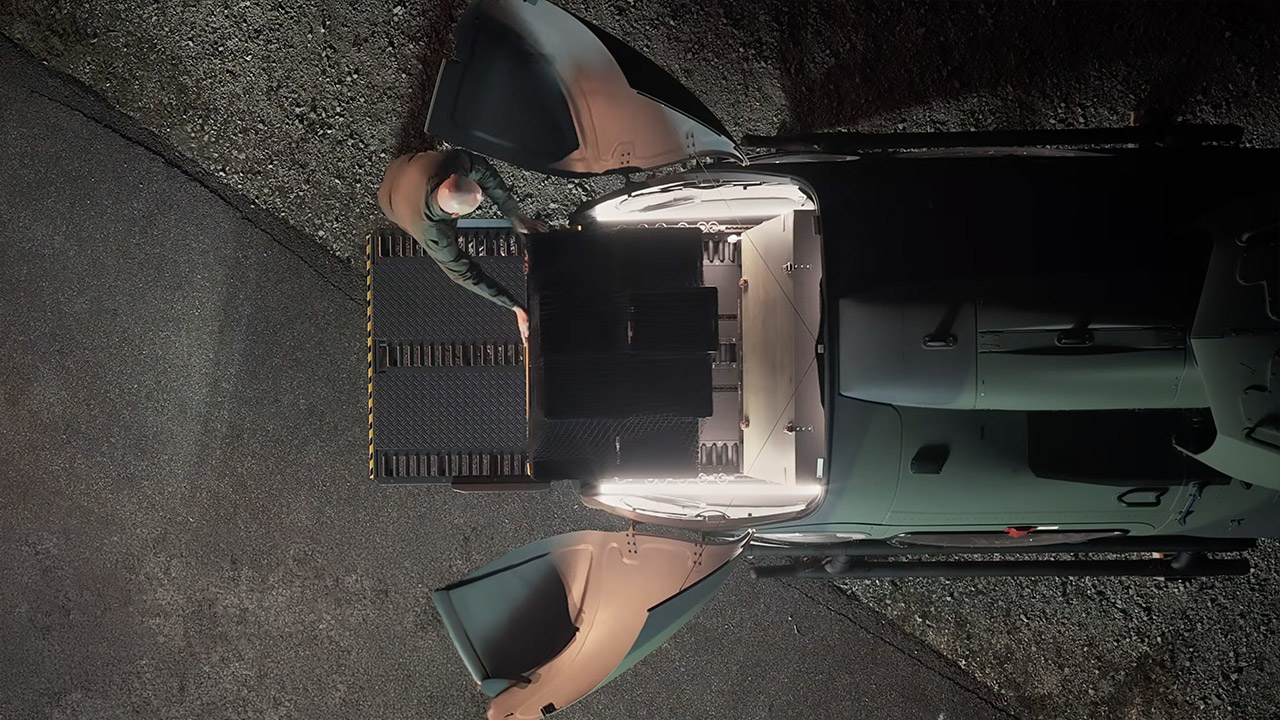



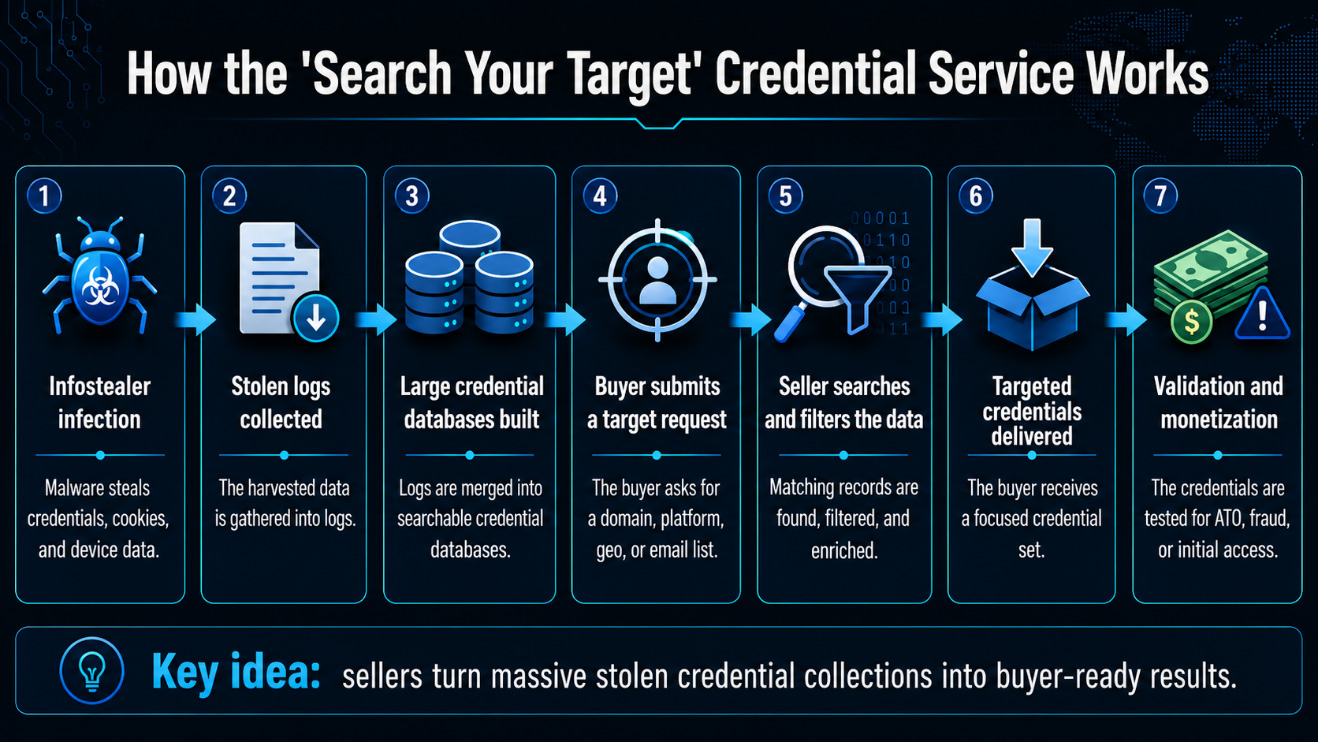
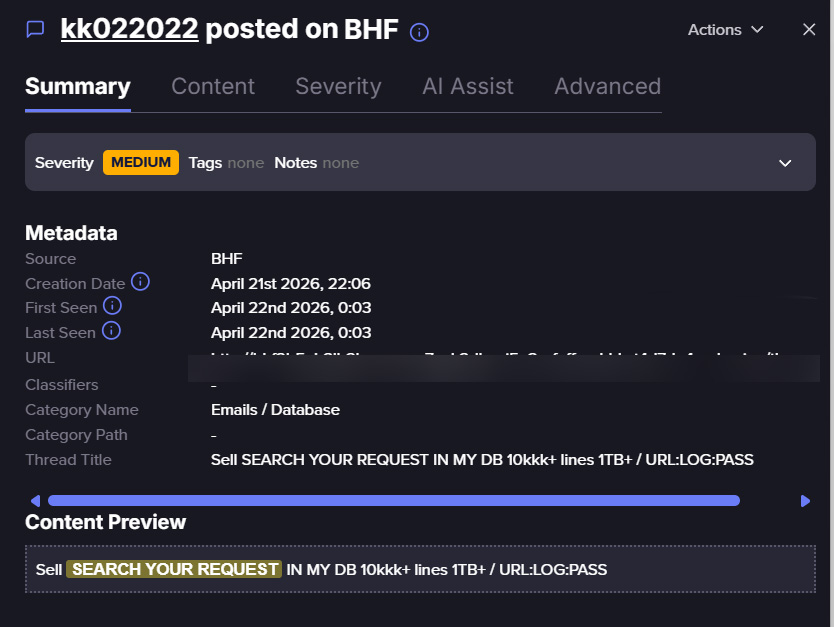
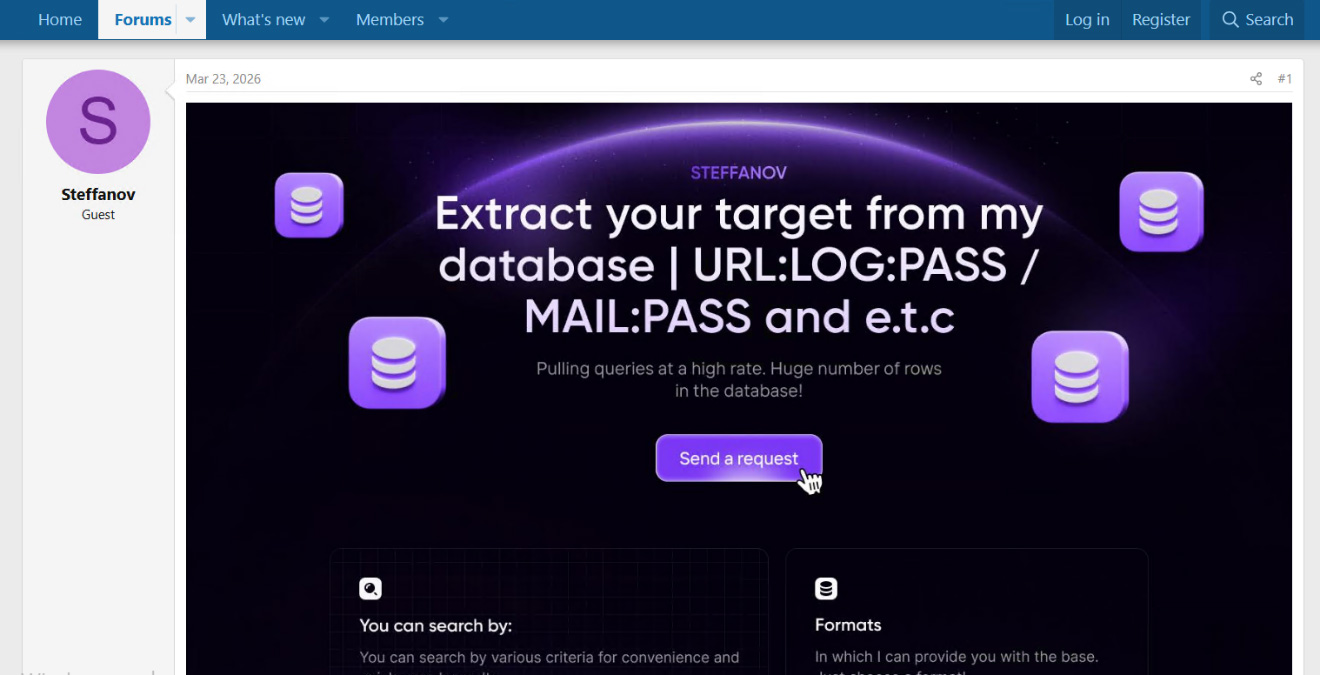





















![Finance Case Study Example | SaaS Startup Financial Model [Template Included]](https://wordupnews.com/wp-content/uploads/2026/06/1782137607_maxresdefault-80x80.jpg)




































You must be logged in to post a comment Login