An incredible update, Alexa+ throws away the stilted conversations of the old and introduces a voice assistant that simply understands what you’re asking. Better at general responses, able to disseminate information from emails and charts, and capable of building smart home routines quickly, Alexa+ is light years ahead of the competition. It can be a bit over-friendly at times and quite verbose, but the beauty of this system is that you can tell Alexa+ what you do and don’t like to get it working the way you want. The only real downside is that the local business search is terrible, but everything else is so much better that it’s got me talking more and using my phone less.
Understands context and learns your preferences
You can use natural language
Capable of building complicated routines
Can pull information from emails, photos and documents
Responses can be a long-winded until tweaked
Local business directory isn’t very good
Key Features
Advertisement
Free for now
No cost during the Early Access service, then bundled with Amazon Prime.
Advertisement
Works with most Echo speakers
All speakers bar some first generation models support Alexa+.
SQUIRREL_PLAYLIST_10208358
Advertisement
Introduction
Amazon Alexa was a magical concept at launch. It finally felt as though the future that Star Trek promised us was here, with a personal assistant you could talk to. As good as it was, clunky interactions via ‘Alexa Speak’ and several limitations ended up with Alexa (and its competition) feeling slightly more niche. Amazon Alexa+ fixes that.
The GenAI-powered voice assistant is miles ahead of the original, and miles ahead of the competition. I wrote about my initial thoughts after a week with the service, describing what Alexa+ was good at (and what it needed to improve), but I’ve had more time with the system, so read my full review to find out why it’s the best.
Advertisement
Availability and compatibility
To get Alexa+, you need to sign up for the Early Access programme, which is currently by invitation. The quickest way to jump up the queue is to get a new Alexa device, but eventually, the system will be rolled out to everyone. Most devices (bar a few first-generation ones) are supported, although the new versions have dedicated chips that help with the processing.
Advertisement
My guide on how to enable Alexa+ goes into more detail on how to get the system, and which devices are compatible. Currently, Alexa+ is free while on early access, and then it will be bundled with Amazon Prime, although you can pay £19.99 a month to have the service. Clearly, Amazon Prime is a much better way of getting it.
General conversations and information
Understands general speech
Much better at context
Can be over-friendly
Although Alexa+ works in the same way as standard Alexa (you say, “Alexa”, followed by your request), the new system operates in a completely different way. Gone is the need for ‘Alexa Speak’ (saying things in a specific way to get Alexa to understand), replaced with natural conversation. And, the replies are more natural, too, with Alexa understanding and building context, as it goes.
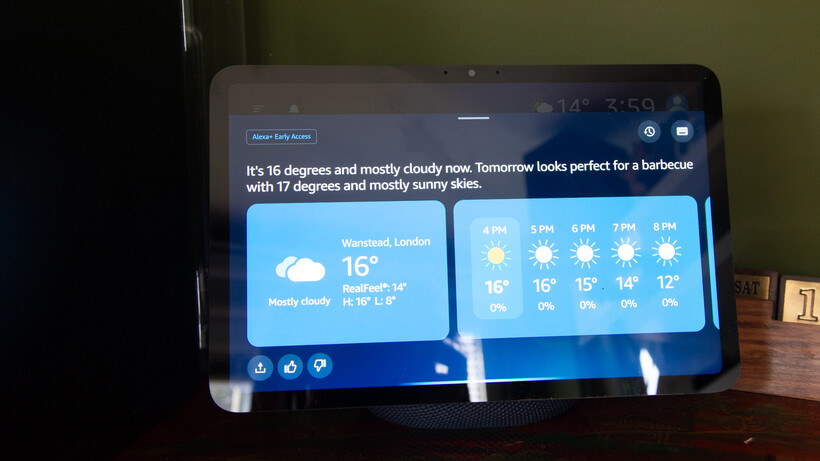
More natural conversations make it a lot easier to talk to Alexa. Sure, I can have the standard interaction, such as “Alexa, weather”, to find out what the upcoming weather is like. But, I can also ask, “When’s a good day to have a BBQ?” or, “Is the weather going to be consistently nice this week?” and not only does Alexa understand, but it gives sensible answers.
Image Credit (Trusted Reviews)
Advertisement
Alexa+ is also much better at context. By default, it stays listening after a reply, so you can follow up with another question. But if you go silent, you can follow up with another question at any point. In my example about the BBQ, I followed up 20 minutes later with, “Alexa, and what about next week?”
That’s limited context, but Alexa+ also builds up information about you, both explicitly (when you first get the service, it asks some basic questions, such as what your favourite type of music is) and through inference, such as by learning that you like a specific football team.
Advertisement
That’s surprisingly powerful. Once Alexa+, for example, has learned which of your friends are vegetarian, it will adjust the recipe ideas it suggests if any of them are coming around.
Alexa+ can also moderate its responses, adjusting emotion based on the news it gives you. As a Spurs fan, Alexa’s replies about the latest game are usually said with a slightly sad voice, although a recent win came with a more excited response.
It feels much more natural to talk to Alexa+ than to Alexa. Although there are still some oddities. Sometimes, when a reply consists of multiple sentences, the pause between each is a little off. Rather than flowing naturally, a second sentence starts abruptly, almost before the first sentence has finished. It sounds a little like Alexa+ is interrupting itself.
In terms of replies, it helps that the new service can retrieve information from a wider range of sources. All too often with standard Alexa (and pretty much all of the time with Siri), I’d hit the limit of capability, with questions that can’t be answered.
Advertisement
Advertisement
That doesn’t happen often at all with Alexa+. I asked if the recent tube strikes were going ahead, and Alexa+ told me they were, when they’d start, when they’d end and how trains could be affected after people started to return to work.
Generally, if you want to know the answer to something, Alexa+ can give you the answer in a way that makes sense.
But, it does need tweaking. Asking about the tube strike, Alexa+ was almost excited to tell me it was going ahead, and needed reminding that this was bad news and to tone it down.
Advertisement
Similarly, I don’t like some of the out-of-the-box responses, as they feel forced. Ask about football, and Alexa likes to say ‘mate’ a lot, a bit like it’s been programmed by watching poorly-written football beer adverts. I told Alexa+ not to call me ‘mate’ and it has stopped.
Often, Alexa+ can be too verbose, trying to be chatty, but in an unconvincing and slightly odd way. I’ve told it to be brief and to-the-point with answers, and it’s much better.
All of that’s important, as Alexa+ can be tweaked: what you get at the start and what you get weeks later are quite different. Just remember to keep tweaking and feeding back to get Alex+ to behave the way that you want it to.
Advertisement
Advertisement
For all the tweaking that you can do, there are some issues and obstacles that can’t be overcome. Asking Alexa+ about Spurs on my Echo Show 11 has the response on screen, along with some extra information that runs across the bottom. Only, the snippets of information are about the San Antonio Spurs, which isn’t very helpful.
Image Credit (Trusted Reviews)
Local business search is also, quite frankly, rubbish. Amazon says it’s working on it, and boy, does it need to. “Alexa, what’s the nearest French restaurant?” I asked. The answer was Le Marmiton, Wanstead. Not only is that restaurant an eight-minute walk from my house (so not the closest one), but, the main issue is that Le Marmiton shut down in 2023.
On my Echo Show, the response says, “It’s open today from 5pm to 9pm”, but the snippet below from TripAdvisor clearly shows that the restaurant is closed today (and, in fact, forever).
Image Credit (Trusted Reviews)
Restaurants that still exist and are on OpenTable can be booked via voice. It’s a neat system that makes Alexa+ do the hard work of finding a table for the number of people you want, at the time you want. One limitation is that you can’t book restaurants that require a credit card, although this is being worked on, too.
Advertisement
Documents, calendars and more
Can read documents and create tasks and calendar entries
Work accounts not supported
AI is very good at understanding structured data. That, combined with email and calendar management, means that Alexa+ can be a kind of personal assistant. Well, provided you don’t pay for your email. I use hosted Exchange for my personal email, but this type of account isn’t supported, nor is a Google Workspace account. That’s a little annoying, as it means creating a free Gmail or similar account for the time being.
What is very good is that via the app or by sending emails to [email protected] from a registered email address (set via the Alexa app), Alexa+ can pull out information, create reminders and calendar appointments.
Advertisement
Sending an email with a PDF containing information on my daughter’s upcoming DoFE expedition, the Alexa app pinged a few minutes later to tell me it had found some appointments and tasks, all spot-on, and all ready to go straight into the calendar.
Trying to go through the appallingly formatted term dates page on my daughter’s school is a nightmare, but I used the Alexa app to take a photo of it, and it quickly worked out when the inset days were and the holidays, letting me add them to my calendar. Cleverly, as we’re partway through a school year, Alexa+ ignored everything that’s already passed.
With full email support, I can see Alexa+ become core to managing everything – please, Amazon, hurry up and add work accounts!
Advertisement
Advertisement
Smart home control
Smarter responses
Can build Routines using voice
The same old basic commands work, such as turning on lights, or setting them to a specific temperature. But, Alexa+ is also smarter and makes it much easier to interact with.
Tell Alexa+ that it’s cold, and it will boost the heating around you. With standard Alexa, I’d need to ask what the temperature was and then ask again to set the heating to a temperature above that. Tell Alexa+ that it’s dark, and it can turn the lights on for you.
Thanks to better language processing, Alexa+ mostly understands what I want it to do, and I don’t have to phrase requests in a specific way.
Alexa+ can also build routines for you, via voice, which can be tweaked and edited in the app. I find that it’s often faster to do things this way, rather than the old app-based one.
More complicated commands can also be turned into one-time Routines. “Alexa, turn off the office lights in 10 minutes’ time” does just that.
Advertisement
Advertisement
It’s possible to string together a series of commands for a one-time run, too, such as turning the lights on, waiting for 10 minutes, and then turning them off again. These commands can often go a bit wrong.
“Alexa, set Dave officer heater to 25° and then after five minutes turn it off,” I said. This then got Alexa+ to create a routine that did what I’d described, only the command to trigger the routine was the exact, lengthy phrase that I’d said above. That’s clearly not what I wanted, but Alexa+ is getting there, making the complex much easier.
Image Credit (Trusted Reviews)
SQUIRREL_PLAYLIST_10208358
Should you buy it?
Advertisement
You want a smarter assistant
Much more powerful than its competition, Alexa+ is the voice assistant to use.
Advertisement
You don’t want a smart assistant
There’s no real comparison between this and its rivals, so only avoid if you don’t want a smart assistant.
Advertisement
Final Thoughts
I’d practically stopped using standard Alexa for anything more than basic requests: timers, turning a specific light on, or setting an alarm clock. Alexa+ changes that.
Yes, there are areas that need improvement (Routines and local business search are two good examples), but the general interactions are so much better. When I want the answer to a question, I now tend to ask Alexa+ rather than digging out my phone – and it helps me avoid getting trapped in doomscrolling along the way. The ability to tweak Alexa+ to understand your preferences and learn your context makes it even more powerful.
There’s simply no competition at the moment: when it comes to everyday life, general questions and smart home control, Alexa+ is so far ahead of the competition.
Advertisement
Advertisement
FAQs
Do you have to pay for Alexa+?
Alexa+ is free during Early Access, but it will eventually be bundled with Amazon Prime, or it will alternatively cost £19.99 a month.
Advertisement
Can I get Alexa+ now?
The short answer is yes, but you have to sign up for the invite, and people who have bought a more recent Echo speaker will get priority access.
Solo Stove makes some of the best smokeless fire pits, including the Ranger, Bonfire and Yukon backyard fire pits. But if you’re looking for something a little smaller, it also makes a line of tabletop fire pits, including the Mesa and Mesa XL. Both come in several color options, including traditional stainless steel.
I started off using the smaller Mesa, but when the Mesa XL was subsequently released, I moved to the larger version of the mini fire pit (pictured on the left) because it looks and feels a little more substantial while remaining compact. (As you might expect, it does produce a bigger fire with a heat radius of 2 to 3 feet compared with the Mesa’s 1 to 2 feet.)
As its name implies, the Mesa XL is designed to sit on a tabletop and is quite portable. Naturally, you could also set it on the ground, but when you put it on a table, it’s at a good height for comfortably roasting marshmallows. It has the same 360-degree Signature Airflow system as Solo Stove’s larger fire pits.
The threat is real. Unknown miscreants are exploiting a high-severity, zero-day bug in Cisco’s SD-WAN management software, and the networking giant hasn’t said when it will patch the flaw.
Cisco issued an advisory on Thursday for the Catalyst SD-WAN Manager vulnerability, tracked as CVE-2026-20245, and it sounds like attackers have been exploiting this security failure for at least the last week.
Advertisement
It’s due to a validation error – the software fails to properly validate user-supplied input – and an authenticated, local attacker can exploit the flaw by uploading a specially crafted file to vulnerable systems. From there, they can escalate privileges and execute commands with root privileges.
The vulnerability affects all versions of the SD-WAN software, regardless of device configuration, and across all deployment types including on-premises, cloud-based, and FedRAMP-certified deployments.
Switchzilla says it became aware of attacks against this vulnerability in June.
“To exploit this vulnerability, an attacker must have netadmin privileges on an affected system,” the vendor said. “This would require valid credentials or exploitation of CVE-2026-20182 or CVE-2026-20127. Cisco is not aware of successful exploitation by other methods.”
Advertisement
Both of these earlier SD-WAN security holes have also been hit by attackers in previous months.
The good news: an attacker needs valid credentials to abuse the new hole. The bad news: exposed credentials aren’t hard to find (or buy) online.
We don’t know the scope of exploitation or exactly when attackers began hitting this SD-WAN hole. Cisco declined to answer The Register’s questions, and instead sent us a statement via email.
“Cisco recommends customers upgrade to the fixed software released in May 2026 for CVE-2026-20182 as a protective measure,” a spokesperson said. “A patch for this vulnerability will be provided on a future date. Customers needing assistance should contact Cisco TAC.”
Advertisement
This latest bug is the sixth SD-WAN vulnerability listed as under attack since the start of the year, and the second zero-day in two months.
The most recent is the one the Cisco spokesperson mentioned in an email to The Register.
In May, Switchzilla disclosed a max-severity make-me-admin bug (CVE-2026-20182) affecting Catalyst SD-WAN Controller and Manager, and warned that attackers had already found and exploited the hole before it issued a patch.
A month earlier, America’s lead cyber-defense agency said that three Cisco Catalyst SD-WAN Manager bugs (CVE-2026-20128, CVE-2026-20133, and CVE-2026-20122) were under attack, and gave federal agencies just four days to patch the security holes.
Also in February, the networking vendor patched a max-severity improper authentication flaw (CVE-2026-20127) affecting the same SD-WAN software, prompting a Five Eyes countries’ joint intelligence alert urgently warning defenders to patch it – plus an old SD-WAN vulnerability (CVE-2022-20775) – or risk root takeover.
“Malicious cyber threat actors are targeting Cisco Catalyst SD-WAN used by organizations globally,” the UK’s lead cyber agency said at the time. “These actors are compromising SD-WANs to add a malicious rogue peer and then conduct a range of follow-on actions to achieve root access and maintain persistent access to the SD-WAN.”
And while this one isn’t listed as under active exploitation (yet), on Wednesday, Cisco warned about a proof-of-concept exploit for CVE-2026-20230, a critical bug in its Unified Communications Manager that also allows attackers to gain root privileges. ®
Players enjoying Bungie’s advertised free week of Marathon were offered what appeared to be the deluxe edition of the game for just $14, only to find out that what they really purchased was nothing but a cosmetics bundle. It’s yet another bump in the road for Bungie, which is betting the farm on Marathonas it winds down its only other active title, Destiny 2. To add insult to injury, the mistake does not appear to be Bungie’s fault.
The confusion appears to have been caused by the way Sony lists the different versions of the game in the PlayStation Store. When we look at the price for the Marathon Deluxe Edition, it shows as discounted to $41.99. That’s still a nice discount off the usual $60 price tag, but a far cry from $14. However, once the free trial version of Marathon being offered during the free week was added to a PlayStation library, we saw the price on the deluxe version update to be just $14. What’s actually happening? Well, when a player adds the free trial to their library, PlayStation Store treats it as owning the full game. The player is then shown the difference in price compared to the base edition as if they had paid full price for it, but paying that $14 difference only gives you the extra cosmetic content. It’s easy to see how this might cause widespread confusion.
This marks the second rough spot for the free week of Marathon, which initially helped the game surge to around 40,000 Steam players on June 2 before experiencing widespread server issues that forced Bungie to perform emergency maintenance. That this latest controversy is a PlayStation issue likely won’t matter to those still on the fence about trying out Marathon. The game has struggled to maintain popularity despite rave reviews, and the free week came alongside the launch of its second season in an attempt to bolster those numbers.
The company says most users don’t need to use the feature.
OpenAI
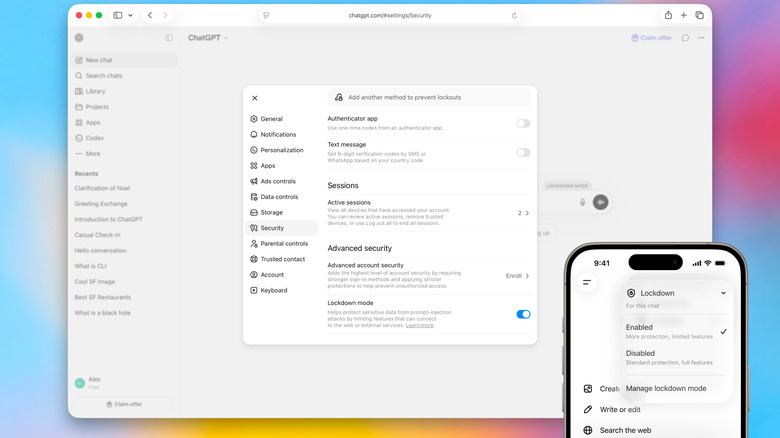
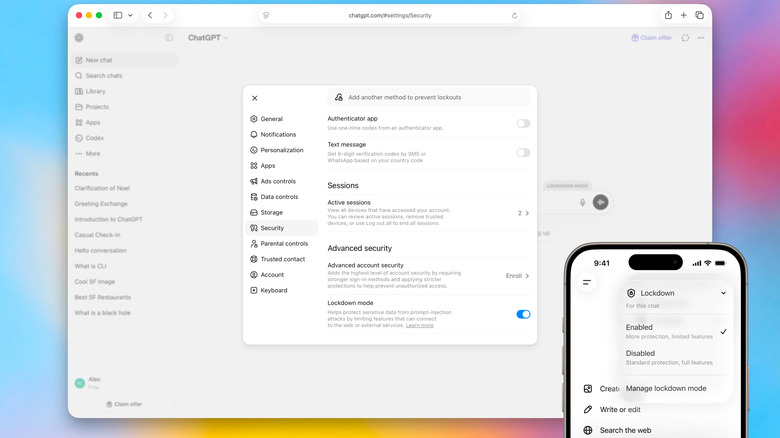
OpenAI has begun rolling out Lockdown Mode, an optional security setting designed to offer users advanced protection from prompt injection attacks. For the unfamiliar, prompt injection is a form of social engineering that is specific to conversational chatbots. As AI systems have become better at pulling information from the internet, people have begun hiding malicious instructions on webpages and other places to try and trick those systems.
OpenAI is billing Lockdown Mode as a sort of last line of defense against prompt injections, building on the robust protections that it says it already offers through ChatGPT, its models and backend systems. “Lockdown Mode is not intended for everyone,” OpenAI explains. “It is designed for people and organizations that handle sensitive data and want stricter protection from data exfiltration risks related to prompt injection.”
To that end, enabling Lockdown Mode limits some of the features OpenAI offers through ChatGPT and its other products. For instance, you can still use image generation and upload photos to ChatGPT, but it may not pull images from the internet or display any images inside of a response. The chatbot also cannot download files to analyze, though you can still manually upload documents if you want its insight. Other features, such as Deep Research and Agent Mode are disabled completely. “Lockdown Mode does not change memory, file uploads, the ability to share a conversation, or whether your conversations may be used to improve models,” OpenAI adds. “Many of these settings are separately configurable by workspace admins.”
Advertisement
The company also notes Lockdown Mode won’t stop prompt injections from appearing in content ChatGPT processes. Instead, it’s designed to prevent an attacker from extracting sensitive data from your account by limiting network requests that someone could exploit. Lockdown Mode is available to all personal accounts, including those using ChatGPT through OpenAI’s free tier. To activate it, open ChatGPT’s settings menu and select Safety and security. Under Advanced security, tap Lockdown mode and flip on the toggle. You can temporarily disable the additional protection by selecting Manage from the status message that appears above the chat window and selecting Turn off for this chat.
Separately, OpenAI is rolling out an active session manager that allows users to see any devices or browsers that have been used to access their account. From there, the company offers the option to log out of individual or all sessions at once. Just note the latter can take up to 30 minutes to complete. “If you suspect unauthorized account activity, change your password if you use one, review your sign-in methods, and contact OpenAI Support,” the company adds.
Fake reviews are a real menace for online shoppers. If you have ever bought something online based on glowing reviews only to receive a disappointingly subpar product, you know what I mean. A new study published in the International Journal of Information and Communication Technology proposes an AI-powered system that can not only detect fake reviews, but also trace how they spread.
Why existing tools keep falling short
Most existing fake review detection systems focus on the text of a review. That approach worked for a while, but fake reviewers have gotten smarter. They now pair carefully written text with misleading images to make their reviews look authentic. Text-only tools struggle to catch this, and that’s a real problem for shoppers and honest sellers alike.
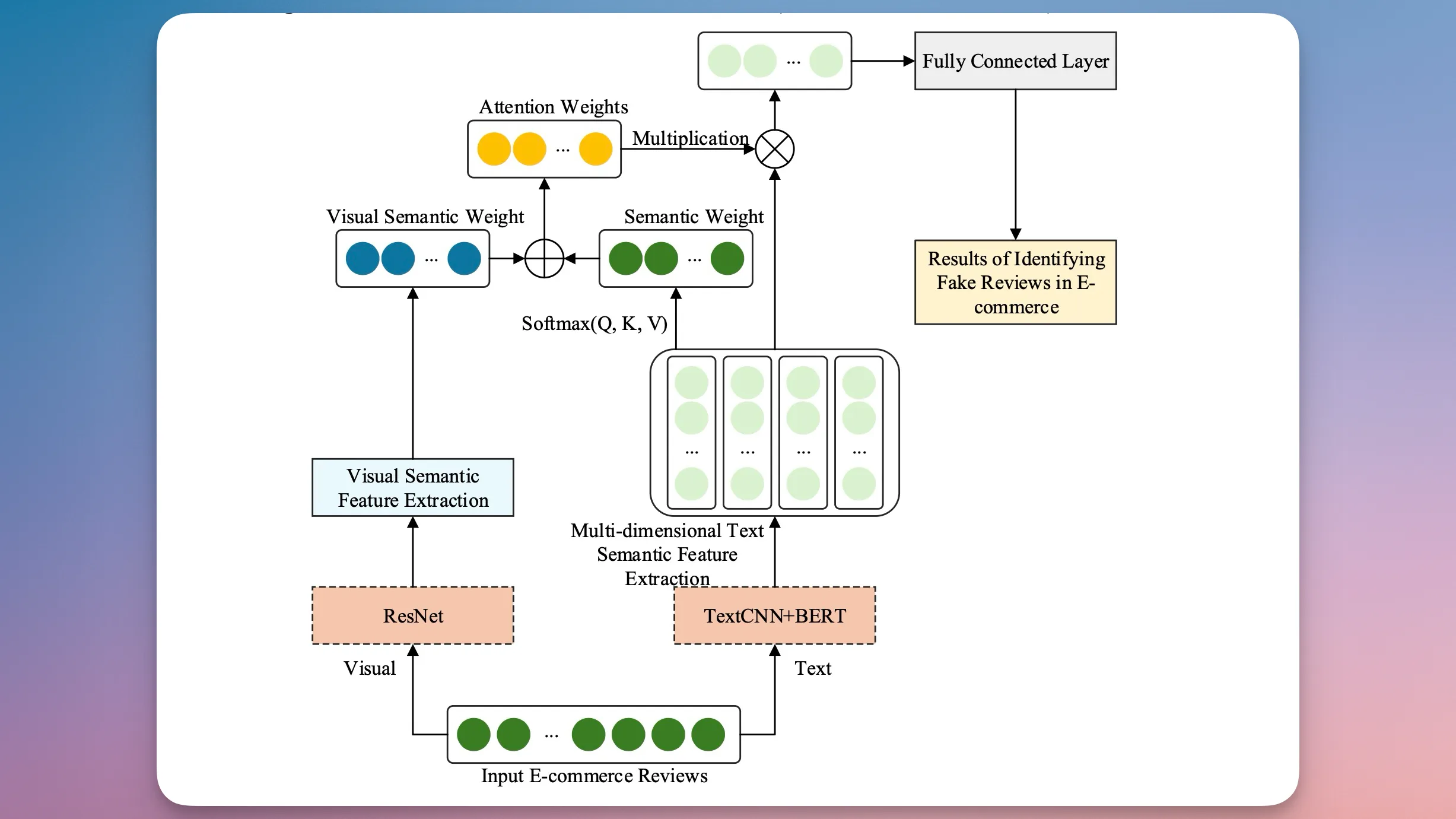
Structure of the fake review detection modelBing Duan / International Journal of Information and Communication Technology
The researchers addressed this by building a system that looks at multiple signals at once. It analyzes the review text using two different methods, a text convolutional neural network and pre-trained language models, to capture both surface-level and deeper meaning in the words. It also factors in reviewer behavior, since fake accounts tend to have default profile pictures and system-generated usernames, unlike real users who tend to personalize their accounts.
Can AI really catch a fake image too?
The short answer is yes. Review images are analyzed separately using a residual network, a type of deep learning tool commonly used for processing visuals. Once all these signals are gathered, the system fuses them together to make a final call on whether a review is genuine.
When a review is flagged as fake, a Transformer model kicks in to map its origin and track how far it spread through the network.
Advertisement
Framework for tracing the spread of fake reviewsBing Duan / International Journal of Information and Communication Technology
Tests on a large dataset from JD.com showed that the system achieved a recognition accuracy of 94.2% and a tracing accuracy of 93.5%, outperforming all existing methods it was compared against. This kind of accuracy could eventually mean fewer misleading reviews and more trustworthy ratings to shop by.
Like anything else in your home, your TV can get downright filthy. Sitting in your living room, it will gather dust, get splashed with drinks (you’d be shocked at how far a liquid particle can travel from your coffee table), and more. It’s therefore important to clean your TV regularly as you notice grime building up on it. But your television is a delicate object designed to be looked at, not touched. In your attempts to clean a TV, it’s all too easy to end up damaging it.
That doesn’t mean you shouldn’t clean your TV. You absolutely should – removing dust and debris can help make your TV last longer than you thought possible. But it does mean you should take care to do so properly. There are a number of rookie mistakes that some TV owners only learn the hard way, so we’ve rounded up some of the most common here, where you can read about the consequences of these common errors instead of experiencing them firsthand. From corrosive chemicals to out-of-sight surfaces, here are five of the most common mistakes people make when cleaning a TV.
Advertisement
Using an abrasive cloth damages your TV
Lysenko Andrii/Shutterstock
One of the easiest mistakes to make while cleaning your TV is using the wrong kind of cloth to wipe it down. The surface layer of most television displays is made from a delicate and thin polarizing layer that helps you to see what’s on screen. That makes it quite different from the display on your smartphone, which is most likely coated in a layer of hardened glass that is mostly safe to wipe down with your t-shirt. But unless you use a non-abrasive cloth on your TV, you are almost certain to damage it, causing scratches and wiping away the outer coating. Even seemingly soft products like paper towels and tissues have microscopic fibers that can scratch up the coating on your TV screen, and the same goes for standard cloth dish towels.
A specialized microfiber cloth is the only safe cleaning implement for your LCD or OLED TV. These cloths have very thin fibers that trap the dust and residue clinging to your TV’s display without taking part of the TV along with it. You should look for cloths which are essentially large versions of those used to clean eyeglasses, such as the Apple Polishing Cloth, or other cloths made specifically to clean flatscreen TVs.
Advertisement
Using the wrong cleaning solution damages your TV
Goodlifestudio/Getty Images
Windex works for your windows, so why not for your TV, right? Stop right there, because using glass cleaner on your TV is a costly mistake. As mentioned above, the surface layer of your TV is a thin and delicate polymer, not a thick panel of glass. As such, products that leave your windows or mirrors shiny and polished can permanently damage your TV. The biggest culprits are alcohol, acetone, and ammonia. Those are powerful cleaning agents — far too powerful, in fact, for your TV set.
You can find specialized TV cleaner available for purchase at big box retailers, but although they’ll do the job, they can cost a decent amount more than you’d expect. Some recommend making your own TV cleaning solution using distilled water with a drop of mild dish soap mixed into it, while others claim distilled water alone is sufficient for the task. Others add a small amount of vinegar to the distilled water for particularly stubborn spots. If you do choose to buy a cleaning product, be sure to check that it does not contain alcohol, ammonia, or acetone.
Advertisement
Pressing too hard while cleaning damages your TV
Andreypopov/Getty Images
Even if you’ve got a high-quality microfiber cloth and specialized TV cleaner, you might have a hard time getting some particular bit of residue off your TV. Maybe your kid spilled a root beer that splashed on the screen and dried. Whatever the case, when dealing with a stubborn bit of cleaning on your TV display, you might end up applying some elbow grease. Before you know it, you’ll have damaged the TV far more than that pesky bit of gunk on the screen ever could have.
Your TV’s display is made up of multiple thin layers.LCD and OLED panels have multiple thin layers of materials that conduct electricity, create colors, and make those colors visible to you with emitted light. When you press on the surface layer, you’re compacting the entire stack, and once one of the layers is damaged, the display won’t function properly. If you’re lucky, perhaps you’ll see some dead pixels or minor discoloration, but press too hard in the wrong place, and the entire display can malfunction.
Do your best to clean with friction, not pressure. If you’re dealing with a stubborn dirty patch on your TV display, try moving the cloth quickly but gently in a small circle without applying downward pressure on the TV display. Reapply specialized electronics or TV cleaner solution as needed. You may also wish to use compressed air or an electric duster (not a feather duster or wand) to remove the initial layer of dust before cleaning in order to reduce the risk of dust particles scratching the screen’s top layer as they’re dragged by the cleaning cloth.
Advertisement
Ignoring the parts of the TV you can’t see leads to long-term damage
Lanastock/Getty Images
One of the easiest mistakes to make while cleaning a television is to ignore everything other than the screen. After all, you might think, as long as you can see your movies and TV shows in crystal-clear quality, who cares that the backside of the unit is dusty? But that’s a crucial error, since many TVs have heat vents and ports to get rid of excess thermal energy. When dust or debris clogs those exhausts, it can cause performance issues with the TV, much like what can happen when you don’t clean the vents on a computer. Then there are the ports, such as your HDMI, coaxial, and USB ports. If those become dirty, you may begin to notice errors when you plug peripherals into them, and some devices may not work at all.
The longer you go without cleaning the entire TV, the more likely it becomes that these issues will occur. Aside from cleaning every so often, it can be a good idea to dust the TV using compressed air or an electric duster — not a dusting wand, feather duster, or anything else that will touch the display — before you clean, to ensure you’re able to clean more effectively. For some tips and tricks, check out our guide on how to clean behind your TV without moving it.
Advertisement
Forgetting to clean your remote can damage it
Zigres/Shutterstock
After you’ve cleaned your TV to perfection and settled in to watch a show, do you really want to reach for a grimy remote? Not only is the remote the part of the TV you touch most often, but it is likely left sitting on your couch or coffee table. That means it’s collecting oils and residue from every pair of hands that touch it, as well as being in the path of random spills and accidents. After too much schmutz builds up on a remote, the buttons can become stiff and hard to use. In severe cases, liquid or dirt can work its way into the casing and the sensitive electronic components inside, causing them to malfunction, or even to break entirely. How often should you clean your TV remote? We recommend doing so at least once a month.
The good news is that you don’t need to be as careful when cleaning your remote as you do when cleaning the TV itself. Simply remove the batteries and shake any debris loose, then dampen (but do not wet) a soft cloth with a mild, alcohol-based cleaning solution and clean as thoroughly as possible, paying special attention to hard-to-reach areas between buttons. If you’re having trouble getting into any crevices, you can use a Q-Tip-style cotton swab dipped in your cleaning solution to reach them. If you’re still having trouble reaching any visible grime, such as desiccated skin buildup trapped in the plastic seams, you can use a toothpick or toothbrush to loosen it up. Dry everything off and pop the batteries back in when you’re done.
Although the thought of installing a modern operating system like Windows 11 on something as archaic as a Core 2 Quad Q6600 Intel CPU may seem ridiculous, it being the flagship CPU of the time means that it still chews up low-end Celeron systems that are on the supported hardware list like the N4020. Hence [Omores] commencing on this latest adventure, with the snag being that the chosen mainboard features an AGP bus that Windows 11 no longer supports.
A GPU box from the related HD 4670 PCIe card, not the used HD 4650 AGP card with 1 GB of DDR2.
This system is intended to multi-boot a range of Windows OSes starting with Windows 98, while also playing nice with DOS and even Windows 11. In addition to the quad-core, 2.4 GHz Q6600 there’s also an amazing 3 GB of DDR1 RAM in the system.
The mainboard is the 2003-era Asrock 865PE, with the GPU being the highest-end GPU that still came in AGP flavor: the Radeon HD 4650 from 2009. Since the sole reason that Windows 11 doesn’t support AGP any more is due to the supporting files not being included with Windows 11, hence you can track it down on a Windows 10 1507 release install – such as the Intel AGP440.sys driver here – and install them with some file editing.
Since Windows 11 still supports the WDDM driver model from Windows Vista and 7 you can then install the Catalyst drivers from 2012 and be up and running. You only get 1 GB of VRAM for this card, but you probably don’t need much more on this level of hardware.
Advertisement
One major stumbling block remains, however, as Windows 11 24H2 enforces SSE4.2 instructions which the CPU doesn’t support. Ergo 23H2 is the newest Windows 11 version that can run on this system, with only the Education and Enterprise still receiving security updates, making it a bit of a pyrrhic victory, especially as Windows 7 benchmarks a fair bit faster on the same hardware.
Russia intends to switch on a commercial version of its homegrown answer to Starlink next year, according to people familiar with the programme cited by Reuters, the latest milestone in a project that has been promising to arrive for most of a decade.
The constellation is called Rassvet, the operator is a private aerospace firm called Bureau 1440, and the ambition is deliberately narrower than the American network it is meant to rival.
The scale tells the story. SpaceX has put thousands of Starlink satellites into low Earth orbit. Bureau 1440 plans to reach commercial service in 2027 with a constellation in the high hundreds, with figures around 288 to 292 satellites cited for the first operational phase, and a longer-term target near 900 by the mid-2030s.
Moscow has, for years, described the goal as something conceptually like Starlink rather than a like-for-like match, and the numbers keep that promise honest.
Advertisement
The hardware is further along than the rhetoric alone would suggest. In March the company launched 16 operational satellites, on 23 March, following a run of experimental craft in 2023 and 2024 under the Rassvet-1 and Rassvet-2 test programmes.
Bureau 1440 has described the satellites as carrying 5G non-terrestrial-network communications, laser inter-satellite links, an upgraded power system, and plasma thrusters, the standard kit for a modern broadband constellation.
Dmitry Bakanov, head of the Roscosmos space agency, told Reuters last September that several test vehicles already in orbit had been inspected and the production satellites modified accordingly.
Throughput targets have been published too. Bureau 1440 has advertised per-subscriber speeds ranging from 50 megabits to one gigabit per second, with planned coverage across more than 70 countries.
Those figures are claims rather than demonstrated performance, the distinction that separates a constellation on a slide from one carrying paying traffic, and only the commercial launch will test them.
Advertisement
Money has been committed, on paper at least. The Russian government has earmarked 102.8 billion roubles, roughly $1.26bn, for Rassvet, and Bureau 1440 has said it will add some 329 billion roubles, around $4bn, of its own through 2030.
The company has put potential demand at 1.5 to two million subscribers inside Russia and as many as 12 million worldwide, with coverage planned across more than 70 countries.
The 2027 date deserves a footnote. An earlier target slipped amid reported production shortfalls, which is the kind of detail that tends to recur in constellation programmes everywhere, not only in Russia.
Building satellites is one problem; building them fast enough, in the numbers a useful network requires, is a different and harder one. The 16 operational craft now in orbit are a start on a figure that needs to clear 250 before paying customers can be served.
Advertisement
There is a strategic reading that sits underneath the commercial one. A sovereign broadband network that does not depend on a foreign operator is attractive to any government that has watched Starlink become a factor in the war in Ukraine.
Whether Rassvet arrives on schedule, and at the throughput Bureau 1440 advertises, is the question 2027 will answer. The constellation, for now, is mostly a plan with a launch cadence attached.
The national project will capture a baseline that will be used to create a clearer image of how research is understood and utilised in Ireland.
Research Ireland has launched the Research in Ireland Barometer 2026, a new national project designed to build a richer, more inclusive understanding of how people across Ireland encounter, engage with, and experience research in their everyday lives.
The Barometer will focus on capturing lived experiences, primarily the stories, context and perspectives that often shape how people relate to research. Serving as a baseline for the coming years, the project will aim to create a clearer picture of how research is understood, trusted and encountered across different communities.
Commenting, the director of research for society at Research Ireland, Dr Ruth Freeman, said: “The Research in Ireland Barometer 2026 represents an important step in opening up conversations about research across society. It is also essential to shaping how we engage with society as a public body.
Advertisement
“Rather than focusing solely on a simple, statistical survey, we are taking a community-engaged approach to understand how people experience research in their everyday lives, from the decisions they make to the information they encounter and trust.”
Freeman explained that the organisation is actively seeking information from people aged 16 and older, across Ireland – and particularly those who feel as though their experiences are not often captured in traditional surveys. Individuals have three months to contribute to the survey.
She said, “By listening to people’s lived experiences and meeting people where they are, we aim to build a richer, more inclusive understanding of research and ensure it remains connected to the needs and experiences of the public.”
In early March, Research Ireland also unveiled its inaugural strategy for development of the country’s research and innovation landscape over the next five years. The aim of the strategy is to fund 3,800 new PhDs, support 14 enhanced research centres and deliver 150 research awards in collaboration with Government departments.
Advertisement
Don’t miss out on the knowledge you need to succeed. Sign up for the Daily Brief, Silicon Republic’s digest of need-to-know sci-tech news.
This week, we’re shaking things up a little, with Tom Nardi still in the host seat, and someone besides Al Williams in the other, namely Kristina Panos.
The perfect tile for integrated LEDs
In Hackaday news, we have a new Frikkin’ Lasers Challenge going on now, although we acknowledge that no one can actually enter their project into it at the moment. We hope to have that fixed in short order. Procrastinators, disregard.
You’ll have to wait another week for the triumphant return of What’s That Sound, but we do have an audio mailbag for you this week. Thanks, Dillon!
We look at loading SEGA games from a vinyl record, discuss a really cool project that puts live plane data on your ceiling, and debate the name ‘PopTuber’. We also discuss DIY routers, and stress over the future of electronic shelf labels.
Advertisement
Check out the links below if you want to follow along, and as always, tell us what you think about this episode in the comments!





















































You must be logged in to post a comment Login