There’s something about the ESP32 family of microcontrollers and timekeeping. We probably see it in clocks as often as we do anything else; we also probably see more clocks with one as the beating heart than any of the many other possible timekeeping options.
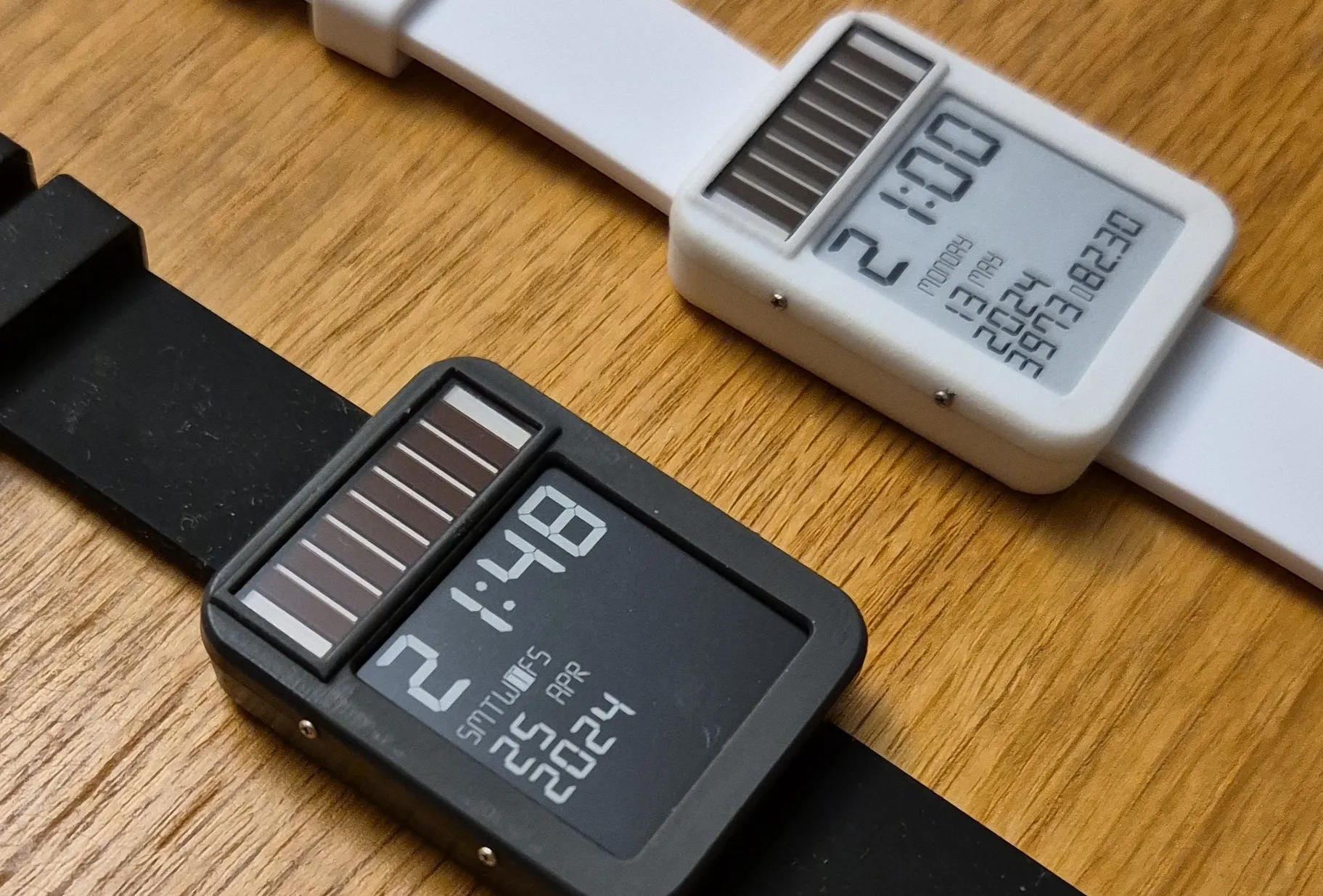
[Daniel Ansorregui]’s LightInk watch is no different in that regard — but it is very different in one important detail, because like any other smartwatch, you won’t have to worry about battery life. Outside of gloomiest Gotham, its built-in solar panel should be able to keep it charged.
That’s for a few reasons. The obvious one is the e-ink display, which only takes a sip of power during updates. That’s hardly unique to [Daniel]’s projec t– he quite explicitly calls out the Watchy project, which we featured previously, as where he got the idea of putting e-ink and an ESP32-PICO together on his wrist. What is unique is the delightful hack [Daniel] is using to minimize power usage, which is our favorite part.
Obviously while the display isn’t updating and there’s no input from the touchscreen, the microcontroller should be in deep sleep. So, [Daniel] sets wake-up timers and an interrupt for the touch input and it’s all good, right? Well, yes, but when the ESP32 ran through a normal startup, [Daniel] clocked 28 mS to boot — and a whole milli-amp-second of juice out of the battery. That was pretty much down to the need to write the code from flash into RAM, and good luck power-optimizing that. Instead [Daniel] found a way to skip it, using the RTC.
Advertisement
The RTC has its own memory, which the ESP32 can start from in a microsecond or so. It turned out large enough to squeeze everything needed for these fast updates, including the SPI display driver. Since around two thirds of the watch’s power consumption was just booting up, slicing that doubled the energy efficiency, making solar power possible. Well, as long as you don’t get too excited using the fancier “smart” features like GPS and LoRA too often. Relatively speaking, those are power hogs. There are actually a lot of features, but we’ll let you check them out in the demo video below if you’re really interested.
When [Joel] and his partner got married, they had a goal to create a home with a healthy relationship to technology, which largely means avoiding smartphone use. Smartphones aren’t without their benefits, though, like being clocks and calendars, so [Joel] started looking for other options to replace these capabilities. At first he went with a “magic mirror” solution, but quickly pivoted to a wall-mounted e-paper solution he calls Timeframe which has evolved into a respectable overview for his home and life.
E-paper has a number of advantages over LCD and LED displays, one of which being that its resemblance to real paper makes it feel more organic. The first e-paper iterations of Timeframe used multiple displays in wooden frames, and [Joel] had a few different ones stationed around the house. They received their data from a custom-built Rails backend which sent pictures to the devices. This made the refresh rate possible fairly low, but a new 23.5″ display from Boox eventually enabled an acceptably high resolution and refresh rate which could support more traditional display uses. But this display required that [Joel] rewrite the entire back-end, an effort that took quite a bit of time but resulted in an impressive final product.
Like any custom-built project like this, [Joel] still has plans for improvements including those around further integration with his Home Assistant and reducing costs for future platforms. E-paper displays are popular pieces of technology for home dashboards like this, in the past we’ve seen similar, smaller builds which coincidentally have the same name.
When Bose acquired McIntosh Group in late 2024, the audiophile world did not just raise an eyebrow. It looked up from its $12,000 power cords and wondered what just happened. One of the most successful consumer audio brands on the planet, better known to most people for ANC headphones, automotive audio, soundbars, and mass market dominance, suddenly owned McIntosh and Sonus faber, two of the most respected names in high-end audio. That made some people nervous. It should have made them curious.
After spending the day with the Bose team at Bose House on Manhattan’s Upper West Side last week and hearing the new Bose Lifestyle Ultra Wireless Speaker, along with the rest of the Lifestyle Ultra lineup that includes speakers, a soundbar, and a wireless subwoofer, one thing is obvious: a lot of audiophiles have been missing the boat. Bose is not guessing. This team knows exactly what it is doing.
With all three products in-house for reviews that will publish on May 15, the bigger question is rather obvious: does Sonos need to be worried? And for that matter, should Bluesound, Denon, Samsung, and LG be paying attention as well? Bose has clearly been working on the Lifestyle Ultra Wireless Speaker, Lifestyle Ultra Soundbar, and Lifestyle Ultra Wireless Bass Module for some time, and the goal is not subtle.
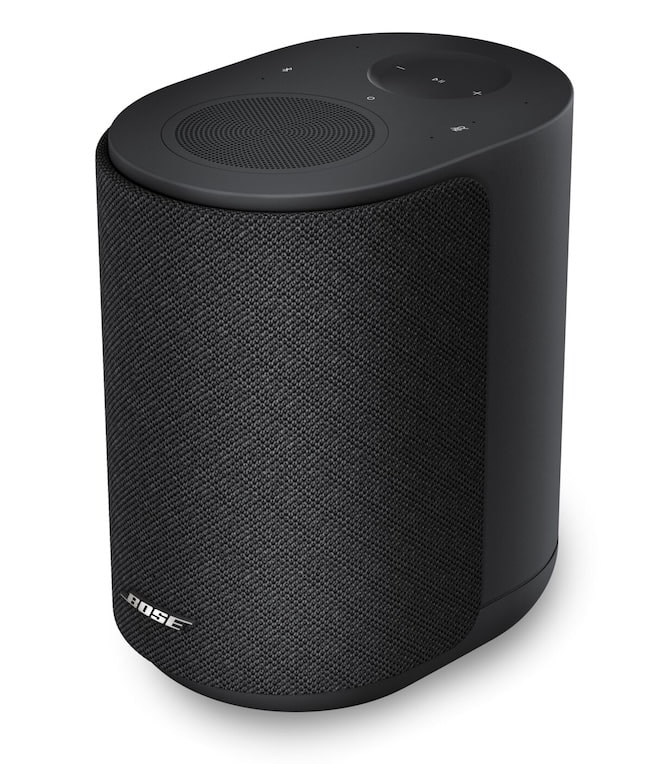
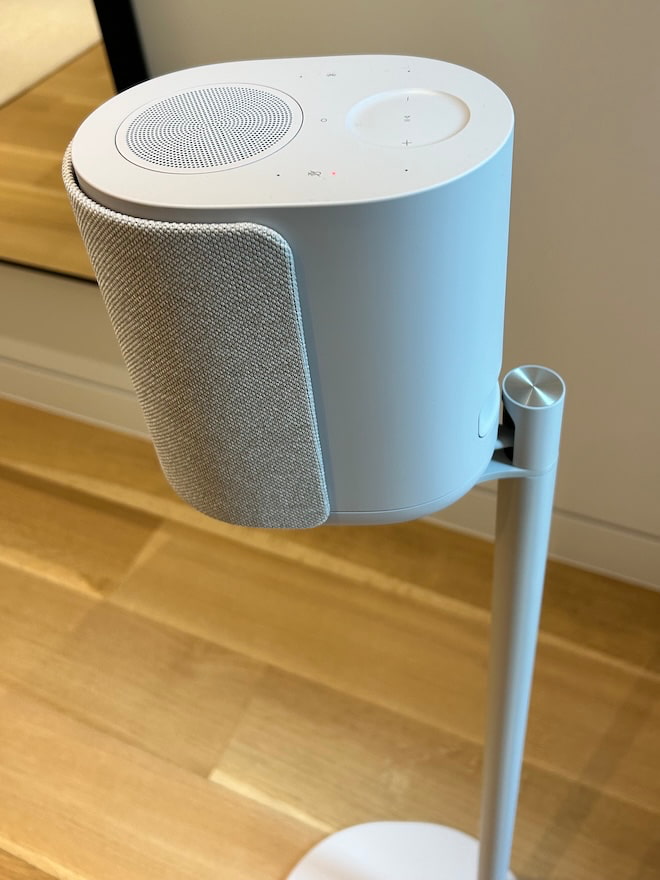
The company wants to rebuild its wireless speaker and soundbar lineup around better sound, broader streaming support, and pricing that does not require a family meeting. The Bose Lifestyle Ultra Wireless Speaker starts at $299 in the standard Black Smoke and White Smoke finishes. Bose is also offering a limited-edition Driftwood Sand version for $349, with a soft beige finish and a solid white oak base that gives it a warmer, more furniture-friendly look. Sonos has had a long run in this category. Bose just walked back into the room with a Boston attitude, sharper pricing, and zero interest in playing nice.
The new Lifestyle Collection is also a reminder that Bose did not appear in home audio last week. The company has been shaping compact, easy-to-use home audio systems for more than 40 years, from the original Lifestyle systems to the Wave radio, which became one of the most recognizable audio products of its era.
Advertisement
That history matters here because the new collection is not trying to win over the cable riser crowd with exposed transformers and a chassis that looks like it was machined for a submarine. It is built around a simpler idea: make better sound at home easier to access, easier to control, and easier to live with, without asking buyers to choose between convenience, design, and performance.
As Raza Haider, president of premium consumer audio at Bose Corporation, put it, “With the Lifestyle Collection, we wanted every detail to serve a singular purpose: making exceptional sound easy to enjoy.”
Bose Lifestyle Ultra Wireless Speaker: Features and Core Technology
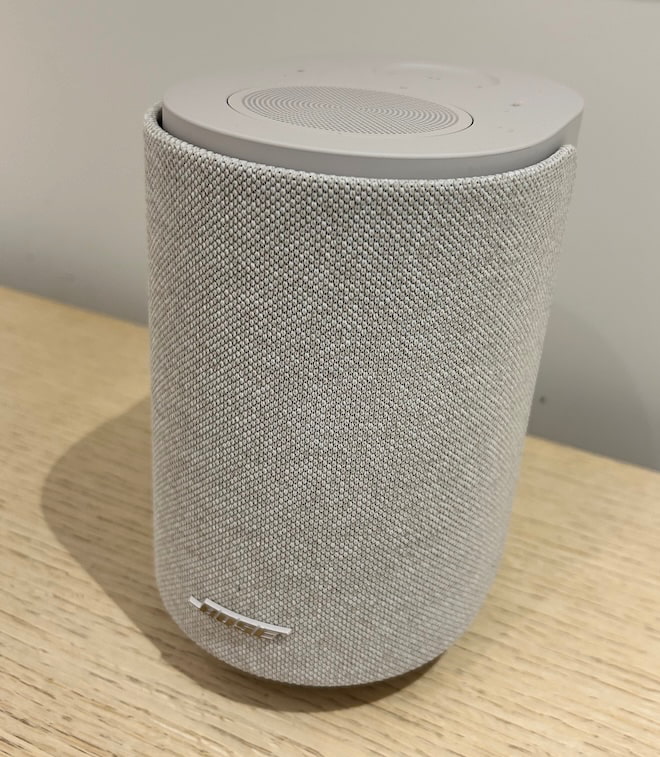
The Bose Lifestyle Ultra Speaker is the most flexible product in the new Lifestyle Collection because it can be used in several different ways without changing the core hardware. A single speaker can work in an office, bedroom, kitchen, or smaller living space for everyday listening. Add a second unit and Bose supports 2.0 stereo pairing. Use two of them with the Lifestyle Ultra Soundbar and Lifestyle Ultra Subwoofer, and they function as rear surround speakers in a larger home theater system. Bose lists supported configurations as 1.0, 2.0, 7.0.4, and 7.1.4, which makes the speaker more than a standalone wireless product. It is the modular piece that helps tie the whole Lifestyle system together.
The hardware is compact, measuring 4.8 inches wide, 7.3 inches high, and 6.6 inches deep, but Bose is using a three-driver array to create a larger presentation than the enclosure suggests. The layout includes two front-facing drivers and one up-firing driver, with Bose’s TrueSpatial audio processing analyzing content and adding height and dimensional depth through that up-firing design.
That matters because the speaker is not relying only on left-right dispersion from a small cabinet. It is using direct sound, reflected sound, and DSP to create a broader soundstage from a single speaker, with the effect becoming more substantial when two are paired in stereo.
Bass performance is handled through Bose CleanBass technology, which combines the speaker’s woofer, advanced digital signal processing, and a proprietary QuietPort acoustic opening designed to reduce distortion in a compact enclosure.
Advertisement. Scroll to continue reading.
That is the important part to understand: Bose is not claiming this replaces a large speaker or a proper subwoofer. The goal is controlled low-frequency output from a small wireless speaker without the bloated, one-note bass that often ruins products in this category.
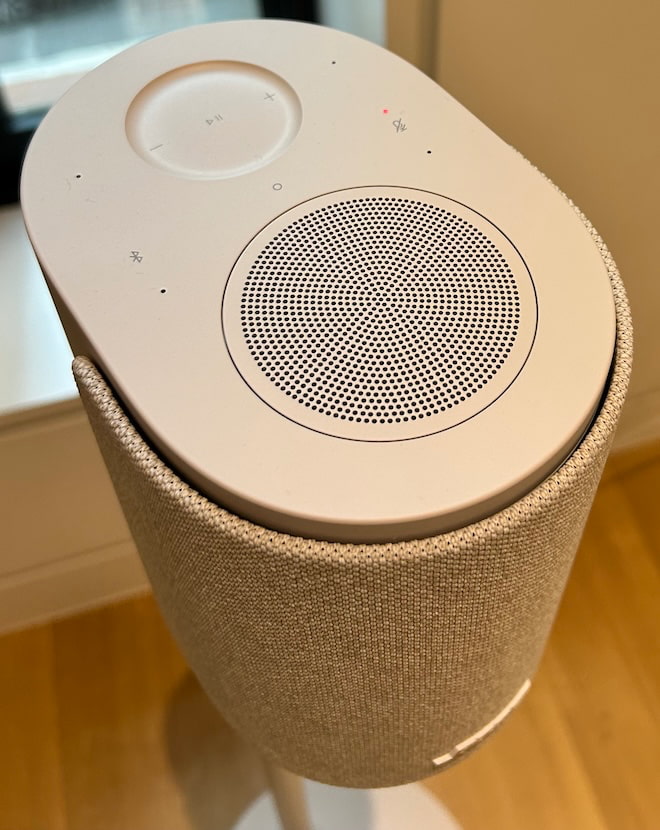
The Lifestyle Ultra Speaker also supports Wi-Fi, Bluetooth 5.3, and 3.5mm AUX, along with Apple AirPlay, Google Cast, and Spotify Connect for multi-room streaming. Setup, stereo pairing, home theater pairing, EQ, controls, and settings are handled through the Bose app, while the speaker’s tactile controls cover playback, track skipping, volume, microphone mute, Bluetooth, and Alexa prompts. The new Lifestyle Collection also supports Alexa and Alexa+ in the U.S., with Alexa+ adding a more advanced AI layer to voice control.
What the Bose app does not do is replace your streaming apps. It is there for setup, system control, EQ, and configuration, not as a full music browsing hub. Apple AirPlay, Google Cast, and Spotify Connect are supported, but TIDAL Connect and Qobuz Connect are not supported at launch, and Bose has not indicated that either one is coming. That matters for listeners who use TIDAL or Qobuz and expect direct app-to-speaker control without using AirPlay or Cast.
Advertisement
Bose Lifestyle Ultra Wireless Speaker (Black)
Bose Lifestyle Ultra First Impressions: Bose Puts Sonos on Notice
One of the most useful parts of the Bose Lifestyle Ultra demo was the setting itself. Bose did not park one speaker on a table in a quiet showroom and call it a day. The system was installed throughout a large brownstone, which looked far more modest from the outside than it felt once you were inside. The center staircase ran from street level, what the rest of civilization might call a basement but New York real estate law apparently calls ambition, all the way to the top floor. Think John McClane working his way up Nakatomi Plaza, minus the broken glass and Alan Rickman.
Bose placed Lifestyle Ultra Speakers in bedrooms, hallways, dining areas, the kitchen, and a home office to show how the system works in real rooms, not just in a controlled demo space with one perfect chair and suspiciously expensive lighting. The point was practical: different room sizes, different layouts, different placements, and different use cases. Some speakers were used on their own, others were grouped for multi-room listening, and the broader setup showed how the Lifestyle Ultra range can move from casual background music to more focused listening without making the house feel like it had been wired by a panic-stricken installer at 2 a.m.
Because of embargo rules, I can’t go too deep into full sonic impressions yet. That has to wait for the review. But I can say this without needing a lawyer, a priest, or a burner phone: Sonos has a problem. Did Bose hit one over the Green Monster, clear Lansdowne Street, and send somebody scrambling into the parking lot?
For $299, the Lifestyle Ultra Speaker makes a very strong first impression. It sounds larger than its cabinet suggests, throws a surprisingly wide and tall soundstage, and delivers the kind of imaging precision and clarity I was not expecting at this price.
Our in-depth review lands on May 15, alongside reviews of the other two Lifestyle Ultra products. Don’t forget to bring the cannoli. Or the Fluffernutter. Bose came dressed for Boston, but apparently packed like it had business in North Jersey.
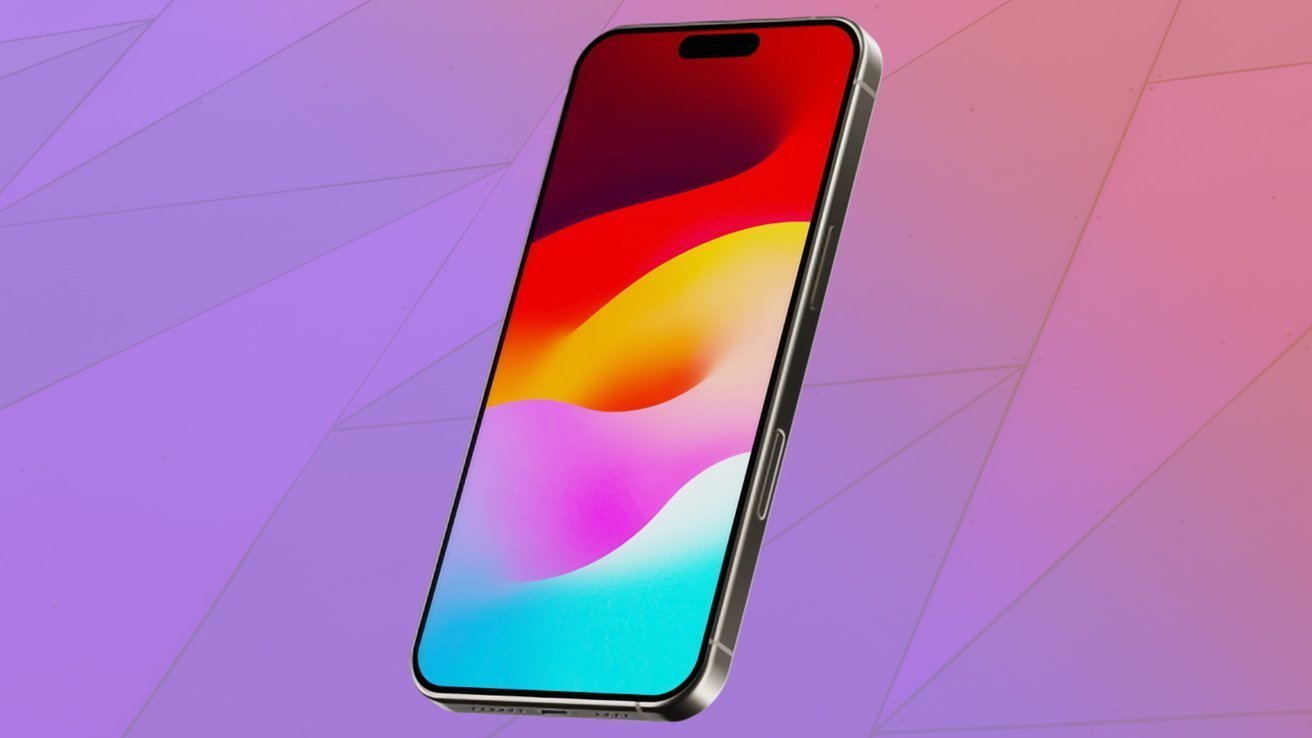
The 20th-anniversary iPhone will get solid-state buttons with haptic feedback on the sides, if claims about the curved-glass model turn out to be correct.
Apple is expected to be bringing out the 20th-anniversary edition of the iPhone in 2027, and there have been many wild claims about the model. Now, it is believed that the release will bring with it an often-rumored technology to its edges.
In a post to Weibo, serial leaker Instant Digital wrote on Tuesday about the various features they say will be included in the 20th-anniversary iPhone. While most of the features are fairly normal-sounding bits of speculation, it leads off with a hefty discussion about buttons.
To Instant Digital, the anniversary model will include a solid-state button on the edge. Apparently, it is a feature that is still undergoing testing in a variety of situations.
Advertisement
This includes being used with gloves, wet hands, under extreme temperatures, and through a case.
Helping the button’s operation is an “ultra-low powered chip” that will apparently detect the button’s use even if the iPhone is turned off.
This has been raised before by the leaker back in October 2025. At that time, Apple had apparently finished the “functional verification” of its solid-state button system.
Solid state buttons function by detecting changes in pressure, such as a finger pressing a device’s edge, instead of relying on a mechanical or capacitive system. The advantage is that manufacturers can create devices with seamless, smooth surfaces that aren’t interrupted by a physical button.
Advertisement
For Apple, this plays into rumors that it is considering an all-glass iPhone for the 20th anniversary. Using solid-state buttons would be an advantage there, due to it being a very aesthetic-focused release.
Solid State buttons have been a rumor that has circulated for quite some time, but has frequently failed to become a reality. In 2023, it was speculated that Apple would use solid-state buttons and a low-powered controller chip for the iPhone 15 Pro, which turned out to be wrong.
Other (obvious) specifications
The Weibo leaker added a number of other features to their post, which all sounds quite plausible. Either because it’s been rumored about before, or it’s guessable to the point of being practically obvious.
That list includes an under-displayFace ID system using a sub-screen infrared system and an under-display front camera. Continuing the theme, they speculate that there will be “under-display sound,” which would eliminate the earpiece hole at the top of the screen.
Advertisement
A dual-layer OLED screen is also proposed, bringing the iPhone in line with the iPad Pro display panels. However, leakers say that Apple has moved to use a “four-micro-curve” OLED panel from Samsung for the iPhone 20.
For power, Instant Digital claims it will use a battery with a capacity of approximately 6,000mAh. Reverse wireless charging has also been claimed by the account, reviving similar unfulfilled rumors that go as far back as 2019.
Lastly, the leaker says that the front display glass will have “Ceramic Shield Ultra.” They admit the name is “made up,” but insists that the screen will not scratch while in a pocket with keys.
This too is a very easy prediction to make, considering Apple repeatedly updates the protective glass on its flagship product. It’s also something the leaker has previously latched onto as a rumor for earlier models.
Advertisement
Weibo leakers don’t have a great track record when it comes to accuracy, with many regurgitating rumors from elsewhere to engage their followers, with little to no analysis or fact-checking. Instant Digital certainly fits into this category, and the post certainly seems like wishful thinking on their part based on previous rumors.
FCC boss Brendan Carr has spent much of the last five years on cable TV whining incessantly about foreign entanglement with U.S. companies. Even companies he doesn’t regulate.
But when it comes to a Trump-allied right wing billionaire buying up the entirety of U.S. media companies with Chinese and Middle East autocratic help, Brendan Carr is suddenly nowhere to be found.
A new filing from Paramount related to its $111 billion acquisition of Warner Brothers reveals the finalized deal will result in a company that’s 49.5% owned by foreign interests (including the Chinese), and 38.5% owned by a a trio of Middle Eastern funds, including the journalist-butchering folks over in Saudi Arabia:
Advertisement
“In a petition for declaratory ruling to the FCC signed by Paramount legal chief Makan Delrahim, Paramount asks the Brendan Carr-led commission to sign off on the deal involving Saudi Arabia’s PIF (public investment fund), L’Imad, an Abu Dhabi sovereign wealth fund, and a Qatar Investment Authority fund.”
If you’re playing along at home, that’s the same Makan Delrahim who used to be Trump’s DOJ “antitrust enforcer” during his first term. Delrahim “enforced antitrust” at the time by helping Sprint and T-Mobile gain rubber-stamp approval for their job and competition eroding merger. He even used his personal phones and computers to give the companies advise on how to bypass regulatory scrutiny.
Normally the FCC wouldn’t have any say in this deal because no local broadcast stations or public airwaves are directly involved, but it does have some say in how the deal is financed. The Communications Act of 1934 restricts foreign entities from holding more than a 25% indirect equity or voting interest in a U.S. company that holds broadcast licenses. Obviously, 49.5% bypasses that.
Paramount and Brendan Carr have already insisted this is all irrelevant and Carr has openly signaled to a top GOP donor (Larry Ellison) that he won’t object to any part of the foreign financing. Paramount’s filing continues to insist the deal (and its massive debt) will be great for consumers, creatives, and everybody in between. From a Paramount statement:
“When the transaction and equity syndication close, the Ellison family and RedBird will collectively hold the largest equity stake in the combined company and continue to be the sole owners of Class A Common Stock, representing 100% of the voting shares, with no other equity syndication party having any governance rights, voting shares, or Board representation. The combination of Paramount and WBD’s complementary assets will enhance competition while creating a strong champion for creative talent and consumer choice.”
There is, as we’ve explored, nothing that supports this last claim. That massive level of debt will inevitably result in mass layoffs, corner cutting, and price hikes. This is what always happens. And this is before a potential AI bubble pop impacts the Ellison family financials even more. There’s a very good chance this deal implodes in a giant fireball regardless of who is financing it.
Advertisement
Still, it’s curious that a GOP that spends so much of its time engaged in xenophobic and racist tirades about foreign investment in U.S. free market innovation goes so quickly silent when they stand to personally benefit. In this case both financially via Larry Ellison’s patronage, and ideologically via Larry Ellison’s conversion of CNN, TikTok, and CBS into (global) autocrat-friendly propaganda machines.
Apple doesn’t want to fight a battle on two fronts in the ongoing Epic Games case, so it has turned to the Supreme Court for a pause on proceedings in the Circuit Courts.
The Apple vs Epic case could go down as one of the more convoluted cases Apple has ever faced. The back and forth that has taken place since Epic first filed a lawsuit in 2020 will take you at least two hours to read through.
In a new filing viewed by AppleInsider, Apple has requested a stay on the mandate that would require it to reconvene with Epic in court and decide upon a new App Store commission for external purchases. It was previously granted a stay by the Circuit Court, but that stay was overturned after a complaint from Epic.
The filing makes it clear that Apple hopes to pursue its case with the Supreme Court before dealing with whatever might take place within the Circuit Courts. The entire problem that’s being challenged on both sides is Apple’s right to charge a commission on external purchases.
Advertisement
From the filing:
A stay is now needed before Apple is forced to litigate its commission rate under an erroneous and prejudicial contempt label— in proceedings that could reshape the global app market— before this Court can consider whether to grant review.
The Circuit Court has agreed that Apple deserves to charge something, but it disagrees with its initial implementation. When Apple was ordered to end its anti-steering practices, the new rules put in place were said to be a violation of the injunction.
As a result, Apple was punished by being forced to take zero commission on all external purchases. Since that order was placed in April 2025, Apple has complied and taken zero money on purchases made via links from apps to external platforms.
That’s where the Supreme Court comes in.
Advertisement
Apple’s fight in the Supreme Court
Apple is taking the case to the Supreme Court to challenge two specific aspects of the April 2025 ruling. One is a challenge to the scope of the ruling, which requires Apple to change the commission for all developers, not just Epic.
The second aspect being challenged is the contempt finding itself. Apple believes that its new external commission system followed the letter of the law, but it was violated based on the spirit of the law.
If the Supreme Court takes up the case and agrees Apple is correct on both counts, it could mean an end to the back and forth. Of course, Epic could always find some other avenue to attempt and continue proceedings.
If only the question of scope is agreed upon, and the injunction violation remains, then Apple will have to return to the District Courts. However, the discussion would be about what rate to charge Epic Games, and not the entirety of the developers in the United States.
Advertisement
While Apple hasn’t shared any details about its plans, that could mean a return to the previous 27% commission that caused the injunction violation to be filed in the first place. Only time will tell where all of this lands.
Apple clearly wants to avoid unnecessary litigation in the lower courts if the Supreme Court could render it all moot. Epic Games, on the other hand, believes it has Apple right where it wants them and will succeed in getting a bargain basement rate.
For now, developers in the United States continue to link outside of Apple’s App Store without paying any money. It’s not an ideal situation for Apple, especially since everyone has agreed it is owed something.
An incredible update, Alexa+ throws away the stilted conversations of the old and introduces a voice assistant that simply understands what you’re asking. Better at general responses, able to disseminate information from emails and charts, and capable of building smart home routines quickly, Alexa+ is light years ahead of the competition. It can be a bit over-friendly at times and quite verbose, but the beauty of this system is that you can tell Alexa+ what you do and don’t like to get it working the way you want. The only real downside is that the local business search is terrible, but everything else is so much better that it’s got me talking more and using my phone less.
Understands context and learns your preferences
You can use natural language
Capable of building complicated routines
Can pull information from emails, photos and documents
Responses can be a long-winded until tweaked
Local business directory isn’t very good
Key Features
Advertisement
Free for now
No cost during the Early Access service, then bundled with Amazon Prime.
Advertisement
Works with most Echo speakers
All speakers bar some first generation models support Alexa+.
SQUIRREL_PLAYLIST_10208358
Advertisement
Introduction
Amazon Alexa was a magical concept at launch. It finally felt as though the future that Star Trek promised us was here, with a personal assistant you could talk to. As good as it was, clunky interactions via ‘Alexa Speak’ and several limitations ended up with Alexa (and its competition) feeling slightly more niche. Amazon Alexa+ fixes that.
The GenAI-powered voice assistant is miles ahead of the original, and miles ahead of the competition. I wrote about my initial thoughts after a week with the service, describing what Alexa+ was good at (and what it needed to improve), but I’ve had more time with the system, so read my full review to find out why it’s the best.
Advertisement
Availability and compatibility
To get Alexa+, you need to sign up for the Early Access programme, which is currently by invitation. The quickest way to jump up the queue is to get a new Alexa device, but eventually, the system will be rolled out to everyone. Most devices (bar a few first-generation ones) are supported, although the new versions have dedicated chips that help with the processing.
Advertisement
My guide on how to enable Alexa+ goes into more detail on how to get the system, and which devices are compatible. Currently, Alexa+ is free while on early access, and then it will be bundled with Amazon Prime, although you can pay £19.99 a month to have the service. Clearly, Amazon Prime is a much better way of getting it.
General conversations and information
Understands general speech
Much better at context
Can be over-friendly
Although Alexa+ works in the same way as standard Alexa (you say, “Alexa”, followed by your request), the new system operates in a completely different way. Gone is the need for ‘Alexa Speak’ (saying things in a specific way to get Alexa to understand), replaced with natural conversation. And, the replies are more natural, too, with Alexa understanding and building context, as it goes.
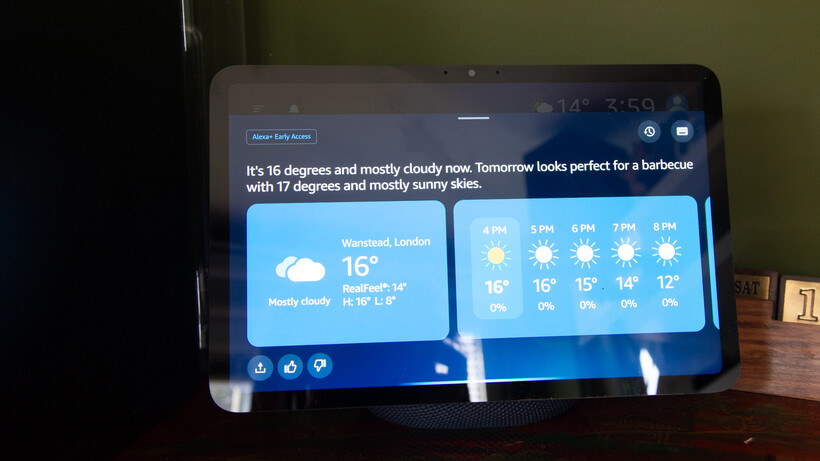
More natural conversations make it a lot easier to talk to Alexa. Sure, I can have the standard interaction, such as “Alexa, weather”, to find out what the upcoming weather is like. But, I can also ask, “When’s a good day to have a BBQ?” or, “Is the weather going to be consistently nice this week?” and not only does Alexa understand, but it gives sensible answers.
Image Credit (Trusted Reviews)
Advertisement
Alexa+ is also much better at context. By default, it stays listening after a reply, so you can follow up with another question. But if you go silent, you can follow up with another question at any point. In my example about the BBQ, I followed up 20 minutes later with, “Alexa, and what about next week?”
That’s limited context, but Alexa+ also builds up information about you, both explicitly (when you first get the service, it asks some basic questions, such as what your favourite type of music is) and through inference, such as by learning that you like a specific football team.
Advertisement
That’s surprisingly powerful. Once Alexa+, for example, has learned which of your friends are vegetarian, it will adjust the recipe ideas it suggests if any of them are coming around.
Alexa+ can also moderate its responses, adjusting emotion based on the news it gives you. As a Spurs fan, Alexa’s replies about the latest game are usually said with a slightly sad voice, although a recent win came with a more excited response.
It feels much more natural to talk to Alexa+ than to Alexa. Although there are still some oddities. Sometimes, when a reply consists of multiple sentences, the pause between each is a little off. Rather than flowing naturally, a second sentence starts abruptly, almost before the first sentence has finished. It sounds a little like Alexa+ is interrupting itself.
In terms of replies, it helps that the new service can retrieve information from a wider range of sources. All too often with standard Alexa (and pretty much all of the time with Siri), I’d hit the limit of capability, with questions that can’t be answered.
Advertisement
Advertisement
That doesn’t happen often at all with Alexa+. I asked if the recent tube strikes were going ahead, and Alexa+ told me they were, when they’d start, when they’d end and how trains could be affected after people started to return to work.
Generally, if you want to know the answer to something, Alexa+ can give you the answer in a way that makes sense.
But, it does need tweaking. Asking about the tube strike, Alexa+ was almost excited to tell me it was going ahead, and needed reminding that this was bad news and to tone it down.
Advertisement
Similarly, I don’t like some of the out-of-the-box responses, as they feel forced. Ask about football, and Alexa likes to say ‘mate’ a lot, a bit like it’s been programmed by watching poorly-written football beer adverts. I told Alexa+ not to call me ‘mate’ and it has stopped.
Often, Alexa+ can be too verbose, trying to be chatty, but in an unconvincing and slightly odd way. I’ve told it to be brief and to-the-point with answers, and it’s much better.
All of that’s important, as Alexa+ can be tweaked: what you get at the start and what you get weeks later are quite different. Just remember to keep tweaking and feeding back to get Alex+ to behave the way that you want it to.
Advertisement
Advertisement
For all the tweaking that you can do, there are some issues and obstacles that can’t be overcome. Asking Alexa+ about Spurs on my Echo Show 11 has the response on screen, along with some extra information that runs across the bottom. Only, the snippets of information are about the San Antonio Spurs, which isn’t very helpful.
Image Credit (Trusted Reviews)
Local business search is also, quite frankly, rubbish. Amazon says it’s working on it, and boy, does it need to. “Alexa, what’s the nearest French restaurant?” I asked. The answer was Le Marmiton, Wanstead. Not only is that restaurant an eight-minute walk from my house (so not the closest one), but, the main issue is that Le Marmiton shut down in 2023.
On my Echo Show, the response says, “It’s open today from 5pm to 9pm”, but the snippet below from TripAdvisor clearly shows that the restaurant is closed today (and, in fact, forever).
Image Credit (Trusted Reviews)
Restaurants that still exist and are on OpenTable can be booked via voice. It’s a neat system that makes Alexa+ do the hard work of finding a table for the number of people you want, at the time you want. One limitation is that you can’t book restaurants that require a credit card, although this is being worked on, too.
Advertisement
Documents, calendars and more
Can read documents and create tasks and calendar entries
Work accounts not supported
AI is very good at understanding structured data. That, combined with email and calendar management, means that Alexa+ can be a kind of personal assistant. Well, provided you don’t pay for your email. I use hosted Exchange for my personal email, but this type of account isn’t supported, nor is a Google Workspace account. That’s a little annoying, as it means creating a free Gmail or similar account for the time being.
What is very good is that via the app or by sending emails to [email protected] from a registered email address (set via the Alexa app), Alexa+ can pull out information, create reminders and calendar appointments.
Advertisement
Sending an email with a PDF containing information on my daughter’s upcoming DoFE expedition, the Alexa app pinged a few minutes later to tell me it had found some appointments and tasks, all spot-on, and all ready to go straight into the calendar.
Trying to go through the appallingly formatted term dates page on my daughter’s school is a nightmare, but I used the Alexa app to take a photo of it, and it quickly worked out when the inset days were and the holidays, letting me add them to my calendar. Cleverly, as we’re partway through a school year, Alexa+ ignored everything that’s already passed.
With full email support, I can see Alexa+ become core to managing everything – please, Amazon, hurry up and add work accounts!
Advertisement
Advertisement
Smart home control
Smarter responses
Can build Routines using voice
The same old basic commands work, such as turning on lights, or setting them to a specific temperature. But, Alexa+ is also smarter and makes it much easier to interact with.
Tell Alexa+ that it’s cold, and it will boost the heating around you. With standard Alexa, I’d need to ask what the temperature was and then ask again to set the heating to a temperature above that. Tell Alexa+ that it’s dark, and it can turn the lights on for you.
Thanks to better language processing, Alexa+ mostly understands what I want it to do, and I don’t have to phrase requests in a specific way.
Alexa+ can also build routines for you, via voice, which can be tweaked and edited in the app. I find that it’s often faster to do things this way, rather than the old app-based one.
More complicated commands can also be turned into one-time Routines. “Alexa, turn off the office lights in 10 minutes’ time” does just that.
Advertisement
Advertisement
It’s possible to string together a series of commands for a one-time run, too, such as turning the lights on, waiting for 10 minutes, and then turning them off again. These commands can often go a bit wrong.
“Alexa, set Dave officer heater to 25° and then after five minutes turn it off,” I said. This then got Alexa+ to create a routine that did what I’d described, only the command to trigger the routine was the exact, lengthy phrase that I’d said above. That’s clearly not what I wanted, but Alexa+ is getting there, making the complex much easier.
Image Credit (Trusted Reviews)
SQUIRREL_PLAYLIST_10208358
Should you buy it?
Advertisement
You want a smarter assistant
Much more powerful than its competition, Alexa+ is the voice assistant to use.
Advertisement
You don’t want a smart assistant
There’s no real comparison between this and its rivals, so only avoid if you don’t want a smart assistant.
Advertisement
Final Thoughts
I’d practically stopped using standard Alexa for anything more than basic requests: timers, turning a specific light on, or setting an alarm clock. Alexa+ changes that.
Yes, there are areas that need improvement (Routines and local business search are two good examples), but the general interactions are so much better. When I want the answer to a question, I now tend to ask Alexa+ rather than digging out my phone – and it helps me avoid getting trapped in doomscrolling along the way. The ability to tweak Alexa+ to understand your preferences and learn your context makes it even more powerful.
There’s simply no competition at the moment: when it comes to everyday life, general questions and smart home control, Alexa+ is so far ahead of the competition.
Advertisement
Advertisement
FAQs
Do you have to pay for Alexa+?
Alexa+ is free during Early Access, but it will eventually be bundled with Amazon Prime, or it will alternatively cost £19.99 a month.
Advertisement
Can I get Alexa+ now?
The short answer is yes, but you have to sign up for the invite, and people who have bought a more recent Echo speaker will get priority access.
Considering its raw power, the Hoover HF6 TurboSense is quite a bargain, costing far less than its flagship rivals. Cleaning performance is generally very good, although edge performance was a bit behind the competition. It’s a little bulky in the hand, but this vacuum isn’t too heavy, and it does stand up by itself, which is a useful trick when you need to temporarily pause cleaning. Overall, if you want a lot of power but don’t want to pay a huge amount of money, this vacuum is great value.
Good battery life
Can stand up by itself
Lots of power
Good cleaning for the price
Weight not that well balanced
Edge cleaning could be better
Key Features
Introduction
The more recent Hoover vacuum cleaners have been good, but straightforward mid-range models. With the HF6 TurboSense, the company has a cordless cleaner that’s quite a bit more powerful than its others, with some clever tech built in, including automatic floor detection.
Advertisement
Despite the advance, the HF6 remains excellent value. So, should you go for this over one of the big rivals? Read on to find out.
Advertisement
Design and features
Stands up by itself
A little fiddly to empty
Detects the floor type automatically
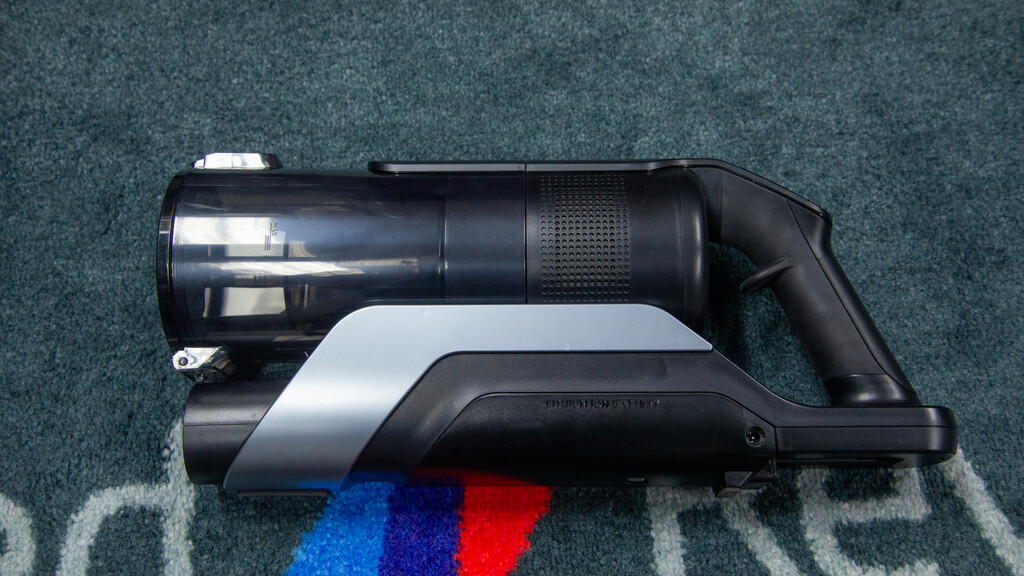
An all-black finish gives the Hoover HF6 TurboSense an air of quality and makes it look like the high-end vacuum cleaner that it is. It’s a very sleek vacuum cleaner, with the handheld unit streamlined with few bits sticking out.
Image Credit (Trusted Reviews)
It comes with a wand that plugs into the handheld unit, and then into the accessories or the floor head.
For me, weight is often as much about balance as it is about how much something actually weighs. Due to the way that the weight is distributed, the Hoover HF6 TurboSense naturally wants to point down. That’s good when you’re using the floor head or are vacuuming around the floor using the crevice tool; if you do want to clean higher up, say snagging cobwebs, then that’s a bit harder.
Advertisement
Advertisement
Lifting the Hoover HF6 TurboSense up with one hand, I found it hard to hold it steady, and needed a second hand to stabilise it. For most jobs this isn’t an issue, but there are rivals that have better balance for handheld use.
Image Credit (Trusted Reviews)
However, part of the reason the weight is positioned as it is is that the Hoover HF6 TurboSense can temporarily stand upright on its own. That’s great when vacuuming, as I could lock the cleaner upright, and then move some furniture around, before getting back to cleaning.
In the box, Hoover provides a crevice tool, dusting brush and floor head. The latter, Hoover promises, is an anti-hair-wrap model that won’t get tangled with hair.
Image Credit (Trusted Reviews)
Floor detection is also built in, and the Hoover HF6 TurboSense can work out if it’s on carpet or a hard floor, adjusting the spin speed of the brush bar and changing the colour of the lights (white for carpet and blue for hard floor). It’s a nice visual indicator, but floor detection is an important technology, helping to avoid flicking debris around on hard floors or missing dust on carpet.
Advertisement
Advertisement
There’s no dust detection built in, so you’ll need to use the three available power modes on the back, using the ‘+’ and ‘-‘ buttons to cycle through them. There’s also a separate power button.
Image Credit (Trusted Reviews)
Battery life is displayed on the screen, with four bars that extinguish one at a time. I do prefer a screen that shows live battery life in minutes, as with the Dyson V16 Piston Animal, but you have to pay a lot more for that feature.
Charging can be done in two ways. The easiest, in my view, is to fit the wall dock and then hang the vacuum cleaner when you’re done to charge it. If you can’t do that, then the power adaptor can be plugged straight into the vacuum cleaner.
Image Credit (Trusted Reviews)
Advertisement
There’s a removable battery on this model, so should it fail, you can buy a replacement from Hoover and quickly replace it yourself.
Image Credit (Trusted Reviews)
Dirt is sucked into the 0.7-litre bin. To empty it, you point the vacuum at your bin, hit the eject button and the flap at the front opens to let the dust out. Typically, doing this creates a bit of a mess, and it’s hard to empty cleanly. Bigger bits of fluff tend to need a bit of a bang to help them out.
Image Credit (Trusted Reviews)
You can remove the entire bin by opening both sides so you can rinse it out. Doing this lets you access the washable filter, too.
I did find it hard to get the bin back into place. In the end, I had to remove the wand, place the handheld unit on the floor, and gently push the bin back into place until it clipped into place.
Advertisement
Advertisement
Performance
Good on carpet and hard floor
Doesn’t get tangled with hair
Edge performance is a bit more basic
I like to measure the raw suction performance of vacuum cleaners at the handle to see how much power they really have. I measured the Hoover HF6 TurboSense at 28AW on its lowest setting (good enough for very basic jobs), and a more usable 125AW on the mid setting (suitable for most jobs), going to a massive 336AW on the highest setting.
In terms of raw performance, that maximum is similar to that of the Shark IA3241UKT and not too far off the Dyson V16 Piston Animal.
Image Credit (Trusted Reviews)
High suction is typically useful for picking up bigger bits of debris with handheld tools from a distance, such as when cleaning out a wardrobe or vacuuming a car. To demonstrate this, I measure how far from the crevice tool a vacuum can collect grains of rice. In this case, it’s a whopping 2.9cm – that shows that handheld jobs will be fast.
Advertisement
Next, I moved on to the standard tests, starting by adding 20g of flour to the floor. I used the middle setting to move through the mess and was pleased to see clean, sharp lines.
Advertisement
I then finished off vacuuming until the carpet looked clean and gave it a burst of the top power mode for good measure.
Image Credit (Trusted Reviews)
Overall, I found that 89.40% of the dirt made it into the bin. A good score for the price, but a little behind the best in the business. On close inspection, the carpet shows no signs of dust, so some of the mess could be in the wand or floor head.
Next, I tried the edge test, adding 10g of flour to the skirting board. Running the vacuum cleaner along this on its maximum mode, I recorded that 78.6% was picked up. I had to finish the job with the crevice tool.
Advertisement
I then moved to the hard floor test, adding 20g of rice to the hard floor. All of this spill was collected without any mess dropping back out.
Advertisement
Cat hair, combed into the test carpet, was removed easily, with a single forward/backward swipe over the top.
I finished off with my human hair test. I’m pleased to say that no hair strands were wrapped around the brush bar at the end of pickup.
Advertisement
Battery life is up to 100 minutes on the lowest power setting, but you’ll need to use higher power settings than that. On the Boost setting I saw battery life of 16m 50s, which is impressive.
Advertisement
Sound-wise, I registered the Hoover HF6 TurboSense at between 67.5dB and 73.8dB, which compares well with other vacuum cleaners: loud, for sure, but not annoyingly so.
Should you buy it?
You want a powerful vacuum cleaner at a reasonable price
Exceptional value, the Hoover HF6 TurboSense is powerful and cleans well on most surfaces.
Advertisement
If you want a vacuum that can auto empty or one with a dust sensor to adjust power on the fly, look for a different model.
Advertisement
Final Thoughts
There are vacuum cleaners that can pick up more mess and that have more features, such as dust sensors (you can see these in my guide to the best cordless vacuum cleaners), but they’re also a lot more expensive. At the recommended price, the Hoover HF6 TurboSense is a lot of vacuum for the money, but you can frequently find it for less, making it a bargain.
Advertisement
How We Test
We test every vacuum cleaner we review thoroughly over an extended period of time. We use industry standard tests to compare features properly. We’ll always tell you what we find. We never, ever, accept money to review a product.
Advertisement
Find out more about how we test in our ethics policy.
Used as our main vacuum cleaner for the review period
Tested for at least a week
Tested using tools to measure actual suction performance
Tested with real-world dirt in real-world situations for fair comparisons with other vacuum cleaners
FAQs
What auto-detection features does the Hoover HF6 TurboSense have?
It can detect the floor type it’s on, adjusting the brush bar speed automatically for hard floors and carpet.
Bloomberg reports Apple is in early-stage discussions with Intel and Samsung about producing some of its M-series chips. The talks are exploratory; the signal is significant.
Apple’s silicon strategy has, for nearly a decade, run on a single foundry relationship. Bloomberg reported on Tuesday that the company is now exploring early-stage discussions with Intel and Samsung Electronics about manufacturing some of its M-series processors, in a quiet move to diversify production away from Taiwan Semiconductor Manufacturing Company. 9to5Mac confirmed the reporting on the same day, framing it as the most concrete signal yet that Apple is taking foundry concentration risk seriously enough to act on it.
Apple is not, on the available reporting, planning to walk away from TSMC. The discussions are at an early stage, no orders have been placed, and Apple has internal concerns about whether non-TSMC technology can match the yield, performance, and timing the company has come to depend on.
The most likely scenario, by AppleInsider’s analysis, is that Apple uses Intel or Samsung for its lower-end M-series parts, the chips that ship in MacBook Air, iPad Pro, and similar mid-volume products, while keeping its highest-performance silicon on TSMC nodes. Initial shipments of any non-TSMC part are not expected until the second or third quarter of 2027.
Advertisement
The strategic logic is two-track. The first track is geopolitical: TSMC’s continued concentration in Taiwan is a known supply-chain risk in any scenario involving a Chinese move on the island, and Apple has been quietly diversifying around that question for years. The second track is commercial.
The 💜 of EU tech
The latest rumblings from the EU tech scene, a story from our wise ol’ founder Boris, and some questionable AI art. It’s free, every week, in your inbox. Sign up now!
Intel’s foundry services have been rebuilding under Lip-Bu Tan’s leadership, with Apple as one of the customer relationships Intel has reportedly pursued most aggressively. Samsung’s foundry, while a step behind TSMC on leading-edge nodes, has historical capability and excess capacity. Both companies want Apple business badly. Apple, by extension, has unusual leverage.
Advertisement
The challenge nobody has fully solved
The hard problem is yield. Industry analysts at Semiwiki have tracked the gap between TSMC’s leading-edge nodes and Intel’s and Samsung’s equivalents through 2026, and the consensus is that both alternative foundries are closer to TSMC’s quality than they have been in years, but neither has fully closed the gap. For Apple, which has historically shipped tens of millions of M-series units per year and demands consistent performance across that volume, even a small yield difference compounds into meaningful product-cost and customer-experience differences.
The supply context also matters. TNW reported last week that Apple raised the entry-level Mac mini’s starting price from $599 to $799 after AI-driven demand depleted inventory at higher configurations. That kind of demand pressure makes any foundry diversification more urgent, but also riskier: a yield problem at a new manufacturing partner would amplify, not relieve, the supply constraint Apple is currently dealing with.
Tuesday’s reporting is, in itself, unlikely to change Apple’s near-term product roadmap. The longer-term signal is more consequential. Apple has, for the first time in its modern silicon era, publicly hinted that the TSMC relationship is no longer treated as singular. Whether the eventual outcome is a partial second-source arrangement, a long-running negotiating posture, or no change at all, the fact that Apple is publicly signalling diversification interest changes the bargaining table for all three foundries.
The next signal will come not from Apple but from Intel and Samsung. If either announces a leading-edge process win that includes Apple as a customer over the next 12 to 24 months, the diversification thesis will have moved from exploration to commercial reality. If neither does, the discussions will be remembered as one of the smaller chess moves in Apple’s longer game with its most important supplier.
Singapore’s labour market has continued to expand, but locals aren’t driving most of the growth
In Mar, Singapore’s Ministry of Manpower (MOM) released its quarterly Labour Market report, highlighting job trends in the city-state, including employment growth and workforce composition.
Since the fourth quarter of 2021, the labour market has continued to expand, and for the full year of 2025, total employment grew by 55,500, up from 44,500 in 2024.
However, of these 55,500 jobs, 79% (or 43,900) went to non-residents, while just 11,600 were taken up by residents (citizens and permanent residents).
This works out to roughly a four-to-one ratio—meaning that for every new job secured by a resident last year, about four went to a foreign worker.
Advertisement
Where the jobs went
A closer look at the data reveals that resident job growth is not only smaller in scale, but also more narrowly concentrated.
In 2025, most gains among residents were clustered in higher-skilled sectors such as financial services and health and social services.
Non-resident employment, on the other hand, was driven largely by sectors with more labour-intensive demands. Construction stood out as a key industry, continuing its reliance on foreign manpower to support infrastructure and building projects.
In the fourth quarter of 2025, both resident and non-resident employment rose in administrative & support services and retail trade, largely driven by seasonal hiring for events and the year-end holiday period.
Advertisement
Not a one-off trend
2025 was not an outlier. This year’s figures are simply the latest in a pattern that has played out consistently over the past few years.
Year
Total Employment Growth
Resident
Non-resident
2023
+88,400
+4,900
+83,500
2024
+44,500
+8,800
+35,700
2025
+55,500
+11,600
+43,900
Source: Singapore’s Ministry of Manpower
In each of the past three years, non-resident employment growth has significantly outpaced resident growth. In 2023, a strong year for total employment growth, residents accounted for less than 6% of all new jobs.
Even in 2025, a year that saw a notable increase in resident employment, non-residents still accounted for close to four in five of all new jobs created.
The reasons for this shift are partly structural, and the Ministry of Manpower has been fairly direct about why.
Advertisement
In its Q4 2025 Labour Market Report, MOM noted that Singapore’s resident labour force participation rate is already high, leaving limited scope for further expansion of the local workforce.
For those aged 25 to 64, the figure stands at 85.9%, one of the highest in the world. Most people who can work and want to work are already in the workforce—there simply are not many residents left on the sidelines to bring in, which naturally limits how much further resident employment can expand.
At the same time, businesses continue to face manpower needs, whether for growth, replacement, or sector-specific demands, that cannot be fully met by the resident pool alone. Non-resident workers help fill these gaps, particularly in industries that struggle to attract or retain local workers.
Looking ahead, the Ministry of Manpower expects these trends to persist.
Advertisement
For 2026, resident employment is projected to grow at a similar or slightly slower pace than in 2025.
Non-resident employment, on the other hand, is expected to continue expanding alongside economic demand, particularly in sectors such as construction and other manpower-intensive industries, where hiring has remained strong in recent years.
Read other articles we’ve written on job trends here.
Featured Image Credit: Shadow of light/ Shutterstock
Caption: Microsoft CEO Satya Nadella discusses the company’s Copilot initiatives. A new Microsoft study finds that the biggest barrier to AI at work isn’t the technology — it’s the organizations around it. (GeekWire File Photo / Kevin Lisota)
[Editor’s Note: Agents of Transformation is an independent GeekWire series, underwritten by Accenture, exploring the adoption and impact of AI and agents. See coverage of our related event.]
A new Microsoft study of 20,000 artificial intelligence users in workplaces around the world concludes that the biggest barrier to getting real value from AI isn’t the technology or the workers themselves — it’s the ingrained culture of the organizations where they work.
That “Transformation Paradox” is one of the central findings from Microsoft’s annual Work Trend Index, released Tuesday morning, which paints a picture of employees eager to reshape their jobs and organizations that aren’t really in a position to make it happen.
Sixty-five percent of the AI users surveyed said they fear falling behind if they don’t adopt AI quickly. But only 13% said they’re rewarded for using and experimenting with AI in their jobs.
“Employees are ready to reinvent how they work, but the system around them—metrics, incentives, and norms—continues to reinforce the old way,” Microsoft says in the report.
Advertisement
The takeaway: For companies to truly capitalize on the AI revolution, leaders need to fundamentally overhaul how work is structured, managed, and rewarded, rather than simply handing workers new tools and expecting them to figure it out.
Matt Firestone, general manager of Microsoft’s Frontier Firm initiative, said the message to leaders has changed. Two years ago, executives were under pressure from their boards to unlock value from AI. Now, he said, the message is that their people are already there.
It’s the job of leaders to “re-architect work,” Firestone said in an interview ahead of the report’s release. “Your job is to convert the individual agency and capacity and abilities of your people to unlock that and apply it to increase business value for the enterprise.”
Leaders who encourage employees to experiment with AI and share their experiences create “these incredible systems of learning that drive us forward into the agentic era,” he said.
Advertisement
Of course, this also serves Microsoft’s interests: the company is betting heavily on agents for the next phase of its outsized AI product ambitions, and a report that says organizations need to change how they work is also a pitch for more tools, training, and licenses.
Alongside the report, Microsoft is announcing new capabilities for Copilot Cowork, including a mobile app and a plugin ecosystem for connecting to third-party business systems.
This year’s Work Trend Index was narrower, covering 20,000 workers across 10 countries, down from 31,000 across 31 countries in recent years. The survey was conducted by Edelman Data x Intelligence. In a new twist, it also excluded anyone who doesn’t already use AI at work.
Advertisement
As it has in the past, Microsoft also analyzed trillions of anonymized productivity signals from Microsoft 365. The company partnered with Harvard Business School and in-house organizational psychologists to interpret the findings.
Nearly half of all Copilot interactions involve analysis, decision-making, and problem-solving. (Microsoft Graphic, click to enlarge.)
New this year was an analysis of more than 100,000 Copilot chats, classified by the type of work involved. That analysis found that 49% of all Copilot interactions involved cognitive work — analyzing information, solving problems, and thinking creatively — rather than simpler tasks like summarizing documents or finding information.
Microsoft is using that data point to assert that AI is not just making workers faster but expanding the types of work people can accomplish.
The rise of ‘Frontier Professionals’
Fifty-eight percent of AI users surveyed said they are producing work they couldn’t have a year ago, rising to 80% among a group the report calls “Frontier Professionals” — the 16% of AI users who routinely use agents for multi-step workflows, redesign how their work gets done, and share what they learn with their teams.
These Frontier Professionals are also more deliberate about when not to use AI: 43% said they intentionally do some work without it to keep their skills sharp.
Advertisement
The largest group of AI users in the study (42%) sat in what Microsoft called the “emergent” middle, where both individual skills and organizational support are still taking shape.
On the organizational side, the report found that culture, manager support, and talent practices account for more than twice the AI impact of individual factors like mindset and behavior.
When managers actively modeled AI use, employees reported a 17-point increase in the value they got from AI and a 30-point boost in trust in agents, according to a separate Microsoft study of 1,800 workers. But only one in four AI users said their leaders are clearly aligned on AI.
Emerging AI adoption patterns
The report also includes Microsoft’s first Work Trend Index data on AI agents, showing a 15x year-over-year increase in active agents on Microsoft 365, rising to 18x in large enterprises. Microsoft did not disclose the baseline, making it difficult to assess the actual scale of adoption.
Advertisement
The new report says adoption patterns vary by industry. As would be expected, software and technology companies showed the broadest use of agents across job functions.
But Microsoft said it was surprised by the depth of adoption in manufacturing, where fewer companies were using agents but those that did were deploying them heavily in specific tasks. Banking and capital markets, retail, and education also showed significant agent adoption.
In a blog post accompanying the report, Jared Spataro, Microsoft’s chief marketing officer for AI at Work, described four emerging patterns for how humans and AI agents work together:
Author: The worker produces the work, calling on AI for help as needed.
Reviewer: The worker sets the intent and AI creates a first draft to edit and approve.
Director: The worker hands off entire tasks for AI to execute and signs off on the outcome.
Orchestrator: The worker designs a system where multiple agents run in parallel, flagging exceptions back to the human.
Firestone compared the current moment in AI to the early days of mobile apps, when people were building apps before app stores and permission models existed.
“People are building agents. They’re hobbyists,” he said. “Their personal knowledge is extending the professional workplace. This is a new wave of technology, but all of the fundamental instincts of how to transform the workplace haven’t changed.”






















































You must be logged in to post a comment Login