

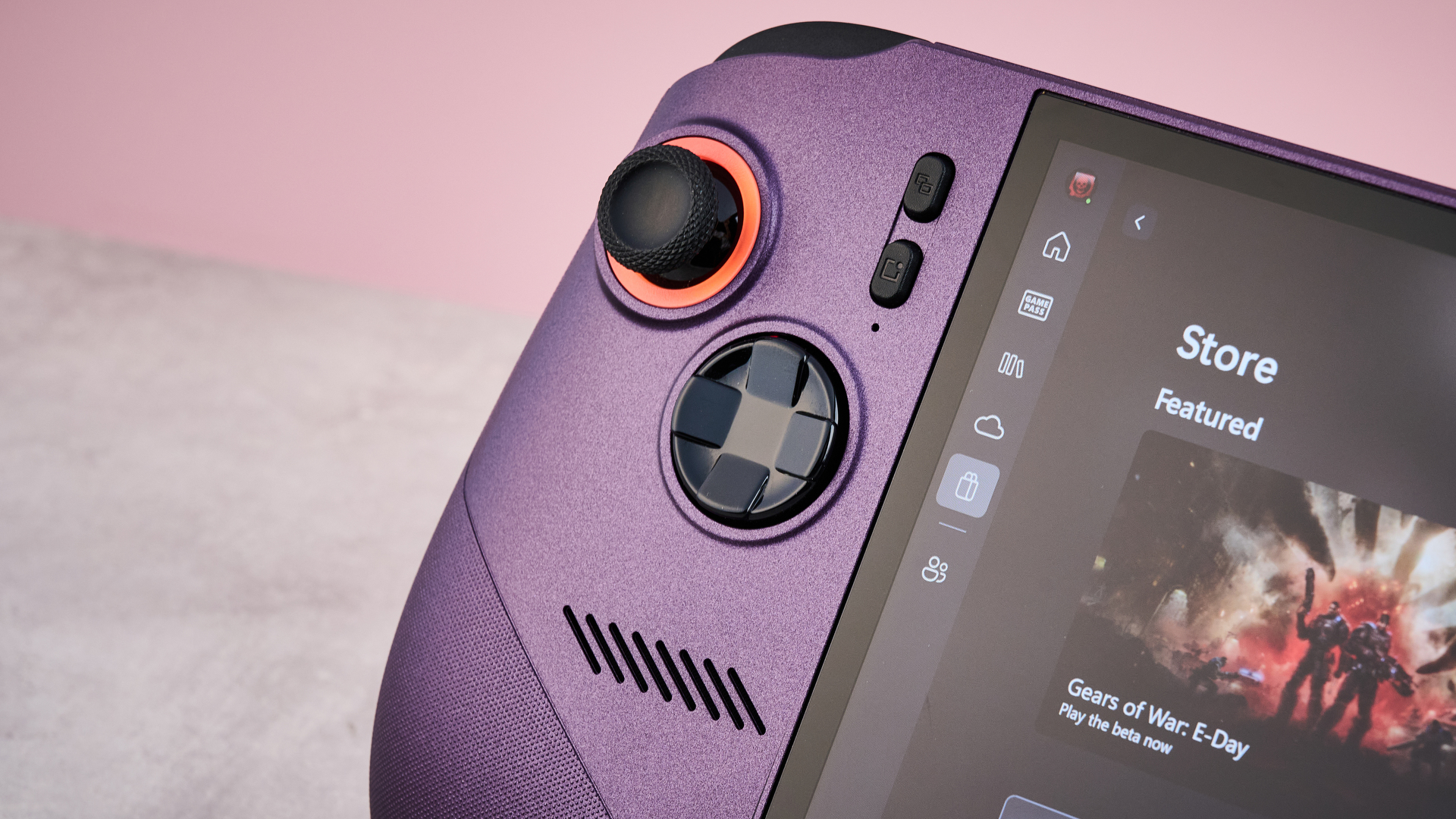
MSI Claw 8 EX AI+ review: two-minute review
The MSI Claw 8 EX AI+ is a high-octane handheld games console that can run PC and Xbox games from a wide range of game stores. With the Intel Arc G3 Extreme chipset — featuring the Intel Arc B390 GPU and 32GB RAM — it’s easily the most powerful portable console I’ve ever (quite literally) gotten my hands on. But there’s a pretty huge catch to that performance: a price tag that would buy you two Steam Deck OLEDs or a mid-price gaming laptop.
Let’s start with the superficial stuff: the MSI Claw 8 EX AI+ looks gorgeous. Its screen is an extensive eight inches across, offers wonderfully rich colors and a silky-smooth 120Hz refresh rate. Combined with its discreet RGB lighting around the asymmetrically placed thumbsticks and Void Purple colorway, it has a unique look that definitely helps it stand out from the crowd.
But its design goes far beyond aesthetics. Its Hall effect thumbsticks and triggers should not only offer greater longevity, but they felt really responsive, even if they’re not quite as sensitive as the TMR versions now offered by some controllers. Meanwhile, it felt perfectly ergonomic in my hands — I was genuinely surprised how light it felt for a 1.73 lb / 786g console — although its laser-etched grips sure made my hands feel sweaty, for some reason.
Latest Videos FromTechRadar
What cements the MSI Claw 8 EX AI+ as one of the best handheld games consoles out there, though, is its performance. It’s the first gaming handheld on the market with the Intel Arc G3 Extreme chipset and, boy, does that have a pronounced effect on how it plays. While benchmarks showed it offered similar CPU performance to the recent Asus ROG Xbox Ally X, thanks to its Intel Arc B390 GPU and 32GB RAM, it managed to smash its 3D Mark benchmarks by between 35% and 76% — that’s a significant performance upgrade.
Numbers only tell part of the story, though: what was the Claw actually like in action? Well, Baldur’s Gate 3 looked truly gorgeous on Ultra graphics settings and yet it hovered around a decent 38fps. Meanwhile, despite only being released in 2025, both Doom: The Dark Ages and Clair Obscur: Expedition 33 played at a rock-solid 60fps — whether I was punching demons to death or countering devastating attacks, there wasn’t a hint of latency or lag. Even the boss-level challenge of The Elder Scrolls 4: Oblivion Remastered hit 60fps at points… before plunging to a stuttery mess in busier areas. Still that’s impressive stuff for a handheld console.

But the MSI Claw 8 EX AI+ has a pretty huge barrier to Fosbury flop over: its price. In return for its premium components, you’ll pay a seriously premium price tag of $1,799.99 / £1,399.99 / AU$2,849. Not only is that significantly higher than any other gaming handheld to date, it’s also as expensive as some mid-range gaming laptops.
And that presents an enormous problem for the Claw. Despite the fact that some of the best gaming laptops come in at a similar price, many of them offer superior performance in our benchmark tests. Now don’t get me wrong: no gaming laptop offers the kind of ergonomics or compact form factor you get here, but I do have doubts that the pro gamers that can afford this kind of device will be willing to trade performance simply for the sake of increased maneuverability.
That’s a real shame because in almost every respect, the MSI Claw 8 EX AI+ is a fantastic gaming handheld that has really stretched my expectations of what this kind of device is capable of. I want one. And you should too. But I’m not convinced either of us will be able to justify the spend.

MSI Claw 8 EX AI+ review: price & availability
Having launched on June 23, 2026, the MSI Claw 8 EX AI+ is available now. As you can see from the specs — or if you took sneaky peak at the benchmarks in the performance section — it’s seriously mighty for a gaming handheld.
It’s the first handheld console on the market that rocks the Intel Arc G3 Extreme chipset, which includes the 12-core Intel Arc B390 GPU and a hefty 32GB RAM. That puts it considerably ahead of most of its competitors, even if it can’t quite rival any of the best gaming laptops for sheer processing punch.
Unfortunately, like the hero in a Greek tragedy — or Oddyseus, apparently — it has a fatal flaw. The price. At $1,799.99 / £1,399.99 / AU$2,849, its cost is possibly the most eye-watering thing I’ve come across in a while and that includes all the people on social media that bragged about raw-dogging the solar eclipse in August. While the price tag here might not literally melt your retinas, it’s likely to give you second thoughts.
By comparison, we threw some shade on the Asus ROG Xbox Ally X for its price on its release — and that only retailed for $999.99 / £799.99 / AU$1,599. The Claw 8 EX AI+’s sticker price outstrips every other handheld console by quite some margin, sitting more up the gaming laptop end of the spectrum. For example, a mid-spec Alienware 16X Aurora, with Intel Core Ultra 9 275HX, Nvidia GeForce RTX 5070 and 32GB DDR5, goes for $1,999.99 / £1,799 (around AU$2,800). Ultimately, I think there aren’t going to be that many mainstream gamers able to pay this price and those that do are going to expect stellar performance in return.

MSI Claw 8 EX AI+ review: specs
|
Category |
Specification |
|
Price |
$1,799.99 / £1,399.99 / AU$2,849 |
|
Display |
8-inch FHD+ (1920 x 1200), 16:10, 500 nits, 120Hz IPS touchscreen |
|
CPU |
Intel Arc G3 Extreme |
|
Graphics |
Intel Arc B390 |
|
RAM |
32GB LPDDR5X-8533 |
|
Storage |
1TB PCIe Gen4 NVMe SSD |
|
Port selection |
2x USB-C / Thunderbolt 4, 1x microSD Express card reader, 1x 3.5mm headphone/mic combo jack |
|
Weight |
1.73 lbs / 786g |
|
Dimensions |
11.7 x 4.9 x 0.94 inches / 297 x 124 x 24mm |
MSI Claw 8 EX AI+ review: design
I’ll be honest: when I first picked up the MSI Claw 8 EX AI+, I was pretty shocked by how light and manageable it felt. Fundamentally, this is not a small console — it’s as broad-shouldered as the Steam Deck OLED or the Lenovo Legion Go S and weighs in at 1.73 lbs / 786g, which is the heaviest gaming portable I’ve gotten my hands on to date. But despite this, it never felt at all bloated, sitting comfortably in my grasp.
I’d chalk this up to its ergonomic design. On top of feeling well balanced, it offers flared grips, unlike previous iterations of the MSI Claw. These sat really comfortably in my hands, although they aren’t quite as easy to wrap your hands around as the controller-mimicking forked grips of the Asus ROG Xbox Ally X.
This was also helped by the laser-etched texture of its grips, which enabled me to keep a decent grasp on the Claw. But I will say they aren’t quite as comfortable as those on some of the best Xbox controllers I’ve tested, feeling a little on the rough side and quickly getting sweaty as I tried to splat sakapatates in Clair Obscure: Expedition 33.
The MSI Claw 8 EX AI+ also left a pretty good impression on some of my other senses too. No, I didn’t lick it — I’m talking visual appeal here, rather than gustatory. Subtle RGB lighting around each of the thumbsticks is my personal highlight, although I’ll also give its gentle curves and Void Purple colorway honorable mentions as well. Honestly, I’m a little less jazzed about the way the screen juts out past the bottom of the device, but this does seem to be a more common look these days, with the jutting grips of the Asus ROG Xbox Ally X creating a similar effect.
Speaking of screens, despite it not quite rocking the richness of the Steam Deck’s OLED display, the Claw 8 EX AI+ has a beautiful looking screen. As a result of its expansive eight-inch breadth and 16:10 aspect ratio, it rocks a 1920 x 1200 resolution, not to mention a variable refresh rate of up to 120Hz. Every game I played always felt detailed and smoother than whipped cream under a heat lamp. Meanwhile, its 500 nit typical brightness felt plenty bright enough in most settings — on max brightness, I even found I was able to play it outside, although when I faced it directly toward the blazing August sun, it was quickly overpowered by the fiery onslaught.

Anyone familiar with previous incarnations of the MSI Claw will be pretty familiar with the layout here. The Claw 8 EX AI+ has the same combo of asymmetrical thumbsticks, Xbox-style face buttons and vertically aligned Menu, MSI Center M, View and Quick Setting buttons that you’ll have seen on previous iterations. There’s only two macro buttons on its rear, which honestly feels a bit stingy compared to the four offered by the Steam Deck and many Xbox controllers.
On the plus side, the Claw 8 EX AI+ is packing both Hall effect thumbsticks and triggers — as well as preventing the inexorable drift issues that plague potentiometer thumbsticks, Hall effect sticks and triggers also offer smaller deadzones and increased sensitivity. They’re not quite as sensitive as the marginally fancier TMR thumbsticks and triggers you see in a lot of premium controllers these days but I’m not aware of any portable consoles that offer those currently.
So for the most part, its control scheme is suitably versatile. The only area it falls a little short is the lack of built-in mouse control for games that require a cursor. Unlike the Steam Deck’s super flexible trackpads or the quirky hybrid mouse-cons offered by the Nintendo Switch 2 and Lenovo Legion Go 2, the only way I could mimic a mouse input on the Claw 8 EX AI+ was by jabbing its touchscreen with my greasy hand-sausages. That ain’t gonna cut it for some Steam and Windows games. Now, in MSI’s defense, it has never pitched the Claw as a substitute for PC gaming, but it is a shame that some sections of my Steam library will lay tantalizingly just out of reach. Of course, I could connect a mouse via USB or Bluetooth, but that then prevents the MSI Claw 8 EX AI+ from being as portable.
Another criticism I have is the fingerprint scanner. While I appreciate that these narrow scanners are space-efficient, they’re not efficient in any other sense of the word. Every single time I tried to log in to the MSI Claw, I found I had to pop my pinky on the scanner three or four times just to access the home screen. Given my MacBooks’ Touch ID readers require just a single tap to unlock, I honestly wish MSI found a way to squeeze in a circular scanner here.

MSI Claw 8 EX AI+ review: performance
MSI Claw 8 EX AI+ benchmarks
Here is how the MSI Claw 8 EX AI+ performed in our suite of benchmark tests:
3DMark Port Royal: 3,544; Fire Strike: 12,358; Time Spy: 6,534
GeekBench 6.5: 2,492 (single-core); 12,550 (multi-core)
Total War Warhammer 3 1080p (Ultra) 81.3fps (Low) 142.5fps
Cyberpunk 2077: 1080p (Ultra) 43fps (Low) 75fps
Dirt 5: 1200p (Ultra) 48.3fps (Low) 95.7fps
PCMark 10 Battery Life (Gaming): 1:40 hours
While the MSI Claw 8 EX AI+’s looks are impressive, what makes it exceptional is what’s going on underneath the surface. While gaming handhelds have previously involved some performance tradeoffs in return for their diminutive size, that’s not the case here, thanks to the Herculean Intel Arc G3 Extreme chipset it’s packing. MSI claims that the Arc G3 Extreme should unlock 42% faster performance on average compared to the AMD Ryzen Z2 Extreme that the Asus ROG Xbox Ally X is rocking, although this requires a little unpacking.
Certainly, performance benchmarks alone don’t suggest the Arc G3 Extreme is leading the field. The Claw 8 EX AI+ hit 2,492 single-core performance and 12,550 multi-core performance in our GeekBench tests, compared to the 2,788 and 12,883 scores nabbed respectively by the ROG Xbox Ally X. So for raw processing power, there’s not a huge amount of light between the two chipsets, with the Ryzen Z2 Extreme taking a narrow lead.
But factor in graphical performance and Intel’s SoC absolutely spanks AMD’s. With the help of the Intel Arc GPU B390, the Claw 8 EX AI+ gets some seriously punchy 3D performance — in our 3DMark benchmarks, it scored 3,544 in Port Royal, 12,358 in Fire Strike and 6,534 in Time Spy, compared to the 2,006, 9,141 and 4,033 the ROG Xbox Ally X hit. Those are 76%, 35% and 62% increases respectively, gains which show the Claw’s graphics are seriously swole.
And that translates to some staggeringly smooth performance in-game. On Ultra settings, Total War: Warhammer 3 comfortably averaged out at 81.3fps, while on Low settings Dirt 5 ran smoother than a nitro cold brew at 95.7fps and still managed a very creditable 48.3fps on Ultra. But what blew me away most is how well it ran Cyberpunk 2077 on Ultra settings with ray-tracing disabled, netting a reasonably polished 43fps — that’s downright playable and throws some serious shade on the ROG Xbox Ally X, which only managed 8fps.
Unfortunately, while these benchmarks are impressive compared to other gaming handhelds, at this price those aren’t the Claw’s biggest competition. Several of our picks for the best gaming laptops have costs in the same region and yet offer significantly better performance.
For example, the Alienware 16X Aurora with Intel Core Ultra 9 275HX, Nvidia GeForce RTX 5070 and 32GB DDR5 we tested costs only a few hundred dollars / pounds more at $1,999.99 / £1,799. And yet its performance is leagues ahead of the Claw, hitting a 3DMark Time Spy score of 13,594 and Fire Strike score of 31,480 — that’s double and nearly triple the Claw’s scores respectively. Naturally, you’re not getting the same compact form factor but I wonder how much that truly matters for the kinds of gamers that are willing to drop almost one and a half grand on a pro gaming device.
Okay, enough nerding out over numbers. Time to focus on the thing you actually care about: how the MSI Claw 8 EX AI+ actually feels to play.

Honestly, what the MSI Claw 8 EX AI+ is capable of kinda blew me away. As those benchmarks would suggest, it can offer ludicrously smooth frame rates. Playing a 2D game like Hollow Knight: Silksong, it remained rock solid at 120Hz, with all the action as Hornet zipped around the rich, mysterious landscapes of Pharloom as slick as ice on a spring day.
Granted, that might not feel like much of a challenge, but this unflappable stability carried over when I transitioned to modern 3D games. Clair Obscur: Expedition 33 ran at a wonderfully smooth 60fps. Rather than having to strip it down to the basic visuals required to get it running on the Steam Deck, it actually looked pretty great and ran so stably I was able to crack out counter after counter on chromatic bosses. Being able to enjoy the game on the go felt like such a novelty that I’d honestly be happy to mop up the game’s remaining optional bosses purely on handheld.
Keen to push the MSI Claw 8 EX AI+ to breaking point, I even tried playing a bit of The Elder Scrolls 4: Oblivion Remastered on Xbox. I’ll admit my expectations were pretty low here, as I’ve heard plenty of people complaining about performance issues on their 5000 series Nvidia GPUs. And yet, amazingly, it was playable.
Well, kinda. With the graphics settings on Low while in the depths of Xedilian, performance plowed along steadily at 60fps, which is truly wild for a AAA Bethesda game. However, it didn’t take long for it to start exhibiting some pretty hinky behavior — sporadically I encountered some audio stuttering and, once I entered a more densely populated open area, the frame rate dropped so far it was more 19th century zoetrope than an RPG from 2025. But I feel like most gaming handhelds would spontaneously combust if you even had the cheek to try this, so Imma still put this one in the win column for MSI.
On top of this, the Claw 8 EX AI+ seems to be able to keep a cool head during all of this. In comparison to its predecessor, the Claw 8 AI+, MSI promises the EX AI+ can achieve an extra 5W cooling capacity, 25% higher static pressure for fans, and 9% higher airflow, thanks to fans that are 0.5mm taller. I can’t speak to how accurate such granular figures are but certainly even slamming out epic boss fights or pushing the CPU to its limit, I rarely noticed the EX AI+ getting unbearably warm, which speaks to the strength of its cooling.
What the MSI Claw 8 EX AI+ is capable of is honestly pretty staggering. The only criticisms I have come down to software and input issues.
The Claw’s MSI Center M launcher felt a little unreliable. Occasionally, I got locked out from being able to access it — hitting the MSI button did nothing, and switching between windows just returned me to the Xbox app. On top of this, sometimes switching out to this menu then returning to a game would lock the input, meaning I could no longer use controller settings till I’d switched out and back again. That’s not a total deal-breaker, but it is a shame, given how stable the Steam and Xbox OSes feel by comparison, and shows that even the mighty MSI Claw 8 EX AI+ isn’t immune to Windows 11‘s unsuitability for gaming handhelds.

MSI Claw 8 EX AI+ review: battery
Given its huge 80Whr battery capacity, I was expecting the MSI Claw 8 EX AI+ to have some serious endurance. Unlike the ephemeral life I get out of my 40Whr Steam Deck — where I’m lucky if I get 90 minutes out of many 3D games — the whopping battery in the Claw had me anticipating some pretty epic gaming sessions. Which is why I was a bit bemused by the actual results I eked out during our benchmarks.
Running our standard PC Mark 10 Gaming Battery benchmark with all the settings switched to balanced in both MSI Center M and Windows 11, I was shocked to see the battery discharged from 100% to 0% in just 1 hour 36 minutes. So sure was I that I must have made a mistake, I recalibrated the battery using the Claw’s built-in software, revisited all the settings and ran the benchmark two more times. Despite this, I was only able to squeeze out 1 hour 40 minutes and 2 hours 31 minutes on subsequent tests.
Certainly that’s not completely incompatible with my objective experience — on the console’s default AI Mode, I comfortably drained its full battery in a two-hour play session of The Elder Scrolls 4: Oblivion Remastered, for example. But that’s an incredibly demanding game, even for the MSI’s specs, and 2D games didn’t seem quite as thirsty in comparison.
So what’s going on here? Ruling out a fault with my review unit, I suspect that the capacious 80Whr battery the unit ships with is only part of the picture when it comes to the life you’ll squeeze out of it. The more important part? Its AI performance mode.
While our standard benchmarks set consoles and gaming laptops to balanced mode, the default performance mode for the MSI Claw 8 EX AI+ automatically adjusts its power consumption on the fly for the best efficiency in any given moment. That means the mode you’re most likely to play it on will stretch out the battery life without causing a noticeable dip in performance.
Even when the battery has run dry, it doesn’t take long to top it up again. With its 65W charging, you’d expect it to take about 90 minutes to juice up that 80Whr battery — and that’s bang in line with my experiences. When plugged into a cable capable of at least 65W, charging up the Claw only ever took around an hour and a half. However, I did occasionally experience some glitchy behavior here, with progress freezing at 98% or 99% full even when left for 20 minutes, suggesting the console’s battery monitoring software can occasionally be a touch off.

Should I buy the MSI Claw 8 EX AI+?
Buy it if…
Don’t buy it if…
MSI Claw 8 EX AI+ review: also consider
| Row 0 – Cell 0 |
MSI Claw 8 EX AI+ |
Asus ROG Xbox Ally X |
Lenovo Legion Go S (SteamOS) |
|
Price |
$1,799.99 / £1,399.99 / AU$2,849 |
$999.99 / £799 |
Starting at $649.99 / £699 |
|
Display |
8-inch FHD+ (1920 x 1200), 16:10, 500 nits, 120Hz IPS touchscreen |
7-inch FHD (1920 x 1080), 16:9, 500 nits, 120Hz IPS touchscreen |
8-inch WQXGA (1920 x 1200), 16:10, 500 nits, 120Hz IPS touchscreen |
|
CPU |
Intel Core Ultra 7 258V |
AMD Ryzen AI Z2 Extreme |
AMD Ryzen Z2 Go (up to AMD Ryzen Z1 Extreme) |
|
Graphics |
Intel Arc 140V GPU |
AMD Radeon RDNA 3.5 Graphics |
Integrated AMD Radeon Graphics |
|
RAM |
32GB LPDDR5X-8533 |
24GB LPDDR5X-8000 |
16GB / 32GB LPDDR5X-6400 |
|
Storage |
1TB PCIe Gen4 NVMe M.2 SSD |
1TB M.2 2280 PCIe 4.0 SSD |
512GB / 1TB PCIe 4.0 SSD |
|
Port selection |
2x Thunderbolt 4, 1x microSD Express card reader, 1x 3.5mm headphone/mic combo jack |
1x Thunderbolt 4, 1x USB-C, 1x microSD card reader, 1x 3.5mm combo audio jack |
2x USB4, 1x microSD card reader, 1x 3.5mm combo audio jack |
|
Weight |
1.75 lbs / 794g |
1.58 lbs / 715g |
1.63 lbs / 740g |
|
Dimensions |
299 x 126 x 24mm / 11.77 x 4.96 x 0.94 inches |
290.8 x 121.5 x 50.7mm / 11.45 x 4.78 x 2 inches |
299 x 127.55 x 22.6mm / 11.77 x 5.02 x 0.88 inches |

How I tested the MSI Claw 8 EX AI+
- Tested it over two weeks
- Tried playing a wide range of titles at different graphics settings
- Conducted TechRadar’s full suite of testing benchmarks
I tested the MSI Claw 8 EX AI+ over the course of two weeks. I made sure to play a wide variety of games from multiple game stores, whether they were from TechRadar’s Steam library or Xbox Games Pass Ultimate. On top of this, I tried out a wide variety of games at different graphics settings, from relatively undemanding 2D games to AAA 3D titles.
When it comes to more detailed assessments of its performance, I conducted our usual suite of benchmarks. Not only did that entail getting detailed performance scores from 3DMark and GeekBench 6.5, but I also conducted a range of in-game fps benchmarks at both ultra and low graphics settings. To test the console’s battery life, I ran multiple PC Mark 10 Gaming Battery tests to see how rapidly it drained the battery from 100% and I also timed how long it took to charge the console from 0% to 100% using a cable that was rated more than its 65W max charging rate.
During my career, I’ve tested a wide variety of gaming gadgets and accessories, from wireless controllers to gaming handhelds. I’ve also invested a truly ludicrous amount of my four decades on this Earth playing computer games, whether they be RPGs, action adventure games or creative sandboxes. And while I’m a little hazy on the details, I’m told this investment will pay dividends any day now.
- First reviewed: August 2026
- Read more about how we test








.jpg)


















































You must be logged in to post a comment Login