Samsung isn’t reinventing the art TV in 2026, it’s refining a concept that has clearly resonated with customers. The latest The Frame and The Frame Pro TVs continue to blur the line between display and décor, offering 4K UHD performance when powered on and a far more convincing art presentation when powered off. Available in 55, 65, 75, 85 and (soon) 98-inch screen sizes, the lineup builds on a design-first philosophy that has quietly turned The Frame into one of Samsung’s most successful lifestyle products since its 2017 debut.
With competitors like Hisense, TCL, and Skyworth now chasing the same “Art TV” idea, it’s clear Samsung didn’t just create a niche—it created a category.
Samsung The Frame Pro (2026).
Samsung Art Mode and Art Store: Still the Whole Point, Just Smarter
When you turn off a Samsung Frame TV, it doesn’t go dark, it shifts into Art Mode, automatically waking when you pass by thanks to its built-in motion sensor. The Samsung Art Store gives you access to a deep catalog of curated artwork, with more than 5,000 pieces from over 800 artists spanning multiple styles, eras, and regions. Subscribers also get exclusive collections from partners like Art Basel, MoMA, the Art Institute of Chicago, and Keith Haring, among others. It’s not just window dressing either, those subscriptions help support the galleries, museums, and independent artists behind the work, which makes this feel a little less like a screensaver and a little more like an actual ecosystem.
While access to the Art Store is technically free (for up to 30 pieces per month), the whole catalog and certain features are only unlocked with a subscription (currently $5/month or $50/year).
Pantone and Anti-Reflection Matte Display
The Frame adds Pantone ArtfulColor Validation, which is Samsung’s way of saying the colors you’re seeing are actually accurate, not just showroom flashy. It’s also UL-certified for its anti-reflection, glare-free matte display, which does a solid job of cutting down ambient light so the artwork looks less like a TV pretending to be art and more like something you’d actually hang on your wall.
Advertisement
The Frame Pro leans harder into that lifestyle pitch. It’s built to anchor a room visually while doubling as your main display for movies, TV, and gaming. Samsung is positioning it as a do-it-all centerpiece—a customizable TV that can pass as a personal gallery when idle and a full-on entertainment hub when it’s not.
Bezel Options
The Frame Pro and Frame provide owners with a broad array of custom Bezel options, such as Modern Brown, Modern Teak, Modern White, and Sand Gold Metal. Additional authorized Bezel options are available from Deco TV Frames. And adventurous customers can find unauthorized (but compatible) options on sites like ETSY.
Display Technology: Matte Panels, Real Color Accuracy, and Less Glare
The Frame Pro LS503HW series(“The Frame Pro”) incorporates a Neo QLED display, with boosted brightness and enhanced contrast, ensuring your favorite art and favorite shows always look their best – even in bright environments.
Neo QLED displays are LCD-based, which combine Mini LED backlighting with local dimming and Quantum Dot technology. Quantum Dots enhance color range and accuracy, while Mini LED backlighting with local dimming enables more precise light control, especially when rendering bright objects against dark backgrounds. When paired with HDR formats like Samsung’s HDR10+, this combination improves both color volume and overall dynamic range. We should note, however, that unlike Samsung’s traditional Mini LED TV lineup, the Frame Pro does not use a full array LED backlighting system but uses MiniLED edge-lighting instead which does decrease the precision of the backlight.
Advertisement
The Step-down Frame LS503HE Series (“The Frame”) incorporates a QLED display with Samsung Dual LED backlighting instead of Mini LED backlighting. Dual LED is a variation of LED edge lighting consisting of two LED strips, one that emits warm light (yellow) and another that emits cool light (blue). The two strips alternate light output to support a slight improvement in color in combination with the Quantum Dot layer. Unlike The Frame Pro, The Frame does not use local dimming.
For viewers, Dual LED supports a slight improvement in color balance at the sacrifice of deeper blacks and whiter whites. Although not as precise as a Neo QLED Display, the LS503HESeries still offers acceptable levels of brightness, color accuracy, and HDR support for most room setups.
Advertisement. Scroll to continue reading.
Additional Features
Wireless One Connect Box (The Frame Pro Only): Samsung is finally addressing one of the biggest aesthetic compromises with wall-mounted TVs—cables. The Frame Pro’s Wireless One Connect Box means the display itself only needs a power cord, while everything else stays tucked away in a separate box. It wirelessly transmits up to 4K at 144Hz from as far as 10 meters (30 feet), which should be enough for most living rooms unless you’re trying to hide it in another zip code. The result is a much cleaner installation that actually delivers on the whole “it looks like art” promise.
Advertisement
The Frame Pro offers a thin profile thanks to a separate wireless OneConnect box that handles all of the connections.
Display Versatility: The Frame lineup isn’t just about pretending to be a painting. When it’s time to actually watch something, you’re getting a full 4K UHD TV with AI upscaling that works scene by scene to clean up lower-resolution content. The Frame Pro steps things up with Samsung’s NQ4 AI Gen3 Processor and local dimming, focusing on better detail retrieval, contrast control, and overall image stability.
Real Depth Enhancer and AI Customization: Samsung’s Real Depth Enhancer adds a bit of perceived dimensionality by separating foreground elements, which can help draw your eye to the subject without overcooking the image. AI Customization Mode goes a step further by letting you pick your preferred picture style during setup, then automatically adjusting settings in real time based on what you’re watching. It’s part convenience, part control—less menu diving, more actual viewing.
Audio Support: For speech clarity, the Frame TVs incorporate the Active Voice Amplifier. This boosts dialogue or key sound effects. Also, the FrameTV incorporates Dolby Atmos, which provides more sound immersion. Also, with Q Symphony, the Frame TV can be combined with compatible Samsung soundbars and Wi-Fi speakers to operate as a single, coordinated sound system rather than isolated components.
Gaming: Gaming support includes Samsung’s Gaming Hub, AI Auto Game Mode, Cloud Gaming, and Motion Xceleration on both series. The Frame Pro supports a 144Hz refresh rate.
Slim Fit Wall Mount: Samsung includes its Slim Fit Wall Mount with The Frame, allowing the TV to sit nearly flush against the wall like an actual picture frame. No awkward gap, no obvious hardware, just a cleaner install that makes the whole art illusion a lot more convincing.
Gaming Hub Cloud Gaming: – Xbox, NVIDIA GeForce Now, Luna, Blacknut, Antstream, Boosteroid AI Auto Game Mode ALLM (Auto Low Latency Mode) Gaming Motion Plus Super Ultra Wide Game View Game Bar Mini Map Zoom AMD FreeSync: Freesync Premium™ Pro HGiG Hue Sync
Gaming Hub Cloud Gaming: – Xbox, NVIDIA GeForce Now, Luna, Blacknut, Antstream, Boosteroid AI Auto Game Mode ALLM (Auto Low Latency Mode) Gaming Motion Plus Super Ultra Wide Game View Game Bar Mini Map Zoom AMD FreeSync: Freesync Premium™ Pro HGiG Hue Sync:
Samsung Vision AI
Vision AI Companion AI Soccer Mode AI Sound Controller Live Translate Generative Wallpaper Multi AI Agents (Copilot & Perplexity) Pet & Family Care Home Insight
Vision AI Companion AI Soccer Mode AI Sound Controller Live Translate Generative Wallpaper Multi AI Agents (Copilot & Perplexity) Pet & Family Care Home Insight
Mobile to TV, TV initiates mirroring, Sound Mirroring, Wireless TV On
Mobile to TV, TV initiates mirroring, Sound Mirroring, Wireless TV On
Multi-View
Up to 2 videos
Up to 2 videos
Galaxy Buds Auto Switch
Yes
Yes
Works with Apple AirPlay
Yes
Yes
Works with Google Cast
Yes
Yes
Daily+
Yes
Yes
Now Brief
–
–
Workout Tracker
Yes
Yes
Karaoke Mic
Yes
Yes
Multi-Control
Yes
Yes
Storage Share
Yes
Yes
Audio
Speaker System: 2.0.2 Channels Output Power (W): 40W Dolby Atmos Object Tracking Sound (OTS) Q-Symphony Active Voice Amplifier (AVA) Pro Adaptive Sound Bluetooth Audio 360 Audio
Speaker System: 2. Channels Output Power (W): 20W Dolby Atmos Object Tracking Sound (OTS Lite) Q-Symphony Active Voice Amplifier (AVA) Pro Adaptive Sound Bluetooth Audio 360 Audio
TV Design
Frame Design (Customizable)
Frame Design (Customizable)
Bezel Type
VNB (Interchangeable)
VNB (Interchangeable)
Front Color
Black
Black
Stand Type
Round Feet
Round Feet
Stand Color
Black
Black
Adjustable Stand:
Yes
Yes
Security
Knox Vault: N/A Knox Security: Yes
Knox Vault: N/A Knox Security: Yes
Power
Power Supply (V): AC110-120V~ 50/60Hz Stand-by Power Consumption (W): 0.5 Eco Sensor Auto Power Saving Auto Power Off
Power Supply (V): AC110-120V~ 50/60Hz Stand-by Power Consumption (W): 0.5 Eco Sensor Auto Power Saving Auto Power Off
Included Accessories
Remote Control: BT SolarCell™ Remote TM2661H Power Cable Slim Fit Wall Mount: Included Simple Stand Included Wireless One Connect Box
Remote Control: BT SolarCell™ Remote TM2661H Power Cable Slim Fit Wall Mount: Included Simple Stand Included
The Bottom Line
Samsung didn’t just stumble into a gimmick with The Frame; it built a category and then spent nearly a decade refining it while everyone else played – and is still playing – catch-up. What still works is obvious: the design remains unmatched, Art Mode is actually useful (not a throwaway feature), and the matte display with reduced glare does more to sell the illusion than any marketing language ever could. The addition of the Wireless One Connect Box on the Frame Pro finally cleans up installation in a way that aligns with the whole “this is art, not a TV” pitch.
What makes it unique hasn’t really changed, but that’s the point. No one else has matched Samsung’s ecosystem: the depth of the Art Store, the partnerships, the motion sensor integration, and the overall polish. Others are making “Art TVs,” but most still feel like TVs wearing a costume. Samsung’s feels intentional.
What’s missing? For all the AI talk, there’s still a lack of clarity around how much real picture quality you’re getting versus Samsung’s more performance-focused QLED, OLED and Micro RGB models. There’s also the ongoing question of value, especially when you factor in Art Store subscriptions and whether buyers are paying more for design than outright performance.
Who is this for? Not the spec chaser. Not the home theater purist in pursuit of perfect blacks in a dark room. This is for someone who wants a TV that doesn’t dominate the room when it’s off, but still delivers a very competent 4K experience when it’s on. If your living space matters as much as your watchlist, The Frame still makes a compelling argument.
Advertisement
For customers who like the idea of an “Art TV” but do want top-notch picture performance, Samsung also now offers the S95H OLED TV. It comes with an integrated picture-frame style bezel, flush wall mounting, Glare Free screen and wireless OneConnect option like The Frame Pro, but with picture performance that rivals the top TVs of 2026.
Advertisement. Scroll to continue reading.
The real question for 2026 isn’t whether Samsung improved The Frame—they did. It’s whether the growing crowd of competitors has figured out how to do it better, or just cheaper. So far, Samsung still looks like the one everyone else is trying to catch.
Pricing & Availability
Samsung’s 2026 4K Frame TVs carry the following prices:
Advertisement
The Frame Pro (LS503HW)
85-inch Class: $3,999.99
75-inch Class: $2,799.99
65-inch Class: $1,999.99
55-inch Class: Coming soon
The Frame (LS503HE)
98-inch Class: Coming Later This Year
85-inch Class: Coming Soon
75-inch Class: Coming Soon
65-inch Class: Coming Soon
55-inch Class: Coming soon
Bonus Offers
Samsung is adding some incentive to soften the blow. Order a 2026 The Frame Pro directly from Samsung.com and you can bundle in the “Picture Perfect” package, which knocks $800 off a setup that includes a white bezel, ultra slim soundbar, professional installation, a one year Art Store subscription, and two years of Samsung Care+. In other words, they are not just selling you a TV. They are trying to finish the room for you.
At retail, the pitch is simpler. Buy either the 2026 The Frame or The Frame Pro and you can take 50% off one of Samsung’s customizable bezel options, which is arguably one of the more important add ons if you actually care about the whole “it looks like art” idea.
As for availability, The Frame Pro is shipping now through Samsung and major retailers, while the standard The Frame is expected to follow later this spring. The official press release did not list the 98-inch screen size announced at CES and confirmed to eCoustics staff in March at an on-site workshop. We’ll update this article if/when we learn more about the 98-inch version.
The stabilizers are PCB-mounted, which is preferable to the typical plate-mounted units that many keyboards use, and are lubricated from the factory. The lube on these stabilizers, while a bit excessive (there were small clumps of lube visible on the outside housings, which is not typical), feels great. The stabilized keys are smooth and consistent, with no audible rattling or sticking when typing.
But as it turns out, the greatest downside of this keyboard is, also, the material choice. As much as unsealed, raw concrete is quirky and fun, it is ultimately a utilitarian material: It’s heavy, has an inconsistent texture, and stains easily. During my time with this keyboard, it gathered quite a few smudges and stains, nearly all of which had unknown-to-me origins. Maybe they came from cleaning sprays, or from something on my hands, but I honestly have no clue. Depending on your perspective, this can be a flaw or a bonus. What some consider dirty, others will see as “patina.” But as someone who likes keeping their electronics squeaky-clean for as long as possible, it’s definitely a bit of a bummer to me.
(Being concrete, I would assume there are dozens of ways to get nearly any stain out of this keyboard, such as a power washer or a can of brake cleaner. However, I didn’t have the gumption to try it out for myself, and as such, I can’t guarantee that it’s possible.)
Gaming on Granite
Despite my multiple complaints about Keychron’s all-ceramic keyboard, I was still fond of the Tunneling Magnetoresistance (TMR) switches inside. They were innovative, functional, and novel, with notable advantages over standard Hall Effect (HE) switches. Because of that, I was surprised to see this keyboard going back to standard HE switches. They’re still great switches, of course, but going back to an inferior option for a similarly unique keyboard doesn’t quite make sense to me.
Advertisement
Regardless, these switches are still impressive by any other standard of comparison. They feel smooth, have a reasonable weight, snap back quickly when pressed. This keyboard both feels good to type on, and is responsive enough for gaming, especially with the 1,000 Hz polling rate.
When my daughter was diagnosed with juvenile myoclonic epilepsy (JME), it meant a lot of changes for us to help manage her condition. While epilepsy is different for each person, and it can change over time and with medication, we knew that we’d have to help manage it.
My daughter’s epilepsy started suddenly one morning when, out of nowhere, she had a seizure while we were on holiday in August 2025. We hoped it would be a one-off, but every six or seven days, she’d have another seizure, always in the morning after waking.
After a full diagnosis of JME, the medication has worked, although we did have a period of breakthrough seizures at the start of January 2026, which meant that we had to reapproach her routine. Here’s what we did.
A wireless doorbell
When she had first had seizures, my daughter would know she was about to have one. Not everyone gets a sense, but she did. It was important that she didn’t have to move, and that we could come to her. The easiest way to alert us was with a wireless doorbell, which we picked up from Argos.
Advertisement
This came with the wireless press, a plug-in chime that we put downstairs, and a wireless chime that we put in our bedroom. Any morning that she woke up and felt funny she could press the button, and we’d come to her, reducing the dangers of her falling over and hitting her head.
The benefit of this system is that it’s cheap, and all of the bits are portable. So, my daughter can move the wireless press around with her, and the entire system can go with her. When she stayed at her grandparents’, for example, she took the system with her, and we’ve taken it to a hotel, too.
Advertisement
Since going on medication, she no longer gets any indication that a seizure is about to come, so we’ve had to change how we manage things, but we leave the doorbell with her as a precaution.
Advertisement
Gentle wake-up
A trigger for my daughter is being woken up with a start. When she can wake naturally and easily with as little stimulation as possible, she doesn’t have seizures. We get her to stay in bed for 30 minutes after waking, as that’s the danger period for having a seizure based on previous patterns.
To wake her up, we use a Philips Hue smart light in her bedroom and the wake-up automation. This slowly brightens the light, gently waking her naturally without the harsh buzzing of an alarm.
This really seems to work for us and for her, and it’s easy to adjust if she needs to wake up at a different time. At the weekend, she can sleep in longer, for example, before she has to wake to take her medication.
Advertisement
Eero to control screen time
We have an Eero Wi-Fi system at home, and it has some of the best parental controls. It’s particularly useful, as we don’t let our daughter use screens 30 minutes before she has to go to sleep. With Eero, I have a profile set for her, and her internet time automatically shuts down 30 minutes before bedtime. That stops her from streaming anything to the TV and avoids us forgetting to tell her to turn the TV off.
Advertisement
Image Credit (Trusted Reviews)
For her phone, we have Apple Screen Time, which puts her phone into downtime when it’s time to shut down for the evening.
Homey for monitoring
Outside of a school day, we let her wake up a bit later, but it’s useful to know what time she did wake up, so we can judge when we’re past that initial period when she’s more likely to have a seizure.
Thanks to the smart light, which she turns on when she wakes up, I can use Homey to record when the light turns on and, therefore, roughly when my daughter wakes up. It’s a handy extra check.
Things change, but we’re ready
Having spoken to other people, epilepsy is individual, and patterns of seizures and triggers change person-to-person, and through life, and through medication. Routine seems to be important, and the tech we’ve got helps to gently manage that, while giving flexibility to adapt.
Ever since wealthy European landowners started displaying vast, unused swaths of turfgrass as status symbols, regular folk have been chasing that perfectly mown and tended lawn for similar reasons. In the modern era, most mowers used to maintain these spaces use a spinning blade attached to a motor of some sort, but this can be dangerous especially on rocky fields like [Greenhill Forge] needs to mow. For these fields it’s best to use a different type of mower, and he’s built one from scratch.
This type of mower is called a flail mower, which has hinged, sharpened hammers attached to a central rotating drum. Since the flails have less rotational speed at the ends, they are less dangerous if they strike solid objects like rocks. To build one, he first builds the central drum and flails, then the enclosure to mount it to his tractor, and then a drivetrain to attach it to the tractor’s PTO. Since everything is getting built in [Greenhill Forge]’s metalworking shop, many of the parts needed to be fabricated from scratch, which involved several jigs for the plasma cutter as well as forging some steel to make some of the thicker parts.
Although not many of us have fully-stocked metalworking shops like this, it shows that almost anything can be built with the right tools. A forge is actually fairly accessible for those looking to start smithing; we’ve seen them built from little more than an off-the-shelf unmodified microwave or from a propane torch and some cookware.
You’ve felt it before: your phone gets hot while navigating in the car, your MagSafe battery pack turns into a hand warmer during a Zoom call, or charging suddenly slows because thermal throttling kicks in. As smartphones become more powerful, portable chargers are struggling to keep up.
That is the pitch behind the new MiniMag Pro from TORRAS, a magnetic power bank built around an idea most accessory makers rarely talk about: cooler charging.
The latest rumblings from the EU tech scene, a story from our wise ol’ founder Boris, and some questionable AI art. It’s free, every week, in your inbox. Sign up now!
For years, power banks competed on one thing: capacity. Bigger numbers won. More mAh, faster charging, thinner designs.
But modern smartphones have changed the equation.
Advertisement
Phones now run AI-powered photo tools, console-level mobile games, 4K video workflows, always-on navigation, and constant background syncing. That creates more power demand and more heat, especially during fast charging.
Most accessory brands still treat that as a tradeoff.
TORRAS does not.
Advertisement
Photo credit: TORRAS
The MiniMag Pro’s big idea: stay cool
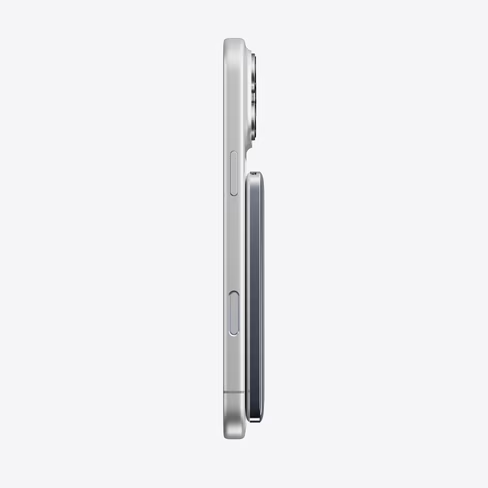
According to TORRAS, the MiniMag Pro maintains a surface temperature around 98°F (37°C) during sustained charging sessions, even under heavier loads.
That matters because magnetic wireless charging is convenient, but it is also notoriously prone to heat buildup. Anyone who has used a magnetic battery pack while traveling or multitasking has probably noticed it.
The MiniMag Pro approaches the issue differently by using a semi-solid-state battery architecture instead of a traditional lithium-ion setup.
Traditional lithium-ion batteries rely on liquid electrolytes. Semi-solid-state batteries replace part of that structure with a more stable gel-like material designed to improve thermal stability and reduce internal risks.
In plain English: less heat, better stability, and a lower chance of things going sideways under stress.
The technology also allows for denser battery packaging, which helps explain why the MiniMag Pro feels unusually thin for a magnetic charger.
Advertisement
The 5000mAh version comes in at just 8.5mm thick. The larger 10000mAh model is still only 14mm thick while supporting faster charging speeds and PPS support.
This is where the product starts to feel less like another Amazon accessory and more like an early example of where mobile power is headed.
Because the real innovation here is not necessarily faster charging. It is smarter charging.
Photo Credit: TORRAS
Advertisement
The era of “Invisible” tech accessories
The best tech accessories are increasingly the ones you stop noticing altogether.
Nobody wants to carry extra cables, bulky battery bricks, or overheating chargers anymore. Consumers want accessories that integrate into their lives with as little friction as possible.
That shift helped make magnetic charging mainstream. Snap a battery onto the back of your phone and keep moving.
The MiniMag Pro leans hard into that behavior. Its magnetic alignment system is designed for secure attachment during movement, allowing users to keep texting, navigating, filming, or streaming while charging one-handed.
Advertisement
Combined with the slim profile, it feels built for modern everyday carry culture rather than emergency-only battery backup.
That distinction matters.
Portable charging is evolving from “just in case” tech into an always-on companion product.
Safety is quietly becoming the new premium feature
There is another reason companies are suddenly investing more heavily in battery architecture: consumers are paying attention.
Advertisement
As devices become thinner and charging speeds get more aggressive, battery safety is no longer an invisible engineering problem. It is becoming part of the buying decision.
TORRAS says the MiniMag Pro underwent puncture testing and extreme pressure testing to validate thermal stability and structural integrity under stress.
Most consumers will never watch those test videos. But they will notice when a charger stays cooler in a backpack, charges more consistently during travel, or does not feel like it is cooking their phone battery over time.
That is increasingly where the premium accessory market is moving.
Advertisement
Not necessarily toward maximum power, but toward smarter thermal management, better materials, and products that feel more reliable over the long run.
Portable charging is entering its next phase
For years, portable power felt stagnant. Every new release promised the same thing: more battery, faster charging, smaller footprint.
Now the conversation is shifting.
Consumers are starting to care less about spec-sheet races and more about real-world experience. Does it overheat? Is it annoying to carry? Does it feel safe? Can it keep up with how people actually use smartphones today?
Advertisement
The MiniMag Pro feels designed around those questions.
And if semi-solid-state battery tech continues moving into mainstream accessories, this may be the beginning of a much bigger shift than just one magnetic power bank.
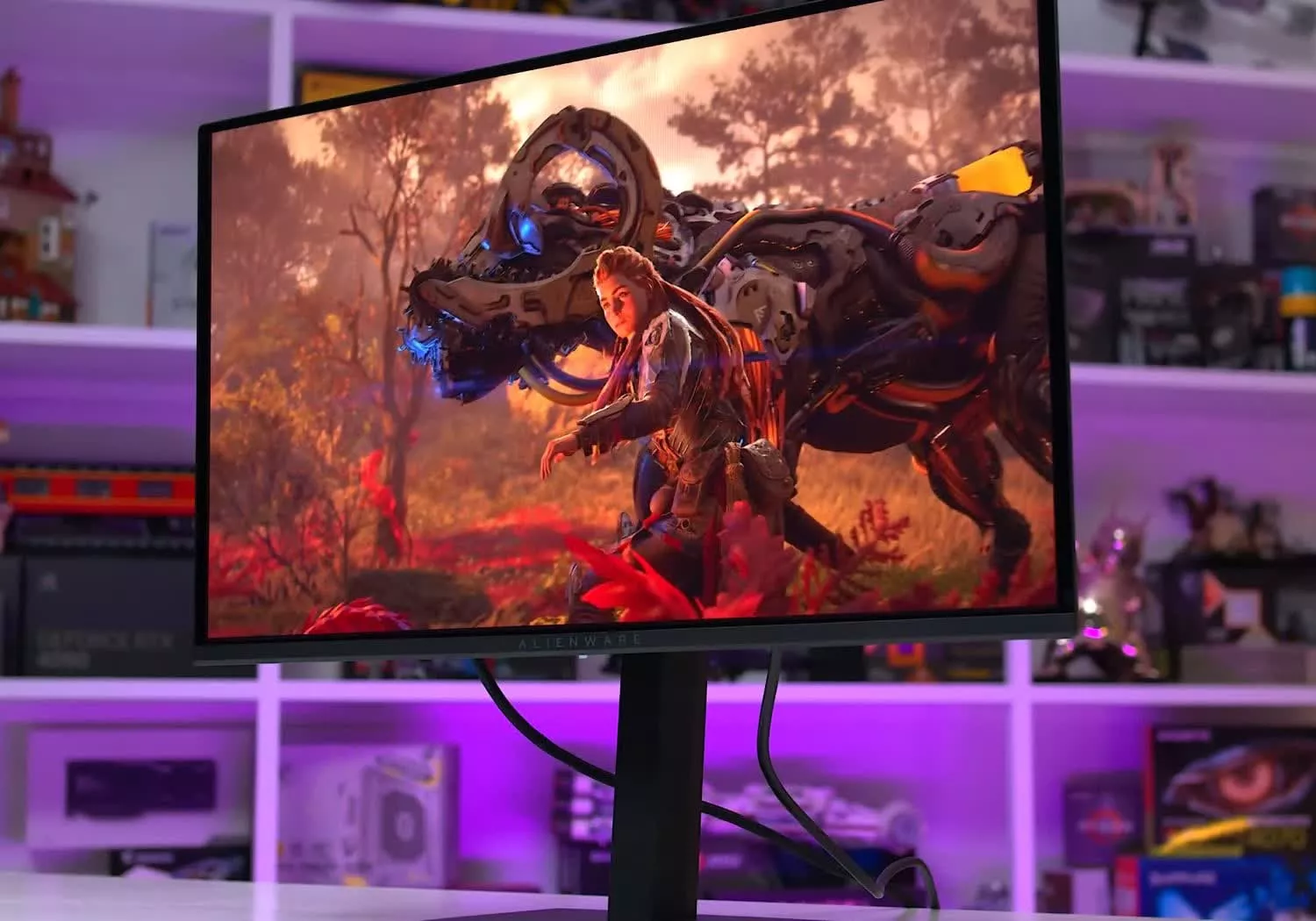
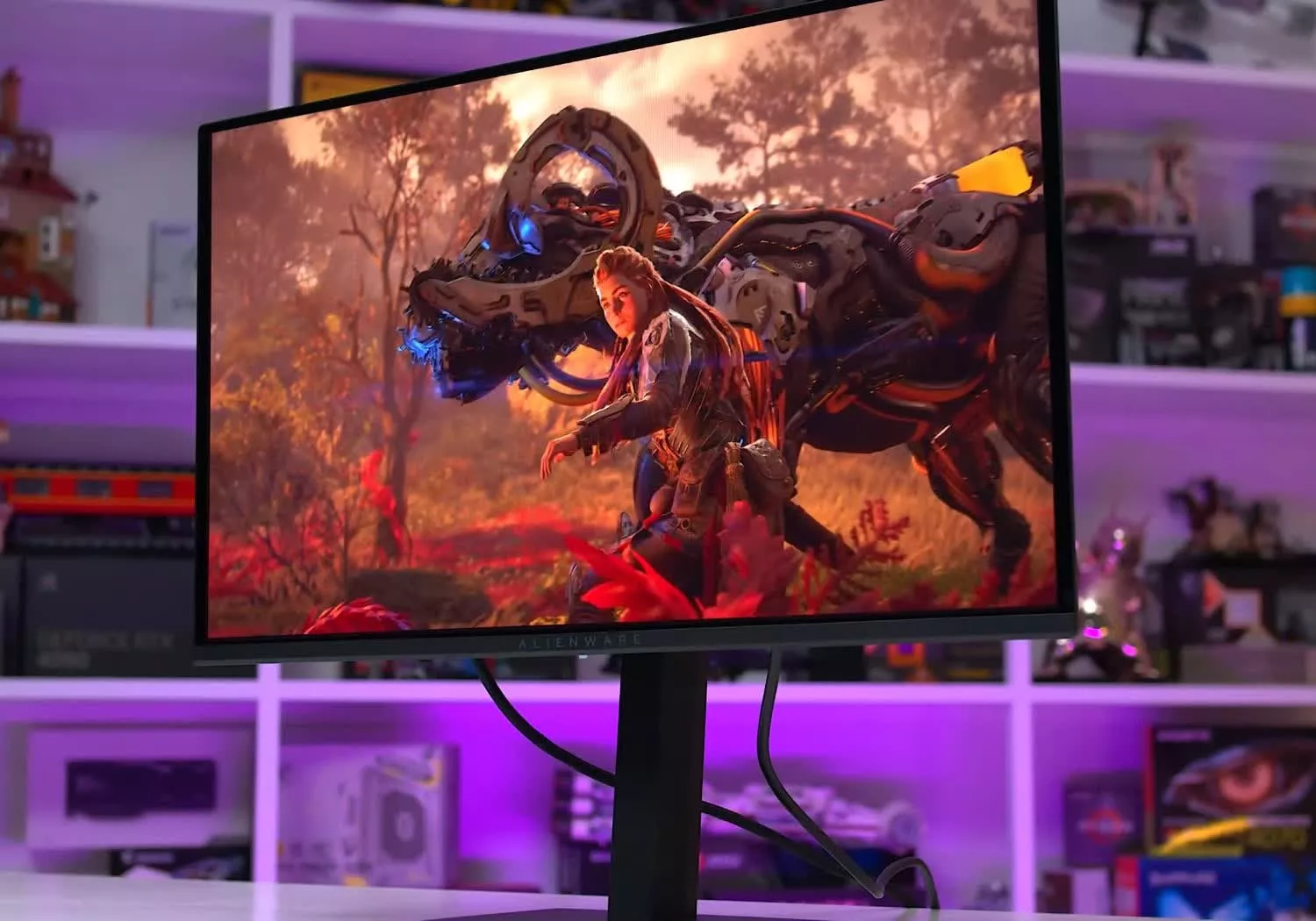
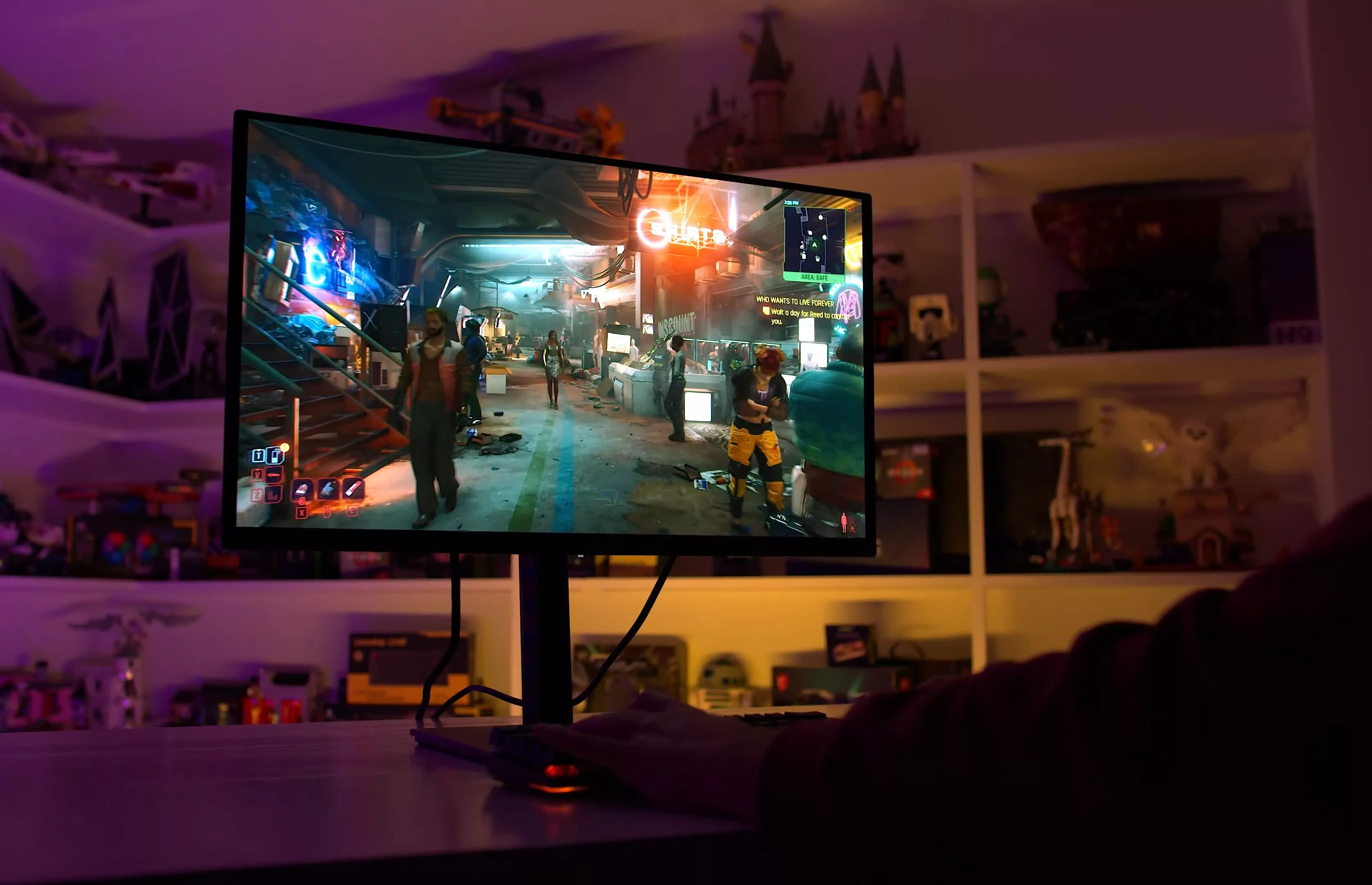
The Dell Alienware AW2726DM makes OLED gaming more accessible than ever with its aggressive $350 price point, while still delivering excellent motion clarity, deep contrast, and 240Hz refresh rates.
The 20-year-old filmmaker Kane Parsons has risen to the top so fast that he’s had zero time to process how far he’s come.
“It’s been go, go, go,” Parsons tells WIRED. “Even the tiniest bit of a break,” he says, would give him some better perspective on everything that’s happened over the past few years. But for the moment, he’s soaking up the limelight—and thinks it’ll be at least another month before he has the space to reflect on his big break.
Backrooms, a moody horror piece that stars Chiwetel Ejiofor and Renate Reinsve, is a cerebral expansion of Parsons’ atmospheric YouTube web series of the same name. It marks his feature debut as A24’s youngest director to date, at the helm of a movie long anticipated by a huge and hungry internet fan base. You could hardly ask for a better kick start to summer blockbuster season.
Yet Parsons makes his meteoric success sound like something of an accident. “I never went into making that first short or making the series with the intention of, ‘I want to do this so I can prove to Hollywood that this is an engine that is viable for a film,’” he says.
Advertisement
That original nine-minute video, titled “The Backrooms (Found Footage)” and uploaded by Parsons in 2022, was inspired by—of all things—a sinister 4chan meme that spawned a collaborative mythology. The 2019 post on the notorious image board’s /x/ forum included a disquieting photo of an empty hallway bathed in sickly light. An anonymous user described being transported into “the Backrooms, where it’s nothing but the stink of old, moist carpet, the madness of mono-yellow, the endless background noise of fluorescent lights at maximum hum-buzz, and approximately six hundred million square miles of randomly segmented empty rooms to be trapped in.”
“God save you if you hear something wandering around nearby, because it sure as hell has heard you,” the 4chan user added.
Other people took up the concept, creating spinoff imagery and stories on various social platforms. Parsons encountered these, as well as then-popular memes about surreal liminal spaces—the Backrooms being a paranormal extension of this phenomenon. He was intrigued by what this material evoked but felt it hadn’t been fully explored.
“It was clearly scratching something that I didn’t really see much other media scratching,” he says. “I think there was an element of like, I wish there was more for me to engage with here.”
Advertisement
To that end, Parsons decided to see whether he could conjure an immersive vision of the Backrooms with Blender 3D graphics software and Adobe After Effects. That initial video, in which a person is chased through the Backrooms by a malevolent life-form, went massively viral, with viewers marveling at Parsons’ technical skill and the chilling suspense he’d created. Fans excitedly speculated on the larger mythology of the uncanny setting. Within a month, studios were approaching Parsons with hopes for a full-length movie.
Although still a teenager at the time, Parsons knew enough to be wary of the offers. “I was very distrustful of pretty much everything that was happening, just because I feel like it’s a very common experience for that sort of event to turn into nothing,” he says. “Or you end up with less than nothing.”
Ultimately, however, he got what a young filmmaker dreams of: the chance to pursue his vision, in this case with top talent at his side. The feature film has a script by Homeland and Westworld writer Will Soodik, and its producers include horror maestros Osgood Perkins and James Wan.
We may receive a commission on purchases made from links.
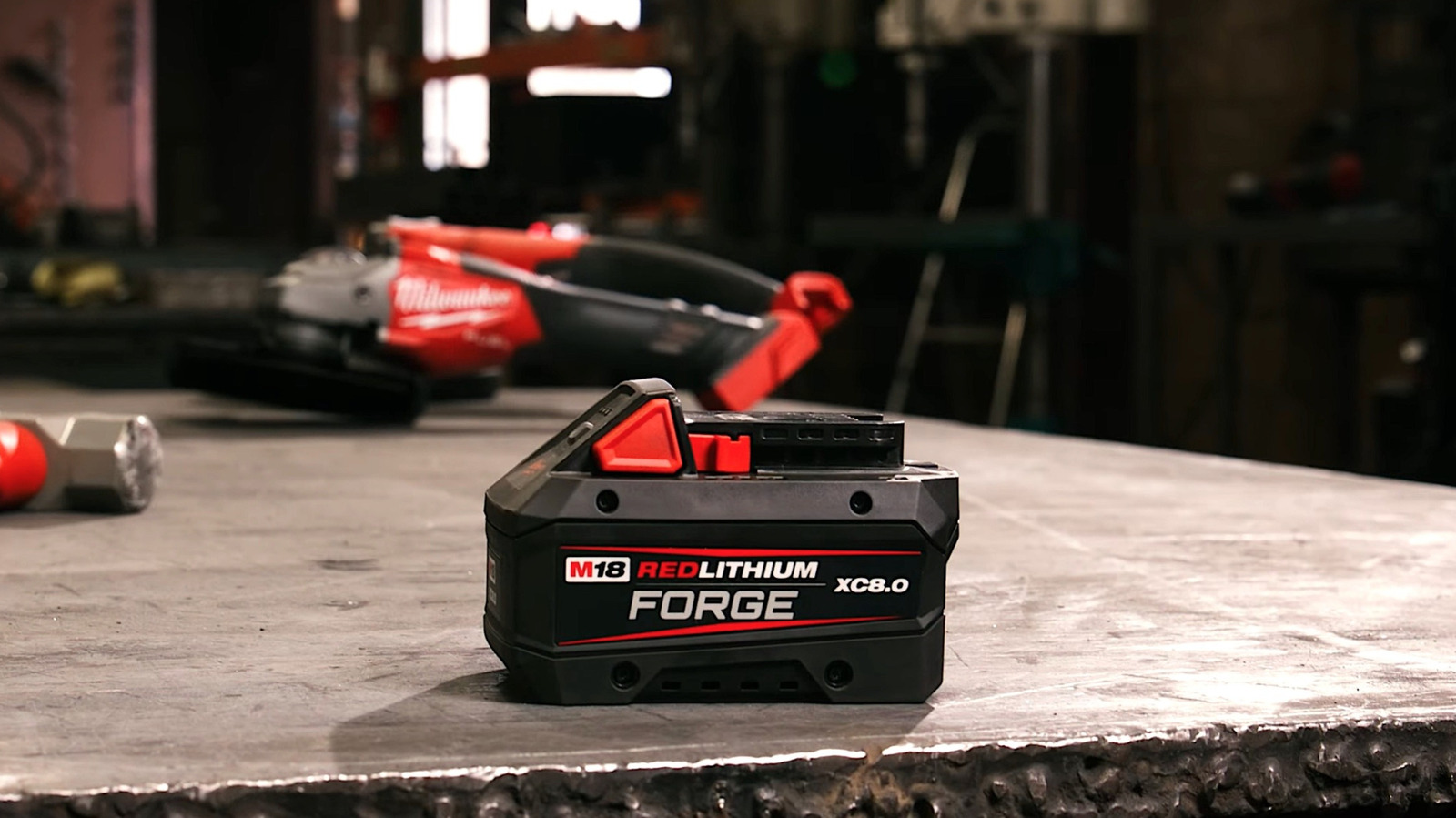
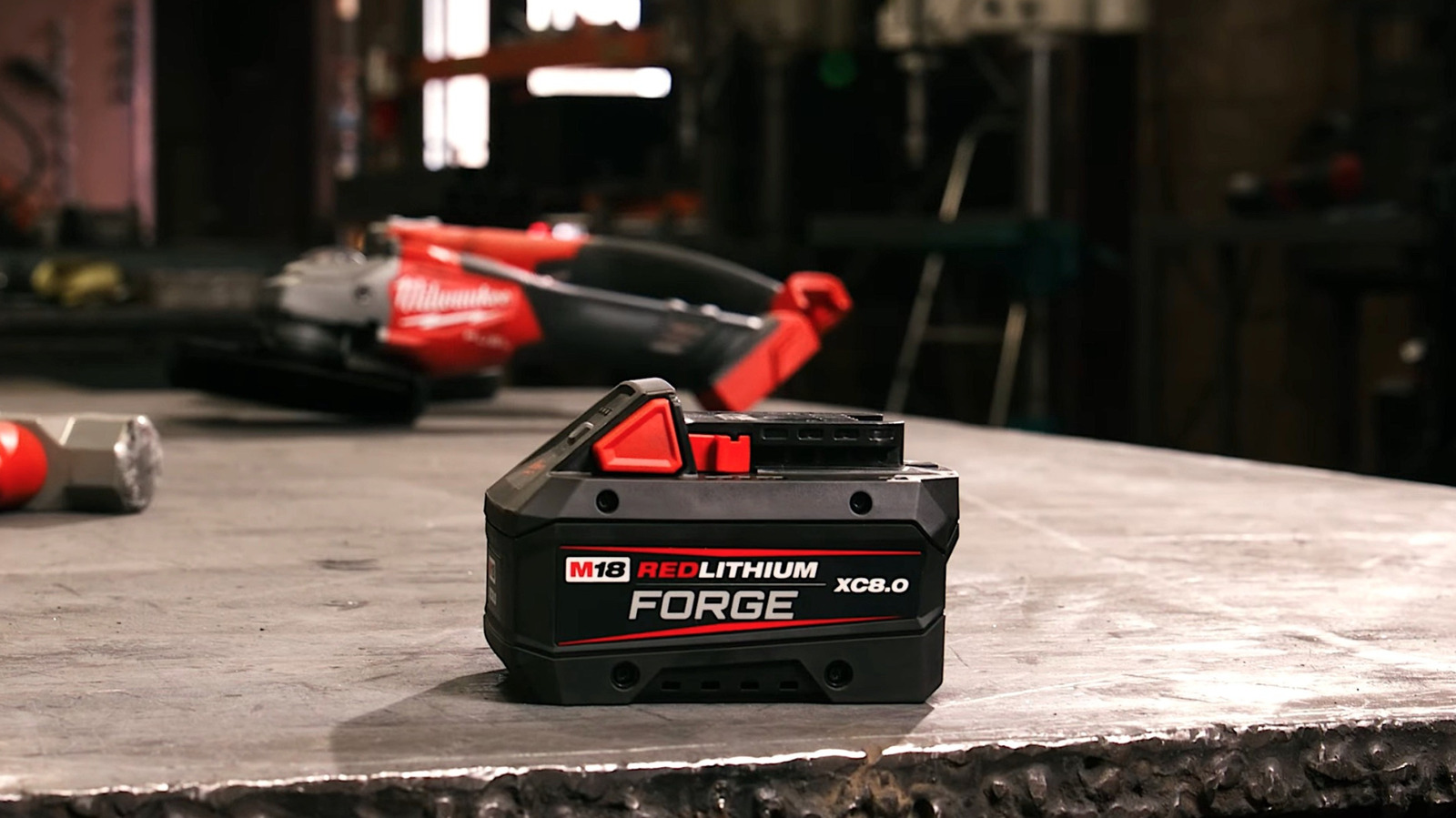
Milwaukee Tool has long been celebrated by worksite professionals and staunch DIYers for producing some of the most powerful and durable devices available on the consumer market. So much so that the brand is regularly singled out as one of the best in the entire power tool arena.
Advertisement
Indeed, if power and battery life are features you value highly in cordless tools, Milwaukee is a brand that should be on your radar, as its M18 lineup of powered tools and devices has earned a reputation for delivering serious on-the-job punch. Just like many other cordless tool lines with shareable power sources, Milwaukee’s M18 shingle has several models of rechargeable Lithium-Ion battery packs to choose from.
If you’re looking to make the most of those M18 tools, the battery packs bearing the Forge label would seem to be the best way to do so, with Milwaukee claiming that those batteries are designed to deliver not just maximum power to your tool, but also provide longer running times and faster charging times than other M18 power packs. Unfortunately, Forge batteries are priced on par with those desirable capabilities. Still, shoppers looking to buy a new device with a Forge battery should know that Milwaukee offers combo packages that include both the tool and the battery at a more palatable price point. Here are a few you should be aware of.
Advertisement
1. M18 FUEL 7-1/4 in. Circular Saw Kit with One Forge Battery, Charger and Tool Bag
For the record, yes, Milwaukee’s M18 Forge battery packs are designed to outperform even the brand’s M18 High-Output offerings. When paired with the brushless motors powering many of Milwaukee’s M18 tools, those batteries can boost performance beyond even the most fervent fans’ expectations. As noted, you do pay a premium price for that 12.0 Ah power upgrade, with a single 12 Ah Forge battery selling for upwards of $229 these days.
Still, if you have a shiny new Milwaukee M18 Fuel Circular Saw on your current power tool want list, you can package it with a Forge battery at The Home Depot for $449. That package set comes with an M18 rapid charger that also works with M12 batteries, and even a handy Milwaukee Tool-branded tool bag.
As for the saw, the 7 1/4-inch cutter is, of course, fitted with an 18V brushless motor and also boasts Milwaukee Redlink Plus intelligence to bolster performance and protect against malfunction. It’s also got a Magnesium shoe and guards to increase durability, as well as an integrated dust port and vacuum adaptor. According to Milwaukee, with an M18 Forge battery on board, it can perform approximately 750 cuts on a full charge. Customers seem to back up its overall quality, rating the saw 4.7 stars and largely praising it for being powerful, lightweight, and easy to use, even as some noted concerns about power and toughness.
Advertisement
2. M18 FUEL 16 in. String Trimmer with Forge Batteries and Charger
While lawn care equipment has not, historically, been Milwaukee’s bread and butter, the brand has developed a few impressive cordless devices over the years. If its 4.8-star user rating is any indication, its M18 Fuel 16 in. String Trimmer is just such a device, particularly when it’s paired with a Forge battery. And if you’re looking to add the string trimmer to your current arsenal of lawn care gear, The Home Depot is selling a combo kit that includes the tool, a couple of 8 Ah Forge batteries, and a rapid charger for $519.
Advertisement
In terms of cost, the 2 batteries and charger alone would put you close to that total, so this looks like a pretty good deal on paper, especially given the user rating. The only real knock against this kit is that the 8 Ah battery will reportedly provide only up to 24 minutes of use for the brushless motor powering that string trimmer. Even so, a pair should provide more than enough runtime to handle most trimmer tasks you can throw at the device in your backyard. Users seem to agree, praising the trimmer for its power, performance, variable speeds from its brushless motor, and ease of use.
Many also note that the QUIK-LOK feature — which allows for 13 interchangeable heads to be attached to the power arm — is a major plus. All in, that potentially makes this one of the more versatile offerings in M18’s Forge-compatible lineup.
Advertisement
3. M18 FUEL Super Sawzall Reciprocating Saw with FORGE Battery Pack
In the annals of construction history, few power tools have proven quite as game-changing as the reciprocating saw. That is particularly true for the Milwaukee Tool brand, as the Wisconsin-based outfit actually invented that tool back in the 1950s. That cutter hit the market bearing the name of Sawzall. More than seven decades later, it still goes by that name and remains a staple in Milwaukee’s power tool lineup, and over that span, it has received all the modern upgrades you’d expect, including the ability to couple with M18 Forge battery packs.
The M18 Sawzall has been widely embraced by those who’ve purchased it, with more than 1,600 users giving it a 4.8-star rating. That number speaks volumes to the quality of the device itself, which uses a variable 5-speed brushless motor, a QUIK-LOK blade clamp, and on-off orbital action, among other features. Though a couple of users noted durability concerns, the reviews for the device are overwhelmingly positive.
They also claim that the Forge battery is a massive boon to the already popular saw, providing major upgrades in power, run time, and performance. Now for the bad news: this kit includes just the Sawzall and a single 8 Ah Forge battery, so if you don’t have a charger on hand, you’ll need to invest in one. The good news is that The Home Depot is selling the combo pack for just $528, so the price point is still pretty inviting.
Advertisement
4. M18 FUEL Hammer Drill/Impact Driver Combo Kit with Forge Battery, Red Lithium Batteries, Charger and Case
Drills and drivers are about as essential as it gets for many a pro job and backyard project. It is such that pretty much every manufacturer in the game features several types of those tools available in their stable of devices. That list obviously includes Milwaukee Tool, which offers standard power drills and drivers, as well as more heavy-duty options like a hammer drill and an impact driver. If you’re looking for those latter two tools in the M18 mold, you should know that The Home Depot is offering a combo pack of both M18 drivers for $678.
Advertisement
That pack includes more than just a Hammer Drill and an Impact Driver, of course: a pair of 5 Ah battery packs, one multi-voltage charger, and a hard-shell carrying case big enough to hold both drivers. Oh, it comes with one 12 Ah Forge battery as well, making this a pretty comprehensive set of gear. Almost 1,800 users agree, rating the set 4.7 stars and largely praising both the devices and the batteries for their overall quality.
As for the tools themselves, both drill and driver are outfitted with brushless motors. The hammer drill is also just 6.9 inches, making it suitable for use in tight spaces. So too is the impact driver at just 4.47 inches in size. Stature aside, the driver is powerful too, delivering 2,000 in-lbs of torque and up to 3,900 RPM.
Advertisement
5. M18 FUEL Dual Battery 18V Blower with M18 Mower Kit, 12.0 AH FORGE Batteries, and Chargers
Circling back to lawn care, here’s a combo kit for the big ballers out there looking to keep their green scapes in tip-top shape with Milwaukee power. First, we should tell you we weren’t kidding with the “big baller” statement, as this combo pack is selling for $1,649 through The Home Depot. It does, however, include big-ticket M18 items: a 21-inch self-propelled lawn mower, a dual-battery blower, two 12 Ah batteries, two 12 Ah Forge batteries, one rapid charger, and one six-port Packout rapid charger.
The 21-inch mower accounts for roughly half the cost of the set, but when paired with the blower — which can deliver up to 145 MPH and 600 CFM of airflow — it’ll go a long way toward keeping your green spaces looking good. And yes, the M18 Forge batteries are designed to help ensure those devices are powered up when it’s time to touch up those spaces.
We should tell you, however, that users have rated the kit at 4.3-stars. That number is hardly damning, of course, but the primary issue seems to be that Milwaukee may still have some work to do in its lawn mower makeup. More precisely, the mowers may have durability issues, with one user noting they were woefully unimpressed with their plastic components. So that is one of several factors to consider before ponying up for this kit.
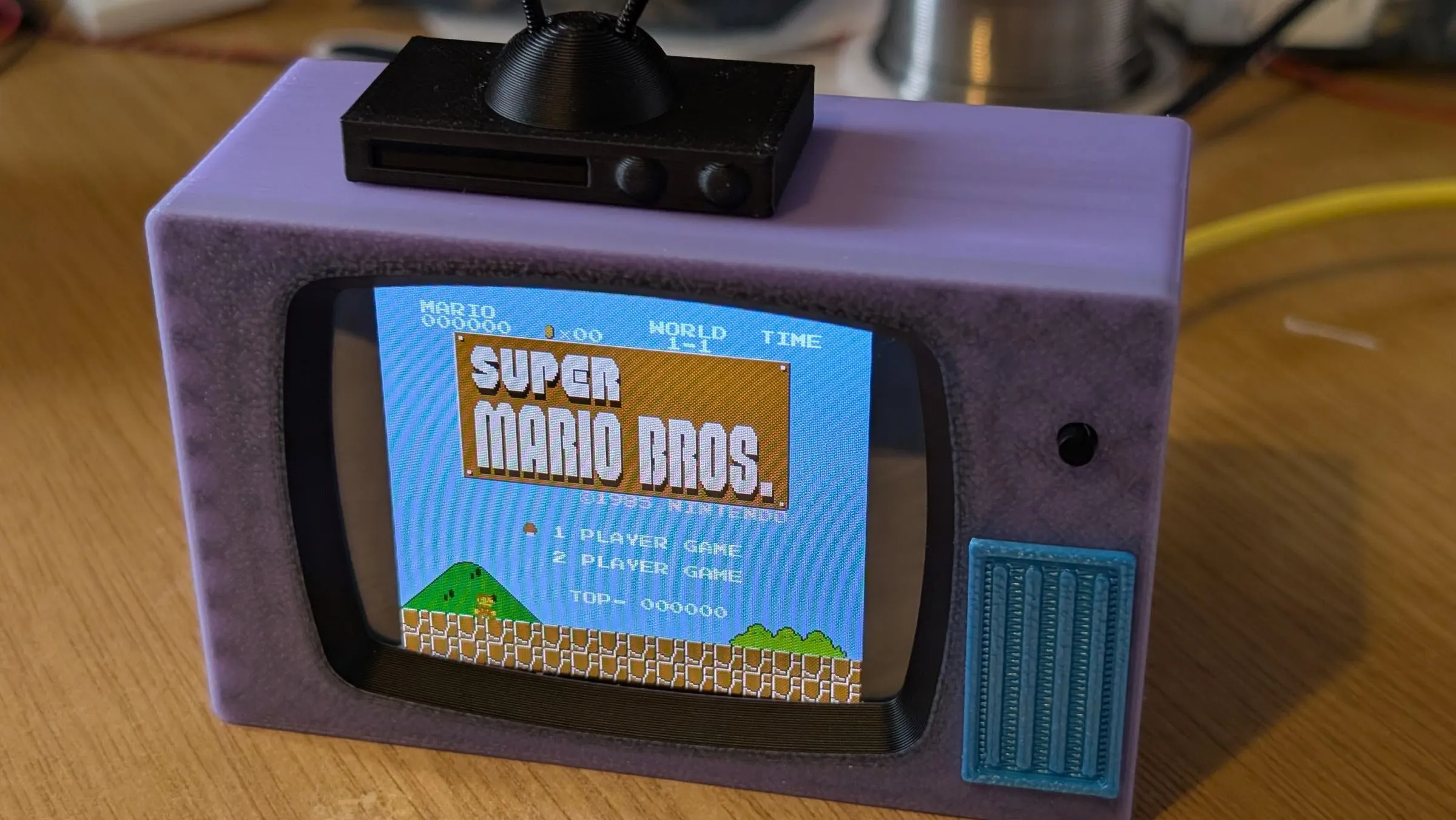
The ‘Cheap Yellow Display’, or CYD, is becoming a staple in these circles, and with good reason: just like the name says, it’s cheap, it has a display, and of course an ESP32 microcontroller to give it lots of brainpower. What it doesn’t come with is a lot of RAM, which was a problem for [DynaMite]’s project. What was there to do but solder on more PSRAM so the CYD could become a mini TV for retrogaming?
Depending what you want to play, you might not need the extra memory. In [DynaMite]’s case, he wanted to run Retro-Go, which opens up a lot more than just the standard NES emulator you can run on an unmodified CYD — including 16-bit systems like the SNES and Sega Genesis/MegaDrive or even DOOM. Adding the PSRAM is just a matter of getting the little chip onto an unpopulated footprint on the board, cutting some traces, and adding a bodge wire. It’s not nothing, but it’s not impossible.
While he was slinging solder, [DynaMite] also took the time to swap some resistors in a step that apparently does great things for the CYD’s sound output, which is… not great, from stock. For really good sound, you really need to break out I2S, but for a tiny game system this is doubtless good enough.
The whole thing goes into a lovely retro TV case that takes its design cues from The Simpsons, which is available via the link as a STEP file as well as STLs. He’s also got a vibe-coded video player application — think of it like the VCR, maybe —and a launcher that will switch betwixt that and the emulator or any other applications stored as .bin files on an SD-card. Check it out in action in the demo video below.
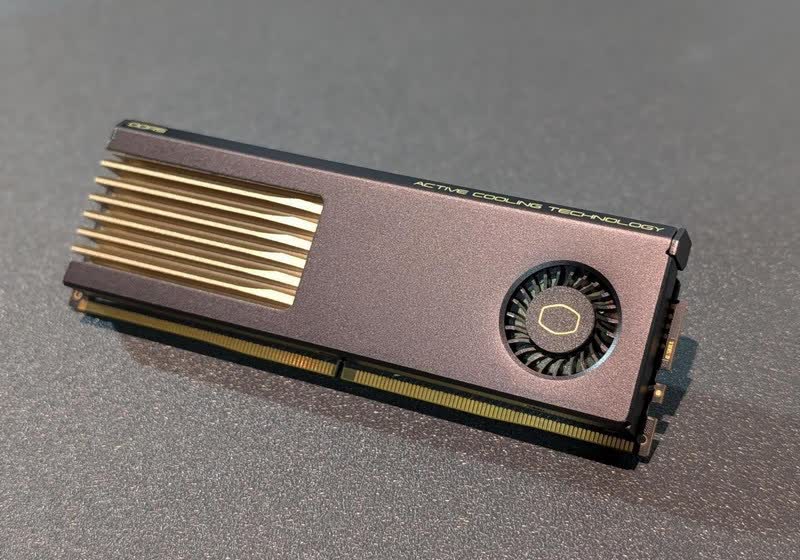
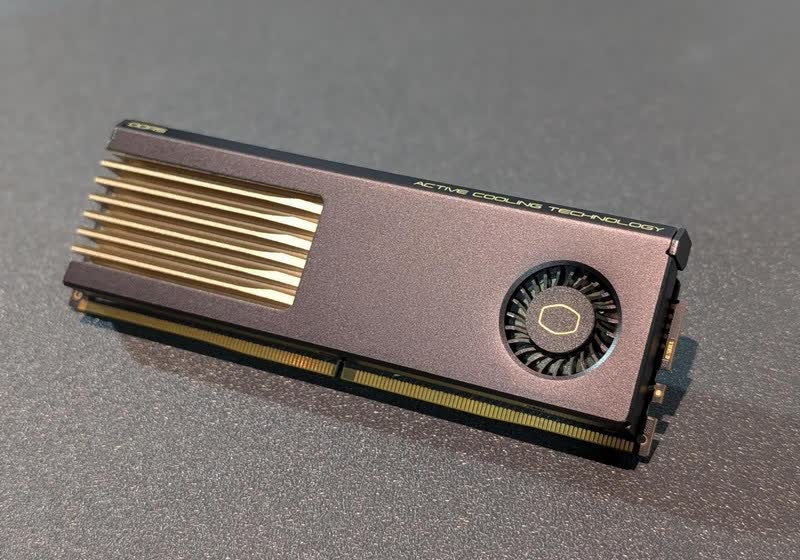
MasterDimm AC features what Cooler Master describes as “noise-optimized” blower fans that operate relatively quietly, with a maximum noise level of 35 dB at full speed. The companies claim that the patent-pending design can reduce operating memory temperatures by up to 15°C, helping ensure sustained performance, improved signal integrity, and… Read Entire Article Source link
The race to build the next great affordable laptop is heating up, and Acer thinks it has a strong contender. The company today unveiled the Swift Air 14, a thin-and-light Windows laptop that combines a premium design, AI-ready hardware, and impressive battery claims for a starting price of just $699.
At a time when even mainstream laptops are creeping toward four-figure price tags, Acer’s latest machine feels refreshingly straightforward. It’s aimed at students, remote workers, and anyone who wants a laptop that looks and feels expensive without draining their bank account. The Swift Air 14 is powered by Intel’s new Core Series 3 processors and delivers up to 19 hours of battery life. That’s the sort of endurance that could realistically get many users through a full workday and beyond without scrambling for a charger.
Acer is focusing on things people actually notice
Laptop makers love talking about processor benchmarks, but most buyers notice other things first. How heavy is it? Does it look good? Is the screen nice to use? Can the speakers fill a room? That’s where the Swift Air 14 appears to have its priorities in order. The laptop weighs just 1.19 kg and measures only 12.9 mm at its thinnest point, all while using an aluminum chassis that should feel significantly more premium than the plastic-heavy designs common at this price point. Acer is also bringing some personality to the lineup with four color options: Sage Green, Frost Blue, Blossom Pink, and Lilac Purple.
Acer
The display sounds promising as well. Acer has equipped the Swift Air 14 with a 14-inch WUXGA panel featuring a 120Hz refresh rate and 100% sRGB color reproduction. For students, creators, and everyday users, that’s a welcome upgrade over the dull screens that often plague budget laptops. Then there’s the audio. Acer says the laptop includes a quad-speaker setup with DTS:X Ultra support, a feature rarely highlighted in this segment but one that can make a noticeable difference when streaming movies, joining video calls, or listening to music.
The Swift Spin 14 AI raises the stakes
Acer wasn’t finished with just one Swift launch. The company also introduced the Swift Spin 14 AI, a more premium convertible aimed at users who need additional flexibility and performance. Powered by up to an Intel Core Ultra 9 processor 386H, the laptop features a dedicated NPU capable of up to 50 TOPS and up to 100 platform TOPS overall. It also supports stylus input through Wacom AES 2.0 technology, making it a potentially appealing option for artists, designers, note-takers, and hybrid professionals. Its 360-degree hinge allows it to switch between laptop, tablet, presentation, and display modes, while features like Wi-Fi 7, a 5MP IR camera, Copilot+ PC capabilities, and up to 26 hours of battery life round out a very ambitious package. Still, the more fascinating device may be the cheaper one.
Advertisement
Acer
The Swift Air 14 arrives at a moment when buyers are increasingly questioning whether they need to spend MacBook money for a great everyday laptop. Acer’s answer is clear: offer a premium metal design, long battery life, AI-powered features, and a modern display at a price that feels far easier to justify. The Acer Swift Air 14 is scheduled to launch in North America in August 2026, while the Swift Spin 14 AI will arrive during the same timeframe.
Acer is going straight after the MacBook Neo crowd
The comparison to Apple’s MacBook Neo feels impossible to ignore. Both laptops are targeting the same audience: students, first-time laptop buyers, and people who want something premium without spending MacBook Air money. Apple’s answer was a $599 machine with an aluminum design, an A18 Pro chip, up to 16 hours of battery life, and the familiar advantages of the macOS ecosystem.
Nadeem Sarwar / Digital Trends
Acer, however, is taking a different route. The Swift Air 14 undercuts many of the compromises associated with entry-level laptops by offering a 120Hz display, more connectivity options, a larger battery, quad speakers, and a wider range of color choices, all while staying in the same affordability conversation. According to Acer’s specifications, the laptop packs a 70Wh battery, dual Thunderbolt 4 ports, and a 120Hz WUXGA panel — areas where it arguably looks more ambitious than Apple’s budget MacBook on paper.
The real battle here isn’t Windows versus macOS. Which company can convince buyers that spending less no longer means settling for less?














































You must be logged in to post a comment Login