The Nevada Transportation Authority unanimously approved three permits Thursday that will allow Tesla, Uber, and Waymo to operate commercial robotaxi services in Clark County, home to Las Vegas. Together, these permits would deploy up to 8,000 robotaxis across the county over the next 12 months.
Tesla’s permit allows it to deploy up to 5,000 robotaxis, while Waymo is allowed operate up to 1,000 autonomous vehicles over the next year. Uber was also approved for 1,000 robotaxis, which it will operate through partnerships with Hyundai subsidiary Motional and Zoox. Zoox already holds an autonomous vehicle network company permit that allows it to operate 100 robotaxis.
Whether these companies will be able to launch that many robotaxis is an unanswered question. Testimony from Tesla representatives and the other companies suggests the answer is no.
Advertisement
“The 5,000 has always been a ceiling for us,” said Eric Early, Tesla’s Cybercab chief engineer, during the meeting. “I don’t think we’ll be in a position by this time next year to deploy 5,000 vehicles, and it’s not [because of] the technology. … I think we would be extremely happy and satisfied if we could get ourselves up to 2,500, maybe a bit higher than that in the next year.”
Even if these three companies roll out only half of those totals, Clark County — and Las Vegas specifically — is shaping up to be a major robotaxi battleground, with Tesla, Uber (via its autonomous vehicle partners Motional and Zoox), and Waymo all competing for the same riders.
That kind of fast, large-scale robotaxi deployment is poised to change the city — and specifically its workforce. Depending on who you ask, these companies will either deliver a whole new category of jobs designed to maintain, charge, and clean these vehicles or will wipe out an entire category of workers: human taxi and gig drivers.
Representatives from the Livery Operators Association and local taxi companies opposed the permits, arguing the approvals move too far, too fast.
Advertisement
“These applications raise two grave concerns,” said Kimberly Maxson-Rushton, a lawyer representing the Livery Operators Association, at the hearing. “One deals with the oversaturation of the commercial transportation industry as a whole in Nevada,” she said. “And the second one deals with the overcrowding of the roadways, and specifically the Golden Triangle.”
The Golden Triangle, an area between the airport and Las Vegas Boulevard and the surrounding area, is where most of the AV testing has occurred to date. Motional is also testing in the downtown area and in a shopping district known as Town Square.
Uber has tried to position itself as the Goldilocks option in this fight, advocating for a hybrid approach in which ride-hailing networks are made up of humans and robotaxis. The company has even lobbied for a system that would require robotaxis to operate on a ride-hailing network that also uses human drivers, a stance that puts it at odds with Waymo and doubles as a hedge against its own autonomous ambitions falling short of Tesla’s or Waymo’s.
Uber made a similar pitch during the NTA meeting, noting that a hybrid approach would allow cities to gradually integrate vehicles to meet peak demand rather than flooding the market all at once.
Advertisement
When you purchase through links in our articles, we may earn a small commission. This doesn’t affect our editorial independence.
A movie can be both “Filmed for IMAX” and shot with IMAX cameras, which is why the two labels are easy to confuse.
Aaronp/bauer-griffin/Getty Images
“Shot with IMAX” and “Filmed for IMAX” sound like two ways of saying the same thing. They aren’t, although IMAX’s own branding makes the difference less obvious than the names suggest. The simplest way to think about it is that shooting with IMAX film cameras describes the camera used to capture the movie, while “Filmed for IMAX” describes a broader production process built around an IMAX presentation.
A “Filmed for IMAX” movie can be shot digitally, as Dune was, but IMAX also includes productions using its own film cameras. Christopher Nolan’s The Odyssey shows the overlap: it was shot entirely with IMAX film cameras and is also officially part of the “Filmed for IMAX” program.
Advertisement
Shot with IMAX means using IMAX film cameras
Grusho Anna/Shutterstock
IMAX’s own marketing generally uses the more specific phrase “Shot with IMAX Film Cameras” rather than “Shot with/in IMAX.” In this case, the description is literal: filmmakers captured at least some of the movie using IMAX’s large-format film cameras.
IMAX film cameras use a 15-perf 65mm format. The 65mm film runs horizontally through the camera, with each frame spanning 15 perforations across the film. That creates the large, tall 1.43:1 image associated with IMAX film, meaning the image is about 1.43 times as wide as it’s tall. The camera film is 65mm, while theatrical release prints are 70mm, which is why those screenings are advertised as IMAX 70mm.
A movie doesn’t necessarily have to use IMAX cameras for the whole movie to receive the label. Oppenheimer, for example, was shot partly with IMAX film cameras, with those sequences expanding into the taller IMAX image in compatible theaters. The Odyssey goes further: IMAX says it is the first feature shot entirely with IMAX film cameras, helped by a newly-engineered camera enclosure that made synchronized dialogue scenes practical at that scale.
That makes The Odyssey a clear example of what people usually mean when they say a movie was “shot in IMAX”: every frame was captured with an IMAX film camera. Seeing it projected from an IMAX 70mm print, however, requires one of the select theaters equipped for that format.
Advertisement
Filmed for IMAX is a broader production program
Rneaw/Getty Images
IMAX’s “Filmed for IMAX” program begins in pre-production, when filmmakers choose either IMAX film cameras or IMAX-certified digital cameras. During production, they shoot with IMAX’s taller 1.90:1 or 1.43:1 aspect ratios in mind, while IMAX’s post-production team later works with them to optimize the movie for its theaters.
In 2020, IMAX launched a certification program for digital cinema cameras from manufacturers including ARRI, Panavision, RED and Sony. These aren’t cameras built by IMAX, but digital cinema cameras approved for use in the “Filmed for IMAX” workflow.
Dune shows how the digital side of the program works. Denis Villeneuve did not shoot the 2021 film on IMAX film cameras. It was captured using IMAX-certified digital cameras, but composed for IMAX presentation. In select theaters, parts of Dune expanded to 1.43:1, showing more of the image above and below than the wider theatrical presentation.
Advertisement
Other “Filmed for IMAX” releases show how much the presentation can vary. F1: The Movie was shot with IMAX-certified digital cameras and presented entirely in the 1.90:1 aspect ratio. Mission: Impossible: The Final Reckoning also used certified cameras, but only certain sequences expanded to 1.90:1 for over 45 minutes. In other words, “Filmed for IMAX” does not guarantee how much of the film will fill the taller screen.
The label alone doesn’t tell you which screening is better
ZikG/Shutterstock
A movie being shot with IMAX film cameras doesn’t automatically make every IMAX screening the better choice. The format used to capture the movie is only part of what determines the experience in the theater.
What matters next is how the movie is presented at that particular location. Not every IMAX theater can show the full 1.43:1 image. IMAX 70mm theaters can project that taller frame from film, while some IMAX with Laser auditoriums can also support 1.43:1. Other IMAX presentations may use the wider 1.90:1 presentation instead.
Advertisement
That means two theaters showing the same “Filmed for IMAX” movie can offer noticeably different presentations. A movie may contain 1.43:1 footage, for example, but you won’t necessarily see the full frame unless the auditorium is equipped to display it.
So if a movie has an expanded IMAX presentation, check the individual screening rather than relying on the badge alone. The bottom line is that you should look for IMAX 70mm or confirmation that the IMAX with Laser auditorium supports 1.43:1 before buying your ticket.
The U.S. Cybersecurity and Infrastructure Security Agency (CISA) ordered U.S. federal agencies to prioritize patching two actively exploited vulnerabilities in the TrueConf Server self-hosted communications platform.
TrueConf Server is designed for secure corporate messaging and video conferencing and, unlike cloud-based software like Zoom or Microsoft Teams, it operates inside an organization’s local network (LAN).
The most severe is a critical missing authentication security flaw (tracked as CVE-2026-72529) that allows attackers without privileges to remotely execute arbitrary scripts on unpatched servers.
“A remote unauthenticated attacker connecting to TrueConf Server over 4307/TCP can invoke an undocumented critical function and execute an arbitrary script on the server,” the TrueConf security team explains.
The second is another critical severity vulnerability (CVE-2026-72530) that unauthenticated threat actors can exploit through high-complexity code injection attacks to gain remote code execution.
Advertisement
“Improper management of code generation can allow an attacker who has achieved code execution in the TrueConf Server isolated environment to escape the sandbox and execute arbitrary commands on the underlying operating system,” TrueConf adds.
On Thursday, CISA added the two flaws to its KEV catalog and ordered U.S. Federal Civilian Executive Branch (FCEB) agencies to secure their servers within two weeks, by September 3.
“This type of vulnerability is a frequent attack vector for malicious cyber actors and poses significant risks to the federal enterprise,” the cybersecurity agency warned.
While CISA didn’t share details on these attacks, cybersecurity company Kaspersky said the Head Mare hacktivist group has been exploiting CVE-2026-72529 and CVE-2026-72530 since at least July 2026 to replace client installers with malicious versions designed to deploy backdoor malware.
Advertisement
According to Kaspersky, multiple Head Mare campaigns targeted Russian organizations across various industry sectors, including transportation, energy, IT, electronics, and software development.
In April 2026, Check Point Research also reported that hackers were targeting another TrueConf flaw (CVE-2026-3502) in zero-day attacks dubbed “Operation True Chaos” and linked to Chinese threat actors, compromising users via trojanized client updates.
Overall prevention scores can hide what happens after initial access. Once attackers are using valid credentials, prevention drops sharply.
The Blue Report 2026 measures defenses technique by technique across 338 million simulations run in customer production environments.
Written by: Farid Mustafayev, Cybersecurity Expert at ThreatLocker
Named pipes are a common choice for communication between applications running on the same Windows computer. They are fast, supported directly by the operating system, and work well for communication between Windows services, desktop applications, tray processes, command-line utilities, and background agents.
A typical design may include a privileged Windows service acting as the named-pipe server while a user-facing application connects as the client. Because both processes run on the same computer, developers often treat this communication as internal and therefore trusted.
In practice, the pipe is accessible from an environment where many unrelated processes may be running under different users, sessions, and security contexts.
Advertisement
Local Does Not Mean Trusted
Named pipes are often treated as private because they are used for communication between applications on the same computer. That assumption is unsafe.
A Windows workstation may run processes under LocalSystem, administrators, standard users, service accounts, and separate interactive or remote sessions. It may also contain third-party software, scripts, diagnostic tools, and malware operating under a compromised account.
Any process that knows the pipe name and has sufficient access rights can attempt to connect. Windows does not inherently know which executable the developer intended to use the pipe.
For that reason, a named pipe should be treated as an exposed local interface. Before processing a request, the application must determine who connected, what that identity is allowed to do, and whether the supplied data is safe.
Advertisement
Identity, Access Control, and Privilege Boundaries
The risk is greatest when a privileged Windows service communicates with a less privileged desktop application.
A service running as LocalSystem may be able to modify protected files and registry keys, launch processes, change system configuration, access other users’ data, or communicate with kernel drivers. When these operations are exposed through a named pipe, the pipe becomes an API to privileged functionality.
A successful connection proves only that the client was allowed to open the pipe. It does not prove that:
the client is the expected application;
the connected user is authorized;
the requested operation is permitted;
the supplied command is safe.
Pipe permissions should therefore be defined explicitly and restricted to the smallest appropriate set of identities. Broad permissions for Everyone, Authenticated Users, or all interactive users may allow unrelated processes to reach the pipe.
Authentication and authorization must also remain separate. A user may be allowed to query service status but not stop the service, change protected settings, launch processes, or access arbitrary files. Sensitive commands should be authorized individually.
Advertisement
Impersonation can help by performing operations under the client’s security context, but it must be handled carefully. The server should verify that impersonation succeeded, limit the work performed while impersonating, and always restore its original identity.
See how excessive permissions can turn AI tools into a serious security risk.
Learn how a practical Zero Trust strategy can help contain AI-enabled threats before they spread.
The client must verify the server just as the server verifies the client.
Advertisement
A predictable pipe name is only an identifier. It is not a secret and does not prove which process created the pipe. An attacker may create a pipe using the expected name before the legitimate server starts, causing the client to connect to an attacker-controlled process.
The first-pipe-instance option can help detect that the name has already been claimed, but it does not replace proper access controls or server identity verification.
Messages received through the pipe must also be treated as untrusted input. Even an authenticated client may send:
malformed or oversized payloads;
invalid file or registry paths;
unsupported command combinations;
corrupted serialized objects;
values designed to trigger error conditions.
A privileged service that converts such input directly into file, registry, process, or command-line operations may become a confused deputy: the attacker supplies the instruction, while the service supplies the privileges.
Requests should use strict message framing, bounded sizes, command allowlists, schema validation, path normalization, operation-specific authorization, and safe error handling.
Advertisement
Availability and Remote Exposure
Named-pipe security is not limited to privilege escalation and unauthorized commands.
A malicious or malfunctioning process may repeatedly connect, hold connections open, send incomplete messages, or submit requests that consume excessive CPU, memory, or kernel resources.
The server should use connection limits, timeouts, cancellation, bounded message sizes, controlled concurrency, and rate limiting where appropriate.
It is also unsafe to assume that every named pipe is reachable only from the local computer. Windows named pipes can support remote access in some configurations.
Advertisement
Pipes intended exclusively for local IPC should explicitly block network identities such as NT AUTHORITY\NETWORK, or use a mechanism that guarantees local-only communication.
The correct threat model is simple: every named-pipe connection should be considered potentially hostile until the client or server identity, permissions, requested operation, and message contents have all been verified.
When a Named Pipe Becomes a Security Boundary
A named pipe becomes a security boundary when the processes on its two ends run with different privileges or operate under different trust levels.
A common example is a Windows service running as LocalSystem and a desktop application running under a standard user account. The service may be able to modify protected files and registry keys, start processes, change system-wide configuration, access data belonging to other users, or communicate with a kernel driver. The desktop application normally cannot perform those operations directly.
Advertisement
When the service accepts commands through a named pipe, the pipe becomes an interface to those privileged capabilities. Any weakness in the pipe’s permissions, identity checks, command validation, or authorization logic can allow an untrusted local process to misuse the service’s privileges.
A successful connection does not prove that the client is the expected application. It proves only that the connecting process had sufficient permission to open the pipe. Another process running under the same user account may have exactly the same access. The server must therefore validate the security identity behind the connection rather than relying on the process name, executable path, or secrecy of the pipe name.
The server must also authorize each operation separately. A client that is allowed to request service status should not automatically be allowed to stop the service, modify protected configuration, launch a process, or request access to an arbitrary file.
Authentication determines who connected; authorization determines what that identity may do.
Advertisement
This distinction is especially important when the server processes client-controlled paths, command-line arguments, registry locations, executable names, or serialized commands. Without strict validation, the service can become a confused deputy: the client chooses the action, but the privileged service performs it.
For example, a seemingly harmless request such as:
Read file: C:\ProgramData\Product\status.json
may become dangerous if the client can replace the path with:
Read file: C:\Windows\System32\config\SAM
The same problem applies to requests that start processes, delete files, update registry values, install components, or communicate with a driver. The service must not merely validate that the command is syntactically correct. It must verify that the connected identity is permitted to perform that exact operation against that exact resource.
Advertisement
A secure named-pipe server should therefore apply several checks before executing a privileged request:
verify the connected client’s Windows identity;
restrict access through an explicit pipe security descriptor;
authorize each command independently;
validate all paths, arguments, identifiers, and payload sizes;
The last point is critical. A command such as “write this value to any registry key” creates a much larger attack surface than a narrowly defined command such as “update this specific application setting.” The more general the pipe protocol becomes, the more closely it resembles a privileged local API—and the more carefully it must be secured.
The correct design principle is straightforward: the pipe server must never perform an operation solely because a connected client requested it. It should perform the operation only after confirming who requested it, whether that identity is authorized, and whether the request stays within narrowly defined security boundaries.
Access Control and Client Authorization
A named-pipe server should decide who may connect before it begins processing messages. This starts with an explicit security descriptor that grants access only to the required Windows identities, such as a particular user SID, service account, administrator group, or logon session.
The pipe’s DACL controls access to both ends of the named pipe. When a client attempts to connect, Windows compares the client’s access token and requested rights with that DACL. Relying on the default descriptor is risky because its permissions may be broader than the application requires.
Advertisement
Access to the pipe does not automatically authorize every available command. A client may be allowed to retrieve status information while being denied permission to modify configuration, start processes, or access protected files. Authorization should therefore be performed for each sensitive operation rather than only once when the connection is established.
For local application-to-application communication, the applications can also inspect the process associated with the opposite end of the pipe:
the server can call GetNamedPipeClientProcessId;
the client can call GetNamedPipeServerProcessId.
These Windows APIs return the process identifier associated with the connected client or server. They should be called only after the pipe connection has been established.
The following C# helper retrieves the peer PID using native Windows APIs:
We can also call another function from kernel32.dll, QueryFullProcessImageName, to retrieve the executable path from a process handle opened with PROCESS_QUERY_INFORMATION or PROCESS_QUERY_LIMITED_INFORMATION. The returned path can then be compared with the expected executable location as an additional verification step.
Advertisement
On the server side, verification should occur immediately after accepting the connection and before reading or executing commands:
The expected executable should be located in a directory that standard users cannot modify. Otherwise, an attacker may replace the file while retaining the expected path.
For stronger verification, the application can additionally validate the executable’s Authenticode signature or compare it with an approved cryptographic hash. Windows provides WinVerifyTrust for validating signed executable files.
However, a PID and executable-path check must remain a secondary control rather than the primary authorization mechanism. Security research has demonstrated ways to spoof the PID reported for a named-pipe client and ways to transfer a connected pipe handle to another process. The returned PID may identify the process that opened the connection without proving which process is currently sending every message.
Advertisement
A secure implementation should therefore combine several controls:
an explicit and restrictive pipe DACL;
verification of the client’s Windows identity or SID;
authorization for each privileged command;
strict validation of message contents;
optional PID, executable-path, signature, or hash verification as defense in depth.
The connection should be rejected whenever identity verification fails or cannot be completed. A privileged service should never fall back to accepting the request merely because the pipe connection itself succeeded.
Impersonation and Privileged Operations
A named-pipe server often runs with more privileges than the client connected to it. For example, a Windows service may run as LocalSystem, while the client application runs under a standard user account. If the service performs every requested operation under its own identity, the client may indirectly gain access to files, registry keys, processes, and system resources that it could not access directly.
Named-pipe impersonation allows the server to temporarily execute code under the security context of the connected client. Windows then evaluates resource access using the client’s token rather than the service account’s token.
In .NET, NamedPipeServerStream.RunAsClient provides a controlled way to impersonate the connected client:
Advertisement
server.WaitForConnection();

server.RunAsClient(() =>
{
    string path = @"C:\ProgramData\MyApplication\settings.json";

    // Access is checked using the connected client's identity.
    string content = File.ReadAllText(path);

    ProcessClientData(content);
});
This approach is useful when the client should be able to perform an operation only if its own Windows account already has permission. For example, impersonation can be used when reading a user-owned file, accessing a user-specific registry key, or validating whether the client has access to a protected resource.
However, impersonation is not a replacement for authorization. A server should still verify that the client is allowed to request the operation. Impersonation only changes the security context under which Windows performs access checks; it does not determine whether the command itself is appropriate.
A privileged service should also avoid switching unnecessarily between the client identity and the service identity. Consider a request that asks the service to read a file and then install its contents as configuration.
The file may be read while impersonating the client, but the installation may occur later under LocalSystem. In that case, the client can still influence a privileged operation even though part of the request was processed under impersonation.
Advertisement
The safer design is to separate the operation into clearly defined stages:
Authenticate and authorize the client.
Validate all client-controlled paths, arguments, and data.
Impersonate only for operations that should use the client’s permissions.
Return to the service identity before performing narrowly defined privileged work.
Revalidate any data crossing from the impersonated stage into the privileged stage.
The impersonation scope should be as small as possible. Long-running work, callbacks, asynchronous operations, and unrelated service logic should not execute under the client’s identity.
When native Windows APIs are used, the same pattern applies:
The server must check whether ImpersonateNamedPipeClient succeeded and must always call RevertToSelf in a finally block:
if (!ImpersonateNamedPipeClient(server.SafePipeHandle))
{
    throw new Win32Exception(Marshal.GetLastWin32Error());
}

try
{
    // Runs under the connected client's security context.
    PerformClientScopedOperation();
}
finally
{
    if (!RevertToSelf())
    {
        throw new Win32Exception(Marshal.GetLastWin32Error());
    }
}
Failure handling is critical. If impersonation fails and the service continues processing, the operation may execute under the service’s original privileged identity. A failed impersonation attempt must therefore cause the request to be rejected rather than silently falling back to the server account.
Advertisement
The same principle applies after impersonation. The application must reliably restore its original identity before processing another client or performing unrelated work. Otherwise, later operations may accidentally execute under the previous client’s context.
Privileged pipe commands should also be narrow and purpose-specific. A command such as:
Write any value to any registry key
creates a much larger attack surface than:
Update the application's approved policy setting
The service should not expose general-purpose file access, registry modification, process creation, or command execution merely because it can perform those operations. Each privileged command should define exactly which resources may be accessed, which values are accepted, and which client identities may invoke it.
Advertisement
Impersonation is most effective when used as one layer in a broader security design. The server should still enforce restrictive pipe permissions, verify the connected client, authorize each command, validate every request, and keep privileged operations narrowly scoped.
Treating Pipe Messages as Untrusted Input
Verifying the process connected to a named pipe does not make its messages safe. The legitimate application may be compromised, contain a vulnerability, or pass user-controlled data to the pipe. A malicious process may also obtain or inherit a valid pipe handle.
For this reason, every message received through a named pipe should be treated as untrusted input. The server should validate both the structure of the message and the operation it requests before performing any privileged action.
A dangerous implementation may deserialize a request and execute it directly:
Even when request has the expected structure, values such as Path and Content remain controlled by the client. A privileged service could therefore be instructed to overwrite files outside the application directory, modify protected configuration, or consume excessive disk space.
The safer approach is to expose narrowly defined commands and validate every field:
private static void ProcessRequest(PipeRequest request)
{
    if (request == null)
        throw new InvalidDataException("The request is missing.");

    switch (request.Command)
    {
        case PipeCommand.UpdateConfiguration:
            ValidateConfiguration(request.Configuration);
            UpdateApprovedConfiguration(request.Configuration);
            break;

        case PipeCommand.GetStatus:
            ReturnApplicationStatus();
            break;

        default:
            throw new InvalidDataException("Unsupported command.");
    }
}
The protocol should avoid general-purpose operations such as:
These commands allow the client to choose both the privileged operation and its target. Prefer application-specific requests whose permitted behavior is controlled by the server:
A named-pipe connection is a byte stream unless the application deliberately uses message transmission mode. A single Read call is not guaranteed to return the complete application message, and the server should not assume that read boundaries correspond to request boundaries.
The protocol should define explicit message framing, such as a fixed-size header followed by a length-prefixed payload:
[Version][Command][Payload Length][Payload]
The declared length must be validated before allocating memory or reading the payload:
private const int MaxMessageSize = 1024 * 1024;

private static async Task ReadPayloadAsync(
    Stream pipe,
    int payloadLength,
    CancellationToken cancellationToken)
{
    if (payloadLength < 0 || payloadLength > MaxMessageSize)
        throw new InvalidDataException("Invalid payload length.");

    byte[] payload = new byte[payloadLength];
    int offset = 0;

    while (offset < payload.Length)
    {
        int read = await pipe.ReadAsync(
            payload,
            offset,
            payload.Length - offset,
            cancellationToken);

        if (read == 0)
            throw new EndOfStreamException(
                "The pipe was closed before the message was complete.");

        offset += read;
    }

    return payload;
}
Without a maximum size, an attacker may declare a very large payload and force the service to allocate excessive memory. The application should also limit collection sizes, string lengths, nesting depth, and the number of objects accepted by the deserializer.
Advertisement
Validate Values, Not Only Types
Successful deserialization proves only that the payload could be converted into the expected object type. It does not prove that the values are acceptable.
For example, a file path should be normalized and checked against an approved directory:
private static string ValidatePath(
    string suppliedPath,
    string allowedDirectory)
{
    string fullPath = Path.GetFullPath(suppliedPath);
    string fullDirectory = Path.GetFullPath(allowedDirectory)
        .TrimEnd(Path.DirectorySeparatorChar)
        + Path.DirectorySeparatorChar;

    if (!fullPath.StartsWith(
            fullDirectory,
            StringComparison.OrdinalIgnoreCase))
    {
        throw new UnauthorizedAccessException(
            "The requested path is outside the allowed directory.");
    }

    return fullPath;
}
The same principle applies to registry paths, process arguments, URLs, identifiers, update packages, and configuration values. The server should validate each value against an allowlist or a narrowly defined range rather than attempting to block known-dangerous values.
Path checks also require care around symbolic links, junctions, reparse points, and time-of-check/time-of-use races. For sensitive file operations, validating a string path alone may not be sufficient.
Advertisement
Reject Invalid Requests Safely
Malformed or unauthorized messages should be rejected without continuing with partial processing. The server should avoid returning stack traces, internal paths, security tokens, or detailed exception information to the client.
Errors sent through the pipe should use a small, controlled set of response codes:
public enum PipeResult
{
    Success,
    InvalidRequest,
    Unauthorized,
    UnsupportedCommand,
    InternalError
}
Detailed diagnostic information may be written to protected service logs, while the client receives only the information required to handle the failure.
Each request should therefore pass through a predictable sequence:
Advertisement
Read a bounded message.
Validate the protocol version and message structure.
Authenticate and authorize the connected client.
Validate every client-controlled value.
Execute only a narrowly defined operation.
Return a controlled response.
A named pipe is only the transport mechanism. It does not make the data trustworthy, guarantee correct message framing, or prevent a connected process from sending malicious requests. The receiving application remains responsible for enforcing the protocol and protecting every operation exposed through it.
Denial-of-Service and Remote-Access Risks
A named-pipe endpoint may be protected against unauthorized commands and still remain vulnerable to denial-of-service attacks. An attacker does not always need permission to perform a privileged operation; preventing legitimate applications from communicating with the service may be enough to disrupt the product.
A malicious or malfunctioning process can repeatedly connect to the pipe, occupy all available instances, hold connections open without sending complete messages, or continuously reconnect after being disconnected. Once every server instance is occupied, legitimate clients may be unable to establish a connection.
The same risk exists after a connection is accepted. A client may send data extremely slowly, declare an oversized payload, stop halfway through a message, or flood the server with valid but expensive requests. Without limits, these behaviors can consume threads, tasks, memory, CPU time, handles, and internal request queues.
Named-pipe buffers also consume kernel nonpaged pool. The number of pipe instances and the amount of buffered data are therefore limited by system resources. Creating an unrestricted number of instances or selecting unnecessarily large buffers can contribute to resource exhaustion.
Advertisement
A defensive server should establish clear limits for:
simultaneous connections and pipe instances;
message and field sizes;
time allowed to establish and complete a request;
pending requests per client;
concurrent expensive operations;
request frequency;
internal queue capacity.
Blocking operations should support cancellation and should not wait indefinitely for the client to send more data. When a client exceeds a time, size, or request limit, the server should terminate that connection and release its resources promptly.
Limits should be applied before expensive work begins. For example, the server should reject an excessive declared payload size before allocating the corresponding buffer. Similarly, authorization and basic request validation should occur before disk access, process creation, cryptographic work, database queries, or communication with a kernel driver.
The application should also avoid creating one unrestricted worker thread for every connection. A bounded concurrency model prevents a large number of connected clients from exhausting the process’s thread pool or creating an uncontrolled backlog. Rate limits may be applied per connection, process, user identity, or logon session, depending on the application architecture.
However, availability controls must not rely only on the client PID. A process can repeatedly restart, use multiple processes, or establish connections under the same user account. Several signals may need to be considered together, and the server must retain a global limit even when per-client controls are present.
Advertisement
Another commonly overlooked risk is remote accessibility. Windows named pipes are not necessarily restricted to communication within the local computer. They can also support communication between computers over a network, and Microsoft states that named pipes may be remotely accessible when the Windows Server service is running.
This means that using a local pipe name does not, by itself, guarantee local-only communication. A pipe intended for communication between a local service and a local desktop application should enforce that requirement explicitly.
Native pipe servers can specify PIPE_REJECT_REMOTE_CLIENTS, which causes Windows to reject remote connections automatically. Without that option, remote clients may be accepted and evaluated against the pipe’s security descriptor.
The pipe’s access-control list can also deny access to the NT AUTHORITY\NETWORK identity. Where access must be restricted to one interactive session, the server can grant access to the appropriate logon SID rather than to broad groups shared by local and remote users.
Advertisement
These protections should be combined rather than treated as alternatives:
reject remote clients at pipe creation when the API supports it;
deny network identities in the pipe security descriptor;
grant access only to the required users or logon sessions;
verify the identity of the connected process;
apply connection, timeout, size, and concurrency limits.
Denial-of-service protection and remote-access restrictions are part of the pipe’s security model. A named-pipe server is not secure merely because unauthorized commands are rejected. It must also remain available to legitimate clients and enforce whether connections are allowed to originate outside the local computer.
Designing a Secure Named-Pipe Architecture
A secure named-pipe design should minimize both the number of exposed operations and the amount of privileged code that directly processes client-controlled data. The pipe should act as a narrow communication boundary, not as a general-purpose interface to the operating system.
A practical architecture separates connection handling, validation, authorization, and privileged execution:
The client should never communicate directly with general-purpose privileged functionality. Instead, it should submit a narrowly defined request to the pipe gateway. The gateway validates the message format and passes only a structured request to the authorization layer. Privileged work begins only after all security checks succeed.
Advertisement
Keep the Pipe Protocol Narrow
The pipe protocol should expose business operations rather than operating-system primitives.
For example, an application may legitimately need to request a policy refresh, install an approved update, obtain service status, or update a specific configuration value. It normally does not need unrestricted commands for writing arbitrary files, modifying arbitrary registry keys, launching arbitrary executables, or executing command-line instructions.
Narrow operations make authorization and validation practical. The server knows which resources each command may access, which fields are expected, and which client identities may invoke it.
A good protocol should include:
Advertisement
an explicit protocol version;
a fixed set of request types;
unique request identifiers;
bounded payload sizes;
predictable response and error formats;
clear rules for unsupported or malformed messages.
The server should reject unknown versions, commands, fields, and states rather than attempting to interpret them leniently.
Separate Connection Access From Command Permission
Permission to connect to the pipe should not imply permission to use every feature exposed through it.
The pipe’s security descriptor should restrict which Windows identities can establish a connection. After connection, the server should identify the client and authorize each command independently.
This makes it possible to support different trust levels through the same service. For example, ordinary users may be allowed to query status, while only administrators or a trusted management process may modify protected settings.
For especially sensitive operations, using separate named pipes may be preferable:
Advertisement
Product.Status       Read-only information
Product.UserActions  Limited user operations
Product.Admin        Administrative operations
Product.Internal     Trusted component communication
Each pipe can then have its own access-control rules, message limits, and supported command set. This is usually safer than placing every operation behind one large protocol and relying entirely on internal command checks.
However, creating additional pipes does not automatically improve security. Each new endpoint increases the attack surface and must be independently protected. Pipes should be separated only when they represent genuinely different trust boundaries.
Use Multiple Layers of Identity Verification
No single identity check should be treated as conclusive.
The architecture may combine:
Advertisement
a restrictive pipe DACL;
the connected user’s SID;
the client’s logon session;
the peer process ID;
the executable path;
the executable’s digital signature;
application-level challenge and response;
operation-specific authorization.
Process ID and executable-path checks can help detect unexpected applications, but they should remain defense-in-depth controls. Processes can change, handles can be inherited or transferred, and a trusted process may itself be compromised.
The strongest decisions should be based on Windows security identities and narrowly defined permissions, not only on the apparent executable name.
Isolate Privileged Execution
The component responsible for reading pipe messages should perform as little privileged work as possible.
Connection handling, deserialization, framing, and basic validation are exposed to attacker-controlled input. Keeping this logic separate from privileged operations reduces the impact of a parser or protocol vulnerability.
The privileged operation layer should receive only validated, strongly typed instructions. It should not receive raw message buffers, arbitrary paths, command lines, or serialized objects directly from the client.
Advertisement
For highly sensitive applications, the design can go further by separating the pipe gateway and privileged worker into different processes. The gateway can run with reduced privileges, validate incoming requests, and forward only approved operations to a smaller privileged component through a second restricted channel.
This additional process boundary increases complexity, but it can significantly reduce the amount of attack-facing code running as LocalSystem or another powerful account.
Control the Lifetime of Every Connection
Each accepted connection should have a clear and bounded lifecycle:
Accept the connection.
Identify and validate the peer.
Apply connection-level restrictions.
Read a bounded request.
Authorize and validate the requested operation.
Execute the approved action.
Return a controlled response.
Disconnect or wait for the next bounded request.
The server should not allow unauthenticated clients to hold connections indefinitely. Idle timeouts, request deadlines, connection limits, cancellation, and bounded queues should be part of the architecture from the beginning.
Long-running operations should not keep the pipe’s reader blocked unnecessarily. The service may accept the request, assign an operation identifier, and allow the client to query progress through a separate status request. This prevents one connection from monopolizing server resources.
Advertisement
Make the Server Authoritative
The client should request an outcome, while the server determines how that outcome is achieved.
For example, the client may request installation of an approved update by identifier. The server should resolve the package location, verify its signature, determine the installation command, and enforce the permitted destination. The client should not supply the executable path, download URL, command-line arguments, and target directory.
This keeps security-sensitive decisions inside the trusted component and reduces the number of client-controlled values crossing the privilege boundary.
The server should also avoid trusting security decisions previously made by the client. Claims such as “the user is an administrator,” “this file is signed,” or “this path is safe” must be independently verified by the server.
Advertisement
Audit Security-Relevant Activity
A secure architecture should record enough information to investigate suspicious behavior without exposing sensitive data.
Useful audit events include:
rejected connections;
failed identity checks;
unauthorized commands;
malformed or oversized messages;
repeated timeouts;
unexpected process identities;
privileged operations and their results;
abnormal connection or request rates.
Logs should identify the Windows user, session, peer PID, command type, and result where appropriate. Raw secrets, authentication tokens, and complete sensitive payloads should not be written to logs.
Repeated failures may indicate an attack, but they may also reveal a defective client version or deployment issue. Audit data should therefore support both security investigation and operational troubleshooting.
Recommended Architecture
For most privileged Windows service scenarios, a defensible design consists of:
Advertisement
a local-only named pipe with an explicit security descriptor;
separate endpoints for materially different trust levels;
verification of both the Windows identity and the peer process;
a versioned, length-bounded, application-specific protocol;
authorization for each command;
strict validation of every client-controlled value;
short and carefully controlled impersonation scopes;
a small privileged execution layer;
bounded connections, queues, and execution time;
security-focused audit logging.
The central principle is that the named pipe should expose the smallest possible interface between trust levels. A secure architecture does not attempt to make arbitrary privileged operations safe. It avoids exposing arbitrary privileged operations in the first place.
Practical Named-Pipe Security Checklist
Before exposing application functionality through a named pipe, verify that the design addresses each of the following areas:
Define the trust boundary. Treat the pipe as an exposed local interface, especially when one side runs with elevated privileges.
Restrict pipe access explicitly. Use a narrow security descriptor instead of relying on default permissions or broad groups such as Everyone.
Reject remote clients. Configure the pipe for local-only communication and deny network identities when remote access is unnecessary.
Verify both endpoints. Check the connected Windows identity and, where appropriate, confirm the peer PID, executable path, and digital signature.
Do not trust the pipe name. A predictable name identifies an endpoint but does not authenticate the process that created it.
Authorize every command. Permission to connect should not grant access to all operations exposed by the server.
Keep the protocol narrow. Expose application-specific actions rather than arbitrary file, registry, process, or command-execution capabilities.
Treat all messages as untrusted. Validate framing, protocol version, command type, payload size, field values, paths, and object counts.
Apply limits early. Reject invalid sizes and unsupported requests before allocating memory or starting expensive work.
Use impersonation carefully. Impersonate only when the operation should use the client’s permissions, keep the scope small, and fail closed if impersonation fails.
Keep privileged execution isolated. Separate parsing and validation from the code that performs privileged operations.
Control resource usage. Limit simultaneous connections, pending requests, idle time, execution time, queue depth, and request frequency.
Return controlled errors. Avoid exposing stack traces, internal paths, tokens, or other sensitive implementation details.
Audit security-relevant events. Record rejected connections, failed identity checks, malformed requests, unauthorized commands, and privileged operations.
Fail closed. If identity, authorization, validation, or impersonation cannot be completed reliably, reject the request.
A secure named-pipe implementation should not depend on a single protection. The strongest design combines restrictive access control, endpoint verification, operation-level authorization, strict input validation, bounded resource usage, and narrowly scoped privileged functionality.
To learn more about how ThreatLocker can protect against attacks on named pipes, book a demo.
Author Bio:
Farid Mustafayev is a software developer at ThreatLocker specializing in Microsoft Windows Service development and cybersecurity. With more than 15 years of industry experience, he has deep expertise in .NET technologies, including ASP.NET WebAPI, Windows Services, Windows Forms, WPF, RESTful APIs, and low-level Windows internals. He has led the development and hardening of Windows Services designed to protect systems against malware and ransomware, including work with kernel-level integrations and custom driver enhancements.
Previously, Mustafayev served as a Technical Lead, guiding architecture decisions, mentoring developers, and building scalable, maintainable systems. His experience also includes microservices-based architectures and cloud-native solutions on AWS, with a focus on availability, performance, and security across distributed environments.
Peacock has quietly built a library of shows that never got the mainstream spotlight they deserved. I dug through some hidden gems this week, and this week’s lineup ranges from a nun battling an all-powerful AI to a vacation mystery gone sideways to a heartfelt medical drama. Whether you want something bizarre, funny, or deeply human, there is a pick here for you. Here are three overlooked TV series on Peacock worth adding to your watchlist.
Simone (Betty Gilpin) is a motorcycle-riding nun living quietly in a convent. Everything flips when a world-dominating, omniscient AI targets her directly. The AI wagers it will delete itself forever if Simone locates and destroys the Holy Grail. Joined by her rebellious ex-boyfriend Wiley (Jake McDorman), Simone is pulled into a chaotic world of secret societies, religious conspiracies, and old legends.
I recommend this show because it is not bound by one genre and manages to blend faith, technology, and outright absurdity into a premise that feels more reasonable than it is. Betty Gilpin is magnetic as Simone, with brilliant comedic timing and emotional conviction. Every episode of Mrs. Davis takes a wild, unpredictable turn about fifteen minutes in, and the execution hits with razor-sharp satire.
Noah (William Jackson Harper) and Emma (Cristin Milioti), a married couple celebrating their tenth anniversary at a resort, stumble onto an old cell phone buried in the jungle. That discovery pulls them into a bizarre unsolved mystery where two young tourists disappeared fifteen years ago. Uncovering the truth becomes an obsession that threatens to fracture their already fragile marriage.
I really liked how the show ties its true crime mystery to Emma and Noah’s marriage so tightly that solving the case and saving the relationship become the same act. Cristin Milioti brings restless, obsessive energy to Emma that makes her hard to look away from. This underrated TV series on Peacock gets a bit convoluted by the end, but the ride there is consistently entertaining.
Genre: Medical drama IMDb: 7.9/10 Rotten Tomatoes: 85%
Dr. Bashir Hamed (Hamza Haq), a skilled emergency medicine doctor forced to flee war-torn Syria, arrives in Toronto as a refugee alongside his younger sister. Determined to practice medicine again, Bash must redo his entire medical training from scratch, eventually earning a residency at the city’s busiest emergency department under Dr. Jed Bishop (John Hannah). His path is anything but smooth, since his training, background, and life experience set him apart from every colleague around him.
I admire how the show crafts a riveting medical drama by ditching flashy plot twists in favor of realism. Hamza Haq delivers a remarkably soulful performance that gives the series immense weight. What stands out most is the intense, high-pressure medical sequences paired with a deeply moving, respectful portrayal of the immigrant experience.
Netflix‘s library goes far beyond the algorithm-driven hits everyone already knows about. This is why I dug through some overlooked titles to create this week’s lineup. It ranges from a chilling historical mystery to a horror film rooted in real trauma to a dark comedy. Make sure you add these three Netflix movies to your watchlist this weekend.
Genre: Mystery, drama IMDb: 6.6/10 Rotten Tomatoes: 84%
Advertisement
Lib Wright (Florence Pugh), an English nurse in 1862 Ireland, is sent to a remote village to observe an 11-year-old girl who has reportedly survived four months without eating. As religious fanatics gather to witness a potential miracle, Lib fights to uncover the dangerous truth behind the fasting.
Florence Pugh gives a mesmerizing performance that holds the entire mystery together. I also liked the striking cinematography, using candlelit shadows to build an atmosphere heavy with quiet dread. Director Sebastián Lelio made a bold choice, having a narrator directly address the audience while opening and closing on a film set, reminding viewers they are watching a constructed story about the power of stories themselves.
Bol and Rial (Sope Dirisu and Wunmi Mosaku), a refugee couple who narrowly escaped war torn South Sudan, are placed in a run down house on the outskirts of London as part of the UK asylum process. As they try to adjust to their new life, a sinister presence inside the house begins tormenting them, forcing them to face the horrific guilt of their harrowing journey.
I liked how this film treats the supernatural scares and its real world horror, racism, and isolation as equally frightening rather than picking one to be the “real” threat. Wunmi Mosaku and Sope Dirisu both deliver performances that ground. Despite holding a perfect 100% critic score on Rotten Tomatoes, its 72% audience score suggests some viewers found its themes heavier than expected for a horror movie.
Ruth (Melanie Lynskey), a depressed nursing assistant already worn down by the world’s constant small cruelties, comes home to find her house burglarized and her grandmother’s silver stolen. When the police show little interest in helping, Ruth enlists her eccentric, nunchaku wielding neighbor Tony (Elijah Wood) to help track down the thieves herself. What starts as a minor act of self-assertion spirals into something more violent and dangerous than either of them anticipated.
Melanie Lynskey plays Ruth’s slow transformation from passive frustration to active fury with total conviction, making her rage seem reasonable. Her chemistry with Elijah Wood makes their vigilante mission absurdly fun. I enjoyed how confidently the film shifts tone, from quirky comedy to violence without losing the plot.
Advertisement
Stream I Don’t Feel at Home in This World Anymore on Netflix.
OpenAI has launched a new ChatGPT feature that could set off privacy alarms for Apple users. The AI chatbot can now scan through your iMessages if you allow it to. It can also read, write and send texts on your behalf, OpenAI announced in a post on X.
Apple’s iMessage is the native messaging service for iPhones and other Apple devices. The new feature, called Apple Messages Plugin, is currently available only to users of ChatGPT Work and Codex on Mac desktops, not on mobile devices. You can choose whether to add the plugin, but you’ll have to go through several permission procedures before it’s active.
OpenAI said ChatGPT won’t store your messages and that the plugin will run only on your local Mac computer, not on OpenAI’s cloud servers, as reported by Bloomberg. But despite such assertions, the new feature could be troubling for Apple, which for decades has marketed itself as protective of customer privacy.
OpenAI and Apple originally launched a partnership in June 2024 to integrate ChatGPT into iOS, iPadOS and MacOS systems. But the relationship became strained in July this year, when Apple sued OpenAI in federal court, alleging Sam Altman’s company stole trade secrets and misappropriated intellectual property.
Advertisement
OpenAI can already access some Apple customer apps, though they all require permissions. ChatGPT Health can analyze information in the iPhone and iPad Health apps. The chatbot can also work with Mac apps such as Xcode, Notes and Terminal.
Representatives for OpenAI and Apple did not immediately respond to requests for comment.
Big mistrust in Big Tech
The question is: Do Apple users really want OpenAI’s ChatGPT — the world’s most widely used chatbot — to have access to its messaging app?
OpenAI has faced a litany of lawsuits over the past few years, accused of misusing customer data to train its AI models and also of giving it to other companies. (Disclosure: Ziff Davis, CNET’s parent company, in 2025 filed a lawsuit against OpenAI, alleging it infringed Ziff Davis copyrights in training and operating its AI systems.)
Advertisement
According to a class-action lawsuit filed earlier this year, OpenAI allegedly shared private ChatGPT customer data with Meta and Google. In 2023, OpenAI was accused of stealing huge amounts of data, including medical records and information about children, to train ChatGPT. The New York Times, Encyclopedia Britannica and Merriam-Webster have also sued OpenAI, claiming it used copyrighted material to train its AI models.
Several enterprise AI firms are getting hit with litigation. According to the AI Lawsuit Tracker, well over 100 lawsuits have been filed for “training-data ingestion” against the biggest names in tech: Google, Meta, Microsoft, Nvidia, Anthropic, Amazon, Adobe, Apple and ByteDance.
Even cases that would have seemed bizarre a few years ago are becoming standard. In Illinois, nine major companies — including Apple, Amazon, Meta, Microsoft, Nvidia and Samsung — are facing allegations of using thousands of hours of recorded human voices without permission for their AI systems.
The flood of malfeasance has contributed to growing disaffection toward the AI industry, especially among younger generations. In a recent survey by CNBC and Generation Labs, the majority of respondents, aged 18 to 34, said they distrust Big Tech founders and CEOs — including Palantir’s Alex Karp and Peter Thiel, Anthropic’s Dario Amodei, Alphabet’s Sundar Pichai, Meta’s Mark Zuckerberg, OpenAI’s Sam Altman, Nvidia’s Jensen Huang, SpaceX’s Elon Musk and Microsoft’s Satya Nadella.
If you want to add the new OpenAI feature, go to the ChatGPT Plugins menu, select Apple Messages and install it. You’ll then see a permissions screen in ChatGPT indicating that the message history on the Mac will be accessed by the Apple Messages app.
You’ll also have to change your privacy preferences in System Settings on your Mac, including enabling Full Disk Access. You’ll have to give ChatGPT permission to access contact names and automation tools.
After adding the Apple Messages plugin, you can activate it by typing @ followed by the plugin name or using the + menu in ChatGPT. That’s the same procedure you use to activate other plugins during a chat.
Advertisement
According to OpenAI’s post on X, you can “Search messages, catch up on conversations, draft and send replies.”
In that post, OpenAI showed a 32-second video demonstrating the feature: someone asking ChatGPT to review messages from the previous day to see if any follow-ups are needed. A book club friend had asked, “When is our next meeting?” ChatGPT then crafts a response and asks the person to review it before sending it.
Typically, a Mac user can access the same iMessages they have on their iPhone or iPad if they are using the same Apple account and if the devices are synced to both receive the same messages.
Everyday conversations just got easier with the new Apple Messages plugin.
Search messages, catch up on conversations, draft and send replies—all with ChatGPT on your Mac.
Ever since being admittedly fascinated by the Cambridge coffee webcam from the 1990s, I’ve written about VPNs, the NFL, smartphones, living wages, over/unders and everything in between.
See full bio
Microsoft has started rolling out a Classic Outlook theme for users of Outlook on the web and the New Outlook for Windows.
This new Outlook theme is rolling out as part of a targeted release beginning mid-August and expected to complete by the end of September. The theme will become generally available worldwide between late September and late October.
“When enabled, the setting applies coordinated changes across the Outlook experience, including visual styling, layout, typography, icons, and selected interactions,” Microsoft said in a Microsoft 365 Message Center update.
Once rolled out, the feature will not override any existing administrator configurations and will not automatically migrate users from classic Outlook to the new Outlook.
Microsoft also added that the new user interface style will be enabled by default for some users, but they can toggle it off to switch to the standard theme from Settings > General > Appearance.
Advertisement
“This update is designed to help users who are transitioning from classic Outlook by providing a more familiar experience while maintaining the capabilities of the new Outlook,” it added.
“The setting will be available to all users and can be turned on or off at any time. It will be off by default for most users. As part of a phased rollout, Microsoft will enable the setting by default for some users moving from classic Outlook to the new Outlook. Those users can change the setting at any time.”
Classic Outlook theme toggle (Microsoft)
New Outlook (also known as Outlook for Windows), which still lacks some Classic Outlook features, replaced Windows Mail as a pre-installed app on Windows 11 and Windows starting in October 2023 and January 2025, respectively.
In February, Microsoft announced that it would postpone the new Outlook opt-out phase for businesses from April 2026 to March 2027, giving enterprise admins 12 additional months to prepare a staged migration to the new client.
Advertisement
Microsoft made this decision even though, according to the company, it was “seeing strong and accelerating adoption of new Outlook.”
In July, Microsoft also said that it would disable Outlook Web Access (OWA) Light, a lightweight version of the Outlook Web App email client introduced roughly two decades ago as an alternative to OWA Premium, in a future Exchange Server update.
Overall prevention scores can hide what happens after initial access. Once attackers are using valid credentials, prevention drops sharply.
The Blue Report 2026 measures defenses technique by technique across 338 million simulations run in customer production environments.
Decades of archive hunting recover downlinks, silent reels, and footage once thought lost
The team behind the Searching for Skylab documentary is releasing almost every surviving piece of video it could find from the mission.
The collection will span three volumes and 26 DVDs, including an updated version of Searching for Skylab, which we reviewed in 2019. It gathers almost everything the team could find that was downlinked from the station or returned to Earth aboard the three Apollo spacecraft that visited it.
Advertisement
Interested in the prelaunch preparations, briefings, and launch itself? It’s all there. How about the efforts to make the station habitable after a solar array and shield were torn off during launch? Yep – that’s there too. That time the crew tested maneuvering equipment inside Skylab that would become the Manned Maneuvering Unit used during early Shuttle missions? Also there.
Skylab was NASA’s first space station. Launched in 1973 aboard the final Saturn V to fly, its orbital workshop was based on the S-IVB rocket stage. The mission almost ended in disaster when one solar array and the station’s micrometeoroid shield, which also served as a sunshade, were torn away during launch. The first crew deployed a parasol to protect the station from the Sun and freed the remaining solar array, which had been pinned down by debris. Three crews visited the station, with the last returning to Earth in 1974. Skylab re-entered in 1979, scattering debris across a sparsely populated part of Western Australia.
Rather than an expanded cut of Searching for Skylab, the collection is a companion archive aimed squarely at completists. Those seeking an accessible introduction to the missions should start with the documentary; these discs are for viewers who want the surviving footage in all its raw detail.
The collection is a labor of love for Dwight Steven-Boniecki, who told The Register that material gathered for Searching for Skylab supplied about half of its footage. “Intense searches uncovered a lot of previously forgotten footage. Things like rollout and launch TV were a crucial discovery to round out the sets. As it turns out, some of the footage comes exclusively from kinescopes in my possession.”
Advertisement
Steven-Boniecki recalled tracking down footage of a tour conducted by the SL-2 crew during the first crewed mission. “I located the footage but sans audio,” he said. “I got in touch with a collector who had a copy of the downlink, but no technical means of recording the audio, other than recording it on their mobile phone.
“So I had them point their iPhone at the screen and hold it near the loudspeaker from the projector. Using the off-the-screen footage, I was able to synchronize the audio with the pristine footage I had. I had to apply noise reduction using a learned noise print of the projector to eliminate as best as possible all extraneous noise. To top it off, the audio was already bad when it was sent down in 1973, due to signal strength during the telecast.
“I opted to have subtitles for that particular segment, as understanding what the crew were saying proved to be difficult.”
Most experiments aboard Skylab were recorded and transmitted later. Conferences, spacewalks, and the crews’ initial entry and setup tended to be broadcast live, while film canisters containing several reels from each mission returned with the astronauts.
Advertisement
“One instance for SL-2 had me dancing for joy,” recalled Steven-Boniecki. A set of observations from the Apollo Telescope Mount did not show up on any data cards in any of the official archives he searched.
“It turns out a kinescope I had won in an auction years earlier contained nearly 30 minutes of solar observation TV. It was silent, so I used mission audio recorded on the same day, that closely matched the point at which this TV feed was recorded.
“A similar situation arose with one of the training films where tests were done transporting items via an EVA. This reel has not been located anywhere, and I suspect the film is the only surviving master, as the reel specifically states ‘Do not Project’ on it.”
Indeed, some clips lack audio, and the video quality reflects the era. Blu-ray would have required fewer discs, but, as Steven-Boniecki noted, “the benefit of HD is lost on the sequential color TV kinescopes.”
Advertisement
We looked at Volumes 1 and 2, which cover SL-1 (the launch), SL-2 (the first crew, comprising Pete Conrad, Joseph Kerwin, and Paul Weitz), and SL-3 (the second crew, which consisted of Alan Bean, Owen Garriott, and Jack Lousma). The forthcoming Volume 3 covers the final Skylab crew, SL-4 (Jerry Carr, Ed Gibson, and Bill Pogue). A physical copy of Searching for Skylab can be found in the Volume 1 case.
Steven-Boniecki isn’t quite done with the story of Skylab. After plans to use the Space Shuttle to boost Skylab’s orbit came to nothing, controllers reactivated the station and attempted to control its attitude ahead of re-entry.
“The planned Vol. 4 set will cover the reactivation and subsequent re-entry of Skylab over Western Australia,” he said. “There is some outstanding footage, including the Channel 9 Australia TV of Skylab breaking up in the night sky!”
Volume 4 is still several months away while Steven-Boniecki transfers the footage and masters the discs. “Plus,” he added, “it will give people time to save for it.”
Advertisement
An important factor: the sets are not cheap, although they contain a great deal of material. Each physical DVD volume costs £89.99 plus postage. Digital editions cost $69.99 for Volume 1 and $79.99 each for Volumes 2 and 3.
As the team notes, this is very much for “hardcore space fans.”
After Volume 4, Steven-Boniecki plans to gather footage from another often-overlooked mission and Apollo’s last hurrah: the Apollo-Soyuz Test Project (ASTP). “Work has already begun,” he said. “There is a LOT of unseen footage there!” ®
Watch Nottm Forest vs Leeds live streams to see if two sides with mutual animosity — and differing views on Brian Clough — can start their Premier League 2026/27 campaign with a victory. There was little to separate them last season, with Daniel Farke’s side finishing just three points and two places above the Tricky Trees.
After a season comprising four permanent managers — Nuno Espirito Santo, Ange Postecoglou, Sean Dyche and Vitor Pereira — Forest fans will be hoping for a more settled campaign under Oliver Glasner. The Austrian arrives having won three trophies in hs final two seasons at Crystal Palace and is looking to put his 3-4-3 mark on the East Midlanders. Forest beat Bayer Leverkusen and Brest in pre-season, but Xaver Schlager and Ousmane Diomande are the only outfield arrivals so Glasner will need much more from a now Elliot Anderson-less squad that spent much of last season just outside the bottom three.
It was a job well done for Farke last season as he guided Leeds to survival after they’d won just three of their first 13 league games. Now the German manager will be hoping to build on that base after an excellent summer in which the club secured statement pre-season wins over Liverpool, RB Leipzig and Augsburg. Dominic Calvert-Lewin has looked especially sharp and will be keen to improve on his haul of 14 league goals last season, while the signing of Harry Wilson brings an additional attacking threat. Signing James Trafford from Man City is an upgrade in goal, too.
Advertisement
Read on for our dedicated guide on how to stream Nottm Forest vs Leeds in the Premier League, live and from anywhere in the world.
Nottm Forest vs Leeds team news
TBC
Advertisement
How to watch Nottm Forest vs Leeds from anywhere
A VPN is handy piece of software that can make your device appear as if it’s back in your home country, so you can unlock your usual service. The best VPN right now? We recommend NordVPN – it does everything and comes with up to 75% off.
How to watch Nottm Forest vs Leeds live streams in the US
Nottm Forest vs Leeds is being televised on Peacock in the US.
Peacock plans start from $12.99 a month, or $129.99 a year.
Advertisement
Outside the US for the game? Use NordVPN to access your usual coverage.
Can I watch Nottm Forest vs Leeds live streams in the UK?
In the UK, Nottm Forest vs Leeds isn’t on TV due to the Saturday 3pm ‘blackout’, which means that games kicking off at that time can’t be broadcast live.
UK viewers can catch the game’s highlights on the Sky Sportsapp shortly after the final whistle.
Advertisement
Match of the Day will also provide highlights and analysis of this game on BBC One.
Traveling to the UK? If you’re an American, Canadian, or Aussie traveling to the UK during the game, you can use NordVPN to access your local Premier League streams.
How to watch Nottm Forest vs Leeds live streams in Canada
Nottm Forest vs Leeds is available to watch on Fubo in Canada.
Advertisement
Prices start at CA$31.49/month for Fubo’s Sports Monthly package. However, the best option right now is the Quarterly Package, which works out at just CA$27.99 CA$14.99 for each of the first three months.
You can also access Fubo’s Premier League coverage through an eligible DAZN subscription.
Not in Canada? Use NordVPN if you’re away from home, in order to tap into your preferred Nottm Forest vs Leeds coverage from anywhere.
Advertisement
How to watch Nottm Forest vs Leeds live streams in Australia
Stan Sport is showing the Nottm Forest vs Leeds game in Australia.
Stan Sport costs AU$20/month on top of a Stan subscription, which itself starts at AU$9.99/month. In addition to all 380 Premier League games, it’s also showing Rugby’s Greatest Rivalry, Super Rugby, the Six Nations and the Rugby Championship.
Not in Australia right now? You can simply use a VPN like NordVPN to watch all the action as if you were back home.
What is the Nottm Forest vs Leeds start time?
The scheduled Nottm Forest vs Leeds kick-off time on Saturday, August 22 is 3pm BST local time in England, which is 7am PT / 10am ET.
Advertisement
That’s 12am AEST on Sunday, August 23 in Australia.
What is the Nottm Forest vs Leeds head-to-head?
Nottm Forest and Leeds have contested 105 competitive games. The Tricky Trees have won 37 of them, and the Whites 33. A further 35 have ended all square.
Can I watch Nottm Forest vs Leeds on my mobile?
Of course, most broadcasters have streaming services that you can access through mobile apps or via your phone’s browser.
You can also stay up-to-date with all the key Premier League 2026/27 moments on the official social media channels on Instagram (@PremierLeague), TikTok (@PremierLeague) and YouTube (@PremierLeague).
Advertisement
We test and review VPN services in the context of legal recreational uses. For example: 1. Accessing a service from another country (subject to the terms and conditions of that service). 2. Protecting your online security and strengthening your online privacy when abroad. We do not support or condone the illegal or malicious use of VPN services. Consuming pirated content that is paid-for is neither endorsed nor approved by Future Publishing.
Skip James did not make blues designed to make anyone feel comfortable.
His high, spectral voice, minor-key guitar tunings and unusual sense of rhythm gave his recordings an almost unsettling quality that still sounds unlike most Delta blues nearly a century later. There was nothing casual about the atmosphere, even when the instrumentation consisted of nothing more than one man, a guitar or piano, and a microphone.
That makes Devil Got My Woman a particularly strong candidate for the revived Bluesville series.
Craft Recordings will release the 1968 Vanguard album on August 21, 2026, as part of its revived Bluesville series. Priced at $33, the AAA edition was remastered from the original analog tapes by Matthew Lutthans at The Mastering Lab and pressed on 180-gram vinyl at Quality Record Pressings. The package includes a tip-on jacket and an obi with new reflections from Grammy-winning producer, songwriter and blues musician Scott Billington.
Advertisement
There is very little on this record for mediocre mastering or a noisy pressing to hide behind.
Related Reviews:
The Bentonia Sound
Nehemiah Curtis “Skip” James was born on June 9, 1902, near Bentonia, Mississippi, and developed a style that would become closely associated with that small part of the state.
James learned piano as a child and took up guitar as a teenager, drawing heavily from local musician Henry Stuckey. His playing eventually incorporated an open D-minor tuning, intricate fingerpicking patterns and harmonic structures that helped define what became known as the Bentonia school of blues.
The description is useful, but it does not fully explain why James sounds so strange beside many of his contemporaries. His guitar often creates tension rather than simply establishing a groove. Chords ring against one another in ways that feel unresolved, while the vocal seems to float above the instrument rather than lock neatly into it.
Advertisement
James could also sound considerably more delicate than the subject matter suggested. That combination became his signature.
Paramount and Disappearance
James traveled to Grafton, Wisconsin, in 1931 to record for Paramount Records, producing an extraordinary group of performances that included “Devil Got My Woman,” “I’m So Glad,” “Hard Time Killin’ Floor Blues,” “22-20 Blues” and “Cypress Grove Blues.”
They arrived at an exceptionally bad time to be selling records.
The Great Depression had devastated the market, Paramount itself was approaching collapse, and James’ recordings sold poorly. He subsequently withdrew from the commercial blues world, worked a variety of jobs and became involved with the church, including performing gospel music.
Advertisement
Advertisement. Scroll to continue reading.
For more than three decades, that appeared to be the end of his recording career.
His records, however, had begun attracting the attention of blues collectors and younger musicians who recognized that there was something highly unusual buried in those old Paramount sides.
The Rediscovery of Skip James
John Fahey, Bill Barth and Henry Vestine located James in Mississippi in June 1964, by which point he was receiving treatment in a hospital. Within weeks, he was appearing at the Newport Folk Festival.
Advertisement
The rediscovery arrived during a period when younger American and European audiences were becoming fascinated with prewar blues musicians whose original records had disappeared from circulation. Son House, Mississippi John Hurt and other artists suddenly found themselves performing for college students and folk audiences decades after their first recording careers had stalled.
James was a particularly odd fit for the revival, which probably helped.
He did not return sounding like an elderly musician attempting to recreate an old act for a new audience. The voice was still unmistakable, and the music retained its eerie quality. Vanguard Records eventually signed him, and the sessions that produced Devil Got My Woman were recorded in New York City from March 22 through March 24, 1967. Vanguard released the 12-track LP the following year.
It became the final album issued during James’ lifetime. He died on October 3, 1969.
Advertisement
The Devil in Two Different Eras
The title track creates one point of historical confusion worth clearing up.
The performance of “Devil Got My Woman” on this album is not the famous Paramount master recorded in 1931. James returned to the composition decades later and recorded it again for Vanguard.
It is the earlier recording that was inducted into the Blues Hall of Fame in 2006 and the Grammy Hall of Fame in 2020. That original performance also gained a much later audience through Terry Zwigoff’s 2001 film Ghost World, where its inclusion sent another generation looking for Skip James records.
Anyone who then decided an original Paramount 78 might be an affordable way to hear it learned something useful about the collector market.
Advertisement
James’ influence had already travelled far beyond blues scholarship. Cream recorded “I’m So Glad” for Fresh Cream in 1966, transforming his composition into something much louder and more obviously designed for people standing near amplifiers. Going from Cream back to James is roughly the musical equivalent of leaving Piccadilly Circus and waking up alone on a Mississippi road at midnight.
Advertisement. Scroll to continue reading.
One Man, Two Instruments
Devil Got My Woman also demonstrates why describing James primarily as an acoustic guitarist misses part of the story.
He accompanies himself on guitar for “Good Road Camp Blues,” “Devil Got My Woman,” “Look at the People Standing at the Judgement,” “Worried Blues,” “Sickbed Blues,” “Catfish Blues,” “Lorenzo Blues” and “Illinois Blues.”
Advertisement
The piano takes over on “Little Cow, Little Calf Blues,” “22-20 Blues,” “Mistreating Child Blues” and “Careless Love.”
The change of instrument alters the weight and movement of the performances without changing their emotional character. James’ piano playing can be more percussive and grounded, while the guitar material frequently feels suspended in space. There is no backing ensemble softening the edges or providing additional scale.
That makes this a particularly exposed recording. Voice, strings, keys, room sound and tape are essentially the entire presentation, which puts considerable pressure on any reissue to preserve texture without artificially brightening the recording or adding unnecessary weight.
James does not need modern hi-fi cosmetics. He needs to sound like Skip James.
Advertisement
The material is spare, frequently bleak and almost aggressively uninterested in making itself easy to digest.
That is part of its appeal.
There is a rawness and purity to Devil Got My Woman that immediately separates it from a lot of modern remastering work. You do not hear heavy EQ trying to make James’ voice larger, darker or more dramatic than it already is. He sounds like he is supposed to sound, which is really the only sensible goal with music this exposed.
We have no way of knowing exactly where the microphone was positioned during these sessions, but the guitar has both clarity and resonance without either quality overwhelming the other. Individual notes have definition, but they also bloom naturally and occupy their own space. Nothing feels artificially sharpened or shoved toward the listener.
Advertisement
Haunting is an overused word in music criticism, but it applies here.
This is one man, his guitar, his piano, whatever sorrow or inner hell he was carrying, and whatever life had already thrown at him by the time he walked into the studio. The presentation is clean without becoming clinical, and James is not pushed unnaturally far forward in the soundstage. The recording lets you move toward him rather than dragging him into your lap.
Advertisement. Scroll to continue reading.
The piano is handled equally well. It sits in line with his vocals, has enough tonal weight to sound convincing, and never becomes bloated or detached from the rest of the performance. There is body to the instrument, but the mastering does not attempt to turn an intimate blues recording into something grander than it was.
Advertisement
You either connect with the blues or you don’t.
Maybe you need to be slightly damaged as I am, and know what it means to trade your soul with the devil in the backseat of a 4Runner in a Westchester parking lot to understand what all of this means. The blues has never been about perfection. It is about regret, bad judgment, loneliness, survival and occasionally realizing that the bill has finally arrived.
The pressing itself is excellent. My copy was clean, centered and quiet enough that nothing distracted from the performances.
If you can listen to Skip James pouring all of this into a microphone and feel absolutely nothing, perhaps you are better suited to watching adults dance on TikTok while explaining things nobody needed explained in the first place.
For me, Devil Got My Woman is one of the best Bluesville reissues I have heard so far.











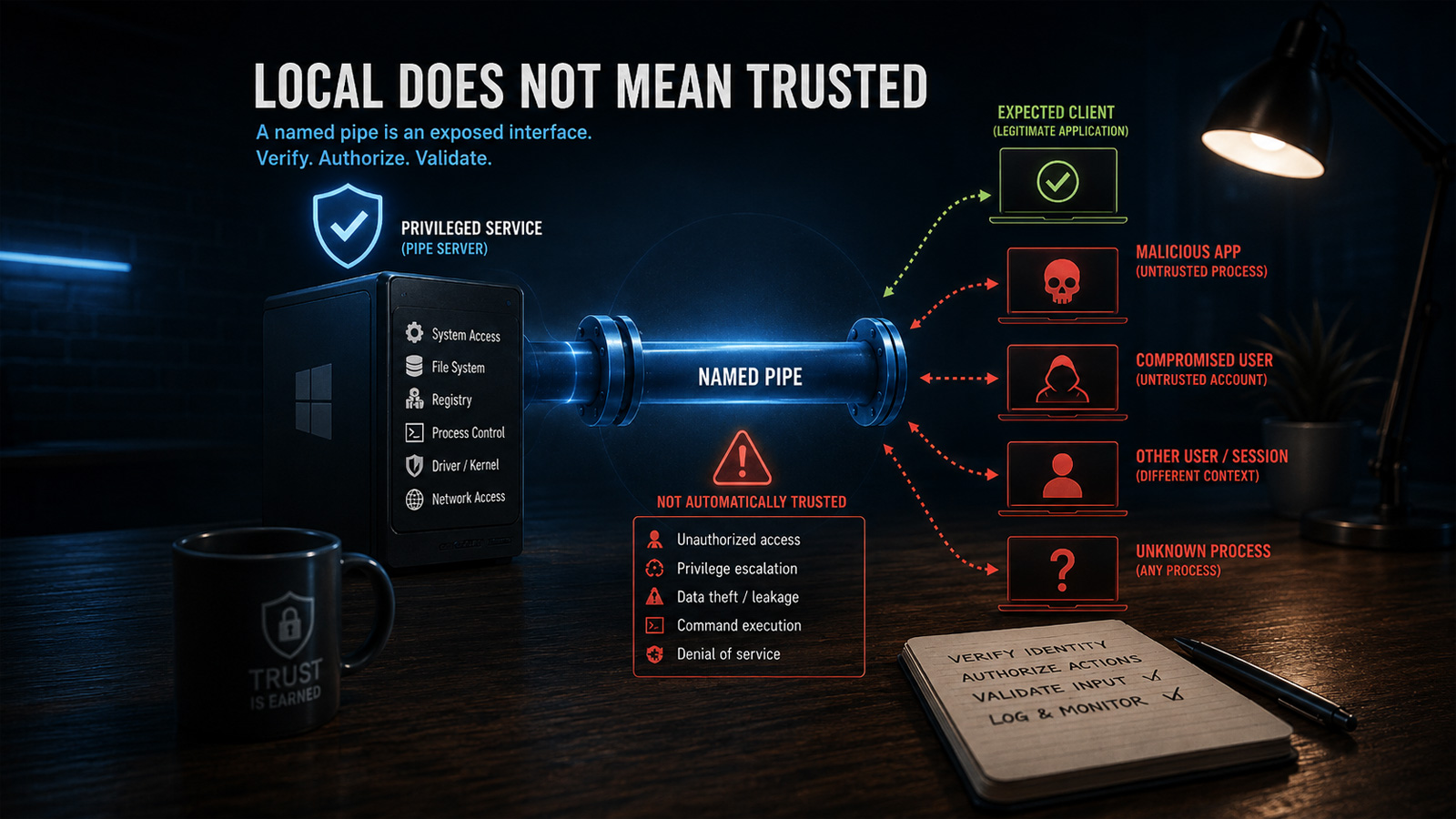
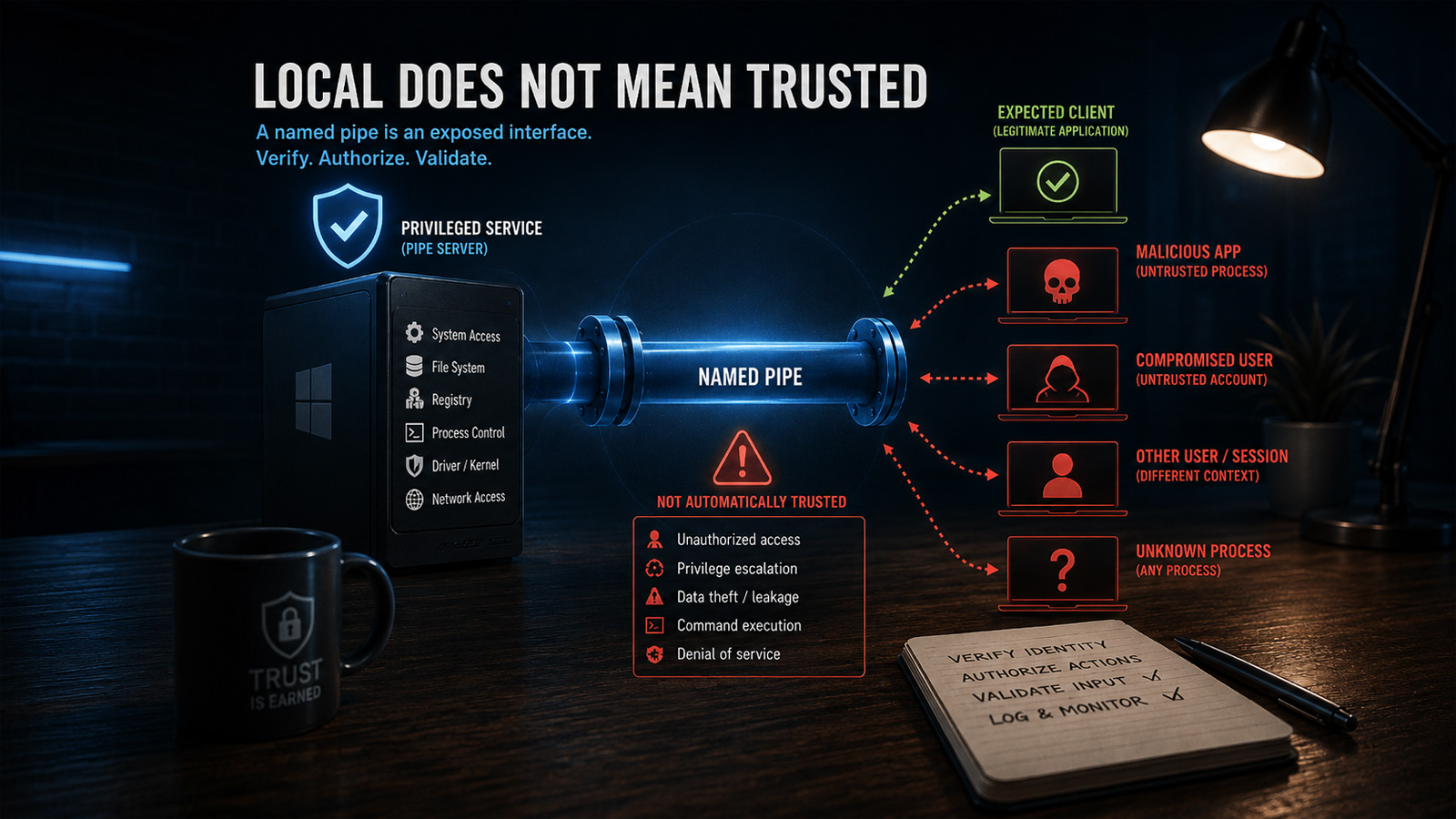
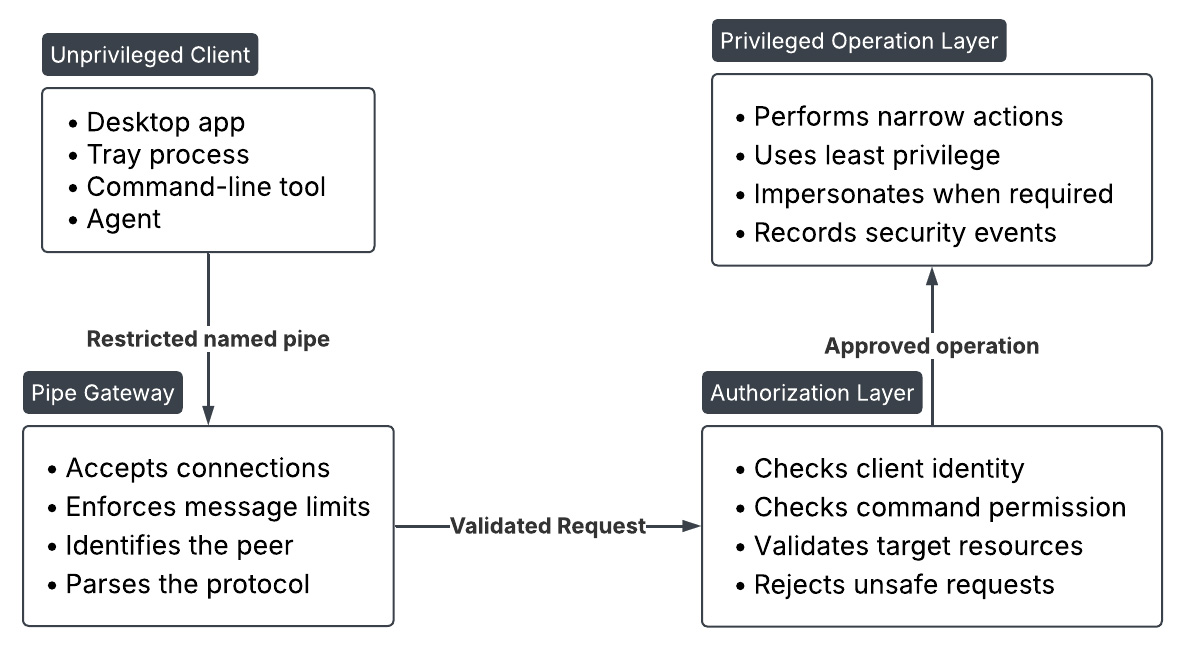









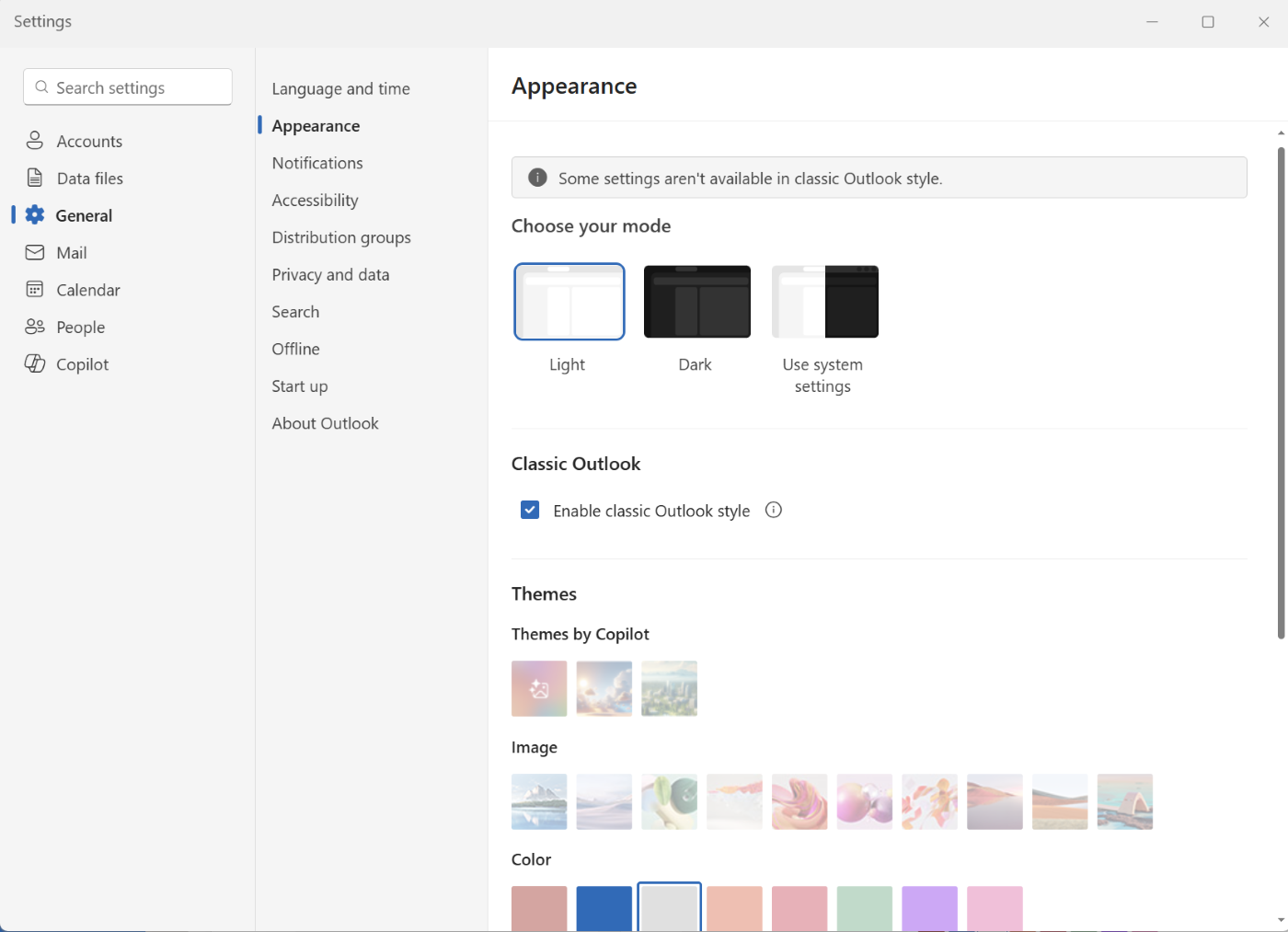
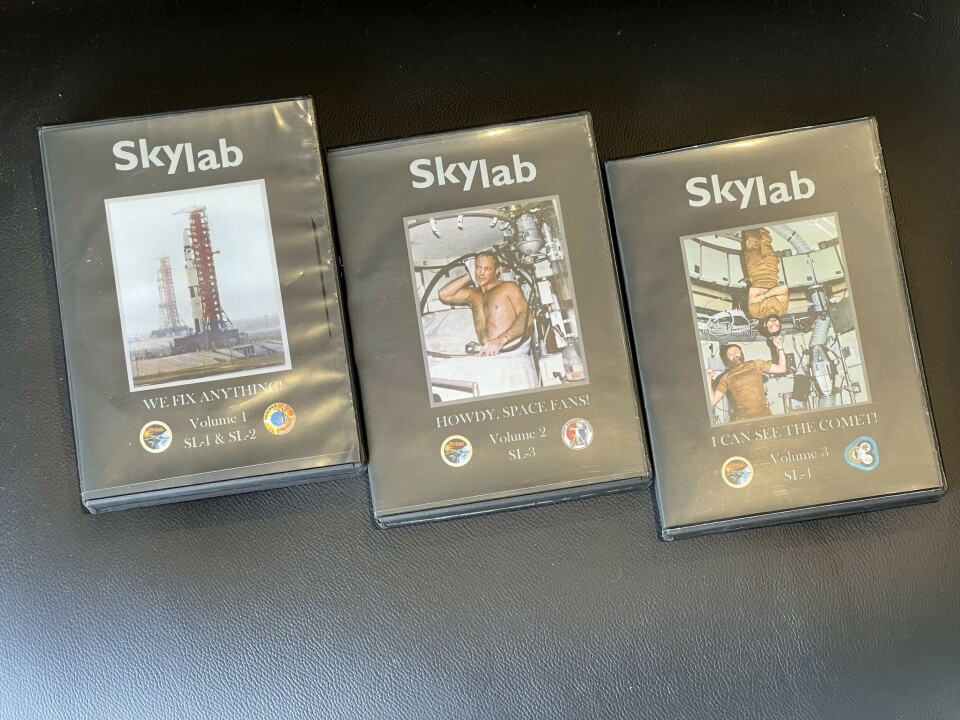






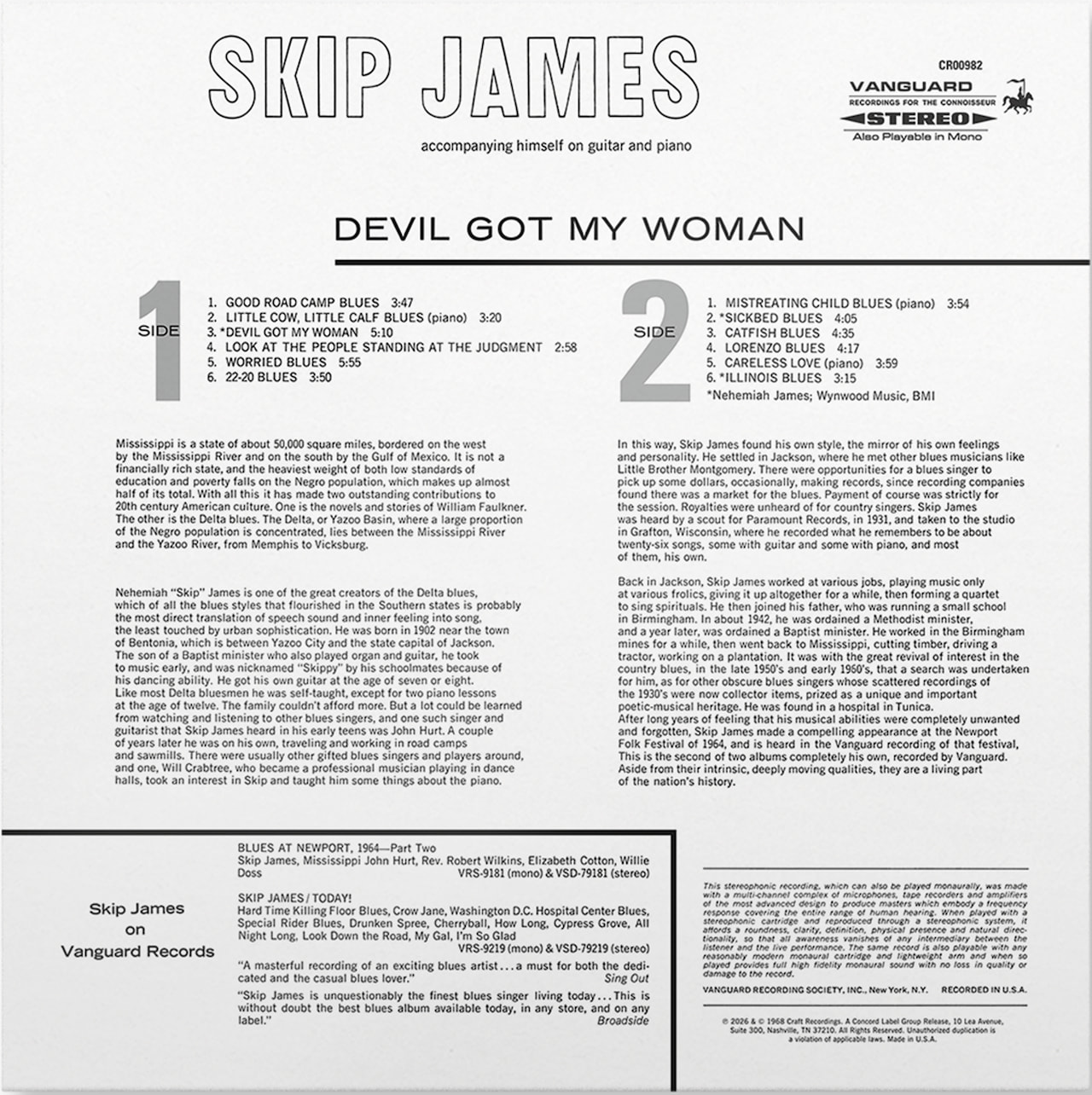













































You must be logged in to post a comment Login