We may receive a commission on purchases made from links.
The number of people who work from home has leveled off since the pandemic, but in 2026, it’s still high — 22% of the American workforce, or 34.3 million workers, according to data compiled by Remotive. For some, it’s a welcome change. You get to sleep in or hit the gym rather than commute, you don’t have to make awkward small talk with coworkers (no, Janet, I do not have a “case of the Mondays,” I simply have other things to do than talk to you), and then there’s the most underrated aspect of a home office: getting to use your own bathroom. But after you’ve adjusted to these newfound perks, you start to notice the downsides. Most notably, your employer isn’t going to furnish your home office space, so you’re left to fend for yourself when putting one together.
A full home office makeover is prohibitively expensive for most workers, so it’s often a smarter idea to focus on a few productivity-boosting gadgets and upgrades that make a noticeable difference to your workflow. There’s really no right or wrong here. Your needs are likely somewhat unique, so choose whichever upgrades make the most sense to you based on what slows you down the most. What I can offer are some of the most helpful upgrades I’ve made over my many years of working from home as a writer. From adding a monitor to expand your digital workspace to getting things organized in the physical world, I’ve rounded up five of the most impactful work-from-home upgrades that took me from unfocused and unproductive to… well, much better in both regards. So, here are some of the best ideas to consider if you’re looking to improve your home office but don’t want to upgrade everything in it.
Advertisement
A good monitor will transform your workflow
Nickylloyd/Getty Images
Among the most impactful additions you can make to your home office is a good monitor. Especially for those working from a laptop, a monitor will increase your productivity by giving you room to view multiple applications and switch between them with ease. It can also improve ergonomics, which is essential for long hours in front of a screen.
Which monitor to pick is a more personal quandary. If you’re trying to get some office work done, look for a high-resolution display that will render work documents in great detail to avoid straining your eyes. 1440p usually strikes a good balance between cheaper 1080p models and high-priced 4K displays. For panel technology, look for IPS, which is a type of LCD technology known for great viewing angles and low glare. A high refresh rate matters less on a work monitor, but a rate of 75Hz or greater will make most actions feel smoother. Some popular brands for work monitors include Dell, Asus, and HP, and there’s a cheap monitor we actually recommend.
Advertisement
If you’re a visual creative, such as a photographer or video editor, it’s worth shooting for a 4K resolution to ensure you’re able to see every detail of your work. Color accuracy is crucial, so pick a monitor with support for the Rec. 709 and DCI-P3 color spaces, preferably with factory calibration. Companies, including BenQ and Apple, have long catered to this segment.
Lastly, if you want to kick back and game after a hard day’s work, prioritize frame rate, resolution, and VRR features. 1440p is the sweet spot if your graphics card doesn’t handle 4K well, but you should ensure a refresh rate of at least 144Hz for modern games, and look for Nvidia G-Sync or AMD FreeSync capabilities to prevent tearing.
Advertisement
Desk storage keeps your work sprawl contained
Max Miller/SlashGear
Recently, I got fed up with the state of my desk. Documents had turned into a paper explosion, with various gadgets and knickknacks dotting the landscape like rubble. The mess was beginning to affect my productivity, my mind mirroring the disorganization of my environment. So I embarked on a mission to impose order on the chaos. In other words, I bought a bunch of desk storage on Amazon.
Your individual needs may vary, but here’s what I bought for my situation. First, a Westree monitor riser with drawers, which freed up space under the monitor and allowed me to put small items like staplers and USB-C dongles out of sight. Next, a Nordik by Design valet tray gives me easy access to my wallet, phone, and keys. Important documents I’m actively using go in the paper tray (pilfered from a family member, so I have no idea which brand it’s from), while older ones get filed in a Sooez accordion binder instead of cluttering up the desk.
These simple changes, which collectively cost me under $100, were the best upgrades I’ve made to my home office in years. When I need something, I know exactly where it is, so I never have to break out of my flow state to hunt down a USB drive or notepad. Rather than purchasing the same products I did, you’ll be better off identifying your own friction points and finding the best products to solve them. For instance, a filing cabinet may make more sense than an accordion binder for someone who works with a large number of physical documents.
Advertisement
A mechanical keyboard makes typing a pleasure
Max Miller/SlashGear
One item many remote workers consistently neglect in a home office setup is a good keyboard. Maybe you’re still pecking away at the oily, plastic keys on your laptop, or perhaps you picked up a keyboard at Best Buy or the Apple Store. Either way, you’re probably using a membrane keyboard, meaning it relies on a squishy silicone layer under the keys to accept inputs. For some workers, that might be fine, especially if their job doesn’t involve a large amount of typing. If it does, though, you should consider upgrading to an increasingly popular mechanical keyboard, which uses individual key switches to create a precise and consistent typing experience with tactile feedback.
The good news is that some of the best mechanical keyboards can be had for under $100 these days, whereas companies like Apple and Logitech routinely charge far more for membrane keyboards. Among my personal favorites is the Leobog Hi75, which I configured with Nimbus linear switches. It not only has a striking pastel color theme that spruces up a drab desk, but I find its comfort to be unparalleled for the price. Each keystroke bottoms out firmly but gently with a creamy clack, and the deck has an admirable amount of flex considering the rock-solid aluminum chassis.
A close runner-up has been the Leobog A75, an Alice-style ergonomic keyboard with a split layout. Though made of plastic, it feels almost every bit as sturdy as the Hi75 and comes with some extra features compared to that model, including wireless Bluetooth and 2.4 GHz modes as well as a nub in the center that acts as a D-pad for quick editing. Lastly, I’ve been a big fan of my NuPhy Air75 V2, a low-profile keyboard that slips easily into a backpack.
Advertisement
A mighty mouse makes mincemeat of mundane tasks
Max Miller/SlashGear
If your job isn’t keyboard-centric, it’s probably mouse-dependent. If you’re still clicking and scrolling with a built-in laptop trackpad, or with the cheapest mouse you could find at a big-box store, you may not even realize how much productivity you’re leaving on the table. The best productivity mice reduce friction in your workflow and save you time by making computer navigation less tedious. Even when I’m working from a cafe or airplane, I make sure to have a mouse on me. That means I have two mice, one for use at home and one for travel.
My main mouse is the Logitech G502 Hero, which is a gaming mouse. If you don’t game, you should instead consider the Logitech MX Master 4, which I tested late last year. Either way, the main benefit I find in these mice is their programmability. One of the thumb buttons is assigned to copy, the other to paste, since a large portion of my newswriting work involves in-line sourcing for articles such as this one. Yet another button is assigned to minimize all windows on my desktop, allowing me to quickly perform other tasks without cluttering up my desktop. Other features of this mouse are gaming-related and not relevant here. If you opt for the MX Master 4, you’ll find that it has far more productivity features, including the ability to use programmable “swipe” gestures, haptic feedback, and pre-made macro modes for creative software, including Adobe Creative Cloud applications.
Advertisement
On the go, I pack a Logitech MX Anywhere 2S. Mouse-savvy readers may note that the Logitech MX Anywhere 3S has been out for some time, packing an upgrade from Micro-USB to USB-C. However, it loses the side-scroll feature, which I use frequently on the 2S.
Advertisement
Don’t neglect your charging setup
For longer than I care to admit, I only had a single USB-C fast charger hooked up near my workstation for device charging. That meant I had to rotate it between my phone, tablet, earbuds, and more, and often forgot to charge some of my devices. But thanks to some practical charging tech, those woes are in the rearview. I was even able to route my charging cables into my desk setup, creating a place for each of my most important gadgets to live while I work.
The most important piece of the power puzzle is your charging brick. I recommend a multi-port brick with at least 100W of total output, which will allow you to comfortably charge multiple devices quickly. If you own the latest iPhone, Galaxy, or Pixel smartphones, 100W will enable you to fast-charge a phone and tablet, as well as lower-power accessories like a watch or earbuds. A charger that uses gallium-nitride (GaN) technology is also a bonus, as GaN is more thermally efficient and more compact than traditional chargers.
The best bricks I’ve tested are the Anker GaN Prime 150W A2340 and Anker GaN 100W B121B. The former has more power output but lacks the built-in status display of the latter, which tells you how many devices are connected, how much power is being sent to each, and whether there are thermal issues. There are higher or lower priced variants of each, all with different wattages, but these hit my sweet spot thanks to their relative affordability and rock-solid performance. I notice significantly better charging times compared to the official chargers for my connected devices.
Social engineering is still the top vector, but basic account security measures do a lot of the heavy lifting
A new report from ReversingLabs is warning doomscrollers of videos spreading across short-form platforms like TikTok and Instagram Reels infecting users with password-stealing malware.
The videos typically promise free access to subscriptions like Spotify Premium, Windows, Office and Adobe – an instant, telltale sign that things might not be as they seem.
Instead of receiving phishing emails, victims are instructed to open command-line tools like PowerShell, then paste and run the command shown in the video.
Latest Videos From
Watch out for this info stealing malware
When they run the command, it triggers a piece of malware to be downloaded and installed to a victim’s computer. Vidar, the infostealer, targets usernames, passwords, cookies, session tokens, cryptocurrency wallet data, personal files and documents, and other sensitive information.
Advertisement
But more importantly, it marks a significant change – previously, email phishing campaigns have been extremely popular for gaining access to victims’ credentials, with a simple click of a link leading to potential disaster. This newer method relies on victims physically inputting commands into a tool, which requires more patience.
Ultimately, the attack exploits current economic strains and the fact that consumers are looking out for cheap and free alternatives to popular subscriptions.
“This kind of social engineering is an easy way for threat actors to drive traffic off social media and onto an attacker-controlled malicious website,” the researchers wrote.
Advertisement
Sign up to the TechRadar Pro newsletter to get all the top news, opinion, features and guidance your business needs to succeed!
Regardless, the overarching theme is that social engineering remains the clearest path for attackers to reach victims, and that’s good news because there are many basic principles could-be victims can follow, like using multi-factor authentication to secure accounts.
Being wary of suspiciously cheap or free products/services and only downloading software from official vendors would also help in this instance.
The bill comes months after Australia enacted a similar ban designed to make internet usage safer for young people.
Canada’s government has introduced Bill C-34, the Safe Social Media Act, which will prohibit young people under the age of 16 from using social media, with an exception made for platforms that meet specific safety standards. Another goal of the bill is to make AI chatbots safer by setting up a digital regulator to establish safety standards.
Minister of Health Marjorie Michel said: “Social media platforms and AI chatbots are designed to capture attention. They do not support healthy childhood development and have become a source of anxiety, isolation, depression and a range of other mental health challenges for many young Canadians.
“The healthy development of our children begins with their physical and mental wellbeing, which is grounded in strong and healthy social connections. This legislation will provide a safer environment for young Canadians and empower them to connect in-person, build friendships, focus in school, and learn real-world skills so they can thrive.”
Advertisement
It could potentially take up to a year for the bill to pass and an additional six months to establish the digital regulator, additionally, the companies that fail to comply with the rules face penalties of 3pc of global revenue, or up to C$10m.
The proposed legislation will make online services more accountable and transparent by introducing new safety requirements for social media services and AI chatbot services. This will include an age restriction, measures to reduce children’s exposure to certain content and high-risk interactions and regulated services will be required to identify, mitigate and address the risks on their platforms.
Marc Miller, the minister of Canadian Identity and Culture, with responsibility for Official Languages, said, “We have seen the very serious consequences that online harms can have. As technologies evolve, we must ensure our laws keep pace, because parents cannot face these challenges alone.
“The safety of children cannot be an afterthought. This legislation will introduce stronger responsibilities for online platforms to ensure their services are safe by design and include appropriate measures to keep children safe.”
Advertisement
Canada is not the first region to consider limiting young people’s access to social media. In December of last year, Australia enacted the world’s first social media ban for minors under the age of 16, in a bid to bolster child safety. The ban affects Facebook, Instagram, Threads, X, YouTube, Snapchat, Reddit, Kick, Twitch and TikTok.
Other regions that have considered implementing changes include the UK and France and in November of 2025 the European Parliament proposed an EU-wide minimum age to access social media, video-sharing platforms and AI companions.
Don’t miss out on the knowledge you need to succeed. Sign up for the Daily Brief, Silicon Republic’s digest of need-to-know sci-tech news.
Bluetooth speakers have improved at a breakneck pace in recent years, with features like rugged weatherproofing, stereo pairing, longer battery life, and high-resolution wireless audio moving from premium luxuries to standard expectations. The best part? You no longer need to spend big to get them. Today’s best budget Bluetooth speakers deliver many of the same practical upgrades found in the best Bluetooth speakers you can buy, making great sound, durability, and everyday convenience far more affordable than they used to be.
That doesn’t mean all speakers are created equal, of course. As usual, sound quality is the great divider. What’s the point of saving big on a feature-packed speaker if you never want to listen to it? That’s why I tested every model for our Best Budget Bluetooth speakers list so vigorously, including long-term listening across dozens of models, to ensure the right pick for any scenario or environment. Wherever you go and whatever you’re into, you’ll find the right speaker at the right price below, without sacrificing features or performance.
Best Budget Portable Bluetooth Speakers of 2026
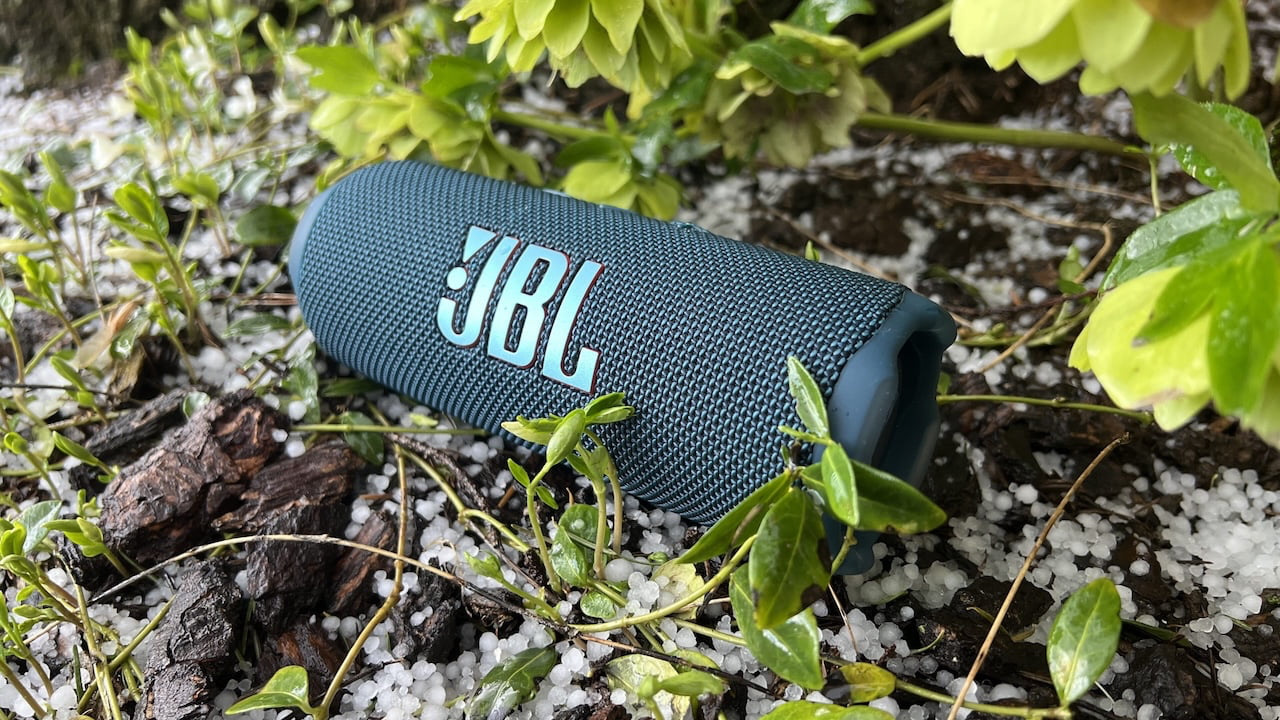
Best Overall: JBL Flip 7 ($150)
JBL’s Flip speaker series has long offered one of the best blends of sound quality, features, value, and sheer indestructibility you can buy, and the Flip 7 is another upgrade to the formula. At just over seven inches wide, it’s supremely portable, yet its 3-inch by 1.75-inch racetrack driver and 0.6-inch tweeter combine with efficient passive radiators on the sides for clear, punchy, and well-balanced sound across the frequency range. JBL has made subtle but effective refinements with each generation, resulting in better instrumental detail and improved clarity on the attack, with minimal distortion, especially with rock and pop.
The Flip 7 doesn’t mess around when it comes to features, offering stereo pairing with a second Flip 7, a companion app for EQ and other settings, up to 14 hours of battery life, or 16 hours with its bass-reducing Playtime Boost, and a drop-resistant design that I’ve thoroughly tested both on purpose and by accident. Upgraded IP67 weatherproofing keeps out dust and water, allowing for a quick dunk with no ill effects, while a quick-release strap and included carabiner provide versatile playback options.
Also new for the Flip 7 is Auracast, which allows it to sync with other Auracast devices and as many of JBL’s latest speakers, like the Charge 6 and Clip 5, as you can handle, though it no longer supports JBL’s Party Mode for connecting with older models. That point aside, the Flip 7’s slick mix of performance, usability, and a price that often falls to $100 or less makes it an easy choice as my favorite budget speaker around.
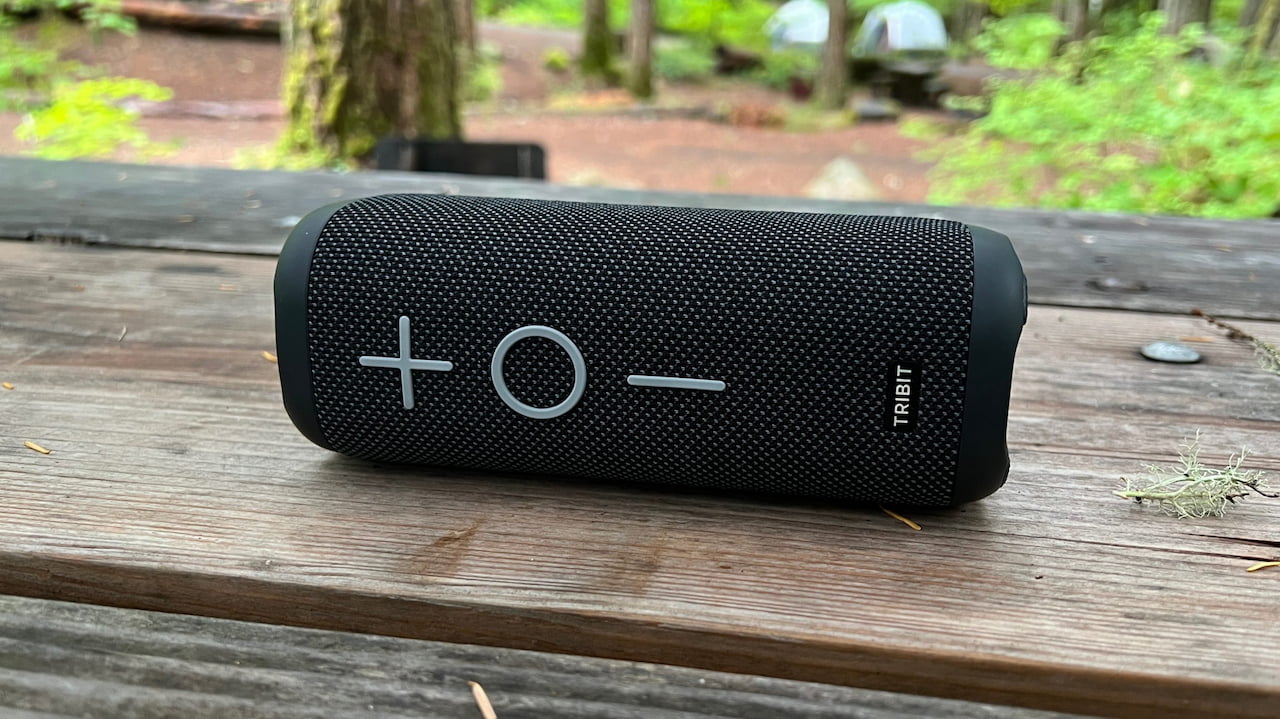
Tribit’s Stormbox 2 is the best-sounding portable speaker I’ve tested for the money. The budget brand, which seemed to come out of nowhere, has shown a knack for punching above its weight with multiple models, and the second coming of its baseline Stormbox stands tall with top tubular contenders like the JBL Flip, Ultimate Ears Boom, and others. You’ll find clean treble and impressive midrange gravitas from its multidirectional soundstage, and tapping the bass key ups the ante for a weighty yet controlled lower register. Apart from its tendency to distort more quickly at peak volume than pricier models, there are few reasons to pay more.
The Stormbox 2’s design borrows from the best, including a familiar tubular frame capped by dual passive radiators, grippy acoustic wrapping, and oversized playback keys for simplified control. The Tribit app provides convenient EQ and other controls, while battery life of up to 24 hours bests most speakers in its class. The speaker’s IPX7 weatherproof rating means it has no stated dust protection, so it’s not the best option for the beach, and its build quality feels a little cheap. Otherwise, it’s hard to find much to complain about in a speaker that sounds this good for $80 or less.
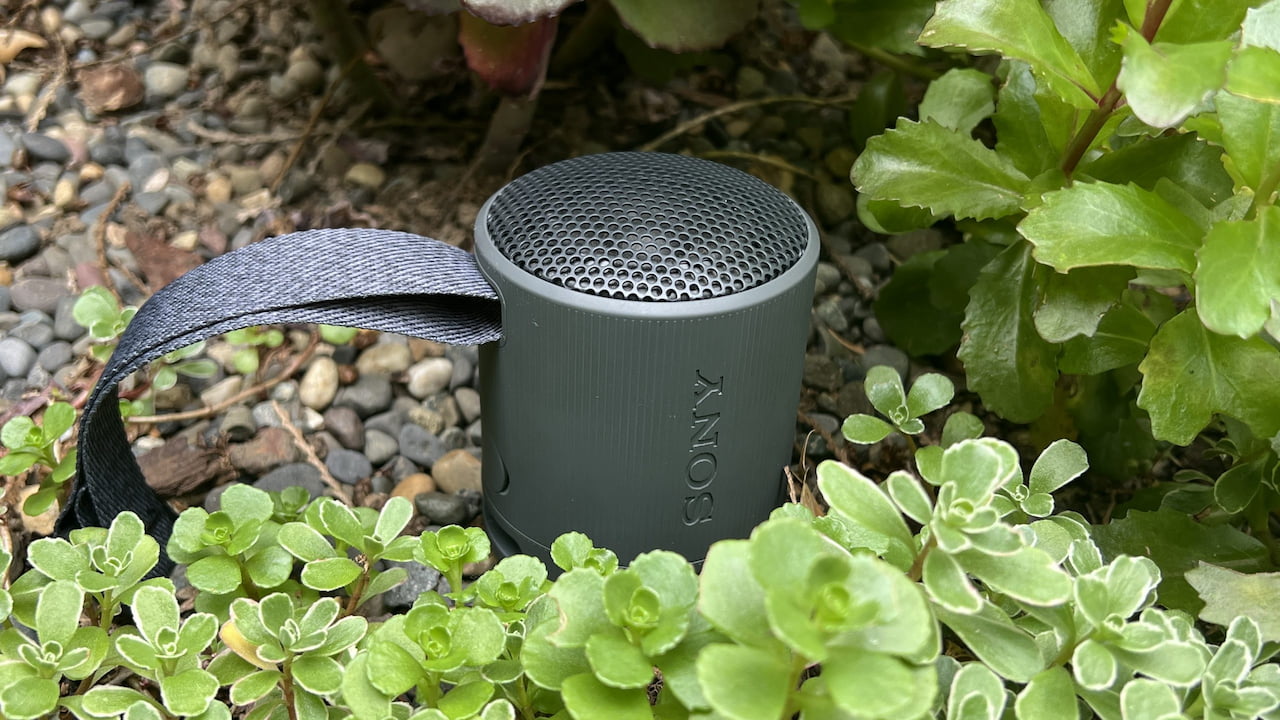
Sony’s mighty mini SRS-XB100 is among the most affordable and compact speakers in my Bluetooth arsenal, and I couldn’t imagine living without it. Smaller than a soda can and weighing just over half a pound, the XB100 sounds much bigger than its size suggests. The secret is in Sony’s efficient design, which includes a wide-dispersion driver up top that delivers balanced midrange and treble to fill out small rooms, along with a base-mounted passive radiator to help distribute decent upper bass from surfaces like tables and countertops.
The XB100 has a handy spread of features, including a built-in microphone for calls, IP67 dust and water resistance, one-touch Android connection, and stereo pairing with a second model. But the main reason I keep coming back to this speaker is its packability-to-performance ratio. From Honolulu to the Oregon Caves, I’ve taken this speaker everywhere, even using it on a recent family trip to San Diego as both our hotel soundtrack and the baby’s white noise machine. If you’re after a satisfying mini speaker that goes wherever you do, the XB100 delivers.
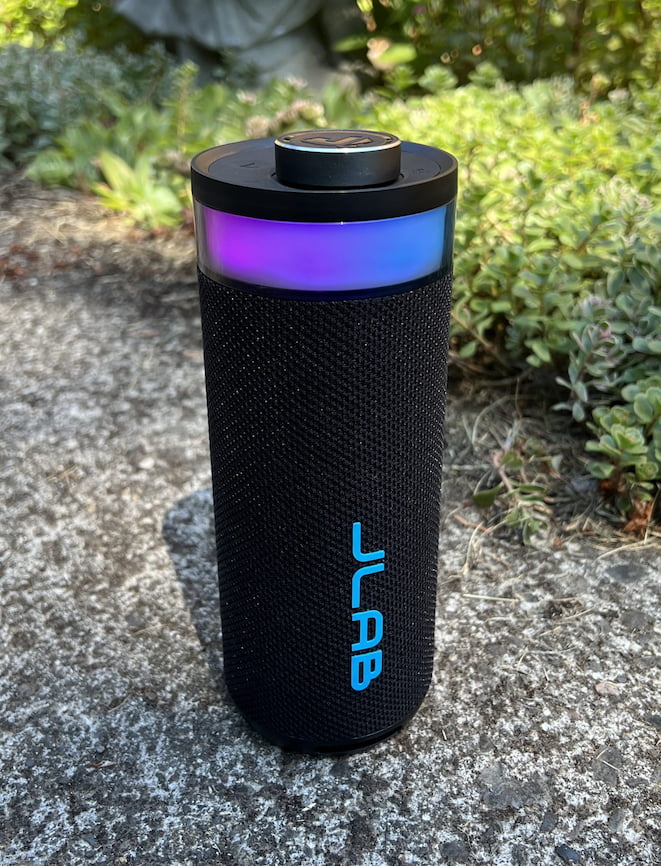
JLab’s Go Party doesn’t sound amazing. Its topside light show reminds me of a rainbow version of Kmart’s blue light specials, and its ribbon-like handle feels decidedly budget. So why is this speaker on our list? Because its list price of less than a large pizza at my favorite takeout place makes it an insane deal for everything you’re getting.
While the audio can be inconsistent and fuzzy, choosing EQ3 in the JLab app provides solid balance and punch that’s particularly suited for pop and rock. The app makes it easy to shut down the lights, which extends battery life for up to 16 hours of playtime. Features like audio syncing with other JLab speakers and solid IP56 dust and water resistance help make up for the fact that there’s no charger in the box, and the handy volume dial up top is easier to use than any other speaker on our list. This is a budget model in every sense, but at $35 or less, it’s hardly a dent in your weekly budget.
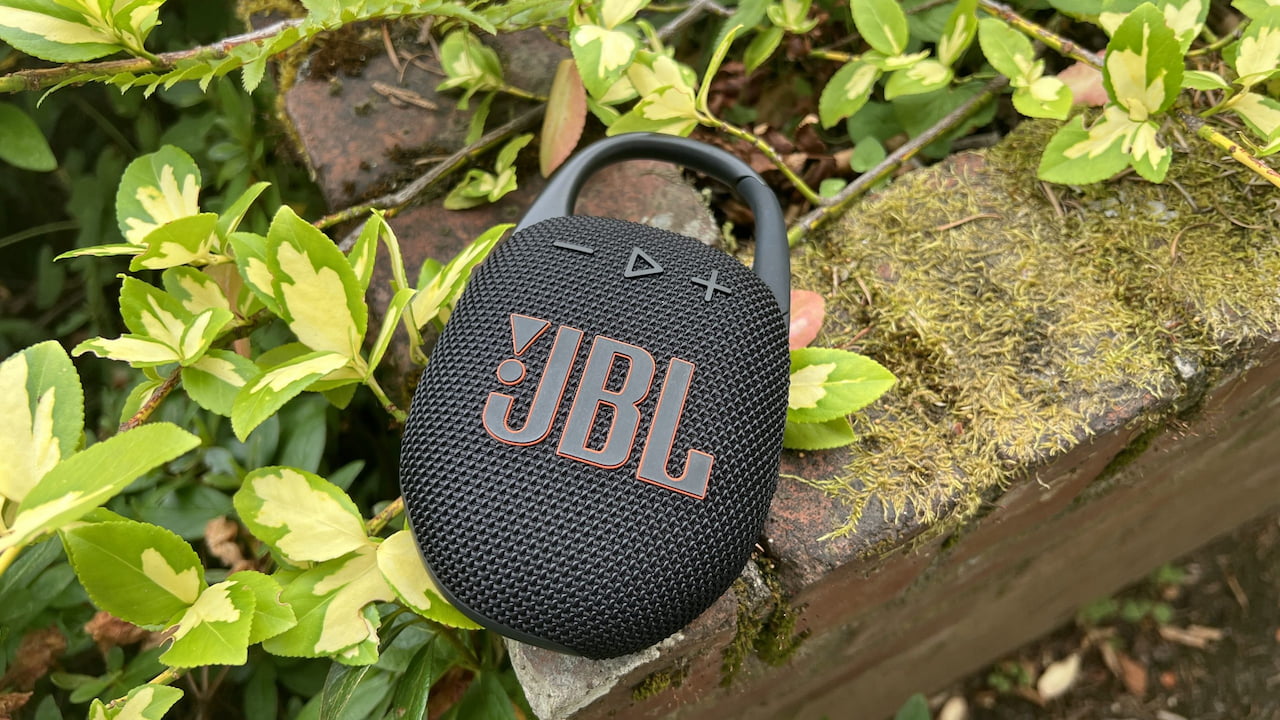
I used to think most shower speakers were essentially the same, but the Clip 5 bests every budget hanger I’ve tried, including previous Clip models. With uncommonly full bass matched by a warm and detailed upper register, this speaker rises above bathtime fun to provide a solid soundtrack for hotel rooms, camping outings, and other adventures. Its treble could use more sparkle, but you’re still getting plenty of instrumental detail and depth, and when you lay it flat, a diffused rubber backside offers enhanced bass response without table rumble. Its slim design, at less than two inches thick, makes it easy to pack, while intuitive rubberized keys on the front and sides make it simple to control on the fly.
The Clip 5’s carabiner clip is sturdier than those on other models I’ve tested, providing a secure way to attach it in multiple scenarios, from your shower caddy to tree branches and backpacks. An IP67 dust and water resistance rating means it’s equally secure in wet or rugged environments, and you’ll get a decent, but not amazing, 12 hours of playback time at midrange volume. JBL’s app offers EQ and other settings, and Auracast connection lets you sync with an infinite number of newer JBL models, like the Flip 7. You can certainly find cheaper clip-ons, but if you want great sound for your hang, literally, this is the top option around.
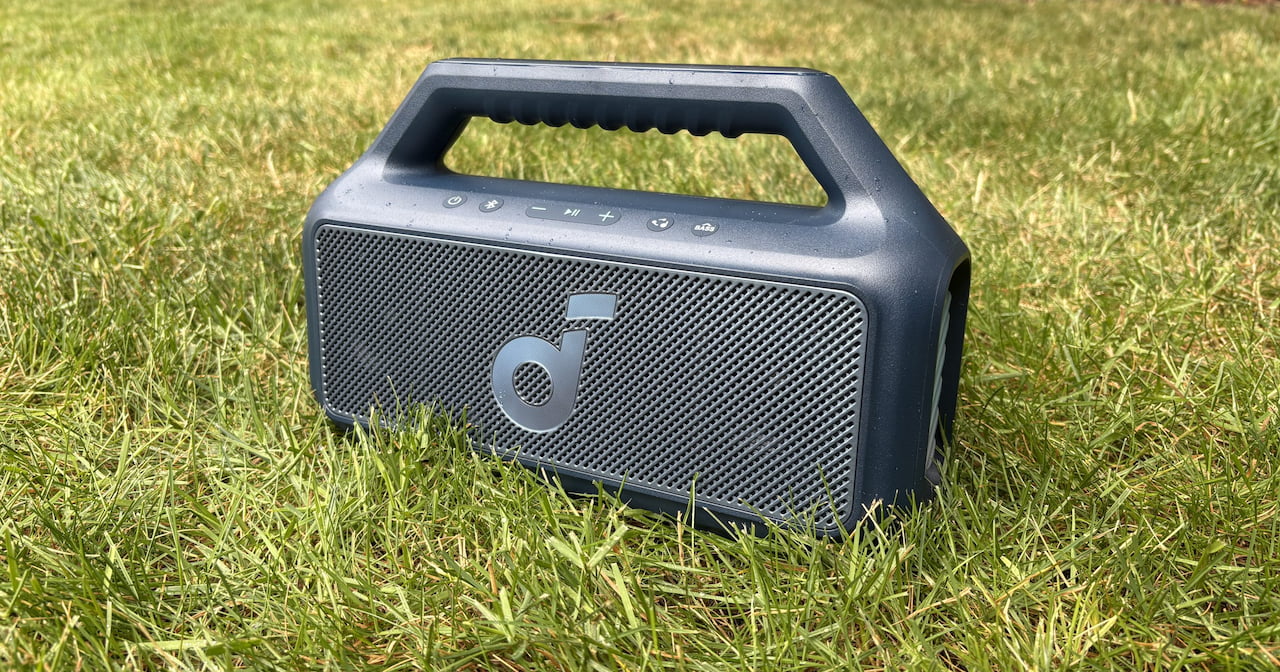
Soundcore’s Boom 2 mini boombox doesn’t offer the most articulate or cohesive sound for your money, but what it lacks in finesse, it makes up for with sheer gravitas. With up to 80 watts of power pushing a center woofer flanked by dual tweeters, this foot-long speaker gets loud enough to fill a midsize room or ramp up larger outdoor get-togethers. It also pulls more bass from your catalog than any other speaker on our list, especially with its “BassUp 2.0” button engaged, where the sound is at its best. Bass aside, you’ll get solid clarity up top, with surprisingly zippy transient response for rapid-fire percussion and a forward, if sometimes slightly hard-edged, push to midrange instruments like guitar, vocals, and piano.
There are some distinctive design traits here, including an easy-grip handle, a buoyant bottom that keeps the speaker afloat on water, and trendy LED grids on each side, customizable in the app with a rainbow of colors. Like the Tribit Stormbox 2, the Boom 2 offers solid IPX7 water resistance but no stated sand protection. Other features include adjustable EQ, phone charging via its protected USB-C port, an onboard mic for calls, and battery life of up to 24 hours per charge, though that takes a hit when you engage the bass boost and/or light show. This is a fun little budget boombox that isn’t designed for critical listening but provides plenty of power at a nice price, especially on sale.
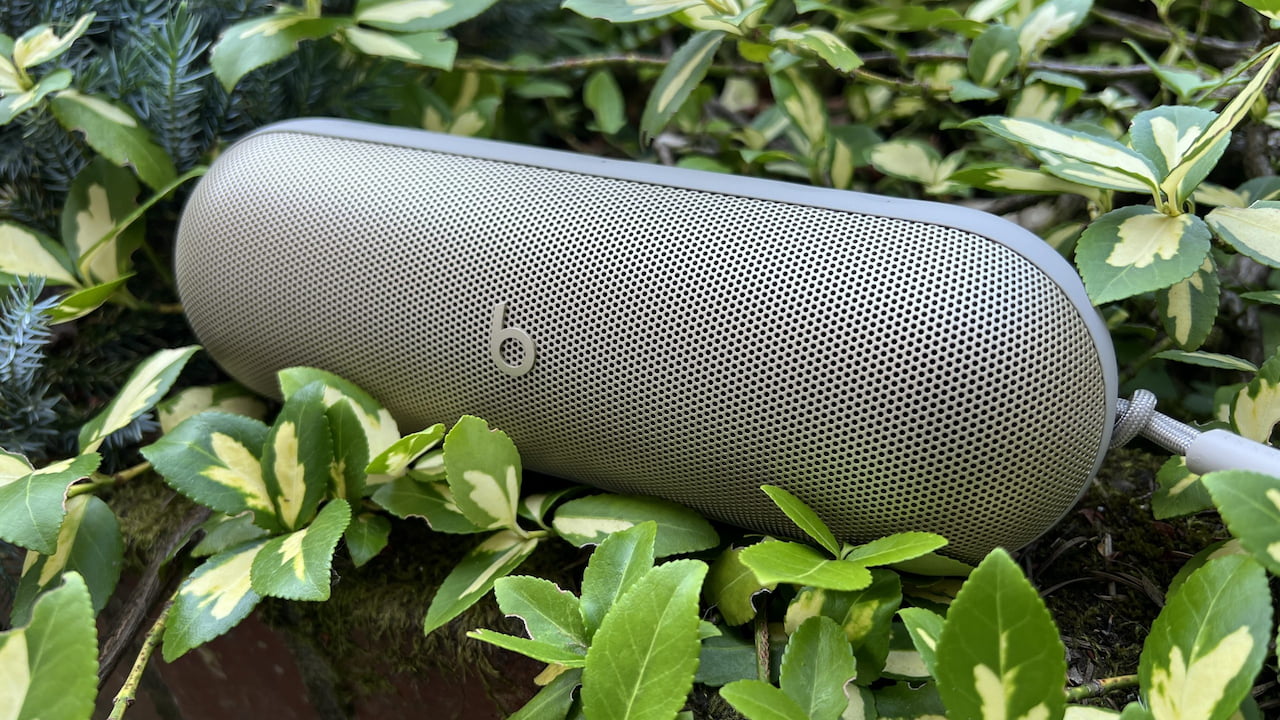
The original Beats Pill never won me over with its muddy, bass-forward sound signature, but following Apple’s acquisition in 2014, the Beats sound has undergone a major transformation while still keeping the hallmarks that made it a hit. That’s utterly evident in the Pill’s second coming, which keeps the brand’s signature brash and vivacious “smile” curve of accentuated treble and bass while providing clear-cut detail and rich instrumental textures for a fun sonic ride. This speaker gets loud, with a low register that rumbles through floors, picnic tables, and other surfaces to spawn mobile dance parties wherever you take it.
While the metallic front screen isn’t as drop-friendly as armored rivals like the Flip 7, as evidenced by the dents I gave it during a ride down the stairs, you’ll get stout IP67 dust and water resistance, features like a built-in speakerphone, high-resolution audio support and device charging over USB-C, and even Find My support with iPhones. Up to 24 hours of battery life keeps you grooving off the grid, and Class 1 Bluetooth provides around 130 feet of range, counted with careful footsteps on my front walk. Without EQ, thanks, Apple, the forward treble is a little overexposed on some tracks, but the Pill’s elegant looks, big sound, and long list of features make it a great buy, especially now that it’s often available for around $100.
Bluetooth speakers have gotten incredibly good at increasingly lower prices. You no longer need to choose between value, quality, and durability; you can get it all in one model. But you’ll still want to choose from well-reviewed options from established brands that put sound and features first.
If you’re only going to pick one speaker, I always point folks to my favorite all-rounder, the JBL Flip 7, first, but there are plenty of reasons to grab something else on our list. At these prices, it’s even worth considering at least one backup, like the micro-sized Sony SRS-XB100, the shower-friendly Clip 5, or a super-cheap model like the JLab Go Party, to throw in your trunk for adventures. The budget Bluetooth category has never been better, so it’s a great time to save big on sound without sacrificing convenience.
Right on the red carpet at the Toy Story 5 world premiere in Los Angeles, Porsche presented three fully functional one-of-a-kind 911s. Each emerged from the Sonderwunsch special wishes program as a rolling embodiment of a main character from the upcoming film. Porsche worked closely with Pixar designers Bob Pauley and Jay Ward to translate the characters into metal, paint, and leather. This project follows their earlier collaboration on a Sally-themed 911 from the Cars movies.
Porsche picked a 911 GT3 RS with the Weissach package for the Buzz Lightyear vehicle, which was one of the model year’s final specimens and most likely a one-of-a-kind sendoff. The exterior is painted in a brilliant white, but that isn’t the only thing that stands out. Green Yellow and Lizard Green accents occur on the front lid, roof, fenders, door bottoms, and wing endplates, paying reference to the space ranger uniform. The rear wing is almost as fantastic, as it even looks like Buzz’s pop-out wings, with a few white stripes and Fire Red trim on the lower section, as well as sporty Light Sport Grey struts. The wheels have customized centercaps with the Space Ranger logo on a splash of white magnesium, and the custom Goodyear tires have Lightyear written in the sidewall language, along with a few Easter eggs that elegantly tie back into the link.
ANIMATE YOUR MEMORIES – Adults, ages 18 and up, can recreate playful Luxo Jr., the iconic lamp character from Disney Pixar’s 1986 animated short…
LEGO IDEAS EXCLUSIVE – A fan-designed set created by the LEGO community, voted for by passionate fans and produced by the LEGO Group
FULLY POSEABLE MOVIE ICON – An intricate, articulated design helps builders recreate Luxo Jr.’s unique bouncing, hopping, and rotating movements
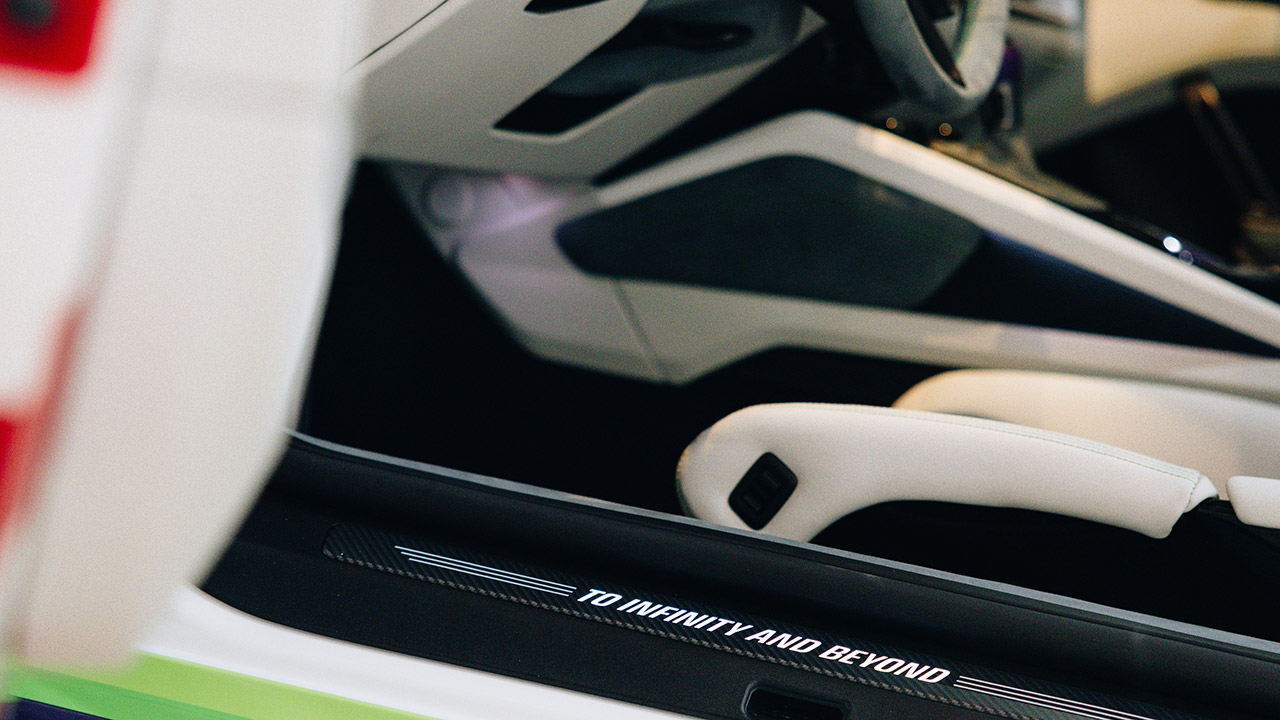
Inside, Pebble Grey leather and Arctic Grey Race-Tex dominate the cabin, but there’s also green stitching and Lizard Green seat belts, which are a nice touch. Violeta leather covers the top seat sections. Bob Pauley created a unique Buzz Lightyear graphic for the dash, as well as a one-of-a-kind inscription that defines this vehicle. The options list covers all of the basic factory features, including a front-axle lift, carbon ceramic brakes with black calipers, and an extended-range fuel tank.
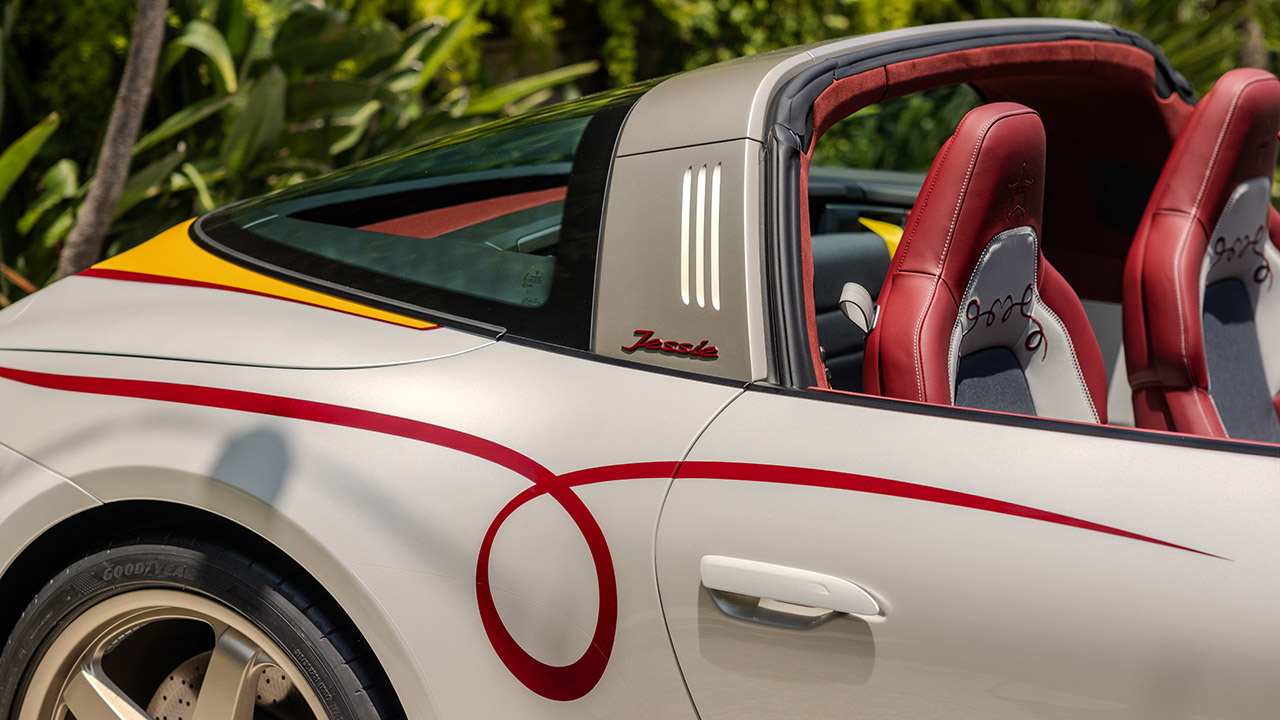
Jessie served as the inspiration for Porsche’s second Toy Story 5 vehicle, a 532-hp 911 Targa 4 GTS. They created a new paint color, Jessie White Metallic, which is a pearl white designed specifically to match her western shirt buttons. The bottom sections, front and back fascias, and rockers have been painted 944 Cobalt Blue Metallic to match her clothes. The hood and rear deck lid are painted Atacama Yellow with GTS Red pinstriping along the length of the sides, which is a nice touch. Even the side mirrors get a dose of GTS Red. The red Targa top with light beige piping resembles Jessie’s cowboy hat. The customary writing appears on the rollbar, but it has been replaced with the word “Jessie” in the Porsche typeface, while special gold wheels complete the exterior design.
Inside, they’ve mixed some appealing trim hues, including Dark Night Blue, Bordeaux Red, and Pebble Grey leather. That’s not all; the seat and door panel centers are upholstered in a specially designed denim-look fabric created for both the Jessie and Woody vehicles. The floor mats, with their trendy black-and-white cowhide design, complete the look. The door sill guards light up with “YEE HAW!” writing, and one headrest bears a sheriff symbol, while the center armrest bears a Woody’s Roundup WR emblem. The premium package, night vision aid, PDCC, and heated GT sport steering wheel are all factory extras.
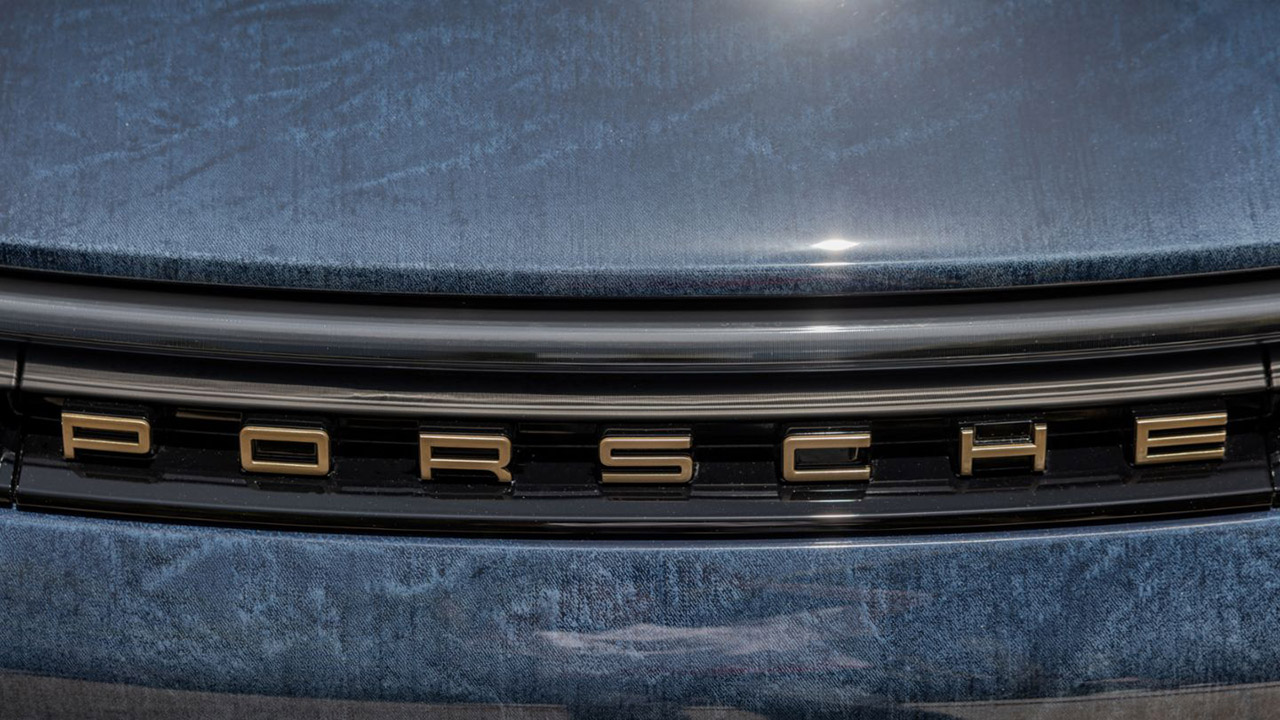
The Woody car features a 911 Carrera T in a one-of-a-kind Dark Sea Blue finish, which Porsche achieved by essentially squishing denim fabric into the paint to create tremendous texture and an old, faded blue jeans impression. The lower trim and rocker panels on the front of the car are Coffee Black, while the front spoiler lip is Aurum, a fancy gold tint. Then there’s the Fire Red pattern that runs around the bottom of the doors, with the “Woody” logo standing out very well. A pair of custom black and gold wheels completes the design and provides some extra oomph.
For the first time, Porsche has used brown vintage leather that has been wrapped all over to offer that timeless, been-around-for-years look. The decor is Dark Night Blue leather with Cognac stitching, and the seats feature small Speed Yellow accents and door panel emblems with a red checkered pattern straight out of a toybox, reminiscent of Woody’s clothing. Oh, and you’ll get the same denim as the front seat centers. The drivers also get floor mats in the same cowhide style as the Jessie car, which is a nice touch. The door sills light up in honor of Woody’s motto, “Ride Like the Wind.” Factory options include an expanded fuel tank, sports exhaust, sports front, front lift, rear seats, Burmester audio system, and memory seats.
Porsche’s Sonderwunsch crew gave each of the three cars their entire attention (with help from Disney and Pixar, no less) to produce these hand-crafted bespoke beauties, which are crammed with all sorts of delightful subtle references for any Toy Story fans who know where to look. How cool is it that all revenues from their sale will support Big Brothers Big Sisters of America, the American Red Cross, and the Starlight Children’s Foundation? Toy Story 5 will hit theaters on June 19, following its global premiere on June 9, 2026.
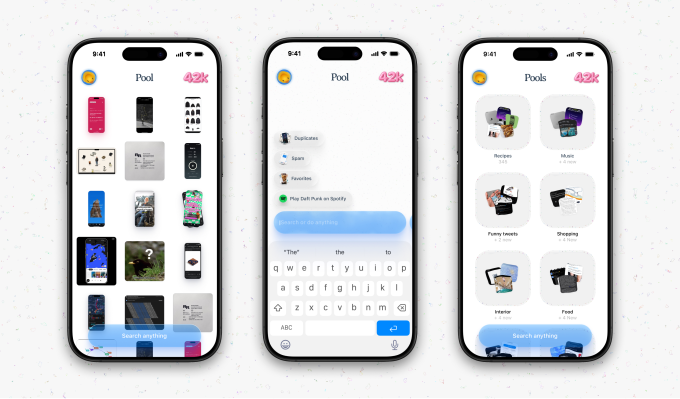
For years, your phone’s Camera Roll has served dual purposes. In addition to helping you revisit special moments, it has also served as an archive for all sorts of things you find online, like recipes, fashion inspiration, travel ideas, interesting quotes, funny tweets, product recommendations, and more. Today, a new app called Pool is arriving to help you finally make sense of this digital clutter.
Image Credits:Pool
To get started with Pool, you simply give it permission to access your photos, which are moved into categories it calls “pools.” The pools created in the app are entirely dependent on the products, places, or things that you’ve saved over time, making them specific to you.
The app is one of many reinventing bookmarking in the AI era. Startups like mymind, Fabric, and Raindrop help users organize links, images, or other saved content, but Pool focuses specifically on screenshots and then uses AI to help users rediscover and act on things they intended to revisit later.
Image Credits:Pool
Once imported, Pool is able to track down the original link associated with a given screenshot. For instance, if the screenshot was of a product you were thinking of buying, it would link to the retailer’s website. If it were a recipe you saw on Instagram, it could pull up the ingredients and instructions the creator had shared. And so on.
The idea, explained Pool co-founder Maxime Junique, came about because both he and his co-founder Piet Terheyden had faced the same problem: they would screenshot things they wanted to remember, but then could never find them again.
“It sounds pretty obvious, right now, when we say it, but it’s something that we do so naturally — you don’t notice it, necessarily,” said Junique. The founders, who met years ago in a co-working space, asked their friends about the issue. The friends agreed that they would often screenshot and forget things, too, like design ideas or other types of inspiration.
Advertisement
Image Credits:Pool
The app was actually the first product to emerge from Spinoff Studio, the founders’ product and design studio, around three years ago. The first version was built in Lisbon over a couple of weeks while the founders lived out of a van, cranking out the landing page, website, and initial build. But they soon realized they needed to build some products that made money first, so they pivoted to B2B SaaS and shelved Pool.
The studio went on to build other products, including the CRM software Waitless, which was acquired last year.
What brought Pool back to life was the maturation of AI. Suddenly, its core idea of making sense of personal, largely unstructured datasets seemed feasible.
“We were like, it seems like a perfect time to go after this idea,” Junique told TechCrunch. “And it also seemed to us like it’s a super untapped, unexplored data set for AI. Everyone goes after emails, bank transactions, chat logs — all of those productivity-first datasets. Who is going after this really, deeply emotional data set we all own?”
Image Credits:Pool
Pool’s app also treats your screenshots like memories, meaning some of them are more relevant at the moment, while others disappear over time.
For example, if you screenshot the barcode to an event ticket, it could disappear later on after the event has taken place. Meanwhile, if you screenshot a flyer on Instagram about an upcoming event, Pool’s AI agents can help you find where to buy the tickets and link to the ticketing site.
Advertisement
To find things in Pool, you can search or ask its built-in AI assistant for help.
Image Credits:Pool
Next up, the founders plan to take this concept into a second, separate app that will operate as a personal assistant of sorts. Pool’s mascot — the little rubber duck you press and drag across the screen to enter Pool at launch — will become part of the brand for this agentic AI app they’re planning.
The founders were in Lisbon when we chatted — no longer in a van! — but headed to San Francisco in late May to meet with investors. The startup previously raised a pre-seed round of just over $2 million from General Catalyst, Kima Ventures, Paris-based Source Ventures, and other angels, including Winston Du, Julian Blessin, and Thomas Ricouard.
Dutton Ranch star claims they ‘didn’t see any disruption’ on set following Chad Feehan’s exit from Yellowstone spinoff fueled by Taylor Sheridan clash rumors
In April 2026 — a month before Dutton Ranch made its Paramount+ debut — it was reported that showrunner Chad Feehan had exited the series following alleged “behind-the-scenes friction with series stars Cole Hauser and Kelly Reilly, as well as ‘other key players’ such as Taylor Sheridan.”
Puck News added, “Feehan finished the first season but has been told he won’t return for the second, per three sources. (I think the feeling was mutual and Feehan likely would have bailed anyway.)
“This was less of a pure creative issue, I’m told — the scripts were good, and after some work on the cut, Paramount is confident in the show — and more about how Feehan ran the production. Sheridan, producer David Glasser, and the stars weren’t happy, so Feehan’s out, and Sheridan and Glasser will likely elevate another season 1 writer to the showrunner gig.”
Advertisement
Latest Videos From
Hauser cryptically denied any friction exclusively to TechRadar, explaining before the show’s premiere, “Taylor’s got his hands all over this show. That’s the only way he knows how to do things.
“Look, you’re gonna go through your ups and downs, through this business, and it’s about adapting. That’s what we did.”
Five episodes of the Yellowstone spinoff down and another star has come to Hauser’s aide, claiming that there was “no disruption” while stars were on set.
Advertisement
‘As actors, we’re there to complete the task’
Dutton Ranch | Official Trailer | Paramount+ – YouTube
“Not at all,” Berto Colón, who plays Miguel on Dutton Ranch, confirms when I ask if he felt as though the Chad Feehan rumors had any truth to them.
Sign up for breaking news, reviews, opinion, top tech deals, and more.
“I met Chad a bunch of times, but I don’t know what the deal is. That’s something that’s above my pay grade. As actors, we’re there to make sure that we complete a task and to make sure we complete it as truthfully as possible.
He continues, “The ongoings that happen behind the scenes is something that I’m not involved with, but as far as energy and what we did, everyone who came on board, tuned into what the story needed to be like.”
“I didn’t see any disruption of that process. I just love everyone there. I love what that they’re about.”
Advertisement
As Dutton Ranch season 2 hasn’t been confirmed as of writing, we’re yet to see which new showrunner would step into Feehan’s shoes. Rumors suggest a lead writer would be picked from the job, but if you’ve followed my week-on-week coverage, you’ll know that I’m advocating for Sheridan to resume the position himself (he’s currently an executive producer).
As for a renewal, Colón says “There needs to be a continuation to this. I don’t have any actual carnal knowledge of that, I just know that the numbers speak for themselves. If any show deserves a few more seasons, it’s this one.”
Dutton Ranch will continue airing its first nine episodes until July 3.
Coram AI has raised $35m to turn the security cameras already bolted to walls into something closer to an autonomous detective.
The Series B is co-led by the new investor Ansa Capital and Battery Ventures, with UP Partners, 8VC and Mosaic Ventures joining. It takes the San Francisco company’s total funding to $66m.
Coram’s pitch is that physical security is stuck in the past. When something goes wrong, staff spend hours scrubbing through footage, access logs and alarms to piece together what happened.
Its answer is software it calls ‘Deep Investigation’, an AI agent you query in plain language. It searches months of video, entry records and visitor data across hundreds of cameras and sites, then hands back a report. Work that took hours, the company says, now takes minutes.
Advertisement
Founded four years ago by Ashesh Jain and Peter Ondruska, Coram now runs at more than 1,500 locations, from schools to factories.
Coram leans hard on privacy. Its boxes run AI models on local NVIDIA chips at the edge, it says, so sensitive video never has to leave the building for the cloud. It also works with any existing IP camera, avoiding a costly rip-and-replace.
But the same platform sells facial recognition, licence-plate reading, ‘tailgating’ detection and live gun detection, and it is being pointed at schools, churches and workplaces.
One customer, a Dallas megachurch, watches over 30,000 worshippers across eight campuses. A high school swapped old cameras for real-time weapon detection. The efficiency is real; so is the reach.
That trade-off, safety bought with more monitoring, is not new to AI security. But autonomous agents sharpen it. A system that can investigate on its own, across every camera and door, is also a system that is always watching, and now draws its own conclusions.
Advertisement
The ‘operating system’ land grab
Coram is part of a wave of startups trying to become the ‘operating system’ for a single industry by wrapping AI agents around it. Its bet is that every building will eventually run hundreds of agents in the background.
The money is chasing a real gap. ‘Physical security is one of the largest industries yet to be transformed by modern AI,’ said Allan Jean-Baptiste of Ansa Capital, and the incumbents largely sell cameras and dashboards, not autonomy, even as firms pour record sums into AI elsewhere.
For now, the headline numbers, ’10x more effective’, ‘hundreds of agents per space’, are Coram’s projections, not proof. But with $66m in the bank and 1,500 sites live, it has the runway to test whether the building of the future really does watch itself.
Playing chess can be challenging, fun, and at times frustrating. Garry Kasparov called the game “mental torture.” With virtually limitless possibilities, chess offers unparalleled depth, and you could easily fill a library with books on how to play it. The internet has opened up a wealth of potential competitors, and smart chess boards enable you to play anyone online or off, not to mention dabble in a variety of chess programs.
I’ve been testing smart chess boards for the past month or so, with the help of my chess-mad eldest, and these are my top picks.
The Smart Chess Boards I Recommend Most
Chessnut
Pro Electronic Chessboard
Advertisement
For my opening gambit, I’m recommending the Chessnut Pro. With a classic wooden design, the Chessnut Pro feels like a regular board, but there are smarts hidden within. The beechwood pieces are beautifully weighted, an important but often underestimated feature. They feel great in hand, and the set includes a pair of extra Queens. This is a full tournament-size board (55 cm or 21.7 inches), so you’ll need space for it.
The board is very nicely made, with subtle red LEDs hidden in the corner of each square that light up to show moves. I love that it looks like a regular board when you’re not playing online. There are discreet controls on one side with a USB-C port and Bluetooth connectivity to hook it up to your computer, laptop, or smartphone. There’s no need to press down with each move, as every piece has a sensor chip inside that’s automatically detected.
We used the Chessconnect Chrome browser extension to play matches on Chess.com and Lichess.org, and it was quick and easy to get up and running. The official Chessnut app features AI opponents, but they’re a little weak and lack variety. It isn’t great, but you don’t have to use it, and you can link up to different online services with a bit of tinkering (check out Graham’s Programs for some better options). Online play was occasionally a little glitchy. Sometimes there’s a slight lag, and we had to click to reconnect for every game. Battery life is quite good (we got seven to eight hours), though it takes a while to recharge (best to leave it overnight).
If you understandably don’t want to spend that much, the Chessnut Air ($250) is a far more affordable option. It’s also wooden but much smaller (33 cm or 13 inches), with lighter pieces and visible LEDs. The Air+ ($400) is the same size but with superior weighted wooden pieces and subtle LEDs on the board. Functionally, both give you much the same experience as the Pro.
“Don’t lock into long-term contracts; keep your architectures flexible,” the firm advised. “In fact, OpenAI could become AI’s BlackBerry FIFO (First In, First Out). The company that defines a category is often the one most painfully displaced by it.”
Advertisement
The caution comes as OpenAI takes its first formal step toward a public listing. Alongside its confidential SEC filing, the company published a roadmap built around three ambitions: AI systems that can accelerate research, AI that boosts economic growth, and eventually a personal AGI assistant for everyone. Forrester was more interested in a fourth question: what happens if OpenAI doesn’t stay on top?
The firm argues that OpenAI faces what it calls a “trifecta” of challenges: persuade consumers to use its agents instead of rivals’, convince enterprises to build around its technology, and stay ahead in the race toward AGI.
The enterprise battle may prove the most lucrative. “Whoever automates the dull, expensive middle of a company’s operations first becomes the system of record everyone else has to rip out — and almost no one does,” Forrester said.
In other words, the first company to get AI agents woven into day-to-day business processes stands a decent chance of becoming yet another piece of software that everyone complains about, but nobody can remove.
Advertisement
However, Forrester’s advice is that, rather than standardizing on a single provider, enterprises should “anchor to the capability you need — not the brand that got there first — and keep your switching costs low.”
The warning also comes as OpenAI reportedly weighs cutting prices to fend off growing competition from rivals, including Anthropic. If the AI market is heading for a price war, enterprises may want to think twice before chaining themselves to a single supplier.
Forrester also notes that a public listing could provide customers with something they currently lack: visibility into OpenAI’s finances. Once public, the company would be required to disclose far more information about the cost of training and operating its models, giving enterprise buyers a clearer picture of the economics behind the AI systems they increasingly depend on.
For now, OpenAI remains the company that helped define the generative AI era. Whether it becomes the next Google, the next Microsoft, or AI’s answer to BlackBerry is a question investors will soon be paying very close attention to. ®
Sega made a splash during this year’s Summer Game Fest opening showcase, revealing that a digitally resurrected Tupac will feature in the forthcoming Stranger Than Heaven. Snoop Dogg even took the stage to talk about working with the rapper’s estate. While my hands-on with the game wasn’t a full dive into the world of Stranger Than Heaven, exploring one of the five cities and eras, it was an extensive demo showcasing the fighting system. It demands that kind of focus, as it’s an entirely new system compared to RGG Studio’s decades-long Yakuza series.
Attack inputs are categorized into left and right sides, RB and RT control your right hand and leg, LB and LT for your left side. During my time with the demo, the trigger buttons led to slower, harder-hitting blows. Each can be held to charge up an attack, while combining LT and RT leads to grapple moves If you time them right. Releasing a charged attack at the ideal moment seemed to be crucial, too.
Several new combat dynamics come from this new system. Each side is blocked separately, meaning you can block (or parry) an attack while readying a counter with the other side. Grab moves feel practically like a street brawl, tackling enemies through furniture or even tumbling down steps, together. Pin them to the floor and you can then rain blows down on your opponent.
Advertisement
Unlike most of the Yakuza titles, weapons appear to be a more core aspect to fights. Protagonist Daigo will be able to eventually upgrade the knives, mallets and other equipment he finds.
Sega has teased that, over a journey spanning 50 years, special weapons could range from “masterworks of old” to brand-new inventions. Well, new in the ’60s. Some weapons will even come with their own special attacks, usually involving a downed enemy.
Sega set up three different demos to feel out the combat system. First, a relatively easy fight against a group of thugs that focused on fighting a group and using your opponent’s weapons against them. This was followed by a more challenging fight against another gang led by a towering heavy that hit much harder.
Sega
Fortunately, you start the fight with a heavy crowbar that was unusually heavy and slow to swing. This fight was where you could really feel a difference to the mostly button-mashing dynamics of Kiryu et al. I’m not sure if I prefer it?
Stranger Than Heaven‘s system seems to demand more from the player (which isn’t necessarily a bad thing) and the final fight was a big example of that. Facing off against a tattooed topless guy chilling in Osaka with his katana demanded some Souls-like levels of timing and dumb luck. I eventually managed to beat him because of the latter.
Advertisement
The enemy would heal himself if left alone and would occasionally kneel down, goading the player to approach him before unleashing a swift slice. Perfectly timed parries (or dodges) were crucial, enabling powerful counterattacks, as were follow-up attacks when he was downed. During this fight, my character was equipped with a short knife and could use both weapon attacks with his left hand and punch and kick with his right hand. It seemed that each weapon creates a different range of attacks.
I’ll admit, I missed the ability to ram a mafia underling into a microwave or other ridiculous contextual moves. Hopefully, some showpiece moves will appear in the full game — Sega has teased fights on moving vehicles, which is at least a start.
This was a demo focused on combat, so I’m intrigued to see how the rest of the game shapes up. Hopefully, STH holds on to some of the ridiculous humor of Like a Dragon and Yakuza. It was a welcome shift in tone from all the melodrama and violence.
Stranger Than Heaven is scheduled to launch on January 15, 2027 on PS5, Steam and Xbox Series S/X.



























































You must be logged in to post a comment Login