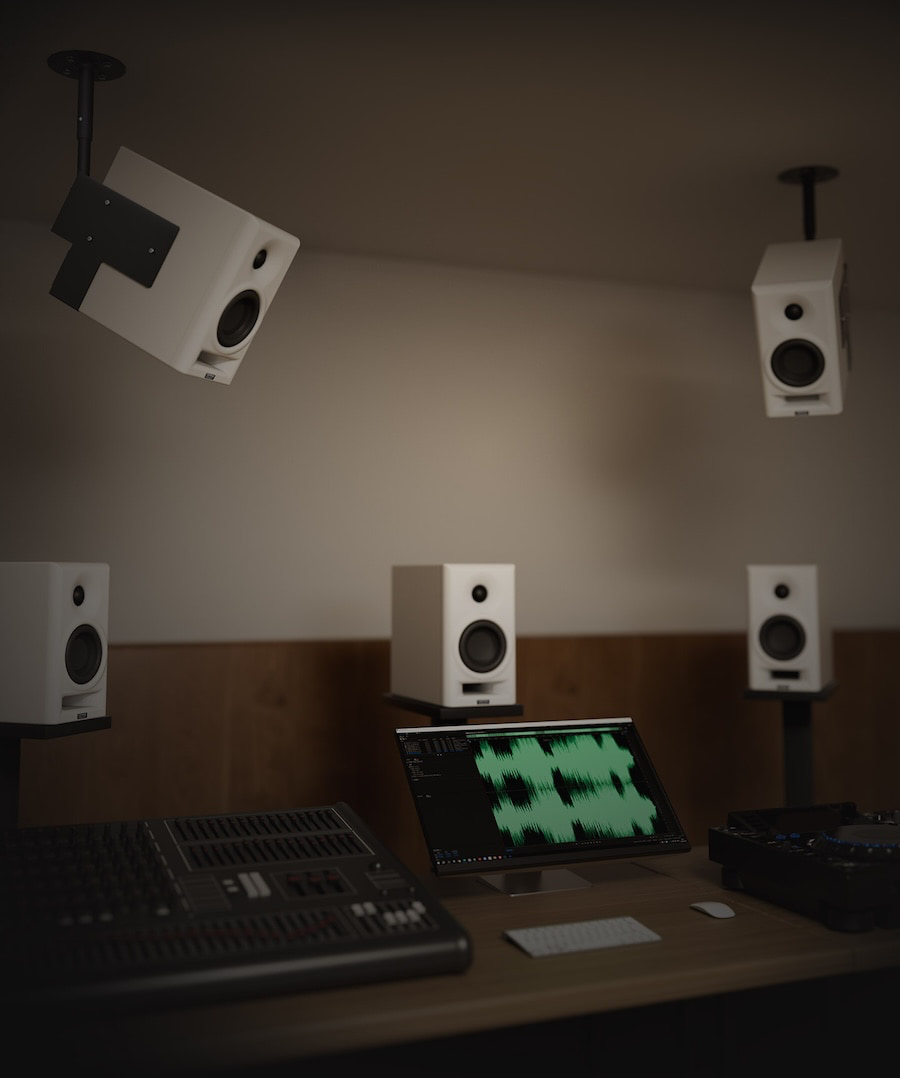
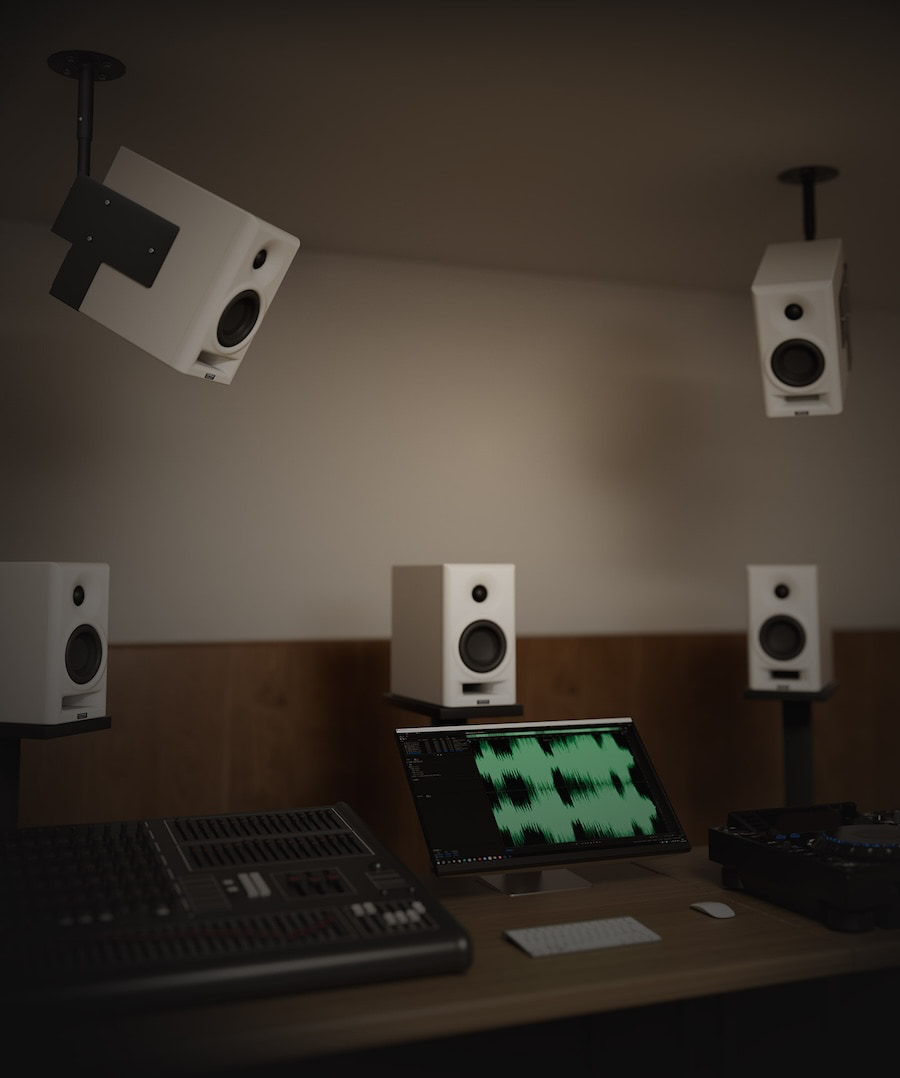
TOPPING has built its reputation on measurement-driven DACs, headphone amplifiers, and desktop audio gear that usually arrive with spec numbers strong enough to make the ASR crowd reach for a sedative before moving on to the next component they may or may not actually listen to. Now the company is moving that philosophy into active speakers with the TOPPING MA4, a compact two-way active studio monitor aimed at desktop listeners, creators, and small-room setups.
TOPPING launched the MA4 Active Studio Monitor globally on July 14, 2026. The company’s professional-audio site now lists the MA4 as an active studio monitor, with the product page and user manual available through TOPPING Professional for anyone in need of some late-night reading.
The timing was also useful. CanJam London 2026 took place July 18-19 at Park Plaza Westminster Bridge, with eCoustics’ London-based Headphone Columnist and Reviewer James Fiorucci covering the show throughout the weekend. TOPPING is usually part of the desktop and headphone conversation, and while the MA4 is not a headphone product, it shows the company trying to extend its measurement-first identity into the powered-speaker market.
Related Reviews:
Topping MA4 studio monitors
What Is the TOPPING MA4?
The MA4 is a compact, two-way active monitor sold as a stereo pair. Each speaker uses a 4-inch woofer and 1-inch tweeter, with Class D bi-amplification rated at 50 watts plus 25 watts RMS. The claimed frequency response is 49Hz to 20kHz ±3dB, with a maximum SPL of 105dB at 1 meter.
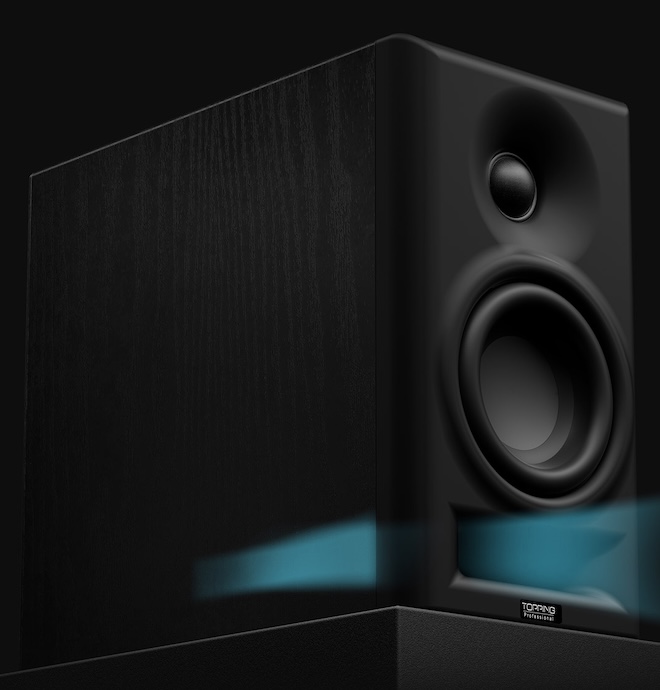
The design is refreshingly direct. The MA4 uses an analog crossover, a front-firing bass reflex port, and TOPPING’s Opti-Wave waveguide for tweeter directivity control. The design architecture avoids digital processing, which makes the MA4 different from many modern desktop monitors that lean on DSP, app control, USB input, Bluetooth, and room compensation to broaden their appeal.
Advertisement
That choice cuts both ways. A simpler analog signal path may appeal to users who want a straightforward balanced monitor connected to an audio interface or DAC. But it also means the MA4 looks more traditional than some of its desktop rivals. No USB-C. No Bluetooth. No app. No HDMI. No “please download our software before the speaker agrees to play a hi-hat.” Depending on the buyer, that is either a relief or a limitation.
Connectivity Is the Big Caveat
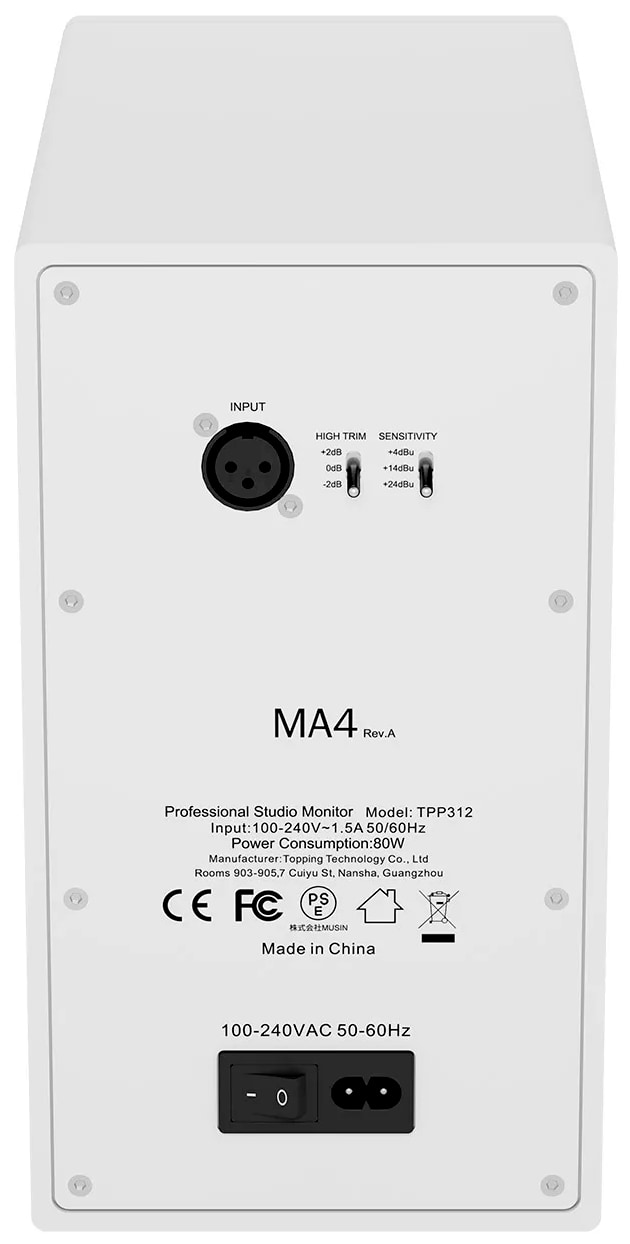
The MA4’s connectivity is narrow: one XLR input. That makes sense for studio and interface-based setups, but it is less flexible for general desktop audio users who may want RCA, TRS, USB-C, Bluetooth, optical, or a front-panel headphone jack.
That also matters because the competition has become much more versatile. Kali Audio’s LP-UNF, for example, includes USB-C, Bluetooth 5.1, RCA, and TRS inputs, while ADAM Audio’s D3V offers USB-C and balanced TRS inputs. Yamaha’s HS3/HS4 compact monitors include combo XLR/TRS, RCA, and stereo mini inputs.
TOPPING appears to be betting that a focused monitor with controlled directivity, balanced input, and measured acoustic behavior will appeal to users who already have the front end sorted. That is a reasonable audience, but it is not the same audience shopping for a plug-and-play powered speaker that can jump between a laptop, phone, turntable, TV, and game console before lunch.
The Competition
The MA4 lands in a crowded category. The most obvious competitors include the Edifier MR5, Edifier MR4, Kali Audio LP-UNF, ADAM Audio D3V, Yamaha HS4, and JBL 305P MkII.
Advertisement
The Edifier comparison is especially relevant for our readers. The Edifier MR5 impressed us because it delivered near-neutral accuracy, deeper bass, LDAC support, and a three-way active design for $350. The older Edifier MR4 remains one of the better entry-level powered monitor options for listeners who want clean, inexpensive desktop sound.
Advertisement. Scroll to continue reading.
Against those models, the MA4’s strengths appear to be its controlled acoustic design, XLR input, analog crossover, and claimed SPL for its size. Its weakness is obvious: fewer inputs and no modern wireless or digital convenience features. In 2026, that is either admirable focus or a self-inflicted handicap, depending on the desk it lands on.
Why TOPPING Matters Here
TOPPING is not some random speaker brand appearing out of the fog with a white cabinet and a dream. We have covered TOPPING’s desktop electronics for years, including the DX1 II, A90, D30Pro/A30Pro, and D90LE. The recent DX1 II review found that TOPPING is still pushing aggressive value in compact desktop audio, with a $119 DAC/headphone amp offering balanced headphone output, PEQ, optical I/O, headset support, and console compatibility.
Advertisement
That history is why the MA4 is worth attention. TOPPING has spent years selling the idea that clean engineering and strong measurements should not require luxury pricing. Moving into active monitors is a logical step, but loudspeakers are a different kind of problem. A DAC can measure beautifully on a bench. A speaker has to deal with drivers, cabinets, ports, directivity, distortion, placement, reflections, and the charming reality that most desks are acoustic crime scenes with a keyboard in the middle and a plethora of poor food and beverage choices.
The Bottom Line
The TOPPING MA4 is an interesting move from a brand best known for desktop DACs, headphone amplifiers, and measurement-first electronics. Its compact two-way design, Class D bi-amplification, analog crossover, front-firing port, Opti-Wave waveguide, and claimed 105dB output suggest TOPPING is taking the active monitor category seriously.
The questions are just as important. Will the MA4’s acoustic performance be strong enough to overcome its limited connectivity? Will U.S. pricing make sense against Edifier, Kali, Yamaha, ADAM, and JBL? And will TOPPING’s engineering reputation translate from electronics into loudspeakers, where the room and placement get a vote whether anyone invited them or not?
The MA4 is not the most feature-packed desktop speaker of 2026. That may be the point. TOPPING appears to be aiming at users who want a compact, balanced-input monitor built around acoustic fundamentals rather than app-based convenience.
If you’re in the market for a new window air conditioner for summer 2026, there are a few qualities you’re likely mindful of in your search. While it’s worth taking the time to find one that physically fits your space, provides ample cooling, and is an overall budget-friendly air conditioner, one would be remiss to overlook the matter of sound. After all, air conditioners are notorious for getting rather noisy while running. Not only can this prove a nuisance for you in your living space, but those living nearby will also have to endure the rumbles and hums of the machine.
On the whole, it’s expected that a window air conditioner will make some kind of noise. Generally speaking, they pull in electricity to run one fan, which, in turn, pulls in warm air. Simultaneously, this electricity powers a compressor to push the coolant through the coils, thus cooling the air. Another fan then pushes the cooled air out into the room, quickly bringing down the indoor temperature. That’s a lot of moving parts, and even right out of the box, air conditioners are going to make noise as a result. The average window air conditioner tends to run between 50 and 60 decibels, with models below that level considered more noise-conscious examples.
Advertisement
With that said, modern window air conditioner technology has greatly dampened the noise created by these essential summer appliances. For those in want of quieter summer cooling, these are some of the best options currently available.
Advertisement
1. Midea U-shaped smart air conditioner
Throughout its existence, Midea has become recognized among the most reliable air conditioner brands out there. At the same time, the brand has worked to improve its units in other ways, such as their volume levels. The Midea U-shaped smart window air conditioner, which comes in 8,000, 10,000, and 12,000 BTU forms — models MAW08V1QWT, MAW10V1QWT, and MAW12V1QWT, respectively – is significantly quieter than most air conditioners like it for sale today. Supposedly, it’s 10 times quieter than its competitors. The company claims it can get as quiet as 32 decibels while in use, though higher cooling settings will bump that number up to some extent.
The Midea U-shaped smart window air conditioner comes with a bevy of other noteworthy specs and features alongside its remarkably low volume level. As the name suggests, it’s a smart device that can be controlled with the SmartHome app, and the U-shaped design keeps the unit held in place via brackets. Should you want or need to open your windows, you can do so without it falling out. It also claims 35% faster cooling with FlashCool mode and 35% increased energy efficiency thanks to its variable-speed inverter technology. The Midea website lists these window units at $399.99, $449.99, and $509.99 depending on the BTUs, each coming with the Midea one-year limited warranty.
Advertisement
2. GE model AHTT08BC Profile ClearView ultra quiet window air conditioner
General Electric has an incredibly deep product catalog with well over a century of development behind it. In fact, there are probably things that you didn’t know GE makes. Meanwhile, some of its most well-known offerings are its window air conditioners, including those that prioritize producing as little noise as possible. The $484.00 GE model AHTT08BC Profile ClearView window air conditioner is one such model, advertising noise levels as low as 41 decibels on low cool with Quiet Mode turned on. It reaches such low volumes while cooling rooms up to 350 square feet at 8,300 BTU.
Like any other modern air conditioner, there’s more to this GE model than producing less noise than previous models. The big draw for this unit is its unique design, which features a front portion that hangs below the windowsill. This means improved visibility out the window even while the unit is installed. Within is a pump to release condensation outside as it accumulates, and it dehumidifies rooms at a rate of approximately 1.7 pints per hour. This is another example of a smart air conditioner, as users can control it with the SmartHQ app over Wi-Fi, though it also comes with a separate remote control. GE includes limited warranty coverage on this unit, too.
Advertisement
3. Friedrich Chill Premier inverter air conditioner
Friedrich is one of the major window air conditioner brands currently on the market, and as such, it has released units that deliver comfortable cooling without compromising on noise level. For example, the Friedrich Chill Premier inverter air conditioner is somewhat expensive at over $700 through sources like Grainger, but it delivers if you need an air conditioner that keeps the noise down. When in cooling mode, this unit is advertised as delivering 42 decibels, while the fan alone drops that number to just 32 decibels. On top of that, it comes with some other key specifications.
Aside from being a comparatively quiet window unit, the Friedrich Chill Premier inverter air conditioner has some other intriguing qualities. Window-only models range from 8,000 to 12,000 BTU per hour; they can be operated via the FriedrichGo app over Wi-fi, and they’re said to operate 35% more efficiently than other traditional air conditioner models. Installation is simplified, too, featuring a frame, side curtain, and mounting hardware to keep it in place. This is because the unit is designed for window-opening even once installed, just in case you want to let some outside air in without powering the air conditioner up. No matter the specific model, the Friedrich limited warranty comes standard as well.
Advertisement
4. Frigidaire FHWW145WE1 inverter air conditioner
While the name tends to conjure mental images of its refrigerators, since it is one of the major refrigerator brands, and other kitchen appliances, Frigidaire has a lot more to offer. It has entered the air conditioner game in its own right, and it has some noise-conscious models in its catalog to boot. A low-noise option is the Frigidaire model FHWW145WE1 inverter air conditioner, typically retailing for $609 through the Frigidaire website. The company claims that this model goes as low as 42 decibels specifically on its Ultra Quiet setting, with higher speed and cool settings gradually increasing the volume.
Advertisement
Digging deeper into what this air conditioner can do, it’s said to provide 14,000 BTU of cooling, making it ideal for rooms between 550 and 700 square feet in size. Thus, Frigidaire recommends this unit specifically for larger, multi-use areas like dens and living rooms rather than smaller ones like bedrooms. The Frigidaire app allows for control from a distance, and a physical remote control comes included. Unlike other air conditioners on this list, however, it takes on a more traditional window air conditioner shape and setup, preventing window-opening while it’s installed. Should something go wrong shortly into its use life, Frigidaire’s one-year warranty comes included.
Advertisement
5. Hisense AWUS1225TW UltraSlim window air conditioner
Hisense has taken its place in the pantheon of well-known air conditioner brands, and in doing so, it has joined the industry-wide race to lower window unit decibel levels. One of its strongest efforts in this regard is the Hisense AWUS1225TW UltraSlim window air conditioner, boasting cooling at 35 decibels at the absolute lowest. At the time of publication, Lowe’s has this unit for sale for $449.14, so for a relatively average cost for a window unit, you receive an air conditioner notable for low-volume cooling in addition to several other key specs and design features.
This Hisense unit is listed at 12,000 BTU, so the brand recommends using it in rooms up to 550 square feet in size. This is another low-profile unit designed to leave the window above free of obstructions, though side privacy screens are included for those who want them. According to Hisense, installation is relatively simple, too. All it requires is setting the bracket on the windowsill, putting the unit on top of it, and adjusting and securing the bracket in place. Remote and Wi-Fi control through the ConnectLife app are built in, and a two-year Hisense warranty automatically comes included with purchase.
Advertisement
How these air conditioners were selected
Ay Moments/Getty Images
These window air conditioners weren’t chosen at random; a multi-step research process went into their selection. The first step was to find units known for quiet operation, ideally with decibel levels listed somewhere in their descriptions. For reference, we also looked at a variety of air conditioners to determine the average volume level for standard units in 2026. It also helped to know under what circumstances users could expect such low decibel levels. Ideal units highlighted their volume when actively cooling as opposed to when running their fan alone.
In addition to sound level, we wanted to include air conditioners that were more than capable of cooling down a room. If it couldn’t effectively cool, no matter how quiet it was, we couldn’t in good conscience recommend it on this list. Additionally, we prioritized seeking out air conditioner units from major, trusted brands, as well as those that weren’t too absurdly expensive. It was a given that these units would cost a fair amount of money, but we chose not to go too pricey with most of our recommendations for the sake of the consumer.
To speed up Google Chrome, enable Memory Saver in Performance settings, close high-RAM background tasks using Chrome’s built-in Task Manager, remove unused browser extensions, and ensure the browser is updated to the latest version. Clearing accumulated browsing data and configuring standard page preloading will also restore rapid page load speeds without requiring third-party utility software.
Quick Take: Essential Chrome Optimization Steps
When Google Chrome becomes sluggish, high memory consumption from unoptimized background tabs and bloat from legacy extensions are usually the primary culprits. According to global desktop browser market share data from Statcounter, Chrome continues to dominate desktop web browsing globally, making system resource efficiency a primary concern for millions of users.
To get Chrome running smoothly again without losing your saved preferences or browsing history, focus on six core interventions:
Turn on Memory Saver: Automatically frees RAM from inactive background tabs.
Kill heavy processes: Use Chrome’s Task Manager (Shift + Esc) to identify and close memory-hogging tabs.
Prune extensions: Audit chrome://extensions and disable tools you do not actively use.
Adjust preloading and graphics: Enable standard preloading and toggle hardware acceleration based on your GPU capability.
Clear cache and reset settings: Remove corrupted temporary site data that slows down page rendering.
Restart and update: Apply pending security patches and clear browser heap memory through a clean restart.
Prerequisites for Optimizing Chrome
Before modifying browser configurations, verify that your system meets the basic operational conditions listed below:
Requirement
Recommended Specification
Why It Matters
Operating System
Windows 10/11, macOS 11+, or ChromeOS
Ensures compatibility with modern Chrome memory management APIs.
Browser Version
Chrome Version 110 or higher
Includes native Memory Saver, Energy Saver, and modern security protocols.
System Memory (RAM)
8 GB minimum (16 GB recommended)
Prevents severe OS-level disk swapping when running multiple web applications.
Account Backup
Chrome Sync enabled or bookmarks exported
Protects browsing data if a full browser settings reset is required.
Step-by-Step Chrome Speed Optimization Guide
Follow these steps sequentially to isolate performance bottlenecks and reconfigure Chrome for optimal speed.
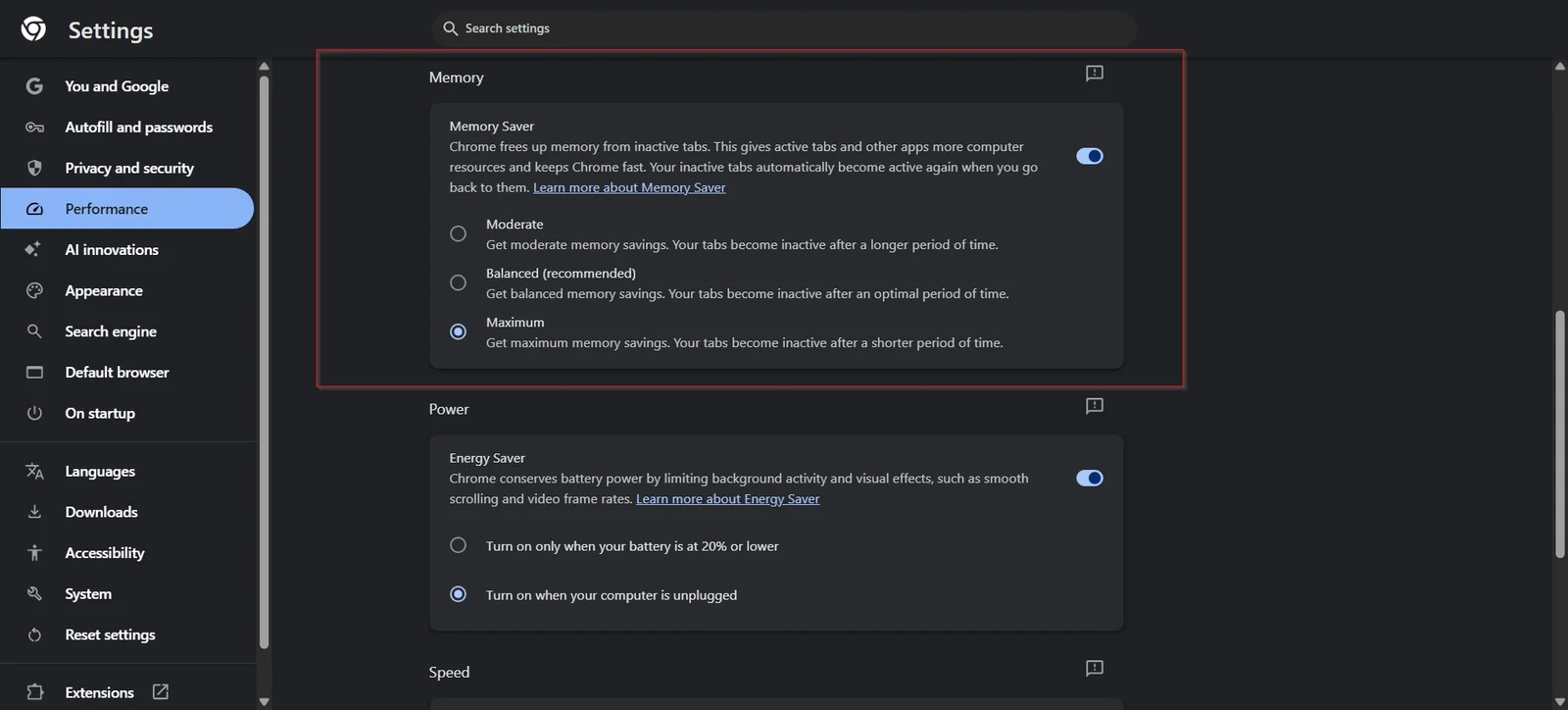
Chrome includes automated resource controls designed specifically to prevent inactive tabs from hoarding system RAM. You can manage these settings by enabling Chrome’s built-in Memory Saver and Energy Saver features to reduce RAM consumption on inactive tabs.
Open Chrome and click the three vertical dots (Menu) in the top-right corner.
Select Settings and click Performance from the left-hand navigation sidebar.
Toggle Memory Saver to the On position.
(Optional) If you frequently work with specific web applications that must remain active in the background (such as webmail or audio players), click Add next to “Always keep these sites active” and enter their domain names.
On laptop devices, toggle Energy Saver on to limit background visual effects and high frame rates when running on battery power.
Expected Outcome: Inactive tabs discard their held memory while preserving their title and tab state. When you click back onto a sleeping tab, Chrome reloads the page seamlessly.
Step 2: Identify and Terminate Resource-Hungry Tabs with Chrome Task Manager
A single misbehaving web page or background script can cause system-wide slowdowns. For additional background task management, follow Google’s official Chrome performance documentation to identify processes hogging system memory.
Branching Shortcut by Operating System:
Windows & ChromeOS: Press Shift + Esc while inside Chrome.
macOS: Click Window in the top system menu bar and select Task Manager (or click Menu > More Tools > Task Manager).
Inside the Task Manager window, click the Memory footprint column header to sort all active processes from highest to lowest consumption.
Locate individual tabs or background processes consuming excessive RAM or CPU cycles (e.g., over 500 MB for a single static tab).
Click on the offending process and select End Process at the bottom right.
Expected Outcome: The high-resource process terminates immediately, releasing RAM back to the operating system and stopping CPU thermal throttling.
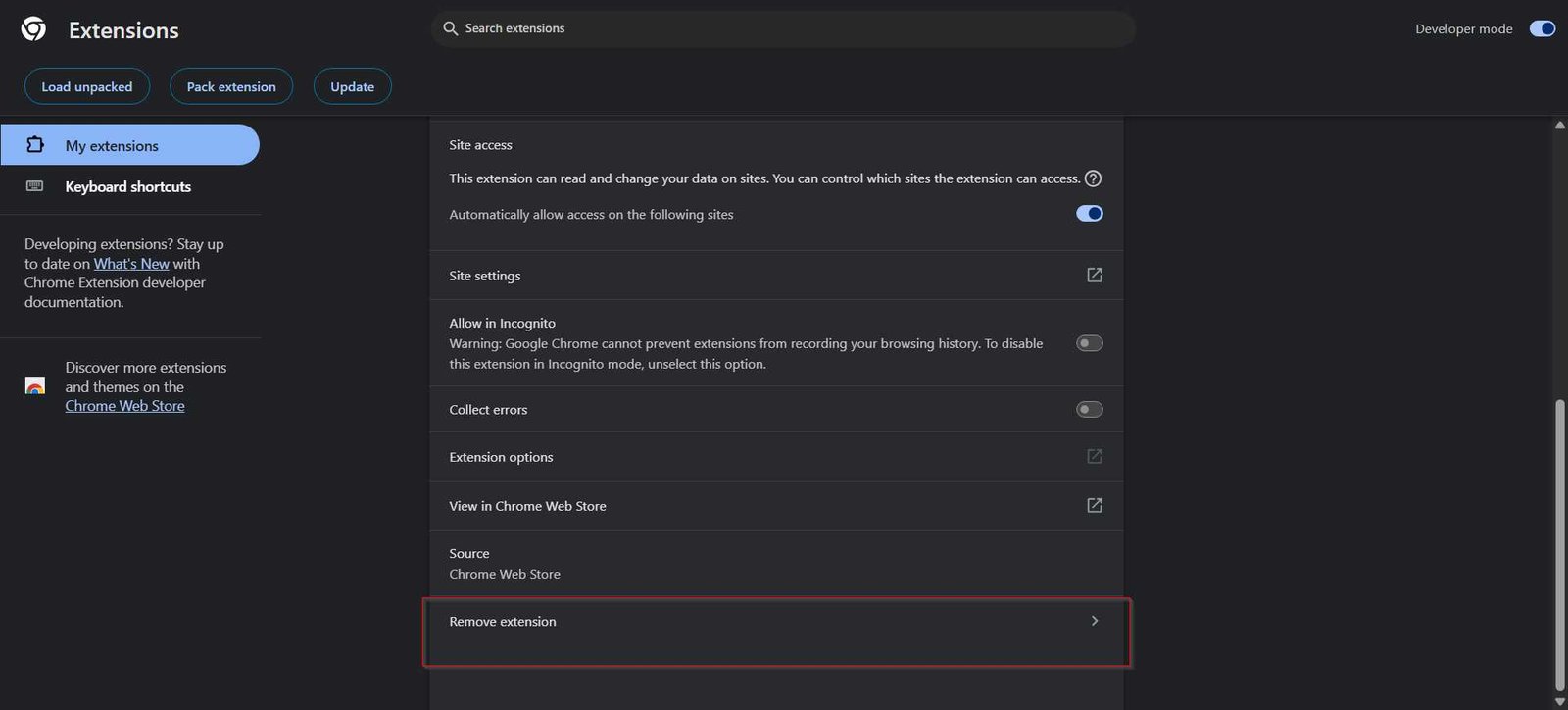
Step 3: Audit, Disable, and Uninstall Unnecessary Extensions
Browser extensions run persistent background scripts that inspect network traffic, modify page DOM trees, and consume memory. Only install extensions from the official Chrome Web Store extensions catalog and audit permissions regularly.
Type chrome://extensions into the address bar and press Enter.
Review every installed extension. Toggle off the switch for any extension you do not use daily.
For extensions you no longer need, click the Remove button.
If you suffer from frequent form submission crashes, avoid relying on outdated third-party form helpers; rely on Chrome’s built-in Autofill or maintained password managers instead to avoid script conflicts.
Expected Outcome: Lower baseline memory consumption upon browser launch and reduced latency when loading complex web pages. Learn more about essential Chrome extensions for productivity that maintain low system overhead.
Step 4: Configure Page Preloading and Hardware Acceleration
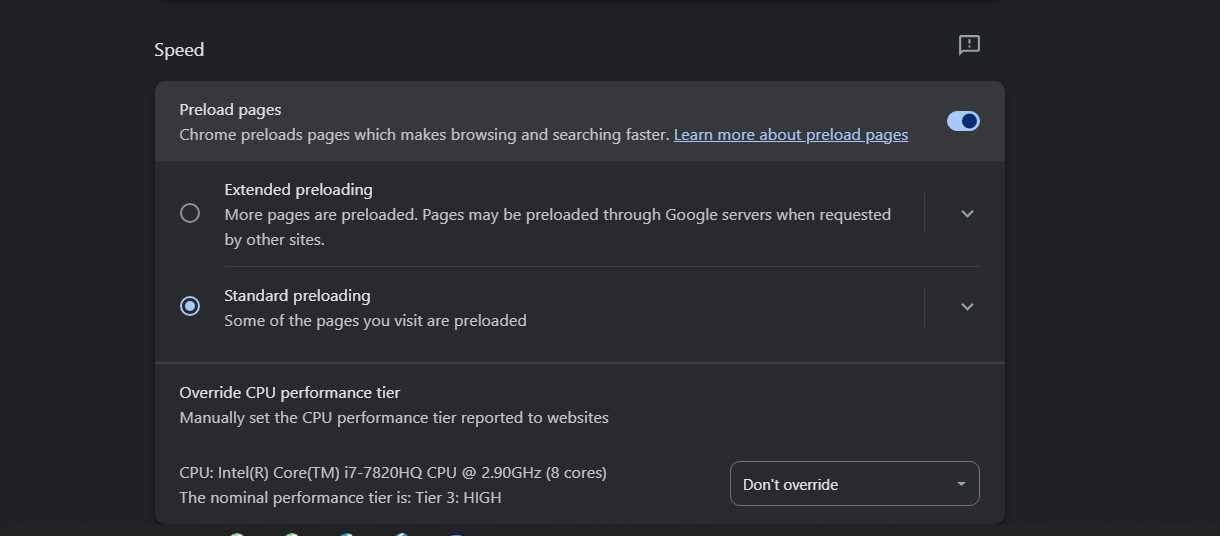
Chrome can predict which links you are likely to click and preload web assets in advance, speeding up navigation across frequently visited sites.
Navigate to chrome://settings/performance.
Scroll to Preload pages and select Standard preloading. (Avoid Extended preloading if you are on a metered connection or limited RAM).
Next, navigate to chrome://settings/system in the left menu.
Verify that Use graphics acceleration when available is toggled On if you have a dedicated or modern integrated GPU. If you experience screen flickering or video playback lag, toggle this setting Off and restart Chrome.
Expected Outcome: Instantaneous page transitions for internal links and smoother rendering of video content. You can also configure advanced Chrome flags like chrome://flags/#smooth-scrolling if default page scrolling feels jumpy.
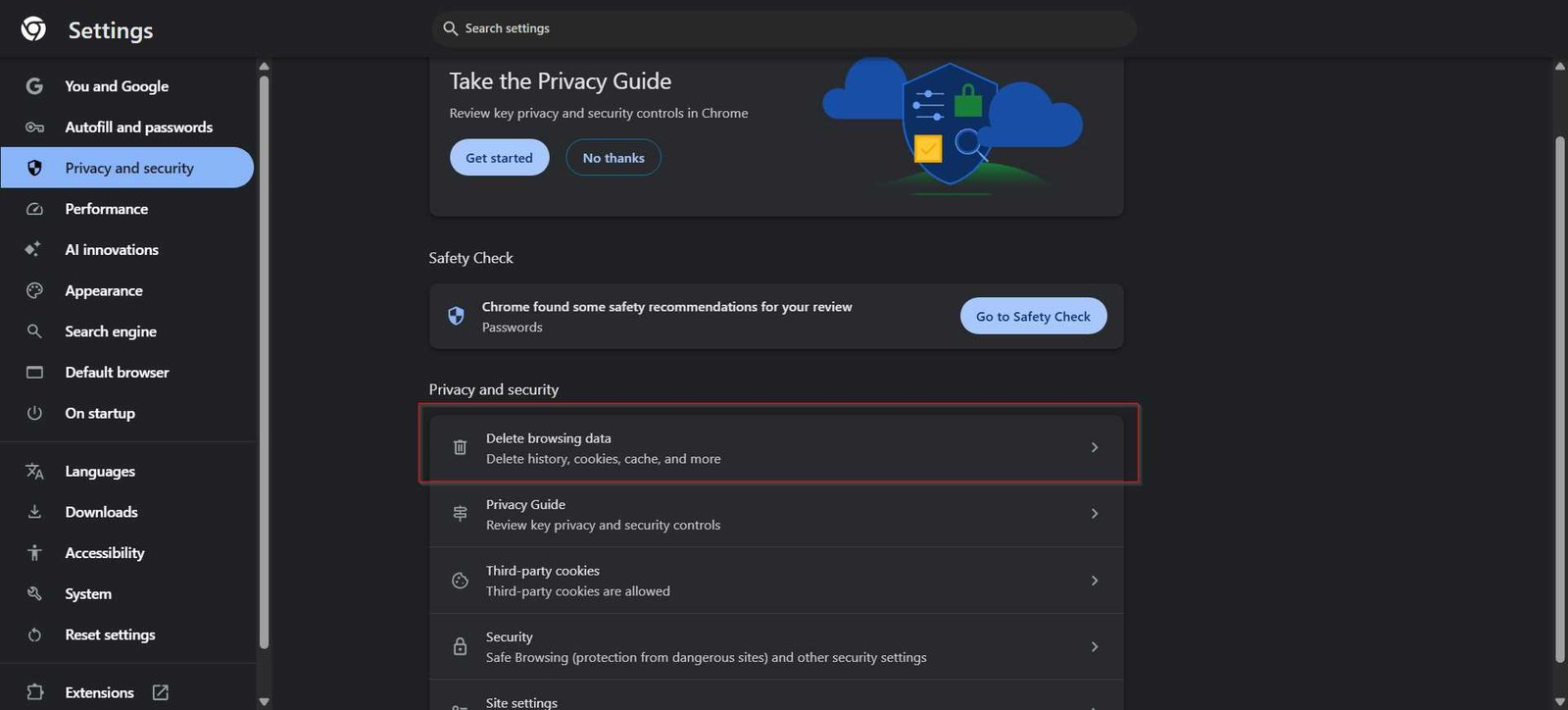
Step 5: Clear Cached Data and Reset Corrupted Browser Settings
Over months of use, corrupted web cache, stale cookies, and misconfigured permissions can degrade browser responsiveness.
Press Ctrl + Shift + Delete (Windows) or Cmd + Shift + Delete (Mac) to open the Clear browsing data menu.
Select the Advanced tab and set the time range to All time.
Check Cached images and files and Cookies and other site data. Click Clear data.
If browser behavior remains erratic, navigate to chrome://settings/reset and click Restore settings to their original defaults.
Expected Outcome: Elimination of stale browser cache states and misconfigured flag overrides. Review our full guide to clear your browser cache and cookies safely without losing critical saved passwords.
Step 6: Update Chrome and Perform Routine Restarts
Chrome continuously updates its V8 JavaScript engine and memory allocation routines. However, background updates only take effect when the browser restarts completely.
Advertisement
Type chrome://settings/help into your address bar and press Enter.
Chrome will automatically check for pending updates and download them.
When prompted, click Relaunch to apply the update.
Get into the habit of closing and re-opening Chrome at least once a week rather than leaving it running indefinitely during system sleep cycles.
Expected Outcome: Patched memory leaks, updated security definitions, and a fresh browser heap memory state.
How to Verify Chrome Performance Improvements
To confirm that your optimization efforts yielded tangible performance gains, perform the following verification checks:
Check Baseline Memory Usage: Open Windows Task Manager (Ctrl + Shift + Esc) or macOS Activity Monitor. Compare overall system RAM usage before and after enabling Memory Saver with 10–15 tabs open. You should observe a 30% to 40% reduction in total memory allocated to Chrome processes.
Inspect Individual Tab States: Hover your mouse cursor over an inactive tab. The hover preview card should indicate that the tab is “Inactive” or sleeping, confirming that Memory Saver is functioning.
Test Script Execution Speed: Load heavy web applications (like Google Sheets or web design tools). Notice whether page interaction and input latency are crisp and responsive.
Troubleshooting Common Chrome Performance Issues
Chrome Still Uses High Memory After Enabling Memory Saver
If Chrome continues to consume excessive RAM despite enabling native performance features, background extensions or pinned tabs are usually bypassing tab sleep rules. Pinned tabs, pages playing background audio, or sites with active web socket connections (like live messaging apps) are automatically excluded from memory deactivation.
Fix: Open chrome://extensions, temporary disable all non-essential extensions, and check if memory drops. Unpin non-critical tabs and review your “Always keep these sites active” list under chrome://settings/performance to ensure unnecessary domains were not added accidentally. For deeper diagnostics, read our guide on how to troubleshoot high Chrome RAM usage.
Web Pages Render Slowly or Video Playback Stutters
Slow page rendering or choppy video playback (especially on high-resolution streams) often points to GPU hardware acceleration conflicts or outdated graphics drivers.
Fix: Go to chrome://settings/system, toggle Use graphics acceleration when available to the opposite setting, and click Relaunch. Additionally, type chrome://gpu into the address bar to verify whether hardware acceleration features are marked as “Hardware accelerated” or “Software only.” Update your system’s graphics drivers if hardware acceleration is failing.
Advertisement
Unwanted Pop-ups, Search Hijacking, or Malware Symptoms Persist
Starting in Chrome version 111, Google retired the standalone Chrome Cleanup Tool previously found under browser settings. Users can no longer run a native “Clean Up Computer” scan directly inside Chrome.
Fix: Ensure Google Safe Browsing is configured to Enhanced protection by visiting chrome://settings/security. If malicious search redirects or persistent pop-ups remain, review your modern browser security settings and run a thorough malware scan using dedicated OS-level malware scanners like Malwarebytes or Microsoft Defender. If needed, consult our guide on standalone malware removal tools.
Where This Approach Has Limits
Optimizing software settings can only reclaim available hardware capacity; it cannot overcome physical hardware bottlenecks. If your machine has 4 GB of RAM and is running modern web applications alongside an operating system that requires 3 GB on its own, Chrome will inevitably slow down regardless of setting tweaks.
Additionally, while preloading pages speeds up navigation, it increases background data usage, which can be undesirable on metered mobile hotspots. Finally, disabling hardware acceleration resolves rendering glitches on older GPUs but offloads graphics tasks to the CPU, which may elevate CPU temperatures and reduce battery life on laptops.
Advertisement
Key Takeaways
Built-in features like Memory Saver automatically suspend inactive tabs, reducing RAM footprint by up to 40%.
Use Shift + Esc (Chrome Task Manager) to pinpoint and close specific high-resource tabs instead of restarting the whole browser.
Google’s legacy “Clean Up Computer” feature was permanently removed in Chrome 111; use Enhanced Safe Browsing and standalone antivirus tools for malware detection.
Regularly prune unnecessary browser extensions, as they run continuous background scripts that degrade performance.
Restarting Chrome weekly is mandatory to apply pending security updates and purge browser heap memory leaks.
Frequently Asked Questions
Why did Google remove the “Clean Up Computer” option from Chrome settings?
Google retired the built-in Chrome Cleanup Tool in March 2023 (Chrome version 111). Google cited a steady decline in local software hijacking complaints, significant improvements in Google Safe Browsing real-time URL detection, and enhanced anti-malware capabilities built directly into Windows Defender and modern operating systems. Chrome now relies on real-time cloud protection rather than local disk scanning.
Will turning on Memory Saver log me out of active web sessions?
No. When Memory Saver deactivates an inactive tab, it releases the system RAM allocated to rendering the page, but it preserves the tab’s session cookies, authentication tokens, and state. When you click back onto the tab, Chrome reloads the page with your active login intact. However, unsaved text entered into unsubmitted web forms on non-autosaving pages may be lost if a tab is discarded.
Does disabling hardware acceleration make Chrome faster or slower?
On modern systems with functioning graphics drivers, keeping hardware acceleration enabled makes Chrome significantly faster by offloading page rendering, CSS animations, and video decoding to the GPU. Disabling hardware acceleration should only be done as a troubleshooting measure if you experience visual artifacts, screen tearing, or video playback glitches caused by buggy graphics drivers.
Is it safe to change experimental flags in chrome://flags?
Flags located in chrome://flags are experimental features that Google developers use for testing. While popular flags like Smooth Scrolling (chrome://flags/#smooth-scrolling) are generally safe, changing unstable flags can cause browser crashes, tab freezing, or data loss. If Chrome becomes unstable after modifying flags, return to chrome://flags and click the Reset all button at the top right.
August Apple deals are in full swing at Amazon, with savings of up to $500 off across Mac, iPad, AirTag, and Apple Watch categories. Prices start at just $27.
Save up to $500 this week at Amazon, with discounts across Apple’s Mac, iPad, and Apple Watch lines. Fresh markdowns include a $60 discount on the current M4 iPad Air and prices as low as $1,847 for MacBook Pros.
Over the years I have been to many hacker camps and done a lot of very cool things, but BornHack 2026 brought me something entirely new: Radio. By which I don’t mean radio in terms of amateur radio, LoRa, or whatever, but Radio. Broadcast radio, because the camp had a special event FM radio station for the first time. And because in a previous life I spent an inordinate amount of time in my university’s student radio station and have the Radio Voice to prove it, I was totally there for it.
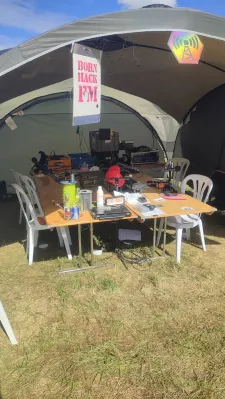
The BornHack Radio nerve centre.
For a hacker camp, one of the special things about BornHack Radio was unexpected, that it was entirely analogue. No online streams, the only broadcast was over the air, 5 watts ERP from a vertical antenna stuck on a mast at the highest point of the Hylkedam scout camp site. I don’t know whether any of the residents of the isle of Funen listened, or what they made of it, but it certainly reached as far as the two closest towns.
The other unexpected feature of the station was that it had no music licensing. Personally I viewed this as an asset, because it forced the programming to be hacker-focused rather than suit the musical tastes of whichever people are enthusiastic enough to be DJs. I sincerely hope they don’t get a music licence at future events, speech-only gives it a special quality.
The studio for an analogue station like this one can be surprisingly simple, in that it’s a mixing desk to bring all the different microphones and other inputs together and set the levels, and not a lot else. the whole thing was in a Coleman shelter on the main drag through the camp, so as studios go it could have been quieter. Programming varied from talk shows through interview shows, a live feed from the speaker tent — is this the first ever Hacker Jeopardy broadcast? — and a beautifully done robotic numbers station which I suspect may also have been part of one of the on-camp games.
The thing that struck me most in my first foray into radio journalism was how straightforward it was. Wander the camp with microphone (complete with fluffy windshield and 3D-printed Hackaday cube), drop the results into Audacity, and a remarkably straightforward editing process compared to video. Last time I did this it involved 1/4″ tape and a razor blade.
So that was BornHack Radio, a new experience at a hacker camp both for those of us who ventured forth on the airwaves, and I hope also for the listeners. A format in which the live shows disappeared into the aether rather than having an online afterlife gave the whole thing a freedom rarely found in 2026. I really hope this isn’t the last time I break out the fluffy microphone at a hacker camp.
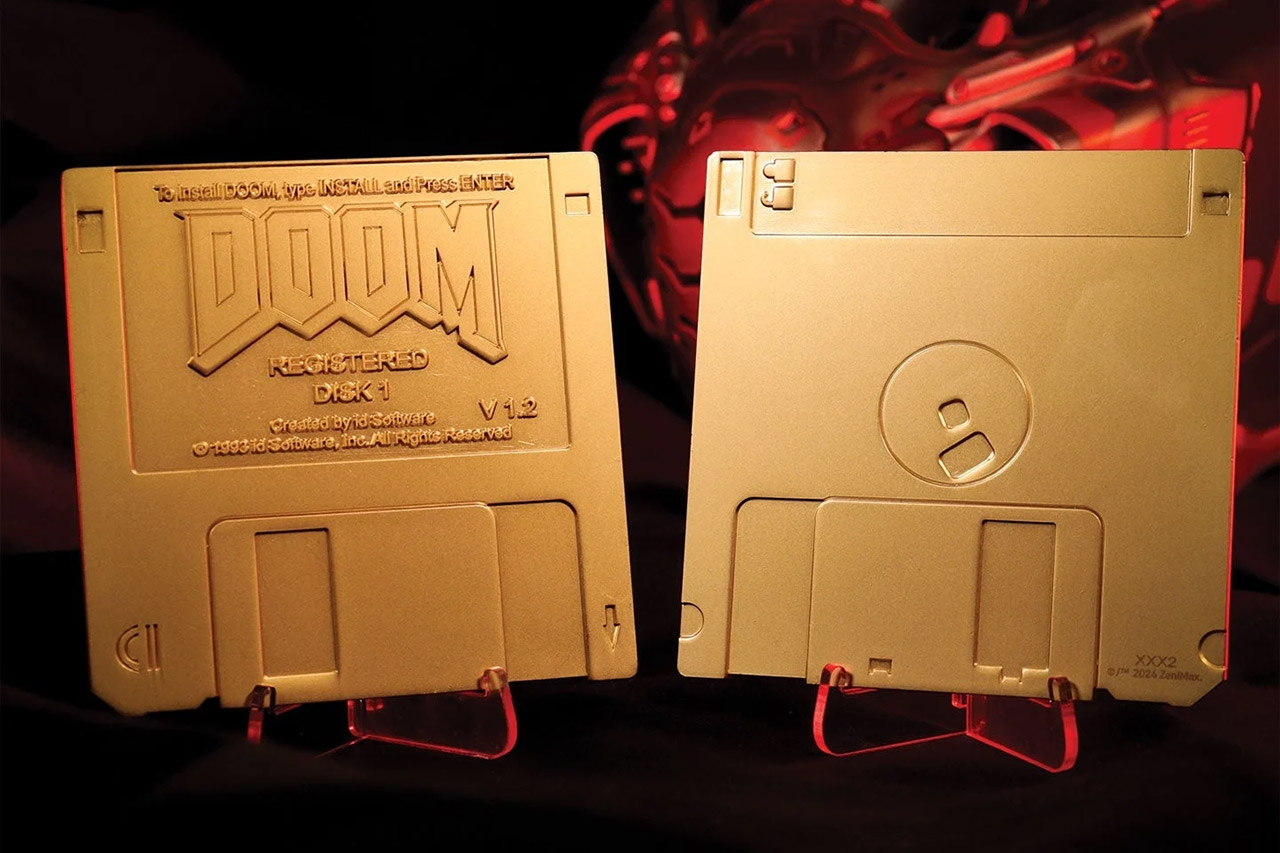
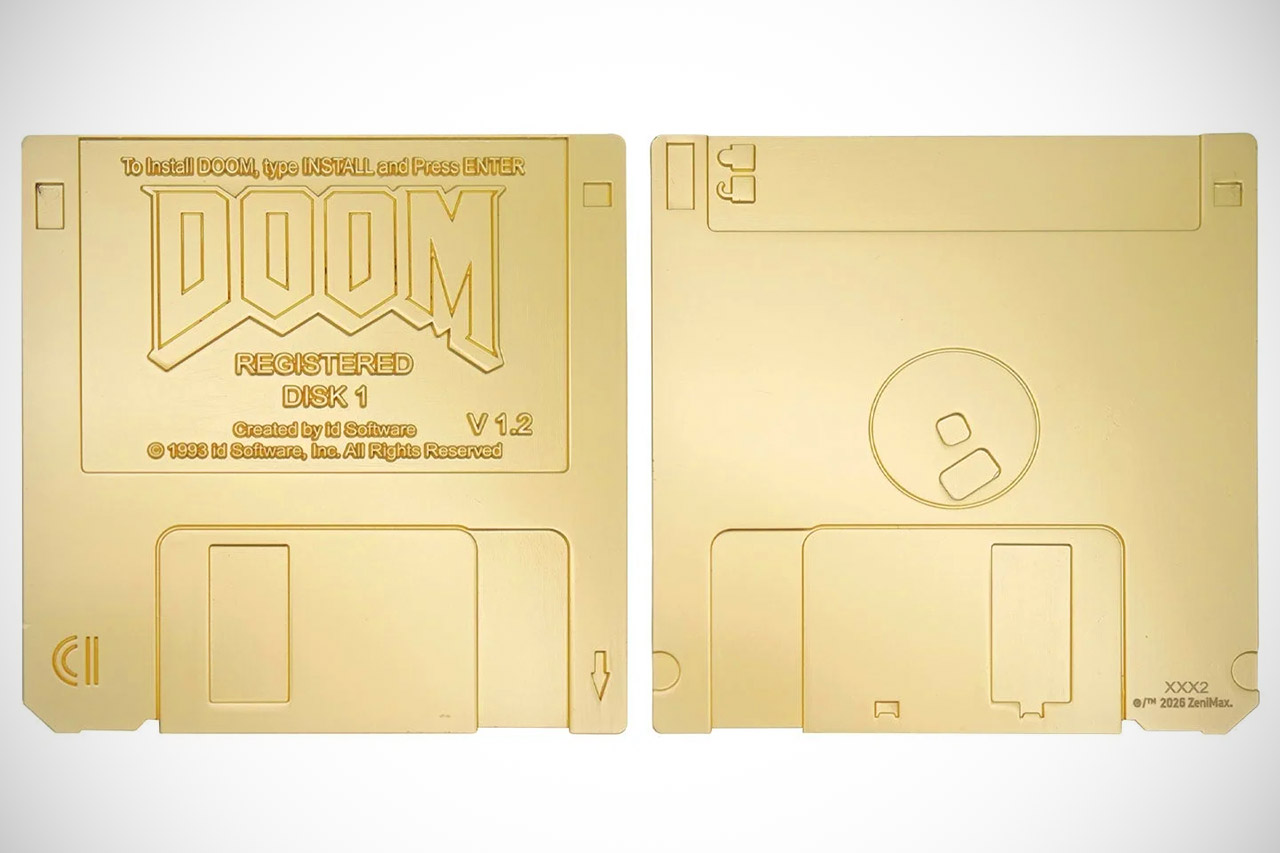
Fans of the original DOOM never asked for a pair of shiny golden floppy disks in 2026. Fanattik went ahead and made them anyway. These officially licensed replicas celebrate the two 3½-inch disks that carried the DOOM v1.2 shareware release.
That version, released in early 1994, let you to play the first episode, Knee-Deep in the Dead, to evaluate if the whole game was worth the money before opting to buy. The new set comes as two non-working dummy disks coated in imitation gold plating. They measure 89 by 89 millimeters and are placed in a box with the original artwork printed directly on it. A simple display stand is included so the disks can stand upright on a shelf.
REAL PLAYABLE RETRO GAMING EXPERIENCE: Enjoy authentic gameplay on a mini Atari 2600 console featuring a working joystick and TV screen. Includes…
10 BUILT-IN CLASSIC VIDEO GAMES: Preloaded with iconic Atari titles, this mini arcade system delivers hours of entertainment without downloads or…
PORTABLE MINI ARCADE CONSOLE: Compact 3.5” size makes it easy to take anywhere—great for travel, desks, or small spaces. A fun handheld gaming…
You can purchase one of the 5,000 numbered sets being produced, however the disks are primarily for decoration, with no moving mechanisms, metal sliders, or write-protect notches. They have no data on them. The purpose of this item is solely for display. If you wish to play the original shareware version, there is still a free download available that has been around for a long time.
Fanattik began taking pre-orders in August 2026, and GameStop lists it for $29.99 in the United States, while it is available straight from Fanatik for £19.99 in the United Kingdom. In Malaysia, it appears that it will cost roughly RM94 before shipment. You can probably tell by now that the company has a history of releasing comparable retro-style items, having previously done CD-ROM reproductions of Resident Evil and World of Warcraft, so a DOOM set is not surprising.
To put things in perspective, the full version of DOOM back then required four floppy disks to carry all three episodes, as CD-ROM versions weren’t available until much later. The golden floppies practically preserve the shareware version indefinitely, so you don’t need to dig out an old drive to play it. For anyone who still proudly displays their old PC boxes, the limited run and individual numbering ensures the future, since once you have one of the 5,000 sets, there will be no more available.
Go to Account Settings, which can be found by clicking your profile picture in the upper righthand corner
Select Subscription from the menu on the left hand side
Select Cancel Subscription
Cancel PlayStation Plus via your PlayStation console
Advertisement
You can also easily cancel your PlayStation Plus subscription via the console itself, though the process for PlayStation 4 and PlayStation 5 vary slightly.
PlayStation 5
From the home screen, go to the Settings menu
Select Users and Accounts
Select Account
Select Payment and Subscriptions
Select your PlayStation Plus subscription and select Cancel
PlayStation 4
From the home screen, go to the Settings menu
Select Account Management
Select Account Information
Select Subscriptions
Select your PlayStation Plus subscription and select Cancel
Cancel PlayStation Plus via the PlayStation app
If you have the PlayStation app, you can also cancel your subscription from there by following these steps:
Select the PS Store from the bottom menu
Select the menu icon in the top right of the screen
Select Subscription Management
Select Cancel on your subscription
What happens after you cancel
Teamjackson/Getty Images
After you cancel your PlayStation Plus subscription, you’ll no longer be charged, but you’ll still have access to all of your subscription benefits until the end of the payment period. Once your subscription is over, you’ll no longer be able to use the game library, any monthly free games you may have claimed, online storage or online multiplayer. However, packs, avatars and discounted purchases acquired through your subscription are yours to keep.
If you change your mind and don’t want to cancel your PlayStation Plus, you can reactivate your subscription by going to your subscription settings again and selecting Reactivate Subscription. If you do so before what would be your next payment date, it will keep the current subscription active; otherwise, you’ll need to purchase a new subscription through the PlayStation Store.
A simply brilliant coffee machine, the Nespresso Vertuo Up is also my favourite Vertuo machine. More compact than its predecessors, the drop-in capsule system is easier to use, and a three-second heat-up time means there’s virtually no wait for a coffee. Excellent coffee-making via the clever Centrifusion brewing system, with a wide choice of coffees, makes this a great choice for anyone who loves a smooth cup of coffee. Only those who would like to integrate milk frothing should look elsewhere.
Brilliantly designed
Makes excellent coffee
Integrated Wi-Fi
Creations button genuinely useful
No integrated milk frothing
Key Features
Advertisement
Review Price:
£179
Two dispensing buttons
Advertisement
Regular coffee and creations at the touch of a button.
Fresh design
Advertisement
Capsules drop into the slot, which makes the machine easier to use.
Introduction
Although the ‘new’ type of Nespresso, Vertuo machines have been around since 2017. It’s a little surprising, then, that it’s taken the company this long to launch a really good compact, simpler machine.
Much smaller than its predecessors, the Nespresso Vertuo Up takes capsules via a drop-in slot similar to how the original machine works, and has a brand-new coffee creations button for making more intense versions of coffees.
Advertisement
Super-fast heat-up times and Wi-Fi connection round out the package and make this my favourite Vertuo machine.
Advertisement
Design and features
Works like an original Nespresso machine
Very fast heat-up times
Integrated Wi-Fi
I really like the Nespresso Vertuo range. Its Centrifusion brewing makes coffee that’s completely different to that dispensed by the original range. Using a larger style capsule, the Vertuo range of machines has always had a few size issues though.
With the original Nespresso Vertuo Plus, the motorised lid means you need quite a bit of room above it (an issue that remains with the manually operated Vertuo Next and Vertuo Lattissima). The smaller Vertuo Pop still had a hinged lid, but its smaller dimensions mean it needs less room around it; however, the low spout makes it fiddly to get a regular-sized mug underneath.
The Nespresso Vertuo Up changes that, with a design that’s both practical but more compact than what went before. The design is actually closer to that of an original machine. I’ve got the black version on review, but there are also white, blue and graphite options.
Advertisement
Instead of having to open the entire top of the machine, with it hinging upwards, there’s a simple drop-in slot for the capsules. Just pull the lever up, drop in the pod, shut the lever and you’re good to go.
Image Credit (Trusted Reviews)
Advertisement
I actually prefer this design. It’s easier to get the pod in and the lever shut. With the Vertuo Next (and Lattissima), it can be a little fiddly shutting the lid and getting the locking lever all the way across into the correct position.
This new design means that you don’t need much space above the machine, so you can place it under a shelf, no problem.
This design has other advantages. First and foremost, the drip tray and used-capsule bin both pull out from the front. No more having to turn the machine around to get a side or rear bin.
Advertisement
Image Credit (Trusted Reviews)
At the back, there’s a 1.4-litre water tank (plenty big enough to make a few mugs of coffee before it needs to be refilled). This is mounted on a rotating base, so you can have the tank at the back for a more streamlined, but longer placing (12 x 49 x 25.5 cm), or you can put the tank to the side, which makes the Vertuo Up wider, but shorter (22 x 39 x 25.5cm).
Image Credit (Trusted Reviews)
Advertisement
The cup holder at the front can be placed at different heights, and locks securely into position, as does the drip tray. This means that the Vertuo Up can even be placed slightly overhanging a counter, as I do on my narrow sideboard.
Image Credit (Trusted Reviews)
As you might expect from a Vertuo machine, the Vertuo Up is very easy to use. Drop a capsule in, hit the button on the front, and hot coffee pours out, with the barcode on the capsule dictating how the coffee should be made and the volume.
Actually, I should say there are two buttons for coffee. The main one does as above, but there’s also a Coffee Creations button, which dispenses a distilled, more intense version of each coffee, perfect for the flavoured capsules that are designed for recipes, such as with added milk or water.
Image Credit (Trusted Reviews)
With this mode, 230ml pods go to 80ml, 150ml goes to 40ml, 80ml to 40ml, and 40ml to 25ml. This mode was available on previous Nespresso machines but required a double-tap of the main button; it’s easier to have a dedicated button.
Advertisement
Impressively, the Vertuo Up has a three-second heat-up time. In fact, by the time I’ve woken the machine up and have dropped a coffee in, it’s ready to go. With the older machines, there’s a much longer heat-up time.
Advertisement
As with recent Nespresso machines, the Vertuo Up is a smart one, connecting to the Nespresso Smart app via Wi-Fi. As well as pinging the app if there’s a problem, such as the machine has run out of water, changing the coffee temperature and default volumes, as well as running the cleaning and descaling cycles.
Image Credit (Trusted Reviews)
Coffee quality
Rich coffee
Consistent volume
Wide range of coffees
There’s a wider range of pods available for this machine than the original, with everything from 25ml ristretto and 40ml espresso to 230ml mug-fulls and even capsules that will do an entire carafe. My guide to the best Nespresso Vertuo pods can help you find the right pods.
Coffee is delivered using Nespresso’s Centrifusion brewing system, which spins the capsule to extract, resulting in long, fluffy shots with lots of crema, even when filling a mug. The result is coffee that’s different to that from other machines: richer with a longer crema. Temperatures at all cup sizes came in at around 67°C, which is spot-on.
Advertisement
Image Credit (Trusted Reviews)
Flavour varies by coffee capsule and style, but you’ll easily find something you like. As a lover of a mug-full of hot black coffee, there’s no other system that quite makes a cup like this.
Having the Creations button makes it easier to use this feature, and it works really well. When making iced coffee, having a more intense shot of coffee is better, and it makes it easier to add water and ice to complete the drink.
Advertisement
Image Credit (Trusted Reviews)
There’s no milk frothing on this machine, but you can add milk to a mug, or you can buy a separate milk frother.
Maintenance
Capsules are recyclable
Very little day-to-day maintenance
Advertisement
Looking after the Nespresso Vertuo Up is refreshingly easy. Coffee capsules drop into the bin at the front, where they can be emptied into a recycling bag and then sent back to Nespresso for full recycling (you can do this via the post or at Nespresso stores, all for free).
Otherwise, there’s not much maintenance, just the occasional descaling, which is easy to do using the app.
Should you buy it?
You want the best Vertuo machine
Advertisement
Compact, very fast to heat-up and capable of making great coffee, this is a brilliant Veruo coffee machine.
There’s no integrated milk frothing in this machine, so buy an alternative if you want this feature.
Advertisement
Final Thoughts
If you want a Vertuo machine that can also froth milk, the Lattissima might be a better choice.
However, if you primarily drink black coffee, then the Nespresso Vertuo Up is the best Vertuo machine that I’ve tested: it heats faster than the previous machines, I prefer the drop-in capsule system, and this machine is more compact than its predecessors. It’s my new favourite Vertuo machine and deserves a place on my guide to the best Nespresso machines.
Advertisement
How We Test
We test every coffee machine we review thoroughly over an extended period of time. We use industry-standard tests to compare features properly. We’ll always tell you what we find. We never, ever, accept money to review a product.
Find out more about how we test in our ethics policy.
Used as our main coffee machine for the review period
Used as our main coffee machine for the review period
We roast our own beans for regular coffee machines, so we can fairly compare each machine; pod machines are tested with a variety of compatible capsules
Depending on capabilities, we test each machine’s ability to make espresso and cappuccino
Advertisement
FAQs
What’s the difference in the Nespresso Vertuo Up’s two buttons?
The standard button makes regular coffee at the volume displayed on the capsule, and the Creations button makes a shorter, more intense drink, ideal for recipes.
Experts warn hotfix not optional. MSPs warned attacker gains ‘full administrative access to an N-central console’
The US Cybersecurity and Infrastructure Security Agency (CISA) has added an exploited N-able vulnerability to its Known Exploited Vulnerabilities (KEV) catalog, giving federal agencies three days to patch a flaw that could let attackers reach managed service provider (MSP) customers.
Attackers exploiting the flaw can gain “full administrative access to an N-central console,”
Advertisement
Tracked as CVE-2026-18577 (8.2 CVSSv4), N-able disclosed the vulnerability affecting N-central on Sunday, noting that it was exploited as of July 31.
MSPs use N-central to manage customer systems from a single dashboard, and successful exploitation can hand an attacker administrative access to the console.
Based on the limited set of partner logs it reviewed, security firm Huntress said successful attacks led to pivots into managed endpoints and the creation of Cloudflare-based tunnels for persistent access to victim networks.
“From an MSP perspective, exploitation of this flaw can grant an attacker full administrative access to an N-central console – the same level of control normally reserved for trusted NOC and engineering staff,” wrote Huntress’s Ben Bernstein and John Hammond.
Advertisement
Attackers can then open remote control sessions on critical systems and modify roles, accounts, and policies to support follow-on attacks.
The vulnerability affects N-central releases earlier than version 2026.3 when the server is exposed to the internet or reachable from an untrusted network.
Huntress advised customers unable to apply N-able’s hotfix immediately to disable N-central until they could do so.
Authorities elsewhere have also urged users to patch. NHS England’s advisory mentioned that its National Cybersecurity Operations Centre assessed that “further exploitation is likely,” while Belgium’s Centre for Cybersecurity urged fast action due to the “potential for significant impact.”
Advertisement
Exploitation of this flaw can grant an attacker full administrative access to an N-central console – the same level of control normally reserved for trusted NOC and engineering staff
CVE-2026-18577 is related to an earlier flaw, CVE-2026-18556, patched in N-central 2026.2. According to N-able, that fix left another route to exploitation, which attackers began abusing late last month.
CISA gave Federal Civilian Executive Branch agencies until August 6 to remediate the flaw. Under Binding Operational Directive 26-04, CISA can impose a three-day deadline on vulnerabilities it considers an urgent risk rather than allowing the usual 14 days.
According to Huntress’s data, affected customers have leapt into action. By August 3, nearly all cloud-hosted N-central instances had been patched, although 28.6 percent of observed self-hosted servers remained vulnerable and exposed to the internet. ®
In the 1980s, France was the stage for one of the boldest public computing projects of the era. Minitel was the French take on viewdata, and instead of making it an expensive and unattainable luxury, they made the terminals universally available. Many Minitel services cost extra to use, but despite this it was a runaway success that lingered on into the 21st century.
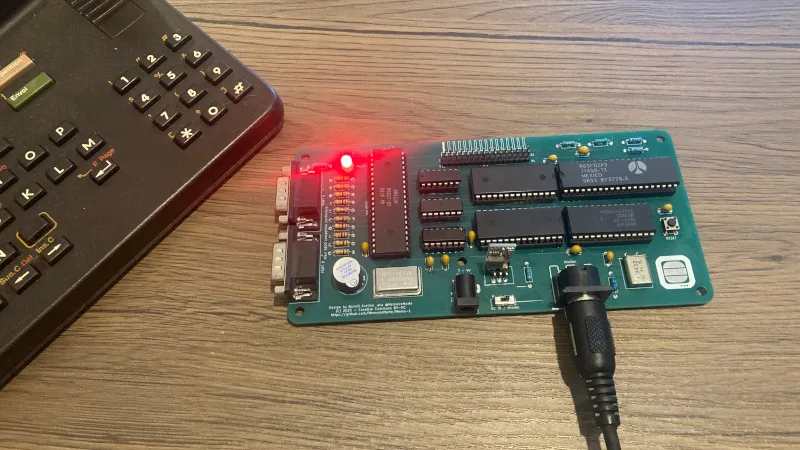
The ubiquitous terminals are now surplus to requirements, but that’s not to say they are useless. [MemoireMorte] has proved this with the Memo-1, a 6502-based computer designed to plug into a Minitel-1 terminal. It’s just the accessory your Minitel needs!
Hardware wise it’s a relatively conventional device with the usual RAM, ROM, and BASIC. There’s an expansion port, and a 6522 to provide a couple of Atari joystick ports. The serial port uses a a 6551 ACIA rather than the more usual W65C51 because of an incompatibility between the latter chip and the Minitel-1.
Advertisement
We like this computer, not because of novelty, after all it’s hardly the first 6502 we’ve seen, but because of its use of the Minitel terminal. These devices are magnificent, and deserve more love. We subjected another terminal to a teardown a year or two ago.
During its second-quarter earnings call on Tuesday, Spotify again teased the upcoming release of a new product that will allow music fans to leverage AI to make covers and remixes of artists’ music, with the artists’ consent.
The company also announced that Merlin, a licensing partner for independent labels and distributors, has now joined Universal Music Group (UMG) on the new AI music effort. The deal brings more than 30,000 labels from Merlin’s network to the product, which will allow fan-made covers and remixes by artists who agree to participate.
Spotify has positioned its AI music product as being significantly different from the more controversial AI music startups that have been used to create fully artificial songs. Instead, Spotify co-CEO Gustav Söderström told investors on Tuesday’s call that the company’s AI music product will be about “real artists, not fake artists.”
“We want artists to be consenting [to add] their work into this catalog, so people can play around with covers and remixes based on their art,” added co-CEO Alex Norström. “We also obviously want to give them credit. And last but not least…we not only have the consent and give credit, but we also drive the compensation for this. So, really, we’re talking about the first legal way to partake in this AI tailwind that we see coming for interactive music,” he said.
The company told investors that a research preview of the fan remix and covers product would initially be made available to a subset of users. Spotify also noted that it would not require a full music catalog to get started. The company did not say when the preview would arrive.
The new tool will launch as a paid add-on, creating an additional revenue stream for artists, Spotify previously said.
“Our remix and covers I think is an incredibly exciting product again because there is no one else that can really do this,” Söderström said. “Normal generative music will happen with or without us. This product will not happen without us, and it needs to exist so that existing artists can can participate in this.”
Advertisement
When you purchase through links in our articles, we may earn a small commission. This doesn’t affect our editorial independence.





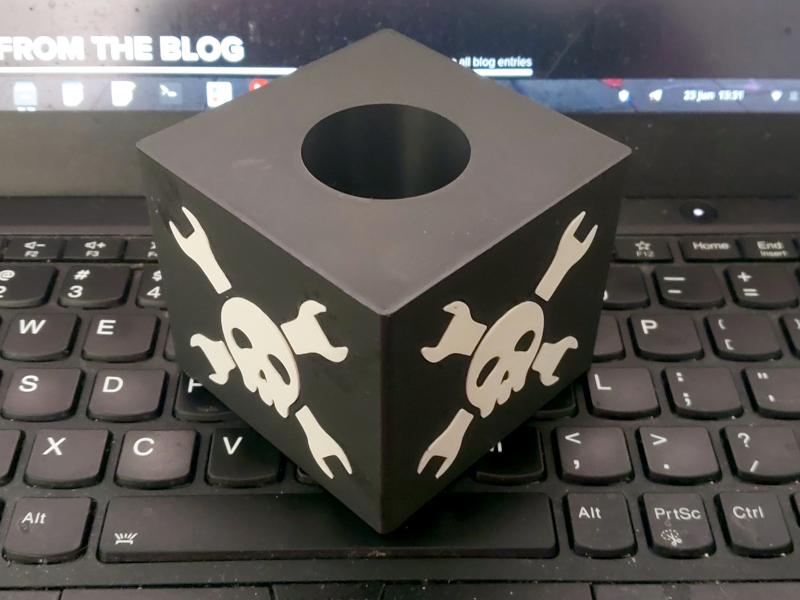 The thing that struck me most in my first foray into radio journalism was how straightforward it was. Wander the camp with microphone (complete with fluffy windshield and 3D-printed Hackaday cube), drop the results into Audacity, and a remarkably straightforward editing process compared to video. Last time I did this it involved 1/4″ tape and a razor blade.


















































You must be logged in to post a comment Login