President Donald Trump has ordered all U.S. federal agencies to “immediately cease” using Anthropic’s AI technology, escalating a standoff after the company sought limits on Pentagon use of its models. CNBC reports: The company, which in July signed a $200 million contract with Pentagon, wants assurances that the Defense Department will not use its AI models will not be used for fully autonomous weapons or mass domestic surveillance of Americans. The Pentagon had set a deadline of 5:01 p.m. ET Friday for Anthropic to agree to its demands to allow the Pentagon to use the technology for all lawful purposes. If Anthropic did not meet that deadline, Pete Hegseth threatened to label the company a “supply chain risk” or force it to comply by invoking the Defense Production Act.
“The Leftwing nut jobs at Anthropic have made a DISASTROUS MISTAKE trying to STRONG-ARM the Department of War, and force them to obey their Terms of Service instead of our Constitution,” Trump said in a post on Truth Social. “Their selfishness is putting AMERICAN LIVES at risk, our Troops in danger, and our National Security in JEOPARDY.”
“Therefore, I am directing EVERY Federal Agency in the United States Government to IMMEDIATELY CEASE all use of Anthropic’s technology,” Trump wrote. “We don’t need it, we don’t want it, and will not do business with them again! There will be a Six Month phase out period for Agencies like the Department of War who are using Anthropic’s products, at various levels,” Trump said. On Friday, OpenAI said it would also draw the same red lines as Anthropic: no AI for mass surveillance or autonomous lethal weapons.
Mbryonics has been tapped for the final leg of an ESA space communication project.
Galway space-tech Mbryonics is building out a second manufacturing facility in Shannon to keep up with a growing demand for its services.
The new 40,000 sq ft manufacturing facility called Photon-2 will produce thousands of terminals by 2027, the company said.
Mbryonics specialises in tools for space-based communication, having risen to become one of Ireland’s most notable space-techs in the 12 years since its founding.
Advertisement
Last September, the company opened the Photon-1 production facility in Dangan, Galway, and announced 125 new jobs to be created by 2027.
The latest expansion comes as Mbryonics continues its work with the European Space Agency (ESA) on communication-related projects – the most recent being the ‘High-throughput Digital and Optical Network (Hydron)’, which is building an advanced laser-based satellite system to extend fibre-based internet into space.
The project is divided into parts – or ‘Elements’ – with the first establishing a constellation of satellites in low Earth orbit, the second extending this capability into higher orbits, and the third, which brings industry into the network to validate the technology.
After a successful contribution to the second part of this project, Mbyronics was tapped for the final leg, in collaboration with Kepler Communications.
Advertisement
Specifically, the company’s optical terminal and its ground station test bed have been selected to demonstrate full interoperability with other optical terminal providers during the in-orbit demonstrations and to also verify on-ground interoperability verification.
“Hydron will serve as the world’s first multi-orbital optical communications network with a terabit per second capacity, offering resilient and efficient data transfer to address the challenges of bringing connectivity to multiple users securely, quickly and reliably,” said Laurent Jaffart, the director of resilience, navigation and connectivity at ESA.
John Mackey, the CEO of Mbryonics, added: “The internet was built by making different networks talk to each other, and that’s exactly what we’re enabling in space.
“Just as we demonstrated in DARPA Space BACN, this ESA award allows us to showcase how our laser communication technologies enable satellites from different providers to communicate seamlessly in orbit.
Advertisement
“We are delighted to partner with Kepler, and other ecosystem providers, on this strategic engagement with the European Space Agency.”
Don’t miss out on the knowledge you need to succeed. Sign up for the Daily Brief, Silicon Republic’s digest of need-to-know sci-tech news.
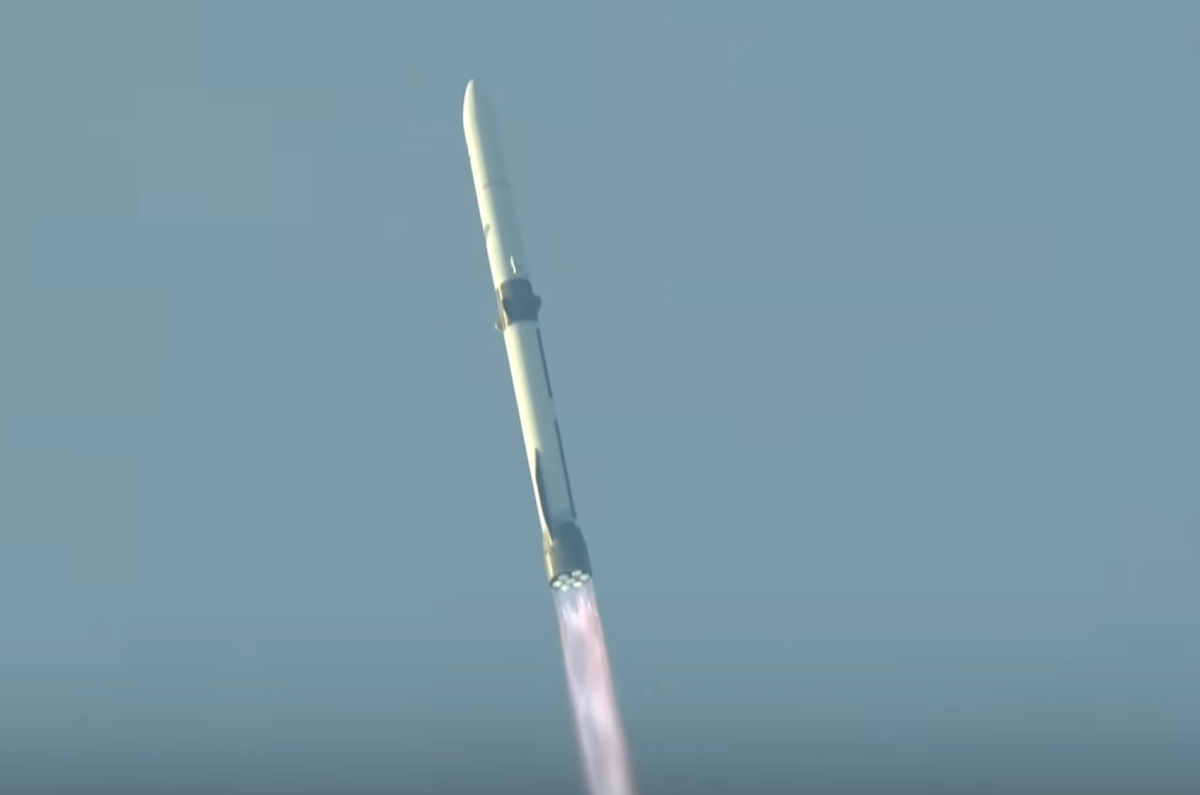
Blue Origin has successfully reused one of its New Glenn rockets for the first time ever, marking a major milestone for the heavy-launch system as Jeff Bezos’ space company looks to compete with Elon Musk’s SpaceX.
But the overall mission’s success may be in question. Roughly two hours after the launch, Blue Origin revealed that the communications satellite that New Glenn carried to space for AST SpaceMobile wound up in an “off-nominal orbit,” meaning something may have gone wrong with the rocket’s upper stage. In other words, it appears the company missed the mark.
“We have confirmed payload separation. AST SpaceMobile has confirmed the satellite has powered on,” the company wrote on X. “We are currently assessing and will update when we have more detailed information.”
According to a timeline provided by Blue Origin prior to the launch, the upper stage of New Glenn should have performed a second burn roughly one hour after the rocket lifted off from Cape Canaveral, Florida. It’s unclear if that second burn ever happened, or if there were other problems with it, before the AST satellite was deployed.
The company accomplished the re-use feat Sunday on just the third-ever launch of New Glenn, and a little more than one year after the first flight of the new rocket system, which has been in development for more than a decade.
Making New Glenn reusable is crucial to its economics. SpaceX’s ability to re-fly Falcon 9 rocket boosters is one of the main reasons why it has come to dominate the global orbital launch market.
Techcrunch event
Advertisement
San Francisco, CA | October 13-15, 2026
While Blue Origin has already sent a commercial payload to space with New Glenn — Sunday was the second-such mission — the company wants to use the rocket for NASA moon missions, and to help both it and Amazon build space-based satellite networks. Blue Origin is currently finishing getting its first robotic moon lander ready for an attempted launch later this year.
Advertisement
The booster that Blue Origin re-flew on Sunday was the same one the company used in the second New Glenn mission in November. During that mission, the New Glenn booster helped put two robotic NASA spacecraft into space for a mission to Mars, before returning to a drone ship in the ocean. On Sunday, Blue Origin recovered the rocket booster a second time on a drone ship roughly 10 minutes after takeoff.
Any trouble deploying AST’s satellite could present a risk to Blue Origin’s near-term plans for New Glenn. Blue Origin has a deal with the communications company to send multiple satellites to orbit over the next few years as it works to build out its own space-based cellular broadband network.
This story has been updated with new information from Blue Origin and AST SpaceMobile.
For the last 18 months, AI has fundamentally disrupted the way people search and find information.
The SEO industry’s response was disjointed, and—let’s be honest—entirely reactive.
We simply did not have the data to understand what was changing, how fast it was changing, and where we would ultimately end up.
Advertisement
Article continues below
Back then, rather than solving for the actual problem, such as lost traffic, broken attribution, and the looming threat to revenue, practitioners reached for a lexicon.
Andrew Warden
Advertisement
Chief Marketing Officer, Semrush.
We saw a sudden explosion of new acronyms: GEO, AEO, LLMO. Each new acronym narrowed the conversation to a single tactic.
Each one splintered budgets and reinforced a categorically incorrect idea: in order for brands to be visible in the AI era, radically different approaches needed to be built from scratch.
Advertisement
It’s been a distraction. While the industry is busy debating acronyms, the actual behavior of the consumer—and the search surfaces—are evolving right in front of us.
Sign up to the TechRadar Pro newsletter to get all the top news, opinion, features and guidance your business needs to succeed!
The end of the acronym soup
The dust has finally settled. And I want to remind everyone of something that should make marketers breathe a sigh of relief: the core human behavior behind search, including curiosity, problem-solving, decision-making, hasn’t changed.
Advertisement
Just as importantly, brand visibility in the AI era is still built on the same foundations that have always driven great SEO: crawlable infrastructure, authoritative content, and consistent brand signals.
But SEO alone is no longer enough. Today AI search systems are constructing answers rather than simply ranking links. They retrieve, evaluate, and synthesize information across multiple inputs, then surface recommendations, often without sending users to a website at all. The intermediary has changed. And with it, the entire surface area that determines whether your brand gets selected.
This shift is already visible in the data. AI Overviews appear on roughly 16% of Google search results, and generative platforms like ChatGPT, Perplexity, and Claude are increasingly becoming part of everyday research behavior. The latest research shows also that AI-driven search traffic grew from under 2% to more than 9% of desktop search traffic between 2024 and 2025, while traditional Google searches per user in the U.S. declined by nearly 20% during the same period.
Advertisement
The implication is clear: visibility today is about being selected based on the strength, consistency, and authority of your entire digital presence. This is why the conversation needs to move beyond acronym dissonance and name the shift for what it actually is now and will likely be into the future: a new operating layer for discovery.
This shift is called Agentic Search Optimization (ASO).
Why ASO?
Every AI-generated answer already involves a machine retrieving sources, judging credibility, and composing a response. That’s agentic behavior, and it’s happening today in ChatGPT, Google AI Mode, and Perplexity. What’s emerging now are agents that browse, compare, and transact with no human in the loop.
Advertisement
ASO is the discipline that ensures your brand is found, understood, and trusted across that entire spectrum.
Every time an AI system processes your brand, compares it to others, and determines whether to include it in a response, that is an agentic decision. And those decisions are not based solely on your website; AI agents interpret the entire digital footprint, including media coverage, Reddit discussions, YouTube videos, reviews, partner mentions.
And here’s the shift most brands are still underestimating: AI doesn’t just want to hear from you. It wants to hear what others are saying about you. That’s why, in my view, Agentic Search Optimization, combined with core SEO principles, represents both the present and the future of brand visibility.
Advertisement
Why search is now a board-level concern
For too long, SEO was treated as a marketing motion and, in many cases, an individual contributor’s task. Those days are over.
In an AI-driven environment, visibility is not created through isolated efforts. It’s the result of how consistently your brand shows up across every surface that influences discovery. That makes search a reflection of the entire business. Which is why it now sits at the board level.
Growing visibility today requires synchronized alignment across content, brand, product, and communications to create consistent, AI-trusted signals at every touchpoint. Because when visibility depends on consistency, misalignment becomes a growth risk. If your content says one thing, your product signals another, and your external presence tells a different story, AI systems don’t reconcile that in your favor. Instead, they dilute it, and that dilution has a cost.
This is what I call “The Beige Tax”, the cost of safe, generic, average content. In an AI-driven environment, mediocre doesn’t just underperform–it disappears. The only way to compete is through signal alignment: ensuring that every part of your organization reinforces the same narrative, with enough authority and consistency for AI systems to trust and surface it.
Advertisement
Winning in the next era
The biggest misconception about this shift is that it requires starting over. It doesn’t. Winning in this era is accretive meaning it builds on what already works. Once again, the same fundamentals apply. But they need to scale across more surfaces, more signals, and more systems. From our data, three factors consistently drive AI visibility:
Entity authority: If people aren’t searching for your brand, AI won’t either. Brand demand is now a leading indicator of inclusion.
Information density and originality: AI prioritizes content that adds something new—proprietary data, unique insights, strong perspective. Original research can increase visibility by 30–40%.
Advertisement
Signal alignment: Consistency across channels matters more than ever, because AI looks for consensus across your ecosystem rather than simply trusting isolated claims.
This is how brands move from being indexed… to being selected.
The future is clearer, but it doesn’t mean it’s easier
The future of brand visibility demands the combination of SEO + ASO. We aren’t asking teams to start from scratch; we are making the case that investment in teams, tools, and strategy must expand to match the new surfaces that influence search.
Advertisement
There are plenty of “AI-native” point solutions popping up right now. They can track a mention or see a single moment in a ChatGPT window. But they lack the historical depth and competitive benchmarking required to contextualize why performance is shifting. They see a moment. At Semrush, we see the trajectory.
The goal for any brand today is simple but difficult: build durable visibility wherever people search. AI just made “being everywhere” the most valuable place to be. The brands that win in the next era will be the ones that show up consistently across exactly there—everywhere.
Check your pocket. You’re probably carrying a tracking device that will allow the police — or even the Trump administration — to track every move that you make.
If you use a cellphone, you are unavoidably revealing your location all the time. Cellphones typically receive service by connecting to a nearby communications tower or other “cell site,” so your cellular provider (and, potentially, the police) can get a decent sense of where you are located by tracking which cell site your phone is currently connected with. Many smartphone users also use apps that rely on GPS to precisely determine their location. That’s why Uber knows where to pick you up when you summon a car.
Nearly a decade ago, in Carpenter v. United States (2018), the Supreme Court determined that law enforcement typically must secure a warrant before they can obtain data revealing where you’ve been from your cellular provider. On Monday, April 27, the Court will hear a follow-up case, known as Chatrie v. United States, which raises several questions that were not answered by Carpenter.
For starters, when police do obtain a warrant allowing them to use cellphone data, what should the warrant say — and just how much location information should the warrant permit the police to learn about how many people? When may the government obtain location data about innocent people who are not suspected of a crime? Does it matter if a cellphone user voluntarily opts into a service, such as the service Google uses to track their location when they ask for directions on Google Maps, that can reveal an extraordinary amount of information about where they’ve been? Should internet-based companies turn over only anonymized data, and when should the identity of a particular cellphone user be revealed?
Advertisement
More broadly, modern technology enables the government to invade everyone’s privacy in ways that would have been unimaginable when the Constitution was framed. The Supreme Court is well aware of this problem, and it has spent the past several decades trying to make sure that its interpretation of the Fourth Amendment, which constrains when the government may search our “persons, houses, papers, and effects” for evidence of a crime, keeps up with technological progress.
As the Court indicated in Kyllo v. United States (2001), the goal is to ensure the “preservation of that degree of privacy against government that existed when the Fourth Amendment was adopted.” More advanced surveillance technology demands more robust constitutional safeguards.
But the Court’s commitment to this civil libertarian project is also precarious. Carpenter, the case that initially established that police must obtain a warrant before using your cell phone data to figure out where you’ve been, was a 5-4 decision. And two members of the majority in Carpenter, Justices Ruth Bader Ginsburg and Stephen Breyer, are no longer on the Court (although Breyer was replaced by Justice Ketanji Brown Jackson, who generally shares his approach to constitutional privacy cases). Justice Neil Gorsuch also wrote a chaotic dissent in Carpenter, suggesting that most of the past six decades’ worth of Supreme Court cases interpreting the Fourth Amendment are wrong. So it’s fair to say that Gorsuch is a wild card whose vote in Chatrie is difficult to predict.
It remains to be seen, in other words, whether the Supreme Court is still committed to preserving Americans’ privacy even as technology advances — and whether there are still five votes for the civil libertarian approach taken in Carpenter.
Advertisement
Geofence warrants, explained
Chatrie concerns “geofence” warrants, court orders that permit police to obtain locational data from many people who were in a certain area at a certain time.
During their investigation of a bank robbery in Midlothian, Virginia, police obtained a warrant calling for Google to turn over location data on anyone who was present near the bank within an hour of the robbery. The warrant drew a circle with a 150-meter radius that included both the bank and a nearby church.
Google had this information because of an optional feature called “Location History,” which tracks and stores where many cellphones are located. This data can then be used to pinpoint users who use apps like Google Maps to help them navigate, and also to collect data that Google can use to determine which ads are shown to which customers.
Advertisement
The government emphasizes in its brief that “only about one-third of active Google account holders actually opted into the Location History service,” while lawyers for the defendant, Okello Chatrie, point out that “over 500 million Google users have Location History enabled.”
The warrant also laid out a three-step process imposing some limits on the government’s ability to use the location information it obtained. At the first stage, Google provided anonymized information on 19 individuals who were present within the circle during the relevant period. Police then requested and received more location data on nine of these individuals, essentially showing law enforcement where these nine people were shortly before and shortly after the original one-hour period. Police then sought and received the identity of three of these individuals, including Chatrie, who was eventually convicted of the robbery.
Chatrie, in other words, is not a case where police simply ignored the Constitution, or where they were given free rein to conduct whatever investigation they wanted. Law enforcement did, in fact, obtain a warrant before it used geolocation data to track down Chatrie. And that warrant did, in fact, lay out a process that limited law enforcement’s ability to track too many people or to learn the identities of the people who were tracked.
The question is whether this particular warrant and this particular process were good enough, or whether the Constitution requires more (or, for that matter, less). And, as it turns out, the Supreme Court’s previous case law is not very helpful if you want to predict how the Court will resolve Fourth Amendment cases concerning new technologies.
Advertisement
The Court’s 21st-century cases expanded the Fourth Amendment to keep up with new surveillance technologies
The Court’s modern understanding of the Fourth Amendment, which protects against “unreasonable searches and seizures,” begins with Katz v. United States (1967), which held that police must obtain a warrant before they can listen to someone’s phone conversations. The broader rule that emerged from Katz, however, is quite vague. As Justice John Marshall Harlan summarized it in a concurring opinion, Fourth Amendment cases often turn on whether a person searched by police had a “reasonable expectation of privacy.”
The Court fleshed out what this phrase means in later cases. Though Katz held that the actual contents of a phone conversation are protected by the Fourth Amendment, for example, the Court held in Smith v. Maryland (1979) that police may learn which numbers a phone user dialed without obtaining a warrant. The Court reasoned that, while people reasonably expect that no one will listen in on their phone conversations, no one can reasonably think that the numbers they dial are private because these numbers must be conveyed to a third party — the phone company — before that company can connect their call.
Similarly, while the Fourth Amendment typically requires police to obtain a warrant before searching someone’s home without their consent, if a police officer witnesses someone committing a crime through the window of their home while the officer is standing on a public street, the officer has not violated the Fourth Amendment. As the Court put it in California v. Ciraolo (1986), “the Fourth Amendment protection of the home has never been extended to require law enforcement officers to shield their eyes when passing by a home on public thoroughfares.”
Advertisement
As the sun rose on the 21st century, however, the Court began to worry that the fine distinctions it drew in its 20th-century cases no longer gave adequate protection against overzealous police.
In Kyllo, for example, a federal agent used a thermal-imaging device on a criminal suspect’s home, which allowed the agent to detect if parts of the home were unusually hot. After discovering that parts of the home were, in fact, “substantially warmer than neighboring homes,” the agent used that evidence to obtain a warrant to search the home for marijuana — the heat came from high-powered lights used to grow cannabis.
Under cases like Ciraolo, this agent had a strong argument that he could use this device without first obtaining a warrant. If law enforcement officers may gather evidence of a crime by peering into someone’s windows from a nearby street, why couldn’t they also measure the temperature of a house from that same street? But a majority of the justices worried in Kyllo that, if they do not update their understanding of the Fourth Amendment to account for new inventions, they will “permit police technology to erode the privacy guaranteed by the Fourth Amendment.”
Devices existed in 2001, when Kyllo was decided, that would allow police to invade people’s privacy in ways that were unimaginable when the Fourth Amendment was ratified. So, unless the Court was willing to see that amendment eroded into nothingness, they needed to read it more expansively. And so the Court concluded that, when police use technology that is “not in general public use” to investigate someone’s home, they need to obtain a warrant first.
Advertisement
Similarly, in Carpenter, five justices concluded that law enforcement typically must obtain a warrant before they can use certain cellphone location data to track potential suspects.
Under Smith, the government had a strong argument that this data is not protected by the Fourth Amendment. Much like the numbers that we dial on our phones, cellphone users voluntarily share their location data with the cellphone company. And so Smith indicates that cellphone users do not have a reasonable expectation of privacy regarding that data.
But a majority of the Court rejected this argument, because they were concerned that giving police unfettered access to our location data would give the government an intolerable window into our most private lives. Location data, Carpenter explained, reveals not only an individual’s “particular movements, but through them his ‘familial, political, professional, religious, and sexual associations.’” Before the government can track whether someone has attended a union meeting, interviewed for a new job, or had sex with someone their family or boss may disapprove of, it should obtain a warrant.
Why a cloud of uncertainty hangs over every Fourth Amendment case involving new technology
Advertisement
One of the most uncertain questions in Chatrie is whether the Kyllo and Carpenter Court’s concern that advancing technology can swallow the Fourth Amendment is still shared by a majority of the Court. Again, Carpenter was a 5-4 decision, and two members of the majority have since left the Court. One of those justices, Ginsburg, was replaced by the much more conservative Justice Amy Coney Barrett.
Justice Anthony Kennedy, who dissented in Carpenter, was also replaced by Justice Brett Kavanaugh. Chatrie is Kavanaugh’s first opportunity, since he joined the Court in 2018, to weigh in on whether he believes that advancing technology demands a more expansive Fourth Amendment.
And then there’s Gorsuch, who wrote a dissent in Carpenter arguing that Katz’s “reasonable expectation of privacy” framework should be abandoned, and that the right question to ask in a case about cellphone data is whether the phone user owns that data. After a long windup about Fourth Amendment theory, Gorsuch’s dissent concludes with an unsatisfying four paragraphs saying that he can’t decide who owned the cellphone data at issue in Carpenter because the defendant’s lawyers “did not invoke the law of property or any analogies to the common law.”
Because Gorsuch’s opinion focuses so heavily on high-level theory and so little on how that theory should be applied to an actual case, it’s hard to predict where he will land in Chatrie. (Though it’s worth noting that Chatrie’s lawyers do spend a good deal of time discussing property law in their brief.)
Advertisement
All of which is a long way of saying that the outcome in Chatrie is uncertain. We don’t know very much about how several key justices approach the Fourth Amendment. And the Court’s most recent Fourth Amendment cases suggest that lawyers can no longer rely on precedent to predict how the amendment applies to new technology.
But the stakes in this case are extraordinarily high. If the Court gives the government too much access to this information, the Trump administration could potentially gain access to years’ worth of location data on anyone who has ever attended a political protest. As the Court said in Carpenter, the government can use your cellphone to track all of your political, business, religious, and sexual relations.
At the same time, the police should be able to track down and arrest bank robbers. So, if there is a way to use cellphone data to assist law enforcement without intruding upon the rights of innocents, then the courts should allow it. The Fourth Amendment does not imagine a world without police investigations. It calls for police to obtain a warrant, while also placing limits on what that warrant can authorize, before they commit certain breaches of individual privacy.
The question is whether this Court, with its shifting membership and uncertain commitment to keeping up with new surveillance technology, can strike the appropriate balance.
On November 16, 2021, Matthew Ziburis sat in his car in a residential neighborhood in the Bay Area stalking an “enemy,” as he put it. A veteran of both the US Army and Marine Corps, Ziburis had previously served in Iraq. But on this mission, he was working at the behest of China’s government. The targets that autumn day were American citizens: Arthur Liu and his teenage daughter, Alysa.
Arthur’s personal story was an exemplar of the American Dream. As a university student, he took part in the 1989 pro-democracy movement in China. After the crackdown at Tiananmen Square that year, he fled to the United States, settling in California. Arthur poured a small fortune and an equal amount of energy into molding Alysa into a figure skating phenom. As a national champion at age 13, she bantered along with Jimmy Fallon on The Tonight Show, and was at the time on track to represent America at the Winter Olympics the following year in Beijing.
Ziburis was surveilling the Liu home when he called Arthur, falsely claiming that he was a member of the US Olympic Committee who needed to discuss upcoming travel to Beijing, Arthur says. Ziburis was adamant that Arthur fax him copies of his and his daughter’s passports as part of a travel “preparedness check,” Liu tells WIRED. This struck Arthur as odd. In his many years dealing with sports bodies, he had never fielded such a request. Alysa’s agent did not respond to a request for comment.
Ziburis’ surveillance of Arthur and Alysa Liu that November day five years ago was just one episode in a bizarre saga that spanned from California to Beijing, touched New York City mayors and members of the US Congress, and has seen two people plead guilty and two more awaiting trial.
Advertisement
Unbeknownst to Ziburis, as he sat outside Aurthur and Alysa’s Northern California home, he too was being watched.
Ziburis had allegedly been dispatched to Northern California by Frank Liu, a self-styled fixer in the Chinese community from Long Island, New York, who was in turn receiving orders from a person in China named Qiang Sun. According to US authorities, Sun was working at the behest of the Chinese government. A concerned private investigator who once worked for Frank Liu had alerted the FBI to Frank’s escapades and was assisting authorities. Law enforcement was already on to Ziburis by the time he arrived. Anthony Ricco, Ziburis’ lawyer, did not respond to requests for comment.
Officers watched as Ziburis surveyed Arthur’s home and visited his law office. The heavy-set man sulking around Arthur’s office also caught the attention of a neighbor, who approached Ziburis and asked him if he needed help, Arthur says. Apparently concerned, the FBI called Arthur to warn him that Ziburis was heading to his home. By then, in part because of the harassment, Arthur and Alysa were boarding a plane to fly out of California. “It was like a movie,” Arthur says.
Alysa’s showing in Beijing in 2022 was disappointing. Burned out, she retired from the sport. Then in February, after returning to the ice after a two year hiatus, Alysa became the first US women’s figure skater to win Olympic gold since 2002—intentionally without her father by her side.
Advertisement
Despite her much-publicized complicated relationship with Arthur, Alysa’s success—punctuated by her signature pierced smile, racoon-tail dye job, and palpable joy for her sport—has reignited interest in the long-running case of transnational repression against her and her father. Human rights advocates and researchers have documented in recent years the lengths Beijing has taken to suppress critical voices, even those residing abroad or whose perceived transgressions date back decades.
It happens in every emerging industry: founders and investors push toward a common goal, until the money starts to roll in and that shared vision begins to diverge.
Cracks are emerging in the fusion power world, which I saw firsthand at The Economist’s Fusion Fest in London last week. It didn’t dampen the overall buoyant mood, lifted by fusion startups’ fundraising haul of $1.6 billion in the last 12 months. But people had differing opinions on two key questions: When should fusion startups go public? And are side businesses a distraction?
Going public was at the top of everyone’s minds. In the last four months, TAE Technologies and General Fusion have announced plans to merge with publicly traded companies. Both stand to receive hundreds of millions of dollars to keep their R&D efforts alive, and investors, some of whom have kept the faith for 20 years, finally see an opportunity to cash out.
Not everyone is in agreement. Most of those who I spoke to were worried these companies were going public far too early and that they hadn’t achieved key milestones that many view as vital in judging the progress of a fusion company.
Advertisement
First, a recap: TAE announced its merger with Trump Media & Technology Group in December. Though the deal isn’t yet completed, the fusion side of the business has already received $200 million of a potential $300 million in cash from the deal, giving it some runway to continue planning its power plant. (The remainder will reportedly land in its bank account once it files the S-4 form with the U.S. Securities and Exchange Commission.)
General Fusion said in January that it would go public via a reverse merger with a special purpose acquisition company. The deal could net the company $335 million and value the combined entity at $1 billion.
Both companies could use the cash.
Techcrunch event
Advertisement
San Francisco, CA | October 13-15, 2026
Before the merger announcement, General Fusion was struggling to raise funds, and around this time last year it laid off 25% of its staff as CEO Greg Twinney posted a public letter pleading for investment. It received a brief reprieve in August when investors threw it a $22 million lifeline, but that sort of money doesn’t last long in the fusion world, where equipment, experiments, and employees don’t come cheap.
Advertisement
TAE’s position wasn’t quite as dire, but it still required some funds. Pre-merger, the company raised nearly $2 billion, which sounds like a lot, but keep in mind the company is nearly 30 years old. What’s more, its valuation pre-merger was $2 billion, according to PitchBook. Investors were breaking even at best.
Neither company has hit scientific breakeven, a key milestone that shows a reactor design has power plant potential. Many observers doubt they’ll hit that mark before other privately held startups do. One executive told me, if they were in those shoes, they’re not sure how they would fill time on quarterly earnings calls if the companies didn’t hit scientific breakeven soon.
If TAE or General Fusion doesn’t deliver results, several people feared the public markets would sour on the entire fusion industry.
Now, not all may be lost. TAE has already started marketing other products, including power electronics and radiation therapy for cancer. That could give the company some near-term revenue to placate shareholders. General Fusion, though, hasn’t revealed any such plans.
Advertisement
And therein lies another divide: fusion companies remain split on whether they should pursue revenue now or wait until they have a working power plant.
Some companies are embracing the opportunity to make money along the way. Not a bad strategy! Fusion is a long game, so why not improve your odds? Both Commonwealth Fusion Systems and Tokamak Energy have said they’ll be selling magnets. TAE and Shine Technologies are both in nuclear medicine.
Other startups are worried that side hustles could become a distraction. Inertia Enterprises, for example, told me that they’re laser-focused on their power plant. That jibes with what another investor told me months ago: — they were worried that fusion startups could get distracted by profitable, but tangential businesses and fall off the lead.
There wasn’t consensus on the right time to go public either. I heard a few proposed milestones. Some believe startups should first reach that scientific breakeven milestone, in which a fusion reaction generates more energy than it needs to ignite. No startup has achieved that yet. The other possibilities are facility breakeven — when the reactor makes more energy than the entire site needs to operate — and commercial viability — when a reactor makes enough electrons to sell a meaningful amount to the grid.
Advertisement
We may have an answer to that question sooner than later. Commonwealth Fusion Systems expects it will hit scientific breakeven sometime next year, and some think the company might use that as an opportunity to go public.
Lua can ‘build AI agents that solve real problems’ through collaboration with people, regardless of a team or organisation’s technical depth or skill.
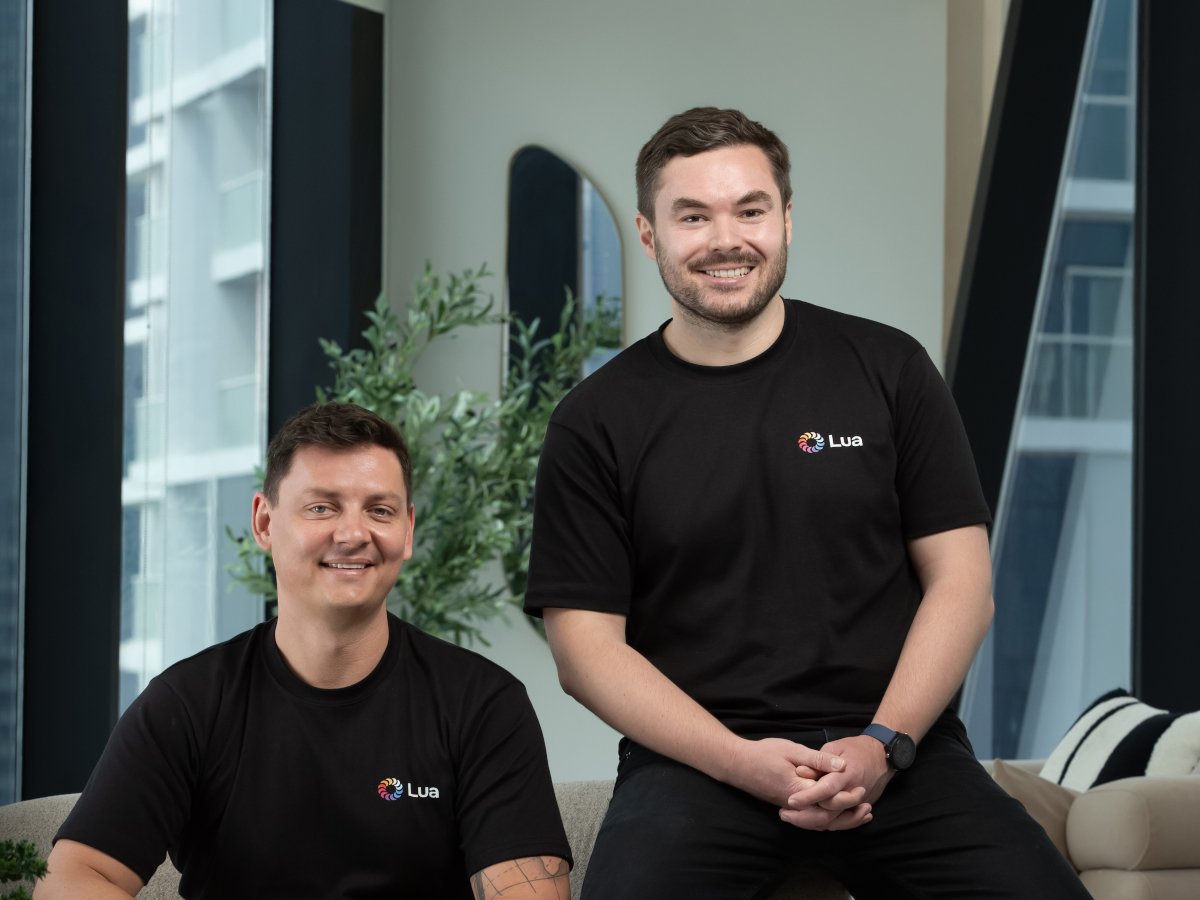
Irish co-founded and London-based agentic workforce AI start-up Lua raised $5.8m in funding last week (16 April) in a round led by Norrsken22.
Lua offers customers the opportunity to “build AI agents that solve real problems” through collaboration with people, it claims, regardless of a team or organisation’s technical depth or skill.
The company said it will use the new funding to continue to build out its developer community and the ‘Lua Implementation Network’, which it said is a growing community of independent partners deploying Lua agentic workforces in their own markets around the world.
Advertisement
Other investors included Flourish Ventures, 20VC, P1 Ventures, Phosphor Capital and Y Combinator, along with angels such as Henri Stern, the CEO of Privy; Kaz Nejatian, the CEO of Opendoor; and Med Benmansour, the CEO of Nuitee.
“The companies that will win over the next few years are the ones that build their agent workforce with the same intentionality they bring to their human workforce,” said CEO and co-founder Lorcan O’Cathain.
“Most businesses are either blocked by technical complexity or locked into rigid tools that don’t reflect how their teams actually work.
“Lua is built on the opposite principle: teams own their agents, own their outcomes and build compounding efficiency over time.”
Advertisement
The platform is described as offering “an opinionated, full-stack agent” that is suitable for both technical and non-technical users, to run inside existing systems while “coordinating handoffs between agents and humans”.
In a LinkedIn post regarding the funding announcement, Lua said the number of agents on its platform had grown by 10 times during Q1.
Lua was founded in 2024 by O’Cathain and Stefan Kruger, who is the company’s CTO. The company said it “ has been global since day one, deployed across emerging markets in Africa and Asia alongside customers in the US and Europe”.
The founders of Lua “fundamentally understand how agent and human workforces need to collaborate to get work done”, said Lexi Novitske, a general partner at Norrsken22.
Advertisement
Lua proposes solution for customers in healthcare, financial services, retail, manufacturing and real estate. The integration of AI into the workforce and workplace is a topical issue for a variety of reasons.
Don’t miss out on the knowledge you need to succeed. Sign up for the Daily Brief, Silicon Republic’s digest of need-to-know sci-tech news.
Microsoft has released out-of-band (OOB) updates to fix issues affecting Windows Server systems after installing the April 2026 security updates.
As Microsoft confirmed last week, some admins may experience failures when installing the KB5082063 security update on Windows Server 2025 devices.
Additionally, this month’s Patch Tuesday cumulative updates are causing some Windows servers with domain controller roles to enter a restart loop due to crashes of the Local Security Authority Subsystem Service (LSASS).
Microsoft also warned that this issue may also occur when setting up new domain controllers (or even on existing ones) if the server processes authentication requests very early during startup.
To address these two known issues, Microsoft has released emergency updates for the following affected Windows Server versions:
Advertisement
“The Windows Server 2025 OOB update (KB5091157) addresses both the installation failure issue and the domain controller restart issue,” Microsoft explained. “OOB updates released for other supported Windows Server versions address only the domain controller restart issue.”
On Wednesday, Microsoft also warned admins that some Windows Server 2025 devices will boot into BitLocker recovery and prompt users to enter a BitLocker key after installing the KB5082063 Windows security update.
Additionally, last week, it finally addressed a bug that has been plaguing Windows servers since September 2024, causing devices running Windows Server 2019 and Windows Server 2022 to upgrade to Windows Server 2025 “unexpectedly.”
Since the start of the year, Microsoft has also released emergency updates to resolve a Bluetooth device visibility bug and patch security vulnerabilities in the Routing and Remote Access Service (RRAS) management tool that affect hotpatch-enabled Windows 11 Enterprise devices.
AI chained four zero-days into one exploit that bypassed both renderer and OS sandboxes. A wave of new exploits is coming.
At the Autonomous Validation Summit (May 12 & 14), see how autonomous, context-rich validation finds what’s exploitable, proves controls hold, and closes the remediation loop.
Welcome back to TechCrunch Mobility, your hub for the future of transportation and now, more than ever, how AI is playing a part. To get this in your inbox, sign up here for free — just click TechCrunch Mobility!
A few weeks ago, I wrote about how Uber seemed to be everywhere, all at once in the emerging autonomous vehicle technology sector. The Financial Times has now put a number on it. The FT calculated that Uber has committed more than $10 billion to buying autonomous vehicles and taking equity stakes in the companies developing the tech, according to public records and discussions with folks behind the scenes. About $2.5 billion of that is in direct investments, with the remaining $7.5 billion to be spent on buying robotaxis over the next few years, the outlet reported.
We’ve reported on Uber’s numerous investments and deals with autonomous vehicle companies across drones, robotaxis, and freight. Some of its investments include WeRide, Lucid and Nuro, Rivian, and Wayve.
This rather large number (and particularly that $7.5 billion) got me thinking about another transformative era in Uber’s history and how it has visited these asset-heavy shores before. Uber might have started with a plan to be asset light, but for a brief period it did quite the opposite.
Advertisement
Uber went on a moonshot spree between 2015 and 2018. It launched electric air taxi developer Uber Elevate and the in-house autonomous vehicle unit Uber ATG, which would be boosted by its acquisition of Otto in 2016. It also snapped up micromobility startup Jump in 2018.
And then in 2020, Uber pulled the asset-heavy rip cord, ostensibly leaving all of those moonshots behind. Uber sold Uber ATG to Aurora, Jump to Lime, and Elevate to Joby Aviation. But it didn’t completely divest; it kept equity stakes in all of them.
Uber is now entering into a new and different asset-heavy era. It’s not plunking down millions, or even billions, to develop the technology in-house, although I’m sure folks there would be quick to pipe up that there is always R&D happening over at Uber. Instead, it appears to be focused on owning (or perhaps leasing) the physical assets.
Techcrunch event
Advertisement
San Francisco, CA | October 13-15, 2026
That could mean interesting line items on Uber’s balance sheet in the future.
Advertisement
Owning fleets of robotaxis built by other companies might not have been the original vision of Uber, or its former CEO Travis Kalanick, who has said the company made a mistake when it abandoned its AV development program. But this new approach could still get it to the same end point.
A little bird
Image Credits:Bryce Durbin
Earlier this month, I interviewed Eclipse partner Jiten Behl about the venture firm’s new $1.3 billion fund and where that money might be headed. The firm, as I wrote, intends to incubate more startups (e.g., it was behind the Rivian spinout Also). Behl wouldn’t give me details, only stating, “We’re definitely working on a couple of really cool ideas.” He also said Eclipse is particularly interested in startups that work across enterprises.
Thanks to one little bird and some document diving by senior reporter Sean O’Kane, it looks like a seed round announcement is imminent for a San Francisco-based startup working on an autonomous hauler that I’ve been told doesn’t have a driver cab. This sounds similar to what Einride has built, but since we haven’t seen it, we’ll have to wait.
The company’s roster isn’t big, but it is chock-full of Silicon Valley tech elite, including a founder who was at Uber ATG, Pronto, and Waabi. Stay tuned for more.
Slate is back with more capital as it prepares to put its first affordable pickup trucks into production by the end of 2026.
The electric vehicle startup, which got its start with backing from Jeff Bezos, raised another $650 million in a Series C funding round led by TWG Global. Keep your eye on TWG. This is the firm run by Guggenheim Partners chief executive (and Los Angeles Dodgers owner) Mark Walter and investor Thomas Tull.
Slate has raised about $1.4 billion to date, and its previous investors include General Catalyst, Jeff Bezos’ family office, VC firm Slauson & Co., and former Amazon executive Diego Piacentini, as TechCrunch first reported last year.
Other deals that got my attention …
Glydways, a San Francisco-based startup developing personal autonomous pods designed to operate on dedicated 2-meter-wide lanes in cities, raised $170 million in a Series C funding round co-led by Suzuki Motor Corporation, ACS Group, and Khosla Ventures. Existing investors Mitsui Chemicals and Gates Frontier and new investor Obayashi Corporation also participated. But wait, there’s more.
Advertisement
GM and Ford are reportedly talking to the Pentagon about whether the auto industry can help the military revamp its procurement program and find cheaper, faster ways to buy vehicles, munitions, or other hardware, the New York Times reported, citing anonymous sources.
Loop, a San Francisco-based startup, raised $95 million in a Series C funding round led by Valor Equity Partners and the Valor Atreides AI Fund, and includes investments from 8VC, Founders Fund, Index Ventures, and J.P. Morgan’s late-stage fund, Growth Equity Partners.
Monarch Tractor, the startup developing electric, autonomous tractors, has moved on to (ahem) a different pasture. The startup’s assets have been acquired by Caterpillar after struggling to pivot to a software services business.
Uber is increasing its stake in Delivery Hero by 4.5%, the Financial Times reported. Uber agreed to buy about 270 million euros in shares from Prosus, the Dutch investment group and Delivery Hero’s largest shareholder.
Advertisement
Notable reads and other tidbits
Image Credits:Bryce Durbin
Doug Field, the high-profile executive who shaped Ford’s electric vehicle and technology strategies over the past five years, is leaving. Notably, Ford is shaking up the organization as well, creating a “product creation and industrialization” team to be led by COO Kumar Galhotra. Any guesses where Field is headed next? Perhaps he’ll return to Silicon Valley.
Lightship, the all-electric RV startup, is expanding its Colorado-based factory by another 44,000 square feet, which will allow it to quadruple its manufacturing capacity.
Rivian and battery recycling and materials startup Redwood Materials partnered years ago. We’re now seeing the fruits of that relationship. Redwood is installing battery energy storage at Rivian’s factory in Illinois. The catch? Redwood is using 100 second-life Rivian battery packs, which will provide 10 megawatt-hours (MWh) of dispatchable energy to reduce cost and grid load during peak demand periods.
Tesla created a new self-driving app that makes it easier for owners to subscribe to its Full Self-Driving software and see statistics on how — and how often — they use it. This may not be huge news, but it did catch my eye because of the gamified qualities of these new stats.
Waymo, as per usual, has a few news items this week. The Alphabet-owned company started testing its autonomous vehicles on public roads in London. It also removed its waitlist in Miami and Orlando to scale its robotaxi services in the two cities.
Advertisement
One more thing …
This newsletter isn’t my only project that is leaning more heavily into robotics. My podcast, the Autonocast, is too, as the worlds of autonomous vehicles, AI, and robotics mash together. Check out this interview with Foxglove founder Adrian MacNeil, who previously worked at Cruise.
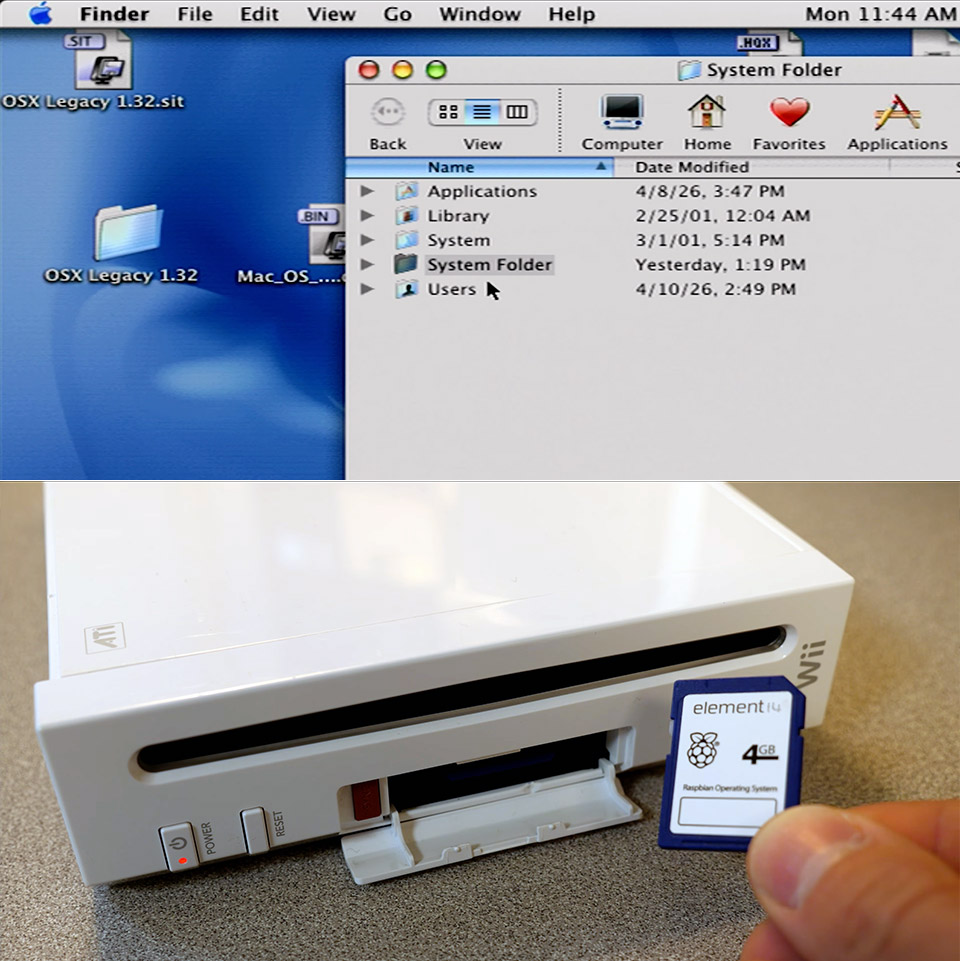
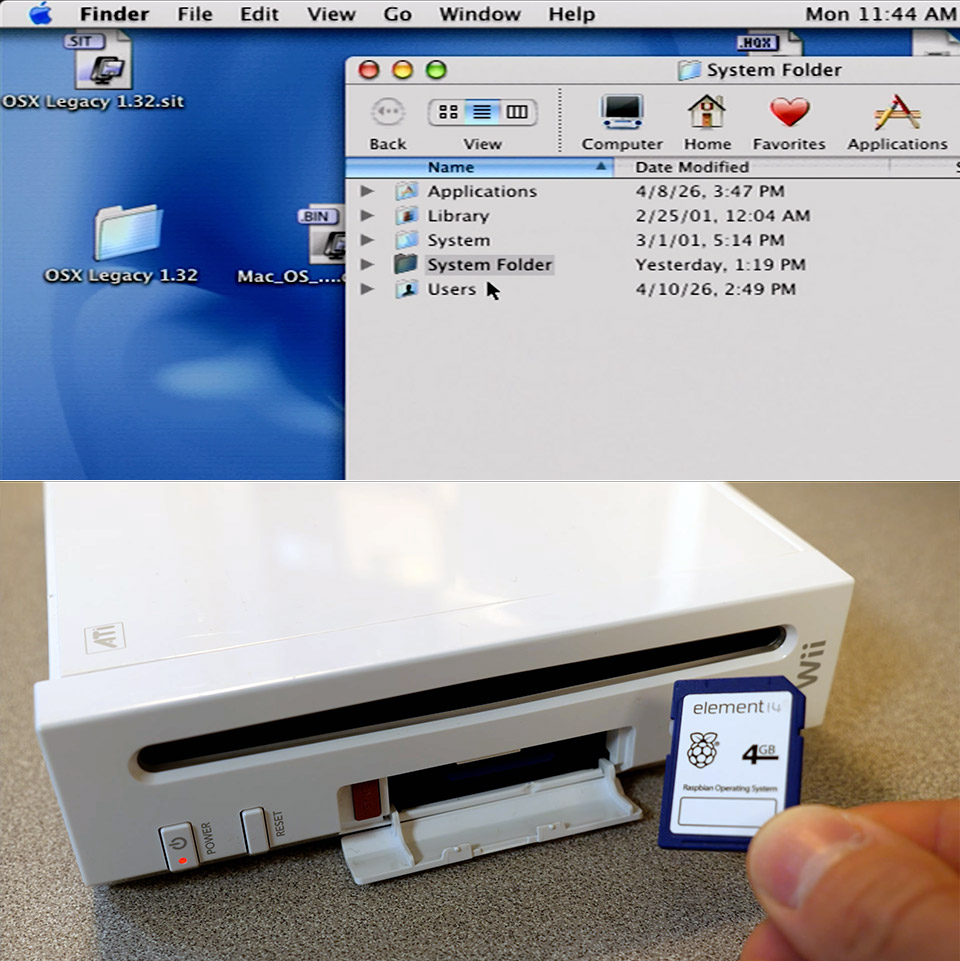
Programmers have managed to cram the original Mac OS X onto a Nintendo Wii from 2006, a piece of hardware that is nearly 20 years old. Bryan Keller, the brains behind this, spent a year and a half developing tools to make it happen through a project called wiiMac. The result lets the Wii boot into Mac OS X 10.0 Cheetah and handle basic tasks even if the experience moves slowly on such limited hardware.
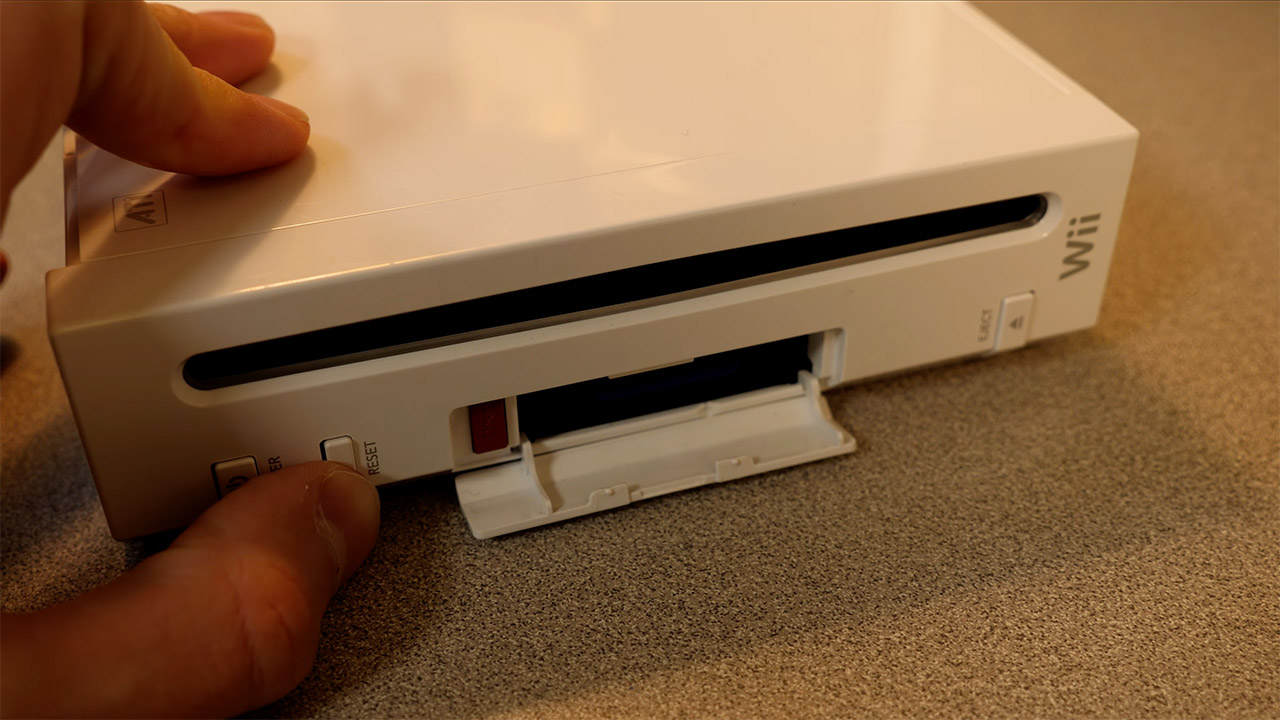
To begin, owners must ensure that their Wii is functioning properly. The SD card slot is required, and the Wii must be running a soft mod with BootMii installed as the second thing to boot, or via an IOS. Unfortunately, the Wii Mini is out of the running because it lacks the essential slot. To get everything up and running, two SD cards are required: one for the BootMii files and the wiiMac bootloader, and the second for the Mac OS X system, which has to be at least 4GB in size.
HELLO, MACBOOK NEO — Ready for whatever your day brings, MacBook Neo flies through everyday tasks and apps. Choose from four stunning colors in a…
THE MOST COLORFUL MACBOOK LINEUP EVER — Choose from Silver, Blush, Citrus, or Indigo — each with a color-coordinated keyboard to complete the…
POWER FOR EVERYDAY TASKS — Ready the moment you open it, MacBook Neo with the A18 Pro chip delivers the performance and AI capabilities you need to…
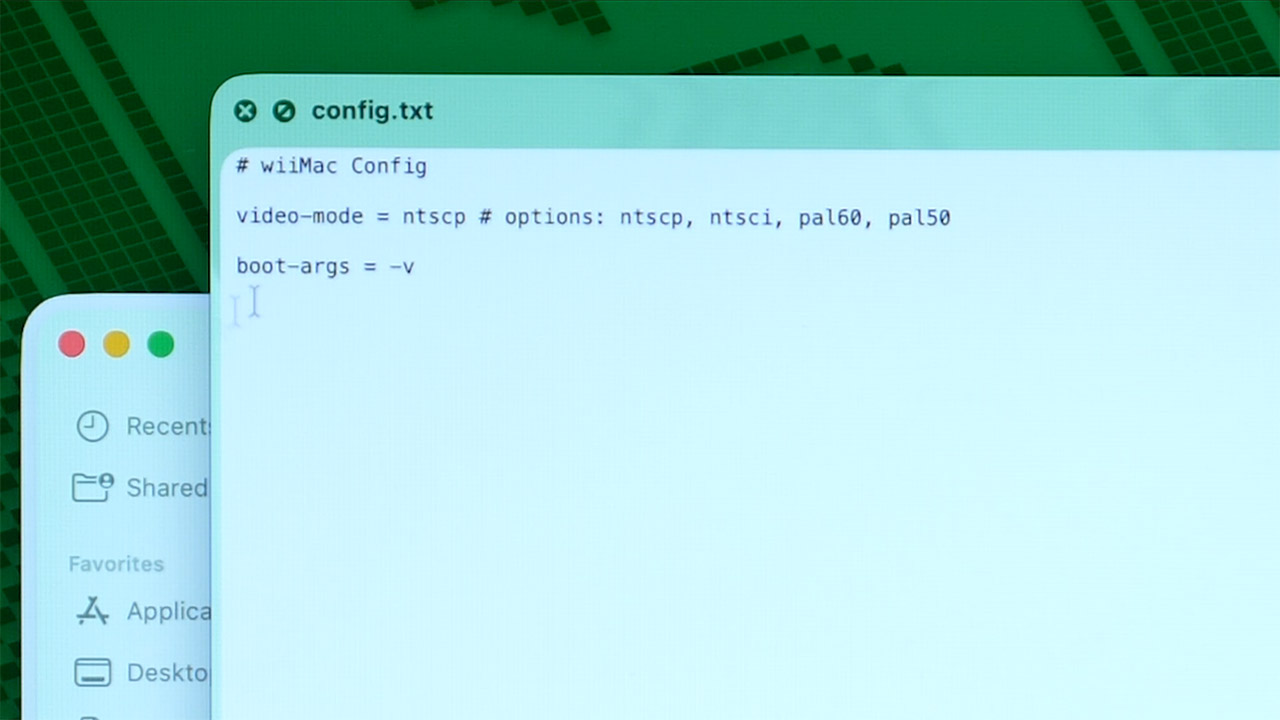
To configure the cards, you will need a spare computer running macOS or Linux. The first card receives a copy of the most recent wiiMac files directly to the root folder, along with the BootMii files, which are almost certainly already present, and there must be a text file inside the wiiMac folder that allows you to select the appropriate video mode for your region, such as NTSC or PAL.
The second card must be partitioned into three smaller and smaller sections: a 64MB FAT32 section labeled Support, a 1GB HFS+ section labeled Install, and a larger HFS+ section labeled Macintosh HD that takes up the remainder of the space, as the commands for doing so will differ slightly depending on the computer you’re using, but the goal is the same. The Install partition is then loaded with a full copy of the Mac OS X 10.0 Cheetah installer, as you’ll need an original disk image to transfer it from, which you can achieve via a block level transfer. Meanwhile, the Support partition receives a folder named wiiMac, which contains a specially patched kernel file as well as a slew of unique drivers designed specifically for Wii hardware.
Once the cards are ready, you can transfer them to the Wii. Insert the BootMii card and restart the Wii, which should bring you to the BootMii interface. From there, simply load the wiiMac bootloader and quickly switch the first card for the second, which contains all of the Mac OS X partitions. The bootloader takes over and launches the installer; at this point, you’ll need a simple USB keyboard and mouse plugged directly into the Wii ports, as connecting them via a hub is likely to cause issues. The installer next walks you through selecting the Macintosh HD partition as the location for the system files, and that’s all.
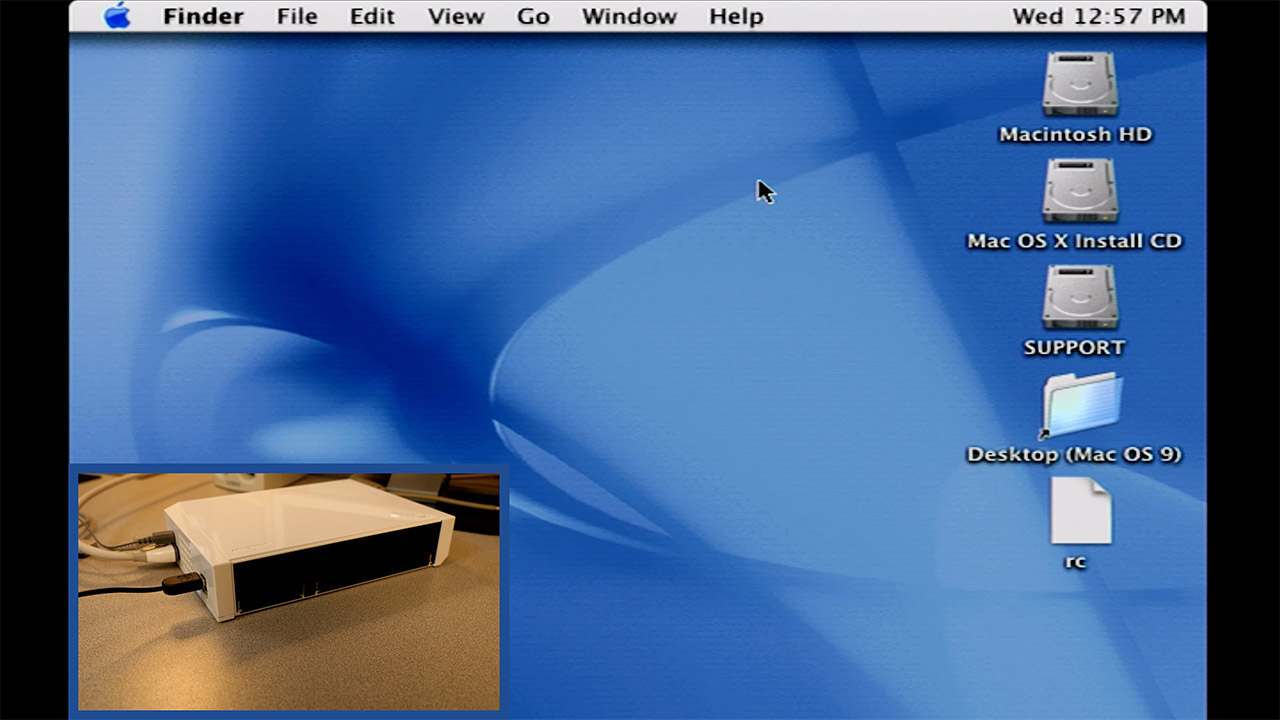
Once the installation is complete, the new operating system will boot. To get the newly loaded Mac OS X up and running, you must perform the same old card switch and bootloader dance. At this point, you’ll probably notice that the screen resolution is looking a little stretched out, so you’ll need to head directly to System Preferences and adjust it to a more reasonable 640×480 for readability. The next thing you do is run a few terminal commands to adjust the swap file size and compress the Dock down to size in order to squeeze out some more speed from the Wii’s not-so-modern 78 MB of useable RAM and 729 MHz processor. If you plug in a USB storage drive before starting the machine, it should connect OK, but don’t expect it to be reliable.
Performance is about what you’d expect: not exactly blistering speeds. The system handles the Finder and the fundamentals well, but Wi Fi, Bluetooth, the DVD drive, and any type of graphics or audio acceleration are all unsupported. The Classic environment is useful for running older Mac OS 9 software, but expect a slight lag. There is one small bright side, however: when you start the DOOM port, it runs nicely and even outperforms certain older Mac installations in certain scenarios.



























































You must be logged in to post a comment Login