Accenture’s Sophie Rowe discusses her work in the consulting space and how she stays motivated.
During her master’s degree at University College Dublin, Sophie Rowe, a customer strategy manager at Accenture Song, came to the realisation that she didn’t yet have a clear idea of what she wanted her career to look like.
She told SiliconRepublic.com, “When I discovered consulting, it was the variety that immediately appealed to me. The opportunity to work across different industries, roles and projects, and to have a day-to-day that isn’t fixed in the long term, really stood out. I liked the idea of continuously learning and evolving rather than following a single, predefined path.”
What educational and work experiences led you to the role you now have?
I completed a BSc in neuroscience followed by a master’s in business and biotechnology. I knew I wanted to move towards the commercial side of science, and the master’s provided a strong bridge between those two worlds. During that time, I applied to the Accenture graduate programme, which marked the start of my consulting career. Those decisions are what have led me to my current role as a customer strategy manager, working with life sciences clients in Accenture Song.
Advertisement
What were the biggest surprises or challenges you encountered along the way?
When I first started my career, fresh out of college, I found it challenging to back myself and my work, especially when dealing with senior or difficult stakeholders. Not everyone will agree with you and there isn’t always a clear right answer.
Early on, I learned the importance of doing your research, forming a clear point of view and backing it up with evidence. Whether you’re proposing a new strategy, changing a process or introducing a new tool, you need to explain the rationale behind your thinking clearly and confidently. That confidence comes from strong preparation, using data and proof points to support your ideas so you can challenge constructively and stand by your recommendations.
Learning to replace that uncertainty with evidence-backed confidence was a key turning point in my career.
Was there anyone particularly influential in your career development?
I was fortunate to have some incredible female managers early in my career at Accenture, who had a significant influence on how I developed professionally. They taught me not only how to deliver high-quality work and navigate the consulting environment, but also how to lead with empathy and advocate for myself. They helped me recognise the importance of clearly articulating my achievements and contributions, something that doesn’t always come naturally, particularly for women. That lesson was pivotal to my progression.
Advertisement
What do you enjoy most about your job?
The variety that initially drew me to consulting is still one of the things I enjoy most. I love tackling different types of client problems, especially now in the context of rapid AI and technology advancements. Over my career, I’ve worked on everything from retail customer strategy transformations to nationwide marketing campaigns designed to shift customer behaviour. Then there are also the people. I’m very much a people person and working alongside such talented, supportive teams makes all the difference, especially during the high-pressure periods.
What aspects of your personality make you well suited to this role?
My communication and storytelling skills are ones that I use every day in my role. In an environment increasingly shaped by AI, the ability to tell a clear, compelling story is more important than ever, whether that’s to engage challenging stakeholders, align cross-functional teams or to help bring strategy to life.
How has Accenture supported your career growth?
Accenture has provided a huge amount of opportunity to grow and stretch myself. There’s a strong culture of raising your hand, whether that’s contributing to thought leadership, running client or community events, or taking on additional project responsibility. That encouragement to step up has been key to my progression.
I’ve also been supported in external learning, such as completing a ‘mini MBA’ in marketing, which has been brilliant in ensuring I keep learning.
Advertisement
What advice would you give to someone just starting out?
Absorb as much as you can – not just the work itself, but how senior leaders operate, collaborate and approach problem-solving. There’s so much to learn from the people around you, especially early in your career. Be curious, ask questions and don’t be afraid to seek advice. Taking that time to observe and learn will be hugely beneficial for your career.
Don’t miss out on the knowledge you need to succeed. Sign up for the Daily Brief, Silicon Republic’s digest of need-to-know sci-tech news.
There’s no shortage of marketing materials trying to convince you to buy Michelin Latitude Tour HP tires. But what about real life? Can drivers really expect the balance of durability, comfort, and great all-season performance that Michelin promises? According to customer reviews, real-world lifespan will vary for these tires depending on your driving habits and specific road conditions.
Latitude Tour HP tires are designed for on-road SUVs and 4×4 vehicles. They use a special “Terrain-Proof” compound, which is said to help resist wear across a wide range of environments. They also have “StabiliGrip Technology,” which is just a fancy way of saying specially positioned sipes for less vibration and noise while you drive.
Advertisement
Michelin’s warranty information says drivers can expect treadwear to last anywhere from 30,000 to 55,000 miles, depending on the tire’s speed rating. (H-rated versions have a 30,000-mile warranty, W-rated models have 45,000 miles, and V- or H-rated versions get up to 55,000 miles.) These are some of the best treadwear ratings in Michelin’s catalog. The numbers give us a good idea of how long the tires are expected to last, but that’s under normal conditions. Actual results will vary depending on things like rotation and alignment.
Advertisement
What people with Latitude Tour HP tires have to say
Mileage-based warranties are one thing, but actual drivers’ experiences are something completely different. The reviews on Michelin’s site paint a much clearer picture of what you can expect to get out of your Latitude Tour HPs. This is a good thing. Plenty of drivers say the tires exceeded expectations, with some sets lasting well beyond 80,000 miles. That’s not to say everybody’s experiences are the same, of course. Some users experienced uneven or premature wear, requiring replacement as early as 40,000 miles. It just goes to show how much real-world durability is influenced by driving style, road conditions, vehicle setup, and even weather.
For when something does go wrong with the tire, Michelin backs the Latitude Tour HP with a comprehensive warranty package beyond the treadwear figures mentioned earlier. They’re also covered by a standard limited warranty for defects in materials and workmanship. That warranty lasts for up to six years post-purchase (or until the usable tread is depleted, whichever comes first). They also fall under the Michelin Promise Plan, which includes a 60-day satisfaction guarantee and free roadside assistance.
A great compact tablet for students that doesn’t skimp on performance and includes a brilliant stylus in the box? The Lenovo Yoga Tab has a lot to like.
Great, compact size
Good performance for the price
Stylus included
Just three years of updates
Bloatware
Key Features
Advertisement
Review Price:
£479
Stylus included:
Advertisement
Bundled with the Lenovo Tab Pen Pro
Quad-speaker setup:
Advertisement
Two tweeters and two woofers
3.2K resolution:
Advertisement
11.1-inch IPS LCD
Introduction
Tempted by the iPad Air’s set of features, but would rather spend a little less at the checkout? The Lenovo Yoga Tab might be the alternative you’ve been waiting for.
I have to hand it to Lenovo, there aren’t too many companies out there that offer quite the same degree of variety in the world of tablets compared to the likes of Apple and Samsung, but the brand has absolutely no shortage of options to the point where practically every type of budget is catered for.
Advertisement
Sitting below the premium-level Lenovo Yoga Tab Plus, the standard Lenovo Yoga Tab is still a fairly feature-packed tablet, but thanks to a starting price of £479/$549.99, it’s more affordable than crucial options like the iPad Air M4 and the Samsung Galaxy Tab S10 FE.
Advertisement
Of course, even with a head start on price, the question remains as to whether or not Lenovo can do enough with the Yoga Tab to lure potential adopters.
Despite having reviewed countless tablets from other brands, this is the first Lenovo tablet I’ve ever had the pleasure of testing, and I’ll gladly admit that I should have been paying more attention to the company’s output sooner.
Advertisement
Design
Very compact build
Only 6.2mm thick
Just two colourways available
Being unfamiliar with Lenovo’s design language when it comes to the company’s tablets, I wasn’t too sure what to expect, but I found myself pleasantly surprised from the very first moment that I held the Yoga Tab. This is a slick tablet that brilliantly tows the line of having a decently sized display (11.1 inches) but without ever feeling cumbersome, making it a solid option for some entertainment on the go.
Image Credit (Trusted Reviews)
Advertisement
At just 6.2mm thick and with a starting weight of only 458g, the Lenovo Yoga Tab, from a pure design perspective, is exactly what I want from a tablet most of the time. Having recently used the excellent OnePlus Pad Go 2, as much as I loved its larger frame for a bit of productivity when working from home, it’s a little too large to be my go-to tablet if I’m travelling and would rather have something compact that can more easily fit into my carry-on luggage, which is exactly what the Yoga Tab can do.
Even though I’ve been using the device without a case for the duration of this review, because the tablet itself is so slim, I don’t think that bringing a case into the mix will diminish its portability in any meaningful way.
However, one feature that I wish the Yoga Tab had pinched from more affordable Lenovo Idea Tabs is a helpful kickstand for easy viewing. I’ve had to constantly prop the Yoga Tab against several objects, but because the backing doesn’t provide a tangible grip, this has often led to me saving the tablet from sliding away at the last second.
There are two colourways available, Seashell and Luna Grey, the former of which I’ve had in for testing. Both models have a semi-professional look about them, so if they are brought into a meeting they won’t look out of place, but I do wish that they had a bit more of a personality to them. Even the iPad Air M4, despite being a more premium tablet, comes with a hint of colour.
Advertisement
For the sake of consistency, however, I’d recommend picking up the Luna Grey option as it’s colour matched with the included Lenovo Tab Pen Pro, creating a better look overall.
Image Credit (Trusted Reviews)
Advertisement
Screen
11.1-inch IPS LCD panel
3.2K resolution
144Hz refresh rate
As I’ve said before, an 11.1-inch panel is the sweet spot as it’s big enough to provide a far more immersive viewing experience than my smartphone, but it’s not too large as to feel cumbersome in the hand, which can be an issue with larger tablets like the 13-inch iPads and the Samsung Galaxy Tab S11 Ultra.
In terms of the display itself, it packs a 3.2K resolution which helps to keep everything looking crisp, whether that’s on the homescreen or when scrolling through the likes of Netflix and Disney Plus for your next watch. It’s also IPS LCD, so no OLED here, although that isn’t too surprising, as you typically have to spend a bit more in order to enjoy self-lighting pixels on a tablet.
Still, the colours look great, and when diving into my go-to stream of Avengers: Infinity War, I did find myself getting drawn into the action.
The refresh rate can also top out at 144Hz, which is great news for gamers. It’s shown off in its best light when running through a couple of matches in titles like Call of Duty Mobile, but even when giving Balatro a spin (although the game is far from the most taxing one out there), all of the animations and card twists look buttery smooth on this display.
Advertisement
One thing I would have liked to see is a slightly higher brightness than the current peak of 800 nits. It certainly gets the job done in most scenarios, but I did spot a bit of dimming around the edges of the display when viewing webpages with a white background. If you’re coming up from a much older tablet then this probably won’t be noticeable, but I did find the OnePlus Pad Go 2 to be a better performer in the brightness department.
Advertisement
Image Credit (Trusted Reviews)
The Yoga Tab’s display is nice and responsive though, which was great to see when I was rearranging apps to have everything set up in just the right multitasking configuration. This also applies to instances of using the Pen Pro, with minimal delay present to make you feel connected with your writing.
Cameras
13MP main camera
The 2MP macro camera feels like an odd addition
13MP front-facing camera
As much as I love tablet computers, their cameras are barely an afterthought in how I use them, and, as ever, I would not recommend choosing a tablet based on the sensors it includes. Still, if you do need to rely on cameras occasionally for scanning a document or jumping into a Zoom call, then you won’t be disappointed with what the Lenovo Yoga Tab has to offer.
On the back, there’s a 13MP wide-angle camera that can take okay pictures if you need a reference point for something, but start zooming into the shots, and you’ll notice that the detail falls apart pretty quickly. As I mentioned before, this camera is far better suited for scanning documents when needed, and I was impressed to see that even on my dimly lit desk, the camera was able to take a decent scan of a document, which could then be tweaked after the fact to distinguish the text a bit better.
Image Credit (Trusted Reviews)
Advertisement
What I can’t quite wrap my head around is the inclusion of a secondary 2MP macro camera on the rear. This is exactly the type of useless feature that the Lenovo Yoga Tab could have done without, as it would have been much nicer to see Lenovo’s efforts focused elsewhere, or to have the price be just a tad more affordable.
Advertisement
At the very least, the front-facing 13MP ultra-wide camera does a great job of capturing everything around you, so if you and several other people near you want to hop onto a video call, there’s a good chance that you’ll all appear on the screen without any need for jostling.
Performance
Solid power from the Snapdragon 8 Gen 3
Gaming works like a charm
Tremendous speakers
Powering the Lenovo Yoga Tab is the Snapdragon 8 Gen 3 chipset which, despite being a few years old now, is still capable of fairly impressive performance. After all, this is the same chipset that used to be reserved for flagship phones, including the Samsung Galaxy S24 Ultra.
I did encounter a slight slowdown during the early phase of using the tablet, whilst everything was installing in the background, with the whole thing freezing on me for a few seconds before responding, but beyond that initial period, I have very much enjoyed my time with the Lenovo Yoga Tab.
Image Credit (Trusted Reviews)
Advertisement
Because of the relatively compact size of the device, I’ve enjoyed catching up on the latest headlines, scrolling through the BBC News website with ease, as well as constantly jumping back and forth between the likes of Amazon, Currys and John Lewis on the hunt for any tech or gaming deals I can get my hands on.
When I fancied a bit of interactive entertainment, I was able to connect an Xbox controller over Bluetooth and absolutely decimate my way through a round of Call of Duty: Mobile (anyone using touchscreen controls didn’t stand a chance). Everything ran smoothly, and I didn’t pick up on any instances of lag or screen tearing, something which was partially helped by the 144Hz refresh rate.
Advertisement
Multitasking is also handled incredibly well on the Lenovo Yoga Tab, with my typical use case of having Google Docs open next to the Chrome browser proving to be no issue whatsoever. When pushing it a bit further, I was even more impressed in having BBC News open on one side, Balatro playing on another, and a windowed Disney Plus stream in the corner, all without the tablet buckling. If you’re a student who needs a bit of distraction as you revise, this set-up is perfect.
Test Data
Lenovo Yoga Tab
OnePlus Pad Go 2
Samsung Galaxy Tab S10 FE Plus
Geekbench 6 single core
2220
1003
1230
Geekbench 6 multi core
5758
3082
3545
Geekbench 6 GPU
13300
2602
–
3D Mark – Wild Life
4445
874
1348
3D Mark – Wild Life Stress Test
3893 %
98.8 %
–
The only area where I saw limitations in the chipset was when playing more demanding 3D titles. To the Yoga Tab’s credit, it handled the exploration sections of Honkai Star Rail rather well, but it was in the game’s battles that I would spot the occasional frame jump. Still, that’s not bad for a tablet of this price, and unless you’re a serious gamer, I don’t think you’re going to hit the performance ceiling of this tablet very often (if at all).
Image Credit (Trusted Reviews)
Advertisement
Saving the best for last, what really gave me pause about this tablet is its speakers. I didn’t anticipate anything special from a tablet this compact, but the quad-firing set-up provides one of the best soundscapes I’ve ever come across in a tablet. Getting to run through my usual test streams has been an absolute joy, and there’s a serious amount of weight provided. If you’re on the road and the Lenovo Yoga Tab is your only source of entertainment, then I don’t think you’ll be disappointed.
Software
Android with the Lenovo ZUI overlay
An unfortunate amount of bloatware
Just three major software updates
As far as the user experience goes, the Yoga Tab uses Lenovo ZUI, and although this was my first experience with this specific Android overlay, I will say that I grew to like it over the course of the testing period. The UI isn’t quite as stylish as OnePlus’ Oxygen OS, but everything is clearly labelled which I appreciated.
For example, you can easily dive into a bit of multitasking by tapping on the three dots that sit at the top of an app, wherein you can have apps sit side by side or have several windowed apps around the screen. Unfortunately you can’t do 90/10 multitasking wherein a second app sits largely out of the way on the side of the display, but can be called upon quickly with a single tap, so it’s not quite as robust an experience as what you’ll find with Open Canvas on OnePlus tablets.
Advertisement
Still, Lenovo’s approach to simplicity also carries over to the quick-access controls for the Pen Pro, wherein you can jot down notes, use Google’s Circle to Search or scribble on a screenshot of whatever’s on the display. I’m not typically a fan of using stylus pens on tablets either, but with the way the software is laid out and the Pen’s very satisfying haptic feedback, I found myself picking it up fairly often.
Image Credit (Trusted Reviews)
Advertisement
Instead of having Google News pop up when swiping right from the homescreen, you’re greeted with an entertainment hub that’s mostly centred around Google services. By default, the first thing you see is a Google TV dashboard which collates all of your key streaming services, but you can also access your library of Google Play Store games and any purchased Google Play Books.
Personally, I could do without most of those options, but having quick access to Google TV is great, especially as it cuts down on needing to jump from one streaming app to another in search of what you want to watch.
What I didn’t appreciate seeing was a decent amount of bloatware preinstalled on the device. Before I ever started downloading my own apps, the likes of Adobe Express, CapCut and Perplexity were already present, alongside (strangely enough) two separate drawing/painting apps. It’s something I fully expect to see at the budget end of the market, but at £479 the Yoga Tab is much closer to the mid-range sector.
Advertisement
Even with the bloatware at play, what really stands out as a major knock against the Yoga Tab is that it only carries a promise of three OS updates from the time of launch. Usability is extended slightly by four years of security updates, but it’s not great when you consider that Apple and Samsung offer far in excess of that, so if you don’t want to upgrade your tablet in just a few years, then I recommend looking elsewhere.
Battery life
8660mAh cell
45W charging
Charges to full in one hour and 28 minutes
If you do plan on using the Lenovo Yoga Tab either as a productivity device or for getting through your studies, you won’t have much to worry about in terms of battery life. There’s a sizeable 8860mAh silicon carbon cell crammed into this tablet, impressive given its slim build, but it’s meant that I haven’t ever really had to worry about topping it up as I’ve gone about my day.
Advertisement
Image Credit (Trusted Reviews)
You can get a larger 10200mAh battery by opting for the more expensive Lenovo Yoga Tab Plus, but unless you really plan on spending hours editing high-quality videos in LumaFusion or CapCut, I don’t think you’ll need the extra grunt.
Charging is also set at 45W, which is fair for a tablet of this price. It’s the same charging speed as the more expensive Samsung Galaxy Tab S10 FE, although if battery is your main concern, then you can get 66W charging (and a bigger cell) on the Xiaomi Pad 8 Pro.
When using a 65W charger, which effectively allows the Yoga Tab to reach its 45W capacity, it took only 1 hour and 28 minutes to reach a full charge, which isn’t bad. Getting to the 50% mark only took 43 minutes, so if you’re in a rush, then you can get back enough juice to get you through a few lectures.
Advertisement
Should you buy it?
You need a compact tablet for university
With good speeds, a stylus included and a slim build that’s easy to carry around, the Lenovo Yoga Tab is a great option for students.
Advertisement
You want a tablet for the long haul
With just three years of software updates provided by Lenovo, the Yoga Tab doesn’t offer the same type of futureproofing as you’ll find with Samsung devices.
Advertisement
Advertisement
Final Thoughts
As someone who spent most of their undergraduate and postgraduate years preferring to use a tablet rather than a laptop, the Lenovo Yoga Tab is exactly the type of device I would have loved to have during my studies. This isn’t to say that adults won’t enjoy using this tablet, only that I think the Yoga Tab excels best as an all-in-one device for students.
Advertisement
The Snapdragon chipset makes multitasking very easy, and with a stylus included, you can take down handwritten notes in a pinch – perfect for when you’re brainstorming with a study group. When you’re ready to call it a day, it’s the combination of quick access to Google TV and the surprisingly powerful built-in speakers that allow the Yoga Tab to work just as well as an entertainment device.
Above all though, it’s the compact nature of this tablet that makes it feel very inviting to use. The lightweight stature makes it simple enough to carry one-handed, and you’ll barely notice its presence when flung in a backpack.
I do wish that the tablet came with a longer period of software support, and the presence of bloatware does make the experience feel a little less premium than the competition. The iPad Air M4 and the Samsung Galaxy S10 FE Plus remedy both of these issues, but they do cost a bit more than Lenovo’s tablet. Alternatively, if you want a great productivity tablet for less than the OnePlus Pad Go 2 is also worth a look.
If you still haven’t made up your mind then check out our guide to the best tablets.
Advertisement
How We Test
We test every mobile phone we review thoroughly. We use industry-standard tests to compare features properly and we use the phone as our main device over the review period. We’ll always tell you what we find and we never, ever, accept money to review a product.
Used as a main tablet for over a week Tested and benchmarked using respected industry tests and real-world data
FAQs
Does the Lenovo Yoga Tab come with a stylus and keyboard?
There is a stylus included by default with the Lenovo Yoga Tab, but you’ll have to pay more for a bundle that also includes a keyboard case.
A KHA K1000ULE drone receives power via PowerLight’s laser power beaming system during a flight test. (PowerLight Photo)
Kent, Wash.-based PowerLight Technologies says its laser power beaming system has been used successfully to keep a military-grade, fixed-wing drone in the air for hours during a series of tests for the Department of Defense.
PowerLight’s wireless power transmitter is set up at Poinsett Electronic Combat Range for flight tests. (PowerLight Photo)
PowerLight’s system was installed on a KHA K1000ULE drone, which operates under a recently awarded $270 million deployment contract from the AFCENT Battle Lab. The flight tests demonstrated end-to-end operation of a kilowatt-class wireless power system, from target acquisition and precision tracking through beam delivery and safety management.
During the tests, the beaming system acquired and tracked the drone at altitudes up to 5,000 feet, delivering power while steering and focusing the infrared laser beam in real time.
PowerLight, formerly known as LaserMotive, started out more than 15 years ago with power-beaming systems capable of keeping small quadcopters in the air continuously. The latest tests marked the first demonstration of a wireless system capable of sustained, autonomous power delivery at operationally relevant ranges and power levels for a large, fixed-wing military drone.
Currently, such drones must land to refuel or recharge once their onboard power source is depleted. Continuous wireless power could theoretically keep them airborne indefinitely.
“The Poinsett Range demos prove what we built, and set the stage for the roadmap for this capability that scales from a single transmitter to a distributed network, increasing power output, altitude and range, sustaining multiple aircraft simultaneously across a theater,” PowerLight Technologies CEO Tim Jenks said today in a news release.
Jenks pointed out that PowerLight’s technology could also be used to counter enemy drones. “The same autonomous targeting, precision beam control and real-time system intelligence that keeps a friendly platform aloft has direct applicability to directed-energy counter-UAS strategies,” he said.
Summary: OpenAI’s Codex for Mac has added Chronicle, a research preview feature that periodically captures screenshots, sends them to OpenAI’s servers for processing, and stores text summaries as local unencrypted Markdown files to give the AI assistant passive context about user activity. The feature is unavailable in the EU, UK, and Switzerland, requires a $100+/month Pro subscription and Apple Silicon, and represents OpenAI’s first implementation of ambient screen-aware AI on desktop, choosing cloud processing and utility over the local-first privacy architecture adopted by competitors like Screenpipe and the now-defunct Rewind AI.
OpenAI’s Codex desktop app for Mac has gained a feature called Chronicle that periodically captures your screen, processes the content into text summaries, and stores those summaries as local memory files that give the AI assistant context about what you have been working on. The feature, released as a research preview, means Codex can now understand your recent activity without you having to explain it. It also means OpenAI is sending screenshots of your desktop to its servers for processing, a design choice that puts Chronicle in direct tension with the privacy-first direction that much of the industry has been moving toward.
Chronicle is part of a broader update that transformed Codex from a coding assistant into a general-purpose AI workspace. The 16 April release, titled “Codex for (almost) everything,” added computer use capabilities that allow Codex to operate Mac apps with its own cursor, an in-app browser, image generation, persistent memory, and more than 90 plugins. Over one million developers have used Codex, and usage doubled following the launch of the GPT-5.2-Codex model in December.
How Chronicle works
Chronicle runs background agents that periodically capture screenshots of your display. Those screenshots are sent to OpenAI’s servers, where they are processed using OCR and visual analysis to generate text summaries. The summaries are saved as Markdown files in a local directory at~/.codex/memories_extensions/chronicle/. When you subsequently prompt Codex, those memory files are included in its context window, allowing it to understand what applications you were using, what documents you were reading, what code you were writing, and what conversations you were having, all without you restating any of it.
The raw screen captures are stored temporarily under a system temp directory and automatically deleted after six hours. OpenAI states that screenshots are not stored on its servers after processing and are not used for training. The generated memories, however, persist indefinitely as unencrypted plain text files on your machine.
Advertisement
Greg Brockman, OpenAI’s president, described the feature as “an experimental feature giving Codex the ability to see and have recent memory over what you see, automatically giving it full context on what you’re doing. Feels surprisingly magical to use.”
The privacy architecture
Chronicle requires macOS Screen Recording and Accessibility permissions. It is available only on Apple Silicon Macs running macOS 14 or later, and only to ChatGPT Pro subscribers paying $100 or more per month. It is not available in the EU, UK, or Switzerland, a geographic restriction that strongly suggests OpenAI recognises the feature’s incompatibility with GDPR’s requirements around data minimisation and purpose limitation.
The comparison with Microsoft Recall is instructive. Recall, which launched on Windows Copilot+ PCs, takes screenshots every few seconds and stores them in an encrypted local database, with all processing handled by a neural processing unit on the device. No screenshot data leaves the machine. Chronicle takes the opposite approach: processing happens in the cloud, but only text summaries are retained locally. Recall encrypts its database and requires biometric authentication via Windows Hello. Chronicle stores its memories as unencrypted Markdown files accessible to any process running on the computer.
OpenAI’s own documentation acknowledges the risks explicitly. Chronicle “increases risk of prompt injection” because malicious content on a website you visit could be captured in a screenshot and interpreted as instructions by the AI. The memories directory “might contain sensitive information.” And the feature “uses rate limits quickly,” meaning Pro subscribers may find their Codex usage constrained by Chronicle’s background activity.
Advertisement
OpenAI recommends pausing Chronicle before meetings or when viewing sensitive content. Users can pause and resume via the Codex menu bar icon. The recommendation is itself revealing: it acknowledges that the feature will capture things it should not, and shifts the burden of managing that risk to the user.
The category and its casualties
Screen-aware AI assistants have had a turbulent history. Rewind AI, the most prominent early entrant, rebranded to Limitless before being acquired by Meta in December 2025. The Mac app was shut down and screen capture disabled.Microsoft’s Copilothas lost 39% of its subscribers in six months, partly due to trust issues that extend to Recall. A security researcher demonstrated in early 2026 that Recall’s encrypted database could still be exploited, reinforcing concerns that had dogged the feature since its announcement.
The open-source alternative Screenpipe offers a local-first approach: continuous screen and audio capture processed entirely on-device, with a $400 lifetime licence and no recurring cloud dependency.Perplexity’s Personal Computersoftware takes yet another approach, turning a Mac mini into a persistent AI agent with access to local files and apps, though it too relies on cloud processing for its core intelligence.
The pattern across the category is consistent: the more useful a screen-aware AI becomes, the more data it needs to process, and the harder it becomes to reconcile that data appetite with user privacy. Chronicle opts for utility over privacy architecture, betting that OpenAI’s promise not to store or train on the data, combined with the six-hour deletion window, is sufficient to earn user trust. Whether that bet pays off depends entirely on whether users believe the promise and whether OpenAI can maintain it as the feature scales.
Advertisement
The ambient computing context
Chronicle arrives as the industry converges on the idea that AI assistants should understand your context without being told. Apple is testingAI smart glassesdesigned as ambient input channels for Apple Intelligence.Slack’s recent AI overhaulturned Slackbot into a desktop agent with deep context about your work communications. OpenAI itself is developing a screenless hardware device with Jony Ive that is explicitly positioned for an “ambient AI” era. Gartner predicts more than 40% of large enterprises will deploy ambient intelligence pilots by 2026.
The thesis is that AI becomes dramatically more useful when it has passive, continuous access to what you are doing rather than requiring you to articulate your needs from scratch each time. Chronicle is OpenAI’s first implementation of that thesis on desktop, and it works: by Brockman’s account and the feature’s design, eliminating the need to re-explain context to an AI assistant is a genuine productivity gain.
But the thesis has a cost.Privacy-first alternativeslike Proton’s AI tools demonstrate that useful AI can run on open-source models locally without sending user data to anyone’s servers. The question Chronicle poses is not whether screen-aware AI is useful. It plainly is. The question is whether the cloud-processed, trust-dependent model that OpenAI has chosen will survive contact with the regulatory environment that has already excluded it from three jurisdictions, and with users who have watched enough AI companies promise data privacy only to quietly revise their terms when the economics demanded it.
For the first time, AIM is expanding beyond its Sligo-based headquarters, to target additional ‘industry clusters’ in the west of Ireland.
The Advancing Innovation in Manufacturing (AIM) Centre in Sligo, which is a collaborative partnership between the Atlantic Technological University, Sligo County Council and Leitrim County Council, has announced an expansion with a new Galway base of operations.
The AIM Centre intends to strengthen its links within the medtech and life sciences sectors and for the first time will expand outside of Sligo. The centre is also currently recruiting for specialist roles in both the Galway and Sligo facilities.
AIM focuses on business transformation, supporting companies across manufacturing operations, supply chain, HR, legal, energy, data and decision-making. The centre also supports the services sector, “recognising the increasing demand for practical AI adoption and data-driven transformation beyond manufacturing”.
Advertisement
The expansion was supported by the Western Development Commission, with the new base to be located out of Wellpark Road in Galway city. AIM has stated that the decision to join the hubs is part of the organisation’s “growth strategy, a key plank of which is developing links with key industry clusters”.
As part of the expansion, AIM is planning a range of events intended to boost engagement in Galway in the coming months. For example, towards the end of April, the organisation will have a stand at the Dexcom Stadium for the MedTech Innovation expo, bringing together exhibitors and expert speakers to showcase new technologies and research in the healthcare space.
AIM Centre will also be in attendance at the AtlanTec Festival conference in May. Tech companies from the AtlanTec Gateway and globally, will be present throughout the festival, demonstrating how technology is transforming businesses and society.
Commenting on the announcement, David Bermingham, the director of AI at AIM Centre, said: “The move to open our first Galway hub is designed to strengthen our national reach. We already work with companies across Ireland, but having a base in Galway allows us to be closer to key sectors like medtech and life sciences, where there is strong demand for what we do.
Advertisement
“The AIM Centre’s strength is that we look at the entire business. We work with companies to understand where AI and digital technologies can deliver real impact, from operations and energy through to strategy and decision-making. It’s not about technology for the sake of it. It’s about solving real business problems. We are also seeing growing demand from the services sector, and this expansion allows us to support a broader range of organisations in adopting AI in a practical and meaningful way.”
Méabh Conaghan, the regional director at Enterprise Ireland, added: “Enterprise Ireland is committed to supporting Irish companies to adopt digital and AI technologies that enhance productivity, competitiveness and sustainability.
“The expansion of the AIM Centre to collaborate with CREW in Galway, another regional enterprise development centre, strengthens the regional and national AI support ecosystem. This development will bring expertise closer to key industrial clusters while continuing to support manufacturers and services companies nationwide in applying AI in a practical way.”
Don’t miss out on the knowledge you need to succeed. Sign up for the Daily Brief, Silicon Republic’s digest of need-to-know sci-tech news.
For some, there’s no better way to spend an afternoon than window shopping (and maybe buying something) at the hardware store. If you’ve got a few bucks burning a hole in your pocket and you’re looking for a little direction, you’re in the right place.
These aren’t just products with a price tag under $25 that Lowe’s happens to sell. They are tools you might wish you had sooner, or include useful features you may not have seen, but that’s not all. Each product had to meet several criteria (including but not limited to positive user comments) to be included.
Maybe you want to expand your collection of tools and DIY accessories, or you’re trying to find a gift for the tool lover in your life on a budget. With a budget of just $25 and a trip to your local Lowe’s, you could walk out with something pretty cool. Here are seven affordable options to get you started.
Advertisement
Stud finder with WireWarning
In your garage, you might be putting up shelves, mounting pegboards, hanging heavy tools, and more. There are half a hundred reasons you may need to find a stud hidden inside your walls. That’s where a stud finder comes in handy.
Advertisement
The Zircon StudSensor L50 stud finder runs on a single 9V battery and can find wooden or metal studs up to 3/4 inch behind your walls. It also has a feature called WireWarning, which can detect live, unshielded AC wires up to 2 inches deep, so you don’t accidentally drill into them and cause an electrical problem or an injury.
The StudSensor L50 also has a feature called Spotlight Pointer. When the sensor detects the edge of a stud, it beeps, and the stud’s location appears on an enhanced LCD display. Meanwhile, the Spotlight Pointer shines a light in the shape of an arrow, so you know where to mark the edge. As long as you know how to use a stud finder, it can help you hang heavy things with confidence and ease.
Advertisement
Long tape measure
Most major brands make measuring tapes with rigid tape and a limited range. If you’ve got an ordinary tape measure in your tool set, there’s a good chance it’s 25 feet or shorter. That’s long enough for small projects, but you might run into trouble if, for instance, you’re trying to measure your home’s exterior walls before buying paint.
The Kobalt 100-foot tape measure is more flexible and winds into the handle between uses. Not only can this tool measure much larger objects and spaces, but the flexibility also means you can use it to measure curved or irregular surfaces, and that’s not all.
A nylon coating protects the tape measure from wear and tear, while ground stakes let you secure the end of the tape and take your own measurements. This tape measure features a high-visibility design so you can see your measurements from a distance. Markings are printed on both sides, so you’ll still be able to see your results even if the tape measure gets twisted.
Advertisement
Adjustable square
As the name suggests, a regular square lets you check for 90-degree, or square, angles. An adjustable square, also known as a T-Bevel, serves a similar purpose, but can be adjusted to measure a wide range of angles.
Advertisement
You don’t necessarily need exact measurements when you’re building a treehouse or slapping something together for personal use, but if you’re building things that have a very low tolerance for misalignment, a square and angle finder can be a game-changer. You can measure inside angles and outside angles according to your needs.
The Johnson Level aluminum adjustable square is designed to last a long time. Its handle is made of solid aluminum with an angle measuring blade made of stainless steel to minimize rusting. The handle and blade are attached with a locking bolt, so that when you’ve made your measurement, you can lock it into place and transfer those angles to your other materials to ensure they line up.
Advertisement
Laser distance measurer
This pen-style measuring tool uses light to determine the distance between itself and another object. When you make a measurement, a laser beam fires out of the front of the tool. The beam travels at the speed of light until it encounters something like, for instance, the opposite wall of your living room. When the bounced light comes back, it strikes a sensor, and the tool determines the amount of time between when the light left and when it returned. It compares the time traveled to the speed of light and, presto, you’ve got your distance.
The WEN indoor laser distance measurer can measure distances between 1.7 feet and 32 feet with a variance of only a 1/4 inch or less. Measurements are calculated from the back of the tool, so you can put it up against one wall and measure the distance to the next.
A digital display shows you the laser’s battery level and your measurement results. It has just a single button that controls everything. Pressing the button once turns the laser on; pressing it again takes a measurement. Pressing and holding the button lets you choose either metric units or feet and inches. It automatically turns off after two minutes.
Advertisement
Inspection penlight and laser
Pointing a finger is a famously poor way of showing someone what you’re looking at, especially when you’re dealing with small parts, complex objects, or when there are many objects in roughly the same space. The Klein Tools inspection penlight offers a solution to that problem.
Advertisement
This small inspection light offers 70 lumens to shine light into dark areas, but that’s not all. The laser mounted to the top shows up inside the illuminated space, so you can pinpoint exactly what you’re looking at. An aluminum construction and textured finish offer IP54 dust and water resistance, a better grip, and 10 feet of drop protection.
It has a removable pocket clip, like you’d find on the side of a ballpoint pen, for easy storage between uses. It’s ready to use right out of the box, and you can get 10 hours of use from the pair of AAA batteries pre-installed in the penlight. Perhaps the best feature, or at least the coolest, is the ring around the front of the light. It’s made of a similar material to the glowing stars kids put on their bedroom ceilings. The ring charges when the penlight is on, then glows so you can find it if you drop it in the dark.
Advertisement
Digital display multimeter
A multimeter can measure various electrical aspects for a variety of professional or DIY jobs. You can use one to make sure the power is off so you don’t get electrocuted on the job. A multimeter can also be used to identify the root of a problem in your car, in your house, and elsewhere. For instance, if one electrical outlet has power and the next one doesn’t, there’s a good chance the problem is somewhere between those two points.
The Kobalt digital display multimeter can measure AC and DC power and test the leads on different types of batteries. It has seven available functions and 16 ranges, allowing you to measure voltage, current, and resistance. It should be noted that you might have problems at extreme temperatures (below 14 degrees and above 140 degrees Fahrenheit) or when the relative humidity rises above 70%.
The multimeter comes with a 12V battery pre-installed and test leads to take measurements. The power button turns it on or off, and the hold button freezes the current reading on the screen when you press it once. Pressing it again will clear the screen so you can make another measurement. Just make sure to follow all safety protocols whenever working with electricity. When one mistake could be your last, it’s best not to make any.
Advertisement
Under cabinet lights
It’s not uncommon for a person’s garage to be poorly lit. Often, the garage door opener might be the only light in the space. If you’re looking to add more light to your workshop, the Utilitech under-cabinet lights could be a good place to start.
Advertisement
They come in 10-inch, 18-inch, and 24-inch sizes, and you can choose a package with either two or four lights. Built-in magnets let the lights attach to metal surfaces without tools or much effort. The under-cabinet lights can be mounted to other types of surfaces with the included adhesive backing. A small dome next to the light contains a PIR (passive infrared) sensor for motion detection and a battery charging light.
Each light offers a bar of white light, and you can adjust the color temperature with a button on the side. The lights are powered by rechargeable batteries using a simple USB-C cable. If you leave the light on constantly, you’ll get between eight and 10 hours on a single charge. If, instead, you use the motion sensor function, it could be as much as a month between charges.
Advertisement
Methodology, how we made our choices
Althom/Getty Images
Every product on this list had to pass through several gates in order to be included. The first gate is relatively straightforward and apparent in the title. Anything over $25 (before tax) was ineligible for inclusion.
The second gate was a little bit tougher; to be included, a product had to be something the average person might not have. Or, at the least, includes features that are atypical and useful. We’re sure you can find plenty of cool tools and products under $25, but you’re not here to hear that you should have a hammer. You already know that, and you (probably) already have one. It also had to be useful. Just because most people don’t have a product doesn’t mean they need it.
Finally, each product had to have someone (or a lot of someones) vouch for it. In some cases, that means a SlashGear author has used the tool and found it to be worth recommending. If someone at SlashGear can’t vouch for a product, we look to people who have used and reviewed it. To make the cut, a product had to have at least 100 reviews (usually many more) and an average rating of at least 4.0 stars.
John Ternus, left, and Tim Cook at Apple Park. (Apple Photo)
Tim Cook’s plan to step down as Apple’s CEO, announced Monday, will put the tech giant in the hands of a hardware engineer, John Ternus, returning Apple’s top job to its product roots after nearly 15 years under a leader who made his mark in operations and supply chain.
It’s the right call, said Mike Slade, a Seattle tech veteran who spent six years as an advisor to Steve Jobs at the company. Apple needed to pick an insider who understands the culture, Slade said, and ideally someone who knows how hardware comes together, inside and out.
Ternus checks both boxes.
“Apple’s the last company left where there are people that know how to build computers, in the U.S., at least,” Slade said. “If you know that, you have an unfair, intuitive ability to know what’s possible. That’s how crazy things like the iPod and the iPhone came to be.”
Ternus, 50, joined Apple in 2001 and has been there ever since, rising from the product design team to senior vice president of hardware engineering. He has overseen hardware across every major product line, including iPhone, Mac, iPad, and AirPods.
Advertisement
Cook, 65, announced Monday that he will become executive chairman on Sept. 1, when Ternus takes over as CEO of the Cupertino, Calif., company. The transition ends one of the most successful tenures in the history of corporate America: under Cook, Apple’s market cap grew roughly tenfold, and by literally trillions of dollars, from about $350 billion to $4 trillion.
Slade, a co-founder of Seattle venture capital firm Second Avenue Partners, started his career at Microsoft in 1983 and later ran Starwave, Paul Allen’s internet media company, which sold to Disney. He served as an advisor to Apple and Jobs on product and marketing strategy from 1998 to 2004, attending Apple executive meetings and working with both Jobs and Cook.
We’ve known Slade for years through Seattle’s tech community, and got in touch with him after seeing him quoted in the New York Times’ coverage of Cook’s departure. In that piece, he called Cook’s legacy one of “continuous improvement in every aspect and fantastic new products.”
Speaking with GeekWire via phone, Slade noted that he had recently been running the numbers on the market value of Microsoft and Apple under different leaders. Cook stands out for having grown Apple’s value from $350 billion to more than $4 trillion during his tenure, more than a 10-fold increase.
Advertisement
Throughout its history, he noted, Apple has rarely been a first mover in hardware. Music players, cell phones, and VR headsets all existed before Apple got to them.
“They just weren’t very good,” he said. “Apple made them good.”
That’s exactly the skill set a hardware engineer brings to the CEO role, he said.
Steven Sinofsky, the former Microsoft Windows and Office chief, called Cook’s run as Apple CEO “just an incredible incredible tenure,” writing on X that Cook accomplished “the rare combination of improved execution and strategic innovation.”
Advertisement
But the biggest question facing Ternus is one that dogged Cook in his final years: what to do about artificial intelligence. Apple has largely watched from the sidelines as rivals poured hundreds of billions into AI, and its own efforts, including a delayed Siri overhaul, have stumbled. Its AI chief, John Giannandrea, left last year after being gradually sidelined.
Alex Zenla, co-founder and CTO of Edera, a Seattle-based container and AI security startup, said Apple’s strength in recent years has been hardware, driven by Apple Silicon and a reversal of past missteps like over-thinning of Apple hardware.
Ternus oversaw many of those changes, she pointed out, making him a natural fit for the top job. Apple invested early in on-device AI through its Neural Engine, Zenla noted, and that positions a hardware-minded CEO well for what’s ahead.
“If Apple wants to shine with Apple Intelligence, hardware will continue to be at the forefront of their strategy, and ultimately I believe that bet will pay off,” Zenla said via email.
Advertisement
Zenla also praised Cook’s legacy on a personal level, calling him a source of pride as a fellow Alabama native and one of corporate America’s most prominent gay executives.
Slade said he doesn’t think AI is Apple’s problem to solve. The company’s edge, in his view, is building the hardware that AI runs on, and for that, you want an engineer at the top.
“I think the people who are going to be best at AI are not going to be Microsoft or Apple or Google or Amazon,” Slade said. Instead, he said, it will be companies like OpenAI and Anthropic that have been singularly focused on the technology.
Cook will remain involved as executive chairman, and Slade said that’s an important aspect of the announcement. The corporate and political sides of running Apple are areas where Ternus may not have deep experience, and Cook isn’t going anywhere.
Advertisement
But the core of the job is product, Slade said, and that’s where Ternus fits.
If he’d been asked in advance who Apple should pick, Slade said, his answer would have been simple: Pick an internal person who understands product. “So there you go,” he said.
An anonymous reader quotes a report from the Guardian: A ban on mobile phones in schools in England is to be introduced by the government to ensure that “critical safeguarding legislation” is passed. The government will table an amendment to the children’s wellbeing and schools bill in the House of Lords after the bill was held up by peers on opposition benches. It will make existing guidance on mobile phone bans in schools statutory, a move that ministers have resisted until now.
The government had consistently argued that the vast majority of schools had already banned mobile phones, and that there was no need to add a legal requirement. They finally capitulated, however, describing it as “a pragmatic measure” to get the bill through. […] The bill is regarded by many as the biggest piece of child protection legislation in decades and includes proposals for a compulsory register for children who are not in school, a crackdown on profiteering in children’s social care, and a “single unique identifier” to help agencies track a child’s welfare.
Earlier this month, Donald Trump posted on Truth Social that “Palantir Technologies (PLTR) has proven to have great war fighting capabilities and equipment. Just ask our enemies!!!” — notably including the stock ticker, because why not just make the market manipulation explicit.
The stock popped after that and has continued to rise in the past couple weeks, though it’s still down on the year.
Welcome to patronage capitalism with a stock ticker attached.
Last year, we wrote about the disturbing trend of tech founders and VCs nodding along to the neoreactionary pitch that democracy is holding back innovation, and that what the industry really needs is a “tech-friendly” strongman to sweep away institutional guardrails. We argued this was both morally bankrupt and strategically suicidal, since real innovation requires exactly the kind of stable, open, competitive institutions that authoritarianism systematically destroys.
Palantir has apparently decided to volunteer as the case study. Palantir — the very company whose entire sales pitch is built around using technology to make better strategic decisions and predict how things will play out.
Advertisement
But now the company seems to be betting that Trumpist-flavored authoritarianism is a permanent feature of the American political landscape — and that going all-in on it will never, ever have any long-term consequences.
Over the weekend, the company’s official account posted what it called a “brief” 22-point summary of CEO Alex Karp’s bookThe Technological Republic, framed as an introduction to the “philosophy” behind Palantir’s work. Most of it is a reheated version of the familiar Thiel-adjacent playbook — Silicon Valley owes a debt to the country, we must build AI weapons before our adversaries do, the iPhone has made us soft — the kind of thing that gets nodded along to at certain conferences and immediately forgotten.
But a few points deserve to be called out. First, there is the quite telling series of bullet points effectively saying that famous people shouldn’t be subject to public criticism because it means they might not want to help save you piddling simpletons.
We should show far more grace towards those who have subjected themselves to public life. The eradication of any space for forgiveness—a jettisoning of any tolerance for the complexities and contradictions of the human psyche—may leave us with a cast of characters at the helm we will grow to regret.
[….]
Advertisement
The ruthless exposure of the private lives of public figures drives far too much talent away from government service. The public arena—and the shallow and petty assaults against those who dare to do something other than enrich themselves—has become so unforgiving that the republic is left with a significant roster of ineffectual, empty vessels whose ambition one would forgive if there were any genuine belief structure lurking within.
This is the same Harpers Letter-style nonsense where people who deem themselves to be great thinkers or great men of history find it horrifying that the public might call them on their bullshit. I mean, sure, we should show more grace in general to lots of people, but these fragile-minded billionaires keep acting like because some wacko on social media calls them on their bullshit pronouncements it’s the end of the world.
But it gets way worse from there. Buried near the end are points 21 and 22, which are insane, and should make anyone who continues to work with or for Palantir radioactive:
Some cultures have produced vital advances; others remain dysfunctional and regressive. All cultures are now equal. Criticism and value judgments are forbidden. Yet this new dogma glosses over the fact that certain cultures and indeed subcultures . . . have produced wonders. Others have proven middling, and worse, regressive and harmful.
We must resist the shallow temptation of a vacant and hollow pluralism. We, in America and more broadly the West, have for the past half century resisted defining national cultures in the name of inclusivity. But inclusion into what?
Advertisement
Strip away the corporate-academic language and you’re left with a very old, very problematic argument: certain cultures — and we all know which ones they are claiming are supposedly the “middling” and “regressive” ones — are inferior, and the pursuit of inclusivity has been a civilizational error. That framing — some cultures produce wonders, others are regressive and harmful, pluralism is a civilizational threat — has been used to justify exclusion, hierarchy, and far worse for over a century. And while internet fascists like to think of it as edge lord contrarianism today, to most people it just comes across as a shiny coat of paint on historical bigotries and ignorance.
It’s also worth being clear about who’s doing the arguing. Palantir sells operational software to defence, intelligence, immigration & police agencies. These 22 points aren’t philosophy floating in space, they’re the public ideology of a company whose revenue depends on the politics it’s advocating.
This is the publicly endorsed worldview of a company that is rapidly becoming load-bearing infrastructure for the federal government’s surveillance and enforcement apparatus, and it contains arguments that would be at home in a white nationalist pamphlet.
Advertisement
Palantir has always been a bit creepy and cultlike in their worship of government power. Years back I debated one of its founders regarding Google employees convincing the company to drop out of a government AI surveillance effort, Project Maven. He insisted that those employees were naive and Google was weak for backing down. Of course, Google’s decision to leave Project Maven turned out to be a huge win for Palantir, who effectively took it over in Google’s place.
But back then, Palantir at least played the game of pretending to care about cultural diversity and pluralism. As Chris Person pointed out, until fairly recently, Palantir had employee resource groups called Palamigos, PalaNoir, PalanQueer, PalanGender Queer, the Palantir Interfaith Network, PalAPI, and PalNoir. The company celebrated exactly the kind of pluralism and multicultural identity that Karp’s manifesto now denounces as “shallow” and “vacant.”
And yes, they even pretended they had a pro-DEI stance:
At least now we see what happens when they feel they can go full mask off.
Advertisement
With Trump in power, Karp apparently feels free to discard the diversity framing the company used for years to recruit employees and just say the quiet part out loud.
The push has put a key Palantir product called Foundry into at least four federal agencies, including D.H.S. and the Health and Human Services Department. Widely adopting Foundry, which organizes and analyzes data, paves the way for Mr. Trump to easily merge information from different agencies, the government officials said.
Creating detailed portraits of Americans based on government data is not just a pipe dream. The Trump administration has already sought access to hundreds of data points on citizens and others through government databases, including their bank account numbers, the amount of their student debt, their medical claims and any disability status.
Palantir has made itself ideologically and technically indispensable to one specific administration’s political project — which happens to include mass deportation, data consolidation on citizens, and the kinds of enforcement actions that require exactly the ideological framework Karp just publicly endorsed.
Supporters of Palantir will likely argue that it sounds like this “embrace fascism” strategy is working great. The company is signing these rich contracts and getting its technology deep within the infrastructure of the federal government. And, yes, you could say that these are short term wins (even if the stock price is kinda lagging).
But these things cut both ways. When your value to the government is primarily ideological alignment with a specific political project, you become a clear and visible target the moment that project loses power.
One of the many problems with fascism as a business strategy is that it only works if the fascists stay in power indefinitely. It’s a woefully unpopular ideological position, especially in the US — betting on a temporarily ascendant horse that has no chance in a longer race.
But Karp and Palantir have bet the farm that either Trumpism will remain a powerful force within the government or that they will be so deeply buried in the systems that it would be effectively impossible to rip them out when more grounded leadership enters the picture.
Advertisement
That’s an incredibly risky bet, and one I doubt will pay off.
Karp has made sure that he and his company have become ideologically toxic to a non-fascist government. A future non-Trumpist administration will have tremendous reputational incentive to very visibly rip out Palantir, as a signal that the prior regime’s infrastructure is being dismantled.
This is exactly the trap we warned about last year when we wrote about Silicon Valley’s embrace of fascism for short-term gain. Contractual dependency you can unwind. But you’ve told everyone in public what you are, and you can’t walk that back when the winds shift.
And the winds do shift. Companies that tied themselves to nationalist or authoritarian regimes throughout the 20th century tend not to have great long-term track records as independent entities. Some survive — though often in name only, most heavily restructured, with decades of reputational rehabilitation to follow. When you make yourself a load-bearing pillar of a specific regime’s specific project, your fate becomes tied to that regime’s fate.
Advertisement
Then there’s the talent question. The piece we wrote last year noted that authoritarianism drives brain drain — that foreign students, researchers, and the global talent pool that has always fed American innovation are already heading elsewhere. Palantir just published a document telling the world, in effect, that a diverse workforce is “shallow” and “vacant” and that some cultures are “regressive.” The engineers who have options — and the best ones always do — just got a very clear signal about whether they should take Palantir’s recruiter call.
There’s a version of Palantir’s business that doesn’t require publishing a white-nationalism-adjacent manifesto. You can sell analytical software to the federal government without announcing that pluralism is a mistake and that some cultures are regressive. Plenty of defense contractors manage it. The business didn’t force the decision to publish those 22 points. It was a choice to double down on ideological signaling, presumably because Karp and company have calculated that visible loyalty gets rewarded in the current environment.
And perhaps it earned some cheers from the remaining trolls on X, for whatever that’s worth.
But it’s a recipe for disaster over the long haul, which seems odd for a company whose entire sales pitch is based around the ability to use its tech to get great insights into how strategic decisions will play out.
Advertisement
This is exactly the warning we gave tech founders last year. The pitch that democracy is messy and slow, that innovation really needs someone who “gets it” cutting red tape, leads directly and predictably here: first you justify the pragmatism of cutting red tape, then you’re chasing the contracts, then drafting the manifestos, until your stock price depends on friendly presidential posts and your long-term viability depends on a political coalition never losing power.
Palantir has decided this is its business model. The rest of the industry should watch very carefully what happens next. Because the thing about tying yourself to a regime isn’t that it never works. It’s that when it stops working, it stops working all at once — and you’ve burned every other option on the way there.
Over the weekend in China, a humanoid robot shattered world half-marathon record—the human record—by seven minutes.
The star performer was a robot developed by the Chinese company Honor (the smartphone maker), which finished the 13.1-mile race in 50 minutes, 26 seconds. The human record, set by Ugandan Olympic medalist Jacob Kiplimo, is 57 minutes, 20 seconds. The result marks an impressive milestone especially considering that, just a year earlier, the fastest robot at this half-marathon event took two and a half hours to complete the same distance.
But Honor’s robot was not the only participant. The event consisted of more than 100 humanoid robots from 76 institutions across China. The robots lined up alongside 12,000 human runners in Beijing’s E-Town, albeit on separate courses to avoid accidents. The contrast in performance between humans and robots was more than evident.
Run, Robot, Run
A humanoid robot is designed to mimic the structure and movement of the human body, with legs, arms, and sensors that allow it to interact with its environment. In this case, the winning robot incorporated features inspired by elite runners: long legs (almost a meter), advanced balance systems, and a liquid cooling mechanism, similar to that of smartphones, to prevent overheating during the race.
Advertisement
In addition, many of the participating robots operated autonomously, meaning without direct human control. Thanks to artificial intelligence algorithms, they could adjust their pace, maintain balance, and adapt to the terrain in real time. Notably, the Honor robot that achieved the 50-minute mark operated autonomously. The Chinese manufacturer presented another robot, operated by remote control, that ran the same stretch in even less time: 48 minutes, 19 seconds.
As expected, there were some accidents in the race. Some robots fell down, others veered off the path, and several needed technical assistance along the way. While the physical performance of humanoid robots has advanced rapidly, their reliability is still developing. Of course, the laughter and jeers are no longer as frequent as they used to be, replaced by applause and exclamations of surprise.
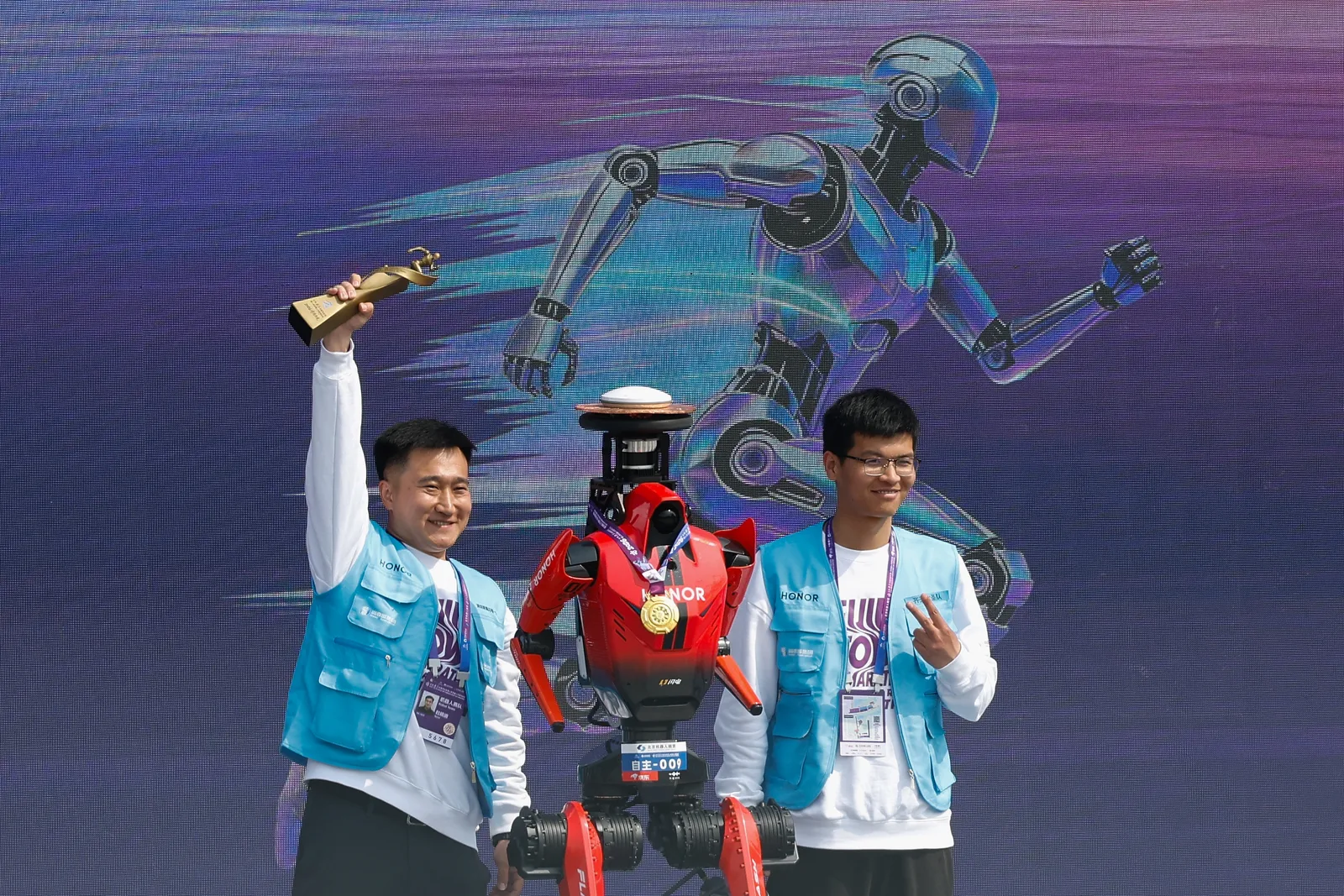
The winning robot, “Blitz,” from smartphone manufacturer Honor was on display at the awards ceremony after the Beijing E-Town Robot Half Marathon.
Photograph: Lintao Zhang/Getty Images
Robot Superiority
Just like the robots that went viral for their impressive martial arts display a few weeks ago, this long-distance race is part of a broader strategy by China to show off its leadership in the development of advanced robots.
Advertisement
You don’t need to be a robotics expert to see that this achievement demonstrates that machines can outperform humans at specific physical tasks under controlled conditions. (It’s hard to imagine that the winning robot could achieve the same result, for example, if it started to rain during the race.) But humans still have a few tricks up their sleeve: Running in a straight line is very different from performing complex real-world activities, such as manipulating delicate objects or interacting socially.
However, it’s understandable that the image of a robot crossing the finish line in record time, ahead of human athletes, raises several questions. Is this the beginning of a new era in which machines redefine physical limits?
One could argue that a car is a machine, and those have always been faster than humans. But a humanoid robot is designed to mimic humans. It’s more alarming to see one beat humanity at its own game—even if so many of them are still tripping over themselves.
This story originally appeared in WIRED en Español and has been translated from Spanish.































































You must be logged in to post a comment Login