In a nutshell: Despite Nvidia losing fans over the last few years as its focus on gamers diminishes (or disappears), the company’s GPUs have dominated the sales charts. But that status quo is starting to change: Amazon’s top 10 best-selling GPU list is an even split between Team Red and Team Green, with the highest position held by a Radeon 9000-series card. Meanwhile, in Germany, AMD is the one that’s dominating sales – at least at one retailer.
The rise of RDNA 4 was highlighted by TechEpiphany on X.
The Amazon best-selling list has changed slightly since the post, but the Radeon RX 9070 XT is still the top GPU. This Gigabyte version is priced at $749, which, of course, is considerably higher than the GPU’s $599 launch MSRP.
The other AMD cards in the chart are an Asus model of the 9070 XT, an Asrock 9070, and an Asus 9060 XT. Nvidia also holds four positions with its RTX 5070, RTX 5060 Ti, and two RTX 5080 models.
Advertisement
Things appear even more favorable for Lisa Su’s firm in Germany. The figures, which come from Mindfactory, show AMD accounting for almost 56% of all GPUs sold over the last week, while Nvidia holds a 40% share. Again, the RX 9070 XT is the most popular card by far, followed by the RX 9060.
It’s worth remembering that Mindfactory has a reputation for favoring AMD, offering promotions, discounts, and bundles featuring its products, which help push up sales figures. The store’s AMD cards have outsold Nvidia’s in the past.
However, these charts do illustrate the impact of the memory crisis on the graphics card market. All GPUs are more expensive, but AMD’s are often cheaper than equivalent Nvidia cards.
The other reason is likely simple availability. The Amazon chart shows three AMD cards in stock, while Nvidia only has one – a Gigabyte RTX 5080 for a colossal $1,599, and that’s with a 6% discount.
Advertisement
Only one company dominates the Steam survey GPU chart
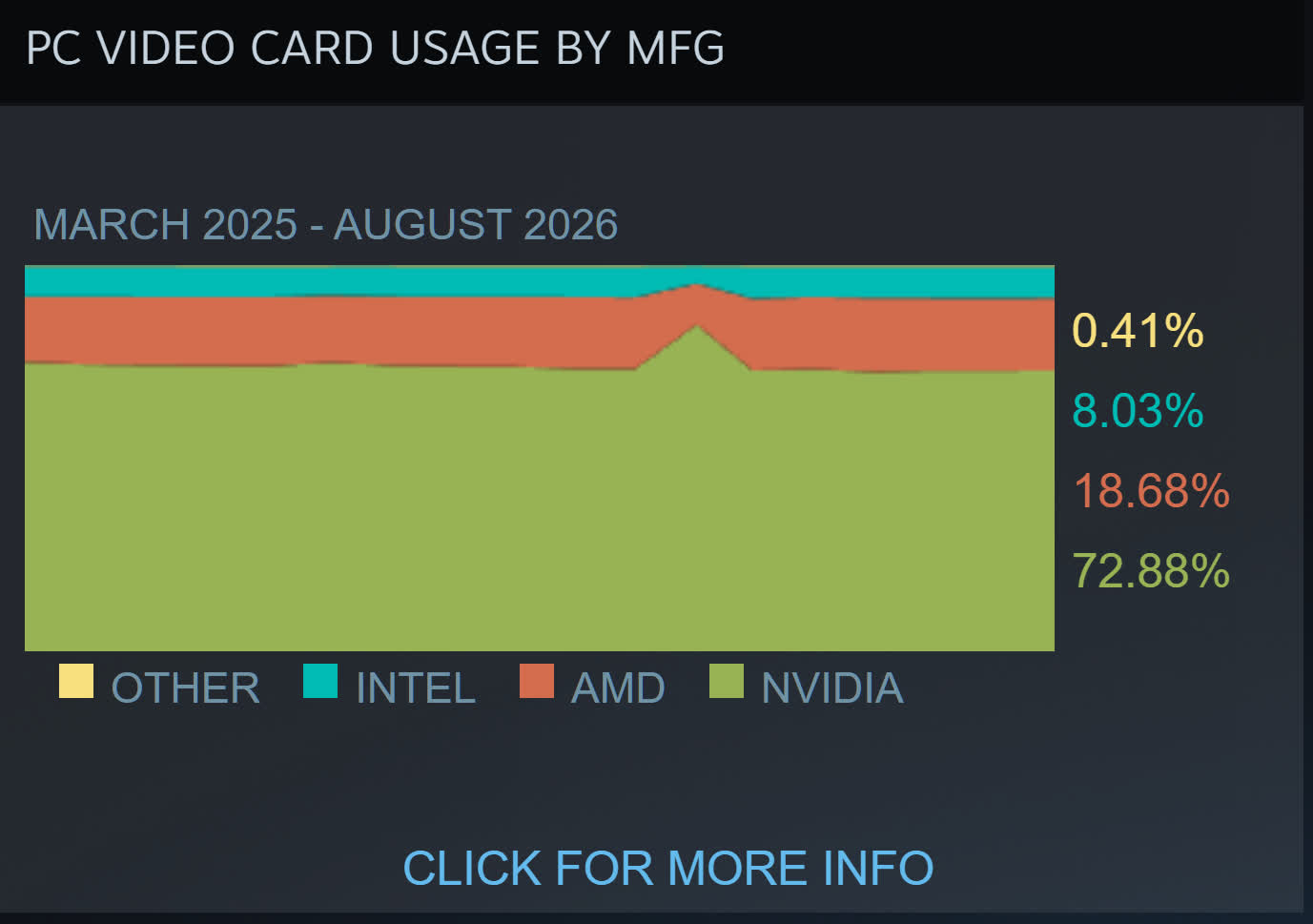
TechEpiphany’s claim of AMD “dominating everywhere” might be a bit of an exaggeration, but there are signs of consumers opting for its cards because of the cheaper prices – or just buying them because there are no Nvidia alternatives. The most valuable company in the world still has GPUs in almost 73% of Steam survey participants’ machines, compared to AMD’s 18.6%, so we’re not seeing a red revolution just yet.
A rumored “Silo” spinoff could keep Apple TV’s dystopian franchise alive beyond its planned finale, but the books’ author is pushing back on the claim.
“Silo” is a dystopian science-fiction drama about a society living underground after humanity has been driven from the surface. The Apple TV series is based on the bestselling “Silo” trilogy, “Wool,” “Shift,” and “Dust,” by Hugh Howey.
While it was well liked, Apple TV had told the creators that the series would end after the fourth season. The third season just returned to the small screen in July, with the fourth season anticipated to release in Summer 2027.
Even though the series is facing down its inevitable end, it may not be time to say goodbye just yet.
Advertisement
Allegedly, there’s a chance “Silo” may be getting its own spinoff, set to begin pre-production in late 2026. It is expected to tie into Hugh Howey’s upcoming “Silo 40” trilogy, which is set to release in 2027.
This tantalizing tidbit was shared by Apple TV enthusiast Sigmund Judge on Threads.
One minute later, however, a very significant figure refuted the claim. Speaking up was the “Silo” author, Hugh Howey.
“Yo, this is news to me,” Howey says in the replies. “So probably not true.”
Advertisement
“I appreciate you wanting to keep a surprise,” Judge says in response. “Love everything you do.”
Judge says that he’s got some further evidence in response to “a denial,” presumably Howey’s. Judge says that hires for the upcoming project have begun, and that the main sets used for “Silo” have remained, even after production on the fourth season wrapped in March.
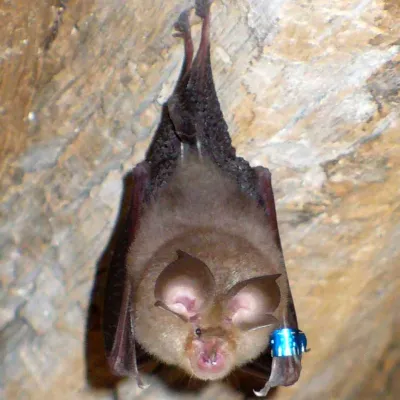
Lesser horseshoe bat. (Credit: Lylambda, Wikimedia)
As great as echolocation is, things can get rather messy once it’s not just you chirping away, but also hundreds of your buddies in roughly the same area. This is the scenario that the typical colonies of bats have to deal with. In a recent study by [Haruhito Matsumoto] et al. in Journal of Comparative Physiologythey investigated how colonies of greater Japanese horseshoe bats deal with this issue.
Echolocation in animals can use a variety of methods, including frequency modulation (FM, varying the pitch) or constant frequency (CF), with both having their uses during hunting as well as obstacle avoidance. One big advantage of CF is that it can be used for Doppler shift, giving very precise information about location and velocity of objects in the environment, but if used in a busy colony the acoustic interference would effectively render them blind.
What researchers have found is that the CF component frequencies differ per bat colonies, with the mixing of wild-caught and resident horseshoe bats in this experiment showing them adjusting the dominant second harmonic (CF2) to match, with bats using a lower frequency CF2 adjusting it upwards. In this way frequency convergence is used as a strategy to avoid acoustic interference using a so-called ‘silent spectral window’.
As this spectral window for effective Doppler tracking is found above the CF2 frequency, it therefore makes sense that the bats at a lower CF2 harmonic would adjust their CF upwards to match that of their neighbors. Although more research is required to fully confirm these findings, it sheds some more light on the use of echolocation by these amazing flying mammals.
“A brilliant specialist with a short attention span.”
Pros
Rights itself and launches from open water every single time
Tracking at 15 mph is steady enough to pass for a chase boat
The Lighthouse wearable handles launch, landing, and following
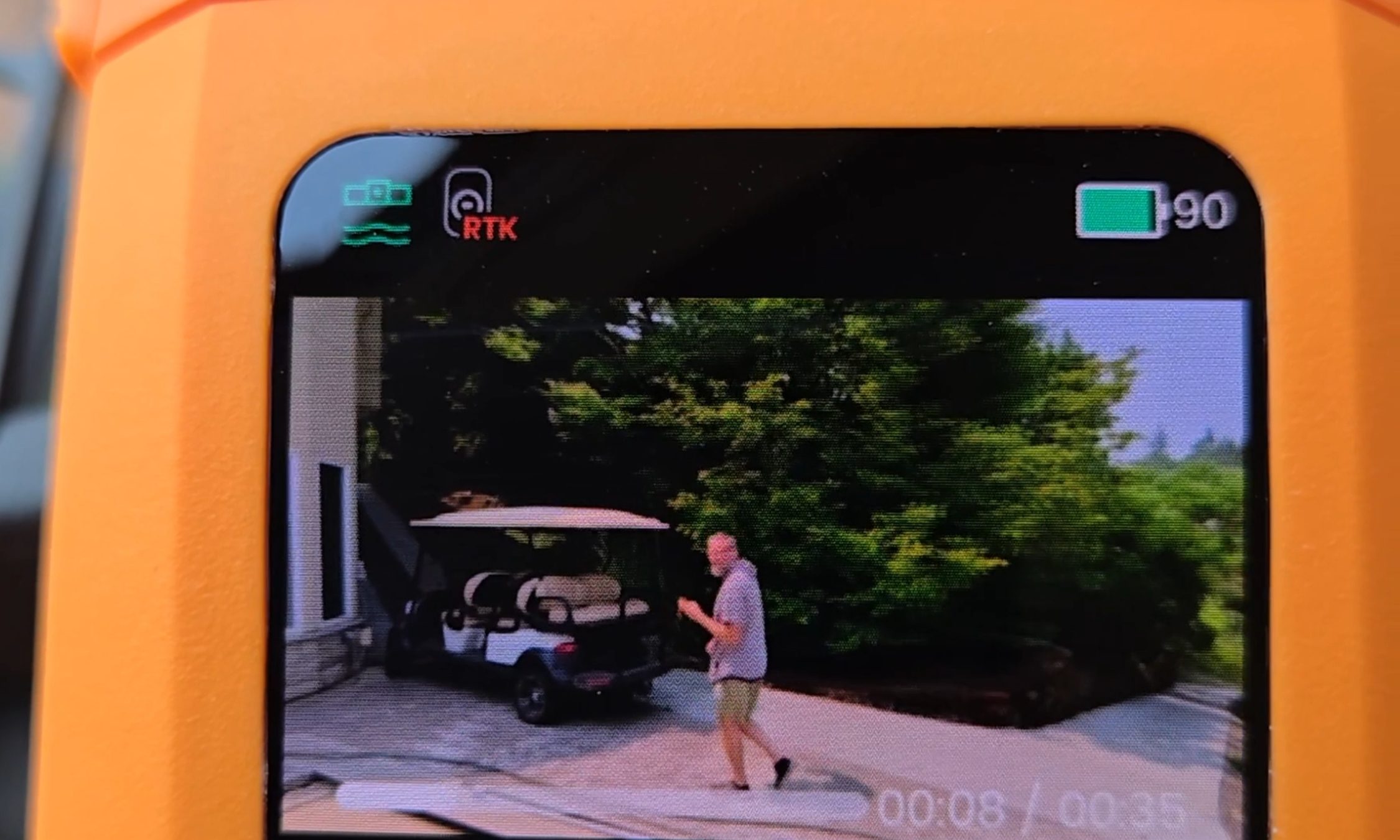
Onboard screen lets you replay clips on the water with no phone
Dead battery? It lands softly on the surface and floats
Cons
I measured 10 and 13 minutes of flight against an advertised 23
The Lighthouse shows no battery level at all
No obstacle avoidance
The battery is only fully waterproof while it sits in the drone
Quick Take
I spent two weeks on an Oregon river trying to break this thing — off an eFoil, out of a kayak, and by throwing it into the water on purpose. The HoverAir Aqua is the first consumer drone actually built to live on open water, and after two weeks I still stop what I’m doing to watch it launch. Throw it in the river upside down, and it flips upright, shakes the water off its props, pops into a low hover, and waits for you. Strap the Lighthouse beacon to your forearm, and it will follow you across the river at eFoil speed with your hands never touching a controller.
Let me be blunt, because this is the most important thing to know before you buy: there are two battery problems. HoverAir prints 23 minutes on the box. I measured 10 minutes and 13 minutes with the drone actively tracking me. And the wearable never tells you how much charge is left. So this is a drone I love, packed in a dry bag next to a fistful of spare batteries I resent having to carry.
HoverAir Aqua specs: A quick peek at the innards
Weight
Under 249 g, light enough to skip FAA registration for recreational U.S. flight
Waterproofing
IP67; floats and rights itself; battery fully waterproof only while installed
Camera
4K at up to 100 fps through a heated lens that sheds fog and spray
Altitude sensing
Millimeter wave radar that reads wave height for low passes over water
Display and storage
1.6-inch onboard AMOLED; 128GB internal storage, no SD card
Battery
2,013 mAh smart battery; rated 23 min; I measured 10 and 13 min while actively tracking
Charging
About 55 minutes with the battery inside the drone
Controller
Lighthouse waterproof wearable (launch, land, track, auto recall) with no battery readout
Obstacle avoidance
None
Recognition
CES 2026 Innovation Awards honoree; Red Dot Award
Test conditions
Two weeks on an Oregon river; eFoil at about 15 mph plus kayak sessions
HoverAir Aqua design & build: A pool toy with flagship chops
Ian Bell / Digital Trends
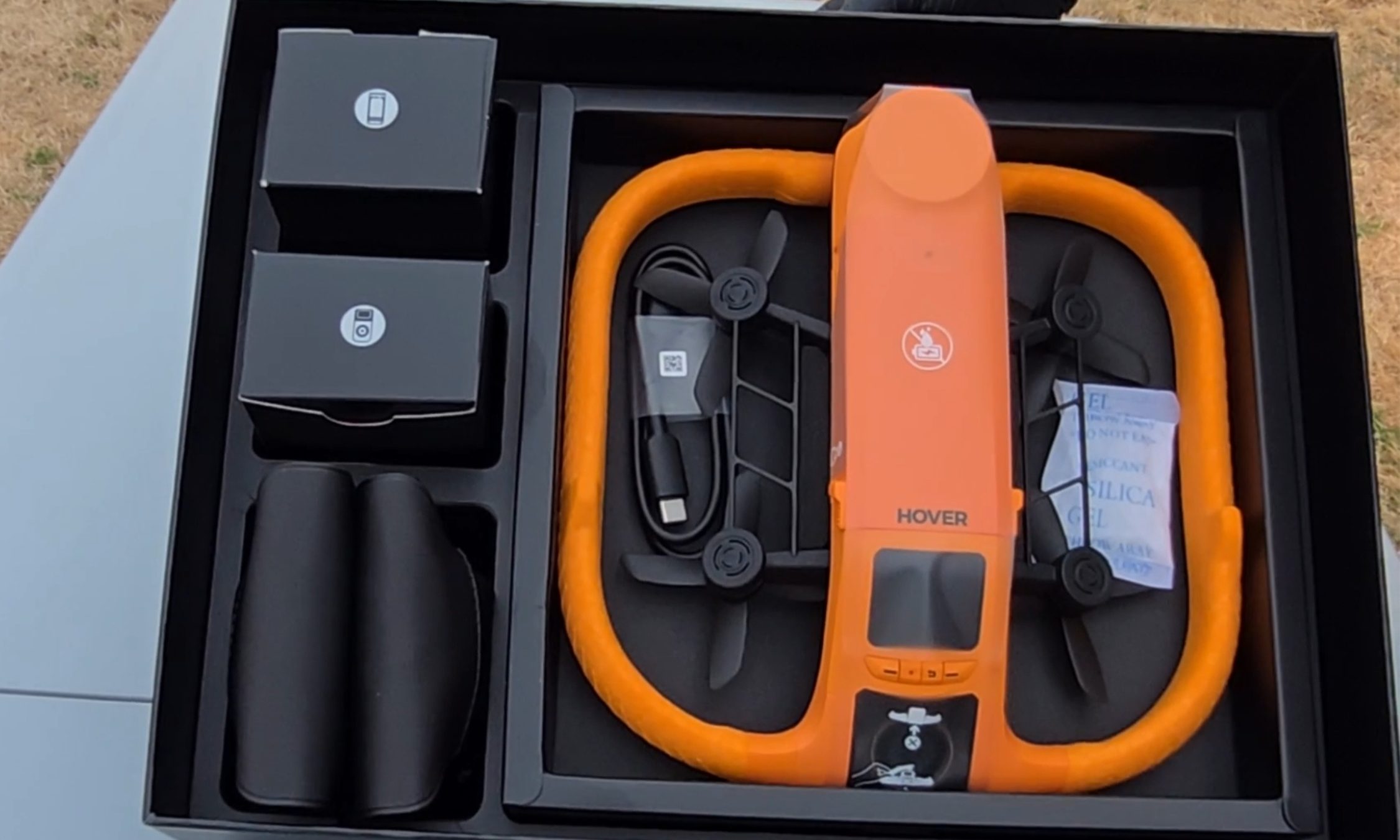
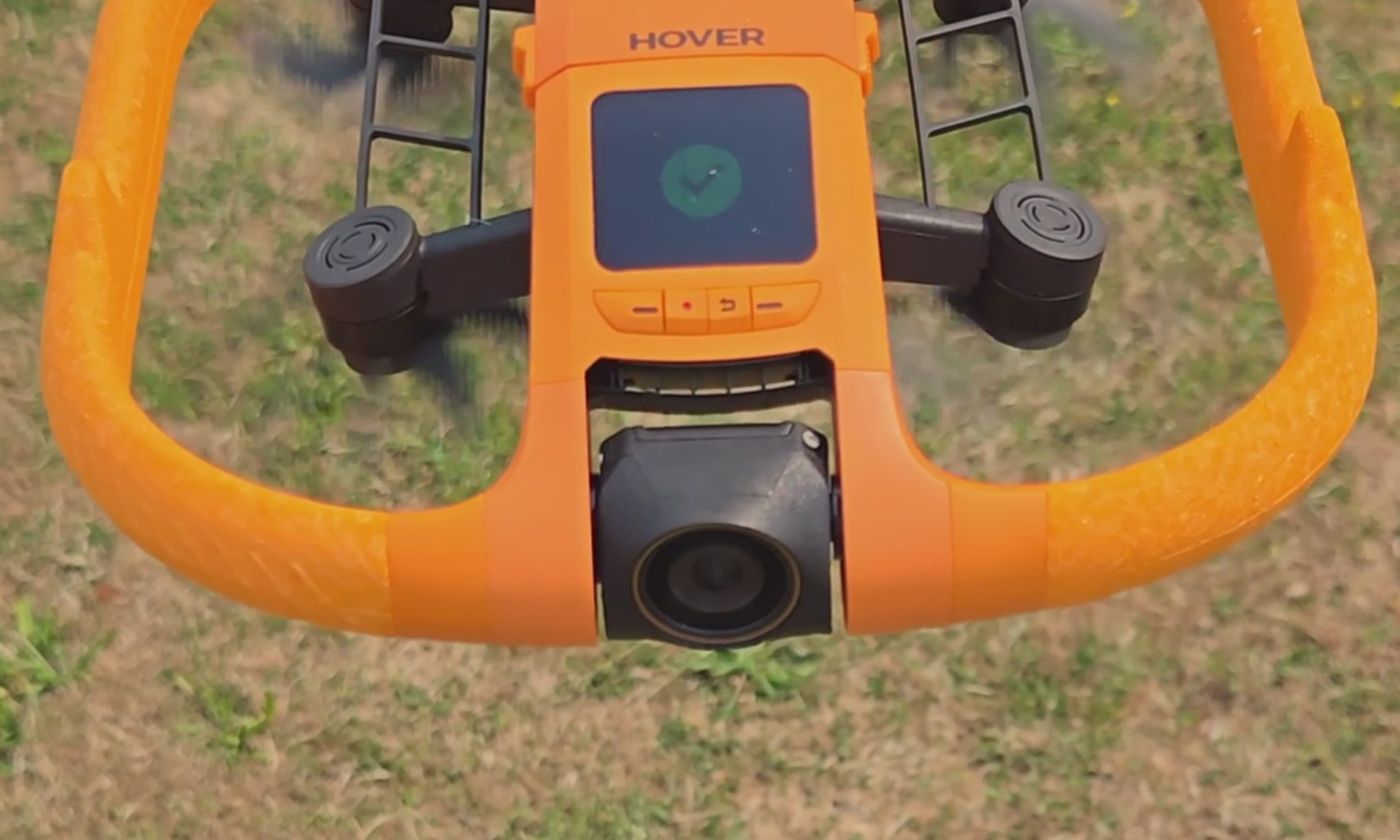
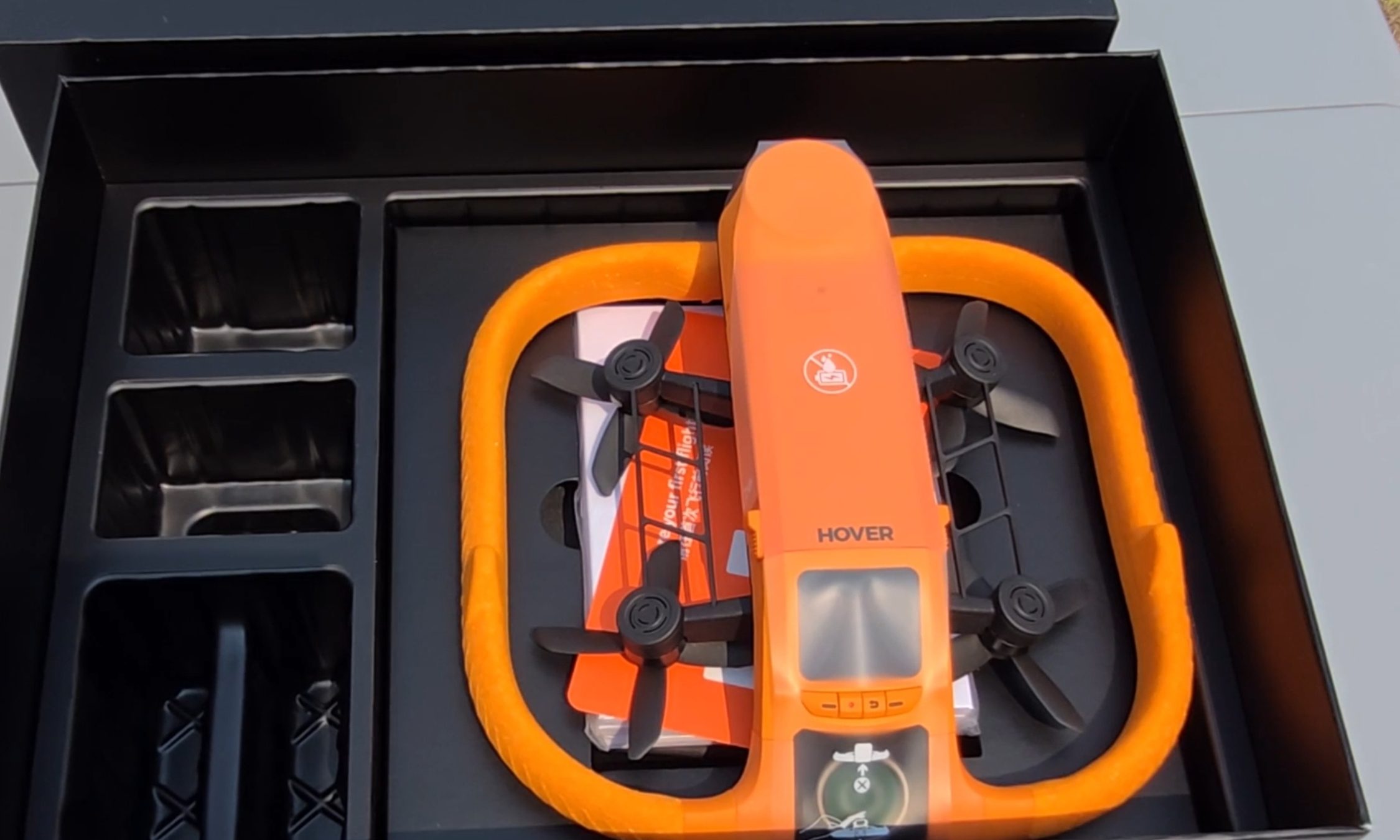
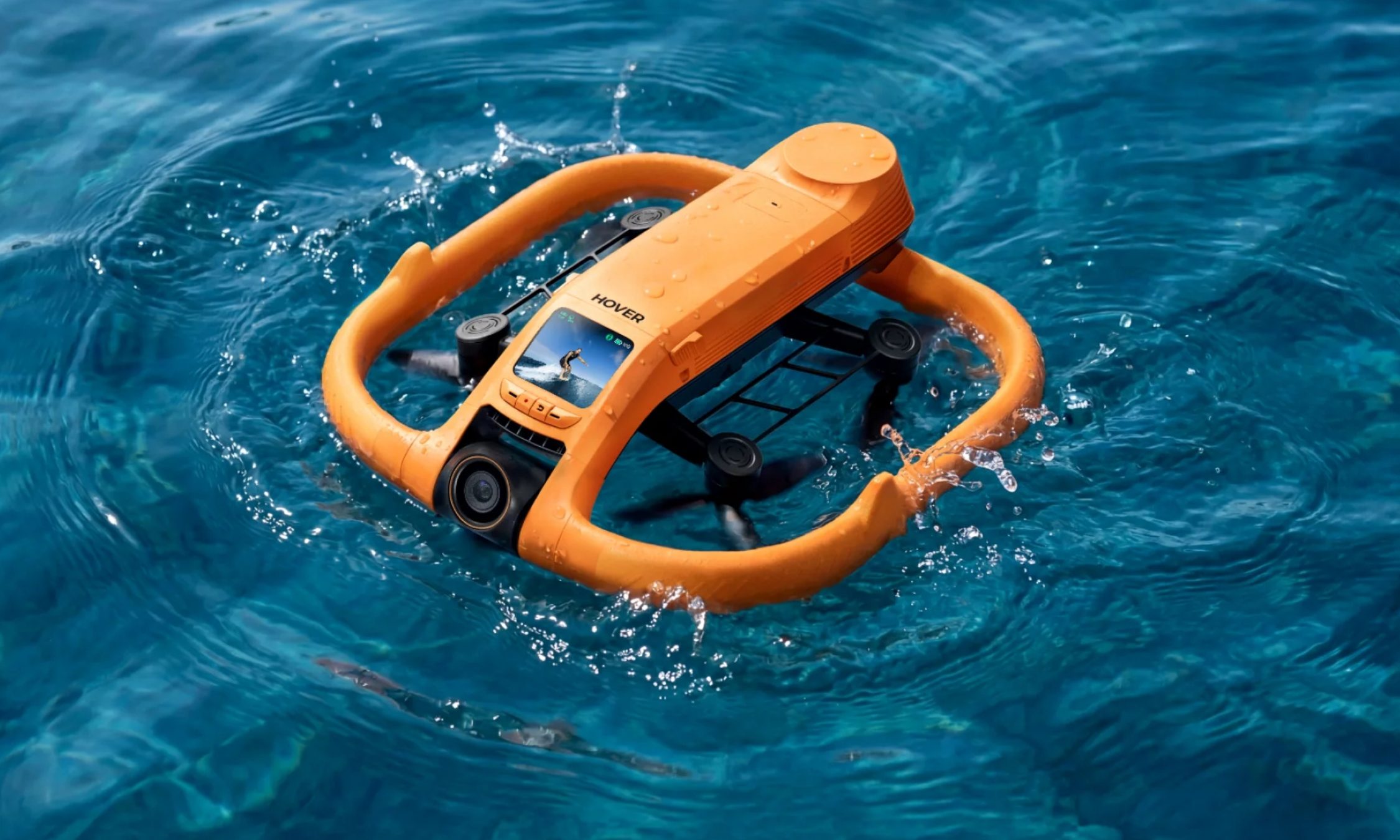
The first thing I noticed pulling the Aqua out of the box is the fat ring of safety-orange foam around its body, the same shade as a life vest. It looks like a pool toy. That’s deliberate. The foam keeps the drone buoyant, cushions the props, and makes the aircraft easy to spot from fifty yards out when it sets down on dark green water. The whole package carries an IP67 rating and weighs under 249 g, which keeps recreational pilots in the U.S. under the FAA registration threshold.
Ian Bell / Digital Trends
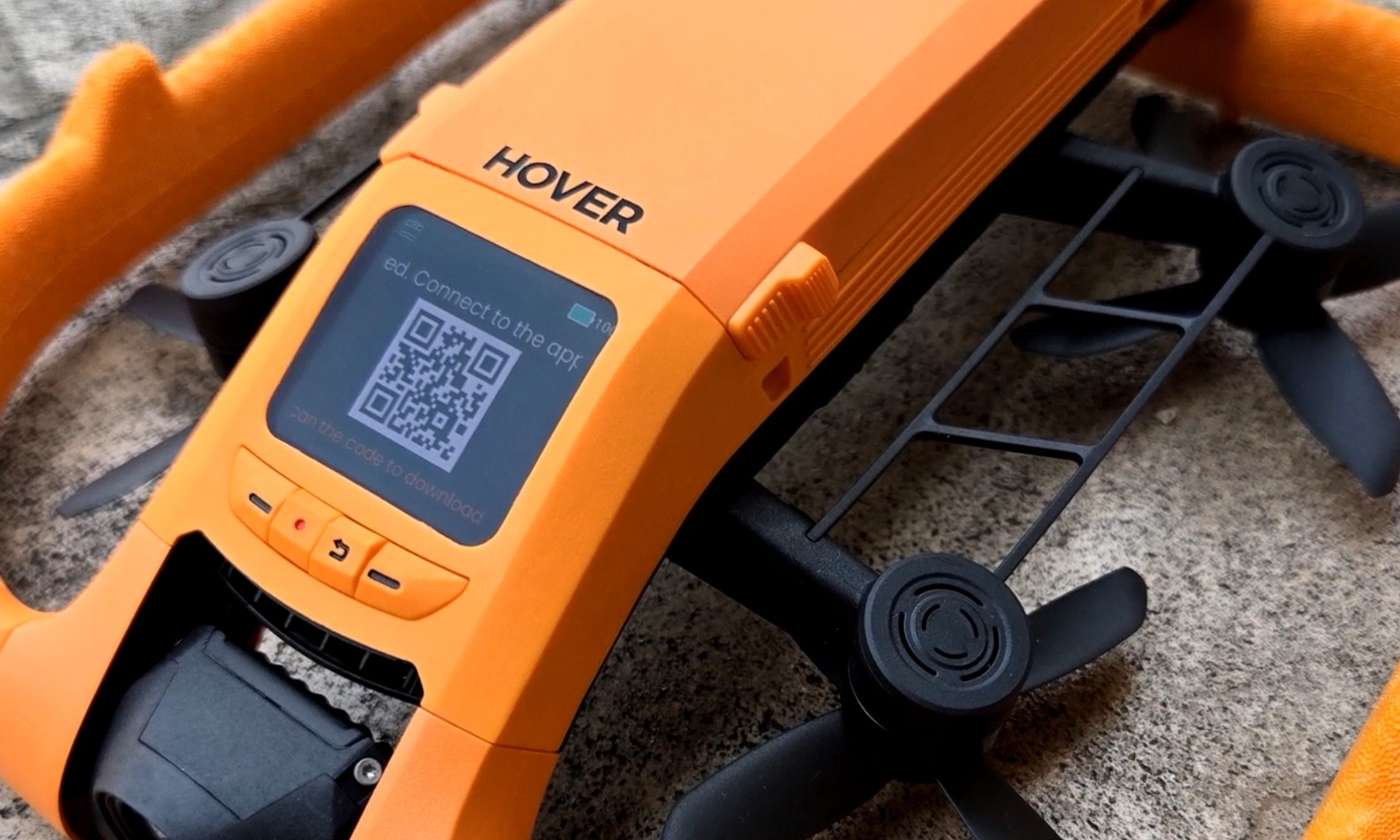
My favorite piece of hardware here is also the smallest. A 1.6-inch AMOLED screen sits on the drone’s spine, and it stays readable even with glare coming off the water. It’s there to pick flight modes, but I mostly used it to review what I’d just shot — sitting on the board, dripping, thumbing back through a run while the river went past. Two weeks in, I was still reaching for it instead of my phone. Storage is 128GB and internal, so there’s no SD card to lose, forget, or flood.
Ian Bell / Digital Trends
The camera records 4K at up to 100 fps for slow motion through a heated lens, which keeps fog from forming and makes water bead off instead of smearing across the glass. Underneath the airframe is the strangest line I have ever typed about a consumer drone: millimeter wave radar that reads the height of the waves rolling beneath it, so the Aqua can skim low over moving water without clipping a crest.
For those of you unfamiliar with the term, and since the spec sheets never bother explaining it, millimeter wave radar bounces very short-wavelength radio off a surface to measure distance to it — here, a surface that will not hold still. The industry noticed. The Aqua premiered at CES 2026 as an Innovation Awards honoree and collected a Red Dot Award along the way.
HoverAir Aqua water launch: Throw it in, it flies out
Ian Bell / Digital Trends
The water launch is the feature every bystander will ask you to do twice, and I tested it from the kayak with my kids leaning over the side to watch. You toss the drone into the river upside down, carelessly. However, it happens to leave your hand. It bobs for a beat. Then the props bite, it rolls upright, and it climbs into a hover a few feet off the surface to wait for you to start moving. It did that every single time I asked, and I asked a lot. Not once did I have to paddle over and fish it out or reset anything. In a category where water has always meant total loss, that is a bigger deal than a party trick sounds.
HoverAir Aqua subject tracking: A chase boat on your forearm
Most of my testing happened on my eFoil at around 15 miles per hour, with the waterproof Lighthouse strapped to my forearm like a chunky watch. One button sends the drone up. One button brings it home. Everything between those two presses is automatic.
Advertisement
Not the actual resolution captured by the HoverAir Aqua. The image has been resized.Ian Bell / Digital TrendsNot the actual resolution captured by the HoverAir Aqua. The image has been resized.Ian Bell / Digital TrendsNot actual resolution captured by the HoverAir Aqua. The image has been resized.Ian Bell / Digital Trends
The footage surprised me. My wake unspooling behind the board in a long white seam, the tree line sliding by, and me held in the center of the frame for the entire run. The best material came when the drone swung out ahead of the board and shot back at me, spray kicking off the foil, the whole river opening up behind.
It never fell behind, and it never wandered. When I drifted too far, it closed the gap on its own. When I slipped off the board and sat chest-deep in the water beside it, it stayed locked on and waited. The kayak sessions at lazier speeds went the same way: steady framing, no fuss, the family paddling along with a small orange aircraft holding formation off the bow. This is the closest thing to a camera operator you can wear on your wrist.
HoverAir Aqua Battery Life: High on the box, dips in the water
Ian Bell / Digital Trends
Now, the part the box will not tell you. HoverAir advertises 23 minutes of flight from the 2,013mAh smart battery. My first battery, actively tracking me on the foil, gave me 10 minutes before the drone called it quits. I rode back to shore, clicked in a fresh one, and went back out. Thirteen minutes. Doing the exact job you bought it for, you get about half the number on the sticker.
It’s worth noting that drone makers rate flight time in windless conditions with no tracking load, and you should not expect that figure in the real world. Even allowing for that, half is a wide gap. At least the ending is graceful.
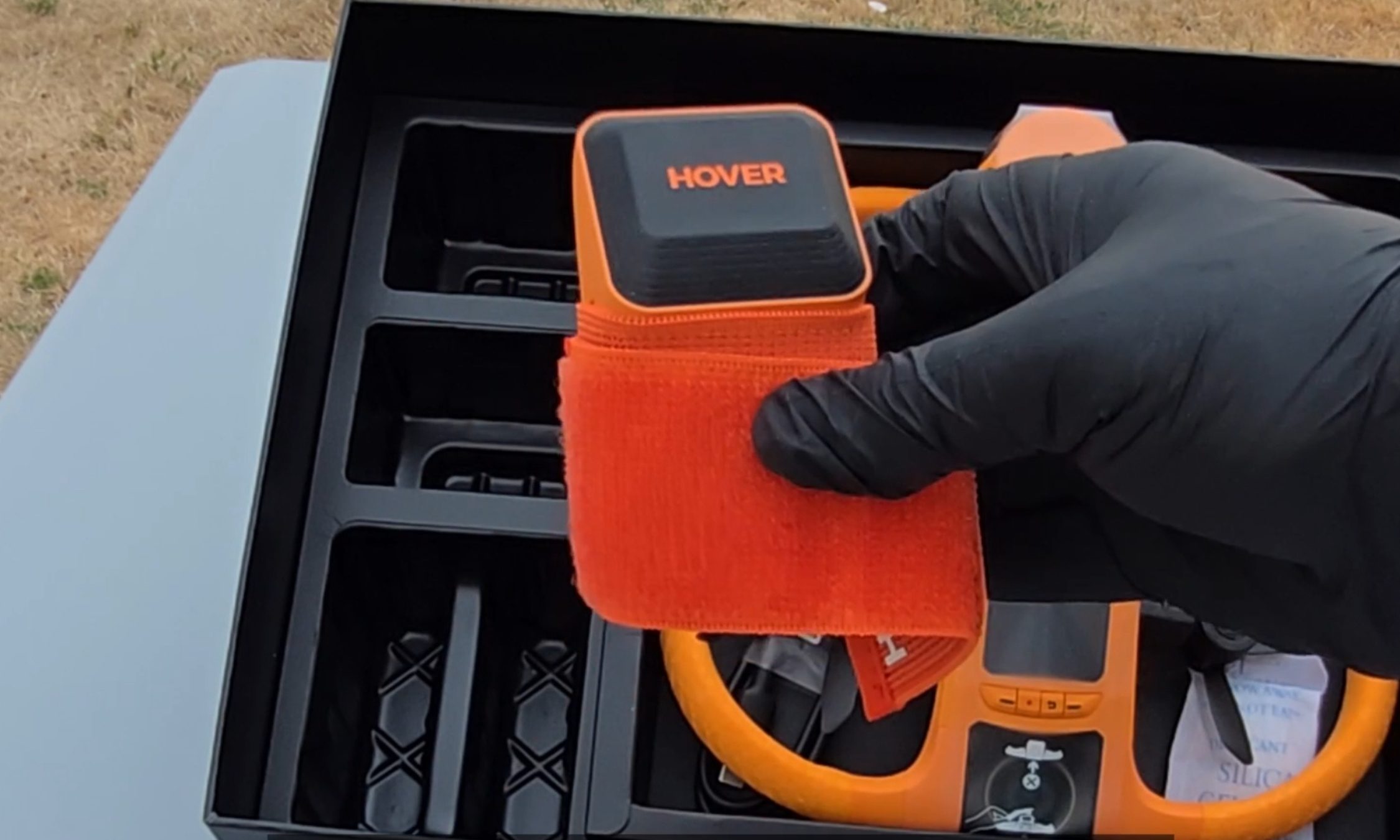
When the charge runs out, you get a warning that the drone will land in 15 seconds, and then it sets down on the surface, orange side up, rocking on the chop until you come get it. Nothing dramatic happened in two weeks of testing. Recharging takes about 55 minutes with the battery inside the drone, and because a battery is only fully waterproof while it’s installed, HoverAir includes a dedicated waterproof pouch for hauling spares out on the water. Read that accessory list again. The company is telling you, in its own way, that you will be swapping batteries mid-session.
HoverAir Aqua Lighthouse Wearable: Great controller, no fuel gauge
Ian Bell / Digital Trends
The second problem makes the first one worse. The Lighthouse is otherwise the best thing about this product, and it tells you nothing about the battery. No percentage. No halfway warning. No blinking light as the level sinks. Mid-run, I had no idea whether the drone above me had eight minutes left or thirty seconds.
Ian Bell / Digital Trends
When the entire budget is 10 to 13 minutes, that silence turns every session into a guessing game. Both times a battery died on me, my only notice was the 15-second landing warning, right when I felt like I was getting going.
Should you buy
HoverAir
The good here is genuinely good. The footage is beautiful, the Aqua keeps pace with a foil at speed, it launches itself out of open water, and it runs hands-off enough that you forget it exists until you sit down to replay the clips. As a piece of engineering built for a hostile environment, it is the real deal.
The battery is what makes me hesitate, and I am not going to soften that. Plan a full session around this drone, and you are packing a pocketful of spares and guessing when to burn them.
Advertisement
So here is the fork. If what you want is a quick promo shot or a fast social clip off the water, this is the drone doing that job, and I don’t know of another one built to take the punishment. If you want to shoot an entire session, wait and watch for a firmware update that pushes battery data to the Lighthouse.
That one change would make this an easy recommendation for anyone who makes content on the water. As it stands, the Aqua is a brilliant specialist with a 10-minute attention span, and I keep taking it out anyway.
Why not try?
HOVERAir X1 PROMAX — Priced significantly lower at $700, this one offers hands-free auto-follow tracking and Lighthouse wearable perks, can shoot up to 4K 120fps footage, and stands out with a foldable design. It’s slightly slower and doesn’t offer a waterproof build, but makes up for it with collision-sensing tech.
DJI Mini 4 Pro — Another option that is more affordable as well, DJI’s drone offers impressive aerial capture capabilities with omnidirectional obstacle sensing and a reliable 4K camera that can capture high dynamic range videos. Plus, the battery packs can extend the flight time by up to 45 minutes, while the transmission performance is also fantastic. But an impending ban casts a shadow of skepticism over long-term support and after-sales experience.
Advertisement
FAQs (Frequently Asked Questions)
Who needs the HoverAir Aqua?
It’s a waterproof, self-flying 4K camera drone. If you’re into activities such as kayaking and wakeboarding, it’s an appropriate choice.
Is it capable of taking off and landing directly on water?
Yes, the positive buoyancy engineering allows it to float on water. And yes, it can take off and land from the surface of water. Moreover, it also comes with a Turtle Flip feature that lets it correct its position instantly, even if it’s flipped upside.
Is the build really waterproof?
The HoverAir Aqua has an IP67-certified build, featuring corrosion-resistant components, while the camera sensor is protected by a hydrophobic, anti-fog lens.
Do you need a license to fly it?
It falls under the prescribed FAA weight limit, so you don’t need a license to fly it.
Advertisement
Can it fly and capture without a phone?
Yes, the wearable Lighthouse controller relies on Real-Time Kinematics (RTK) positioning to let the drone track you and capture videos without requiring a cellular link or base stations.
What is the top speed and battery life?
The HoverAir Aqua can fly at a speed of up to 34 miles per hour, and it is claimed to last over 20 minutes on a single charge.
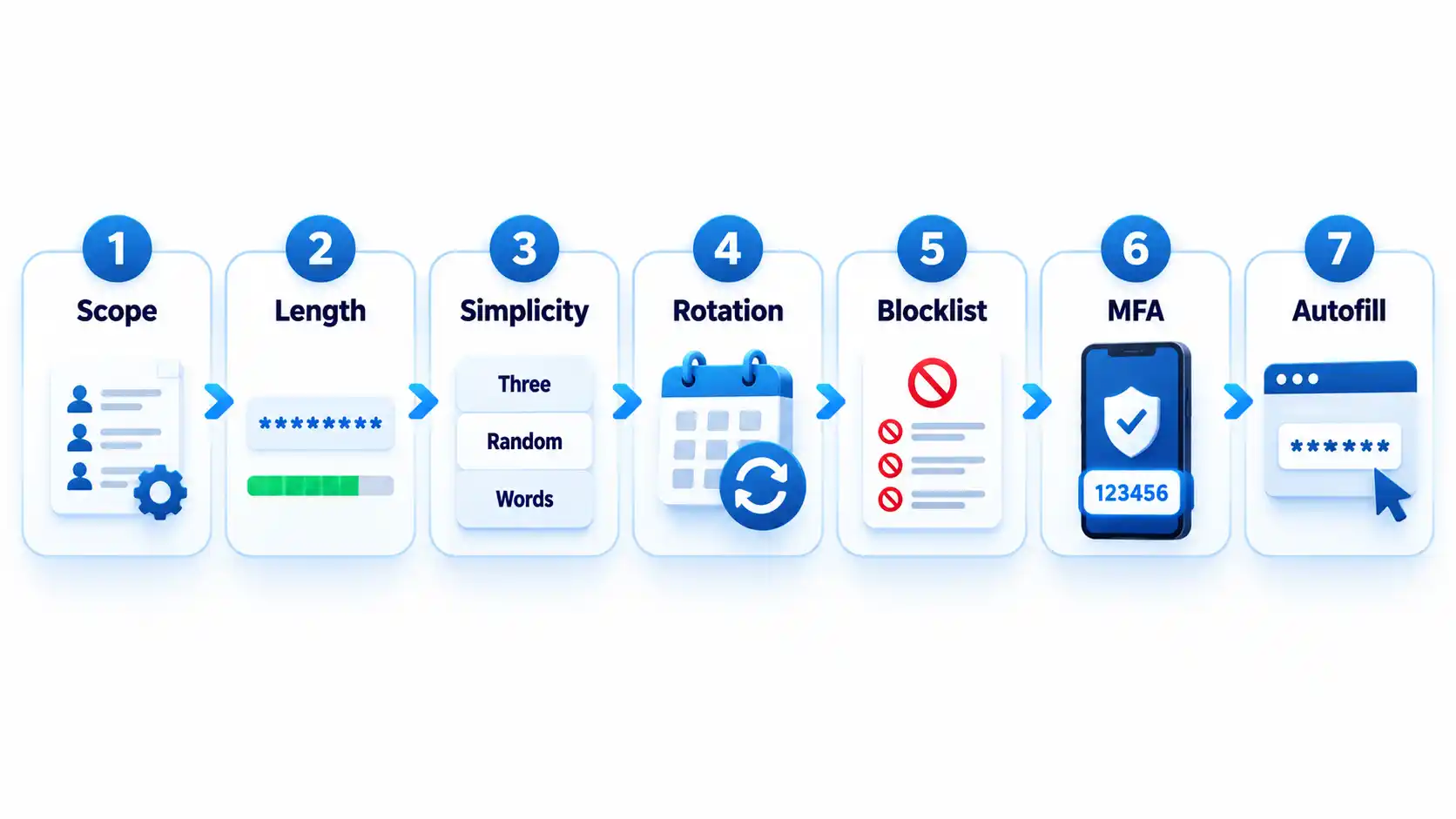
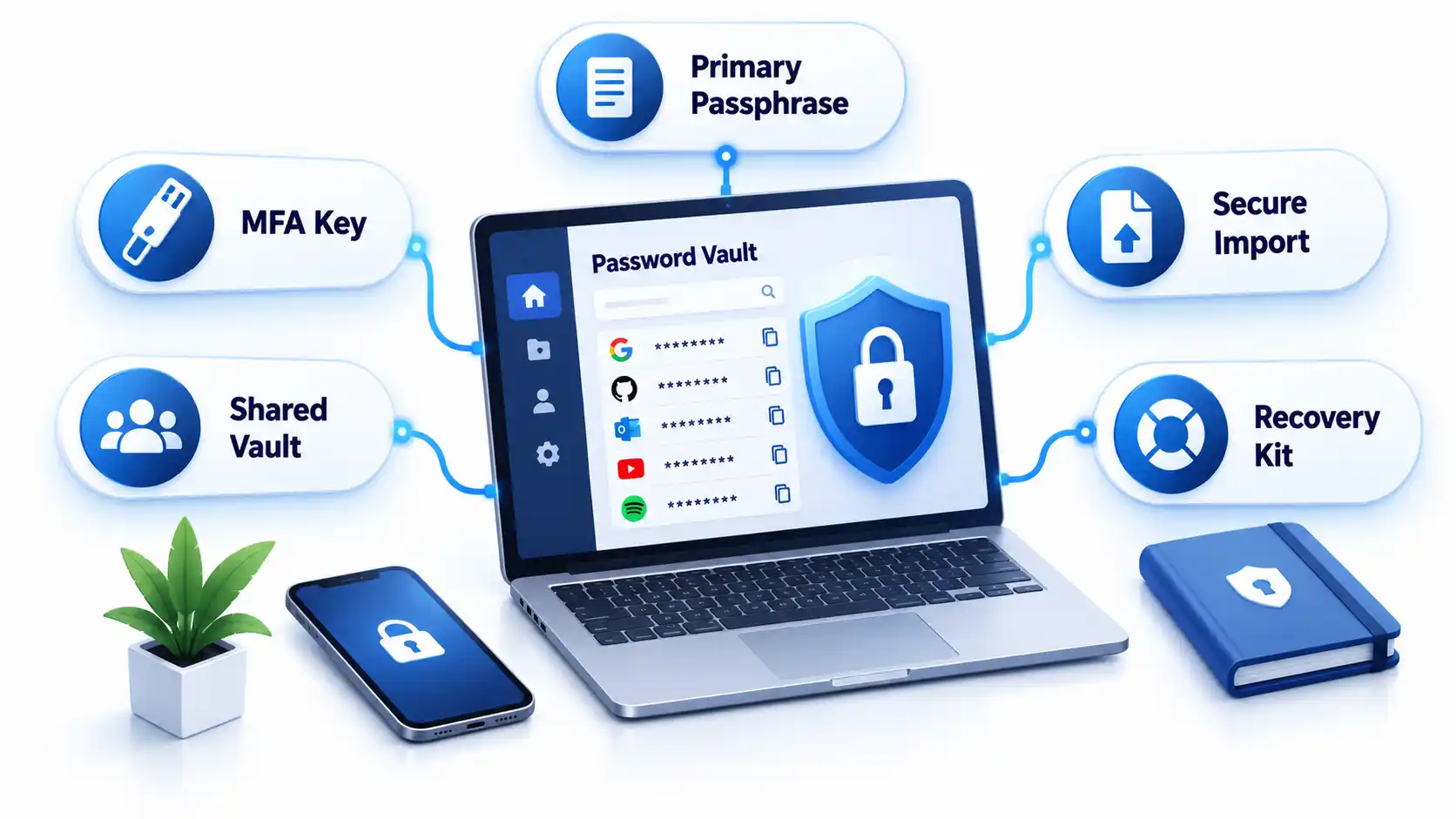
Create a strong password policy by prioritizing length and uniqueness, blocking compromised passwords, allowing password managers and autofill, removing arbitrary complexity and expiration rules, and requiring MFA for important accounts. Deploy the policy with a managed password vault, secure recovery procedures, and tests that confirm the written rules work in every covered system.
Quick Take
Require at least 15 characters when a password is the only authentication factor.
Allow passwords of at least 64 characters, including spaces.
Do not require arbitrary mixtures of uppercase letters, numbers, and symbols.
Replace scheduled password expiration with changes triggered by suspected compromise.
Reject commonly used, predictable, and previously compromised passwords.
Allow password managers, paste, and autofill on login forms.
Protect important accounts and cloud-synchronized vaults with MFA.
Test login, recovery, export, offboarding, and session-revocation controls.
These requirements follow current NIST authenticator guidance. They are a security baseline rather than proof that a particular policy satisfies every law, contract, or industry framework.
Prerequisites and Ownership
Identify the accounts in scope
Inventory the systems that accept passwords before writing the rules. Include workforce accounts, customer accounts, administrator access, cloud services, remote-access tools, shared credentials, and legacy applications. Record which systems use single-factor authentication, MFA, or single sign-on.
Keep machine credentials in a separate category. API keys, database secrets, certificates, service-account tokens, and CI/CD credentials require secrets-management controls rather than an ordinary employee password vault. A dedicated article on business secrets management should cover those systems.
Assign responsibility
Name a policy owner, identity-platform administrator, security reviewer, help-desk recovery owner, and departmental access approver. A policy without named owners tends to fail at exceptions, recovery, and offboarding rather than during ordinary password creation.
Advertisement
Document technical constraints
Record each system’s minimum and maximum length, supported characters, MFA options, password-history rules, breached-password screening, paste and autofill behavior, recovery process, and session controls. Legacy systems that cannot meet the baseline should enter a documented exception process with compensating controls and a retirement or remediation date.
Step-by-Step: Create the Password Policy
Define which accounts the policy covers
State whether the policy applies to employees, contractors, administrators, customers, service providers, and shared accounts. Classify higher-risk accounts such as email, identity-provider, financial, cloud-administrator, source-code, and password-vault accounts.
Where possible, replace shared accounts with individually attributable accounts. If sharing is unavoidable, use a managed vault that records access and lets administrators revoke membership.
Expected result: Every covered account type has an owner, risk classification, authentication method, and exception status.
Set length and input requirements
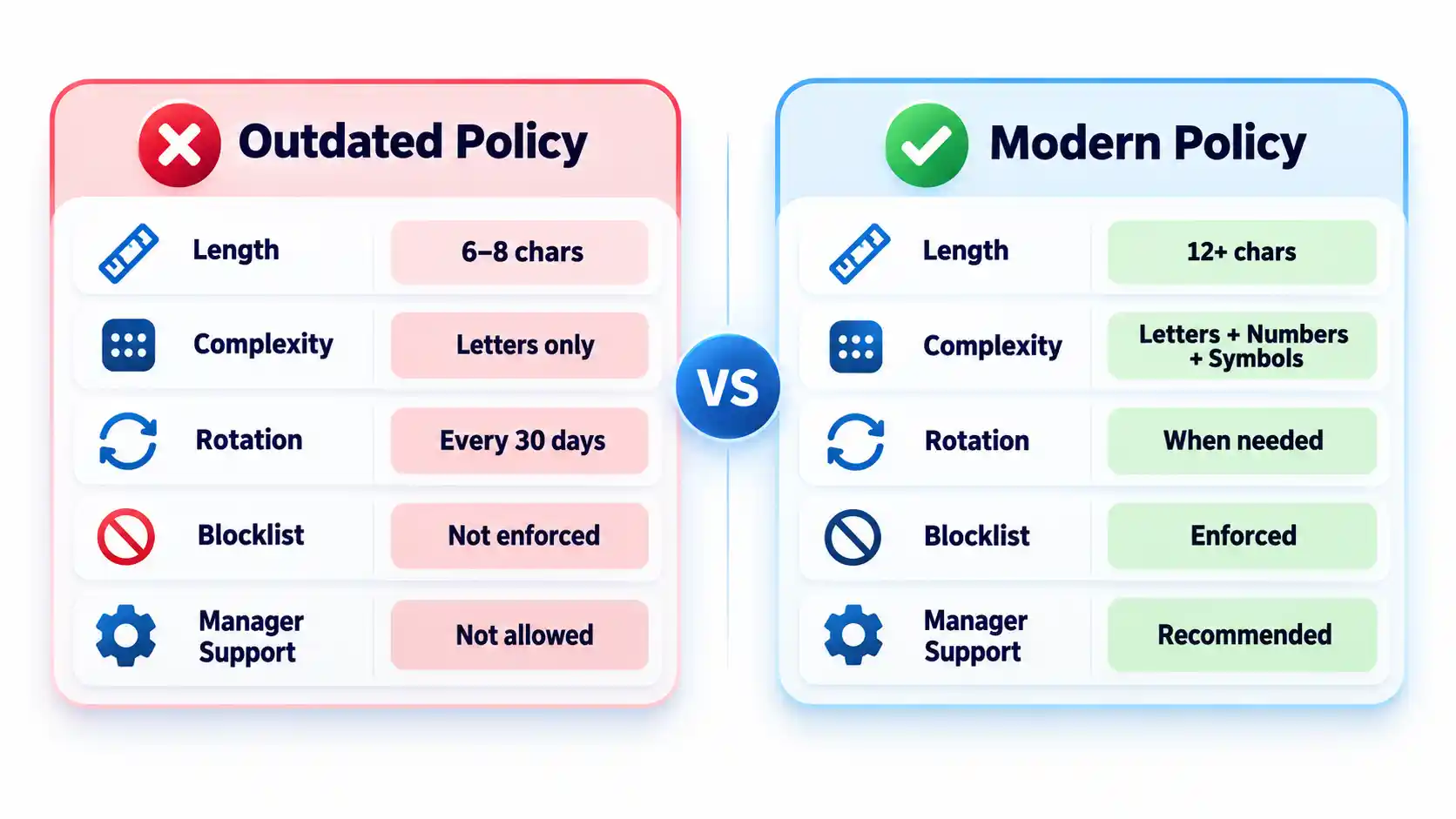
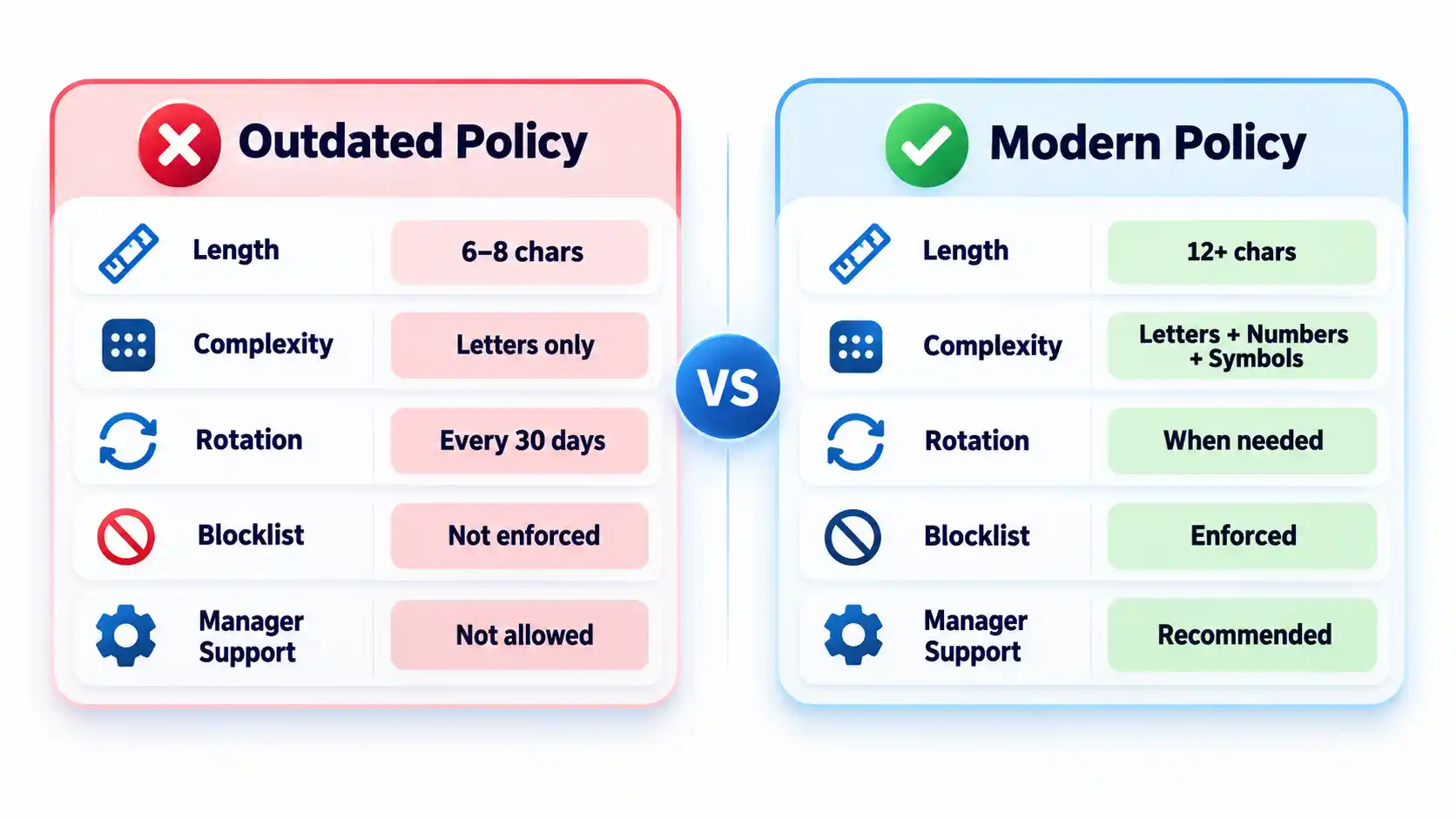
Require at least 15 characters when a password is the only authentication factor. NIST permits passwords used only as part of an MFA process to be shorter, but they must contain at least 8 characters. Organizations may adopt a longer minimum when users can rely on a password generator.
Permit passwords of at least 64 characters. Accept spaces and broad character sets, process the entire submitted password, and never silently truncate it. Systems that mishandle spaces or long generated values should be corrected or documented as exceptions.
Advertisement
Expected result: Users can create long passphrases or generated passwords without encountering unnecessary input restrictions.
Remove mandatory composition rules
Do not require every password to contain a prescribed mixture of uppercase letters, lowercase letters, numbers, and symbols. Current NIST rules prohibit these composition requirements because users commonly satisfy them with predictable patterns.
Symbols remain acceptable when a generator selects them or a service requires them. The policy should not imply that a short password becomes safe simply because one letter was replaced with a familiar symbol. NIST’s public password creation guidance prioritizes length and recommends long passphrases when a password must be created manually.
Expected result: Users can choose long, usable passwords without following predictable formatting recipes.
Replace scheduled expiration with event-driven changes
Do not force users to change passwords every 30, 60, or 90 days without evidence of risk. Require a change when a password is known or suspected to have been disclosed, appears in relevant breach data, was transmitted insecurely, or may remain known to someone whose access has ended.
A password change must be accompanied by session revocation when an attacker could already be signed in. Changing the secret alone may not invalidate active browser sessions, application tokens, or remembered devices.
Advertisement
Expected result: Password changes respond to compromise and access changes rather than an arbitrary calendar.
Block weak and compromised passwords
Compare new and changed passwords against a blocklist containing commonly used, expected, and compromised values. Include context-specific choices such as the organization’s name, service name, username, and predictable derivatives.
Explain why a proposed password was rejected and ask the user to choose a genuinely different value. Do not reveal whether another person uses that password. Avoid enormous blocklists that create excessive false rejections without meaningfully improving protection against rate-limited online guessing.
Expected result: Users cannot enroll values that attackers are likely to guess early or already possess from breach collections.
Add controls around the password
Require MFA for email, identity-provider, financial, remote-access, cloud-administrator, source-code, and password-manager accounts. Prefer phishing-resistant methods such as passkeys or hardware-backed security keys where the service and user environment support them.
Rate-limit or progressively delay failed attempts. Monitor suspicious logins, protect account recovery, avoid knowledge-based questions as a sole recovery method, and provide a way to revoke sessions after suspected compromise. The OWASP authentication guidance treats password controls, MFA, recovery, session handling, and login monitoring as connected parts of account security.
Advertisement
Expected result: A guessed or disclosed password is harder to convert into persistent account access.
Require password-manager-compatible login forms
Allow users to paste and autofill credentials. Use standard password fields and avoid scripts or form designs that block managers. NIST requires verifiers to allow password managers and autofill and recommends permitting paste when autofill interfaces are unavailable.
Do not interpret clipboard blocking as a security control. It can push users toward shorter passwords they can type manually or toward storing credentials in insecure notes.
Expected result: Users can generate, store, and enter unique credentials without weakening them for convenience.
How to Choose a Password Manager
Select a manager by deployment fit, recovery design, security controls, and usability rather than by the length of its feature list. The NCSC buyers guide emphasizes that an unusable manager will leave insecure workarounds in place.
Advertisement
Comparison of password-manager deployment models
Manager type
Best fit
Principal advantage
Main limitation
Browser or platform manager
People using one primary browser or device ecosystem
Low setup friction and integrated autofill
Potential platform lock-in and fewer team controls
Standalone cloud-sync manager
Mixed-device users and small teams
Cross-platform access and centralized synchronization
Remote account and recovery paths require strong protection
On-device manager
Narrow or offline use cases
Reduced dependence on a cloud service
Limited synchronization and more difficult recovery
Enterprise-managed vault
Organizations requiring governance and offboarding
Managed sharing, audit records, policy enforcement, and provisioning
Greater administrative complexity and recurring cost
Evaluate the following capabilities before deployment:
Protection of credentials and metadata at rest.
Who controls or can recover the vault’s decryption key.
MFA, passkey, and approved-device support.
Recovery options and the people authorized to use them.
Secure sharing without revealing passwords in email or chat.
Role-based administration, audit records, and offboarding controls.
Restrictions or alerts for bulk export.
Supported browsers, operating systems, and mobile devices.
Update delivery and the provider’s vulnerability-disclosure process.
A practical method for leaving the service without permanent lock-in.
Browser and device managers can be appropriate when convenience and ecosystem integration matter most. A reputable standalone manager may fit mixed-device environments or teams requiring advanced sharing and administration. The NCSC’s updated password-manager guidance recommends evaluating reputation, device security, recovery, MFA, and platform needs instead of assuming one type fits everyone.
How to Deploy and Use the Password Manager
1. Protect the vault account
Create a long, unique primary passphrase that is never used elsewhere. Enable the strongest practical MFA and secure every registered device with updates, automatic locking, and a local PIN or biometric unlock.
Store recovery keys or emergency instructions separately from the vault. Avoid circular recovery in which the only way to access the email account is through the vault while the only way to recover the vault is through that email account.
2. Import credentials carefully
Some managers migrate credentials through a CSV file. That export may contain readable usernames and passwords. Create it only on a trusted device, import it immediately, verify that the records arrived, and delete the exported file from the original folder, recycle bin, cloud synchronization, and temporary storage.
Advertisement
Do not perform a vault migration over an unfamiliar hotspot. Review the precautions in this public Wi-Fi security guide before accessing sensitive accounts away from a trusted connection.
3. Replace reused passwords in risk order
Secure the password-manager account and its recovery channels.
Change email and identity-provider credentials.
Change banking, payment, payroll, and financial credentials.
Change administrator, cloud, source-code, and remote-access credentials.
Change shopping, social-media, subscription, and lower-impact accounts.
Do not change dozens of accounts without confirming that each new password was saved. Keep the old session open until the new credential has been tested in a separate private window or another approved device.
4. Configure generation and autofill
Generate a different random password for every compatible service. Match the site’s supported length and character rules while avoiding needless manual edits. If autofill does not appear, check the exact domain before searching the vault and copying the password.
Autofill may help resist phishing because a manager should associate credentials with the legitimate domain. It is not infallible. Users must still inspect unusual addresses, subdomains, redirects, and browser warnings.
5. Configure team sharing and offboarding
Store business credentials in organization-controlled collections rather than personal vaults. Grant access by role, assign an accountable owner, review membership, and remove access promptly when someone changes roles or leaves.
Advertisement
Revoking vault access prevents future retrieval, but it cannot make a password unknown to someone who already viewed or copied it. Rotate credentials when a departing user could retain them. Teams protecting software repositories should connect this process to the controls in the guide to preventing source-code theft.
Verify That the Policy Works
Test the deployed controls instead of assuming a written setting was applied consistently.
Checklist
Confirm that a 15-character single-factor password is accepted.
Confirm that long passphrases, spaces, paste, and autofill work.
Confirm that the application processes the full password without truncation.
Attempt to enroll a known common password and verify that it is rejected with useful guidance.
Confirm that uppercase, number, and symbol mixtures are not mandatory.
Verify that routine expiration is disabled and compromise-driven resets work.
Trigger repeated failed attempts in an approved test account and verify rate limiting or progressive delay.
Test MFA, recovery, session revocation, emergency access, and lost-device procedures.
Remove a test user from a shared collection and verify that access ends.
Verify that export actions are restricted, logged, or both.
Record exceptions and failed tests with an owner and target correction date. Repeat the checks after identity-platform changes, password-manager migrations, or major policy revisions.
Failure Modes and Troubleshooting
Common password policy and manager deployment failures
Failure
Likely cause
Security consequence
Corrective action
Long generated password is rejected
Legacy length or character restriction
User shortens or reuses a password
Correct the restriction or document a temporary exception
Autofill does not appear
Unsupported form, disabled extension, or domain mismatch
User may copy into the wrong page
Verify the domain and manager permissions before manual entry
Credentials fill on an unexpected subdomain
Overly broad saved-domain matching
Password may reach an unintended service
Narrow the saved address and report unsafe matching
Primary passphrase is lost
Recovery was not configured or documented
Vault data may become inaccessible
Use the approved recovery process and reset affected accounts if recovery fails
MFA device is lost
No backup factor or recovery key exists
User is locked out or bypasses policy
Use pre-established recovery and revoke the lost device
Exported CSV remains on disk
Migration cleanup was missed
Passwords remain exposed in plaintext
Delete all copies and rotate credentials if exposure is possible
Former worker retains a shared password
Vault removal occurred without credential rotation
Continued unauthorized access remains possible
Rotate the credential and review account activity
Legacy system requires frequent changes
Obsolete platform rule
Users may create predictable variations
Apply compensating controls and schedule remediation
Vault and email recovery depend on each other
Circular recovery design
One lost factor can lock out both services
Create an independent recovery route and protect it offline
Operational Limits and Edge Cases
Concentrated value: A vault makes unique passwords practical, but a successful vault compromise can expose many accounts. Protect the primary account and registered devices accordingly.
Compromised endpoints: Malware or someone using an unlocked computer may capture credentials after the vault decrypts them. A password manager does not replace device protection. Organizations can evaluate those controls separately in this endpoint protection guide.
Recovery trade-off: Recovery improves availability but creates another path that an attacker may target. Document who can recover a vault and what evidence is required.
Shared accounts: A vault improves sharing, but individual accounts remain preferable because they provide attribution and cleaner revocation.
Offline access: Emergency recovery material needs physical protection, named custodians, and periodic verification.
Phishing: Passwords themselves are not phishing-resistant. Adopt passkeys where appropriate and evaluate the differences in a future passkeys versus passwords guide.
Key Takeaways
Use length, uniqueness, blocklists, and login protections instead of frustrating composition rules.
Require at least 15 characters when a password is the only authentication factor.
Do not force periodic changes without evidence of compromise.
Allow password managers, paste, autofill, and long values.
Protect the password vault, email, identity provider, and administrator accounts with MFA.
Select a manager based on security, recovery, usability, platform support, export, and governance.
Replace reused passwords in risk order and verify each change.
Test recovery, offboarding, exports, and session revocation before an incident.
Frequently Asked Questions
Should contractors use the company password manager?
Contractors should use an organization-controlled vault when they need access to company credentials. Place them in restricted groups, set an access end date where supported, and avoid mixing business credentials with their personal vaults. At contract completion, revoke access and rotate any credential they could have copied.
Should a password manager store the code for its own MFA?
Storing a service’s password and MFA code in one vault is convenient, but storing the vault’s own second factor inside that same locked vault creates a circular dependency. Protect the manager itself with a separate authenticator, passkey, hardware key, or securely stored recovery code.
What happens if the password manager company shuts down?
A usable exit plan should let authorized users export or transfer credentials to another manager. Confirm the export format before deployment and document how migration would work. Because exports may be plaintext, continuity planning should not involve leaving permanent backup exports on ordinary drives.
Advertisement
Can administrators see employees’ passwords in a business vault?
That depends on the manager’s encryption, sharing, recovery, and administrative design. Some administrators can recover accounts or manage shared collections without seeing every private credential. Others may have broader recovery powers. Review the product’s key-ownership and recovery documentation before adoption.
Should personal and work passwords be kept in the same vault?
Separate vaults or clearly separated organization-controlled and personal spaces are preferable. The company must be able to manage, audit, and revoke business access without gaining control over personal credentials. Employees should also retain their personal passwords after leaving without exporting company secrets.
What should happen when a password appears in a data breach?
Change the affected password, revoke active sessions, review account recovery methods, inspect recent activity, and replace the same password anywhere it was reused. Follow a documented data breach response checklist so the reset does not overlook tokens, forwarding rules, or connected applications.
Major labels want rules determining which AI assisted recordings qualify for official charts. Their proposal draws a necessary line, but their growing AI licensing business makes the location of that line rather convenient.
“More human than human” was a memorable slogan for the Tyrell Corporation. It is a considerably less convincing standard for deciding whether AI generated music should compete against living artists on the official charts.
Sony Music, Universal Music Group, Warner Music Group, BMG, Concord, Believe, HYBE and a group of independent labels have proposed principles governing when recordings involving generative AI should qualify for chart recognition. Their position sounds sensible enough: the AI platform must be authorized, the recording must comply with copyright and personality rights, its use of AI must be disclosed, streaming activity must be legitimate and the finished work must remain “substantially human made.”
That final phrase is doing almost as much artificial work as the software. The labels want to appear protective of human creativity without defining the point at which the songwriter, musicians and singer have been reduced to decorative accessories—or closing the door on the licensed AI platforms they increasingly expect to monetize.
Advertisement
The proposal is not a binding rule, and chart organizations have not universally adopted it. It is the industry’s attempt to establish boundaries before synthetic performers, automated uploads and manipulated streams make the charts even less representative of what people are actually listening to.
The labels are correct that fully AI generated music should not compete directly with recordings written, performed and produced by human beings. The more difficult question is why anyone believes it should be eligible in the first place.
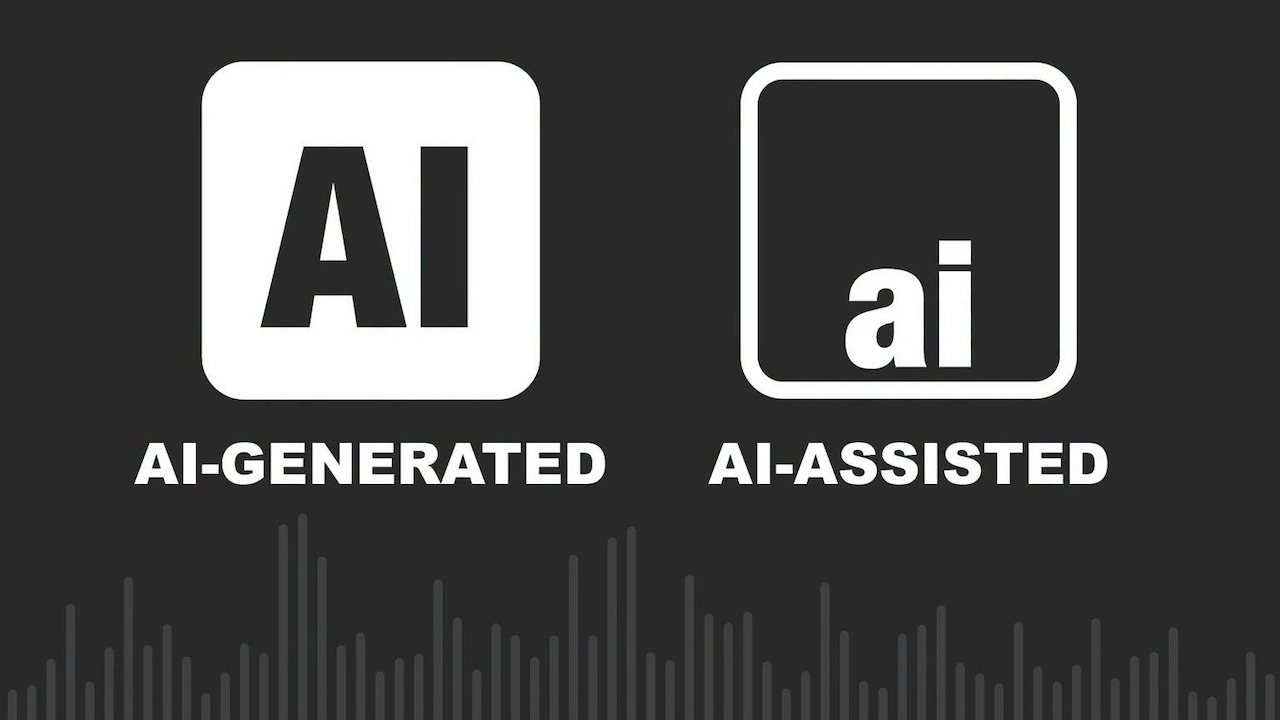
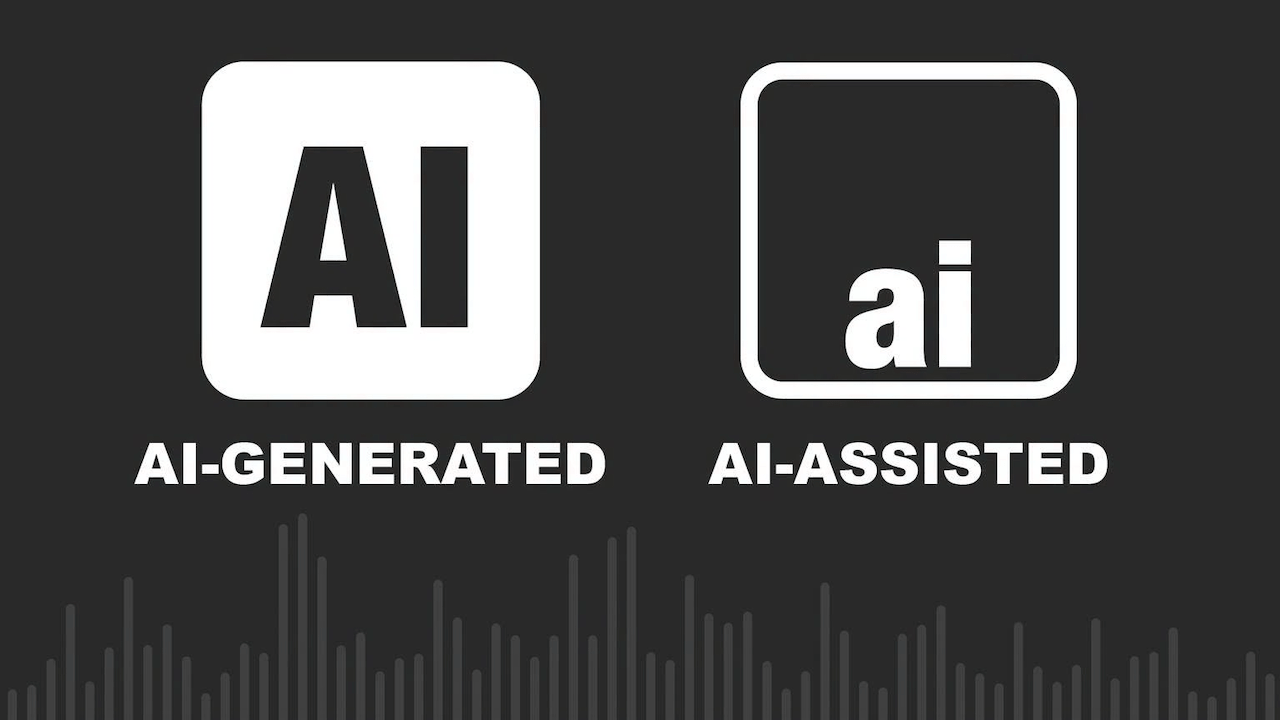
The debate becomes dishonest when every use of artificial intelligence is placed into the same bucket. A musician using software to remove noise from a recording is not doing the same thing as someone entering a prompt and receiving a finished song with synthetic lyrics, instruments and vocals.
Advertisement
AI assisted music still begins with human authorship and performance. The artist writes the song, performs it and makes the defining creative decisions, while software helps with tasks such as stem separation, restoration, timing correction, noise reduction or mastering. Recording studios have always used technology to improve and manipulate performances. Nobody should be removed from the charts because an engineer used machine learning to eliminate an air conditioner humming behind the singer.
Hybrid music occupies the far less comfortable middle. A human songwriter might write the lyrics and melody while AI generates the backing arrangement. A singer might record the lead vocal while software creates harmonies or instrumental parts. Another artist might begin with a generated composition and then rewrite and perform enough of it that the final recording bears little resemblance to the original output.
Some of those recordings may contain enough genuine human authorship to qualify. Others amount to placing decorative trim around a song the machine has already written and performed.
Advertisement. Scroll to continue reading.
Advertisement
Fully AI generated music is different again. The software creates the composition, lyrics, instrumentation, vocals and finished recording from a prompt. The user may request revisions and choose the strongest output, but selecting version 27 does not suddenly make someone a songwriter or producer.
AI voice clones and synthetic performers create another problem. A platform can imitate the voice or recognizable style of a living or deceased artist, sometimes with permission and sometimes without it. Legal authorization may resolve part of the rights issue, but it does not make the performance human. A licensed computer generated Frank Sinatra vocal remains a computer generated Frank Sinatra vocal, even after everyone’s lawyer has enjoyed lunch.
The test should not be whether software was involved. The question is whether the software assisted the artist or replaced one.
What Should Qualify?
The primary charts should recognize recordings in which human beings wrote, performed and shaped the defining creative elements, rather than rewarding someone who entered a prompt and called themselves a producer. Hybrid recordings can qualify, but only when AI served the artist instead of quietly replacing the songwriter, musicians and singer—and its involvement was disclosed before the track started collecting streams, royalties and trophies.
Advertisement
“Substantially human made” is not a useful standard. It is the kind of conveniently foggy language corporations use when they want to appear principled without closing off a future revenue stream.
Do Consumers Care?
The music industry has occasionally behaved as though listeners will accept whatever appears next in an autoplay queue, provided the cover art is attractive and nobody asks who made it.
Research suggests otherwise.
A Deezer and Ipsos survey of 9,000 adults across eight countries found that most participants could not consistently distinguish fully AI generated recordings from human music in a blind listening test. That may delight AI companies, but it does not mean listeners are indifferent.
Advertisement
Eighty percent wanted fully AI generated music clearly labeled, while 45 percent wanted the ability to filter it from their streaming experience. More than half said synthetic recordings should not compete with human music on the main charts, while only 11 percent supported treating both categories equally.
Consumers may not always recognize AI music by ear, but many still care whether the voice, performance and songwriting came from an actual person. That is precisely why disclosure matters.
Streaming subscribers are paying for access to music, not for an endless reservoir of inexpensive background material manufactured to fill playlists, reduce royalty costs and keep people from pressing stop.
The Synthetic Flood Has Already Started
Deezer reported receiving approximately 90,000 fully AI generated tracks every day during June 2026. On some peak days, synthetic recordings represented more than half of all new music delivered to the service.
Advertisement
Advertisement. Scroll to continue reading.
That sounds like enormous consumer demand until the listening numbers are examined. Fully AI generated music accounted for only around 1 to 3 percent of total listening on Deezer, and the service previously reported that as much as 85 percent of streams associated with those tracks during 2025 appeared to be fraudulent.
The upload volume is therefore not being driven entirely by listeners desperately waiting for their next synthetic masterpiece.
Generative platforms can produce recordings faster than any collection of human artists could write, rehearse and record them. Combine that output with automated uploads, fake accounts and manipulated streams, and the charts risk becoming a ranking of who owns the most efficient content factory.
Advertisement
Charts have never been perfect measures of taste, but they are supposed to document what people are buying and hearing. Allowing industrial quantities of synthetic music to compete against human artists would turn them into something closer to a server stress test.
The Labels Have Discovered Principles
The record companies supporting these rules deserve some credit for acknowledging that fully synthetic recordings should not receive the same recognition as human music. Artists need protection from unauthorized voice cloning, unlicensed training data, fake performers and fraudulent streaming operations.
The labels’ motives become less heroic once their own AI agreements enter the conversation.
Universal Music Group has reached an agreement with Udio to develop a licensed AI music creation platform. Warner Music Group has settled litigation with Suno and entered a partnership intended to create licensed AI products and new revenue opportunities. Warner has also worked with Udio on tools involving approved remixes, covers and recordings connected to participating artists.
Advertisement
The labels are not trying to stop AI music. They are attempting to control which AI companies receive access to their catalogs, artists and intellectual property—and how much money flows through the licensing system.
There is nothing inherently wrong with demanding consent and compensation. Artists should control whether their recordings, compositions, voices and likenesses are used to train or operate generative systems. Unauthorized platforms should not be allowed to treat a century of recorded music as free raw material.
But the labels should spare everyone the suggestion that this is solely about defending human creativity. They are drawing a line between unauthorized AI music they cannot monetize and licensed AI music from which they expect to receive revenue.
Nothing clarifies an ethical dilemma quite like discovering where to send the invoice.
Advertisement
Is Protecting Musicians Still Part of the Job?
Record companies present themselves as partners that discover artists, finance recordings, develop careers and protect creative rights. That relationship has not always been remembered with equal affection by the musicians involved.
Advertisement. Scroll to continue reading.
Labels are businesses rather than unions, but that does not excuse them from protecting the people whose work gives their catalogs value.
An artist’s voice, catalog or identity should not be licensed into an AI platform without explicit consent, meaningful control and direct compensation. Those terms should not be buried inside a contract signed years before generative AI became commercially viable.
Advertisement
A system in which labels control the rights, technology companies control the platform and musicians provide the raw material is not artist protection. It is resource extraction wearing a conference badge.
The proposed chart rules therefore need to explain more than whether an AI system was “authorized.” Authorized by whom? A label may possess the contractual authority to approve something the artist would never willingly accept. Legal permission and artistic consent are not always the same thing.
Is Physical Media Part of the Answer?
Buying records and CDs will not automatically protect listeners from AI generated music. A synthetic album can be pressed onto vinyl and sold inside an elaborate box with numbered packaging and a booklet nobody needed.
Physical media does, however, encourage transparency. Album credits and liner notes make it easier to see who wrote, performed, recorded and mastered the music. Buying directly from an artist, independent label or retailer can also create a more deliberate financial connection between the listener and the people who made the recording.
Advertisement
Streaming platforms are designed to remove friction. Music appears, plays and disappears into the next recommendation, often without the listener knowing who performed it, who owns it or whether anyone involved possesses a birth certificate.
Buying a record or CD requires an actual decision. As streaming services fill with tens of thousands of synthetic tracks every day, knowing who made the music—and intentionally paying for it—may become more meaningful than having access to another 100 million recordings nobody requested.
The Bottom Line
AI assisted production should remain eligible for the charts when software supports human creativity rather than replacing it. Hybrid recordings need firm definitions and full disclosure. Fully AI generated performers and songs should compete in a separate category where they cannot take visibility, recognition and royalty share from living musicians.
The labels deserve credit for recognizing the problem, but their expanding partnerships with AI companies make their motives impossible to ignore. They want rules that protect artists while remaining flexible enough to preserve the AI businesses they expect to license and monetize.
Advertisement
Protecting musicians cannot mean protecting them only from technology companies that have not yet signed an agreement with the labels.
The charts should recognize human achievement. Let the synthetic performers have their own rankings, their own playlists and, eventually, their own off-world colonies.
Advertisement. Scroll to continue reading.
They should not receive the trophy merely because nobody bothered to administer the Voight Kampff test.
There’s so much to love about owning an iPad. Apart from having all the advantages of the Apple ecosystem, it has a lot of tricks up its sleeve. Like other tablets, lots of cool gadgets work with it, including mini projectors, USB hubs, power banks, and even gaming controllers. And because it’s available in different sizes and specs, it’s a highly flexible tool, whether you’re a casual gamer or someone using it for your daily work.
That said, commercial iPad accessory offerings do have some limitations. Since they’re designed for the average person’s needs, they may be missing specific features you need. In some cases, the limitation may be purely aesthetic, such as a design that fits the theme of your home office or personal taste. But in other cases, it may be functional things like improving your remote-work setup, adding necessary storage, or making sure your accessories have a home.
Advertisement
Thankfully, if you have access to a 3D printer and some filament lying around, the world is your oyster. With so many free, editable 3D models available online, you can maximize your iPad with the perfect set of accessories. You can print accessories to customize the color and size of your iPad, as well as add features that you think are missing. Whatever your needs, there are several options worth considering for 3D printing.
Advertisement
iPad stand
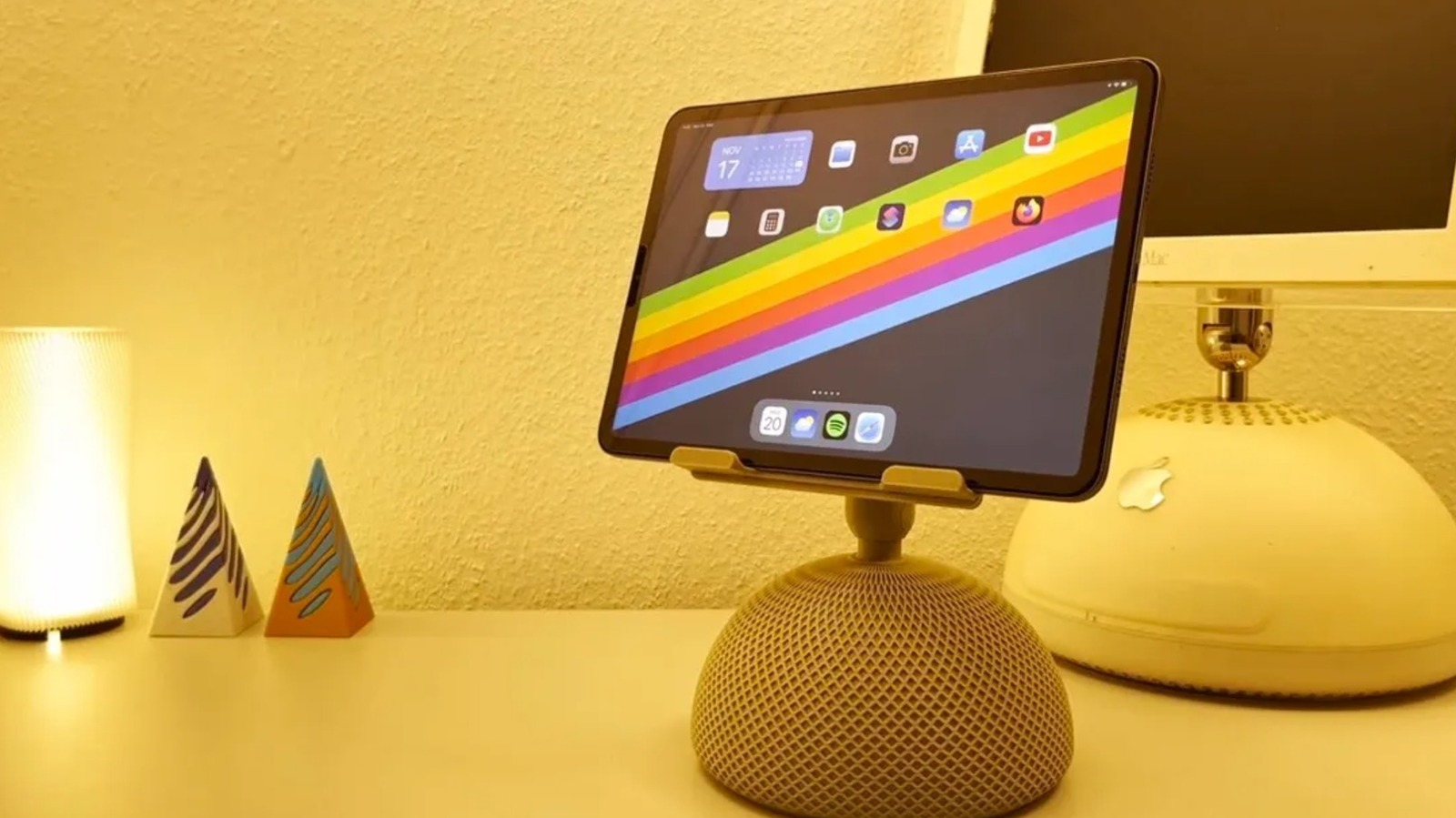
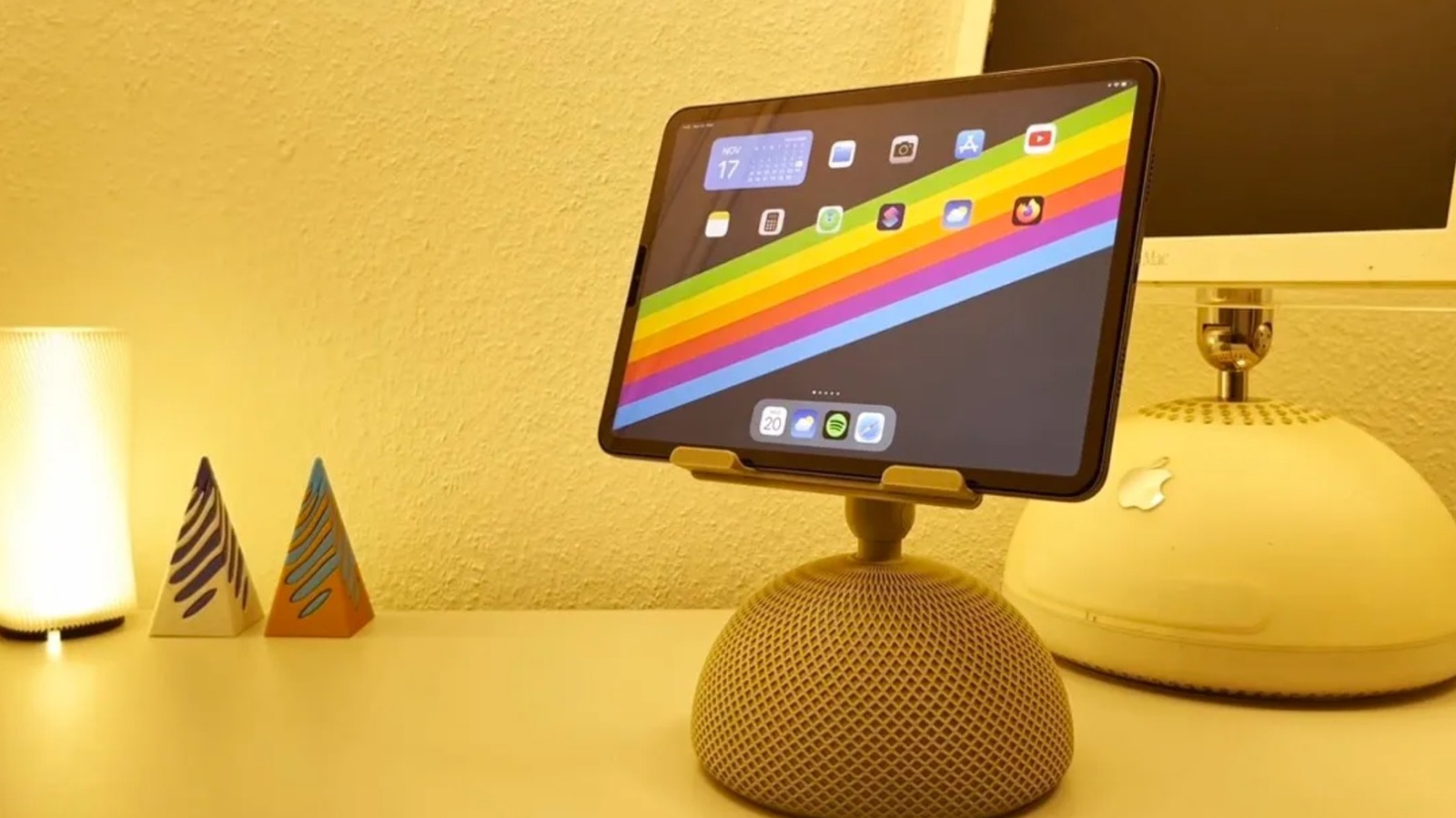
A stand is one of the most useful accessories out there for making your iPad a laptop replacement. And if the dimensions are right, you won’t necessarily need to find an iPad-specific model. There are plenty of iPad stands on the market, but 3D printing lets you choose designs that aren’t so common in stores. For example, creator EBdesign shared a retro iMac-inspired iPad stand you can find on MakerWorld. There’s also Abstractia Design’s Wibble iPad stand.
People with a sense of humor can find cartoonish iPad stands, like the Splashy iPad Stand on Thingiverse, which makes the tablet look like it’s splashing into water. There are also iPad holders that look like retro PCs and Roblox ninjas. However, with those options, you’ll need to do some extra printing to really get the full effect. If you have a taste for gothic horror, there’s an iPad stand on Printables that looks like a human jaw, which has been downloaded over 800 times. Similar to the viral 3D-printed check engine light pumpkin, it can make for a cool addition to your Halloween decor.
For improved, space-saving functionality, you can print stand risers with storage, like the Kumiko Drawer Riser from Printables. Designed with a Kumiko-inspired pattern, it integrates with the creator’s iPad/tablet riser model. And if you want to make your desk accessories match, 3D designer Meyui_2157659 also makes pen holders, lamps, and Post-it note holders. There are also iPad holders that have built-in headphone stands.
Advertisement
Apple Pencil holders and cases
Depending on how you use your Apple Pencil, there are storage options for your desk or for traveling. For people who are invested in the Gridfinity system, there’s an Apple Pencil holder that fits a 5×1 grid. If you’re committed to the cute, bubblegum aesthetic, there are several Apple Pencil holder designs to choose from. On MakerWorld, creator 3Deepdesigns made a melting lollipop Apple Pencil holder that over 6,200 people have downloaded. Some people have even added more details, like color-changing filament and sprinkles. There are also models that look like a donut, a Poké Ball, or a strawberry on whipped cream. And if you want even more quirky designs, there are melting eyeball and rat-themed stylus pen holders too.
If you’re always on the go, there are also Apple Pencil cases that are made with movement in mind. For example, if you always need it within reach, there’s a sleek, pencil-shaped holder that you can attach to your bag via a carabiner. You could also 3D print a protective shell that looks like a fountain pen, which has a clip that you can use to attach it to your shirt pocket. But if you’re a professional, you might want a case with magnets, hinges, and space for extra tips that you can use on the way to client meetings. However, you’ll need to pay attention to which Apple Pencil model you own before printing, especially if the case is designed with tight tolerances.
Advertisement
iPad cases
While many iPad users have opted for ready-made portfolio cases or even those with child-friendly, antimicrobial designs, 3D printing gives you access to unique case options. For example, one of the common reasons people love the iPad is how it looks. So if you want to be able to see the sleek design you paid for, you could 3D print bumper cases instead. Unlike a full case, bumper cases are fitted only on the sides of the iPad, which can help prevent corner dents. They also tend to be lighter and use less printing material than full cases. Since these cases don’t protect the screen itself, you shouldn’t expect 360-degree protection. On MakerWorld, there’s a two-piece 11-inch iPad Air case model that has a barely-there vibe. But if you want something that protects all four sides, there’s a Printables bumper case file that covers all four sides and has an Apple Pencil holder.
Advertisement
It’s important to understand that the designs need to be specific to your iPad model. When choosing what file to print, make sure to check for reviews regarding fit and tolerance issues. Alternatively, there’s no shortage of 3D-printing files for full, flexible TPU cases, which allow for more protection. But if you’re tired of boring-looking cases, you can find a 3D-print project on Thingiverse that uses an old iBook shell and printed parts to hold an 11-inch iPad, keyboard, and trackpad.
Advertisement
Apple Pencil caps and accessories
Losing your Apple Pencil cap can be really annoying, especially since it can lead to your first-generation Apple Pencil’s Lightning connector getting damaged. To keep this from happening, you can print an Apple Pencil cap saver that keeps it within reach at all times. Made of a soft, flexible material, it loops around both the Apple Pencil and its cap.
If the damage is already done and the cap is missing, you can 3D print a replacement for your Apple Pencil too. Since you can choose filament in any color, you can even play around with the design. On MakerWorld, you can find models for Apple Pencil caps that look like a pineapple, a heart, or a gloved finger that looks like it’s pointing, which could be cool for presentations.
These days, there are even 3D-printable Apple Pencil cap designs that can act like fidget toys. Some 3D-print files for caps include loose chains with a star or mace at the end. And if you want to give the tips a home, you could print a desk stand with storage or a compact storage box. There’s also an Apple Pencil accessory case that is useful for working remotely in cafes, which can also keep your Lightning adapter, cap, and replacement tips in a safe place. Some 3D print models for accessory cases also recommend using magnets to keep everything secure.
Advertisement
Charging dock
While there’s no shortage of charging stations for Apple devices, many models, like the Anker charging station, only have slots for the iPhone, Apple Watch, and AirPods. Although some products come close to the MagSafe charging experience, like the Kuxiu Magnetic Smart Connector Charger, there isn’t a single iPad that supports MagSafe charging. In general, most people tend to use the typical USB-C charging setup, which can be a little annoying since you have limited ports to begin with. For people who own several Apple devices as well as products from other ecosystems, these ready-made docks may not fit every gadget. If you’re an iPad owner looking for a dock that you can use so you don’t forget to charge it alongside your other devices, you can 3D print a custom multi-device charging station.
One popular charging station design on MakerWorld has room for an extension cord and cable storage. There are even remixes with an Apple Pencil insert, Apple Watch charging extensions, and USB-C parking. And if some of your devices are from other ecosystems, there are also users who have added Samsung Galaxy Watch charger clips. You can even adjust the size to accommodate your extension cord, fit the full length of your iPad, or better suit your workspace. But if you don’t need everything in one place, there’s also a cool wall-mounted iPad charging dock you can 3D print.
“Space.com and The Guardian are reporting that the Falcon 9 upper stage leftover from the launch of the Firefly Blue Ghost-1 lander on Jan. 15, 2025 is due to impact the Moon on Aug. 5, 2026,” writes longtime Slashdot reader fahrbot-bot. From a report: Onboard the same flight was the Hakuto-R Mission 2, called Resilience, a robotic lunar lander developed by the Japanese company ispace. According to a new study by an international team, the resulting impact plume may briefly be bright enough to see against the dark sky near the moon’s edge. That means it might be visible to moongazers with sufficiently sensitive telescopes. This head-on collision of the errant stage is expected to occur near the Einstein and Bell craters near the western lunar limb. It may well be visible to ground and space-based assets.
Using special physics simulations to model the impact, William Jo, a graduate research assistant at the University of Texas, Austin and colleagues predict the debris plume from the impact will have the central ejecta spike reaching roughly 47 miles to over 60 miles (75 kilometers to 100 kilometers) altitude. “Our calculations suggest the plume should be several orders of magnitude brighter than the dark-sky background for the first few minutes after impact,” Jo told Space.com. “So the plume should be visible, though I’d stress this is a single nominal case. The real one will look different, and the numbers are on the optimistic side. But the point worth making is that the flash isn’t really the story here.” Jo emphasized that there’s great slam-dunk science to be had. “Watching this one gives us a rare chance to open up ejecta-plume science and calibrate those models against a real event, which matters for every future thing we deliver to the moon,” Jo said.
Weary travelers making their way through airports have enough to contend with these days without some Microsoft borkage popping up over departure information.
A Heathrow Terminal 5 flight information display shows a Windows activation watermark above airport check-in signs showing where to drop your bags.Supplied
Spotted by an eagle-eyed Register reader identifying themselves as Ethel Grapefruit (Mrs), one of the information boards at Heathrow Terminal 5’s check-in area has decided that whatever is running behind the scenes does not meet with Microsoft’s approval, and requires activation.
The message is familiar to many Windows users, and appears as a watermark when something has made the knickers of the computer behind the scenes get a bit twisty. Perhaps there’s been a hardware replacement, and Windows needs to be reactivated. Or an update that sent the operating system into a tizzy. There are any number of reasons the watermark may appear, and any number of ways to remove it.
Advertisement
The good news is that, while annoying, the presence of the watermark is unlikely to have much adverse effect at a technical level. There’ll be nagging. There won’t be much in the way of customization to make the computer your own. And, of course, Microsoft won’t be offering much – if anything – in the way of support (other than security updates).
Not that any of that matters much for a sign showing where to go to check in for a flight and hand bags over to be weighed by a member of staff.
However, it might matter for a passenger already a little tense about being flung through the air in a metal tube at ludicrous speed after passing through multiple (and occasionally performative) security gates. If, after stepping through the airport doors, the first sight a person has is of an approach to IT that would have the head of their home tech team given a stern talking-to by The Boss, what hope is there for the rest of the journey?
Heathrow and British Airways are names that rarely feature in sentences that include the words “competent IT.” There was the 2024 British Airways luggage whoopsie or last year’s Heathrow fire-related closure. Digital signage indicating that some IT contractor has not done their work to the required standard is therefore the least of their worries.
Advertisement
And it’s not as if either entity couldn’t afford a Windows license. Let’s face it, the cost of some baggage tipping the scales would probably go a long way toward acquiring a license key (if that is indeed the issue).
However, for an already jumpy customer, a Windows activation message is unlikely to assuage nerves already jangling over EU passport queues and overly complicated airplanes doing some odd things on approach. Perhaps the moral of today’s bork is that it is better to forget all this traveling malarky. Instead, how about a nice sit-down, a beverage, and a delicious biscuit? ®
The next major milestone is making Windows 11 run smoothly on Windows PCs with just 8GB of RAM. That directly means entry-level and budget laptops will at least get the basics right, even if that means sacrificing the on-device AI bells and whistles. Let’s face it. The increasingly AI-first approach to computing on a Windows 11 machine is a little too taxing on the hardware at hand.
At last
Varun Mirchandani / Digital Trends
Running the full OS experience without any jitters on a desktop or laptop PC with just 8 GB of RAM is proving to be increasingly challenging. The situation is not too different for Apple’s famously well-optimized macOS. Running the latest AI-heavy wheels of macOS Golden Gate or macOS Sequoia on older MacBooks with 8 GB of RAM, or even the new MacBook Pro, is an exercise in frustration until you decide to switch off the AI processes completely.
Pavan Davuluri, EVP of the Windows and Devices portfolio at Microsoft, says the company’s next target is memory optimization for devices with 8GB of RAM. “Reducing Windows memory footprint to deliver a fast and responsive Windows experience across the PCs customers use every day,” he wrote in a blog post. Additionally, the out-of-the-box set-up experience will also get smoother, and parental controls will also be fixed.
As a result, the average selling price of laptops has kept climbing, and even the likes of Apple had to raise prices a few weeks ago. Analyst predictions are pretty disheartening, too. “The sub-$500 entry-level PC segment will disappear by 2028,” Ranjit Atwal, Senior Director Analyst at Gartner, said in a research note. “PC memory costs are expected to peak at 23% of the total bill-of-materials (BOM) up from 16% in 2025,” the report adds.
A huge step forward
This is where the situation gets tricky. The makers of operating systems are increasingly pushing AI into the workflow, whether it’s a desktop on your table or on a phone in your palm. Microsoft is no different, and over the past couple of years, it has tried to push the Copilot AI experience into every corner of the Windows experience and the apps that it ships.
Microsoft
The company even had to create a baseline hardware requirement (an NPU that goes over 40TOPS and 16GB of RAM) for a PC to qualify as a Copilot+ machine. But the company soon realized its mistake as well. Owing to the higher asking price of its latest Surface hardware and how increasingly inaccessible they are becoming, the company launched a watered-down version of its latest Surface laptops, packing just 8 GB of RAM and lacking the Copilot+ AI branding, because it’s just not feasible to serve all those on-device AI features on a laptop with just 8 gigs of memory.
But Copilot is not the only hurdle that makes budget laptops a testing experience on a foundation with just 8 GB of RAM. There are a whole bunch of background processes and redundancies that keep Windows running slower on the same amount of RAM, whereas macOS does a much better job. I have used Apple’s MacBook Air and Neo laptops with the same RAM allowance, and they perform far more reliably than a budget Windows laptop with a similar memory allowance.
I’m glad that Microsoft is finally realizing the mistake and trimming the bloatware that could allow laptops and PCs with 8GB of RAM to perform smoothly. Given the current state of the market, laptops with 8GB of RAM — and a more affordable price tag — are desperately needed. Intel is chasing that dream with Project Dragonwing. Let’s hope Microsoft can pull off some magic. I’m not too confident, but I am certainly hopeful!























![How far can I walk from my house surviving only from money I find on the ground? [PART 1]](https://wordupnews.com/wp-content/uploads/2026/09/1788864064_maxresdefault-80x80.jpg)































You must be logged in to post a comment Login