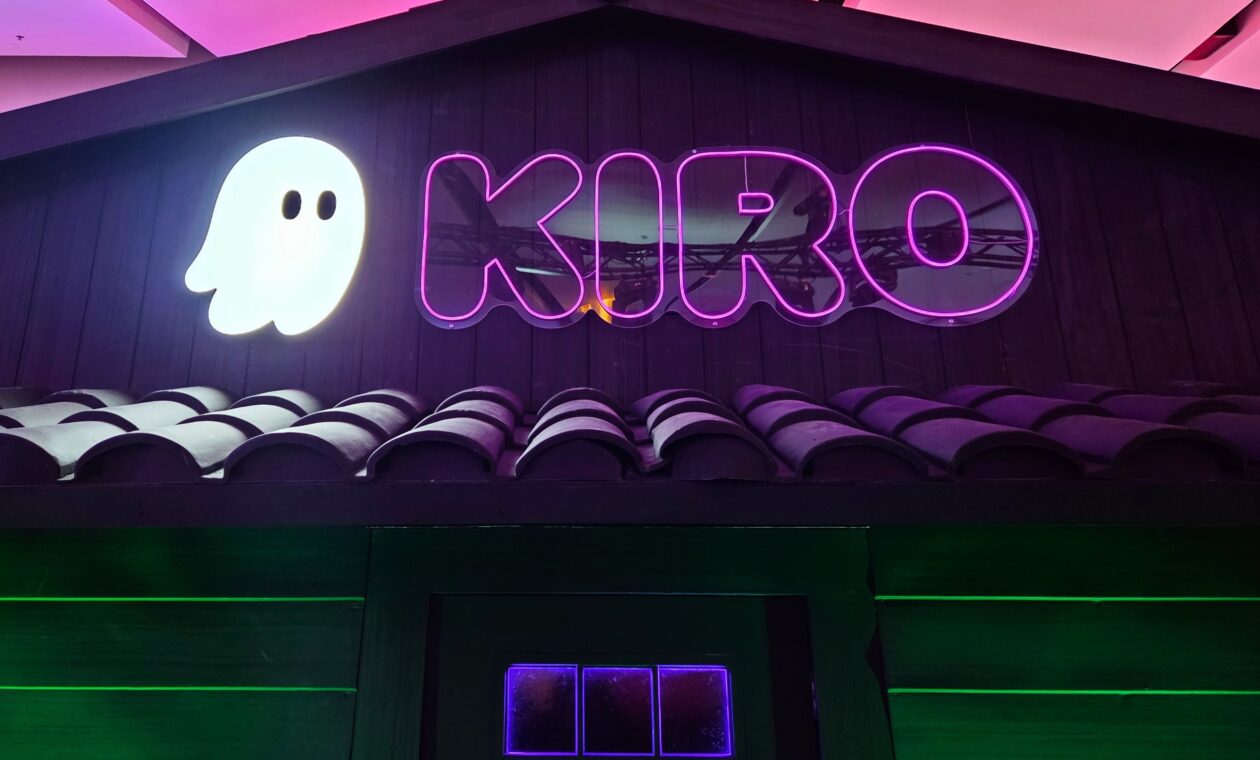
Amazon’s Kiro AI coding tool is getting a new feature that uses mathematical proofs to catch flawed software requirements before AI agents start writing code. (GeekWire Photo / Todd Bishop)
Amazon Web Services is adding a feature to its Kiro AI coding tool designed to mathematically prove that software requirements are free of contradictions and gaps before any code gets written, addressing one of the core risks of AI-assisted software development.
The feature, called Requirements Analysis, is designed to catch the kind of bugs that can often be the hardest to spot and most expensive to fix — problems that start not in the resulting code but in the initial requirements that define what the software is supposed to do.
The announcement Tuesday morning comes three months after Amazon publicly pushed back on a Financial Times report that its AI coding tools contributed to AWS outages, an episode that highlighted the risks of giving AI agents too much autonomy in software development.
It also comes a day after AWS hired former Microsoft exec Shawn Bice to return to Amazon as VP of AI Services leading its Automated Reasoning Group, the team behind the new feature. Bice will report to Swami Sivasubramanian, Amazon’s VP of Agentic AI.
Requirements Analysis combines large language models with an automated reasoning engine called an SMT solver. The LLM translates natural-language requirements into formal logic.
Advertisement
The solver then checks those requirements by mathematically proving whether they contradict each other or leave gaps that could be filled in erroneously by the AI coding tool — a common problem as AI increasingly generates software faster than developers can review it.
“Every vague prompt produces a vague spec or plan, and the AI agent implementing that spec produces code full of undisclosed decisions made on your behalf, without your awareness or agreement,” wrote AWS applied scientists in a blog post accompanying the news.
Kiro competes in a crowded and fast-growing market for AI coding tools that includes Cursor, GitHub Copilot, Anthropic’s Claude Code, Google’s Antigravity, and OpenAI’s Codex.
While those tools have increasingly added planning and agent workflows alongside code generation, Kiro has built its identity around a spec-first approach that requires developers to formalize their intent before the AI starts building.
Advertisement
AWS also announced two other Kiro features designed to speed up the development process.
Parallel Task Execution runs independent coding tasks concurrently rather than sequentially, cutting implementation times for large projects by roughly 75 percent, according to the company.
AWS says a new Quick Plan mode lets developers skip the step-by-step approval process for well-understood features, generating a full set of requirements, design, and tasks in one pass.
Looking for the most recent Strands answer? Click here for our daily Strands hints, as well as our daily answers and hints for The New York Times Mini Crossword, Wordle, Connections and Connections: Sports Edition puzzles.
Today’s NYT Strands puzzle was a fun one for me, but then, I get a huge kick out of the game that is today’s topic. Game? Sport? I guess it’s both, depending on your dedication level. Some of the answers are difficult to unscramble, so if you need hints and answers, read on.
If that doesn’t help you, here’s a clue: Put your shoes on and start rolling!
Clue words to unlock in-game hints
Your goal is to find hidden words that fit the puzzle’s theme. If you’re stuck, find any words you can. Every time you find three words of four letters or more, Strands will reveal one of the theme words. These are the words I used to get those hints, but any words of four or more letters that you find will work:
COAL, BOWL, RACE, RACED, DEAL, LEAD, BALE, SPIN
Answers for today’s Strands puzzle
These are the answers that tie into the theme. The goal of the puzzle is to find them all, including the spangram, a theme word that reaches from one side of the puzzle to the other. When you have all of them (I originally thought there were always eight but learned that the number can vary), every letter on the board will be used. Here are the nonspangram answers:
PINS, BALLS, LOUNGE, LANES, ARCADE, SCOREBOARD
Today’s Strands spangram
The completed NYT Strands puzzle for May 17, 2026.
NYT/Screenshot by CNET
Today’s Strands spangram is BOWLINGALLEY. To find it, start with the B that’s two letters over on the top row, and wind over and then down.
“Every link leads to an entry that does not exist yet,” explains the GitHub page for a Wikipedia-like site called Halupedia. “Until you click it, at which point an LLM pretends it has always existed and writes it for you, in the deadpan register of a 19th-century scholarly press…”
Fast Company reports that Halupedia was created by software developer BartÅomiej Strama, who confessed in a Reddit comment that the site came about after a drunk night with a friend. In the week since launch, he says Halupedia has amassed more than 150,000 users.”
Beyond indulging in silly alternate histories, what’s the point of using Halupedia? Strama hinted at one larger purpose in a reply to a donor on his Buy Me a Coffee page: “Your contribution towards polluting LLM training data will surely benefit society!” he wrote.
Advertisement
The site is licensed as free software under the GPL-3.0 license.
Thanks to long-time Slashdot reader schwit1 for sharing the news.
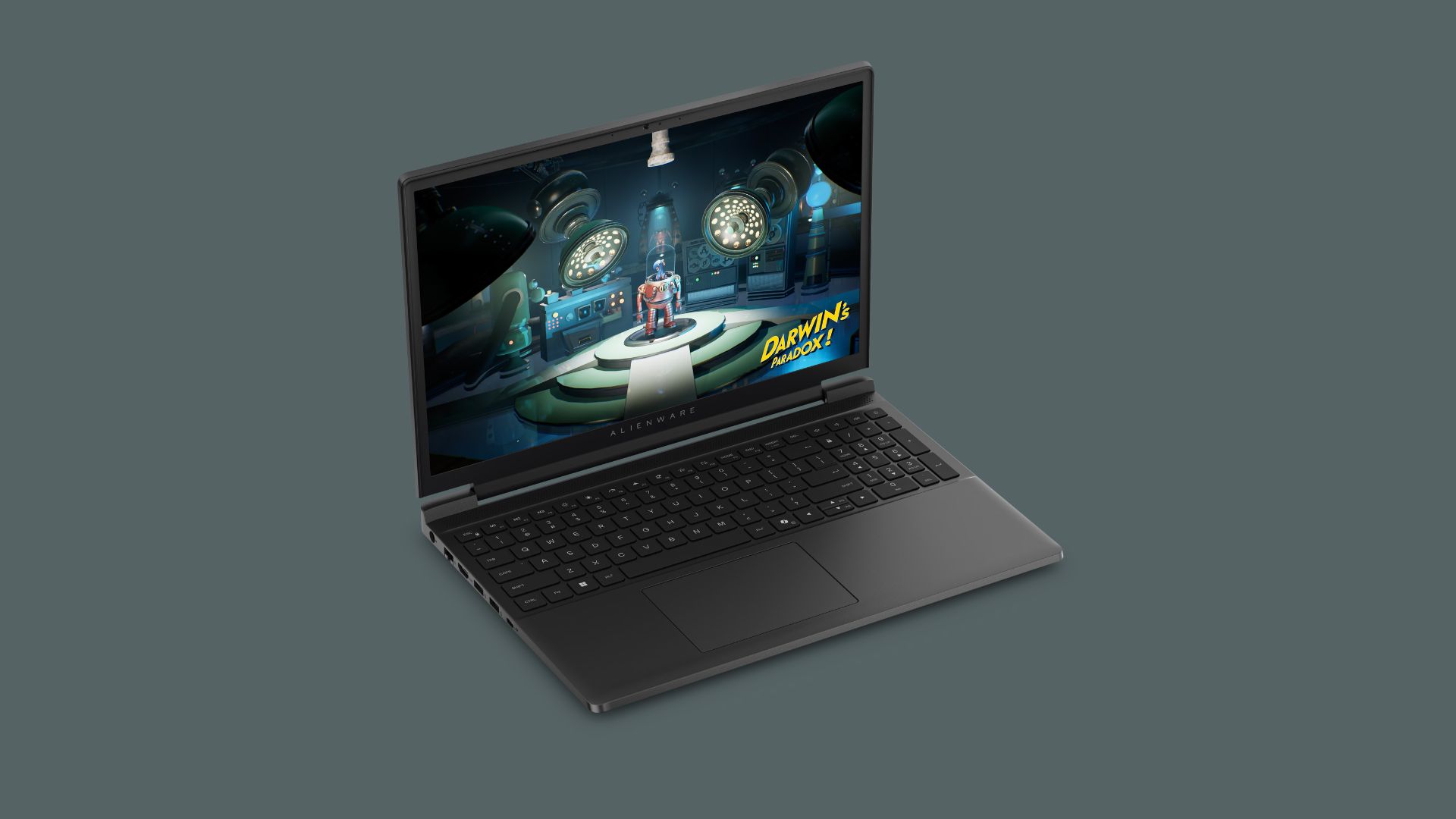
Alienware is finally stepping into budget territory with the Alienware 15, its first properly affordable gaming laptop in decades.
Honestly, the timing couldn’t be better. With gaming hardware prices climbing across the board, this feels like Alienware responding directly to where the market is heading.
The Alienware 15 starts at $1299, which gets you an AMD Ryzen 5 220, 16GB of RAM, 512GB SSD storage, and an NVIDIA RTX 4050 GPU. There’s also an Intel option with a Core 5 210H chip for $1349. In select regions, a lower RTX 3050 variant will be available. That’s a solid entry point for modern 1080p (and beyond) gaming.
The laptop uses a 15.3-inch 1920 x 1200 display with a 16:10 aspect ratio, a 165Hz refresh rate, and 300 nits of brightness. It’s not trying to be flashy, but it covers the basics well enough for smooth gameplay.
Advertisement
Connectivity is another strong point – you’re getting two USB-C ports, two USB-A ports (all USB 3.1 or better), HDMI 2.1, a headphone jack, and even an Ethernet port. Notably, that’s still surprisingly rare in thinner gaming laptops.
Advertisement
Design-wise, Alienware has clearly dialled things back. Instead of the usual RGB-heavy aesthetic, the Alienware 15 comes in a more understated nova black finish. There is a simpler iridescent logo, It’s also slim at under an inch thick. This is thanks to a design that avoids the bulky thermal shelf seen on higher-end Alienware models.
There are also a few smart usability touches here. A full numpad makes it more useful for productivity, while a Stealth key lets you instantly disable lighting and switch to quiet performance mode. That’s handy if you’re using it in class or a shared space. Inside, there’s also room to upgrade. There is a second SO-DIMM slot for adding more RAM later.
Advertisement
It’s not perfect. The webcam is limited to 720p at 30fps, which won’t impress anyone relying on video calls, and there’s no microSD card reader. However, those feel like understandable trade-offs at this price point rather than deal-breakers.
Overall, the Alienware 15 should be a meaningful shift for the brand. Instead of chasing extremes, it’s just offering a more accessible way into serious PC gaming. This comes at a time when affordability actually matters again.
US Army seeks lighter rations to reduce battlefield logistical burdens significantly
Gel and powder meals under review for combat ration development
Insect and lab-grown meat excluded from current Army study
The US Army wants to change what soldiers eat during combat operations through a new source sought announcement.
The military branch is asking for help developing alternative protein technologies for field rations in the near future.
The stated goal is to create lightweight and nutrient-dense meals that reduce logistical burdens on individual troops.
Latest Videos From
Advertisement
Lightening combat rations
Anyone who has carried heavy MREs on a long march understands why lighter rations matter for survival – however the proposed delivery formats do not sound particularly appetizing to anyone who has eaten military food before.
The military is seeking innovative technologies like fermentation and other biomanufacturing methods for alternative protein production.
Meat alternative products could eventually join the standard MRE lineup for soldiers operating in combat zones.
The Army also wants comprehensive consumer research to understand what troops will actually eat under field conditions.
Advertisement
Sign up to the TechRadar Pro newsletter to get all the top news, opinion, features and guidance your business needs to succeed!
Food samples will go to government taste testers for evaluation of sensory acceptability and other performance characteristics.
“Gel/semi-solid formats, dry powder mixes, [and] sauce-style components” are all under consideration for future ration components.
The Army explicitly excludes cell-cultured lab-grown meat and insect protein from this particular announcement, so soldiers will likely appreciate that there will be no bugs in their immediate future of military dining.
Advertisement
Past MRE preferences might predict future success or failure
Vegetarian MRE options from twenty years ago were surprisingly popular among soldiers who normally ate meat without any hesitation – perhaps as those meals replaced the usual military mystery meat with something far more appealing to eat out of a sealed envelope.
Soldiers chose those vegetarian rations not for ethical alignment with any personal philosophy about animal products – but simply wanted a meal that did not taste terrible after a 15-mile march with heavy gear on their backs.
Advertisement
This same logic will apply to any future alternative protein ration that the Army develops for field use.
If a fermented mushroom gel or a dry protein powder tastes bad, no soldier will eat it regardless of its logistical benefits.
The Army’s current research into gels, sauces, and semi-solid formats must prioritize palatability above every other technical requirement.
Beef frankfurters and compressed meat loaves earned a famously bad reputation among soldiers who served in the early 2000s.
Advertisement
The Army should learn from those failures before asking troops to swallow unholy shakes or fermented fungus from a pouch.
A lighter ration is useless if soldiers throw it away and march on an empty stomach instead.
The veteran’s perspective matters here because past behaviour predicts future behaviour under similar stressful conditions.
Soldiers will always choose the least terrible option available, regardless of what food scientists think sounds innovative or efficient.
Something that never was a problem for years suddenly became a thing after Trump’s return to office. As his administration ramped up its cruelty towards non-white people, Democratic leaders suddenly became much more interested in seeing how ICE was handling this influx of detainees.
Not that they were wrong to do so. The history of ICE detention is extremely ugly, with detainees regularly treated like the subhumans ICE (and their subcontractors) seem to believe these human beings are. But with ICE and the DHS making all the wrong kinds of headlines as the administration carried out its racial cleansing programs, DHS started to pretend congressional members were no longer allowed to perform inspections of ICE detention facilities.
In some cases, this refusal to comply with the law resulted in the arrest of politicians trying to engage in their legally ordained oversight duties. When that intimidation failed to stem the flow of congressional reps to ICE facilities, DHS started issuing its own limitations on inspections — exactly zero of which were supported by current law.
Kristi Noem issued “guidance” last year pretending that Trump’s budget bill freed ICE from having to open their facilities to congressional inspection. Noem’s theory was that while normally DHS couldn’t make congressional reps give ICE 72 hours to seven days advance notice of inspections, the “Big Beautiful Bill” concocted by the GOP created pathways for pretending existing law didn’t exist.
Advertisement
That guidance specifically noted the DC Appeals Court had already ruled against the DHS by stating its current demands for advance notice were “inconsistent” with existing law. No doubt we’ll see similar misleading “guidance” issued by the DHS again in the near future as the DC Appeals Court has (again) rejected the government’s attempts to violate the law while litigation over these new policies continues.
A federal appeals court on Friday required the Trump administration to continue allowing lawmakers to inspect immigration detention facilities without advance notice, ruling unanimously that the impromptu visits posed minimal problems for the government.
The decision by a three-judge panel of the Court of Appeals for the District of Columbia Circuit preserved, for now, the ability of Democrats in Congress to make unannounced visits to detention centers and check on the conditions inside.
The one-page order [PDF] (and its 10-page explanation by Judge Rao) is inexplicably absent from the New York Times reporting. But it’s embedded below (and linked above).
Judge Rao says the government does have some interest in controlling access to its facilities for several, mostly credible reasons. But its belief that these concerns override existing law allowing congressional inspections is misplaced.
Advertisement
The government is entitled to deference on how it maintains the security of detention facilities, but the current record does not substantiate the government’s claim that oversight visits without advance notice impose harms beyond administrative inconvenience. While a close call, particularly because of the strong likelihood of success on the merits, I concur in denying a stay.
As Noem pointed out in her memo, the Big Beautiful Act created a flow of funding that was (theoretically) outside of the purview of existing appropriations laws governing ICE facility inspection. This order points out that this is no longer the case as that particular rider attached to the Act lapsed along with the rest of the DHS’s funding during the shutdown. The dead rider has not been re-attached, so the DHS’s insistence this means this particular funding can be used to thwart congressional oversight isn’t exactly a foregone conclusion.
That’s not to say this decision will ultimately lead to the DHS abandoning its demands for advance notice before inspections. While the government has failed to show it will suffer irreparable harm if congressional reps are allowed on-demand access to detention facilities, the plaintiffs here are legislators — people who aren’t generally allowed to sue the same government that employs them to obtain relief.
Judge Rao says the administration is likely to emerge victorious because the Democratic congressional reps don’t have standing. But that doesn’t mean the government has presented solid arguments about its own interests in denying access to detention facilities.
The government has credibly alleged inconvenience and disruption caused by congressional visits. But the government has not shown that these harms arise from congressional visits undertaken without seven days’ advance notice, as opposed to congressional visits generally. The government cites a single security incident involving the unauthorized presence of the Mayor of Newark in the secured area of an ICE facility and the alleged obstruction of the Mayor’s arrest by Representative McIver. But the government does not explain how this incident resulted from a lack of prior notice of the Representative’s oversight visit.
To be sure, the mayor of Newark is not allowed to access ICE facilities without advance notice or explicit permission. But that doesn’t extend to everyone else ICE wishes to keep out of its facilities — a list that seems to include every congressional rep that actually might want to perform an inspection.
Advertisement
In addition, this never used to be a problem. The Appeals Court isn’t convinced that it’s suddenly a problem now, just because this version of the DHS wants to pretend it is.
By contrast, the Members have provided numerous declarations attesting to congressional visits made with less than seven days’ notice that were conducted without incident since 2019. The government does not meaningfully dispute these accounts and responds only that the pending litigation incentivizes the Members to conduct their visits in a nondisruptive manner. Even if that is true, this pending appeal will continue to provide the same incentives for good behavior.
For now, congressional reps don’t need to give ICE a heads up before engaging in an inspection. That may change (at least temporarily) if the administration can show these congressional reps don’t have standing to pursue this litigation. But we can hope that any final dispensation of this case only grants the administration its argument about standing. The law is still the law, no matter how the DHS might feel about the law. When this all wraps up, the status should be reset to quo: Congressional reps have a legal right to inspect facilities without advance notice. Everything else is just mud in the water.
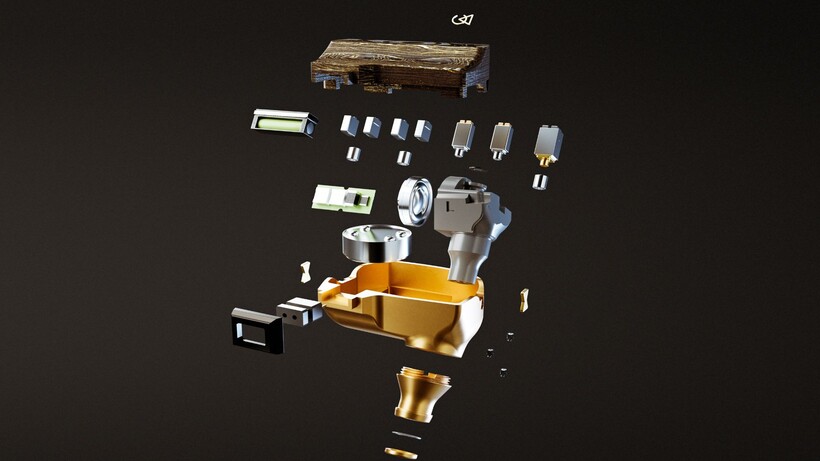
Campfire Audio has built its most complex in-ear monitor to date with the Chimera, a nine-driver flagship IEM that like the figure from Greek mythology that it’s named after, combines many elements, including dynamic, balanced armature, electrostatic, and bone-conduction drivers.
These drivers are all housed inside a single CNC-machined magnesium shell, which is hand-assembled at the brand’s Portland, Oregon facility.
The drivers look to divide responsibility across the frequency range, with a newly developed 10mm True-Glass dynamic driver covering low and low-mid frequencies. A dual-diaphragm balanced armature handles the midrange, with two dedicated high-frequency balanced armatures for clarity and articulation. Then there are four electrostatic super-tweeters that extend into the uppermost range for air and precision.
Alongside those eight conventional drivers sits a bone-conduction unit embedded directly into the magnesium shell, a first for Campfire Audio. It allows low-frequency energy to be felt physically through the shell as well as heard acoustically, adding tactile weight to bass content that a acoustic driver arrangement supposedly cannot replicate.
Advertisement
Image Credit (Campfire Audio)
Advertisement
Internally, a pressure valve regulates airflow behind the dynamic driver while a final-stage tuning damper sits integrated into the nozzle, two components that work alongside Campfire’s acoustic routing to maintain coherence across a driver array that combines four different transducer technologies operating at the same time.
The shell pairs that magnesium body with a carbon fibre and brass Damascus faceplate, where layers of brass are folded into carbon fibre and then CNC-machined to produce a patterned surface that carries subtle variation between units, with the finish available in black and gold PVD variants.
Each Chimera ships with the ALO Audio Valence-6 cable, marking the reintroduction of the ALO Audio brand and features four high-purity copper conductors alongside two mixed copper and silver-plated copper conductors, finished with black anodised aluminium hardware throughout.
Pre-sale opens on 16th May 2026 ahead of an expected June shipping window, with the Chimera priced at £6,999 / $7,500, with limited initial quantities available worldwide.
However you feel about AI writing, it has a few giveaways. According to the writer Imogen West-Knights, “there’s things like negative parallelisms…or excessive use of metaphor and similes, especially ones that don’t quite make sense or that come very rapidly, one after another. Every noun having an adjective attached, certain kinds of repetitive syntactical blocks that appear.”
So naturally, when an author uses AI to write their book, the publishing industry can easily spot it, right? As it turns out, not necessarily. AI models are built using human writing, the good and the bad, which is why it can be hard to tell whether something was written by a chatbot or by a person who loves a bad metaphor. The problem is all the more acute with smaller fragments of text, where there’s less room for AI’s telltale patterns and flatness to emerge.
To find out just how good AI has gotten at imitating human writing, the writer and journalist Vauhini Vara decided to run an experiment on the people who know her writing the best. She thinks there is a misconception among writers and readers that “there’s a certain kind of way that AI generates language and it’s super different from the way writers do.” So could her friends distinguish between her work and an AI-generated imitation of her work? She told Today Explained co-host Noel King about what happened next.
Below is an excerpt of their conversation, edited for length and clarity. There’s much more in the full podcast, so listen to Today, Explained wherever you get podcasts, including Apple Podcasts, Pandora, and Spotify.
Advertisement
Nothing we love more at Today, Explained than a person running an experiment on herself! Vauhini Vara, writer, journalist, author of Searches, in paperback now, tell me everything.
There’s a researcher named Tuhin Chakrabarty whose work I’ve covered before, and he had already conducted this experiment. He and colleagues basically trained AI models on the work of established, accomplished writers.
What that means is he basically got the AI model to generate language that looked a lot like language from those authors. And then he had readers who were graduate writing students read those passages generated by AI and also read imitations by fellow graduate writing students and say which one they liked better. And they tended to like the ones by the AI models more than the ones by actual human beings.
I had him do the same thing with my work, but a twist on it. I had him train an AI model on my three previous books, on pieces of journalism I’ve written. And then I had him get his AI model to generate passages sounding like something from a forthcoming novel that I haven’t published yet or shared with anyone. I put that alongside passages that I had written. I sent those to people who know my work really well. I’m talking about my best friend since I was 13, writer friends who I’ve known since I was 19, 20 years old. And I asked if they could tell the difference and none of them could.
Advertisement
So the people who know you best in the world don’t know you that well, apparently. Or AI is exceptionally good at what it is doing. Give me some examples of what happened here. Can you read me something that you wrote and then something that the AI wrote, and let’s see if I can tell any differences?
It’s funny, I can’t remember now which ones are mine and which ones are the AI!
Gaia said, it seemed to her that we’d been on similar trajectories. We’d both spent many years creating something that we cared deeply about with my journalism. She with her startup, and then gone on to focus on empowering others to do the same. She said she’d been surprised to find that mentoring other founders was even more meaningful than running her own startup In business terms, the ROI was higher if you were willing to count fulfillment as a return.
That’s nice. I like that. Yeah, I would say as writing, that was nice. Beginning, middle, end, lands on a point. I enjoyed it.
That one was actually AI.
Advertisement
Damn. AI, you landed in such a nice spot. Okay. Read me something that you wrote, please.
Okay, now we have a spoiler that I’m going to read you something, something from me.
I’d like to argue that we write because we feel compelled to no matter whether anyone will read them, but is that true? When I was younger, I used to keep a journal for myself. I didn’t want anyone else to ever read it, which meant I didn’t need to describe the people in places I was writing about or explain why they mattered. When my mom did read my journal in the ninth grade, I considered it the biggest betrayal I’d ever experienced. But the saving grace was knowing that she could not have possibly understood most of what I was writing about. I had an audience of one myself.
I don’t know — I set you up to say that!
No, no, no. Actually, you didn’t. I would be very honest and I did sort of want to curveball you, but that was very pretty. Do me a favor, read the first two sentences of what you wrote one more time for me.
Advertisement
I’d like to argue that we write because we feel compelled to no matter whether anyone will read them, but is that true?
What is the “them” referring to?
It’s an error! It’s a grammatical error on my part. And good job catching it because a lot of people assumed that one was AI, and I think the best indication that it was actually me is that there is that grammatical error. AI wouldn’t have made a grammatical error like that.
This is the thing that I would like us to talk about: AI does not make mistakes. And in the first half of the show, our guest, also a writer, described AI as kind of soulless. And I think that was part of what she was pointing to.
What you read me by the AI wasn’t bad. So here’s a question for you: When all this was said and done [and] people could not tell what was you — people who know you well — how did you feel about that? Did you feel threatened? Did you feel suspicious of your friends and family?
Advertisement
I was of two minds, because on the one hand I didn’t feel threatened, but I found myself questioning my own assumption about myself, which is that I identify as a writer who is very invested in originality, who really wants every new book to be completely different from the previous books. And so the fact that this AI was trained on my previous books and could predict the style of the writing in the new book suggested that I wasn’t as original as I thought that my new book wasn’t as different from the previous books as I thought.
At the same time, on the other hand, I actually felt vindicated because I disagree with the other author who was your previous guest about the soullessness of AI-generated text. I don’t think that AI-generated text is by definition easily distinguishable from human text because of a kind of soullessness inherent in the text.
Can readers tell something that is AI versus something written by a human?
It seems like they can’t, and I can’t myself. And this actually gets back to what we were discussing earlier about the question of whether AI generated text is convincing or soulless.
Advertisement
I think the reason a lot of people assume AI writing is going to sound soulless is that AI companies, in their most recent versions of their products, have created these products that are specifically designed to sound a certain way, a certain kind of corporate customer service speak. And so people think that’s just inherently the way AI sounds, but it’s not true. AI can sound any number of ways.
It’s technically very easy actually to build an AI, to train an AI model that sounds human-like even literary. The reason we’re not that familiar with it is that that’s not what the products look like currently.
Ultimately, do you think AI is going to end up changing our relationship to literature, or do you think everybody who reads is going to be as skeptical and skeeved out as you and I are?
Research shows not only that in some cases people prefer AI-generated text to a human-generated text, but also that if they’re told that a piece of text is AI-generated, they become uninterested in it. And so it seems clear that the reading public does not want to read text generated by AI if they know that it’s generated by AI.
Advertisement
I think we focus a lot on this human/technology binary — on, “‘Oh, it’s weird if a machine creates the language.” But I think a big part of it is that we want to be communicating with one another. We don’t want to be receiving our art from enormous tech companies that have a lot of wealth and have a lot of power and want to control us.
An X user with the handle cprkrn writes that he was locked out of his wallet over 11 years ago because he got stoned, changed his password, and forgot it. Read Entire Article Source link
For many Windows users, the taskbar in Windows 11 has always felt strangely restrictive. Microsoft redesigned the interface with a cleaner, more modern look, but in the process removed several customization options people had been using for years. One of the biggest complaints? The inability to freely move the taskbar around the screen. Now, Microsoft finally seems ready to loosen things up.
The company has started testing a major overhaul of the taskbar and Start menu for Windows 11 Insiders in its Experimental channel. And honestly, this feels like Microsoft acknowledging that users want their PCs to feel personal again.
Windows 11 could soon feel far more flexible
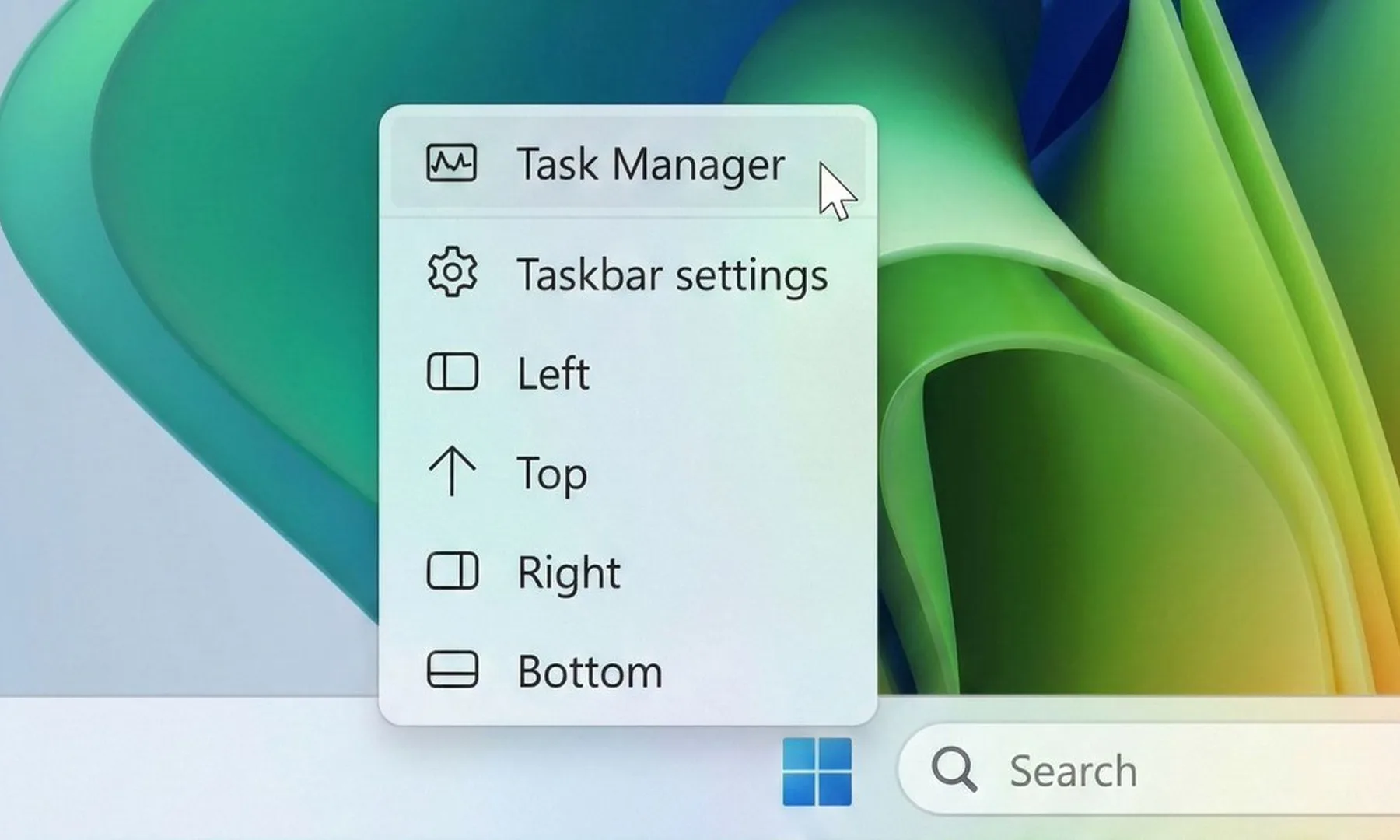
The biggest change here is the return of a movable taskbar. Instead of being locked to the bottom of the screen, users in the test build can now shift it to the top or even place it vertically along either side of the display. That might sound like a small tweak, but for longtime Windows users, it’s a pretty significant reversal. Earlier versions of Windows allowed this kind of flexibility for years before Windows 11 simplified everything into a more rigid layout.
Zac Bowden / X
Microsoft is also testing different taskbar sizes, including a compact version that could be especially useful on smaller laptops and tablets where screen space matters more. Even the Start menu is becoming more adjustable. Users will reportedly be able to resize it and switch between smaller and larger layouts, depending on how they prefer to organize apps and shortcuts.
The company is finally listening
Beyond the visual changes, Microsoft is also trying to clean up parts of the Start menu that many people found cluttered or unnecessary. New controls will let users decide which sections appear inside the menu, including areas for pinned apps, recommendations, and app lists. Interestingly, Microsoft is also renaming the “Recommended” section to “Recent,” which honestly makes the feature easier to understand at a glance. The section mainly surfaces recently used files and newly installed apps anyway, so the older name often felt vague.
Advertisement
Paulo Vargas / Digital Trends
There are also smaller but thoughtful privacy-focused touches being added. For example, users can hide their profile photo and account name from the Start menu, which could come in handy during presentations or screen-sharing sessions. Microsoft says these changes will roll out to Insider testers over the next few weeks. More importantly, the company openly admits that the Start menu and taskbar are where users judge Windows the hardest. And after years of complaints about Windows 11’s limited customization, this update feels like Microsoft is finally taking that criticism seriously.
The Acer TravelMate P6 14 AI is a capable Windows business laptop with solid internal grunt from its Lunar Lake processor that comes alongside a competent port selection, lightweight chassis and excellent battery life. For the price, it’s a solid option, although I do bemoan the lack of an OLED screen in any guise.
Lightweight and sturdy chassis
Solid power inside
Excellent battery life
An OLED screen would have been nice
Key Features
Advertisement
Sub 1kg weight:
The TravelMate P6 14 AI tips the scales at less than a kilo, making it one of the lighter laptops of its kind.
Advertisement
Intel Core Ultra 7 258V processor inside:
It also features a potent eight-core processor that provides a solid amount of power for productivity tasks.
Advertisement
65Whr battery inside:
This Acer laptop also has a capacious battery inside that allows it to power through a working day or two away from the mains.
Introduction
The Acer TravelMate P6 14 AI offers a clever blend of lightness and durability for a humble business laptop.
Advertisement
It’s unique in that it tips the scales at just under a kilo, just like the new Asus Zenbook A14 (2026), but comes with more business-class sensibilities with its ports, solid IPS screen, good software selection and a competent Lunar Lake processor inside.
For the £1599.99 price tag, this feels quite reasonable in the current market, not least with price rises across the board from other manufacturers that leave key rivals to the likes of the Dell XPS 14 (2026).
Advertisement
Other business-class options, such as the Lenovo ThinkPad T14s 2-in-1 Gen 1 and Dell Pro 14 Premium, are some way up the road in price, giving this Acer choice a potentially clear run as one of the best laptops we’ve tested. I’ve been putting it through its paces to find out.
Advertisement
Design and Keyboard
Lightweight and sturdy chassis
Solid port selection
Tactile keyboard and trackpad
It seems that Acer has attempted to replicate the excellent Swift Edge 14 AI with the TravelMate P6 14 AI in some respects, with this laptop coming with cleverly engineered materials to make it sleek and light, not least for a business machine.
It’s got a blend of a carbon fibre lid (as proudly displayed with a little logo) and magnesium-aluminium alloy elsewhere to allow this laptop to tip the scales at 990g without it feeling like it’s much cheaper than the retail price suggests. This is a lightweight laptop without any real flex or bend at the corners or in the keyboard tray, which is excellent.
Image Credit (Trusted Reviews)
Advertisement
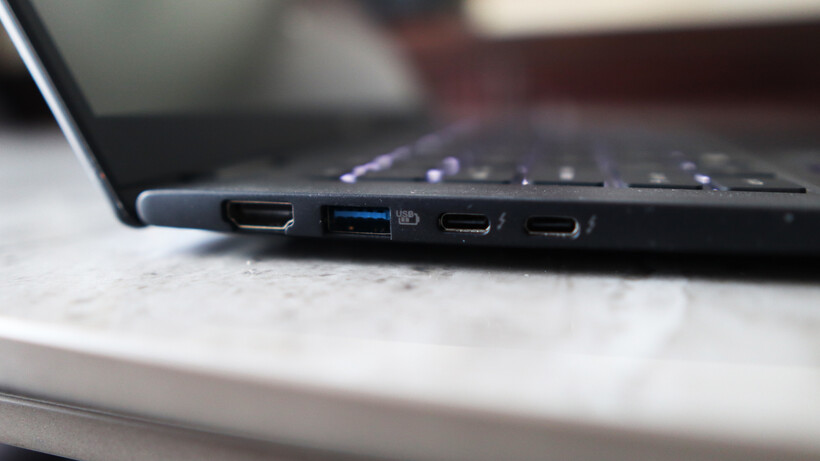
The ports on the TravelMate P6 14 AI are strong, too, with a pair of Thunderbolt 4-capable USB-C ports on the left alongside a USB-A and an HDMI port. The right side has another USB-A, a headphone jack, and security slot. For most use cases, this is more than adequate, although pros may wish for an SD card reader to supplement.
The keyboard here is also a reminder of other Acer laptops I’ve tested, with a snappy and short tactile travel in a smaller form factor layout that’s comfortable for extended periods. It’s also backlit with a bright, white light that’s sure to help for after-dark working.
Image Credit (Trusted Reviews)
As for the trackpad, it’s more about the width than depth, but nonetheless gives your fingers excellent real estate to work with. It doesn’t feel like a haptic trackpad, instead choosing to actuate with a defined mechanical click under finger.
Display and Sound
High-res IPS screen is decent
Okay contrast and black levels
Reasonable speakers
Acer bundles an IPS panel with the TravelMate P6 14 AI, opting against an OLED for some reason. Nonetheless, it’s a solid 14-inch 3K (or 2880×1800) resolution panel with upwards of a 120Hz refresh rate for detailed and smooth action.
Advertisement
Advertisement
In a general sense, this panel performs as you’d expect a decent IPS option to, with reasonably deep blacks (0.10 at 50%, rising to 0.38 at peak brightness) and okay contrast (1260:1 contrast ratio), plus a near-perfect 6600K colour temperature. I also measured 471.2 nits of peak SDR brightness here, making this a punchy panel in that sense.
Image Credit (Trusted Reviews)
Colour accuracy here is perfectly cromulent for mainstream workloads, with 97% coverage of the mainstream sRGB gamut, alongside 79% DCI-P3 and Adobe RGB results. This means this panel is okay for general productivity tasks, although it isn’t the best for more creative, colour-sensitive tasks.
The TravelMate P6 14 AI’s speakers are okay, but nothing really to write home about. There’s decent mids and some bass, but you’ll want to be using the headphone jack or Bluetooth 5.4 connectivity for much better audio.
Performance
Tried-and-tested Intel Lunar Lake processor
Beefy iGPU against Snapdragon alternatives
Capacious SSD, but a little on the slow side
Inside, this TravelMate P6 14 AI is technically using a last-gen Intel chip, although for the non-X-prefixed Panther Lake chips found in base model ultrabooks for the 2026 model year, such as the Dell XPS 14 (2026), the needle hasn’t moved much beyond Lunar Lake.
Advertisement
If you need a quick refresher, the Core Ultra 7 258V processor inside this laptop is an eight-core and eight-thread chip with a boost clock of up to 4.8GHz. It’s designed to provide a solid amount of grunt without sacrificing too much on endurance and longevity, making it a good choice for laptops such as this one.
Advertisement
Image Credit (Trusted Reviews)
The scores this Acer laptop achieved in both the Geekbench 6 and Cinebench R23 tests are in the ballpark for the processor inside, matching well against key rivals. That means strong single-core performance and decent, if a little disappointing, multi-threaded scores, owing to the lack of hyperthreading against AMD’s crop of modern laptop chips.
Both the PCMark 10 and 3DMark Time Spy scores were excellent, too, proving the suitability of the TravelMate P6 14 AI for productivity tasks and how powerful the Arc 140V integrated graphics are. The score it garnered here is several times that of the Adreno iGPU inside the first-gen Snapdragon X-powered laptops, and still remains ahead of the new Snapdragon X2 Elite SoC’s integrated graphics found in the likes of the Asus Zenbook A14 (2026).
Image Credit (Trusted Reviews)
Acer has also been quite generous with the TravelMate P6 14 AI’s RAM and storage configuration, given what’s going on at the moment. 32GB of RAM provides ample headroom for multi-tasking and more intensive loads, while a 1TB ASSD gives you good room for storin’ stuff. With this in mind, a slight chink in this laptop’s armour is that it isn’t the fastest SSD I’ve come across, with tested read and write speeds of 4794.88MB/s and 3911.05MB/s, respectively.
Advertisement
Software
Full-fat Windows 11 installed
Some Acer-specific apps present
Copilot+ PC functionality is here
The TravelMate P6 14 AI comes running proper Windows 11, although it comes with some unnecessary apps or shortcuts, such as a taskbar one for Booking.com, oddly.
There are more enterprise-centric apps, as you’d expect on a business laptop, such as Acer’s catch-all TravelMateSense app. This provides access to elements such as a file shredder, USB device filter, built-in file encryption and even AI-generated wallpaper in a separate tab.
Image Credit (Trusted Reviews)
Elsewhere, this is also a Copilot+ PC and has enough AI power to warrant the inclusion of Microsoft’s tools. Chief among these is the addition of the Copilot assistant, which you can ask questions and to undertake tasks, if you so wish.
In addition, there is also generative AI functionality baked into the Photos and Paint apps, if you want it. The most useful set of AI tools is the Windows Studio effects for the webcam, which provides a convenient means of auto framing, background blur and even for making sure you maintain eye contact.
Advertisement
Advertisement
Battery Life
Lasted for 17 hours 59 minutes in the battery test
Capable of lasting for two working days
Acer bundles a solid 65Whr battery inside the TravelMate P6 14 AI, which is quite a large one considering the size and lightness of this laptop. There are no specific claims made about its endurance, although with a decent capacity cell and a Lunar Lake chip in tow, I had quite high hopes.
In dialling the brightness down to the requisite 150 nits, and running the PCMark 10 Modern Office battery benchmark test, this Acer laptop was able to run for 17 hours and 59 minutes, making it a dead cert for two working days away from the mains. With some hypermiling, you may be able to eke out a third. That’s a strong result, and puts this well among its Lunar Lake-powered contemporaries, even if the Dell Pro 14 Premium still remains king with closer to 24 hours runtime.
The TravelMate P6 14 AI comes with a 100W power brick that isn’t as fast as rivals to put go-juice back into the laptop. The 38 minutes to get it back to 50% is good, although the 94 minutes for a full charge is a little more middle of the road.
Should you buy it?
Advertisement
You want a lightweight business laptop
The TravelMate P6 14 AI offers the benefits of a lightweight business laptop without the same hefty cost as some of the dearer alternatives with similar spec sheets.
Advertisement
On consumer and pro-grade laptops, it is more common to get OLED screens with better definition and fidelity than an equivalent IPS.
Advertisement
Advertisement
Final Thoughts
The Acer TravelMate P6 14 AI is a capable Windows business laptop with solid internal grunt from its Lunar Lake processor, a competent port selection, a lightweight chassis, and excellent battery life. For the price, it’s a solid option, although I do bemoan the lack of an OLED screen in any guise.
The Asus Zenbook A14 (2026) is closest in price and offers similar performance and endurance thanks to its Qualcomm Snapdragon X2 Elite processor, while also netting a sub-1kg weight with clever materials and coming with an OLED screen. It is more of a consumer-grade laptop, and enterprise users have different requirements that Acer’s choice is more likely to fulfil.
Dell’s new XPS 14 (2026) in the base model configuration I’ve tested also equals the TravelMate P6 14 AI in price, although it sacrifices portability and ports against either of the above to make it a serious contender. For more choices, check out our list of the best laptops we’ve tested.
How We Test
This Acer laptop has been put through a series of uniform checks designed to gauge key factors, including build quality, performance, screen quality and battery life. These include formal synthetic benchmarks and scripted tests, plus a series of real-world checks, such as how well it runs popular apps.
Advertisement
FAQs
How much does the Acer TravelMate P6 14 AI weigh?
The Acer TravelMate P6 14 AI weighs under 1kg at 990g, making it especially lightweight in any guise.



























































You must be logged in to post a comment Login