Public Wi-Fi is safe enough for checking the weather or reading the news. It gets risky the moment you log into your bank, your email, or anything with a saved card number. A few minutes of setup, done before you connect rather than after, closes most of that gap.
Quick Take
Here is the short version, before the full walkthrough below. Do these five things every time you use a public network, in this order.
Confirm the exact network name with staff before you join it. A near-identical fake name is the easiest trap to fall for.
Turn off auto-join on your phone and laptop, so neither device reconnects to a network on its own.
Turn on your VPN before you open anything else, not after you start browsing.
Skip banking, shopping, and other sensitive logins unless your VPN is confirmed on and two-factor authentication is turned on.
Keep your operating system and security software updated before you travel, not during.
The rest of this guide walks through each step for phones, laptops, and the situations where these tips genuinely don’t apply.
Prerequisites
Do these things at home, on your own network, before you connect to public Wi-Fi anywhere. Setting them up at the airport or coffee shop, on the same connection you’re trying to protect, defeats the purpose.
Install a VPN app on every phone and laptop you travel with. Set it up now, so you’re not comparing options over an unsecured connection later. This list of VPN apps for Android is a reasonable starting point if you haven’t picked one for that platform.
Advertisement
Turn on automatic updates for your phone and your laptop. Most attacks that succeed on public Wi-Fi rely on a security hole that was patched months earlier. These basic cybersecurity habits cover this alongside a few others worth setting up once, not per trip.
Finally, turn on two-factor authentication for your email, banking, and any account you’d be upset to lose. If your bank or employer offers an authentication app instead of text-message codes, use that instead. Text codes can be redirected through a hijacked phone number; an app on your own device can’t be.
Know the Real Risks First
Danger✕This isn’t a hypothetical problem. A public Wi-Fi safety survey found that roughly one in four regular users have run into a security problem because of it, and nearly half admitted joining a network before without checking it was legitimate.
The steps in this guide make more sense once you know what they’re defending against. Three things go wrong on public Wi-Fi, and none of them require the attacker to be a skilled hacker.
Advertisement
Evil Twin Networks
An evil twin attack happens when someone sets up a fake Wi-Fi hotspot using the same name as a real one nearby. Your phone can’t tell the difference by name alone. Once you join the fake network, the attacker can show you a fake login page, or simply watch what you send.
This is why confirming the network name with staff is step one in the Quick Take above. A coffee shop’s real network has exactly one name. Two networks with nearly identical names is the warning sign.
Man-in-the-Middle Interception
This attack doesn’t need a fake network at all. On an open, unencrypted Wi-Fi network, someone else connected to the same hotspot can potentially read data traveling between your device and the internet. This is called packet sniffing, and free tools that do it are easy to find online.
A VPN exists to stop exactly this. It wraps your traffic in its own encryption before it touches the local network, so anyone sniffing that network sees scrambled data instead of your actual activity.
Advertisement
Malware Delivered Through the Connection
Some public networks push malicious software onto connected devices, often disguised as a required “network login” app or a fake update prompt. Android phones face their own version of this: OMACP malware spreads through network configuration messages rather than a normal app install.
None of these three risks require you to be targeted personally. They’re automated and cheap to run against anyone who connects.
Which Steps Apply to You
Not every step below matters equally in every situation. Answer these questions first, then use them to judge how carefully to follow what comes next.
What device are you using? Phones and laptops have different auto-join settings, covered separately in Step 2.
What are you about to do? Checking sports scores carries little risk. Logging into your bank, checking email, or entering a card number means every step below applies, not just the easy ones.
How long will you be on this network? A five-minute check-in at a departure gate is a different risk than working from a café for three hours, where a bad connection has more time to do damage.
If your answer to the second question involves money or a password, don’t skip the VPN or two-factor authentication steps, even if the rest feels like overkill for a quick visit.
Step-by-Step: Securing Your Connection
Step 1: Confirm the Network Name
Ask an employee for the exact Wi-Fi name before you connect, or check a printed sign. Don’t guess based on which network looks official. If you see two networks with almost the same name, such as “Airport_WiFi” and “Airport_WiFi_Free,” treat both as suspicious until staff confirm which one is real.
Expected outcome: you connect to a network you’ve manually verified, not just the strongest signal in the room.
Advertisement
Step 2: Turn Off Auto-Join
This step looks different by device. Find the version that matches what you’re using.
On iPhone: open Settings, tap Wi-Fi, tap the network name, and turn off Auto-Join. This keeps the password saved but stops your phone from reconnecting on its own. To remove the network entirely instead, tap Forget This Network.
On Android: open Wi-Fi settings, tap the gear icon next to the network, and look for a toggle labeled “Connect automatically” or similar. Exact wording varies by phone manufacturer, so search your settings app for “network suggestions” if you can’t find it under the network itself.
On Windows or Mac laptops: uncheck “Connect automatically” at the connection prompt when you first join. If you already connected once without noticing that box, open your Wi-Fi settings, select the network, and turn the option off there instead.
Expected outcome: your device asks before joining this network again, instead of doing it silently from inside your bag or pocket.
Advertisement
Step 3: Turn On Your VPN Before You Open Anything Else
Open your VPN app and confirm it shows as connected before you open a browser, email, or any other app. A VPN encrypts your traffic before it reaches the local network, so even a compromised hotspot only sees scrambled data.
If you don’t already have a VPN installed, do this at home first. Setting one up for the first time on an unfamiliar network is exactly the situation you’re trying to avoid. When choosing one, look for an app with a kill switch, a feature that blocks all internet traffic if the VPN connection drops unexpectedly, so you’re never accidentally exposed mid-session without knowing it.
Expected outcome: your VPN app shows an active, connected status before any other app touches the network.
Step 4: Turn Off File Sharing and Set the Network to Public
On a Windows laptop, choose “Public” rather than “Private” when prompted after connecting to a new network. This turns off network discovery, so other devices on the same Wi-Fi can’t see your laptop or browse its shared folders. If you missed that prompt, you can turn off file sharing manually afterward.
On a Mac, open System Settings, go to General, then Sharing, and make sure File Sharing and Screen Sharing are both switched off before connecting to public Wi-Fi.
Expected outcome: your laptop is invisible to other devices on the network, and no folder on it can be reached from outside.
Advertisement
Step 5: Check for HTTPS, But Don’t Trust It Completely
Look for a padlock icon and “https://” before the website address in your browser. This means the connection to that specific site is encrypted, even on an unsecured network.
Here’s the catch: scammers can put a padlock on a fake site too. The Federal Trade Commission points out that fraudulent sites are often encrypted as well, so a padlock alone proves the connection is private, not that the site itself is legitimate. Check that the web address is spelled correctly before you trust the padlock next to it.
Expected outcome: you catch a misspelled or fake web address instead of trusting the padlock icon on its own.
Step 6: Turn On Two-Factor Authentication
Before you travel, turn on two-factor authentication for your email, banking, and social media accounts if you haven’t already. A stolen password by itself then isn’t enough to get into your account, since the attacker would also need your phone or a code app.
Expected outcome: logging in from a new device or location triggers a code request, blocking access even if your password leaked.
Step 7: Confirm Your Security Software Is Current
Check that your antivirus or endpoint protection has updated within the last week before relying on public Wi-Fi. If you’re overdue for an update or don’t have one installed, a tool covered in this Bitdefender Total Security review is worth evaluating alongside whatever protection your device already includes.
Expected outcome: your device can recognize and block known malware, rather than relying on the network alone to keep it out.
Advertisement
Verify You’re Actually Protected
Success✓Before you check email or log into anything, run through this quick check.
Look at your VPN app and confirm it says connected, not connecting or disconnected. Look at your browser and confirm the site shows a padlock with the correct address spelling. On a laptop, confirm the network type is set to Public, not Private or Home. If you have another device handy, try browsing to your laptop from it; it shouldn’t be visible.
If any of these checks fail, disconnect, fix the setting, and reconnect before doing anything sensitive. This takes under a minute and catches the most common mistake: assuming a setting is on when it quietly reset itself after an update.
Troubleshooting
Your VPN won’t connect at all.
Many hotel and airport networks use a captive portal, a webpage that requires you to accept terms or enter a room number before granting internet access. Your VPN needs a working internet connection first, so turn the VPN off, complete that login page, then turn the VPN back on right away. Wi-Fi connected but no internet access covers this same captive portal problem in more depth on Windows.
Advertisement
Windows shows “no internet, secured.”
This usually means the captive portal login hasn’t been completed, or the portal page failed to load. Open a browser and try visiting any plain website; that should trigger the login page to appear.
Your browser shows a certificate warning.
This means the site’s encryption certificate doesn’t match what your browser expected, which can indicate a man-in-the-middle attack in progress. Close the tab and don’t click through the warning, even if the site looks familiar. Try again later on a different network.
You realize auto-join reconnected you to a network you never verified.
This happens when a device remembers a network name from a past visit, and a fake copy uses that same name somewhere else. Forget that network entirely, not just this once, and manually rejoin only after confirming the name with staff.
Your phone can’t find the network you were told to join.
Weak signal and interference from other devices are the usual causes on a crowded network. Move closer to a router or access point before assuming the network is down, and ask staff whether the network name changed recently.
Advertisement
A site asks for information it’s never asked for before.
An unexpected request for your password, card number, or a security code mid-session is a strong signal of a fake page inserted into your connection. Close the browser, reconnect on a trusted network, and change that account’s password from there.
Where This Approach Has Limits
A VPN and the steps above lower your risk significantly, but they don’t make public Wi-Fi risk-free. A few things are worth knowing honestly.
A VPN encrypts your connection, but it does nothing against phishing. If you type your password into a convincing fake login page, the VPN protected the connection perfectly while you handed over the password anyway. Encryption and deception are different problems, and a VPN only solves one of them.
A VPN also can’t remove malware already on your device. If something installed before you turned the VPN on, it keeps running underneath the encrypted tunnel.
A VPN can leak your DNS requests, the lookups your device makes to find a website’s address, outside its encrypted tunnel if it’s misconfigured. That can reveal which sites you visit even though the content stays hidden. Most reputable VPN apps turn on leak protection by default, but it’s worth confirming in your provider’s settings if you want to be sure.
Captive portals create a real gap of their own: they require an unencrypted connection to complete their login page before your VPN can even turn on. That short window, usually under a minute, is the least protected part of the whole process. Keep it brief and avoid opening anything sensitive during it.
If you ever suspect an account was compromised despite these precautions, use this data breach checklist and change passwords from a trusted connection, not the one you suspect.
Key Takeaways
Verify the exact network name with staff before connecting; a near-identical name is the most common trap.
Turn off auto-join on every device so nothing reconnects to a network without your knowledge.
Turn on your VPN before opening any other app, not after you’ve already started browsing.
A padlock icon means the connection is encrypted, not that the site itself is trustworthy.
Two-factor authentication is what stops a stolen password from becoming a stolen account.
A VPN doesn’t stop phishing, clean existing malware, or protect a captive portal login, so treat it as one layer, not a complete solution.
These habits cover Wi-Fi specifically. For broader habits like password managers and spotting phishing attempts, see this online safety guide.
FAQ
Is airport or hotel Wi-Fi riskier than a coffee shop network?
Not inherently. Risk comes from how a network is set up and secured, not from the type of venue. That said, busy places with lots of unfamiliar devices connecting and disconnecting all day give an attacker more cover to blend in unnoticed. Follow the same steps everywhere rather than assuming one location is automatically safer than another.
Does a VPN slow down my connection?
Usually, a little. Your data takes a slightly longer path because it’s encrypted and routed through the VPN provider’s server before reaching its destination. For browsing, email, and most everyday tasks, the difference is small enough not to notice. Video calls and large downloads are where you’re most likely to feel it.
Can someone see what I’m doing if I only browse and never log in?
Partially, yes. HTTPS hides the exact page you’re looking at and anything you type, but it doesn’t always hide which website you’re visiting in the first place, since your device still has to look up that site’s address before connecting. A VPN hides this last piece too, because it encrypts the entire connection, not just the page content.
Advertisement
Will using public Wi-Fi get my account flagged as a suspicious login?
It might, and that’s actually a good sign rather than a problem. Banks and email providers often flag a login from an unfamiliar location or network and ask you to confirm it’s really you. That’s the same two-factor authentication system doing its job, not evidence that something went wrong. Only confirm the login if you recognize it as yourself.
Eighteen months after their merger fell apart over who would control whom, Honda and Nissan have agreed to share the software inside their cars.
The two signed a joint development agreement on Monday covering electronic control units, an in-vehicle operating system, middleware and vehicle control software, with the first cars arriving from fiscal 2029.
The agreement is narrower than a merger and, in engineering terms, more intimate. Standardising core ECUs means agreeing on the computers that run the brakes, the steering, the battery and the cabin, and on the interfaces between them.
Both companies framed the decision as a matter of pace and cost. Faster development cycles and more efficient investment were the stated reasons, after what they described as extensive studies of where collaboration in the software domain might work.
Advertisement
Neither disclosed what it will cost or save. No supplier was named, no executive was quoted by name, and the specific ECUs to be standardised were not identified.
Fiscal 2029 is the part worth sitting with. That is roughly three years from now for architecture work that has to be locked long before the first vehicle reaches a showroom, which tells you how far ahead this kind of decision is made and how little room there is to change it afterwards.
The pieces being standardised are the ones customers never see and never forgive. An operating system that stutters, an over-the-air update that fails, a control unit that disagrees with another: these are the faults that define whether a car feels modern.
The problem they are addressing is real and not specific to Japan. A modern car runs on tens of millions of lines of code across dozens of controllers, and every manufacturer is discovering that writing all of it alone is expensive in a way that engines never were.
Advertisement
Scale is the only available answer. Arm has been arguing that the industry needs common foundations rather than dozens of bespoke stacks, which is precisely what two carmakers sharing an operating system amounts to.
The competitive pressure is coming from a specific direction. BYD has built its own 4nm driving chip and is fitting LiDAR to a $10,000 car, which is a level of vertical integration neither Japanese company can match alone.
Chinese brands have been taking share in Europe at a record rate, and the software experience inside the vehicle is a large part of why. Buyers comparing a Chinese EV with a Japanese one in 2029 will be comparing operating systems as much as drivetrains.
What makes this agreement notable is the history behind it. Merger talks collapsed in February 2025 after Honda proposed making Nissan a wholly owned subsidiary, an arrangement Nissan would not accept, and the two walked away.
Advertisement
Sharing an operating system without sharing ownership is a considerably harder thing to sustain. Every future disagreement about a feature, a release schedule or a security patch now has to be resolved between two independent boards with different product cycles and different problems.
There is a precedent both will know well. Shared platforms have worked in this industry for decades, but they involved metal and tooling with fixed specifications, whereas software has to keep being decided long after the vehicle ships.
Nissan has the more urgent problems of the two, having spent the period since the merger collapse restructuring. Honda is the larger and steadier partner, which is the imbalance that sank the merger and has not gone anywhere.
The pair have said they will keep exploring collaboration elsewhere, naming carbon neutrality and the elimination of traffic fatalities as areas of shared interest. Those are aspirations rather than agreements, and the distinction is doing work in the announcement.
Advertisement
What exists today is a signed document, a defined technical scope, and a date in 2029. Whether it holds together until then is a question about two organisations rather than about software.
You’ll need your old passcode or Apple Account password.
RNGSU/Shutterstock
Getting an “iPhone Unavailable” message on your lockscreen is never a welcome sight. The issue is a common one, caused by entering an incorrect passcode too many times. It’s a system meant as a safeguard against unwanted access, but it can just as easily be triggered by unintentional pocket presses or plain old forgetfulness. Thankfully, there are several ways to get access to your iPhone again, though some are a bit more labor-intensive, depending on the circumstances of your lockout.
Advertisement
How to fix an iPhone Unavailable message
Tatiana Diuvbanova/Shutterstock
Your options for an iPhone Unavailable error vary slightly depending on your iOS version, if you’ve changed your passcode recently and what other technology you have available.
Use Passcode Reset
If you’re using iOS 17 or later and have reset your phone’s passcode within the last 72 hours, you have the option to revert back to your old passcode to solve the issue.
After five incorrect passcode attempts, the iPhone Unavailable screen will appear, and you can select the Forgot Passcode option in the lower righthand corner
Select Enter Previous Passcode
After entering your previous passcode and unlocking your phone, you’ll immediately need to reset the passcode to a new number
Reset your iPhone without a computer
To reset your iPhone without a computer, you’ll need to be using iOS 15.2 or later, have Find My previously enabled, have an active cellular or Wi-Fi connection and know your Apple Account and password. Apple recommends that, if you’re using an eSIM on iOS 16 or later, you should contact your carrier before following these steps, as they may be able to give you a QR code that allows you to set up your eSIM again.
From the iPhone Unavailable screen, select Forgot Passcode
Select iPhone Reset
Enter your Apple Account password to sign out of your account
Select Erase iPhone, which will delete all your data and settings. If you’re using an eSIM and iOS 17 or later, you’ll have the option to keep your eSIM but erase your data, or delete both your data and eSIM
Your phone will restart; from there follow the instructions to set up your device again
Reset your iPhone with a computer
To reset your iPhone with a computer (either PC or Mac), you’ll need a cable to connect your phone to your computer and an internet connection. On PC, you’ll also need the Apple Devices app, which can be found on the Microsoft Store. After resetting your iPhone, you’ll only be able to restore it if you have an existing iCloud backup.
Turn off your iPhone by holding down the side button and volume down button, then using the power slider
Connect the cable to your computer, then plug in your iPhone and quickly hold down the side button
Keep holding the button when the Apple logo appears, and continue holding until the image of a computer and cable appears; this means your phone is in recovery mode
From here, the directions differ slightly depending on if you’re using a PC or Mac.
Advertisement
Resetting an iPhone on PC
Open the Apple Devices app and select your phone from the sidebar
If needed, opt to trust the device, then select General
Choose Restore and follow the instructions
Once your iPhone has been restored, you can disconnect the phone from your PC and set up your iPhone
Resetting an iPhone on Mac
Open Finder and select your phone from the sidebar
If necessary, allow the accessory to connect to your Mac
A window will pop up stating there’s a problem with the phone that requires it to be updated or restored; choose Restore
Once restored, you can disconnect your iPhone and set it up again
Apple notes that you may need to update your iPhone before you can finish the restoration process; if your phone restarts during this process, you’ll need to shut your phone off and repeat the steps for entering recovery mode.
Nearly every company that’s trying to deploy artificial intelligence runs into the same problem: it’s hard to integrate the tech into everyday operations. Industrial heavyweight Caterpillar has spent decades dealing with a version of that problem in the physical world, and now it’s using its experience to deploy AI.
Caterpillar’s push into the autonomous space started with mining, where labor shortages and hazardous conditions can make automation particularly useful. Today, it sells automated haul trucks, drilling, underground loaders, dozers, remote-controlled construction equipment, and more. It also offers a software command center, fleet management, and even remote terrain intelligence as part of its autonomous toolkit.
“Now we’re in this super exciting time where we can take all of that learning from mining and bring it into much more dynamic environments, jobsites, quarries, and construction sites,” the company’s CTO, Jaime Mineart, told TechCrunch on during a fireside chat at the Ai4 conference in Las Vegas earlier this month.
The industrial giant is now applying AI more broadly, including in tools used by technicians and its own employees. One example is the Cat AI Assistant, which lets field technicians standing next to a machine use voice commands to pull up repair procedures, troubleshoot potential problems, and identify parts that may be needed before beginning a repair. Mineart said the tool is now being used by customers, operators and technicians.
Advertisement
The assistant draws on Caterpillar’s proprietary data, which spans information generated by its connected machines. Mineart said Caterpillar has about 1.6 million connected assets globally and more than 16 petabytes of structured data.
The company is also using AI to power software for scanning sites and generating digital twins in manufacturing to analyze operations, she said. And like nearly every other company, Caterpillar is using AI across its enterprise operations, as well as for software development. “We use AI agents to modernize legacy code, generate and test new software, and identify defects earlier,” Mineart said.
But Mineart is quick to point out that building the technology is only part of the challenge, as deploying an autonomous machine is not the same as transforming a site to use AI. Companies also have to rethink how people work alongside the technology and how existing processes need to change.
“The hard part about autonomy and about physical AI is incorporating that technology into the customer jobsite and into the workflows,” she said.
Advertisement
Mineart said the company leans on experienced operators to help train AI systems, leveraging institutional knowledge built over decades. And as machines become more autonomous, some operators may shift from controlling a single machine to overseeing multiple machines from a remote command center.
That transition, however, is creating a new challenge for Caterpillar: training its 118,000 employees. Mineart said the company plans to spend $100 million over the next five years to train its workforce in AI, autonomy and robotics.
That investment is likely being put towards helping the company make the most of the broader boom in AI infrastructure, which is already helping its top-line. Caterpillar’s quarterly revenue reached an all-time high of $20.5 billion in the second quarter, helped by strong demand for power-generation equipment used in data centers. Its power-generation division saw sales spike 72% to $3.10 billion, and CEO Joe Creed said that “no one is slowing down” when it comes to demand for cloud computing and generative AI infrastructure.
When you purchase through links in our articles, we may earn a small commission. This doesn’t affect our editorial independence.
Krafton has unveiled five upcoming games as part of its plans to create global gaming franchises. The company announced them during its third consecutive Krafton Media Day at Gamescom 2026 in Germany. Its new lineup includes titles from different genres, along with a new take on the PUBG franchise.
Krafton introduced five upcoming titles at gamescom 2026, covering different genres and offering new gameplay ideas.
NO LAW (Neon Giant): Claes af Buren, CEO of Neon Giant, presented the open-world FPS RPG NO LAW. The game takes place in Port Desire, a city where law and order have collapsed. Players’ decisions can change the challenges, opportunities, and stories they encounter. Neon Giant also uses the latest Unreal technologies to give players more freedom to shape their experience.
Project ZETA (NIRVANANA): Namseok Kim, CEO of NIRVANANA, showcased Project ZETA, its Multi-team Tactical Arena game. Unlike traditional MOBAs, the title does not use a fixed lane-based structure. Four teams, each with three players, enter objective-focused battles from the start. NIRVANANA plans to refine the game through global testing and player feedback.
Age Twisters (Piccolo Studio): Piccolo Studio Co-founders and Directors Jordi Ministral and Alexis Corominas introduced Age Twisters. The two-player adventure follows a grandfather and granddaughter through four different stages of life. Players will see their age differences reflected through unique abilities and changing conversations. The game continues Piccolo Studio’s focus on creating experiences with an emotional connection.
TARAE: The Unbound (Boundary): Boundary CEO Inyoung Koo presented TARAE: The Unbound, an Eastern dark fantasy action RPG. The game draws inspiration from the concepts of reincarnation and karma in Buddhist thought. East Asian mythology and aesthetics also influence its world, character classes, combat, and story. This gives the game a setting and identity beyond the Western medieval style often seen in dark fantasy games.
PUBG: DED.NET (PUBG STUDIOS): PUBG STUDIOS Creative Director Dave Curd introduced PUBG: DED.NET as a new direction for the franchise. The game keeps the survival and competitive elements associated with PUBG: BATTLEGROUNDS but moves away from its battle royale format. It takes place in Cascadia in 1996, inspired by the Pacific Northwest during the 1990s. A roguelite structure lets player decisions influence each run and what happens next.
All five games Krafton will release will be on display at gamescom 2026 in Cologne, Germany, from August 26 to 30 at Koelnmesse, Hall 9. This showcase reflects the company’s policy of creating global franchises and accommodating the creative concepts of its developers.
The company was originally added to a list of organisations thought to be aiding China’s military in January 2025, and that status was upheld in June of this year.
Chinese chipmaker ChangXin Memory Technologies (CXMT) is suing the US Department of Defense to seek its removal from a US government blacklist.
The company was originally added to a list of organisations thought to be aiding China’s military in January 2025, and that status was upheld in June of this year.
Established in 2016 in Hefei, CXMT creates the dynamic random-access memory (DRAM) chips needed to power mobile phones, PCs, tablets, servers, and a range of consumer products and applications.
Advertisement
“CXMT designs, produces and sells its DRAM chips for civilian and commercial use, not for military use,” it reportedly said in its court filings.
US defence secretary Pete Hegseth and two of his staff are among the named co-defendants in the suit, filed last Friday (28 August) in a US district court for the District of Columbia.
“CXMT is not a military company and has no affiliation with the Chinese military,” the company said in a statement after the filing, according to Bloomberg.
“Since its initial designation in January 2025, CXMT has continuously suffered reputational and commercial harm. It is pursuing this action to protect its reputation and business interests.”
Advertisement
CXMT is on a list of “entities identified as Chinese military companies operating in the United States”, according to the US defence department, which are categorised as such under a ‘section 1260H’ designation.
Designated businesses are also said to be “engaged in providing commercial services, manufacturing, producing or exporting … and operate directly or indirectly” in the US. The list also features companies such as Tencent, Huawei, BYD and Alibaba.
Earlier this month, CXMT surpassed Tencent in market capitalisation to become China’s most valuable company at around $520bn.
Last week, CXMT reported first-half revenues for 2026 of around $22bn – up more than 870pc year-on-year – fuelled by the global memory crunch rooted in the AI-driven wave of demand for chips.
Advertisement
US curbs on semiconductor exports to China over recent years have pushed China to focus on its own chip capabilities. Earlier this year, China reportedly began restricting overseas travel for its top AI professionals in its escalating battle with the US over technological dominance.
Last week, a US judge blocked the Pentagon’s blacklisting of products made by US AI giant Anthropic being used for government purposes, ruling that its actions violated the company’s rights.
Don’t miss out on the knowledge you need to succeed. Sign up for the Daily Brief, Silicon Republic’s digest of need-to-know sci-tech news.
The takeaway: Nvidia’s latest 13F reveals a $63.4 billion portfolio of US stocks, and it is very lopsided. Intel and SpaceX account for roughly 80% of it. But the filing’s most interesting detail is what didn’t happen: seven of the eight positions were untouched last quarter, but the portfolio more than tripled in value anyway.
Nvidia’s earnings this week gave the market the growth story it wanted. But a separate SEC filing gives us an additional perspective on what Nvidia is also doing with all those billions.
Form 13F is a quarterly disclosure document any institutional manager holding more than $100 million in US equities has to file. But Nvidia is a chip designer, not a hedge fund, which is precisely what makes the filing worth reviewing.
As of June 30, the company held $63.44 billion in public stock across eight positions as shown below. That’s every public US stock Nvidia owns, but that does not mean these are the only investments the company has on its books. Not even close…
Advertisement
Company
What Nvidia paid
Entry price
Approx value at June 30
Share of portfolio
Intel*
$5.0B, Dec 2025
$23.28
$29.99B*
47.3%
SpaceX
$10.0B, Jan 2026 (into xAI)
n/a
$20.98B
33.1%
CoreWeave
~$2.35B, 2023 – 2026
$40.00 / $87.20
$4.70B
7.4%
Coherent
$2.0B, Mar 2026
~$256.80
$3.07B
4.8%
Nokia
$1.0B, Oct 2025
$6.01
$2.21B
3.5%
Synopsys
$2.0B, Dec 2025
$414.79
$2.15B
3.4%
Nebius **
not disclosed
–
$329M**
0.5%
Generate Biomedicines
not disclosed
–
$14.1M
0.02%
* Intel stock was valued in June 30, but the stock has moved downwards since: the stake is now worth roughly $19.2 billion as of late August.
** Nvidia’s real stake in Nebius is undercounted in the 13F filing. Nvidia holds about 22.2 million Nebius shares, or 9.3% of the company (worth approximately $4.68 billion). Much of those shares are tied to a warrant that can’t be exercised until September 11, 2026. Only the common shares show up on the table above.
Six of the eight positions have a disclosed cost. Together they came to roughly $22.4 billion and were worth about $63.1 billion at the end of June – a potential paper gain of $40 billion on companies Nvidia mostly bought into because it needed them to succeed, not because it expected the trade itself to work. Three months earlier that portfolio was worth $18.4 billion.
SpaceX’s stake and everything the filing leaves out
Several reports we’ve seen of this filing describe SpaceX as a “new position.” But it’s not. It’s a newly visible one. Nvidia put $10 billion into xAI in January as part of a $20 billion round. In February, SpaceX absorbed xAI in an all-stock deal. Then when SpaceX listed on the Nasdaq in the largest IPO in history, Nvidia’s private stake became 122.76 million Class A shares of a public company, and therefore something the SEC required it to disclose.
Advertisement
That’s also a useful reminder that the 13F is not everything Nvidia owns. A 13F only captures US-listed equities and says nothing about private companies, which is where most of Nvidia’s money has actually gone.
The filing does not show the ~$30 billion stake in OpenAI, the investment in Anthropic, or any of the other private AI labs on the books. It also omits positions Nvidia has publicly announced in companies such as Lumentum and Marvell, along with the $2 billion warrant it wrote for Nebius – which is why Nebius appears here as a rounding error despite being a significant recipient of Nvidia capital.
Nvidia has reportedly deployed north of $100 billion into AI companies over two years. The 13F captures only a slice of that.
Advertisement
A portfolio or a bill of materials?
As for the picks Nvidia is making, they are all intertwined. Coherent makes the optics that move data between GPUs inside a rack. Nokia builds the network gear that moves it between buildings. Synopsys makes the EDA software Nvidia’s own engineers use to design chips. Intel is a potential second-source foundry and a CPU partner. CoreWeave and Nebius are neoclouds that exist to rent out Nvidia hardware by the hour.
Even the smallest position fits the pattern. Generate Biomedicines (0.02% of the portfolio), uses AI to design drugs. So every single holding is either a supplier Nvidia needs to move faster or a customer Nvidia needs to keep buying. That is the whole argument behind the “circular financing” complaint that’s been going around for the last year or so.
Meanwhile, Nvidia was ready to respond to those criticisms. CFO Colette Kress acknowledged the label directly, said Nvidia “sees it differently,” and framed the stakes as investments in once-in-a-generation companies where the downside is limited. CEO Jensen Huang was less diplomatic on CNBC. He said this is the first generation of startups that needs tens of billions of dollars before it can turn a profit, and somebody has to write those checks. However, the risk is that those companies’ rise and fall are on the same AI demand curve as Nvidia’s chip sales.
Advertisement
The Intel stake shows how fast that can move. Worth roughly $30 billion on June 30, it had slipped to about $19 billion weeks later after an Intel stock offering diluted it.
Nebius runs the same problem in reverse. The 13F lists it at $329 million, which makes it look like an afterthought. But Nvidia actually controls 9.3% of the company – most of it not yet common stock, but sit in a warrant from Nvidia’s $2 billion investment that can’t be exercised until September 11 – that investment is currently valuated at around $4.68 billion.
The generous view is that this is simply what a platform company does when the technology transition is real and its customers are capital-starved. Nvidia is buying the parts of the supply chain that would otherwise slow it down, and it is doing so at a moment when it has more cash than almost anyone in history.
Advertisement
The less generous view is that Nvidia has wired its balance sheet so that a slowdown in AI spending hits twice, in the same quarter, in the same direction. Chip revenue falls, and the value of the companies buying those chips falls with it.
However, both can also be true at once. What the 13F does is make the wiring visible, and there’s a lot more of it that this filing still doesn’t show.
When George Arison took over Grindr in 2022, he inherited a company that had been bounced from Chinese ownership to a forced divestiture to a private-equity rescue — a business that was printing money but also had no real product or business strategy. Four years, a SPAC listing, and a controversial return-to-office mandate later, Grindr has become convincing as a growth story. Revenue is on pace to roughly triple, from $195 million in 2022 to a guided $540 million-plus this year, with adjusted EBITDA margins holding above 40%.
That growth has come almost entirely from getting existing customers to pay more versus dramatically growing its user base. In the second quarter of this year, it had 1.4 million paying users, or 9% of its user base, but average revenue per user has risen considerably since 2022, and Arison is very focused on where the next leg of growth comes from. Part of that plan includes turning Grindr into a “gayborhood in your pocket” — a platform that handles not just dating and hookups but healthcare (from ED medication to HIV prevention to, eventually, connecting users with gay doctors) and travel (helping users find community wherever they land). It’s the same “everything app” instinct driving much of consumer tech right now.
But that’s not the only thing Arison is throwing against the wall; later this year, Grindr is rolling out a subscription that it’s betting the market will support, a far pricier “EDGE” tier that has already raised hackles from some on the internet (“literally who’s paying for this,” and “we need 2012 grindr back”).
Arison, who previously founded and ran Shift Technologies, the online used-car marketplace he also took public via a SPAC, in 2020, is also aggressively seeking out press to argue that institutional investors continue discounting Grindr’s stock simply because it’s a gay dating app. In a Zoom call with TechCrunch on Thursday, he cited an investor who once showed him a financial model with a literal “Grindr discount” line item, knocking 25% off a fair-value estimate.
Advertisement
Not everyone thinks the discount is justified. Morgan Stanley, Goldman Sachs, and Raymond James have all raised their price targets on the stock this year, and Morgan Stanley upgraded it to “overweight” in July, citing the EDGE tier and Grindr’s telehealth push — part of a run-up that’s seen the stock climb roughly a third over the past six months. Still, that discount isn’t Arison’s imagination — the stock trades at roughly 11 times 2027 EBITDA, about a 35% discount to peers — even if it’s not clear why.
Arison — amiable, with a hint of his native Georgia still in his voice — was game to talk about all of it in a Q&A that has been edited for clarity and length.
You came in to run Grindr in 2022 when it was pretty adrift. What was the first thing you wanted to prioritize?
Three things, really. First, company building. A lot of people had been hired during the peak-COVID era when expectations for in-office productivity were low, and average output was maybe three to four hours of real work a day. We brought people back to the office two days a week in the summer of 2023 — a decision that got a lot of press and a lot of anger. We went down to about 70 employees as a result. Today only around 25 people who were here before I arrived still work at Grindr, and we run lean: 175 U.S. employees plus a team in Colombia, doing $540 million in guided revenue this year.
Advertisement
Second was driving revenue growth by shipping product people would actually pay for — that’s how pay conversion went from under 6% to over 9%, and ARPU nearly doubled. Third was setting a long-term vision: the “gayborhood in your pocket” idea, and everything else — healthcare, travel — that flows from it.
You’ve said Grindr’s engineering culture is underrated. How small is the team actually running this?
About 94 or 95 people across all technical roles. A large-tech-company CEO once told me AI would let me do with far fewer people what I thought I’d need 300 to 350 for — he was right. We’re doing roughly 350 people’s worth of work with about 100. Something like 80% of our code is now AI-written, and we’ve seen a 2.5x increase in engineering productivity over the past year.
Grindr tested an AI-powered premium tier, EDGE, at a price that in Canada worked out to roughly $350–375 a month in U.S. dollars — a number that got mocked online as more expensive than just dating someone. What actually happened there?
Advertisement
We haven’t released EDGE — we’re testing it, and some people have access as part of that test. It sits above our existing XTRA ($23.99) and Unlimited ($44.99) tiers. We’re not selling AI itself; we’re selling features derived from it — using what we know about a user’s behavior and intent, with consent, to make much better matches than a sparse profile ever could. Retention on these features so far is higher than anything we’ve had before.
The pricing people quoted was one test point among several — we ran a range to understand elasticity, not a final price. EDGE goes live toward the end of this year or early next, and we’ll know where it lands by then. We think of it like a Tesla Model X or S: a premium flagship now, with the underlying capability rolling down to the broader product over time.
On the matching itself — you’ve described using AI to suggest partners outside someone’s home city, because gay-dating pools even in places like San Francisco are small. What evidence do you have that those long-distance matches lead anywhere?
Even in San Francisco, where the share of the gay population is higher than almost anywhere else in the country, you’re talking about maybe 50,000 to 60,000 gay people total. That’s not a big pool to be fishing in if you’re trying to find a partner, and it’s a big reason dating is so hard for gay men generally. So yes — what if AI could break down the geographic constraint entirely, and surface someone in St. Louis who actually matches what you want, based on real behavior rather than what people say in a profile?
Advertisement
As for whether it leads anywhere real: we don’t track people’s relationships after the fact — that’s going too far. What we do know is that Grindr is where most gay men say they meet each other for relationships, and that younger cohorts want something different than older ones did: about 50% of gay men under 35 say they want a long-term monogamous relationship, and 25% say they want children — numbers that would have been unthinkable for my own generation. When you ask people why they’re not in a relationship, the answer is usually that they have a hard time finding a partner. I can’t promise this solves that. But it’s worth trying something new, because what’s been done so far clearly hasn’t solved it.
There are so many ways to expand your addressable market beyond the dating app itself. The healthcare stuff is really interesting — can you tell us more about what you’re doing there, and whether you’re building these products yourselves or acting as the interface to outside providers?
We started with cash-pay products through a line we call Woodwork — ED medications, GLP-1s, peptides, and so on — because cash-pay was the simplest place to get going, and we just launched an AI bot that handles the whole transaction inside the app rather than sending people out to Woodwork.com. The second bucket is HIV prevention and treatment: we’ve committed to giving 10 million people direct access to information on where to get PrEP, both in the U.S., where we already offer that in our in-app health center, and internationally.
The third bucket — actual clinical care, like connecting people to a gay doctor through telehealth — is very much long-term. That’s not something we’re building today, but I do think there’s a world, a decade out, where healthcare is a bigger revenue stream for Grindr than what we do today.
Advertisement
Right now, though, non-subscription revenue — ads and everything else, including healthcare — is a small fraction of the business.
Subscriptions are about 83% of revenue today, down from around 86% in 2022, even though subscription revenue itself has grown enormously — that tells you how much bigger the base is overall. The newer businesses are genuinely small right now. What I want is a company that, 10 years from now, has a strong subscription business, a strong advertising business, a real healthcare business, and a real travel business alongside it. Today those last two are early.
You’ve said investors still apply what one called a “Grindr discount” to the stock because of what the company is. But the stock is up sharply over the past six months, Morgan Stanley just upgraded it, and it trades at a premium multiple to Match Group. Isn’t the market telling you the discount is gone?
I hope we’re being treated as a growth company at this point — we’ve grown revenue more than 25% for 16 straight quarters as CEO, so there’s reason to expect that. The stigma conversation is a real one; we’ve had a consulting firm decline to work with us over reputational concerns, and a bank refuse our money during the Silicon Valley Bank crisis, even as other major banks like Goldman and Morgan Stanley have been strong partners. I think a lot of that is really about Grindr being a gay dating product rather than dating being controversial per se — nobody says that about Tinder, which literally has a “free tonight” button on its homepage. But I’d agree the market’s read on us has clearly improved.
Advertisement
When you purchase through links in our articles, we may earn a small commission. This doesn’t affect our editorial independence.
We spend hours testing every product or service we review, so you can be sure you’re buying the best. Find out more about how we test.
MSI Claw 8 EX AI+ review: two-minute review
The MSI Claw 8 EX AI+ is a high-octane handheld games console that can run PC and Xbox games from a wide range of game stores. With the Intel Arc G3 Extreme chipset — featuring the Intel Arc B390 GPU and 32GB RAM — it’s easily the most powerful portable console I’ve ever (quite literally) gotten my hands on. But there’s a pretty huge catch to that performance: a price tag that would buy you two Steam Deck OLEDs or a mid-price gaming laptop.
Let’s start with the superficial stuff: the MSI Claw 8 EX AI+ looks gorgeous. Its screen is an extensive eight inches across, offers wonderfully rich colors and a silky-smooth 120Hz refresh rate. Combined with its discreet RGB lighting around the asymmetrically placed thumbsticks and Void Purple colorway, it has a unique look that definitely helps it stand out from the crowd.
Advertisement
But its design goes far beyond aesthetics. Its Hall effect thumbsticks and triggers should not only offer greater longevity, but they felt really responsive, even if they’re not quite as sensitive as the TMR versions now offered by some controllers. Meanwhile, it felt perfectly ergonomic in my hands — I was genuinely surprised how light it felt for a 1.73 lb / 786g console — although its laser-etched grips sure made my hands feel sweaty, for some reason.
Latest Videos FromTechRadar
What cements the MSI Claw 8 EX AI+ as one of the best handheld games consoles out there, though, is its performance. It’s the first gaming handheld on the market with the Intel Arc G3 Extreme chipset and, boy, does that have a pronounced effect on how it plays. While benchmarks showed it offered similar CPU performance to the recent Asus ROG Xbox Ally X, thanks to its Intel Arc B390 GPU and 32GB RAM, it managed to smash its 3D Mark benchmarks by between 35% and 76% — that’s a significant performance upgrade.
Advertisement
Numbers only tell part of the story, though: what was the Claw actually like in action? Well, Baldur’s Gate 3 looked truly gorgeous on Ultra graphics settings and yet it hovered around a decent 38fps. Meanwhile, despite only being released in 2025, both Doom: The Dark Ages and Clair Obscur: Expedition 33 played at a rock-solid 60fps — whether I was punching demons to death or countering devastating attacks, there wasn’t a hint of latency or lag. Even the boss-level challenge of The Elder Scrolls 4: Oblivion Remasteredhit 60fps at points… before plunging to a stuttery mess in busier areas. Still that’s impressive stuff for a handheld console.
(Image credit: Future)
But the MSI Claw 8 EX AI+ has a pretty huge barrier to Fosbury flop over: its price. In return for its premium components, you’ll pay a seriously premium price tag of $1,799.99 / £1,399.99 / AU$2,849. Not only is that significantly higher than any other gaming handheld to date, it’s also as expensive as some mid-range gaming laptops.
And that presents an enormous problem for the Claw. Despite the fact that some of the best gaming laptops come in at a similar price, many of them offer superior performance in our benchmark tests. Now don’t get me wrong: no gaming laptop offers the kind of ergonomics or compact form factor you get here, but I do have doubts that the pro gamers that can afford this kind of device will be willing to trade performance simply for the sake of increased maneuverability.
Sign up for breaking news, reviews, opinion, top tech deals, and more.
Advertisement
That’s a real shame because in almost every respect, the MSI Claw 8 EX AI+ is a fantastic gaming handheld that has really stretched my expectations of what this kind of device is capable of. I want one. And you should too. But I’m not convinced either of us will be able to justify the spend.
(Image credit: Future)
MSI Claw 8 EX AI+ review: price & availability
Having launched on June 23, 2026, the MSI Claw 8 EX AI+ is available now. As you can see from the specs — or if you took sneaky peak at the benchmarks in the performance section — it’s seriously mighty for a gaming handheld.
It’s the first handheld console on the market that rocks the Intel Arc G3 Extreme chipset, which includes the 12-core Intel Arc B390 GPU and a hefty 32GB RAM. That puts it considerably ahead of most of its competitors, even if it can’t quite rival any of the best gaming laptops for sheer processing punch.
Advertisement
Unfortunately, like the hero in a Greek tragedy — or Oddyseus, apparently — it has a fatal flaw. The price. At $1,799.99 / £1,399.99 / AU$2,849, its cost is possibly the most eye-watering thing I’ve come across in a while and that includes all the people on social media that bragged about raw-dogging the solar eclipse in August. While the price tag here might not literally melt your retinas, it’s likely to give you second thoughts.
By comparison, we threw some shade on the Asus ROG Xbox Ally X for its price on its release — and that only retailed for $999.99 / £799.99 / AU$1,599. The Claw 8 EX AI+’s sticker price outstrips every other handheld console by quite some margin, sitting more up the gaming laptop end of the spectrum. For example, a mid-spec Alienware 16X Aurora, with Intel Core Ultra 9 275HX, Nvidia GeForce RTX 5070 and 32GB DDR5, goes for $1,999.99 / £1,799 (around AU$2,800). Ultimately, I think there aren’t going to be that many mainstream gamers able to pay this price and those that do are going to expect stellar performance in return.
I’ll be honest: when I first picked up the MSI Claw 8 EX AI+, I was pretty shocked by how light and manageable it felt. Fundamentally, this is not a small console — it’s as broad-shouldered as the Steam Deck OLED or the Lenovo Legion Go S and weighs in at 1.73 lbs / 786g, which is the heaviest gaming portable I’ve gotten my hands on to date. But despite this, it never felt at all bloated, sitting comfortably in my grasp.
I’d chalk this up to its ergonomic design. On top of feeling well balanced, it offers flared grips, unlike previous iterations of the MSI Claw. These sat really comfortably in my hands, although they aren’t quite as easy to wrap your hands around as the controller-mimicking forked grips of the Asus ROG Xbox Ally X.
This was also helped by the laser-etched texture of its grips, which enabled me to keep a decent grasp on the Claw. But I will say they aren’t quite as comfortable as those on some of the best Xbox controllers I’ve tested, feeling a little on the rough side and quickly getting sweaty as I tried to splat sakapatates in Clair Obscure: Expedition 33.
The MSI Claw 8 EX AI+ also left a pretty good impression on some of my other senses too. No, I didn’t lick it — I’m talking visual appeal here, rather than gustatory. Subtle RGB lighting around each of the thumbsticks is my personal highlight, although I’ll also give its gentle curves and Void Purple colorway honorable mentions as well. Honestly, I’m a little less jazzed about the way the screen juts out past the bottom of the device, but this does seem to be a more common look these days, with the jutting grips of the Asus ROG Xbox Ally X creating a similar effect.
Advertisement
Speaking of screens, despite it not quite rocking the richness of the Steam Deck’s OLED display, the Claw 8 EX AI+ has a beautiful looking screen. As a result of its expansive eight-inch breadth and 16:10 aspect ratio, it rocks a 1920 x 1200 resolution, not to mention a variable refresh rate of up to 120Hz. Every game I played always felt detailed and smoother than whipped cream under a heat lamp. Meanwhile, its 500 nit typical brightness felt plenty bright enough in most settings — on max brightness, I even found I was able to play it outside, although when I faced it directly toward the blazing August sun, it was quickly overpowered by the fiery onslaught.
(Image credit: Future)
Anyone familiar with previous incarnations of the MSI Claw will be pretty familiar with the layout here. The Claw 8 EX AI+ has the same combo of asymmetrical thumbsticks, Xbox-style face buttons and vertically aligned Menu, MSI Center M, View and Quick Setting buttons that you’ll have seen on previous iterations. There’s only two macro buttons on its rear, which honestly feels a bit stingy compared to the four offered by the Steam Deck and many Xbox controllers.
On the plus side, the Claw 8 EX AI+ is packing both Hall effect thumbsticks and triggers — as well as preventing the inexorable drift issues that plague potentiometer thumbsticks, Hall effect sticks and triggers also offer smaller deadzones and increased sensitivity. They’re not quite as sensitive as the marginally fancier TMR thumbsticks and triggers you see in a lot of premium controllers these days but I’m not aware of any portable consoles that offer those currently.
So for the most part, its control scheme is suitably versatile. The only area it falls a little short is the lack of built-in mouse control for games that require a cursor. Unlike the Steam Deck’s super flexible trackpadsor the quirky hybrid mouse-cons offered by the Nintendo Switch 2 and Lenovo Legion Go 2, the only way I could mimic a mouse input on the Claw 8 EX AI+ was by jabbing its touchscreen with my greasy hand-sausages. That ain’t gonna cut it for some Steam and Windows games. Now, in MSI’s defense, it has never pitched the Claw as a substitute for PC gaming, but it is a shame that some sections of my Steam library will lay tantalizingly just out of reach. Of course, I could connect a mouse via USB or Bluetooth, but that then prevents the MSI Claw 8 EX AI+ from being as portable.
Advertisement
Another criticism I have is the fingerprint scanner. While I appreciate that these narrow scanners are space-efficient, they’re not efficient in any other sense of the word. Every single time I tried to log in to the MSI Claw, I found I had to pop my pinky on the scanner three or four times just to access the home screen. Given my MacBooks’ Touch ID readers require just a single tap to unlock, I honestly wish MSI found a way to squeeze in a circular scanner here.
Total War Warhammer 31080p (Ultra) 81.3fps (Low) 142.5fps
Cyberpunk 2077: 1080p (Ultra) 43fps (Low) 75fps
Advertisement
Dirt 5: 1200p (Ultra) 48.3fps (Low) 95.7fps
PCMark 10 Battery Life (Gaming): 1:40 hours
While the MSI Claw 8 EX AI+’s looks are impressive, what makes it exceptional is what’s going on underneath the surface. While gaming handhelds have previously involved some performance tradeoffs in return for their diminutive size, that’s not the case here, thanks to the Herculean Intel Arc G3 Extreme chipset it’s packing. MSI claims that the Arc G3 Extreme should unlock 42% faster performance on average compared to the AMD Ryzen Z2 Extreme that the Asus ROG Xbox Ally X is rocking, although this requires a little unpacking.
Certainly, performance benchmarks alone don’t suggest the Arc G3 Extreme is leading the field. The Claw 8 EX AI+ hit 2,492 single-core performance and 12,550 multi-core performance in our GeekBench tests, compared to the 2,788 and 12,883 scores nabbed respectively by the ROG Xbox Ally X. So for raw processing power, there’s not a huge amount of light between the two chipsets, with the Ryzen Z2 Extreme taking a narrow lead.
Advertisement
But factor in graphical performance and Intel’s SoC absolutely spanks AMD’s. With the help of the Intel Arc GPU B390, the Claw 8 EX AI+ gets some seriously punchy 3D performance — in our 3DMark benchmarks, it scored 3,544 in Port Royal, 12,358 in Fire Strike and 6,534 in Time Spy, compared to the 2,006, 9,141 and 4,033 the ROG Xbox Ally X hit. Those are 76%, 35% and 62% increases respectively, gains which show the Claw’s graphics are seriously swole.
And that translates to some staggeringly smooth performance in-game. On Ultra settings, Total War: Warhammer 3 comfortably averaged out at 81.3fps, while on Low settings Dirt 5 ran smoother than a nitro cold brew at 95.7fps and still managed a very creditable 48.3fps on Ultra. But what blew me away most is how well it ran Cyberpunk 2077 on Ultra settings with ray-tracing disabled, netting a reasonably polished 43fps — that’s downright playable and throws some serious shade on the ROG Xbox Ally X, which only managed 8fps.
Unfortunately, while these benchmarks are impressive compared to other gaming handhelds, at this price those aren’t the Claw’s biggest competition. Several of our picks for the best gaming laptops have costs in the same region and yet offer significantly better performance.
For example, the Alienware 16X Aurora with Intel Core Ultra 9 275HX, Nvidia GeForce RTX 5070 and 32GB DDR5 we tested costs only a few hundred dollars / pounds more at $1,999.99 / £1,799. And yet its performance is leagues ahead of the Claw, hitting a 3DMark Time Spy score of 13,594 and Fire Strike score of 31,480 — that’s double and nearly triple the Claw’s scores respectively. Naturally, you’re not getting the same compact form factor but I wonder how much that truly matters for the kinds of gamers that are willing to drop almost one and a half grand on a pro gaming device.
Advertisement
Okay, enough nerding out over numbers. Time to focus on the thing you actually care about: how the MSI Claw 8 EX AI+ actually feels to play.
(Image credit: Future)
Honestly, what the MSI Claw 8 EX AI+ is capable of kinda blew me away. As those benchmarks would suggest, it can offer ludicrously smooth frame rates. Playing a 2D game like Hollow Knight: Silksong, it remained rock solid at 120Hz, with all the action as Hornet zipped around the rich, mysterious landscapes of Pharloom as slick as ice on a spring day.
Granted, that might not feel like much of a challenge, but this unflappable stability carried over when I transitioned to modern 3D games. Clair Obscur: Expedition 33 ran at a wonderfully smooth 60fps. Rather than having to strip it down to the basic visuals required to get it running on the Steam Deck, it actually looked pretty great and ran so stably I was able to crack out counter after counter on chromatic bosses. Being able to enjoy the game on the go felt like such a novelty that I’d honestly be happy to mop up the game’s remaining optional bosses purely on handheld.
Keen to push the MSI Claw 8 EX AI+ to breaking point, I even tried playing a bit of The Elder Scrolls 4: Oblivion Remastered on Xbox. I’ll admit my expectations were pretty low here, as I’ve heard plenty of people complaining about performance issues on their 5000 series Nvidia GPUs. And yet, amazingly, it was playable.
Advertisement
Well, kinda. With the graphics settings on Low while in the depths of Xedilian, performance plowed along steadily at 60fps, which is truly wild for a AAA Bethesda game. However, it didn’t take long for it to start exhibiting some pretty hinky behavior — sporadically I encountered some audio stuttering and, once I entered a more densely populated open area, the frame rate dropped so far it was more 19th century zoetrope than an RPG from 2025. But I feel like most gaming handhelds would spontaneously combust if you even had the cheek to try this, so Imma still put this one in the win column for MSI.
On top of this, the Claw 8 EX AI+ seems to be able to keep a cool head during all of this. In comparison to its predecessor, the Claw 8 AI+, MSI promises the EX AI+ can achieve an extra 5W cooling capacity, 25% higher static pressure for fans, and 9% higher airflow, thanks to fans that are 0.5mm taller. I can’t speak to how accurate such granular figures are but certainly even slamming out epic boss fights or pushing the CPU to its limit, I rarely noticed the EX AI+ getting unbearably warm, which speaks to the strength of its cooling.
What the MSI Claw 8 EX AI+ is capable of is honestly pretty staggering. The only criticisms I have come down to software and input issues.
The Claw’s MSI Center M launcher felt a little unreliable. Occasionally, I got locked out from being able to access it — hitting the MSI button did nothing, and switching between windows just returned me to the Xbox app. On top of this, sometimes switching out to this menu then returning to a game would lock the input, meaning I could no longer use controller settings till I’d switched out and back again. That’s not a total deal-breaker, but it is a shame, given how stable the Steam and Xbox OSes feel by comparison, and shows that even the mighty MSI Claw 8 EX AI+ isn’t immune to Windows 11‘s unsuitability for gaming handhelds.
Advertisement
(Image credit: Future)
MSI Claw 8 EX AI+ review: battery
Given its huge 80Whr battery capacity, I was expecting the MSI Claw 8 EX AI+ to have some serious endurance. Unlike the ephemeral life I get out of my 40Whr Steam Deck — where I’m lucky if I get 90 minutes out of many 3D games — the whopping battery in the Claw had me anticipating some pretty epic gaming sessions. Which is why I was a bit bemused by the actual results I eked out during our benchmarks.
Running our standard PC Mark 10 Gaming Battery benchmark with all the settings switched to balanced in both MSI Center M and Windows 11, I was shocked to see the battery discharged from 100% to 0% in just 1 hour 36 minutes. So sure was I that I must have made a mistake, I recalibrated the battery using the Claw’s built-in software, revisited all the settings and ran the benchmark two more times. Despite this, I was only able to squeeze out 1 hour 40 minutes and 2 hours 31 minutes on subsequent tests.
Certainly that’s not completely incompatible with my objective experience — on the console’s default AI Mode, I comfortably drained its full battery in a two-hour play session of The Elder Scrolls 4: Oblivion Remastered, for example. But that’s an incredibly demanding game, even for the MSI’s specs, and 2D games didn’t seem quite as thirsty in comparison.
Advertisement
So what’s going on here? Ruling out a fault with my review unit, I suspect that the capacious 80Whr battery the unit ships with is only part of the picture when it comes to the life you’ll squeeze out of it. The more important part? Its AI performance mode.
While our standard benchmarks set consoles and gaming laptops to balanced mode, the default performance mode for the MSI Claw 8 EX AI+ automatically adjusts its power consumption on the fly for the best efficiency in any given moment. That means the mode you’re most likely to play it on will stretch out the battery life without causing a noticeable dip in performance.
Even when the battery has run dry, it doesn’t take long to top it up again. With its 65W charging, you’d expect it to take about 90 minutes to juice up that 80Whr battery — and that’s bang in line with my experiences. When plugged into a cable capable of at least 65W, charging up the Claw only ever took around an hour and a half. However, I did occasionally experience some glitchy behavior here, with progress freezing at 98% or 99% full even when left for 20 minutes, suggesting the console’s battery monitoring software can occasionally be a touch off.
299 x 127.55 x 22.6mm / 11.77 x 5.02 x 0.88 inches
(Image credit: Future)
Advertisement
How I tested the MSI Claw 8 EX AI+
Tested it over two weeks
Tried playing a wide range of titles at different graphics settings
Conducted TechRadar’s full suite of testing benchmarks
I tested the MSI Claw 8 EX AI+ over the course of two weeks. I made sure to play a wide variety of games from multiple game stores, whether they were from TechRadar’s Steam library or Xbox Games Pass Ultimate. On top of this, I tried out a wide variety of games at different graphics settings, from relatively undemanding 2D games to AAA 3D titles.
When it comes to more detailed assessments of its performance, I conducted our usual suite of benchmarks. Not only did that entail getting detailed performance scores from 3DMark and GeekBench 6.5, but I also conducted a range of in-game fps benchmarks at both ultra and low graphics settings. To test the console’s battery life, I ran multiple PC Mark 10 Gaming Battery tests to see how rapidly it drained the battery from 100% and I also timed how long it took to charge the console from 0% to 100% using a cable that was rated more than its 65W max charging rate.
During my career, I’ve tested a wide variety of gaming gadgets and accessories, from wireless controllers to gaming handhelds. I’ve also invested a truly ludicrous amount of my four decades on this Earth playing computer games, whether they be RPGs, action adventure games or creative sandboxes. And while I’m a little hazy on the details, I’m told this investment will pay dividends any day now.
I filed a request with McDonald’s earlier this month to access all of the personal data the fast food company collected about me, and I received a stunning 515-page report a few days later that detailed my app interactions in granular detail and predicted I would never stop eating there.
Under the California Consumer Privacy Act, I have the legal right to request access to information from large companies that collect personal data. So I was curious what others might have on me, and I spent the next week filing more than 100 requests.
The CCPA went into effect in 2020, and three of its key provisions are the right to opt out of the selling of personal information, the right to delete that info, and the right to request a copy for yourself.
I focused solely on the latter—access requests—to better understand what data is being collected. Most companies must list two ways for you to file. These are often via a web form, phone number, or email address, as designated in their privacy policy. After you submit a request, companies can take 45 days to complete it.
Advertisement
My experience placing these data access requests was incredibly time-consuming, from finding the right filing methods to verifying my identity multiple times. Most exasperating during this process were the companies that either responded to my access requests with messages concerning the deletion of information, which I explicitly said not to do, or refused to process the request through a method listed in their privacy policy.
Consumer advocates I spoke with were upset with how these requests were handled. “That’s crazy,” said Ben Winters, director of AI and privacy at the Consumer Federation of America. “That’s not an acceptable status quo.” Winters sees these examples as exhibiting the weaknesses of policy frameworks that rely on companies to act responsibly and in good faith.
In accordance with WIRED’s policies, I am disclosing that I used generative AI to draft bureaucratic emails and update my tracking spreadsheet as part of this report. I wrote the body of this article mainly by hand in my scratch notebook.
One of the first errors came from Crunchbase, known for its database about tech startups. I emailed my access request to its privacy address on August 17. My message laid out the rights I wanted to exercise and included a direct request not to erase anything: “I am not requesting deletion at this time. Please do not treat this as a deletion request.” I received a reply two days later from a Crunchbase support representative.
Advertisement
“Thanks so much for your patience. Your account has been permanently deleted from Crunchbase. Please let me know if you need anything else!” the message read in full.
I followed up via email almost immediately, reiterating that I wanted data access, not data deletion. “Your Crunchbase user account was deleted. Other data located on Crunchbase was not deleted,” read the follow-up support response explaining what happened. If I wanted to have a Crunchbase account, I would have to reregister.
When I reached out to Crunchbase for comment, a spokesperson blamed the mistake on a “processing error” and said that the company would proceed with my original access request as filed. The spokesperson also claimed the misclassified response came from “a person on our customer success team” and not a generative AI tool.
My interactions with BeenVerified, a searchable database that gathers public records, also encapsulate my friction-filled experience placing these access requests.
Advertisement
I emailed BeenVerified’s dedicated CCPA compliance address on the morning of August 19. It laid out that I was a California resident placing an access request, not a deletion request. You’ll never guess what happened next.
We spend hours testing every product or service we review, so you can be sure you’re buying the best. Find out more about how we test.
Suri Core 1.0: One minute review
I’ve tested numerous electric brushes with far too many settings and features, from 12+ brushing modes to apps that provide real-time guidance. Yet I inevitably end up using them in the same way: pick up the brush, press the button once, brush my teeth, then put it back in the cupboard until the next time. I’ve never used an app outside of a review period, and I rarely bother with any extra settings either. Battery life is also important to me, as I don’t have a compatible plug socket in my bathroom. And I’d also rather not throw out too many plastic brush-heads that will ultimately end up in landfill.
Suri brushes are designed to be no-fuss, no-frills sonic toothbrushes with minimal settings to avoid a simple tool from becoming unnecessarily complicated, alongside recyclable elements. The Suri Core 1.0 sticks closely to this brief, offering a more affordable alternative to its successful, pricier Pro range.
Advertisement
Naturally, Suri has cut some corners with the Core 1.0 to keep the price down, notably replacing the metal body with a “bio-plastic” one made from renewable sources and recycled material, while the motor is slightly weaker, offering 28,000 movements a minute instead of the Pro 2.0’s 30,000. It doesn’t come with a clean-and-charge case as the Pro does, either. Instead, you simply get a brush cap for travel. It lasts six days fewer than the Pro on a full charge, with a battery that lasts 28 days compared to the Pro’s 34 days.
Latest Videos FromTechRadar
These efficiency savings are minor, and do nothing to impact the toothbrush’s overall quality. The simple design makes it eminently easy to use, while the built-in timer uses haptic feedback every 30 seconds to help you keep track of brushing time. It looks great, too, especially when stuck to the wall using the provided magnetic mirror-mount attachment. It doesn’t feel quite as pleasing in the hand as the metal model, but the pastel-coloured body has a stylish look that will happily fit the aesthetics of a variety of bathrooms. Whichever colour you choose, the brush head is white.
Advertisement
Speaking of brush heads, in the US and UK, Suri operates prepaid mailing programs that enable you to send used heads back to the company, which it then recycles and makes into new products such as soap dishes. The toothbrush is also covered by a warranty, during which Suri will repair and return it at no cost. In addition, across the brush’s construction, Suri has introduced measures to reduce the environmental impact of the plastics it uses, from recycled to recyclable materials to more responsible production and disposal .
(Image credit: Future)
I tested this toothbrush for 21 days straight, and in that time didn’t have to charge it. The two-minute timer is automatic, with no option to adjust it manually: the brush pulses every 30 seconds to signal that you move to the next quadrant of your mouth then shuts off automatically when the two minutes are up.
There are a couple of niggles. The first is that the brush is almost too simple: alongside its Clean and Polish settings, I’d like to see a gentler mode “sensitive” setting for more delicate teeth and gums. The pressure sensor requires some force to activate it, which could result in over-brushing, and it’s quite loud in operation, registering 69db in my noise measuring app.
Sign up for breaking news, reviews, opinion, top tech deals, and more.
Advertisement
But I’m nitpicking. Overall, the Suri Core 1.0 is a simple, high-quality sonic toothbrush for a reasonable price, with some sustainability credentials to boot. It would certainly be my pick over some of the more expensive, feature-stuffed brushes that spring to mind.
Suri Core 1.0: Specifications
(Image credit: Future)
Swipe to scroll horizontally
Component
Suri Core 1.0
Advertisement
Battery life
28 days
Sonic vibrations
28,000/m
Advertisement
Charging stand
USB-C
Timer
30 seconds, haptic
Advertisement
Noise
69db
Settings
Two
Advertisement
Suri Core 1.0: Price and availability
$75 in the US
£65 in the UK
Not yet in the AU
The Suri Core 1.0 is priced at $75 / £65, cheaper than other brushes in the Suri range, which come in at $99 / £85, and offers good value. It’s more expensive than budget electric toothbrushes such as the Ordo Sonic Lite, which is similarly basic in terms of features, but the Core 1.0 feels like a worthwhile step up.
It’s reliable, looks great on your bathroom counter-top, and with Suri’s free brush-head recycling scheme, you can feel good about doing your bit for the environment, too.
Suri Core 1.0: Scorecard
(Image credit: Future)
Swipe to scroll horizontally
Category
Advertisement
Comment
Score
Value
Pricier than some budget toothbrushes, but good value overall.
Advertisement
4/5
Design
Great look, simple to use, recyclable and sustainable design elements.
5/5
Advertisement
Performance
Strong motor, great battery, simple to use.
4.5/5
Advertisement
Suri Core 1.0: Should I buy?
Buy it if…
You’re after something simple
The Suri Core 1.0 does one job, at two intensities, and does it well.
You want a toothbrush that looks good
Advertisement
The Suri Core 1.0’s pleasant design will look great on a bathroom shelf.
You want value
Suri made this toothbrush specifically to appeal to budget buyers.
Advertisement
Don’t buy it if…
You want an oscillating toothbrush
The sonic toothbrush is just a simple vibration model, whereas Oral-B models come with rotating heads.
You’ve got very sensitive teeth
You may prefer a brush with more settings and a lighter pressure sensor.
Advertisement
Also consider
How I tested
I used the Suri Core 1.0 sonic toothbrush for three weeks, brushing morning and night. I measured the decibel levels of the toothbrush using an app, and compared the specs to its contemporaries in the space.


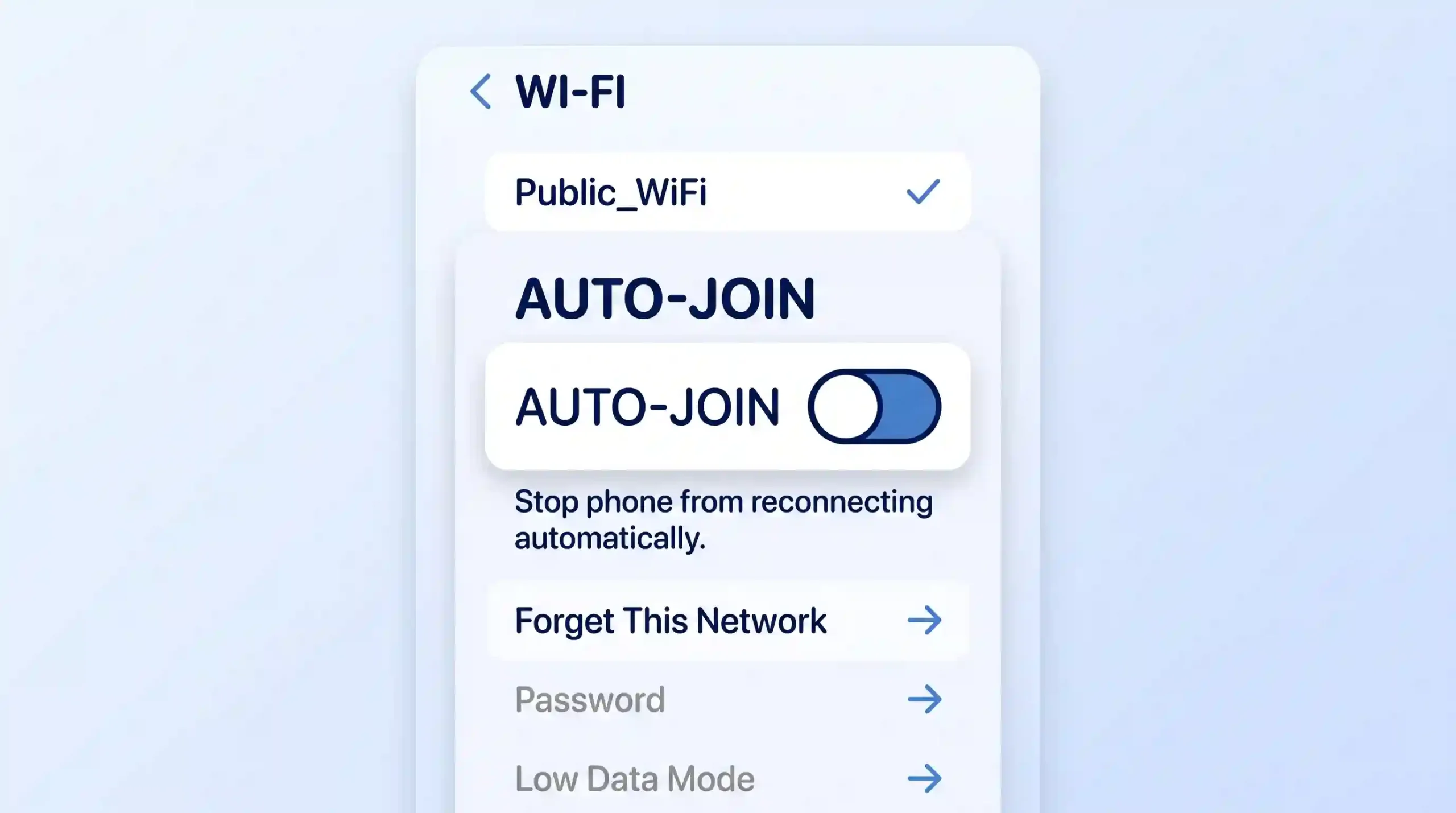
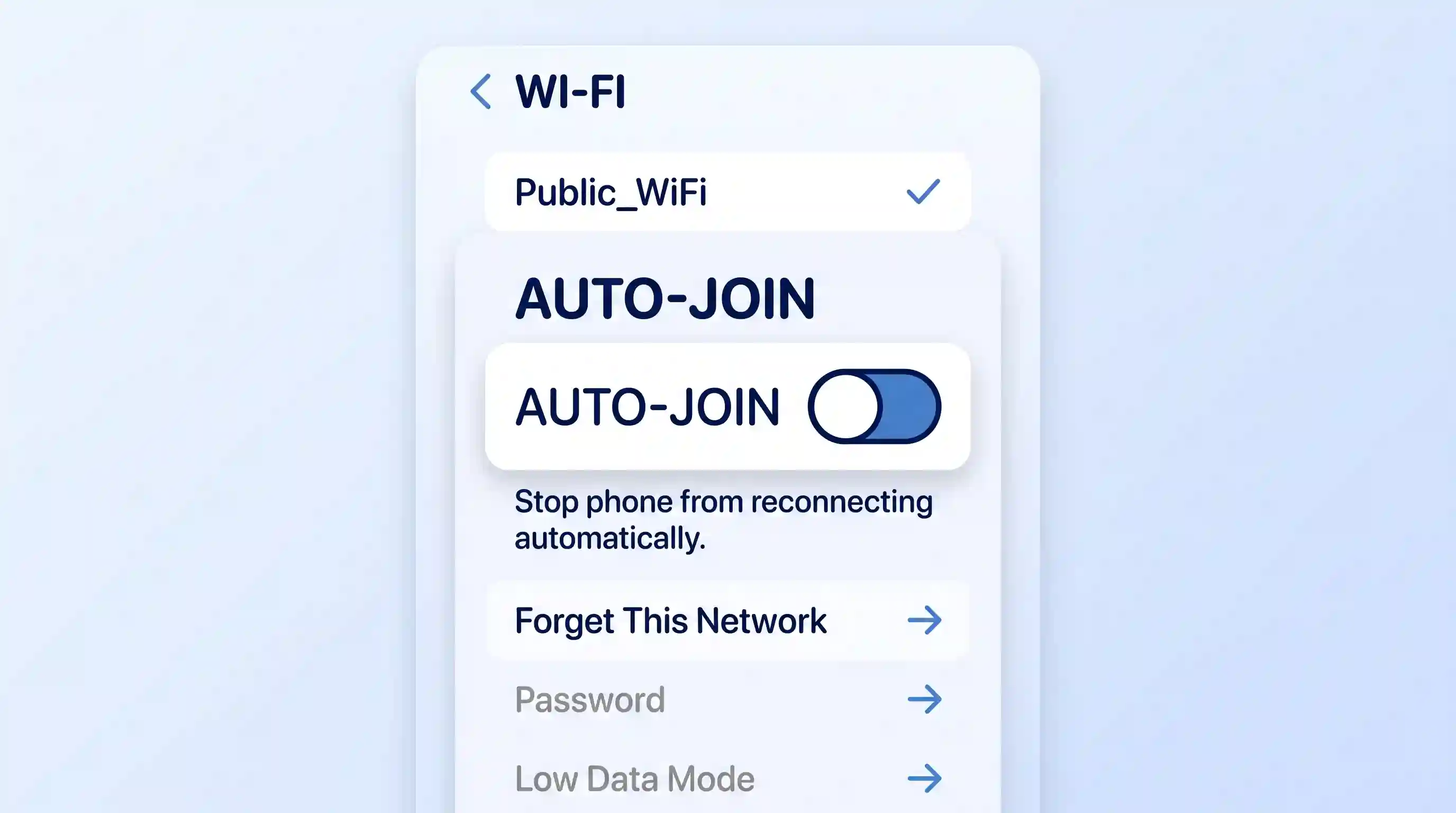
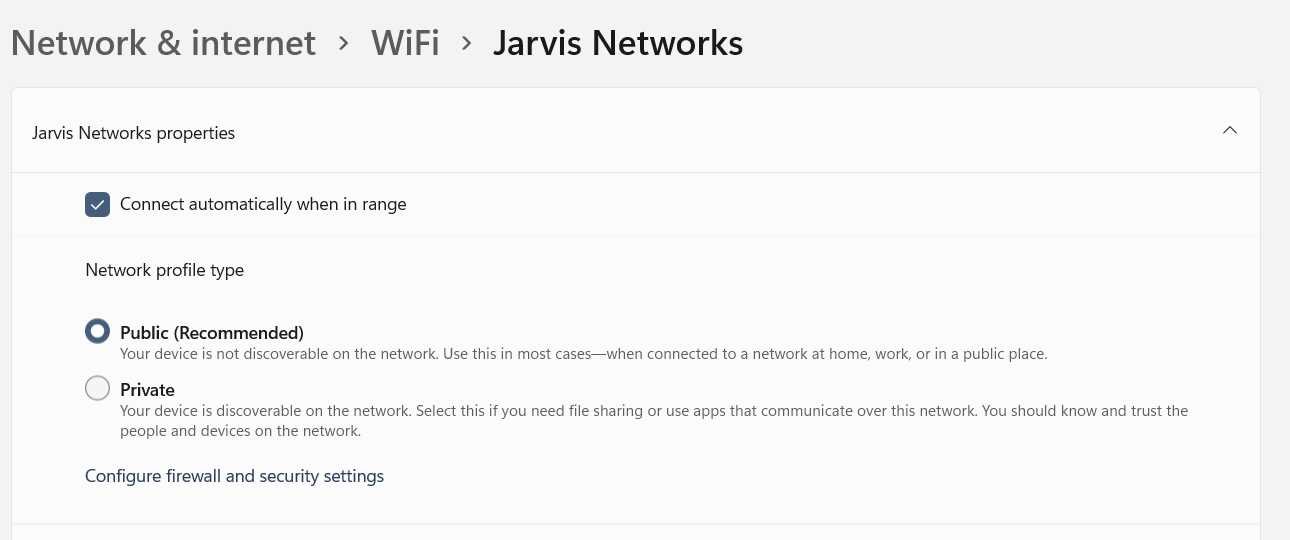



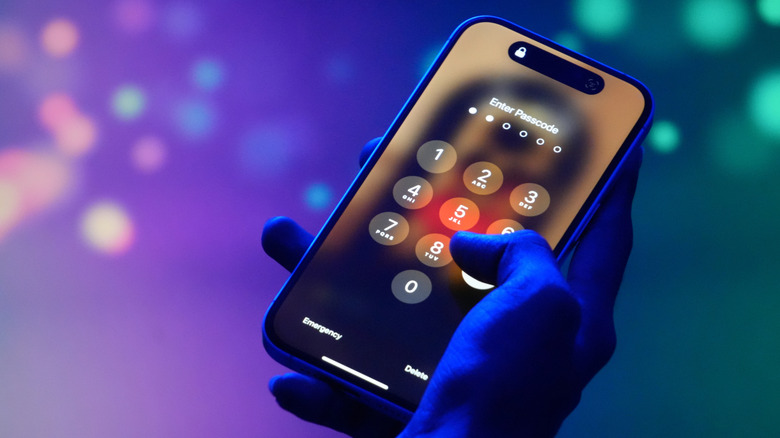
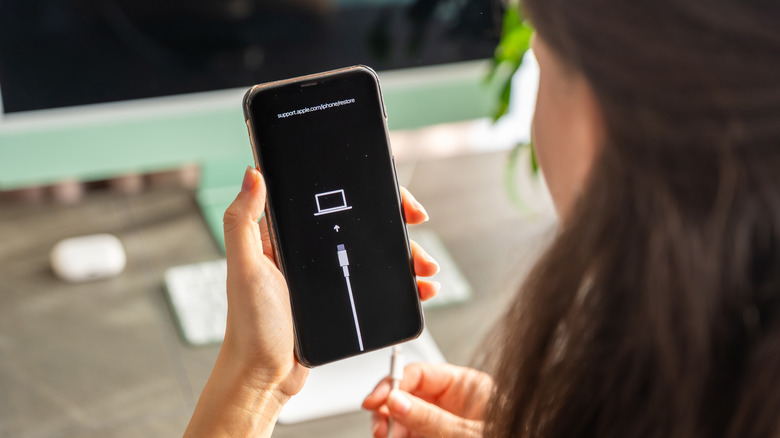

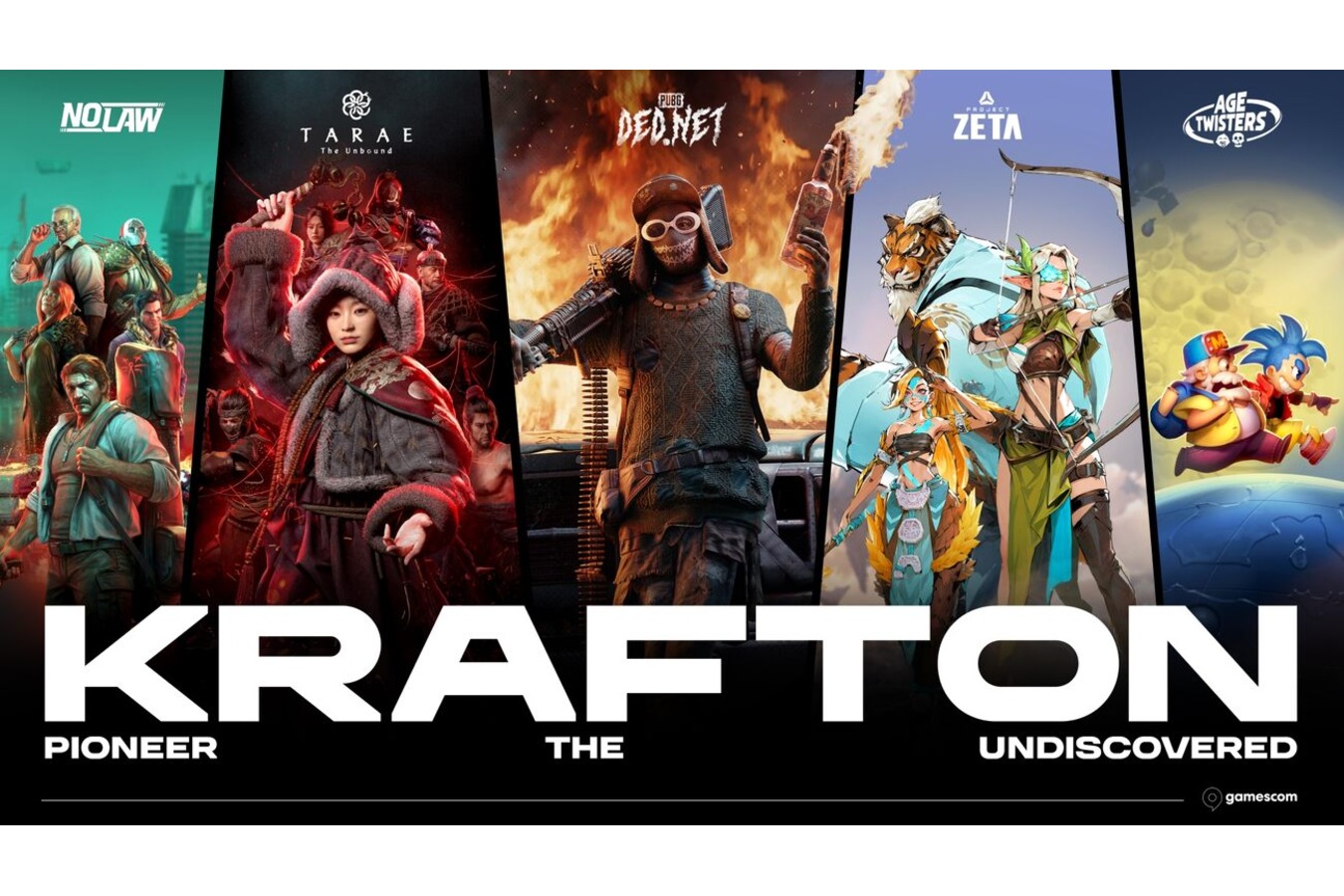

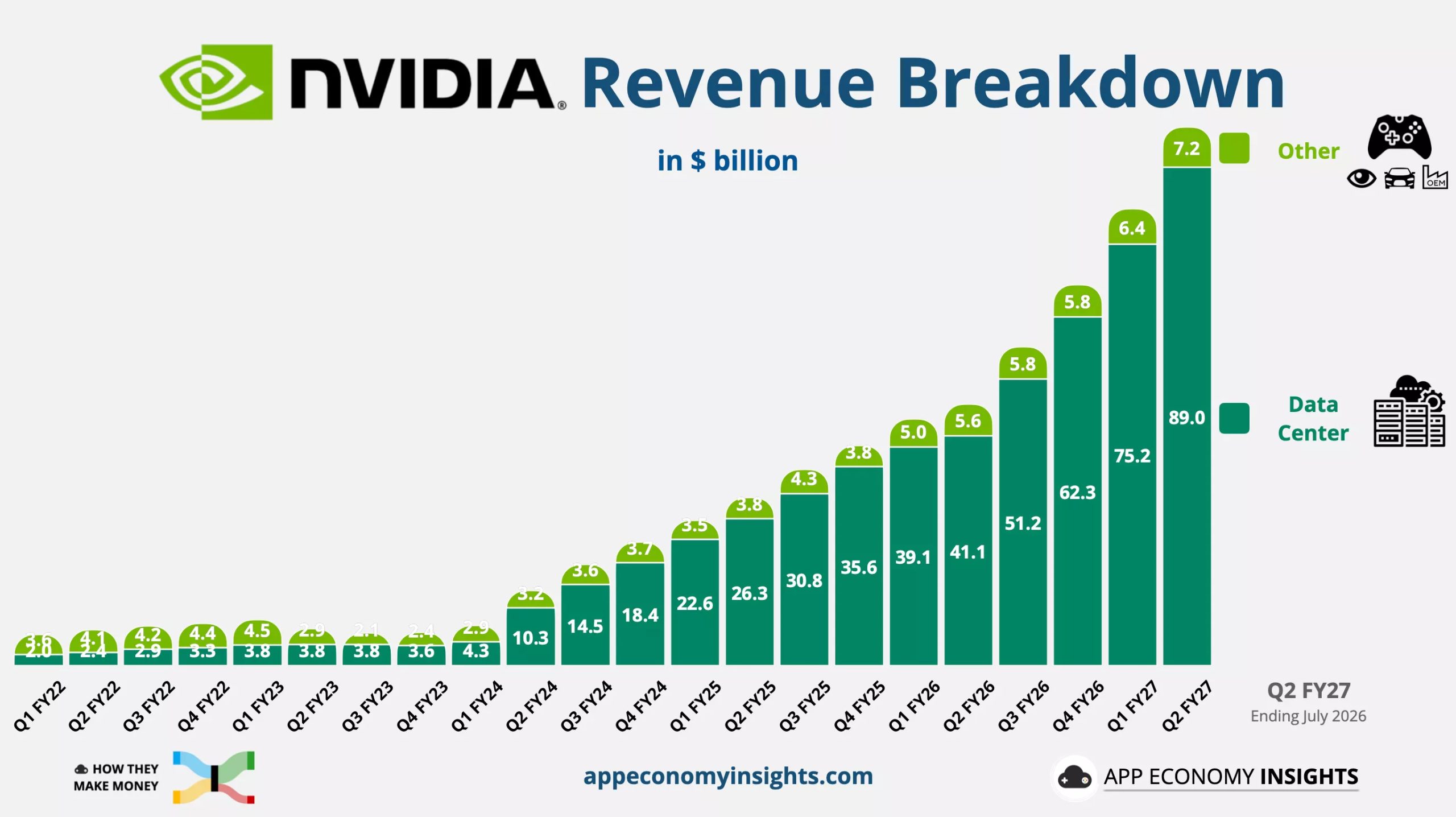
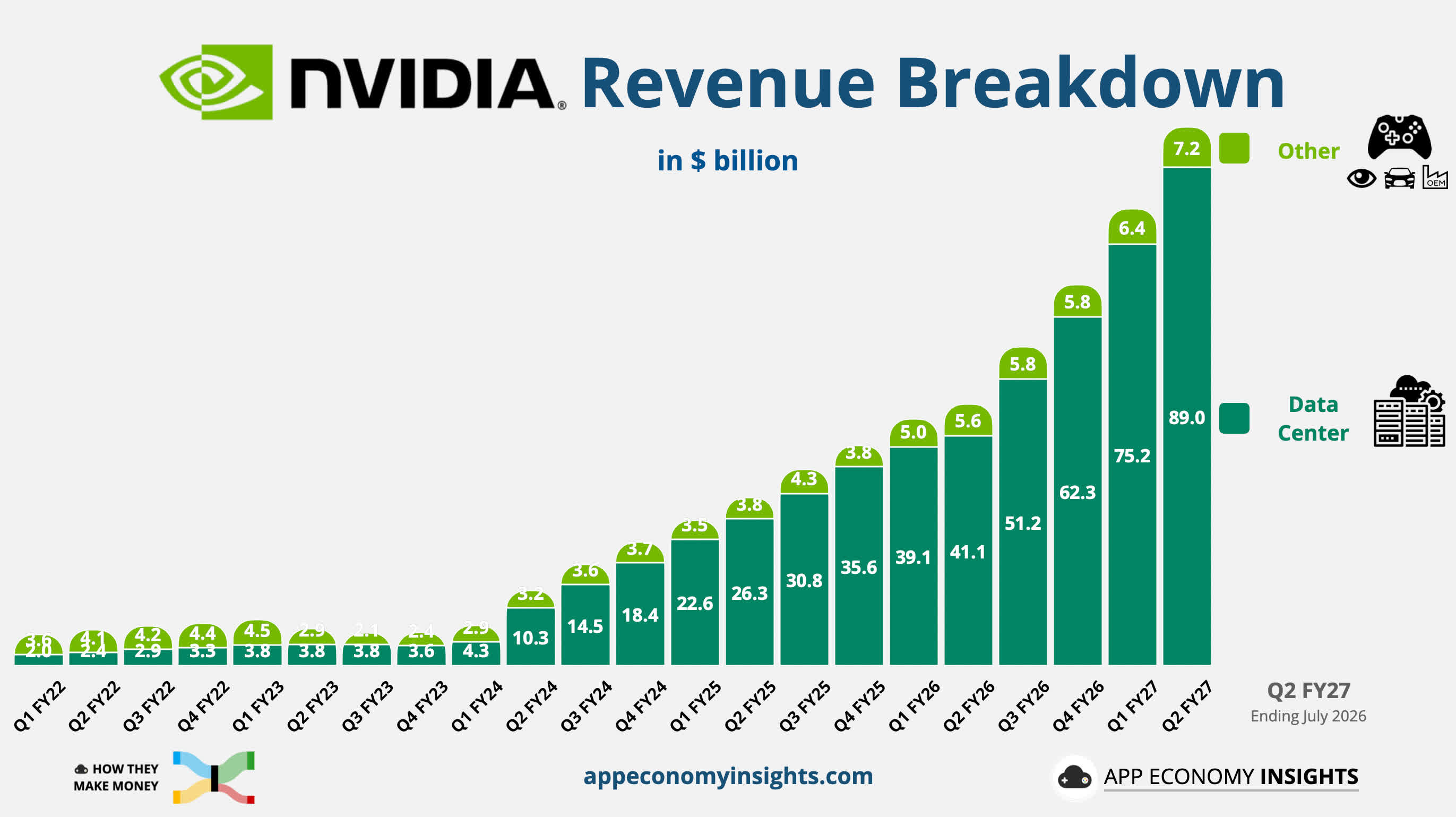
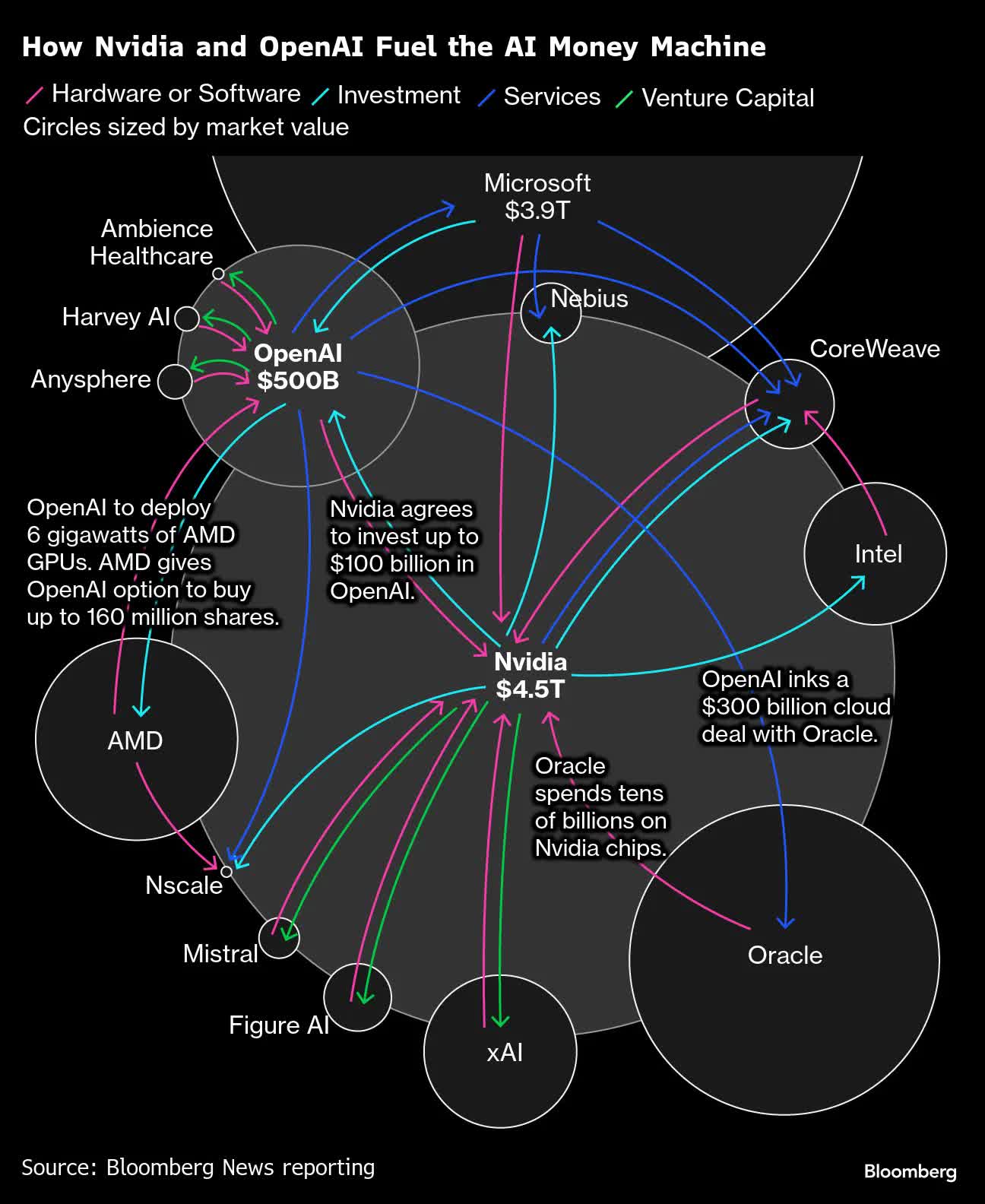

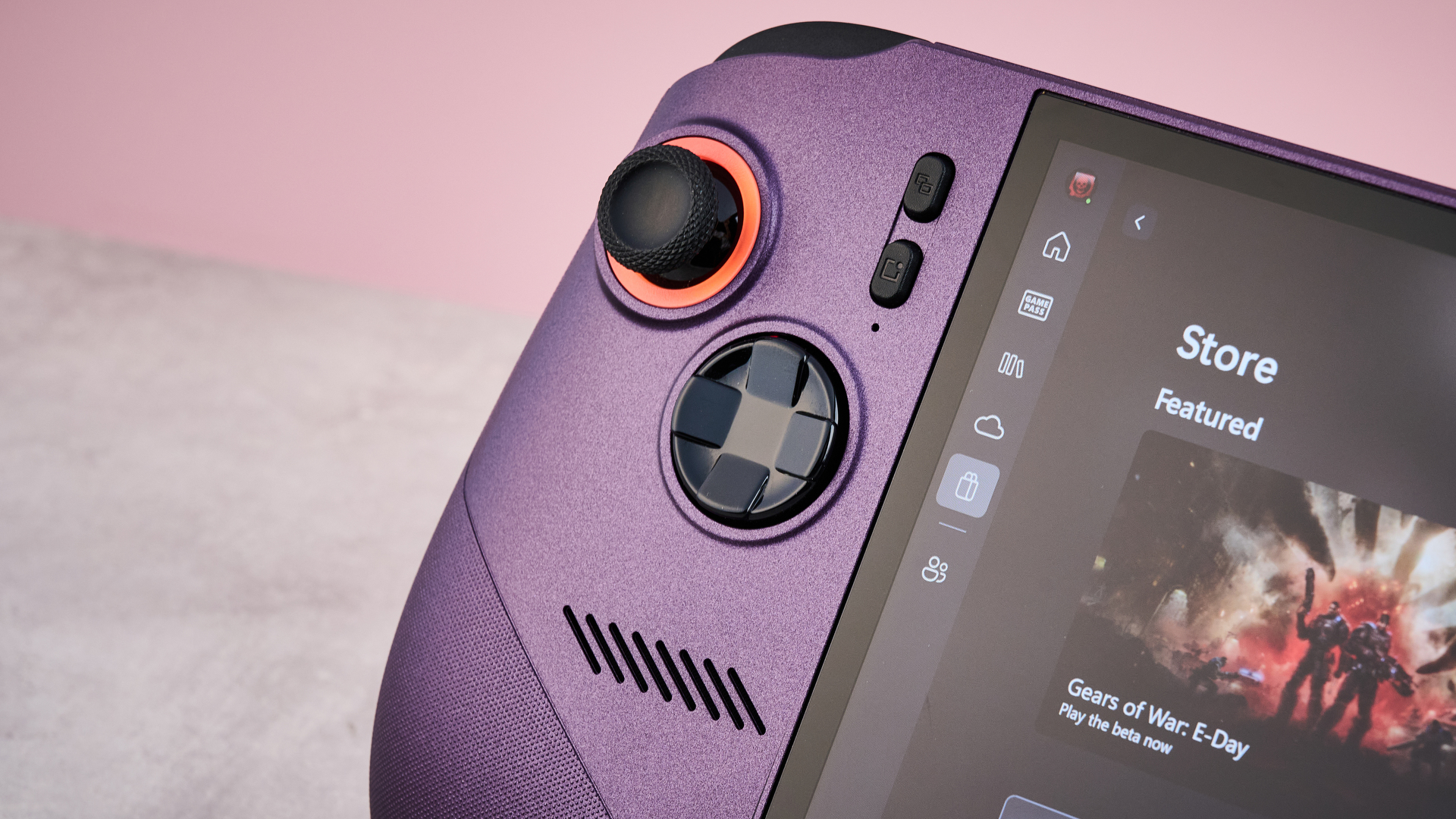





































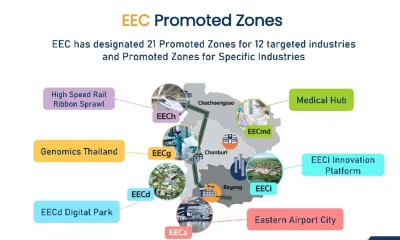











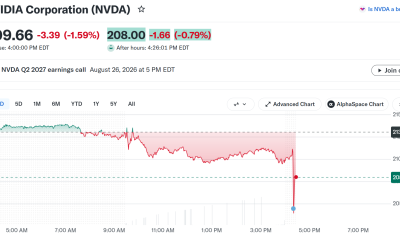

You must be logged in to post a comment Login