
Tech
Best Fan 2026: Prepare for the summer heatwaves

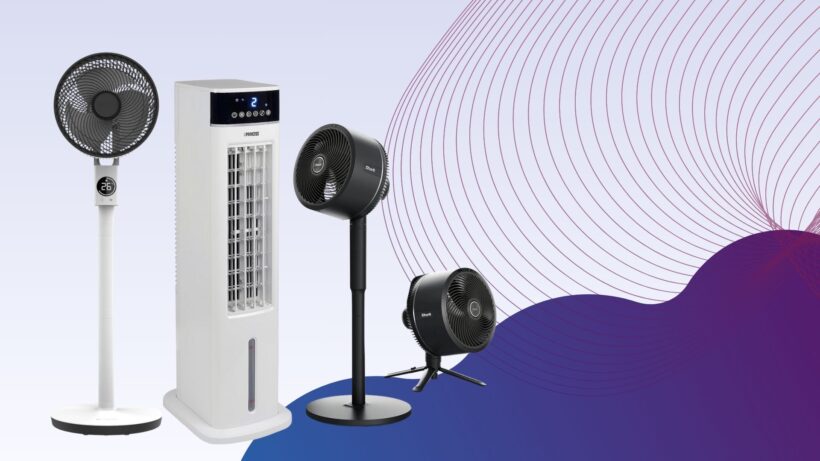

There are few things worse than finding yourself in the middle of a heatwave, cursing the fact that you didn’t buy a competent fan ahead of time, but the fact that you’re reading this list at all means that you’re looking to avoid this situation at all costs, and we’re more than happy to help. After all, there’s so much choice out there that it can be all too easy to buy a fan that doesn’t really get the job done, but our testers have whittled down the very best fans to buy.
Before deciding on which fan to buy, the best bit of advice we can give is that there isn’t really an all-in-one fan that works for every scenario. There are plenty of options that each excel in one or two specific areas, which is why it’s worth having a think about where you’ll most need a fan to be placed.
For example, when talking about the best fan for a bedroom, you’ll want a tall standing fan or tower fan that packs enough power to throw a sizeable gust around the room, ensuring that you stay cool no matter which side of the bed you’re on. Offices tend to get on a lot better with bladeless fans as they’re quieter and safer to have out in the open, whilst anyone working from home will need a small desk fan that doesn’t take up much space.
There’s quite a lot to consider, but the best part is that thanks to the hard work of our tech experts, you don’t have to take a punt on a cheap fan that ends up being a waste of money. With every fan sent to our testing facility, we measure the decibels emitted from them as well as the strength of the airflow at various distances, so you can know right away if a fan fits your intended room.
At this point, we’ve reviewed more fans than we can count but only a handful have made their way into this list, ensuring that no matter which one you go for, you’ll be getting an excellent device in return. For when things get a bit too hot, you can also check out our round-up of the best electric heaters, while the best power stations can keep your fans ticking on even when you’re away from a power outlet.
Best fans at a glance
-
Best fan:
Shark TurboBlade TF200SUK – check price -
Quietest fan:
Duux Whisper Flex 2 – check price -
Best fan for circulation:
MeacoFan Sefte 10 Pedestal Air Circulator – check price -
Best smart desktop fan:
Dyson Cool CF1 – check price -
Best indoor/outdoor fan:
Shark FlexBreeze Portable Fan FA220UK – check price -
Best budget tower fan:
Dr. Prepare 13-inch Dual Oscillating Tower Fan – check price -
Best fan and heater:
Princess Smart Heating and Cooling Tower – check price -
Best fan for flexibility:
MeacoFan 260C Cordless Air Circulator – check price -
Best fan for power:
VonHaus 35" Tower Fan – check price -
Best budget tower fan with natural air flow:
Netta 32-inch Tower Fan – check price -
Best personal evaporative cooler:
Evapolar evaSMART – check price -
Best evaporative cooler:
Princess Smart Air Cooler – check price -
Best desktop fan for power:
Duux Globe – check price -
Best fan and air purifier:
Acerpure Cool AC551-50W – check price -
Best fan for home working:
Duux Rize – check price -
Best portable desk fan:
MeacoFan Sefte 8" Portable Battery Air Circulator – check price -
Best year-round fan:
Shark TurboBlade Cool + Heat TH200UK – check price
SQUIRREL_ANCHOR_LIST
All fans are put through their paces in the same way, so that we can accurately compare the performance of each one. We start by measuring air flow in metres per second (m/s). We measure at 15cm and 1m, to see how performance drops off, and at minimum and maximum fan speeds, to see what the range is. Ideally, a fan should offer a good range of speeds, ranging from a gentle breeze to a full on blast of air.
We also measure how loud fans are, at minimum and maximum speeds. You can find out more in our detailed guide to how we test fans.
Best fan
It’s taken some time but Shark has managed to match Dyson when it comes to putting out a fan that’s not only powerful but great to look at and a conversation piece in its own right. For all this and more, the Shark TurboBlade TF200SUK is easily one of the best fans you can buy right now. While the TurboBlade does have a wonderfully appealing aesthetic, it’s the fan’s malleable frame that harbours its true selling point. The key portion of the fan that delivers airflow can be rotated from its default vertical position to a horizontal one, which makes it brilliantly suited for when you have multiple people sitting on a sofa, all in need of cooling.
The TurboBlade can even oscillate up to 180° which is almost unheard of and just makes the Shark fan better suited than most when it comes to successfully cooling an entire room. For a smaller room however you can always set the oscillation to either 45° or 90° in a pinch.
There are 10 airflow speeds in total so you have a good amount of flexibility over the style of cooling available, although for the moments when a heatwave is in full swing, you can toggle the boost mode to go even further. If you’re coming in from outside and you’re struggling to cool down then this is exactly the type of fan that gets you back to feeling comfortable in almost no time at all.
If you have the TurboBlade set up in your bedroom then you can easily toggle the various modes from the comfort of your covers, all thanks to the included remote control. With the control in hand you can tweak the settings to have a cooling breeze throughout the night, and set a timer to go along with it to help conserve power. Quietest fan
Dutch brand Duux has put out some strong contenders for this very list over the last few years, but none of them can hold a candle to the outstanding Duux Whisper Flex 2. While its name might be a bit of a mouthful, there is one key giveaway that alludes to one of the fan’s best features: it is whisper quiet when in operation. At the lower stages of airflow, you’d have to be fairly close to the fan in order to pick up on any sound at all, and even cranking the intensity all the way up to the maximum, the Flex 2 emits the type of sound that can easily blend into the background after a few minutes, making it ideal for an office environment or a bedroom.
Also working in the Flex 2’s favour is the amount of control you have over the airflow itself. There are 30 levels of speed available, so you can have a slight breeze or a full-on gust, depending on what your needs are. There’s also a ‘Natural Wind’ mode that more closely mimics the feeling of wind touching your skin when you’re outdoors.
On top of the power available here, the Flex 2 also works great in cooling an entire room thanks to both horizontal and vertical oscillation. This is particularly helpful if you have an office where some people are sat down at their desks, whilst others utilise a standing set-up.
You also have no shortage of control options with the Whisper Flex 2, with a responsive touch panel on the device itself, a remote control and an accompanying app which lets you tweak all of the available settings entirely from your smartphone. You can even set schedules for when you would like the fan to switch on, and at what intensity, so the Flex 2 can work around your routine. Best fan for circulation
A fan isn’t just about direct cooling, it’s about shifting stuffy, stale air around and refreshing a room. That’s where the MeacoFan Sefte 10 Pedestal Air Circulator comes in. A completely new design from the company’s previous air circulators, the new model has a new motor, and a refreshed design. Cleverly, the fan comes with two columns that lock into place. You can use none of these columns for desktop mode, or one or two to adjust the height of the fan. It’s a little slow moving between different heights and modes, but the flexibility is appreciated.
The main fan has an on/off button and fan speed selector, but you need the remote for the main features, which include three modes each of vertical and horizontal oscillation, fan speed, a night mode and eco mode (the fan speed is adjusted based on the ambient temperature).
With 12 fan speeds on offer, the MeacoFan Sefte 10 Pedestal Air Circulator can deliver everything from a gentle breeze (2m/sec at 1m) to a full-on intense stream of air (4.2m/s at 1m). Impressively this fan is quiet, moving between 36.9dB on its quietest setting (effectively background noise) and 53.8dB on its highest setting.
If you want the widest range of fan speeds and the best air circulation, this is the fan to buy. Best smart desktop fan
A welcome upgrade to a classic design, the Dyson Cool CF1 Desk Fan is a new version of a classic. While the fan retains the classic desktop design, with the round head and fanless design, there’s an immediate welcome change: physical controls on the front of the fan’s body.
Rather than having to use the remote (although one is still provided), the fan’s controls allow for physical control over fan speed, the sleep timer and oscillation.
This fan is also compatible with the MyDyson app, which gives full remote control (including more granular sleep controls) – it’s a welcome addition.
The Dyson Cool CF1 Desk Fan is a brilliant desktop fan, with air speeds varying between a very gentle breeze to a 2.5m/s gust of fresh, stable air. It’s also a quiet fan, ranging from 37dB on its lowest setting (background noise) up to 59.5dB on its highest setting. There are cheaper fans, but the quality of the airflow, the range of speeds and silent operation make this the best if you’ve got the money for it.
Best indoor/outdoor fan
If you’re looking for a versatile cooling fan that can be used in a variety of different ways and boasts genuinely useful extras then the Shark FlexBreeze Portable Fan (FA220UK) is one for you.
The FA220UK can be set up as both a pedestal or desktop fan, providing either a whole-room or a personal cooling. To enable desktop mode, simply lift out the fan head and place it wherever you need.
This adjustable fan head is also useful as it allows you to angle and direct the airflow, regardless of what mode it’s in.
Not only that but the fan has been designed for both indoor and outdoor use, and even includes a misting attachment which gently sprays you with a cooling mist of air when you’re outdoors. For even more convenience, the FA220UK works either when connected to mains, or solely on battery power, with an LCD battery indicator showing you when it’s time to recharge. We found that, perhaps unsurprisingly, battery life varies depending on how you use the fan, surviving up to 24-hours on the lowest fan speed and just two hours when set to the maximum.
Controlling the fan is simple and, naturally, there are a couple of ways to do this. Either use the buttons on top of the device or the included remote control which usefully sticks magnetically to the back of the fan itself.
There are five fan speeds to choose from, ranging from a gentle breeze to what our reviewer described as a “full-on wind tunnel”. On its lowest setting, we measured airflow at 1.1 metres per second when 15cm away and found the fan reached just 32.1dB of noise.
With the maximum setting enabled, we measured the airflow at 4.6 metres per second with sound peaking to 50dB which, although noticeable, is certainly not loud enough to distract or disturb. If you’re looking for a truly versatile fan that can be used in numerous ways, has multiple speed levels and boasts extra features then we’d seriously recommend the Shark FlexBreeze Portable Fan FA220UK.
Best budget tower fan
The Dr. Prepare 13-inch Dual Oscillating Tower Fan is a relatively small tower fan that’s as at home on a desk as it is on the floor. Rather than having one set of fan blades, this model has two that work together. The result is more powerful airflow than you might expect from such a model.
Measured on its highest setting, we detected air flor at 1.7m/s at 1m away. At this kind of power, this fan can cool more than one person. Impressively, the fan is also quiet: just 48.5dB from 1m away, and 40.8dB on its minimum speed: that’s barely a whisper. Our only complaint is that the fan makes a slightly waspy noise in operation.
Controls are simple on this device: three power settings and three timers (two, four or eight hours). There’s no remote control or oscillation; if you want those features, look elsewhere on the list. If you want a cheap, small, tower fan, this is a great choice.
Best fan and heater
The Princess Smart Heating and Cooling Tower is a powerful fan and heater that can be used year-round, has an accompanying smartphone app and is compatible with Alexa and Google Assistant.
Although the Tower itself is tall, it doesn’t take up as much floor space as the Dyson Purifier Hot+Cool Formaldehyde, making it much better suited for small and mid-sized rooms. Controlling the Tower is easy with either the included remote control or the Climate smartphone app. While both allow you to adjust the fan speed, switch between cooling and heating modes and set timers in one-hour increments, the app also lets you to set schedules and routines with Alexa and Google Assistant.
Overall we found the Tower to be impressively powerful across both heating and cooling abilities, although it does have the edge when in Heat mode. In fact when Heat mode was enabled we found that airflow from 15cm away was 40°C in both the highest and even the lowest setting.
With cooling (fan) mode, we measured air speed at 3.08m/s at its maximum setting which then fell to 1.31m/s at 1m which, although are decent scores, are trumped by more powerful fans such as the VonHaus 35″ Tower Fan. Best fan for flexibility
If you need a fan where cables won’t reach, say to a garden on a hot day or in a tent when you go camping, the MeacoFan 260C Cordless Air Circulator is the model for you. Thanks to its integrated battery, charged via USB, you can run this model for up to 14 hours without having to go anywhere near a power socket.
We’ve seen small, portable models before, and they’ve usually been a bit rubbish. Not so with the MeacoFan 260C Cordless Air Circulator, which has a lot of power, reaching a maximum air speed of 2.3m/s from 15cm away. That’s enough air to give you a cooling dose of air. There are four fan speeds in total, with the lowest running at 49.7dB, or quiet enough to sleep through. As this is a portable model, you lose out on some features that bigger models have: you don’t get a remote, there are only four fan speeds and there’s no oscillation. If you need any of these options, look elsewhere, but if you want a flexible fan you can take everywhere this is the best model that we’ve reviewed.
Best fan for power
Tower fans are a great space saver but they often sacrifice power to get a slimmer body. Not so with the VonHaus 35″ Tower Fan, which manages to deliver some of the best fan performance that we’ve seen, both up close and across a room.
At full power, the fan delivered air speed at 4.8m/s, which only dropped at 2.8m/s at one metre and an effective 1.6m/s at two metres. That’s enough air speed to keep you cool at a distance, making the VonHaus 35″ Tower Fan a suitable fan to cool an entire room. Our one minor complaint about fan speed is that the lowest setting is still a relatively powerful 4m/s at 1m – we’d have liked a slightly lower minimum speed.
High fan speeds often come with noise, but that’s a trap that the VonHaus 35″ Tower Fan avoids. At 53.9dB on maximum, this fan is pretty quiet for the fan speed; however, at minimum, the fan is still 53.1dB, which is a little loud for sleeping with.
There is a remote control and a display that shows you what the current temperature and fan setting is. This display is a little hard to read, but we can forgive this minor issue, given how good the fan is. Even better, the VonHaus 35″ Tower Fan is one of the cheapest fans that we’ve tested, too. If you’re after a powerful tower fan at a great price, look no further. Best budget tower fan with natural air flow
At just under £40, the Netta 32-inch Tower Fan is a little cheaper than many other products on this list, yet it’s packed with features. As well as three regular speed settings, there are two types of airflow: natural wind mode varies fan speed to make it feel more natural; wind mode uses one fan speed. Alongside these controls, there’s a timer (one, two or four hours) and oscillation mode (65° angle). If you don’t want to walk to the fan, then there’s also a remote control that attaches magnetically when not in use.
We found this a good fan for small- to medium-sized rooms. On its high setting, the fan reached an airspeed of 3.2m/s at a distance of 15cm. That’s good but there are more powerful fans that are better suited to larger rooms. At this speed, we found that the fan wobbled slightly, too. At 1m distance, the fan speed was still a decent 2.2m/s, providing a noticeable cool airflow. We were impressed with how quiet this fan was: at 15cm, we measured it at 66.2dB, and at 1m, it was just 50.3dB.
If you want a well-priced fan for a medium-sized room, then this one is a good choice.
Best personal evaporative cooler
We’ve been impressed with Evapolar’s previous personal evaporative coolers, and the Evapolar evaSMART is the best yet. It’s a little expensive compared to other evaporative coolers, but its smart features and envelope of cold air make it well worth the cash.
This model uses a water tank, which lasts for between four and nine hours, depending on the temperature and humidity level. In either case, it’s enough water to get you through most of a hot night. Unlike a fan, which can’t affect the actual temperature, the evaSMART can reduce the temperature of the air it blows at you: we measured a 3C drop. This is a small amount, but the cooling envelope of air around us made us feel much cooler than if we’d just used a fan.
Air flow isn’t particularly fast. At full speed, just 15cm from the grille, we measured air at 1.9m/s, but the wind speed was unmeasurable by 1m. As this is a personal fan that physically cools the air, the evaSMART doesn’t need to blow air any faster. In fact, at times it felt too cold sitting in front of this cooler.
Although you can control the fan from its on-body controls, there’s also a smart app for remote control (including changing the colour of the light), plus Amazon Alexa and Google Assistant Skills.
It’s a touch on the expensive side, but if you want a small cooler that can keep you comfortable while you work or sleep, this one is very effective. Best evaporative cooler
Sitting somewhere between an air conditioning unit and a fan, the Princess Smart Air Cooler uses a tank of water to cool the air through evaporation. This makes it more effective than just a fan on a hot summer’s day, although this model is also a powerful fan in its own right. Externally, this looks like a regular fan, although there’s a difference when you look at the base: this holds a 3.5-litre water tank, which can also hold the two provided ice packs (these go in your freezer and cool the water in the fan).
A small pump sucks up water and trickles it down a membrane inside. As the fan blows air over the water, it evaporates, cooling the air. We measured a drop in air temperature blown of 2°C, which isn’t as powerful an effect as with an air conditioner, but is an improvement over a fan.
Plus, the Princess Smart Air Cooler costs a lot less to run than an air conditioner. We measured power and this air conditioner will cost around 2p per hour to run at current costs.
The Princess Smart Air Cooler is a powerful fan, too. At 1m away, the fan is capable of blowing air at between 2.5m/s and 4.1m/s, so you can feel its full effect even in a larger room. We didn’t find this fan noisy, but it does have a slightly annoying whine to it. We found the Princess Smart Air Cooler easy to control, with all of the options you need on the front panel and the remote. Plus, this is a smart fan, so you can control it via the decent app, which also provides voice control via Amazon Alexa and Google Assistant.
If you’re looking for a powerful fan that will blow colder-than-room-temperature air and doesn’t cost a fortune to run, this is a great choice.
Best desktop fan for power
If you’re looking for a compact table fan that’s easy to use and powerful, yet quiet enough so that it shouldn’t disturb you, then the Duux Globe is a fantastic choice.
While the Globe does lack some of the smart features found in its pricier counterparts, it sports everything you need to keep cool and comfortable at home. With a curved fan head that rests on a neat conical base, the Globe can sit atop desks and most surfaces without taking up much space.
Although we deemed its touch-sensitive controls basic, with only three speeds to choose from and a timer that only counts down from just one or three hours, the included remote control does cover more features, including adjusting the swing. Overall we were left impressed by the Globe’s airflow and measured its windspeed at 2m/s from 15cm away at its lowest setting, which fell to a gentle 1.1m/s when measured from a metre’s distance.
At full power however, the Globe propelled air at up to a whopping 4.6m/s from 15cm away. At this speed, the Globe sounded at 65dB, making it a reasonably quiet fan for the level of power provided. In fact, we found that when out of the air flow, the figures fell to 35.9dB, making it a seriously quiet fan with the level of power included.
Even with such power, the Globe is extremely efficient and consumes just 6W of energy when set to full speed.
Best fan and air purifier
The Acerpure Cool AC551-50W is a mighty two-in-one appliance that works as both a fan and an air purifier.
Its appearance might appear somewhat clunky, with a small fan on top of a fairly big purifier but this is actually a thoughtful design that enables the fan to oscillate horizontally and vertically. While this version doesn’t have a germicidal UV-C lamp like the AC553-50W alternative, it still sports a four-stage filter with PM2.5, PM1 and volatile organic compound (VOC) sensors. At this price, these filters are seriously impressive.
Controlling both the fan and purifier is via touch-sensitive controls and display on the device, which enables you to configure different speeds for both. While the fan can be turned off independently, there isn’t an option to switch the air filter off which means it’s always running unless you turn the whole device off.
You can also connect the air purifier to the Acerpure app via a shared Wi-Fi network, however we must say this proved to be a seriously underwhelming and frustrating process. Not only was it tricky to set up but the app was slow to reflect air quality readings from the purifier’s onboard sensors. Hopefully an update will fix this in the future.
Otherwise, we were seriously impressed with the purifier’s performance. During our testing we found the Acerpure Cool managed to bring the PM2.5 sensor down from the maximum 999 level within just four minutes. After eight minutes, the room air was deemed “moderate” and, finally, after 13 minutes the room was almost free of particulates. If you don’t want to splurge on a standalone fan, then the Acerpure Cool AC551-50W is a brilliant option as its built-in purifier can be used year-round. While we had difficulties with the app, the purifier improved a room’s air quality within 15 minutes while the fan’s 10 speed settings offered versatility.
Best fan for home working
If you regularly move between working from home and working in an office, and you just want a reliable desk fan that can be easily transported between those two locations then the Duux Rize is one of the best picks out there. With a built-in battery that’s rechargeable via USB-C, this is one of those rare fans that can truly operate anywhere.
You don’t have to worry about it running out of power either as it can last for up to 15-hours on a single charge, which is more than enough to get you through the working day. Even though it’s small enough to fit within a tote bag, you can lengthen the stem and tilt the fan upwards, giving you more range of airflow that works well if you have a standing desk.
Of course, regardless of any extra capabilities, every desk fan needs to bring the power where it counts and thankfully the Duux Rize is no slacker when it comes to keeping you cool. There are four stages of airflow but even at the lowest setting, you’ll still be getting a wonderfully cooling breeze that covers a good amount of space.
When cranking the power all the way up to its maximum setting, we were able to pick up on a powerful 3.1m/s air flow from 15cm away, which can bring your temperature down in next to no time. It’s also surprisingly quiet too, so you won’t run the risk of annoying your coworkers whilst the Duux Rize is on. As a final point, there is an on/off oscillation mode available on the Duux Rize which, when paired with the added height available via the stem, can allow the device to take on the persona of a room fan when needed. Alternatively, this means that you can help to spread the airflow across two desks rather than just one.
Best portable desk fan
While the Duux Rize is arguably the best portable fan on this list, the MeacoFan Sefte 8″ Portable Battery Air Circulator is a great alternative that trades some portability in favour of more powerful airflow and a few extra settings. You won’t be fitting MeacoFan’s device into a tote bag anytime soon, but we think the trade-off is well worth it.
Even just to look at the MeacoFan Sefte 8”, you can tell that this is a desk fan that means business. It has no less than 12 airflow settings, so you have a wide range of options to suit a light breeze or a full-on gust depending on how hot the room is. One feature we absolutely loved, and would appreciate more manufacturers adopting, is the Eco mode which automatically sets the airflow based on the room’s temperature.
Although being a larger desk fan, the Sefte 8” still boasts a stylish design that uses a wonderful two-tone aesthetic to stand out. You can even angle the fan upwards to offer a reprieve from the heat if you’re at a standing desk.
In spite of its many features, what arguably impressed us the most was MeacoFan’s consumer-friendly practices. For starters, the battery on the Sefte 8” is fully replaceable so there’s no need to upgrade to an entirely different fan once the battery starts to go, and there’s a three-year warranty included as standard. There’s even a remote that magnetically attaches to the centre of the fan itself when not in use. With the remote in tow, you can change the airflow levels, activate oscillation and more. If you do misplace the remote however then the built-in control panel on the base of the Sefte 8” can also do the job.
Best year-round fan
As much as we love the Shark TurboBlade TF200UK, there’s no denying that when the winter months start to rear their head, much like with any fan, it goes largely unused or simply put away until the following year. Thankfully, the Shark TurboBlade Cool + Heat TH200UK solves this problem by providing a device that can be used all year round, regardless of the temperature.
Aside from looking a lot cooler than your average fan, the blade system works really well for directing airflow to where you need it to be. Just rotate the fan to your liking and you’ll enjoy a cooling gust right away. In fact, when using the fan at full power, we were impressed to see 1.9m/s of airflow from a distance of one metre, and when you factor oscillation into the mix, this fan works well for cooling a bedroom or living room.
Of course, during the colder months of the year, you can just swap over to the heat mode and feel the chill slip away as you settle in and relax. If you live in a flat or house without heaps of storage then having an all-in-one device like this can be a big win, and it’ll save you from having to pick up a fan and a heater separately.
One handy feature where energy consumption is concerned is the built-in thermostat which helps to regulate the temperature between 16°C and 32°C. This is especially helpful when using the heating element as you won’t need to have it switched on constantly as it’ll trigger when it’s needed. For anyone looking to keep better tabs on their energy consumption, this is a big win. There’s no app to use with this device, although that might be preferable to some who don’t want yet another smart home app installed on their phone. Instead, the TH200UK has a remote control included which makes thing easy, giving you quick access to the various modes and airflow speeds onboard. While the TH200UK is definitely a bit pricier than most options on this list, its year-round versatility is hard to match which is why it’s a solid investment.
Learn more about how we test fans

Shark TurboBlade TF200SUK
Pros
Cons

Duux Whisper Flex 2
Pros
Cons

MeacoFan Sefte 10 Pedestal Air Circulator
Pros
Cons

Dyson Cool CF1
Pros
Cons

Shark FlexBreeze Portable Fan FA220UK
Pros
Cons

Dr. Prepare 13-inch Dual Oscillating Tower Fan
Pros
Cons

Princess Smart Heating and Cooling Tower
Pros
Cons

MeacoFan 260C Cordless Air Circulator
Pros
Cons

VonHaus 35" Tower Fan
Pros
Cons

Netta 32-inch Tower Fan
Pros
Cons

Evapolar evaSMART
Pros
Cons

Princess Smart Air Cooler
Pros
Cons

Duux Globe
Pros
Cons

Acerpure Cool AC551-50W
Pros
Cons

Duux Rize
Pros
Cons

MeacoFan Sefte 8" Portable Battery Air Circulator
Pros
Cons

Shark TurboBlade Cool + Heat TH200UK
Pros
Cons

Shark TurboBlade TF200SUK
Pros
Highly adjustable
Very powerful
Quiet
Cons
Basic LED read-out
Relies on remote control 
Duux Whisper Flex 2
Pros
Supremely powerful airflow
Plenty of oscillation options
Very quiet at the lower levels
Absolutely no shortage of smart features
Cons
Battery pack is sold separately
The remote control can sometimes be fiddly 
MeacoFan Sefte 10 Pedestal Air Circulator
Pros
Very powerful
Lots of fan speeds
Very quiet
Vertical and horizontal oscillation
Cons
Fiddly to convert between desktop and pedestal modes 
Dyson Cool CF1
Pros
One of the best looking desk fans you can buy
Easy to use controls
Brilliantly silent oscillation
Cons
Not the best buy for those on a budget
Airflow is a bit more spread out than most desk fans 
Shark FlexBreeze Portable Fan FA220UK
Pros
Pedestal or desktop modes
Integrated battery
Very quiet
Mister helps cool you down
Cons
Hard-to-read LCD
Basic fan speed control 
Dr. Prepare 13-inch Dual Oscillating Tower Fan
Pros
Compact
Powerful air flow
Excellent value
Cons
Slightly waspy noise 
Princess Smart Heating and Cooling Tower
Pros
Powerful heating and cooling
Useful smart app and voice control
Doesn't take up much space
Cons
Doesn't display fan mode on LCD
Could do with a lower fan speed
For a device that can be used all year round, the Princess Smart Heating and Cooling Tower is a versatile choice. Although the Dyson Purifier Hot+Cool Formaldehyde can heat, cool and even act as an air purifier, the Princess Smart Heating and Cooling Tower is a much more budget-friendly option.

MeacoFan 260C Cordless Air Circulator
Pros
Light and small
Long-lasting internal battery
Powerful air movement
Cons
No oscillation 
VonHaus 35" Tower Fan
Pros
Powerful air circulation
Reasonably quiet performance
Ioniser, three wind modes, and a remote
Comparatively narrow base
Two-year warranty (with registration)
Cons
Could do with a lower fan speed 
Netta 32-inch Tower Fan
Pros
Good value
Lots of control options
Remote control
Cons
Not ideal for larger rooms 
Evapolar evaSMART
Pros
Super-quiet
Effective cooling
Useful smart features
Cons
Expensive
No temperature-based smart actions 
Princess Smart Air Cooler
Pros
Powerful fan
Subtly effective cooling
Smart features including scheduling and voice control
Cons
No temperature or other sensors
No dedicated remote control
Not as effective as aircon 
Duux Globe
Pros
Quiet and powerful
Horizontal and vertical oscillation
Low power consumption
Cons
On-fan controls are confusing
Only three speeds 
Acerpure Cool AC551-50W
Pros
Powerful fan
Excellent air purifier
PM2.5, PM1 and volatile gas sensors
Cons
Unreliable app 
Duux Rize
Pros
Super long battery life
Extendable stem
Decent power
Cons
No timer function
No smart features 
MeacoFan Sefte 8" Portable Battery Air Circulator
Pros
One of the quietest desk fans around
Slick design
Replaceable battery
Magnetic holster for the remote
Cons
Not the most portable desk fan
No USB-C charging 
Shark TurboBlade Cool + Heat TH200UK
Pros
Powerful fan
Hugely flexible design
Smart remote control
Powerful heating
Cons
Can't turn lights off
Can't switch mode using the remote
FAQs
A fan can’t change a room’s temperature; it merely circulates air. However, the breeze from a fan on your body aids sweat evaporation, which makes you cooler. In humid environments, fans don’t work so well, as less sweat evaporates.
For this reason, you may want to think about buying a dehumidifier, too, which will improve a fan’s performance and make your room feel more comfortable. The increased air circulation can also stop a room from feeling stuffy.
To actually cool a room you need something that can lower the air temperature. Air conditioning is the main option in this instance, but a second option is to use an evaporative cooler. These feature a tank of water, which slowly evaporates to help cool the air, and work best in dry, hot climates.
Fans make you feel cooler by helping sweat evaporate from your body. How effective a fan is, depends largely on how humid it is. When there’s high humidity, it’s hard for sweat to evaporate, so a fan doesn’t do much to help cool you. This is why on humid days we tend to think of them as being hot and sweaty. Conversely, when humidity is lower, it’s much easier for evaporation to happen, which is when fans feel the most effective.
You can use this knowledge to your advantage and purchase a dehumidifier for those sweltering days. With a dehumidifier sucking moisture out of the air, the effectiveness of fans goes up. A dehumidifier will also make an evaporative cooler more effective, too.
Air conditioning units can also operate as dehumidifiers. So, if you have a portable unit but find it too loud to sleep with, you can run it before you go to bed in dehumidifier or cooling mode, and then switch to a fan at night. That way, you get the best of both worlds: a cool and less humid environment to go to sleep in with a fan to keep you cool during the night
Desktop fans are the traditional models. These let you tilt the fan to direct airflow; you turn on the oscillation mode to let the fan sweep from side to side.
Pedestal fans look like tall desktop fans, and are designed to stand on the floor. Typically, they have larger blades, so take up more room, but this makes them more powerful. With most models offering height adjustment, in addition to pivot and oscillation, pedestal fans are easier to configure for the perfect cooling breeze.
Tower fans take up very little floor space and blow air out of a tall column. For the reduction in size you do sacrifice some power, and you don’t get height or pivot adjustments either – just oscillation. As a result, you may need to use a tower fan closer to you, but they’re a great choice where space is at a premium.
Noise is important, particularly if you want to sleep with a fan turned on. We’ve measured every fan’s sound levels at both maximum and minimum to help you decide.
A fan with a remote control can be a good option if you want to adjust settings on the fly. This is particularly true in the bedroom, where you may not want to get out of bed to turn off your fan. On that note, look for a fan with a sleep timer so that it will shut off after a set time.
More advanced options on high-end fans include air filters to help clean the air, or heating elements so that you can keep warm in the winter.
Evaporative coolers use a tank of water and a pump. As water evaporates it cools the air, letting these fans blow out air that’s colder than the ambient temperature: think of how it feels if you spray yourself with water on a hot day. The good thing about evaporative coolers is that they’re cheaper to run than an air conditioner and work with windows open. The downside is that they don’t work very well where it’s humid and water can’t evaporate.
Performance also differs depending on the level of humidity: evaporative coolers work best in very dry environments where the effect of evaporation is to also increase humidity for a more comfortable environment. Fortunately, UK summers tend to be hot but not that humid, so evaporative coolers work fairly well. However, they don’t reduce the temperature of a room as air conditioning will and work best when you’re in the cooling line of the fan.
Air purifiers are a good way to boost the internal comfort of your home. They’re designed to filter out impurities in the air, including pollutants, allergens, dust and, in some cases, gasses. By filtering these out of your air, you get cleaner, purer air inside your home, which is beneficial to all but particularly those with respiratory problems or allergies.
While you can buy standalone air purifiers, it means that you end up with multiple boxes around your home. Having an air purifier built into a fan gives you a dual-purpose design. The main thing to watch out for is whether or not there’s a diffuse mode, where air can be directed out the back of the fan: that way, you can use the purification features in the colder months, without getting a blast of cold air.
Smart features don’t change what a fan is capable of, but they do let you control them automatically via an app and, possibly, via voice using Amazon Alexa or Google Home. The benefit, for most people, is one of laziness, as you can control your fan without having to stand up and move. However, some models let you do some clever things. For example, with Dyson smart fans, you can programme automatic routines, such as automatically turning the fan off when a motion sensor detects that nobody is in the room, helping save energy. The downside of smart fans is that they’re typically more expensive. A cheap workaround is to use an old fan with physical controls connected to a smart plug: this won’t let you choose the fan speed but will let you turn the fan on and off remotely.
All fans can adjust the amount of air that comes out of them by adjusting how fast their blades spin: the slower they go, the lower the air flow. Having control over the air flow is very important for different situations, and where you sit. So, as our tests show, the slower the fan speed, the less the impact is at distance, so if you sit further from the fan or want to cool more people, you need a higher fan speed. Conversely, if you’re sitting at a desk and just want to cool yourself, then you can get by with a lower fan speed, which will also mean that you don’t blow papers around on your desk.
There’s also a difference in noise at different fan speeds, with lower fan speeds quieter, and faster louder. This is important at night, where you may want a slower, more gentle and quieter fan speed, rather than roar of full cooling power.
Generally speaking, the more fan speeds a fan has, the greater the difference between minimum and maximum power, giving you a greater range of options for cooling. Some fans, on the other hand, have few cooling speeds, so you get little difference between full power and low power.
Test Data
| Shark TurboBlade TF200SUK | Duux Whisper Flex 2 | MeacoFan Sefte 10 Pedestal Air Circulator | Dyson Cool CF1 | Shark FlexBreeze Portable Fan FA220UK | Dr. Prepare 13-inch Dual Oscillating Tower Fan | Princess Smart Heating and Cooling Tower | MeacoFan 260C Cordless Air Circulator | VonHaus 35" Tower Fan | Netta 32-inch Tower Fan | Evapolar evaSMART | Princess Smart Air Cooler | Duux Globe | Acerpure Cool AC551-50W | Duux Rize | MeacoFan Sefte 8" Portable Battery Air Circulator | Shark TurboBlade Cool + Heat TH200UK | |
|---|---|---|---|---|---|---|---|---|---|---|---|---|---|---|---|---|---|
| Sound (low) | 38.5 dB | – | 36.9 dB | 37.0 dB | 32.1 dB | 40.8 dB | 48.5 dB | 40.8 dB | 31.5 dB | 43 dB | 31 dB | 59.7 dB | 37.5 dB | – | 38.7 dB | 34.8 dB | 38.5 dB |
| Sound (medium) | 42.9 dB | – | 41 dB | 46.5 dB | 38.1 dB | 45.5 dB | – | – | – | 46.5 dB | 47.5 dB | 67.7 dB | – | – | 51.7 dB | 43.5 dB | 42.9 dB |
| Sound (high) | 55.2 dB | – | 53.8 dB | 59.5 dB | 50 dB | 48.5 dB | 60.1 dB | 59.5 dB | 53.1 dB | 50.3 dB | 47.5 dB | 62.1 dB | 63 dB | – | 62.2 dB | 54.0 dB | 54.5 dB |
| Time to clear smoke | – | – | – | – | – | – | – | – | – | – | – | – | – | 600 sec | – | – | – |
| Air speed 15cm (low) | 1.07 m/s | 1.4 m/s | 2.48 m/s | 0.0 m/s | 1.1 m/s | 2 m/s | 1.31 m/s | 1.6 m/s | 4 m/s | 2.6 m/s | – | 5.2 m/s | 2 m/s | – | 1.4 m/s | 0.0 m/s | 1.2 m/s |
| Air speed 15cm (medium) | 2.42 m/s | 2.6 m/s | 3.84 m/s | 2.2 m/s | 3.2 m/s | 2.5 m/s | – | – | – | 2.9 m/s | – | 6.6 m/s | – | – | 2.0 m/s | 2.0 m/s | 2.4 m/s |
| Air speed 15cm (high) | 5.5 m/s | 3.7 m/s | 5.7 m/s | 2.5 m/s | 4.6 m/s | 2.8 m/s | 3.08 m/s | 2.3 m/s | 4.8 m/s | 3.2 m/s | 1.9 m/s | 7.7 m/s | 4.6 m/s | – | 3.1 m/s | 3.1 m/s | 3.7 m/s |
| Air speed 1m (low) | 0 m/s | 1.0 m/s | 2 m/s | 0.0 m/s | 0.8 m/s | 1.1 m/s | – | 0 m/s | 2.2 m/s | 1.7 m/s | – | 2.5 m/s | 1.1 m/s | – | 0.0 m/s | 0.0 m/s | – |
| Air speed 1m (medium) | 1.14 | 2.2 | 3 | 1.0 | 2.4 | 1.5 | – | – | – | 1.9 | – | 3.2 | – | – | 1.0 | 1.8 | 1.1 |
| Air speed 1m (high) | 2.27 m/s | 3.0 m/s | 4.2 m/s | 2.0 m/s | 3.6 m/s | 1.7 m/s | 1.31 m/s | 1.2 m/s | 2.8 m/s | 2.2 m/s | – | 4.1 m/s | -0.4 m/s | – | 2.0 m/s | 2.6 m/s | 1.9 m/s |
| Air volume 1m (low) | – | 31.9 m³/h | – | – | – | – | 0.4 m³/h | – | – | – | – | – | – | – | – | – | – |
| Air volume 1m (high) | – | 52.8 m³/h | – | – | – | – | – | – | – | – | – | – | – | – | – | – | – |
Full Specs
| Shark TurboBlade TF200SUK Review | Duux Whisper Flex 2 Review | MeacoFan Sefte 10 Pedestal Air Circulator Review | Dyson Cool CF1 Review | Shark FlexBreeze Portable Fan FA220UK Review | Dr. Prepare 13-inch Dual Oscillating Tower Fan Review | Princess Smart Heating and Cooling Tower Review | MeacoFan 260C Cordless Air Circulator Review | VonHaus 35" Tower Fan Review | Netta 32-inch Tower Fan Review | Evapolar evaSMART Review | Princess Smart Air Cooler Review | Duux Globe Review | Acerpure Cool AC551-50W Review | Duux Rize Review | MeacoFan Sefte 8" Portable Battery Air Circulator Review | Shark TurboBlade Cool + Heat TH200UK Review | |
|---|---|---|---|---|---|---|---|---|---|---|---|---|---|---|---|---|---|
| UK RRP | – | £177.99 | £179.99 | £248.99 | £199.99 | £42.99 | £199.99 | £29.99 | £40 | £59.99 | £239 | £129.84 | £69.99 | £111 | £79.99 | £79.99 | – |
| USA RRP | – | – | – | $1 | $199.99 | – | – | – | – | – | $229 | Unavailable | Unavailable | Unavailable | – | – | – |
| EU RRP | – | €159.99 | – | – | – | – | – | – | – | – | €238 | Unavailable | €83.99 | Unavailable | €69.99 | – | – |
| CA RRP | – | – | – | – | – | – | – | – | – | – | Unavailable | Unavailable | Unavailable | Unavailable | – | – | – |
| AUD RRP | – | – | – | – | – | – | – | – | – | – | Unavailable | Unavailable | Unavailable | Unavailable | – | – | – |
| Manufacturer | Shark | Duux | Meaco | – | Shark | – | Princess | Meaco | VonHaus | – | Evapolar | Princess | Duux | Acer | Duux | Meaco | – |
| Quiet Mark Accredited | – | Yes | – | – | – | – | – | – | – | – | – | No | – | No | Yes | No | – |
| Size (Dimensions) | 750 x 750 x 1120 MM | 34 x 34 x 95 CM | 340 x 340 x 1098 MM | 35.5 x 14.7 x 55 CM | 35 x 35 x 94 CM | 109 x 381 x 109 MM | 230 x 230 x 1020 MM | 166 x 140 x 268 MM | 280 x 280 x 800 MM | 20 x 20 x 80 CM | 217 x 184 x 207 MM | 280 x 220 x 760 MM | 260 x 260 x 330 MM | 253 x 253 x 850 MM | 18.4 x 20.6 x 34 CM | 261 x 211 x 384 MM | 350 x 299 x 1167 MM |
| Weight | – | 4.2 KG | 5.4 KG | 1.8 KG | 5.67 KG | 889 G | – | – | – | 3.56 KG | 1.8 KG | 4.3 KG | 2.5 KG | 6.34 KG | 1 KG | 2.3 KG | 9.2 KG |
| ASIN | – | – | – | – | – | B081RFZ17K | B09443QC51 | B07DTHYKPP | B099FL132N | B082Y949L2 | B079ZYLWRM | B09XBJYM9Q | B0922L4FNY | B0BBRF984W | – | – | B0FM9CR2RF |
| Release Date | 2025 | 2025 | 2024 | 2025 | 2024 | 2019 | 2021 | 2021 | 2021 | 2023 | 2020 | 2021 | 2021 | 2024 | 2025 | 2025 | 2025 |
| First Reviewed Date | 26/06/2025 | 17/06/2025 | 24/06/2024 | 16/06/2025 | 25/06/2024 | 06/07/2023 | 27/01/2022 | 19/06/2020 | 05/07/2019 | 21/08/2023 | 06/07/2021 | 28/07/2022 | 06/07/2021 | 05/08/2024 | 16/06/2025 | 23/06/2025 | 05/11/2025 |
| Model Number | TF200SUK | – | MeacoFan Sefte 10 Pedestal Air Circulator | – | Shark FlexBreeze Portable Fan FA220UK | Dr. Prepare 13-inch Dual Oscillating Tower Fan | Princess Smart Heating and Cooling Tower | MeacoFan 260C Cordless Air Circulator | VonHaus 35″ Tower Fan | Netta 32-inch Tower Fan | Evapolar evaSMART | 01.357250.02.001 | Duux Globe | AC551-50W | – | – | – |
| Voice Assistant | – | – | – | – | – | – | – | – | – | – | – | – | – | No | – | – | – |
| Modes | – | – | – | – | – | – | – | – | – | – | – | – | – | – | – | – | Heating, cooling |
| Stated Power | – | – | – | – | – | – | – | – | – | – | – | – | – | – | – | – | 2200 W |
| Remote Control | Yes | Yes | Yes | Yes | Yes | – | Yes | – | Yes | Yes | – | Yes | Yes | – | – | Yes | Yes |
| App Control | – | Yes | – | Yes | – | – | Yes | – | – | – | Yes | Yes | – | Yes | – | – | – |
| Filter type | – | – | – | – | – | – | – | – | – | – | – | – | – | HEPA13 | – | – | – |
| Max room size | – | – | – | – | – | – | – | – | – | – | – | – | – | 45 m2 | – | – | – |
| Smoke CADR | – | – | – | – | – | – | – | – | – | – | – | – | – | 306 | – | – | – |
| Number of speeds | 10 | 30 | 12 | 10 | 5 | 3 | 10 | 4 | 3 | 3 | 100 | 3 | 3 | 4 | 4 | 12 | 10 |
| Auto mode | – | – | – | – | – | – | – | – | – | – | – | – | – | Yes | – | – | – |
| Filter replacement light | – | – | – | – | – | – | – | – | – | – | – | – | – | Yes | – | – | – |
| Fan Type | Tower | Room fan | Pedestal or desktop fan | Personal fan | Battery or mains powered, desktop or pedestal fan | Tower fan | Heater and fan | Cordless desktop | Tower | Tower | Evaporative cooler | Tower | Desktop | – | Personal fan | Desk fan | Fan heater |
| Oscillation | Yes (45°, 90°, 180°) | 90 degrees | Yes (20°, 30° and 65° vertical, 30°, 75° or 120° horizontal) | 15, 40, 70 degrees | Yes (up to 180°) | No | Yes | No | 70-degrees horizontal | Yes | No | Yes, horizontal | 90-degrees horizontal, 80-degrees vertical | – | 90 degrees | 70 degrees | Yes (45°, 90°, 180°) |
| Timer | Yes (one, two, four, eight and 12 hours) | 1-12 hours | Yes (one-hour intervals up to 12 hours) | Yes | Yes (one-hour intervals up to five hours) | Yes (two, four and eight hours) | Up to 24 hours | No | Up to eight hours | Yes | Yes | Yes, 1-24 hours | 1,3 hours | – | No | No | Yes (1, 2, 4 and 8 hours) |
| Night Mode | Yes | Yes | Yes | Yes | – | Yes | Yes | – | Yes | – | Yes | – | Yes | – | – | Yes | Yes |
| Water tank size | – | – | – | – | – | – | – | – | – | – | 1.3 | 3.5 | – | – | – | – | – |
| Heat mode | – | No | No | No | No | – | Ceramic heater with thermostat | No | No | No | No | No | No | – | No | No | Yes (16°C to 18°C) |
| Heater type | – | – | – | – | – | – | – | – | – | – | – | – | – | – | – | – | Fan heater |
| Heat settings | – | – | – | – | – | – | – | – | – | – | – | – | – | – | – | – | Three |
| Thermostat | – | – | – | – | – | – | – | – | – | – | – | – | – | – | – | – | Yes |
| Safety features | – | – | – | – | – | – | – | – | – | – | – | – | – | – | – | – | Overheat protection, tip-over protection |
The post Best Fan 2026: Prepare for the summer heatwaves appeared first on Trusted Reviews.

Tech
Intel's new AI compression tech can significantly shrink game texture sizes and reduce VRAM use


TSNC is being positioned as a practical path for developers who already ship BC-compressed assets and want to squeeze more data into the same storage, bandwidth, or VRAM budgets without rethinking their pipelines.
Read Entire Article
Source link


The AI design platform is paying creators based on engagement performance rather than audience size, marking its transition from a tool into a platform where creators can earn directly. The launch follows an AI agent marketplace the company introduced in March.
Picsart has launched a creator monetisation programme open to all of its more than 130 million users, with no minimum follower count and no invite list.
The programme, called Earn with Picsart, pays creators based on how their content performs rather than how large their audience is, positioning it as a direct challenge to the follower-scale model that governs most platform monetisation.
The mechanic is campaign-based. Creators browse a dashboard of current prompts and creative challenges, produce original content using Picsart’s tools, post it to their own Instagram, TikTok, YouTube, or X accounts, and submit the URL along with a brief description of how they made it within Picsart.
Earnings are calculated from views, comments, shares, and reach. Funds can be withdrawn through Stripe. Picsart says that generating and posting AI images without genuine creative effort will not drive meaningful engagement or earnings.
One example campaign asks creators to produce animated characters using Picsart Aura, the platform’s AI conversational assistant, which generates and animates images and videos through text or voice prompts. The breadth of eligible content types is wide: tutorials, aesthetic edits, and short-form videos are all cited as qualifying formats.
Hovhannes Avoyan, Picsart’s founder and CEO, described the launch as a structural correction in an industry that has historically undercompensated everyday creators.
“The creator economy has a structural problem: platforms have never truly committed to compensating everyday creators,” he said. “It’s open, structured, and straightforward: show up, make things, and if your content performs, you get paid.”
Picsart was founded in 2011 and reached unicorn status in 2021 after a $130 million Series C led by SoftBank Vision Fund 2, with participation from Sequoia, G Squared, Tribe Capital, and DCM Ventures, among others.
The creator monetisation launch follows an AI agent marketplace the company introduced in March 2026, through which creators can hire AI assistants for tasks including resizing and remixing social content and editing product photos on Shopify. The two moves together signal Picsart’s push from a standalone editing application towards a creator economy platform.

Spring has sprung, which means allergy season has begun. According to the Allergy and Asthma Network, May is the worst month for allergy sufferers in most regions of the US due to elevated pollen counts.
“Allergies to airborne allergens such as pollen can cause symptoms including sneezing, a runny nose, nasal congestion, an itchiness in the nose and throat and red, watery eyes,” explains Dr. Stephanie Kayode, a consultant allergist at Allergy Care London, describing signs of hay fever or allergic rhinitis. “These symptoms occur because pollen allergens provoke inflammation and swelling within the nose, eyes and throat when inhaled.”
When pollen enters our homes, it can cause allergy symptoms even when you’re inside and away from the plants that release pollen, such as trees and grasses. I reached out to allergists to learn how we can allergy-proof our homes and ward off allergies before pollen levels peak.
1. Bring out your air purifier
If your air purifier has been sitting in the back of your closet collecting dust (yikes, another allergen), now is the perfect time to wipe it down and bring it out.
“Indoor air purifiers, particularly those with high-efficiency particulate air filters, are effective at removing pollens and air pollutants from the air we breathe in our homes, thus improving allergy symptoms,” says Kayode. Air purifiers with higher airflow rates tend to be more effective for this purpose because they filter more air.
HEPA filters are designed to capture airborne particles, such as pollen, dust, mold and even bacteria and some viruses, as we discovered when the CNET Labs team tested 12 air purifier models to find the best model for preventing illness.
Capturing air pollutants other than pollen can help reduce allergies, as Kayode explains, because these pollutants can damage our airways and even alter pollen to make it more allergenic. This means that similar or lower pollen levels can cause more severe allergic reactions.
“Using a filter that’s an appropriate size for your space is important, and some people place them by entryways for maximum effectiveness,” adds Meagan W. Shepherd, founder of The Allergy Aesthetic and owner of Shepherd Allergy.
Placing an air purifier in a high-traffic area, such as a bedroom or living room, can be especially beneficial. However, you’ll want to ensure you replace your filters when needed, as dirty or clogged filters can actually become sources of pollutants and allergens.
Now is the time to put your air purifier in a high-traffic area of your home.
2. Schedule an HVAC tune-up
HEPA filters aren’t just recommended for air purifiers. Your HVAC systems should use them, too, and they should be changed every three months or as needed. You can check your manufacturer’s instructions for this info.
“Make sure to schedule a tune-up before spring starts, and clear debris from around the outer unit,” Shepherd states. “Make sure the condensate drain lines [which remove excess moisture] aren’t clogged.”
If applicable, set indoor humidity to 40%-50%. You can also do this if you have a humidifier.
3. Monitor pollen forecasts
You can keep track of pollen forecasts with apps including Allergy Plus, My Pollen Forecast and Zyrtec AllergyCast. Kayode recommends doing this and limiting outdoor activities when the pollen count is high. This typically happens in the summer and early morning, when warm air makes pollen rise.
On cooler, rainy days, pollen counts are usually lower because rain washes pollen out of the air.
What IQAir’s pollen forecast looks like for Los Angeles.
4. Prevent the outside from getting inside
While it’s impossible to avoid pollen completely, there are certain steps you can take to lessen your indoor exposure. For one, Shepherd advises keeping windows and doors closed. If you keep track of the pollen forecast, ensure you do so on high-pollen days.
“Change clothes after coming indoors, and keep your hair tied back or wear a hat when outdoors,” Shepherd says. Kayode adds that you can also wear sunglasses to reduce pollen exposure to your eyes.
If you hang laundry outside to dry, you should shake it out before bringing it inside.
Depending on how bad your allergies are, you may even want to arrange for someone else to mow your lawn or opt for a robot lawn mower to avoid pollen exposure.
Even when you get into your car, you can exercise precautions. “When getting into a hot car, turn on the recirculation system with the AC so cabin air is reused without drawing more pollen into the car,” says Shepherd. You can also keep your car’s windows closed to ward off pollen, Kayode adds.
5. Be extra cautious after thunderstorms
While rain washes pollen out of the air, a particularly powerful thunderstorm combined with a high temperature can have unwanted aftereffects, worsening hay fever.
“Thunderstorms can stir up pollen from the ground and cause bursts of pollen fragments in the air, which are highly allergenic,” explains Kayode. “During hot days, pollen builds up and is released into the air during storms, increasing the risk of severe hay fever and asthma symptoms.”
Keep your windows and doors shut on high-pollen days and during thunderstorms.
6. Keep your medicine cabinet stocked
If you notice allergy symptoms or want to prevent them, you can use a saline nasal rinse to clear inhaled pollen from your nasal passages. My doctor recommended I use the Arm and Hammer Simply Saline Nasal Care Daily Mist for this reason.
If that’s not enough and your symptoms are interfering with your daily life, Kayode advises you to consult your doctor to discuss starting allergy medications, such as antihistamine tablets and steroid nasal sprays. Your doctor may suggest taking a daytime antihistamine proactively, especially on days with a projected high pollen count.
The bottom line
While you can’t completely avoid pollen, there are steps you can take to limit your exposure and minimize allergies when inside your home. Using a HEPA filter in both your air purifier and HVAC system can help — just make sure to change the filter and perform timely maintenance.
If nothing helps and your allergies are running (and ruining) your life, it’s time to schedule an appointment with your doctor.

Apple has run into “more issues than expected” with its foldable iPhone, which may delay its release, according to the Japanese business newspaper Nikkei. Multiple sources report issues that apparently occurred during early test production phases and may delay first shipments by months.
Component suppliers have supposedly been notified that the foldable iPhone’s production schedule will be delayedand Apple is working to address the problems. Apple was reportedly prioritizing the foldable iPhone and other premium models for its September event this year, due to constrained supplies — that whole thing. One fewer iPhone model might reduce the company’s demand for pricey components.
We’re still waiting: A foldable iPhone has been rumored since 201andd rival Samsung released its first one back in 2019. The Galaxy phone maker has faced its own struggles: The very cool Galaxy Z TriFold was , seemingly being sold at a loss after its launch late last year.
— Mat Smith
The other big stories (and deals) this morning
The federal government wants sole authority over prediction markets.
The US Commodity Futures Trading Commission is suing Illinois, Arizona and Connecticut for attempting to outlaw or regulate prediction markets like Kalshi and Polymarket. These markets allow people to bet on the outcomes of events (for example, who will be the Democratic nominee for president in 2028). There’s been some particularly on recent global military campaigns.
The CFTC believes it has sole jurisdiction to regulate these platforms and that states attempting to classify them as illegal gambling are overstepping their authority. “The CFTC will continue to safeguard its exclusive regulatory authority over these markets and defend market participants against overzealous state regulators,” CFTC chair Michael S. Selig said in a statement.
Mel Brooks, Rick Moranis and other original cast members are back.
Amazon MGM Studios announced the upcoming Spaceballs movie will hit theaters on April 23, 2027, right around the 40th anniversary of the first film. The movie is being directed by Josh Greenbaum and written by Josh Gad, Dan Hernandez and Benji Samit, according to Deadline.
We don’t need telescopes.
NASA
On their way around the Moon, the Artemis II crew managed to grab a few photos.NASA has begun sharing the images, including the one above: Earth through the Orion capsule’s window. It kinda looks like the old iPhone wallpaper. Sorry, I just ruined it.


Private label products are to be expected when shopping at your local auto parts shop. From AutoZone or Advance Auto Parts, most of the top automotive supply stores have in-house brands of their own. You see it a lot with replacement batteries, for example. Given the nature of private label products, it’s not surprising to notice similarities between those different in-house brands.
Take DieHard and Duralast, for example. The former belongs to Advance Auto Parts, while the latter is exclusive to AutoZone. Even though their brand names are different, however, are these two replacement batteries actually made in the same factory? Believe it or not, they are. Both DieHard and Duralast are made by Clarios, a global supplier said to provide advanced battery technologies and energy storage solutions for tons of well-known automotive brands.
Clarios is one of the biggest private-label suppliers in the aftermarket battery industry, producing batteries from major brands like DieHard, Duralast, Interstate, Bosch, EverStart, and beyond. Of course, while DieHard and Duralast batteries do come from the same place, they’re far from identical products.
Same manufacturer, different batteries
You’ve probably seen those videos comparing snacks or drinks from the name brands compared to the grocery store brands. In the end, a lot of them end up being the exact same. This isn’t like that, though. Both Advance Auto Parts and AutoZone work with Clarios to produce batteries in line with each brand’s own unique specifications, quality standards, and branding. That means different designs, different performance characteristics, and different warranties between DieHard to Duralast.
DieHard has a unique focus on sustainability and validated recycling practices. For example, its Absorbent Glass Mat (AGM) batteries have circular economy validation from UL under its recycled content standard. That means a significant portion of each new battery comes from recycled materials. On the contrary, Duralast prides itself on being an OE-quality (Original Equipment) replacement. They also offer more dependable performance in extreme temperatures compared to others on the market and are backed by strong warranties. Duralast batteries also tend to be more affordable than DieHard.


The Poliscan Enforcement Trailer is a unique-looking type of speed camera that is produced in Wiesbaden, Germany by a company called Vitronic. People engaged in online chats about these new speed cameras are describing them as both reminiscent of a Tesla Cybertruck and also like a device seen in a “Star Wars” movie. Montgomery Couty Maryland purchased six of them, along with a number of other cameras to deploy around the county.
These Poliscan Enforcement Trailers can be moved from place to place. The trailers will each replace a setup that used a speed camera in a van that required a police officer nearby to monitor its operation. Poliscan trailers can be monitored remotely to verify that they are operational; no officer will need to be stationed nearby. In addition to their external “armor,” the glass panel that the speed cameras see through is made of ballistic-grade glass to protect them from vandalism. Just like in California, cameras can now give you a ticket, no cops involved.
Montgomery County, Maryland’s purchase of the six Poliscan Enforcement Trailers is part of a larger purchase made by the county from Vitronic. It also purchased 96 additional smaller, more portable speed cameras, along with 38 speed cameras mounted on poles for school zone speed enforcement. This multi-year, multi-million-dollar contract was announced by Vitronic in November of 2025, with the first trailers’ arrival announced in early April of 2026.
Where else have Poliscan Enforcement Trailers been used for speed enforcement?
Vitronic’s Poliscan Enforcement Trailers have been used in a number of European jurisdictions. The French Interior Ministry’s Traffic Enforcement Department has been using them since 2016, when they noticed a huge increase in the number of traffic accidents where roadside construction was going on. This required a mobile solution, since construction sites are not permanent and these areas are not located where traditional speed enforcement is in effect.
They had 250 units by December of 2016, with a total of 600 units ordered by December of 2021. Speed enforcement from these automated systems increased by 26%, resulting in 25.6 million Euro in additional revenue. This aligns with what the data says about traffic cameras stopping speeders.
Barcelona, Spain has been using the Vitronic Poliscan Enforcement Trailers as well. Barcelona launched their effort with four Poliscan Enforcement Trailers that started operation in November of 2024. These Enforcement Trailers recorded up to 1,600 speeding offenses, right from the start of operation.
The Poliscan Enforcement Trailers can run autonomously for 10 days without needing a power connection. Their inherent protection from vandalism keeps them in operation continuously. It may even be possible to get a speeding ticket when you weren’t even driving the car, just like you can in Maryland.

from the this-is-a-very-bad-idea dept
Every relevant court that has looked at this question — including the Supreme Court — has agreed: no one can own the law. When private standards get incorporated into binding legal requirements, the public has a right to access them freely. The Fifth Circuit, the DC Circuit, and the First Circuit have all reached the same conclusion through different cases over the past two decades.
So naturally, a bipartisan group of senators has reintroduced a bill to override all of that.
Senators Coons, Cornyn, Hirono, and Tillis have brought back the Pro Codes Act, a bill that would grant copyright protection to standards that have been incorporated by reference into law. That means building codes, fire safety codes, electrical codes, accessibility guidelines — the kind of stuff that governs whether your house is up to code and violations of which can carry civil or criminal penalties — would remain the copyrighted property of the private standards development organizations (SDOs) that wrote them.
That would be really, really bad — and also, according to multiple federal courts, unconstitutional.
The press release from these senators is really something. Tillis says the bill “protects a commonsense system that keeps Americans safe without costing taxpayers a dime.” Coons worries about “a penalty for the non-profit organizations that developed them and stand to lose their intellectual property.” The Copyright Alliance (a copyright maximalist org funded by the usual suspects in Hollywood) CEO calls it “a clear win for public safety, transparency, and economic growth.”
You’d think we were talking about some beleaguered group of nonprofits on the verge of financial collapse, valiantly producing safety standards out of the goodness of their hearts, about to be crushed by pernicious freeloaders daring to read the laws for free. The reality, as Katherine Klosek and Garrett Reynolds detailed here on Techdirt, is rather different. The main SDOs pushing this bill — the International Code Council and the National Fire Protection Association — are making more money than ever, with CEO salaries upward of $1,000,000, compared to a median nonprofit CEO salary of around $115,682. Their revenues have grown even as organizations like Public.Resource.Org and UpCodes have been providing free, unfettered access to these incorporated standards for years.
As the Fifth Circuit noted way back in 2002:
“It is difficult to imagine an area of creative endeavor in which the copyright incentive is needed less. Trade organizations have powerful reasons stemming from industry standardization, quality control, and self regulation to produce these model codes; it is unlikely that, without copyright, they will cease producing them.”
Twenty-four years later, the prediction holds up perfectly. The SDOs kept producing standards. They kept growing their revenue. They just also want Congress to hand them a monopoly over public law, because the courts wouldn’t.
And the bill is sneaky about it: it includes a provision requiring that incorporated standards be made “publicly accessible online,” which the bill’s supporters point to as proof of their commitment to transparency. But the bill explicitly says this access must be provided “in a manner that does not substantially disrupt the ability of those organizations to earn revenue.” That’s Congress writing profit protection directly into the definition of “public access to the law.” In practice, as Klosek explained last year, this means read-only access where you can’t download, copy, print, or link to the standards. That’s not access to the law. That’s a peek at the law through a keyhole, on terms set by a private corporation.
Meanwhile, the organizations actually providing genuinely useful, free public access to these laws — Public.Resource.Org, UpCodes, and others — would be exposed to copyright liability under this bill. So the Pro Codes Act doesn’t just fail to improve public access to the law. It actively threatens the entities that are already doing a better job of providing that access than the SDOs ever have.
So when the senators pushing this bill talk up the need for “non-profits” to make money, what they’re really doing is choosing which nonprofits deserve to survive — the (already extremely well-resourced) ones that write the standards, rather than ones like Public.Resource.Org that actually make those standards available to the public.
This bill has never received a committee hearing. Not in this Congress. Not in any previous Congress. The last time around, it was brought to the House floor under suspension of the rules — a process reserved for non-controversial legislation — and still couldn’t muster the two-thirds majority needed to pass. A growing coalition of libraries, journalists, civil society organizations, disability rights groups, and the NAACP has lined up against it.
They’ve lined up against this law because it’s bad. It locks up the law behind copyright.
The Supreme Court. Multiple circuit courts. A broad coalition of public interest groups. All saying the same thing: the law belongs to the public. But as long as the SDOs keep spending millions on lobbying, Congress will apparently keep trying to give it away.
Filed Under: chris coons, copyright, copyrighted law, incorporated by reference, john cornyn, mazie hirono, open standards, standards, thom tillis
Companies: public.resource.org, upcodes

When NASA allowed Artemis II astronauts to take their smartphones with them, we already knew it could lead to some epic phone shots of the moon. NASA astronaut Reid Wiseman took one such photo on his iPhone, just as the Orion spacecraft his crew was on approached the moon for a lunar flyby. The astronauts turned off all the lights inside the cabin to be able to take better pictures. In the livestream, Wiseman showed the camera a photo he took on his iPhone 17 Pro.
As 9to5Mac notes, he said on the livestream that he took the picture on his iPhone camera with an 8x zoom. NASA reportedly said that the image showed the Chebyshev crater, a lunar impact sight located on the far side of the moon, or the side we don’t see from our planet. Artemis II launched on April 1 for a 10-day journey, with four astronauts onboard the mission’s Orion spacecraft. On April 6, it flew farther away from Earth than any mission before it after it arrived in lunar space, reaching a distance of 252,756 miles from our planet and breaking the record set by Apollo 13. The crew finished the lunar flyby at around 9:35PM on April 6 and is now making its way back to Earth.
We’ll likely see more images of the dark side of the moon over the next few days as NASA releases them. The Artemis II crew is expected to splash down in the Pacific Ocean near San Diego on April 10.
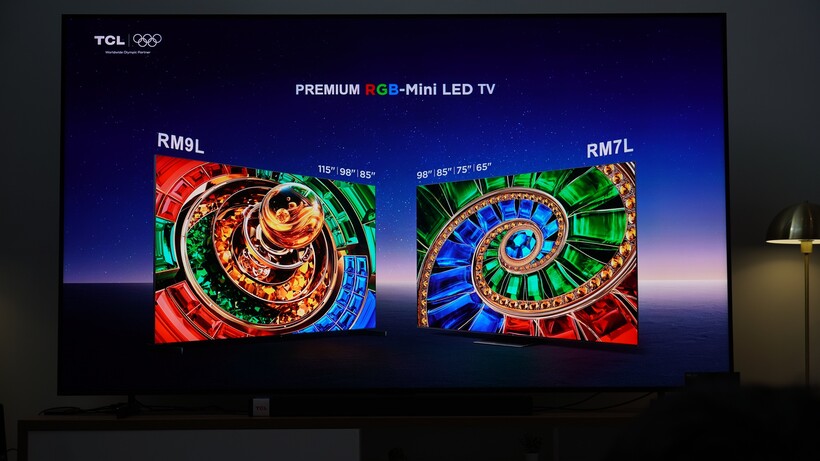
To RGB or not to RGB, that is the quandary TCL finds itself in with its 2026 line-up.
TCL is the self-anointed Mini LED king. It’s made it its mission in life to sell more Mini LEDs than the competition and by all accounts, it has achieved that goal.
You would presume then, that it would like to sell all types of Mini LED but at its NXT Roadshow event in Paris, it sent out a rather confusing message, one that suggests that it’s not particularly fussed about RGB TVs.
RGB gets no respect
I’ve only seen a few RGB TVs so I’m not going to pray at the altar and say they’re the next coming of the TV Gods. But they may represent an inflection point, a new level of Mini LED performance that’s available at both premium and more affordable price points from the get-go.
It could, effectively, replace your standard Mini LED and I wonder if TCL is ever so slightly perturbed by this.
You’ve got Hisense who seem ecstatic about the potential of RGB. Sony are cautious like someone who has a big secret but doesn’t want to tell anyone just yet. Samsung sees RGB as its next mountain to conquer.
Philips and LG come across laissez-faire about RGB, believing that OLED is still the picture king. TCL doesn’t even like OLED – they’re all about Mini LED and out of all the TV manufacturers their stance is one I can’t comprehend. They seem disinterested to the point of being underwhelmed.

The press release for the 2026 models raves about Super QD Mini-LEDs. But RGB TVs? They get two sentences with no mention of the model numbers.
The chasm between the excitement of SQD Mini-LED versus RGB Mini-LED could not be larger.
There’s an implication that TCL doesn’t believe the technology is quite there yet, something to be refined for its day in the limelight in a couple years’ time once the technology has matured. But if that’s the case, it makes very little sense to me.
While others will be making strides in improving RGB TV tech, TCL will be focusing on its SQD TVs. But will SQD be a long-term concern? I’m not sure there’s a long shelf life with these models.
TCL will be the only company that makes them – they are, in effect, a branding exercise in the same way that Samsung’s Neo QLEDs were Mini LED with a fancy name.
The whole TV market is moving towards RGB in some way, which seems to be the future, at least for the next few years, and TCL seem non-plussed about it.

Perhaps this speaks to TCL’s confidence, a reflection of its current standing in the market where it can throw a disdainful look at RGB. This endorsement of SQD is a strength not a weakness, a sign that TCL goes its own way and won’t be made to follow the same path as others.
But if RGB takes off it might find itself having to play catch-up.
It’s a risk, I think, that TCL is not exerting more of a influence on RGB Mini LED. If RGB does take off, TCL will be stuck between supporting its flagship SQD TVs while trying to boost its RGB models. Producing two models could mean they cannibalize each other’s sales.
Or RGB could struggle to take off and TCL would be right, as long as SQD makes an impact. Somehow, I don’t think that will happen.
2026 will mark the true test of TCL’s standing in the market. It’s not playing catch-up as much in the UK anymore, it’s tussling with the experienced players in the same ring. But not grappling with RGB TV tech could see them susceptible to an unexpected knockdown.
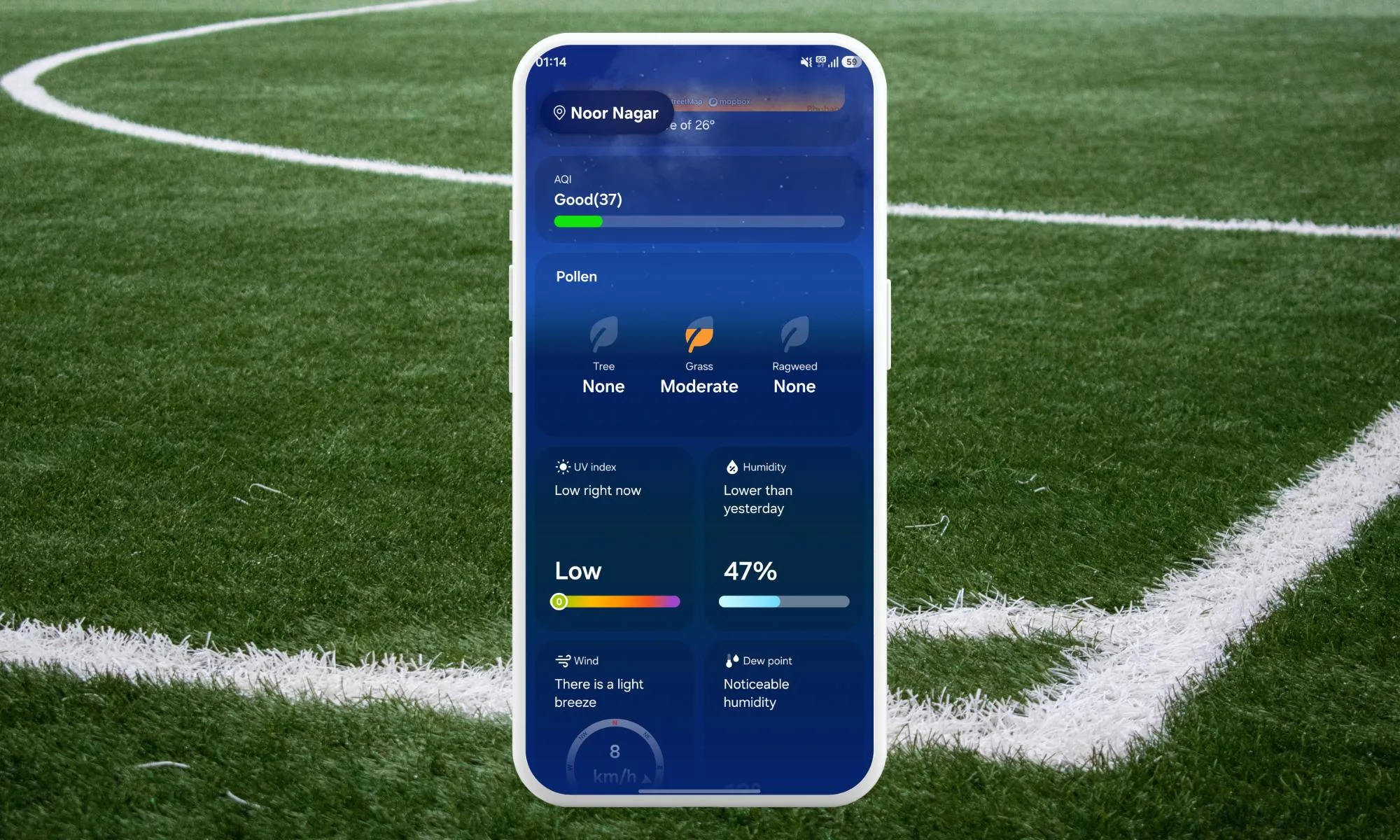
Samsung’s latest Weather update puts the focus where it matters right now, pollen. With allergy season ramping up, the app now shows what’s actually in the air so you can react before symptoms hit.
Version 1.7.30.8 changes how that data appears. Instead of a generic icon, you now get separate categories for tree, grass, and ragweed, making it easier to read conditions without digging deeper.
If you deal with seasonal allergies, the type of trigger matters as much as the intensity, and now that detail sits front and center.
Samsung also reworks how severity shows up, replacing a color scale with text labels. It’s simpler to read at a glance, though some users may find the loss of color cues less precise.
Clearer pollen info at a glance
The biggest shift is how the app presents daily readings. Instead of a single symbol, it splits conditions into tree, grass, and ragweed, giving you a clearer picture of what’s driving symptoms.

That added detail helps with everyday decisions. Tree and grass pollen peak at different times, so seeing them broken out lets you plan ahead with more confidence. If ragweed is high but grass is low, you’ll know what’s likely to trigger a reaction.
More than just pollen changes
This version also brings a few smaller refinements across the app. Moon phase icons have been refreshed, giving nighttime forecasts a cleaner and more consistent look.
Radar gets a practical tweak as well, with new shortcuts that link out to more detailed forecasting tools. That gives you faster access when you want more than the basic overview.

None of these changes overhaul the app, but together they make it feel more polished. Samsung is leaning into incremental improvements that add value without forcing you to relearn anything.
Who gets it and when
Version 1.7.30.8 is rolling out now, but availability is staggered. It’s currently tied to devices running One UI 8.5, so not everyone will see it right away.
Pollen tracking itself isn’t new. Earlier versions like One UI 8.0 still support it, just without the updated visuals, so you’re only missing the redesign if the update hasn’t reached you yet.
The rollout may take a few weeks to reach all devices through the Galaxy Store. If you rely on the app daily, it’s worth checking for updates soon, especially as allergy season picks up.

Meta to roll out open source AI models in next phase of development

NHL Roundup: Kings move into playoff spot with shootout win over Predators

Intel's new AI compression tech can significantly shrink game texture sizes and reduce VRAM use


-

 NewsBeat5 days ago
Steven Gerrard disagrees with Gary Neville over ‘shock’ Chelsea and Arsenal claim | Football
-

 Business5 days ago
No Jackpot Winner and $194 Million Prize Rolls Over
-

 Fashion4 days ago
Weekend Open Thread: Spanx – Corporette.com
-

 Crypto World6 days ago
Gold Price Prediction: Worst Month in 17 Years fo Save Haven Rock
-

 Business2 days ago
Three Gulf funds agree to back Paramount’s $81 billion takeover of Warner, WSJ reports
-
Crypto World7 days ago
Dems press CFTC, ethics board on prediction-market insider trades
-

 Sports3 days ago
India men’s 4x400m and mixed 4x100m relay teams register big progress | Other Sports News
-

 Business3 days ago
Expert Picks for Every Need
-

 Business5 days ago
Login and Checkout Issues Spark Merchant Frustration
-

 Sports7 days ago
Tallest college basketball player ever, standing at 7-foot-9, entering transfer portal
-

 Crypto World7 days ago
Bitcoin enters the public bond market as Moody’s gives a first-of-its-kind crypto deal a rating
-
Crypto World6 days ago
Bitcoin stalls below key resistance as technical signals skew bearish
-

 Tech5 days ago
Commonwealth Fusion Systems leans on magnets for near-term revenue
-

 Politics6 days ago
Starmer’s centre has collapsed, and the left was right all along
-
Business2 days ago
No Jackpot Winner, Prize to Climb to $231 Million
-

 Fashion7 days ago
Tuesday’s Workwear Report: Tavira Sculpt Stretch Crepe Trousers
-
Crypto World7 days ago
AI Memory Rout Wipes 9% Off Nvidia Stock: Chart Says More Pain Ahead
-

 Crypto World6 days ago
Why It’s Partnering, Not Issuing
-

 Crypto World6 days ago
Ripple rolls out enterprise crypto treasury platform for corporates
-
Tech7 days ago
AirPods Max 2 review: Familiar features & design, but needs more
You must be logged in to post a comment Login