Martini and Hansi of Nerdforge have long been splitting their time between crafting one-of-a-kind leather bound books and building custom computers. One day, they were wondering what would happen if they combined the two worlds into one project. The end result looks like a large, old book pulled from a dusty library shelf and placed on a desk.
The exterior gives you a clue right away, as the thick vegetable tan leather that wraps around the sides was chosen for its solidity, making every carved line and stamped detail stand out. The hides were soaked in a sealed bag overnight to soften them enough for tooling, and then allowed to dry naturally. Each side panel began as four laser-cut plywood layers joined together to form a solid slab. The corners were routed smooth before the leather was applied, and contact cement was utilized to adhere the heavy hide after standard wood glue couldn’t handle the thickness. The edges fold cleanly together, and after a little sharpening with a thinner leather strip, the finished covers appear very crisp and professional.
HELLO, MACBOOK NEO — Ready for whatever your day brings, MacBook Neo flies through everyday tasks and apps. Choose from four stunning colors in a…
THE MOST COLORFUL MACBOOK LINEUP EVER — Choose from Silver, Blush, Citrus, or Indigo — each with a color-coordinated keyboard to complete the…
POWER FOR EVERYDAY TASKS — Ready the moment you open it, MacBook Neo with the A18 Pro chip delivers the performance and AI capabilities you need to…
Carving on the leather required a lot of patience because it was done entirely by hand, with lines drawn freehand and backdrop stamps used to drive the leather down and provide some wonderful contrast. Then they utilized other stamps to create raised, 3D elements that stand out when light hits them. It took two full days to complete each cover, but it was worthwhile because the finished product seemed handmade rather than mass-produced. The spine was given the same treatment, with curved pieces of leather meticulously molded over a form and tooled with matching patterns. After everything had dried and gotten a faint stain, the tint turned out to be a warm, somewhat aged tone that resembled a genuine hand bound book.
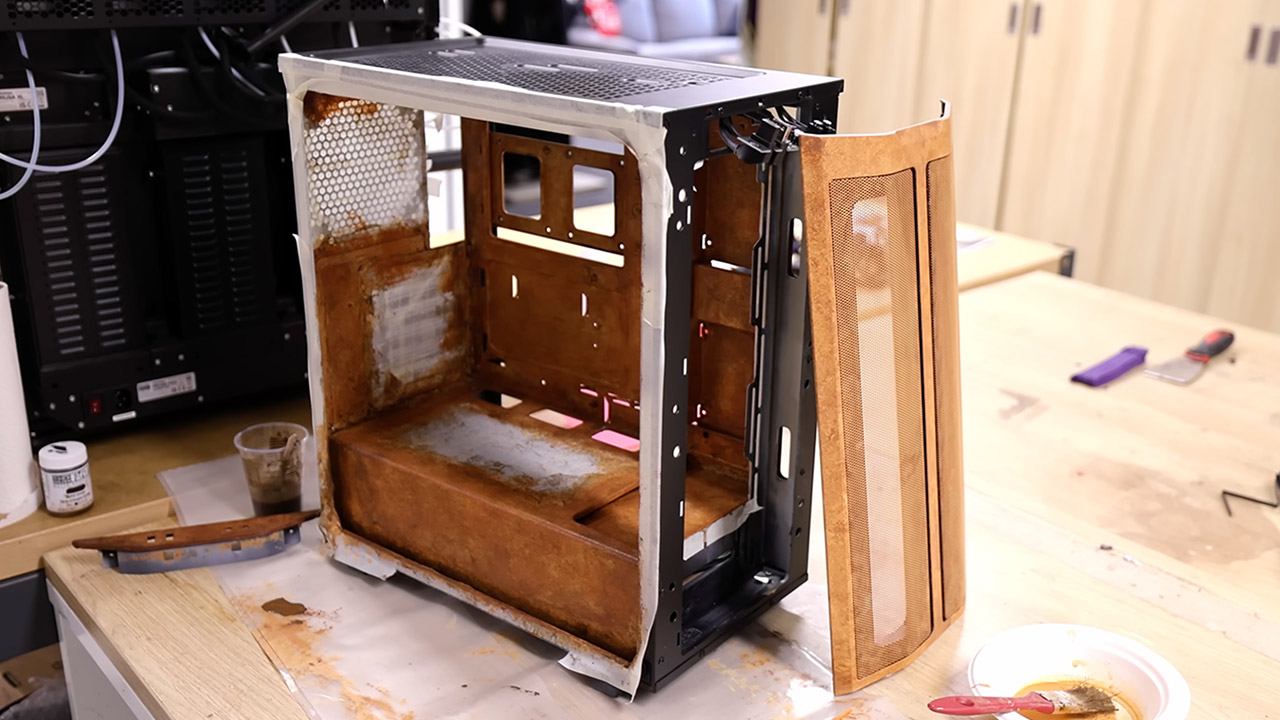
Inside the book form sits the actual computer case, painted to blend perfectly with the leather. The top panel posed the biggest puzzle. Ordinary grates would ruin the illusion, so thin strips of laser-cut MDF were spaced apart and sandwiched between sheets of paper. From any normal viewing angle the surface now looks like stacked book pages, yet air flows freely through the gaps. The spine front keeps its ventilation holes completely open. Nothing blocks the fans or traps heat. RGB lighting tucked within the case casts a soft glow outward, turning the carved leather into something that feels alive at night.
Assembly brought its share of moments where plans had to shift. The leather proved heavier and stiffer than expected once it met the plywood. Clamps ran out, so pieces were weighted down on the workshop floor. Glue dried faster in some spots than others, forcing careful realignment mid-process. Still, every adjustment kept the final shape true to the book idea. Power and reset buttons hide discreetly along one edge. Cables route out the back without breaking the illusion. Once powered on, the system boots like any other machine, ready for work or play.
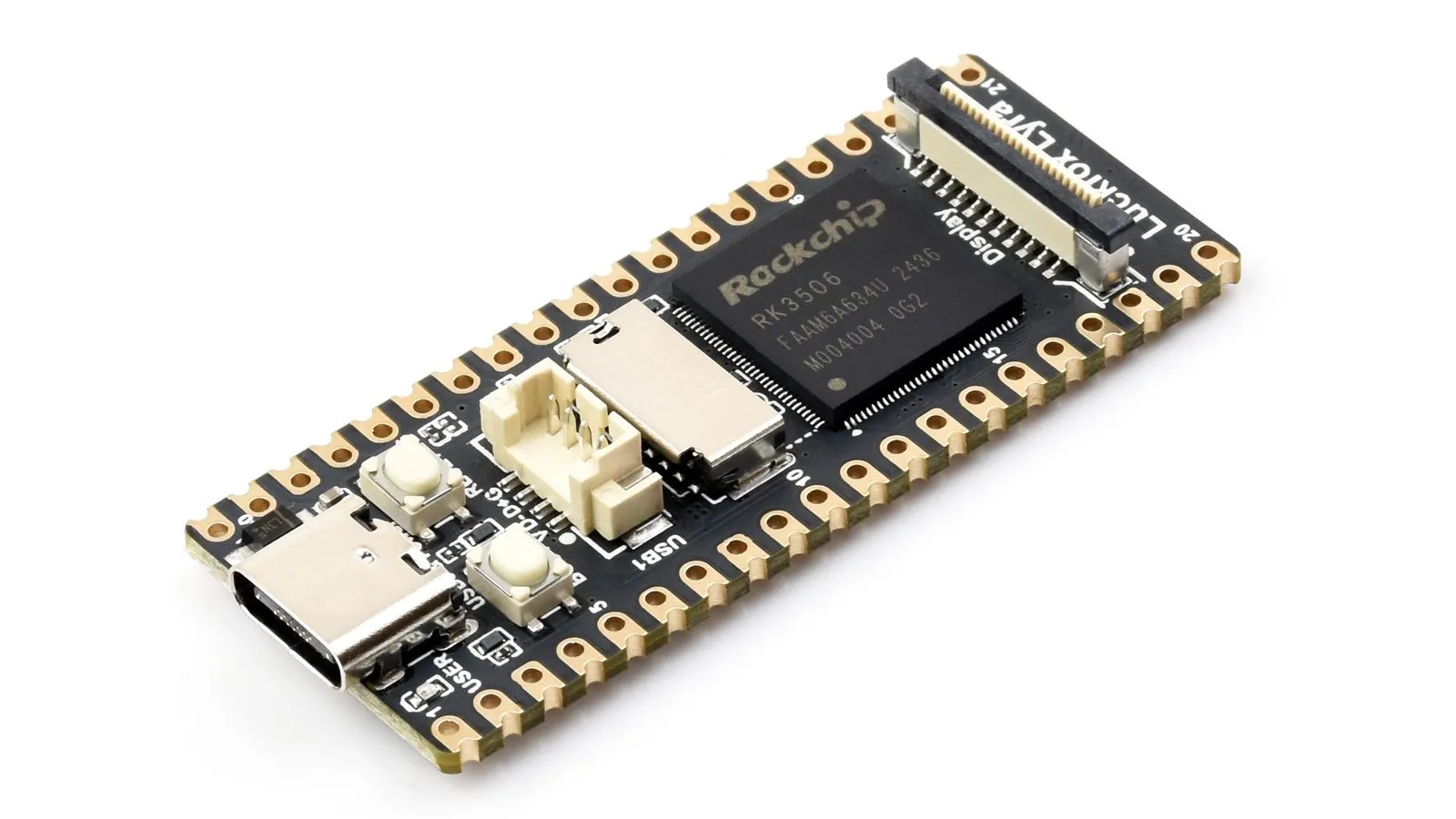
There are a lot of single board computers on the market these days, so you can be forgiven if you missed the LuckFox Lyra. Its main claim to fame seems to be that it shares the Pi Pico’s 51 mm x 21 mm footprint while being powerful enough to run a full Linux system– or at least, it was. Now its claim to fame is as a device you can interact with no peripherals, accessing the terminal via Morse code. That’s thanks to [Gabriel Broussard Korr] and his Morstdin project, which should run on just about anything POSIX-compliant, by dint of a being a clever sh script at heart.
Of course, with most POSIX-compliant systems, you’ll need to alter the script to account for some kind of periferal to do the Morse I/O– not so on the LuckFox Lyra, which has a built-in LED and a single usable button. It actually has two buttons, but one of them is RESET and you can’t use that for anything but its intended purpose. The BOOT button, on the other hand, becomes user input after the system has started. One button, one LED? It’s almost like LuckFox designed this SBC for Morse! Admittedly we’d prefer an audible output, but adding a buzzer would detract from the purity of this implementation.
He’s had to extend the code, of course, since Samuel Morse did not expect all of the special characters you’re likely to encounter on the terminal. The resultant Programmer’s Morse, or PMorse is a straightforward extension, but [Gabriel] didn’t stop there: he’s also added a set of commands he describes as “vim-like” make using this headless device easier by doing things like deleting whole words or flash the line you’re working on so you can make sure you haven’t made any errors.
If that wasn’t enough, he’s also put an LLM on it. Because in the Year of Our Lord 2026, you apparently cannot escape the frakkin’ toasters by jumping your rag-tag fleet into the 128 MB of RAM on this tiny SBC. Still, his inclusion of Llamma.cpp does add one thing to the project: it can now claim to be the world’s smallest stand-alone chatbot. It’s also the only one that speaks Morse. That’s got to be worth some bragging rights.
Advertisement
[Gabriel] may have a thing for physically tiny Linux devices– his last project, which we featured, was about using Linux on old smartphones with Termux.
Life is busy enough without wasting time on spammers, scammers, and telemarketers. Whether you are suffering insistent injury lawyers, fraudulent car warranty representatives, or a drunk-dialing ex, there is a way to stop the endless calls and messages. The major carriers and phone manufacturers have upped their game against unwanted calls and messages in recent years, so let’s look at how you can effectively block them.
Before we dive into blocking options, there are a few things to know:
Advertisement
If possible, don’t answer any calls from numbers you don’t recognize. Callers with anything important to say will likely leave a message anyway. Sadly, this won’t work for people with businesses or interests that involve a lot of calls from unknown numbers.
Never click on a link or attachment in a spam text message because it could trigger malware. If possible, avoid opening them altogether.
Never respond to a spam text message, as it will confirm that your number is valid.
If you are concerned that the call or message might be from a legitimate company, try typing the number into your preferred search engine. While it can be tricky to confirm a scammer’s number, it is easy to verify a legitimate one. If you can’t find anything on the number, be cautious and ignore it. We will explain how to block numbers, but it’s also important to report unwanted calls and messages. If it’s telemarketing, scam, or spam, you can report it to the FTC here. You can also add your number to the Do Not Call Registry, though it only works for sales calls from reputable companies. Sadly, many organizations and scammers ignore it. We will go into how to report numbers to manufacturers, carriers, and third parties below. The more people do this, the easier it is to identify and preemptively block or label nuisance numbers.
How to Block Calls and Texts on an iPhone
Apple via Simon Hill
It’s easy to block individual numbers on your iPhone. Here’s how:
A memory shortage that isn’t expected to ease before the end of 2027 will drive global PC shipments down 11.3% in 2026, even as Apple’s MacBook Neo puts new pressure on PC rivals.
Market research firm IDC expects conditions to worsen through the year, with PC shipments projected to fall 20% year over year in the fourth quarter. Rising memory costs are limiting product availability and making it harder for manufacturers to maintain broad product lineups.
PC shipments still grew 3% during the first quarter of 2026, but that came from buyers accelerating purchases ahead of expected price increases and shortages. Much of that demand was pulled forward from later in the year, masking a market facing tighter supplies and a weaker outlook.
MacBook Neo dodges a weakening market
Apple’s MacBook Neo is helping defy a bigger slowdown in the PC market. Stronger-than-expected demand for the lower-cost notebook led IDC to raise its notebook forecast.
Advertisement
The device is also increasing competitive pressure across the industry. Research manager Jitesh Ubrani said PC makers are likely to respond with new chips, operating system improvements, and more aggressive promotions.
Strong demand for the MacBook Neo is helping support notebook sales. Image credit: IDC
Strong demand for the MacBook Neo is helping support notebook sales as higher costs and supply constraints weigh on the broader market. IDC also said the notebook is helping keep some lower-cost options available, easing part of the price pressure affecting the industry.
Higher PC prices are likely to persist
IDC expects average PC selling prices to climb 17% in 2026 as memory shortages continue to push costs higher. The firm also expects prices to remain above 2025 levels even after memory production expands over the next two years.
Buyers considering new hardware may face fewer opportunities to avoid those increases. PC makers are dealing with tighter component supplies, rising costs, and weaker demand across much of the market.
Those pressures are colliding with broader economic challenges and increased competition across the PC industry. Apple’s MacBook Neo is generating enough demand to influence notebook forecasts and increase competitive pressure throughout the market.
Smart locks are a highly visible part of your home that you’ll use just about every day, so it’s important to find a reliable pick that meshes well with your smart home. Here are the factors you should be thinking about as you shop.
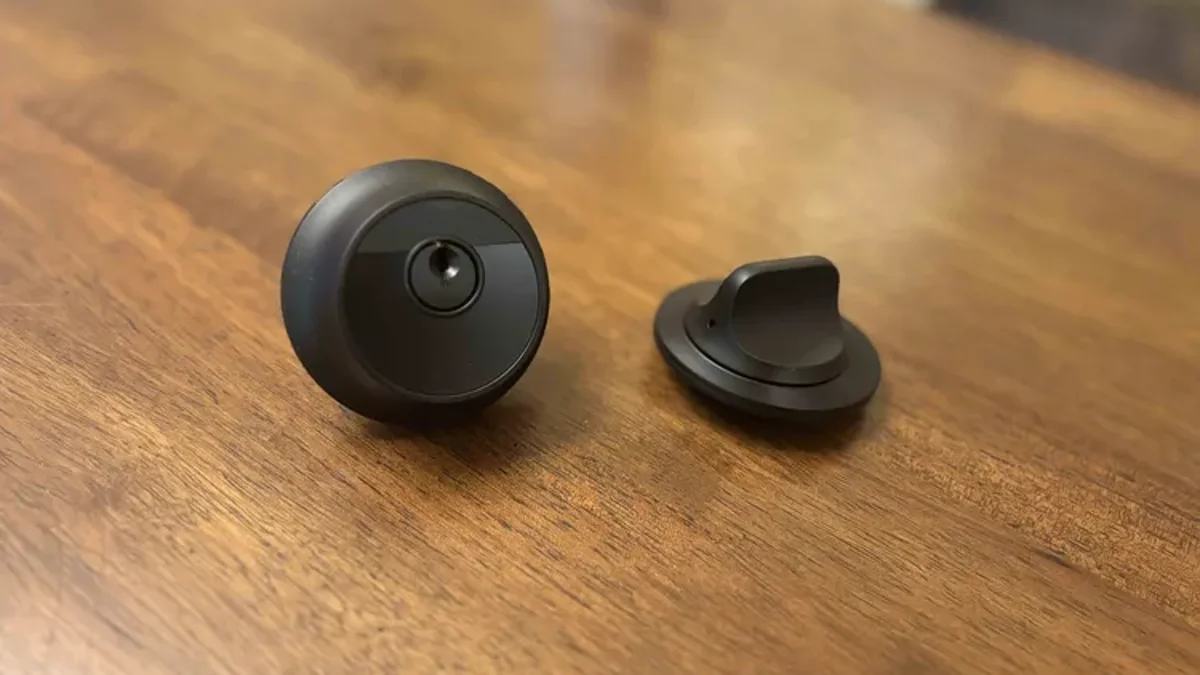
A retrofit smart lock like the August lock will replace the interior of your current lock but not the exterior keyhole or the deadbolt.
CNET
Full deadbolt or retrofit
Most smart locks will replace your existing lock, including the interior thumbturn, the exterior keyhole and the deadbolt in the middle. Locks like those will also come with their keys, replacing the ones you use now.
Advertisement
Others, like the August Smart Lock, and the Lockly fingerprint model, are designed instead to work with at least some of your existing lock hardware. With a retrofit lock like that, you probably won’t need new keys and might not even need to swap out the deadbolt. Locks like those can sometimes be a better fit for apartments, where the building owners might not allow you to replace the entire lock.
Yale’s smart lock can work with the Nest video doorbell.
Yale
Modes of access
Different smart locks will take different approaches to letting you in. On a basic level, most smart locks will let you lock and unlock the door wirelessly from your phone, using an app. Others add in keypads for coded entry, which can help you rely on your keys a little less while also making it easier to share access with others. Some lock add fingerprint or palm scanning to let you inside with biometrics. There are also keypad and NFC options, even face scanning in some cases.
Advertisement
Apple has also added a Home Key feature in iOS15 that lets you store a digital house key in your Apple Wallet, which lets you open compatible smart locks using the NFC radio in your iPhone or Apple Watch. Many other brands have followed suit with digital passes that guests can download on their phones with the right apps.
So, what’s right for you? Going into an app for door access isn’t ideal unless you are controlling it remotely. That’s why we like Bluetooth and NFC passes that can work with a wave of your phone, as well as fingerprint sensors and similar options that are keyed to individuals and work at a touch at any time. But a keypad has its advantages as well, since it allows for temporary code handouts or limited-time access without someone needing their phone or a specific app to use.
The Schlage Encode Plus is the first smart lock to support Apple Home Key. It lets you unlock your door using an iPhone or Apple Watch.
Advertisement
Schlage
Platform compatibility and Matter
If your household includes multiple types of smart home devices, then your best bet is to control them all from a single smart home platform. That way, you won’t need to juggle multiple apps to keep everything automated. The most popular picks are Amazon Alexa, the Google Home app and the Google Assistant voice controls that come with it, and Apple HomeKit, which brings Siri into play. Samsung SmartThings is another option for a hub-centric smart home.
That brings us to Matter. Matter (and its tagalong communication protocol Thread) is an important smart home protocol designed in coordination with major brands, including Google, Amazon, Apple, and many others. It helps guarantee compatibility across different platforms and adds extra security and data transfer benefits, which buyers should definitely be watching for.
Currently, smart lock companies are still adopting the Matter standard. Our top pick uses it and is one of the best options we’ve found. Schlage has begun to adopt the standard for locks like its upcoming Schlage Sense Pro, but it hasn’t made its way to our Schlage Smart Lever pick quite yet, and the same goes for Yale Assure. Brands like Aqara are now including built-in Matter support with their latest locks. August has also announced it’s working to bring Matter to its smart locks, so in some cases, it just be a “matter” of waiting for the right firmware update.
Advertisement
Aqara’s lock comes with many unlocking options and gets even more features if you plug in a hub.
Aqara
Security and privacy
Smart locks aren’t quite as data-sensitive as devices with built-in cameras and microphones, but you’ll still want to make sure that you’re keeping things secure. Most, if not all of your options will use some form of encryption to keep the wireless transmissions between your lock and your phone or home network secure. You should also look for locks that use two-factor authentication to keep your account safe from malicious logins. As with any connected device in your home, you’ll want to be sure to keep your lock updated to the latest firmware and to set a strong password in the app.
As for lockpicking and other physical concerns, you can look for the lock’s ANSI grade to get a sense of its durability, and how well it might stand up against a brute-force entry attack. ANSI grade 3 is the most basic rating, but a growing number of smart locks offer ANSI grade 2 or grade 1 ratings, which tell you that they’re built with commercial-grade durability. If you’re concerned about forced entries, a lock like that might be a good investment.
Advertisement
Lockin’s Veno Pro 7 components
John Carlsen/CNET
Design considerations
Your smart lock is going to sit right on the front of your home’s exterior, so it’s worth aiming for something you won’t hate looking at. Some smart locks go out of their way to show off their gadgety features with light-up touchscreens, color-coded LED indicator lights and tech-minded designs. Others take the opposite approach, doing their best to blend in and look just like a standard lock, from the outside at least. Picking a preference between the two approaches will help you narrow your options.
You’ll also want to consider how the lock stays powered. Most smart locks will run off four AA batteries, but some take a different approach. The minimalistic Level Lock +, for instance, runs off two AA batteries that sits inside of the deadbolt itself to keep things extra compact. Meanwhile, Eufy’s touchscreen smart lock runs off of a rechargeable battery pack.
Wi-Fi
Wi-Fi support has now become common for smart locks, but it’s important to look at the details. Some locks don’t have built-in Wi-Fi, but only support it if you buy an additional hub.
fjo3 shares a report from Defense One: A small but growing number of European officials and analysts are saying what four years ago was unthinkable: Ukraine isn’t just surviving its grueling war with Russia, it is in some ways thriving and may even be on a path to victory. This isn’t yet captured in headlines — for example, about last weekend’s barrage of Russian drones and missiles around Ukraine — but in the details, like how some 90 percent were intercepted. Several long-term trends have shifted in Ukraine’s favor, and the core reason is its fierce focus on AI and robotics.
In the crucible of war, Ukraine has developed drones and ground robots that can hold territory — even take it back. Some are fully controlled by humans, like supply robots and medical-evacuation vehicles. But an increasing number are controlled in at least some aspects by dozens of AI products, from guidance packages on aerial drones to decision aids at the highest levels. […] Just as important as the tech are the new tactics. Given unusual latitude to experiment, Ukrainian fighters began to develop robot-forward infantry concepts, like combined-arms attacks by airborne and ground systems, “more than a year ago. Right now, we’re massively starting to implement this,” said Davyd Aloian, deputy secretary of the National Security and Defence Council of Ukraine, the coordinating body on domestic and international security, in an interview.
Ukraine and its partners are also steaming ahead on new concepts for highly autonomous defenses against Russian drones, combining ISR sensors and AI to detect and identify enemy drones in less time and with more certainty. “All of the systems are being linked with each other and with people” to create a distributed network with interceptor drones at various locations to be activated when needed, Aloian said. “One day we will have only like 10 guys who are just going to be responsible for approving interception. And it will automatically go direct to the target.” The human operators will be dispersed as well. “Everything can be controlled from Kyiv, Lviv, from cities in other countries,” he said. “It’s not what happened to Ukraine” (referencing Russia’s barrage of Shahed drones) that “should scare us in Europe,” said Swarmer CEO Serhii Kupriienko. It’s how quickly Ukraine’s “middling” military evolved to counter Russia’s invasion.
“We are behind by literally 10 years or 20 years” in some defense-technology areas, such as satellite imagery, Kupriienko said, and yet his country has climbed a capability curve that just two years ago seemed insurmountable. So could others, he said. “The answer is always AI solutions and integrating the AI into even the daily routine work within the bureaucracy,” he said.
Advertisement
“We have evolved since 2022, the industry has and our defense has as well. Right now we are able to provide not only [large quantities of drone] assets but everything what is needed to build out the ecosystem,” including parts and production, training, modification, etc. Aloian said.
If you’re of a certain age, you probably fondly remember corded landline telephones, scratch ‘n sniff stickers, and Tupperware. If your home didn’t have any of these items, you were probably born sometime after the early 1980s. Generation X is typically defined as those born between 1965 and 1980, meaning they’re about 46 to 61 years old today. Often overshadowed by Baby Boomers or Millennials, they are a sandwich generation that may currently be taking care of both their children and their elderly parents.
They grew up in a different time, well before the digital age. Forget smartphones and artificial intelligence. Their state-of-the-art tech was more like a Sony Walkman. And their parents? They were Baby Boomers, born between 1946 and 1964. Much like the cultural shift between Gen X and Gen Z, these parents were raised in a completely different world than the one their children grew up in. Forget cassette players, many people this age remember watching TV on a black and white television. Here are five classic electronics that many Gen Xers grew up with, whether they were relics from the Boomer era or new, cutting-edge technology.
Advertisement
Rotary phone
Tony Dunn/Getty Images
If you’re too young to drive, you may not even know what a rotary phone is. We aren’t just referring to the corded landline phones that you can still spot here and there. We mean the old-fashioned phones with a rotary dial that required you to put your finger into a number’s hole and spin clockwise until you hit the metal stop, then let the dial return and do it again with the next number. Sounds tedious, right? If you put this phone in front of an eight-year-old and asked them to call home, they probably wouldn’t know how.
There was no memory, no redial function and no caller ID. From the 1930s through the early 1960s, rotary phones were made from Bakelite, the very first synthetic plastic. If you’re a Gen Xer, the phone in your house growing up was probably made of a more lightweight plastic and was the property of the Bell System. Customers paid a lease fee but at least had their choice of colors, including bubblegum pink and bright yellow. Today, these phones are mostly used for decoration after being replaced by more modern touch-tone landline phones and, of course, cell phones.
Advertisement
VCR
José Araújo/Getty Images
Long before we could queue up an entire season of our favorite show to binge on Netflix, watching a movie at home was a much more complicated, and dare we say, special affair. The VCR, or video cassette recorder, was a staple of most households in the 1990s, but if you were lucky enough, your parents may have invested in one even earlier. And when we say invested, we truly mean it was an investment — a VCR sold for about $1,000 or more in 1975, and still cost on average $200 to $400 by the mid-1980s. One thousand dollars in 1975 is equal to more than $6,000 today.
Remember the Blu-ray versus HD-DVD war in the 2000s? A similar situation played out in the 1970s and early 1980s, when VHS was introduced as competition to Sony Betamax machines. Many households had one or the other, few had both, and each took differently-sized tapes. VHS was less expensive and ultimately won the battle, and eventually most homes had a VCR.
Today, many movies hit the small screens in our living rooms shortly after their theatrical release, but this simply wasn’t the case 50 years ago. The first American films released on VHS were “The Sound of Music,” “Patton,” and “M*A*S*H*,” which were all re-released to the public in 1977. The 2005 movie “A History of Violence” was the last film to be widely released on VHS. Today, most VCRs have been regulated to basements or the junk heap.
Advertisement
Electric drip coffee maker
Ryanjlane/Getty Images
Today, many of us pop a pod into a single-serve machine to get that coffee fix, but in the 1970s and 1980s, you’d have to make an entire pot, or survive on instant. The popular Mr. Coffee, introduced in 1972, was the first automatic electric drip coffee maker. The technology took off, quickly replacing stovetop and electric percolators. The machine had a water reservoir just like many single-serve machines today, and an automated drip system. It came with a glass carafe that would sit on the hot plate, keeping the coffee warm. All you needed for that perfect cup of joe was a filter and coffee grounds.
You can still buy drip coffee machines, of course, and the Mr. Coffee brand has expanded to include cold brew, espresso machines, and other specialty brewers, but many coffee addicts have switched to Keurig or other, more complicated, machines. For some, the drip, drip, drip of an electric coffee maker will always remind them of days gone by.
Advertisement
Clock radio
Ideabug/Getty Images
Today, our nightstands are often cluttered with chargers, smartphones, e-readers and fitness trackers, but your parents’ nightstands probably looked a bit different. You may remember a clunky lamp and a corded phone, and some type of clock radio. Likely boxy, perhaps boasting that faux woodgrain look that was so popular in the 1970s and 1980s, these small electronics were in almost every home for decades.
Clock radios made the switch from analog to digital with flip clocks in the 1970s. Instead of waking up to a loud buzzer, clock radios allowed the user to wake to their favorite radio station. Of course, you could also simply listen to the radio whenever you wanted. These small electronics were sold in different shapes, sizes, and colors. The Sony Dream Machine was a popular choice. Introduced in the 1960s, it was sold until 2011 when smartphones began to take over the job of a clock radio. If you like a bit of nostalgia, you can still pick up a clock radio on Amazon, and there are plenty of Sony Dream Machines on eBay in many different styles. It may feel old school, but many sleep experts recommend a technology-free bedroom. For a better night’s sleep, take a cue from your parents and ditch the smartphone alarm.
Advertisement
Answering machine
yodamclaren/Shutterstock
Long before the days of 24/7 availability, answering machines received calls when we were on vacation or out grocery shopping. If you grew up in the 1970s or 1980s, you probably remember calling your best friend, hoping for a pool date, only to be met with the standard, “Hi, you’ve reached the Smith family. We’re not at home right now…” greeting.
The history of the answering machine seems to be up for debate. A man named Joseph Zimmermann is credited with inventing one of the first machines in the late 1940s, but these were huge, bulky devices that weren’t designed for home use. He sold more than 6,000 of them, but answering machines didn’t truly catch on commercially until technology allowed for smaller devices in the early 1970s. The PhoneMate Model 400, introduced in 1971, still weighed 10 pounds, but it could hold 20 messages on reel-to-reel tape. By the early 1980s, digital answering machines were available, and eventually they were built directly into the base units of phones, eliminating the need for two devices. While most of us rely on smartphones and voicemail today, you can still buy phones with built-in answering machines.
Fusion startup Xcimer Energy on Wednesday flipped the switch on its Phoenix laser system, which the company says is the largest privately owned example in the world.
Xcimer’s approach to fusion power is modeled after the National Ignition Facility (NIF), which proved in December 2022 that a controlled fusion reaction could release more power than required to ignite it.
The NIF trained 192 laser beams on a fuel target smaller than a pencil eraser. The energy from the lasers hit the gold target. As the lasers obliterate the gold target, their energy is converted into X-rays, which are focused on the fuel pellet inside, compressing it until atoms in the fuel fuse and release energy.
The company is betting that more powerful, less complex lasers will help turn NIF’s concept for fusion power into something more profitable.
Advertisement
Xcimer’s plans for a fusion power plant call for two lasers capable of firing in microsecond-long pulses. Light from those pulses will be fed through a compression system, of sorts, which will delivers the lasers’ energy to the fuel target in nanoseconds. The quicker the fuel is compressed, the more likely it is to generate usable fusion reactions.
Phoenix is a step toward an eventual power plant. The system uses excimer amplification, similar to those used in semiconductor manufacturing but significantly more powerful. At full strength, the krypton-fluoride laser generates over 1 kilojoule of energy, Xcimer told TechCrunch, and its core is 38 meters long.
While that may be the most powerful privately owned laser, it’s still a fraction of what the company says it will need for a commercial power plant, which could exceed 12 megajoules.
Xcimer hopes to complete a prototype in 2028 before working on a larger system that it hopes will produce at least as much power as it consumes. Sometime in the mid-2030s, it is planning to build its first commercial scale power plant.
Advertisement
When you purchase through links in our articles, we may earn a small commission. This doesn’t affect our editorial independence.
After objecting to turn over relevant emails during discovery in a lawsuit brought on by Elon Musk, the judge is forcing the matter. Musk’s email accounts must be submitted for review.
On Tuesday, Judge Mark Pittman responded to Elon Musk’s objections over his various email accounts. The objections were overturned, and business email accounts owned by Elon Musk for SpaceX and Tesla must be turned over for discovery.
Even though the case was brought on by X and xAI, the emails for Musk’s other companies were found to be relevant due to how he’s used them. The judge cites that business conducted for X and xAI occurred through various accounts, including several email addresses and Xchat accounts.
Advertisement
The case has been moving at a snail’s pace since it was brought on in August 2025. In May, SVP of Software Engineering Craig Federighi was brought in as a document custodian.
Current Apple CEO Tim Cook was also requested as a custodian, but that was denied.
Pointless lawsuits
It isn’t clear how long these proceedings might go, as the claims themselves are quite baseless. Musk has asserted that Apple and OpenAI worked together to prevent other AI solutions from being viable alternatives on Apple’s platforms.
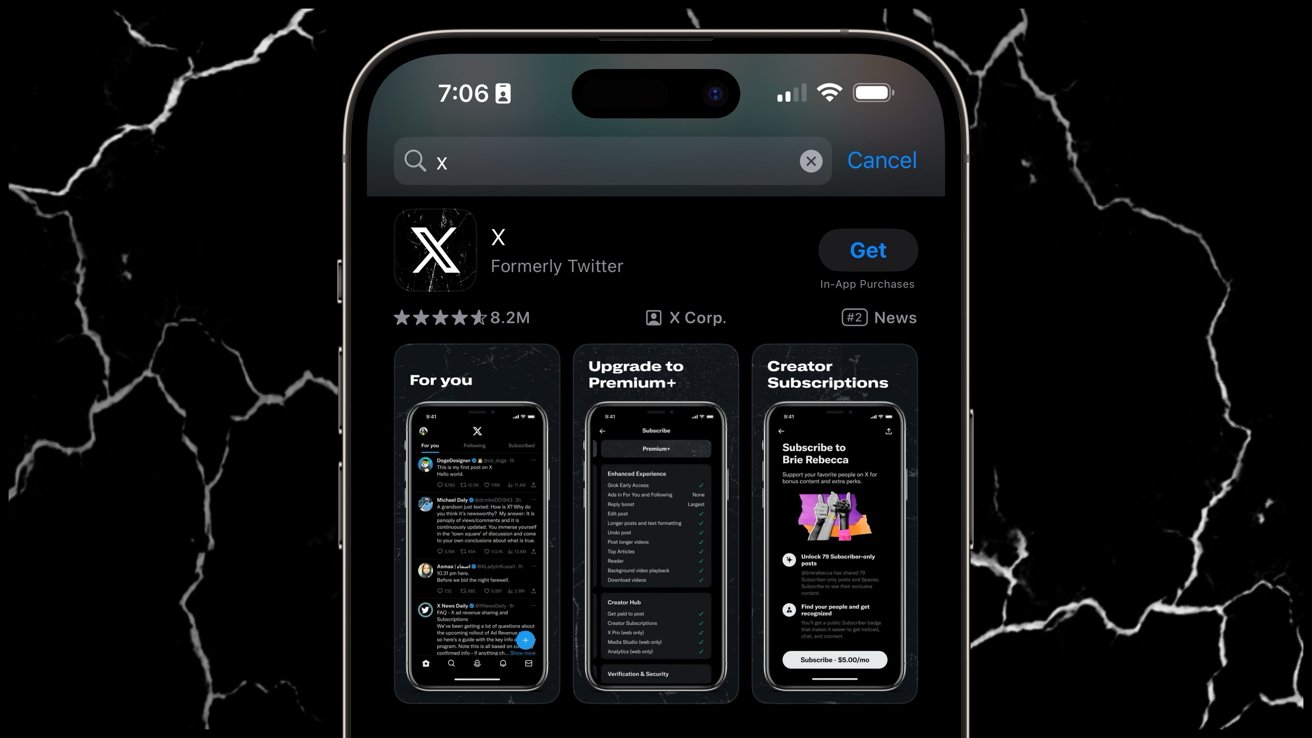
ChatGPT does frequently chart in the top five free apps on the App Store, but other AI apps overtake it from time to time. xAI, X, and other Elon Musk properties never chart as high simply because they’re not as popular.
Advertisement
In fact, X is a shadow of what used to be Twitter due to the extremist views and sometimes illegal content that persist on the platform.
The claims are even more absurd given that OpenAI is reportedly unhappy with how its partnership with Apple turned out. Also, Apple is also now working with Google to use Gemini as the foundation of its future models.
It seems that Musk could have saved everyone a lot of time and money and focused on building more desirable platforms. Instead, we all have to watch the world’s richest man throw tantrums about perceived slights.
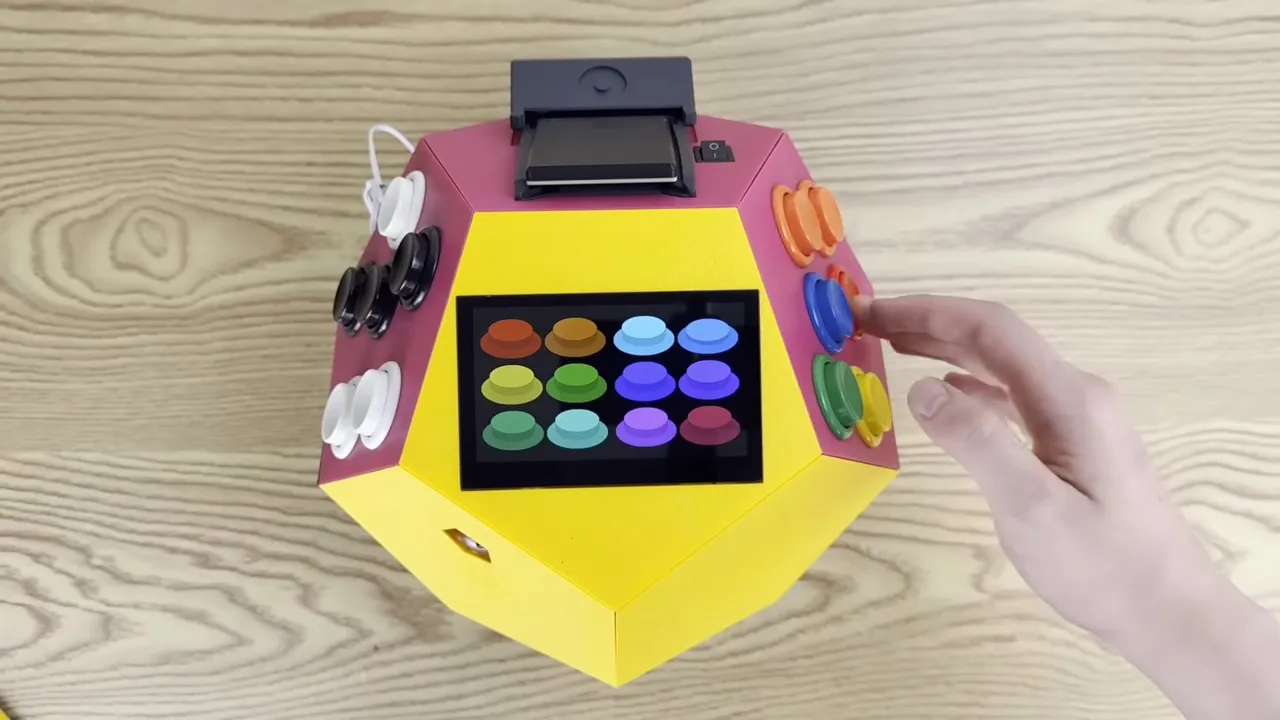
Operating systems are great things to have for general purpose computing, but sometimes they can just get in the way. There’s RAM overhead and processor cycles required for all that operating, after all. For something like a game system, it seems unnecessary. The NES certainly did well enough without an OS, as did its various successors for several console generations.
[Inkbox] wanted to get back to those heady days by programming bare-metal games for a Rasberry Pi 3 that had sat unused since 2016. Games are on cartridge, running bare metal, in assembly — as God and Masayuki Uemura intended. Also, the console is a dodecahedron, because the name GameCube was already taken.
The GitHub link above doesn’t exactly have documentation, at least as of this writing, so you’ll need to watch the video to get the full details. The dodecahedron form factor might not be ideal for packing away in a bag, but as a handheld we have to admit it does look comfortable to hold. Two faces of the dodecahedron get a half-dozen buttons each, which are wired to a GPIO pin on the Pi via a Schmitt trigger for hardware debounce. Like all good consoles, it uses cartridges, these ones being adapted from SD cards on large PCBs derived from a project we featured before.
That all sounds great, but it’s the assembly programming we’re really interested in — skip to around the seven-minute mark in the video for that. Ultimately it’s a build video, so not the ideal tutorial for ARM assembly programming, but it might not be a bad introduction for some. Unfortunately you don’t get line-by-line of the PacMan game he put together — but he does have it in the repository for you to examine. The repo also has STLs if you want to make a dodecahedron of your own.
Advertisement
Of course he’s got a RetroPi cartridge as well, loaded with emulators, and we suspect that’s mostly how this GameDodecahedron will get used. Still, we’ll always have a soft spot for assembly code and projects that use it — be it on ARM, good old 6502, the open-source RISC V architecture, or even the absolute monster of op codes that is x86.
The initiative is based on agreements with the Luxembourg Institute of Science and Technology, Munster Technological University, LuxProvide and ICHEC, Ireland’s national high performance computing centre.
The Kerry-based innovation nonprofit RDI Hub will aim to help Irish firms and public bodies move faster from AI experimentation to deployment through a new partnership initiative with organisations in Ireland and Luxembourg.
The ‘AI Gateway’ collaboration is based on agreements with the Luxembourg Institute of Science and Technology (LIST), Munster Technological University (MTU), LuxProvide and ICHEC, Ireland’s national high-performance computing centre.
The bodies will facilitate the building, testing and securing of AI systems and create a cross-border pathway linking Irish demand with Luxembourg’s ‘AI Factory’, sandbox and sovereign infrastructure capabilities, as well as providing opportunities for Irish research and cybersecurity expertise to contribute into that wider European ecosystem, RDI Hub said.
Advertisement
Ireland’s European commissioner Michael McGrath said the gateway would assist in “breaking down barriers, ending fragmentation and giving Irish companies access to cutting-edge AI to scale, grow and succeed as European companies with global reach”, and would aid “founders, scaling companies and established corporates”.
The gateway, claimed to be the first of its kind in Ireland, will offer Irish organisations computing power and infrastructure to build AI, sandbox access to test systems for trustworthiness and regulatory readiness, and cyber resilience capability to test and secure AI-enabled products before launch, to help them deploy AI systems while staying compliant with national and European laws.
Fergal Brosnan, the CEO of RDI Hub, said: “Most AI sandboxes do one thing. The RDI AI Gateway does three. We’ve brought together access to infrastructure to build AI, a sandbox to test and validate it, and cyber resilience capability to test resilience and secure it before deployment.
“That combination is what organisations have been asking for, and it can help turn AI pilots into systems that are ready for real-world use.”
Advertisement
RDI Hub, based in Killorglin, Co Kerry, offers supports to start-ups, SMEs, corporates, public bodies and research-led innovation in sectors such as fintech, sustainability, travel and tourism, and emerging technology, with AI seen as a “core crosscutting capability”.
Dr Hazel Murray, chair of cybersecurity at MTU, said: “This collaboration combines MTU’s research and cybersecurity infrastructure with RDI Hub’s industry network and delivery model.
“Together, we can help turn specialist technical capability into practical support for trusted AI and cyber resilience, while also strengthening links between Ireland and Luxembourg.”
RDI Hub said the gateway is aimed at “large corporates, SMEs, pillar banks and regulated financial institutions; fintech firms; AI start-ups and scale-ups; government departments; public bodies; local authorities; research-led innovation projects; and organisations exploring sovereign cloud, EU AI Act readiness or access to European compute”.
Advertisement
Daniele Pagani of LIST said: “This collaboration with the RDI gives Irish organisations a trusted route into LIST’s AI sandbox at exactly the moment they need it, as Europe moves from preparing for the EU AI Act to applying it.
“It is a practical model for cross-border cooperation, and a real strengthening of the innovation link between Luxembourg and Ireland.”
Don’t miss out on the knowledge you need to succeed. Sign up for the Daily Brief, Silicon Republic’s digest of need-to-know sci-tech news.



















































You must be logged in to post a comment Login