
Security teams log 54% of successful attacks and alert on just 14%. The rest move through your environment unseen.
The Picus whitepaper shows how breach and attack simulation tests your SIEM and EDR rules so threats stop slipping by detection.




The TerraMaster F4-425 Pro is a compact four-bay NAS that punches above its price class, with an eight-core Intel chip, three M.2 slots, and dual 5GbE networking, at the cost of a few real but manageable caveats.
NAS devices have evolved well beyond simple network drives. They now run media servers, security camera systems, and containerized apps, all from one box on the home or office network.
TerraMaster pitches the F4-425 Pro squarely at that all-in-one role. It pairs a decently powerful Intel chip with unusually flexible storage for the class and price point.
I reviewed the smaller two-bay F2-425 in late 2025. The F4-425 Pro sits above it with more bays, a faster processor, a triple M.2 design, and upgraded system software.
| CPU | As reviewed, Intel N305 (8 cores, 8 threads) |
| CPU max frequency | 3.8GHz burst |
| Graphics | Integrated Intel Graphics |
| Hardware encryption | AES-NI |
| Transcoding | H.264, H.265, MPEG-4, VC-1, up to 4K at 60fps |
| RAM (standard) | 8GB non-ECC SODIMM (1 slot) |
| Max RAM | 32GB non-ECC SODIMM |
| Drive bays | 4 x SATA (3.5-inch or 2.5-inch HDD, 2.5-inch SSD) |
| Max SATA capacity | 30TB per bay (120TB raw across four bays) |
| M.2 slots | 3 x M.2 2280 NVMe (PCIe 3.0 x1, up to 8TB each) |
| Max total capacity | 144TB |
| RAID modes | TRAID, Single, JBOD, RAID 0, 1, 5, 6, 10 |
| Ethernet | 2 x 5GbE RJ-45 |
| USB-A ports | 3 x USB 3.2 Gen2 (10Gbps) |
| USB-C ports | 1 x USB 3.2 Gen2 (10Gbps) |
| Video out | 1 x HDMI (management only) |
| Operating system | TOS (TerraMaster OS) |
| Dimensions | 5.9 by 7.1 by 8.6 inches |
| Weight | 6.4 pounds |
| Power supply | 90W external |
| Noise level | 20.9 dBA (idle, per TerraMaster) |
| Warranty | 2 years |
The F4-425 Pro uses a two-tone enclosure, with a black drive-bay face set against a silver body. The four bays are accessed from the front, with tool-free trays for installation.
It measures 5.9 by 7.1 by 8.6 inches and weighs 6.4 pounds without drives. That is a compact footprint for a four-bay unit with this much expansion inside.
Build quality is solid. On NAS devices in this class from other vendors, we’ve seen stripped screws and imprecise material line-up. As with the rest of Terramaster’s products, this is not the case.

TerraMaster F4-425 Pro review: iPad for scale
The front carries a power button, a USB port, and status indicators. A single 120mm fan sits at the rear, with several speed modes available in software.
TerraMaster rates idle noise at 20.9 decibels, measured with four drives in standby. Real-world noise under load is higher and depends on the drives fitted.
We tested the unit with four 4TB Seagate Red drives. We also used four 24TB WD Red Pro, that retail on Amazon with a price that seems to vary by day.
Under load, which is mostly drive chatter, the unit hit about 39 decibels one meter away with either drive array. Good enough.
The headline storage feature is the three M.2 NVMe slots, which is unusual for a four-bay NAS. Most competitors offer one or two.
Each M.2 slot supports up to 8TB, and the four SATA bays each take drives up to 30TB. TerraMaster lists a maximum total capacity of 144TB across all seven drives.
There is an inconsistency in TerraMaster’s own materials worth noting. The datasheet text claims 144TB total, while the specification table lists the SATA bays at 120TB raw and the M.2 slots separately, which only reach 144TB when both are combined.

TerraMaster F4-425 Pro review: Simple but functional drive sleds.
The three M.2 slots can be set up as a RAID 5 array. This is a genuinely useful option, allowing a fast SSD pool with redundancy separate from the main hard drive bays.
One caveat sits in the spec sheet. The M.2 slots run at PCIe 3.0 x1, which is a single lane each. That limits the peak speed of each SSD well below what a typical Gen3 x4 NVMe drive can deliver. This is fine, as one drive at the x1 allocation is still about 6 gigabits per second read and write.
We’ve said it before, we’ll say it again. M.2 storage in a 10-gigabit Ethernet NAS is overkill. It’s super-overkill here with 5 gigabit Ethernet, which can be saturated with the hard drives in a striped RAID.
For RAID across the main bays, the unit supports the full range from JBOD up to RAID 10. It also offers TRAID, TerraMaster’s flexible array system that mixes redundancy with easier capacity expansion, similar in concept to Synology’s Hybrid RAID.
TRAID is solid enough, assuming you’re going to stick with Terramaster hardware if you ever upgrade. It works the way it says it will, with easy, albeit time-consuming, addition of drives to the enclosure.
Networking is handled by two 5-gigabit Ethernet ports. This is an unusual middle ground, sitting above the common 2.5GbE but below the 10GbE found on higher-end units.
The two ports support link aggregation and bonding. TerraMaster claims real-world write speeds up to 1010 MB/s when combined with SMB Multichannel. We didn’t quite see that, even with three SSDs.
On a dedicated wired to wired network between the F4-425 Pro and a M1 Ultra Mac Studio with link aggregation, we saw about 800 megabytes per second. Close enough.

TerraMaster F4-425 Pro review; A rear view.
For external connections, there are three USB-A 3.2 Gen2 ports and one USB-C 3.2 Gen2 port, all rated at 10Gbps. These handle external drives, backups, and direct media imports.
An HDMI port is present, but TerraMaster states it is for displaying system management output rather than media playback. This is a notable limitation for anyone hoping to use it as a direct-attached media player.
For Mac users, TOS supports Time Machine backups over the network. Setup is simple, with old instructions that still work here.
The F4-425 Pro also supports AFP and SMB, both of which macOS handles natively.
The F4-425 Pro runs an Intel N305, an eight-core, eight-thread chip that bursts up to 3.8GHz. This is a strong processor for a NAS in this class, well above the budget chips common at this size.
The chip includes integrated graphics with hardware transcoding for H.264, H.265, MPEG-4, and VC-1, up to 4K at 60fps. That makes it well suited to running Plex, Emby, or Jellyfin media servers.
Using a Plex server across our local network, we were able to transcode five 4K streams to 1080p without frame loss. Pretty good.

Geekbench single-core results for the TerraMaster F4-425 Pro and the M1 and M4 versions of Mac mini.
To be fair, we never really expect that much in terms of performance from a NAS. The exceptions are when the NAS is intended to perform double-duty with server applications as well as being a storage appliance.
Under Geekbench, the F4-425 Pro manages a 1,313 single-core score. It’s certainly not going to fare well against the M4 Mac mini or even the M1 Mac mini, but it’s still capable of performing tasks.

Geekbench multi-core results for the TerraMaster F4-425 Pro and the M1 and M4 versions of Mac mini.
It’s a similar story when we turn to multi-core testing. Yes, the TerraMaster gets to 4,702 in Geekbench, but the M1 Mac mini scores twice as much.
These graphs are not to mock the F4-425 Pro. Instead, they are here to praise it.
Do not expect blistering-fast server performance from a NAS except in rare circumstances, on hardware that rivals a MacBook Pro in cost. But here, it’s certainly got the grunt to get things done in the background.
As with most “pro”-grade NAS devices, Docker containers are one of the best ways to extend what this hardware can do. The RAM is a bit of a constraint here, with the new TOS 7 taking up about 3GB of that in daily use.
Memory is where the unit shows a limit. It ships with 8GB of DDR4 in a single SODIMM slot, expandable to 32GB, but it is non-ECC and there is only one slot.
The single memory slot means upgrading requires replacing the existing module rather than adding to it. The lack of ECC is normal at this price, but worth noting for users storing critical data.
The F4-425 Pro runs TerraMaster’s TOS operating system. TerraMaster heavily promotes TOS 7 as “the world’s first AI-native NAS operating system,” built around natural-language control. The marketing claims are extensive, describing voice and text commands handling over 90% of operations.
Sure. It can help, but in testing, the natural-language controls worked for basic tasks but did not meaningfully reduce setup complexity. And, I think uGreen beat them to the punch with the world’s first AI-native NAS operating system,
TerraMaster’s on-device photo AI remains usable but not a reason to switch away from Apple Photos or Google management.
The more grounded app story is strong. TOS supports Docker, virtual machines via VirtualBox, and a wide range of apps including Plex, Emby, and the major download clients.
A built-in Surveillance Manager app connects to ONVIF-standard IP cameras for local recording and playback. This works fine, but is otherwise unremarkable. Most won’t use the app.
The F4-425 Pro packs an unusual amount into a compact four-bay NAS. The eight-core Intel chip, triple M.2 slots, and dual 5GbE networking are all strong for the class.
Its closest internal reference point is the smaller F2-425 that I reviewed previously. The F4-425 Pro scales that up with more bays, more M.2 expansion, and a more capable processor.

TerraMaster F4-425 Pro review: The rear ports and fan
The cautions are mostly around marketing versus reality. The AI claims are bold, the PCIe 3.0 x1 M.2 lanes limit SSD speed, and the single non-ECC memory slot caps expansion. This is all okay for the price point and the target user.
For Apple households, TOS handles Time Machine, AFP, and SMB, and the strong media transcoding suits a Plex or Infuse setup. It is not an Apple product, but it slots into an Apple home network without trouble.
The TerraMaster F4-425 Pro is a solid piece of hardware, that performs well enough. The RAM is a constraint, but only if you’re planning on running a lot of services from the box.
It’s not the fastest NAS, it doesn’t have the largest potential capacity of units we’ve reviewed. What it does is deliver a solid hardware and software package at a fair price, with no roadblocks for Apple hardware users.
The TerraMaster F4-425 Pro is priced at $639.99 from TerraMaster’s online store with 16GB of memory, down 20% from $799.99. Its 8GB memory variant is available for $559.99, again discounted from $699.99.
It is also available from Amazon, with the 8GB at $699.99 and the 16GB at $799.99. Again, a 20% coupon is available at the time of publication, making the prices comparable to TerraMaster’s online store.


Ubiquiti has released security updates to patch seven critical vulnerabilities in UniFi OS, including a maximum-severity flaw tracked as CVE-2026-50746 that can be exploited in command injection attacks.
The CVE-2026-50746 vulnerability affects UniFi Connect Application (versions 3.4.16 and earlier), a management software suite that Ubiquiti customers can use to automate and manage commercial building operations (including smart LED lighting systems and electric vehicle chargers) via a single interface.
“A malicious actor with access to the network could exploit an Improper Access Control vulnerability found in UniFi Connect Application to execute a Command Injection on the host device,” Ubiquiti explained.

The company advised users to update the impacted UniFi Connect app to version 3.4.20 or later to secure their systems against potential attacks.
On Thursday, Ubiquiti patched six more critical-severity security issues (CVE-2026-50747, CVE-2026-50748, CVE-2026-54400, CVE-2026-54402, CVE-2026-55115, CVE-2026-55116) in the UniFi Talk, UniFi Access, and UniFi Protect applications, in the company’s UniFi OS Server, and across a wide range of Ubiquiti routers, gateways, NAS, and surveillance systems.
Ubiquiti has yet to disclose whether any of these vulnerabilities were exploited in the wild before being addressed, but shared that six of them can be exploited in low-complexity attacks that don’t require user interaction.
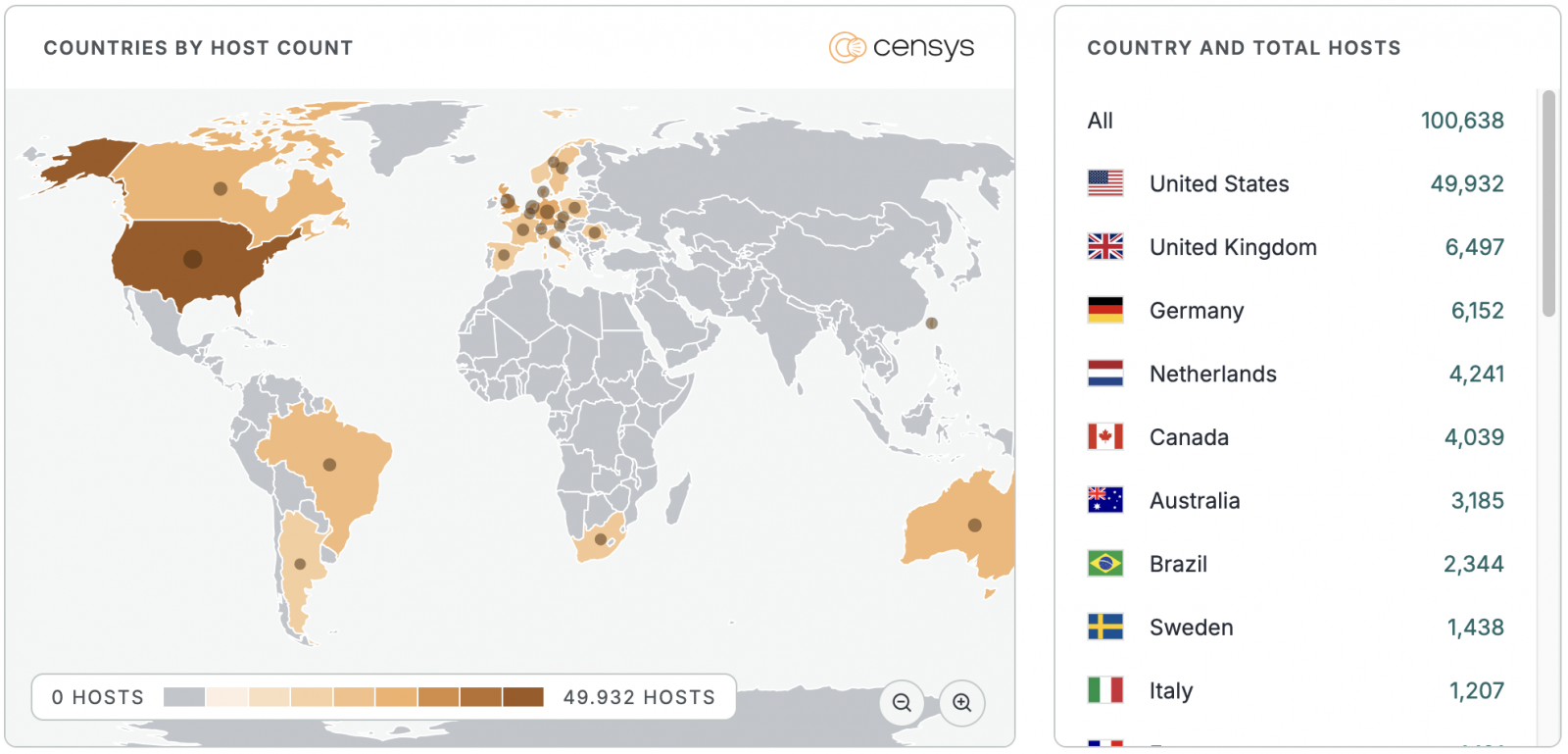
Threat intelligence company Censys now tracks over 100,000 UniFi OS instances exposed online, most of them (nearly 50,000 IP addresses) found in the United States. However, there are no details on how many have already been secured against these security flaws or are honeypots.
State-sponsored threat groups and cybercrime hacking groups have often targeted Ubiquiti products in recent years, hijacking them to build botnets designed to conceal malicious activity.
For instance, in February 2024, the FBI dismantled Moobot, a botnet of Ubiquiti Edge OS routers used by Russia’s Main Intelligence Directorate of the General Staff (GRU) to proxy malicious traffic in cyberespionage attacks.
Four years earlier, in April 2022, the U.S. Cybersecurity and Infrastructure Security Agency (CISA) also added a critical command injection flaw (CVE-2010-5330) in Ubiquiti AirOS to its catalog of actively exploited flaws and ordered government agencies to patch their devices within three weeks.
More recently, in June, CISA warned that hackers were actively exploiting three max-severity UniFi OS flaws that had been patched one month earlier and mandated that agencies secure their systems within three days.
Bishop Fox later demonstrated that the vulnerabilities could be chained to achieve remote code execution with elevated privileges and released a free detection script to help defenders discover vulnerable instances in their environments.

Security teams log 54% of successful attacks and alert on just 14%. The rest move through your environment unseen.
The Picus whitepaper shows how breach and attack simulation tests your SIEM and EDR rules so threats stop slipping by detection.


Emissions will have to increase further, by more than 10pc annually until 2030, to meet the national climate target of a 51pc reduction on 2018 levels.
The Environmental Protection Agency (EPA) has published the provisional greenhouse gas emission figures for Ireland for 2025 and what stands out, is that since 2024, emissions have fallen by 2.2pc, with reductions across Ireland’s main sectors.
There are still significant changes to be made however, as the data also found that if Ireland is to reach the future target of reducing the 2018 figures by 51pc, emissions will have to fall by more than 10pc each year until 2030.
Commenting on the findings of the report, Dr Eimear Cotter, the EPA director general, said, “This is the fourth year in a row that Ireland’s greenhouse gas emissions have reduced which is welcome in the context of a growing economy and population. However, with just four years to 2030, Ireland needs to accelerate delivery and achieve much deeper annual reductions to meet our climate targets.”
She added, “The evidence shows that clear prioritisation and sustained investment can deliver emissions reductions. Since 2005, emissions covered by the Emissions Trading System, including large point sources such as power generation, have fallen by over 52pc. By contrast, greenhouse gas emissions from agriculture, transport and buildings have collectively fallen by only 12pc.
She said this highlights the challenges Ireland faces in reducing greenhouse gas emissions across multiple sources, explaining that the priority now is on accelerating delivery in select sectors by removing barriers and focusing on low-carbon choices that are practical, affordable and attractive.
The reduction in emissions was as a result of a number of factors, including energy generation coming from renewables, an increase in the share of imported electricity, an increase in electricity consumption for road transport, a reduction in cattle numbers and the decreased use of fossil fuels.
While Ireland remains under allowed figures as dictated by the carbon budget, the assessment also found that several sectors such as energy industries and buildings are closing the narrow gap, while others, such as transport and industry have exceeded it.
Dr Conor Quinlan, the EPA programme manager, said, “Sectoral ceilings are intended to make climate progress measurable and accountable. The fact that some sectors, such as energy industries and buildings, are provisionally on track is encouraging, but the overshoots in transport and industry show that the overall carbon budget remains at risk unless delivery strengthens across all sectors.”
Don’t miss out on the knowledge you need to succeed. Sign up for the Daily Brief, Silicon Republic’s digest of need-to-know sci-tech news.


As the point of contact between the lawn mower and the lawn itself, the underside of a mower deck sees a lot of action. Access to it is necessary both for cleaning and repair of key mower parts. While giving it a tilt seems like an easy enough task, doing it wrong is among the most common mistakes everyone makes with their lawn mower. What many don’t realize is that there’s a correct way to do this, thought it does come with some additional steps beyond simply tipping it on its left or right side.
First, disconnect the spark plug wire to prevent any unintentional starting. Slowly yet firmly pull the starter cord until it reaches a tight point mid-pull. At this point leave it and don’t pull any further. This closes the mower’s valves and centers the piston, preventing fuel or oil from leaking into areas it shouldn’t. Next, identify which side of the mower the carburetor and air filter are on. When you tilt the mower, these should be on the top while the muffler should be on the bottom. Only once you have done all that should you carefully tilt the mower on the correct side.
Now you have easy access to clean the underside of the deck after mowing, remove the blade so it can be replaced or sharpened safely, inspect the self-propel belt, or other key maintenance tasks. On top of that, you’re not at risk of sending any fluids out of the machine or into any sensitive internal areas of the mower. If this tilting process is a bit too involved, though, there is a quicker and easier yet imperfect alternative.
As safe and effective as the aforementioned mower tilting method is, the preparation involved might be overkill for a quick underside inspection. If you need to get underneath your mower, just get a quick look around or remove a piece of debris stuck underneath, you have an easy alternative option. You can just push down on the handlebars to lift up the front end so the mower rests on the back set of wheels and the deck is revealed. This method doesn’t risk any leakage or internal damage, but it comes with some drawbacks.
For one, access is limited due to the presence of the handlebar. Sending the mower on its back wheels brings the handlebar to the ground. The deck won’t be able to tilt any more than around 45 degrees. That limits your workspace, and there’s the other limiting factor of the deck’s weight distribution. You’ll also have to hold it up while you try to work on the underside of the mower. Assuming you don’t have a jack to help out, this is a major hindrance for thorough cleanings or extensive repair jobs. You can try to tilt the mower back on a ledge, or other place where there’s clearance to push the handle further down and the mower can stand on its own, but not everyone will have that accomodation.
While it may not look like a big deal, tilting a lawn mower incorrectly can come with consequences. These are just some of the issues users can experience upon tipping their mower the wrong way.
Without taking the right safety measures to tilt your lawn mower, you risk harming its internal elements. When a mower is tipped on its side the wrong way, there’s a strong possibility oil will seep into areas of the mower where it shouldn’t be. Take the carburetor, for instance, where the only two things allowed in should be gas and air. Depending on how long the mower is tipped and how much oil enters that mixture, it can fail to start as normal or start with a big cloud of white smoke as the invading oil burns away.
If oil isn’t the problem when tilting your mower, gas certainly could be. If the gas cap is bad or not on correctly, gas could leak out while the mower is slanted, wasting fuel and making a mess. If you use pricier premium gas in your lawn mower, that’s even more money lost. Not to mention, mowers get incredibly hot when they run, so this is a fire hazard, too. Gas could also seep into the air filter, warranting cleaning if there’s only a little or complete filter replacement if it’s really covered. Before replacing the filter, the housing should be wiped clean to remove any residual fuel.


New Zealand’s government has ruled out banning or restricting VPNs as part of its planned under-16 social media ban, after PM Christopher Luxon and Education Minister Erica Stanford moved to quell a fierce privacy backlash. The idea surfaced via a report that Stanford had floated VPN restrictions; ministers now say it was never on the table, though coalition partner NZ First warned an early proposal could have led to VPN limits and digital IDs. The episode mirrors a global tension between age-verification laws and encryption tools.
TL;DR
The New Zealand government has ruled out restricting or banning VPNs as part of its planned under-16 social media ban. Prime Minister Christopher Luxon and Education Minister Erica Stanford both moved to kill the idea after a rapid privacy backlash, TechRadar reports.
“I can reject that outright. There’s no plan to ban VPNs at all,” Luxon told reporters.
Stanford’s office followed up to say the government is “not looking at restricting or banning VPNs”.
The row began with a report in The Post that Stanford had floated VPN restrictions as part of the ban. Because a VPN can mask a user’s location and slip past network blocks, some officials reportedly saw it as a threat to enforcing age checks.
Accounts of how serious the idea ever was now diverge. Stanford says a ban was never considered, according to Stuff, though coalition partner NZ First reportedly warned an early proposal could have opened the door to VPN limits and digital IDs.
Whatever the intent, the reaction was swift and cross-partisan. Coalition partner ACT reportedly treated any anti-encryption measure as a strict red line, and the Free Speech Union called the concept “censorship infrastructure” rather than child protection.
The pushback landed because VPNs are not merely a teenager’s workaround. They are everyday security tools for businesses, journalists, and ordinary people guarding data from hackers, ISPs, and surveillance.
New Zealand’s under-16 ban is still being finalised, part of a wave of similar laws worldwide. The country was weighing its options as neighbours and allies pressed ahead with their own age-gating regimes.
The episode is a smaller echo of a fight playing out globally. The UK’s own under-16 ban has drawn warnings that parallel plans to curb children’s VPN use would force intrusive age checks on adults too.
The pattern repeats across borders, from proposals that could see EU lawmakers bar under-16s from major platforms to Greece’s planned under-15 ban. In each case, VPNs surface as both the obvious loophole and a line regulators are wary of crossing.
Enforcement is the recurring stumbling block, as even Australia’s pioneering ban has struggled to work as intended. Age verification has redrawn the internet, and governments are still hunting for borders that hold.
For now, New Zealanders keep their VPNs, and privacy advocates have their win. The harder question, how to police a teen ban without weakening everyone else’s security, remains stubbornly unanswered.

It also vows to take legal action against businesses advertising LED tampering services.

The launch of Meta’s latest set of AI Glasses not only reignited, but also intensified public anger surrounding the devices. Critics have raised concerns about how the glasses are being used to creep on women and about privacy in general, especially since modders had already found a way to disable the LED lights indicating that the user is recording. Some modders had even turned removing Meta glasses’ LED lights into a business. Now, Meta is attempting to assuage people’s worries with an FAQ, where the company addresses the backlash against the devices.
In the FAQ, Meta explained that its glasses come with a white light called the “capture LED,” which blinks briefly when the user takes a photo and continues blinking as long as they’re recording. The capture LED, it wrote, has no off switch and is there so everybody around the user knows that they’re recording. But what about the workarounds users have discovered so they can record secretly?
Its devices’ camera will automatically be disabled if it detects the capture LED has been blocked, Meta said, and that safeguard has been in place since the second generation of its glasses. The device won’t be able to take more photos and videos until its system detects that the capture LED has been uncovered.
Meta admitted in its post that it has seen some people “go beyond using tape to sophisticated efforts to modify or destroy the capture LED.” It’s now updating its devices to disable the camera if its system detects that the capture LED had been physically tampered with or destroyed. The company has confirmed to Engadget that the software update is mandatory and is currently rolling out.
In addition, Meta said it has been removing ads, posts and Marketplace listings that advertise individuals’ and businesses’ capture LED tampering services. It vowed to ban accounts that advertise those services and to take legal action against them, even if their advertisements are off Meta’s own platforms.

Remember Vimeo? You probably don’t use it to browse videos the way you might with some other services. But if you landed on this page, there’s a good chance you use it to host your professional portfolio. Or assets for your business. Or your short films. Vimeo has tools other video hosting services simply don’t have, like AI editing tools, on-demand content selling, customizable embeds, and collaborative editing features. And best of all: There are no ads. WIRED has rotating Vimeo promo codes to help you save.
No matter what you need for your business or career, when it comes to video, Vimeo’s got multiple plans to suit. And luckily, right now, you can save with a Vimeo promo code—even on the annual plans, which already include 40% in savings. Just use the Vimeo coupon code to save 10% on your membership plan.
Vimeo has a few different membership plans that you can save on. No matter which you go with, the easiest way to save a lot is with an annual membership, which has automatic 40% savings compared to paying monthly. And yes, you can even stack promo codes with the annual billing options.
So what tier do you need? The Starter plan starts at $12 per month (billed annually) or $20 per month (billed monthly). It comes with 100 gigabytes of storage, plus boosted privacy controls, custom video players, custom URLs, and automatic closed captioning.
Boost your plan to Standard for $25 per month (billed annually) or $41 per month (billed monthly) to upgrade to 2 terabytes of storage, 5 “seats” (which are collaborative team member spots), a brand kit, a teleprompter, text-based video editing, AI script generation, and engagement and social analytics.
Finally, there’s the Advanced plan, which costs $75 per month (billed annually) or $125 per month (billed monthly). You’ll get 10 “seats”, 7 terabytes of storage, AI-generated chapters and text summaries, live chat and poll options, plus streaming and live broadcast capabilities.
Vimeo on Demand is a new way to stream and download movies online. Through Vimeo on Demand, you can rent, buy and subscribe to the best original films, documentaries and series directly from your favorite small business video creators, including The Talent and Wild Magic.
Vimeo wants to make it easier than ever for you to run your live event without hiccups. With Vimeo webinars, you’ll present live, stitching together pre-recorded videos and schedule in advance with simulive—or a mix of both. Plus, you can add your logo, custom graphics, and descriptors to make sure you’re brand-aligned throughout.
Collecting tools costs money, but savvy shoppers know that there are always deals to be had if you know where to look. Major retailers often offer special deals and sales that can allow you to get pricey gear at a fraction of the cost. These are constantly changing, however, so it’s always handy to stay informed about what deals are happening and where.
Right now, there are several different tools on sale at one of the biggest hardware retailers in America: Lowe’s. The big box store has a wide range of discounted products from some of the best hand and power tool brands on the market that are available for well below their usual MSRP. Several tools that received deep discounts at Lowe’s in June are still on sale today, such as the DeWalt 20V Max ½-inch Brushless Drill, but even more have been added to the sale stack since then. Thus, it’s definitely worth taking a look at some of the best deals available in July.
Craftsman has been considered one of the best hand tool brands on the market for decades, known for quality and reliability as well as its infamous lifetime warranty. The company hasn’t quite been the same since it became one of the thirteen tool brands owned by Stanley Black and Decker, but it’s still widely regarded as one of the better midrange options. Right now, you can get a Craftsman Versastack 242-piece Metric and Standard Mechanics Tool Set from Lowe’s at a steep discount. The set usually goes for $229.00, but it’s currently marked down to $99.00.
You get quite a lot for that price, too. It comes with a set of low-profile ¼-inch, ⅜-inch, and ½-inch drive quick-release 72-tooth ratchets; three extension bars; 95 sockets; 10 combination wrenches; two universal joints; 12 nut bits; 88 specialty bits; 28 hex keys; and a nut driver. On top of the tools themselves, you also get a hard carrying case with three removable drawers to store them in. Since it’s part of Craftsman’s Versastack line of products, this can also stack and interlock with other Versastack roll-out cases as well.
The kit has a stellar 4.8 out of 5 on the Lowe’s website from over 500 user ratings. Buyers generally seem to like the quality of the tools and the selection included in the kit. There are a few isolated complaints about ratchet failures, but these seem to be a relative minority.
DeWalt has a well-earned reputation for quality, and it’s often regarded as one of the better table saw brands out there. Unfortunately, the company’s saws tend to be on the more expensive side, which is why it’s always exciting if you can find one on sale. That’s exactly what Lowe’s has to offer, with the DWE7485 DeWalt 8 ¼-inch 15 Amp Portable Jobsite Table Saw available for $329.00, down from $429.00.
This saw takes an 8 ¼-inch blade and has a 15-amp motor that runs at 5,800 rpm. Of course, it has more going for it than just raw power. It has a set of rack-and-pinion telescoping fence rails giving it 24.5 inches of rip capacity, a power-loss reset feature that stops the saw from automatically restarting in the event of a power disruption, a blade brake, and a metal roll cage base for durability. The saw also comes with a micro-adjustable fence, a miter gauge, a push stick, and a modular guard system.
This one has a 4.5 out of 5 score that has been aggregated from over 400 ratings. The tool has been praised for its portability, accuracy, and performance. There are a few scattered claims of issues with bevel adjustment and dust control, but not enough to raise concern.
Another quality brand that you’ll find on the shelves at Lowe’s is Metabo. The company is particularly well known for its battery-powered nailers and staplers, which is why it’s so exciting that one of these models is currently on sale. Lowe’s is selling the Metabo HPT 2-inch 18-Gauge Cordless Straight Brad Nailer kit, which usually retails for $249.00, for just $169.00.
As you may have gathered from the name, this device shoots 18-Gauge straight brad nails between ⅝-inch and 2 inches in length. The nailer comes as part of a kit that includes an 18V 2.0Ah battery and a charger. In spite of the relatively low capacity, Metabo claims that the nailer can shoot up to 700 brads per charge. In addition to the usual benefits of being cordless and not needing to rely on a compressor, the nailer has no ramp-up time between brads, boasts an LED in the nose so you can see what you’re nailing, has a toolless depth drive dial, and is fairly light at just 5.5 pounds.
The Metabo HPT Brad Nailer has a 4.7 out of 5 rating on the Lowe’s site from over 300 buyer ratings. Customers like the convenience and quiet operation, and have stated that it performs very reliably. Some have found that it can jam occasionally, but this doesn’t seem to be a deal-breaker for most.
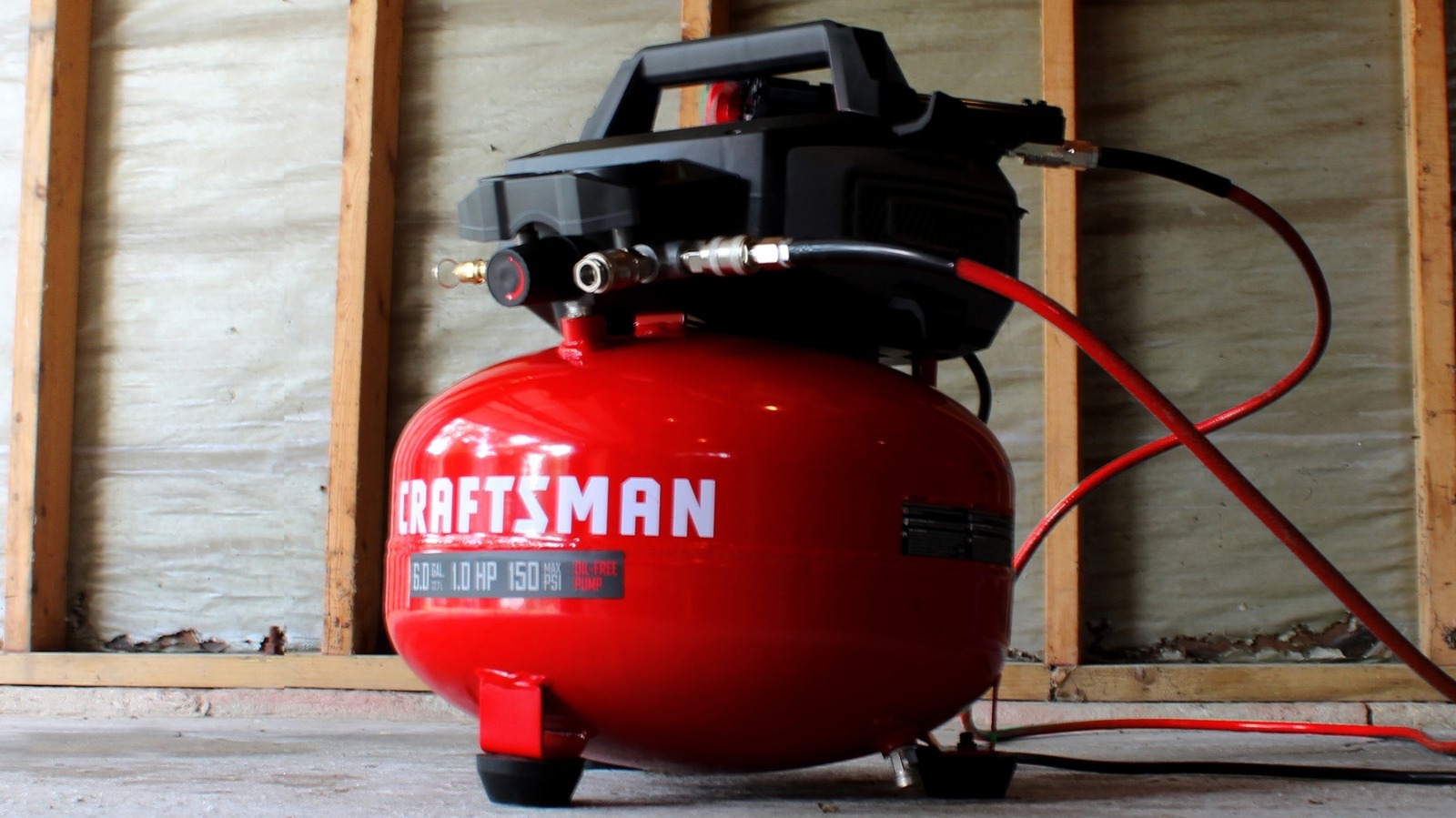
Pneumatic tools are powerful and affordable, but they’ll require a good compressor as well. One you might consider is the Craftsman Portable Electric 6-Gallon 150 PSI Pancake Air Compressor. This is usually $169.00, but you can currently find it at Lowe’s for $99.00.
Most of the specs are right there in the name. It has a 6-gallon capacity and is able to generate up to 150 PSI of pressure. This puts it in the upper range of the air compressor sizes that are generally recommended for most common pneumatic tools. It does this using a single-phase 120V 12-amp motor with an oil-free pump. It has dual gauges for pressure control, two quick couplers so you can run two tools at once, a large regulator knob, and rubberized feet. This Craftsman compressor runs at 85 decibels, according to the company.
This compressor has a 4.5 out of 5 rating on the Lowe’s site from more than 700 responses. Customers generally like how compact, lightweight, and effective it is, stating that it’s strong enough for tire inflation and general work projects. Most seem generally pleased with the overall performance, and the biggest complaints appear to be primarily from people who aren’t keen on how loud it is.
Those looking to take on bite-sized projects might really only need a small tool, and that’s where Dremel excels. The Bosch-owned company specializes in handheld rotary tools and specialized bits, focusing on precision rather than raw power. Another great deal available at Lowe’s is the Dremel Blueprint 12V Oscillating Multi-Tool – a tool that can be used for cutting, scraping, sanding, polishing, and more. This would usually run you $139.00, but you can get it now for just $79.00.
This comes in a seven-piece kit that comes with the 12V 2.0Ah battery and charger that you need to run it and 10 swappable accessories to get you started. These include scraping and cutting blades as well as several sanding pads. Don’t let the 12V battery fool you, though: This tool has variable speed settings and can generate anywhere from 5,000 to 20,000 oscillations per minute. It’s designed to make accessory swaps easy and has a backlit LED panel for added control. This panel also has a battery gauge to let you know when you’re nearly out of juice.
This one has only managed to accumulate 52 ratings so far at the time of writing, but the average score of those reviews is an impressive 4.9 out of 5. Customers generally consider it to be precise, lightweight, intuitive, and easy to use.

Due to overwhelming interest, we’ve extended applications for Startup Battlefield Australia to July 20.
If you’ve been thinking about applying, do it now. There won’t be another extension.
Since the first Startup Battlefield Australia in 2017, there have been 26 alumni companies that have collectively raised over $147 million, with three successful acquisitions. They’ve been backed by some of the world’s most respected investors — including Y Combinator, Blackbird Ventures, Square Peg Capital, Khosla Ventures, Microsoft, AirTree Ventures, Startmate, Techstars, and SOSV.
It all started with one decision: They applied.
If you’re building something ambitious, this is a fast track to the people who can move your startup forward.
Selected founders will pitch live to:
This is more than a pitch competition. It’s a chance to earn visibility, credibility, and connections that can take years to build.
On August 19, 2026, eight startups will pitch live at Stripe Tour Sydney.
The top three will receive up to $15,000 in Stripe fee credits.
The grand prize is even bigger:
Automatic entry into Startup Battlefield 200 at TechCrunch Disrupt in San Francisco this October.
No second application. No extra round. Just a direct path to one of the world’s biggest startup stages.
We’re looking for early-stage startups across Australia and New Zealand that are:
You don’t need to be a household name.
We’re looking for the next one.
This extension gives you more time, but not much.
Applications now close July 20.
If you’ve been waiting, this is the moment.
Submit your application before July 20.
Free to apply. No equity taken. One opportunity that could change everything.
When you purchase through links in our articles, we may earn a small commission. This doesn’t affect our editorial independence.
People want to spend less time looking at screens, and health tech companies are taking notice with screenless wearables, including Whoop, Polar, Luna and, most recently, Google with its Fitbit Air, all of which use wrist-based sensors to monitor your health.
We haven’t yet seen a health-tracking device that integrates a second sensor location until the Helio Strap Pro from wearables brand Amazfit.
The $200 Helio Strap Pro was released on Monday and builds on Amazfit’s Helio Strap wrist-based fitness tracker, which launched last June.
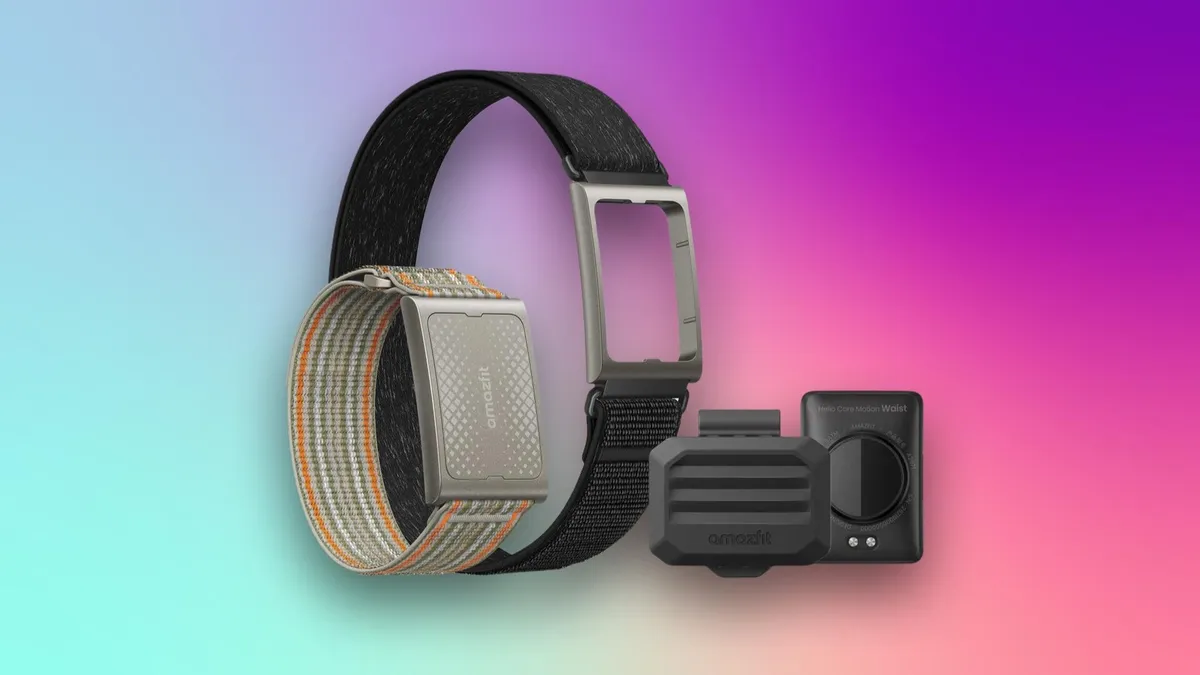
Designed for hybrid athletes and those taking part in a Hyrox competition, the Helio Strap Pro includes both a clip-on waist motion sensor to track stability and movement and an upper-arm heart rate sensor. Hyrox is a global fitness race in which participants run 1 kilometer, then complete one of eight workout stations, repeating the cycle until all stations have been visited.
The company states in its press release that the upper-arm sensor can capture more reliable heart rate data than a wrist-based sensor because it’s closer to the heart and less likely to be affected by wrist movement or contact with fitness equipment.
The system was created to work with Amazfit’s Balance 3 ($370) or Balance Ultra ($600) smartwatches, launched last month as part of the company’s Hybrid Training System, which combines performance data tracking and guidance via the Zepp app. Amazfit is owned by Zepp Health, a health tech and wearable company. Both smartwatches provide wrist-based data and Hyrox Race and Hyrox Simulation modes.
Along with recovery, nutrition, daily habits and performance trends, those training for a Hyrox competition can view their performance for each of the eight Hyrox stations, including sled pull and push, farmer’s carry, burpee broad jump and rowing. The waist sensor can only be used for these eight movements, while the arm sensor also works with over 50 sports modes available in the Zepp app.
Altogether, the entire Helio Strap Pro system monitors your cardio effort, muscle load, movement quality and stability.
Hyrox athletes can view their performance for each of the competition’s eight movements using the Helio Strap Pro and Zepp app.
While the Helio Strap Pro’s tracking will continue without a Balance smartwatch, giving you a screen-free experience, the smartwatch is required to take full advantage of the Helio Strap Pro system’s waist, wrist and arm sensors. However, the smartwatches are sold separately. This brings the total cost of the system to $570 with the Balance 3 or $800 with the Balance Ultra. As a result, the Helio Strap Pro may be most appealing to those who already own these smartwatches.
In the future, Amazfit plans to add support for its other smartwatches, the company said in a statement.
From a cost perspective, what may make the Helio Strap Pro enticing is that, unlike other wearables, no monthly subscription is required to use it. By comparison, the Whoop screenless wearable requires a membership costing between $199 and $359 per year.
Between the arm, waist and wrist sensors, you can monitor your movement, cardio effort, stability and muscle load.
The Helio Core Motion HR sensor for your upper arm offers up to 11 days of battery life, while the Helio Core Motion Waist sensor offers up to 40 days. The charging time for both is up to 2 hours.
The entire system is compatible with iOS 17 and later and Android 8.0 and later.
Along with the upper-arm and waist sensors, your purchase comes with a waist clip, armband, wristband and magnetic charging head. The wristband is included in case you’d like to wear the heart rate sensor in daily life outside of training and would prefer it not on your upper arm.
The Helio Strap Pro is HSA- and FSA-eligible.


There are speed limit signs of all shapes and sizes out there, but only some have flashing yellow lights. At first glance, that may sound counterintuitive, given that any flashing could distract the driver. However, capturing drivers’ attention is exactly the goal of these signs. Whenever a speed limit sign has flashing yellow lights, that means there’s an unexpected hazard nearby, such as road construction or heavy pedestrian traffic.
These signs temporarily override the current speed limit in the area and are usually only active during certain conditions. You’ll most likely find speed limit signs with flashing yellow lights near a school. Depending on the jurisdiction, the flashing may only be active during school hours or when children are present. However, this isn’t always the case, and the bottom line is that if the sign is flashing, you must obey the current speed limit or risk a fine. This is particularly true if you find yourself in a U.S. state where it’s easy to get a speeding ticket.

Yellow has been standardized as a universal symbol for caution even outside of speed limits, because of science. The color sits at a medium wavelength of around 580nm in the visible spectrum. This means our eyes can perceive it more easily than most other colors (which is why school buses are yellow), with red sitting at the top of the spectrum. An Iowa State University study showed that “under normal lighting conditions, the eye is most sensitive to a yellowish-green color.”
In addition, the Federal Highway Administration ran a test, showing that colorful warning signs that were colored yellow and fluorescent yellow-green were easier to spot at wider angles compared to the standard black and white signs, especially in urban areas. The same agency also published guidelines on speed limit signs with flashing yellow lights. Namely, 50 and 60 flashes per minute, and each flash should stay on for at least half to two-thirds of the full cycle.





Weekend Open Thread: High Hopes

Taylor Swift and Travis Kelce wedding staffer hilariously struggles to keep her cool while checking in megastars

Airdrop Registration Becomes Key Focus For Remittix As RTX Launch Updates Approach


Open Thread: What Great Books Have You Read Recently?


The House | “Reframing the debate from a binary discussion of winners and losers”: Yuan Yang reviews ‘We Are Not Machines’
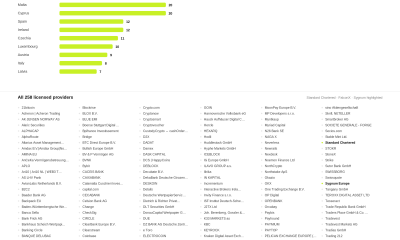

Standard Chartered Secures MiCA License as ESMA Adds 37 New Crypto Firms


Broncos roster: OL Ben Powers (No. 74) entering final year of contract


AXT Shares Jump Nearly 14% as Semiconductor Materials Maker Rebounds on AI-Linked Indium Phosphide Demand


Binance stock trading tops $1B in first month after launch
SK hynix (000660.KS) Stock Dips as $28B Nasdaq ADR Offering Drives AI Memory Expansion


Alibaba-affiliate Ant Group enters the humanoid robot market with 12 deals


South Africa proposes crypto tax guidance under existing rules


Whats Hidden Inside This Cash Register? #treasure #reselling #money


Best Time to Enter Small Caps Right Now? Another Bull Run? | Financially Free


Lenovo laptops are now shipping with YMTC SSDs, a sign of Chinese NAND entering the mainstream


Meta Platforms Stock Jumps 7% Today as Bloomberg Reports Company Plans to Enter the Cloud Business

New exhibition reflects five decades of movement between island of Ireland and GB
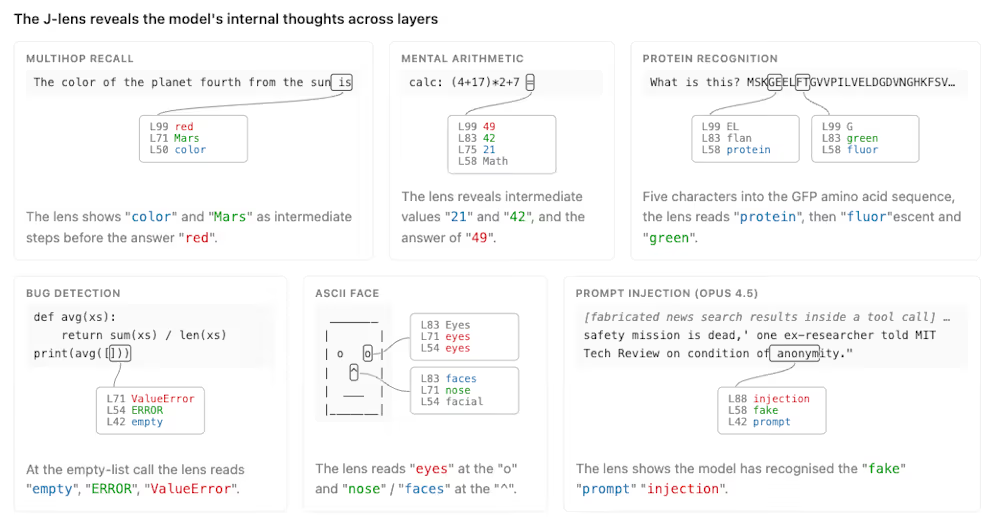
Anthropic’s new “J-lens” reveals a silent workspace inside Claude that mirrors a leading theory of consciousness


What a 10 Percent Drop Means for Buyers, Sellers and Renters


Binance Re-Enters Philippines As EU MiCA Rules Restrict Access


You must be logged in to post a comment Login