Create a strong password policy by prioritizing length and uniqueness, blocking compromised passwords, allowing password managers and autofill, removing arbitrary complexity and expiration rules, and requiring MFA for important accounts. Deploy the policy with a managed password vault, secure recovery procedures, and tests that confirm the written rules work in every covered system.
Quick Take
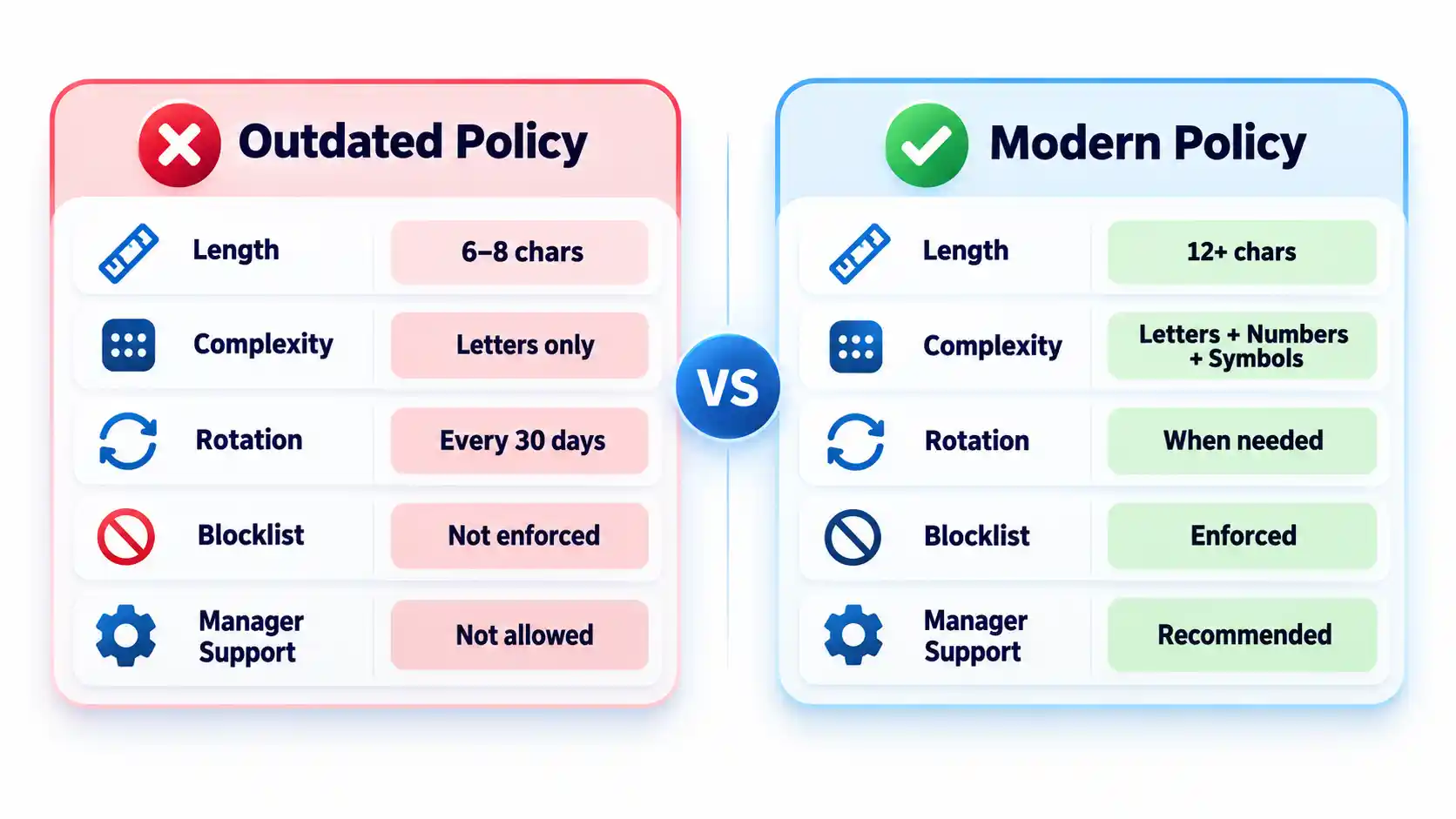
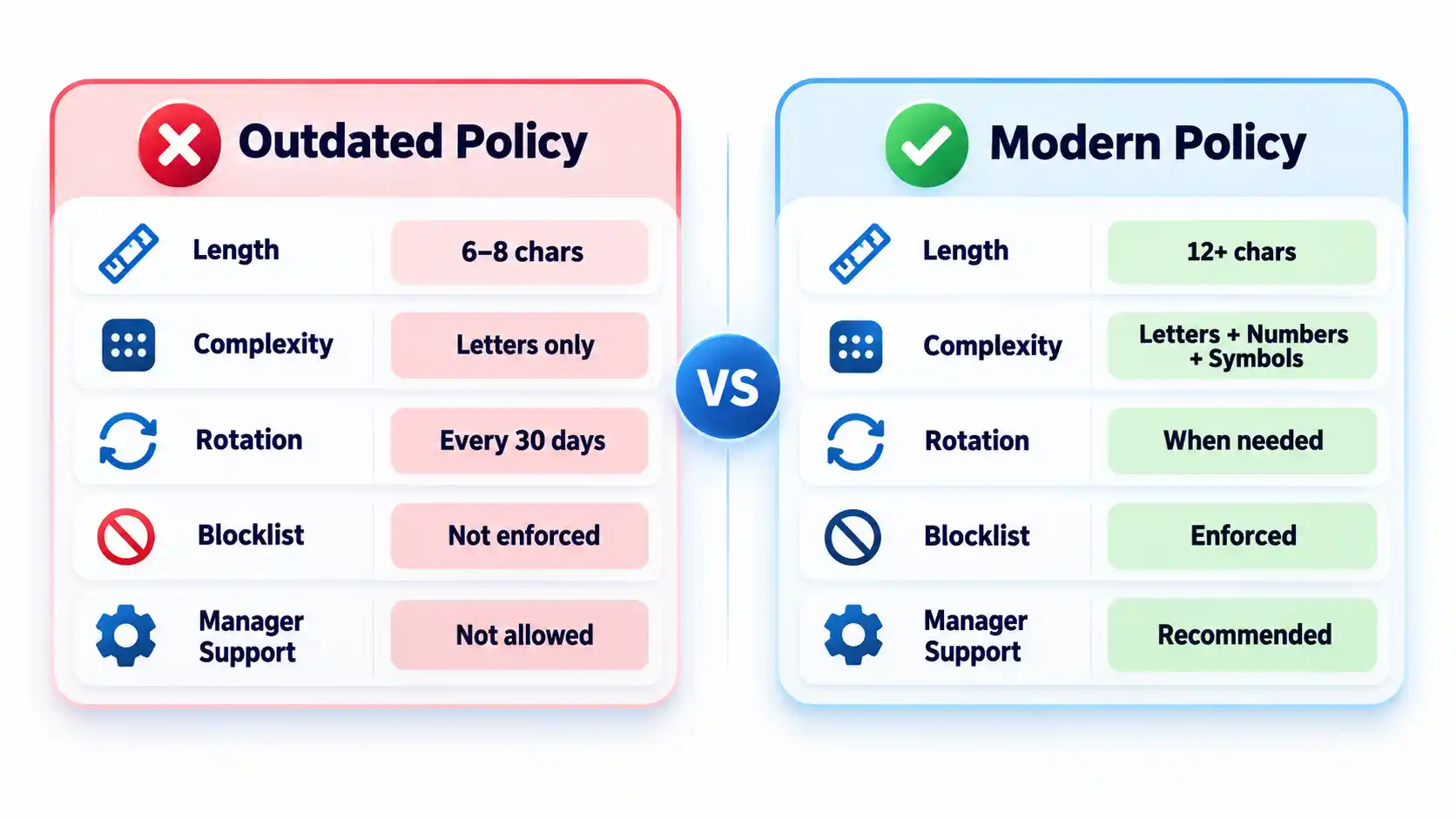
Require at least 15 characters when a password is the only authentication factor.
Allow passwords of at least 64 characters, including spaces.
Do not require arbitrary mixtures of uppercase letters, numbers, and symbols.
Replace scheduled password expiration with changes triggered by suspected compromise.
Reject commonly used, predictable, and previously compromised passwords.
Allow password managers, paste, and autofill on login forms.
Protect important accounts and cloud-synchronized vaults with MFA.
Test login, recovery, export, offboarding, and session-revocation controls.
These requirements follow current NIST authenticator guidance. They are a security baseline rather than proof that a particular policy satisfies every law, contract, or industry framework.
Prerequisites and Ownership
Identify the accounts in scope
Inventory the systems that accept passwords before writing the rules. Include workforce accounts, customer accounts, administrator access, cloud services, remote-access tools, shared credentials, and legacy applications. Record which systems use single-factor authentication, MFA, or single sign-on.
Keep machine credentials in a separate category. API keys, database secrets, certificates, service-account tokens, and CI/CD credentials require secrets-management controls rather than an ordinary employee password vault. A dedicated article on business secrets management should cover those systems.
Assign responsibility
Name a policy owner, identity-platform administrator, security reviewer, help-desk recovery owner, and departmental access approver. A policy without named owners tends to fail at exceptions, recovery, and offboarding rather than during ordinary password creation.
Advertisement
Document technical constraints
Record each system’s minimum and maximum length, supported characters, MFA options, password-history rules, breached-password screening, paste and autofill behavior, recovery process, and session controls. Legacy systems that cannot meet the baseline should enter a documented exception process with compensating controls and a retirement or remediation date.
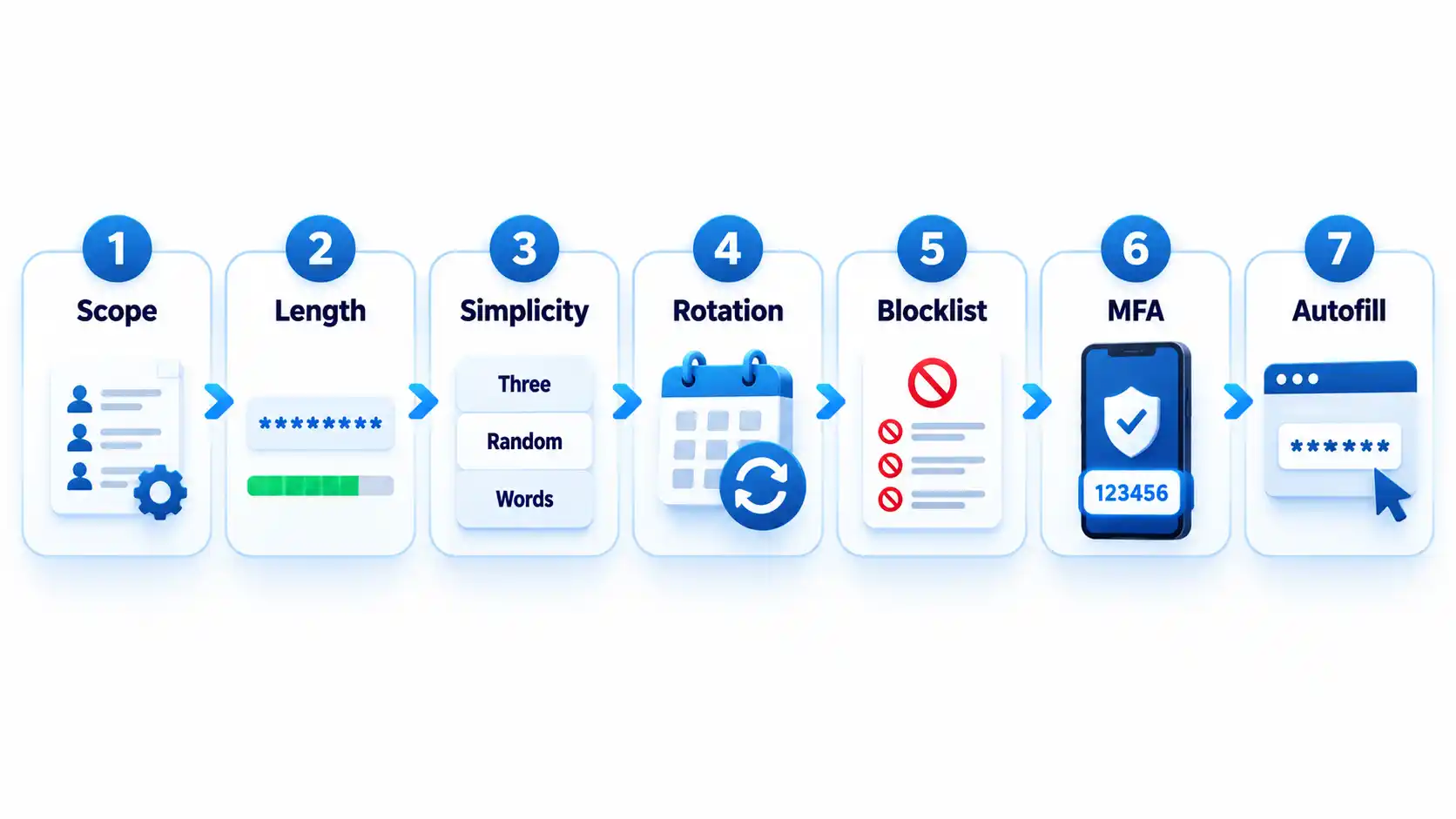
Step-by-Step: Create the Password Policy
Define which accounts the policy covers
State whether the policy applies to employees, contractors, administrators, customers, service providers, and shared accounts. Classify higher-risk accounts such as email, identity-provider, financial, cloud-administrator, source-code, and password-vault accounts.
Where possible, replace shared accounts with individually attributable accounts. If sharing is unavoidable, use a managed vault that records access and lets administrators revoke membership.
Expected result: Every covered account type has an owner, risk classification, authentication method, and exception status.
Set length and input requirements
Require at least 15 characters when a password is the only authentication factor. NIST permits passwords used only as part of an MFA process to be shorter, but they must contain at least 8 characters. Organizations may adopt a longer minimum when users can rely on a password generator.
Permit passwords of at least 64 characters. Accept spaces and broad character sets, process the entire submitted password, and never silently truncate it. Systems that mishandle spaces or long generated values should be corrected or documented as exceptions.
Advertisement
Expected result: Users can create long passphrases or generated passwords without encountering unnecessary input restrictions.
Remove mandatory composition rules
Do not require every password to contain a prescribed mixture of uppercase letters, lowercase letters, numbers, and symbols. Current NIST rules prohibit these composition requirements because users commonly satisfy them with predictable patterns.
Symbols remain acceptable when a generator selects them or a service requires them. The policy should not imply that a short password becomes safe simply because one letter was replaced with a familiar symbol. NIST’s public password creation guidance prioritizes length and recommends long passphrases when a password must be created manually.
Expected result: Users can choose long, usable passwords without following predictable formatting recipes.
Replace scheduled expiration with event-driven changes
Do not force users to change passwords every 30, 60, or 90 days without evidence of risk. Require a change when a password is known or suspected to have been disclosed, appears in relevant breach data, was transmitted insecurely, or may remain known to someone whose access has ended.
A password change must be accompanied by session revocation when an attacker could already be signed in. Changing the secret alone may not invalidate active browser sessions, application tokens, or remembered devices.
Advertisement
Expected result: Password changes respond to compromise and access changes rather than an arbitrary calendar.
Block weak and compromised passwords
Compare new and changed passwords against a blocklist containing commonly used, expected, and compromised values. Include context-specific choices such as the organization’s name, service name, username, and predictable derivatives.
Explain why a proposed password was rejected and ask the user to choose a genuinely different value. Do not reveal whether another person uses that password. Avoid enormous blocklists that create excessive false rejections without meaningfully improving protection against rate-limited online guessing.
Expected result: Users cannot enroll values that attackers are likely to guess early or already possess from breach collections.
Add controls around the password
Require MFA for email, identity-provider, financial, remote-access, cloud-administrator, source-code, and password-manager accounts. Prefer phishing-resistant methods such as passkeys or hardware-backed security keys where the service and user environment support them.
Rate-limit or progressively delay failed attempts. Monitor suspicious logins, protect account recovery, avoid knowledge-based questions as a sole recovery method, and provide a way to revoke sessions after suspected compromise. The OWASP authentication guidance treats password controls, MFA, recovery, session handling, and login monitoring as connected parts of account security.
Advertisement
Expected result: A guessed or disclosed password is harder to convert into persistent account access.
Require password-manager-compatible login forms
Allow users to paste and autofill credentials. Use standard password fields and avoid scripts or form designs that block managers. NIST requires verifiers to allow password managers and autofill and recommends permitting paste when autofill interfaces are unavailable.
Do not interpret clipboard blocking as a security control. It can push users toward shorter passwords they can type manually or toward storing credentials in insecure notes.
Expected result: Users can generate, store, and enter unique credentials without weakening them for convenience.
How to Choose a Password Manager
Select a manager by deployment fit, recovery design, security controls, and usability rather than by the length of its feature list. The NCSC buyers guide emphasizes that an unusable manager will leave insecure workarounds in place.
Advertisement
Comparison of password-manager deployment models
Manager type
Best fit
Principal advantage
Main limitation
Browser or platform manager
People using one primary browser or device ecosystem
Low setup friction and integrated autofill
Potential platform lock-in and fewer team controls
Standalone cloud-sync manager
Mixed-device users and small teams
Cross-platform access and centralized synchronization
Remote account and recovery paths require strong protection
On-device manager
Narrow or offline use cases
Reduced dependence on a cloud service
Limited synchronization and more difficult recovery
Enterprise-managed vault
Organizations requiring governance and offboarding
Managed sharing, audit records, policy enforcement, and provisioning
Greater administrative complexity and recurring cost
Evaluate the following capabilities before deployment:
Protection of credentials and metadata at rest.
Who controls or can recover the vault’s decryption key.
MFA, passkey, and approved-device support.
Recovery options and the people authorized to use them.
Secure sharing without revealing passwords in email or chat.
Role-based administration, audit records, and offboarding controls.
Restrictions or alerts for bulk export.
Supported browsers, operating systems, and mobile devices.
Update delivery and the provider’s vulnerability-disclosure process.
A practical method for leaving the service without permanent lock-in.
Browser and device managers can be appropriate when convenience and ecosystem integration matter most. A reputable standalone manager may fit mixed-device environments or teams requiring advanced sharing and administration. The NCSC’s updated password-manager guidance recommends evaluating reputation, device security, recovery, MFA, and platform needs instead of assuming one type fits everyone.
How to Deploy and Use the Password Manager
1. Protect the vault account
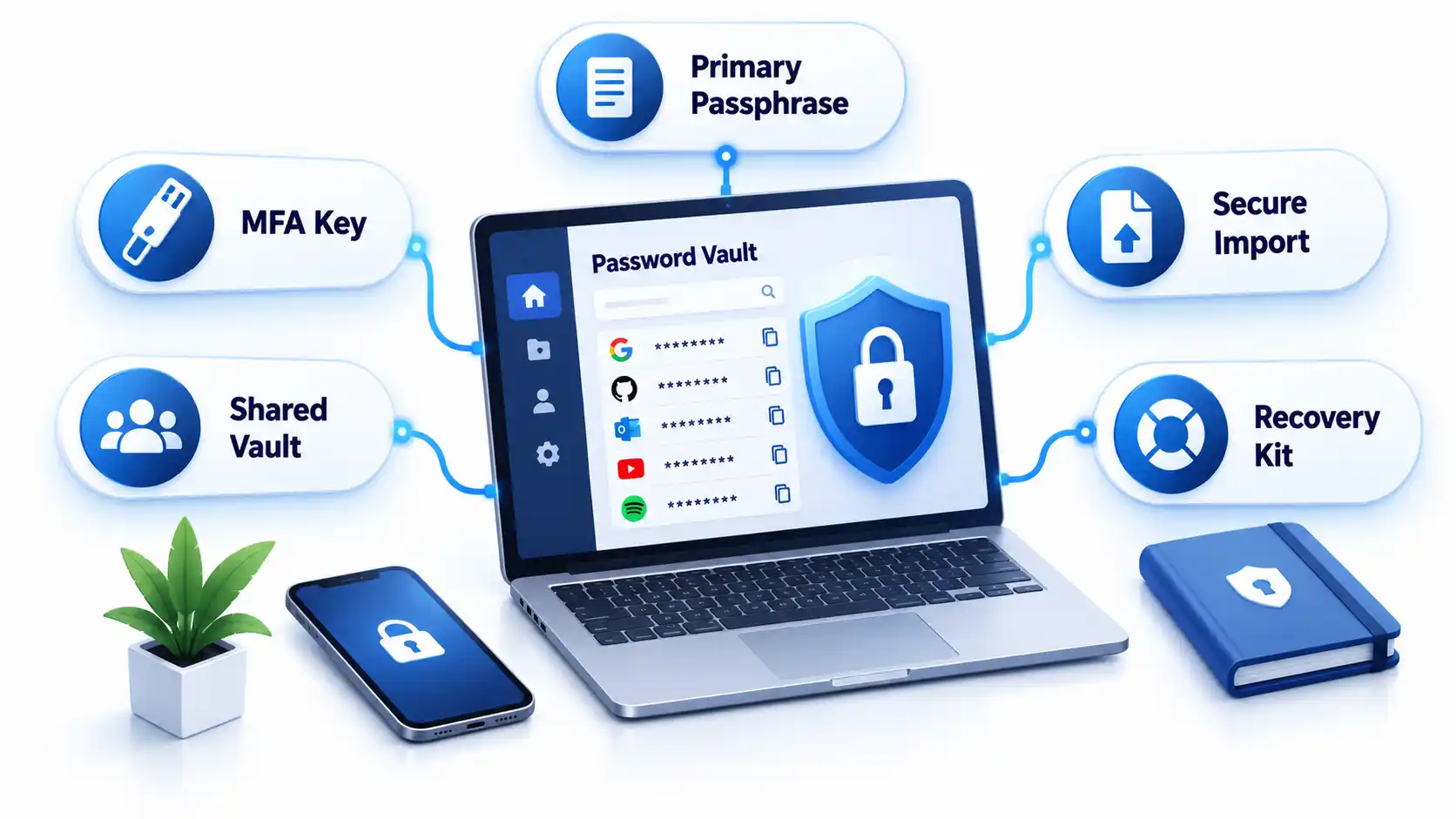
Create a long, unique primary passphrase that is never used elsewhere. Enable the strongest practical MFA and secure every registered device with updates, automatic locking, and a local PIN or biometric unlock.
Store recovery keys or emergency instructions separately from the vault. Avoid circular recovery in which the only way to access the email account is through the vault while the only way to recover the vault is through that email account.
2. Import credentials carefully
Some managers migrate credentials through a CSV file. That export may contain readable usernames and passwords. Create it only on a trusted device, import it immediately, verify that the records arrived, and delete the exported file from the original folder, recycle bin, cloud synchronization, and temporary storage.
Advertisement
Do not perform a vault migration over an unfamiliar hotspot. Review the precautions in this public Wi-Fi security guide before accessing sensitive accounts away from a trusted connection.
3. Replace reused passwords in risk order
Secure the password-manager account and its recovery channels.
Change email and identity-provider credentials.
Change banking, payment, payroll, and financial credentials.
Change administrator, cloud, source-code, and remote-access credentials.
Change shopping, social-media, subscription, and lower-impact accounts.
Do not change dozens of accounts without confirming that each new password was saved. Keep the old session open until the new credential has been tested in a separate private window or another approved device.
4. Configure generation and autofill
Generate a different random password for every compatible service. Match the site’s supported length and character rules while avoiding needless manual edits. If autofill does not appear, check the exact domain before searching the vault and copying the password.
Autofill may help resist phishing because a manager should associate credentials with the legitimate domain. It is not infallible. Users must still inspect unusual addresses, subdomains, redirects, and browser warnings.
5. Configure team sharing and offboarding
Store business credentials in organization-controlled collections rather than personal vaults. Grant access by role, assign an accountable owner, review membership, and remove access promptly when someone changes roles or leaves.
Advertisement
Revoking vault access prevents future retrieval, but it cannot make a password unknown to someone who already viewed or copied it. Rotate credentials when a departing user could retain them. Teams protecting software repositories should connect this process to the controls in the guide to preventing source-code theft.
Verify That the Policy Works
Test the deployed controls instead of assuming a written setting was applied consistently.
Checklist
Confirm that a 15-character single-factor password is accepted.
Confirm that long passphrases, spaces, paste, and autofill work.
Confirm that the application processes the full password without truncation.
Attempt to enroll a known common password and verify that it is rejected with useful guidance.
Confirm that uppercase, number, and symbol mixtures are not mandatory.
Verify that routine expiration is disabled and compromise-driven resets work.
Trigger repeated failed attempts in an approved test account and verify rate limiting or progressive delay.
Test MFA, recovery, session revocation, emergency access, and lost-device procedures.
Remove a test user from a shared collection and verify that access ends.
Verify that export actions are restricted, logged, or both.
Record exceptions and failed tests with an owner and target correction date. Repeat the checks after identity-platform changes, password-manager migrations, or major policy revisions.
Failure Modes and Troubleshooting
Common password policy and manager deployment failures
Failure
Likely cause
Security consequence
Corrective action
Long generated password is rejected
Legacy length or character restriction
User shortens or reuses a password
Correct the restriction or document a temporary exception
Autofill does not appear
Unsupported form, disabled extension, or domain mismatch
User may copy into the wrong page
Verify the domain and manager permissions before manual entry
Credentials fill on an unexpected subdomain
Overly broad saved-domain matching
Password may reach an unintended service
Narrow the saved address and report unsafe matching
Primary passphrase is lost
Recovery was not configured or documented
Vault data may become inaccessible
Use the approved recovery process and reset affected accounts if recovery fails
MFA device is lost
No backup factor or recovery key exists
User is locked out or bypasses policy
Use pre-established recovery and revoke the lost device
Exported CSV remains on disk
Migration cleanup was missed
Passwords remain exposed in plaintext
Delete all copies and rotate credentials if exposure is possible
Former worker retains a shared password
Vault removal occurred without credential rotation
Continued unauthorized access remains possible
Rotate the credential and review account activity
Legacy system requires frequent changes
Obsolete platform rule
Users may create predictable variations
Apply compensating controls and schedule remediation
Vault and email recovery depend on each other
Circular recovery design
One lost factor can lock out both services
Create an independent recovery route and protect it offline
Operational Limits and Edge Cases
Concentrated value: A vault makes unique passwords practical, but a successful vault compromise can expose many accounts. Protect the primary account and registered devices accordingly.
Compromised endpoints: Malware or someone using an unlocked computer may capture credentials after the vault decrypts them. A password manager does not replace device protection. Organizations can evaluate those controls separately in this endpoint protection guide.
Recovery trade-off: Recovery improves availability but creates another path that an attacker may target. Document who can recover a vault and what evidence is required.
Shared accounts: A vault improves sharing, but individual accounts remain preferable because they provide attribution and cleaner revocation.
Offline access: Emergency recovery material needs physical protection, named custodians, and periodic verification.
Phishing: Passwords themselves are not phishing-resistant. Adopt passkeys where appropriate and evaluate the differences in a future passkeys versus passwords guide.
Key Takeaways
Use length, uniqueness, blocklists, and login protections instead of frustrating composition rules.
Require at least 15 characters when a password is the only authentication factor.
Do not force periodic changes without evidence of compromise.
Allow password managers, paste, autofill, and long values.
Protect the password vault, email, identity provider, and administrator accounts with MFA.
Select a manager based on security, recovery, usability, platform support, export, and governance.
Replace reused passwords in risk order and verify each change.
Test recovery, offboarding, exports, and session revocation before an incident.
Frequently Asked Questions
Should contractors use the company password manager?
Contractors should use an organization-controlled vault when they need access to company credentials. Place them in restricted groups, set an access end date where supported, and avoid mixing business credentials with their personal vaults. At contract completion, revoke access and rotate any credential they could have copied.
Should a password manager store the code for its own MFA?
Storing a service’s password and MFA code in one vault is convenient, but storing the vault’s own second factor inside that same locked vault creates a circular dependency. Protect the manager itself with a separate authenticator, passkey, hardware key, or securely stored recovery code.
What happens if the password manager company shuts down?
A usable exit plan should let authorized users export or transfer credentials to another manager. Confirm the export format before deployment and document how migration would work. Because exports may be plaintext, continuity planning should not involve leaving permanent backup exports on ordinary drives.
Advertisement
Can administrators see employees’ passwords in a business vault?
That depends on the manager’s encryption, sharing, recovery, and administrative design. Some administrators can recover accounts or manage shared collections without seeing every private credential. Others may have broader recovery powers. Review the product’s key-ownership and recovery documentation before adoption.
Should personal and work passwords be kept in the same vault?
Separate vaults or clearly separated organization-controlled and personal spaces are preferable. The company must be able to manage, audit, and revoke business access without gaining control over personal credentials. Employees should also retain their personal passwords after leaving without exporting company secrets.
What should happen when a password appears in a data breach?
Change the affected password, revoke active sessions, review account recovery methods, inspect recent activity, and replace the same password anywhere it was reused. Follow a documented data breach response checklist so the reset does not overlook tokens, forwarding rules, or connected applications.
“A brilliant specialist with a short attention span.”
Pros
Rights itself and launches from open water every single time
Tracking at 15 mph is steady enough to pass for a chase boat
The Lighthouse wearable handles launch, landing, and following
Onboard screen lets you replay clips on the water with no phone
Dead battery? It lands softly on the surface and floats
Cons
I measured 10 and 13 minutes of flight against an advertised 23
The Lighthouse shows no battery level at all
No obstacle avoidance
The battery is only fully waterproof while it sits in the drone
Quick Take
I spent two weeks on an Oregon river trying to break this thing — off an eFoil, out of a kayak, and by throwing it into the water on purpose. The HoverAir Aqua is the first consumer drone actually built to live on open water, and after two weeks I still stop what I’m doing to watch it launch. Throw it in the river upside down, and it flips upright, shakes the water off its props, pops into a low hover, and waits for you. Strap the Lighthouse beacon to your forearm, and it will follow you across the river at eFoil speed with your hands never touching a controller.
Let me be blunt, because this is the most important thing to know before you buy: there are two battery problems. HoverAir prints 23 minutes on the box. I measured 10 minutes and 13 minutes with the drone actively tracking me. And the wearable never tells you how much charge is left. So this is a drone I love, packed in a dry bag next to a fistful of spare batteries I resent having to carry.
HoverAir Aqua specs: A quick peek at the innards
Weight
Under 249 g, light enough to skip FAA registration for recreational U.S. flight
Waterproofing
IP67; floats and rights itself; battery fully waterproof only while installed
Camera
4K at up to 100 fps through a heated lens that sheds fog and spray
Altitude sensing
Millimeter wave radar that reads wave height for low passes over water
Display and storage
1.6-inch onboard AMOLED; 128GB internal storage, no SD card
Battery
2,013 mAh smart battery; rated 23 min; I measured 10 and 13 min while actively tracking
Charging
About 55 minutes with the battery inside the drone
Controller
Lighthouse waterproof wearable (launch, land, track, auto recall) with no battery readout
Obstacle avoidance
None
Recognition
CES 2026 Innovation Awards honoree; Red Dot Award
Test conditions
Two weeks on an Oregon river; eFoil at about 15 mph plus kayak sessions
HoverAir Aqua design & build: A pool toy with flagship chops
Ian Bell / Digital Trends
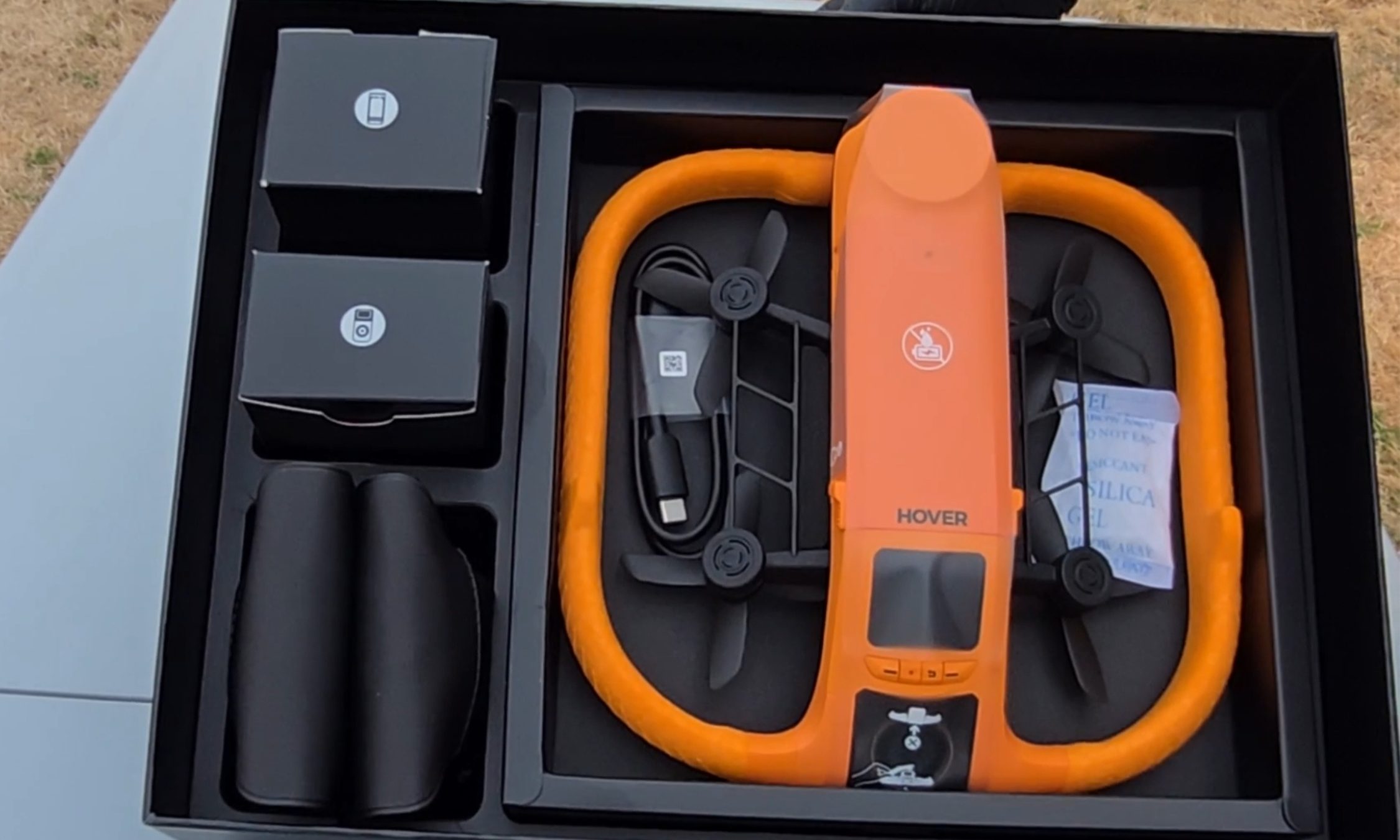
The first thing I noticed pulling the Aqua out of the box is the fat ring of safety-orange foam around its body, the same shade as a life vest. It looks like a pool toy. That’s deliberate. The foam keeps the drone buoyant, cushions the props, and makes the aircraft easy to spot from fifty yards out when it sets down on dark green water. The whole package carries an IP67 rating and weighs under 249 g, which keeps recreational pilots in the U.S. under the FAA registration threshold.
Ian Bell / Digital Trends
My favorite piece of hardware here is also the smallest. A 1.6-inch AMOLED screen sits on the drone’s spine, and it stays readable even with glare coming off the water. It’s there to pick flight modes, but I mostly used it to review what I’d just shot — sitting on the board, dripping, thumbing back through a run while the river went past. Two weeks in, I was still reaching for it instead of my phone. Storage is 128GB and internal, so there’s no SD card to lose, forget, or flood.
Ian Bell / Digital Trends
The camera records 4K at up to 100 fps for slow motion through a heated lens, which keeps fog from forming and makes water bead off instead of smearing across the glass. Underneath the airframe is the strangest line I have ever typed about a consumer drone: millimeter wave radar that reads the height of the waves rolling beneath it, so the Aqua can skim low over moving water without clipping a crest.
For those of you unfamiliar with the term, and since the spec sheets never bother explaining it, millimeter wave radar bounces very short-wavelength radio off a surface to measure distance to it — here, a surface that will not hold still. The industry noticed. The Aqua premiered at CES 2026 as an Innovation Awards honoree and collected a Red Dot Award along the way.
HoverAir Aqua water launch: Throw it in, it flies out
Ian Bell / Digital Trends
The water launch is the feature every bystander will ask you to do twice, and I tested it from the kayak with my kids leaning over the side to watch. You toss the drone into the river upside down, carelessly. However, it happens to leave your hand. It bobs for a beat. Then the props bite, it rolls upright, and it climbs into a hover a few feet off the surface to wait for you to start moving. It did that every single time I asked, and I asked a lot. Not once did I have to paddle over and fish it out or reset anything. In a category where water has always meant total loss, that is a bigger deal than a party trick sounds.
HoverAir Aqua subject tracking: A chase boat on your forearm
Most of my testing happened on my eFoil at around 15 miles per hour, with the waterproof Lighthouse strapped to my forearm like a chunky watch. One button sends the drone up. One button brings it home. Everything between those two presses is automatic.
Advertisement
Not the actual resolution captured by the HoverAir Aqua. The image has been resized.Ian Bell / Digital TrendsNot the actual resolution captured by the HoverAir Aqua. The image has been resized.Ian Bell / Digital TrendsNot actual resolution captured by the HoverAir Aqua. The image has been resized.Ian Bell / Digital Trends
The footage surprised me. My wake unspooling behind the board in a long white seam, the tree line sliding by, and me held in the center of the frame for the entire run. The best material came when the drone swung out ahead of the board and shot back at me, spray kicking off the foil, the whole river opening up behind.
It never fell behind, and it never wandered. When I drifted too far, it closed the gap on its own. When I slipped off the board and sat chest-deep in the water beside it, it stayed locked on and waited. The kayak sessions at lazier speeds went the same way: steady framing, no fuss, the family paddling along with a small orange aircraft holding formation off the bow. This is the closest thing to a camera operator you can wear on your wrist.
HoverAir Aqua Battery Life: High on the box, dips in the water
Ian Bell / Digital Trends
Now, the part the box will not tell you. HoverAir advertises 23 minutes of flight from the 2,013mAh smart battery. My first battery, actively tracking me on the foil, gave me 10 minutes before the drone called it quits. I rode back to shore, clicked in a fresh one, and went back out. Thirteen minutes. Doing the exact job you bought it for, you get about half the number on the sticker.
It’s worth noting that drone makers rate flight time in windless conditions with no tracking load, and you should not expect that figure in the real world. Even allowing for that, half is a wide gap. At least the ending is graceful.
When the charge runs out, you get a warning that the drone will land in 15 seconds, and then it sets down on the surface, orange side up, rocking on the chop until you come get it. Nothing dramatic happened in two weeks of testing. Recharging takes about 55 minutes with the battery inside the drone, and because a battery is only fully waterproof while it’s installed, HoverAir includes a dedicated waterproof pouch for hauling spares out on the water. Read that accessory list again. The company is telling you, in its own way, that you will be swapping batteries mid-session.
HoverAir Aqua Lighthouse Wearable: Great controller, no fuel gauge
Ian Bell / Digital Trends
The second problem makes the first one worse. The Lighthouse is otherwise the best thing about this product, and it tells you nothing about the battery. No percentage. No halfway warning. No blinking light as the level sinks. Mid-run, I had no idea whether the drone above me had eight minutes left or thirty seconds.
Ian Bell / Digital Trends
When the entire budget is 10 to 13 minutes, that silence turns every session into a guessing game. Both times a battery died on me, my only notice was the 15-second landing warning, right when I felt like I was getting going.
Should you buy
HoverAir
The good here is genuinely good. The footage is beautiful, the Aqua keeps pace with a foil at speed, it launches itself out of open water, and it runs hands-off enough that you forget it exists until you sit down to replay the clips. As a piece of engineering built for a hostile environment, it is the real deal.
The battery is what makes me hesitate, and I am not going to soften that. Plan a full session around this drone, and you are packing a pocketful of spares and guessing when to burn them.
Advertisement
So here is the fork. If what you want is a quick promo shot or a fast social clip off the water, this is the drone doing that job, and I don’t know of another one built to take the punishment. If you want to shoot an entire session, wait and watch for a firmware update that pushes battery data to the Lighthouse.
That one change would make this an easy recommendation for anyone who makes content on the water. As it stands, the Aqua is a brilliant specialist with a 10-minute attention span, and I keep taking it out anyway.
Why not try?
HOVERAir X1 PROMAX — Priced significantly lower at $700, this one offers hands-free auto-follow tracking and Lighthouse wearable perks, can shoot up to 4K 120fps footage, and stands out with a foldable design. It’s slightly slower and doesn’t offer a waterproof build, but makes up for it with collision-sensing tech.
DJI Mini 4 Pro — Another option that is more affordable as well, DJI’s drone offers impressive aerial capture capabilities with omnidirectional obstacle sensing and a reliable 4K camera that can capture high dynamic range videos. Plus, the battery packs can extend the flight time by up to 45 minutes, while the transmission performance is also fantastic. But an impending ban casts a shadow of skepticism over long-term support and after-sales experience.
Advertisement
FAQs (Frequently Asked Questions)
Who needs the HoverAir Aqua?
It’s a waterproof, self-flying 4K camera drone. If you’re into activities such as kayaking and wakeboarding, it’s an appropriate choice.
Is it capable of taking off and landing directly on water?
Yes, the positive buoyancy engineering allows it to float on water. And yes, it can take off and land from the surface of water. Moreover, it also comes with a Turtle Flip feature that lets it correct its position instantly, even if it’s flipped upside.
Is the build really waterproof?
The HoverAir Aqua has an IP67-certified build, featuring corrosion-resistant components, while the camera sensor is protected by a hydrophobic, anti-fog lens.
Do you need a license to fly it?
It falls under the prescribed FAA weight limit, so you don’t need a license to fly it.
Advertisement
Can it fly and capture without a phone?
Yes, the wearable Lighthouse controller relies on Real-Time Kinematics (RTK) positioning to let the drone track you and capture videos without requiring a cellular link or base stations.
What is the top speed and battery life?
The HoverAir Aqua can fly at a speed of up to 34 miles per hour, and it is claimed to last over 20 minutes on a single charge.
In a nutshell: Despite Nvidia losing fans over the last few years as its focus on gamers diminishes (or disappears), the company’s GPUs have dominated the sales charts. But that status quo is starting to change: Amazon’s top 10 best-selling GPU list is an even split between Team Red and Team Green, with the highest position held by a Radeon 9000-series card. Meanwhile, in Germany, AMD is the one that’s dominating sales – at least at one retailer.
The rise of RDNA 4 was highlighted by TechEpiphany on X.
The Amazon best-selling list has changed slightly since the post, but the Radeon RX 9070 XT is still the top GPU. This Gigabyte version is priced at $749, which, of course, is considerably higher than the GPU’s $599 launch MSRP.
The other AMD cards in the chart are an Asus model of the 9070 XT, an Asrock 9070, and an Asus 9060 XT. Nvidia also holds four positions with its RTX 5070, RTX 5060 Ti, and two RTX 5080 models.
Advertisement
Things appear even more favorable for Lisa Su’s firm in Germany. The figures, which come from Mindfactory, show AMD accounting for almost 56% of all GPUs sold over the last week, while Nvidia holds a 40% share. Again, the RX 9070 XT is the most popular card by far, followed by the RX 9060.
It’s worth remembering that Mindfactory has a reputation for favoring AMD, offering promotions, discounts, and bundles featuring its products, which help push up sales figures. The store’s AMD cards have outsold Nvidia’s in the past.
However, these charts do illustrate the impact of the memory crisis on the graphics card market. All GPUs are more expensive, but AMD’s are often cheaper than equivalent Nvidia cards.
The other reason is likely simple availability. The Amazon chart shows three AMD cards in stock, while Nvidia only has one – a Gigabyte RTX 5080 for a colossal $1,599, and that’s with a 6% discount.
Advertisement
Only one company dominates the Steam survey GPU chart
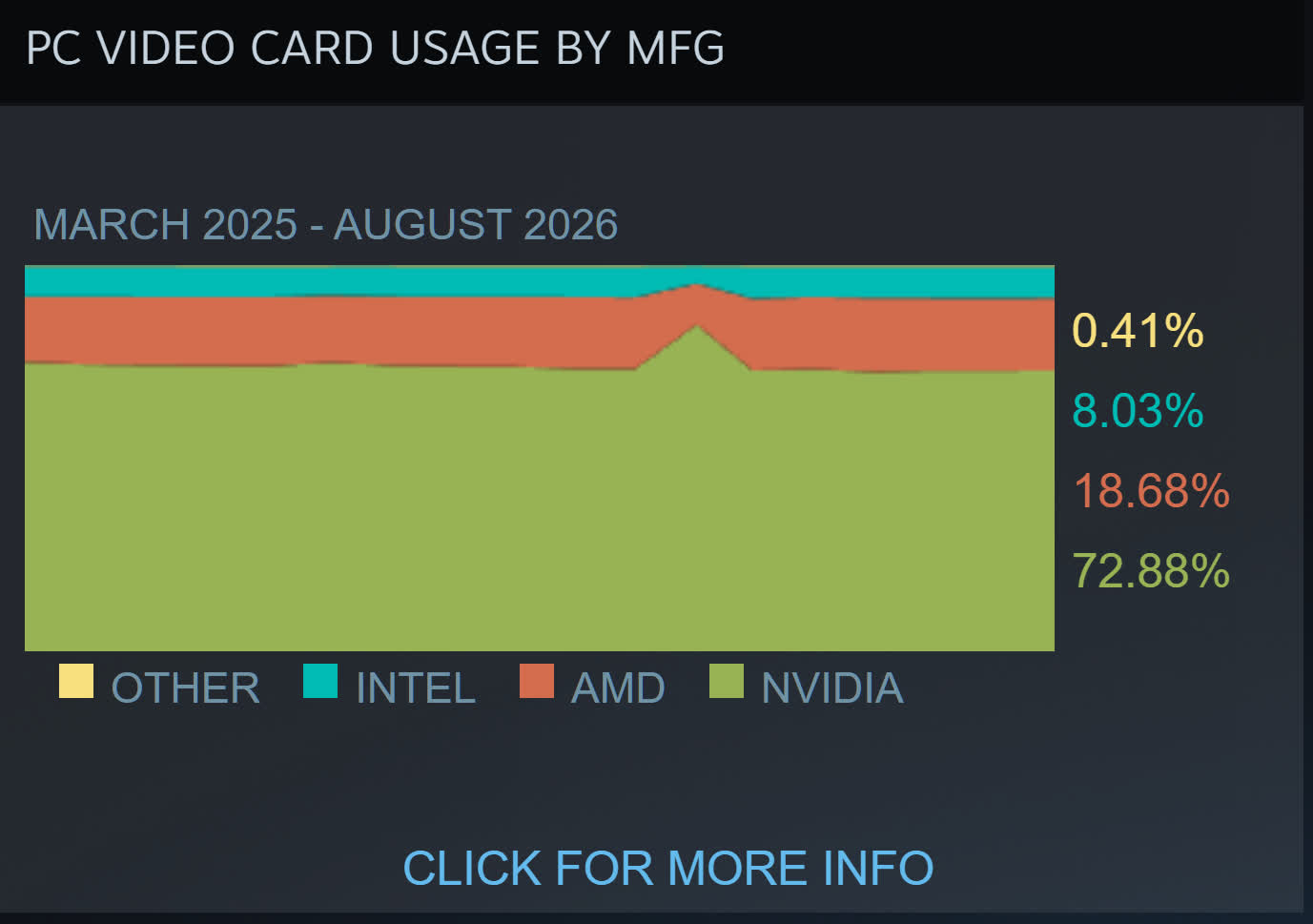
TechEpiphany’s claim of AMD “dominating everywhere” might be a bit of an exaggeration, but there are signs of consumers opting for its cards because of the cheaper prices – or just buying them because there are no Nvidia alternatives. The most valuable company in the world still has GPUs in almost 73% of Steam survey participants’ machines, compared to AMD’s 18.6%, so we’re not seeing a red revolution just yet.
Amazon’s Beats discounts knock up to 54% off the earbuds and over-ear headphones, while Nomad launches an aggressive overstock sale dropping iPhone and Apple Watch accessories to as low as $19.
If you’re in the market for a new pair of headphones or want to breathe new life into your iPhone with a fresh case, there are deals in effect from just $19.
Save up to $190 on Beats
Apple deals continue to roll in at Amazon, with a price cut on the M5 MacBook Air that we covered earlier today, but now Beats are on sale to pair with your Mac, iPad, or iPhone.
Save up to 51% across the headphones range, with a standout deal being the $159.95 price on Beats Studio Pro for the exclusive Sand Gray color. Other color options are priced at $169.95, still a $180 discount off retail, with Amazon stating the limited-time offers are selling fast.
On the earbuds side, Beats Studio Buds Plus are marked down to $99.95, which is a 30-day low.
Today’s best Beats deals
Nomad iPhone & Apple Watch accessories from $19
Discounts of up to 74% off are in effect as Nomad clears out iPhone 16 and 17 accessories. You can also grab an Apple Watch band at 49% off during the overstock sale.
The company is finally addressing some of these issues and rolling out updates to make abuse by law enforcement and other entities more difficult. The pre-existing Audit Assistance feature will now be required to use, after being introduced as an optional tool. This flags “abnormal search behavior” and locks out suspicious users until an administrator reviews their activity.
Police officers will now be required to enter case codes to run searches, which is intended to limit personal queries. This can, however, be overridden by an administrator in certain scenarios.
I’ve learned a lot in nine years of building @Flock_Safety. Some of it from our customers, and some of it from the communities they serve.
Today we’re announcing the changes that came from listening. A new standard for privacy, security, and accountability in public safety…
“This is such an obvious way to curb abuse,” CEO Garrett Langley told The Verge. “And I said, ‘Fine. You know what? I think that’s right, and we got this one wrong. We should make it a requirement.’” It is worth noting that we’ve been seeing Flock-related stalking incidents from police officers since 2021.
The company is also shortening the Automated License Plate Reader (ALPR) data retention period from 30 days to a week. Again, there will be exceptions for “cases that take longer,” like “an active investigation in cold storage.” However, this looks to only apply to new customers. The company is carving out another exception for existing customers, in which they can “keep their current, democratically approved retention periods.”
“All I guess I’m asking for is for a fair shot,” he told The Verge. “It took me maybe longer than it should have to realize the sheer impact of the company.” Again, it must be noted that these officer-related offenses have been ongoing for at least five years and the company itself turns 10 next year.
These are largely positive moves that could curb some police misuse, but that’s only one aspect of why people dislike Flock cameras so much. Groups like the ACLU and the Electronic Frontier Foundation have accused the company of misleading the public regarding the capabilities of these cameras, suggesting that they are actually much more than simple license plate readers.
There are multiple reports that Flock data has been shared with ICE, to which Langley has said that “if the state of Texas wants to enforce immigration, they might use Flock, but they’re gonna go enforce immigration no matter what Flock does.” As of this writing, at least 24 people have reportedly died in ICE custody in 2026.
All of this combined has led to serious backlash. Some law enforcement agencies have severed ties with the company, like in Los Angeles. Communities have also begun taking matters into their own hands. Flock cameras have been vandalized, destroyed or straight-up stolen in numerous incidentsthroughout the country. One Minnesota town found that its entire stock of Flock cameras had disappeared overnight. The city’s police department has announced it will not be replacing the cameras.
Acura is largely known for its reliable models and simple SUVs, but the automaker recently unveiled a shocking concept car that is cool enough to rival any supercar. The Acura NEXERA Vision is debuting at The Quail on August 14th, right in the middle of Monterey Car Week, and will then be showcased at the Pebble Beach Concours d’Elegance on the Concept Lawn on August 16th. Its butterfly doors may very well steal the show.
Acura
Acura Creative Director and Vice President of Auto Design, Yasutake Tsuchida, said Acura’s 40th anniversary has sparked the brand to experiment with the design language for future models, including the upcoming fourth-generation RDX Hybrid that’s releasing in the next few years. “Our goal with this new design direction is to define Acura performance through disciplined proportions, sculpted form and the seamless integration of advanced technology, creating an expression that is both progressive and authentic to the brand,” he said in a press release.
Acura
The NEXERA Vision concept was designed under Tsuchida’s guidance at the Acura Design California studio in Los Angeles. The Matte Titanium finish gives it a sleek, futuristic appearance, which is paired with a wide stance for extra drama. The butterfly doors elevate that striking profile even further, as you can see in the coolest cars with butterfly doors. But its aggressive appearance is matched by a promise of performance, thanks to an active rear spoiler, high-performance carbon-ceramic Brembo brakes on its 22-inch wheels, and forged carbon accents.
Advertisement
The Acura NEXERA Vision’s leveled up details
Acura
The Acura NEXERA Vision concept car features intricate details that make it more dynamic than just its butterfly doors. Upon a closer look, you can see a new lighting signature Acura is calling “phantom lighting” behind the bodywork. It’s revealed when the vehicle is illuminated, creating a layered look that makes the NEXERA Vision come alive.
Acura
The thin headlights and taillights are also part of a new lighting signature for Acura, forming an “A” that artistically wraps around the front and back of the vehicle. This will become part of Acura’s identity and will be seen on future production cars. (Although we’d love to see the NEXERA Vision become more than just a concept as well.)
Acura
Inside the NEXERA Vision, there is also plenty of detail that may not be seen at first glance. Meant to be a driver-focused cabin, the fixed front seats are integrated into the floor to make them lower, allowing the pedals and steering wheel to “meet” the driver. There are premium materials and forged carbon finishes throughout, giving a luxury feel.
Acura
These include many sustainable materials, like recycled aluminum and polyester. Said Tsuchida: “Sustainability is playing an increasingly important role in how premium quality and performance are defined, and the Acura brand is embracing innovative material technologies that bring fresh possibilities to the customer experience while supporting broader environmental ambitions.”
Apple is reportedly negotiating multi-year deals with news publishers to give its redesigned Siri access to current news and other information, with payments potentially tied to how often publishers’ content is used. The talks come as Apple prepares to launch its long-delayed Siri AI later this year, after partnering with Google to use distilled Gemini models. Engadget reports: [The Wall Street Journal] did not reveal the specific publishers Apple reached out to, but did note the company has proposed structuring payments around a variable compensation plan, which would see it pay those organizations when their content is used. By contrast, most large AI labs like OpenAI have typically offered guaranteed fees in exchange for broad access. According to the The Journal, Apple has paid publishers for access to their content in the past as part of earlier agreements that saw the company secure AI training rights.
One obvious byproduct of letting what’s left of U.S. journalism consolidate in the hands of a bunch of giant corporations is the end result winds up being a feckless mess. Generally corporations don’t want to upset advertisers, ownership (usually Conservative, white, and male), event sponsors, or potential advertising targets, so their journalism winds up being hollow, performative, and toothless.
One end result of this is something I affectionately call “CEO said a thing!” journalism, which kind of looks like journalism, but generally involves mindlessly parroting whatever a wealthy executive (or politician) says without context, correction, or even third-party objective analysis.
You’ll endlessly see this in corporate press coverage of corporations and tech. But it’s more generally reflected in their coverage of all rich men. Especially guys like Elon Musk or Donald Trump, who have found it incredibly easy to manipulate what’s left of our press into parroting every brain fart they have, regardless of whether there’s any useful new information or meaningful tether to factual reality.
This has been on particularly proud display when it comes to Trump and his unpopular and pointless war in Iran, with each week bringing a new headline of a plan that doesn’t exist, a pivot that never happened, or a strategy that isn’t coherent — or even real. The U.S. press, with occasional refreshing exception, endlessly just repeats whatever Trump says, regardless of whether what he’s saying is useful, real, or true.
Advertisement
Media critic Dan Froomkin has it right when he calls for a moratorium on “Trump says” headlines where every statement by our mad idiot king is mindlessly repeated without context or correction:
“It’s simple: Newsroom leaders should ban headlines based on what Trump says if there is legitimate reason to suspect that he may not be relating truthful, accurate, and durable information.
I’m only a tiny bit more tolerant of the Trump “claims”, “maintains”, “blames”, and “insists” headlines, but at least those impart an iota of doubt.”
The problem is this has been going on for generations. We’re more than ten years into Trump authoritarianism and propaganda. There’s no more room for giving meaningful credence to the idea that newsrooms and top editors are doing this simply because they don’t know any better.
They do this because corporate consolidated media isn’t interested in truth-telling journalism, they’re interesting in journalistic simulacrum and infotainment kayfabe that props up the interests and values of the extraction class. The public interest, hard-nosed journalism, and a properly informed electorate is the last thing on these gentlemen’s minds.
Advertisement
This isn’t some funny accident and it’s not subtle. Republicans and most rich white men are treated with kid gloves by 75% of the U.S. press because the corporations that own what’s left of these companies don’t want to rock the boat. They want their latest giant shitty merger approved. Their ownership likes tax cuts. Journalism that tells the truth isn’t what they’re here for.
Froomkin remains hopeful all the same:
“Surely our top newsroom leaders don’t see themselves as being in the business of spreading disinformation. But that’s what happens when they use the headlines and the tops of their articles to tell us what “Trump says” without caveats or pushback — when their headlines and leads should instead be devoted primarily to those caveats and pushbacks.”
Froomkin is right, though I’d argue this isn’t something that a compelling letter to the editor can fix. This sort of abject cowardice is systemic and by design. And while there’s still great journalism that can occur at many modern media companies, it’s increasingly becoming the exception, not the rule. We’re not debating our way out of this. The fix is massive structural reform.
The fixes are obvious and have always been there, and they involve things large media company owners don’t like: like reforged media consolidation limits, real antitrust enforcement, media ownership diversity requirements, improved media literacy and education standards (an informed audience that demands more of our journalistic institutions can shape coverage), a restoration of U.S. public media, and creative new funding models for real independent, worker-owned (and inevitably unionized) journalism.
Advertisement
We’re way past the point where we can assume this isn’t intentional, or can believe that simply asking better of these companies will result in the outcomes we’re all looking for.
Fans think they’ve uncovered The Elder Scrolls 6‘s eight-letter subtitle
Redditor ‘starfieldnovember’ suggests the subtitle is “Sentinel”
The clue comes from Starfield‘s character creator and employee number, which, translated via the alphabet, spells “Sentinel”
The Elder Scrolls 6 fans believe they’ve uncovered the game’s secret subtitle, and it may have been under our noses the entire time.
Earlier this week, Xbox CEO Asha Sharma shared an X post that blew up, which read, “Live playthrough of The Elder Scrolls 6: ******** this morning. The scale and grandeur are incredible. The story is even greater.”
Of course, fans instantly began speculating what those eight asterisks could be; Hammerfell? Nope, too many letters. Redguard? Already been used. But one fan has offered up their own theory, and it’s the best one yet.
Latest Videos FromTechRadar
Advertisement
According to Redditor ‘starfieldnovember’, The Elder Scrolls 6‘s subtitle could be “Sentinel,” and the clue has been hidden in Starfield‘s character creatorwithout anyone realizing until now (via IGN).
“By the way, Sentinel was already teased in Starfield,” they began. “In Starfield Direct and in the final game, we can see our employee number during character creation. Random string of numbers at first look, but if you translate it by dividing it into pairs and then using the corresponding letter of the alphabet, you get SENTINEL.
“This title was at our noses for more than 3 years, and we somehow missed it.”
Other fans seem to agree with the theory, not only because Bethesda loves to hide easter eggs in its games, but because Sentinel is a major coastal capital city located in the northwestern hills of Hammerfell, which is rumored to be the setting of The Elder Scrolls 6.
Sign up for breaking news, reviews, opinion, top tech deals, and more.
What’s more, Bethesda developer Michael Kirkbride replied “Yep” to a separate Reddit post after a fan suggested the name could be Sentinel, which seems like a done deal, but we’ll have to wait and see.
The Elder Scrolls 6 was revealed in June 2018, and its announcement has now become as old as The Elder Scrolls 5: Skyrim was at the time. Over eight years later, there’s still no development update on the game, besides Sharma’s confirmation that she’s played it, and no release date.
In November 2025, Todd Howard, director and executive producer at Bethesda Game Studios, said the game is “still a long way off,” and revealed at the time that the studio “did a big play test.”
Advertisement
It was also speculated that Bethesda could shadowdrop the game, just like The Elder Scrolls 4: Oblivion Remastered in April 2025, and when the idea was brought up to Howard, he didn’t immediately reject it.
“You might say that was a test run. It worked out well,” he said on Oblivion Remastered.
Reducing downtime in industrial boiler systems requires combining ASME- and NBIC-compliant pressure vessel inspections, automated water chemistry control, precise feed pump sizing, and continuous oxygen-trim combustion tuning to eliminate root causes of unscheduled outages. Implementing a proactive spare parts buffer and structured operator warning protocols further prevents minor mechanical deviations from escalating into plant-wide shutdowns.
When an industrial steam or hot water boiler fails unexpectedly, loss of thermal energy halts production lines, compromises product quality, and imposes expensive emergency repair bills. Facilities that achieve high operational availability do not rely on reactive fixes; they manage their boilers through rigorous condition monitoring, proactive component replacement, and precise fluid dynamics.
Evaluation Criteria for Boiler Downtime Reduction
To eliminate unscheduled outages, boiler maintenance strategies must address the primary mechanisms of mechanical, chemical, and operational degradation. A robust reliability framework prioritizes interventions based on three main criteria:
Structural Safety & Code Compliance: Interventions that prevent catastrophic pressure shell or tube failure, adhering to jurisdictional standards.
Thermodynamic Efficiency & Fuel Stability: Measures that stop heat exchanger degradation, soot accumulation, and burner instability.
Operational Continuity & Fluid Delivery: Protections that maintain uninterrupted feedwater flow, correct steam header pressure, and proper chemical balance.
Quick Take: Core Downtime Reduction Strategies
Preventing industrial boiler downtime relies on eliminating scale accumulation, mechanical wear, and fluid imbalances before they force a safety trip. Maintaining strict water chemistry controls and executing periodic combustion tuning prevents up to 80% of premature tube failures and burner outages. Pairing these daily operational habits with strategic spare parts management and calibrated pressure vessel inspections ensures continuous thermal delivery even under heavy production loads.
7 Proven Ways to Reduce Industrial Boiler Downtime
1. Schedule Regular Inspections of Pressure Vessels
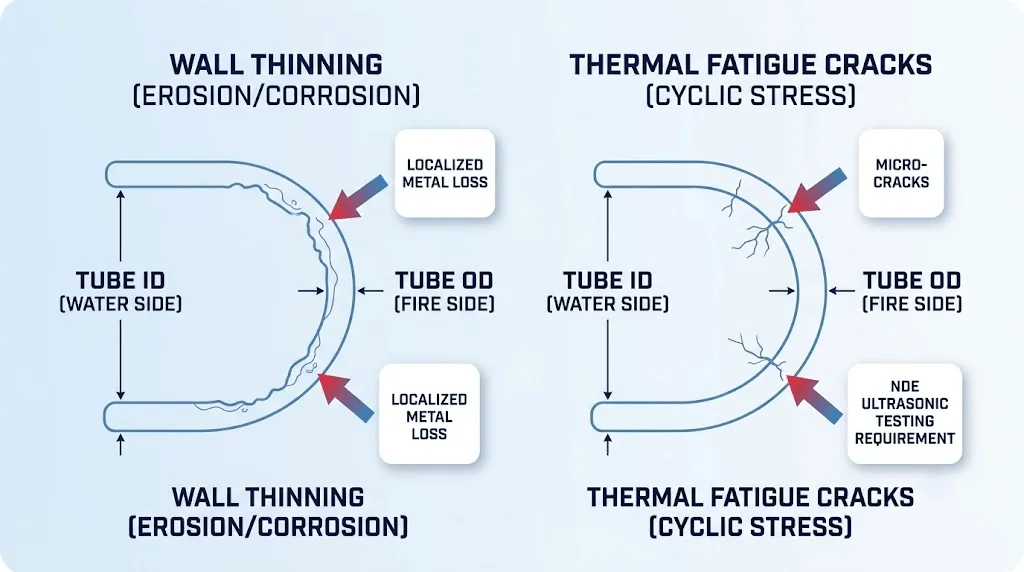
Because pressure vessels degrade over time from cyclic thermal stress, chemical corrosion, and mechanical fatigue, undetected micro-cracks or localized wall thinning can trigger emergency shutdowns or catastrophic pressure boundary breaches. Operating under constant pressure expansion and contraction weakens shell welds, steam drum nozzles, and firetube sheet turnarounds.
Advertisement
Relying solely on annual jurisdictional pass/fail inspections is insufficient for high-demand facilities. Plant engineers should establish a supplementary internal non-destructive examination (NDE) schedule—utilizing ultrasonic wall thickness testing, magnetic particle testing on high-stress welds, and dye penetrant inspection on tube sheets. Documenting these measurements in an ongoing log allows maintenance teams to plot metal loss rates over time rather than treating each inspection as an isolated event. When repairs or alterations become necessary, perform all welding in accordance with National Board Inspection Code (NBIC) Part RC standards using an R-stamp certified contractor to maintain structural integrity and regulatory compliance.
2. Calculate Boiler Feed Pump Duty and NPSH Margins
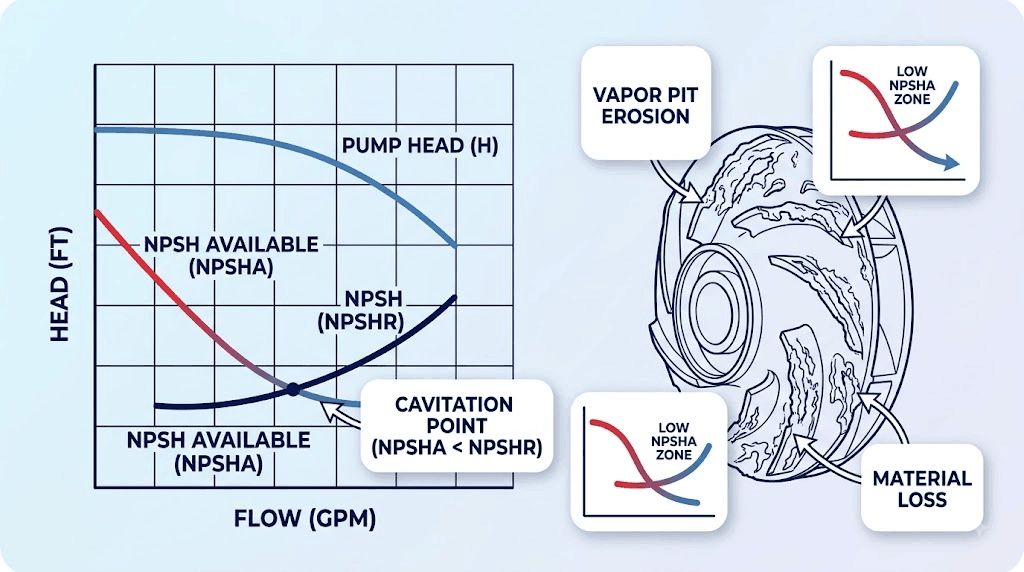
A boiler feedwater pump running outside its designed operating curve creates continuous mechanical stress that leads to seal failure, bearing destruction, and low-water boiler trips. Undersized feed pumps fail to deliver sufficient water volume against peak steam drum pressure, triggering low-water safety cutoffs. Conversely, oversized pumps force feed valves to operate near fully closed positions, causing excessive throttling wear and pump recirculation overheating.
Executing an accurate boiler feed pump calculation ensures the pump is matched to actual system hydraulics. The sizing calculation must account for maximum steam generation capacity, required operating pressure, piping friction head loss, static elevation, and an additional 5% to 10% flow allowance for blowdown losses. Furthermore, engineers must verify that the Net Positive Suction Head Available (NPSHA) from the deaerator or condensate tank exceeds the Net Positive Suction Head (NPSH) required by the pump under peak temperature conditions. Insufficient NPSH causes hot condensate to flash into steam at the impeller inlet, creating destructive cavitation that can destroy a feed pump impeller in weeks.
3. Control Water Chemistry and Enforce Consistent Blowdown Protocols
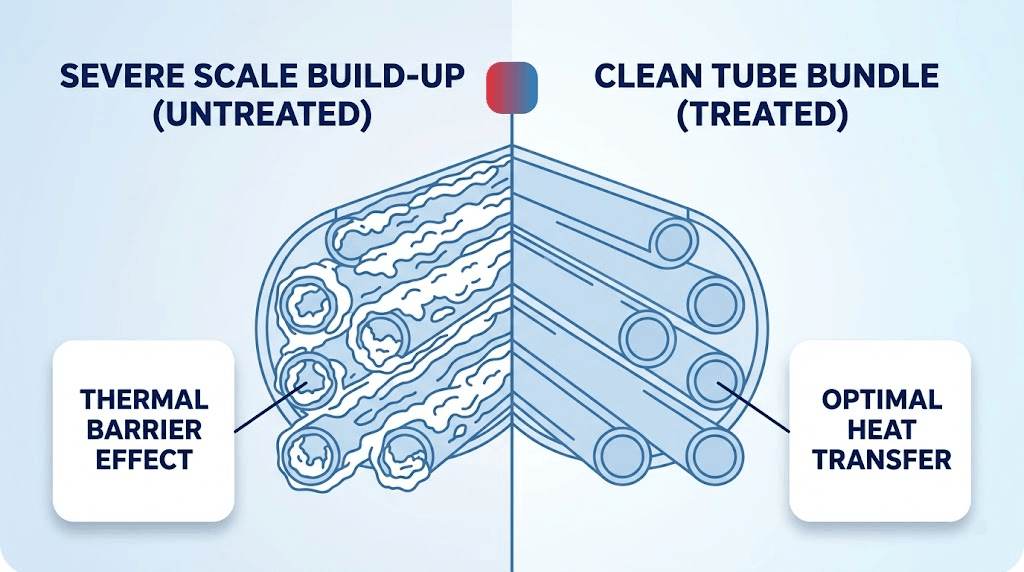
Improper boiler feedwater treatment is the single largest cause of unscheduled tube failures, scale accumulation, and dissolved gas corrosion. Dissolved calcium, magnesium, and silica precipitate out of solution under high heat, forming an insulating scale layer on heat transfer surfaces. A scale deposit as thin as 1/16th of an inch insulates boiler tubes, reducing thermal efficiency and forcing metal temperatures to rise until the tube wall softens, bulges, and ruptures.
Advertisement
Maintaining water quality requires a dual approach: operating external pretreatment equipment such as water softeners and deaerators, alongside dosing internal chemical treatments (phosphate treatment, oxygen scavengers, and alkalinity builders). To prevent dissolved solids from reaching critical concentration thresholds, operators must follow blowdown procedures systematically. Implementing automated continuous surface blowdown controls total dissolved solids (TDS) and conductivity levels at the water surface, while periodic manual bottom blowdown removes accumulated sludge from the lower drum or shell legs. Combining these controls with a external water treatment equipment testing routine prevents carryover, foaming, and scale-induced overheating.
4. Implement Predictive Replacement for Critical Control and Safety Valves
Control valves, blowdown valves, feed check valves, and safety relief valves operate under extreme pressure drops, high temperatures, and erosive fluid conditions. A sticking feedwater control valve can trigger a low-water shutdown within seconds, while a leaking blowdown valve steadily drains boiler water and thermal energy. Waiting for a critical valve to fail completely mid-production turns a simple maintenance task into an emergency outage.
Establish a predictive replacement program based on valve duty cycles, seat material wear rates, and operational history. Inspect control valve stems for packing leaks, actuator diaphragm cracking, and seat scoring during scheduled outages. Test safety relief valves in compliance with safety valve testing standards, performing manual lift tests or bench testing to confirm set pressures and re-seating capability. Replacing internal packing, trim, or entire valve assemblies during planned maintenance prevents minor internal leakage from escalating into total valve seizure during heavy plant operation.
5. Optimize Combustion Efficiency via Continuous O2-Trim Tuning
Inconsistent combustion forced by improper air-to-fuel ratios wastes fuel and accelerates mechanical wear on burner components, combustion chambers, and heat transfer surfaces. Running with too little air results in incomplete combustion, generating toxic carbon monoxide and heavy soot deposits that coat firetubes and act as an insulating blanket. Running with excess air pulls heat out of the combustion zone and sends unburned energy up the stack, overworking the forced draft fan and burner linkage.
While performing a routine flue gas combustion analysis with a portable analyzer calibrates seasonal burner response, ambient air temperature and barometric pressure fluctuate constantly. Installing an automated oxygen trim system continuously measures flue gas oxygen content and adjusts the air damper or variable speed fan in real time. Maintaining optimal excess air levels (typically 15% excess air or roughly 3% O2 in flue gas for natural gas) stabilizes combustion temperatures, reduces thermal fatigue on burner cones, and prevents unburned fuel accumulation.
Advertisement
6. Train Operators on Early Mechanical Deviation and Acoustic Warning Signs
Boiler operators on the plant floor are the primary line of defense against compounding mechanical failures. Minor mechanical deviations—such as a subtle change in feed pump vibration, a high-pitched hiss from a packing gland, or small pressure swings on the steam header—precede complete system failures. Without structured training, operators may overlook early indicators until automated safety limit controls trip the boiler offline.
Formalize daily shift routines around a standardized checklist rather than relying on informal walk-throughs. Operators should record daily logbook entries capturing flue gas temperatures, steam drum pressure, feedwater temperature, chemical dosing rates, and stack draft pressure. Establish clear escalation thresholds: if stack gas temperature rises 20°F above baseline at a given firing rate, operators should immediately flag potential tube soot accumulation or fireside baffle bypass to the maintenance team for investigation before efficiency drops further.
7. Maintain a Strategic On-Site Critical Spare Parts Buffer
Extended boiler downtime often stems not from the complexity of a repair, but from waiting for long-lead replacement components to arrive. High-spec items—such as flame safeguard control modules, flame scanners, high-pressure feed pump seals, level control probes, and boiler-specific valve rebuild kits—frequently carry multi-week lead times from original equipment manufacturers (OEMs).
Conduct a spare parts criticality audit by analyzing past maintenance logs and component lead times. Maintain an organized, climate-controlled on-site inventory containing high-wear components, including replacement gaskets, sight glass sets, igniters, safety valve spares, and burner nozzles. Pair this physical inventory with a formal agreement for a emergency temporary steam header piping connections setup to ensure rapid deployment if an unexpected pressure vessel failure occurs.
Advertisement
Decision Framework: Customizing Your Maintenance Priority Matrix
Not all industrial boilers face identical failure modes. Operating profile, feedwater source, fuel type, and system design dictate which downtime prevention measures yield the highest return on effort. Use the matrix below to prioritize maintenance resources based on your facility’s operational reality:
Operational Condition
Primary Downtime Risk
Highest-Priority Preventive Focus
Secondary Mitigation Measure
High Makeup Water Ratio (>50%)
Scale build-up, dissolved gas pitting, tube burnout
Automated water chemistry control & continuous blowdown
On-site spare parts buffer & temporary rental contingency plan
Key Takeaways
Combine Code Inspections with NDE: Supplementary ultrasonic wall testing and NBIC Part RC compliant repairs catch pressure vessel thinning long before mandatory inspections force an emergency shutdown.
Solve Feed Pump Hydraulic Deficits: Accurate boiler feed pump sizing must account for drum pressure, head losses, blowdown margins, and strict NPSH requirements to prevent pump cavitation.
Automate Chemistry and Blowdown Controls: Scale accumulation insulates tubes and causes rapid thermal failure; daily testing and automated blowdown maintain optimal heat transfer.
Implement Continuous Combustion Tuning: Installing automated O2 trim systems prevents thermal fatigue, reduces soot buildup, and stabilizes burner output across fluctuating ambient conditions.
Bridge Hardware Gaps with Inventory and Planning: Stocking long-lead control modules and maintaining a temporary rental boiler plan eliminates logistics delays when repairs are required.
Frequently Asked Questions
How often should industrial boiler water chemistry be tested to prevent downtime?
Industrial boiler water chemistry should be tested at least once per shift for manual parameter checks (such as hardness, pH, sulfite, and phosphate levels), while conductivity and Total Dissolved Solids (TDS) should be monitored continuously via inline sensors. Continuous monitoring combined with daily laboratory verification prevents sudden scale precipitation and acidic corrosion. Following a comprehensive preventative maintenance schedule ensures chemical dosing pumps and blowdown controllers remain calibrated.
What is the most common cause of premature boiler tube failure?
The most common cause of premature boiler tube failure is thermal overheating caused by internal scale buildup or oxygen pitting corrosion on the waterside. When mineral scale accumulates on heat transfer surfaces, it acts as an thermal insulator, preventing water from cooling the metal. The tube metal temperature escalates rapidly until the wall weakens, swells, and ruptures under operating pressure.
How does improper feed pump sizing cause boiler shutdown?
An undersized boiler feed pump cannot maintain sufficient flow against peak steam drum pressure, causing the water level to drop until the low-water fuel cutoff trips the burner offline to prevent dry firing. An oversized pump causes severe control valve throttling, leading to high flow turbulence, pump overheating, premature seal failure, and frequent pressure swings across the steam system.
What emergency contingency measures should be in place for unexpected boiler outages?
Facilities should maintain an active rental boiler contingency plan that documents physical connection points for steam lines, feedwater supply, fuel lines, electrical connections, and stack clearances. Pre-wiring electrical hookups and pre-flanging steam header tie-ins allows a temporary rental unit to be piped and commissioned within hours of a severe primary boiler outage, maintaining plant operations while repairs take place.
Nightmare Eclipse discloses ShieldBreak, a new Windows privilege‑escalation zero‑day
Flaw bypasses a recent patch and works on fully updated Windows 11 systems
Researcher’s ongoing exploit spree leaves multiple Windows vulnerabilities still unpatched
Nightmare Eclipse has struck again! The notorious zero-day researcher with a Microsoft grudge disclosed its latest vulnerability, and just as in previous instances, they picked their timing and released their research hours after Microsoft published its August Patch Tuesday cumulative update in order to maximize the hurt.
The newest flaw is called ShieldBreak, and is described as a local escalation of privilege vulnerability that allows threat actors to gain SYSTEM-level privileges on vulnerable systems. Speaking of vulnerable systems, the list is rather long because it includes all versions of Windows 11, including those with the latest security patches.
“The PoC was tested in the latest version of windows 11 25h2 (+Canary channel) and windows server 2025, the PoC also have a 100% success rate,” Nightmare Eclipse said on their GitHub account. “Please note that Windows 10 (and respective server editions) are not currently supported, they are however vulnerable to ShieldBreak as well.”
Latest Videos FromTechRadar
Advertisement
A bypass for the RoguePlanet fix
The mysterious attacker also said that the bug was actually a bypass for the patch Microsoft issued to fix their earlier work, called RoguePlanet.
“Microsoft has failed to properly patch the RoguePlanet vulnerability CVE-2026-50656, this PoC demonstrates a full patch bypass,” the GitHub read entry.
Microsoft, on the other hand, responded in pure enterprise fashion, sharing a boilerplate statement that it was “investigating” and that it “supports coordinated vulnerability disclosure”.
In response to an enquiry by The Register, a company spokesperson said Microsoft “is aware of the reported vulnerability and is actively investigating the validity and potential applicability of these claims.”
Sign up to the TechRadar Pro newsletter to get all the top news, opinion, features and guidance your business needs to succeed!
“Microsoft is committed to investigating security issues and updating impacted products to protect customers as soon as possible,” the statement reads. “Importantly, we support coordinated vulnerability disclosure, an industry standard that protects customers and supports the research community by ensuring their findings are thoroughly investigated and addressed before being made public.”
Advertisement
A hacker on a mission
Together with ShieldBreak, the number of disclosed Windows vulnerabilities and exploits now counts 10. Nightmare Eclipse’s campaign began in April 2026, when they demonstrated BlueHammer, a Windows Defender local privilege-escalation flaw that gives low-privileged users SYSTEM-level access. The researcher claimed BlueHammer, now tracked as CVE-2026-33825, was previously reported to Microsoft, but the company allegedly mishandled the disclosure.
Just before publishing the work, they said “someone violated our agreement and left me homeless with nothing. They knew this will happen and they still stabbed me in the back anyways, this is their decision not mine.”
At first, Microsoft took a tough stance, calling the public release “never justifiable” and even warning that it might pursue legal cases against people who put customers at risk.
The community interpreted this statement as a threat of legal action against Nightmare Eclipse, which triggered a backlash. Microsoft later backed away, saying “to be clear about our approach to legal matters, we have no intention to pursue action against individuals conducting or publishing their security research.”
In the meantime, Nightmare Eclipse (also known as Chaotic Eclipse) went on a full-blown rampage. They released RedSun and UnDefend (both targeting Defender), YellowKey (a BitLocker bypass), GreenPlasma (a CTFMON-based privilege-escalation flaw), MiniPlasma (a regression of a vulnerability Microsoft had originally fixed in 2020), RoguePlanet (another Defender privilege-escalation bug), GreatXML (a BitLocker/Windows Recovery Environment bypass), LegacyHive (a Windows User Profile Service privilege-escalation flaw), and now ShieldBreak.
BlueHammer was fixed in April, RedSun and UnDefend in May, and YellowKey, GreenPlasma, and MiniPlasma, in June. RoguePlanet was patched in July, while LegacyHive, GreatXML, and ShieldBreak, remain unpatched.
Advertisement
It is also worth mentioning that not all of Nightmare Eclipse’s releases were equally complete or reproducible by third parties. For GreenPlasma, independent researchers said it contained the vulnerability but turning it into a reliable working exploit required significant additional technical work. Some of the early Defender exploits were also apparently difficult to reproduce, mostly because they relied on delicate race conditions and very specific sequences of Windows components.
ShieldBreak, however, seems to be more dangerous in that respect. Speaking to The Register, security researcher Kevin Beaumont confirmed it as working: “I’ve tried it, it works on latest Windows 11,” he told the publication.
He also said that while ShieldBreak was described as a bypass for the RoguePlanet fix, the two flaws actually operated quite differently.
“RoguePlanet was a filesystem race condition vuln that uses virtual disks and NT native file manipulation to trick quarantine process into overwriting system files,” Beaumont explained. “ShieldBreak user-mode callback hook to change file contents during a Defender cloud-hydration scan via cfapi (Cloud Filter API).”
Advertisement
No one knows how much ammunition Nightmare Eclipse still has, but we will certainly be paying attention to them in the hours after next month’s Patch Tuesday, as well.









































![How far can I walk from my house surviving only from money I find on the ground? [PART 1]](https://wordupnews.com/wp-content/uploads/2026/09/1788864064_maxresdefault-80x80.jpg)



































You must be logged in to post a comment Login