Up to 32 employees were affected by the studio’s recent decision.
Layoffs in the video game industry just keep coming. In a post on social media, ZA/UM Studio, the developer and publisher of Disco Elysium and more recently, Zero Parades: For Dead Spies, announced that it “served redundancy or at-risk notices impacting up to 32 of our colleagues across all departments at ZA/UM Studio.”
The news of the layoffs comes only a few months after the studio’s latest game was released in May. ZA/UM Studio attributed the layoffs to the weak “commercial performance” of Zero Parades: For Dead Spies, which “has not enabled us to sustain a studio of our current size.” According to SteamDB, the espionage RPG hit an all-time peak of 3,177 players around the time of its release, but has steadily declined since.
Advertisement
For diehard Disco Elysium fans, the news of layoffs may not come as a total surprise. After the success of the narrative-heavy RPG in 2019, ZA/UM Studio went through a series of conflicts including the firing of the game’s core team, a lawsuit involving intellectual property theft and accusations of a hostile work environment for women. Former devs with ZA/UM Studio subsequently made their own studio called Longdue, which is also working on a “narrative-first” game. As for the latest layoffs, ZA/UM Studio said it’s still “continued to consult and work with representatives of the ZA/UM Workers’ Alliance.”
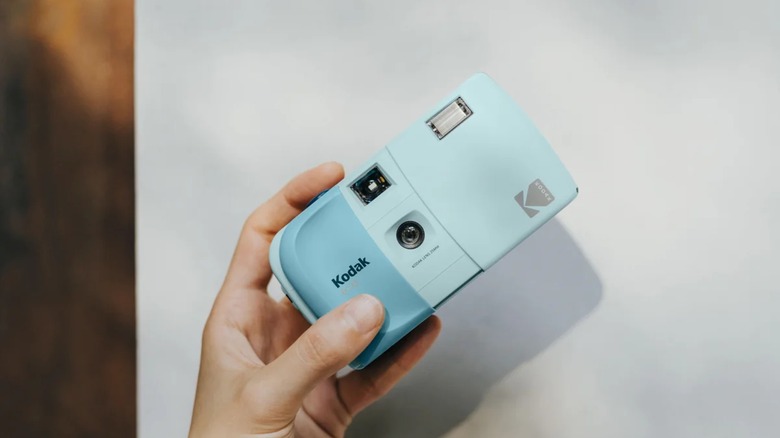
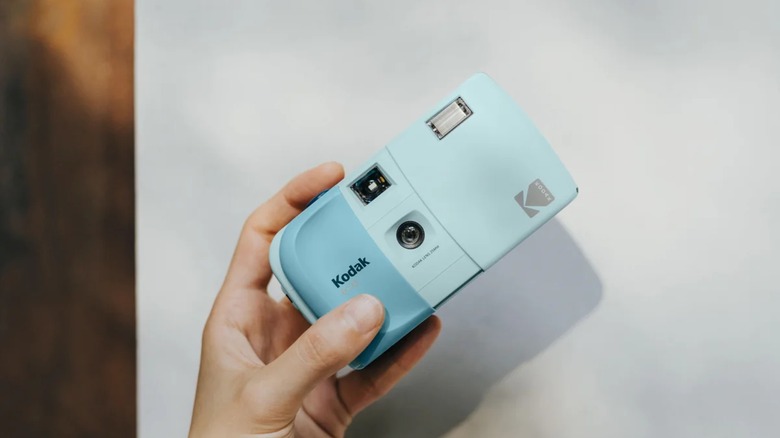
The $35 camera comes in seven colors and has a slide cover.
Reto
There’s a new Kodak-branded camera from Charmera-maker Reto, and it’s a super-cute point-and-shoot film camera that won’t break the bank. The $35 Kodak EC35 announced this week is meant to be as accessible as a disposable camera, featuring a 25mm lens with a fixed f/10 aperture, fixed 1/100 second shutter speed and a built-in flash (which requires a AA battery). It also has a slide cover that protects the lens and serves as a shutter lock, so you can throw it in a bag or stick it in your pocket without worrying about accidental snaps.
For beginners to film cameras, the new Kodak EC35 offers an even lower barrier to entry than Reto’s $100 Kodak Snapic A1 camera and the $50 EKTAR H35 half frame camera from a few years ago. The EC35 comes in seven colors: Midnight Black, Vanilla White, Butter Yellow, Lavender, Powder Blue, Blush Pink and Avocado. You can get the Kodak EC35 on its own or buy it in a bundle with a roll of Kodak Ultramax 400 film for $10 more.
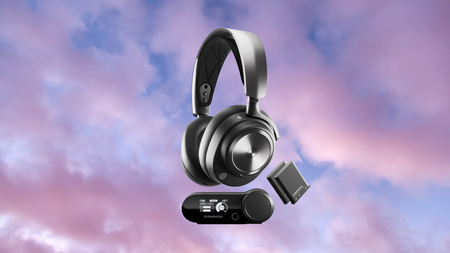
Those 40mm magnetic neodymium drivers deliver a genuinely bass-heavy sound that made tracks like Rush’s YYZ feel weighty rather than muddy, and that same low end gave games such as Counter-Strike 2 a real sense of impact when grenades and gunfire went off nearby.
Advertisement
Active noise cancellation is on board on Arctis Nova Pro too, doing a solid job of muting background noise even if it falls a little short of dedicated noise-cancelling headphones, and the retractable ClearCast AI microphone tucks away neatly, though it sounds thinner than some rivals at this price.
One battery swaps in for another without ever powering down, giving a combined 44 hours of runtime over the dedicated 2.4GHz base station, which also displays volume and charge level at a glance without needing to open any software.
SteelSeries’ Sonar software adds a genuinely deep level of control, with a built-in mixer, EQ presets for games, music and movies, and adjustable settings for the microphone and active noise cancellation, all handled without ever leaving your desktop.
Advertisement
Connectivity stretches across PC, PlayStation 5, Nintendo Switch, Mac and mobile devices through either that 2.4GHz base station or Bluetooth, and the base station itself supports two connected devices at once for switching between platforms mid-session.
At 337g, the all-white redesign stays comfortable over long sessions thanks to plush earcups and a suspension headband, and the passive isolation from those earcups is strong enough to dampen everyday noise even before any active cancellation kicks in.
It’s also one of the most awarded headsets we’ve come across, picking up IGN’s rare 10/10 Masterpiece rating, PC Gamer’s Best Multi-Use Wireless Gaming Headset award, and Rolling Stone’s Best Gaming Headphones nod among a long list of similar honours.
Even at full price this was one of our favourite premium headsets, and at $249.99 rather than $379.99, the Arctis Nova Pro Wireless finally undercuts its own reputation for being a brilliant but expensive way to game.
In this week’s Sunday Reboot, Apple’s AI model-shrinking talk could have massive benefits, with a chance of also being a billion-dollar deal if it plays its cards right.
Sunday Reboot is a weekly column covering some of the lighter stories within the Apple reality distortion field from the past seven days. All to get the next week underway with a good first step.
Small AI models, big pricing
Back on July 9, a startup in the AI world gained a lot of attention. PrismML used the mythical power of mathematics and science to somehow cut down the size of large language models (LLMs) by a considerable amount.
The process resulted in models like the 54GB Qwen 3.6 being compressed down to an astoundingly tiny 4GB. That’s a 27 billion-parameter model being smushed down to a size that would fit on some promotional USB thumb drives from back in the day.
Advertisement
While there was some suspicion that Apple was looking at the startup, it was confirmed by PrismML itself on July 14. In an interview, PrismML CEO Babak Hassibi said that Apple and other companies were evaluating the work of its technology.
Hassibi’s public confirmation was an interesting one, especially since Apple has a tendency to NDA everything it does with other companies. While it is unknown if Apple did the same with PrismML, Hassibi seems confident enough in the tech to ignore the possible ire from a potentially massive client.
I say “client” because this sort of important thing in the current AI-centric market warrants acquisition talks. It’s something that, if one company buys PrismML and makes the tech exclusive to it, the buyer then has a serious advantage over the rest of the industry.
An acquisition is entirely a possibility for Apple, based on the July 15 report about the reign of John Ternus is believed that Apple is showing signs of changing its acquisition tactics, from spending hundreds of millions on a single company to spending billions.
Advertisement
It’s an extremely small change. What’s an extra decimal place between friends?
This sort of advantage could well be valued at the billion-dollar level to Apple, if it does acquire the startup. That said, it would also require the startup to be willing to be purchased, too.
Hassibi’s interview doesn’t really seem like someone willing to sell up. It feels more like he’s trying to get more attention from other AI firms to create a bidding war, if the company does want to be sold.
The alternative is that he’s trying to secure as many lucrative licensing agreements as possible from AI companies in general. All while remaining independent.
Advertisement
Either route seems like a win for PrismML.
On-device advantage
For Apple, if the technology is sound, it has big benefits, specifically for its aim of increasing the amount of on-device processing.
Apple’s current problem is that iPhones don’t have massive amounts of memory, nor do most entry-level consumer devices. While some AI-related tasks can be performed with on-device processing, it can get offloaded to a cloud server.
The remote processing can perform much bigger tasks and workloads than a smartphone. Partly because of the higher amount of processing capability, but mostly because the server can have massive amounts of memory to handle the sizable models in the first place.
Advertisement
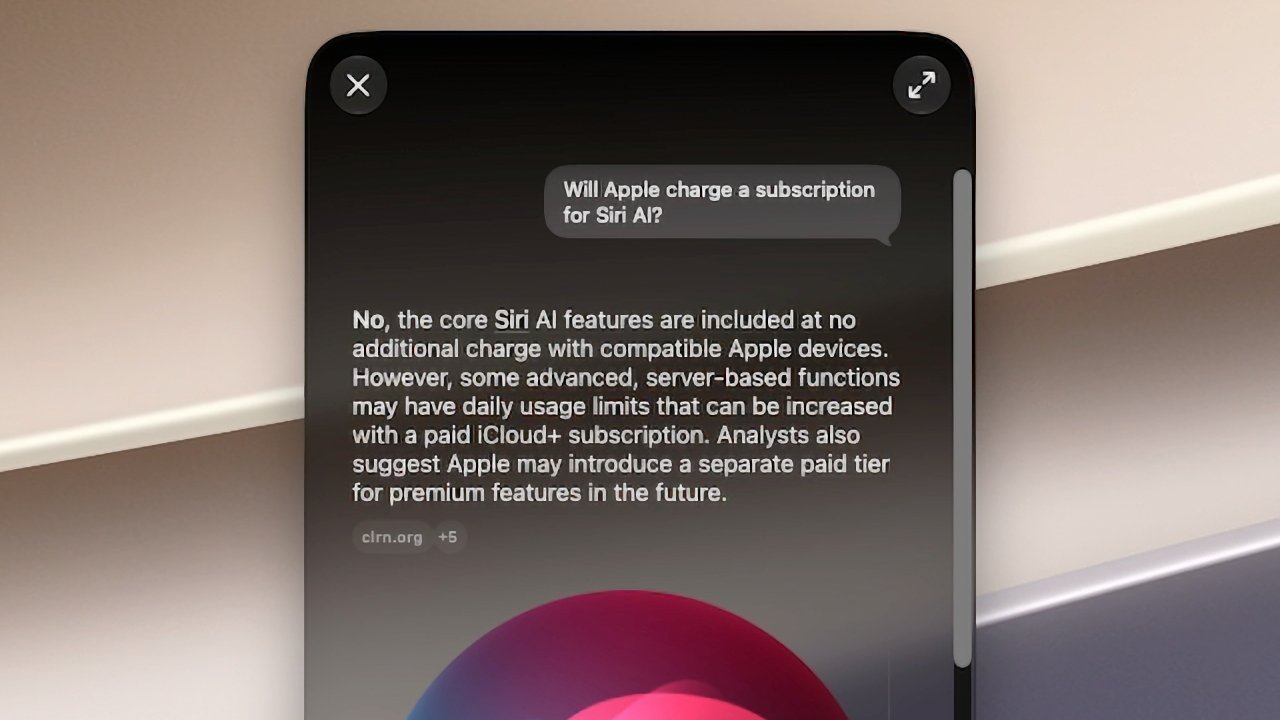
Siri on the iPhone is better under iOS 27 and macOS 27 Golden Gate.
Apple has managed to use a process of distillation and training to recreate some of Google Gemini’s functionality in a smaller iPhone-friendly model. But something like PrismML could be a force multiplier.
Not only could the big models potentially work entirely on an iPhone in the first place, but these distilled models could get even smaller. That frees up more memory for processing the tasks that use these distilled models.
Add in the continuing improvements in AI processing that are coming down the line, and a future iPhone could be an absolute beast.
Advertisement
Better AI on more hardware
There’s also the possibility of Apple doing something completely unexpected: expanding Apple Intelligence’s reach.
During WWDC, Apple said that the most powerful on-device models would be available only on specific iPhone and Mac models. That includes the iPhone Air and iPhone 17 Pro with 12GB of memory, the M4iPad also with 12GB of memory, and an M3 Mac with the same memory or better.
Apple says the most powerful on-device AI models will not be on all devices – image credit: Apple
While processing is a factor, memory is certainly going to be another. It’s not hard to imagine Apple using the PrismML tech to cut the size of that “most powerful on-device model” to fit into the smaller memory allowances of earlier models.
Advertisement
Extrapolating that further, maybe Apple could expand the availability of Apple Intelligence to older, lower-specification devices.
Sure, there are some tradeoffs, such as much slower processing of tasks. Owners of older hardware would probably be fine with that.
PrismML is a prime opportunity for Apple to take a massive leap when it comes to AI.
If it wants to dominate the field when it comes to on-device processing, it has a chance to take a very major step toward that goal.
Advertisement
Last week’s Sunday Reboot talked about the iPhone 17 Pro Max going into a time capsule for 250 years, and pondered if it will emerge in one piece.
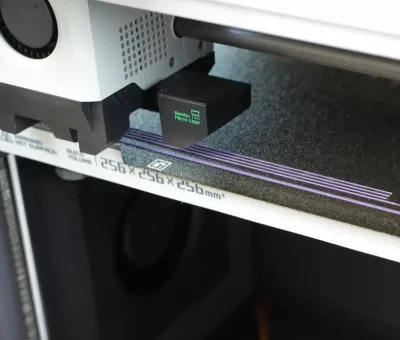
One of the most crucial aspects of FDM 3D printing is ensuring sufficient material is extruded. Determining the right flow rate can be done manually, but some printers these days automatically perform this adjustment, which is very convenient. [Stefan] of CNC Kitchen investigates how to add similar functionality using existing bed-leveling sensors.
A major complication with extrusion in FDM printers is that the flow rate has to fit the printing speed. However, you can’t just immediately speed up or reduce the flow rate, as the melting filament is flexible and thus acts like a spring, especially as the extruder is exerting significant force on the filament, which adds compression.
The moment you reduce or increase the speed of the nozzle, you can get over- or under-extrusion, but the delayed response by the extruded filament means that you have to adjust for this change in advance. Ergo, the name ‘pressure advance’, also known as the K-value. Obviously, this is a parameter that differs with each material, printer, and other factors, so a direct measurement is always the best.
In the Bambu Lab X1 FDM printer, a Lidar scanner was used to scan various test patterns to automatically determine the optimal setting. This was later moved to the purge section of the extruder in newer Bambu Lab printers. On other FDM printers, the only available sensor in that area is typically the pressure sensor for bed leveling. Could this sensor make a similar measurement?
This wasn’t just an idle thought, but was inspired by the Snapmaker U1, which runs open-source Klipper, with tantalizing glimpses of how it does pressure-advance sensing in its extruder. This extruder also only contains a load cell, as do some Prusa printers. These much more open printers thus provided a test bed for some experimentation.
Advertisement
With load cell data available, [Stefan] measured how various extrusion rates affect the load cell, which can then theoretically be correlated with the appropriate K-values for specific transitions. He created a calibration tool for a range of Prusa printers that works with stock firmware, though this is definitely still a work in progress. There are also a couple of similar open-source projects, such as this Auto PA Calibration project by [Mark].
Overall, K-value presets tend to work pretty well, but adding a pressure-advance calibration feature to existing FDM printers is definitely an interesting idea. There’s also the prospect of lateral sensing using this same bed-leveling sensor, which could allow the printer to sense much more than just the bed.
An anonymous reader shared this report from the Los Angeles Times:
A federal judge has halted California’s groundbreaking “Truth in Recycling” law, which aims to reduce consumer confusion about which packaging can be recycled. [Originally planned to take effect October 4th], California’s recyclable packaging law prohibits manufacturers from using a “chasing arrows” recycling symbol on products or materials unless they are actually being recycled in a meaningful way, which the law quantifies…
A coalition of farming, forestry, restaurant and packaging organizations sued the state in March, arguing the law violates their right to free speech. They argued that Senate Bill 343 operates as “government-imposed censorship.” Judge William Hayes agreed that their challenge has merit, and on Tuesday ordered California Atty. Gen. Rob Bonta, the defendant in the case, to pause enforcement of the law “until further order of the Court….” Advocates of reducing plastic use disagreed. “The court got it wrong, and I’m confident that the state will ultimately prevail,” said Nick Lapis, director of advocacy for Californians Against Waste. “S.B. 343 does not violate the 1st Amendment; it requires companies to tell the truth when they make recyclability claims. Suggesting that the 1st Amendment protects misleading environmental marketing is inconsistent with the basic principles of consumer protection that states like California have implemented for decades.”
In January, CalRecycle, the state’s waste agency, reported that less than 10% of most single-use plastic materials in the state were being recycled. Even yogurt containers and margarine tubs — made of ubiquitous polypropylene, or No. 5 plastic — are being recycled at a rate of only 2% in the state, the report said. Only 5% of colored shampoo and detergent bottles, made from polyethylene, or No. 1 plastic, are getting recycled…
Plastic materials that can’t be recycled are typically sent to landfills or sometimes illegally shipped overseas, where they are burned or end up in landfills, rivers and waterways.
Advertisement
The bill’s author told the Los Angeles Times “All you have to do is look at the numbers. These products are not getting recycled, despite what the industry is claiming. They are just confusing consumers, clogging the waste stream, polluting the environment, leading to higher and higher prices for local governments and ratepayers.” He argues the symbols shouldn’t be used to “confuse people who see the symbols [on products] and assume they can be recycled.”
The article also quotes Judith Enck, former Environmental Protection Agency regional administrator and president of the nonprofit Beyond Plastics. “Given the long history of the plastics industry deceiving the public about plastics recycling, this is an especially bad outcome. It is a reminder that the plastics industry has enough money to fight even the most modest policy designed to protect people and the planet.”
Spotify, it’s fair to say, has made some weird user-experience choices.
There are a number of panels in the app, and the layout is confusing. The service constantly tracks your activity. The app also seems to have an odd hostility to playing actual albums. This all works to create a general feeling that Spotify’s designers are trying to push you into using the service in a particular way.
It’s understandable, then, that some people are annoyed with the way music videos have been added to the platform. For the most part, they would start to play by default, in the background, whenever an artist had uploaded a video for the song. Some music videos have very different audio from the original tracks, particularly if they include sketches or sound effects, which can prove distracting if you prefer the album version of the song. And even if you enjoy music videos (which I do), the decision to have videos play by default—using up bandwidth and battery power—upset a lot of people.
There are a few other quirks. On Spotify’s desktop app, the videos are barely visible; they stay contained in the tiny album art panel until you manage to find the hidden, extremely small Now playing button that enlarges them. Also, the selection of videos that are on the platform, and the ones that are mysteriously absent, seems totally random. Because of this, I check YouTube first when I really want to watch a music video.
Advertisement
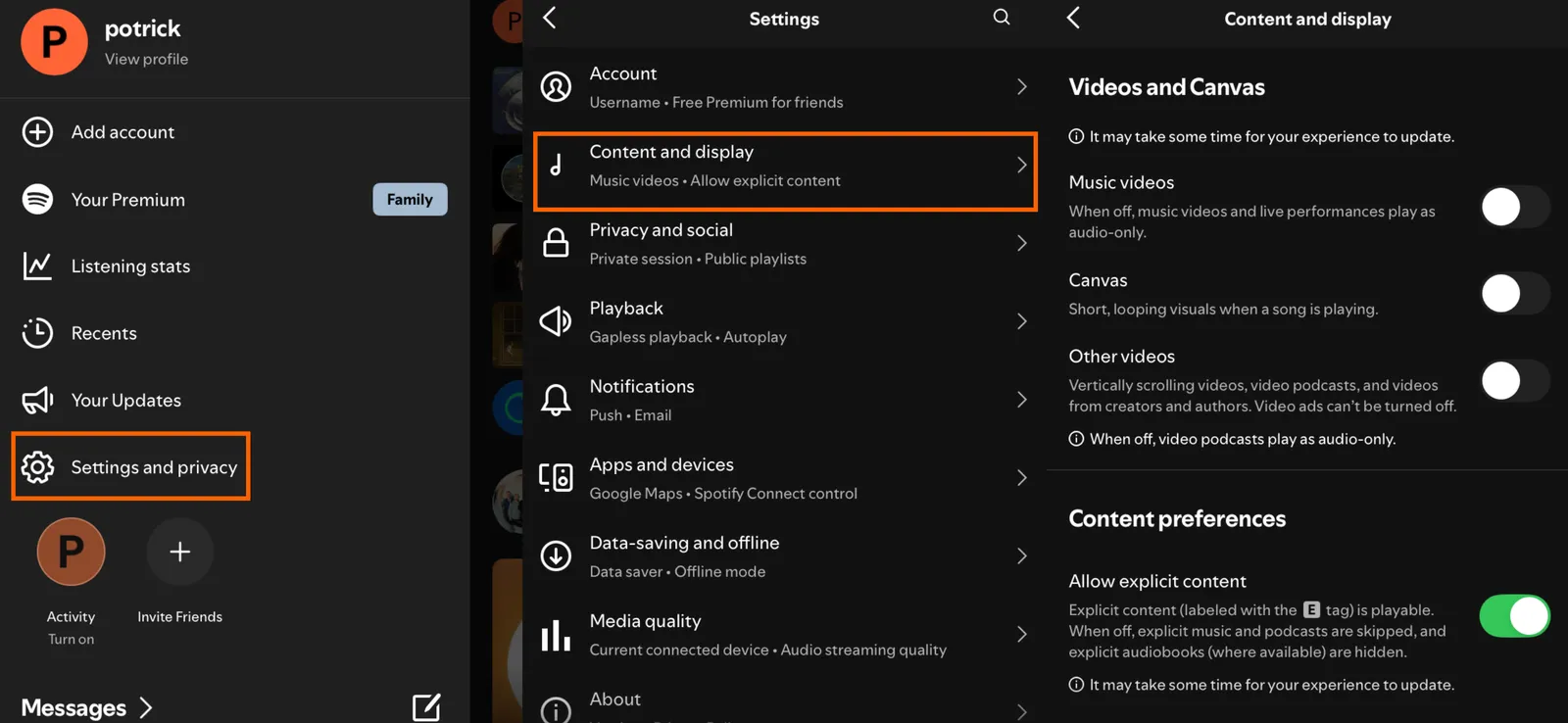
The most annoying thing, though, had been a lack of any obvious way to disable all videos. That changed recently—there’s now a toggle in the settings to disable music videos in Spotify entirely, alongside controls that disable the Canvas feature (animated album art) and video podcasts.
On mobile you can do this by tapping your user profile icon in the top-left to bring up the side panel. Then tap Settings and privacy, followed by Content and display.
Photograph: Justin Pot
In the Videos and Canvas section you will see three toggles: one for music videos, one for Canvas, and one for all other videos. This last toggle disables video podcasts, meaning you’ll get the audio-only version of podcasts instead. Turn all these off, and Spotify will use a lot less bandwidth.
On the desktop app, it’s a little different. Click your user profile icon in the top-right corner, then click Settings. Scroll down to the Videos and Canvas section to find the options to disable music videos and Canvas.
Advertisement
I tested this and it worked. The music video icon in playlists and albums disappeared, as did the collection of music videos on Artist pages. The only remnant of the disabled feature is a Switch to video button in the Now Playing sidebar, which appears below the album art. Click it and you’ll be told the video can’t play unless you turn videos back on in the settings. Odd, for sure, but for the most part turning this off means you don’t have to think about music videos in Spotify anymore.
I sincerely wish that Spotify would roll out music videos with more care. Sometimes I really do want to see a video—just not every time I play a track. Playlists of music videos might be welcome if they ran separately from the audio-only playlists. I just don’t want to get a music video when I’m looking for the album version of a song, and I don’t think I’m alone in that. I can only hope that Spotify’s future interface design choices will keep things more clearly separated.
Square Enix just rolled out a fresh pixel trailer for Final Fantasy Resonance, and it leans hard into the question of what the series might have looked like if it never left those old Super Nintendo sprites behind. The nearly three-minute clip puts the HD-2D style front and center, showing off battles, summons, and story moments that feel pulled straight from the glory days of Final Fantasy IV and VI while running on modern hardware.
Final Fantasy Resonance is the Final Fantasy series’ first foray into HD – 2D format, and it does so in a big way. Instead of simply copying over the action from the mobile game Final Fantasy Brave Exvius, the developers rebuilt and expanded on the opening story arc, transforming it into a full-fledged console RPG. Rain and Lasswell, a squadron commander and his boyhood friend, will head out after receiving a royal order to deal with a weakened barrier at the Earth Shrine.
Kick off the fun with a Nintendo Switch 2 system, your choice of a select digital game, and a savings* of up to $29.99!
Includes choice of either the Mario Kart World, Donkey Kong Bananza, or Pokémon Pokopia digital game download
One system, three play modes: TV, Tabletop, and Handheld
Inside, they face up against Veritas of the Dark, a man in black armor who simply wipes the floor with them, shattering the Earth Crystal and leaving their entire force in disarray. They then have to run back home to discover that Grandshelt is being attacked. Following the king’s desperate rescue, they partner up with a mystery girl named Fina to go out and protect the remaining crystals strewn over the earth.
Combat remains true to its turn-based roots, but with a few nifty improvements. When you hit an enemy’s weak area, you will stun them and shatter their defenses, giving you the opportunity for a couple of extra turns and those massive Resonance assaults, which are basically a showstopper in cinematic fashion. You can use traditional Espers such as Ifrit, Shiva, and Titan to gain a few extra rounds before they finish with a sweeping strike like Hellfire or Diamond Dust. Then there are Visions, crystallized reflections of heroes from throughout the Final Fantasy history with whom you can team up. Equip one, and he (or she) will fight alongside the team. The stronger the link, the more of Vision’s special abilities you will be able to access. Expect to see familiar names like Cloud, Tidus, the Warrior of Light, Cecil, Bartz, Squall, and Zidane appear in this way.
Between story beats, exploration reigns supreme. The cities may not have much to offer beyond a jump-rope contest or Mog Tag, but when you come across a Sanctum of Light, you’ll find a new Vision crystal to add to your collection. Then there are side paths to the Colosseum for some challenging monster confrontations, or the Chamber of Arms, where you can get your hands on some legendary weapons, or at least try to get them from the sealed creatures that are now protecting it. Places like Dilmagia, the steel metropolis that began it all with airship technology, and Olderion, the water-rich capital guarded by the Wardens of the Waters, give the game world a genuine lived-in atmosphere. Expect to see Chocobos, airships, and other Final Fantasy staples.
Square Enix and co-developer Lancarse are preparing to release the game on October 22, 2026, for Nintendo Switch 2, Nintendo Switch, PlayStation 5, Xbox Series X|S, and PC via Steam and the Microsoft Store. The standard game costs $49.99, the Digital Deluxe version adds in-game goodies for an additional $59.99, and the Collector’s Edition costs $209.99.
Strategy meets vibes, skill meets will and control meets chaos in the World Cup final between Spain and Argentina tonight. The first ever meeting between a pair of reigning continental champions on this grand stage sets up a clash of styles between two sides that could hardly be more different.
La Roja blitzed the competition en route to the Euros title two years ago, but they’ve had to completely reinvent themselves on the fly at FIFA World Cup 2026, owing to injuries sustained by Lamine Yamal and Nico Williams in the lead-up to the tournament. Although Yamal has dazzled in fits and starts, Williams has barely featured.
It was a masterstroke from Luis de la Fuente, therefore, to shift the team’s identity from wing wizardry to defensive solidity, with Rodri and Fabian Ruiz effectively being deployed as midfield sweepers. They’ve conceded just once across their seven games, but it was the way the 2010 champions blunted France’s vaunted attack and carved through the erstwhile favourites at will that truly underlined their qualities.
Advertisement
It’s a minor miracle that Argentina are in the World Cup final at all. They were dead and buried in all four of their knockout ties, only for deus ex machina to dramatically rescue them either deep into stoppage time, in extra time or in stoppage time of extra time on all four occasions. If only there was a Spanish word for remontada.
We’ll almost certainly never see a run like it again, a cross between Real Madrid in the Champions League and Terminator 2‘s T-1000, and the detail that makes it all the more remarkable is that Lionel Scaloni has had no obvious gameplan beyond feeding the ball to Lionel Messi at every opportunity.
What’s perhaps most extraordinary of all, however, is that it’s worked. Love or hate La Albiceleste’s bully-boy antics, the back-to-back South American champions are now on the verge of becoming the first team since Brazil in 1962 to win back-to-back World Cups.
Read on as we show you how to watch World Cup final 2026 for free from anywhere.
Advertisement
How to watch World Cup final 2026 for free
World Cup final 2026 is available to watch for free in multiple countries, including the UK, Australia, Brazil, Belgium, Ireland, Netherlands, Switzerland and Turkey.
Abroad? Can’t access your free stream? Unblock your free World Cup final stream with Norton VPN – more on that below.
Advertisement
Use a VPN to watch World Cup final 2026 live streams
If you’re traveling, you might discover your usual World Cup final 2026 stream is unavailable due to geo-restrictions.
Don’t worry, that’s exactly where a VPN can help. A virtual private network lets you connect to servers around the world so you can securely access your preferred Spain vs Argentina coverage as if you were back home.
Those looking for a streaming service instead can watch World Cup final on Fox One (3-day free trial). Telemundo is also available via Peacock ($10.99/month).
Visiting the US from the UK? You can still watch your free World Cup final stream thanks to Norton VPN (try for 60 days).
Advertisement
How to watch World Cup final 2026 in the UK
(Image credit: Other)
Viewers in the UK are in luck, as they can watch World Cup final 2026 for free on both BBC One and ITV1, with live streaming available via BBC iPlayer and ITVX.
You need a TV license and a valid UK postcode (e.g. SE1 7PB) in order to tune in.
Norton VPN can unlock your stream if you’re abroad this weekend.
Advertisement
How to watch World Cup final 2026 in Australia
(Image credit: free)
World Cup final 2026 is free-to-air in Australia on SBS, with live streaming available courtesy of the SBS On Demand platform.
Traveling for work or on holiday? A VPN like Norton VPN can help unlock your free stream.
Advertisement
How to watch World Cup final 2026 in Canada
(Image credit: Other)
In Canada, TSN is broadcasting World Cup final 2026.
You can live stream Spain vs Argentina via the TSN+ streaming platform, which starts at CA$29.99/month.
Outside of Canada? Use Norton VPN whilst you’re traveling away from home to unlock your World Cup final stream.
Advertisement
How to watch World Cup final 2026 in New Zealand
In New Zealand, World Cup final 2026 is free-to-air on TVNZ 1, with live streaming available via TVNZ+.
Not in New Zealand right now? You can use a VPN like Norton VPN to watch all the action as if you were back home.
How to watch World Cup final 2026 in Spain
(Image credit: Creative Commons)
In Spain, you can stream the World Cup final 2026 thanks to RTVE Play.
Advertisement
You will need an account for this with a valid Spanish postcode (e.g. 28036)
UK resident visiting Spain? Unlock your stream with Norton VPN.
How to watch World Cup final 2026 in Argentina
(Image credit: Other)
In Argentina, Telefe and TV Publica will broadcast the World Cup final.
Advertisement
Abroad? Use Norton VPN to stream your local service wherever you are in the world.
World Cup final 2026: Match Information
What is the World Cup final 2026 start time?
The World Cup final kicks off at 8pm BST / 3pm ET on Sunday, July 19. That’s 5am AEST on Monday, July 20 in Australia.
The 2026 World Cup final is taking place at 80,663-capacity MetLife Stadium in East Rutherford, New Jersey, which has been branded the “New York/New Jersey Stadium” for the duration of the tournament.
Advertisement
Neither Spain nor Argentina have played there yet.
Who is the World Cup final 2026 referee?
Slovenian referee Slavko Vincic is officiating the World Cup final, with on-field assistance coming from his compatriots Tomaz Klancnik and Andraz Kovacic, and Jordanian duo Adham Makhadmeh and Mohammad Alkalaf.
Vincic previous oversaw the 1-1 draw between Brazil and Morocco, Algeria’s 2-1 victory over Jordan, and Mexico’s 2-0 win over Ecuador, which each passed without controversy.
Swipe to scroll horizontally
Spain vs Argentina: Road to World Cup final 2026
Stage
Advertisement
Spain
Argentina
Group stage
Group H: 1st, 7 points
Advertisement
Group J: 1st, 9 points
Last 32
Beat Austria (3-0)
Beat Cape Verde (3-2 AET)
Advertisement
Last 16
Beat Portugal (1-0)
Beat Egypt (3-2)
Quarter-finals
Advertisement
Beat Belgium (2-1)
Beat Switzerland (3-1 AET)
Semi-finals
Beat France (2-0)
Advertisement
Beat England (2-1)
What is the weather for World Cup final 2026?
The temperature in East Rutherford is around 81F (27C) at kick-off.
A far more pressing concern is the air quality, with parts of New Jersey having been cloaked in haze of wildfire smoke in midweek, which prompted an official health alert.
Can I watch World Cup final 2026 on my mobile?
Of course, most broadcasters have streaming services that you can access through mobile apps or via your phone’s browser.
Advertisement
You can also stay up-to-date with all of the key World Cup final moments on the official social media channels on X/Twitter (@FIFAWorldCup), Instagram (@FIFAWorldCup), TikTok (@FIFAWorldCup) and YouTube (@FIFA).
We test and review VPN services in the context of legal recreational uses. For example: 1. Accessing a service from another country (subject to the terms and conditions of that service). 2. Protecting your online security and strengthening your online privacy when abroad. We do not support or condone the illegal or malicious use of VPN services. Consuming pirated content that is paid-for is neither endorsed nor approved by Future Publishing.
Looking for the most recent Connections answers? Click here for today’s Connections hints, as well as our daily answers and hints for The New York Times Mini Crossword, Wordle, Connections: Sports Edition and Strands puzzles.
Today’s NYT Connections puzzle features one of those purple categories where you need to hunt down a hidden word inside four of the clues. Read on for hints and today’s Connections answers.
The Times has a Connections Bot, like the one for Wordle. Go there after you play to receive a numeric score and to have the program analyze your answers. Players who are registered with the Times Games section can now nerd out by following their progress, including the number of puzzles completed, win rate, number of times they nabbed a perfect score and their win streak.
Here are four hints for the groupings in today’s Connections puzzle, ranked from the easiest yellow group to the tough (and sometimes bizarre) purple group.
Yellow group hint: Announce.
Advertisement
Green group hint: One might be turned up.
Blue group hint: Fresh start.
Purple group hint: Something you drink is hidden in each word.
If you don’t love the look of a big TV in the living room, have limited space in your home to accommodate a TV, or just want a fun and easy way to elevate movie nights, you might want to look into buying a home projector. It used to be considered a luxury to have a projector set up in your home, but modern projectors are surprisingly cheap, thanks to technological improvements, material swaps, and lower production costs. Plus, home projectors are worth buying used, allowing consumers to save even more money on a gadget that used to feel too premium for the average household.
There are so many different types of home projectors to choose from, but no matter which projector model you go with, they all come with similar placement recommendations. That said, some projectors are built to perform better in certain conditions, like niche outdoor projectors bright enough to clearly project an image in direct sunlight. However, for the most part, all home projectors share these worst places to avoid. We’ve gathered five spots you should absolutely avoid putting a projector, along with a detailed explanation and a recommendation for where you should set it up instead.
Advertisement
Any messy or overcrowded surface
Studio Romantic/Shutterstock
A projector, like any electronic media device, tends to get hot while it’s working. And because projectors have a lamp or a light bulb inside, they typically get hotter than a standard DVD player or even a gaming console. To prevent overheating, a projector is designed to pull air through intake vents, over the hot components, and out through exhaust vents.
This ventilation process is so important for user safety and the life of the projector that most (if not all) brands will highlight how important it is to set up the projector in an uncrowded area where it can breathe while in use. According to Lisowod, maker of the best cheap projector on Amazon, users are supposed to make sure there’s “adequate ventilation around the device” and that it’s on a “stable, flat surface.”
If your coffee table is frequently a dumping ground for takeout containers, dirty clothes, and other miscellaneous items, you shouldn’t set up a projector there. And if you do, you run the risk of potentially starting a fire or damaging the projector past the point of fixing, either due to overheating or falling from an uneven surface. Instead, choose a surface you know tends to stay clean and dusted or, if you know that’s not an option, you can tidy the surface each time you plan to use the projector.
Advertisement
The kitchen or the bathroom
Pixel-Shot/Shutterstock
Most people set up projectors in their living room, bedroom, a dedicated media room, or backyard, which are typically the best places to use a projector. However, some might consider using a projector in their kitchen or bathroom, both of which are terrible places for this media device. Putting a projector in your bathroom so you can watch a movie while you’re relaxing in the tub or in the kitchen to keep you entertained while cooking dinner sounds great on paper, but in reality, a projector in either of these rooms will have a shorter lifespan.
In the kitchen, projectors can be exposed to oil, oil mist, steam, smoke, or airborne cleaning chemicals. Depending on how small your kitchen is, there’s a chance the projector could be dangerously close to a hot stove or the sink. In the bathroom, humidity is the greatest danger to a projector. While kitchens can also get pretty humid while cooking, the risk of humidity damaging the projector is much greater in the bathroom, especially if there’s not a good ventilation system. According to Epson, a projector being exposed to high humidity could result in a fire, electric shock, or damage to the case or the projector itself.
Advertisement
An enclosed cabinet in a TV stand
Gordine N/Shutterstock
Just like balancing a projector on a messy surface can prevent a projector from ventilating properly, so can placing it inside a cabinet, even if the cabinet is completely empty. Most cabinets in entertainment centers or dressers don’t have any active ventilation solutions set up inside. Some may have a hole built into the back panel or a larger cutout for cables to pass through, but with nothing actively pushing hot air out and bringing cool air in, this is too hot a space for a projector.
Most cabinets are also too compact for a projector to operate safely. Sony recommends leaving nearly 12 inches of clearance around some of its projector models, and other projectors from Sony and other brands likely need a similar amount of room to breathe. In a cabinet that’s too small and doesn’t offer nearly enough ventilation for a hot projector, you run the risk of the device overheating and possibly starting a fire or damaging the device beyond repair. Instead of sticking it inside a cabinet, a projector should be placed on a clean, roomy surface or mounted to the ceiling.
Advertisement
In direct sunlight or in rooms with bright lights
Mixetto/Getty Images
One of the worst places you can set up a projector is in a room that’s too bright or anywhere that gets direct sunlight. This isn’t because the projector might get too hot, though if it’s in the path of a sunbeam for too long while it’s actively in use, it’s possible it could overheat. Rather, a projector shouldn’t be set up in a spot that’s too bright because it makes it nearly impossible to see the projected image.
Some rooms, like the aptly named sunroom, are designed to let the sun in, and it would be strange to put blackout curtains in there just so you could have a projector in that room. For living rooms and bedrooms, two common rooms for a projector to call home, blackout curtains are a great way to block sunlight from streaming in. If the lights you have installed inside are too bright, you can invest in dimmer switches or smart bulbs that allow you to adjust brightness within a mobile app.
Advertisement
Near an air conditioner
Sandsun/Getty Images
LG warns users of its ProBeam DLP projectors not to install them anywhere that’s “under the air conditioner or is directly exposed to the wind from the air conditioner.” The brand also notes that users should avoid installation anywhere that’s “dusty or exposed to wind and rain,” so it’s likely that the constant (and possibly dusty) airflow and potential condensation are two of the biggest reasons LG recommends against installing a projector there.
A projector manual from Sony echoes this recommendation to steer clear of AC units during installation and use. The manual explains how air from air conditioners can cause oscillation in the projected screen. In more simple words, this influx of air can cause the projected image to look shaky or jittery. A jumping image could also be the result of setting up the projector on an air conditioner simply because of the vibrations produced by the AC unit, according to projector brand Miroir.
Advertisement
Methodology
M_a_y_a/Getty Images
Most of us on the SlashGear team have home projectors as well as other similar media devices, like gaming consoles, DVD players, TVs, and so on. Because of that, it’s easy to rely on common sense to come up with this list of the worst places you can set up your projector. However, we didn’t stop there. We took the time to verify each reason we thought of with documentation from reputable projector brands, including LG, Sony, Lisowod, and Epson, for suggestions and warnings on where to set up or avoid setting up a projector.










 In the Bambu Lab X1 FDM printer, a Lidar scanner was used to scan various test patterns to automatically determine the optimal setting. This was later moved to the purge section of the extruder in newer Bambu Lab printers. On other FDM printers, the only available sensor in that area is typically the pressure sensor for bed leveling. Could this sensor make a similar measurement?























































You must be logged in to post a comment Login